HomeRun 2000 Series XU2000 - Vacuum Cleaner PHILIPS - Free user manual and instructions
Find the device manual for free HomeRun 2000 Series XU2000 PHILIPS in PDF.

 FR
FR
 BG
BG
 CS
CS
 DA
DA
 DE
DE
 EL
EL
 EN
EN
 ES
ES
 ET
ET
 FI
FI
 HU
HU
 ID
ID
 IT
IT
 KK
KK
 LT
LT
 LV
LV
 MK
MK
 NL
NL
 NO
NO
 PL
PL
 PT
PT
 RO
RO
 RU
RU
 SK
SK
 SL
SL
 SQ
SQ
 SV
SV
 TR
TR
 UK
UK
 VI
VI
User questions about HomeRun 2000 Series XU2000 PHILIPS
0 question about this device. Answer the ones you know or ask your own.
Ask a new question about this device
Download the instructions for your Vacuum Cleaner in PDF format for free! Find your manual HomeRun 2000 Series XU2000 - PHILIPS and take your electronic device back in hand. On this page are published all the documents necessary for the use of your device. HomeRun 2000 Series XU2000 by PHILIPS.
USER MANUAL HomeRun 2000 Series XU2000 PHILIPS
natural_image
Two views of a robotic vacuum cleaner, one black and one white, with no visible text or symbols.
flowchart
graph TD
    A["Welcome, Get started!"] --> B["home.id/welcome"]
    B --> C["Registration and Benefits"]
    B --> D["Download app"]
    B --> E["Quick start"]
    B --> F["Digital manual"]
English 3
Bahasa Indonesia 33
Bahasa Melayu 64
Čeština 95
Dansk 125
Deutsch 155
Eesti 188
Español 218
Français 249
Hrvatski 281
Italiano 311
Latviešu 342
Lietuviškai 372
Magyar 402
Nederlands 433
Norsk 465
Polski 495
Português 525
Română 555
Shqip 586
Slovenščina 618
Slovensky 648
Srpski 678
Suomi 708
Svenska 738
Tiếng Việt 768
Türkçe 798
Ελληνικά 828
Български 861
Македонски 894
Русский 926
Українська 959
Қазақша 991
ภาษาไทย 1022
简体中文 1057
繁體中文 1091
한국어 1119
1148 العربية
1177 فارس
Contents
Introduction 3
Product overview 4
Before first use 5
Preparing for use 5
Charging the robot 6
Download the app, register, and connect to Wi-Fi 7
Audible signals 9
Set the language of the voice alerts 9
How your robot works 9
Create a map 9
Tell your robot where not to clean with restricted cleaning zones ____ 10
How your robot cleans ____ 11
Set cleaning preferences, advanced settings and cleaning order ____ 12
Using your robot 13
Preparing for a cleaning run 13
Start your first cleaning session via the app 13
Using the robot without the app 14
Your robot's cleaning pattern ____ 14
Returning to the station 15
Auto recharge and resume 15
Cleaning and maintenance 15
When to do maintenance 15
How to clean the mop pad and the dust bin 16
Cleaning the water tank 18
Cleaning the main brush 19
Cleaning the side brush 21
Cleaning the main wheels and the front caster wheel 21
Cleaning the sensors, contact points and IR signal window 22
Long term storage 22
Indicator light signals and their meaning 23
Reset/restore the robot 24
Child lock 24
Replacement 25
Ordering accessories 25
Removing the rechargeable battery 25
Warranty and support 26
Disposal and recycling 27
Troubleshooting 27
Introduction
Congratulations on your purchase of a Philips HomeRun 2000 Series Robot vacuum cleaner! To get the most out of your robot and access all the advanced
functions you can download and install the Philips HomeRun robot app. You can also find support videos and frequently asked questions in the app or visit www.philips.com/homerun2000.
Read the separate safety booklet carefully before you use the robot for the first time and save it for future reference.
Product overview
text_image
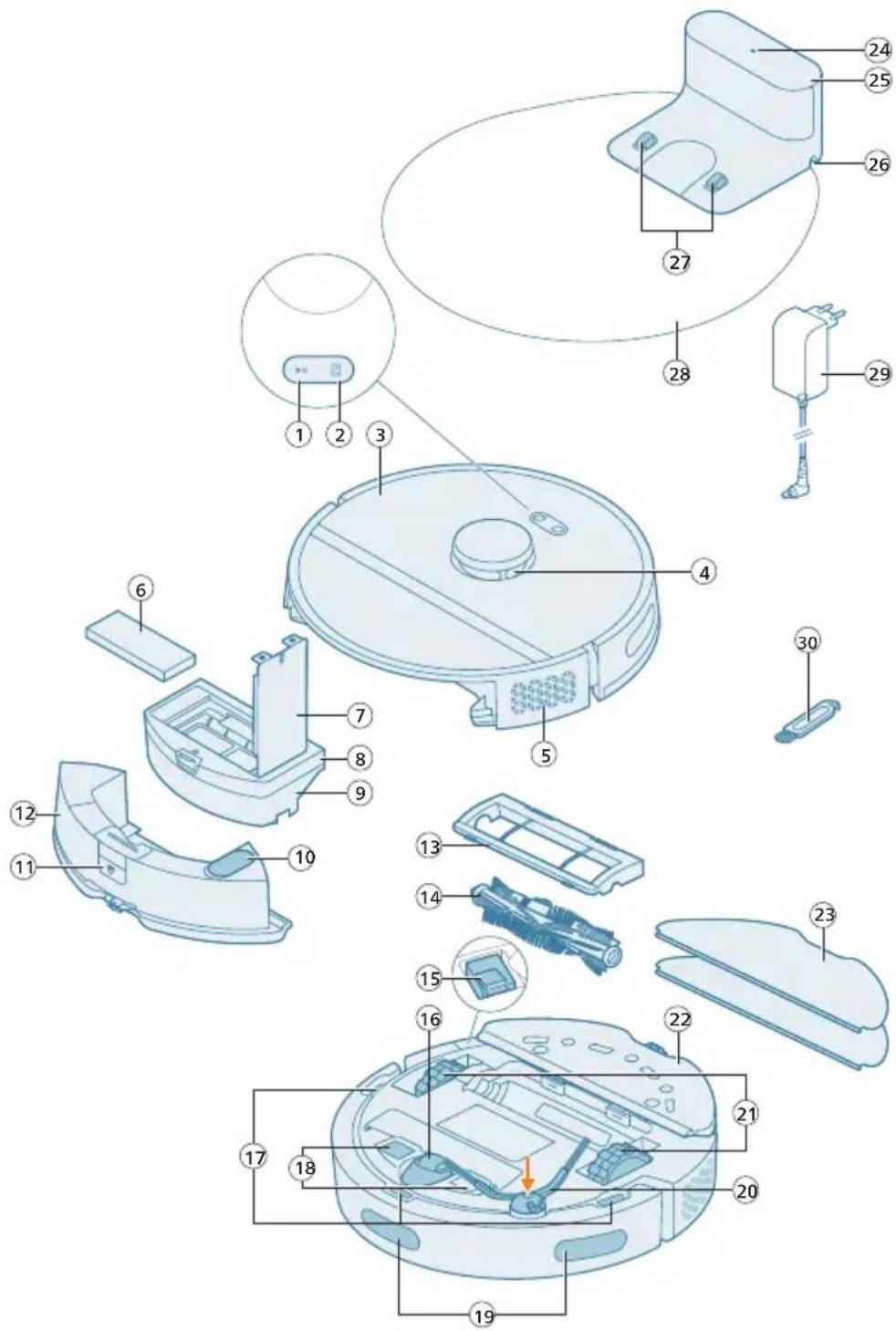
Exploded view diagram of a robotic vacuum cleaner with numbered parts for identification1 Start/stop button
2 Return button
3 Top cover
4 360° laser navigation (LiDAR)
5 Air outlet
6 Washable filter
7 Lid of the washable filter
8 Dust bin lid
9 Dust bin
10 Water inlet
11 Release button of the water tank
12 Water tank
13 Brush cover
14 Main brush
15 Power on/off switch
16 Front caster wheel
17 Anti-drop sensor (3x)
18 Charging contact points (robot)
19 Sensor to avoid cliff and wall
20 Side brush
21 Main wheels
22 Mop pad holder
23 Washable mop pad (2x)
24 Indicator light
25 (Charging) station
26 Power cord socket
27 Charging contact points (station)
28 Placemat
29 Adapter
30 Brush cleaning tool
Before first use
1 Take the appliance out of the box and remove all packaging.
2 Remove the protection covers.
3 If you see any sign of visible damage, go to home.id or contact the Consumer Care Center in your country.
i Note: A small amount of clean water residue may be present inside the nozzle and tanks. This is a result of factory quality checks. Rest assured, the device is thoroughly clean and safe for use.
Preparing for use
Tips for choosing the best location for installing the station:
- Do not place the station in bright sunlight or under furniture. This will block the infrared signal that helps the robot find its way back to the station.
- Install the station on a level surface against a wall.
- Install the station on a hard floor.
- Do not place the station near stairs or a heat source (radiator).
- Install in a location with good Wi-Fi coverage.
text_image
0.5m 1.5m 0.5m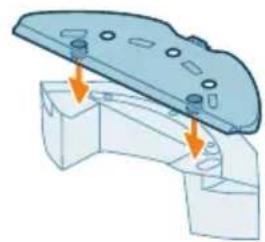
natural_image
3D diagram of a mechanical component with mounting holes and arrows indicating assembly or force direction (no text or symbols)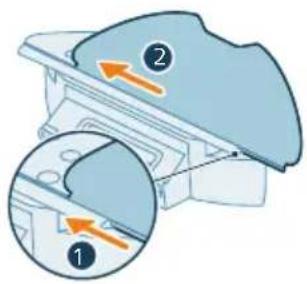
text_image
Diagram showing two views of a mechanical component with numbered annotations and directional arrows indicating movement or force.Install the station
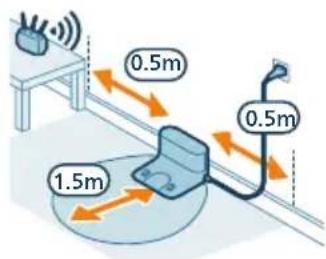
1 Install the station within the correct dimensions for placement.
i Note: Keep 0.5 meters of space on the sides of the station and 1.5 meters in front of the station.
2 Connect the station to the power supply.
3 There is a cable compartment behind the station. Make sure that the remaining part of the power cable is well concealed behind the station in the cable compartment so that the robot cannot drive over it.
Install the mop pad holder and washable mop pad
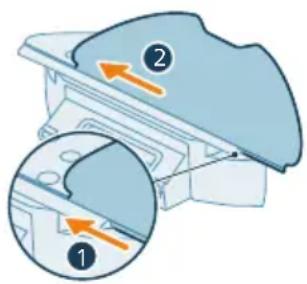
1 Attach the mop pad holder to the bottom of the water tank of the robot.
2 Slide the straight side of the washable mop pad in the correct slot of the mop pad holder and attach the washable mop pad to the velcro material of the mop pad holder.
Charging the robot
text_image
ON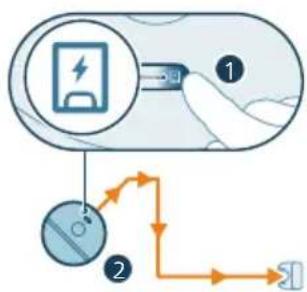
flowchart
graph TD
    A["Battery Charge"] --> B["Switch"]
    B --> C{Charging Path}
    C -->|Path 1| D["Load"]
    C -->|Path 2| E["Charge Measurement"]
    D --> F["Output"]
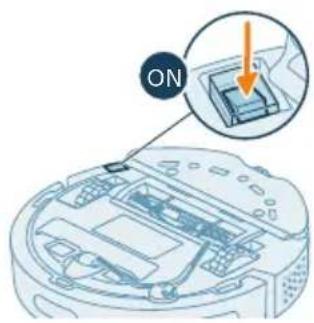
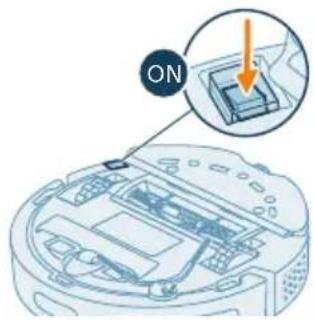
1 Press the on/off switch on the bottom of the robot to switch on the robot.
2 Turn the robot to its correct position and put the robot on the floor in front of the station.
3 Make sure that the station is connected to the wall socket.
4 Press the return button. The robot drives to the correct position in the station.
5 Wait until the robot is fully charged.
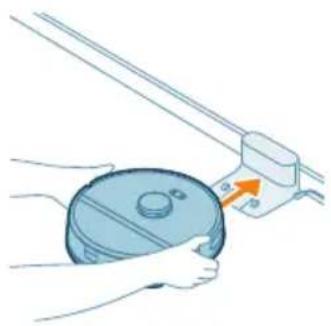
If the battery is empty, the robot will not drive itself to the correct position. In this case, follow the next steps:
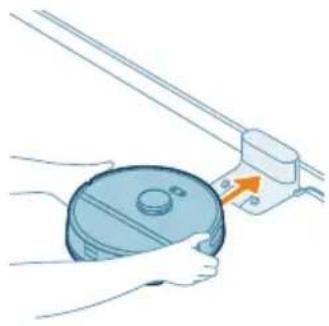
1 Turn the robot to its correct position and put the robot on the floor in front of the station. The water tank should be facing away from the station.
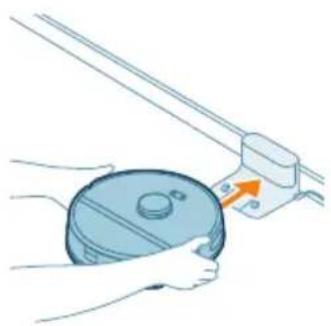
2 Align the charging contact points on the front bottom of the robot with the charging contact points on the station.
natural_image
Illustration of hands holding a circular object with an arrow pointing to a mechanical component (no text or symbols)3 Push the robot against the station so that the charging contacts of the robot make contact with the charging contacts of the station.
i Note: Make sure that the robot is in its correct position and starts to charge. The lights in the two buttons on top of the robot flash slowly. If the battery is empty, it may take a while before the robot indicates that it is charging.
4 Wait until the robot is fully charged.
i Note: Make sure the robot is fully charged before you use it for the first time.
Download the app, register, and connect to Wi-Fi
App content
The Philips HomeRun Robot App allows you to control your robot from anywhere. You can also manage settings and quickly access support.
With the app, you can:
- Create a map, or virtual floor plan, of your home.
- Select which rooms to clean.
- Switch between different cleaning modes and settings for each room.
- Monitor the cleaning session in real time and check the battery level.
- Receive notifications and alerts.
- Schedule a cleaning session.
- See the maintenance status and find replacement parts.
- Watch how-to-use videos.
- Access the full user manual.
- Find answers in the FAQs.
- Contact Consumer Care.
Downloading the app
1 Scan the QR code on the left or on the packaging of the robot to download the Philips HomeRun robot app.
Or:
Search for 'Philips HomeRun robot app' in the Apple App Store or one of the Android App Stores.
2 Download and install the app.
3 Follow the instructions in the app.
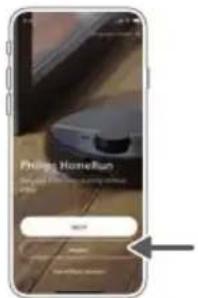
Registering a personal account
You can register a personal account and benefit from the following advantages:
- Control the robot from more than one device, e.g. a smart phone.
- Save important data like customized cleaning plans for your home.
text_image
Philip HomeRun Login in the home run, using home run SELECT Canceli Note: If you change your phone and you don't have an account, then you'll lose all customized cleaning plans.
i Important: Philips values and respects your privacy. A link to our privacy notice can be found in the app before registering.
natural_image
Illustration of a robotic vacuum cleaner connected to a device via wireless signal and dotted lines (no text or symbols)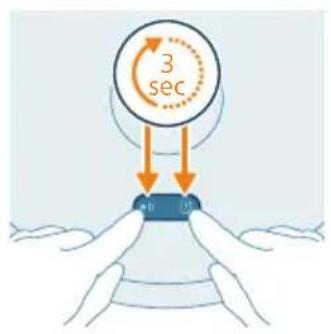
text_image
3 secSetting up the Wi-Fi connection
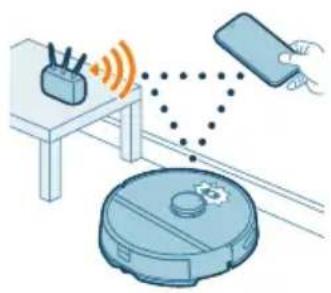
Before you begin: make sure that the robot and your mobile device have good Wi-Fi coverage.
1 Press the 'Add robot' button in the app and follow the instructions.
2 Pair the robot with the WiFi in the app. Make sure that you have your WiFi password at hand.
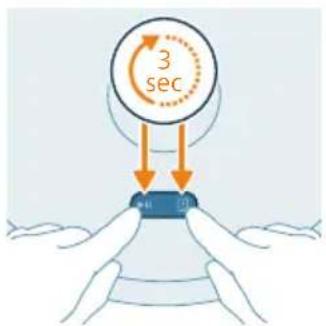
3 Press and hold the start/stop button and return button at the same time for three seconds. The lights in the buttons will flash orange to indicate that the robot is in Wi-Fi set-up mode.
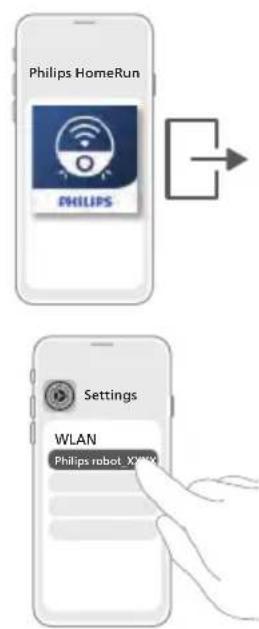
4 Click the join button if it's visible in the app to connect with the 'Philips robot' network.
i Note: If the join button is not visible in the app, leave the app and go to WiFi under 'Settings' on your mobile device. There you can select the 'Philips robot' network and connect to it.
i Note: Your robot can connect to both 2.4GHz and 5GHz frequency WiFi bands.
text_image
Philips HomeRun PHILIPS Settings WLAN Philips robot X000XIf the Wi-Fi pairing fails:
- Check your Wi-Fi connection.
- Check if you selected the correct model.
- Check if you entered the correct Wi-Fi password.
- Check if the robot is still in Wi-Fi set-up mode.
i Note: You can recognize this if the lights in the two buttons on the robot are still flashing orange.
i Note: If you are unable to solve the problem, visit www.philips.com/homerun2000 for support information and the contact details of Consumer Care.
Audible signals

text_image
hello- The voice alert language of the robot can be changed from English to your local language. To change the language, download the app and connect the robot with the Wi-Fi, so that it can download the new language. - The app will give alerts and reminders if the robot needs attention. This way you'll be fully informed on the real-time status even if the robot cleans while you're away.
Set the language of the voice alerts
i You can set the language of the voice alerts immediately after you have connected the robot to Wi-Fi.
1 Make sure that the robot is connected to the app.
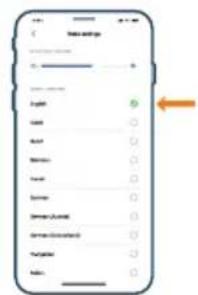
2 In two places in the app you can find the option to change the language of the voice alert.
- On the same app screen where you are asked to name the robot.
- Or by pressing the "Settings" icon on the top right corner and then choosing the "Voice settings" tab.
3 Then choose the language of the voice alert there.
text_image
Home address English English English English English English English English English English English English English English English English English English English English English English English English English English English English English English English English English English English English English English English English English English English English English English English English English English 英文How your robot works
Create a map
How mapping works
The robot drives through the rooms and quickly scans them to build a map of the floor.
text_image
Safety warning illustration showing a first aid kit and a second aid kit with a checkmark indicating inspection or repair.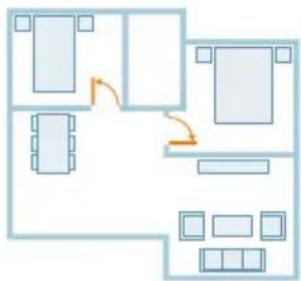
flowchart
graph TD
    A["Room 1"] --> B["Room 2"]
    B --> C["Room 3"]
    C --> D["Room 4"]
    D --> E["Room 5"]
    E --> F["Room 6"]
    F --> G["Room 7"]
    G --> H["Room 8"]
    H --> I["Room 9"]
    I --> J["Room 10"]
    style A fill:#f9f,stroke:#333
    style B fill:#f9f,stroke:#333
    style C fill:#f9f,stroke:#333
    style D fill:#f9f,stroke:#333
    style E fill:#f9f,stroke:#333
    style F fill:#f9f,stroke:#333
    style G fill:#f9f,stroke:#333
    style H fill:#f9f,stroke:#333
    style I fill:#f9f,stroke:#333
    style J fill:#f9f,stroke:#333
Map Editor
In the app, you can use Map Editor to:
- Edit rooms (merge/divide rooms, name rooms) so you can customize the cleaning routine of the robot per room.
- Add zones to specify where the robot can and cannot clean.
- Create a map for each floor of your home and store up to 5 maps. If something changes in the environment, your robot will automatically re-map the area in the next cleaning session.
Preparing the room for mapping
Before you start mapping, make sure to:
- Tidy up the area.
- Put furniture in its regular place.
- Put away loose and small obstacles.
i Note: The robot will either go to sleep or cannot complete the mapping if it gets stuck on one of these obstacles.
- Open all in-house doors and close doors to the outside.
i Important: Make sure the robot cannot get blocked during use.
Create and edit a map
i Important: During mapping your robot will not clean.
1 To create a map, either click "Create map" in the home screen directly after pairing the robot with the app or when no map has previously been created. Or click the setting icon in the top right corner, select "My maps", and select the "+" icon in the top right corner. Then follow the instructions in the app.
2 To edit your map, either select the map icon in the home screen or click the setting icon in the top right corner, select "My maps", and select "Edit map" for the map that you would like to edit.
Tell your robot where not to clean with restricted cleaning zones
In the app under "Map edit", you can set up restricted areas to indicate where the robot is allowed to clean and where it is not.
Virtual wall and No-Go zone
Create virtual walls ( ) and No-Go zones ( ) for areas you do not want the robot to go. You can for example create virtual walls or No-Go zones to:
- Protect fragile objects. The robot cannot detect small obstacles like shoes, toys or cables, nor can it detect shiny, transparent (e.g. glass) or dark obstacles or surfaces.
- Prevent the robot from getting stuck while cleaning.
i Note: The robot can get stuck on high pile carpets, carpets with fringes or or very light rugs like in the bathroom. Also the robot cannot detect cables on the floor.
- Protect the robot.
i Note: The robot should be kept away from liquids and wet areas such as pet bowls and plant trays.
i Important: virtual walls and No-Go zones should not be used to protect against hazards.
i Important: virtual walls and No-Go zones should not prevent the robot from returning to the station.
No-Mop zone
Create No-Mop zones to prevent the robot from mopping carpets or rugs.
i Note: The robot will avoid the No-Mop zones when the robot is in 'Vac and Mop', 'Vac then mop', and ''mop' modes.
How your robot cleans
In the app, the following can be selected:
Area6 Description
| Regular Regular cleaning is intended for your normal daily cleaning. The robot cleans each room according to the settings you specified and saved in the cleaning method. | |
| If the environment is not recognized, the robot maps the environment and cleans according to the last set mode. If it is a mode with mopping function but no mop is installed, the robot does not dispense water. After the cleaning is completed, the robot returns to the station. | |
| Room | - Room: the robot cleans one or more rooms in an order you specify. |
| Zone | - Zone: the robot cleans a zone in a room you specify. |
| Spot | - Spot: the robot cleans a spot area you specify. |
| After selecting one of the above options, you can select a cleaning mode and fine-tune your cleaning preferences and advanced settings. | |
Set cleaning preferences, advanced settings and cleaning order
In the app, you can select five different cleaning modes for each room. These are standard modes that can be used in most situations. You can customize your cleaning mode by fine-tuning cleaning preferences and advanced settings.
Cleaning modes
Mode Description
| Vac & Mop The robot vacuum and mops the floor at the same time. This mode is intended for regular cleaning of hard floors. |
| IMPORTANT: For mopping sensitive hard floors, such as parquet floors, set the water level in the app to the lowest level. |
| Vacuum The robot only vacuum the floor. This mode can be used for areas that shouldn't be mopped. |
| Mop The robot only mops the floor. |
| Quiet The robot cleans with minimal noise. The suction power is lowered and the voice alerts are muted. |
| Intensive The robot vacuum and mops the floor at the same time and at full power. This mode is intended for thorough cleaning of small areas.Note that it is not recommended to clean large areas in this mode. The robot passes the area 5 times, so the cleaning time and battery usage will increase significantly. |
Cleaning preferences
For each cleaning mode, you can fine-tune the following cleaning preferences:
Setting Description
| Suction power Change the suction power:- Low : for efficient cleaning with low energy consumption and low noise level.- Normal : for regular cleaning and effective removal of fine dust on hard floors with optimal balance between power and efficiency.- High : for a thorough cleaning of large floors. Can clean more on a single charge than max mode.- Max : ideal for removing large dirt like crumbs. The strong suction power removes fine dust particles hidden deep inside carpets and crevices. |
Setting Description
Mop Wetness Determine the flow rate that is pumped from the electric water tank onto the mop:
IMPORTANT: Do not add hot water or cleaning detergents to the water tank.
- Low: to mop a sensitive floor e.g. parquet. The combination of vacuuming and mopping removes more fine dust than vacuuming alone.
- Medium: optimal for a regular wet & dry cleaning. The mop removes superficial dirt and bacteria to keep your home sanitized and healthy.
- High: for a spotlessly clean home. It is recommended to combine this setting with 2 or 5 cleaning path repetitions for an intensive cleaning.
Cleaning path repetition
Specify the number of repetitions. One pass is sufficient for normal cleaning. It is possible to program the robot to make 2 or 5 passes for intensive cleaning. It is recommended to select this option only for specific cleaning areas as it impacts cleaning duration.
Advanced settings
You can set your own cleaning order in the app by clicking the setting icon in the top right corner and selecting "Cleaning order".
Using your robot
Preparing for a cleaning run
text_image
Diagram showing two labeled parts (① and ②) with arrows indicating movement or force, likely illustrating a mechanical or electrical component assembly.- Before you start the robot on its cleaning run:
- Attach the washable mop pad to the mop pad holder.
IMPORTANT: The mop pad holder can be removed. But when using the robot with mop pad holder, the washable mop pad must always be attached to the mop pad holder, even if you use the robot without mopping. This is to prevent damage to the floor and the mop holder during use.
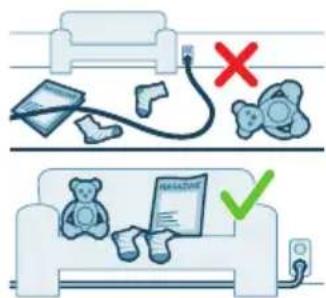
- Remove all cables, wires, cords and small objects such as shoes and toys from the floor to prevent the robot from getting entangled in them.
- Open all in-house doors.
- Pre-wet the mop for optimal results.
Start your first cleaning session via the app
Start
1 Open the app.
2 Select the cleaning area: 'Regular', 'Room', 'Zone', or "Spot.
3 Press the 'start' icon.
i Note: make sure that the power on/off switch on the robot is set to the "on" position ("|").
i Note: If the battery level is too low, cleaning cannot start. Wait until the robot is sufficiently charged before you start a cleaning session.
Stop
1 Press the Pause icon in the app. The robot stops.
2 Press the Start icon again. The robot continues.
3 Press the Return icon. The robot goes back to the station.
Using the robot without the app
i Note: For an optimal experience, we recommend using the app.
Without the app, you can use the two buttons on the robot to operate it:
- Start/stop button
- Long press (3s) to turn the robot on and off.
- Short press to start cleaning or to pause cleaning. Press again to resume cleaning.
- Return button
- Short press (when the robot is not cleaning): the robot will find the station and charge.
- Short press while cleaning: the robot will stop cleaning. Short press again: the robot returns to the station to charge.
- Short press when the robot is driving back to the station: the robot will pause returning to the station. Press again to let it drive back to the station.
Note: To deactivate the robot's WiFi function, press the bumper on the front side of the robot and return button for 10 seconds. You can still use basic functions without WiFi, but for full access to all features, we highly recommend pairing the robot with WiFi.
When operating the robot manually, it will vacuum and mop. However, if the water tank is empty or the mop pad holder is not attached, the robot won't mop.
Your robot's cleaning pattern
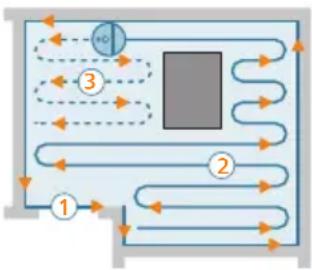
flowchart
graph TD
    A["1"] --> B["2"]
    B --> C["3"]
    C --> D["4"]
    D --> E["5"]
    E --> F["6"]
    F --> G["7"]
    G --> H["8"]
    H --> I["9"]
    I --> J["10"]
    J --> K["11"]
    K --> L["12"]
    L --> M["13"]
    M --> N["14"]
    N --> O["15"]
    O --> P["16"]
    P --> Q["17"]
    Q --> R["18"]
    R --> S["19"]
    S --> T["20"]
    T --> U["21"]
    U --> V["22"]
    V --> W["23"]
    W --> X["24"]
    X --> Y["25"]
    Y --> Z["26"]
    Z --> AA["27"]
    AA --> AB["28"]
    AB --> AC["29"]
    AC --> AD["30"]
    AD --> AE["31"]
    AE --> AF["32"]
    AF --> AG["33"]
    AG --> AH["34"]
    AH --> AI["35"]
    AI --> AJ["36"]
    AJ --> AK["37"]
    AK --> AL["38"]
    AL --> AM["39"]
    AM --> AN["40"]
The robot cleans the home in a structured way. The robot cleans room by room and always starts by cleaning the edges of the room first before covering the remaining surface.
Returning to the station
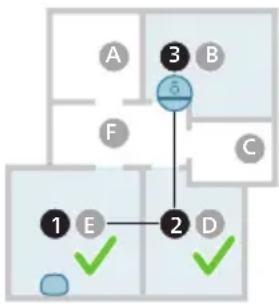
flowchart
graph TD
    A["A"] --> 3["3"]
    B["B"] --> 3["3"]
    C["C"] --> 2["2"]
    D["D"] --> 2["2"]
    E["E"] --> 1["1"]
    1 --> 2
    style 3 fill:#000,stroke:#000,color:#fff
    style 2 fill:#000,stroke:#000,color:#fff
    style 1 fill:#000,stroke:#000,color:#fff
    style 2 fill:#000,stroke:#000,color:#fff
    style 3 fill:#000,stroke:#000,color:#fff
    style 4 fill:#000,stroke:#000,color:#fff
    style 5 fill:#000,stroke:#000,color:#fff
    style 6 fill:#000,stroke:#000,color:#fff
    style 7 fill:#000,stroke:#000,color:#fff
    style 8 fill:#000,stroke:#000,color:#fff
    style 9 fill:#000,stroke:#000,color:#fff
After the robot has completed its cleaning session, the robot will automatically drive back to the station to recharge.
Auto recharge and resume
When the battery runs low (<20%) while cleaning, the robot automatically returns to the station to recharge. After the battery has been charged, the robot continues where it has left off.
You can disable this function in the app by clicking the settings icon in the top right corner and then toggling the "resume clean" option on or off.
Cleaning and maintenance
When to do maintenance
Item Cleaning Replacement
| Washable mop pad Every two weeks 3-6 months | |
| Main brush Weekly 6-12 months | |
| Washable filter Weekly 3-6 months | |
| Side brush Every two weeks 6-12 months | |
| Main wheels & Front caster wheel | Monthly - |
| 360° laser navigation (LiDAR) sensor | Monthly - |
| Sensors: - Infrared signal sensors - Anti-drop sensor (3x) | Monthly - |
| Charging contacts robot and station | Monthly - |
| Sensors to detect placement of dust bin and water tank | 6 months - |
| Dust bin Empty the dust bin after each use | |
How to clean the mop pad and the dust bin
Clean the washable mop pad
1 Pull the washable mop pad off the velcro material.
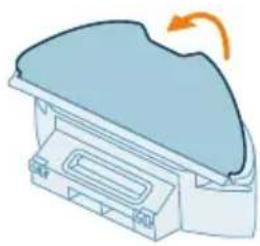
natural_image
Illustration of a mechanical component with a curved arrow indicating rotation (no text or symbols)2 Slide the straight side of the washable mop pad out of the slot.
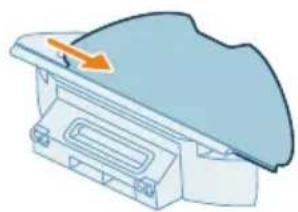
natural_image
Diagram of a mechanical component with a blue cover and orange arrow indicating direction (no text or symbols)3 Rinse and clean the washable mop pad with water or wash it in the washing machine.
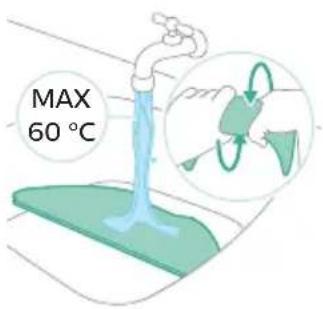
text_image
MAX 60 °C4 Air dry the washable mop pad.
i Note: Do not use other ways to dry the washable mop pad.

text_image
Safety warning illustration showing sun, water drop, and checkmark symbols with arrows indicating directionClean the dust bin and washable filter
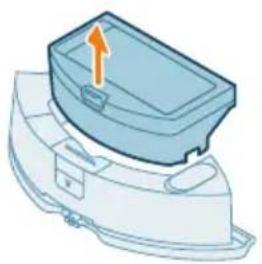
1 Pull the dust bin out of the water tank.
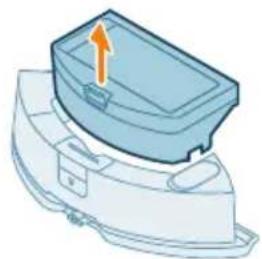
natural_image
Illustration of a blue plastic container with an upward arrow, no text or symbols present
2 Open the lid of the dust bin.
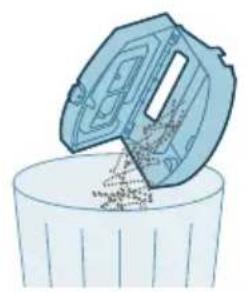
3 Pour the dirt out of the dust bin.
i Note: Do not confuse the lid of the dust bin with the lid of the washable filter.
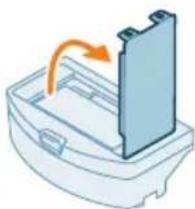
4 Open the lid of the washable filter.
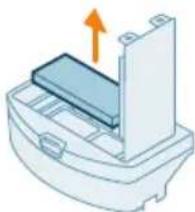
5 Pull the washable air filter out.
6 Clean the dustbin with a brush to remove any pollutants.
7 Rinse the washable filter with water and air dry the washable filter.
i Note: Do not use cleaning detergents.
i Note: Do not use other ways to dry washable filter.
8 Make sure the washable filter is completely dry and then put it against the filter lock of the dust bin and push it in.
9 Push the washable filter down.
10 Close the lid of the washable filter.
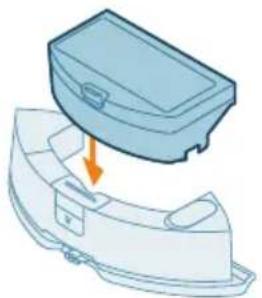
natural_image
Illustration of a blue toolbox with an arrow indicating compression or disassembly (no text or symbols)11 Slide the dust bin back into the water tank.
Cleaning the water tank
natural_image
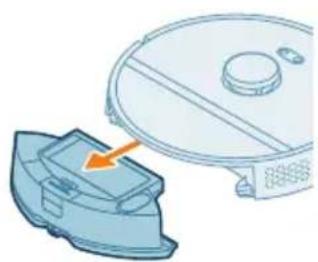
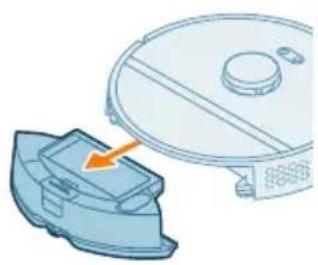
Illustration of a robotic vacuum cleaner next to a blue mechanical component, with no visible text or symbols.1 Push the water tank release button.
2 Pull the water tank out of the robot.
3 Remove the dust bin from the water tank.
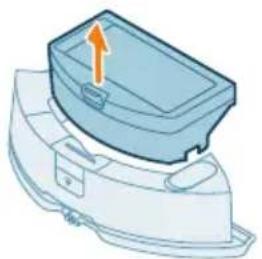
natural_image
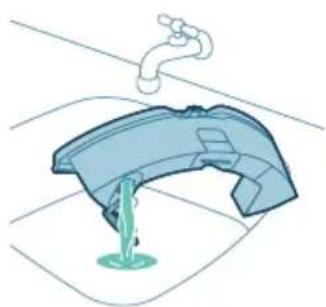
3D diagram of a mechanical component with an orange arrow indicating direction (no text or symbols)4 Fill the water tank with tap water.
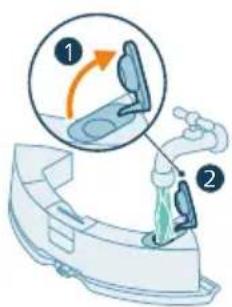
text_image
Diagram illustrating a step in a washing machine tool, showing step 1 with an arrow and step 2 with a green liquid level.5 Shake the water tank.
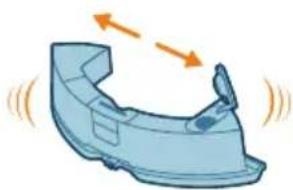
natural_image
Illustration of a blue plastic car hood with motion arrows indicating speed (no text or symbols)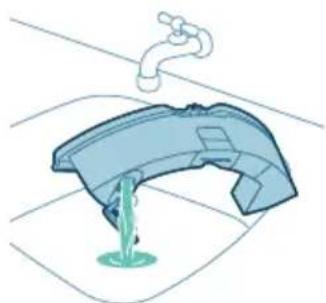
natural_image
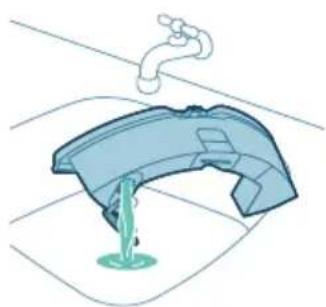
Illustration of a faucet pouring liquid into a container (no text or symbols)6 Pour the water out in a sink.
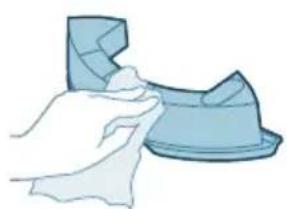
natural_image
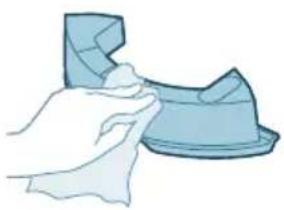
Illustration of a hand cleaning a blue plastic object (no text or symbols)7 Dry the outside of the water tank with a cloth.
i Note: Do not use cleaning detergents.
IMPORTANT: Do not wash water tank in the dishwasher.
8 Keep the sealing cap of the water tank open and allow the inside of the water tank to air dry.
i Note: Do not use other ways to dry the water tank.
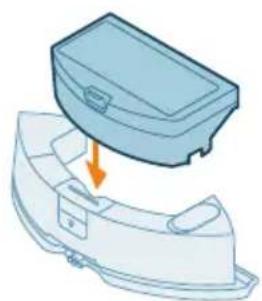
natural_image
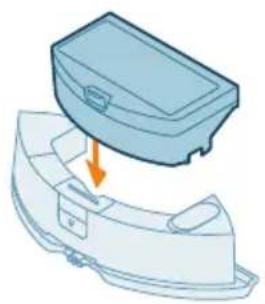
Illustration of a blue plastic case with an arrow indicating downward motion, no text or symbols present9 Put the dust bin back to the water tank.
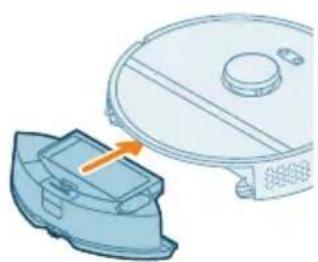
natural_image
Illustration of a robotic vacuum cleaner with a blue component and an orange arrow indicating motion (no text or symbols)10 Insert the water tank back into the robot.
i Note: Make sure that the outside of the water tank is dry.
i Note: Do not use cleaning detergents.
Cleaning the main brush
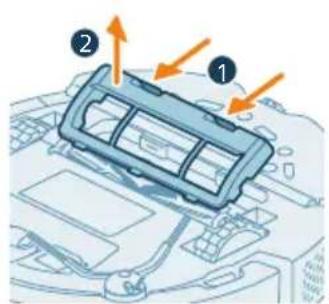
text_image
Diagram of a car air conditioner unit with labeled parts and directional arrows indicating airflow or movement.1 Put the robot upside down on a surface that is flat and stable.
2 Push the release buttons of the brush cover at the same time.
3 Lift and remove the brush cover.
natural_image
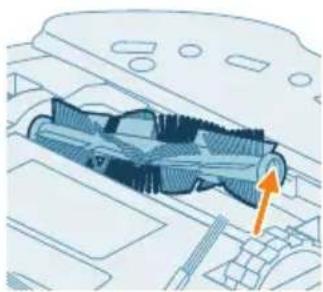
Technical diagram of a mechanical component with an orange arrow indicating direction (no text or symbols present)4 Pull the main brush out.
natural_image
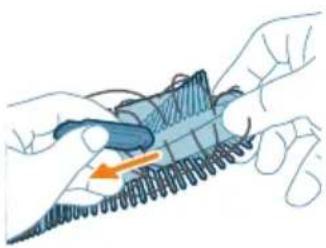
Illustration of hands holding a coiled spring or rope with an orange arrow indicating direction (no text or symbols)5 Use the cleaning tool to cut through the hairs.
natural_image
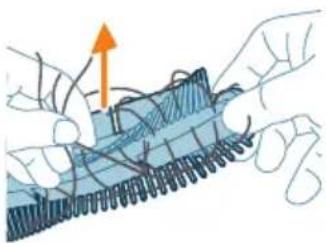
Illustration of hands tying a knot with a blue mesh and an orange upward arrow (no text or symbols)6 Remove the hairs and dirt from the main brush.
Tip: Use the brush end of the cleaning tool to remove the dirt on the main brush.
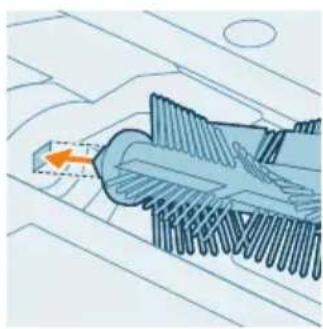
7 If you have removed the cap on the end of the main brush, push it back.
natural_image
Technical illustration of a mechanical component with a highlighted section and an orange arrow indicating direction (no text or symbols present)8 Install the main brush in the correct location. Match the square shaped peg with the square shape hole and insert the brush into position.
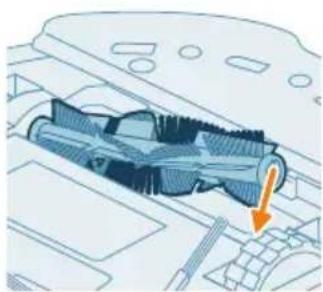
natural_image
Technical illustration of a mechanical component with an arrow indicating a specific feature (no text or symbols present)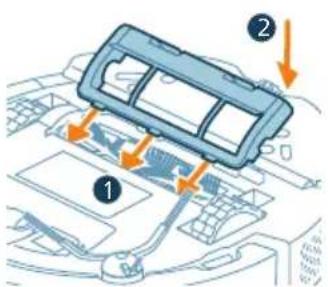
text_image
Diagram showing car interior components with numbered labels and directional arrows indicating parts of the dashboard.9 Put the lips of the brush cover in the correct cutouts.
10 Push the brush cover in.
Cleaning the side brush
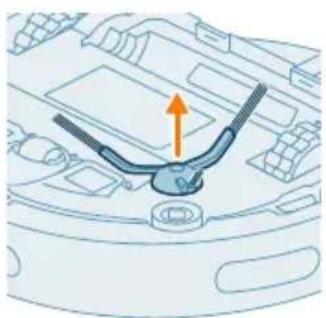
natural_image
Diagram of a car engine compartment with an orange arrow indicating upward motion (no text or symbols present)1 Put the robot upside down on a surface that is flat and stable.
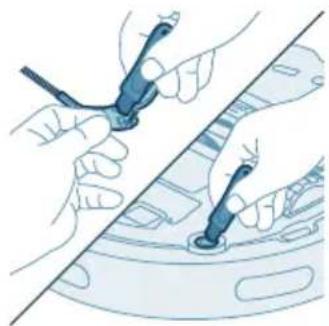
2 Remove the side brush.
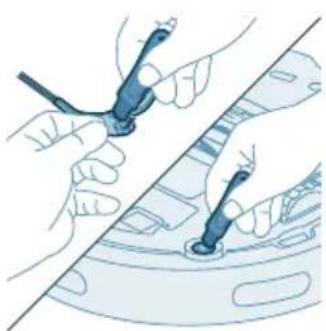
natural_image
Illustration of hands using a tool to adjust or install a component, no text or symbols present3 Use a brush with soft bristles (e.g. a toothbrush) to remove dust or fluff from the side brush and the robot.
Tip: You can use the brush end of the cleaning tool to remove dust or fluff from the side brush and the robot.
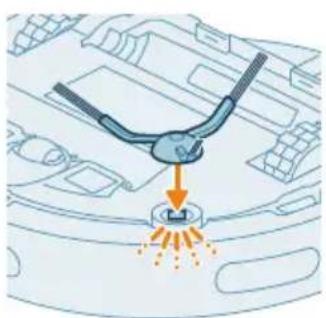
natural_image
Diagram of a car interior with a spray gun and exhaust cone (no text or symbols)4 Attach the side brush by clicking it into the correct position on the bottom of the robot.
Cleaning the main wheels and the front caster wheel
1 Put the robot upside down on a surface that is flat and stable.
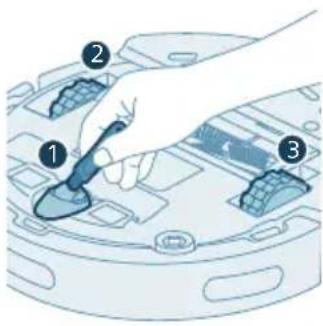
text_image
Diagram showing a hand holding a tool interacting with a device, labeled with numbered components 1, 2, and 3.2 Use a brush with soft bristles (e.g. a toothbrush) to remove dust or fluff from the front caster wheel and main wheels.
You can use the brush end of the cleaning tool to remove dust or fluff from the wheels.
Cleaning the sensors, contact points and IR signal window
To maintain good cleaning performance, you have to clean sensor, contact points and IR signal window from time to time.
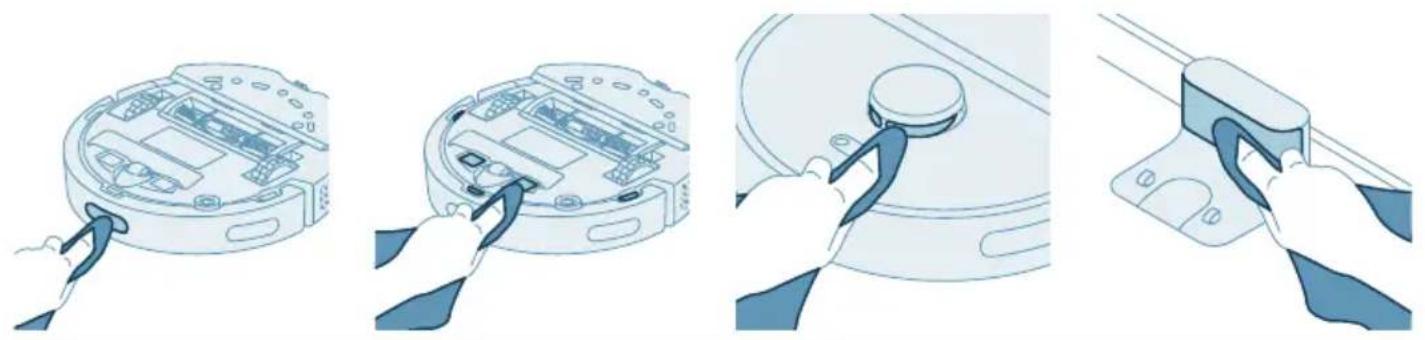
natural_image
Illustration of four steps of a robotic vacuum cleaner's internal components, showing hand positioning and cleaning (no text or symbols)1 Unplug the station from the wall socket.
2 Use a soft non-abrasive dry cloth.
3 Clean the components.
i Note: Do not use cleaning detergents.
4 Dry the components and surfaces with a dry cloth.
i Note: Do not use other ways to dry the components.
Long term storage
1 Charge the battery until it is full.
2 Store the robot within a temperature range from 8 °C to 35 °C.
Indicator light signals and their meaning
Signal Description of signal Meaning of signal
 | The indicator light on the robot lights up white. | The robot is powered on, or in in a cleaning circle. |
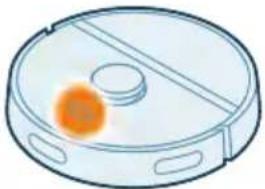 | The indicator light on the robot is pulsing white and orange. | The robot is charging. |
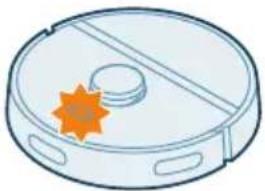 | The indicator light on the robot is flashing in orange. | The robot runs into a problem or is in the pairing mode. |
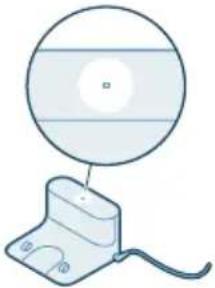 | The indicator light on the station lights up white. | The station is plugged in. |
Signal Description of signal Meaning of signal
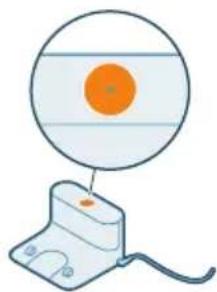
natural_image
Illustration of a device with an orange circular component and a base-mounted cable (no text or symbols)The indicator light on the station lights up orange.
The station runs into a problem. Unplug the station and plug it in again. If the indicator still lights up orange, contact the consumer care center in your country.
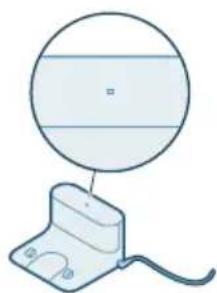
natural_image
Simple line drawing of a circular object above a rectangular base with wires (no text or symbols)The indicator light on the station is off.
The station is not plugged in. If the station is plugged in, the indicator light goes out if the appliance is left idle to save power.
Reset/restore the robot
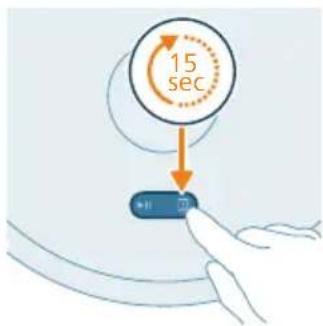
text_image
15 secYou can reset/restore the robot by pressing and holding the Return button on top of the robot for 15 seconds.
i Note: After resetting/restoring the robot, the robot needs to reconnect the app, and the relevant settings in the app are removed.
Child lock
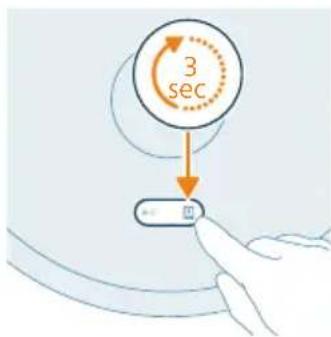
text_image
3 sec1 Activate child lock in the app or press the Return button on the robot for 3 seconds.
2 To deactivate child lock, deselect child lock in the app or press the Return button on the robot for 3 seconds again.
Replacement
Ordering accessories
To buy accessories or spare parts, visit www.philips.com/homerun2000 or go to your Philips dealer. You can also contact the Philips Consumer Care Center in your country (see the international warranty leaflet for contact details).
Replacement parts:
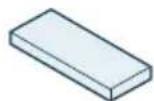
XV1430 Replacement washable mops

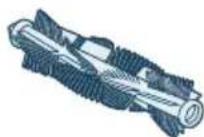
XV1433 Maintenance kit with 2 filters, 1 main brush and 1 side brush.

Removing the rechargeable battery
To remove the rechargeable battery, follow the instructions below. You can also take the robot to a Philips service center to have the rechargeable battery
removed. Contact the Philips Consumer Care Center in your country for the address of a service center near you.
Take any necessary safety precautions when you handle tools to open the product and when you dispose of the rechargeable battery.
Warning: Before you remove the battery, make sure that the product is disconnected from the station and that the battery is completely empty.
1 Start the robot from a place somewhere in the room and not from the station station.
2 Let the robot run until the rechargeable battery is empty to make sure that the rechargeable battery is completely discharged before you remove it and dispose of it.
3 Undo the screws of the battery compartment lid and remove the lid.
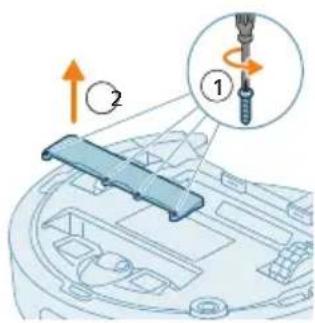
text_image
Diagram showing mechanical assembly with labeled parts and directional arrows, including a numbered step 1 and 2.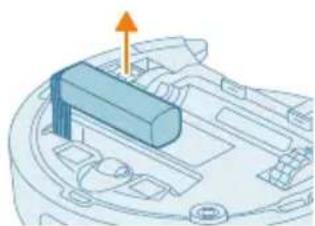
natural_image
3D diagram of a mechanical component with an orange arrow indicating upward motion (no text or symbols)4 Lift out the rechargeable battery and disconnect it by pressing the little clip on the battery connector to release the battery connector.
5 Take the robot and the rechargeable battery to a collection point for electrical and electronic waste.
Warranty and support
If you need information or support, please visit www.philips.com/support or read the international warranty leaflet.
Your robot vacuum cleaner has been designed and developed with the greatest possible care. In the unfortunate case that your robot needs repair, the Consumer Care Centre in your country will help you by arranging any necessary repairs in the shortest possible time and with maximum convenience. If there is no Consumer Care Centre in your country, go to your local Philips dealer.
Disposal and recycling
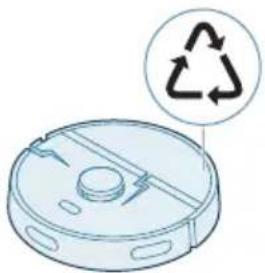
natural_image
Illustration of a robotic vacuum cleaner with a circular symbol indicating recycling (no text or symbols present)Do not dispose the robot in the regular trash. Make sure to bring it to your the recycling facility for electrical equipment.
Troubleshooting
This chapter summarizes the most common problems you could encounter with the appliance. If you are unable to solve the problem with the information below, go to the Philips HomeRun robot app or visit
www.philips.com/homerun2000, where can also find support videos and frequently asked questions. You can also contact the Consumer Care Center in your country.
Problem Possible cause Solution
| The robot doesn't switch on. The battery is low. Charge the robot on the station before use. | ||
| The ambient temperature is too low or too high. | Use the robot at a temperature between 8 °C and 35 °C. | |
| The robot is unable to pair with the app. | The robot is no longer in pairing mode. | Put the robot back in pairing mode by holding the home and on/off button at same time (lights will flash orange). |
| The Wi-Fi connection (signal) is not good. | Place the robot in an area with a good Wi-Fi signal. | |
| A wrong Wi-Fi network selected. | Make sure you select the correct Wi-Fi network. | |
| A wrong password used. Make sure you use the correct Wi-Fi password. | ||
| A wrong robot model is selected in the app. | Make sure you select the correct robot model. | |
| A wrong app is downloaded Always use the app that you have downloaded via the QR-code from the quick start guide. | ||
| The app and the robot lose connection. | The robot has gone out of reach of the Wi-Fi signal. | Wait for robot to drive back into area with a good Wi-Fi signal. |
| The robot has gone into sleep mode. | The robot will go into sleep mode if it has not returned to the station. Press any button on the robot to awake the | |
Problem Possible cause Solution
| robot.Then send it to the station via the app or by pressing the return button. | ||
| The Wi-Fi password has been changed. | When Wi-Fi details have changed: add the robot to the app again. | |
| The Wi-Fi network name has been changed. | When Wi-Fi details have changed: add the robot to the app again. | |
| The app account was changed. | When account details were changed, add robot to the app again. | |
| The email with the verification code has not been received. | The verification code email may take up to a minute to arrive. | Wait more than a minute for the email. |
| The email has not been sent. Click the "resend" button. | ||
| The email may have landed in 'spam' or 'junk' folder. | Check the 'spam' or 'junk' folders. (The sender e-mail address starts with: HomeRun_noreply@). | |
| A wrong email address is used. Check if you have used the correct email address. | ||
| The phone or computer doesn't have good internet connection to receive the email. | Make sure the phone or computer has a good internet connection. | |
| The robot can't find station. | The station has been moved during a cleaning run. | Place the station back in the same place it was when the cleaning run started. |
| The station is not connected to the power supply. | Connect the station to the power supply. | |
| The sensors on robot and/or station are dirty. | Clean all the sensors of the robot and the station. | |
| A No-Go zone was placed too close to the station | Don't save No-Go zones too close to the station. | |
| The station has been placed on a spot with very bright light. | Don't put the station in a place with very bright light (like direct sun light) this may interfere with the infra red signal. | |
| The robot pushes the station away. | The station is not standing close to a wall. | Place station with the back towards a wall. |
| The sensors on robot and/or station are dirty. | Clean all the sensors of the robot and the station. | |
| The station doesn't have enough space around it (0,5 meter to each side and 1,5 m to the front). | Make sure the station has enough space around it. | |
Problem Possible cause Solution
| The robot doesn't clean properly. | The dust bin of the robot is full. Empty the dust bin of the robot. | |
| The water tank is empty. Refill the water tank in time. | ||
| Obstacles are stuck in the brushes. | Remove all obstacles from the brushes. | |
| The filter has not been cleaned. Clean the filter regularly. | ||
| The filter has not been placed back or has not been placed back correctly. | Place the filter back correctly. | |
| The washable mop needs to be replaced. | Replace the XV1430 washable mop. Purchase a new XV1430 washable mop via de app or on www.philips.com/homerun2000 | |
| The robot uses no or little water during mopping. | The water level is set too low. Set the water level higher in the app. | |
| Too much water comes out of the mop / the robot makes the floor too wet. | The water level is set too high. Set the water level lower in the app.  | |
| Robot misses areas for cleaning/ robot does not clean the whole area/ robot has began to miss certain spots | The sensors of the robot are no longer clean. | Clean the robot's sensors with a dry cloth. |
| The robot is working on slippery polished floors. | Make sure the floor is dried before the robot starts cleaning. | |
| The robot is unable to reach certain areas blocked by furniture or barriers. | Tidy up the area to be cleaned by putting furniture and small objects in their proper place. | |
| The cleaning area is not tidy. Remove small objects from the floor and tidy up the cleaning area before the robot starts cleaning. | ||
| The robot keeps a safety margin in the distance close to No-Go zones and No-Mop zones, and this can cause that the robot won't pass a certain area. | Make the No-Go zone or No-Mop zone in the app a bit smaller. | |
Problem Possible cause Solution
| The robot has blocked itself by eating a cable. | There are cables on the floor which the robot is unable to detect. | Stop the robot and remove the brush cover. Take away main brush and check if something is stuck in the side brush: remove side brush, take away the cable, reattach the side brush. Remove all cables from the floor before you start a cleaning run. |
| The robot falls from stairs. The anti-drop sensors on the bottom of the robot are dirty. | Clean the anti-drop sensors on the bottom of the robot.If the robot continues to fall from stairs, draw a virtual wall on the top of the stairs in the app. | |
| Objects have been placed on the top step of the stairs that the robot detects and therefore thinks it is safe to drive. | Remove the any objects that are placed on the top step of the stairs. | |
| The robot doesn't charge or discharges very quickly. | The robot is stored in a space that is too hot or too cold. | Charge and store the robot at a temperature between 8 °C and 35 °C. |
| There is foam buildup in the water tank and the robot moves strangely. | Detergent has been added to the water tank, causing the robot to be slippery. | Never add detergent to the water tank again. Clean the robot and its wheels, including a thorough rinse of the water tank. |
| The robot is making an abnormal noise. | The filter has not been placed back or has not been placed back correctly. | Check if filter is placed back correctly. |
| The robot has cleaned up a hard piece of dirt, which is now moving around inside the dustbin. | Empty the dustbin. | |
| The brushes are no longer turning. | Hairs are stuck in the main brush. | Remove hairs with the brush cleaning tool provided with the robot. |
| Other obstacles are stuck in the brushes. | Remove other obstacles from the brushes. | |
| The main brush was not placed back correctly. | Remove the main brush and reassemble it. | |
| When main brush is not placed back correctly: reassemble correctly the square shaft into the square hole. | ||
| The side brush gets deformed. | Something may have gotten stuck in the side brush. | Put brush in hot water for a while and let it dry. |
| Purchase a new side brush via the app or on www.philips.com/homerun | ||
Problem Possible cause Solution
| The robot won't drive on to a black floor. | The robot thinks a pitch black floor is a falling hazard - the cliff detection is activated. | Make sure lights are switched on in the room with pitch black flooring. |
| Clean the anti-drop sensor on the bottom of the robot. | ||
| A schedule is set, but the robot doesn't start cleaning according to the schedule. | The 'do not disturb' function may be activated. | Check in the app if the 'do not disturb' function is switched on at the same time as the schedule. |
| The robot is in sleep mode. Make sure that the robot is charging in the station.The robot will go into sleep mode if it has not returned to the station. Press any button on the robot to awake the robot.Then send it to the station via the app or by pressing the return button. | ||
| The wrong time zone has been selected in the app. | You can change the time zone in in the app in 'My Account' under 'Profile'. | |
| The robot has lost connection with the Wi-Fi network. | Make sure the Wi-Fi network is working. | |
| The battery of the robot is empty. | Make sure that the station is connected to the power supply. | |
| It is not possible to log in to the robot app account. | The email address has been changed. | Create a new app account in case the email address has been changed. |
| The password is wrong. Enter the correct password. | ||
| In case the password is forgotten, click 'forgot password' and follow the steps. | ||
| The wrong country region is selected. | Select the correct country region in the app. | |
| Pop-up messages about app or firmware updates continue to be received. | App updates or firmware updates are not installed. | For continuous improvement of the robot we recommend installing all updates. |
| The Philips HomeRun robot app is not available in my country. | VPN may be blocking access to the right country information. | Disable any VPN service you are using. |
| Google or Apple account may be set to a different country. | Change the Google or Apple account information to match the country you bought the robot in. | |
| The firmware update fails. The battery level is too low The battery level of the robot needs to be more than 20% in order to install an update. | ||
Problem Possible cause Solution
| The robot is not at the station Make sure the robot is charging in the station when you install the update. | ||
| The Wi-Fi signal is not good enough. | Ensure the robot is in a spot with strong wifi | |
| The robot finished mapping, but I do not see a map in the app. | The robot did not start and finish at the station. | To create a map, make sure that the robot starts and finishes at the station. Once the map has been saved in the app, you can use the robot without station. |
| The robot got stuck or blocked while mapping. | Return the robot to the station and restart the mapping process. Identify the location where the robot got stuck earlier and remove any obstacles or block the robot from accessing that area. Once the map has been created, you can create a no-go zone to prevent the robot from entering that area again. | |
| My map is lost from the app. The maximum amount of maps had been reached. | The robot will create a new map when it recognizes a new environment. If you already have 5 maps, the robot will override an old one. If you want to make sure the robot does not override a map, lock it in the app. You can lock 3 maps at the same time. | |
| I do not want to use the WiFi function. | The WiFi function can be deactivated on your device. | To deactivate the robot's WiFi function, press the bumper on the front side of the robot and return button for 10 seconds. You can still use basic functions without WiFi, but for full access to all features, we highly recommend pairing the robot with WiFi. |
lsi
Pendahuluan 33
text_image
Exploded view diagram of a robotic vacuum cleaner with numbered parts for identification1 Tombol mulai/berhenti
text_image
0.5m 1.5m 0.5mnatural_image
3D mechanical assembly diagram showing a bracket with mounting holes and arrows indicating assembly direction (no text or symbols)text_image
Diagram showing two labeled parts (① and ②) with directional arrows indicating movement or flow, likely illustrating a mechanical or electrical process.Mengisi daya robot
text_image
ONnatural_image
Illustration of a hand holding a circular object next to a mechanical device with an arrow indicating motion (no text or symbols)text_image
Philip Hotiellun How much you're going to get your home? OK! Cancel No. 100% or 100% of the user.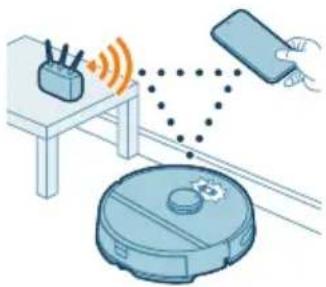
natural_image
Illustration of a robotic vacuum cleaner connected to a device via wireless signals (no text or symbols)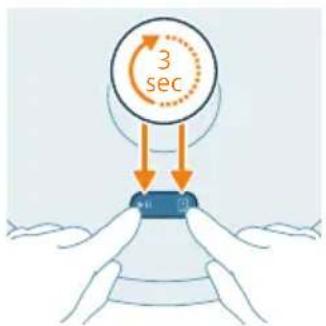
text_image
3 secMengunduh aplikasi
text_image
Screenshot of a mobile app interface showing a dropdown menu with options like 'Load', 'Start', and 'End' in Chinese.text_image
Safety warning illustration showing correct and incorrect actions for a medical procedure on a bed, with symbols indicating no need and failure.text_image
Diagram showing two views of a mechanical component with numbered annotations and directional arrows indicating movement or force.natural_image
Illustration of a mechanical component with a curved arrow indicating rotation (no text or symbols)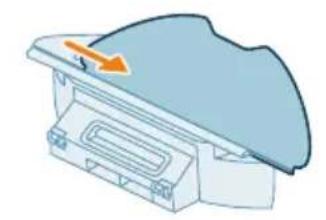
natural_image
Illustration of a mechanical component with a blue cover and orange arrow indicating direction (no text or symbols)text_image
Safety warning illustration showing sun, water drop, and checkmark symbols with arrows indicating directionnatural_image
3D diagram of a mechanical component with an arrow indicating upward motion (no text or symbols)natural_image
Illustration of a printer with an open lid and orange arrow indicating rotation (no text or symbols)2 Buka tutup wadah debu.
natural_image
Illustration of a plastic container with a lid pouring liquid into it (no text or symbols)natural_image
Illustration of a mechanical component with an arrow indicating rotation or movement (no text or symbols)natural_image
Illustration of a printer or printer with an orange arrow indicating upward motion (no text or symbols present)text_image
Safety warning icons showing warning, sun, and checkmark symbols with corresponding iconsnatural_image
Illustration of a blue toolbox with an orange arrow indicating downward motion, partially enclosed in a white container (no text or symbols)natural_image
Illustration of a robotic vacuum cleaner with a blue component and an orange arrow pointing to the component (no text or symbols)1 Tekan tombol pelepas tangki air.
2 Tarik tangki air keluar dari robot.
natural_image
Illustration of a blue plastic container with an orange arrow pointing upward, placed on a curved base (no text or symbols)text_image
Diagram illustrating a medical procedure with labeled steps and a magnified view of the step 1.natural_image
Illustration of a car body with motion arrows indicating speed or movement (no text or symbols)5 Guncang-guncangkan tangki.
natural_image
Illustration of a faucet pouring liquid into a curved container (no text or symbols)6 Tuang airnya di wastafel.
natural_image
Illustration of a hand cleaning a small blue object (no text or symbols)natural_image
Illustration of a blue plastic case with an arrow indicating compression or disassembly (no text or symbols)natural_image
Illustration of a robotic vacuum cleaner next to a blue mechanical component with an orange arrow indicating motion (no text or symbols)text_image
Diagram of a car air conditioner unit with numbered components and directional arrows indicating assembly or installation.natural_image
Technical diagram of a mechanical component with an orange arrow indicating a specific feature (no text or symbols present)natural_image
Illustration of hands performing a mechanical or electrical manipulation task with a blue component and orange directional arrow (no text or symbols)natural_image
Illustration of hands manipulating a blue mechanical component with an upward arrow (no text or symbols)natural_image
Technical illustration of a mechanical component with a highlighted section and directional arrow (no text or symbols)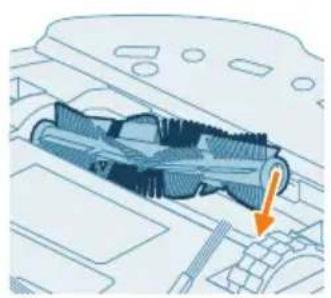
natural_image
Technical illustration of a mechanical component with an orange arrow indicating a specific part (no text or symbols present)text_image
Diagram of car interior components with numbered parts and directional arrows indicating assembly or movementnatural_image
Diagram of a car engine bay with an orange arrow pointing to the headrest area (no text or symbols present)2 Lepaskan sikat samping.
natural_image
Illustration of hands using a tool to adjust or install a car body panel (no text or symbols visible)natural_image
Diagram of a robotic arm spraying water onto a vehicle interior (no text or symbols)text_image
Diagram showing a hand using a tool to adjust or install electronic components, labeled with numbers 1, 2, and 3.natural_image
Illustration of a robotic vacuum cleaner's internal components being inserted into a device, shown in three sequential steps (no text or symbols present)text_image
Diagram showing a mechanical component with labeled parts and directional arrows, including numbered callouts.natural_image
3D diagram of a mechanical component with an arrow indicating upward motion (no text or symbols)natural_image
Illustration of a robotic vacuum cleaner with a circular symbol indicating recycling (no text or labels)text_image
Exploded view diagram of a robotic vacuum cleaner with numbered parts for identification1 Butang mula/henti
2 Butang return
3 Penutup atas
4 Navigasi laser 360° (LiDAR)
5 Salur keluar udara
6 Penuras boleh cuci
7 Penutup penuras boleh cuci
8 Penutup bekas habuk
9 Bekas habuk
10 Salur masuk air
11 Butang pelepasan tangki air
12 Tangki air
13 Penutup berus
14 Berus utama
15 Suis kuasa hidup/mati
16 Roda dwipaksi hadapan
17 Sensor antijatuh (3x)
18 Titik sentuh pengecasan (robot)
19 Sensor untuk mengelakkan tebing dan dinding
20 Berus sisi
21 Roda utama
22 Pemegang pad mop
23 Pad mop boleh cuci (2x)
24 Lampu penunjuk
25 Stesen (Pengecasan)
26 Soket kord kuasa
27 Titik sentuh pengecasan (stesen)
28 Lapik
29 Penyesuai
30 Alat pembersihan berus
text_image
0.5m 1.5m 0.5mnatural_image
3D diagram of a mechanical component with two arrows indicating assembly or force direction (no text or symbols)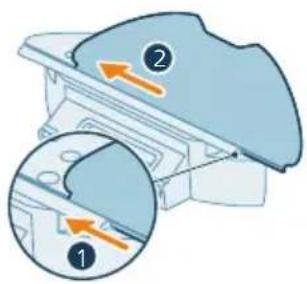
text_image
Diagram showing two labeled parts (① and ②) with arrows indicating direction, likely illustrating a mechanical or structural concept.flowchart
graph TD
    A["Electricity Battery"] --> B["Charge Drop"]
    B --> C["Electricity Charge"]
    C --> D["Path to Battery"]
    style A fill:#f9f,stroke:#333
    style D fill:#bbf,stroke:#333
natural_image
Illustration of hands holding a circular object next to a mechanical device with an arrow indicating motion (no text or symbols)4 Tekan butang return. Robot bergerak ke kedudukan yang betul di stesen.
5 Tunggu sehingga robot dicas sepenuhnya.
text_image
Philip Honeflun The following is: 100% of the customer's phone. NEW ON ON ON ON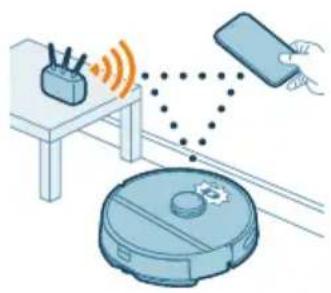
natural_image
Illustration of a robotic vacuum cleaner connected to a device via wireless signal and a hand holding a remote (no text or symbols)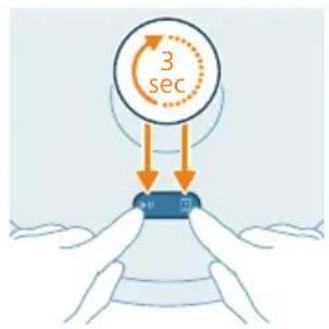
text_image
3 sectext_image
Philips HomeRun PHILIPS Settings WLAN Philips robot_XWXYJika penggandingan Wi-Fi gagal:
text_image
Safety warning illustration showing incorrect and correct actions to switch a device, with red 'X' indicating no error and green checkmark indicating confirmation.text_image
Diagram showing two views of a mechanical component with numbered annotations and directional arrows indicating movement or force.- Pasangkan pad mop boleh cuci ke pemegang pad mop.
natural_image
Illustration of a mechanical component with an arrow indicating rotation (no text or symbols)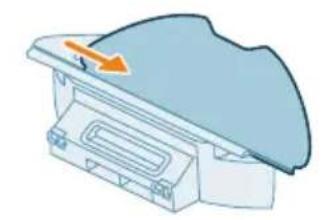
natural_image
Illustration of a medical device with a blue dome and orange arrow indicating direction (no text or symbols)text_image
Safety warning illustration showing sunlight, a leaf with raindrops, and a checkmark indicating failure.4 Keringkan di udara pad mop boleh cuci.
natural_image
3D illustration of a mechanical component with an orange arrow indicating upward motion (no text or symbols)natural_image
Diagram of a printer with an open lid and orange arrow indicating rotation (no text or symbols)natural_image
Illustration of a plastic container with a lid pouring liquid into it (no text or symbols)natural_image
Illustration of a mechanical component with an arrow indicating rotation or assembly (no text or symbols)natural_image
Illustration of a printer or scanner with an orange arrow indicating upward motion (no text or symbols present)text_image
Safety warning icons showing warning, sun, and checkmark symbols with corresponding visual examplesnatural_image
Illustration of a blue toolbox placed on a curved base with an orange arrow indicating downward motion (no text or symbols)Mencuci tangki air
natural_image
Illustration of a robotic vacuum cleaner with a blue component and an orange arrow pointing to the component (no text or symbols)natural_image
Illustration of a blue plastic container with an orange arrow pointing upward, placed on a white base (no text or symbols)text_image
Diagram illustrating a step in a showerhead with labeled parts and directional arrows indicating motion or movement.natural_image
Illustration of a blue plastic car body with motion arrows indicating speed or movement (no text or symbols)5 Goncang tangki air.
natural_image
Illustration of a faucet pouring liquid into a curved container (no text or symbols)natural_image
Illustration of a hand holding a small blue object, possibly a tool or device, with no visible text or symbols.natural_image
Illustration of a blue plastic case with an arrow indicating compression or disassembly (no text or symbols)natural_image
Illustration of a robotic vacuum cleaner next to a blue mechanical component with an orange arrow indicating motion (no text or symbols)text_image
Diagram of a car air vent with numbered components and directional arrows indicating airflow or movementnatural_image
Technical diagram of a mechanical component with an orange arrow indicating a specific feature (no text or symbols present)natural_image
Illustration of hands holding a mechanical component with an orange arrow indicating motion (no text or symbols)natural_image
Illustration of hands tying a knot with an upward arrow (no text or symbols)natural_image
Technical illustration of a mechanical component with an orange arrow indicating motion direction (no text or symbols)natural_image
Technical illustration of a mechanical component with an orange arrow indicating a specific part (no text or symbols present)text_image
Diagram of car air intake system with labeled components and directional arrows indicating flow or movementnatural_image
Diagram of a car engine compartment with an orange arrow indicating upward motion (no text or symbols present)natural_image
Illustration of hands using a tool to adjust or install a component on a vehicle (no text or symbols visible)natural_image
Diagram of a car interior with a spray nozzle and exhaust plume (no text or symbols)text_image
Diagram showing a hand using a tool to adjust or install electronic components, labeled with numbers 1, 2, and 3.natural_image
Illustration of four steps of a robotic vacuum cleaner's internal components being connected, showing hand placement and tool path (no text or symbols)text_image
Diagram showing a mechanical component with labeled parts and directional arrows, including numbered callouts.natural_image
3D diagram of a mechanical component with an orange arrow indicating direction (no text or symbols)natural_image
Illustration of a robotic vacuum cleaner with a recycling symbol (no text or labels)text_image
Exploded view diagram of a robotic vacuum cleaner with numbered parts and Chinese labelstext_image
0.5m 1.5m 0.5m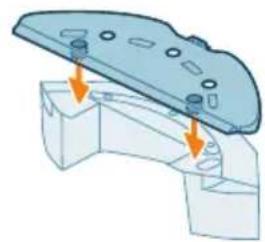
natural_image
3D diagram of a mechanical component with mounting holes and arrows indicating assembly or force (no text or symbols)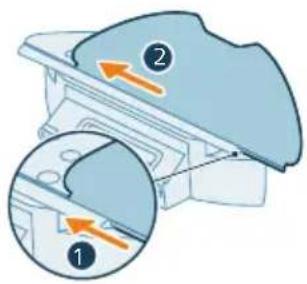
text_image
Diagram showing two views of a mechanical component with numbered annotations and directional arrows indicating movement or force.Instalace stanice
natural_image
Illustration of a hand holding a circular component next to a mechanical bracket (no text or symbols)3 Zatlačte robota ke stanici, aby se nabíjecí kontakty robota setkaly s nabíjecími kontakty stanice.
text_image
Philips HomeRun • Get your home run to the home run OK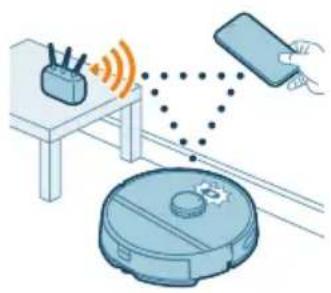
natural_image
Illustration of a robotic vacuum cleaner connected to a device via wireless signal and a hand holding a smartphone (no text or symbols)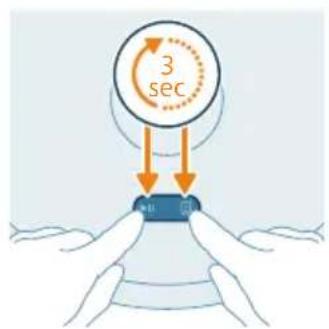
text_image
3 sec mtext_image
Home access English English English English English English English English English English English English English English English English English English English English English English English English English English English English English English English English English English English English English English English English English English English English English English English English English English 英文Jak robot funguje
Vytvoření mapy
text_image
Illustration showing a medical procedure with a red X mark and a green checkmark indicating correct or incorrect actions.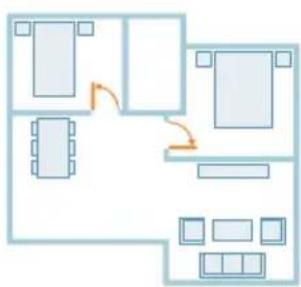
natural_image
Floor plan diagram with furniture layout and directional arrows (no text or labels)text_image
Diagram showing two labeled parts (① and ②) with directional arrows indicating movement or flow, likely illustrating a mechanical or electrical component assembly.natural_image
Illustration of a mechanical component with a curved arrow indicating rotation (no text or symbols)natural_image
Illustration of a mechanical component with an arrow indicating direction (no text or symbols)text_image
Safety warning illustration showing sunlight, a warning sign, and two clothes hanging with water droplets and symbolsnatural_image
Illustration of a mechanical component with an arrow indicating upward motion (no text or symbols)natural_image
Diagram of a printer with an open lid and orange arrow indicating rotation (no text or symbols)natural_image
Illustration of a trash bin with a plastic container pouring into it (no text or symbols)natural_image
Illustration of a mechanical component with an arrow indicating rotation (no text or symbols)natural_image
Illustration of a mechanical device with an upward arrow indicating motion or force (no text or symbols present)
text_image
Safety warning icons showing warning, sun, and checkmark symbols with corresponding iconsnatural_image
Illustration of a blue toolbox with an arrow pointing to a cut-out container (no text or symbols)natural_image
Illustration of a robotic vacuum cleaner with a blue cover and orange arrow pointing to the component (no text or symbols)natural_image
Illustration of a blue plastic container with an orange arrow indicating upward motion (no text or symbols)text_image
Diagram illustrating a step in a washing machine tool, showing step 1 and step 2 with an arrow indicating rotation.natural_image
Illustration of a car head with motion arrows indicating speed or movement (no text or symbols)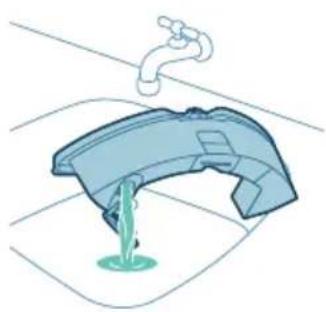
natural_image
Illustration of a faucet pouring liquid into a basin (no text or symbols)natural_image
Illustration of a hand cleaning a blue object with a cloth (no text or symbols)natural_image
Illustration of a blue toolbox placed on a curved base with an orange arrow indicating downward motion (no text or symbols)natural_image
Illustration of a robotic vacuum cleaner with a blue component and orange arrow indicating motion (no text or symbols)text_image
Diagram of a car air conditioner unit with labeled parts and directional arrows indicating airflow or movement.natural_image
Technical illustration of a car interior with an orange arrow indicating a specific component (no text or symbols present)natural_image
Illustration of hands holding a mechanical component with an orange arrow indicating motion (no text or symbols)natural_image
Illustration of hands threading a knitted fabric with an upward arrow (no text or symbols)natural_image
Technical illustration of a mechanical component with a highlighted section and directional arrow (no text or symbols)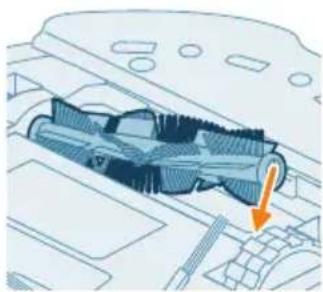
natural_image
Technical diagram of a mechanical component with an arrow indicating a specific section (no text or symbols present)text_image
Diagram of car engine compartment with labeled parts and directional arrows indicating assembly or movementnatural_image
Diagram of a car engine compartment with a highlighted component and an orange arrow indicating direction (no text or symbols)natural_image
Illustration of hands using a tool to adjust or install a component on a vehicle (no text or symbols visible)natural_image
Diagram of a car interior with a spray nozzle and orange spray effect (no text or symbols)text_image
Diagram showing a hand using a tool to adjust or install electronic components, labeled with numbers 1, 2, and 3.natural_image
Illustration of four steps of a robotic vacuum cleaner's internal components being inserted, showing hand placement and cleaning (no text or symbols present)natural_image
Illustration of a device with an orange circular component and a base-mounted cable (no text or symbols)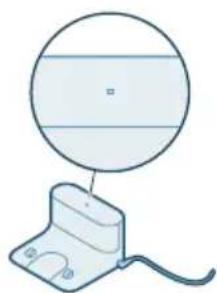
natural_image
Simple line drawing of a circular object above a rectangular base with wires (no text or symbols)text_image
Diagram showing a mechanical component with labeled parts and directional arrows, including numbered callouts.natural_image
3D diagram of a mechanical component with an orange arrow indicating direction (no text or symbols)natural_image
Illustration of a robotic vacuum cleaner with a circular symbol indicating recycling (no text or symbols present)text_image
Exploded view diagram of a robotic vacuum cleaner with numbered parts for identification and assembly reference.1 Start/stop-tast
2 Returknap
text_image
0.5m 1.5m 0.5m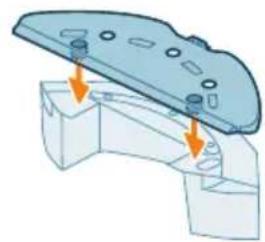
natural_image
3D diagram of a mechanical component with mounting holes and arrows indicating assembly or force direction (no text or symbols)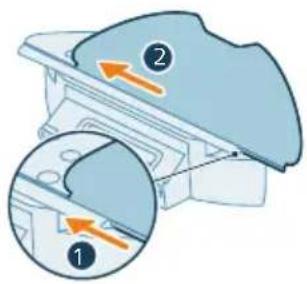
text_image
Diagram showing two views of a mechanical component with numbered annotations and directional arrows indicating movement or force.Installer stationen
1 Installer stationen inden for de korrekte dimensioner til placering.
natural_image
Illustration of a hand holding a circular object with a small inset device, no text or symbols presenttext_image
Fisher HomeRun App: 100% or more, or less than 50% or less. On the phone is currently closed.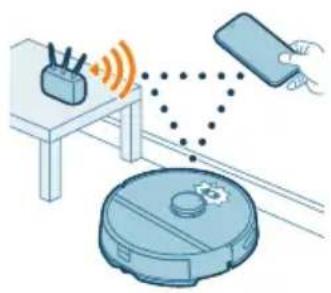
natural_image
Illustration of a robotic vacuum cleaner connected to a device via wireless signal and dotted lines (no text or symbols)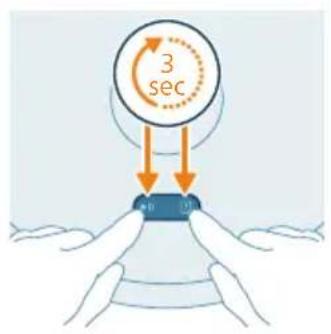
text_image
3 sectext_image
English French Chinese English English German/Chinese German/English English Englishtext_image
Safety warning illustration showing incorrect and correct actions to switch a device, with symbols for disassembly, repair, and cleaning.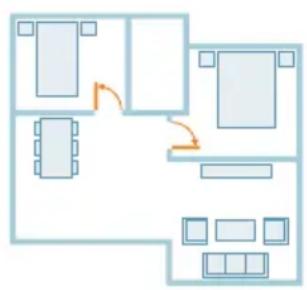
flowchart
graph TD
    A["Room 1"] --> B["Room 2"]
    B --> C["Room 3"]
    C --> D["Room 4"]
    D --> E["Room 5"]
    E --> F["Room 6"]
    F --> G["Room 7"]
    G --> H["Room 8"]
    H --> I["Room 9"]
    I --> J["Room 10"]
    style A fill:#cce5ff,stroke:#333
    style B fill:#cce5ff,stroke:#333
    style C fill:#cce5ff,stroke:#333
    style D fill:#cce5ff,stroke:#333
    style E fill:#cce5ff,stroke:#333
    style F fill:#cce5ff,stroke:#333
    style G fill:#cce5ff,stroke:#333
    style H fill:#cce5ff,stroke:#333
    style I fill:#cce5ff,stroke:#333
    style J fill:#cce5ff,stroke:#333
text_image
Diagram showing two views of a mechanical component with numbered annotations and directional arrows indicating movement or force.natural_image
Illustration of a mechanical component with a blue top and orange rotation arrow (no text or symbols)natural_image
Diagram of a mechanical component with an arrow indicating direction (no text or symbols)text_image
Safety warning illustration showing sunlight, a leaf with raindrops, and a checkmark indicating failure.natural_image
Illustration of a blue plastic container with an orange arrow indicating upward motion (no text or symbols)natural_image
Diagram of a printer with an open lid and orange arrow indicating rotation (no text or symbols)natural_image
Illustration of a plastic bag pouring liquid into a trash bin (no text or symbols)i Bemærk: Undgå at forveksle låget på støvbeholderen med låget på det vaskbare filter.
natural_image
Illustration of a mechanical component with an arrow indicating rotation (no text or symbols)4 Åbn låget til det vaskbare filter.
natural_image
Illustration of a mechanical device with an arrow indicating upward motion (no text or symbols)text_image
Safety warning icons showing warning, sun, and checkmark symbols with corresponding icons9 Skub det vaskbare filter ned.
10 Luk låget til det vaskbare filter.
natural_image
Illustration of a blue toolbox with an arrow indicating downward motion, partially enclosed in a white container (no text or symbols)natural_image
Illustration of a robotic vacuum cleaner with a blue cover and orange arrow pointing to its component (no text or symbols)natural_image
Illustration of a blue plastic container with an orange arrow indicating upward motion (no text or symbols)text_image
Diagram illustrating a step in a washing machine tool, showing step 1 and step 2 with an arrow indicating rotation.natural_image
Illustration of a car head with motion arrows indicating speed or movement (no text or symbols)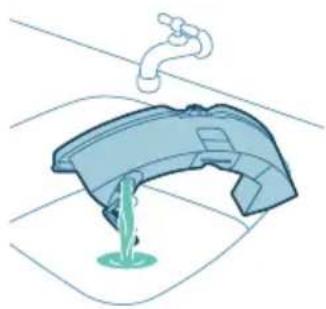
natural_image
Illustration of a faucet pouring liquid into a curved container (no text or symbols)natural_image
Illustration of a hand cleaning a shoe (no text or symbols)natural_image
Illustration of a blue toolbox placed on a curved base with an orange arrow indicating downward motion (no text or symbols)natural_image
Illustration of a robotic vacuum cleaner with a blue component and orange arrow indicating motion (no text or symbols)text_image
Diagram of a car air conditioner unit with labeled parts and directional arrows indicating airflow or movement.natural_image
Technical illustration of a car interior with an orange arrow indicating a specific component (no text or symbols present)natural_image
Illustration of hands holding a mechanical component with an orange arrow indicating motion (no text or symbols)natural_image
Illustration of hands threading a knitted fabric with an upward arrow (no text or symbols)natural_image
Technical illustration of a mechanical component with a highlighted section and directional arrow (no text or symbols)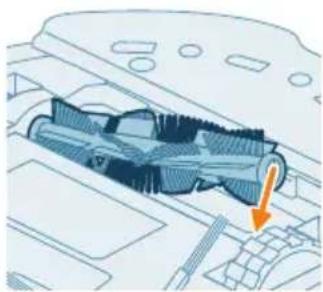
natural_image
Technical diagram of a mechanical component with an arrow indicating a specific section (no text or symbols present)text_image
Diagram of car engine compartment with labeled parts and directional arrows indicating movement or assemblynatural_image
Diagram of a car engine compartment with a highlighted component and an orange arrow indicating direction (no text or symbols)1 Anbring robotten med bunden opad på et fladt og stabilt underlag.
natural_image
Illustration of hands using a tool to adjust or install a component on a vehicle (no text or symbols visible)natural_image
Diagram of a car interior with a spray nozzle and exhaust plume (no text or symbols)text_image
Diagram showing a hand using a tool to adjust or install electronic components, labeled with numbers 1, 2, and 3.natural_image
Illustration of four steps of a robotic vacuum cleaner's internal components being inserted into a device (no text or symbols present)natural_image
Illustration of a device with an orange circular component and a base-mounted cable (no text or symbols)natural_image
Simple line drawing of a circular object above a rectangular base with wires (no text or symbols)text_image
Diagram showing a mechanical component with labeled parts and directional arrows, including numbered callouts.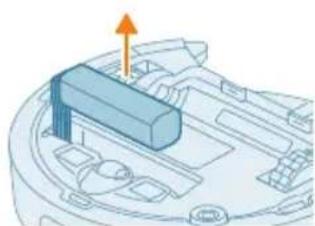
natural_image
3D diagram of a mechanical component with an arrow indicating direction (no text or symbols)natural_image
Illustration of a robotic vacuum cleaner with a circular symbol indicating recycling (no text or symbols present)text_image
Exploded view diagram of a robotic vacuum cleaner with numbered parts for identification and assembly reference.text_image
0.5m 1.5m 0.5m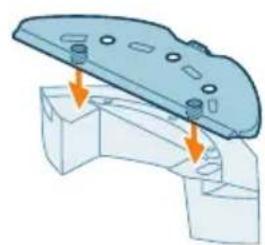
natural_image
Mechanical assembly diagram showing a component with mounting holes and a base, no text or symbols present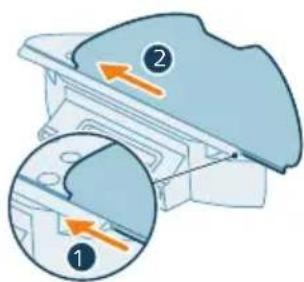
text_image
Diagram showing two views of a mechanical component with numbered annotations and directional arrows indicating movement or force.flowchart
graph TD
    A["Electricity Battery"] --> B["Switch"]
    B --> C["Power Supply"]
    C --> D["Output"]
natural_image
Illustration of a hand holding a circular object next to a mechanical device with an arrow indicating motion (no text or symbols)text_image
Philip HomeRun OK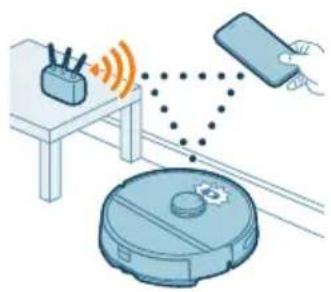
natural_image
Illustration of a robotic vacuum cleaner connected to a smartphone and a coffee maker (no text or symbols present)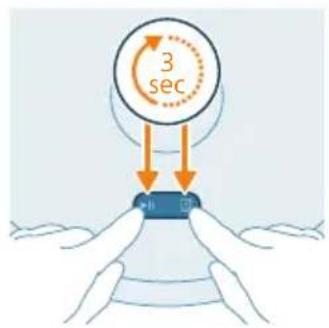
text_image
3 sectext_image
Settings WLAN Philips robot_XXYKYtext_image
English English English English English English English English English English English English English English English English English English English English English English English English English English English English English English English English English English English English English English English English English English English English English English English English English English Englishtext_image
Safety warning illustration showing a device with a red 'X' and a blue '√' indicating incorrect safety, alongside a cartoon cat on a sofa.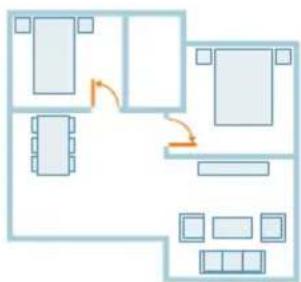
flowchart
graph TD
    A["Room 1"] --> B["Room 2"]
    B --> C["Room 3"]
    C --> D["Room 4"]
    D --> E["Room 5"]
    E --> F["Room 6"]
    F --> G["Room 7"]
    G --> H["Room 8"]
    H --> I["Room 9"]
    I --> J["Room 10"]
    style A fill:#cce5ff,stroke:#333
    style B fill:#cce5ff,stroke:#333
    style C fill:#cce5ff,stroke:#333
    style D fill:#cce5ff,stroke:#333
    style E fill:#cce5ff,stroke:#333
    style F fill:#cce5ff,stroke:#333
    style G fill:#cce5ff,stroke:#333
    style H fill:#cce5ff,stroke:#333
    style I fill:#cce5ff,stroke:#333
    style J fill:#cce5ff,stroke:#333
text_image
Diagram showing two labeled parts (① and ②) with arrows indicating direction, likely illustrating a mechanical or electrical component assembly.natural_image
Illustration of a mechanical component with a curved arrow indicating rotation (no text or symbols)natural_image
Illustration of a mechanical component with a blue cover and orange arrow indicating direction (no text or symbols)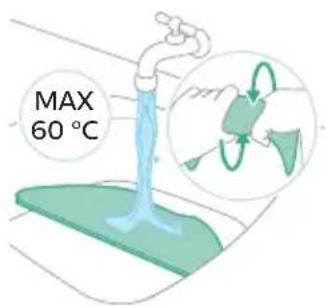
text_image
MAX 60 °Ctext_image
Safety warning illustration showing sunlight, a leaf with raindrops, and a checkmark indicating failure.natural_image
3D illustration of a mechanical component with an orange arrow indicating upward motion (no text or symbols)natural_image
Illustration of a printer with an open lid and orange arrow indicating rotation (no text or symbols)natural_image
Illustration of a trash bin with a plastic container pouring liquid into it (no text or symbols)natural_image
Illustration of a mechanical component with an arrow indicating rotation or assembly (no text or symbols)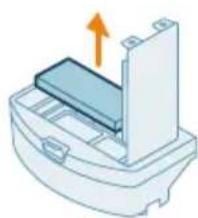
natural_image
Illustration of a printer or printer with an arrow indicating upward motion (no text or symbols present)text_image
Safety warning icons showing sun, water drop, and checkmark symbols
natural_image
Illustration of a blue plastic case with an arrow indicating downward motion, showing internal components (no text or symbols)natural_image
Illustration of a robotic vacuum cleaner with a blue base and orange arrow pointing to the component (no text or symbols)natural_image
3D illustration of a mechanical component with an upward arrow indicating motion (no text or symbols)text_image
Diagram illustrating a water tap with labeled steps 1 and 2 showing the movement of a showerhead.natural_image
Illustration of a car body component with motion arrows indicating movement (no text or symbols)natural_image
Illustration of a faucet pouring liquid into a container with green liquid, no text or symbols presentnatural_image
Illustration of a hand cleaning a small blue object (no text or symbols)natural_image
Illustration of a blue plastic case with an arrow indicating downward motion, showing internal components (no text or symbols)natural_image
Illustration of a robotic vacuum cleaner with a blue mesh component and an orange arrow indicating motion (no text or symbols)text_image
Diagram of a car air vent with numbered components and directional arrows indicating airflow or movementnatural_image
Technical diagram of a mechanical component with an orange arrow indicating direction (no text or symbols present)natural_image
Illustration of hands holding a mechanical component with an orange arrow indicating direction (no text or symbols)natural_image
Illustration of hands tying a knot with a blue mesh and an orange upward arrow (no text or symbols)natural_image
Technical illustration of a mechanical component with internal threading and a highlighted section (no text or symbols)natural_image
Technical illustration of a mechanical component with an arrow indicating a specific part (no text or symbols present)text_image
Diagram showing car interior components with numbered parts and directional arrows indicating assembly or movementnatural_image
Diagram of a car engine compartment with a highlighted lever and orange arrow indicating direction (no text or symbols)natural_image
Illustration of hands using a tool to adjust or install a component on a vehicle (no text or symbols visible)natural_image
Diagram of a robotic arm spraying water onto a car interior (no text or symbols)text_image
Diagram showing a hand using a tool to adjust or install a device with numbered parts labeled 1, 2, and 3.natural_image
Illustration of a robotic vacuum cleaner's open lid and base, showing step-by-step cleaning (no text or symbols)text_image
Diagram showing mechanical assembly with labeled parts and directional arrows, including a numbered callout.natural_image
Diagram of a mechanical component with an arrow indicating upward motion (no text or symbols present)natural_image
Illustration of a robotic vacuum cleaner with a circular symbol indicating recycling (no text or labels)text_image
Exploded view diagram of a robotic vacuum cleaner with numbered parts and Chinese labelstext_image
0.5m 1.5m 0.5mnatural_image
Mechanical assembly diagram showing a bracket with mounting holes and two arrows indicating force or movement (no text or symbols present)text_image
Diagram showing two views of a mechanical component with numbered annotations and directional arrows indicating movement or force.natural_image
Illustration of hands holding a circular device with a scroll wheel, next to a mechanical component (no text or symbols)text_image
Philip HomeRun Get your home run to the room of your home run OK Cancel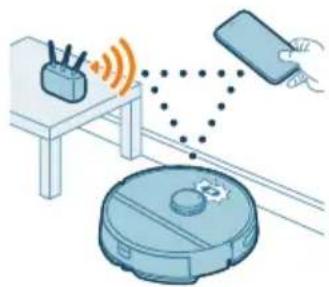
natural_image
Illustration of a robotic vacuum cleaner with signal waves and a hand interacting with a device (no text or symbols)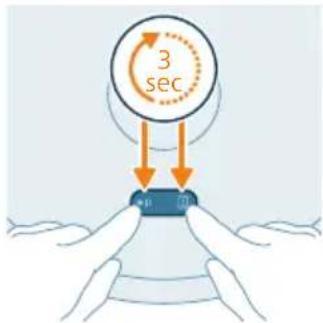
text_image
3 sec mtext_image
Enter C Enter filter Enter filter Enter filter Enter filter Enter filter Enter filter Enter filter Enter filter Enter filter Enter filter Enter filter Enter filter Enter filter Enter filter Enter filter Enter filter Enter filter Enter filter Enter filter Enter filter Enter filter Enter filter Enter filter Enter filter Enter filter Enter filter Enter filter Enter filter Enter filter Enter filter Enter filter Enter filter Enter filter Enter filtertext_image
Illustration showing a printer with a red X mark and a blue bear, and a checkmark on a sofa with a green checkmark.text_image
Diagram showing two labeled parts (① and ②) with arrows indicating movement or force, likely illustrating a mechanical or electrical process.natural_image
Illustration of a mechanical component with a blue top and orange rotation arrow (no text or symbols)natural_image
Diagram of a mechanical component with an arrow indicating direction (no text or symbols)text_image
Safety warning illustration showing sunlight, a leaf with raindrops, and a checkmark indicating failure.natural_image
3D illustration of a mechanical component with an upward arrow indicating motion (no text or symbols)Puhastage tolmukonteiner ja pestav filter
natural_image
Illustration of a printer with an open lid and orange arrow indicating rotation (no text or symbols)natural_image
Illustration of a hand pouring liquid into a trash bin (no text or symbols)natural_image
Illustration of a mechanical component with an arrow indicating rotation (no text or symbols)4 Avage pestava filtri kaas.
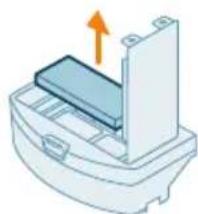
natural_image
Illustration of a printer or printer with an arrow indicating upward motion (no text or symbols present)text_image
Safety warning symbol with sun, warning sign, and two checkmarks indicating failure or rejectionnatural_image
Illustration of a blue toolbox with an arrow pointing to a cut-out container (no text or symbols)11 Lükake tolmukamber tagasi veepaaki.
Veepaagi puhastamine
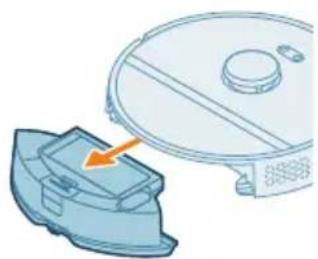
natural_image
Illustration of a robotic vacuum cleaner with a blue component and an orange arrow pointing to it (no text or symbols)natural_image
Illustration of a blue plastic container with an orange arrow pointing upward, placed on a curved base (no text or symbols)text_image
Diagram illustrating a step in a washing machine tool, showing step 1 and step 2 with an arrow indicating rotation.natural_image
Illustration of a car interior with water flow indicators (no text or symbols)5 Raputage veepaaki.
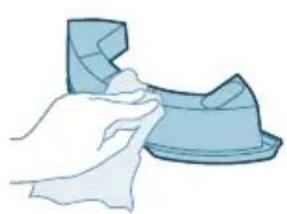
natural_image
Illustration of a hand cleaning a small blue object (no text or symbols)6 Vala vesi kraanikaussi.
natural_image
Illustration of a blue plastic case with an arrow indicating downward motion, showing internal components (no text or symbols)9 Pange tolmukamber tagasi veepaaki.
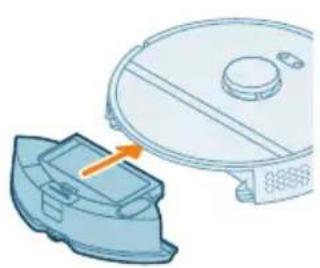
natural_image
Illustration of a robotic vacuum cleaner with a blue component and orange arrow indicating motion (no text or symbols)10 Pange veepaak tagasi robotisse.
text_image
Diagram of a car air conditioner unit with labeled parts and directional arrows indicating airflow or movement.natural_image
Technical illustration of a car interior with an orange arrow indicating a specific component (no text or symbols present)natural_image
Illustration of hands holding a mechanical component with an arrow indicating motion (no text or symbols)natural_image
Illustration of hands threading a blue mesh with an upward arrow (no text or symbols)natural_image
Technical illustration of a mechanical component with a highlighted section and directional arrow (no text or symbols)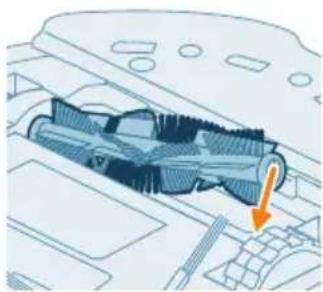
natural_image
Technical diagram of a mechanical component with an arrow indicating a specific section (no text or symbols present)text_image
Diagram of car engine compartment with labeled parts and directional arrows indicating assembly or movementnatural_image
Diagram of a car engine compartment with a highlighted component and an orange arrow indicating direction (no text or symbols)1 Pange robot tagurpidi tasasele stabiilsele pinnale.
natural_image
Illustration of hands using a tool to adjust or install a component, no text or symbols presentnatural_image
Diagram of a car interior with a spray nozzle and fan blade (no text or symbols)text_image
Diagram showing a hand using a tool to adjust or install a device with numbered parts labeled 1, 2, and 3.natural_image
Illustration of four steps of a robotic vacuum cleaner's internal components being inserted into a device (no text or symbols present)natural_image
Illustration of a computer monitor with an orange screen and a circular diagram above it (no text or symbols)natural_image
Simple line drawing of a device with a circular component above it, no text or symbols present.text_image
Diagram showing a mechanical component with labeled parts and directional arrows, including numbered callouts.natural_image
3D diagram of a mechanical component with an orange arrow indicating direction (no text or symbols)natural_image
Illustration of a robotic vacuum cleaner with a circular symbol indicating recycling (no text or symbols present)text_image
Exploded view diagram of a robotic vacuum cleaner with numbered parts for identificationtext_image
0.5m 1.5m 0.5mnatural_image
3D mechanical assembly diagram showing a bracket with mounting holes and two arrows indicating force or movement (no text or symbols)text_image
Diagram showing two views of a mechanical component with numbered annotations and directional arrows indicating movement or force.Cargar el robot
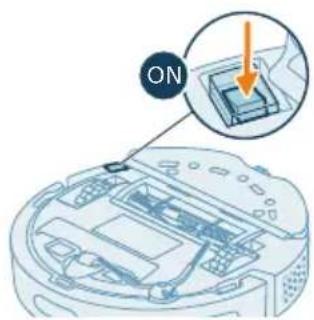
text_image
ONtext_image
Diagram illustrating a battery charging process with labeled components and connections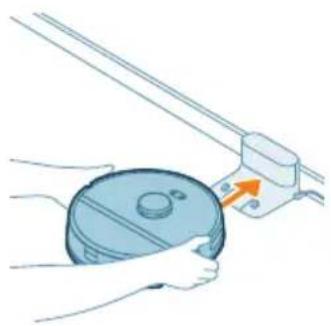
natural_image
Illustration of a hand holding a circular object with a handle, next to a mechanical component (no text or symbols)text_image
Philip HomeRun Get your home run your computer GET OK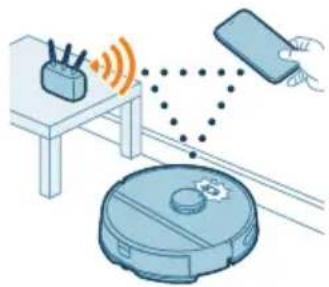
natural_image
Illustration of a robotic vacuum cleaner connected to a smartphone via wireless signal and sensor points (no text or symbols)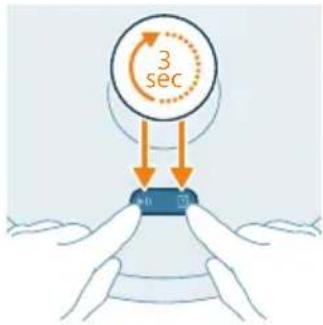
text_image
3 sectext_image
Settings WLAN Philips robot_XXYXtext_image
Mobile app interface screenshot showing settings for a device with options like Print, Copy, and Dash.text_image
Illustration showing a washing machine and a cat on a sofa with a checkmark indicating cancellation or rejection.text_image
Diagram showing two labeled parts (① and ②) with arrows indicating direction, likely illustrating a mechanical or electrical component assembly.natural_image
Illustration of a mechanical component with an arrow indicating rotation (no text or symbols)
text_image
MAX 60 °Ctext_image
Safety warning illustration showing sunlight, a leaf with raindrops, and a checkmark indicating failure.natural_image
3D illustration of a mechanical component with an orange arrow indicating upward motion (no text or symbols)natural_image
Diagram of a printer with an open lid and orange arrow indicating rotation (no text or symbols)natural_image
Illustration of a plastic bag pouring liquid into a trash bin (no text or symbols)natural_image
Illustration of a mechanical component with an arrow indicating rotation or assembly (no text or symbols)natural_image
Illustration of a printer or printer with an orange arrow indicating upward motion (no text or symbols present)text_image
Safety warning symbol and two icons showing a warning sign, sun, and a checkmark over a surface with water droplets.natural_image
Illustration of a blue plastic case with an arrow indicating downward motion, showing internal components (no text or symbols)natural_image
Illustration of a robotic vacuum cleaner with a blue component and an orange arrow pointing to the component (no text or symbols)natural_image
Illustration of a blue plastic container with an orange arrow pointing upward, placed on a white base (no text or symbols)text_image
Diagram illustrating a water tap with labeled steps and a magnified view of the valve mechanism.natural_image
Illustration of a blue plastic car body with motion arrows indicating speed or movement (no text or symbols)natural_image
Illustration of a faucet pouring liquid into a curved container (no text or symbols)natural_image
Illustration of a hand holding a small blue object, possibly a tool or device, with no visible text or symbols.natural_image
Illustration of a blue plastic case with an arrow indicating compression or disassembly (no text or symbols)natural_image
Illustration of a robotic vacuum cleaner next to a blue mechanical component with an orange arrow indicating motion (no text or symbols)text_image
Diagram of a car air vent with numbered components and directional arrows indicating airflow or movementnatural_image
Technical diagram of a mechanical component with an orange arrow indicating a specific feature (no text or symbols present)natural_image
Illustration of hands holding a coiled spring or spring with an orange arrow indicating direction (no text or symbols)natural_image
Illustration of hands tying a knot with an upward arrow (no text or symbols)natural_image
Technical illustration of a mechanical component with internal threading and a highlighted section (no text or symbols)natural_image
Technical diagram of a mechanical component with an arrow indicating a specific section (no text or symbols present)text_image
Diagram showing car interior components with numbered parts and directional arrows indicating movement or flownatural_image
Diagram of a car engine compartment with an orange arrow indicating upward motion (no text or symbols present)natural_image
Illustration of hands using a tool to adjust or install a component on a vehicle (no text or symbols visible)natural_image
Diagram of a car interior with a spray nozzle and exhaust plume (no text or symbols)text_image
Diagram showing a hand using a tool to adjust or install electronic components, labeled with numbers 1, 2, and 3.natural_image
Illustration of four steps of a robotic vacuum cleaner's internal components being connected, showing hand placement and tool path (no text or symbols)natural_image
Simple line drawing of a circular device with internal components and two side ports (no text or symbols)natural_image
Illustration of a vacuum cleaner with a small orange component on its side (no text or symbols)text_image
Diagram showing mechanical assembly with labeled parts and directional arrows, including numbered annotations ① and ②.natural_image
3D diagram of a mechanical component with an arrow indicating upward motion (no text or symbols)natural_image
Illustration of a robotic vacuum cleaner with a circular label indicating a recycling symbol (no text or labels present)text_image
Exploded view diagram of a robotic vacuum cleaner with numbered parts for identificationtext_image
0.5m 1.5m 0.5mnatural_image
3D diagram of a mechanical assembly with arrows indicating force or movement (no text or symbols)text_image
Diagram showing two labeled parts (① and ②) with directional arrows indicating movement or flow, likely illustrating a mechanical or electrical component.Chargement du robot
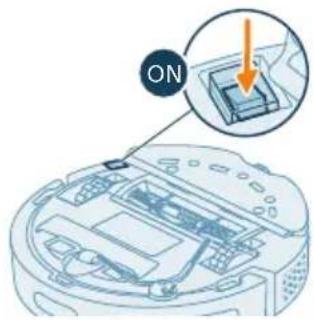
text_image
ONnatural_image
Illustration of a hand holding a circular object with a handle, next to a mechanical device (no text or symbols visible)text_image
Philip Hotiellun No valid for the following: you can get your right to access your home. OK Cancel No valid for the following: you can get your right to access your home.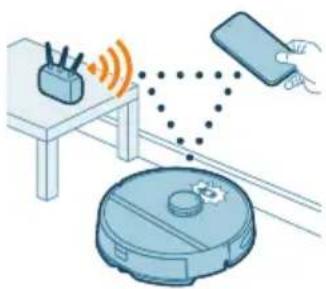
natural_image
Illustration of a robotic vacuum cleaner connected to a device via wireless signals (no text or symbols present)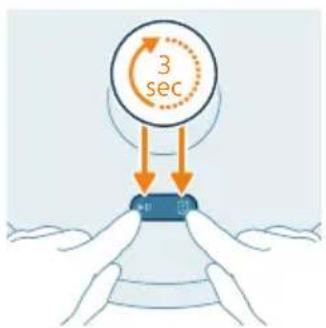
text_image
3 sec 40 70text_image
Safety warning illustration showing a medical procedure to remove a patient's abdomen, with 'No. 1' and 'Yes' signs indicating failure or rejection.text_image
Diagram showing two labeled parts (① and ②) with arrows indicating movement or force, likely illustrating a mechanical or electrical component assembly.natural_image
Illustration of a blue plastic bag with an orange arrow indicating rotation (no text or symbols)natural_image
Diagram of a mechanical component with a blue cover and orange arrow indicating direction (no text or symbols)text_image
Safety warning illustration showing sunlight, a warning sign, and two clothes hanging with symbols indicating water safety.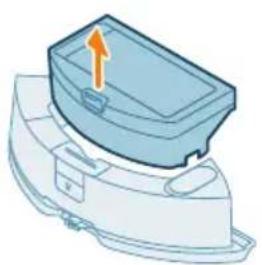
natural_image
Illustration of a blue plastic container with an orange arrow pointing upward, placed on a curved surface (no text or symbols)natural_image
Diagram of a printer with an open lid and arrow indicating rotation (no text or symbols)natural_image
Illustration of a blue industrial machine pouring granular material into a cylindrical container (no text or symbols)natural_image
Illustration of a mechanical component with an arrow indicating rotation or assembly (no text or symbols)natural_image
Illustration of a printer or scanner with an orange arrow indicating upward motion (no text or symbols present)text_image
Safety warning icons showing warning, sun, and checkmark symbols with corresponding iconsnatural_image
Illustration of a blue toolbox with an orange arrow indicating downward motion, partially enclosed in a white container (no text or symbols)natural_image
Illustration of a robotic vacuum cleaner with a blue cover and orange arrow pointing to the component (no text or symbols)natural_image
Illustration of a blue plastic container with an orange arrow indicating upward motion (no text or symbols)text_image
Diagram illustrating a step in a washing machine tool, showing step 1 and step 2 with motion arrows and color-coded zones.text_image
Diagram of a car air conditioner unit with labeled parts and directional arrows indicating airflow or movement.natural_image
Technical diagram of a mechanical component with an orange arrow indicating direction (no text or symbols present)4 Sortez la brosse principale.
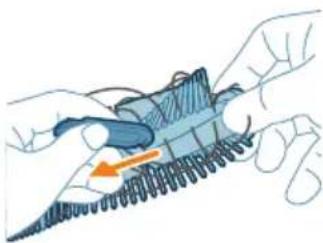
natural_image
Illustration of hands holding a mechanical component with an orange arrow indicating motion (no text or symbols)natural_image
Illustration of hands threading a knitted fabric with an upward arrow (no text or symbols)natural_image
Technical illustration of a mechanical component with a highlighted section and directional arrow (no text or symbols)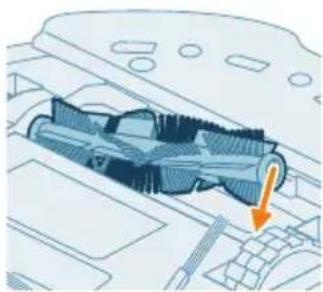
natural_image
Technical illustration of a mechanical component with an arrow indicating a specific section (no text or symbols present)text_image
Diagram showing car engine compartment with labeled parts and directional arrows indicating movement or assembly.natural_image
Diagram of a car engine compartment with a highlighted component and an upward arrow (no text or symbols)natural_image
Illustration of hands using a tool to adjust or install a component on a vehicle (no text or symbols visible)natural_image
Diagram of a car interior with a spray gun emitting orange light, no text or symbols presenttext_image
Diagram showing a hand holding a tool interacting with a device, labeled with numbered components.natural_image
Illustration of a robotic vacuum cleaner's open lid and base, showing step-by-step installation (no text or symbols)natural_image
Illustration of a computer monitor with an orange screen and a circular diagram above it (no text or symbols)natural_image
Simple line drawing of a device with a circular component above it, no text or symbols present.text_image
Diagram showing a mechanical assembly with labeled parts and directional arrows, including numbered callouts.natural_image
3D diagram of a mechanical component with an orange arrow indicating direction (no text or symbols)natural_image
Illustration of a robotic vacuum cleaner with a circular symbol indicating recycling (no text or symbols present)text_image
Exploded view diagram of a robotic vacuum cleaner with numbered parts for identification1 Gumb za pokretanje/zaustavljanje
2 Gumb za povratak
3 Gornji poklopac
4 360° laserska navigacija (LiDAR)
5 Izlaz zraka
6 Perivi filtar
7 Poklopac perivog filtra
8 Poklopac spremnika za prašinu
9 Spremnik za prašinu
10 Otvor za vodu
11 Gumb za oslobađanje spremnika za vodu
12 Spremnik za vodu
13 Poklopac četke
14 Glavna četka
15 Prekidač za uključivanje/isključivanje
16 Prednji kotačić
17 Senzor ispadanja (3x)
18 Kontakti za punjenje (robot)
19 Senzor za izbjegavanje rubova i zidova
20 Bočna četka
21 Glavni kotačići
22 Držač krpe
23 Periva krpa (2x)
24 Svjetlosni indikator
25 Stanica (za punjenje)
26 Utičnica kabela za napajanje
27 Kontakti za punjenje (stanica)
28 Podložak
29 Adapter
30 Alat za čišćenje četke
Prije prve uporabe
text_image
0.5m 1.5m 0.5m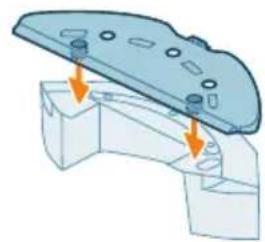
natural_image
3D diagram of a mechanical component with mounting holes and arrows indicating assembly or force direction (no text or symbols)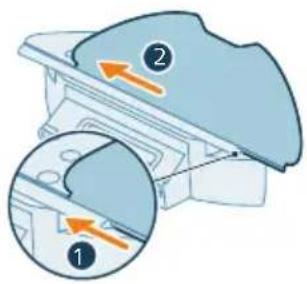
text_image
Diagram showing two views of a mechanical component with numbered annotations and directional arrows indicating movement or force.Postavljanje stanice
1 Postavite stanicu unutar pravilnih dimenzija za položaj.
i Napomena: ostavite 0,5 metara razmaka s obje strane stanice i 1,5 metara ispred stanice.
natural_image
Illustration of a hand holding a blue cylindrical object with a small orange arrow pointing to it, next to a mechanical component (no text or symbols)text_image
Phint HomeRun Sagard 100% home run setting option -025 OK Cancel No change in access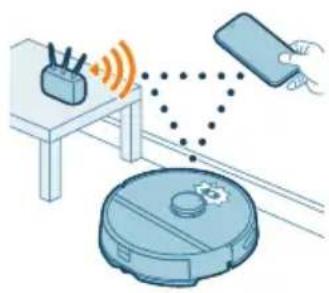
natural_image
Illustration of a robotic vacuum cleaner connected to a smartphone via wireless signal and sensor points (no text or symbols)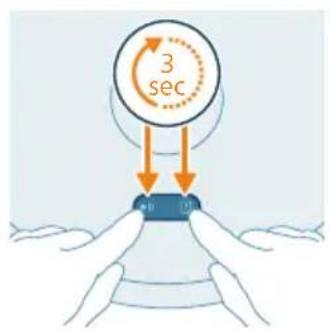
text_image
3 sec 40 10text_image
Home address English English English English English English English English English English English English English English English English English English English English English English English English English English English English English English English English English English English English English English English English English English English English English English English English English English 英文Način na koji robotski usisavač radi
Izradite kartu
Na koji način radi mapiranje
Robot se kreće kroz prostorije i brzo ih skenira kako bi izradio kartu podova.
Alat za uređivanje karte
U aplikaciji možete upotrebljavati alat za uređivanje karte za:
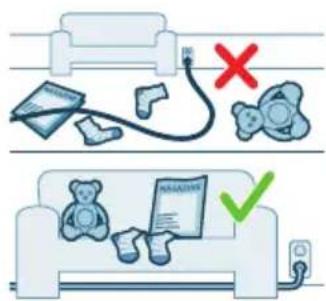
text_image
Illustration showing a medical procedure with a patient on a bed and a patient on a sofa, marked with red and green checkmarks indicating failure or rejection.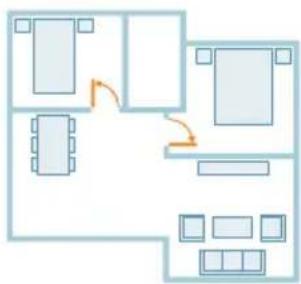
flowchart
graph TD
    A["Room 1"] --> B["Room 2"]
    B --> C["Room 3"]
    C --> D["Room 4"]
    D --> E["Room 5"]
    E --> F["Room 6"]
    F --> G["Room 7"]
    G --> H["Room 8"]
    H --> I["Room 9"]
    I --> J["Room 10"]
    style A fill:#cce5ff,stroke:#333
    style B fill:#cce5ff,stroke:#333
    style C fill:#cce5ff,stroke:#333
    style D fill:#cce5ff,stroke:#333
    style E fill:#cce5ff,stroke:#333
    style F fill:#cce5ff,stroke:#333
    style G fill:#cce5ff,stroke:#333
    style H fill:#cce5ff,stroke:#333
    style I fill:#cce5ff,stroke:#333
    style J fill:#cce5ff,stroke:#333
text_image
Diagram showing two labeled parts (① and ②) with arrows indicating movement or force, likely illustrating a mechanical or electrical component assembly.- Prije nego što pokrenete robot za čišćenje:
- Pričvrstite perivu podlogu krpe na držač krpe.
natural_image
Illustration of a mechanical component with a curved arrow indicating rotation (no text or symbols)natural_image
Illustration of a mechanical component with a blue cover and orange arrow indicating direction (no text or symbols)3 Isperite i očistite perivu krpu vodom ili je operite u perilici rublja.
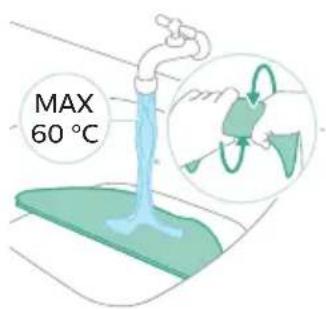
text_image
MAX 60 °C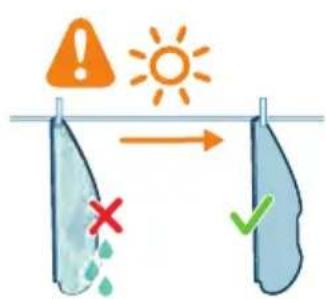
text_image
Safety warning illustration showing sunlight, a warning sign, and two clothes hanging with symbols indicating failure or damage.natural_image
3D diagram of a mechanical component with an arrow indicating upward motion (no text or symbols)2 Otvorite poklopac spremnika za prašinu.
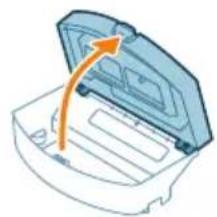
natural_image
Illustration of a printer with an open lid and arrow indicating rotation (no text or symbols)3 Izbacite prljavštinu iz spremnika za prašinu.
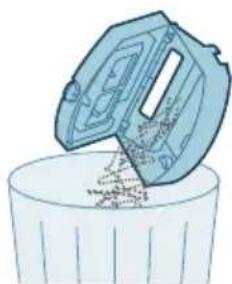
natural_image
Illustration of a trash bin with an open lid pouring liquid into it (no text or symbols)i Napomena: nemojte pobrkati poklopac spremnika za prašinu s poklopcem perivog filtra.
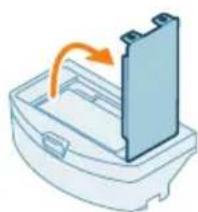
natural_image
Illustration of a mechanical component with an arrow indicating rotation or assembly (no text or symbols)4 Otvorite poklopac perivog filtra.
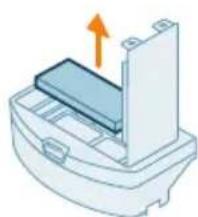
natural_image
Illustration of a printer or scanner with an orange arrow indicating compression or shift (no text or symbols present)5 Izvadite perivi filtar. 6 Očistite spremnik za prašinu četkom kako biste uklonili sve onečišćenje.

text_image
Safety warning icons showing warning, sun, and checkmark symbols with corresponding icons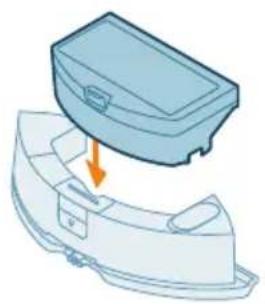
natural_image
Illustration of a blue plastic case with an orange arrow indicating downward motion (no text or symbols)7 Isperite perivi filtar vodom i osušite ga na zraku.
natural_image
Illustration of a robotic vacuum cleaner with a blue cover and orange arrow pointing to the component (no text or symbols)1 Pritisnite gumb za oslobadanje spremnika za vodu.
2 Izvucite spremnik za vodu iz robota.
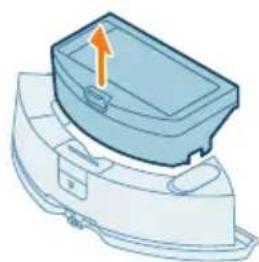
natural_image
Illustration of a blue plastic container with an orange arrow pointing upward, mounted on a white base (no text or symbols)3 Izvadite spremnik za prašinu iz spremnika za vodu.
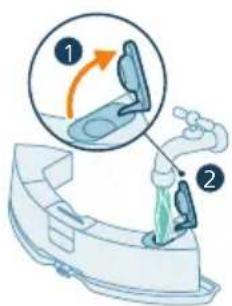
text_image
Diagram illustrating a step in a washing machine tool, showing step 1 and step 2 with motion arrows and color-coded zones.4 Napunite spremnik za vodu vodom iz slavine.
5 Protresite spremnik za vodu.
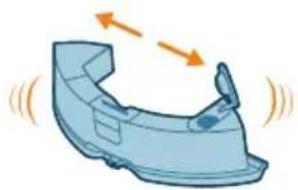
natural_image
Illustration of a car head with motion arrows indicating speed or movement (no text or symbols)
natural_image
Illustration of a faucet pouring liquid into a basin (no text or symbols)6 Izlijte vodu u umivaonik.
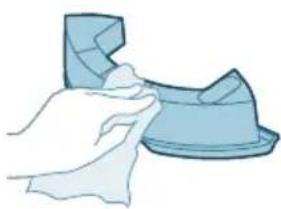
natural_image
Illustration of a hand cleaning a blue object with a cloth (no text or symbols)natural_image
Illustration of a blue plastic case with an orange arrow indicating downward motion (no text or symbols)natural_image
Illustration of a robotic vacuum cleaner with a blue base and orange arrow indicating motion (no text or symbols)10 Vratite spremnik za vodu u robot.
text_image
Diagram of a car air conditioner unit with labeled parts and directional arrows indicating components2 Istovremeno pritisnite gumbe za oslobadanje poklopca četke.
3 Podignite i uklonite poklopac četke.
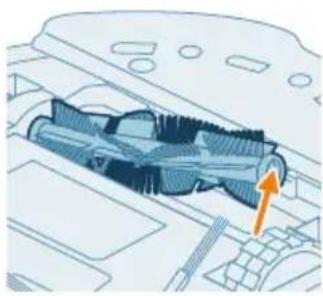
natural_image
Technical illustration of a mechanical component with an orange arrow indicating direction (no text or symbols present)natural_image
Illustration of hands holding a coiled spring or rope, with an orange arrow indicating direction (no text or symbols)natural_image
Illustration of hands tying a rope knot with an upward arrow (no text or symbols)natural_image
Technical illustration of a mechanical component with a highlighted section and directional arrow (no text or symbols)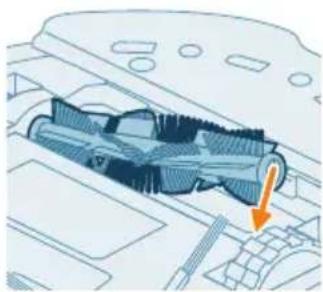
natural_image
Technical diagram of a mechanical component with an arrow indicating a specific section (no text or symbols present)text_image
Diagram of car engine compartment with labeled parts and directional arrows indicating assembly or movement9 Postavite jezičce poklopca četke u odgovarajuće ureze.
10 Gurnite poklopac četke.
natural_image
Diagram of a car engine compartment with a highlighted component and an orange arrow indicating direction (no text or symbols present)1 Okrenite robot naopako na površinu koja je ravna i stabilna.
2 Uklonite bočnu četku.
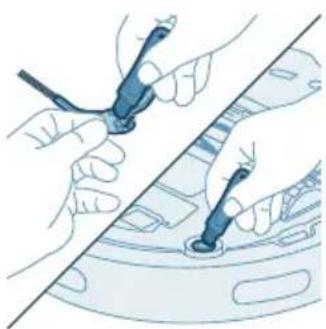
natural_image
Illustration of hands using a tool to adjust or install a component on a vehicle (no text or symbols visible)3 Pomoću četke s mekim vlaknima (npr. četkice za zube) uklonite prašinu i nakupine s bočne četke i robota.
natural_image
Diagram of a car interior with a spray nozzle and orange spray effect (no text or symbols)4 Pričvrstite bočnu četku tako da je utisnete u točan položaj (dok ne čujete škljocaj) na donjem dijelu robota.
text_image
Diagram showing a hand using a tool to adjust or install electronic components, labeled with numbers 1, 2, and 3.1 Okrenite robot naopako na površinu koja je ravna i stabilna. 2 Pomoću četke s mekim vlaknima (npr. četkice za zube) uklonite prašinu i nakupine prašine s prednjeg kotačića i glavnih kotačića.
natural_image
Illustration of four steps of a robotic vacuum cleaner's internal components being inserted into a device (no text or symbols present)1 Iskopčajte stanicu iz zidne utičnice. 2 Koristite meku suhu krpu. 3 Očistite dijelove.
natural_image
Illustration of a device with an orange circular component and a base-mounted device (no text or symbols)natural_image
Simple line drawing of a circular object above a rectangular device with a cable (no text or symbols)text_image
Diagram showing a mechanical component with labeled parts and directional arrows, including numbered callouts.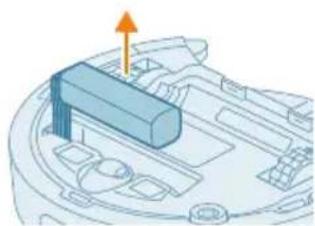
natural_image
3D diagram of a mechanical component with an orange arrow indicating direction (no text or symbols)punjivu bateriju. Obratite se centru za korisničku službu tvrtke Philips u svojoj državi radi adrese servisnog centru u vašoj blizini.
Poduzmite sve mjere opreza kada rukujete alatima da otvorite proizvod i kad odlazete punjivu bateriju.
Upozorenje: prije uklanjanja baterije pazite da je proizvod iskopčan iz stanice i da je baterija potpuno prazna.
natural_image
Illustration of a robotic vacuum cleaner with a circular symbol indicating recycling (no text or symbols present)text_image
Exploded view diagram of a robotic vacuum cleaner with numbered parts for identificationtext_image
0.5m 1.5m 0.5mnatural_image
3D mechanical assembly diagram showing a bracket with mounting holes and two arrows indicating force or movement (no text or symbols)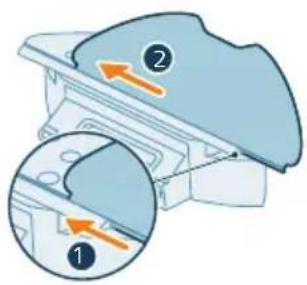
text_image
Diagram showing two labeled parts (① and ②) with directional arrows indicating movement or flow, likely illustrating a mechanical or electrical component assembly.natural_image
Illustration of a hand holding a circular object next to a mechanical device with an arrow indicating motion (no text or symbols)natural_image
Illustration of a robotic vacuum cleaner emitting signal waves from a power supply unit, with a smartphone and hand interacting nearby (no text or symbols)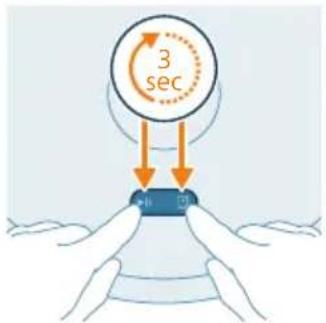
text_image
3 secDownload dell'app
text_image
Safety warning illustration showing incorrect and correct actions to switch a device, with a red X mark indicating no change and a green checkmark.text_image
Diagram showing two views of a mechanical component with numbered annotations and directional arrows indicating movement or force.natural_image
Illustration of a mechanical component with a curved arrow indicating rotation (no text or symbols)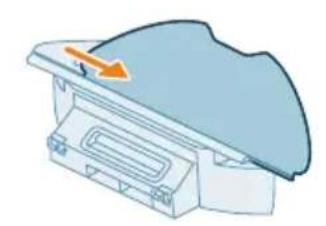
natural_image
Illustration of a mechanical component with a curved surface and an arrow indicating direction (no text or symbols)text_image
Safety warning illustration showing sunlight, a warning sign, and two hanging objects with symbols indicating failure or damage.natural_image
Illustration of a mechanical component with an orange arrow indicating upward motion (no text or symbols)natural_image
Diagram of a printer with an open lid and arrow indicating rotation (no text or symbols)natural_image
Illustration of a container with liquid being poured into it (no text or symbols)natural_image
Illustration of a mechanical component with an arrow indicating rotation or assembly (no text or symbols)natural_image
Illustration of a printer or printer with an orange arrow indicating upward motion (no text or symbols present)text_image
Safety warning symbol and two icons showing a warning sign, sun, and a checkmark over a surface with water droplets.natural_image
Illustration of a blue toolbox placed on a curved base with an orange arrow indicating downward motion (no text or symbols)natural_image
Illustration of a robotic vacuum cleaner with a blue component and an orange arrow pointing to the component (no text or symbols)natural_image
Illustration of a blue plastic container with an orange arrow pointing upward, placed on a white base (no text or symbols)text_image
Diagram illustrating a medical procedure with labeled steps and a magnified view of the step 1.natural_image
Illustration of a car body with motion arrows indicating speed or movement (no text or symbols)natural_image
Illustration of a faucet pouring liquid into a curved container (no text or symbols)natural_image
Illustration of a hand holding a small blue object, possibly a tool or device, with no visible text or symbols.natural_image
Illustration of a blue plastic case with an arrow indicating compression or disassembly (no text or symbols)natural_image
Illustration of a robotic vacuum cleaner next to a blue mechanical component with an orange arrow indicating motion (no text or symbols)text_image
Diagram of a car air intake system with labeled components and directional arrows indicating flow or movement.natural_image
Technical diagram of a mechanical component with an orange arrow indicating a specific feature (no text or symbols present)natural_image
Illustration of hands holding a coiled spring or spring with an orange arrow indicating direction (no text or symbols)natural_image
Illustration of hands tying a knot with an upward arrow (no text or symbols)natural_image
Technical illustration of a mechanical component with internal threading and highlighted section (no text or symbols)natural_image
Technical illustration of a mechanical component with an arrow indicating a downward motion (no text or symbols present)text_image
Diagram showing car dashboard components with numbered parts and directional arrows indicating assembly or movement.natural_image
Diagram of a car engine bay with an orange arrow pointing to the headrest area (no text or symbols present)natural_image
Illustration of hands using a tool to adjust or install a component on a vehicle (no text or symbols visible)natural_image
Diagram of a car interior with a spray nozzle and orange laser beam (no text or symbols)text_image
Diagram showing a hand holding a tool interacting with a device, labeled with three numbered components.1 Capovolgete il robot su una superficie piana e stabile.
natural_image
Illustration of a robotic vacuum cleaner's open lid and base, showing step-by-step installation (no text or symbols)text_image
Diagram showing a mechanical component with labeled parts and directional arrows, including numbered callouts.natural_image
3D diagram of a mechanical component with an orange arrow indicating direction (no text or symbols)natural_image
Illustration of a robotic vacuum cleaner with a recycling symbol (no text or labels)text_image
Exploded view diagram of a robotic vacuum cleaner with numbered parts for identificationtext_image
0.5m 1.5m 0.5m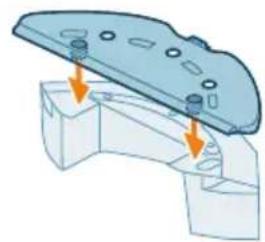
natural_image
Mechanical assembly diagram showing a bracket with mounting holes and two arrows indicating force or movement (no text or symbols present)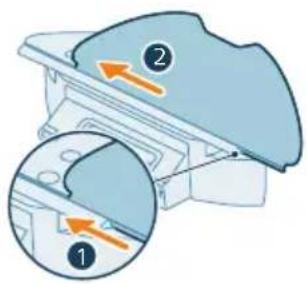
text_image
Diagram showing two views of a device with numbered annotations and directional arrows indicating movement or process.Robota uzlāde

text_image
ON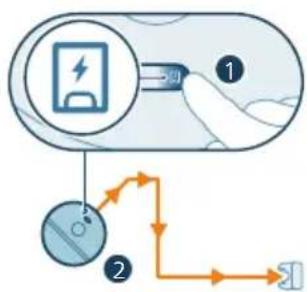
flowchart
graph TD
    A["Initial Charge"] --> B["Charging Step 1"]
    B --> C["Charging Step 2"]
    C --> D["Output"]
natural_image
Illustration of hands holding a circular object with an arrow pointing to a mechanical component (no text or symbols)text_image
Philip Hometron Get your 12th session of the new airway http://www.hometron.com/123456789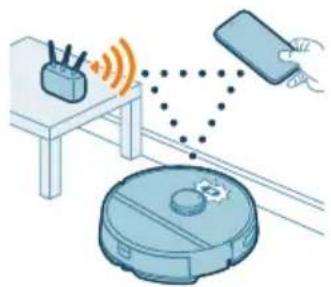
natural_image
Illustration of a robotic vacuum cleaner connected to a smartphone and a router, with no visible text or symbols.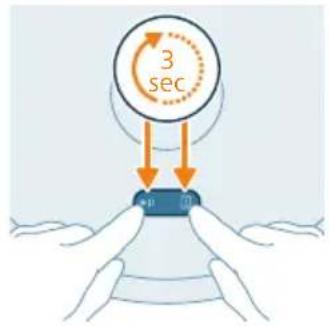
text_image
3 sectext_image
Home screen English Hindi Korean Hindi Hindi Korean (Chinese) Korean (English) Korean (Chinese) Korean (English)text_image
Safety warning illustration showing incorrect and correct actions to remove a device, with a red 'X' indicating no error and a green checkmark for confirmation.text_image
Diagram illustrating a mechanical component with labeled parts and directional arrows indicating movement or force.natural_image
Illustration of a mechanical component with a blue top and orange rotation arrow (no text or symbols)natural_image
Diagram of a mechanical component with an arrow indicating direction (no text or symbols)text_image
Safety warning illustration showing sun, warning sign, and two clothes hanging with symbols indicating water safety and weather conditions.natural_image
3D illustration of a mechanical component with an orange arrow indicating direction (no text or symbols)natural_image
Illustration of a printer with an open lid and orange arrow indicating rotation (no text or symbols)natural_image
Illustration of a hand pouring liquid into a trash bin (no text or symbols)natural_image
Illustration of a mechanical component with an arrow indicating rotation (no text or symbols)natural_image
Illustration of a printer or printer with an arrow indicating upward motion (no text or symbols present)text_image
Safety warning icons showing warning, sun, and checkmark symbols with corresponding iconsnatural_image
Illustration of a blue toolbox with an arrow pointing to a cut-out container (no text or symbols)natural_image
Illustration of a robotic vacuum cleaner with a blue cover and orange arrow pointing to the component (no text or symbols)natural_image
Illustration of a blue plastic container with an orange arrow pointing upward, placed on a white base (no text or symbols)text_image
Diagram illustrating a step in a washing machine tool, showing step 1 and step 2 with motion arrows and color-coded zones.natural_image
Illustration of a car interior with water flow indicators (no text or symbols)5 Sakratiet üdens tvertni.
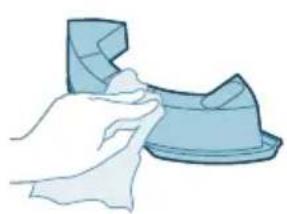
natural_image
Illustration of a hand cleaning a small blue object (no text or symbols)6 Izlejiet üdeni izlietnē.
natural_image
Illustration of a blue plastic case with an arrow indicating downward motion, showing internal components (no text or symbols)9 Ielieciet putekju tvertni atpakal ūdens tvertnē.
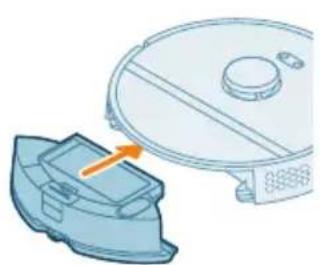
natural_image
Illustration of a robotic vacuum cleaner with a blue component and orange arrow indicating motion (no text or symbols)text_image
Diagram of a car air conditioner unit with labeled parts and directional arrows indicating airflow or movement.natural_image
Technical illustration of a car interior with an orange arrow indicating a specific component (no text or symbols present)natural_image
Illustration of hands holding a mechanical component with an orange arrow indicating motion (no text or symbols)natural_image
Illustration of hands threading a knitted fabric with an upward arrow (no text or symbols)6 Nonemiet matus un citus netirumus no galvenas sukas.
natural_image
Technical illustration of a mechanical component with a highlighted section and directional arrow (no text or symbols)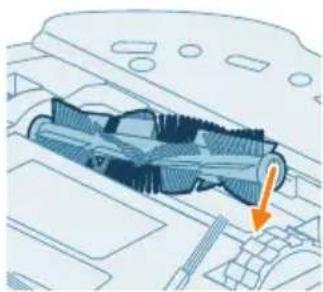
natural_image
Technical diagram of a mechanical component with an arrow indicating a specific section (no text or symbols present)text_image
Diagram of car engine compartment with labeled parts and directional arrows indicating assembly or movementnatural_image
Diagram of a car engine compartment with a highlighted component and an orange arrow indicating direction (no text or symbols present)natural_image
Illustration of hands using a tool to adjust or install a component on a vehicle (no text or symbols visible)3 Izmantojiet birsti ar mīkstiem sariem (piem., zobu birsti), lai noņemtu puteklus vai pūkas no sānu sukas un robota.
natural_image
Diagram of a car interior with a spray nozzle and orange spray effect (no text or symbols)text_image
Diagram showing a hand using a tool to adjust or install a device with numbered parts labeled 1, 2, and 3.natural_image
Illustration of four steps of a robotic vacuum cleaner's internal components being inserted into a device (no text or symbols present)natural_image
Illustration of a computer monitor with an orange screen and a circular diagram above it (no text or symbols)Stacijas indikatora gaismina iedegas oranža.
natural_image
Simple line drawing of a device with a circular component above it, no text or symbols present.text_image
Diagram showing a mechanical component with labeled parts and directional arrows, including numbered annotations ① and ②.natural_image
3D diagram of a mechanical component with an orange arrow indicating direction (no text or symbols)natural_image
Illustration of a robotic vacuum cleaner with a circular symbol indicating recycling (no text or symbols present)text_image
Exploded view diagram of a robotic vacuum cleaner with numbered parts for identificationtext_image
0.5m 1.5m 0.5mnatural_image
3D mechanical assembly diagram showing a bracket with mounting holes and arrows indicating assembly direction (no text or symbols)text_image
Diagram showing two labeled parts (① and ②) with directional arrows indicating movement or flow, likely illustrating a mechanical or electrical component.Roboto jkrovimas
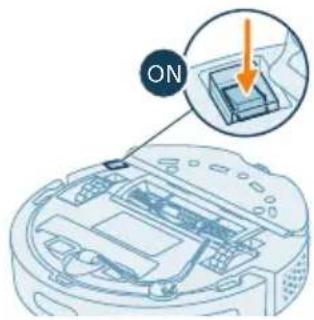
text_image
ONnatural_image
Illustration of hands holding a circular object next to a mechanical device with an arrow indicating motion (no text or symbols)text_image
Philip HomeRun Get your home run your own phone OK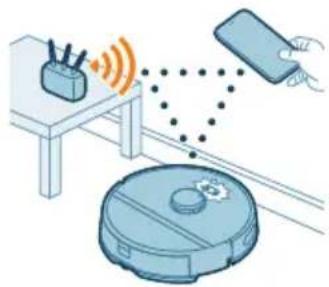
natural_image
Illustration of a robotic vacuum cleaner connected to a smartphone via wireless signal and sensor points (no text or symbols)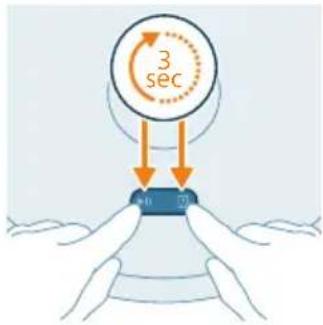
text_image
3 sec 7text_image
Settings WLAN Philips robot_XXYXtext_image
Export Export Export Export Export Export Export Export Export Export Export Export Export Export Export Export Export Export Export Export Export Export Export Export Export Export Export Export Export Export Export Export Export Export Export Export Export Export Export Export Export Export Export Export Export Export Export Export Export Export Exporttext_image
Diagram showing two scenarios of a household with accessories and a checkmark indicating cancellation or rejection.text_image
Diagram showing two views of a mechanical component with numbered annotations and directional arrows indicating movement or force.natural_image
3D illustration of a mechanical component with a curved arrow indicating rotation (no text or symbols)natural_image
Illustration of a mechanical component with a blue cover and orange arrow indicating direction (no text or symbols)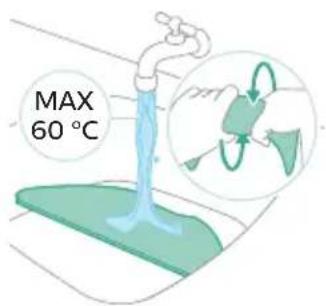
text_image
MAX 60 °Ctext_image
Safety warning illustration showing sunlight illuminating a clothesline with a warning symbol and checkmarknatural_image
3D illustration of a mechanical component with an orange arrow indicating direction (no text or symbols)natural_image
Illustration of a printer with an open lid and orange arrow indicating rotation (no text or symbols)natural_image
Illustration of a trash bin with a plastic container pouring liquid into it (no text or symbols)natural_image
Illustration of a mechanical component with an arrow indicating rotation or assembly (no text or symbols)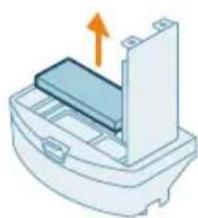
natural_image
Diagram of a printer or printer with an orange arrow indicating upward motion (no text or symbols present)text_image
Safety warning icons showing sun, water drop, and checkmark symbolsnatural_image
Illustration of a blue toolbox with an arrow indicating compression or disassembly (no text or symbols)Vandens bako valymas
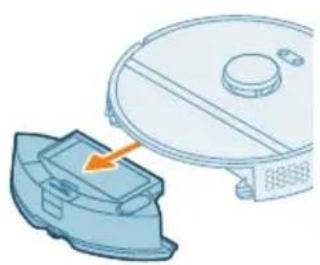
natural_image
Illustration of a robotic vacuum cleaner with a blue component and orange arrow indicating motion (no text or symbols)natural_image
3D illustration of a mechanical component with an upward arrow indicating motion (no text or symbols)text_image
Diagram illustrating a medical procedure with labeled steps 1 and 2 showing a hand holding a device.4 Vandens bakelj pripildykite vandentiekio vandens.
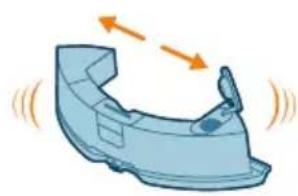
natural_image
Illustration of a car body component with motion arrows indicating movement (no text or symbols)5 Vandens bakelj pakratykite.
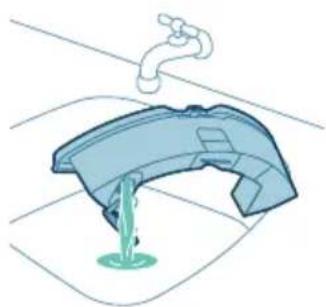
natural_image
Illustration of a faucet pouring liquid into a container (no text or symbols)natural_image
Illustration of a hand cleaning a small object (no text or symbols)natural_image
Illustration of a blue toolbox placed on a curved base with an orange arrow indicating force or movement (no text or symbols)natural_image
Illustration of a robotic vacuum cleaner with a blue mesh component and an orange arrow indicating motion (no text or symbols)text_image
Diagram of a car air vent with numbered components and directional arrows indicating airflow or movementnatural_image
Technical diagram of a mechanical component with an orange arrow indicating direction (no text or symbols present)natural_image
Illustration of hands holding a mechanical component with an orange arrow indicating motion (no text or symbols)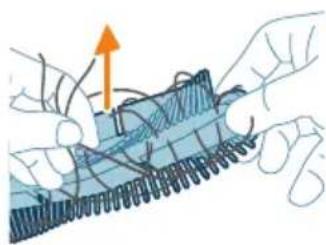
natural_image
Illustration of hands threading a rope with an upward arrow (no text or symbols)natural_image
Technical illustration of a mechanical component with internal threading and a highlighted section (no text or symbols)natural_image
Technical diagram of a mechanical component with an arrow indicating a specific feature (no text or symbols present)text_image
Diagram showing car interior components with numbered labels and directional arrows indicating parts of the dashboard.natural_image
Diagram of a car engine hood with a blue connector and orange arrow indicating upward motion (no text or symbols)natural_image
Illustration of hands using pliers to adjust or install a component on a vehicle (no text or symbols visible)natural_image
Diagram of a robotic arm spraying liquid onto a car interior (no text or symbols)text_image
Diagram showing a hand using a tool to adjust or install a device with numbered parts labeled 1, 2, and 3.natural_image
Illustration of four steps of a robotic vacuum cleaner's internal components being inserted, showing hand placement and cleaning (no text or symbols present)natural_image
Illustration of a device with an orange circular component and a base-mounted cable (no text or symbols)natural_image
Simple line drawing of a circular component with horizontal lines and a base-mounted device (no text or symbols)text_image
Diagram showing a mechanical component with labeled parts and directional arrows, including numbered callouts.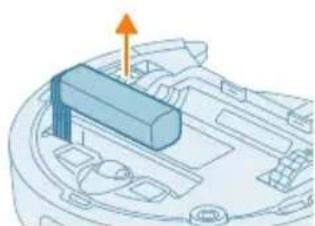
natural_image
3D diagram of a mechanical component with an arrow indicating direction (no text or symbols)natural_image
Illustration of a robotic vacuum cleaner with a circular symbol indicating recycling (no text or symbols present)text_image
Exploded view diagram of a robotic vacuum cleaner with numbered parts for identification and assembly reference.text_image
0.5m 1.5m 0.5mnatural_image
3D diagram of a mechanical component with mounting holes and a base, showing alignment arrows (no text or symbols)text_image
Diagram showing two views of a mechanical component with numbered annotations and directional arrows indicating movement or force.natural_image
Illustration of a hand holding a circular object with a handle, next to a mechanical device (no text or symbols visible)text_image
Philip Hotiellun You will get your home to get your button. OK! Cancel Help No. 100% or 100%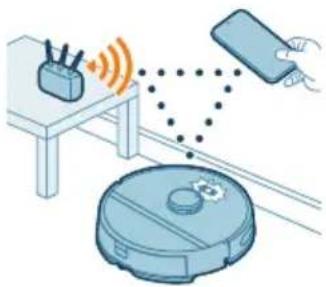
natural_image
Illustration of a robotic vacuum cleaner connected to a smartphone and a coffee maker (no text or symbols present)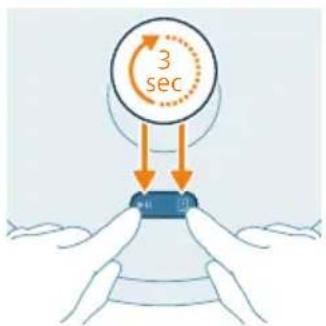
text_image
3 sectext_image
Settings Logan Leaf Edit Edit Edit Edit Edit Edit Edit Edit Edit Edittext_image
Safety warning illustration showing incorrect repair of a bed and cat with a 'No. 100%' mark, plus checkmark indicating no repair.text_image
Diagram showing two labeled parts (① and ②) with arrows indicating direction, likely illustrating a mechanical or electrical component assembly.natural_image
Illustration of a mechanical component with a blue top and orange rotation arrow (no text or symbols)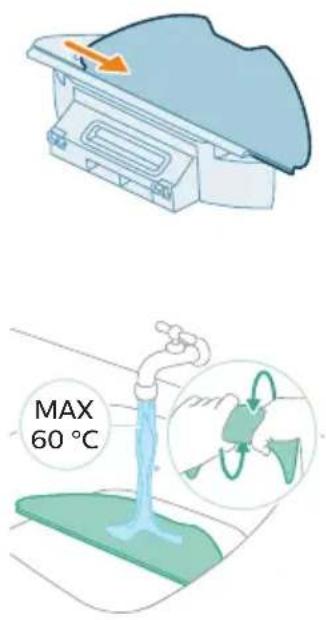
text_image
MAX 60 °Ctext_image
Safety warning illustration showing sunlight, a leaf with raindrops, and a checkmark indicating failure.natural_image
3D illustration of a mechanical component with an arrow indicating upward motion (no text or symbols)natural_image
Diagram of a printer with an open lid and orange arrow indicating rotation (no text or symbols)natural_image
Illustration of a plastic bag pouring liquid into a trash bin (no text or symbols)natural_image
Illustration of a mechanical component with an arrow indicating rotation or assembly (no text or symbols)natural_image
Illustration of a printer or printer with an orange arrow indicating upward motion (no text or symbols present)text_image
Safety warning icons showing sun, water drop, and checkmark symbolsnatural_image
Illustration of a blue plastic case with an orange arrow indicating downward motion (no text or symbols)natural_image
Illustration of a robotic vacuum cleaner with a highlighted component (no text or symbols)natural_image
3D illustration of a mechanical component with an upward arrow, no text or symbols presenttext_image
Diagram illustrating a water tap with labeled steps and a magnified view showing the valve mechanism.natural_image
Illustration of a car body component with motion arrows indicating movement (no text or symbols)natural_image
Illustration of a faucet pouring liquid into a container (no text or symbols)natural_image
Illustration of a hand holding a small blue object, possibly a tool or device, with no visible text or symbols.natural_image
Illustration of a blue plastic case with an arrow indicating compression or disassembly (no text or symbols)natural_image
Illustration of a robotic vacuum cleaner next to a blue mechanical component with an orange arrow indicating motion (no text or symbols)text_image
Diagram of a car air vent with numbered components and directional arrows indicating airflow or movementnatural_image
Technical diagram of a mechanical component with an orange arrow indicating a specific feature (no text or symbols present)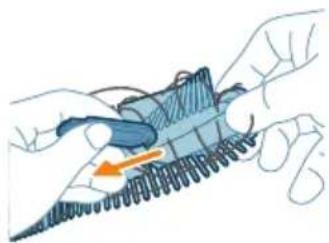
natural_image
Illustration of hands holding a coiled spring or spring with an orange arrow indicating direction (no text or symbols)natural_image
Illustration of hands tying a knot with an upward arrow (no text or symbols)natural_image
Technical illustration of a mechanical component with internal threading and highlighted section (no text or symbols)natural_image
Technical illustration of a mechanical component with an orange arrow indicating a specific feature (no text or symbols present)text_image
Diagram showing car interior components with numbered parts and directional arrows indicating movement or flownatural_image
Diagram of a car engine compartment showing intake manifold and exhaust pipe (no text or labels)natural_image
Illustration of hands using a tool to adjust or install a car body panel (no text or symbols visible)natural_image
Diagram of a robotic arm spraying water onto a vehicle interior (no text or symbols)text_image
Diagram showing a hand using a tool to adjust or install a device, labeled with numbered components.natural_image
Illustration of four steps of a robotic vacuum cleaner's internal components being connected, showing hand placement and tool path (no text or symbols)text_image
Diagram showing mechanical assembly with labeled parts and directional arrows, including a numbered step 1 and 2.natural_image
Diagram of a mechanical component with an arrow indicating upward motion (no text or symbols present)natural_image
Illustration of a robotic vacuum cleaner with a circular symbol indicating recycling (no text or symbols present)text_image
Exploded view diagram of a robotic vacuum cleaner with numbered parts for identification1 Start-/stopknop
text_image
0.5m 1.5m 0.5m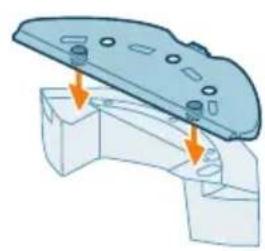
natural_image
3D diagram of a mechanical component with arrows indicating assembly or force direction (no text or symbols)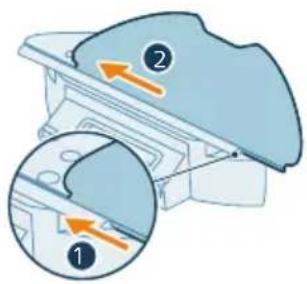
text_image
Diagram showing two labeled parts (① and ②) with directional arrows indicating movement or flow, likely illustrating a mechanical or process setup.flowchart
graph TD
    A["Electricity Battery"] --> B["Switch"]
    B --> C["Power Supply"]
    C --> D["Output"]
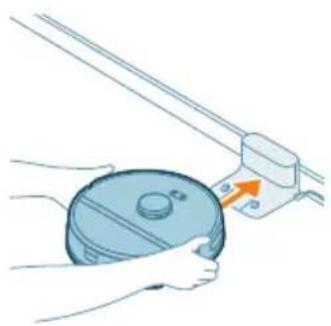
natural_image
Illustration of a hand holding a circular object next to a mechanical device with an arrow indicating motion (no text or symbols)text_image
Philip Hotiellun You will get your home to get your button. OK! Cancel Help No. 100% or 100%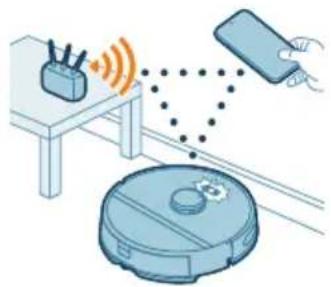
natural_image
Illustration of a robotic vacuum cleaner with sensor points and a hand interacting with a smartphone (no text or symbols)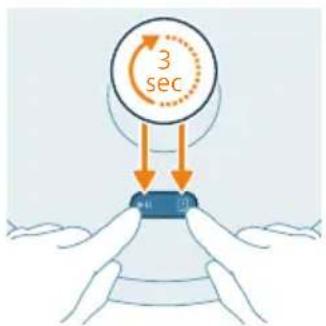
text_image
3 secDe app downloaden
text_image
Settings WLAN Philips robot_XOMYtext_image
English English English English English English English English English English English English English English English English English English English English English English English English English English English English English English English English English English English English English English English English English English English English English English English English English English Englishtext_image
Illustration showing a medical procedure with a red X mark and a green checkmark indicating approval or rejection.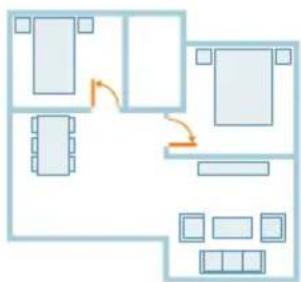
flowchart
graph TD
    A["Room 1"] --> B["Room 2"]
    B --> C["Room 3"]
    C --> D["Room 4"]
    D --> E["Room 5"]
    E --> F["Room 6"]
    F --> G["Room 7"]
    G --> H["Room 8"]
    H --> I["Room 9"]
    I --> J["Room 10"]
    style A fill:#cce5ff,stroke:#333
    style B fill:#cce5ff,stroke:#333
    style C fill:#cce5ff,stroke:#333
    style D fill:#cce5ff,stroke:#333
    style E fill:#cce5ff,stroke:#333
    style F fill:#cce5ff,stroke:#333
    style G fill:#cce5ff,stroke:#333
    style H fill:#cce5ff,stroke:#333
    style I fill:#cce5ff,stroke:#333
    style J fill:#cce5ff,stroke:#333
text_image
Diagram showing two labeled parts (① and ②) with arrows indicating movement or force, likely illustrating a mechanical or electrical component assembly.natural_image
Illustration of a mechanical component with a curved arrow indicating rotation (no text or symbols)natural_image
Diagram of a mechanical component with a blue cover and orange arrow indicating direction (no text or symbols)text_image
Safety warning illustration showing sun, warning triangle, and clothes hanging with checkmark indicatorsnatural_image
Illustration of a blue plastic container with an orange arrow indicating upward motion (no text or symbols)natural_image
Illustration of a printer with an open lid and orange arrow indicating rotation (no text or symbols)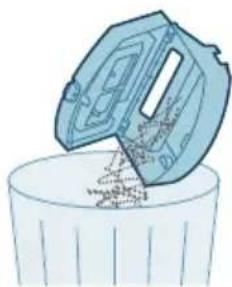
natural_image
Illustration of a hand pouring liquid into a trash bin (no text or symbols)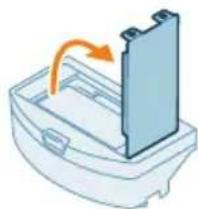
natural_image
Illustration of a mechanical component with an arrow indicating rotation or assembly (no text or symbols)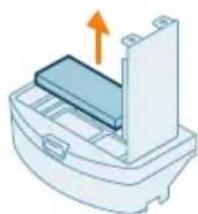
natural_image
Illustration of a printer or printer with an orange arrow indicating upward motion (no text or symbols present)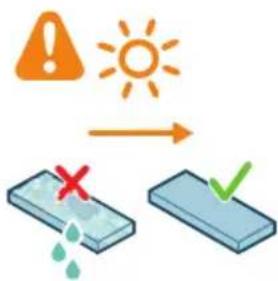
text_image
Safety warning icons showing warning, sun, and checkmark symbols with corresponding visual examplesnatural_image
Illustration of a blue toolbox with an arrow indicating compression or disassembly (no text or symbols)natural_image
Illustration of a robotic vacuum cleaner next to a blue mechanical component, with no visible text or symbols.natural_image
3D diagram of a mechanical component with an orange arrow indicating direction (no text or symbols)text_image
Diagram illustrating a step in a washing machine tool, showing step 1 with an arrow and step 2 with a green liquid level.natural_image
Illustration of a blue car body with motion arrows indicating movement (no text or symbols)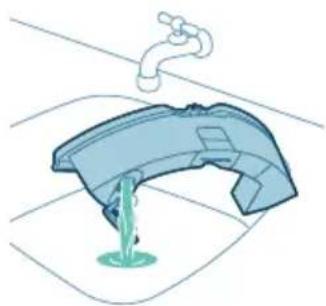
natural_image
Illustration of a faucet pouring liquid into a container (no text or symbols)natural_image
Illustration of a hand cleaning a blue object with a circular base (no text or symbols)natural_image
Illustration of a blue plastic case with an orange arrow indicating downward motion (no text or symbols)natural_image
Illustration of a robotic vacuum cleaner with a blue component and an orange arrow indicating motion (no text or symbols)text_image
Diagram of a car air conditioner unit with labeled parts and directional arrows indicating airflow or movement.natural_image
Technical diagram of a mechanical component with an orange arrow indicating direction (no text or symbols present)4 Trek de borstel eruit.
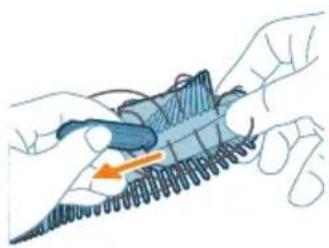
natural_image
Illustration of hands holding a coiled spring or rope with an orange arrow indicating direction (no text or symbols)natural_image
Illustration of hands tying a knot with a blue rope and an orange upward arrow (no text or symbols)natural_image
Technical illustration of a mechanical component with a highlighted section and an orange arrow indicating direction (no text or symbols present)natural_image
Technical illustration of a mechanical component with an arrow indicating a specific feature (no text or symbols present)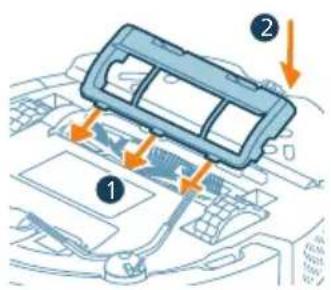
text_image
Diagram showing car interior components with numbered parts and directional arrows indicating movement or flownatural_image
Diagram of a car engine compartment with an orange arrow indicating upward motion (no text or symbols present)natural_image
Illustration of hands using a tool to adjust or install a component on a vehicle (no text or symbols visible)natural_image
Diagram of a car interior with a spray nozzle and exhaust plume (no text or symbols)text_image
Diagram showing a hand holding a tool interacting with a device, labeled with numbered components 1, 2, and 3.natural_image
Illustration of four steps of a robotic vacuum cleaner's internal components being inserted into a device (no text or symbols present)text_image
Diagram showing mechanical assembly with labeled parts and directional arrows, including a numbered component 1.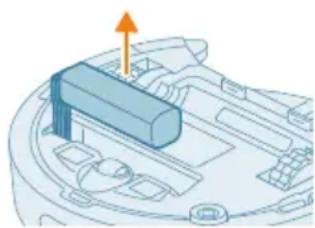
natural_image
3D diagram of a mechanical component with an orange arrow indicating direction (no text or symbols)natural_image
Illustration of a robotic vacuum cleaner with a circular symbol indicating recycling (no text or labels present)text_image
Exploded view diagram of a robotic vacuum cleaner with numbered parts and Chinese labels1 Start/stopp-knapp
2 Returknapp
3 Toppdeksel
text_image
0.5m 1.5m 0.5m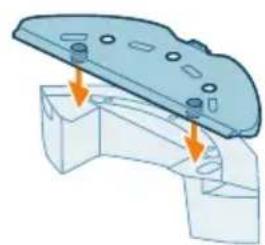
natural_image
3D diagram of a mechanical component with arrows indicating assembly or force direction (no text or symbols)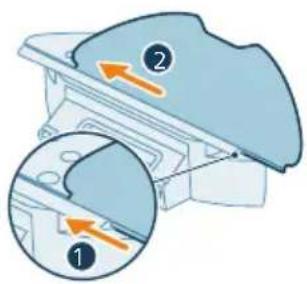
text_image
Diagram showing two views of a mechanical component with numbered annotations and directional arrows indicating movement or force.natural_image
Illustration of a hand holding a circular object with a handle, next to a mechanical component (no text or symbols)text_image
Phleg HomeRun OK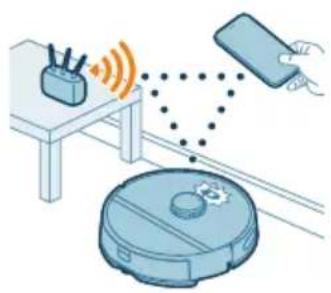
natural_image
Illustration of a robotic vacuum cleaner connected to a device via wireless signal and a hand holding a smartphone (no text or symbols)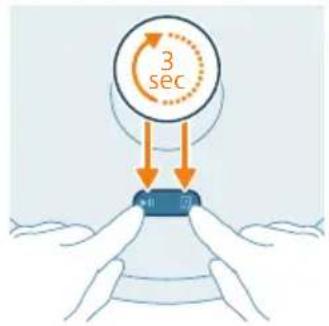
text_image
3 secNedlasting av appen
1 Skann QR-koden til venstre på robotemballasjen for å laste ned Philips HomeRun-robot-appen.
Eller:
text_image
Settings WLAN Philips robot_XXXtext_image
Export Export Export Export Export Export Export Export Export Export Export Export Export Export Export Export Export Export Export Export Export Export Export Export Export Export Export Export Export Export Export Export Export Export Export Export Export Export Export Export Export Export Export Export Export Export Export Export Export Export Exporttext_image
Diagram showing two scenarios of a medical procedure: one with a stethoscope and a red X mark, the other with a checkmark and a green checkmark.text_image
Diagram showing two labeled parts (① and ②) with arrows indicating movement or force, likely illustrating a mechanical or electrical component assembly.natural_image
Illustration of a mechanical component with a curved arrow indicating rotation (no text or symbols)natural_image
Illustration of a mechanical component with a blue top and orange arrow indicating direction (no text or symbols)text_image
Safety warning illustration showing sunlight, a warning sign, and two clothes hanging with symbols indicating water safety.4 La den vaskbare mikrofiberkluten lufttørke.
natural_image
3D illustration of a mechanical component with an arrow indicating upward motion (no text or symbols)natural_image
Illustration of a printer with an open lid and orange arrow indicating rotation (no text or symbols)natural_image
Illustration of a hand pouring liquid into a trash bin (no text or symbols)natural_image
Illustration of a mechanical component with an arrow indicating rotation or assembly (no text or symbols)natural_image
Diagram of a mechanical component with an arrow indicating upward motion (no text or symbols)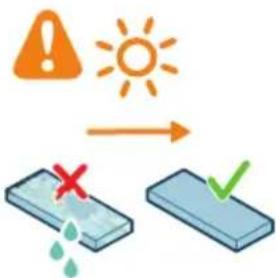
text_image
Safety warning icons showing sun, water drop, and checkmark symbols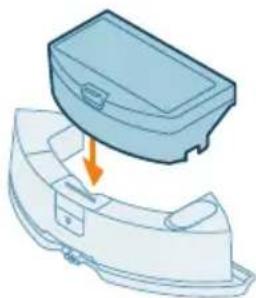
natural_image
Illustration of a blue plastic case with an arrow indicating downward motion, showing internal components (no text or symbols)natural_image
Illustration of a robotic vacuum cleaner next to a blue mechanical component with an orange arrow pointing to it (no text or symbols)1 Trykk på utløserknappen på vannbeholderen.
2 Trekk vannbeholderen ut av roboten.
natural_image
Illustration of a blue plastic container with an orange arrow indicating upward motion (no text or symbols)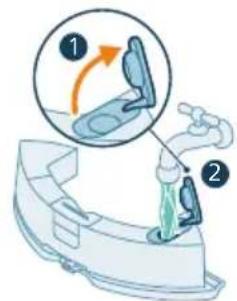
text_image
Diagram illustrating a medical procedure with labeled steps 1 and 2 showing a device being injected or performed.4 Fyll vannbeholderen med vann fra springen.
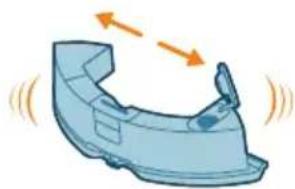
natural_image
Illustration of a blue car body with motion arrows indicating movement (no text or symbols)5 Rist vannbeholderen.
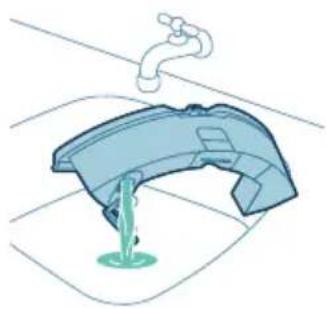
natural_image
Illustration of a faucet pouring liquid into a container with green liquid, no text or symbols present6 Tøm ut vannet i vasken.
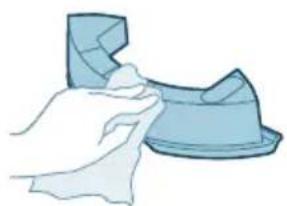
natural_image
Illustration of a hand cleaning a blue object with a circular base (no text or symbols)natural_image
Illustration of a blue toolbox placed on a curved base with an arrow indicating downward motion (no text or symbols)natural_image
Illustration of a robotic vacuum cleaner with a blue base and orange arrow indicating motion (no text or symbols)text_image
Diagram of a car air conditioner unit with labeled parts and directional arrows indicating airflow or movement.natural_image
Technical diagram of a mechanical component with an orange arrow indicating direction (no text or symbols present)natural_image
Illustration of hands holding a blue mechanical component with an orange arrow indicating motion (no text or symbols)natural_image
Illustration of hands tying a knot with a string, showing rope routing and a yellow upward arrow (no text or symbols)natural_image
Technical illustration of a mechanical component with internal threading and highlighted section (no text or symbols)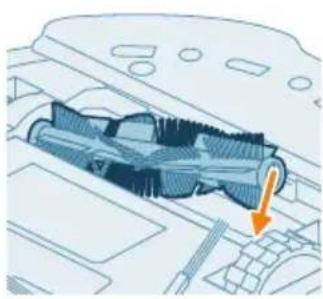
natural_image
Technical illustration of a mechanical component with an arrow indicating direction (no text or symbols present)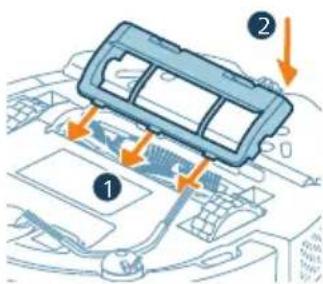
text_image
Diagram showing car interior components with numbered parts and directional arrows indicating flow or movementnatural_image
Diagram of a car engine compartment with an orange arrow indicating upward motion (no text or symbols present)natural_image
Illustration of hands using blue toolps to adjust or install a component on a vehicle (no text or symbols visible)3 Bruk en børste med myk bust (f.eks. en tannbørste) for å fjerne støv eller lo fra sidebørsten og roboten.
natural_image
Diagram of a car interior with a spray nozzle and exhaust pipe (no text or symbols)text_image
Diagram showing a hand holding a tool interacting with a device, labeled with three numbered components.1 Plasser roboten opp ned på en flat og stødig overflate. 2 Bruk en børste med myk bust (f.eks. en tannbørste) for å fjerne støv eller lo fra styrehjulet foran og hovedhjulene.
natural_image
Illustration of a robotic vacuum cleaner's open lid and base, showing step-by-step cleaning and assembly (no text or symbols)natural_image
Illustration of a device with an orange circular component and a base-mounted cable (no text or symbols)natural_image
Simple line drawing of a computer monitor with a circular diagram above it (no text or symbols)text_image
Diagram showing a mechanical component with labeled parts and directional arrows, including numbered callouts.lenger kan lade det, eller när det går tomt for strøm raskt. Kontakt Philips-kundeservicen for ditt land for å få adressen til et servicesenter nær deg.
natural_image
3D diagram of a mechanical component with an orange arrow indicating direction (no text or symbols)natural_image
Illustration of a robotic vacuum cleaner with a recycling symbol (no text or labels)text_image
Exploded view diagram of a robotic vacuum cleaner with numbered parts for identificationtext_image
0.5m 1.5m 0.5m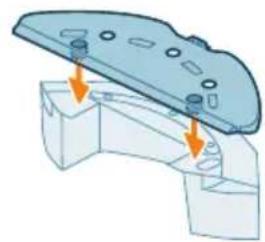
natural_image
3D diagram of a mechanical component with mounting holes and arrows indicating assembly or force (no text or symbols)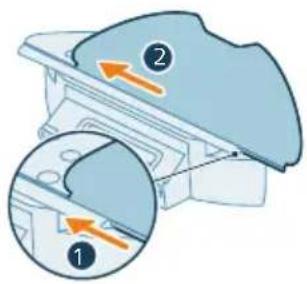
text_image
Diagram showing two views of a mechanical component with numbered annotations and directional arrows indicating movement or force.Instalowanie stacji
natural_image
Illustration of a hand holding a blue cylindrical object with a small orange arrow pointing to it, next to a mechanical component (no text or symbols)text_image
Phige HomeRun Add your home run to the room of your home run.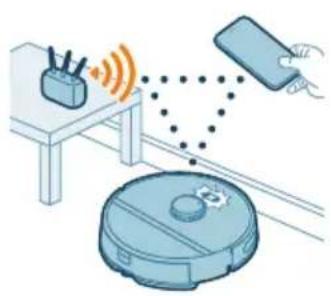
natural_image
Illustration of a robotic vacuum cleaner connected to a device via wireless signal and sensor points (no text or symbols)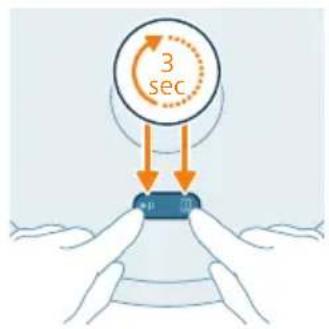
text_image
3 sec ptext_image
Home savings English Cash Short Medium Short Short Short Short (Cash) Short (Short) Long Maintext_image
Safety warning illustration showing incorrect and correct actions to switch from a bed to a coffee table, with symbols indicating no error and checkmark.text_image
Diagram showing two labeled parts (① and ②) with arrows indicating movement or force, likely illustrating a mechanical or electrical component assembly.natural_image
Illustration of a mechanical component with a curved arrow indicating rotation (no text or symbols)natural_image
Illustration of a medical device with a blue cover and orange arrow indicating direction (no text or symbols)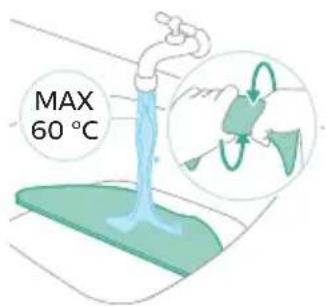
text_image
MAX 60 °Ctext_image
Safety warning illustration showing sunlight illuminating a clothesline with a warning symbol and checkmark indicating water release.natural_image
3D illustration of a mechanical component with an orange arrow indicating upward motion (no text or symbols)natural_image
Diagram of a printer's internal structure with an orange arrow indicating rotation (no text or symbols)natural_image
Illustration of a trash bin with a plastic container pouring liquid into it (no text or symbols)natural_image
Illustration of a mechanical component with an arrow indicating rotation or assembly (no text or symbols)natural_image
Diagram of a printer or printer with an orange arrow indicating upward motion (no text or symbols present)5 Wyciągnij filtr.
text_image
Safety warning icons showing sun and water symbols with a checkmark indicating disassembly or repairnatural_image
Illustration of a blue box with an arrow pointing to a smaller container (no text or symbols)natural_image
Illustration of a robotic vacuum cleaner with a blue component and an orange arrow pointing to it (no text or symbols)natural_image
3D illustration of a mechanical component with an upward arrow indicating motion (no text or symbols)text_image
Diagram illustrating a water tap with labeled steps 1 and 2 showing the movement of a showerhead.natural_image
Illustration of a car body component with motion arrows indicating movement (no text or symbols)natural_image
Illustration of a faucet pouring liquid into a container with green liquid, no text or symbols presentnatural_image
Illustration of a hand cleaning a small blue object (no text or symbols)natural_image
Illustration of a blue plastic case with an arrow indicating downward motion, showing internal components (no text or symbols)natural_image
Illustration of a robotic vacuum cleaner with a blue mesh component and an orange arrow indicating motion (no text or symbols)text_image
Diagram of a car air vent with numbered components and directional arrows indicating airflow or movementnatural_image
Technical diagram of a mechanical component with an orange arrow indicating direction (no text or symbols present)natural_image
Illustration of hands holding a mechanical component with an orange arrow indicating motion (no text or symbols)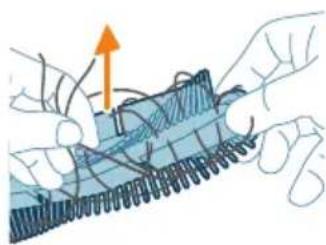
natural_image
Illustration of hands threading a rope with an upward arrow (no text or symbols)natural_image
Technical illustration of a mechanical component with internal threading and a highlighted section (no text or symbols)natural_image
Technical diagram of a mechanical component with an arrow indicating a specific feature (no text or symbols present)text_image
Diagram showing car interior components with numbered labels and directional arrows indicating parts of the dashboard.natural_image
Diagram of a car engine hood with exhaust pipe and orange arrow indicating direction (no text or symbols)natural_image
Illustration of hands using pliers to adjust or install a car body panel (no text or symbols visible)natural_image
Diagram of a car interior with a spray nozzle and orange flame (no text or symbols)text_image
Diagram showing a hand using a tool to adjust or install a device with numbered parts labeled 1, 2, and 3.natural_image
Illustration of a robotic vacuum cleaner's open lid and base, showing step-by-step cleaning (no text or symbols)natural_image
Illustration of a device with an orange circular component and a base-mounted cable (no text or symbols)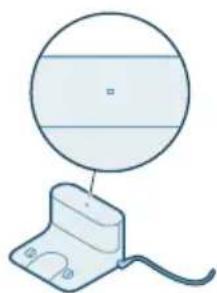
natural_image
Simple line drawing of a circular component above a rectangular base with wires (no text or symbols)text_image
Diagram showing mechanical assembly with labeled parts and directional arrows, including a numbered callout.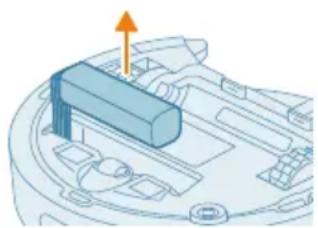
natural_image
3D diagram of a mechanical component with an orange arrow indicating upward motion (no text or symbols)natural_image
Illustration of a robotic vacuum cleaner with a circular symbol indicating recycling (no text or symbols present)text_image
Exploded view diagram of a robotic vacuum cleaner with numbered parts and Chinese labelstext_image
0.5m 1.5m 0.5m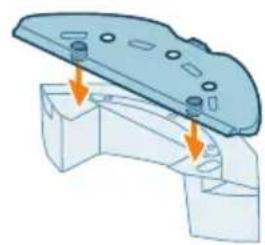
natural_image
3D mechanical assembly diagram showing a bracket with mounting holes and a flat plate (no text or symbols)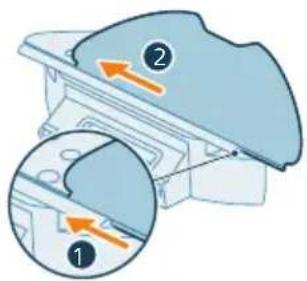
text_image
Diagram showing two views of a mechanical component with numbered annotations and directional arrows indicating movement or force.Instalar a base
flowchart
graph TD
    A["Electricity Battery"] --> B["Charge Drop"]
    B --> C["Electricity Charge"]
    C --> D["Path to Battery"]
    style A fill:#f9f,stroke:#333
    style D fill:#bbf,stroke:#333
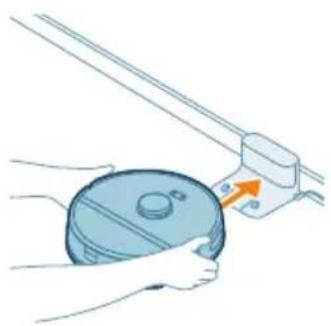
natural_image
Illustration of hands holding a circular object next to a mechanical device with an arrow indicating motion (no text or symbols)text_image
Philip NoneRun http://www.elserun.net/other/100%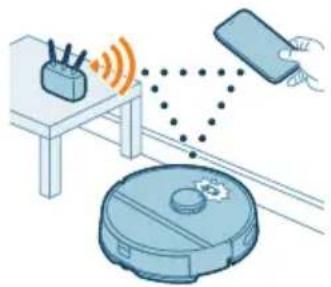
natural_image
Illustration of a robotic vacuum cleaner with sensor points and a hand holding a smartphone (no text or symbols)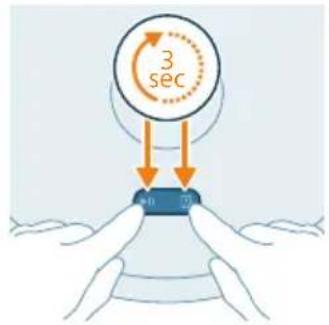
text_image
3 sec →10 70text_image
Settings WLAN Philips robot_XXXSe o emparelhamento Wi-Fi falhar:
text_image
Export Export Export Export Export Export Export Export Export Export Export Export Export Export Export Export Export Export Export Export Export Export Export Export Export Export Export Export Export Export Export Export Export Export Export Export Export Export Export Export Export Export Export Export Export Export Export Export Export Export Exporttext_image
Diagram illustrating a correct and incorrect handling of household items, with one item marked by a red X and the other by a green checkmark.text_image
Diagram showing two labeled parts (① and ②) with arrows indicating movement or force, likely illustrating a mechanical or electrical component assembly.natural_image
Illustration of a mechanical component with a curved top and internal structure, showing rotational motion (no text or symbols)natural_image
Illustration of a mechanical component with a blue cover and orange arrow indicating direction (no text or symbols)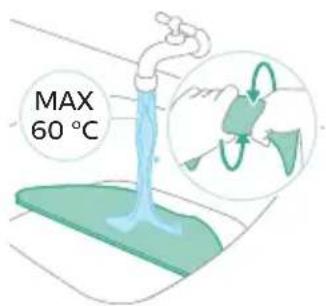
text_image
MAX 60 °Ctext_image
Safety warning illustration showing sunlight illuminating a clothesline with a warning symbol and checkmarknatural_image
Illustration of a mechanical component with an orange arrow indicating upward motion (no text or symbols)natural_image
Illustration of a printer with an open lid and orange arrow indicating rotation (no text or symbols)natural_image
Illustration of a trash bin with a plastic container pouring liquid into it (no text or symbols)natural_image
Illustration of a mechanical component with an arrow indicating rotation (no text or symbols)natural_image
Diagram of a printer or printer with an orange arrow indicating upward motion (no text or symbols present)text_image
Safety warning icons showing sun and water symbols with a checkmark indicating disassembly or repairnatural_image
Illustration of a blue toolbox with an arrow indicating downward motion, partially enclosed in a white container (no text or symbols)natural_image
Illustration of a robotic vacuum cleaner with a blue component and orange arrow indicating motion (no text or symbols)natural_image
3D illustration of a mechanical component with an upward arrow indicating motion (no text or symbols)text_image
Diagram illustrating a medical procedure with labeled steps 1 and 2 showing a hand holding a device.natural_image
Illustration of a car body component with motion arrows indicating movement (no text or symbols)natural_image
Illustration of a faucet pouring liquid into a container (no text or symbols)6 Despeje a água.
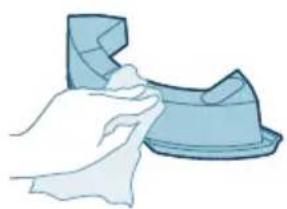
natural_image
Illustration of a hand cleaning a small object (no text or symbols)natural_image
Illustration of a blue plastic case with an arrow indicating downward motion, showing internal components (no text or symbols)natural_image
Illustration of a robotic vacuum cleaner with a blue mesh component and an orange arrow indicating motion (no text or symbols)text_image
Diagram of a car air vent with numbered components and directional arrows indicating airflow or movementnatural_image
Technical diagram of a mechanical component with an orange arrow indicating direction (no text or symbols present)natural_image
Illustration of hands holding a mechanical component with an orange arrow indicating motion (no text or symbols)5 Utilize a ferramenta de limpeza para cortar os pelos.
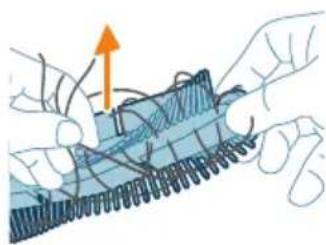
natural_image
Illustration of hands threading a rope with an upward arrow (no text or symbols)natural_image
Technical illustration of a mechanical component with internal threading and a highlighted section (no text or symbols)natural_image
Technical diagram of a mechanical component with an arrow indicating a specific feature (no text or symbols present)text_image
Diagram showing car interior components with numbered labels and directional arrows indicating parts of the dashboard.natural_image
Diagram of a car engine compartment with an orange arrow indicating upward motion (no text or symbols present)natural_image
Illustration of hands using pliers to adjust or install a component on a vehicle (no text or symbols visible)natural_image
Diagram of a car interior with a spray nozzle and exhaust pipe (no text or symbols)text_image
Diagram showing a hand holding a tool interacting with a device, labeled with numbers 1, 2, and 3.natural_image
Illustration of four steps of a robotic vacuum cleaner's internal components being inserted into a device (no text or symbols present)natural_image
Illustration of a medical device with an orange circle and cable, no text or symbols presentnatural_image
Simple line drawing of a device with a circular component above it, no text or symbols present.A luz indicadora da base está apagada.
Repor/restaurar o robot
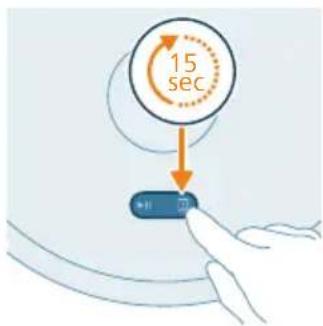
text_image
15 secEncomendar acessórios
text_image
Diagram showing mechanical assembly with labeled parts and directional arrows, including numbered callouts ① and ②.natural_image
3D diagram of a mechanical component with an orange arrow indicating upward motion (no text or symbols)natural_image
Illustration of a robotic vacuum cleaner with a circular symbol indicating recycling (no text or symbols present)text_image
Exploded view diagram of a robotic vacuum cleaner with numbered parts for identification1 Buton Start/Stop
2 Buton de revenire
text_image
0.5m 1.5m 0.5mnatural_image
Mechanical assembly diagram showing a bracket with mounting holes and two arrows indicating force or movement (no text or symbols present)text_image
Diagram showing two views of a mechanical component with numbered annotations and directional arrows indicating movement or force.natural_image
Illustration of a hand holding a circular component with a mechanical bracket and an orange arrow indicating motion (no text or symbols)text_image
Phipped HomeRun OK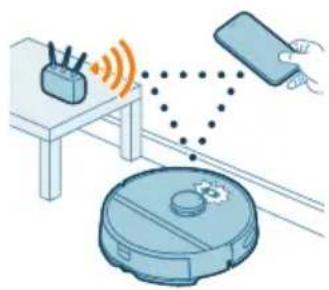
natural_image
Illustration of a robotic vacuum cleaner emitting signal waves from a device, with a smartphone and remote control unit nearby (no text or symbols)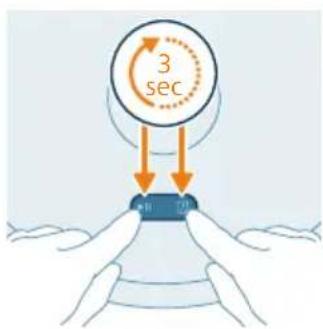
text_image
3 sec H T0text_image
Settings WLAN Philips robot_XXYXtext_image
Export Export Export Export Export Export Export Export Export Export Export Export Export Export Export Export Export Export Export Export Export Export Export Export Export Export Export Export Export Export Export Export Export Export Export Export Export Export Export Export Export Export Export Export Export Export Export Export Export Export Exporttext_image
Diagram illustrating a correct and incorrect handling of household items, with one item marked by a red X and the other by a green checkmark.text_image
Diagram showing two labeled parts (① and ②) with arrows indicating movement or force, likely illustrating a mechanical or electrical component assembly.natural_image
Illustration of a mechanical component with a curved arrow indicating rotation (no text or symbols)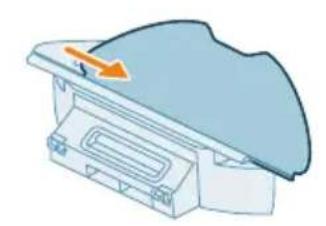
natural_image
Illustration of a mechanical component with a curved surface and an arrow indicating direction (no text or symbols)text_image
Safety warning illustration showing sunlight, a warning sign, and two hanging objects with symbols indicating failure or damage.natural_image
3D illustration of a mechanical component with an orange arrow indicating upward motion (no text or symbols)natural_image
Diagram of a printer with an open lid and arrow indicating rotation (no text or symbols)natural_image
Illustration of a trash bin with an open lid pouring particles into it (no text or symbols)natural_image
Illustration of a mechanical component with an arrow indicating rotation or assembly (no text or symbols)natural_image
Illustration of a printer or scanner with an orange arrow indicating upward motion (no text or symbols present)text_image
Safety warning icon showing sun, warning symbol, and two labeled boxes with checkmarks indicating water droplets and a red X mark.natural_image
Illustration of a mechanical component with an arrow indicating downward motion (no text or symbols)natural_image
Illustration of a robotic vacuum cleaner with a blue component and an orange arrow pointing to it (no text or symbols)natural_image
Illustration of a blue plastic container with an orange arrow pointing upward, placed on a white base (no text or symbols)text_image
Diagram illustrating a water tap with labeled parts and a circular diagram showing the step 1 of the valve mechanism.natural_image
Illustration of a car body component with motion arrows indicating movement (no text or symbols)natural_image
Illustration of a faucet pouring liquid into a curved container (no text or symbols)natural_image
Illustration of a hand holding a small blue object, possibly a tool or device, with no visible text or symbols.natural_image
Illustration of a blue plastic case with an arrow indicating compression or disassembly (no text or symbols)natural_image
Illustration of a robotic vacuum cleaner next to a blue mechanical component with an orange arrow indicating motion (no text or symbols)text_image
Diagram of a car air vent with numbered components and directional arrows indicating airflow or movementnatural_image
Technical diagram of a mechanical component with an orange arrow indicating a specific feature (no text or symbols present)natural_image
Illustration of hands performing a mechanical manipulation or disassembly process (no text or symbols visible)natural_image
Illustration of hands manipulating a blue mechanical component with an upward arrow (no text or symbols)natural_image
Technical diagram of a mechanical component with internal threading and highlighted section (no text or symbols)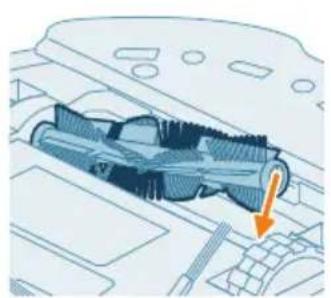
natural_image
Technical illustration of a mechanical component with an orange arrow indicating direction (no text or symbols present)text_image
Diagram of car interior components with numbered parts and directional arrows indicating movement or flownatural_image
Diagram of a car engine compartment with an orange arrow indicating upward motion (no text or symbols present)natural_image
Illustration of hands using a tool to adjust or install a component on a vehicle (no text or symbols visible)natural_image
Diagram of a robotic arm spraying water onto a vehicle interior (no text or symbols)text_image
Diagram showing a hand using a tool to adjust or install a device with numbered parts labeled 1, 2, and 3.natural_image
Illustration of four steps of a robotic vacuum cleaner's internal components being inserted into a device (no text or symbols present)text_image
Diagram showing mechanical assembly with labeled parts and directional arrows, including numbered annotations ① and ②.natural_image
3D diagram of a mechanical component with an orange arrow indicating direction (no text or symbols)natural_image
Illustration of a robotic vacuum cleaner with a circular label indicating a recycling symbol (no text or labels present)text_image
Exploded view diagram of a robotic vacuum cleaner with numbered parts for identificationtext_image
0.5m 1.5m 0.5mnatural_image
3D mechanical assembly diagram showing a bracket with mounting holes and arrows indicating assembly direction (no text or symbols)text_image
Diagram showing two labeled parts (① and ②) with directional arrows indicating movement or flow, likely illustrating a mechanical or electrical component.natural_image
Illustration of a hand holding a circular object with a handle, next to a mechanical device (no text or symbols visible)natural_image
Illustration of a robotic vacuum cleaner connected to a smartphone and a coffee maker (no text or symbols present)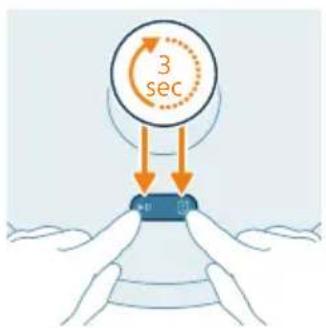
text_image
3 sec 40 70Shkarkimi i aplikacionit
text_image
English English Language English Language English Language English Language English Language English Language English Language English Language English Language English Language English Language English Language English Language English Language English Language English Language English Language English Language English Language English Language English Language English Language English Language English Language English Language English Language English Language English Language English Language English Language English Language English Language English Language English Languagetext_image
Safety warning illustration showing incorrect and correct actions to switch a device, with a red X mark indicating no error and a green checkmark.text_image
Diagram showing two labeled parts (① and ②) with arrows indicating direction, likely illustrating a mechanical or electrical component assembly.natural_image
Illustration of a mechanical component with a curved arrow indicating rotation (no text or symbols)natural_image
Diagram of a mechanical component with a blue cover and orange arrow indicating direction (no text or symbols)text_image
Safety warning illustration showing sunlight, a warning sign, and two clothes hanging with symbols indicating water safety.natural_image
Illustration of a blue plastic container with an orange arrow indicating upward motion (no text or symbols)natural_image
Illustration of a blue toolbox with an arrow indicating compression or disassembly (no text or symbols)natural_image
Illustration of a robotic vacuum cleaner next to a small mechanical component (no text or symbols)natural_image
Illustration of a mechanical component with an orange arrow indicating upward motion (no text or symbols)3 Hiqeni koshin e pluhurit nga depozita e ujit.
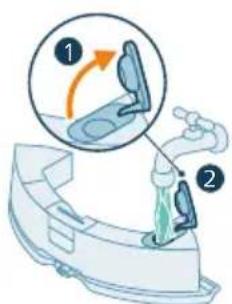
text_image
Diagram illustrating a step in a toilet sink with labeled instructions and visual indicatorsnatural_image
Illustration of a blue plastic car hood with motion arrows indicating movement (no text or symbols)natural_image
Illustration of a faucet pouring liquid into a basin (no text or symbols)natural_image
Illustration of a hand cleaning a small blue object (no text or symbols)natural_image
Illustration of a blue toolbox with an arrow pointing to a smaller container (no text or symbols)natural_image
Illustration of a robotic vacuum cleaner with a blue component being removed, showing no text or symbols.text_image
Diagram of a car air conditioner unit with labeled parts and directional arrows indicating airflow or movement.natural_image
Technical diagram of a mechanical component with an orange arrow indicating direction (no text or symbols present)natural_image
Illustration of hands holding a mechanical component with an orange arrow indicating motion (no text or symbols)natural_image
Illustration of hands threading a knitted fabric with an upward arrow (no text or symbols)natural_image
Technical illustration of a mechanical component with a highlighted section and directional arrow (no text or symbols)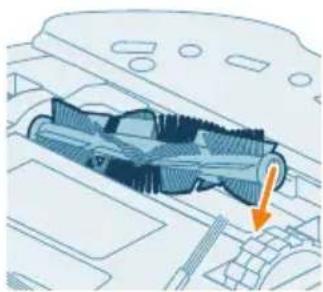
natural_image
Technical illustration of a mechanical component with an arrow indicating a specific part (no text or symbols present)text_image
Diagram showing car engine compartment with labeled parts and directional arrows indicating movement or flownatural_image
Diagram of a car engine compartment with a blue connector and orange directional arrow (no text or symbols)natural_image
Illustration of hands using pliers to install a component on a device (no text or symbols visible)natural_image
Diagram of a car interior with a spray nozzle and exhaust pipe (no text or symbols)text_image
Diagram showing a hand using a tool to adjust or install a device with numbered parts labeled 1, 2, and 3.natural_image
Illustration of four steps of a robotic vacuum cleaner's internal components, showing hand positioning and cleaning (no text or symbols)natural_image
Illustration of a device with an orange circular component and a base-mounted cable (no text or symbols)natural_image
Simple line drawing of a circular object above a rectangular base with wires (no text or symbols)text_image
Diagram showing mechanical assembly with labeled parts and directional arrows, including a numbered step indicator.natural_image
3D diagram of a mechanical component with an orange arrow indicating direction (no text or symbols)natural_image
Illustration of a robotic vacuum cleaner with a circular symbol indicating recycling (no text or symbols present)text_image
Exploded view diagram of a robotic vacuum cleaner with numbered parts for identification and assembly reference.text_image
0.5m 1.5m 0.5mNamestitev postaje
natural_image
3D diagram of a mechanical component with mounting holes and a base, showing alignment arrows (no text or symbols)2 Ravno stran pralne krpe za mokro brisanje potisnite v pravo režo na držalu krpe za brisanje in pritrdite pralno krpo za mokro brisanje na ježka držala krpe za brisanje.
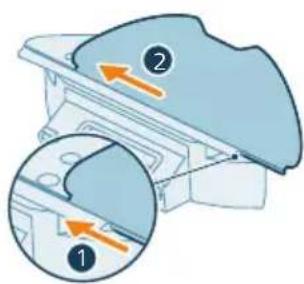
text_image
Diagram showing two views of a mechanical component with numbered annotations and directional arrows indicating movement or force.Polnjenje robota
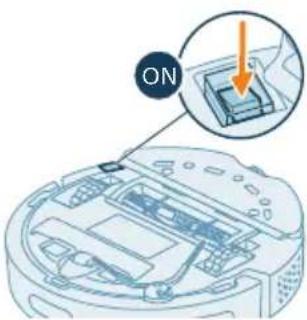
text_image
ON1 Pritisnite stikalo za vklop/izklop na spodnji strani robota, da ga vklopite.
2 Robota obrnite v pravo smer in ga položite na tla pred postajo.
3 Prepričajte se, da je postaja priključena v omrežno vtičnico.
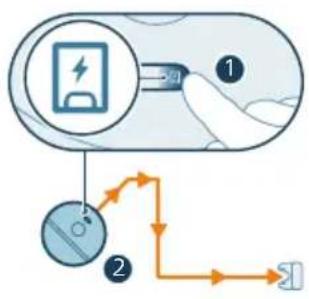
flowchart
graph TD
    A["Step 1: Battery icon"] --> B["Step 2: Carrier symbol"]
    B --> C["Path 1: Click button"]
    C --> D["Path 2: Pulse connection"]
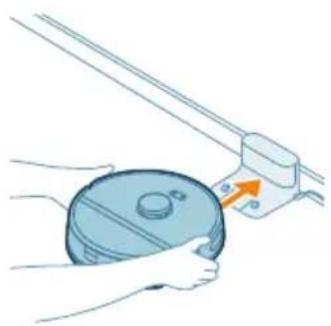
natural_image
Illustration of a hand holding a circular object next to a mechanical device with an arrow indicating motion (no text or symbols)text_image
Philip Honeflun OK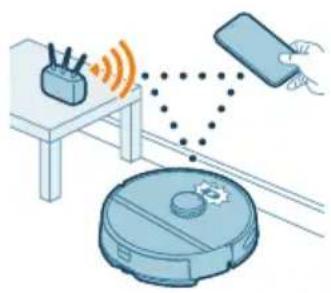
natural_image
Illustration of a robotic vacuum cleaner connected to a device via wireless signals (no text or symbols)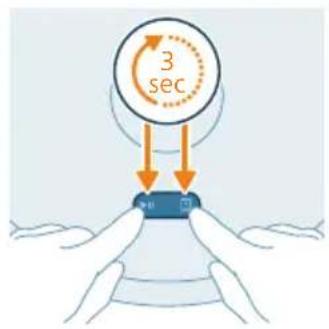
text_image
3 sectext_image
Home setting Light Cash Receipt Payment Payment Payment Receipts Payment Receipts Options BalanceKako deluje robotski sesalnik
natural_image
Illustration of a medical or laboratory setup with a bench, tubing, and accessories (no text or symbols)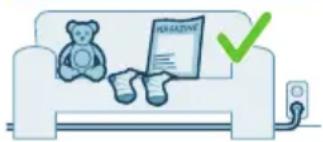
natural_image
Illustration of a teddy bear sitting on a couch with a checkmark and a green checkmark (no text or symbols)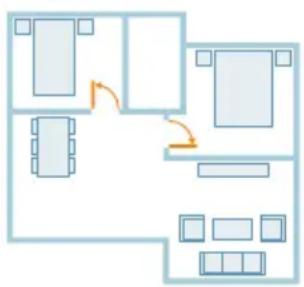
flowchart
graph TD
    A["Room 1"] --> B["Room 2"]
    B --> C["Room 3"]
    C --> D["Room 4"]
    D --> E["Room 5"]
    E --> F["Room 6"]
    F --> G["Room 7"]
    G --> H["Room 8"]
    H --> I["Room 9"]
    I --> J["Room 10"]
    style A fill:#cce5ff,stroke:#333
    style B fill:#cce5ff,stroke:#333
    style C fill:#cce5ff,stroke:#333
    style D fill:#cce5ff,stroke:#333
    style E fill:#cce5ff,stroke:#333
    style F fill:#cce5ff,stroke:#333
    style G fill:#cce5ff,stroke:#333
    style H fill:#cce5ff,stroke:#333
    style I fill:#cce5ff,stroke:#333
    style J fill:#cce5ff,stroke:#333
text_image
Diagram showing two views of a mechanical component with numbered annotations and directional arrows indicating movement or force.natural_image
Illustration of a mechanical component with a blue lid and orange rotation arrow (no text or symbols)2 Ravno stran pralne krpe za mokro brisanje izvlecite iz reže.
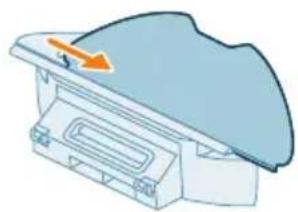
natural_image
Diagram of a mechanical component with an arrow indicating direction (no text or symbols)3 Izperite in očistite pralno krpo za mokro brisanje z vodo ali jo operite v pralnem stroju.
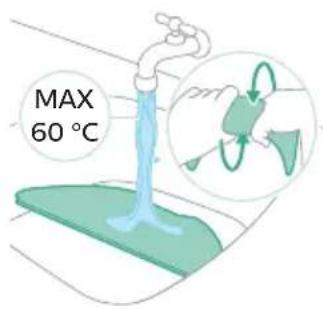
text_image
MAX 60 °C4 Pralno krpo za mokro brisanje posušite na zraku.
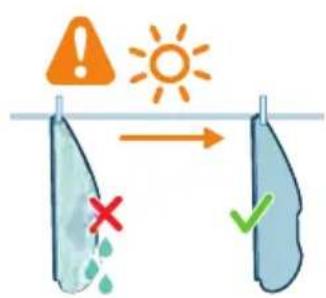
text_image
Safety warning illustration showing sunlight, water drop, and checkmark indicatorsi Opomba: Ne uporabljajte drugih načinov za sušenje pralne krpe za mokro brisanje.
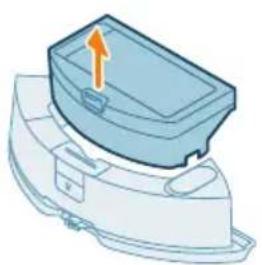
natural_image
3D illustration of a mechanical component with an arrow indicating upward motion (no text or symbols)natural_image
Illustration of a printer with an open lid and a curved arrow indicating rotation (no text or symbols)natural_image
Illustration of a blue industrial machine pouring granular material into a slotted cylindrical container (no text or symbols)3 Stresite umazanijo iz posode za prah.
i Opomba: Ne zamenjajte pokrova posode za prah s pokrovom pralnega filtra.
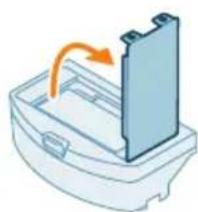
natural_image
Illustration of a door handle with an arrow indicating rotation (no text or symbols)4 Odprite pokrov pralnega filtra.
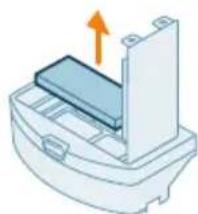
natural_image
Illustration of a printer or printer with an orange arrow indicating upward motion (no text or symbols present)text_image
Safety warning icons showing warning, sun, and checkmark symbols with corresponding icons7 Pralni filter operite z vodo in ga posušite na zraku.
natural_image
Illustration of a blue toolbox with an arrow pointing to a cut-out container (no text or symbols)11 Posodo za prah potisnite nazaj v posodo za vodo.
natural_image
Illustration of a robotic vacuum cleaner with a blue cover and orange arrow pointing to the component (no text or symbols)natural_image
Illustration of a blue plastic container with an orange arrow pointing upward, mounted on a white base (no text or symbols)3 Iz posode za vodo odstranite posodo za prah.
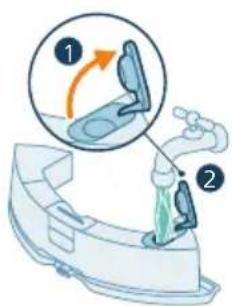
text_image
Diagram illustrating a step in a washing machine tool, showing step 1 and step 2 with motion arrows and color-coded zones.4 Posodo za vodo napolnite z vodo iz pipe.

5 Stresite posodo za vodo.
6 Vodo izlijte v lijak.
7 Zunanjost posode za vodo osušite s krpo.
text_image
Diagram of a car air conditioner unit with labeled parts and directional arrows indicating airflow or movement.natural_image
Technical illustration of a car interior with an orange arrow indicating a specific component (no text or symbols present)natural_image
Illustration of hands holding a mechanical component with an orange arrow indicating motion (no text or symbols)natural_image
Illustration of hands threading a knitted fabric with an upward arrow (no text or symbols)6 Z glavne ščetke odstranite lase, dlake in umazanijo.
natural_image
Technical illustration of a mechanical component with a highlighted section and directional arrow (no text or symbols)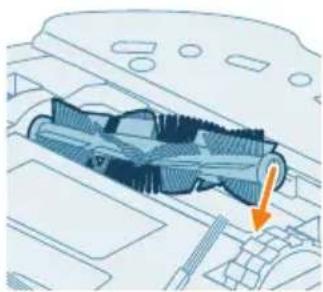
natural_image
Technical diagram of a mechanical component with an arrow indicating a specific section (no text or symbols present)text_image
Diagram of car engine compartment with labeled parts and directional arrows indicating assembly or movement9 Robove pokrova ščetke vstavite v prave zareze.
10 Potisnite pokrov ščetke noter.
natural_image
Diagram of a car engine compartment with a highlighted component and an orange arrow indicating direction (no text or symbols)1 Robota na glavo položite ravno in stabilno površino.
natural_image
Illustration of hands using a tool to adjust or install a component, no text or symbols presentnatural_image
Diagram of a car interior with a spray nozzle and exhaust plume (no text or symbols)text_image
Diagram showing a hand using a tool to adjust or install a device, labeled with numbers 1, 2, and 3.natural_image
Illustration of four steps of a robotic vacuum cleaner's internal components being inserted into a device (no text or symbols present)1 Izključite postajo iz električne vtičnice. 2 Uporabite mehko in suho krpo. 3 Očistite sestavne dele.
natural_image
Simple line drawing of a circular device with internal components and mounting holes (no text or symbols)natural_image
Illustration of a robotic vacuum cleaner with an orange circular component on its side (no text or symbols)Indikator na robotu utripa belo in Robot se polni. oranžno.
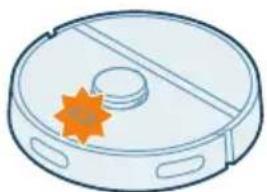
natural_image
Illustration of a robotic vacuum cleaner with a star-shaped orange badge (no text or symbols)natural_image
Simple line drawing of a circular component with a rectangular base and cable, no text or symbols present.natural_image
Illustration of a computer monitor with an orange screen and cable, no text or symbols presentnatural_image
Simple line drawing of a device with a circular component above it, no text or symbols present.text_image
Diagram showing a mechanical component with labeled parts and directional arrows, including numbered callouts.1 Robota zaženite nekje v prostoru, ne v postaji.
2 Preden odstranite in zavržete akumulatorsko baterijo, se prepričajte, da je popolnoma prazna tako, da sesalnik pustite delovati, dokler se baterija ne izprazni.
3 Odvijte vijake pokrova prostora za baterije in odstranite pokrov.
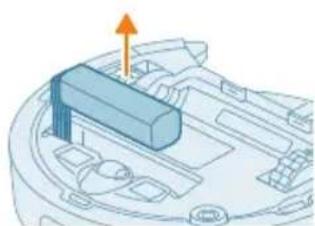
natural_image
3D diagram of a mechanical component with an arrow indicating direction (no text or symbols)4 Akumulatorsko baterijo dvignite in jo izključite tako, da pritisnete malo sponko na priključku baterije, da se ta sprosti.
5 Robota in akumulatorsko baterijo odnesite na zbirno točko za električne in elektronske odpadke.
Jamstvo in podpora
natural_image
Illustration of a robotic vacuum cleaner with a circular symbol indicating recycling (no text or symbols present)text_image
Exploded view diagram of a robotic vacuum cleaner with numbered parts for identification1 Tlačidlo spustenia/zastavenia
2 Tlačidlo Návrat
3 Vrchný kryt
4 360° laserová navigácia (LiDAR)
5 Vývod vzduchu
6 Umývatelný filter
7 Veko umývatelného filtra
8 Veko nádoby na prach
9 Nádoba na prach
10 Prívod vody
11 Tlačidlo na uvolnenie nádoby na vodu
12 Nádoba na vodu
13 Kryt kefy
14 Hlavná kefa
15 Vypínač
16 Predné koliesko
17 Snímač na ochranu pred pádom (3×)
18 Nabíjacie kontaktné body (robot)
19 Snímač na vyhnutie sa hrane a stene
20 Bočná kefa
21 Hlavné kolieska
22 Držiak na utierku mopu
23 Pratel'ná utierka mopu (2×)
24 Svetelný indikátor
25 (Nabíjacia) stanica
26 Zásuvka sietového kábla
27 Nabíjacie kontaktné body (stanica)
28 Podložka
29 Adaptér
30 Nástroj na čistenie kefy
Pred prvým použitím
text_image
0.5m 1.5m 0.5mnatural_image
3D diagram of a mechanical component with mounting holes and arrows indicating assembly or force (no text or symbols)text_image
Diagram showing two labeled parts (① and ②) with directional arrows indicating movement or flow, likely illustrating a mechanical or electrical component assembly.Nabíjanie robota
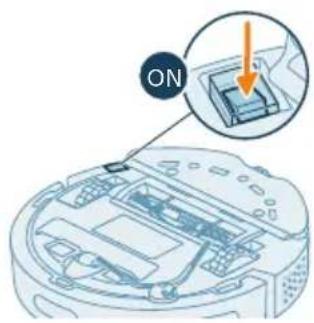
text_image
ONnatural_image
Illustration of a hand holding a blue circular object with a knob, connected to a mechanical device (no text or symbols visible)3 Zatlačte robota k stanici tak, aby nabíjacie kontakty robota boli v kontakte s nabíjacími kontaktmi stanice.
text_image
Philips HomeRun • Get your home run to the home run OK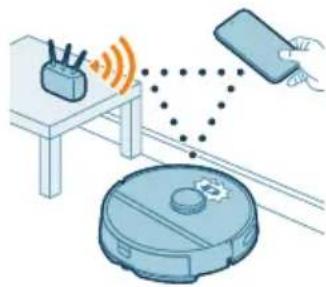
natural_image
Illustration of a robotic vacuum cleaner emitting signal waves from a device, with a hand holding a remote (no text or symbols)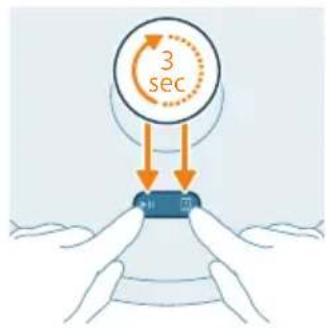
text_image
3 sectext_image
Medical illustration showing a first aid kit and second aid kit with a 'HARDENIVE' label, indicating no need for medical treatment.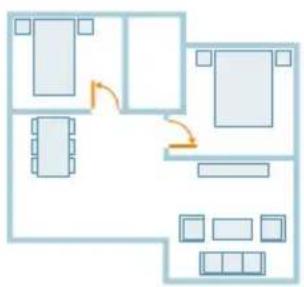
flowchart
graph TD
    A["Room 1"] --> B["Room 2"]
    B --> C["Room 3"]
    C --> D["Room 4"]
    D --> E["Room 5"]
    E --> F["Room 6"]
    F --> G["Room 7"]
    G --> H["Room 8"]
    H --> I["Room 9"]
    I --> J["Room 10"]
    style A fill:#f9f,stroke:#333
    style B fill:#f9f,stroke:#333
    style C fill:#f9f,stroke:#333
    style D fill:#f9f,stroke:#333
    style E fill:#f9f,stroke:#333
    style F fill:#f9f,stroke:#333
    style G fill:#f9f,stroke:#333
    style H fill:#f9f,stroke:#333
    style I fill:#f9f,stroke:#333
    style J fill:#f9f,stroke:#333
text_image
Diagram showing two views of a mechanical component with numbered annotations and directional arrows indicating movement or force.- Skôr než spustíte robota na čistenie:
- Pripevnite utierku mopu k držiaku na utierku mopu.
natural_image
Illustration of a mechanical component with a curved arrow indicating rotation (no text or symbols)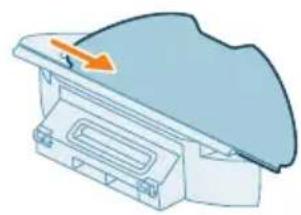
natural_image
Diagram of a mechanical component with a blue cover and orange directional arrow (no text or symbols)2 Vysuňte pratelnú utierku mopu rovnou stranou z drážky.
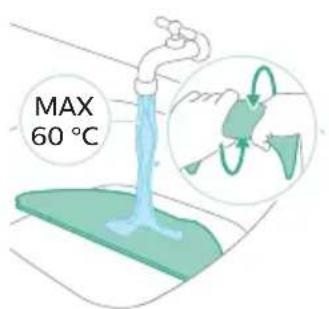
text_image
MAX 60 °Ctext_image
Safety warning illustration showing sunlight, a leaf with raindrops, and a checkmark indicating failure.4 Vysušte pratelnú utierku mopu na vzduchu.
natural_image
3D illustration of a mechanical component with an arrow indicating upward motion (no text or symbols)natural_image
Diagram of a printer or printer with an open lid and arrow indicating rotation (no text or symbols)natural_image
Illustration of a blue plastic bag pouring liquid into a trash bin (no text or symbols)3 Vysypte nečistoty z nádoby na prach.
natural_image
Illustration of a mechanical component with an arrow indicating rotation or assembly (no text or symbols)natural_image
Diagram of a mechanical component with an arrow indicating upward motion (no text or symbols)text_image
Safety warning icons showing sun, water drop, and checkmark symbolsnatural_image
Illustration of a blue plastic case with an arrow indicating downward motion, showing internal components (no text or symbols)Čistenie nádoby na vodu
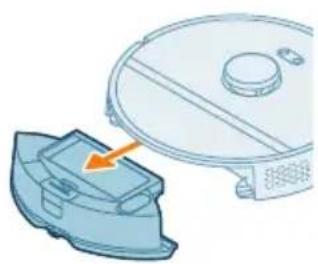
natural_image
Illustration of a robotic vacuum cleaner next to a blue plastic component, with an orange arrow pointing to the component (no text or symbols present)natural_image
Illustration of a blue plastic container with an orange arrow indicating upward motion (no text or symbols)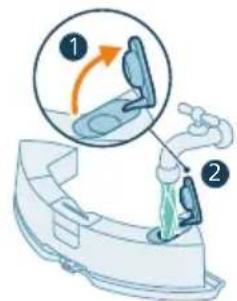
text_image
Diagram illustrating a medical procedure with labeled steps 1 and 2 showing a device being injected or performed.natural_image
Illustration of a blue plastic car body with motion arrows indicating movement (no text or symbols)natural_image
Illustration of a faucet pouring liquid into a container with green liquid, no text or symbols presentnatural_image
Illustration of a hand cleaning a small blue object (no text or symbols)natural_image
Illustration of a blue plastic case with an arrow indicating downward motion (no text or symbols)natural_image
Illustration of a robotic vacuum cleaner with a blue component and an orange arrow indicating motion (no text or symbols)text_image
Diagram of a car air conditioner unit with numbered components and directional arrows indicating airflow or movement.natural_image
Technical diagram of a mechanical component with an orange arrow indicating direction (no text or symbols present)4 Vytiahnite hlavnú kefu.
natural_image
Illustration of hands holding a blue mechanical component with an orange arrow indicating motion (no text or symbols)natural_image
Illustration of hands tying a knot with a string, showing rope routing and a yellow upward arrow (no text or symbols)natural_image
Technical illustration of a mechanical component with internal threading and a highlighted section (no text or symbols)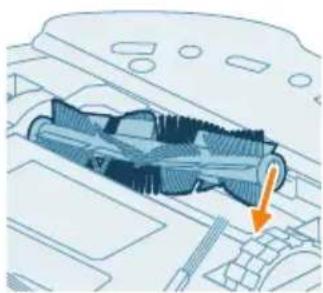
natural_image
Technical illustration of a mechanical component with an arrow indicating a specific section (no text or symbols present)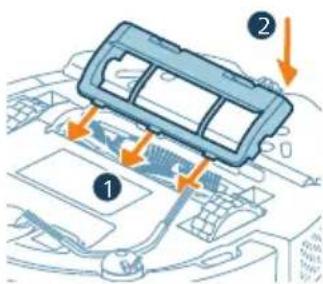
text_image
Diagram showing car interior components with numbered parts and directional arrows indicating flow or movementnatural_image
Diagram of a car engine compartment with an orange arrow indicating upward motion (no text or symbols present)natural_image
Illustration of hands using blue toolps to adjust or install a component on a car (no text or symbols visible)natural_image
Diagram of a car interior with a spray nozzle and exhaust pipe (no text or symbols)text_image
Diagram showing a hand using a tool to adjust or install a device with numbered parts labeled 1, 2, and 3.natural_image
Illustration of a robotic vacuum cleaner's open lid and base, showing step-by-step cleaning (no text or symbols)natural_image
Illustration of a medical device with an orange circle and cable, no text or symbols presentnatural_image
Simple line drawing of a device with a circular component above it, no text or symbols present.text_image
Diagram showing mechanical assembly with labeled parts and directional arrows, including a magnified view of a screwdriver.natural_image
Diagram of a mechanical component with an orange arrow indicating direction (no text or symbols)natural_image
Illustration of a robotic vacuum cleaner with a circular label containing the recycling symbol (no text or labels present)text_image
Exploded view diagram of a robotic vacuum cleaner with numbered parts for identification1 Dugme za početak/zaustavljanje
2 Dugme za povratak
3 Gornji poklopac
4 Laserska navigacija od 360° (LiDAR)
5 Izlaz za vazduh
6 Perivi filter
7 Poklopac perivog filtera
8 Poklopac posude za prašinu
9 Posuda za prašinu
10 Ulaz za vodu
11 Dugme za otpuštanje rezervoara za vodu
12 Rezervoar za vodu
13 Poklopac četke
14 Glavna četka
15 Prekidač za uključivanje/isključivanje
16 Prednji upravljački točkić
17 Senzor ispadanja (3x)
18 Kontakti za punjenje (robot)
19 Senzor za izbegavanje pada i zida
20 Bočna četka
21 Glavni točkići
22 Držač umetka za brisanje
23 Perivi umetak za brisanje (2x)
24 Indikatorska lampica
25 Stanica (za punjenje)
26 Utičnica kabla za napajanje
27 Kontakti za punjenje (stanica)
28 Podmetač
29 Adapter
30 Alatka za čišćenje četke
text_image
0.5m 1.5m 0.5m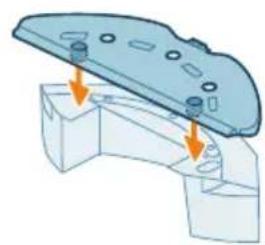
natural_image
3D diagram of a mechanical component with mounting holes and a base, showing alignment arrows (no text or symbols)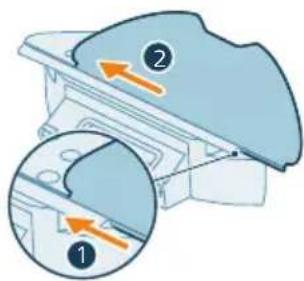
text_image
Diagram showing two views of a mechanical component with numbered annotations and directional arrows indicating movement or force.Postavljanje stanice
natural_image
Illustration of a hand holding a circular object next to a mechanical device with an arrow indicating motion (no text or symbols)text_image
Philip HomeRun Get your home run to the room of your home run. OK Cancel Help No. 013-58762000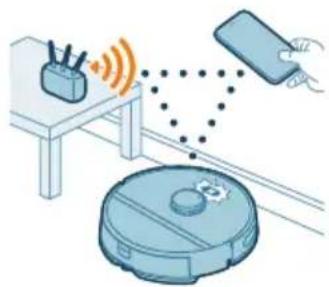
natural_image
Illustration of a robotic vacuum cleaner with signal waves and a hand interacting with a device (no text or symbols)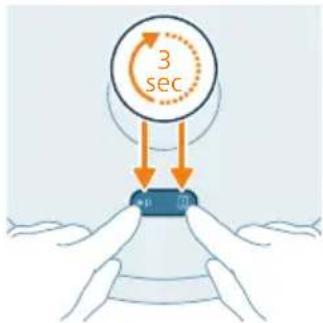
text_image
3 sec mRegistrujte lični nalog
text_image
Home settings English English Cash Book Business Food Services Information & Data General & Data Language EditorKako robot radi
Kreirajte mapu
text_image
Safety warning illustration showing incorrect and correct actions to remove a device, with a red X mark indicating no error and a green checkmark for confirmation.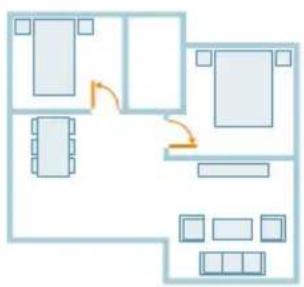
flowchart
graph TD
    A["Room 1"] --> B["Room 2"]
    B --> C["Room 3"]
    C --> D["Room 4"]
    D --> E["Room 5"]
    E --> F["Room 6"]
    F --> G["Room 7"]
    G --> H["Room 8"]
    H --> I["Room 9"]
    I --> J["Room 10"]
    style A fill:#f9f,stroke:#333
    style B fill:#f9f,stroke:#333
    style C fill:#f9f,stroke:#333
    style D fill:#f9f,stroke:#333
    style E fill:#f9f,stroke:#333
    style F fill:#f9f,stroke:#333
    style G fill:#f9f,stroke:#333
    style H fill:#f9f,stroke:#333
    style I fill:#f9f,stroke:#333
    style J fill:#f9f,stroke:#333
- Otvorite sva unutrašnja vrata i zatvorite vrata spolja.
text_image
Diagram showing two views of a mechanical component with numbered annotations and directional arrows indicating movement or force.natural_image
Illustration of a mechanical component with a curved arrow indicating rotation (no text or symbols)2 Izvucite ravnu stranu perivog umetka za brisanje iz proreza.
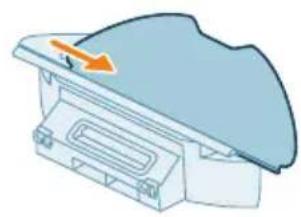
natural_image
Illustration of a mechanical component with a blue top and orange arrow indicating direction (no text or symbols)3 Isperite i očistite perivi umetak za brisanje vodom ili ga operite u mašini za pranje veša.
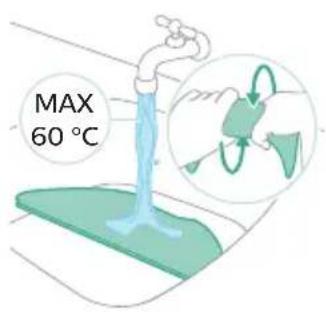
text_image
MAX 60 °Ctext_image
Safety warning illustration showing sunlight, water droplets, and a checkmark with red X and green ✓ symbolsnatural_image
3D illustration of a mechanical component with an arrow indicating upward motion (no text or symbols)Čišćenje posude za prašinu i perivog filtera
natural_image
Diagram of a printer with an open lid and arrow indicating rotation (no text or symbols)2 Otvorite poklopac posude za prašinu.
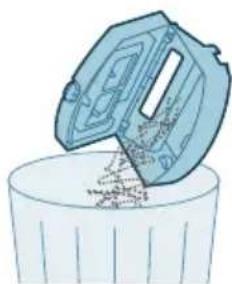
natural_image
Illustration of a blue industrial machine pouring granular material into a slotted cylindrical container (no text or symbols)3 Izbacite prljavštinu iz posude za prašinu.
i Napomena: Nemojte da pomešate poklopac posude za prašinu sa poklopcem perivog filtera.
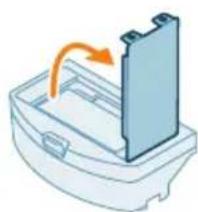
natural_image
Illustration of a door handle with an arrow indicating rotation (no text or symbols)4 Otvorite poklopac perivog filtera.
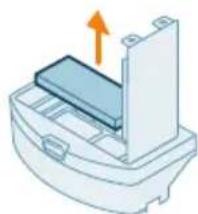
natural_image
Illustration of a printer or printer with an orange arrow indicating upward motion (no text or symbols present)5 Izvucite perivi filter.
text_image
Safety warning symbol showing sun, warning sign, and two icons (red cross for incorrect, green check for correct) indicating different conditions.7 Isperite perivi filter vodom i osušite ga na vazduhu.
natural_image
Illustration of a blue toolbox with an arrow pointing to a cut-out container (no text or symbols)11 Ugurajte posudu za prašinu nazad u rezervoar za vodu.
Čišćenje rezervoara za vodu
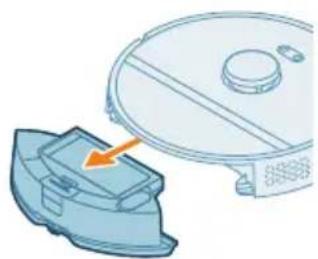
natural_image
Illustration of a robotic vacuum cleaner with a blue cover and orange arrow pointing to the component (no text or symbols)1 Pritisnite dugme za oslobadanje rezervoara za vodu.
2 Izvucite rezervoar za vodu iz robota.

natural_image
Illustration of a blue plastic container with an orange arrow indicating upward motion (no text or symbols)text_image
Diagram illustrating a step in a washing machine tool, showing step 1 and step 2 with motion arrows and color-coded zones.4 Napunite rezervoar za vodu vodom sa česme.
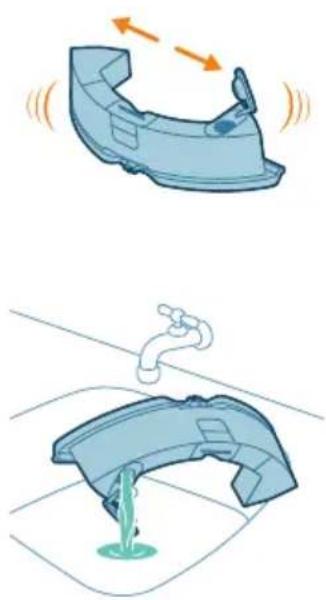
natural_image
Illustration of a car interior with water flow indicators (no text or symbols)natural_image
Illustration of a hand cleaning a small blue object (no text or symbols)6 Prospite prljavu vodu.
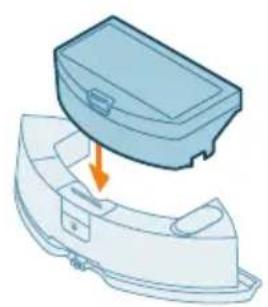
natural_image
Illustration of a blue plastic case with an arrow indicating downward motion, showing internal components (no text or symbols)7 Osušite spoljašnjost rezervoara za vodu krpom.
natural_image
Illustration of a robotic vacuum cleaner with a blue component and orange arrow indicating motion (no text or symbols)10 Postavite rezervoar za vodu natrag u robot.
i Napomena: Proverite da li je spoljašnjost rezervoara za vodu suva.
text_image
Diagram of a car air conditioner unit with labeled parts and directional arrows indicating airflow or movement.2 Istovremeno pritisnite dugmad za oslobadanje poklopca četke.
3 Podignite i skinite poklopac četke.
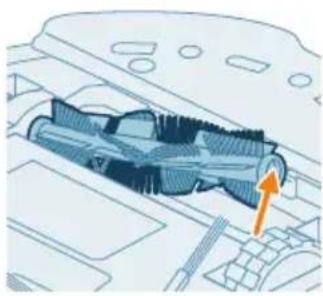
natural_image
Technical illustration of a car interior with an orange arrow indicating a specific component (no text or symbols present)natural_image
Illustration of hands holding a mechanical component with an orange arrow indicating motion (no text or symbols)natural_image
Illustration of hands threading a knitted fabric with an upward arrow (no text or symbols)natural_image
Technical illustration of a mechanical component with a highlighted section and directional arrow (no text or symbols)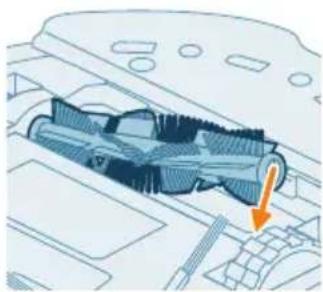
natural_image
Technical diagram of a mechanical component with an arrow indicating a specific section (no text or symbols present)text_image
Diagram of car engine compartment with labeled parts and directional arrows indicating assembly or movement9 Postavite jezičke na poklopcu četke u odgovarajuće ureze.
10 Gurnite poklopac četke.
natural_image
Diagram of a car engine compartment with a highlighted lever and orange arrow indicating direction (no text or symbols)1 Okrenite robot naopako na površini koja je ravna i stabilna.
2 Izvadite bočnu četku.
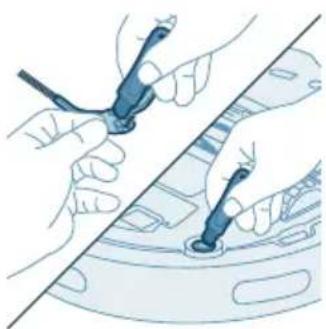
natural_image
Illustration of hands using a tool to adjust or install a component on a vehicle (no text or symbols visible)natural_image
Diagram of a car interior with a spray nozzle and orange spray effect (no text or symbols)4 Spojite bočnu četku tako što će kliknuti u pravi položaj pri dnu robota.
text_image
Diagram showing a hand using a tool to adjust or install a device, labeled with numbers 1, 2, and 3.natural_image
Illustration of four steps of a robotic vacuum cleaner's internal components being inserted into a device (no text or symbols present)1 Isključite stanicu iz zidne utičnice. 2 Koristite meku, neabrazivnu, suvu krpu. 3 Prebrišite komponente.
natural_image
Illustration of a device with an orange circular component and a base-mounted cable (no text or symbols)Svetlo indikatora na stanici svetli narandžasto.
natural_image
Simple line drawing of a circular component above a rectangular base with wires (no text or symbols)Lampica indikatora na stanici je isključena.
Stanica nije uključena. Ako je stanica uključena, lampica indikatora se gasi ako je aparat ostavljen u praznom hodu radi uštede energije.
text_image
Diagram showing a mechanical component with labeled parts and directional arrows, including numbered callouts.1 Pokrenite robot sa nekog mesta u prostoriji, a ne sa stanice.
2 Ostavite robot da radi dok se punjiva baterija ne isprazni kako biste bili sigurni da je potpuno prazna pre nego što je izvadite i bacite.
3 Odvijte vijke sa poklopca odeljka za baterije i skinite poklopac.
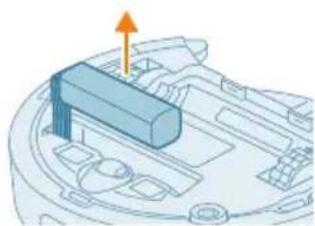
natural_image
3D diagram of a mechanical component with an orange arrow indicating direction (no text or symbols)4 Podignite punjivu bateriju i odvojite je tako što ćete pritisnuti malu kopču na priključku baterije da biste oslobodili priključak baterije.
5 Odnesite robota i punjivu bateriju na mesto za prikupljanje električnog i elektronskog otpada.
Garancija i podrška
natural_image
Illustration of a robotic vacuum cleaner with a circular symbol indicating recycling (no text or symbols present)text_image
Exploded view diagram of a robotic vacuum cleaner with numbered parts for identificationtext_image
0.5m 1.5m 0.5m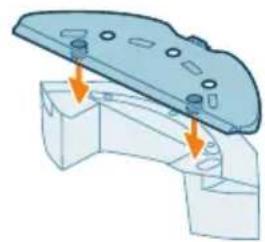
natural_image
3D diagram of a mechanical component with mounting holes and arrows indicating assembly or force direction (no text or symbols)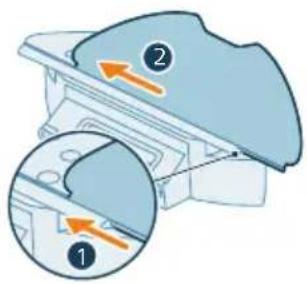
text_image
Diagram showing two views of a mechanical component with numbered annotations and directional arrows indicating movement or force.natural_image
Illustration of a hand holding a circular object next to a mechanical device with an arrow indicating motion (no text or symbols)text_image
Philip HomeRun Get your home run to the room of your home run OK Cancel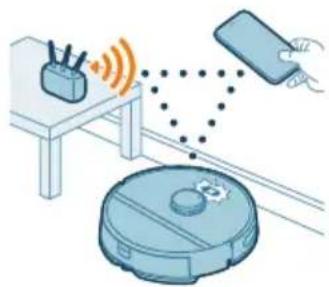
natural_image
Illustration of a robotic vacuum cleaner emitting signal waves from a device, with a hand interacting with it (no text or symbols present)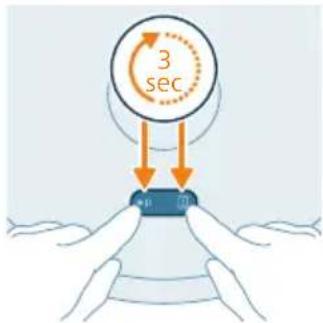
text_image
3 sec mtext_image
Home Settings English Cash Sculpt Mention Food Nutrition Dietary/Neutral Dietary/Dietary/Neutral Fungsten MailRobotin toiminta
Kartan luominen
text_image
Illustration showing a printer with a red X mark and a blue bear, alongside a card and a green checkmark on a sofa.text_image
Diagram showing two views of a mechanical component with numbered annotations and directional arrows indicating movement or force.natural_image
Illustration of a mechanical component with a curved arrow indicating rotation (no text or symbols)natural_image
Illustration of a mechanical component with an arrow indicating direction (no text or symbols)text_image
Safety warning illustration showing sunlight, a warning sign, and two clothes hanging with water droplets and symbolsnatural_image
3D illustration of a mechanical component with an upward arrow indicating motion (no text or symbols)natural_image
Illustration of a printer with an open lid and orange arrow indicating rotation (no text or symbols)natural_image
Illustration of a hand pouring liquid into a trash bin (no text or symbols)natural_image
Illustration of a mechanical component with an arrow indicating rotation (no text or symbols)natural_image
Illustration of a printer or printer with an arrow indicating upward motion (no text or symbols present)text_image
Safety warning symbol with sun, warning sign, and two checkmarks indicating failure or rejectionnatural_image
Illustration of a blue toolbox with an orange arrow indicating downward motion, partially enclosed in a white container (no text or symbols)natural_image
Illustration of a robotic vacuum cleaner with a blue component and an orange arrow pointing to it (no text or symbols)natural_image
Illustration of a blue plastic container with an orange arrow indicating upward motion (no text or symbols)text_image
Diagram illustrating a step in a washing machine tool, showing step 1 with an arrow indicating rotation and step 2 with a spray bottle.natural_image
Illustration of a car interior with water flow indicators (no text or symbols)natural_image
Illustration of a hand cleaning a small blue object (no text or symbols)natural_image
Illustration of a blue plastic case with an arrow indicating downward motion, showing internal components (no text or symbols)natural_image
Illustration of a robotic vacuum cleaner with a blue component and orange arrow indicating motion (no text or symbols)text_image
Diagram of a car air conditioner unit with labeled parts and directional arrows indicating componentsnatural_image
Technical illustration of a mechanical component with an orange arrow indicating direction (no text or symbols present)natural_image
Illustration of hands holding a coiled spring or rope, with an orange arrow indicating direction (no text or symbols)natural_image
Illustration of hands threading a blue mesh with an upward arrow (no text or symbols)natural_image
Technical illustration of a mechanical component with a highlighted section and directional arrow (no text or symbols)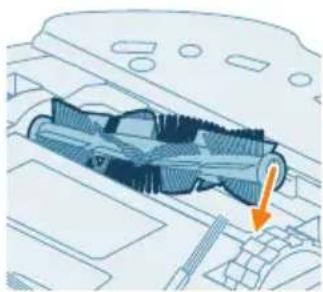
natural_image
Technical diagram of a mechanical component with an arrow indicating a specific section (no text or symbols present)text_image
Diagram of car engine compartment with labeled parts and directional arrows indicating assembly or movementnatural_image
Diagram of a car engine compartment with a highlighted lever and orange arrow indicating direction (no text or symbols)natural_image
Illustration of hands using a tool to adjust or install a component on a vehicle (no text or symbols visible)natural_image
Diagram of a car interior with a spray nozzle and orange laser beam (no text or symbols)text_image
Diagram showing a hand using a tool to adjust or install electronic components, labeled with numbers 1, 2, and 3.natural_image
Illustration of four steps of a robotic vacuum cleaner's internal components being inserted into a device (no text or symbols present)natural_image
Illustration of a computer monitor with an orange screen and a circular diagram above it (no text or symbols)natural_image
Simple line drawing of a device with a circular component above it, no text or symbols present.text_image
Diagram showing a mechanical component with labeled parts and directional arrows, including a magnified view of the tool's rotation.natural_image
3D diagram of a mechanical component with an orange arrow indicating upward motion (no text or symbols)natural_image
Illustration of a robotic vacuum cleaner with a circular symbol indicating recycling (no text or symbols present)text_image
Exploded view diagram of a robotic vacuum cleaner with numbered parts for identification1 Start/stopp-knapp
2 Returknappen
text_image
0.5m 1.5m 0.5mInstallera stationen
natural_image
3D diagram of a mechanical component with mounting holes and arrows indicating assembly or force (no text or symbols)text_image
Diagram showing two labeled parts (① and ②) with directional arrows indicating movement or flow, likely illustrating a mechanical or electrical component assembly.Laddning av roboten
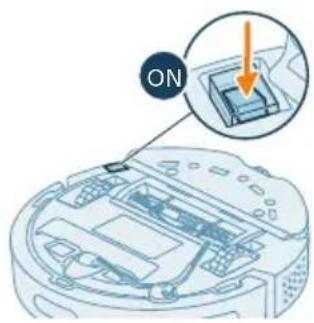
text_image
ONnatural_image
Illustration of a hand holding a circular object with a small inset device, no text or symbols presenttext_image
Pharma HomeRun → ← ← ←natural_image
Illustration of a robotic vacuum cleaner connected to a device via wireless signal and dotted lines (no text or symbols)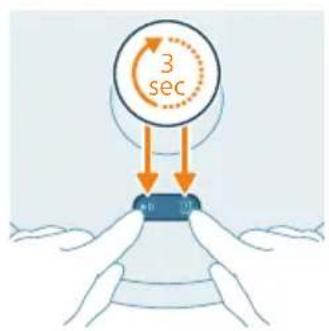
text_image
3 sec 10 13Konfigurera Wi-Fi-anslutningen
text_image
Data settings English Canada Brazil Germany India Mexico Serbia (China) Serbia (Colombia) Hungary Maltatext_image
Safety warning illustration showing incorrect and correct actions to replace a bed, with symbols indicating no error and checkmark.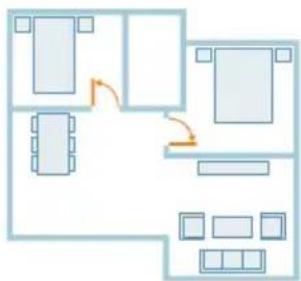
flowchart
graph TD
    A["Room 1"] --> B["Room 2"]
    B --> C["Room 3"]
    C --> D["Room 4"]
    D --> E["Room 5"]
    E --> F["Room 6"]
    F --> G["Room 7"]
    G --> H["Room 8"]
    H --> I["Room 9"]
    I --> J["Room 10"]
    style A fill:#f9f,stroke:#333
    style B fill:#f9f,stroke:#333
    style C fill:#f9f,stroke:#333
    style D fill:#f9f,stroke:#333
    style E fill:#f9f,stroke:#333
    style F fill:#f9f,stroke:#333
    style G fill:#f9f,stroke:#333
    style H fill:#f9f,stroke:#333
    style I fill:#f9f,stroke:#333
    style J fill:#f9f,stroke:#333
text_image
Diagram showing two views of a mechanical component with numbered annotations and directional arrows indicating movement or force.natural_image
Illustration of a mechanical component with a curved top and arrow indicating rotation (no text or symbols)natural_image
Diagram of a mechanical component with an arrow indicating direction (no text or symbols)text_image
Safety warning illustration showing sunlight, a warning sign, and two clothes hanging with symbols indicating failure or damage.natural_image
Illustration of a blue plastic container with an orange arrow indicating upward motion (no text or symbols)natural_image
Diagram of a printer with an open lid and orange arrow indicating rotation (no text or symbols)natural_image
Illustration of a plastic bag pouring liquid into a trash bin (no text or symbols)natural_image
Illustration of a mechanical component with an arrow indicating rotation (no text or symbols)natural_image
Illustration of a mechanical device with an arrow indicating upward motion (no text or symbols)text_image
Safety warning symbol with sun, warning sign, and two checkmarks indicating failure or rejectionnatural_image
Illustration of a blue toolbox with an orange arrow indicating downward motion, partially enclosed in a white container (no text or symbols)natural_image
Illustration of a robotic vacuum cleaner with a blue component and an orange arrow pointing to it (no text or symbols)natural_image
Illustration of a blue plastic container with an orange arrow indicating upward motion (no text or symbols)text_image
Diagram illustrating a step in a washing machine tool, showing step 1 with an arrow indicating rotation and step 2 with a spray bottle.natural_image
Illustration of a car interior with water flow indicators (no text or symbols)natural_image
Illustration of a hand cleaning a small blue object (no text or symbols)natural_image
Illustration of a blue plastic case with an arrow indicating downward motion, showing internal components (no text or symbols)natural_image
Illustration of a robotic vacuum cleaner with a blue component and orange arrow indicating motion (no text or symbols)text_image
Diagram of a car air conditioner unit with labeled parts and directional arrows indicating airflow or movement.natural_image
Technical diagram of a mechanical component with an orange arrow indicating direction (no text or symbols present)natural_image
Illustration of hands holding a mechanical component with an orange arrow indicating motion (no text or symbols)natural_image
Illustration of hands threading a knitted fabric with an upward arrow (no text or symbols)natural_image
Technical illustration of a mechanical component with a highlighted section and directional arrow (no text or symbols)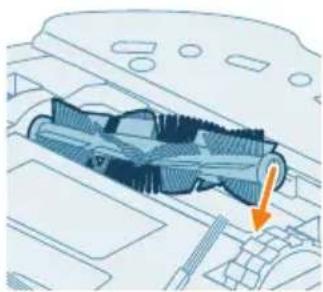
natural_image
Technical diagram of a mechanical component with an arrow indicating a specific section (no text or symbols present)text_image
Diagram of car engine compartment with labeled parts and directional arrows indicating assembly or movementnatural_image
Diagram of a car engine compartment with a highlighted component and an orange arrow indicating direction (no text or symbols)natural_image
Illustration of hands using a tool to adjust or install a component, no text or symbols presentnatural_image
Diagram of a car interior with a spray nozzle and exhaust plume (no text or symbols)text_image
Diagram showing a hand using a tool to adjust or install electronic components, labeled with numbers 1, 2, and 3.natural_image
Illustration of four steps of a robotic vacuum cleaner's internal components, showing hand positioning and cleaning (no text or symbols)natural_image
Illustration of a medical device with an orange circle and cable, no text or symbols presentnatural_image
Simple line drawing of a device with a circular component above it, no text or symbols present.text_image
Diagram showing mechanical assembly with labeled parts and directional arrows, including a numbered component ① and a circular motion indicator.natural_image
3D diagram of a mechanical component with an arrow indicating upward motion (no text or symbols)natural_image
Illustration of a robotic vacuum cleaner with a circular symbol indicating recycling (no text or symbols present)text_image
Exploded view diagram of a robotic vacuum cleaner with numbered parts for identificationtext_image
0.5m 1.5m 0.5m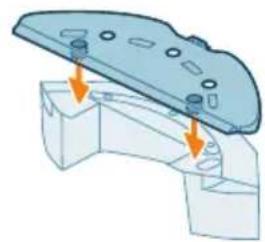
natural_image
3D diagram of a mechanical component with mounting holes and arrows indicating assembly or force (no text or symbols)
text_image
Diagram showing two views of a mechanical component with numbered annotations and directional arrows indicating movement or force.Sạc robot
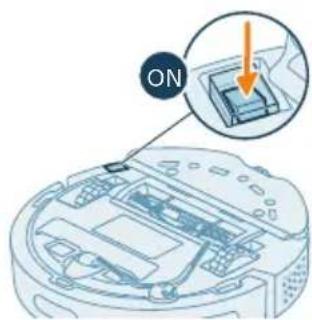
text_image
ON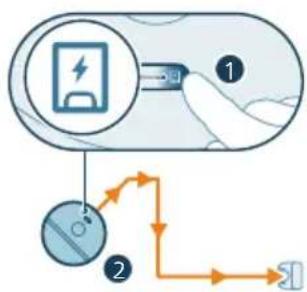
flowchart
graph TD
    A["Battery Charge"] --> B["Switch"]
    B --> C{Charging Path}
    C -->|Path 1| D["Device 1"]
    C -->|Path 2| E["Device 2"]
Lắp trạm
natural_image
Illustration of a hand holding a blue circular object with a knob, connected to a mechanical device (no text or symbols visible)natural_image
Illustration of a robotic vacuum cleaner connected to a device via wireless signal and sensor points (no text or symbols)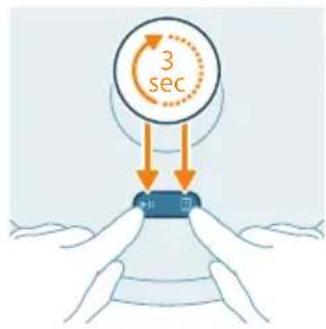
text_image
3 sectext_image
Safety warning illustration showing a printer with a red X mark and a teddy bear, indicating failure to replace the printer.text_image
Diagram showing two labeled parts (① and ②) with arrows indicating movement or force, likely illustrating a mechanical or electrical component assembly.natural_image
Illustration of a mechanical component with a curved arrow indicating rotation (no text or symbols)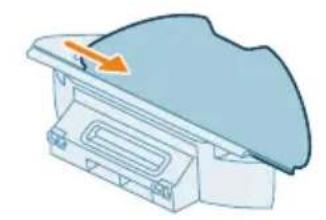
natural_image
Illustration of a medical device with a blue dome and orange arrow indicating direction (no text or symbols)text_image
Safety warning illustration showing sunlight, a leaf with raindrops, and a checkmark indicating failure.natural_image
3D illustration of a mechanical component with an orange arrow indicating upward motion (no text or symbols)natural_image
Diagram of a printer with an open lid and orange arrow indicating rotation (no text or symbols)2 Mỏ nắp hộp bụi.
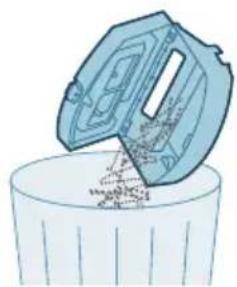
natural_image
Illustration of a trash bin with a lid pouring into it (no text or symbols)3 Trút bụi ra khởi hộp bụi.
natural_image
Illustration of a mechanical device with an arrow indicating rotation or assembly (no text or symbols)natural_image
Illustration of a printer or scanner with an orange arrow indicating upward motion (no text or symbols)text_image
Safety warning symbol with sun and checkmark indicating failure to prevent water drop, accompanied by an icon showing a warning sign.natural_image
Illustration of a blue toolbox placed on a curved base with an orange arrow indicating downward motion (no text or symbols)natural_image
Illustration of a robotic vacuum cleaner with a blue component and an orange arrow pointing to the component (no text or symbols)natural_image
Illustration of a blue plastic container with an orange arrow pointing upward, placed on a white base (no text or symbols)text_image
Diagram illustrating a step in a medical procedure involving foot positioning and fluid flow, with numbered annotations.natural_image
Illustration of a blue plastic car body with motion arrows indicating speed or movement (no text or symbols)natural_image
Illustration of a faucet pouring liquid into a curved container (no text or symbols)natural_image
Illustration of a hand cleaning a small blue object (no text or symbols)natural_image
Illustration of a blue plastic case with an arrow indicating downward motion, no text or symbols presentnatural_image
Illustration of a robotic vacuum cleaner next to a blue mechanical component with an orange arrow indicating motion (no text or symbols)text_image
Diagram of a car air conditioner unit with numbered components and directional arrows indicating assembly or installation.natural_image
Technical diagram of a mechanical component with an orange arrow indicating a specific feature (no text or symbols present)natural_image
Illustration of hands holding a mechanical component with an orange arrow indicating motion (no text or symbols)natural_image
Illustration of hands tying a knot with an upward arrow (no text or symbols)natural_image
Technical illustration of a mechanical component with internal structure and highlighted section (no text or symbols)natural_image
Technical illustration of a mechanical component with an arrow indicating direction (no text or symbols present)text_image
Diagram showing car interior components with numbered parts and directional arrows indicating movement or flowLàm sạch chối bên.
natural_image
Diagram of a car engine compartment with an orange arrow pointing to the head area (no text or symbols present)2 Tháo chối bên.
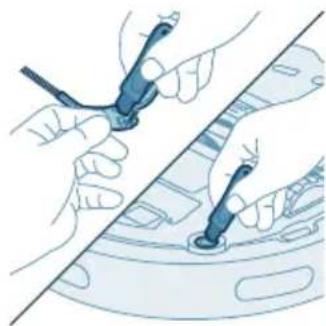
natural_image
Illustration of hands using a tool to adjust or install a component on a vehicle (no text or symbols visible)natural_image
Diagram of a car interior showing a lever and spray nozzle (no text or symbols)text_image
Diagram showing a hand using a tool to adjust or install a device with numbered parts labeled 1, 2, and 3.natural_image
Illustration of a robotic vacuum cleaner's open lid and base, showing step-by-step installation (no text or symbols)natural_image
Simple line drawing of a circular device with internal components (no text or symbols)natural_image
Illustration of a robotic vacuum cleaner with a small orange component on its side (no text or symbols)text_image
Diagram showing a mechanical component with labeled parts and directional arrows, including numbered callouts.natural_image
3D diagram of a mechanical component with an arrow indicating upward motion (no text or symbols)natural_image
Illustration of a robotic vacuum cleaner with a recycling symbol (no text or labels)text_image
Exploded view diagram of a robotic vacuum cleaner with numbered parts for identification and assembly reference.text_image
0.5m 1.5m 0.5mistasyonu kurma
natural_image
3D diagram of a mechanical component with mounting holes and arrows indicating assembly or force (no text or symbols)text_image
Diagram showing two views of a mechanical component with numbered annotations and directional arrows indicating movement or force.Robotu şarj etme
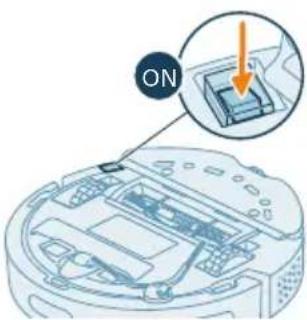
text_image
ONnatural_image
Illustration of a person using a tool to lift a circular component (no text or symbols present)text_image
Philip HomeRun Get your home run to the room of your home run. OK Cancel Help No. 013-58762000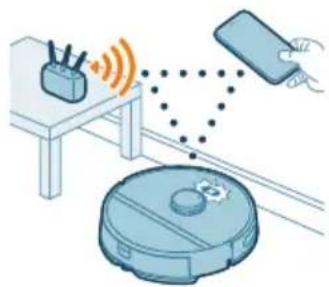
natural_image
Illustration of a robotic vacuum cleaner with signal waves and a hand interacting with a device (no text or symbols)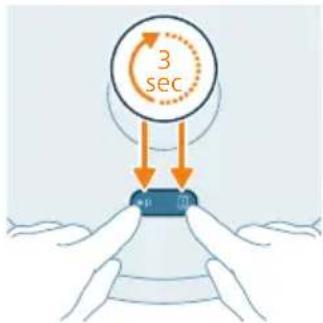
text_image
3 sec mtext_image
Illustration showing a cat and teddy bear on a couch with a 'X' indicating cancellation or rejection, alongside a checkmark for reading.text_image
Diagram showing two views of a mechanical component with numbered annotations and directional arrows indicating movement or force.natural_image
Illustration of a mechanical component with a blue top and orange rotation arrow (no text or symbols)natural_image
Diagram of a mechanical component with an arrow indicating direction (no text or symbols)text_image
Safety warning illustration showing sunlight, a leaf with raindrops, and a checkmark indicating failure.natural_image
3D illustration of a mechanical component with an upward arrow indicating motion (no text or symbols)natural_image
Illustration of a printer with an open lid and orange arrow indicating rotation (no text or symbols)natural_image
Illustration of a hand pouring liquid into a trash bin (no text or symbols)natural_image
Illustration of a mechanical component with an arrow indicating rotation (no text or symbols)natural_image
Illustration of a printer or printer with an arrow indicating upward motion (no text or symbols present)text_image
Safety warning icon showing sun, warning sign, and two labeled boxes with symbols indicating water droplets and a checkmark.natural_image
Illustration of a blue toolbox with an orange arrow indicating downward motion, partially enclosed in a white container (no text or symbols)natural_image
Illustration of a robotic vacuum cleaner with a blue cover and orange arrow pointing to the component (no text or symbols)natural_image
Illustration of a mechanical component with an arrow indicating upward motion (no text or symbols)text_image
Diagram illustrating a step in a washing machine tool, showing step 1 and step 2 with an arrow indicating rotation.natural_image
Illustration of a car interior with water flow indicators (no text or symbols)5 Su haznesini silkeleyin.
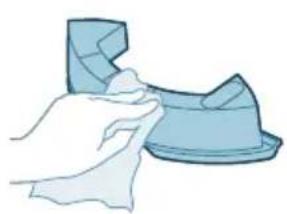
natural_image
Illustration of a hand cleaning a small blue object (no text or symbols)natural_image
Illustration of a blue plastic case with an arrow indicating downward motion, showing internal components (no text or symbols)natural_image
Illustration of a robotic vacuum cleaner with a blue component and orange arrow indicating motion (no text or symbols)text_image
Diagram of a car air conditioner unit with labeled parts and directional arrows indicating airflow or movement.natural_image
Technical diagram of a mechanical component with an orange arrow indicating direction (no text or symbols present)natural_image
Illustration of hands holding a mechanical component with an orange arrow indicating motion (no text or symbols)natural_image
Illustration of hands threading a knitted fabric with an upward arrow (no text or symbols)natural_image
Technical illustration of a mechanical component with a highlighted section and directional arrow (no text or symbols)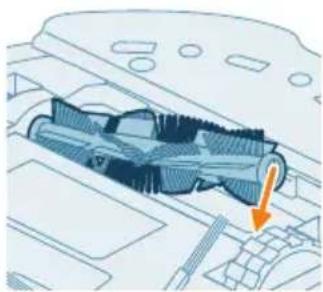
natural_image
Technical diagram of a mechanical component with an arrow indicating a specific section (no text or symbols present)text_image
Diagram of car engine compartment with labeled parts and directional arrows indicating assembly or movementnatural_image
Diagram of a car engine compartment with a highlighted lever and orange arrow indicating direction (no text or symbols)natural_image
Illustration of hands using a tool to adjust or install a component on a vehicle (no text or symbols visible)natural_image
Diagram of a car interior with a spray nozzle and orange spray effect (no text or symbols)text_image
Diagram showing a hand using a tool to adjust or install a device with numbered parts labeled 1, 2, and 3.natural_image
Illustration of four steps of a robotic vacuum cleaner's internal components being inserted, showing hand placement and cleaning (no text or symbols present)natural_image
Illustration of a device with an orange circular component and a base-mounted cable (no text or symbols)natural_image
Simple line drawing of a circular object above a rectangular device with a cable (no text or symbols)text_image
Diagram showing a mechanical component with labeled parts and directional arrows, including numbered callouts.natural_image
3D diagram of a mechanical component with an orange arrow indicating direction (no text or symbols)natural_image
Illustration of a robotic vacuum cleaner with a circular label containing the recycling symbol (no text or labels present)text_image
Exploded view diagram of a robotic vacuum cleaner with numbered parts for identificationtext_image
0.5m 1.5m 0.5mnatural_image
Mechanical assembly diagram showing a component with mounting holes and arrows indicating direction (no text or symbols)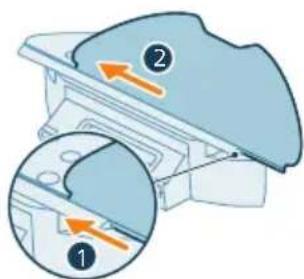
text_image
Diagram showing two labeled parts (① and ②) with arrows indicating movement or force, likely illustrating a mechanical or electrical component assembly.text_image
Philip HoteliRun Get your home to your own button GETnatural_image
Illustration of a robotic vacuum cleaner with sensor signals and a smartphone, no text or symbols presenttext_image
Import Export Import to global Import Export Export to global Export to global Export to global Export to globaltext_image
Illustration showing a medical procedure with a red X mark and a green checkmark, alongside a photo of a patient's clothing and a book.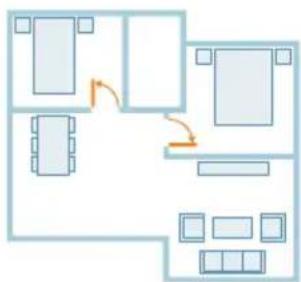
flowchart
graph TD
    A["Room 1"] --> B["Room 2"]
    B --> C["Room 3"]
    C --> D["Room 4"]
    D --> E["Room 5"]
    E --> F["Room 6"]
    F --> G["Room 7"]
    G --> H["Room 8"]
    H --> I["Room 9"]
    I --> J["Room 10"]
    style A fill:#cce5ff,stroke:#333
    style B fill:#cce5ff,stroke:#333
    style C fill:#cce5ff,stroke:#333
    style D fill:#cce5ff,stroke:#333
    style E fill:#cce5ff,stroke:#333
    style F fill:#cce5ff,stroke:#333
    style G fill:#cce5ff,stroke:#333
    style H fill:#cce5ff,stroke:#333
    style I fill:#cce5ff,stroke:#333
    style J fill:#cce5ff,stroke:#333
text_image
Diagram showing a mechanical component with labeled parts and directional arrows, likely illustrating a process or assembly.natural_image
Illustration of a mechanical component with a curved top and arrow indicating rotation (no text or symbols)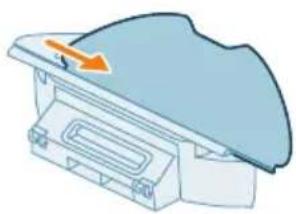
natural_image
Diagram of a mechanical component with an arrow indicating direction (no text or symbols)text_image
Safety warning illustration showing sun, warning sign, and two clothes hanging with symbols indicating water safety and weather conditions.natural_image
Illustration of a mechanical component with an orange arrow indicating upward motion (no text or symbols)natural_image
Diagram of a printer with an open lid and arrow indicating rotation (no text or symbols)natural_image
Illustration of a plastic container with liquid being poured into it (no text or symbols)natural_image
Illustration of a robotic vacuum cleaner with a blue component and an orange arrow pointing to it (no text or symbols)natural_image
Illustration of a blue plastic container with an orange arrow pointing upward, placed on a white base (no text or symbols)text_image
Diagram illustrating a medical procedure with labeled steps and a magnified view of the step 1.natural_image
Illustration of a car body component with motion arrows indicating movement (no text or symbols)natural_image
Illustration of a faucet pouring liquid into a curved container (no text or symbols)natural_image
Illustration of a hand holding a small blue object, possibly a tool or device, with no visible text or symbols.natural_image
Illustration of a blue plastic case with an arrow indicating downward motion, no text or symbols present
natural_image
Illustration of a robotic vacuum cleaner with a blue component and orange arrow indicating motion (no text or symbols)text_image
Diagram of a car air conditioner unit with numbered components and directional arrows indicating parts of the panel.natural_image
Technical diagram of a mechanical component with an orange arrow indicating a specific feature (no text or symbols present)natural_image
Illustration of hands performing a mechanical or electrical manipulation task with a blue component and orange arrow indicating motion (no text or symbols)natural_image
Illustration of hands manipulating a blue mechanical component with an upward arrow (no text or symbols)natural_image
Technical diagram of a mechanical component with internal structure and highlighted section (no text or symbols)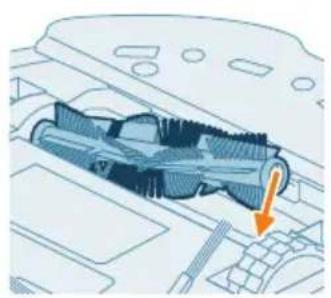
natural_image
Technical illustration of a mechanical component with an orange arrow indicating a specific part (no text or symbols present)text_image
Diagram of car interior components with numbered parts and directional arrows indicating assembly or movementnatural_image
Diagram of a car engine compartment with an orange arrow indicating upward motion (no text or symbols present)natural_image
Illustration of hands using a tool to adjust or install a car body panel (no text or symbols visible)natural_image
Diagram of a car interior showing a lever and spray nozzle (no text or symbols)text_image
Diagram showing a hand using a tool to adjust components on a device, labeled with numbers 1, 2, and 3.natural_image
Illustration of a robotic vacuum cleaner's internal components being inserted into a device, shown in three sequential steps (no text or symbols present)natural_image
Simple line drawing of a circular device with two circular components on its side (no text or symbols)natural_image
Illustration of a vacuum cleaner with an orange circular component on its side (no text or symbols)text_image
Diagram showing mechanical assembly with labeled parts and directional arrows, including a magnified view of a screwdriver.natural_image
3D diagram of a mechanical component with an arrow indicating upward motion (no text or symbols)natural_image
Illustration of a robotic vacuum cleaner with a circular symbol indicating recycling (no text or symbols present)text_image
Exploded view diagram of a robotic vacuum cleaner with numbered parts and labeled componentstext_image
0.5m 1.5m 0.5m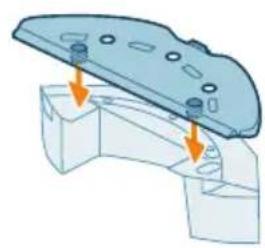
natural_image
Mechanical assembly diagram showing a bracket with mounting holes and two arrows indicating force or movement (no text or symbols present)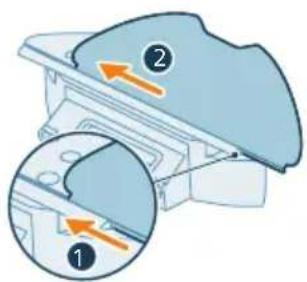
text_image
Diagram showing two views of a device with numbered annotations and directional arrows indicating movement or process.flowchart
graph TD
    A["Electricity Battery"] --> B["Switch"]
    B --> C["Power Supply"]
    C --> D["Output"]
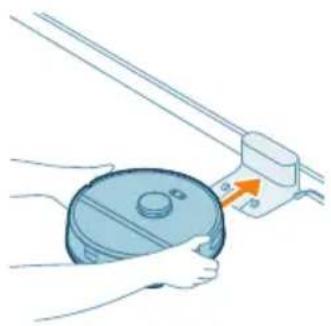
natural_image
Illustration of a hand holding a circular object next to a mechanical device with an arrow indicating motion (no text or symbols)text_image
Phleg HomeRun OK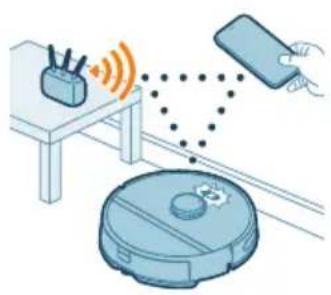
natural_image
Illustration of a robotic vacuum cleaner emitting signal waves from a device, with a hand holding a smartphone nearby (no text or symbols)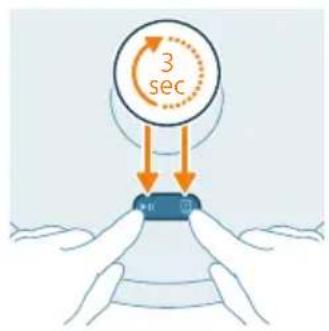
text_image
3 sec Ntext_image
English English English English English English English English English English English English English English English English English English English English English English English English English English English English English English English English English English English English English English English English English English English English English English English English English English Englishtext_image
Safety warning illustration showing a device with a red X mark and a 'No Use' checkmark, alongside a photo of a teddy bear on a sofa.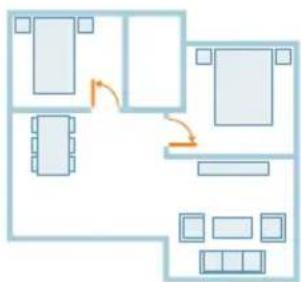
flowchart
graph TD
    A["Room 1"] --> B["Room 2"]
    B --> C["Room 3"]
    C --> D["Room 4"]
    D --> E["Room 5"]
    E --> F["Room 6"]
    F --> G["Room 7"]
    G --> H["Room 8"]
    H --> I["Room 9"]
    I --> J["Room 10"]
    style A fill:#cce5ff,stroke:#333
    style B fill:#cce5ff,stroke:#333
    style C fill:#cce5ff,stroke:#333
    style D fill:#cce5ff,stroke:#333
    style E fill:#cce5ff,stroke:#333
    style F fill:#cce5ff,stroke:#333
    style G fill:#cce5ff,stroke:#333
    style H fill:#cce5ff,stroke:#333
    style I fill:#cce5ff,stroke:#333
    style J fill:#cce5ff,stroke:#333
text_image
Diagram showing two views of a mechanical component with numbered annotations and directional arrows indicating movement or force.natural_image
Illustration of a mechanical component with a curved top and arrow indicating rotation (no text or symbols)natural_image
Illustration of a mechanical component with a blue cover and orange arrow indicating direction (no text or symbols)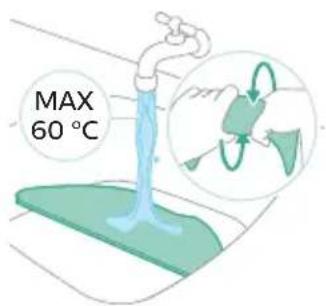
text_image
MAX 60 °Ctext_image
Safety warning illustration showing sunlight, a leaf with raindrops, and a checkmark indicating failure.natural_image
Illustration of a mechanical component with an orange arrow indicating upward motion (no text or symbols)natural_image
Illustration of a printer with an open lid and orange arrow indicating rotation (no text or symbols)natural_image
Illustration of a hand pouring liquid into a trash bin (no text or symbols)natural_image
Illustration of a mechanical component with an arrow indicating rotation or assembly (no text or symbols)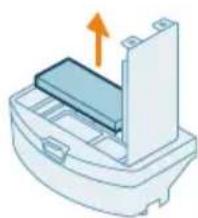
natural_image
Diagram of a printer or printer with an arrow indicating upward motion (no text or symbols present)text_image
Safety warning symbol showing sun and water warning, with a red 'X' indicating failure and a green checkmark.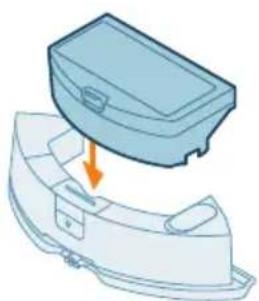
natural_image
Illustration of a mechanical component with an arrow indicating downward motion (no text or symbols)natural_image
Illustration of a robotic vacuum cleaner with a blue cover and orange arrow pointing to its component (no text or symbols)natural_image
Illustration of a blue plastic container with an orange arrow pointing upward, placed on a curved base (no text or symbols)text_image
Diagram illustrating a foot push technique with labeled steps 1 and 2 showing the movement of the foot.natural_image
Illustration of a blue car body with motion arrows indicating movement (no text or symbols)natural_image
Illustration of a faucet spraying water into a container with green liquid (no text or symbols)natural_image
Illustration of a hand holding a small blue object, possibly a tool or device, with no visible text or symbols.natural_image
Illustration of a blue toolbox placed on a curved base with an orange arrow indicating force or movement (no text or symbols)natural_image
Illustration of a robotic vacuum cleaner with a blue component and orange arrow indicating motion (no text or symbols)text_image
Diagram of a car air intake system with labeled components and directional arrows indicating flow or movement.natural_image
Technical diagram of a mechanical component with an orange arrow indicating direction (no text or symbols present)natural_image
Illustration of hands holding a mechanical component with an orange arrow indicating motion (no text or symbols)natural_image
Illustration of hands tying a knot with a blue mesh and an orange upward arrow (no text or symbols)natural_image
Technical illustration of a mechanical component with internal threading and a highlighted section (no text or symbols)natural_image
Technical illustration of a mechanical component with an orange arrow indicating a specific part (no text or symbols present)text_image
Diagram showing car interior components with numbered labels and directional arrows indicating parts of the dashboard.natural_image
Diagram of a car engine compartment with a highlighted intake component (no text or symbols)natural_image
Illustration of hands using a tool to adjust or install a component, no text or symbols presentnatural_image
Diagram of a car interior with a spray gun emitting orange light from a nozzle (no text or symbols)text_image
Diagram showing a hand using a tool to adjust or install a device with numbered parts labeled 1, 2, and 3.natural_image
Illustration of four steps of a robotic vacuum cleaner's internal components being adjusted, showing hand positioning and cleaning (no text or symbols present)text_image
Diagram showing mechanical assembly with labeled parts and directional arrows, including a magnified view of a screwdriver.natural_image
3D diagram of a mechanical component with an orange arrow indicating direction (no text or symbols)natural_image
Illustration of a robotic vacuum cleaner with a circular label containing the recycling symbol (no text or labels present)text_image
Exploded view diagram of a robotic vacuum cleaner with numbered parts for identificationtext_image
0.5m 1.5m 0.5mnatural_image
Mechanical assembly diagram showing a bracket with mounting holes and two arrows indicating force or movement (no text or symbols present)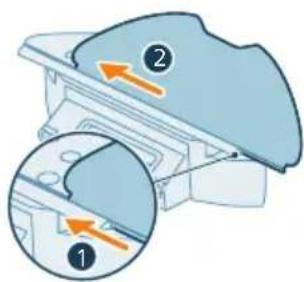
text_image
Diagram showing two views of a mechanical component with numbered annotations and directional arrows indicating movement or force.flowchart
graph TD
    A["Electricity Battery"] --> B["Switch"]
    B --> C["Power Supply"]
    C --> D["Output"]
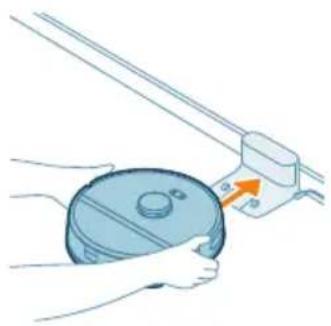
natural_image
Illustration of a hand holding a circular component next to a mechanical device with an arrow indicating motion (no text or symbols)text_image
Phipped HomeRun OK
natural_image
Illustration of a robotic vacuum cleaner emitting signal waves from a device, with a hand holding a smartphone nearby (no text or symbols)
text_image
3 sec Ntext_image
English English Language English Language English Language English Language English Language English Language English Language English Language English Language English Language English Language English Language English Language English Language English Language English Language English Language English Language English Language English Language English Language English Language English Language English Language English Language English Language English Language English Language English Language English Language English Language English Language English Language English Languagetext_image
Safety warning illustration showing incorrect and correct actions to switch from a bed to a sofa, with symbols indicating no need and checkmark.text_image
Diagram showing two views of a device with numbered annotations and directional arrows indicating movement or process.natural_image
Illustration of a mechanical component with a curved arrow indicating rotation (no text or symbols)natural_image
Diagram of a mechanical component with a blue cover and an orange arrow indicating direction (no text or symbols)text_image
Safety warning illustration showing sunlight, a warning sign, and two leaf-shaped objects with symbols indicating failure or damage.natural_image
Illustration of a mechanical component with an orange arrow indicating upward motion (no text or symbols)natural_image
Illustration of a printer's lid with an orange arrow indicating rotation (no text or symbols)natural_image
Illustration of a plastic container with a lid pouring liquid into it (no text or symbols)natural_image
Illustration of a mechanical component with an arrow indicating rotation or assembly (no text or symbols)natural_image
Illustration of a printer or printer with an orange arrow indicating upward motion (no text or symbols present)text_image
Safety warning icons showing sun, water drop, and checkmark symbols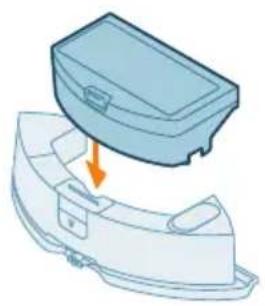
natural_image
Illustration of a blue plastic case with an arrow pointing to a damaged interior (no text or symbols)natural_image
Illustration of a robotic vacuum cleaner with a blue component and an orange arrow pointing to it (no text or symbols)natural_image
3D diagram of a mechanical component with an orange arrow indicating upward motion (no text or symbols)text_image
Diagram illustrating a step in a medical procedure involving foot positioning and fluid flow, labeled with numbers 1 and 2.natural_image
Illustration of a blue plastic car handle with motion arrows indicating movement (no text or symbols)natural_image
Illustration of a faucet with water flowing from a drain (no text or symbols)natural_image
Illustration of a hand cleaning a blue object (no text or symbols)natural_image
Illustration of a blue plastic case with an arrow indicating downward motion, showing internal components (no text or symbols)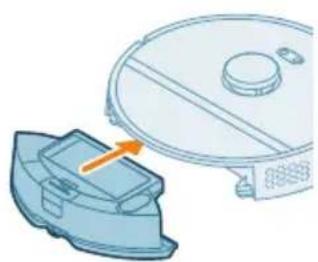
natural_image
Illustration of a robotic vacuum cleaner with a blue component and an orange arrow indicating motion (no text or symbols)text_image
Diagram showing a car air conditioner unit with labeled parts 1 and 2, indicating airflow direction.natural_image
Technical diagram of a mechanical component with an orange arrow indicating a specific feature (no text or symbols present)natural_image
Illustration of hands holding a mechanical component with an orange arrow indicating motion (no text or symbols)natural_image
Illustration of hands tying a rope knot with an upward arrow (no text or symbols)natural_image
Technical illustration of a mechanical component with an orange arrow indicating a specific feature (no text or symbols present)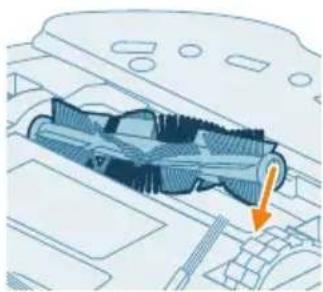
natural_image
Technical diagram of a mechanical component with an arrow indicating a specific section (no text or symbols present)text_image
Diagram of car engine compartment with labeled parts and directional arrows indicating assembly or movementnatural_image
Diagram of a car engine compartment showing structural components and airflow direction (no text or labels)natural_image
Illustration of hands using pliers to adjust or install a component on a device (no text or symbols visible)natural_image
Diagram of a mechanical component with a spray nozzle and flame, no text or symbols presenttext_image
Diagram showing a hand using a tool to adjust or install a device component, labeled with numbers 1, 2, and 3.natural_image
Illustration of a hand inserting a clip into a circular device component (no text or symbols visible)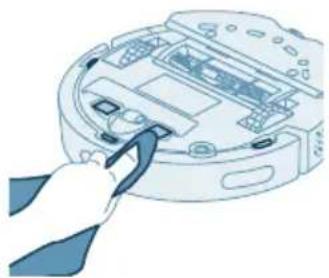
natural_image
Illustration of a hand inserting a cable into a device (no text or symbols visible)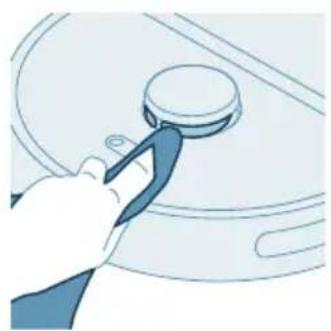
natural_image
Illustration of a hand using a tool to lift a car (no text or symbols visible)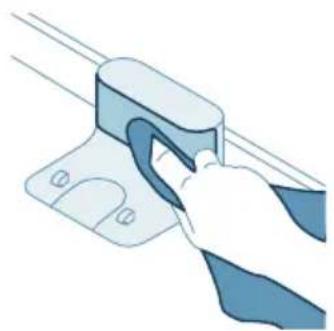
natural_image
Illustration of a hand using a tool to lift a blue plastic clip (no text or symbols)natural_image
Illustration of a device with an orange circular component and a base-mounted cable (no text or symbols)natural_image
Simple line drawing of a circular object above a rectangular base with wires (no text or symbols)text_image
Diagram showing a mechanical component with labeled parts and directional arrows, including numbered callouts.natural_image
3D diagram of a mechanical component with an orange arrow indicating direction (no text or symbols)natural_image
Illustration of a robotic vacuum cleaner with a circular label indicating recycling symbol (no text or symbols on the device itself)text_image
Exploded view diagram of a robotic vacuum cleaner with numbered parts and Chinese labelstext_image
0.5m 1.5m 0.5mnatural_image
3D mechanical assembly diagram showing a bracket with mounting holes and two arrows indicating force or movement (no text or symbols)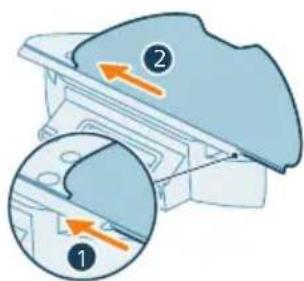
text_image
Diagram showing two views of a mechanical component with numbered annotations and directional arrows indicating movement or force.natural_image
Illustration of a hand holding a circular device with a scroll wheel, next to a mechanical component (no text or symbols visible)text_image
Philip HomeRun The quick access to the home run is required. OK Cancel Help Help you.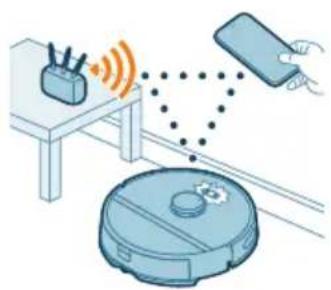
natural_image
Illustration of a robotic vacuum cleaner connected to a device via wireless signals (no text or symbols)
text_image
3 sec 10Загрузка приложения
text_image
English English English English English English English English English English English English English English English English English English English English English English English English English English English English English English English English English English English English English English English English English English English English English English English English English English Englishtext_image
Illustration showing a medical procedure with a red X mark and a green checkmark, alongside a cartoon-style photo of a patient on a couch.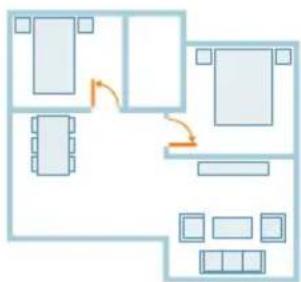
flowchart
graph TD
    A["Room 1"] --> B["Room 2"]
    B --> C["Room 3"]
    C --> D["Room 4"]
    D --> E["Room 5"]
    E --> F["Room 6"]
    F --> G["Room 7"]
    G --> H["Room 8"]
    H --> I["Room 9"]
    I --> J["Room 10"]
    style A fill:#cce5ff,stroke:#333
    style B fill:#cce5ff,stroke:#333
    style C fill:#cce5ff,stroke:#333
    style D fill:#cce5ff,stroke:#333
    style E fill:#cce5ff,stroke:#333
    style F fill:#cce5ff,stroke:#333
    style G fill:#cce5ff,stroke:#333
    style H fill:#cce5ff,stroke:#333
    style I fill:#cce5ff,stroke:#333
    style J fill:#cce5ff,stroke:#333
text_image
Diagram showing two labeled parts (① and ②) with arrows indicating direction, likely illustrating a mechanical or electrical component assembly.natural_image
Illustration of a mechanical component with a curved arrow indicating rotation (no text or symbols)natural_image
Illustration of a mechanical component with a blue top and orange arrow indicating direction (no text or symbols)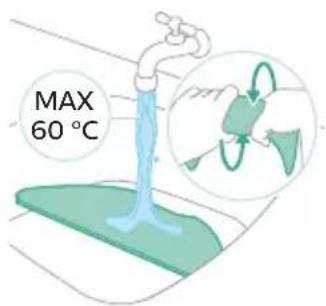
text_image
MAX 60 °Ctext_image
Safety warning illustration showing sunlight, a leaf with raindrops, and a checkmark indicating failure.natural_image
Illustration of a mechanical component with an orange arrow indicating direction (no text or symbols)natural_image
Illustration of a printer with an open lid and orange arrow indicating rotation (no text or symbols)natural_image
Illustration of a trash bin with a lid pouring liquid into it (no text or symbols)natural_image
Diagram of a mechanical component with an arrow indicating rotation or assembly (no text or symbols present)natural_image
Illustration of a printer or printer with an orange arrow indicating compression or shift (no text or symbols present)text_image
Safety warning icons showing sun, water drop, and checkmark symbolsnatural_image
Illustration of a blue plastic case with an arrow indicating downward motion, showing internal components (no text or symbols)natural_image
Illustration of a robotic vacuum cleaner with a blue base and orange arrow pointing to the component (no text or symbols)natural_image
3D illustration of a mechanical component with an upward arrow indicating motion (no text or symbols)text_image
Diagram illustrating a water tap with labeled steps 1 and 2 showing the movement of a showerhead.natural_image
Illustration of a car body component with motion arrows indicating movement (no text or symbols)natural_image
Illustration of a faucet pouring liquid into a container (no text or symbols)natural_image
Illustration of a hand cleaning a small blue object (no text or symbols)natural_image
Illustration of a blue toolbox placed on a curved plastic housing with an orange arrow indicating compression (no text or symbols)natural_image
Illustration of a robotic vacuum cleaner with a blue base and orange arrow indicating motion (no text or symbols)text_image
Diagram of a car air conditioner unit with labeled parts and directional arrows indicating componentsnatural_image
Technical diagram of a mechanical component with an orange arrow indicating direction (no text or symbols present)natural_image
Illustration of hands holding a coiled spring or spring with an orange arrow indicating direction (no text or symbols)natural_image
Illustration of hands tying a knot with an upward arrow (no text or symbols)natural_image
Technical illustration of a mechanical component with internal threading and a highlighted section (no text or symbols)natural_image
Technical illustration of a mechanical component with an arrow indicating a specific part (no text or symbols present)text_image
Diagram showing car dashboard components with numbered parts and directional arrows indicating assembly or movement.natural_image
Diagram of a car engine hood with an orange arrow indicating upward motion (no text or symbols present)natural_image
Illustration of hands using a tool to adjust or install a component on a vehicle (no text or symbols visible)natural_image
Diagram of a car interior showing a spray nozzle emitting orange light onto the hood (no text or symbols)text_image
Diagram showing a hand holding a tool interacting with a device, labeled with three numbered components.natural_image
Illustration of four steps of a robotic vacuum cleaner's internal components, showing hand positioning and cleaning (no text or symbols)natural_image
Simple line drawing of a circular device with internal components and ventilation slots (no text or symbols)natural_image
Illustration of a robotic vacuum cleaner with an orange circular component on its side (no text or symbols)text_image
Diagram showing mechanical assembly with labeled parts and directional arrows, including a magnified view of a screwdriver.natural_image
Diagram of a mechanical component with an orange arrow indicating upward motion (no text or symbols)natural_image
Illustration of a robotic vacuum cleaner with a circular label containing the recycling symbol (no text or labels present)text_image
Exploded view diagram of a robotic vacuum cleaner with numbered parts for identificationtext_image
0.5m 1.5m 0.5mnatural_image
3D mechanical assembly diagram showing a bracket with mounting holes and two arrows indicating force or movement (no text or symbols)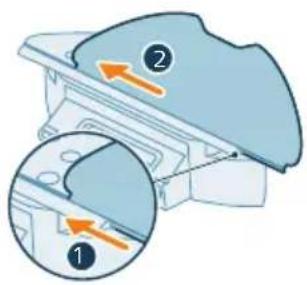
text_image
Diagram illustrating a mechanical or electrical component with labeled parts and directional arrows, likely illustrating a process or assembly.flowchart
graph TD
    A["Electricity Battery"] --> B["Switch"]
    B --> C["Power Supply"]
    C --> D["Output"]
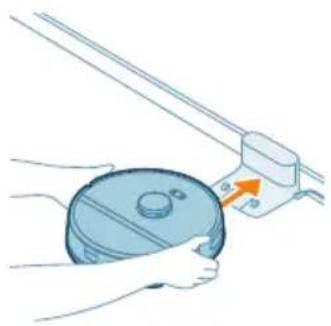
natural_image
Illustration of a hand holding a circular object next to a mechanical device with an arrow indicating motion (no text or symbols)natural_image
Illustration of a robotic vacuum cleaner connected to a device and a sensor array (no text or symbols)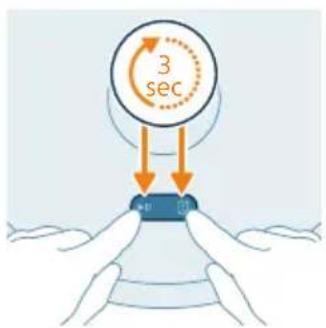
text_image
3 sec 40 70Скачування додатку
text_image
Settings WLAN Philips robot_XXYKYtext_image
Screenshot of a mobile app interface showing a dropdown menu with options like 'OK', 'Cancel', and 'Finish'.text_image
Medical illustration showing a patient undergoing a medical procedure to avoid a child's fever, with a 'X' indicating no need and a green checkmark indicating the correct procedure.text_image
Diagram showing two views of a device with numbered annotations and directional arrows indicating movement or process.natural_image
Illustration of a mechanical component with a curved top and arrow indicating rotation (no text or symbols)natural_image
Diagram of a mechanical component with a blue cover and orange arrow indicating direction (no text or symbols)text_image
Safety warning illustration showing sunlight, a leaf with raindrops, and a checkmark indicating failure.natural_image
3D illustration of a mechanical component with an upward arrow indicating force or direction (no text or symbols)natural_image
Diagram of a printer with an open lid and arrow indicating rotation (no text or symbols)natural_image
Illustration of a blue industrial machine pouring granular material into a slotted cylindrical container (no text or symbols)natural_image
Illustration of a door handle with an arrow indicating rotation (no text or symbols)natural_image
Illustration of a printer or printer with an orange arrow indicating upward motion (no text or symbols present)text_image
Safety warning symbol showing sun, warning sign, and two checkmarks indicating failure or rejection of a surface.natural_image
Illustration of a blue toolbox with an orange arrow indicating downward motion, partially enclosed in a white plastic casing (no text or symbols)natural_image
Illustration of a robotic vacuum cleaner with a blue component and an orange arrow pointing to it (no text or symbols)natural_image
Illustration of a blue plastic container with an orange arrow indicating upward motion (no text or symbols)text_image
Diagram illustrating a step in a washing machine tool, showing step 1 and step 2 with an arrow indicating rotation.text_image
Diagram of a car air conditioner unit with labeled parts and directional arrows indicating airflow or movement.natural_image
Technical diagram of a mechanical component with an orange arrow indicating direction (no text or symbols present)natural_image
Illustration of hands holding a coiled spring or spring with an orange arrow indicating direction (no text or symbols)natural_image
Illustration of hands tying a knot with a blue mesh and an orange upward arrow (no text or symbols)natural_image
Technical illustration of a mechanical component with a highlighted section and an orange arrow indicating direction (no text or symbols present)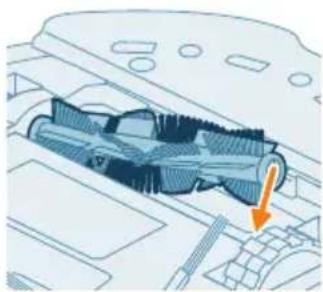
natural_image
Technical diagram of a mechanical component with an arrow indicating a specific section (no text or symbols present)text_image
Diagram of car engine compartment with labeled parts and directional arrows indicating assembly or movementnatural_image
Diagram of a car engine compartment with a highlighted lever and orange arrow indicating direction (no text or symbols)natural_image
Illustration of hands using a tool to adjust or install a component on a vehicle (no text or symbols visible)natural_image
Diagram of a car interior with a spray nozzle and orange laser beam (no text or symbols)text_image
Diagram showing a hand using a tool to adjust or install a device with numbered parts labeled 1, 2, and 3.natural_image
Illustration of four steps of a robotic vacuum cleaner's internal components being inserted into a device (no text or symbols present)natural_image
Illustration of a device with an orange circular component and a small orange object attached to it, shown with a magnified view (no text or symbols)natural_image
Simple line drawing of a device with a circular top and cable, no text or symbols present.text_image
Diagram showing mechanical assembly with labeled parts and directional arrows, including a numbered component ① and a circled arrow labeled ②.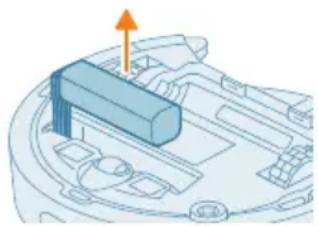
natural_image
3D diagram of a mechanical component with an orange arrow indicating direction (no text or symbols)natural_image
Illustration of a robotic vacuum cleaner with a circular label containing the recycling symbol (no text or labels present)text_image
Exploded view diagram of a robotic vacuum cleaner with numbered parts for identificationtext_image
0.5m 1.5m 0.5mnatural_image
Mechanical assembly diagram showing a bracket with mounting holes and two arrows indicating force or movement (no text or symbols present)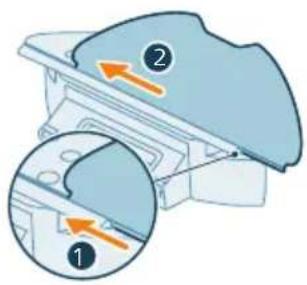
text_image
Diagram showing two views of a mechanical component with numbered annotations and directional arrows indicating movement or force.natural_image
Illustration of a hand holding a circular object next to a mechanical component with an arrow indicating motion (no text or symbols)text_image
Philip Hotiellun You will get your home to get your button. OK! Cancel Help No. 100% or 100%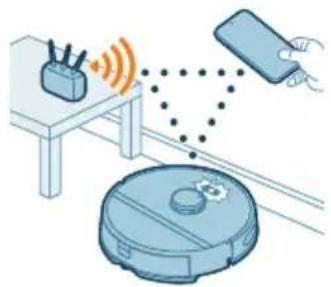
natural_image
Illustration of a robotic vacuum cleaner with sensor points and a smartphone, no text or symbols present