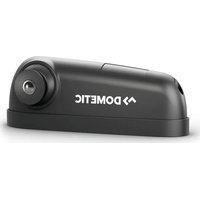
PerfectView CAM 1000RHD - Surveillance Camera DOMETIC - Free user manual and instructions
Find the device manual for free PerfectView CAM 1000RHD DOMETIC in PDF.


| Product type | Surveillance camera |
| Brand | Dometic |
| Model | PerfectView CAM 1000RHD |
| Use | Direction change assistant for right-hand drive vehicles, installed above the passenger window |
| Dimensions (L x W x H) | 209 x 75 x 58 mm |
| Weight | Approx. 0.6 kg |
| Power supply | 10 V to 36 V |
| Power consumption | 6 W max. |
| Sensor | CMOS 1/3.2" |
| Resolution | Approx. 1 million pixels |
| Video format | NTSC, 1 Vpp |
| Photosensitivity | < 1 lux |
| Operating temperature | -40 °C to +85 °C |
| Protection class | IP69k |
| Main functions | Detection of vulnerable road users (pedestrians, cyclists), active/inactive zone, dynamic rectangular indicator, audible warning signal, GPS activation |
| Mounting | On left A-pillar, height 2-4 m depending on mode A or B |
| Package contents | Camera, kettle base, sounder, cable set, monitor M75LXAHD, manual |
| Safety | Do not obstruct airbags, secure mounting, comply with local laws |
| Maintenance and cleaning | Clean with a damp cloth, check cables regularly |
| Warranty | Legal warranty period, contact retailer or dometic.com/dealer |
| Disposal | Recycling via designated centers |
Frequently Asked Questions - PerfectView CAM 1000RHD DOMETIC
User questions about PerfectView CAM 1000RHD DOMETIC
0 question about this device. Answer the ones you know or ask your own.
Ask a new question about this device
Download the instructions for your Surveillance Camera in PDF format for free! Find your manual PerfectView CAM 1000RHD - DOMETIC and take your electronic device back in hand. On this page are published all the documents necessary for the use of your device. PerfectView CAM 1000RHD by DOMETIC.
USER MANUAL PerfectView CAM 1000RHD DOMETIC
natural_image
Line drawing of a mechanical device with no visible text or symbolsCAM1000RHD
EN Turn assist
Installation and Operating Manual ..... 3
De Abbiegeassistent
Montage- und Bedienungsanleitung ... 13
FR Assistant de changement de direction
Instructions de montage et de service .. 23
Asistente de giro
Instrucciones de montaje y de uso .....33
Assistente de mudança de direção
Instruções de montagem e manual de instruções ....43
Assistente di svolta
Istruzioni di montaggio e d'uso ..... 53
Draaiassistent
Montagehandleiding en gebruiksaanwijzing....63
Drejeassistent
Monterings- og betjeningsvejledning...73
sv. Svängassistent
Monterings- och bruksanvisning..... 83
Snuhjelp
Monterings- og bruksanvisning ..... 93
Kääntymisavustin
Asennus- ja käyttöohje. 103
Система помощи при повороте
Инструкция по монтажу
и эксплуатации....113
Asystent skrętu
Instrukcja montażu i obsługi ..... 124
Asistent odbočovania
Návod na montáž a uvedenie
do prevádzky .... 135
Asistent odbočování
Návod k montáži a obsluze ..... 145
Fordulássegéd
Szerelési és használati útmutató ..... 155
© 2022 Dometic Group. The visual appearance of the contents of this manual is protected by copyright and design law. The underlying technical design and the products contained herein may be protected by design, patent or be patent pending. The trademarks mentioned in this manual belong to Dometic Sweden AB. All rights are reserved.
Please read these instructions carefully and follow all instructions, guidelines, and warnings included in this product manual in order to ensure that you install, use, and maintain the product properly at all times. These instructions MUST stay with this product.
By using the product, you hereby confirm that you have read all instructions, guidelines, and warnings carefully and that you understand and agree to abide by the terms and conditions as set forth herein. You agree to use this product only for the intended purpose and application and in accordance with the instructions, guidelines, and warnings as set forth in this product manual as well as in accordance with all applicable laws and regulations. A failure to read and follow the instructions and warnings set forth herein may result in an injury to yourself and others, damage to your product or damage to other property in the vicinity. This product manual, including the instructions, guidelines, and warnings, and related documentation, may be subject to changes and updates. For up-to-date product information, please visit documents.dometic.com.
Table of contents
1 Explanation of symbols 3
2 Safety instructions 4
3 Scope of delivery....6
4 Intended use 6
5 Technical description 7
6 Target group 8
7 Installing the camera 8
8 Connecting the camera....8
9 Using the camera....9
10 Troubleshooting 10
11 Cleaning and maintenance....11
12 Warranty....11
13 Disposal....11
14 Technical data 12
1 Explanation of symbols

DANGER!
Safety instruction: Indicates a hazardous situation that, if not avoided, will result in death or serious injury.

WARNING!
Safety instruction: Indicates a hazardous situation that, if not avoided, could result in death or serious injury.

CAUTION!
Safety instruction: Indicates a hazardous situation that, if not avoided, could result in minor or moderate injury.

NOTICE!
Indicates a situation that, if not avoided, can result in property damage.

NOTE
Supplementary information for operating the product.
2 Safety instructions
Please observe the prescribed safety instructions and stipulations from the vehicle manufacturer and service workshops.
Observe the applicable legal regulations.

DANGER!
- The camera does not release the driver from the duty of care when driving.
- The driver remains fully responsible for driving the vehicle, for fulfilling the road safety obligations and for complying with the statutory road safety requirements.

WARNING! Failure to obey these warnings could result in death or serious injury.
Risk of injury
- Secure the parts installed in the vehicle in such a way that they cannot become loose under any circumstances (sudden braking, accidents) and cause injuries to the occupants of the vehicle.
- Do not install the parts anywhere in the vehicle where an airbag may open. This can cause injury if the airbag deploys.
-
Inadequate supply line connections can result in short circuits, causing:
-
Cable fires
– The airbag being triggered
– Damage to electronic control devices - Electrical malfunctions (turn signal, stop light, horn, ignition, lights).

CAUTION! Failure to obey these cautions could result in minor or moderate injury.
- Secure any parts of the system concealed by the bodywork in such a manner that they cannot be come loose or damage other parts or cables, or impair vehicle functions (steering, pedals, etc.).

• Always follow the safety instructions of the vehicle manufacturer.
Some work (e.g., on retention systems such as the airbag, etc.) may only be performed by qualified specialists.
NOTICE!
Damage hazard
- To prevent damage when drilling, ensure that there is sufficient space on the other side for the drill head to emerge.
- Deburr all drill holes and treat them with a rust-protection agent.
- When working on the electrical system, the batteries must be separated from the vehicle ground. This applies to the main and additional batteries.
-
When working on the following cables, only use insulated cable lugs, plugs and tab sleeves:
-
30 (direct input from positive battery terminal)
- 15 (connected positive terminal, behind the battery)
- 31 (return cable from the battery, ground)
- 58 (reversing light)
Do not use porcelain wire connectors.
- Use a crimping tool to connect the cables.
-
Screw the cable when connecting cable 31 (ground).
-
Screw on the cable using a cable lug and gear disc to one of the vehicle's ground bolts or
- Screw the cable to the sheet metal body work using a cable lug and a self-tapping screw.
Ensure that there is a good ground connection.
- If you disconnect the battery, all data stored in all volatile memory will be lost. Data may have to be reset. Please follow the instructions of the respective vehicle manufacturer in this case. You can find instructions for making these settings in the operating manual.
- When testing the voltage in electrical cables, only use a diode test lamp or a voltmeter.
Test lamps with a bulb consume too much voltage, which can damage the vehicle's electronic system.
- When making electrical connections, ensure the following:
– They are not kinked or twisted
– They do not rub on edges
– They are not laid in sharp-edged through-holes without protection.
• Insulate all connections.
- Secure the cables against mechanical stress with cable binders or insulating tape, e.g., to existing lines.
- Follow the installation and operating manual for the monitor.
| 3 | S | c | o | p | e | o | f | d | e | l |
See fig. 1
| No. | Quantity | Designation | Reference number |
| 1 | Camera CAM1000RHD | 9620001012 | |
| 2 | Base 9600026951 | ||
| 3 | Buzzer – | ||
| 4 | Camera cable set | 9600026950 | |
| 5 | Monitor M75LXAHD(part of system BSV71000RHD) | 9600012899 | |
| – | Installation and operating manual |
4 Intended use
The CAM1000RHD camera, together with the M75LXAHD monitor, is the camera-based turn assistant BVS71000RHD for right-hand-drive vehicles that supports the driver during left-hand turning maneuvers. The camera is designed for installation above the passenger window of the driver's cab and is equipped with a movable ball head for easy adjustment.
The camera is designed for installation in commercial vehicles.
The camera does not release the driver from the duty of care when turning, in particular the inspection of the area to the left of the vehicle.
Detection reliability depends on correct installation, sufficient care (removal of dirt) and lighting conditions (min. 10 lux).
The camera has the following system limits:
• The system detects VRU (vulnerable road users) such as pedestrians or cyclists as well as wheelchair users
- The objects may enter the detection area from any direction and may move or may be stationary.
- The system does not detect hidden objects.
- The detection of objects in darkness is limited.
- The detection of objects in strong shadow is limited.
- Objects with a shape close to a human body may generate a detection indication.
This product is only suitable for the intended purpose and application in accordance with these instructions.
This manual provides information that is necessary for proper installation and/or operation of the product. Poor installation and/or improper operating or maintenance will result in unsatisfactory performance and a possible failure.
The manufacturer accepts no liability for any injury or damage to the product resulting from:
- Incorrect assembly or connection, including excess voltage
- Incorrect maintenance or use of spare parts other than original spare parts provided by the manufacturer
• Alterations to the product without express permission from the manufacturer - Use for purposes other than those described in this manual
Dometic reserves the right to change product appearance and product specifications.
5 Technical description
5.1 Function description
The camera image is evaluated via the control unit in the camera. Any VRU entering the detection area (region of interest = ROI) is detected and marked on the monitor with a red movement rectangle. The rectangle moves with the detected object and serves as an optical signal. Optionally, an acoustic warning device (buzzer, included in the scope of delivery) can be added.
The system BVS7 1000RHD includes the M75LXAHD monitor, which is preferably mounted on the left A-pillar and provides the driver with images of the situation next to the vehicle.
The camera has the following features:
• CMOS camera with VRU detection function
- Minimized false detection due to adaptive algorithm
• Defined active and inactive image area (fig. 4)
- Detection and indication of VRU while moving or stationary only
• Optical signaling by dynamic rectangular indicator
• Acoustic warning signal
• Speed-dependent activation via GPS receiver
• Automatic activation of the monitor
5.2 Display elements of the camera image
Symbol Function Description
| Active area The red field marks the detection range of the camera. It appears for about 3 seconds after the ignition is switched on. It indicates the area (ROI) where the camera can detect an object. This field can be used to adjust the camera so that its detection range covers a certain area. | ||
| - - - + - - - | Reference line with center cross | The reference line appears permanently. It shows the line between active and inactive area. It should preferably be positioned parallel to the left vehicle contour. The center cross is the optical center line of the camera and should be placed vertically below the camera position. |
| Dynamic rectangular indicator | The dynamic rectangular indicator starts at the detected object and moves forwards or backwards parallel with the detected object along the vehicle. | |
| GPS Green symbol: | - Optical display of objects- Warning sound active | |
| Yellow symbol: No GPS signalNo speed related activation or deactivation of the system. | ||
| Red symbol: No object detection available | ||
| Warning sound Blue symbol: | - Warning sound inactive | |
| A or B | Operation mode | Indication of the selected operation mode |
6 Target group

The mechanical and electrical installation and setup of the device must be performed by a qualified technician who has demonstrated skill and knowledge related to the construction and operation of automotive equipment and installations, and who is familiar with the applicable regulations of the country in which the equipment is to be installed and/or used, and has received safety training to identify and avoid the hazards involved.
7 Installing the camera
See fig. 2 to fig. 9
Note the following before installation (change acceptance):
- Depending on country-specific regulations, the system BVS71000RHD - CAM1000RHD + M75LXAHD may require an approval by a testing laboratory (e.g., DEKRA, TÜV).
- Observe the manufacturer's installation guidelines.
- The device may only be put into operation if the user is aware of the risks and dangers resulting from the use of the device.
Note the following during installation:
- Note the detection range dependent on the position of the camera:
- Operating mode A (red letter "A" on screen) for camera positions with a mounting height from 2 m to 3 m (fig. 2 to fig. 4)
-
Operating mode B (red letter "B" on screen) for camera positions with a mounting height from 3 m to 4 m (fig. 3 to fig. 4)
-
Install the extension base if the box body blocks the view to the detection zone (fig. 5).
- Install the camera as shown in fig. 6 to fig. 8.
- Mount the monitor as shown in fig. 9, preferably in the area of the left A-pillar, 30^ to the viewing axis straight ahead.
The NOR/ MIR selection of the monitor is triggered by the yellow/orange wires.
8 Connecting the camera
See fig. 10
Note the following:
- As far as possible, use original ducts for laying the cables, or other suitable options such as paneling edges, ventilation grilles or dummy plugs. If no openings are available, you must drill holes for the respective cables. Check beforehand that there is sufficient space on the other side for the drill head to emerge.
- Wherever possible, lay cables inside the vehicle as they are better protected there than outside.
- If you do need to lay a cable outside the vehicle, ensure that it is well fastened (use additional cable ties, insulating tape, etc.).
- To prevent damage to the cables when laying them, ensure that they are always far enough away from hot or moving vehicle components (exhaust pipes, driveshafts, light systems, fans, heaters, etc.).
- Attach the cables securely in the vehicle to prevent tripping hazards. This can be performed by using cable binders, insulating tape or gluing in place with adhesives.
- Protect every through-hole made in the bodywork against water penetration by suitable measures, e.g. by using a cable with a sealant and by spraying the cable and the cable sleeve with sealant.
Key for circuit diagram
No. Designation Description
| 1 Green connection plug Audio output to loudspeaker | ||
| 2 Yellow connection plug | CVBS video output | |
| 3 Red/black wire | Buzzer for acoustic signal | |
| 4 Red wire | Connection to ignition (ACC) 12 V/24 V | |
| 5 Green wire | No function | |
| 6 White wire | Cable loop for activation of operation mode A or B: Not connected to ACC = A (2 m to 3 m installation height) Connected to ACC = B (3 m to 4 m installation height) | |
| 7 Black wire | Connection to ground | |
| 8 Yellow / orange wires (to use this trigger wire as a loop 2 cables are needed) | Select normal (NOR) or mirrored (MIR) picture: Closed = NOR Open = MIR | |
| 9 Blue wire | GPS output 12 V/24 V for switching on the monitor (blue cable) (C3) | |
It is important for the compliant operation of the system that it cannot be switched off manually. The camera must therefore be connected via camera input CAM3 of the M75LX AHD monitor. The corresponding blue control cable activates or deactivates the monitor.
The following connections must be implemented:
- The picture settings provided by the monitor must be completed before connecting the blue cables. After installation the keys of the monitor are blocked and no settings are available.
- Connect the blue wire of the camera system cable with the blue CAM3 control cable of the monitor. This connection is used to switch the monitor on/off.
√ The system will automatically be activated and deactivated via the GPS signal at approx. 40 km/h.
9 Using the camera
9.1 Initial start of the camera
On the initial start-up the GPS receiver must save the satellite position. This may take up to 5 minutes.
9.2 Detection range
The detection range of the camera is divided into two zones (fig. 4):
• Visible area: depending on mounting height in operating mode A or B
• Active area (indicated by the red field appearing after activation of the system)

NOTE
The view of the camera into the detection area must not be obscured by vehicle parts. Objects may not be detected.
9.3 Test indicator when switching on
See fig. 11
The video system switches in standby-mode soon as the ignition is switched on. The system is activated by a speed of less than 40 km/h. The camera image appears.
The center cross indicator allows the camera to be correctly aligned. The center cross (1) is the optical center line of the camera and should be placed vertically below the camera position. The active area (2) is marked as a red area in the video for 6 seconds.
As soon as a VRU enters the active area, the dynamic rectangular indicator (3) appears in the display. If the audible signal is connected, a beep will sound simultaneously.
9.4 Operation at day and night
The monitor M75LXAHD from the BSV71000RHD system offers adjustment possibilities to adapt the image to day and night operation. These settings must be made before connecting the blue wires.
For more information, please refer to the manual of the monitor M75LXAHD.
10 Troubleshooting
| Fault Cause Solution | ||
| The device shows no function. | The black or red cable for the voltage supply are not making contact. | Check that the connections are secure. |
| The system plug is not connected or not correctly plugged into the control electronics. | Check the system plug and make sure that it locks into place. | |
| NO SIGNAL is displayed on the monitor. | No video signal present. Loose contact in the plug connector of the camera cable | Check that the connections are secure.Especially check the 20p connector of the monitor power cord. |
| The camera is defective. Contact an authorized service center to replace the camera. | ||
| The camera was not connected to camera input C3. | Make sure that the camera is connected to camera input C3. | |
| A yellow GPS icon appears on the monitor. | GPS reception is faulty. The system is active. The camera image appears even at speeds above 40 km/h. | |
| A red GPS icon appears on the monitor. | No object detection is available. Check that the connections are secure.Check whether the camera lens is soiled or otherwise blocked.Contact an authorized service center in case no proper function lasts. | |
| The monitor will not turn off. | The monitor was turned on manually before connecting the blue wire. In connection with the camera the keys are blocked. | The blue wire must be disconnected and the monitor switched off manually. Afterwards connect the blue wire again. |
Fault Cause Solution
| No picture, but the warning tone sounds. | The monitor receives no video signal. The camera is connected to the wrong input. | Check the camera channel used. It must be C3. |
| The cinch adapter has a loose contact or is defective. | Check the cinch adapter. |
11 Cleaning and maintenance

NOTICE! Damage hazard
- Do not use sharp or hard objects, abrasive cleaning agents or bleach during cleaning as these can damage the device.
▶ Occasionally clean the device with a soft, damp cloth.
▶ Regularly check live cables or wires for insulation faults, breaks or loose connections.
12 Warranty
The statutory warranty period applies. If the product is defective, please contact your retailer or the manufacturer's branch in your country (see dometic.com/dealer).
For repair and warranty processing, please include the following documents when you send in the product:
• A copy of the receipt with purchasing date
- A reason for the claim or description of the fault
Note that self-repair or non-professional repair can have safety consequences and might void the warranty.
13 Disposal

▶ Place the packaging material in the appropriate recycling waste bins wherever possible.
▶ Consult a local recycling center or specialist dealer for details about how to dispose of the product in accordance with the applicable disposal regulations.
14 Technical data
| CAM1000RHD | |
| Image sensor 1/3.2" CMOS | |
| Resolution approx. 1 million | |
| Video format NTSC, 1 Vpp | |
| Light sensitivity < 1 lux | |
| Field of view see fig. 4 | |
| Operating voltage 10 V to 36 V | |
| Power consumption max. 6 W | |
| Operating temperature -40 °C to +85 °C | |
| Protection class IP69k | |
| Dimensions 209 x 75 x 58 mm | |
| Weight approx. 0.6 kg | |
| Tests | ISO 16750-3ISO 16750-4SAE J2527ECE-R10 05 (2014)E CISPR 25ISO 7637-2FCC Part 15B |
Safety instruction: Indicates a hazardous situation that, if not avoided, will result in death or serious injury.

WARNUNG!
Safety instruction: Indicates a hazardous situation that, if not avoided, will result in death or serious injury.

AVERTISSEMENT !
5 Description technique
Safety instruction: Indicates a hazardous situation that, if not avoided, will result in death or serious injury.

¡ADVERTENCIA!
Safety instruction: Indicates a hazardous situation that, if not avoided, will result in death or serious injury.

AVISO!
Safety instruction: Indicates a hazardous situation that, if not avoided, will result in death or serious injury.

AVVERTENZA!
Safety instruction: Indicates a hazardous situation that, if not avoided, will result in death or serious injury.

WAARSCHUWING!
Safety instruction: Indicates a hazardous situation that, if not avoided, will result in death or serious injury.

ADVARSEL!
Safety instruction: Indicates a hazardous situation that, if not avoided, will result in death or serious injury.

WARNING!
Safety instruction: Indicates a hazardous situation that, if not avoided, will result in death or serious injury.

ADVARSEL!
Safety instruction: Indicates a hazardous situation that, if not avoided, will result in death or serious injury.

VAROITUS!
Safety instruction: Indicates a hazardous situation that, if not avoided, will result in death or serious injury.

ПРЕДУПРЕЖДЕНИЕ!
Safety instruction: Indicates a hazardous situation that, if not avoided, will result in death or serious injury.

OSTRZEŻENIE!
Safety instruction: Indicates a hazardous situation that, if not avoided, will result in death or serious injury.

VÝSTRAHA!
Safety instruction: Indicates a hazardous situation that, if not avoided, will result in death or serious injury.

VÝSTRAHA!
Safety instruction: Indicates a hazardous situation that, if not avoided, will result in death or serious injury.

FIGYELMEZTETÉS!
dometic.com/sales-offices