DS-D42AM2-N - Monitor Hikvision - Free user manual and instructions
Find the device manual for free DS-D42AM2-N Hikvision in PDF.



| Product type | Professional LED monitor |
| Brand | Hikvision |
| Model | DS-D42AM2-N |
| Screen size | 42 inches (106.7 cm) |
| Resolution | 1920 x 1080 (Full HD) |
| Brightness | 350 cd/m² |
| Contrast ratio | 4000:1 |
| Viewing angle | 178°/178° (horizontal/vertical) |
| Video inputs | VGA, HDMI, DVI |
| Other connectors | RS232, USB (for mouse/keyboard/USB drive), IR IN/OUT, RS485, WLAN, 3D OUT |
| Power supply | 100-240 V AC, 50/60 Hz |
| Power consumption | ≤ 120 W (typical) |
| Dimensions (without stand) | 977.8 x 568.6 x 83.2 mm |
| Weight (without stand) | Approximately 15 kg |
| Main functions | Remote screen adjustment, voltage, temperature, and light detection (via integrated multifunction card) |
| Maintenance and cleaning | Use a soft, dry cloth. Do not use chemical products. |
| Safety | Do not expose to moisture, leave a 5 cm space around for ventilation, do not use in places accessible to children. |
| Spare parts and repairability | Contact Hikvision customer service for parts and repairs. |
| General information | Manual available in multiple languages on the Hikvision website. |
Frequently Asked Questions - DS-D42AM2-N Hikvision
User questions about DS-D42AM2-N Hikvision
0 question about this device. Answer the ones you know or ask your own.
Ask a new question about this device
Download the instructions for your Monitor in PDF format for free! Find your manual DS-D42AM2-N - Hikvision and take your electronic device back in hand. On this page are published all the documents necessary for the use of your device. DS-D42AM2-N by Hikvision.
USER MANUAL DS-D42AM2-N Hikvision
© 2020 Hangzhou Hikvision Digital Technology Co., Ltd. All rights reserved.
This Manual is the property of Hangzhou Hikvision Digital Technology Co., Ltd. or its aliases (hereinaer referred to as "Hikvision"), and it cannot be reproduced, changed, translated, or distributed, parally or wholly, by any means, without the prior written permission of Hikvision. Unless otherwise expressly stated herein, Hikvision does not make any warranties, guarantees or representations, express or implied, regarding to the Manual, any information contained herein.
About this Manual
The Manual includes instrucons for using and managing the Product. Pictures, charts, images and all other informaon hereinaer are for descripon and explanaon only. The informaon contained in the Manual is subject to change, without noce, due to rmware updates or other reasons. Please nd the latest version of this Manual at the Hikvision website (hps://www.hikvision.com).
Please use this Manual with the guidance and assistance of professionals trained in supporting the Product.
Trademarks
HIKVISION and other Hikvision's trademarks and logos are the properes of Hikvision in various jurisdicons.
● Other trademarks and logos menoned are the properes of their respective owners.
Disclaimer
TO THE MAXIMUM EXTENT PERMITTED BY APPLICABLE LAW, THIS MANUAL AND THE PRODUCT DESCRIBED, WITH ITS HARDWARE, SOFTWARE AND FIRMWARE, ARE PROVIDED "AS IS" AND "WITH ALL FAULTS AND ERRORS". HIKVISION MAKES NO WARRANTIES, EXPRESS OR IMPLIED, INCLUDING WITHOUT LIMITATION, MERCHANTABILITY, SATISFACTORY QUALITY, OR FITNESS FOR A PARTICULAR PURPOSE. THE USE OF THE PRODUCT BY YOU IS AT YOUR OWN RISK. IN NO EVENT WILL HIKVISION BE LIABLE TO YOU FOR ANY SPECIAL, CONSEQUENTIAL, INCIDENTAL, OR INDIRECT DAMAGES, INCLUDING, AMONG OTHERS, DAMAGES FOR LOSS OF BUSINESS PROFITS, BUSINESS INTERRUPTION, OR LOSS OF DATA, CORRUPTION OF SYSTEMS, OR LOSS OF DOCUMENTATION, WHETHER BASED ON BREACH OF CONTRACT, TORT (INCLUDING NEGLIGENCE), PRODUCT LIABILITY, OR OTHERWISE, IN CONNECTION WITH THE USE OF THE PRODUCT, EVEN IF HIKVISION HAS BEEN ADVISED OF THE POSSIBILITY OF SUCH DAMAGES OR LOSS.
YOU ACKNOWLEDGE THAT THE NATURE OF INTERNET PROVIDES FOR THE INHERENT SECURITY RISKS, AND HIKVISION SHALL NOT TAKE ANY RESPONSIBILITIES FOR ABNORMAL OPERATION, PRIVACY LEAKAGE OR OTHER DAMAGES RESULTING FROM CYBER-ATTACK, HACKER ATTACK, VIRUS INFECTION, OR OTHER INTERNET SECURITY RISKS; HOWEVER, HIKVISION WILL PROVIDE TIMELY TECHNICAL SUPPORT IF REQUIRED.
YOU AGREE TO USE THIS PRODUCT IN COMPLIANCE WITH ALL APPLICABLE LAWS, AND YOU ARE SOLELY RESPONSIBLE FOR ENSURING THAT YOUR USE CONFORMS TO THE APPLICABLE LAW. ESPECIALLY, YOU ARE RESPONSIBLE, FOR USING THIS PRODUCT IN A MANNER THAT DOES NOT INFRINGE ON THE RIGHTS OF THIRD PARTIES, INCLUDING WITHOUT LIMITATION, RIGHTS OF PUBLICITY, INTELLECTUAL PROPERTY RIGHTS, OR DATA PROTECTION AND OTHER PRIVACY RIGHTS. YOU SHALL NOT USE THIS PRODUCT FOR ANY PROHIBITED END-USES, INCLUDING THE DEVELOPMENT OR PRODUCTION OF WEAPONS OF MASS DESTRUCTION, THE DEVELOPMENT OR PRODUCTION OF CHEMICAL OR BIOLOGICAL WEAPONS, ANY ACTIVITIES IN THE CONTEXT RELATED TO ANY NUCLEAR EXPLOSIVE OR UNSAFE NUCLEAR FUEL-CYCLE, OR IN SUPPORT OF HUMAN RIGHTS ABUSES.
IN THE EVENT OF ANY CONFLICTS BETWEEN THIS MANUAL AND THE APPLICABLE LAW, THE LATER PREVAILS.
Regulatory Informaon
FCC Informaon
Please take aenon that changes or modicaon not expressly approved by the party responsible for compliance could void the user's authority to operate the equipment.
FCC compliance: This equipment has been tested and found to comply with the limits for a Class A digital device, pursuant to part 15 of the FCC Rules. These limits are designed to provide reasonable protecon against harmful interference when the equipment is operated in a commercial environment. This equipment generates, uses, and can radiate radio frequency energy and, if not installed and used in accordance with the instrucon manual, may cause harmful interference to radio communicaons. Operaon of this equipment in a residential area is likely to cause harmful interference in which case the user will be required to correct the interference at his own expense.
FCC Conditions
This device complies with part 15 of the FCC Rules. Operaon is subject to the following two conditions:
- This device may not cause harmful interference.
- This device must accept any interference received, including interference that may cause undesired operaon.
EU Conformity Statement


This product and - if applicable - the supplied accessories too are marked with "CE" and comply therefore with the applicable harmonized European standards listed under the EMC Direcve 2014/30/EU, the LVD Direcve 2014/35/EU, the RoHS Direcve 2011/65/EU.
2012/19/EU (WEEE direcve): Products marked with this symbol cannot be disposed of as unsorted municipal waste in the European Union. For proper recycling, return this product to your local supplier upon the purchase of equivalent new equipment, or dispose of it at designated collecon points. For more informaon see:
www.recyclethis.info

2006/66/EC (battery directive): This product contains a baery that cannot be disposed of as unsorted municipal waste in the European Union. See the product documentaon for speci baery informaon. The baery is marked with this symbol, which may include leering to indicate cadmium (Cd), lead (Pb), or mercury (Hg). For proper recycling, return the baery to your supplier or to a designated collecon point. For more informaon see: www.recyclethis.info
Safety Instrucon
You must carefully read the safety instrucons before using and installing the product.
Warnings & Cauons:
- This is a class A product and may cause radio interference in which case the user may be required to take adequate measures.
- This equipment is not suitable for use in locaons where children are likely to be present.
- CAUTION: Risk of explosion if the battery is replaced by an incorrect type.
- Improper replacement of the baery with an incorrect type may defeat a safeguard (for example, in the case of some lithium baery types).
- Do not dispose of the baery into re or a hot oven, or mechanically crush or cut the battery, which may result in an explosion.
- Do not leave the baery in an extremely high temperature surrounding environment, which may result in an explosion or the leakage of ammable liquid or gas.
- Do not subject the battery to extremely low air pressure, which may result in an explosion or the leakage of flammable liquid or gas.
- Dispose of used baeries according to the instrucons.
- No naked ame sources, such as lighted candles, should be placed on the equipment.
- The venlaon should not be impeded by covering the venlation openings with items, such as newspapers, table-cloths, curtains, etc. The openings shall never be blocked by placing the equipment on a bed, sofa, rug or other similar surface.
- Keep a minimum 5 cm distance around the equipment for sucient venlaon.
- The USB port of the equipment is used for connecting to a mouse, a keyboard, or a USB flash drive only.
- The serial port of the equipment is used for debugging only.
- This equipment is not suitable for use in locaons where children are likely to be present.
- This equipment is suitable for use in server room or place with a minimum 2 m height.
- Never place the equipment in an unstable locaon. The equipment may fall, causing serious personal injury or death.
Overview
As an accessory of the LED display controller, the second genera on mul-funconal card is designed to implement funcons such as remote screen adjustment, voltage detecon, temperature detecon, and light sensing.
Physical Interface
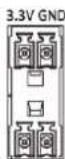
The interface types of mul-functional cards may vary with product model. The following gures are for illustraon purpose only.
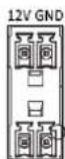
12V GND
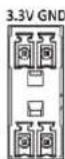
SCL SDA
SCL SDA
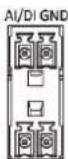
AI/DIGND
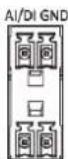
AI/DI GND

D+ D- GND

RX TX GND

POWER

ACTIVE
| Name | Descripon | Name | Descripon |
| 12V GND | Sensor interface | RS232 | Serial interface for remote telecommunicaon |
| 3.3V GND (SCL SDA) | Sensor interface | POWER | Power indicator |
| AI/DI GND | Sensor interface | ACTIVE | Indicator for normal working status |
| RS485 | Serial interface for telecommunicaon | - | - |
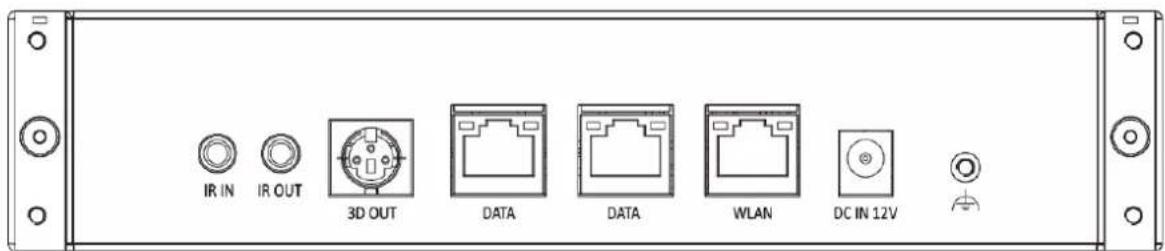
text_image
IR IN IR OUT 3D OUT DATA DATA WLAN DC IN 12V| Name | Descripon | Name | Descripon |
| IR IN | Infrared input interface, requiring to connect with an IR extension cable | DATA | Interface for connecng with the receiving card |
| IR OUT | Infrared out interface | WLAN | Ethernet interface |
| 3D OUT | 3D interface | DC IN 12V | Power interface |
text_image
IR IN IR OUT 3D OUT DATA DATA WLAN DC IN 12Vtext_image
IR IN IR OUT 3D OUT DATA DATA WLAN DC IN 12Vtext_image
IR IN IR OUT 3D OUT DATA DATA WLAN DC IN 12Vtext_image
IR IN IR OUT 3D OUT DATA DATA WLAN DC IN 12Vtext_image
IR IN IR OUT 3D OUT DATA DATA WLAN DC IN 12Vtext_image
IR IN IR OUT 3D OUT DATA DATA WLAN DC IN 12Vtext_image
IR IN IR OUT 3D OUT DATA DATA WLAN DC IN 12Vtext_image
IR IN IR OUT 3D OUT DATA DATA WLAN DC IN 12Vtext_image
IR IN IR OUT 3D OUT DATA DATA WLAN DC IN 12Vtext_image
IR IN IR OUT 3D OUT DATA DATA WLAN DC IN 12Vtext_image
IR IN IR OUT 3D OUT DATA DATA WLAN DC IN 12Vtext_image
IR IN IR OUT 3D OUT DATA DATA WLAN DC IN 12Vtext_image
IR IN IR OUT 3D OUT DATA DATA WLAN DC IN 12Vtext_image
IR IN IR OUT 3D OUT DATA DATA WLAN DC IN 12V| ### | ### | ### | ### |
| IR IN | ### | DATA | ### |
| IR OUT | ### | WLAN | ### |
| 3D OUT | 3D ### | DC IN 12V | ### |