DS-D5049FL - Monitor Hikvision - Free user manual and instructions
Find the device manual for free DS-D5049FL Hikvision in PDF.


User questions about DS-D5049FL Hikvision
0 question about this device. Answer the ones you know or ask your own.
Ask a new question about this device
Download the instructions for your Monitor in PDF format for free! Find your manual DS-D5049FL - Hikvision and take your electronic device back in hand. On this page are published all the documents necessary for the use of your device. DS-D5049FL by Hikvision.
USER MANUAL DS-D5049FL Hikvision
natural_image
Four-panel collage of a modern shopping mall interior, showing multi-level shopping and retail spaces with shoppers and stores (no visible text or signage)User's Manual for LCD Monitor
Caution: Please read this Manual carefully before using the product! Do not try to disassemble it but contact us or your local dealer if the product does not work.
Contents
I. Special Features of the Machine ....1
II. Important Safety Precautions ......1
III. Installation & Connection ....4
Packing List 4
Power Connection 4
Ports 4
IV. Control Buttons on the Front Panel 6
V. Remote Control 11
VI. Basic Operation Instructions....14
Startup 14
Standby 14
Source Selection 15
Menu Operation Instructions ....16
Picture 17
Sound 19
Setup 20
PC 21
USB Multimedia Function 21
VII. Display Modes 22
VIII. List of Accompanying Accessories ......24
IX. Key Technical Parameters of the Product 25
X. Requirements of RoHS Regulation (Mainland China) 50
I. Special Features of the Machine
- The LCD screen features no flash and low radiation as a display screen.
- Using a high-end LCD screen, the product provides high brightness, high contrast and big view angle; ultrafast response greatly reduces ghost of fast moving images.
- Designed with multiple input ports.
- Progressive image processing, using the state-of-the-art motion compensation technology to thoroughly improve the jagged and blurred edges of moving pictures.
- Dynamic contrast technology significantly enhances the sharpness and contrast of various pictures.
- Support high-definition line-by-line input: YPbPr, HDMI and DVI.
- Achieve remote control of all functions, enabling truly easy operation.
- Green energy-efficient design.
- Support output via multiple video ports.
II. Important Safety Precautions
Thanks for purchasing our high-performance multifunctional LCD monitor. This product has been tested strictly before delivery. However, its improper use may cause electric shock or fire. To ensure its safe use, maintain its service life and bring its performance into best play, please read carefully and strictly observe the following safety precautions before using the product.
* Disconnect the power cord from the power outlet and contact a qualified maintenance engineer for repair if:
a. The power cord or power plug is damaged or worn;
b. The machine falls down or the housing is damaged;
c. The machine has an obvious fault and does not work although you operate it following this Manual;
d. Any foreign object or liquid enters in the machine; e. There is any abnormal sound or smell.
* There is high voltage and no user-serviceable component inside the machine. For your safety, please do not attempt to open the housing. Repairs should be referred to qualified maintenance engineers.
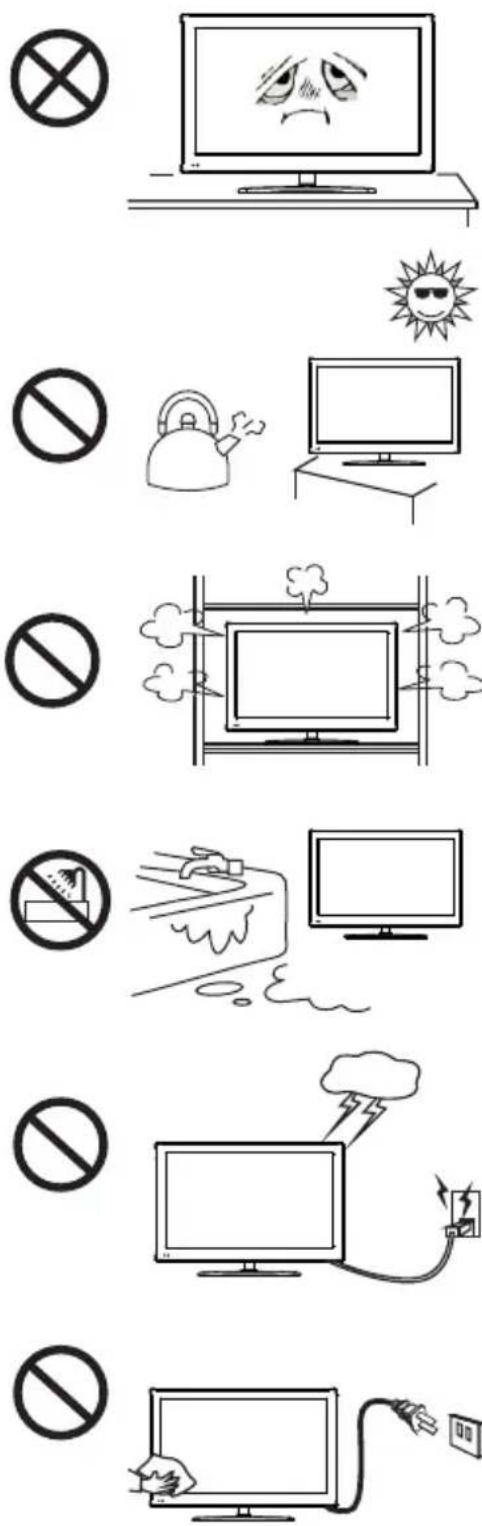
* Put the machine in a well-ventilated place rather than a very hot, cold or damp environment. Do not expose it to direct sunlight.
* The ventilation holes in the housing are designed to protect the inside components against overheat and ensure their long-term reliable work. The product should be placed without blocking such ventilation holes.
* Do not place the machine in any embedded device unless it is well ventilated.
* To avoid the risk of fall, do not put the machine on any unsteady surface.
* Keep the machine away from water sources, and never use it in a damp basement or other similar environment.
* Disconnect the power cord before cleaning the machine. Clean it with a wet, soft cloth without using any liquid cleaner or spray cleaner. Do not use any alcohol, solvent or liquid including ammonia to clean the screen.
* Read and understand all operating instructions and nameplate indications before using the machine, and keep this Manual properly for future reference.
* Using any accessory that is not recommended by the manufacturer may put you at risk.
* Place the power cord properly against trample and pressure.
* To avoid the risk of fire and electric shock, do not overload the power outlet or extend the power cord.
* To protect the LCD screen against scratches and damage, do not strike, press, or engrave on the screen with any hard object.
* All technical specifications provided in this manual and on the carton are subject to change without further notice. In case of any minor difference between this manual and actual operations, the latter shall prevail.
* The power plug or appliance coupler is used as the make and break device for the machine; consider the ease of disconnecting the power cord or power plug when placing the machine.
* Protect the machine against water splashes and drops. To avoid the risk of

text_image
Diagram showing a prohibition symbol next to a computer monitor and an eraser, likely indicating no prohibition or prohibition.fire and electric shock, do not put any container with water or any other liquid on the machine.
* Insert the power plug into the power outlet reliably. A loose connection may cause sparks or fire.
* Keep the machine away from flammable and explosive substances.
* To avoid the risk of short circuit, product damage and electric shock, never allow any sharp object, metal or liquid to enter or contact the signal connectors or ventilation holes.
* To avoid the risk of dew and fault, do not use the machine immediately after moving it from a low-temperature place to a higher-temperature place or use it directly across from an air conditioner.
* Move the machine with care and protect it (especially the screen) against impact. If you use a handcart to move it, protect it against overturn and damage caused by sudden brakes, excessive force or uneven ground.
WarningWarning
As a Class-A product, this product may cause radio interference in living environments. In such case, users may need to take practical measures to restrain such interference.
III. Installation & Connection
Packing List
- LCD monitor * 1; 2. User's Manual * 1; 3. Remote Control * 1;
- AAA battery (7#,1.5V) * 2; 5. Power cord * 1 (or supplied with the machine);
Power Connection
Note:
- This machine uses AC 100-240V 60/50Hz power supply.
- If the machine is to be left unused for a long period of time, please disconnect it from power supply.
Connect to a power outlet (AC 100-240V, 60/50Hz)
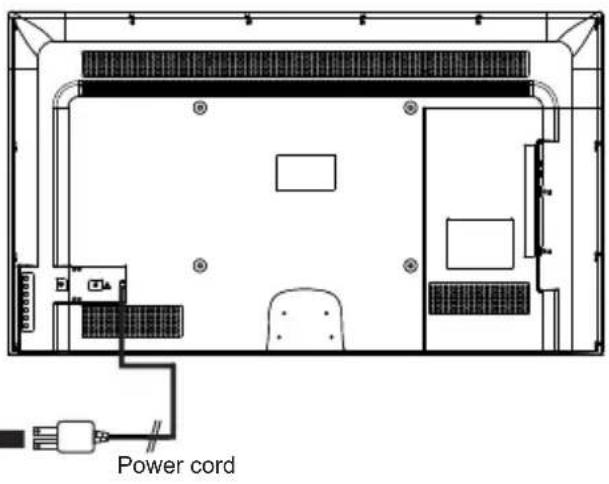
text_image
Power cordPorts
Ports of (55" 001-S):
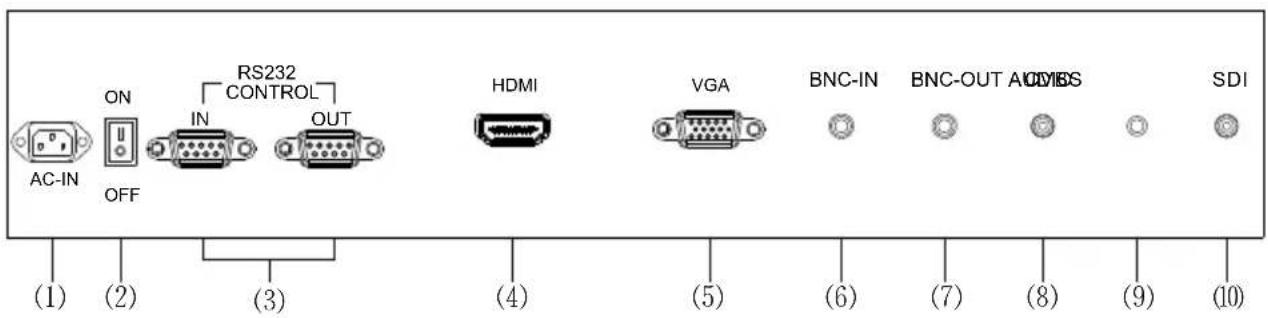
text_image
RS232 CONTROL AC-IN ON IN OUT HDMI VGA BNC-IN BNC-OUT ADCS SDI (1) (2) (3) (4) (5) (6) (7) (8) (9) (10)- AC IN port;2. Rocker switch button;3. RS232 IN / RS232 OUT port;4. HDMI port;5. VGA port;6. BNC IN port;7. BNC OUT port;8. CVBS port;9. AUDIO IN port;10. SDI port
Ports of (65" 001-S/32" and 002 above 32"):
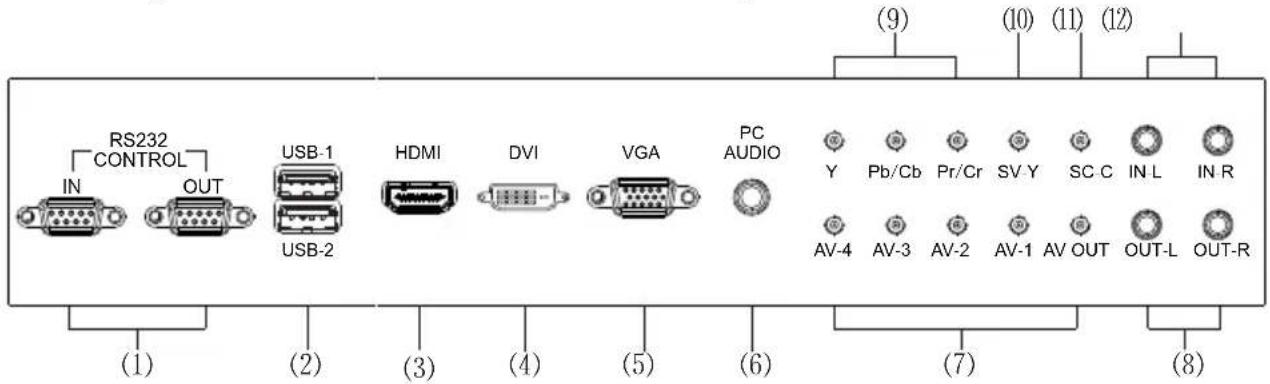
text_image
RS232 CONTROL IN OUT USB-1 USB-2 HDMI DVI VGA PC AUDIO Y Pb/Cb Pr/Cr SV-Y SC C IN L IN R AV-4 AV-3 AV-2 AV-1 AV OUT OUT-L OUT-R (1) (2) (3) (4) (5) (6) (7) (8)- RS232 IN / RS232 OUT port;2. USB port;3. HDMI port;4. DVI port;5. VGA port;6. PC AUDIO port;7. AV ports;8. audio frequency(AV,YPBPR,S-VIDEO) OUT ports;9. Component ports;10. SV-Y port;11. SC-C port;12. IN ports Ports of (003):
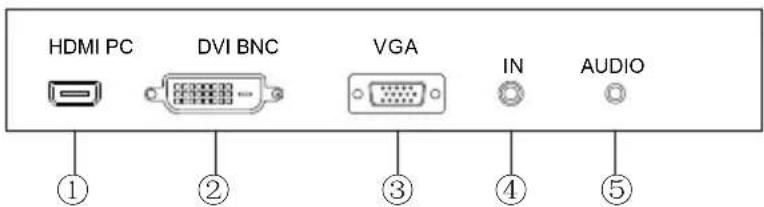
text_image
HDMI PC DVI BNC VGA IN AUDIO ① ② ③ ④ ⑤- HDMI port; 2. DVI port; 3. VGA port; 4. BNC IN port; 5. PC AUDIO port
Ports of (004):
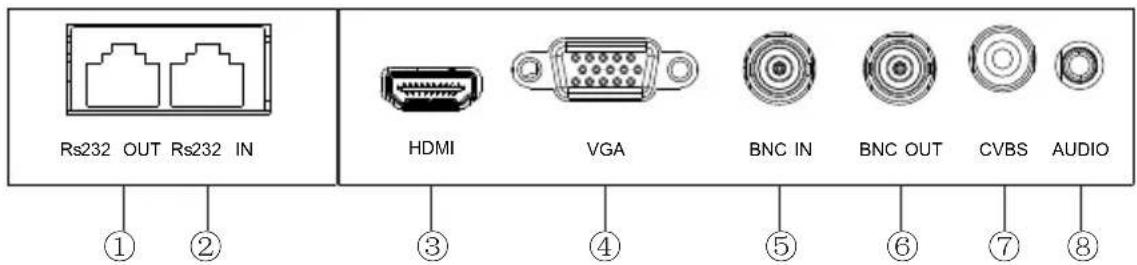
text_image
Rs232 OUT Rs232 IN HDMI VGA BNC IN BNC OUT CVBS AUDIO ① ② ③ ④ ⑤ ⑥ ⑦ ⑧- Rs232 OUT port; 2. Rs232 IN port; 3. HDMI port; 4. VGA port; 5. BNC IN port; 6. BNC OUT port; 7. CVBS IN port; 8. PC AUDIO port
Ports of (005):
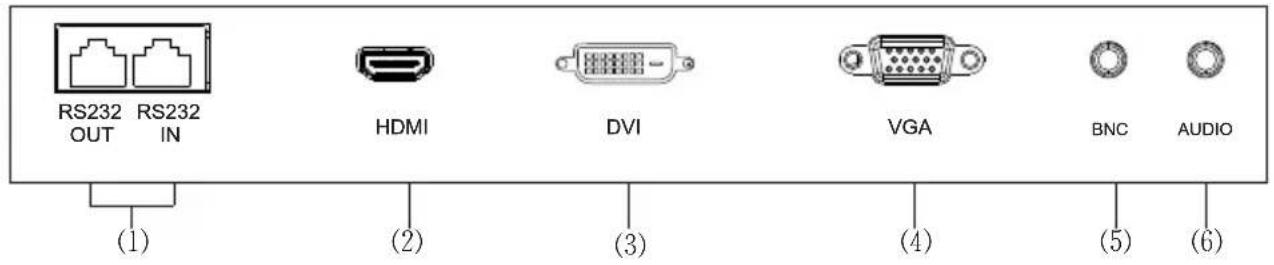
text_image
RS232 RS232 OUT IN HDMI DVI VGA BNC AUDIO (1) (2) (3) (4) (5) (6)- RS232 IN / RS232 OUT port; 2. HDMI port; 3. DVI port; 4. VGA port; 5. BNC port; 6. PC AUDIO port
Ports of (22" 005-V/006-V):
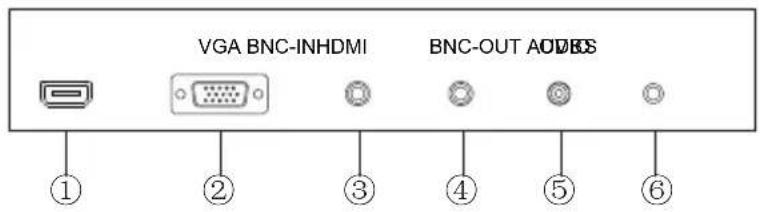
text_image
VGA BNC-INHDMI BNC-OUT AODBS ① ② ③ ④ ⑤ ⑥- HDMI port; 2. VGA port; 3. BNC IN port; 4. BNC OUT port;
- CVBS IN port;6. AUDIO IN port
IV. Control Buttons on the Front Panel
Control Buttons on the Front Panel of (001/002/003) 32" and above
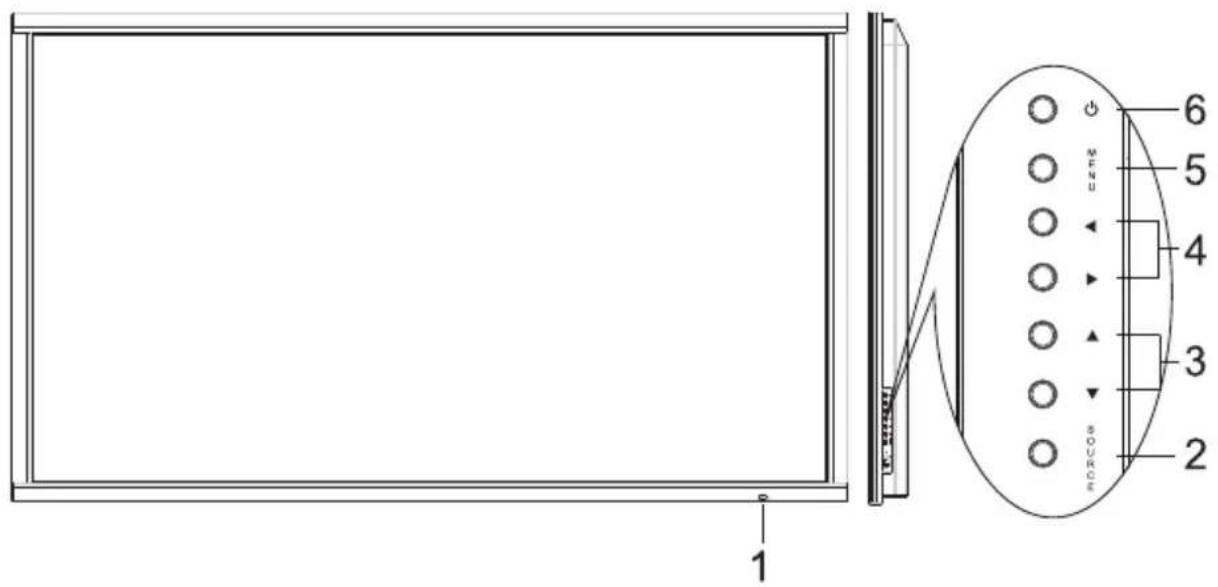
text_image
1 2 3 4 5 6 M F R O M N O P A B C D E F G H I J K L M N O P A B C D E F G H I J K L M N O P A B C D E F G H I J K L M N O P A B C D E F G H I J K L M O P A B C D E F G H I J K L M N O P A B C D E F G H I J K- Remote receiver and indicator.
- SOURCE: Press this button to enter the source selection menu and select a source.
-
- / -: In the OSD menu, press these two buttons to select adjustment items up and down.
- ▶/◀ : Volume Increase / Volume Decrease button; in the OSD menu, press these two buttons to adjust the analog value of a selected item.
- MENU: Press this button to enter the main menu.
- ⏻: Power/Standby button.
Remark: The above picture may be different from and shall be subject to the actual product.
Control Buttons on the Front Panel of (002) 22"
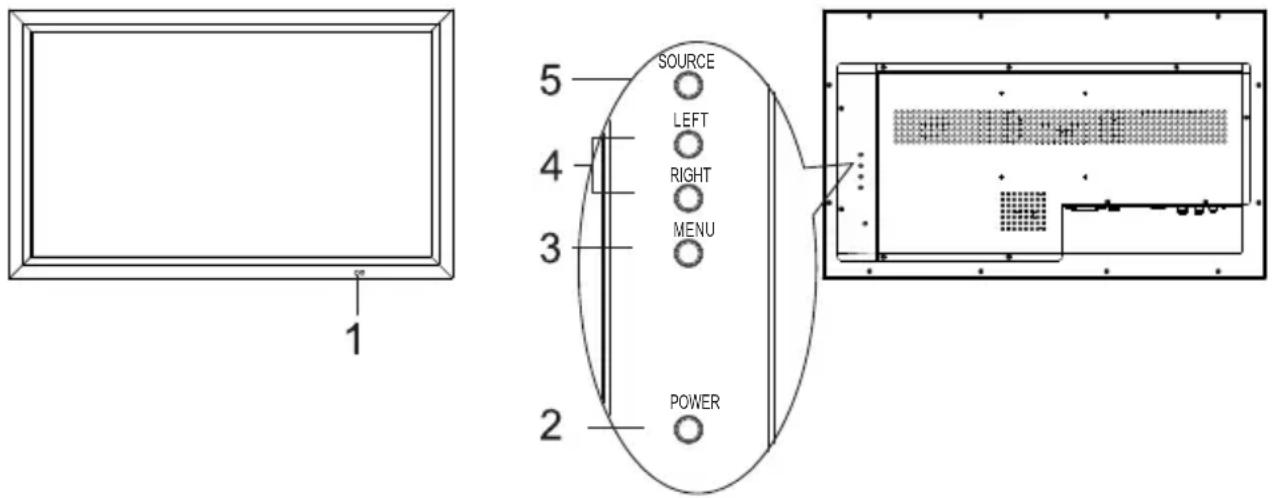
text_image
1 5 SOURCE LEFT RIGHT MENU 2 POWER- Remote receiver and indicator.
- POWER: Power/Standby button.
- MENU: Press this button to enter the main menu.
- LEFT/RIGHT: Volume Increase / Volume Decrease button; in the OSD menu, press these two buttons to adjust the analog value of a selected item or to select adjustment items up and down.
- SOURCE: Press this button to enter the source selection menu and select a source.
Remark: The above picture may be different from and shall be subject to the actual product.
Control Buttons on the Front Panel of (004)
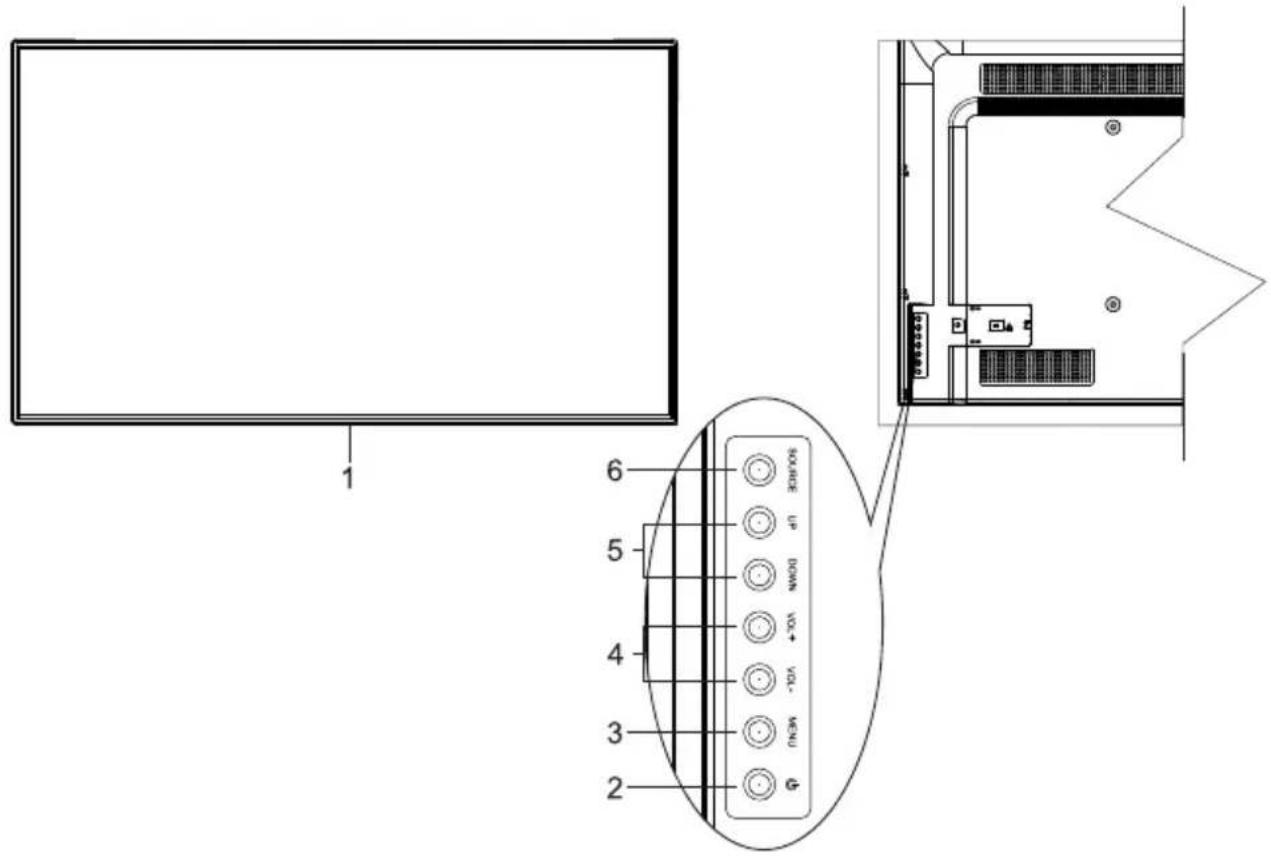
text_image
1 6 5 4 3 2 9000000 + 0.7 NOMM + -0.2 -0.2 HCM +- Remote receiver and indicator.
- ⏻ : Power/Standby button.
- MENU: Press this button to enter the main menu.
- ▶/★Volume Increase / Volume Decrease button; in the OSD menu, press these two buttons to adjust the analog value of a selected item.
- UP/DOWN: In the OSD menu, press these two buttons to select adjustment items up and down.
- SOURCE: Press this button to enter the source selection menu and select a source.
Remark: The above picture may be different from and shall be subject to the actual product.
Control Buttons on the Front Panel of (005)
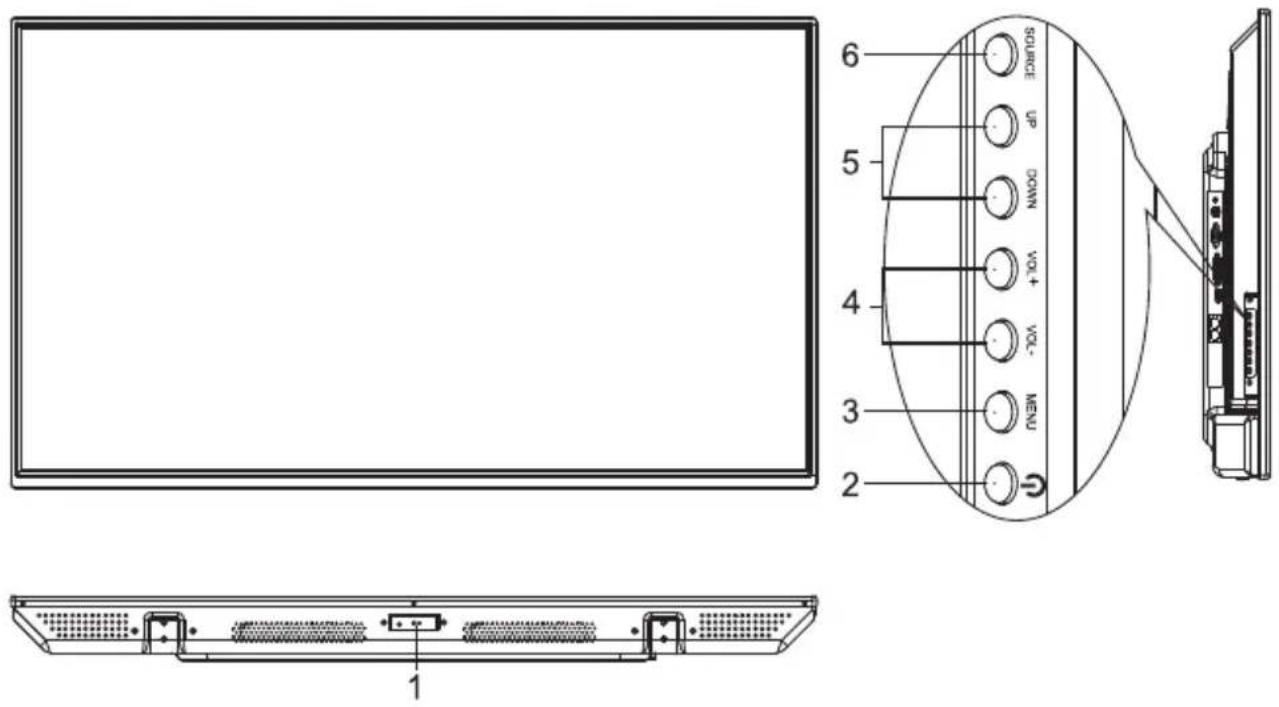
text_image
SOURCE UP DOWN VOL+ VOL- NEW 2 3 4 5 6 1- Remote receiver and indicator.
- ⏻ : Power/Standby button.
- MENU: Press this button to enter the main menu.
- VOL+ / VOL-: Volume Increase / Volume Decrease button; in the OSD menu, press these two buttons to adjust the analog value of a selected item.
- CH+ / CH-: In the OSD menu, press these two buttons to select adjustment items up and down.
- SOURCE: Press this button to enter the source selection menu and select a source.
Remark: The above picture may be different from and shall be subject to the actual product.
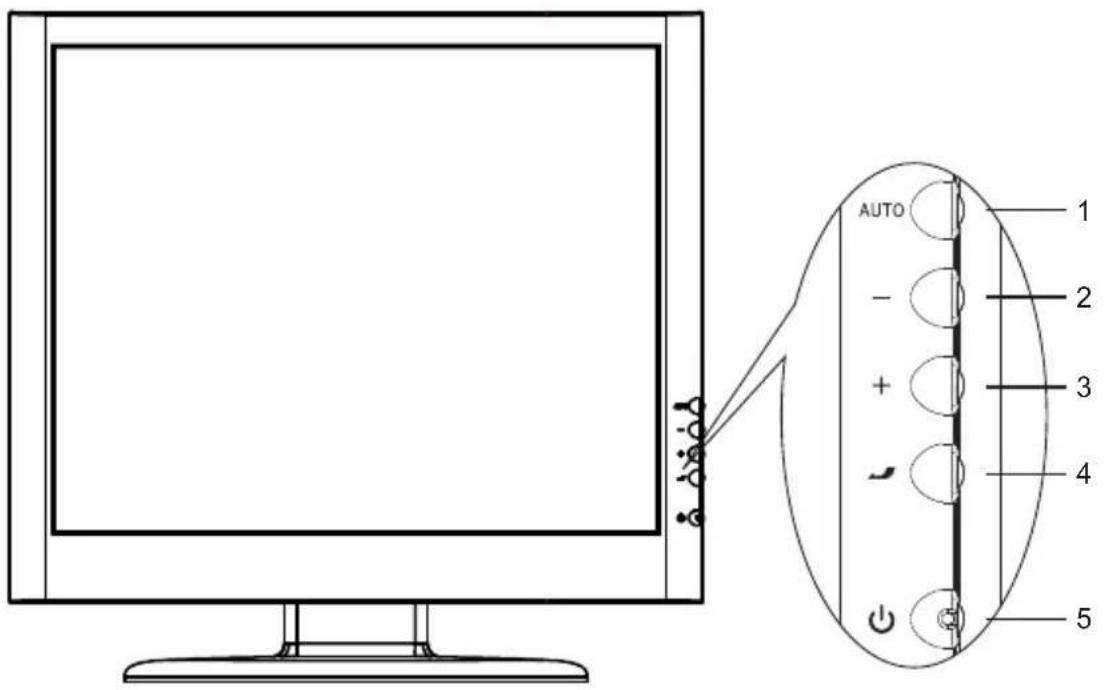
Control Buttons on the Front Panel of (006)
text_image
AUTO 1 - 2 3 4 5- AUTO: Press this button to show the source selection menu. In the OSD menu, press this button to enter the adjustment category menu and select the desired adjustment item in the category menu.
2.-: In the OSD menu, press this button to select the category menu and adjust the analog value or setting of the desired adjustment item in the category menu.
3.+: In the OSD menu, press this button to select the category menu and adjust the analog value or setting of the desired adjustment item in the category menu. - : Call out or exit the OSD menu; after setting, press this button to return to the previous menu or exit the OSD menu. In the source menu, press this button to switch to the input source you have selected.
- ⏻ Press it to turn on/off the monitor.
Remark: The above picture may be different from and shall be subject to the actual product.
V. Remote Control
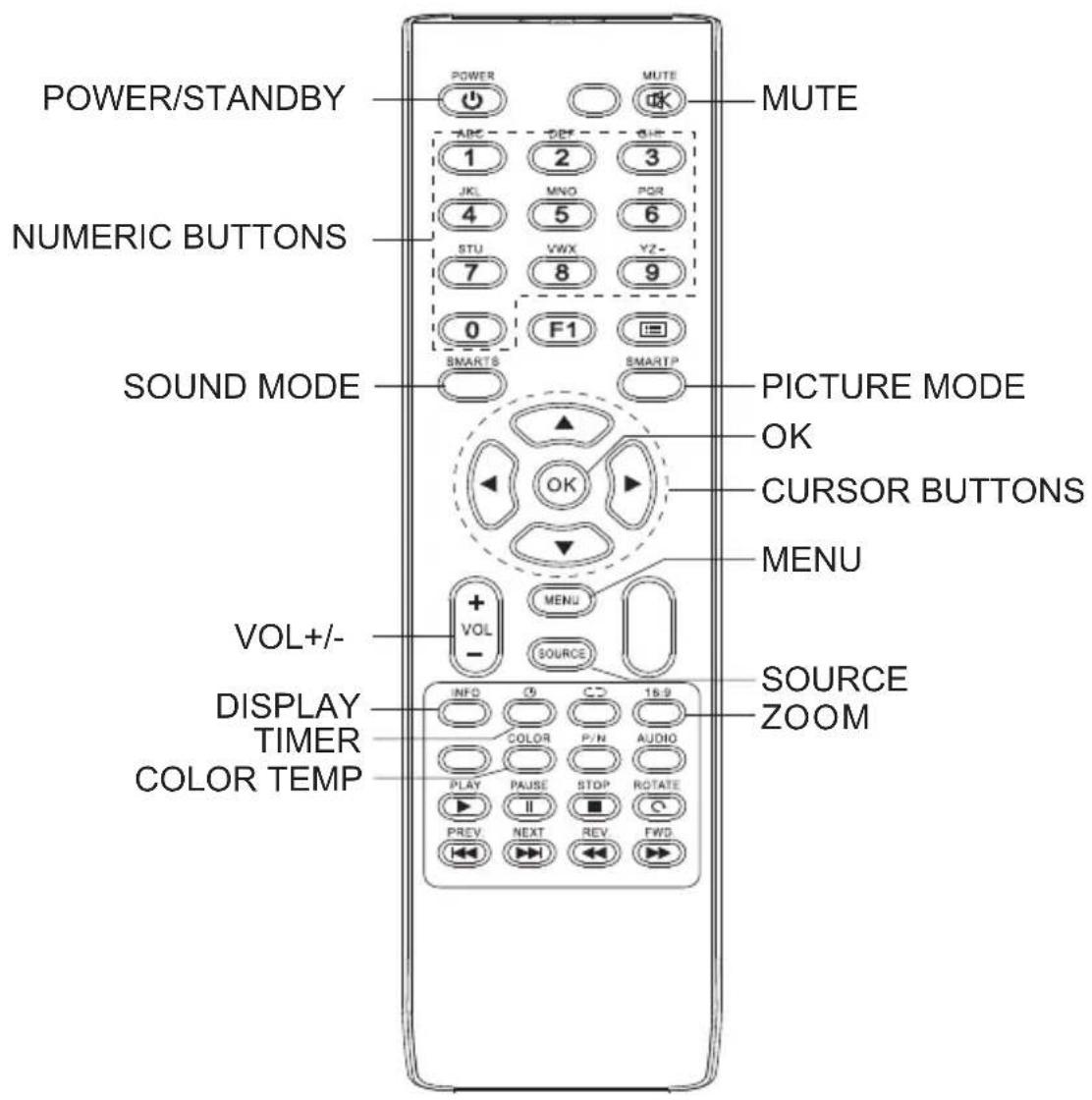
text_image
POWER/STANDBY MUTE 1 2 3 JKL MNO POR 4 5 6 STU VWX VZ- 7 8 9 0 F1 SMARTS SMARTP SOUND MODE PICTURE MODE OK CURSOR BUTTONS MENU + VOL - MENU SOURCE VOL+/- DISPLAY COLOR TIMER COLOR TEMP INFO C5 CD 15.9 COLOR P/N AUDIO PLAY PAUSE STOP ROTATE I II PREV NEXT REV FWD SOURCE ZOOMInstalling Batteries in the Remote Control
Remove the battery cover and insert two AAA batteries (7#,1.5V) into the remote control, matching the cathodes and anodes of the batteries with the “-” and “+” symbols inside the battery compartment.
(Remark: The above picture may be different from and shall be subject to the actual remote control)
Description of Control Buttons on the Remote Control
| Button | Description |
| STANDBY | Switches between normal working and standby |
| MUTE | Mutes the sound |
| NUMERIC BUTTONS | Input numbers |
| SOUND MODE | Switches sound mode |
| PICTURE MODE | Switches picture mode |
| CURSOR BUTTONS | Upper and lower cursor buttons: Select functions; left and right cursor buttons: Adjust analog values |
| VOL+/- | Increases or decreases volume |
| MENU | Displays the main menu |
| SOURCE | Displays the source selection menu |
| DISPLAY | Displays system screen info |
| TIMER | Sets the time when the machine shall be shut down |
| ZOOM | Switches display mode |
| COLOR TEMP | Switches color temperature |
| OK | Confirms an operation |
| PLAY (▶) | For operations in USB mode |
| PAUSE(II) | |
| STOP(■) | |
| ROTATE(○) | |
| PREVIOUS(◀) | |
| NEXT(▶) | |
| FR(◀) | For operations in USB mode |
| FF(▶) |
Precautions for Use of the Remote Control:
- Aim the remote control at the remote receiver when using the remote control. Any object placed between the remote control and the remote receiver may disturb normal operation.
- Protect the remote control from violent vibration. Besides, never set or place the remote control in direct sunlight because heat will result in deformation of the remote control.
- When the remote receiver on the main unit is subject to direct sunlight or strong light, it is possible that the remote control malfunctions. In such case, please change the angle of lighting or the machine, or operate the remote control close to the remote receiver.
- Low battery voltage will affect the remote control distance. Please replace the batteries with new ones. If the remote control is to be left unused for a long period or the batteries are depleted, please remove the batteries in order to avoid battery leakage which may corrode and damage the remote control.
- Never use batteries of different types or mix new batteries with used ones. Always replace batteries in pair.
- Never try to dispose of batteries in fire or recharge or decompose batteries. Never recharge, short-circuit, disassemble/assemble, heat or burn any used batteries. Please dispose of waste batteries according to applicable environmental regulations.
VI. Basic Operation Instructions
Startup
Plug the power cord into the power outlet to connect power supply; press the “ ⏻ ” button on the front panel of the machine, or the “STANDBY” button on the remote control, to turn on the monitor.
Standby
After pressing the "STANDBY" button on the remote control, the monitor will enter Standby mode.
★Tips
This machine applies environmental protection and energy saving technology:
① If there is no signal input in power-on status, the machine will automatically enter Standby mode about 5min later;
② If the auto shutdown time you have set is reached, the machine will automatically enter Standby mode;
③ The power cord must be unplugged to completely disconnect the machine from power supply.
Source Selection
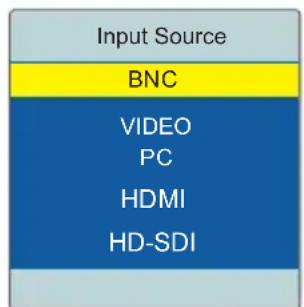
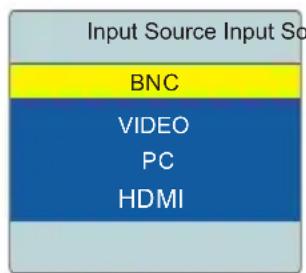
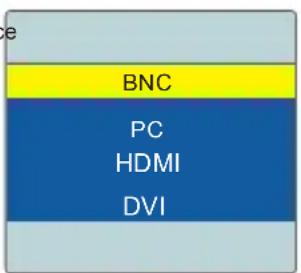
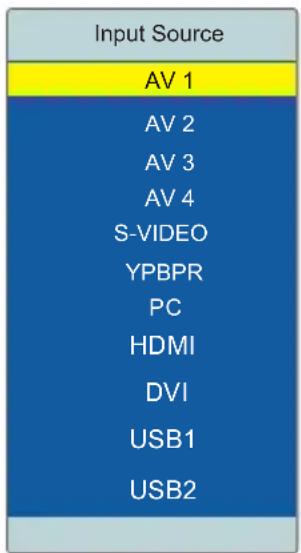
Press the “SOURCE” button on the remote control or on the front panel; the screen will display the “Input Source” menu. At this moment, you can press the upper and lower cursor buttons or the “▲”, “▼” buttons on the front panel to select a source, such as VIDEO1, VIDEO2, VIDEO3, VIDEO4, S-TERMINAL, COMPONENT, PC, HDMI, DVI, USB1 or USB2. Press the “OK” button on the remote control or the “MENU” button on the front panel; the machine will switch to the input source you have selected.
text_image
Input Source BNC VIDEO PC HDMI HD-SDI(55"001-S Series)
text_image
Input Source Input So BNC VIDEO PC HDMI(002/004/006)
Below 32"
text_image
BNC PC HDMI DVI(003/005)
text_image
Input Source AV 1 AV 2 AV 3 AV 4 S-VIDEO YPBPR PC HDMI DVI USB1 USB2(001/002)
32"and above
Menu Operation Instructions
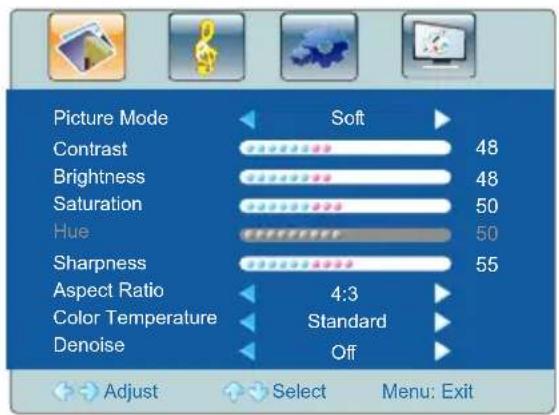
Press the "MENU" button on the remote control or on the front panel; the screen will display the main menu:
- Press the left and right cursor buttons on the remote control or the “▶”, “◀” buttons on the front panel to select the adjustment category menu,
which contains: Picture, Sound, Menu, and PC.
text_image
Picture Mode Soft Contrast 48 Brightness 48 Saturation 50 Hue 50 Sharpness 55 Aspect Ratio 4:3 Color Temperature Standard Denoise Off Adjust Select Menu: Exit-
Press the lower cursor button on the remote control or the “▼” button on the front panel to enter the adjustment category menu.
-
Press the upper and lower cursor buttons on the remote control or the “▲”, “▼” buttons on the front panel to select the desired item in the category menu.
-
Press the left and right cursor buttons on the remote control or the “▲”, “▼” buttons on the front panel to change the analog value or setting of the adjustment item selected.
-
When the screen displays the main menu, press the "MENU" button to exit the main menu. When the screen displays the category menu, press the "MENU" button to return to the previous menu. Press the "SOURCE" button to display the "Input Source" menu; press the "SOURCE" button again to exit the source selection menu.
-
During menu operation, the color of an option icon that cannot be operated in the current state will change to grey.
-
The menu operation instructions in this Manual are provided when the machine is in VIDEO1 state, and menu operations in other states are basically the same as those in VIDEO1 state. These instructions are for users' reference only.
Picture
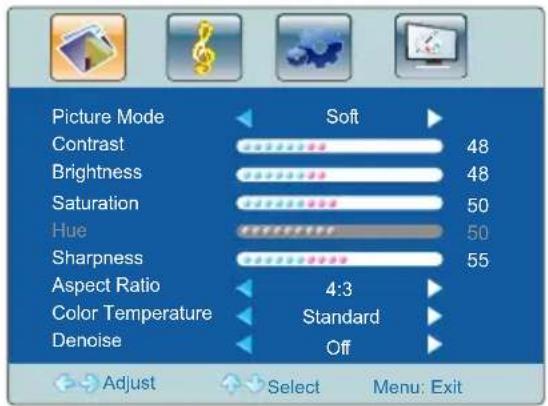
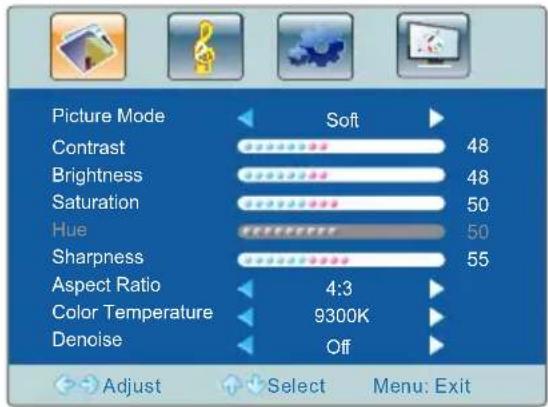
Select 📄 to enter the picture category menu. Press the upper and lower cursor buttons on the remote control or the “▲”, “▼” buttons on the front panel to select the item to be adjusted. Press the left and right cursor buttons on the remote control or the “▶”, “◀” buttons on the front panel to adjust the analog value or status of the item. (See the table below)
text_image
Picture Mode Soft Contrast 48 Brightness 48 Saturation 50 Hue 50 Sharpness 55 Aspect Ratio 4:3 Color Temperature Standard Denoise Off Adjust Select Menu: Exit(All series except 55" 001-S)
★ Tips
The machine will automatically save analog values of contrast, Brightness, Saturation, Hue and Sharpness adjusted by users as User Mode.
text_image
Picture Mode Soft Contrast 48 Brightness 48 Saturation 50 Hue 50 Sharpness 55 Aspect Ratio 4:3 Color Temperature 9300K Denoise Off Adjust Select Menu: Exit(55" 001-S Series)
★ PICTURE MODE shortcut button on the remote control: Press the “PICTURE MODE” button on the remote control to switch among the four modes: Standard, Soft, User, and Bright.
| Option | Function | Description |
| Picture Mode | Adjust the overall effect of pictures | Four options: Standard, Soft, User and Bright. |
| Contrast | Adjust the overall hierarchy of pictures | Increase the analog value to enhance the hierarchy; decrease the analog value to reduce the hierarchy (0-100) |
| Brightness | Adjust the overall brightness of pictures | Increase the analog value to enhance the brightness; decrease the analog value to reduce the brightness (0-100) |
| Saturation | Adjust the color depth of pictures | Increase the analog value to increase the color depth; decrease the analog value to reduce the color depth (0-100) |
| Hue | Adjust the hue of pictures | Increase the analog value to change the hue to green; decrease the analog value to change the hue to purple (0-100) |
| Sharpness | Adjust the sharpness of pictures | Increase the analog value to improve the sharpness; decrease the analog value to reduce the sharpness (0-100) |
| Aspect Ratio | Adjust the aspect ratio of screen display | Five modes: Full Screen, 4:3, PC, Movie, Subtitle (These modes vary with the input signal) |
| Color Temperature | Adjust the overall color temperature of pictures | Three color temperatures for all models except 55" 001-S: Standard, Warm, and Cold; four color temperatures for 55" 001-S: 3200K, 6500K, 9300K, and 13000K. |
| Denoise | Set the denoise level | Four levels: Medium, High, Off, and Low |
Sound
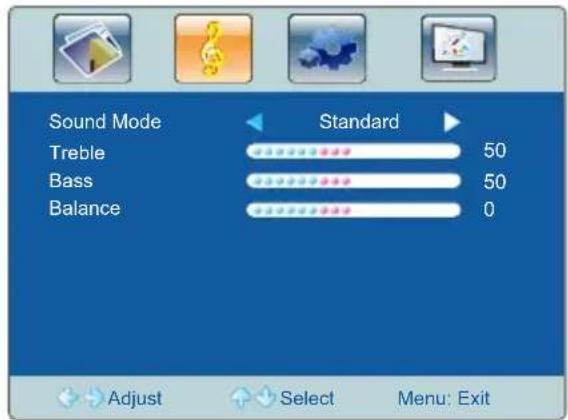
Select 📄 to enter the Sound category menu. Press the upper and lower cursor buttons on the remote control or the “▲”, “▼” buttons on the front panel to select the item to be adjusted. Press the left and right cursor buttons on the remote control
text_image
Sound Mode Treble Bass Balance Standard 50 50 0 Adjust Select Menu: Exitor the “▶”, “◀” buttons on the front panel to adjust the analog value or status of the item. (See the table below)
★Tips
① Normally, Balance is set to 0.
②The machine will automatically save analog values of Treble and Bass adjusted by users as User Mode.
★Shortcut buttons on the remote control
SOUND MODE: Press the “SOUND MODE” button on the remote control to switch among the four modes: Standard, Music, Movie, and User.
MUTE: Press it to mute or restore the sound.
VOL+, VOL-: Press the "VOL+" and "VOL-" buttons on the remote control to control the volume.
| Option | Function | Description |
| Sound Mode | Select the sound effect mode | Four modes: Standard, Music, Movie, and User |
| Treble | Adjust the treble level | Increase the analog value to raise the treble level; decrease the analog value to lower the treble level (0-100) |
| Bass | Adjust the bass level | Increase the analog value to raise the bass level; decrease the analog value to lower the bass level (0-100) |
| Balance | Adjust the balance between left and right channels | Adjust the analog value leftward to increase the volume of left channel; adjust the analog value rightward to increase the volume of right channel (L50-R50) |
Setup
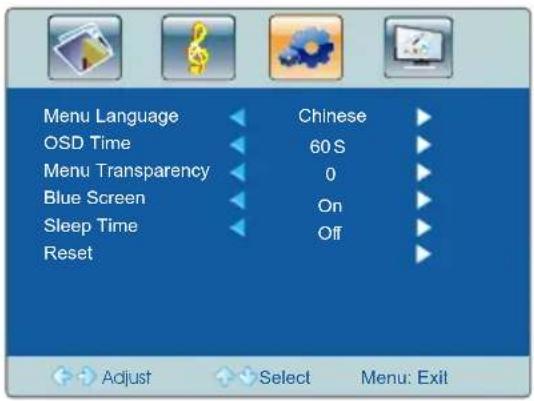
Select 📄 to enter the Setup category menu. Press the upper and lower cursor buttons on the remote control or the “▲”, “▼” buttons on the front panel to select the item to be adjusted. Press the left and right cursor
buttons on the remote control or the “ ”,▶ ” buttons on the front panel to adjust the status of the item. (See the table below)
text_image
Menu Language OSD Time Menu Transparency Blue Screen Sleep Time Reset Chinese 60 S 0 On Off Adjust Select Menu: Exit| Option Function Description | ||
| Menu Language | Set the menu language | Two languages: Chinese and English |
| OSD Time | Adjust the time duration for which a menu is displayed on the screen | Four options: 15S, 30S, 45S, and 60S |
| Menu Transparency | Adjust the transparency of the menu | Increase the analog value to improve the transparency; decrease the analog value to reduce the transparency (0-100) |
| Blue Screen | Set whether the screen changes to blue in the absence of signal | Two states: ON and Off |
| Sleep Time | Set the time after which the machine will enter standby | “Off, 15, 30, 45, 60, 90, 120, 240”; Unit: Min |
| Reset | Restore factory settings | Restore factory settings |
PC
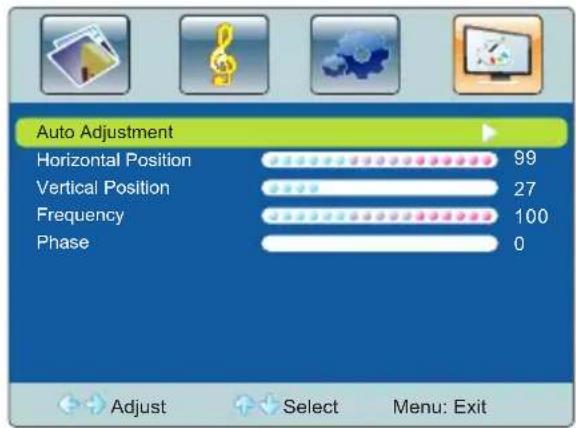
Select to enter the PC category menu. Press the upper and lower cursor buttons on the remote control or the “▲”, “▼” buttons on the front panel to select the item to be adjusted. Press the left and right cursor buttons on the remote control or
text_image
Auto Adjustment Horizontal Position 99 Vertical Position 27 Frequency 100 Phase 0 Adjust Select Menu: Exitthe “▶”, “◀buttons on the front panel to adjust the analog value or status of the item. (See the table below)
| Option | Function | Description |
| Auto Adjustment | Automatically adjust the screen | Press the right cursor button on the remote control to automatically adjust to the optimal display effect |
| Horizontal Position | Adjust the horizontal position | Move the screen display leftward or rightward |
| Vertical Position | Adjust the vertical position | Move the screen display upward or downward |
| Frequency | Adjust the frequency | Adjust the frequency to track the stability and sharpness |
| Phase | Adjust the phase | Adjust the phase of pixelfrequency |
USB Multimedia Function
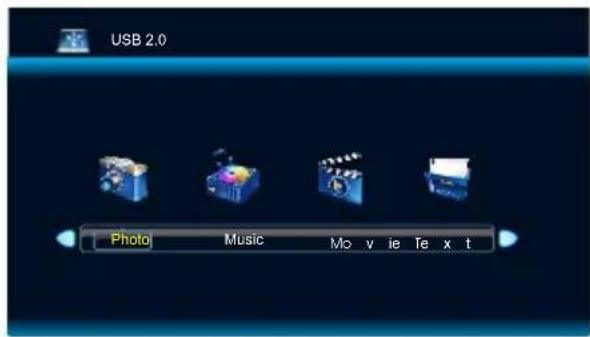
Connect a USB storage device to the USB port on the LCD monitor; press the "SOURCE" button on the remote control or on the control panel to select a USB source; then press "OK" for confirmation.
text_image
USB 2.0 Photo Music Movie Text tVII. Display ModesVII. Display Modes
VGA Display Mode
| NO. | Mode | Resolution | Refresh |
| 1 | VGA | 720×400 | 70Hz |
| 2 | 640×480 | 60Hz | |
| 3 | SVGA | 800×600 | 60Hz |
| 4 | XGA | 1024×768 | 60Hz |
| 5 | WXGA | 1360×768 | 60Hz |
| 6 | WUXGA | 1920×1080 | 60Hz |
The 1920×1080@60Hz operating mode applies to all models except 19" 002/32" 002/006-V/
HDMI Display Mode
| NO. | Mode | Resolution | Refresh |
| 1 | SD | 720×480 | 60Hz |
| 2 | 720×576 | 50Hz | |
| 3 | 1280×720 | 50Hz | |
| 4 | 1280×720 | 60Hz | |
| 5 | HD | 1920×1080 | 50Hz |
| 6 | 1920×1080 | 60Hz |
The 1920×1080@60Hz operating mode applies to all models except 19" 002/32" 002/006-V/
DVI Display Mode
| NO. | Mode | Resolution | Refresh |
| 1 | VGA | 720×400 | 70Hz |
| 640×480 | 60Hz | ||
| 2 | SVGA | 800×600 | 60Hz |
| 3 | XGA | 1024×768 | 60Hz |
| 4 | SXGA | 1360×768 | 60Hz |
| 5 | WXGA | 1600×900 | 60Hz |
| 6 | WUXGA | 1920×1080 | 60Hz |
The 1920×1080@60Hz operating mode applies to all models except 19" 002/32" 002/
Appliacant input socket is used as make-and-break device for this equipment; when placing this equipment, please consider the convenience of unpluging power cord on the power input socket.
NOTE: This equipment has been tested and found to comply with the limits for a Class A digital device, pursuant to part 15 of the FCC Rules. These limits are designed to provide reasonable protection against harmful interference when the equipment is operated in a commercial environment. This equipment generates, uses, and can radiate radio frequency energy and, if not installed and used in accordance with the instruction manual, may cause harmful interference to radio communications. Operation of this equipment in a residential area is likely to cause harmful interference in which case the user will be required to correct the interference at his own expense.
VIII. List of Accompanying Accessories
* A standard-configuration packaging box of the monitor shall contain the following items:
| Appearance | Name |
 | LCD monitor 1* |
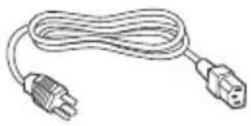 | Power cord *(For 004 Series, the power cord is supplied with the machine) |
 | User's Manual 1* |
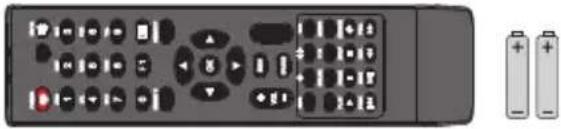 | Remote Control *(Two AAA (7#, 1.5V) batteries) |
 | Product Warranty Card 1* |
IX. Key Technical Parameters of the Product
| Model | 19" (001) |
| Physical resolution | 1920×1080 (pixels) |
| Pixel distance | 0.294mm×0.294mm |
| Response time | 5ms |
| Brightness | 250cd/m2 |
| Contrast | 1000:1 |
| View angle | 170°/160° |
| Chromaticity | 16.7M |
| Smart cooling system | Industrial cooling fan reduces machine temperature and enhances machine reliability (temperature control fan is optional) |
| System functions | Contrast, brightness, sharpness, color saturation, hue, signal switch, color temperature adjustment, refresh rate switch, operating state display |
| Control mode | Rs232 centralized control (optional), button control (IR remote control) |
| Input voltage | AC 100-240V |
| Power consumption | ≤35W |
| Dimension | 433mm×370mm×70mm (thickness) |
| Net/gross weight | 4.6Kg/6Kg |
| Wall-mounting holes | 100mm×100mm |
| Mounting | With M4 screw holes for wall mounting |
| Housing material | Plastic |
| Environmental standards | All components and packaging materials comply with international environmental standards |
| Model | 54.64" (002-S) |
| Physical resolution | 1920×1080 (pixels) |
| Pixel distance | 0.630mm×0.630mm |
| Response time | 8ms |
| Brightness | 350cd/m2 |
| Contrast | 1400:1 |
| View angle | 178°/178° |
| Chromaticity | 16.7M |
| Smart cooling system | Industrial cooling fan reduces machine temperature and enhances machine reliability (temperature control fan is optional) |
| System functions | Contrast, brightness, sharpness, color saturation, hue, signal switch, color temperature adjustment, refresh rate switch, operating state display |
| Control mode | Rs232 centralized control (optional), button control (IR remote control) |
| Input voltage | AC 100-240V |
| Power consumption | ≤120W |
| Dimension | 1268.6mm×739.4mm×72mm (thickness) |
| Net/gross weight | 32.65Kg/40.2Kg |
| Wall-mounting holes | 400mm×(200+200) mm |
| Mounting | With M6 screw holes for wall mounting |
| Housing material | Sheet metal |
| Environmental standards | All components and packaging materials comply with international environmental standards |
| Model | 65" (002-S) |
| Physical resolution | 1920×1080 (pixels) |
| Pixel distance | 0.744mm×0.744mm/0.248×0.744 |
| Response time | 8ms/6.5ms |
| Brightness | 360cd/m2/350cd/m2 |
| Contrast | 4000:1/5000:1 |
| View angle | 178° /178° /176° /176° |
| Chromaticity | 1.07B/1.07G |
| Smart cooling system | Industrial cooling fan reduces machine temperature and enhances machine reliability (temperature control fan is optional) |
| System functions | Contrast, brightness, sharpness, color saturation, hue, signal switch, color temperature adjustment, refresh rate switch, operating state display |
| Control mode | Rs232 centralized control (optional), button control (IR remote control) |
| Input voltage | AC 100-240V |
| Power consumption | 200W/130W |
| Dimension | 1541mm×911mm×73.1mm (thickness) |
| Net/gross weight | 67.5Kg/86Kg/64.5Kg/79.5Kg |
| Wall-mounting holes | 400mm×400mm |
| Mounting | With M8 screw holes for wall mounting |
| Housing material | All sheet metal |
| Environmental standards | All components and packaging materials comply with international environmental standards |
| Model | 21.5" (003A) |
| Physical resolution | 1920×1080 (pixels) |
| Pixel distance | 0.248mm×0.248mm |
| Response time | 5ms |
| Brightness | 250cd/m2 |
| Contrast | 1000:1 |
| View angle | 170° /160° |
| Chromaticity | 16.7M |
| Smart cooling system | Industrial cooling fan reduces machine temperature and enhances machine reliability (temperature control fan is optional) |
| System functions | Contrast, brightness, sharpness, color saturation, hue, signal switch, color temperature adjustment, refresh rate switch, operating state display |
| Control mode | Rs232 centralized control (optional), button control (IR remote control) |
| Input voltage | AC 100-240V |
| Power consumption | ≤35W |
| Dimension | 529.64mm×321.1mm×41.1mm (thickness) |
| Net/gross weight | 5.8Kg/7.3Kg |
| Wall-mounting holes | 100mm×100mm |
| Mounting | With M4 screw holes for wall mounting |
| Housing material | All sheet metal |
| Environmental standards | All components and packaging materials comply with international environmental standards |
| Model | 21.5" (003D) |
| Physical resolution | 1920×1080 |
| Pixel distance | 0.24825mm×0.24825mm |
| Response time | 5ms |
| Brightness | 250cd/m2 |
| Contrast | 1000:1 |
| View angle | 170°/160° |
| Chromaticity | 16.7M |
| Smart cooling system | Industrial cooling fan reduces machine temperature and enhances machine reliability (temperature control fan is optional) |
| System functions | Contrast, brightness, sharpness, color saturation, hue, signal switch, color temperature adjustment, refresh rate switch, operating state display |
| Control mode | Rs232 centralized control (optional), button control (IR remote control) |
| Input voltage | AC 100-240V |
| Power consumption | 35W |
| Dimension | 529.64mm×321.1mm×41.1mm (thickness) |
| Net/gross weight | 5.8Kg/7.3Kg |
| Wall-mounting holes | 100mm×100mm |
| Mounting | With M4screw holes for wall mounting |
| Housing material | Face frame: aluminum profile; rear housing: sheet metal |
| Environmental standards | All components and packaging materials comply with international environmental standards |
| Model | 32" (003) |
| Physical resolution | 1366×768 (pixels) |
| Pixel distance | 0.17025mm×0.51075mm |
| Response time | 8ms |
| Brightness | 350cd/m2 |
| Contrast | 1200:1 |
| View angle | 178°/178° |
| Chromaticity | 16.7M |
| Smart cooling system | Industrial cooling fan reduces machine temperature and enhances machine reliability (temperature control fan is optional) |
| System functions | Contrast, brightness, sharpness, color saturation, hue, signal switch, color temperature adjustment, refresh rate switch, operating state display |
| Control mode | Rs232 centralized control (optional), button control (IR remote control) |
| Input voltage | AC 100-240V |
| Power consumption | ≤75W |
| Dimension | 776.8mm×471.2mm×61.3mm (thickness) |
| Net/gross weight | 13Kg/14.5Kg |
| Wall-mounting holes | 200mm×200mm |
| Mounting | With M6 screw holes for wall mounting |
| Housing material | All sheet metal |
| Environmental standards | All components and packaging materials comply with international environmental standards |
| Model | 41.92" (003) |
| Physical resolution | 1920×1080 (pixels) |
| Pixel distance | 0.4845mm×0.4845mm |
| Response time | 12ms |
| Brightness | 450cd/m2 |
| Contrast | 1300:1 |
| View angle | 178°/178° |
| Chromaticity | 1.06B |
| Smart cooling system | Industrial cooling fan reduces machine temperature and enhances machine reliability (temperature control fan is optional) |
| System functions | Contrast, brightness, sharpness, color saturation, hue, signal switch, color temperature adjustment, refresh rate switch, operating state display |
| Control mode | Rs232 centralized control (optional), button control (IR remote control) |
| Input voltage | AC 100-240V |
| Power consumption | ≤130W |
| Dimension | 1008.6mm×601.7mm×61.9mm(厚) |
| Net/gross weight | 21.1Kg/24Kg |
| Wall-mounting holes | 400mm×400mm |
| Mounting | With M6 screw holes for wall mounting |
| Housing material | sheet metal |
| Environmental standards | All components and packaging materials comply with international environmental standards |
| Model | 42.51" (003) |
| Physical resolution | 1920×1080 (pixels) |
| Pixel distance | 0.4902mm×0.4902mm |
| Response time | 12ms |
| Brightness | 450cd/m2 |
| Contrast | 1100:1 |
| View angle | 178°/178° |
| Chromaticity | 16.7M |
| Smart cooling system | Industrial cooling fan reduces machine temperature and enhances machine reliability (temperature control fan is optional) |
| System functions | Contrast, brightness, sharpness, color saturation, hue, signal switch, color temperature adjustment, refresh rate switch, operating state display |
| Control mode | Rs232 centralized control (optional), button control (IR remote control) |
| Input voltage | AC 100-240V |
| Power consumption | ≤65W |
| Dimension | 1019.6mm×607.7mm×68mm (thickness) |
| Net/gross weight | 18.4Kg/22Kg |
| Wall-mounting holes | 400mm×400mm |
| Mounting | With M6 screw holes for wall mounting |
| Housing material | All sheet metal |
| Environmental standards | All components and packaging materials comply with international environmental standards |
| Model | 46.96" (003) |
| Physical resolution | 1920×1080 (pixels) |
| Pixel distance | 0.5415mm×0.5415mm |
| Response time | 12ms |
| Brightness | 450cd/m2 |
| Contrast | 1300:1 |
| View angle | 178°/178° |
| Chromaticity | 1.06B |
| Smart cooling system | Industrial cooling fan reduces machine temperature and enhances machine reliability (temperature control fan is optional) |
| System functions | Contrast, brightness, sharpness, color saturation, hue, signal switch, color temperature adjustment, refresh rate switch, operating state display |
| Control mode | Rs232 centralized control (optional), button control (IR remote control) |
| Input voltage | AC 100-240V |
| Power consumption | ≤150W |
| Dimension | 1118.3mm×663.4mm×71.2mm (thickness) |
| Net/gross weight | 24.72Kg/28.3Kg |
| Wall-mounting holes | 400mm×400mm |
| Mounting | With M6 screw holes for wall mounting |
| Housing material | Sheet metal |
| Environmental standards | All components and packaging materials comply with international environmental standards |
| Model | 48.5" (003) |
| Physical resolution | 1920×1080 (pixels) |
| Pixel distance | 0.55926mm×0.55926mm |
| Response time | 12ms |
| Brightness | 450cd/m2 |
| Contrast | 1100:1 |
| View angle | 178° /178° |
| Chromaticity | 16.7M |
| Smart cooling system | Industrial cooling fan reduces machine temperature and enhances machine reliability (temperature control fan is optional) |
| System functions | Contrast, brightness, sharpness, color saturation, hue, signal switch, color temperature adjustment, refresh rate switch, operating state display |
| Control mode | Rs232 centralized control (optional), button control (IR remote control) |
| Input voltage | AC 100-240V |
| Power consumption | 75W |
| Dimension | 1152. 2mm × 682. 4mm × 76. 8mm (thickness) |
| Net/gross weight | 24. 65Kg/32Kg |
| Wall-mounting holes | 400mm × 400mm |
| Mounting | With M6 screw holes for wall mounting |
| Housing material | Sheet metal |
| Environmental standards | All components and packaging materials comply with international environmental standards |
| Model | 56. 64" (003) |
| Physical resolution | 1920×1080 |
| Pixel distance | 0.24825mm×0.24825mm |
| Response time | 8ms/12ms |
| Brightness | 350cd/m2/450cd/m2 |
| Contrast | 1400:1/1100:1 |
| View angle | 178°/178° |
| Chromaticity | 16. 7M |
| System functions | Contrast, brightness, sharpness, color saturation, hue, signal switch, color temperature adjustment, refresh rate switch, operating state display |
| Control mode | Rs232 centralized control (optional), button control (IR remote control) |
| Input voltage | AC 100-240V |
| Power consumption | 120W/110W |
| Dimension | 1288. 6mm×759. 5mm×72. 6mm (thickness) |
| Net/gross weight | 33. 75Kg/38. 5Kg/31. 3Kg/37. 3Kg |
| Wall-mounting holes | 400mm × 400mm |
| Mounting | With M6 screw holes for wall mounting |
| Housing material | Face frame: aluminum profile; rear housing: sheet metal |
| Environmental standards | All components and packaging materials comply with international environmental standards |
| Model | 31.55" (004) |
| Physical resolution | 1920×1080 (pixels) |
| Pixel distance | 0.36375 (H) mm×0.36375 (V) mm |
| Response time | 6ms |
| Brightness | 350cd/m2 |
| Contrast | 1400:1 |
| View angle | 178°/178° |
| Chromaticity | 16.7M |
| Control mode | Rs232 centralized control (optional), button control (IR remote control) |
| Input voltage | AC 100-240V |
| Power consumption | ≤55W |
| Dimension | 776.8mm×471.2mm×61.3mm (thickness) |
| Net/gross weight | 12Kg/14.2Kg |
| Wall-mounting holes | 400mm×400mm |
| Mounting | With M6screw holes for wall mounting |
| Housing material | Sheet metal |
| Environmental standards | All components and packaging materials comply with international environmental standards |
| Model | 42.51" (004) |
| Physical resolution | 1920×1080 (pixels) |
| Pixel distance | 0.4902 (H) mm×0.4902 (V) mm |
| Response time | 8ms |
| Brightness | 260cd/m2 |
| Contrast | 1200:1 |
| View angle | 178° /178° |
| Chromaticity | 16.7M |
| System functions | Contrast, brightness, sharpness, color saturation, hue, signal switch, color temperature adjustment, refresh rate switch, operating state display |
| Control mode | Rs232 centralized control (optional), button control (IR remote control) |
| Input voltage | AC 100-240V |
| Power consumption | ≤65W |
| Dimension | 968.2mm×565.2mm×78.5mm (thickness) |
| Net/gross weight | 9.1Kg/12.8Kg (carton) |
| Wall-mounting holes | 200mm×300mm |
| Mounting | With M6 screw holes for wall mounting |
| Housing material | Plastic |
| Environmental standards | All components and packaging materials comply with international environmental standards |
| Model | 48.5" (004) |
| Physical resolution | 1920×1080 (pixels) |
| Pixel distance | 0.1864 (H) mm×0.5593 (V) mm |
| Response time | 9ms |
| Brightness | 330cd/m2 |
| Contrast | 1200:1 |
| View angle | 178° /178° |
| Chromaticity | 16. 7M |
| System functions | Contrast, brightness, sharpness, color saturation, hue, signal switch, color temperature adjustment, refresh rate switch, operating state display |
| Control mode | Rs232 centralized control (optional), button control (IR remote control) |
| Input voltage | AC 100–240V |
| Power consumption | ≤115W |
| Dimension | 1110. 1mm×646. 7mm×79. 1mm (thickness) |
| Net/gross weight | 12. 4Kg/15. 4Kg |
| Wall-mounting holes | 200mm×300mm |
| Mounting | With M6 screw holes for wall mounting |
| Housing material | Metal + plastic |
| Environmental standards | All components and packaging materials comply with international environmental standards |
| Model | 54.64" (004) |
| Physical resolution | 1920×1080 (pixels) |
| Pixel distance | 0.63 (H) mm×0.63 (V) mm |
| Response time | 9ms |
| Brightness | 350cd/m2 |
| Contrast | 1200:1 |
| View angle | 178° /178° |
| Chromaticity | 16.7M |
| System functions | Contrast, brightness, sharpness, color saturation, hue, signal switch, color temperature adjustment, refresh rate switch, operating state display |
| Control mode | Rs232 centralized control (optional), button control (IR remote control) |
| Input voltage | AC 100-240V |
| Power consumption | ≤150W |
| Dimension | 1246.93mm×725.23mm×79.9mm (thickness) |
| Net/gross weight | 14.7Kg/20.3Kg |
| Wall-mounting holes | 200mm×300mm |
| Mounting | With M6 screw holes for wall mounting |
| Housing material | Metal + plastic |
| Environmental standards | All components and packaging materials comply with international environmental standards |
| Model | 42.51" (005) |
| Physical resolution | 1820×1080 (pixels) |
| Pixel distance | 0.4902 (H) mm×0.4902 (V) mm |
| Response time | 12ms |
| Brightness | 450cd/m2 |
| Contrast | 1100:1 |
| View angle | 178° /178° |
| Chromaticity | 16.7M |
| Control mode | Rs232 centralized control (optional), button control (IR remote control) |
| Input voltage | AC 100-240V |
| Power consumption | ≤65W |
| Dimension | 1019.6mm×607.7mm×97.8mm (thickness) |
| Net/gross weight | 20.2Kg/23.8Kg |
| Wall-mounting holes | 400mm×400mm |
| Mounting | With M6screw holes for wall mounting |
| Housing material | Sheet metal |
| Environmental standards | All components and packaging materials comply with international environmental standards |
| Model | 48.5" (005) |
| Physical resolution | 1920×1080 (pixels) |
| Pixel distance | 0.55926 (H) mm×0.55926 (V) mm |
| Response time | 12ms |
| Brightness | 450cd/m2 |
| Contrast | 1100:1 |
| View angle | 178° /178° |
| Chromaticity | 16.7M |
| Control mode | Rs232 centralized control (optional), button control (IR remote control) |
| Input voltage | AC 100-240V |
| Power consumption | ≤75W |
| Dimension | 1019.6mm×607.7mm×97.8mm (thickness) |
| Net/gross weight | 25Kg/32Kg |
| Wall-mounting holes | 400mm×2400mm |
| Mounting | With M6 screw holes for wall mounting |
| Housing material | Sheet metal |
| Environmental standards | All components and packaging materials comply with international environmental standards |
| Model | 54.64" (005) |
| Physical resolution | 1920×1080 (pixels) |
| Pixel distance | 0.630 (H) mm×0.630 (V) mm |
| Response time | 12ms |
| Brightness | 450cd/m2 |
| Contrast | 1100:1 |
| View angle | 178° /178° |
| Chromaticity | 16. 7M |
| System functions | Contrast, brightness, sharpness, color saturation, hue, signal switch, color temperature adjustment, refresh rate switch, operating state display |
| Control mode | Rs232 centralized control (optional), button control (IR remote control) |
| Input voltage | AC 100-240V |
| Power consumption | ≤110W |
| Dimension | 1019. 6mm×607. 7mm×97. 8mm (thickness) |
| Net/gross weight | 31. 3Kg/37. 3Kg |
| Wall-mounting holes | 400mm×400mm |
| Mounting | With M6 screw holes for wall mounting |
| Housing material | Sheet metal |
| Environmental standards | All components and packaging materials comply with international environmental standards |
| Model | 21.5" (006) |
| Physical resolution | 1920×1080 (pixels) |
| Pixel distance | 0.24825 (H) mm×0.24825 (V) mm |
| Response time | 5ms |
| Brightness | 250cd/m2 |
| Contrast | 2500:1 |
| View angle | 178° /178° |
| Chromaticity | 16.7M |
| System functions | Contrast, brightness, sharpness, color saturation, hue, signal switch, color temperature adjustment, refresh rate switch, operating state display |
| Control mode | Rs232 centralized control (optional), button control (IR remote control) |
| Input voltage | AC 100–240V |
| Power consumption | ≤35W |
| Dimension | 507. 87mm × 304. 82mm × 48. 3mm (thickness) |
| Net/gross weight | 3. 2Kg/4. 6Kg |
| Wall-mounting holes | 100mm × 100mm |
| Mounting | With M4 screw holes for wall mounting |
| Housing material | Plastic |
| Environmental standards | All components and packaging materials comply with international environmental standards |
| Model | 34.55" (007) |
| Physical resolution | 1920×1080 (pixels) |
| Pixel distance | 0.36375 (H) mm×0.36375 (V) mm |
| Response time | 6ms |
| Brightness | 350cd/m2 |
| Contrast | 1400:1 |
| View angle | 178°/178° |
| Chromaticity | 16.7M |
| System functions | Contrast, brightness, sharpness, color saturation, hue, signal switch, color temperature adjustment, refresh rate switch, operating state display |
| Control mode | Rs232 centralized control (optional), button control (IR remote control) |
| Input voltage | AC 100-240V |
| Power consumption | ≤55W |
| Dimension | 719mm×420.65mm×64.5mm (thickness) |
| Net/gross weight | TBDKg/TBDKg |
| Wall-mounting holes | 200mm × 200mm |
| Mounting | With M6 screw holes for wall mounting |
| Housing material | Sheet metal |
| Environmental standards | All components and packaging materials comply with international environmental standards |
| Model | 22" (008A-V) |
| Physical resolution | 1920×1080 |
| Pixel distance | 0.248mm×0.248mm |
| Response time | 5ms |
| Brightness | 250cd/m2 |
| Contrast | 1000:1 |
| View angle | 170°/160° |
| Chromaticity | 16.7M |
| System functions | Contrast, brightness, sharpness, color saturation, hue, signal switch, color temperature adjustment, refresh rate switch, operating state display |
| Control mode | Rs232 centralized control (optional), button control (IR remote control) |
| Input voltage | AC 100-240V |
| Power consumption | ≤35W |
| Dimension | 524.1mm×328.2mm×71.8mm (thickness) |
| Net/gross weight | 4.7Kg/6Kg |
| Wall-mounting holes | 75mm×75mm |
| Mounting | With M4 screw holes for wall mounting |
| Housing material | Plastic |
| Environmental standards | All components and packaging materials comply with international environmental standards |
| Model | 42.51" (008) |
| Physical resolution | 1920×1080 (pixels) |
| Pixel distance | 0.4902 (H) mm×0.4902 (V) mm |
| Response time | 8ms |
| Brightness | 260cd/m2 |
| Contrast | 1200:1 |
| View angle | 178°/178° |
| Chromaticity | 16.7M |
| System functions | Contrast, brightness, sharpness, color saturation, hue, signal switch, color temperature adjustment, refresh rate switch, operating state display |
| Control mode | Rs232 centralized control (optional), button control (IR remote control) |
| Input voltage | AC 100-240V |
| Power consumption | ≤65W |
| Dimension | 968.2mm×565.2mm×78.5mm (thickness) |
| Net/gross weight | 9.1Kg/12.8Kg |
| Wall-mounting holes | 200mm×300mm |
| Mounting | With M6 screw holes for wall mounting |
| Housing material | Plastic |
| Environmental standards | All components and packaging materials comply with international environmental standards |
| Model | 48.5" (008) |
| Physical resolution | 1920×1080 (pixels) |
| Pixel distance | 0.1864 (H) mm×0.5593 (V) mm |
| Response time | 9ms |
| Brightness | 330cd/m2 |
| Contrast | 1200:1 |
| View angle | 178° /178° |
| Chromaticity | 16. 7M |
| System functions | Contrast, brightness, sharpness, color saturation, hue, signal switch, color temperature adjustment, refresh rate switch, operating state display |
| Control mode | Rs232 centralized control (optional), button control (IR remote control) |
| Input voltage | AC 100-240V |
| Power consumption | ≤115W |
| Dimension | 1110. 1mm×646. 7mm×79. 1mm (thickness) |
| Net/gross weight | 12. 4Kg/15. 4Kg |
| Wall-mounting holes | 200mm×300mm |
| Mounting | With M6 screw holes for wall mounting |
| Housing material | Sheet metal+Plastic |
| Environmental standards | All components and packaging materials comply with international environmental standards |
| Model | 54.64" (008) |
| Physical resolution | 1920×1080 (pixels) |
| Pixel distance | 0.630 (H) mm×0.630 (V) mm |
| Response time | 9ms |
| Brightness | 350cd/m2 |
| Contrast | 1200:1 |
| View angle | 178° /178° |
| Chromaticity | 16.7M |
| System functions | Contrast, brightness, sharpness, color saturation, hue, signal switch, color temperature adjustment, refresh rate switch, operating state display |
| Control mode | Rs232 centralized control (optional), button control (IR remote control) |
| Input voltage | AC 100-240V |
| Power consumption | ≤150W |
| Dimension | 1246.93mm×725.23mm×79.9mm (thickness) |
| Net/gross weight | 14.7Kg/20.3Kg |
| Wall-mounting holes | 200mm×200mm |
| Mounting | With M6 screw holes for wall mounting |
| Housing material | Sheet metal+Plastic |
| Environmental standards | All components and packaging materials comply with international environmental standards |
| Model | 42.51" (009) |
| Physical resolution | 1920×1080 (pixels) |
| Pixel distance | 0.4902 (H) mm×0.4902 (V) mm |
| Response time | 8ms |
| Brightness | 260cd/m2 |
| Contrast | 1200:1 |
| View angle | 178° /178° |
| Chromaticity | 16.7M |
| System functions | Contrast, brightness, sharpness, color saturation, hue, signal switch, color temperature adjustment, refresh rate switch, operating state display |
| Control mode | Rs232 centralized control (optional), button control (IR remote control) |
| Input voltage | AC 100-240V |
| Power consumption | ≤65W |
| Dimension | 969.6mm×564.2mm×103.2mm (thickness) |
| Net/gross weight | 11.7Kg/16.2Kg |
| Wall-mounting holes | 200mm×200mm |
| Mounting | With M6 screw holes for wall mounting |
| Housing material | Sheet metal |
| Environmental standards | All components and packaging materials comply with international environmental standards |
| Model | 48.5" (009) |
| Physical resolution | 1920×1080 (pixels) |
| Pixel distance | 0.5593 (H) mm×0.5593 (V) mm |
| Response time | 9ms |
| Brightness | 330cd/m2 |
| Contrast | 1200:1 |
| View angle | 178° /178° |
| Chromaticity | 16.7M |
| System functions | Contrast, brightness, sharpness, color saturation, hue, signal switch, color temperature adjustment, refresh rate switch, operating state display |
| Control mode | Rs232 centralized control (optional), button control (IR remote control) |
| Input voltage | AC 100-240V |
| Power consumption | ≤85W |
| Dimension | 1102.2mm×638.9mm×105mm (thickness) |
| Net/gross weight | 13.9Kg/20.9Kg |
| Wall-mounting holes | 200mm×200mm |
| Mounting | With M6 screw holes for wall mounting |
| Housing material | Sheet metal |
| Environmental standards | All components and packaging materials comply with international environmental standards |
| Model | 42.51" (010) |
| Physical resolution | 1920×1080 (pixels) |
| Pixel distance | 0.4902 (H) mm×0.4902 (V) mm |
| Response time | 8ms |
| Brightness | 260cd/m2 |
| Contrast | 1200:1 |
| View angle | 178°/178° |
| Chromaticity | 16.7M |
| System functions | Contrast, brightness, sharpness, color saturation, hue, signal switch, color temperature adjustment, refresh rate switch, operating state display |
| Control mode | Rs232 centralized control (optional), button control (IR remote control) |
| Input voltage | AC 100-240V |
| Power consumption | ≤65W |
| Dimension | 969.6mm×564.2mm×73.5mm (thickness) |
| Net/gross weight | 8.43Kg/11Kg |
| Wall-mounting holes | 200mm×300mm |
| Mounting | With M6 screw holes for wall mounting |
| Housing material | Sheet metal |
| Environmental standards | All components and packaging materials comply with international environmental standards |
| Model | 48.5" (010) |
| Physical resolution | 1920×1080 (pixels) |
| Pixel distance | 0.4902 (H) mm×0.4902 (V) mm |
| Response time | 9ms |
| Brightness | 330cd/m2 |
| Contrast | 1200:1 |
| View angle | 178° /178° |
| Chromaticity | 16.7M |
| System functions | Contrast, brightness, sharpness, color saturation, hue, signal switch, color temperature adjustment, refresh rate switch, operating state display |
| Control mode | Rs232 centralized control (optional), button control (IR remote control) |
| Input voltage | AC 100-240V |
| Power consumption | ≤65W |
| Dimension | 1102. 2mm×638. 85mm×80. 6mm (thickness) |
| Net/gross weight | 10. 38Kg/13. 8Kg |
| Wall-mounting holes | 200mm×300mm |
| Mounting | With M6 screw holes for wall mounting |
| Housing material | Sheet metal |
| Environmental standards | All components and packaging materials comply with international environmental standards |
| Model | 54.64" (010) |
| Physical resolution | 1920×1080 (pixels) |
| Pixel distance | 0.63 (H) mm×0.63 (V) mm |
| Response time | 9ms |
| Brightness | 350cd/m2 |
| Contrast | 1200:1 |
| View angle | 178° /178° |
| Chromaticity | 16.7M |
| System functions | Contrast, brightness, sharpness, color saturation, hue, signal switch, color temperature adjustment, refresh rate switch, operating state display |
| Control mode | Rs232 centralized control (optional), button control (IR remote control) |
| Input voltage | AC 100-240V |
| Power consumption | ≤65W |
| Dimension | 1242.6mm×719.7mm×81.1mm (thickness) |
| Net/gross weight | 14.12Kg/18.4Kg |
| Wall-mounting holes | 200mm×300mm |
| Mounting | With M6 screw holes for wall mounting |
| Housing material | Sheet metal |
| Environmental standards | All components and packaging materials comply with international environmental standards |
● Ambient Conditions
Working conditions: atmospheric pressure: 86kPa\~104kPa; temperature: 0 °C\~40 °CRH: 20%\~80%.
Storage conditions: atmospheric pressure: 86kPa\~104kPa; temperature: -10 °G55 °CRH: 10%\~90%.
X. Requirements of RoHS Regulation (Mainland China)
Toxic/Hazardous Substances/Elements in the Product
*: PCBA includes the PCB and its electronic components;
Packaging materials include the carton, EPS, etc.;
Other accessories include the User's Manual, etc.
☐: The content of such toxic/hazardous substance in all homogeneous materials of such component falls within the content limit specified in GB/T 26572-2011.
× : The content of such toxic/hazardous substance in one or more homogeneous materials of such component goes beyond the content limit specified in GB/T 26572-2011.
As shown in the above table prepared based on the data provided by our material suppliers for each type of materials and verified by us, this product contains hazardous substances. The hazardous substances contained in some materials are irreplaceable at the current technological level although we’ve been trying to make improvements.
The environment-friendly use period of this product is 10 years (see the pollution control symbol in the right figure).
Such use period will be maintained under the normal working conditions specified in the User's Manual only.

Instructions for Regulations on Recycling of Waste Electrical and Electronic Products
To care for and protect the earth better, please send the product to a local manufacturer with nationally recognized recycling qualification for recycling according to the national applicable laws and regulations on recycling of waste electrical and electronic products when you no longer need this product or at the end of its service life.
Warning
This is a class A product. In a household or other environment, this product may cause radio interference. If such interference is detected, the user may be required to take adequate corrective measures.
This Manual is provided for reference only. The functions of the actual product are subject to change without further notice.
V1.2