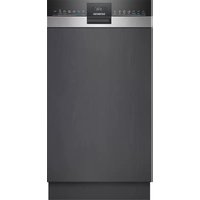
SR55ZS10ME - Dishwasher SIEMENS - Free user manual and instructions
Find the device manual for free SR55ZS10ME SIEMENS in PDF.



| Product type | Built-in dishwasher |
| Brand | Siemens |
| Model | SR55ZS10ME |
| Dimensions (H x W x D) | 86.5 cm x 59.8 cm x 55.0 cm |
| Net weight | Approximately 45 kg |
| Capacity | 13 place settings |
| Energy efficiency class | A |
| Water consumption per cycle | Approximately 9.5 L |
| Noise level | 44 dB(A) |
| Wash programs | Eco, Automatic, Intensive, Quick, Pre-wash, Glasses |
| Special functions | EmotionLight, TimeLight, VarioDrawer, AquaSensor, Child safety |
| Power supply | 220-240 V, 10 A, 50 Hz |
| Water connection | Cold or hot water (max 60°C) |
| Installation type | Built-in under counter or in column |
| Maintenance | Regular cleaning of filters, spray arms, seals and tub |
| Safety | Overflow protection, child safety, automatic shut-off |
| Spare parts available | Filters, spray arms, seals, cords, hinges, etc. |
| Repairability | Designed for consumer repair (advice provided) |
| Manual content | Repair instructions, safety, replacement of parts |
| Warranty | 2 years (according to legal conditions) |
Frequently Asked Questions - SR55ZS10ME SIEMENS
User questions about SR55ZS10ME SIEMENS
0 question about this device. Answer the ones you know or ask your own.
Ask a new question about this device
Download the instructions for your Dishwasher in PDF format for free! Find your manual SR55ZS10ME - SIEMENS and take your electronic device back in hand. On this page are published all the documents necessary for the use of your device. SR55ZS10ME by SIEMENS.
USER MANUAL SR55ZS10ME SIEMENS
4.2 MoHTnpaHe Ha CnCTeMaTa OT KOUHnIu 9
4.2.1 MoHTIpaHHe Ha IINb3raH Ha naneua 3a 86-cM moDen 9
4.2.2 MoHTpaHa He Ha qKcTaOpa 3a Yauu.. 9
4.2.3 MoHTupaHe Ha BNoKkTaHa naporeHepaTopa.. 10
4.3 CmHa Ha rHe3nTo varioDrawer 11
4.3.1 ⅢaKaJaHe Ha rHe3dTo varioDrawer 11
4.3.2 MoHTIpaHHe Ha rHezdoTo varioDrawer 12
4.4 CmHa Ha pa3npbckBaunTe pameHa 13
4.4.1 ⅢBaKaDaHe Ha pa3npbckBaUTo paMo 13
4.4.2 MoHTIpaHe Ha pa3npbckBaIoTo pAmo 13
4.5 CmHa Ha qnItpTe 14
4.5.1 ⅢBaXdaHe HaΦnTbpa 14
4.5.2 MoHTpaHa He HcHnTpTe 14
4.6 MoHTIpaHHe Ha npbckaTa Ta naba 3a Tabu.. 15
4.7 CmHa Ha 3axpaHbauaKa6en.. 16
4.7.1 ⅡKJIIOUOBAHe Ha 3axpaHbuaaKa6eI 16
4.7.2 BknoBaHe Ha 3axpaHbauaKa6e1 16
4.8 CMraHa Ha KaanaKkata 3a NoocTbaun npenapat... 17
4.8.1 Cbane Ha kanayka 3a noHCTBaunn npenapat.. 17
4.8.2 NocTABRHe Ha npyKHHata 17
4.8.3 MoHTnpaHHe Ha KaNaUkTa 3a NoocTbauu npenapat... 17
4.9 CmHa Ha Kanaka Ha NOMnata 3a OTnADH BOni.. 18
4.9.1 CbAJaHe Ha Kanaka Ha nomnata 3a OTnADH BODn 18
4.9.2 MoHTnpaHe Ha KaNaka Ha NOMNaTa 3a OTnADH BODn 18
4.10 CmHa Ha cTpaHnHnaHeI 19
4.10.1 CbAJaHe Ha cTpaHnHnnaHn 19
4.10.2 MoHTpaHa Ha CTpaHmHnnaHe 20
4.11 CmHa Ha BbHnHa Ta Bpata 21
4.11.1 3BaKaDaHe Ha BbHuaHaTa BpaTa 21
4.11.2 MoHTnpaHe Ha BBHuaHa BpaTa 21
4.12 CMHa Ha KOHTpOHHnaHn 23
4.12.1 CbJIHe Ha KOHTpOJIHHaHEn 23
4.12.2 MoHTpaHe Ha KOHTPOJIHHaHEn 23
4.13ФИКСИРанеHa npужинiteHa BpataTa 24
4.14 CmHa Ha donnnaHn 26
4.14.1 CbanyHe Ha donnna nane 26
4.14.2 MoHTpaHe Ha DoJIHnI naHEn 26
4.15 CMHa Ha nnoyata Ha rnaBHnKoHTaKT 27
4.15.1 CbAHe Ha IIOaTa Ha INaBnKoHTaKT 27
4.15.2 MoHTnpaHe Ha nnoyata Ha rnaBnKoHTAKT 27
4.16 CMraHa Ha Tpb6oPbOda 3a npenbnaHe. 28
4.16.1 CbanyHe Ha KaHana 3a npenbnahe 28
4.16.2 MoHTupaHe Ha TpbObonpoBa 3a npembIbaHe 29
4.17 CmHa Ha BbTpewHata Bpata 31
4.17.1 CbanyHe Ha BbTpewHata Bpata 31
4.17.2 MoHTnpaHe Ha BbTpewHata Bpata 31
4.18 CMHa Ha naHTITE 32
4.18.1 CbAHa Ha nAHTHe 32
4.18.2 MoHTpaHe Ha naHTnTe 32
4.19 CMHa Ha yIbTHHeHMeTo (DOnHO) Ha BpaTaTa 35
4.19.1 CbaIHe Ha ynnbTHHeTo Ha BpaTaTa 35
4.19.2 MoHTpaHe Ha yNbTHHeMeTo Ha BpaTaTa 36
4.20 CmHa Ha ynnbTHHeHnTo (ropHo) Ha BpaTaTa 37
4.20.1 CbAraHe Ha yNtBTHHeTo Ha BpaTaTa 37
4.20.2 MoHTnpaHe Ha yNtBTHHeHMeTo Ha BpaTaTa 37
CbBETn 3a peMOHT - CbDOMnJaHa MaunHa
4.21 CmHa Ha EmotionLight 38
4.21.1 CbAHe Ha EmotionLight 38
4.21.2 MoHTupaHe Ha EmotionLight 38
4.22 CmHa Ha TimeLight 41
4.22.1 CbajnHe Ha TimeLight 41
4.22.2 MoHTnpaHe Ha TimeLight 41
OTHOCHO To3n DokyMeHT
1.1 Baxha nHΦopMaζη
1.1.1 Uen
TeHc cBbETn 3a pEmOH T NOMarat Ha Ntpe6nTEnla DpemOHtnpa Cam ypeiB C bOeTBeTbVE C pernameHTa 3a ekONOrOcb6paHO npoeKtnpaHe Ha ypeiNe (OT 03.2021 r.).
Te cbIbpxk HnHOpMaunKa Ka Da CMeHrTe ONpeDeneHn pe3epBn YactN, BKIOHTENHO npdynpckdHn n PNCKOBe.
Ako IMATE HRAKAKB N BLPONO, MOna CbPKeTe Ce c HauHn OToDen 3a o6CnykBaHe Ha KInENTn. Hne HocmN OTTOBOPHOCT 3a UeTn, Camo Ako CbBeNTe 3a peMOHT ca cnaseHn npabInHo.
1.2 06aCHeHne Ha cHMBOJInTe
1.2.1 HnBa Ha onaCHOCT
IpeynpeintenHnBaCe cBcTOrT OT CmBOJ nCnHaHa Dyma.CnrHaHaTa yMa noka3Ba cepno3HOCTTA Ha onaCHOCTTA.
| Ниво на п dedурждени 3начени | |
| ОПАСHОCT | Еспаразы新股у на п dedурждени.TО сбоб Shedени по Смьт ини сернони наразяваим. |
| ПРEDУПЕЖДЕНЕ | Еспаразы新股у на п dedурждени.TOT сбob Shedени по Смьт ини сернони наразяваим. |
| ВИМATEЛНО | Еспаразы新股у на п dedурждени.TOT сбob Shedени по Смьт ини наразяваим. |
| ВИМАМЕЛ | Еспаразы新股у на п dedурждени.TOT сбob Shedени по Смьт ини onMy-шостевни.$etп. |
Tabnua 1: Hua Ha onachocm
1.2.2 Cnmbon3a onachoct
CIMBOHTE3aONACHOCTCa CIMBOHNUH N3o6paXeHNA, KOHTO DaBaT INDINKAUHA 3a BnDa ONACHOCT.
BTo3n DOKyMeHCTe H3N013BaT CNEdHInTe CMBOIN 3a OnaCHOCT:
| Симboл за орасост за чужения | ОвноPre dedупраздітелно сьобсято Орасост от[elekntrочко наpopжени Риск OT[eк科研院所 |
| Орасost от[nорязвany |
OTHOCHO To3n DokyMeHT
| Симbol 3a onachoct 3начени | Опachoct ot пемарази Опachoct ot горец поьрхости |
| Опachoct ot симно магнисто плел Опachoct ot неюни рашу лычени |
Ta5nuu2: CumbOnu 3a onachocm
1.2.3 CtpyKtpa Ha npéDynpeXkDeHnra
PepynpexdHnraT BTO3N DOKMeHT IMAT CTaHapTN3nPAH BbHwEN BID NCTaHdAPTN3nPAH CtpkTypa.


ONACHOCT
BnHn3ToyHKn Ha onaCHOCTTla!
Bb3mOHHnocpeHnO tNfHopapaHeHa onaHocTt/npedynpckdHeHe
Mepkn 3a6paHn 3a npDoTbpaTbaHe Ha onaChocTta.
CneHnIy nPmep NOKaBA np6dynpEKeHHe, KoTo yBcOMaBA 3a TOKOB Yapd, npEeIN3BnKAn OH tAcTn NoD HanpeKeHHe. CnOmeHabe Ce MApkata 3a N36RbAbe Ha onacHOCTA.


ONACHOCT
Pnck OT TokOB yap npaH nuactn noH anpekeHne!
CmbptOT TOKOB ynap
KJNkhOteye HTeOEtEeONEETeEeONeEeONeEeONeEeONeEeONeEeONeEeONeEeONeEeONeEeONeEeONeEeONeEeONeEeONeEeONeEeONeEeONeEeONeEeONeEeONeEeONeEeONeEeONeEeONeEeONeEe
1.2.4 06uCNMBOJI
BTO3NIOKYMENTCEH3NON3BATCNEDHNTeO6UINCNMBONI:
| Оьш симвов Зачени | |
| I | Иденихицаре на спесиален сьвет (Текст w/ллграфика) |
| I | Иденихицаре на постс сьвет (самоTekст) |
| I | Иденихицаре на врьзka Кьм Вideоурок |
| I | Иденихицаре на необхочимite ИСТрумени |
| I | Иденихицаре на необхочимiteпраздарителни ус自主创新 |
| I | Иденихицаре на ус自主创新 (ako ...,Тогава ... ) |
| I | Иденихицаре на рezуntат |
| [Стар] | Иденихицаре на Клиочни 6ытуон |
| [00123456] | Иденихицаре на Кatableожен Homep |
| [Статус] | Иденихицаре на по��аизяп Текст/ празорец (надиспега на урEDA) |
Ta6nua3:06u cumeonu

Be3onachocT
2.1 06uHnHCTpyKu3a6e3onacHOCT
2.1.1 BcHKn DoMaunHn ypeiN
Puck OT TOKOB yap nopadn qactn noh HanpexeHne!
- PrguKPi pR eMOHTN, BKNIOHbAaN eNEKTPnEeCKN KOMHOHeHtN, MOrat Da doBedeAt Do TOKOB yad?
- Pankachate yepda oTe eneKtpueckaTa mpeka 3a nohe 60 cekyHdi, npeDi da 3a-noCHte pabOta.
Cnepe moHHTA TpRABa da ce HbPnpoBepeka 3a 6beonacOCT bcrnacho VDE 0701 nn B cTobETCTBn Cbc cneuHmHNTte 3a cTpanahataponeDb6
Puck OT HapaHbAbe OCTpn p6oBe!
Hocete npedn3n pkbauu
PCK OT pme3A8Na BO pEMe HA pEMOHT, NOIpaBbKHa,OTcPraBaBA Ha HEN3PpABBOCTN cEpBN3 NpOaIe TEEKH DBeWKeZI CE KOMNOHeHTn
Hocete3aunTHn06yBKn.
3akpenete TeXKITE KOMNOHEHTN, Taka Ye da He naHaT.
He no3BONRABaTe KOHTaKT Ha Yactn OT TAnOTo C DmXeUc Ce KOMNoHEHTN.
Pnck 3a 6e3oanacocTtA/foHKuHraTa h ypeda!
- 13no3BaIte cmo opunHaHn pe3epBn qactN.
Pnck OT nobpeHa eNektpocTaTuHc YbCTBtENH KOMnoHeHTN (ESD)
HeDOKOcBaTeMoDyInTe,BKNIOHTeHnHO Bp3Kn IN PNOBOHNKOBNbTtua.

IhctpymEnTu n NOMOuHcpeDCTBa
| посочане Робносту Избражения | |
| Оверты Торх T20 С овор [00340764] | 100 MM, за виHTове с преда- зен удиФТ |
| Оверты Торх T15 | Дылжина 80 MM |
| Плеска OTberрта Врьх 10 MM x 1,6 MM x 200 MM | |
| Кleineц с Истовд- ни челков [00340871] | Дылжина: 200 MM, пави |

PemOH
4.1CMHaHa pa60THnI NIO
N3nCKBaHe:
YpeIbTe n3KNIOUeH OT 3aXpaHbaHeTo.
YpeDHTe ca CBO6OHO DOCTbHNH.
4.1.1 CbAJIHe Ha pa6OTHnI nnT
-
- HATINCHETe DbTa 3aXBaUaUH NoCTa NOI paOToHn IIOIT HARope (1). 2. NOBdInrHeTe NeKo paOToHn IIOIT Otnpei.(2).
2.1.HaTHCHETe pa6oTHnHnnOT Ha3ad(3). 2.N36ytaIte pa6oTHnHnnOT Ha3ad(4).
3.CbanepepaOthmnnT
4.1.2 MoHTnpaHe Ha pa6OTHMa IIOT
MoHTnpaTBeBobpaTeHpeI.

PemOH
4.2 MoHTnpaHe Ha cncTeMaTa OT KOUHnIu
M3nCKBaHe:
CbOTBeTHATA KOUHnua e n3BaDena oT ypea.
4.2.1 MoHTnpaHe Ha nIb3rau Ha naIeua 3a 86-cM moDen
CneuaJIHHHnCTpyMeHTH:
Bodayha nanea [00614935]
ΦнксаТОрЗачи[00618565]
- NocTabete nIb3raHa Ha naneua no dnaroHaN B npedHata qact Ha KOUHNuTa.
2.LeHTpnpaTe n pakHeTe yneHa naeua Ha mrcTo.
4.2.2 MoThnpaHe HaФнкCaTopa 3aЧаш
CneuannHnHcTpymEnTH:
Boday hanaeta [00614935]
Φнкcatop 3a淘汰[00618565]

KORA MNEte qaui, fHKCATOpb53 aauu Moke da 6bne cBbHAT. D0n bNHTENHNT BbN HAmAraBa CbBnPaHeTO Ha BOHa DA bHOTo HA uWITE. PnM MeHE Ha BcOKi Yauu pEnOpbYBaMe Da OCTABTe fHKCaTopa CbHAT HANONY. Ako ROPHNTE KOHNm IMat DoIbNHTeHn IuaCTMacOB BIOKKA, TRe PbBo TRPbBA da Ce 13BaDn.
1.ИЗБаДeTe nIaCTMaCObATo BnOЖka.
2.ⅢpaKHTeΦmKcTOpa3aHaMHaMCTO.
3.CrbHeteФнкcaTopa.

PemOH
- NocTabeTe npedMeTne 3a MHe.
4.2.3 MoHTnpaHe Ha BLOKKaTa Ha naporehepaTopa
CneuaHn HcTpymEnTH:

Boday Ha naneua [00614935]

4.10.2 MoHTnpaHe Ha cTpaHnHnHa nHaen
- Noctabete CtpaHnHH naHEn B yner Ha OCHOBata (1).
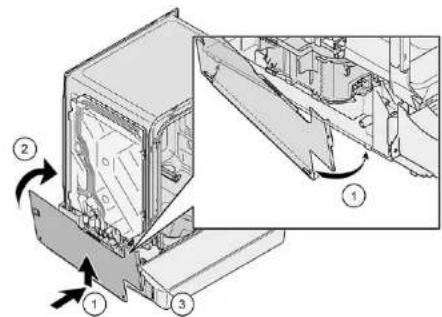
Due. 2: Hantbno uHmeepupan
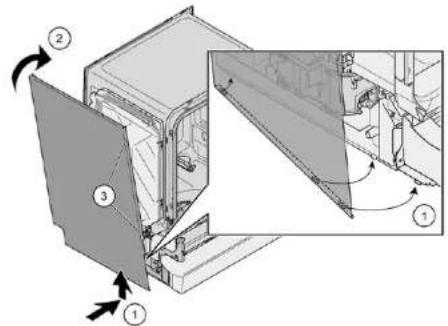
2. HATNCHeTe CtpaHnHnnaHnBbpxy ypeJa (2).
3.3akpenete ctpaHHHnnaHc BnHTOBete (3).

PemOH
4.11 CmHa Ha BbHnHaTa BpTa
M3nCKBaHe:
YpeBbTe H3KnIOueHOT 3aXpaHBAHeTO.
YpeBtE n3KNIOueH OT BOOCHa6nTENHa Mpeka.
MoHTnpaIteB06paTeH peI.

PemOH
4.13ФИКСИРанеHa npуЖинITEHa BpaTaTa
1.ⅠaandeTe kanaKaTaHa BodaHa Ka6eNa
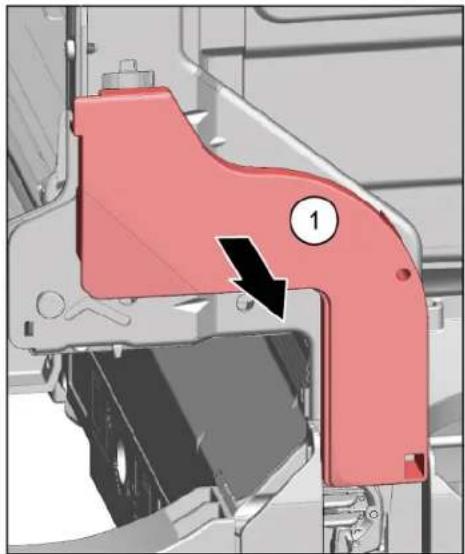
2.1. OTBopete neko BpaTata (1).
2.ФИКСИРАТЕВБВДЛБОHAHATAHaунЯHA OCHOBATA(2).
- BABHO 3aTBOpTe BpaTata (3).
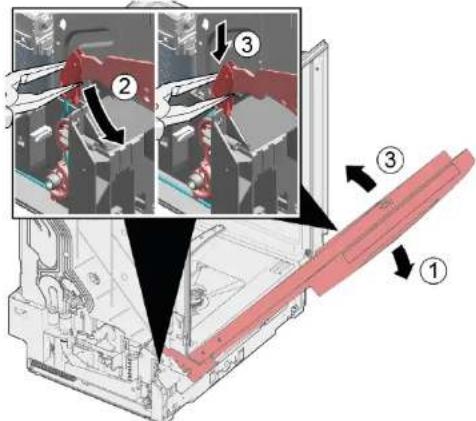
CnCTeMaTc Ka6enIe npKpeHn ABOMaTHNO KbM nHTaHa BpaTaTa.

PemOH
3.1.3aTbOpTe JeKO BpTaTata (4).
- PpemecTe Xnne6a 0r3aN OcBO6oTe naHTaHa BpaTata (5).
- Otbopete Bpatata (6).
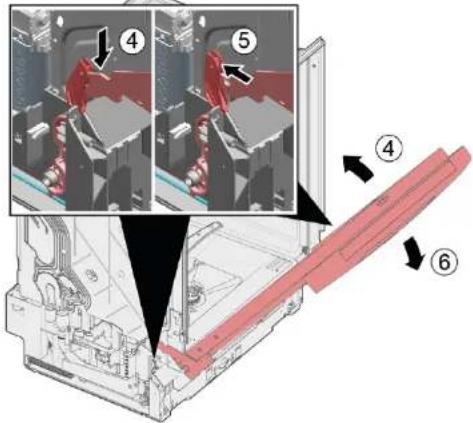
- Nobtopete npoueypata oTHOBo ot npyraTa cTpana Ha ypeda.
KpaKaTa ca NdeHTNHH IN MOraT Da ce pa3MeHrT.
N3nckBaHe:
YpeBt E n3KIOUeH OT 3aXpaHBaHeTO.
YpeBTe N3KJIIOUeH OT BOOChA6DnTeNHaTa MPexa.
BbHnHaTa BpaTa e CbaNeHa.
BbHnHa BpaTa e cBanHe (HanbNHO HHTerPpHa/HHTerPpHa).
4.14.1 Cbajhe Ha donnna naHEn
1

HenpabnHO cbanHe.
Ako donHnraI naHEn ce pa3xna6n OCTpaHH nCBnn, DBete cKo6n
MORaI da ce OTkbchat.AKO cAmO eHnata CKo6a e NOBpeHNa,CTpaHATA MOKe Da cCMEH, Tb KaTO cKo6nte Ca NDEHTHNN.
PnpoeOpuyNTeHO e Da NoCTabne HNeO pNO yPeDA oTnpeN hOTc- TPAHH, 3a Da oBNEKHTE HATOBapBaHETo Ha DonHnra NaHEn C KpakaTa.
2.BdHHTe BOdaHTte (1) c NMOOHTa HA OTBePTKa n OCBoOBeTe fIKCaTOpA, KATO HATNCHETe HADONY.
- NobdHHe nHaHeia.
4.ɪəbaɪdete kpaKaTahanpeən(1).
4.14.2 MoHTpaHe Ha DoJIHnnaHEn
- Noctabete kpaKaTa.
- PnPKPeneTe dOONHnaHEn OTrope (1) n ro HATNCHEte HADony, DOkato Cyete, UpaKaBa Ha MCTo (2).

PemOH
4.15 CMHa Ha IIIOyTa Ha rNaBHn KOHTaKT

IIOyataHa IraBnHKe KOHTe pa3noJoxeHa BdoHaTcAactOTnped.
N3NCBaHe:
YpeBt E n3KJIOueH OT 3axpaHbHaHeTO.
YpeBTe N3KJIIOUeH OT BOOChA6DnTeNHaTa MPexa.
Me6enHnT nane (onuohane) e cBaneH.
BbHuiHaTa BpaTa e cBaNeHa.
BbHHaTa BpTa e CBaneHa (HanbnHO INHTerPnpaHa/NHTerPnpaHa).
DonnHrT naHEn e CbaneH (onuHa).→26
4.15.1 CbaJrHe Ha nNoyTaHa rJaBnKoHTaKT
1.CbaneDbataBnHTa(1).
2.Ocb6oDeTe KpeEnKHHte enMeHTn (2).
- HAKHOHE BHHMATEHNO HNOYATA HA HNABHNI KONTAKT Hanpei (1).


B 3abicIMoCT oCepnTaHaMoDeaIeCeNtKbMEmotionLight Bce OcEe z Akpenen KbM OChOBata.
Ocbobodete uencena ot naneu ha fikcaTopa ndbneTe hazad (onua) (2).
4.15.2 MoHTnpaHe Ha IIIOyTa Ha rJIAbHnKoHTaKT
MoHTnpaTe IIOHATA Ha IINABHHKoHTaT B O6pateH peI.

PemOH
4.16 CmHa Ha Tpb6oPbOda 3a npenbIbaHe

TpboPBOBbT 3a npenbnahe ce HAMpa B npednata doHa qact Ha ypeia.
N3nckBaHe:
YpeBt E n3KIOUeH OT 3aXpaHbAHeTo.
YpeBTe N3KJIIOUeH OT BOOChA6DnTeNHaTa MPexa.
Me6enHnT nAHen e cBaneH (onu).
BbHuiHaTa BpaTa e cBaNeHa.
DonnHnT naHEn eCBaneH (onua).→26
Nochata Ha nabHHMQHTe CBAHe.→27
4.16.1 CbajnHe Ha KaHaHa 3a npenBlaBe

OctaTbUHa Boda
PnO TcTpaHbAHe Ha DpeHakHnMa MPky MoKe Da n3TeYe ocTaBHa BOda.
Cnpete BOATA INI INPemaxHEOTOCOBHINCBCMYKATEHa CnPHIOBKA.
- OtnycheTe MexaHn3Ma 3a 3axBaUaHe oTrope (1,2).
- Ocbobodete KpeneKHN enemt otrope

PemOH
3.1.NoctabeTe OTBepkata Noi MetaHnHCTonep(1). 2.BHIMATEHNOOCBO6OeTeMeTAnHATAcko6a(2)
- NOBHHeTe Tp6bonpoB0da 3a npenbnahe.
4.16.2 MoThiPaine Ha Tpb6oPbOba 3a npenbIbHe

IopoeiOn OT BODa NopAei HENpABINeH MOHTaX Na TpBcONpOBOda 3a nppebNaBe!
Bkaparape npabnnpbbonpoBa 3a npenbbahe oTONY bB BOaHa H na yhen a OCHOBATA.
ФИКСИРАТЕ РAPВИΝΟ ТPBБОПРОВДА 3a ПЕNBЛBAHE HA MICTOTO MY OTROPE.
-
- NocTabete Tpb6onpooba 3a npenbIbahe (1).
-
PnemecTe TpB6oPbOda 3a npenbIbAhe B ynnbTHHeHMeTo (2).
- HatncheTe Tpb6oipOBOda 3a npenbIbaHe BbB BOdAHa ynnbTHHeHHeTo (3).
- NocTabete TpbbonpoBoda 3a npenbnahe cTeHaT (4).
5.ФИКСИРАТЕТРБОПРОВОДA3npenBnBaHcE(5).

PemOH
2.Поберете монтаха OTлву lo OTясно.3.Поберете дали CTOn CTaБиИн.
4.3akpenete c metanha ckoba ot JIbata n daChata cTpaHa.
4.17.2 MoHTIpaHHe BA bTpeWHaTbPata
- Pa3kpniTe ynnbTheHneTo Ha BpTaTAt OtnpeD.
2.ПпсмстeteВьтpeшнataВрета3дунгнtheиToHaBpataT. - 3aTbOpTe BbTpewHaTa Bpata.
4.ObpHete ynnbTheHnTo Ha BpaTata Harope. CtpaHHTte YacTH ce nok3bat Harope - Npemecte naHTaTa Ha BpaTaHa Rope.

PemOH
4.18 CmHa Ha naHTnTe
N3nCKBaHe:
YpeBte n3KNIOueHOT3aXpaHBAHeTo.
BbHnHaTbPaTa e CbaeHa.
ПпочтаHa Глььня Контakт ecBaJIeHa.
Donnrrn taHene cBaneH (onu).
PpykHnTe Ha BpaTaTa ca CbaNeHM.
KoHTpoHmT naHeI eCBaEN.
BpbxaybHa Ka6eHnH CHON OTdOy B4rCHO e CBAJIeH.
TpboBopBOBbT 3a npenbnahe e cBOBoeH.
4.18.1 CbAJIHe Ha naHTnTe
1.Ocbo6oTe naiuHHe hKcatopa cOTBePTka (1) H3dbpnaTe Bpatata Harope 3aeHNo Cnantnte (2).
2.Ocbo6oTe3a3EmBaUaTaBp3KaHa naHTaTa.
3.

JONHOTO yNtBHeHn Ha BpataTa ce OCTpaHbBa eHOBpeMeHo c TOBA.
- Ha demoHTnpaHATA Bpata n3BaTe DeBATA BNHTA OTCBA KaHTA, 3a Da r CaANrTe.
4.18.2 MoHTnpaHe Ha naHTnTe
ONACHOCT
PnCK OT TKOB ydap nopadn qactn noHanpeXeHne!
IaCHOCT 3a JKBOTA OT TOKOB ydap B CnyaHa HEnpaBnHeH peMOHT
EeKtpnckte Taactn Tp86Ba da pemOHntpat OT KBAHINPHIpaHn EeKtPOTeXHHu.
CnepemOHATApaCEH3BpHINnpOBEPKa3a6eONACOCT CbIaCHOVDE0701NBNCBOTBETCTBNEcCneuHHTe3a cTpaHATApa3npoe6b。

PemOH
- Hatachete ynnbtheHemTo Ha Bpata Bbpx DoHHa BbTpseHATA Bpata.
- PnKpene NaHTNE O T BATE CTPAH (1). 3aKpeTne naHTATA NnactMacoBn DbPkay Ha NjIbTHHeHMeTO H BpATA KbM BbTpEeHATa Bpata (2), KATO n3NON3-Bate NO dBa BNTA 3a NaHTA N bPkAAy.
3.3aKaayete naHTte 3aeHNO C BbTpewHa T Bpata (1).
- NocTaBeTe DoJIHOTo yInbTHHeHn Ha Bpata Ta Bpyx BOIOCTOCHTE KaHAn 3a npenbIbAHe H a KOHTeHepa (2) n pOBepete da nn paNpaBNIHO pa3noJKeHN.
5.3aKaHTe nAHHTnTe (3).
6.

JinncBaua 3a3emraBaa Bpb3ka MoKe Da DOBeDe Do MPekOBO HanpeKeHne Ha BpaTaTa.

PemOH
YcTaHOBETe 3aEMBaUaTa Bp3Ka.
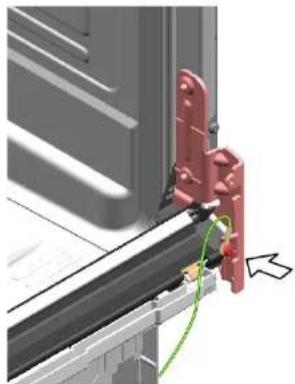
- NocTaBete DBe 3aDpbXaun CkObHa DoJHnTO ynnbTHeHne Ha BpaTata.
4.1 Vymena homi desky 88
4.1.1 Sejmutl hornl desky 88
4.1.2 Montaz hornl desky 88
4.2 Montaz systemu kosu 89
4.2.1 Montaz zasobniku na tabley u modelu 86 cm.. 89
4.2.2 Montaz drzaku salku 89
4.2.3 Montaz parni vlozky 90
4.3 Vymena zasuvky varioDrawer 91
4.3.1 Vyjmulzásuvky varioDrawer 91
4.3.2 Montaz zasuvky varioDrawer 92
4.4 Vymena ostrikovacich ramen 93
4.4.1 Vyjmuti ostrikovaciho ramena 93
4.4.2 Montaz ostrikovaciho ramena 93
4.5 Vymena filtru 94
4.5.1 Vyjmuti filtru. 94
4.5.2 Montaz filtru 94
4.6 Montaz ostrikovaci hlavy pro plechy 95
4.7 Vymena napajecihokabelu 96
4.7.1 Vytazeni napajecihokabelu 96
4.7.2 Pripojeni napajecho kabelu.. 96
4.8 Vymena krytu zasobniku na myci prostrefedek 97
4.8.1 Odstraneni krytu zasobniku na myci prostrefedek 97
4.8.2 Vlozeni pruziny 97
4.8.3 Montaz krytu zasobniku na myci prostredek.. 97
4.9 Vymena krytu cerpadla odpadni vody 98
4.9.1 Odstraneni krytu cerpadla odpadni vody 98
4.9.2 Montaz krytu cerpadla odpadni vody 98
4.10 Vymena bochniho panelu 99
4.10.1 Sejmuti bočniho panelu 99
4.10.2 Montaz bochniho panelu 100
4.11 Vymena vnejsich dvirek 101
4.11.1 Vyjmuti vnejsich dvfek 101
4.11.2 Montaz vnejsich dvirek 101
4.12 Vymena ovladaciho panelu 103
4.12.1 Odstraneni ovladaciro panelu 103
4.12.2 Montáz ovladacihopanelu 103
4.13 Oprava pruzin dvirek.. 104
4.14 Vymena spodniho panelu 106
4.14.1 Sejmuti spodniho panelu 106
4.14.2 Montaz spodniho panelu 106
4.15 Vymena zasuvkove desky v zakladne 107
4.22.1 Fjernelse at timeLight 161
4.22.2 Montering at timeLight 161
Sorg for, at pilemaerkerne passer.
2021-03-22_9001630796 Copyright by BSH Hausgeräte GmbH Side 134 af 965

Reparation
4.21.2 Montering of emotionLight
- Sæt holderen i skylletankens ramme (1).

Reparation
- Aktivér lasekrogen (2).
3.

BEMERKI
Ukorrekt montering!
4.22 Udskifting at timeLight

4.22.1 Fjernelse at timeLight
4.22.2 Montering at timeLight
2.1 General Safety instructions 207
2.1.1 All domestic appliances 207
Tools and aids. 208
Repair 209
4.1 Replacing worktop 209
4.1.1 Removing worktop 209
4.1.2 Installing worktop 209
4.2 Installing basket system 210
4.2.1 Installing a tab slide for the 86 cm model 210
4.2.2 Installing cup support clip 210
4.2.3 Installing steamer insert 211
4.3 Replacing varioDrawer 212
4.3.1 Removing varioDrawer 212
4.3.2 Installing varioDrawer 213
4.4 Replacing spray arms 214
4.4.1 Removing spray arm 214
4.4.2 Installing spray arm 214
4.5 Replacing filters 215
4.5.1 Removing filter 215
4.5.2 Installing filters.. 215
4.6 Installing baking sheet spray head 216
4.7 Replacing power cord 217
4.7.1 Unplugging power cord 217
4.7.2 Plugging in power cord 217
4.8 Replacing detergent cover 218
4.8.1 Removing detergent cover 218
4.8.2 Inserting spring 218
4.8.3 Installing detergent cover 218
4.9 Replacing wastewater pump cover 219
4.9.1 Removing wastewater pump cover 219
4.9.2 Installing wastewater pump cover 219
4.10 Replacing side panel 220
4.10.1 Removing side panel 220
4.10.2 Installing side panel 221
4.11 Replacing outer door 222
4.12 Replacing control panel 224
4.12.1 Removing control panel 224
4.12.2 Installing control panel 224
4.19 Replacing (lower) door seal 236
4.19.1 Removing the door seal 236
4.19.2 Installing the door seal 237
4.20 Replacing (upper) door seal 238
4.20.1 Removing door seal 238
4.20.2 Installing door seal.. 238
Repair hints - Dishwasher
4.21 Replacing EmotionLight 239
4.21.1 Removing EmotionLight 239
4.21.2 Installing EmotionLight 239
4.22 Replacing TimeLight 242
4.22.1 Removing TimeLight 242
4.22.2 Installing TimeLight 242
Concerning this document
1.1 Important information
1.1.1 Purpose
These repair hints support consumer to repair appliances by himself according to the applicable eco-design regulation (as of 03/2021).
They contain information how to exchange defined spare parts including warnings and risks.
In case of questions, please contact our customer service. We will only be liable for damages if the repair hints have been followed properly.
1.2 Explanation of symbols
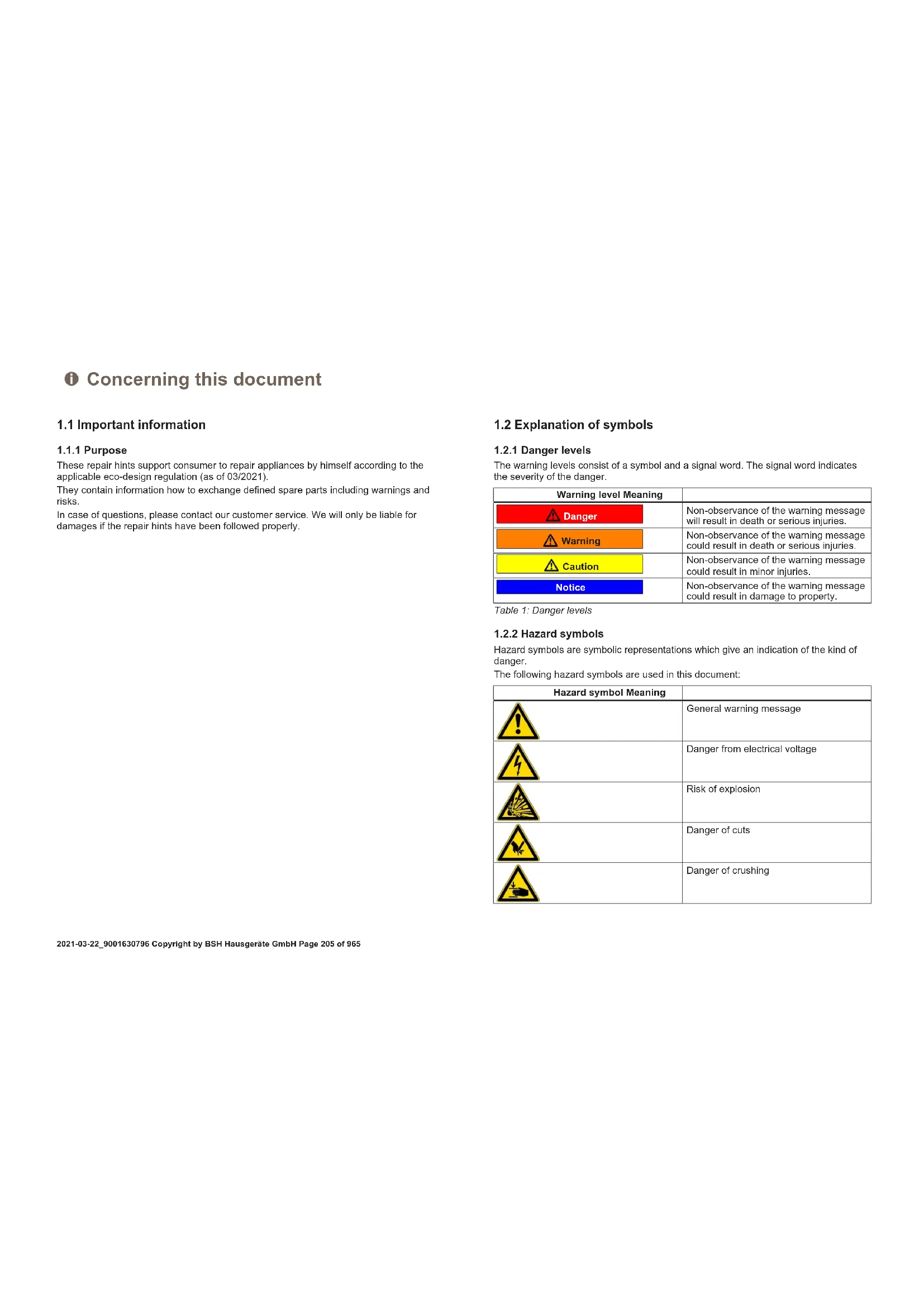
1.2.1 Danger levels
The warning levels consist of a symbol and a signal word. The signal word indicates the severity of the danger.
Table 1: Danger levels
| Warning level Meaning | |
| Danger | Non-observation of the warning message will result in death or serious injuries. |
| Warning | Non-observation of the warning message could result in death or serious injuries. |
| Caution | Non-observation of the warning message could result in minor injuries. |
| Notice | Non-observation of the warning message could result in damage to property. |
1.2.2 Hazard symbols
Hazard symbols are symbolic representations which give an indication of the kind of danger.
The following hazard symbols are used in this document:
| Hazard symbol Meaning | |
| ! | General warning message |
| Danger from electrical voltage | |
| Risk of explosion | |
| Danger of cuts | |
| Danger of crushing |
Concerning this document
| Hazard symbol Meaning | |
| Danger from hot surfaces | |
| Danger from strong magnetic field | |
| Danger from non-ionizing radiation |
Table 2: Hazard symbols
1.2.3 Structure of the warnings
Warnings in this document have a standardised appearance and a standardised structure.

Danger
Type and source of danger!
Possible consequences of ignoring the danger / warning.
Measures and prohibitions for preventing the danger.
The following example shows a warning that warns against electric shock due to live parts. The measure for avoiding the danger is mentioned.

Danger
Risk of electric shock due to live parts!
Death by electrocution
- Disconnect appliances from electrical supply at least 60 seconds before starting repairs.
1.2.4 General symbols
The following general symbols are used in this document:
| Gen. symbol Meaning | |
| 1 | Identification of a special tip (text and/or graphic) |
| i | Identification of a simple tip (only text) |
| Identification of a link to a video tutorial |
| Gen. symbol Meaning | |
| Identification of required tools | |
| Identification of required preconditions | |
| Identification of a condition (if ..., then ...) | |
| Identification of a result | |
| [Start]Identification of a key or button | |
| [00123456] Identification of a material number | |
| Status Identification of displayed text / window(in the appliance's display) | |
Table 3: General symbols
Safety
2.1 General Safety instructions
2.1.1 All domestic appliances
Risk of electric shock due to live parts!
Errors by repairs involving electrical components can lead to electrical shock!
- Disconnect the appliance from the mains for at least 60 seconds before starting work.
After the repair have a safety test according VDE 0701 or country-specific regulations performed.
Risk of injury from sharp edges!
Wear protective gloves.
Risk of crushing during repair, maintenance, troubleshooting and service due to heavy and moving components
Wear protective shoes.
- Secure heavy components from falling down.
- Do not stick body parts into moving components.
Risk to the appliance's safety / function!
Only use original spare parts.
Risk of damage to electrostatically sensitive components (ESDs)!
- Do not touch the modules, including connections and conductor paths.

Tools and aids
| Designation Details Images | ||
| Screwdriver Torx T20 with bore hole [00340764] | 100 mm, for screws with safety pin | |
| Insulated Screw- driver Torx T15 with bore hole [15000626] | Blade length 125 mm, for screws with safety pin | |
| Slotted screwdriver | Blade 10 mm x 1.6 mm x 200 mm | |
| Needle nose pliers [00340871] | Length: 200 mm, straight | |
4.1 Replacing worktop
Prerequisite:
Appliance is disconnected from power supply.
Appliances is freely accessible
4.1.1 Removing worktop
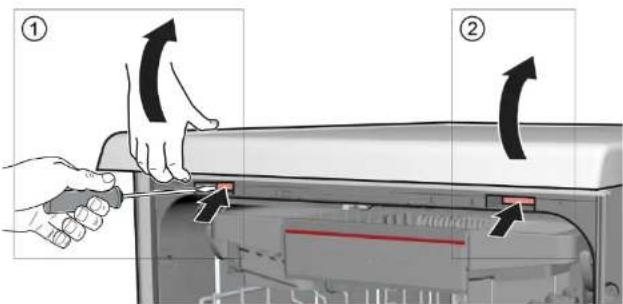
-
- Press both catch levers under the worktop upwards (1).
-
Lift the worktop slightly at the front (2).
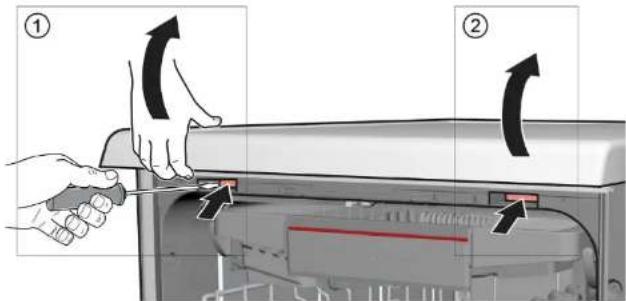
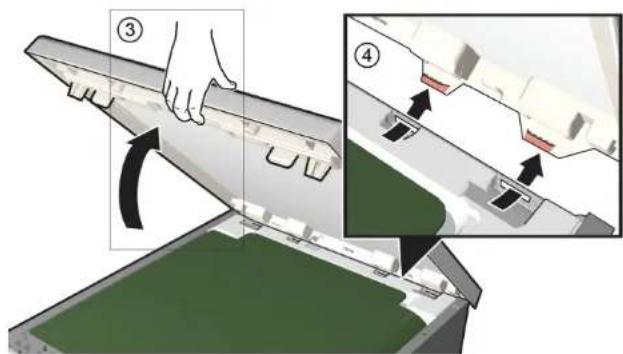
2.1. Push worktop towards the rear (3).
- Push worktop away towards the rear (4).
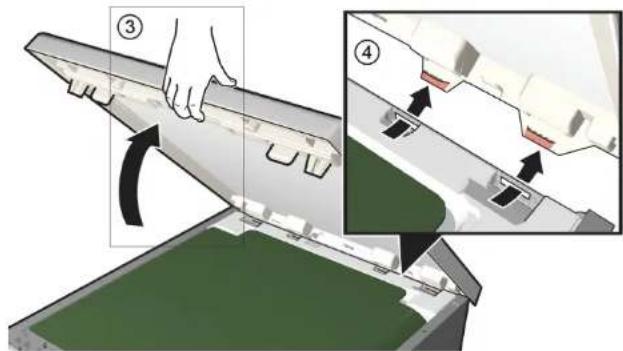
- Remove worktop.
4.1.2 Installing worktop
Install in reverse order.

Repair
4.2 Installing basket system
Prerequisite:
The relevant basket has been removed from the appliance.
4.2.1 Installing a tab slide for the 86 cm model
Required tools:
Tabguide [00614935]
Cup support clip [00618565]
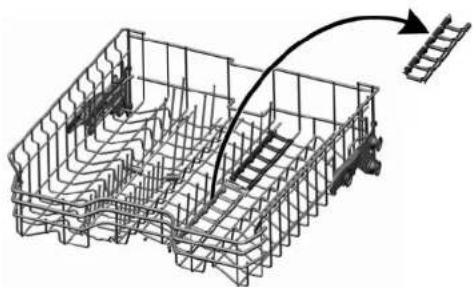
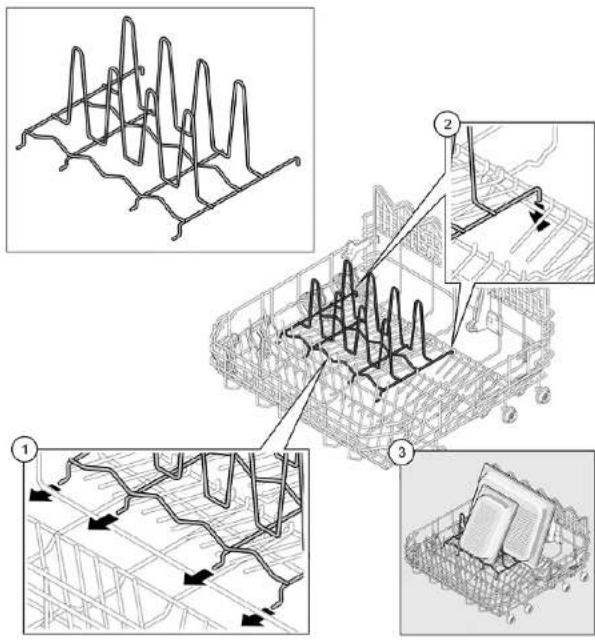
- Insert the tab slide diagonally at the front of the basket.
- Centre and click the tab chute into place.
4.2.2 Installing cup support clip
Required tools:
Tabguide [00614935]
Cup support clip [00618565]

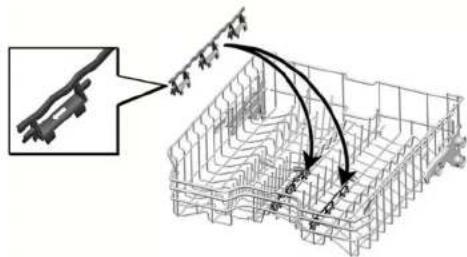
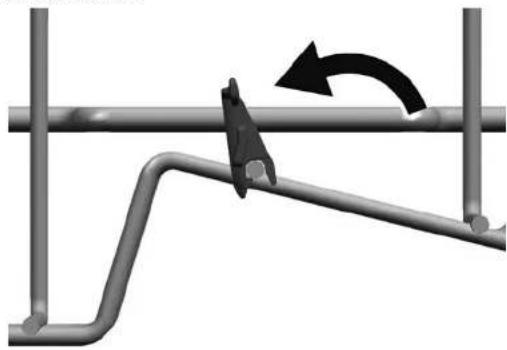
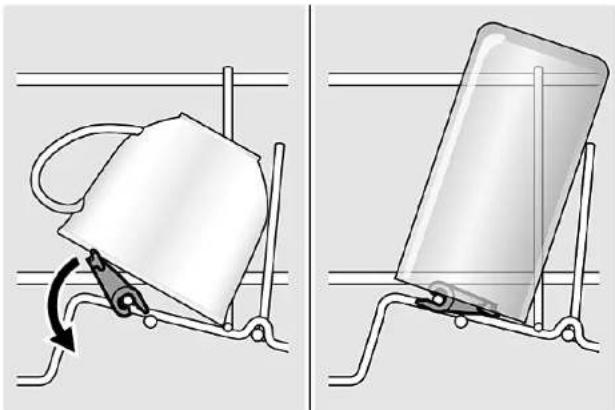
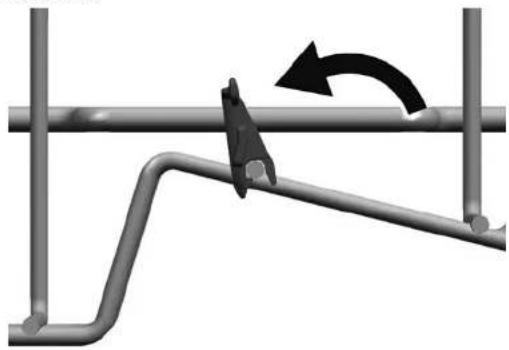
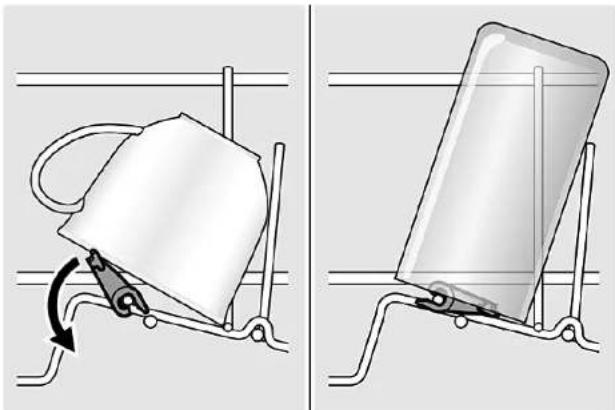
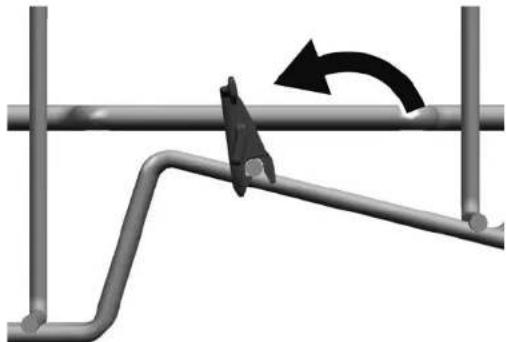
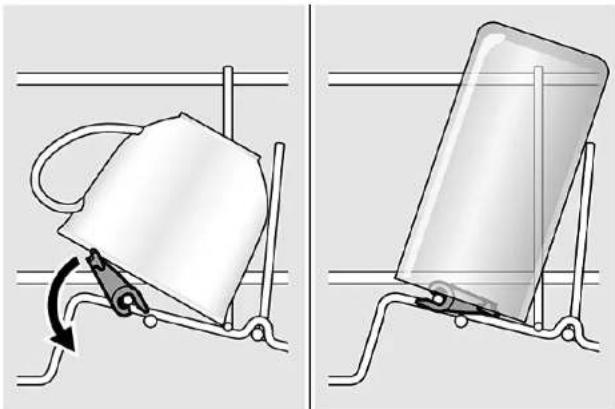
When washing cups, the cup support clip can be folded up. The additional angle reduces the collection of water on the bottom of cups. In the case of tall glasses we recommended leaving the cup support clip folded down. If upper baskets have an optional plastic insert, they must first be removed.
- Remove the plastic insert.
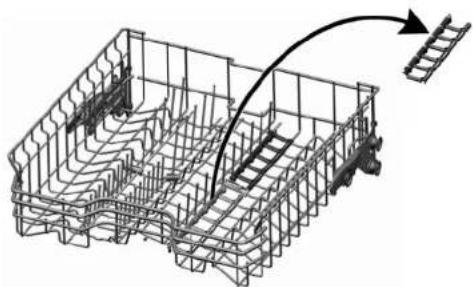
- Click the cup support clip into place.
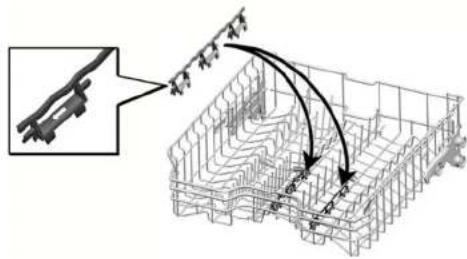
- Fold up the clip.

Repair
- Position the items to be washed.
4.2.3 Installing steamer insert
Required tools:
Tabguide [00614935]
Cup support clip [00618565]
Wedge the steamer insert with the end pieces under the basket system.
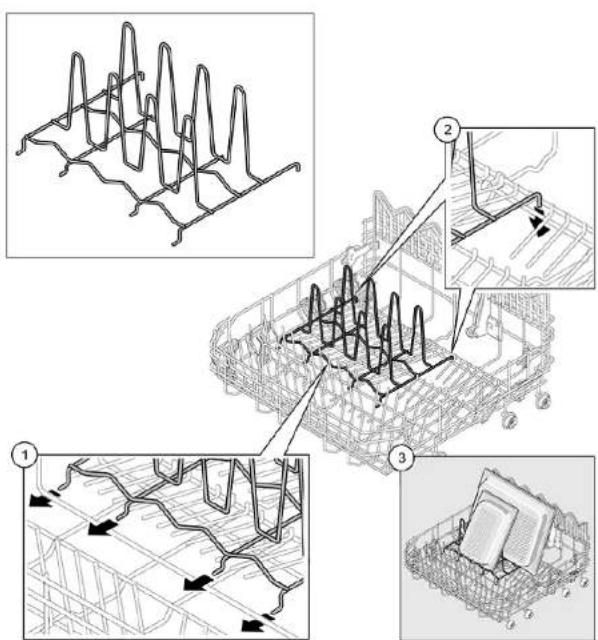

Repair
4.3 Replacing varioDrawer
4.3.1 Removing varioDrawer
- Bend the handle flaps inwards.
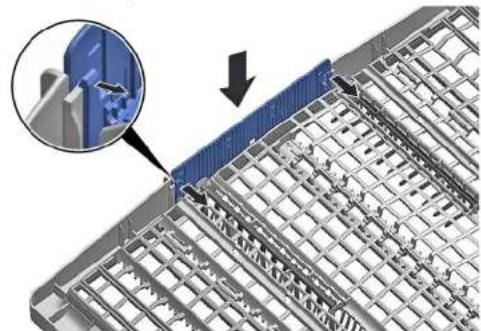
-
Remove the handle upwards.
-
Press plastic side inserts outwards and press them upwards out of the frame.
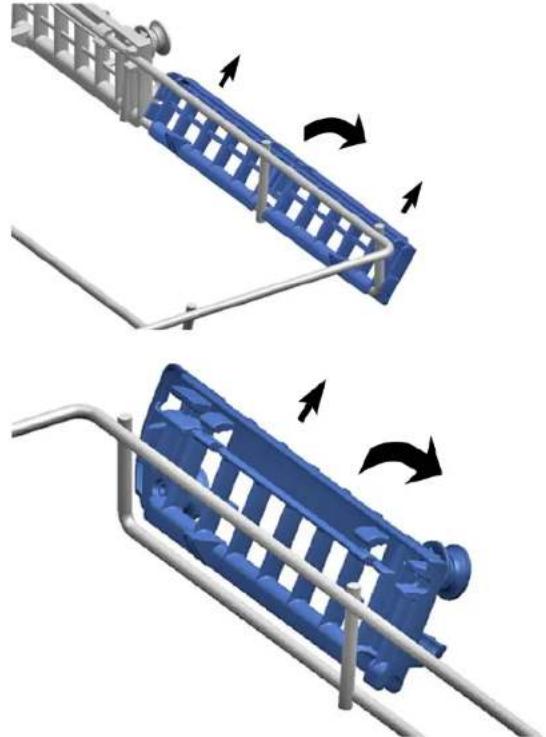

Repair
- Carefully bend the guide tabs outwards.
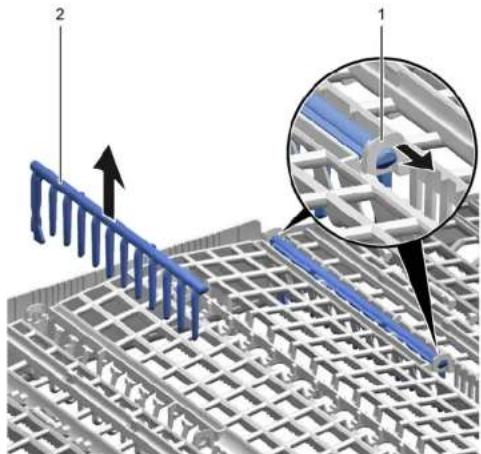
-
Pull the folding spines out of the tabs.
-
Press metal frame at the front out of the holders.
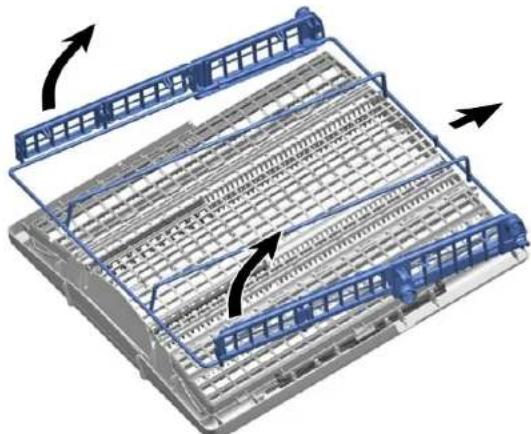
- Push metal frame back out of the guide.
4.3.2 Installing varioDrawer
Install in reverse order.

Repair
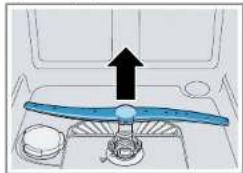
4.4 Replacing spray arms
4.4.1 Removing spray arm
- Pull up the spray arm to remove
- Turn the spray arm (1) and remove it (2).
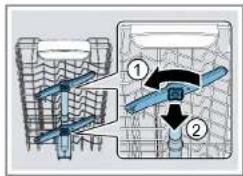
4.4.2 Installing spray arm
Insert the spray arm.
The spray arm clicks into position.

Repair
4.5 Replacing filters
4.5.1 Removing filter
- Turn the coarse filter anticlockwise (1) and remove the filter system (2).
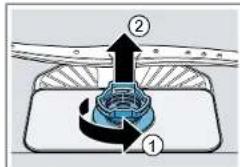
Check that no foreign objects fall into the sump.
- Pull down the micro filter to remove.
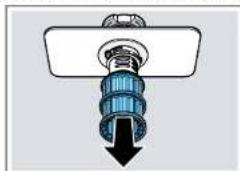
- Press the locking catches together (1) and lift the coarse filter out (2).
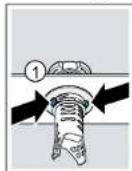
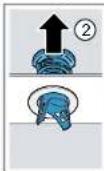
4.5.2 Installing filters
- Re-assemble the filter system.
Make sure that the locking catches on the coarse filter click into position.
- Insert the filter system into the appliance and turn the coarse filter clockwise.
Make sure that the arrow markings match up.
4.6 Installing baking sheet spray head
- Remove top basket.
- Insert the baking sheet spray head in the holder (1) and turn to the right (2).
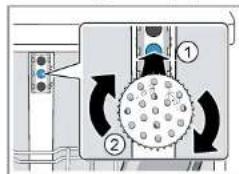

The baking sheet spray head clicks into position.

Repair
4.7 Replacing power cord
Prerequisite:
Appliance is disconnected from power supply.
Appliance is disconnected from water supply.
Appliances is freely accessible.
4.7.1 Unplugging power cord
- Move the plug of the power cord carefully up and down and pull it out of the mains socket.
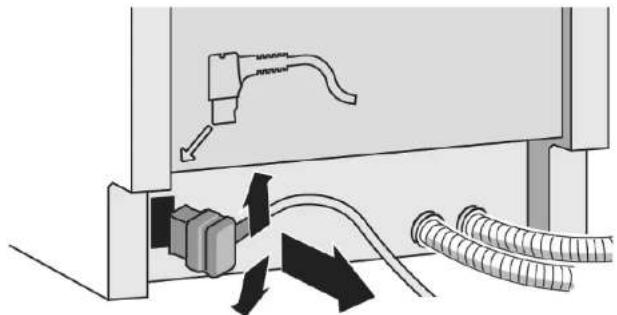
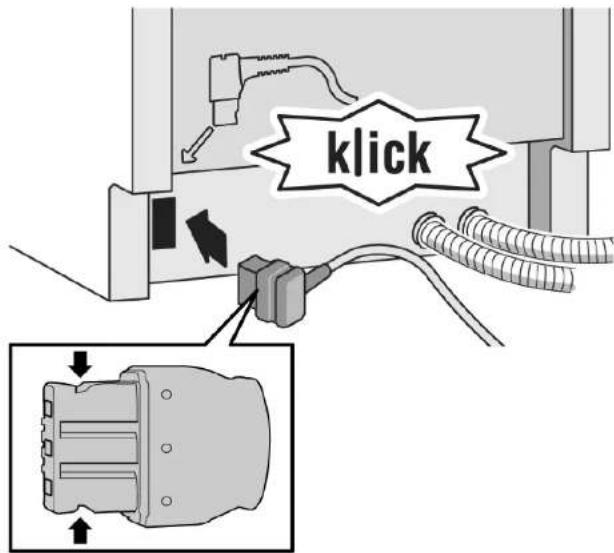
4.7.2 Plugging in power cord

Notice
Overheating of main connection!
Risk of fire
Firmly insert the power cord until it clicks.
- Insert the plug of the power cord into the mains socket until the plug clicks audibly into place.

Repair
4.8 Replacing detergent cover

A small screwdriver can be used as a levering tool.
Prerequisite:
Appliance is disconnected from power supply.
Appliance is disconnected from water supply.
Door has been opened.
Detergent cover has been opened.
4.8.1 Removing detergent cover
- Slide the detergent cover in 5mm
- Lever the detergent cover on the lower side out of the guide rails and take the detergent cover on the upper side out of the guide rails.
- Remove the spring.
4.8.2 Inserting spring
- Insert the long end of the spring into the mounting hole of the dispenser device (1).
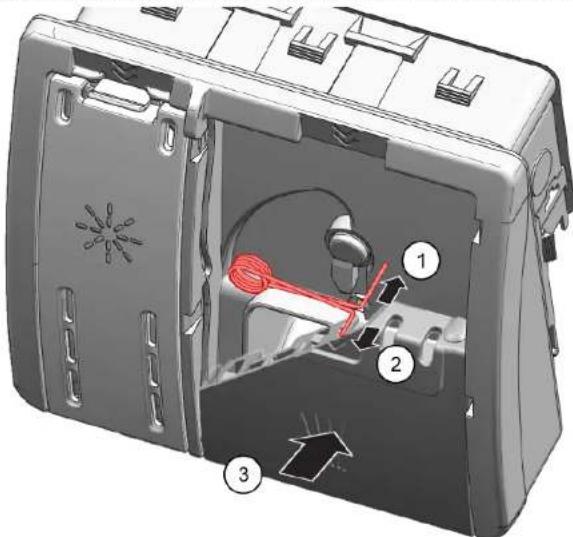
- Insert the short end of the spring into the mounting hole of the detergent cover (2).
- Press cover into the dispenser device (3).
4.8.3 Installing detergent cover
- Insert the detergent cover 5mm before the completely open position into the guide rails on one side. Applying gentle force, press the opposite side into the guide rails.
- Check the function of the detergent cover.

Repair
4.9 Replacing wastewater pump cover
Prerequisite:
Basket has been removed.
Filters has been removed. Page 215
4.9.1 Removing wastewater pump cover
- Scoop out any water.
Use a sponge if necessary.
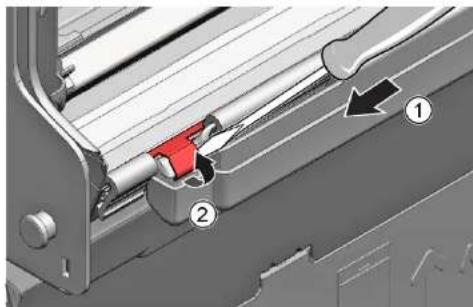
- Prise off the pump cover using a spoon and grip it by the crosspiece.
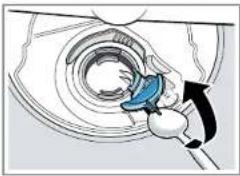
- Lift the pump cover inwards at an angle and remove.
4.9.2 Installing wastewater pump cover
Insert the pump cover (1) and press down (2).
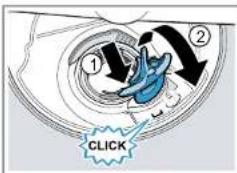
The pump cover clicks into position.

Repair
4.10 Replacing side panel
Prerequisite:
Appliance is disconnected from power supply.
Appliance is disconnected from water supply.
Appliances is freely accessible.
Free-standing appliances: Worktop has been removed.
4.10.1 Removing side panel
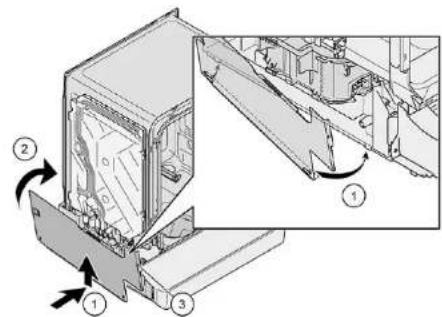
- Remove screws from the side panel (1).
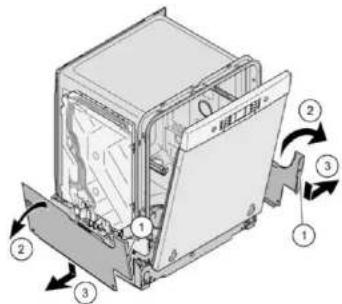
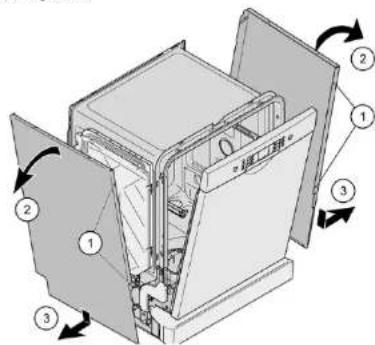
Fig. 1: Fully integrated
- Tilt the side panel slightly outwards at the top (2).
- Lower the side panel and pull it out of the base trough (3).

Repair
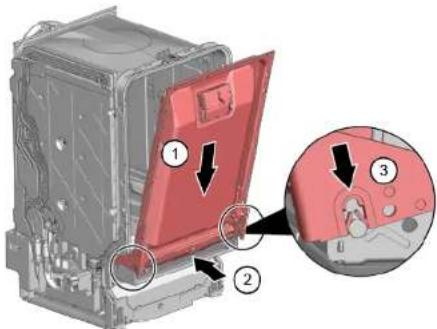
4.10.2 Installing side panel
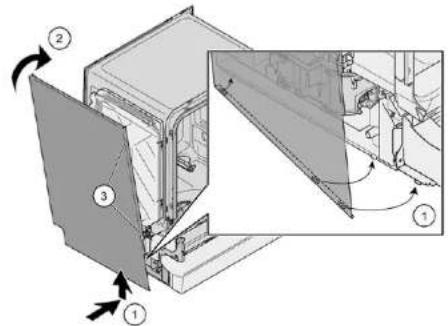
- Insert the side panel into the base trough (1).
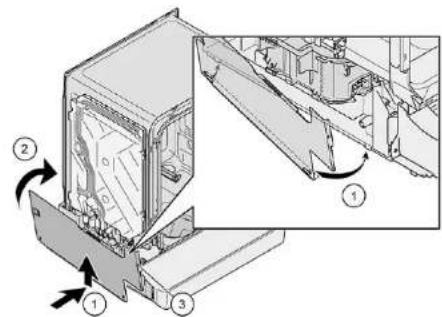
Fig. 2: Fully integrated
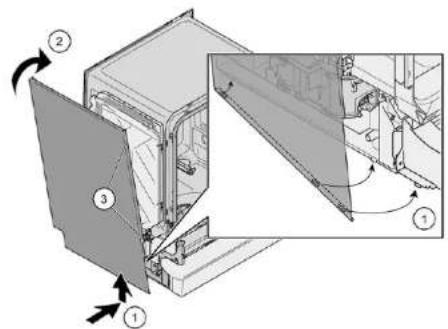
- Press the side panel onto the appliance (2).
- Secure the side panel with screws (3).

Repair
4.11 Replacing outer door
Prerequisite:
Appliance is disconnected from power supply.
Appliance is disconnected from water supply.
Just remove the screws which are described in the following steps.
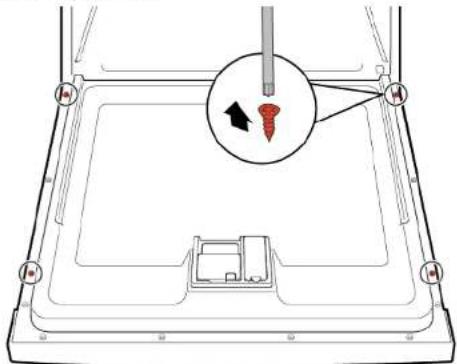
- Open door.
- Remove four screws.
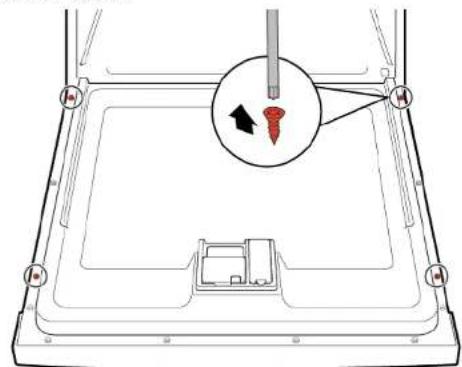
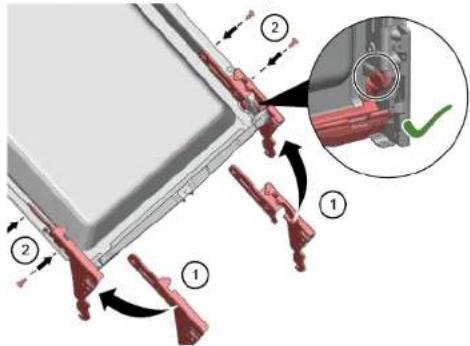
3

Secure the door by holding it on one side.
Remove two screws.
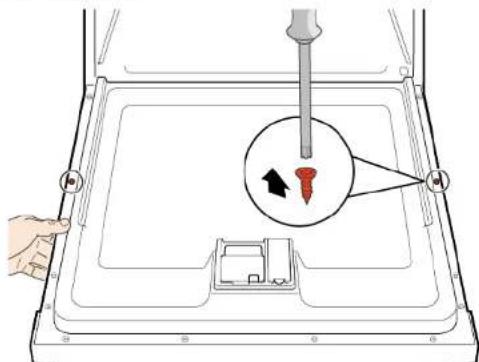
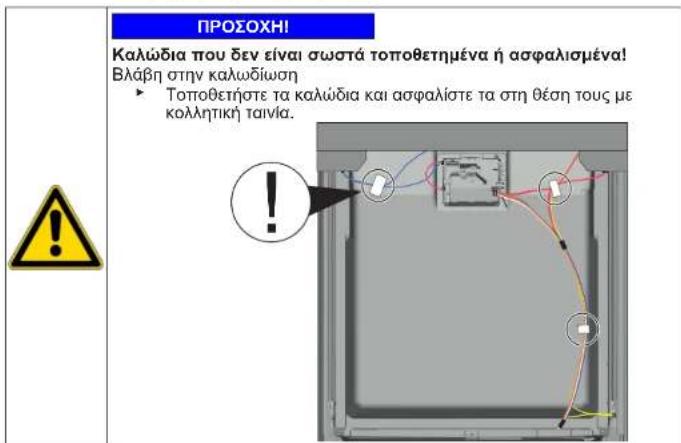
Insulating fleece has been correctly positioned and fixed on the inside of the outer door.
Hinges are inserted into the outer door.
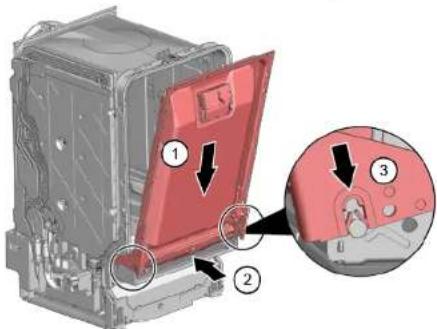
-
Close the inner door without snapping it shut.
-
Push the outer door upwards underneath the control panel (1).
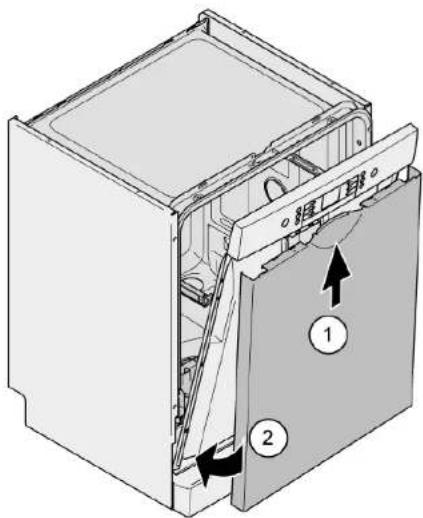
- Press the outer door against the inner door and hold (2).
4.

Secure the door by holding it on one side.
Open the door and secure it with two screws (4 x 11 mm metal screws).
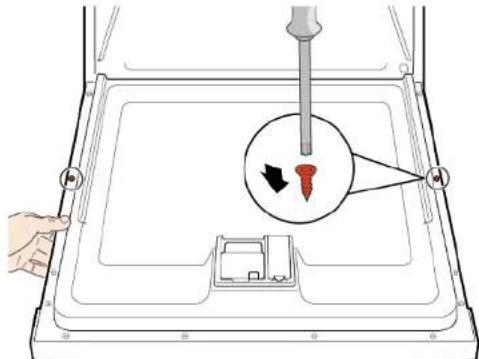
- Secure the outer door with four screws (4 x 11 mm metal screws).
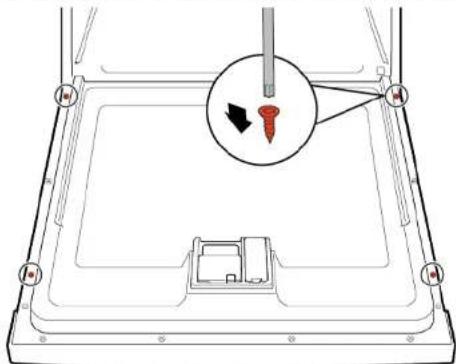

Repair
4.12 Replacing control panel

If an operating module is defective, the entire control panel must be replaced.
Prerequisite:
Appliance is disconnected from power supply.
Appliance is disconnected from water supply.
Outer door has been removed.
Outer door has been removed (fully integrated/integrated).
4.12.1 Removing control panel
- Disconnect electrical connections from the control panel and the low rinse-aid sensor (1, 2).
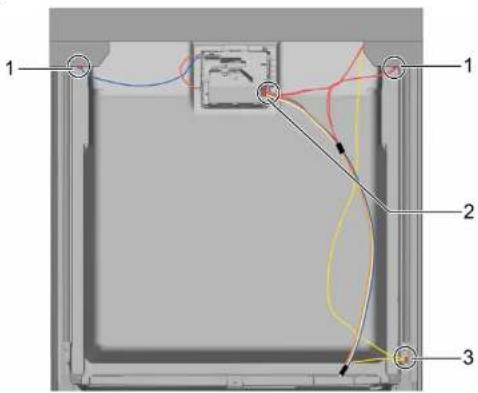
- Disconnect the earth cable (3) (optional).
- Open the appliance door.
-
Secure the control panel to prevent it from falling down (hold on to it).
-
Remove six screws.
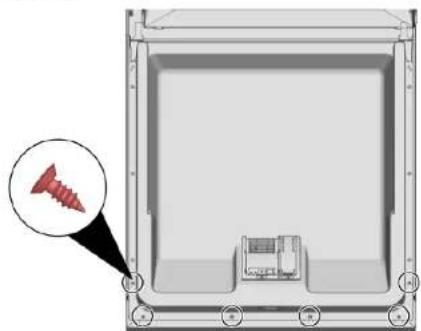
- Remove the control panel.
4.12.2 Installing control panel

Use screws 4 × 16 ~mm .
Install in reverse order.

Repair
- Remove cord guide cover out.
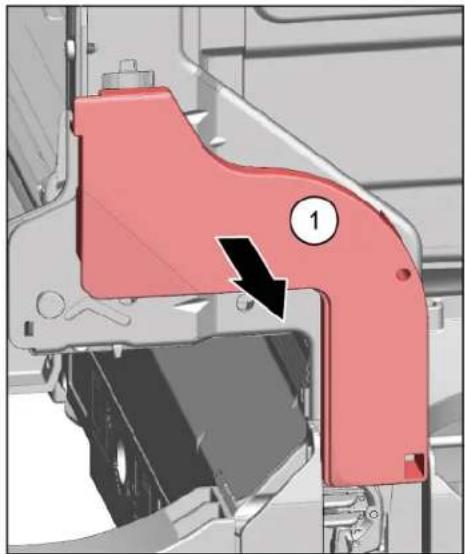
2.1.Open door slightly (1).
- Fix in the groove of the base trough (2).
- Slowly close the door (3).
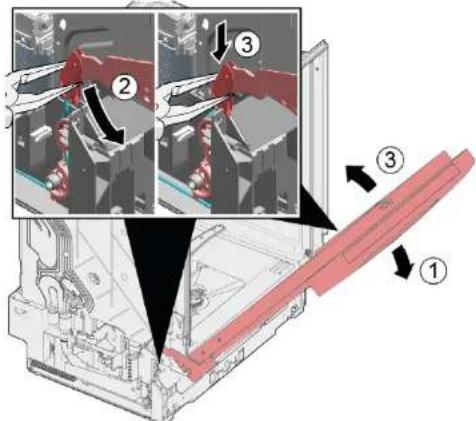
The cord system attaches itself automatically to the door hinge.

Repair
3.1. Slightly close the door (4).
- Move the groove to the back and release the door hinge (5).
- Open the door (6).
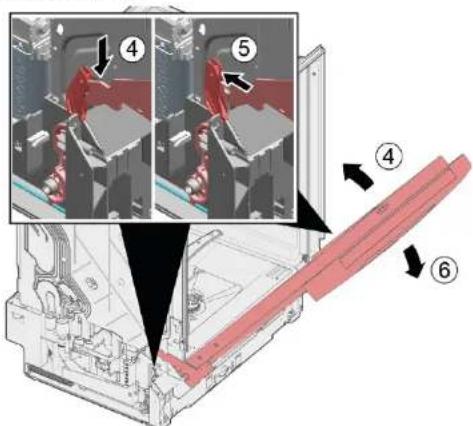
- Repeat the process again on other side of appliance.

Repair
4.14 Replacing toe panel

The feet are identical and can be swapped over.
Prerequisite:
Appliance is disconnected from power supply.
Appliance is disconnected from water supply.
Outer door has been removed.
Outer door has been removed (fully integrated/integrated).
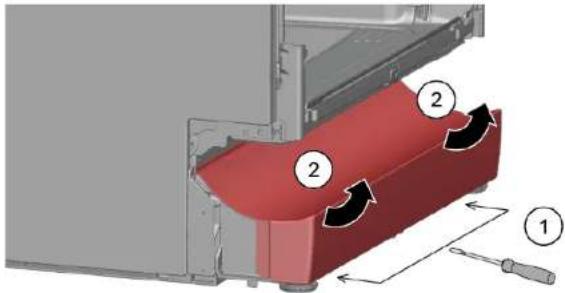
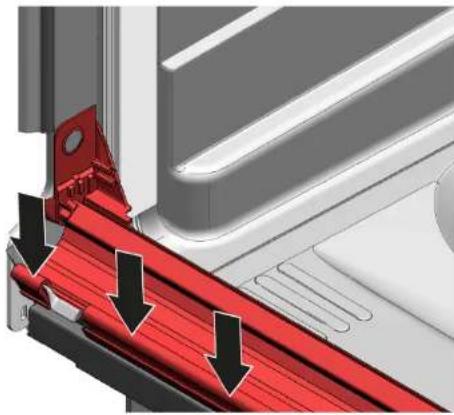
4.14.1 Removing toe panel
1.

Incorrect removal. If the toe panel is loosened at the side and removed, the two brackets may break away. If only one bracket is damaged, the side can be changed as the brackets are identical. It is advisable to place something under the appliance at the front on the side to relieve the load on the toe panel with the feet.
- Reach into the guides (1) with a screwdriver and release the catch by pushing downwards.

-
Lift the panel off.
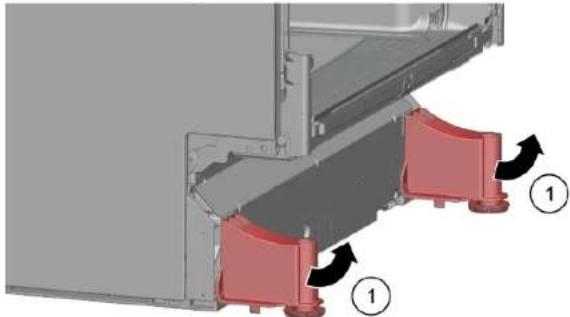
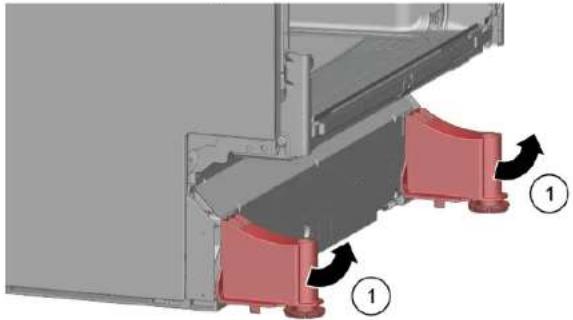
-
Remove the feet forwards (1).
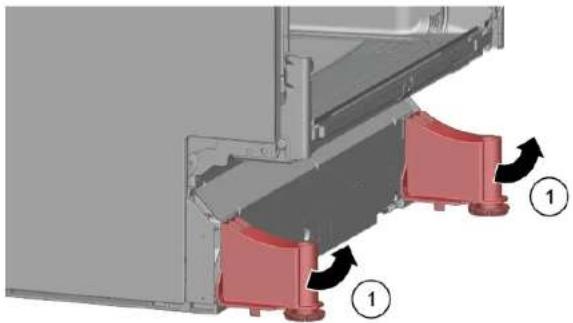
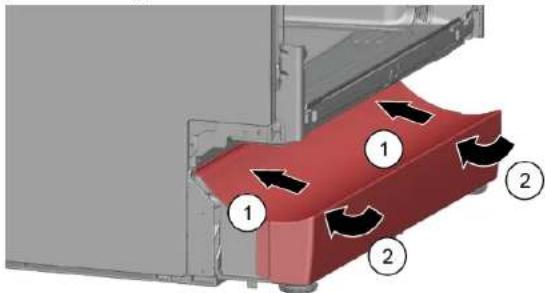
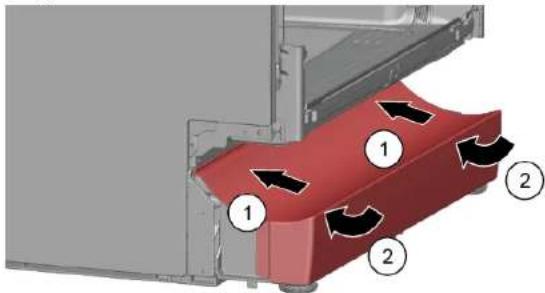
4.14.2 Installing toe panel
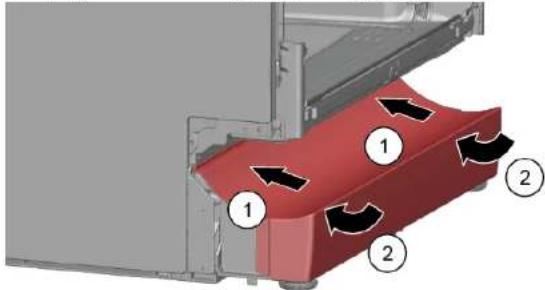
- Insert the feet.
- Attach the toe panel at the top (1) and press it down until it audibly clicks into place (2).

Repair
4.15 Replacing base socket plate

The base socket plate is located in the lower area at the front.
Prerequisite:
Appliance is disconnected from power supply.
Appliance is disconnected from water supply.
Furniture panel (optional) has been removed.
Outer door has been removed.
Outer door has been removed (fully integrated/integrated).
Toe panel has been removed (optional). Page 227
4.15.1 Removing base socket plate
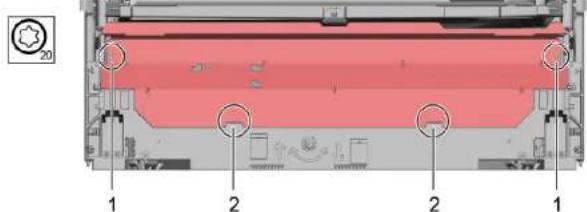
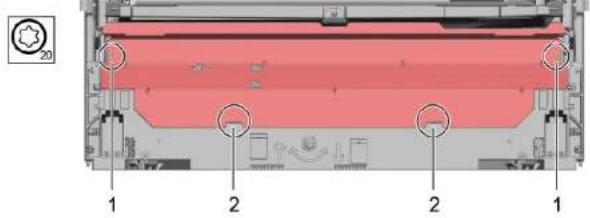
- Remove two screws (1).
-
Disengage catch elements (2).
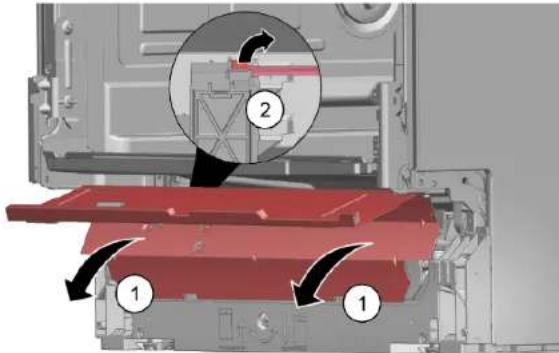
-
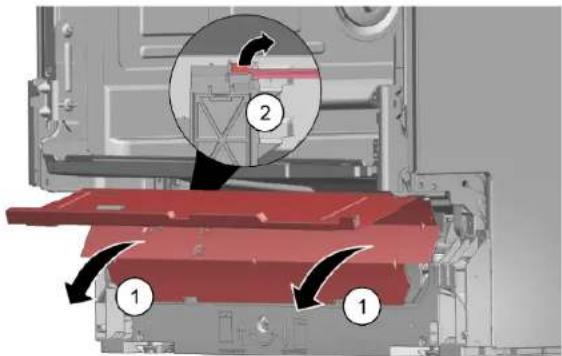
Tilt the base socket plate carefully forwards (1).
4.

Depending on the model series, the plug to the EmotionLight is still secured to the base.
Unlock the plug on the catch tappet and pull to the rear (optional) (2).
4.15.2 Installing base socket plate
Install the base socket plate in reverse order.

Repair
4.16 Replacing overflow conduit

The overflow conduit is located in the front lower area of the appliance.
Prerequisite:
Appliance is disconnected from power supply.
Appliance is disconnected from water supply.
Furniture panel has been removed (optional).
Outer door has been removed.
Toe panel has been removed (optional).→ Page 227
Base socket plate has been removed. Page 228
4.16.1 Removing overflow channel

Residual water
- When the drainage hose is removed, residual water may run out.
-
Catch water or remove from the base pan with suction syringe.
-
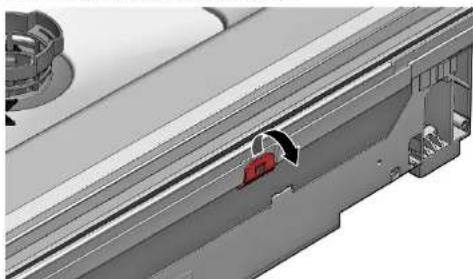
Lever out of the catch mechanism at the top (1, 2).
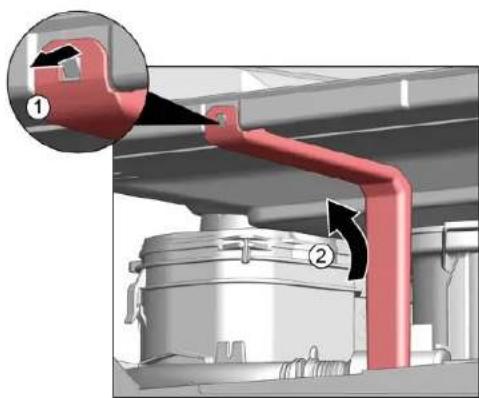
- Release catch element at top.
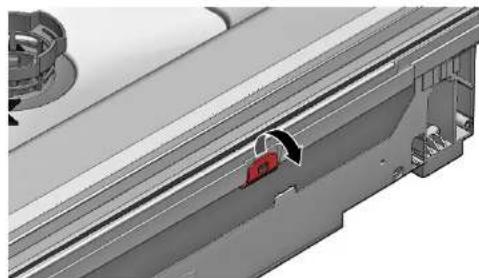
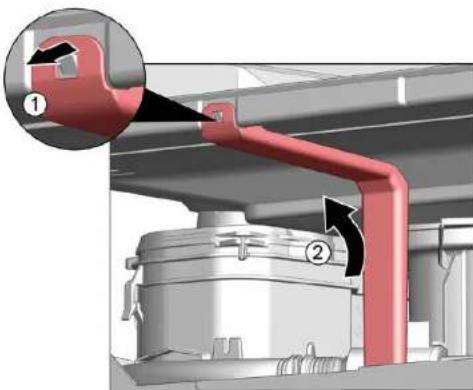
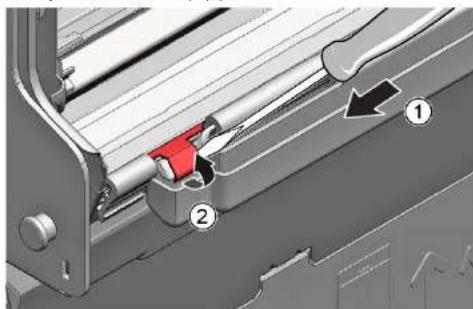
3.1. Insert screwdriver below metal brake (1).
- Gently release metal clip (2).

Repair
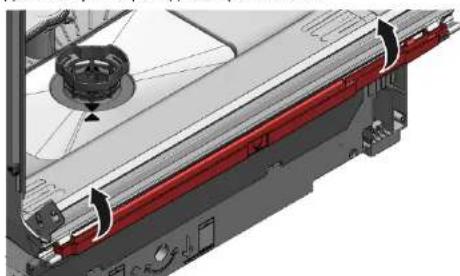
- Lift overflow conduit off.
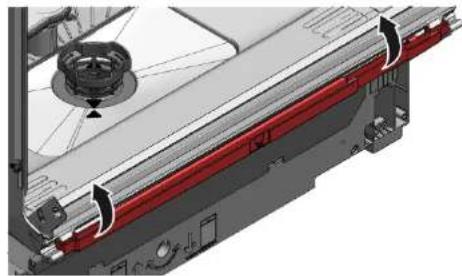
4.16.2 Installing overflow conduit

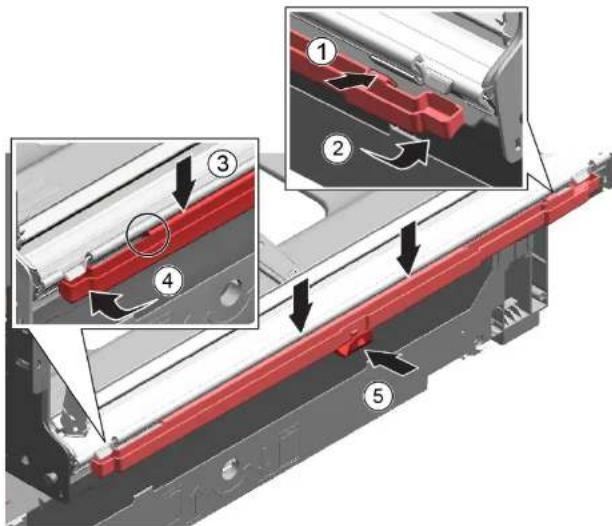
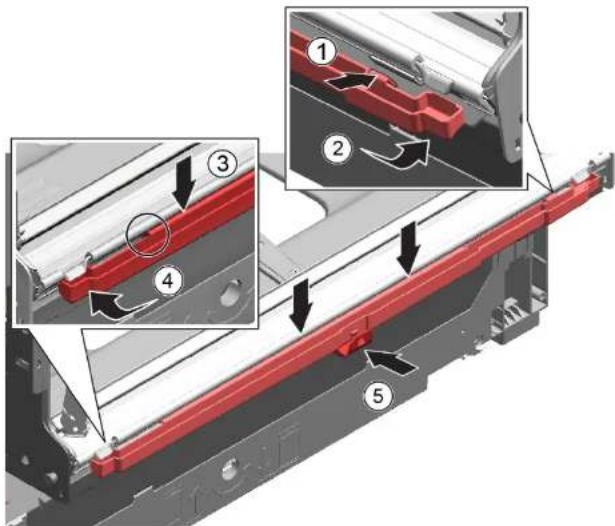
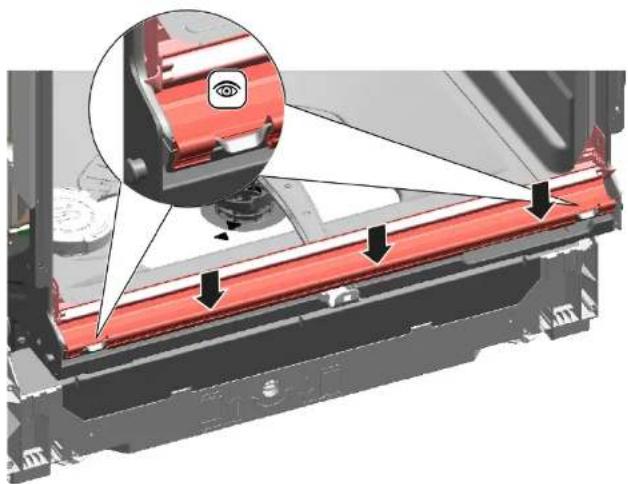
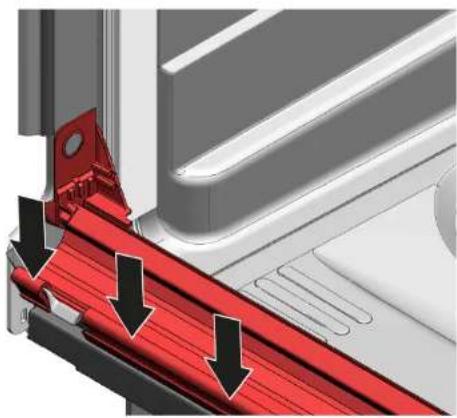
Water damage due to incorrect installation of the overflow conduit!
Correctly insert the overflow conduit at the bottom into the guide of the base trough.
Click the overflow conduit correctly into place at the top.
-
- Place overflow conduit (1).
-
Move overflow conduit into seal (2).
- Press overflow conduit in guide of seal (3).
- Insert overflow conduit concisely (4).
- Clip in overflow conduit (5).

Repair
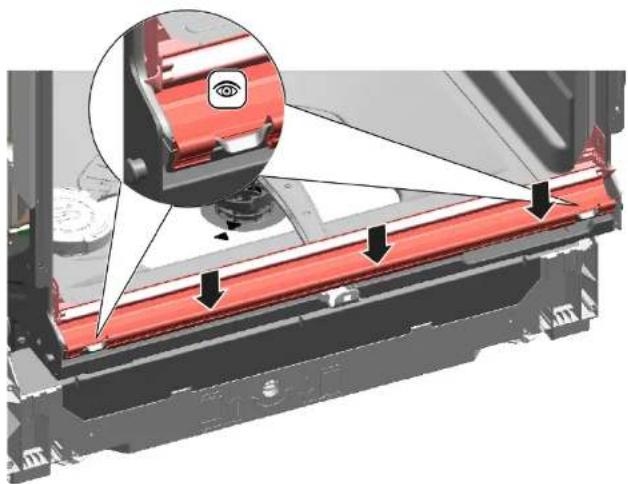
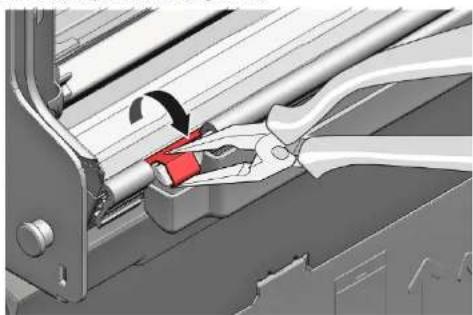
- Check installation left and right. 3. Check firm seat.
- Clip in metal clip on left and right side.

Repair
4.17 Replacing inner door
Prerequisite:
Appliance is disconnected from power supply.
Appliance is disconnected from water supply.
4.17.1 Removing inner door
- Remove screws (1).
- Remove inner door upwards (2).
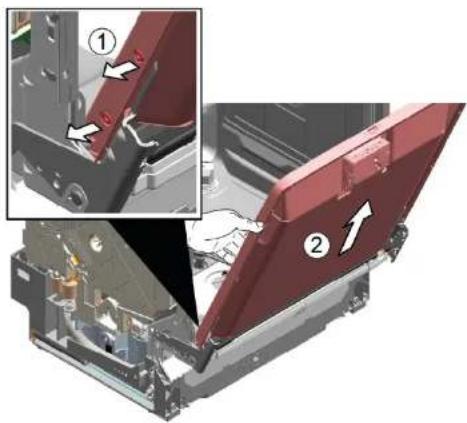
4.17.2 Installing inner door
- Flap door seal to front.
- Move inner door behind door seal.
- Close inner door.
- Flap door seal upwards. Sideparts show up
-
Move door hinge upwards.
-
Secure door hinge with screws.
- Place inner door on door hinge.
- Secure inner door with screws.

Repair
4.18 Replacing hinges
Prerequisite:
Appliance is disconnected from the power supply.
Outer door has been removed.
Base socket plate has been removed.
Toe panel has been removed (optional).
Door springs have been removed.
Control panel has been removed.
Cable harness holder on the bottom right has been removed.
Overflow conduit has been released.
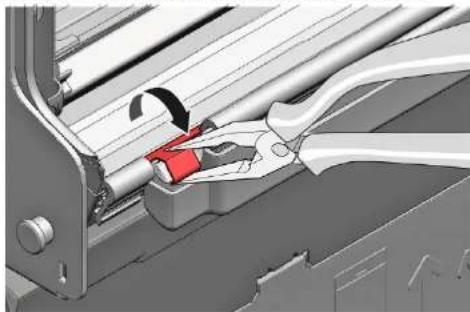
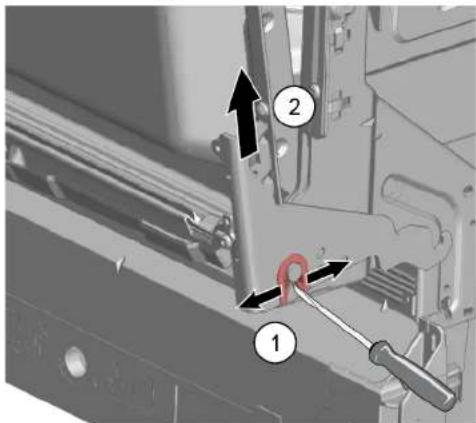
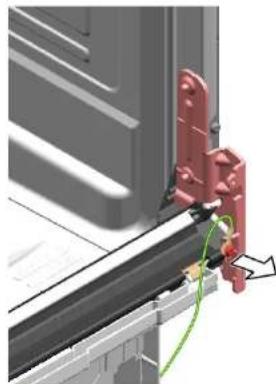
4.18.1 Removing hinges
- Release the catch tappets with a screwdriver (1) and pull out the door upwards together with the hinges (2).
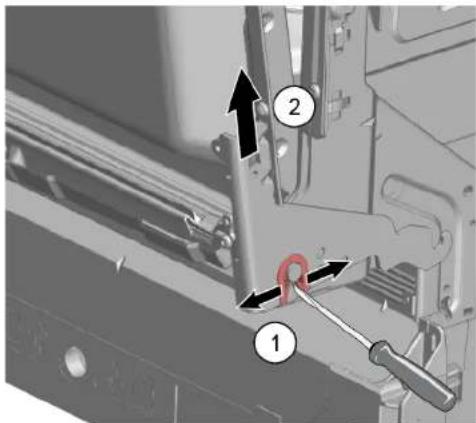
- Release ground connection on door hinge.
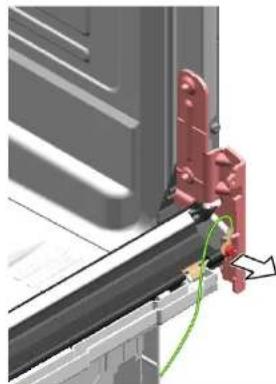
3.

The lower door seal is removed at the same time.
- On the dismantled door, remove two screws from each hinge to take it off.
4.18.2 Installing hinges



Repair
- Push the door seal onto the bottom edge of the inner door.
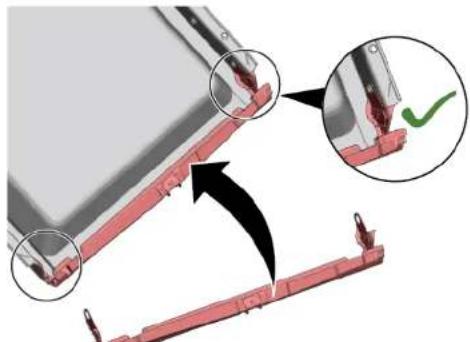
- Attach hinges to each side (1). Secure the hinge and the plastic holder of the door seal to the inner door (2) using two screws for each.
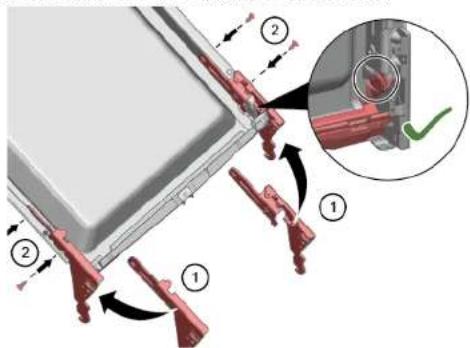
- Hook in the hinges together with the inner door (1).
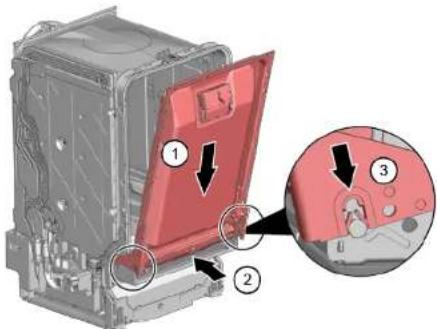
-
Place the lower door seal carefully over the overflow gutters of the container (2) and check that they are correctly positioned.
-
Hook in the hinges (3).
6.

A missing ground connection can lead to mains potential on door.

Repair
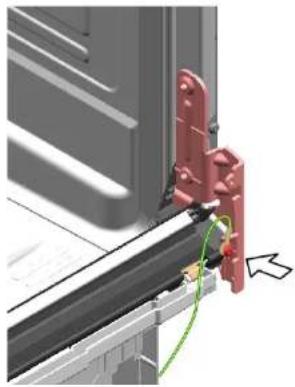
Establish ground connection.
7. Install two retaining clips on the lower door seal.

Repair
4.19 Replacing (lower) door seal
Prerequisite:
Appliance is disconnected from power supply.
Appliance is disconnected from water supply.
Outer door has been removed.
Base socket plate has been removed. Page 228
Toe panel has been removed (optional). Page 227
Door springs have been removed.
Control panel has been removed.
Cable harness holder on bottom right has been removed.
4.19.1 Removing the door seal
- Remove the two retaining clips on the lower door seal (1, 2).
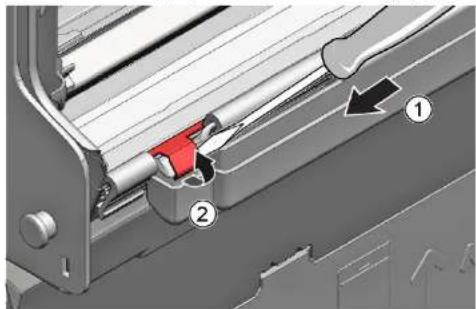
- Detach the overflow channel.
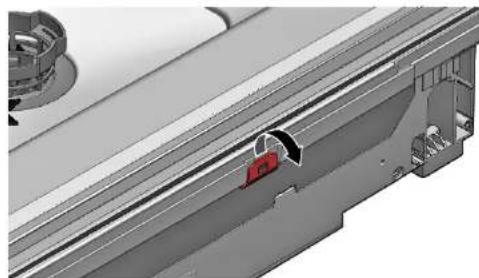
- Lift the overflow gutter off.
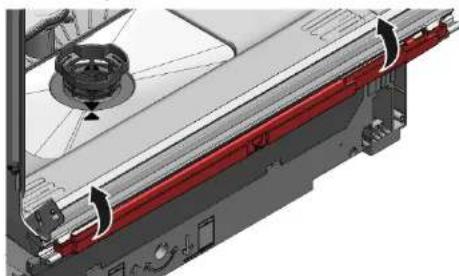

Repair
- Remove the lower door seal from the inner door.
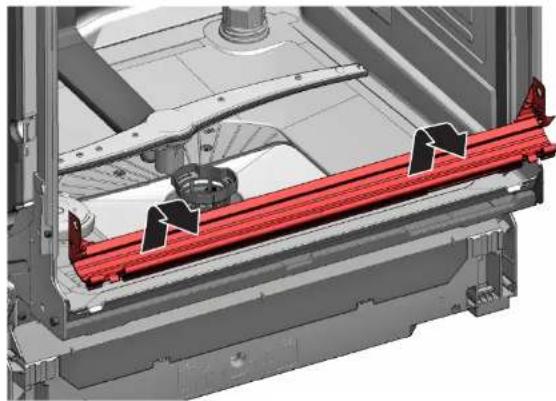
4.19.2 Installing the door seal
- Fit the sealing caps on the left and right to the sealing rail with the door seal.
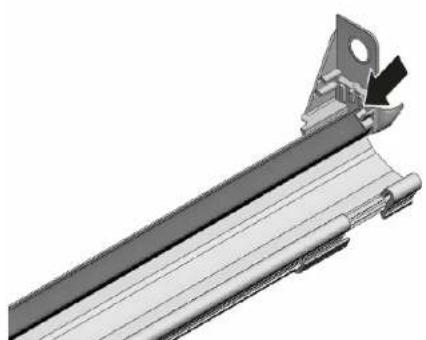
- Insert the door seal with the sealing flap in the inner door.
- Secure the door seal with two retaining clips.
"Installing hinges", Page 233

Repair
4.20 Replacing (upper) door seal
Prerequisite:
Appliance is disconnected from power supply.
Appliance is disconnected from water supply.
4.20.1 Removing door seal
Remove door seal from inner frame.
4.20.2 Installing door seal
The door seal must be cut to the correct length before installation. This is 1750mm for appliances of 81cm in height and 1850mm for appliances of 86cm in height.
- Prepare appropriate door seal.
- Ensure correct installation position of sealing profile.
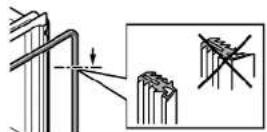
- White dot must be on level with sealing bed strip.
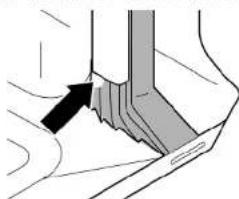
4

Sealing must not be wavy or stretched at corners. Seal is cut off diagonally at ends and tapers away into bottom of container at front.
Position end of seal straight to front underneath inner door. Seal should lie against side of container as far as possible.

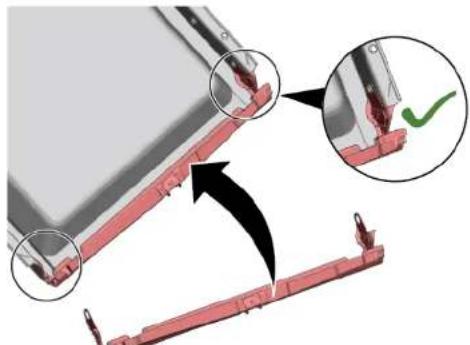
Correctly installed door seal:
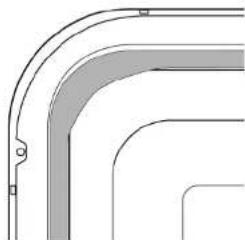

Repair
4.21 Replacing EmotionLight

The EmotionLight is situated in the upper front exterior area of the rinsing tank.
Prerequisite:
Appliance is disconnected from power supply.
Appliance is disconnected from water supply.
Appliances is freely accessible.
Worktop has been removed (optional).
The right-hand side panel has been removed (optional). Page 220
4.21.1 Removing EmotionLight
- Detach catch hook at the rear (1).
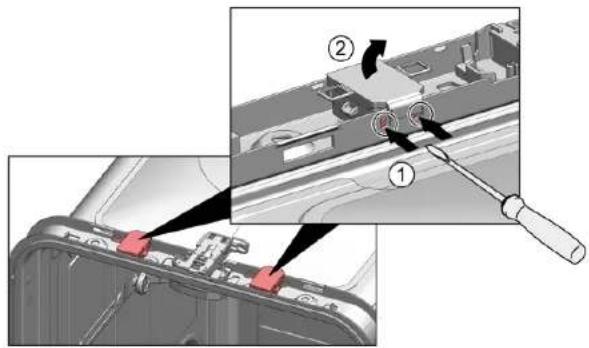
- Remove the holder upwards (2).
-
Pull plug out of connector (bottom right at front of appliance).
-
Remove electrical connection from the power module.
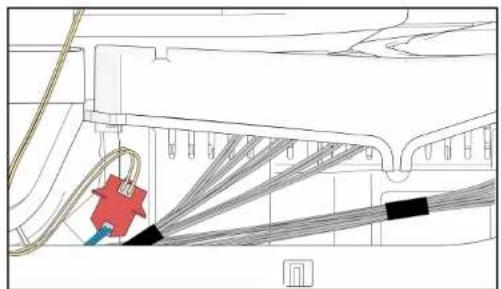
- Remove EmotionLight from the appliance.
4.21.2 Installing EmotionLight
- Insert the holder into the rinsing tank frame (1).
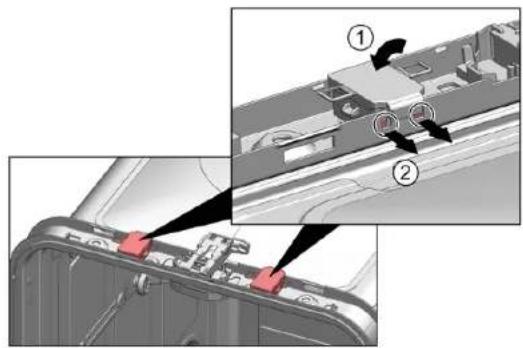

Repair
- Engage the catch hook (2).
3.
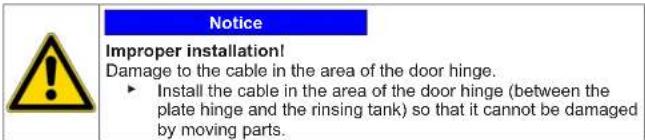
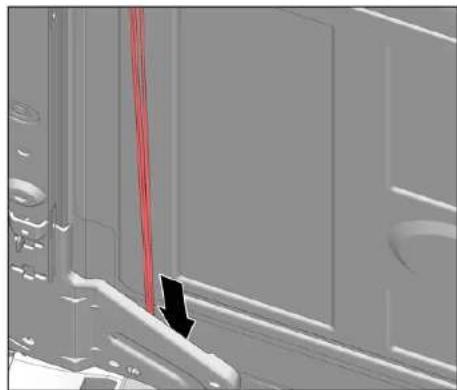
Install the cable on the right lower side.

Repair
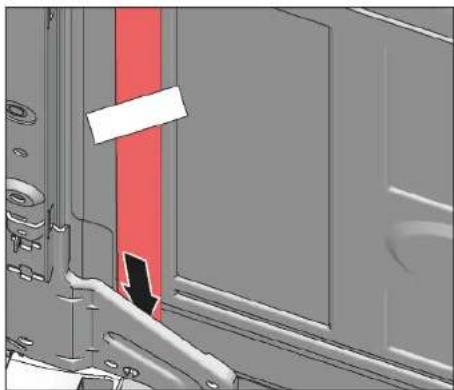
Fig. 3: Flat cable
- Insert the plug.

Repair
4.22 Replacing TimeLight

Replace the TimeLight only as a complete part. The TimeLight module is fixed to the rear of the base socket plate.
Prerequisite:
Appliance is disconnected from power supply.
Appliance is disconnected from water supply.
Toe panel has been removed. Page 227
Base socket plate has been removed and turned. Page 228
4.22.1 Removing TimeLight
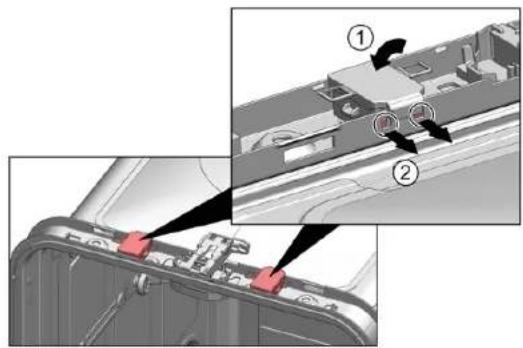
- Bend the catch elements (1) slightly outwards.
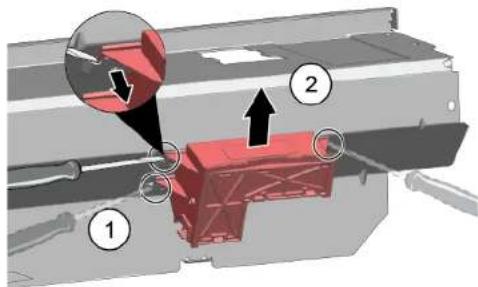
- Pull the TimeLight module upwards out of the guide (2).
4.22.2 Installing TimeLight
- Bend the catch elements (1) back again.
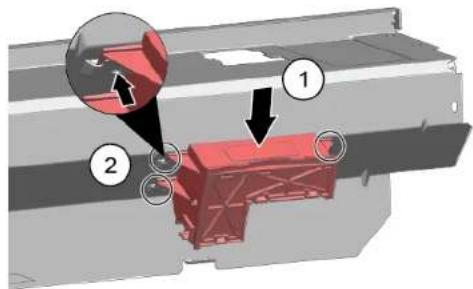
- Push the TimeLight module into the guide (2).
- Connect the electrical connection.
Remonditeave - Nõudepesumasin
Selle dokumendiga seoses 245
1.1 Tahtis teave 245
1.1.1 Eesmark 245
1.2 Sumbolite selgitus 245
1.2.1 Ohutasemed 245
1.2.2 Ohusumbolid 245
1.2.3 Hoiatuste struktuur 246
1.2.4 Üldised sumbolid 246
Ohutus 247
2.1 Uldised ohutusjuhised 247
2.1.1 Koki kodumasinad 247
Tabel 1: Ohutasedmed
1.2.2 Ohusumbolid
4.18.2 Hinged paigaldamine


Remont
- Lukake uksetihend siserse ukse alumisele servale.
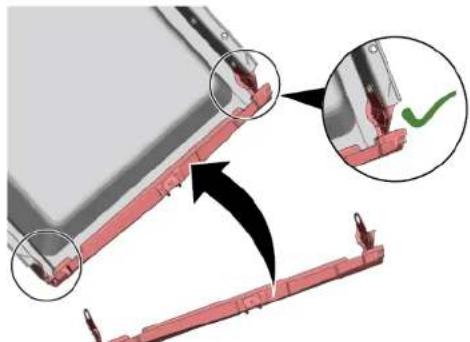
- Paigaldage kummalegi poole hinged (1). Kinnitage hing ja uksetihendi plasthoidik sismisele uksele (2), kasutades molema jaoks kaht kruvi.
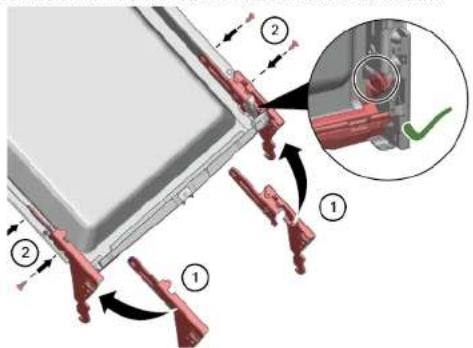
- Pange hinged koos siserse uksega paigale (1).
"Hinged paigaldamine".273
Remont
m = 311
Mny avyicete TIOJovdc,ouMTpeiaqavopevwTov ouvdoewk KaT ovayuyuTw TAKETW.

EpyaIeia Kai BonOnmuata
3.ApaipaeToKartakiEpyaia
4.1.2 ToTOnTeTnO KaTakIOu EpyaioG
Eykaotnoe tynvntn oipa.

EMIOKEUN
4.2 ToTOnTeTnO uOToNpAtoS KaalaiwV
Pouu6ean:
To oxetikokalai@EeiaapieBei aTnoukeun.
4.2.1 TToTbeTnO uOpoeVns 0kns taTtAetac yia to oovrEao 86 cm EiokaBOnBnTikkae:
∑upóενη Θηκη ταμτλέτας [00614935]
KanatipnCnV00618565
1. Eiaayte Tn apoeyn OKn TaPiAeTc Biayovia oTo MPOaivO epos Tou KaaiBiou.
2. Kevtpapete kai koumuwote in oupuovn thkn taumlaetos n theon tou.
4.2.2 ToToBETnON KAIOTnpiNc PAtzaviwEioka Bonntika
3.Avainwote to kain.
- TOnToeTeHToTe Ta AvtiKeIeVv ia TAnoIpo
4.2.3 ToTOnTeTnO nEvToU aTpOpaYepa EIOIka BOnBntiKa mOa:
∑upóevnθηkn taμπλετac [00614935]
KAIITOTnpiEIGPANZAVW[00618565]
- 2pynwote To EvTeo atmuayepa e Ta akpa kTuTo ooutnka KaalaiiWv.

EMIOKEUN
4.3 Avtikataoan varioDrawer
4.10.2 ToToBéTnO nAeupkou TavaE
- EiodyETo TIAeupiko TavaEaOn BaoN (1).
Eik.2: PnipwG EvtoixoEvO
- IIIEATE TO TIAEUPIKO TAVA OTN OUKEUN (2).
3.Aoopaiaote To TnEupiko naveAe BioEc (3).

EMIOKEUN
4.11 Avikataoan gtwepikns troptas
PouT6eOg:
Houokunivai aotouovbεμvniTnV npaoynpopooboaia
H ouakeun eivai anoovvEeyn aTn Tny npoxn vepou.
4.11.1 ApaieoEgwtepiknTtOptos

Atiaw apaipeote Tc bies Tou Ptpovotai Ota npakatw hata.
1.AvolIeTnVnpTa.
2. ApaipéoTe TEOAepic BiEc.
3.

Aaapaiote nyn tropta, kpatovtac nyn otn ia aepa.
ApaipoeTe duo biOeS.
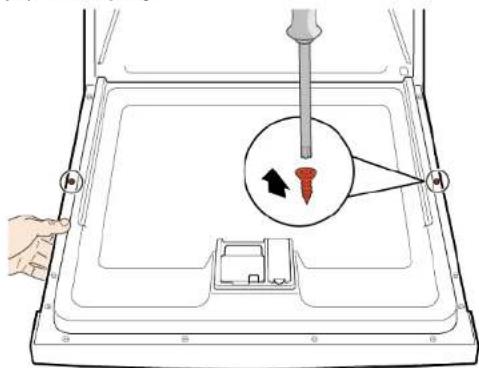

EMIOKEUN
4.11.2 ToTROETNON EJWTEPIKns TOpTAs
PouTmEgAn:
To yovutko faiC TOTIOETIOTNEO WOTA KAI OTPEWOTKE MEOA OTNV EGYTEPIKNI TOPTA.
OJevTeaEeC EiyovTAt OyvEePikn TOpTa.
- KaeioTe Tny eoWTEpiKn npOra XwpiC va Tny aoPpAioEe.
3.AvaonKwote to TaveA.
- ApaiapeoTa Ta nObia mptpootra (1).
4.14.2 ToToBéTηn Φδiας
- ToToBETHaTe TaTbOia.
- Pooapntote Tny moia enaw (1) kai meote npoc ta katw mepi va koumuoei ot th ean ts kai va akouatei o xapaktnipiotikos nxos (2).

EMIOKEUN
- Isimkite,EmotionLight" is prietaio.
4.2.1.2 „EmotionLight" jdéjimas
4.17.1 Remove a porta interior 714
4.17.2 Instalar a porta interior 714
4.18 Substitur as dobradiças 715
4.18.1 Remover as dobradiças 715
4.18.2 Instalar as dobradias 715
4.19 Substituir a vedao (inferior) da porta 718
4.19.1 Remover aVEDACo da porta 718
4.19.2 Instalar aVEDa da porta 719
4.20 Substituir a vedao (superior) da porta 720
4.20.1 Remove aVEDa da porta 720
4.20.2 Instalar a vedao da porta 720
Dicas de resolution - Maquina de lavar loça
4.21 Substituir o EmotionLight 721
4.21.1 Remover o EmotionLight 721
4.21.2 Instalar o EmotionLight. 721
4.22 Substitui o TimeLight 724
4.22.1 Remover o TimeLight 724
4.22.2 Instalar o TimeLight.. 724
4.17.1 Remover a porta interior
4.17.2 Instalar a porta interior
4.18.1 Remover as dobradiças
→"Instalar as dobradiças",715
Reparação
Özel yardymcy ekipman:
Sekme Klavuzu [00614935]
Geçme parça [00618565]

- CbBETn 3a peMOHT - CbDOMnJaHa MaunHa
- OTHOCHO To3n DokyMeHT
- Baxha nHΦopMaζη
- Uen
- 06aCHeHne Ha cHMBOJInTe
- HnBa Ha onaCHOCT
- Cnmbon3a onachoct
- CtpyKtpa Ha npéDynpeXkDeHnra
- ONACHOCT
- 06uCNMBOJI
- Be3onachocT
- 06uHnHCTpyKu3a6e3onacHOCT
- BcHKn DoMaunHn ypeiN
- IhctpymEnTu n NOMOuHcpeDCTBa
- PemOH
- 4.1CMHaHa pa60THnI NIO
- CbAJIHe Ha pa6OTHnI nnT
- MoHTnpaHe Ha pa6OTHMa IIOT
- MoHTnpaHe Ha cncTeMaTa OT KOUHnIu
- MoHTnpaHe Ha nIb3rau Ha naIeua 3a 86-cM moDen
- MoThnpaHe HaФнкCaTopa 3aЧаш
- MoHTnpaHe Ha BLOKKaTa Ha naporehepaTopa
- MoHTnpaHe Ha cTpaHnHnHa nHaen
- CmHa Ha BbHnHaTa BpTa
- 4.13ФИКСИРанеHa npуЖинITEHa BpaTaTa
- N3nckBaHe:
- Cbajhe Ha donnna naHEn
- MoHTpaHe Ha DoJIHnnaHEn
- CMHa Ha IIIOyTa Ha rNaBHn KOHTaKT
- N3NCBaHe:
- CbaJrHe Ha nNoyTaHa rJaBnKoHTaKT
- MoHTnpaHe Ha IIIOyTa Ha rJIAbHnKoHTaKT
- CmHa Ha Tpb6oPbOda 3a npenbIbaHe
- CbajnHe Ha KaHaHa 3a npenBlaBe
- OctaTbUHa Boda
- MoThiPaine Ha Tpb6oPbOba 3a npenbIbHe
- MoHTIpaHHe BA bTpeWHaTbPata
- CmHa Ha naHTnTe
- CbAJIHe Ha naHTnTe
- MoHTnpaHe Ha naHTnTe
- Reparation
- Montering of emotionLight
- BEMERKI
- Ukorrekt montering!
- Udskifting at timeLight
- Fjernelse at timeLight
- Montering at timeLight
- Repair hints - Dishwasher
- Concerning this document
- Important information
- Purpose
- Explanation of symbols
- Danger levels
- Hazard symbols
- Structure of the warnings
- Danger
- General symbols
- Safety
- General Safety instructions
- All domestic appliances
- Tools and aids
- Replacing worktop
- Removing worktop
- Installing worktop
- Repair
- Installing basket system
- Installing a tab slide for the 86 cm model
- Installing cup support clip
- Installing steamer insert
- Replacing varioDrawer
- Removing varioDrawer
- Installing varioDrawer
- Replacing spray arms
- Removing spray arm
- Installing spray arm
- Replacing filters
- Removing filter
- Installing filters
- Installing baking sheet spray head
- Replacing power cord
- Unplugging power cord
- Plugging in power cord
- Notice
- Replacing detergent cover
- Prerequisite:
- Removing detergent cover
- Inserting spring
- Installing detergent cover
- Replacing wastewater pump cover
- Removing wastewater pump cover
- Installing wastewater pump cover
- Replacing side panel
- Removing side panel
- Installing side panel
- Replacing outer door
- Replacing control panel
- Removing control panel
- Installing control panel
- Replacing toe panel
- Removing toe panel
- Installing toe panel
- Replacing base socket plate
- Removing base socket plate
- Installing base socket plate
- Replacing overflow conduit
- Removing overflow channel
- Residual water
- Installing overflow conduit
- Replacing inner door
- Removing inner door
- Installing inner door
- Replacing hinges
- Removing hinges
- Installing hinges
- Replacing (lower) door seal
- Removing the door seal
- Installing the door seal
- Replacing (upper) door seal
- Removing door seal
- Installing door seal
- Replacing EmotionLight
- Removing EmotionLight
- Installing EmotionLight
- Replacing TimeLight
- Removing TimeLight
- Installing TimeLight
- Remonditeave - Nõudepesumasin
- Ohusumbolid
- Hinged paigaldamine
- Remont
- m = 311
- EpyaIeia Kai BonOnmuata
- ToTOnTeTnO KaTakIOu EpyaioG
- EMIOKEUN
- ToTOnTeTnO uOToNpAtoS KaalaiwV
- TToTbeTnO uOpoeVns 0kns taTtAetac yia to oovrEao 86 cm EiokaBOnBnTikkae:
- ToToBETnON KAIOTnpiNc PAtzaviwEioka Bonntika
- ToTOnTeTnO nEvToU aTpOpaYepa EIOIka BOnBntiKa mOa:
- Avtikataoan varioDrawer
- ToToBéTnO nAeupkou TavaE
- Avikataoan gtwepikns troptas
- ApaieoEgwtepiknTtOptos
- ToTROETNON EJWTEPIKns TOpTAs
- PouTmEgAn:
- ToToBéTηn Φδiας
- „EmotionLight" jdéjimas
- Dicas de resolution - Maquina de lavar loça
- Remover a porta interior
- Instalar a porta interior
- Remover as dobradiças
- Reparação
Brand : SIEMENS
Model : SR55ZS10ME
Category : Dishwasher