EasyManual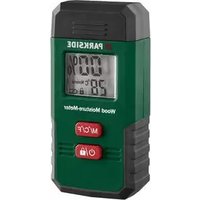
PMSHM 2 A3 - Measuring instrument PARKSIDE - Free user manual and instructions
Find the device manual for free PMSHM 2 A3 PARKSIDE in PDF.


User questions about PMSHM 2 A3 PARKSIDE
0 question about this device. Answer the ones you know or ask your own.
Ask a new question about this device
Download the instructions for your Measuring instrument in PDF format for free! Find your manual PMSHM 2 A3 - PARKSIDE and take your electronic device back in hand. On this page are published all the documents necessary for the use of your device. PMSHM 2 A3 by PARKSIDE.
USER MANUAL PMSHM 2 A3 PARKSIDE
M/°C/°F button (Material selection, °C or °F selection)
button (ON/OFF, Freeze the measured value on the display)
Battery compartment cover
Low battery indicator
Lock symbol (Measured value frozen)
Temperature display (°C or °F)51 GB/IE Technical data Operating voltage: 3 V Battery type: 2 x LR03/AAA Temperature accuracy: +/– 1 °C Humidity accuracy: A: building material below 1.4 %: +/– 0.1 % over 1.4 %: +/– 0.2 % B: wood material below 30 %: +/– 2 % over 30 %: +/– 4 % Precision: see chapter “Making measurements” Operating temperature: 0 °C to 40 °C Protection class: IP20 Resolution: 0.1 % Air humidity: up to a maximum of 80 % (relative)52 GB/IE Scope of delivery Immediately after unpacking please check the package contents for completeness and if all parts and the product are in good condition. 1 Moisture meter 2 LR03/AAA batteries 1 Instructions for use General safety instructions Before using the product, please familiarise yourself with all of the safety information and instructions for use! When passing this product on to others, please also include all the documents!53 GB/IE Check the product for damage before use! Never use a damaged product! Do not expose the product to moisture! This may damage it. This product may be used by children age 8 years and up, as well as by persons with reduced physical, sensory or mental ca- pacities, or lacking experience and/or knowledge, so long as they are supervised or instructed in the safe use of the product and understand the associated risks. Children should not be allowed to play with the product. Cleaning and user maintenance should54 GB/IE not be performed by children without supervision. The measuring pins are very sharp. Always be careful when using this product. Always attach the protective cap to the product when not in use. Other- wise there is a risk of injury! Safety instructions for batteries/ rechargeable batteries DANGER TO LIFE! Keep batter- ies/rechargeable batteries out of reach of children. If accidentally55 GB/IE swallowed seek immediate med- ical attention. Swallowing may lead to burns, perforation of soft tissue, and death. Severe burns can occur within 2 hours of ingestion.
SION! Never recharge non-rechargeable batteries. Do not short-circuit batteries/rechargeable batteries and/or open them. Overheating, fire or bursting can be the result. Never throw batteries/rechargea- ble batteries into fire or water. Do not exert mechanical loads to batteries/rechargeable batteries.56 GB/IE Risk of leakage of batteries/ rechargeable batteries Avoid extreme environmental conditions and temperatures, which could affect batteries/ rechargeable batteries, e.g. radiators/direct sunlight. If batteries/rechargeable batteries have leaked, avoid contact with skin, eyes and mucous membranes with the chemicals! Flush imme- diately the affected areas with fresh water and seek medical attention! WEAR PROTECTIVE GLOVES! Leaked or damaged batteries/57 GB/IE rechargeable batteries can cause burns on contact with the skin. Wear suitable protective gloves at all times if such an event occurs. In the event of a leakage of bat- teries/rechargeable batteries, immediately remove them from the product to prevent damage. Only use the same type of bat- teries/rechargeable batteries. Do not mix used and new batteries/ rechargeable batteries. Remove batteries/rechargeable batteries if the product will not be used for a longer period.58 GB/IE Risk of damage of the product Only use the specified type of battery/rechargeable battery! Insert batteries/rechargeable batteries according to polarity marks (+) and (-) on the battery/ rechargeable battery and the product. Use a dry lint-free cloth or cotton swab to clean the contacts on the battery/rechargeable battery and in the battery compartment before inserting! Remove exhausted batteries/ rechargeable batteries from the product immediately.59 GB/IE Before use Before initial use, remove the protective lm from the product display
and insert the enclosed batteries. Inserting/changing the batteries If the low battery indicator
appears in the display
, the inserted batteries are almost drained and must be replaced. Empty batteries can falsify the measured result. To insert the batteries proceed as follows: Open the battery compartment cover
on the back of the product. Remove the used batteries. Insert 2 LR03/AAA batteries. Observe the correct polarity.60 GB/IE Insert the batteries in the battery compart- ment
and close the battery compart- ment cover
again, so that it audibly latches into place. Note: No button should be pressed while inserting the batteries. Start-up Before you take a measurement Ensure that both measuring pins
touch the surface of the material at the same time. Increase the pressure on the measuring pins
for rough surfaces if necessary. For delicate surfaces complete the meas- urement on a section that is not in the visible area. Note: The measuring pins
are sharp and may dent or damage the surface.61 GB/IE Rub the damp residue on the surface be- fore taking the measurement. Measure several places and take an aver- age value. Be aware that salts can increase the con- ductivity of water. This can lead to incorrect readings and results that are too high. Remove the bark from rewood if needed. Press the measuring pins
against the grain in various places on the wood. Taking a measurement Press the button
to turn on the product. On the display
“0.0%”, the surrounding temperature in °C and the previously selected material 1-6 (see g. A) appears. Press the M/°C/°F button
and hold it down for approximately 5 seconds to switch the temperature display between °C and °F.62 GB/IE Press the M/°C/°F button
to select the material number of which you wish to measure the moisture level (see table reference values): Wood moisture approximate value for firewood
15 % ideal for heating – high heating value 16– 20 % restricted heating – low heating value63 GB/IE Wood moisture approximate value for firewood
21– 44 % not suitable for heating – further dry- ing necessary Note: Above table is reference for checking the status of rewood. If the measured wood moisture level is 15 % or below, the rewood is ideal for heating. If the measured wood moisture level is from 16 to 20 %, the rewood is medium dry. If the measured wood moisture level is 21 % or above, the rewood is not suit- able for heating and further drying is necessary.64 GB/IE Reference values for humidity expressed in per cent by weight Number Material Measuring range dry borderline too humid
Birch, beech, cherry, larch, spruce, walnut 6–44 % < 12 % 12–15 % > 15 %
shows “0.0%” or “Lo”. For measurements above the measurement range, the display
shows “Hi”. Remove the protective cap
Press both measuring pins
against the surface at the same time. After 1–2 seconds you can read the percentage value. If you are taking a measurement in an area in which you cannot read the display
to freeze the re- sult on the display
will then also show the lock symbol
again to take another measurement. If you have completed your measurement, switch the product o by pressing the button
for more than 5 seconds.66 GB/IE Note: The product switches itself o auto- matically if the product is not used for approximately 60 seconds. Battery display If the battery charge status is low, the low battery indicator
appears on the display
Please note that while the batteries are low, the measured values will be false or inaccurate. Replace the batteries as quickly as possible if this display appears. The battery change is described in the section “Inserting/changing the batteries“. Temperature display You can change the temperature display between °C and °F by pressing the M/°C/°F button
for approximately 5 seconds.67 GB/IE Rotate the display You can rotate the result shown in the display
by 180° by pressing the button
together (see g. B). RESET function A calibration can be performed if 0.0 % is not shown on the display
right after turning on the product. For this, open the battery com- partment cover
situated on the backside of the product us- ing a sharp object. If the displayed reading is still not right, press the RESET button
again to calibrate again. Note: Do not remove the batteries while using the RESET function.68 GB/IE Troubleshooting Error Possible causes and solutions The measure- ment is obvi- ously too high or low. Check whether the product is set to the correct material. Check if the measuring pins
are correctly pressed against the material. Repeat the measurement process. The display
is reading “Lo” or “Hi”. The measurement range has been exceeded or you have not reached the measuring range. The number on the display
is not reacting. If the lock symbol
.69 GB/IE Error Possible causes and solutions You can barely see the number
The batteries are low. See the chapter “Inserting/ changing the batteries”. Electrostatic discharges can lead to malfunc- tions. In the event of such malfunctions, remove the batteries briey and reinsert them. Cleaning and care Do not allow liquids to enter the product. Otherwise the product may be damaged. Only clean the product with a slightly damp- ened cloth and mild washing-up liquid. Clean the measuring pins
with a slightly dampened cloth and dry it afterwards.70 GB/IE Check the product for visible external damage before every use. Check the measuring pins
for damage before every use. Storage Always attach the protective cap
to the product when not in use. Always remove the batteries if the product will not be used for extended periods. Store the product in a dry location. Disposal The packaging is made entirely of recyclable materials, which you may dispose of at local recycling facilities.71 GB/IE
Observe the marking of the packag- ing materials for waste separation, which are marked with abbreviations (a) and numbers (b) with following meaning: 1–7: plastics/20–22: paper and breboard/80–98: composite materials. Contact your local refuse disposal authority for more details of how to dispose of your worn-out product. To help protect the environment, please dispose of the product prop- erly when it has reached the end of its useful life and not in the house- hold waste. Information on collection points and their opening hours can be obtained from your local authority.72 GB/IE The product incl. accessories, manual and packaging materials are recyclable and are subject to extended producer responsibility. Dispose them separately, following the illus- trated Info-tri (sorting information), for better waste treatment. Faulty or used batteries/rechargeable batteries must be recycled. Return the batteries/ rechargeable batteries and the product to the available collection points.73 GB/IE Environmental damage through incorrect disposal of the batteries/ rechargeable batteries! Batteries/rechargeable batteries may not be disposed of with the usual domestic waste. They may contain toxic heavy metals and are subject to hazardous waste treatment rules and regulations. The chemical symbols for heavy metals are as follows: Cd = cadmium, Hg = mercury, Pb = lead. That is why you should dispose of used batteries/rechargeable batteries at a local collection point. Warranty The product has been manufactured to strict quality guidelines and meticulously examined before delivery. In the event of material or manufacturing defects you have legal rights against the retailer of this product. Your legal74 GB/IE rights are not limited in any way by our war- ranty detailed below. The warranty for this product is 3 years from the date of purchase. The warranty period be- gins on the date of purchase. Keep the original sales receipt in a safe location as this document is required as proof of purchase. Any damage or defects already present at the time of purchase must be reported without delay after unpacking the product. Should the product show any fault in materials or manufacture within 3 years from the date of purchase, we will repair or replace it – at our choice – free of charge to you. The warranty period is not extended as a result of a claim being granted. This also applies to replaced and repaired parts.75 GB/IE This warranty becomes void if the product has been damaged, or used or maintained im- properly. The warranty covers material or manufacturing defects. This warranty does not cover product parts subject to normal wear and tear, thus considered consumables (e.g. batteries, re- chargeable batteries, tubes, cartridges), nor damage to fragile parts, e.g. switches or glass parts. Warranty claim procedure So that your request can be processed quickly, please observe the following instructions: o For all inquiries, please have the receipt and item number (IAN 465631_2404) ready as proof of purchase. o The article number can be taken from the identication label on the product, engraving76 GB/IE on the product, the front cover of your manual (at the bottom left), or the sticker on the back or bottom of the product. o If malfunctions or other defects arise, rst contact the service department indicated below by phone or email. o You can then send a product recorded as defective to the communicated service address postage-free, making sure to enclose proof of purchase (receipt) and in- formation on the details of the defect and when it occurred.77 GB/IE