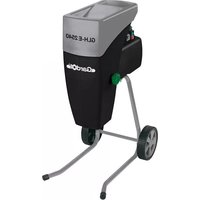
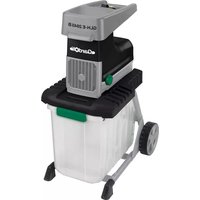
USER MANUAL GLH-E 2540 Gardol
GB Original operating instructions Garden shredder
text_image
Labeled diagram of a portable industrial machine with numbered parts for identification
2
text_image
Technical diagram of a lawn mower assembly with numbered parts and exploded view
text_image
4
0,5 - 1 mm
B
C
D
A
a2
a1
DE
Gefahr!
When using the equipment, a few safety precautions must be observed to avoid injuries and damage. Please read the complete operating instructions and safety regulations with due care. Keep this manual in a safe place, so that the information is available at all times. If you give the equipment to any other person, hand over these operating instructions and safety regulations as well. We cannot accept any liability for damage or accidents which arise due to a failure to follow these instructions and the safety instructions.
1. Safety regulations
The corresponding safety information can be found in the enclosed booklet.
Danger!
Read all safety regulations and instructions. Any errors made in following the safety regulations and instructions may result in an electric shock, fi re and/or serious injury.
Keep all safety regulations and instructions in a safe place for future use.
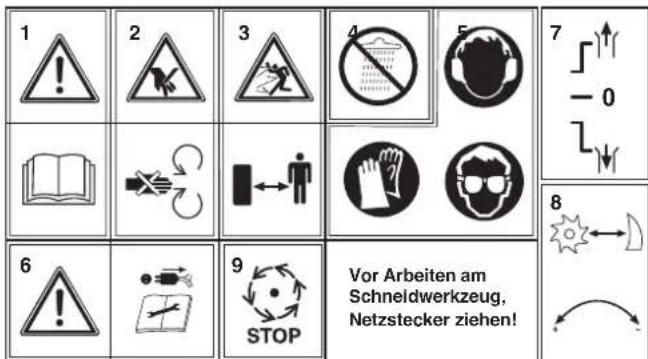
1: Important! Read the operating instructions and follow the warnings and safety instructions
2: Take care when the blades are rotating. Do not put your hands or feet into openings when the machine is running.
3: Important! Keep other persons and animals away from the danger zone.
4: Important! Protect the machine from the damp and never expose it to rain.
5: Important! Always wear safety goggles, ear muff s, protective gloves and heavy-duty work clothes!
6: Always set the ON/OFF switch to OFF and pull the power plug out of the socket-outlet before doing any work on the shredder, e.g. cleaning the shredder and making adjustments, or if
the power cable becomes damaged.
7: Changeover switch: For a description of the changeover switch see point 6.3
8: Explanation of the lever for adjusting the counter blade:
Turning clockwise reduces the distance between the cutting unit and the counter blade. Turning counter-clockwise increases the
distance between the cutting unit and the counter blade.
9: Wait for all machine parts to come to a complete standstill before you touch them!
2. Layout and items supplied
2.1 Layout (Fig. 1)
- Funnel
- Motor circuit breaker switch
- On/Off switch
- Reverse running switch
- Integral power plug
- Knob for setting the counter blade
- Base frame
- Discharge opening
2.2 Items supplied
Please check that the article is complete as specified in the scope of delivery. If parts are missing, please contact our service center or the sales outlet where you made your purchase at the latest within 5 working days after purchasing the product and upon presentation of a valid bill of purchase. Also, refer to the warranty table in the service information at the end of the operating instructions.
- Open the packaging and take out the equipment with care.
- Remove the packaging material and any packaging and/or transportation braces (if available).
• Check to see if all items are supplied.
- Inspect the equipment and accessories for transport damage.
- If possible, please keep the packaging until the end of the guarantee period.
Danger!
The equipment and packaging material are not toys. Do not let children play with plastic bags, foils or small parts. There is a danger of swallowing or suffocating!
• Original operating instructions
- Safetyinstructions
GB
3. Proper use
This electric garden refuse shredder is designed only for shredding organic garden waste. Place biologi-cally degradable material, e.g. leaves, branches, dead flowers etc., into the loading funnel inlet.
The equipment is to be used only for its prescribed purpose. Any other use is deemed to be a case of misuse. The user / operator and not the manufacturer will be liable for any damage or injuries of any kind caused as a result of this.
Please note that our equipment has not been designed for use in commercial, trade or industrial applications. Our warranty will be voided if the machine is used in commercial, trade or industrial businesses or for equivalent purposes.
4. Technical data
Voltage: 230 V\~50 Hz
Power rating: 2500 W (P40) 2000 W
Protection type: IPX4
Cutting unit idling speed 40 min ^1
Branch diameter: ....max. 40 mm
L_pA sound pressure level: 80 dB (A)
K uncertainty 3 dB (A)
L_WA sound power level: 93 dB (A)
Weight: 26 kg
Protection class:.... I
Keep the noise emissions and vibrations to a minimum.
- Only use appliances which are in perfect working order.
• Service and clean the appliance regularly.
• Adapt your working style to suit the appliance.
• Do not overload the appliance.
- Have the appliance serviced whenever necessary.
- Switch the appliance off when it is not in use.
• Wear protective gloves.
Caution!
Residual risks
Even if you use this electric power tool in accordance with instructions, certain residual risks cannot be rules out. The following hazards may arise in connection with the equipment's construction and layout:
- Lung damage if no suitable protective dust mask is used.
- Damage to hearing if no suitable ear protection is used.
- Health damage caused by hand-arm vibrations if the equipment is used over a prolonged period or is not properly guided and maintained.
5. Before starting the equipment
Before you connect the equipment to the mains supply make sure that the data on the rating plate are identical to the mains data.
Warning!
Always pull the power plug before making adjustments to the equipment.
Assembly (Fig. 3)
• Take all the parts out of the packaging.
• Fit the chassis to the housing using the four lock nuts (Item 2).
- Fit the axle (Item 3) to the chassis using the two M6 x 50 screws (Item 4) and nuts (Item 2).
• Push the wheels (Item 5) onto the axle.
- Secure the wheel cover (Item 6) on the axle using a hammer.
- Press the wheel caps onto the wheels.
6. Operation
Please observe the statutory regulations governing noise abatement during operating times, which may differ from town to town.
6.1 Mains connection
Connect the device with an extension lead connected to the integrated power plug (Fig. 1/Item 7). Be sure to observe the relevant information in the safety instructions.
GB
6.2 ON/OFF switch (Fig. 1/Item 3)
- Press the green knob to switch on the shredder.
• Press the red knob to switch it off.
Note: The device has a zero voltage switch. This prevents the device restarting unintentionally after a power failure.
6.3 Direction selection switch (Fig.1/Item 4) Important! The switch for selecting the direction of rotation can only be moved when the shredder is switched off.
Position “↓”
The material is automatically drawn in by the blade and shredded.
Position "↑"
The blade rotates in the opposite direction to release jammed material. After moving the selector switch to the "1" position, press and hold the green knob of the ON/OFF switch. The blade will start to rotate in the opposite direction. As soon as you release the ON/OFF switch, the shredder will stop automatically.
Important! Always wait until the shredder has reached a standstill before you switch it on again.
Note: If the switch for selecting the direction of rotation is in its center position, the motor will not start.
Large items or pieces of wood will be discharged both in the cutting and in the release direction after the blade has been started and reversed several times.
6.4 Motor protection (Fig. 1 / Item 2)
An overload (for example if the blade is jammed) will cause the machine to cut out after a few seconds. To protect the motor from damage the motor protection switch stops the power supply automatically. Wait for at least one minute before you press the reset knob so that you can restart the machine.
Then press the ON/OFF switch.
If the blade becomes jammed, turn the switch for selecting the direction of rotation to the left to position “↑” before you switch on the shredder again.
6.5 Practical tips
- Be sure to observe the safety instructions (see supplied booklet).
- Wear work gloves, goggles and ear protection.
- Fill in the material you want to shred at the funnel on the side with the larger opening (Fig. 1/Item 1).
- The material is drawn into the shredder automatically. CAUTION! Long pieces of material projecting out of the funnel inlet may whiplash when it is drawn in – keep a safe distance between yourself and the machine.
- Judge the quantity of material which you put into the funnel inlet so that the funnel does not clog.
- If you want to shred withered, damp material that has been lying in the garden for several days, alternate between putting in this material and branches. This will help to prevent the loading funnel becoming clogged with material.
- Do not shred soft waste (e.g. kitchen waste) – put it straight in the compost box.
- Entangled branches and leaves should be thoroughly shredded before loading any more material.
- Do not allow the discharge opening to become clogged with shredded material – risk of pile-ups.
• Do not cover the ventilation slits.
- Do not place heavy material or thick branches into the machine continuously. This may cause the blade to jam.
• Use a plunger or hook to remove jammed objects from the funnel or discharge openings.
Important: The material will be crushed, mashed and shredded by the cutting unit, thus accelerating the decomposition process for composting.
6.6 Adjusting the counter blade (Fig. 4)
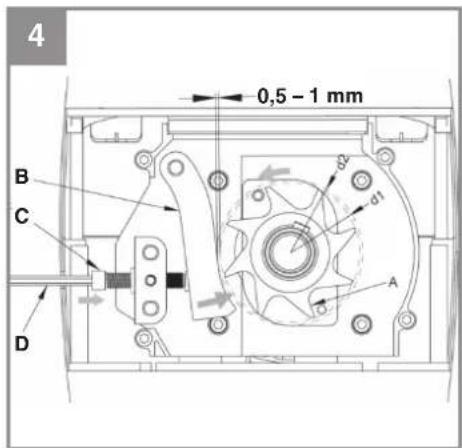
The counter blade and cutting unit are perfectly adjusted at the factory. Only if it suffers wear does the counter blade require adjustment (switch the machine on for this purpose). To ensure the best possible results from your shredder, the gap between the counter blade (item B) and the shredding blade (item A) should be approx. 0.50 mm. There is an adjustment device on the right-hand side of the plastic housing for this purpose. Turn the knob clockwise so that the screw (item C) moves towards the shredding blade. After a half-turn the counter blade will have moved 0.50 mm closer to the shredding blade. After completing
GB
this adjustment check whether the blade produces the desired results.
IMPORTANT: If the shredding blade touches the counter blade, it will cut it and small metal chips may fall out of the discharge opening. This is not a fault, but it must only be adjusted as much as necessary since otherwise the counter blade will suffer premature wear.
7. Replacing the power cable
Danger!
If the power cable for this equipment is damaged, it must be replaced by the manufacturer or its after-sales service or similarly trained personnel to avoid danger.
8. Cleaning, maintenance and ordering of spare parts
Danger!
Always pull out the mains power plug before starting any cleaning work.
8.1 Maintenance and storage
- Clean the machine regularly. This will help to keep the machine in good working order and is the basis for a long working life.
- Keep the vent slots clean while you work.
- Clean the plastic body and other plastic parts with a mild household cleaning agent and a damp cloth. Do not use any aggressive agents or solvents for cleaning purposes.
- Never clean the shredder by spraying with water.
- Prevent water getting inside the machine at all cost.
- Check the chassis securing screws from time to time to ensure that they are tight.
- If you do not intend to use the shredder for a lengthy period, protect it from corrosion using environmentally friendly oil.
• Store the device in a dry room.
• Store the device out of reach of children.
8.2 Ordering replacement parts:
Please quote the following data when ordering replacement parts:
• Type of machine
• Article number of the machine
• Identification number of the machine
- Replacement part number of the part required For our latest prices and information please go to www.isc-gmbh.info
9. Disposal and recycling
The equipment is supplied in packaging to prevent it from being damaged in transit. The raw materials in this packaging can be reused or recycled. The equipment and its accessories are made of various types of material, such as metal and plastic. Never place defective equipment in your household refuse. The equipment should be taken to a suitable collection center for proper disposal. If you do not know the whereabouts of such a collection point, you should ask in your local council offices.
10. Storage
Store the equipment and accessories in a dark and dry place at above freezing temperature. The ideal storage temperature is between 5 and 30
°C. Store the electric tool in its original packaging.
11. Troubleshooting
| Fault Possible cause Remedy | |
| The motor does not start | -Powerfailure- Motor circuit breaker has been triggered- The switch for selecting the direction of rotation is in its center position. | - Check the mains lead, plug and fuse.- Press the Reset button (see point 6.4)- Set the direction of rotation on the switch |
| Material is not drawn in by the shredder | - The shredding blade is running in reverse.- Material blockage in the fllling funnel- The shredding blade is jammed | - Change the direction of rotation.- Change the direction of rotation and pull the material out of the funnel. Feed in thick branches again so that the blade does not immediately engage again in the notches it previously cut.- Change the direction of rotation. The blade will now release the jammed material. |
| The material is not shredded properly | - The counter blade is not set correctly. | - Adjust the counter blade. See section 6.6 on how to do so. |
GB

For EU countries only
Never place any electric power tools in your household refuse.
To comply with European Directive 2012/19/EC concerning old electric and electronic equipment and its implementation in national laws, old electric power tools have to be separated from other waste and disposed of in an environment-friendly fashion, e.g. by taking to a recycling depot.
Recycling alternative to the return request:
As an alternative to returning the equipment to the manufacturer, the owner of the electrical equipment must make sure that the equipment is properly disposed of if he no longer wants to keep the equipment. The old equipment can be returned to a suitable collection point that will dispose of the equipment in accordance with the national recycling and waste disposal regulations. This does not apply to any accessories or aids without electrical components supplied with the old equipment.
The reprinting or reproduction by any other means, in whole or in part, of documentation and papers accompanying products is permitted only with the express consent of the iSC GmbH.
Subject to technical changes
Given unfavorable conditions in the power supply the equipment may cause the voltage to drop temporarily. If the supply impedance "Z" at the connection point to the public power supply exceeds 0.329 Ω, it may be necessary to take further measures before the equipment can be used as intended from this power supply. If necessary, you can ask your local electricity supply company for the impedance value.
GB
We have competent service partners in all countries named on the guarantee certificate whose contact details can also be found on the guarantee certificate. These partners will help you with all service requests such as repairs, spare and wearing part orders or the purchase of consumables.
Please note that the following parts of this product are subject to normal or natural wear and that the following parts are therefore also required for use as consumables.
| Category Example | |
| Wear parts* Roller | |
| Consumables* Counter blade (pressure plate) | |
| Missing parts | |
* Not necessarily included in the scope of delivery!
In the effect of defects or faults, please register the problem on the internet at www.isc-gmbh.info. Please ensure that you provide a precise description of the problem and answer the following questions in all cases:
• Did the equipment work at all or was it defective from the beginning?
• Did you notice anything (symptom or defect) prior to the failure?
• What malfunction does the equipment have in your opinion (main symptom)?
Describe this malfunction.
GB
Warranty certifi cate
Dear Customer,
All of our products undergo strict quality checks to ensure that they reach you in perfect condition. In the unlikely event that your device develops a fault, please contact our service department at the address shown on this guarantee card or the sales outlet from where you bought the device. Please note the following terms under which guarantee claims can be made:
- These guarantee terms apply to consumers only, i.e. natural persons intending to use this product neither for their commercial activities nor for any other self-employed activities. These warranty terms regulate additional warranty services, which the manufacturer mentioned below promises to buyers of its new products in addition to their statutory rights of guarantee. Your statutory guarantee claims are not affected by this guarantee. Our guarantee is free of charge to you.
- The warranty services cover only defects due to material or manufacturing faults on a product which you have bought from the manufacturer mentioned below and are limited to either the rectification of said defects on the product or the replacement of the product, whichever we prefer. Please note that our devices are not designed for use in commercial, trade or professional applications. A guarantee contract will not be created if the device has been used by commercial, trade or industrial business or has been exposed to similar stresses during the guarantee period.
-
The following are not covered by our guarantee:
-
Damage to the device caused by a failure to follow the assembly instructions or due to incorrect installation, a failure to follow the operating instructions (for example connecting it to an incorrect mains voltage or current type) or a failure to follow the maintenance and safety instructions or by exposing the device to abnormal environmental conditions or by lack of care and maintenance.
- Damage to the device caused by abuse or incorrect use (for example overloading the device or the use or unapproved tools or accessories), ingress of foreign bodies into the device (such as sand, stones or dust, transport damage), the use of force or damage caused by external forces (for example by dropping it).
-
Damage to the device or parts of the device caused by normal or natural wear or tear or by normal use of the device.
-
The guarantee is valid for a period of 60 months starting from the purchase date of the device. Guarantee claims should be submitted before the end of the guarantee period within two weeks of the defect being noticed. No guarantee claims will be accepted after the end of the guarantee period. The original guarantee period remains applicable to the device even if repairs are carried out or parts are replaced. In such cases, the work performed or parts fitted will not result in an extension of the guarantee period, and no new guarantee will become active for the work performed or parts fitted. This also applies if an on-site service is used.
-
To make a claim under the guarantee, please register the defective device at: www.isc-gmbh.info. Please keep your bill of purchase or other proof of purchase for the new device. Devices that are returned without proof of purchase or without a rating plate shall not be covered by the guarantee, because appropriate identification will not be possible. If the defect is covered by our guarantee, then the item in question will either be repaired immediately and returned to you or we will send you a new replacement.
Also refer to the restrictions of this warranty concerning wear parts, consumables and missing parts as set out in the service information in these operating instructions.
FR
Danger!
Negotovost K 3 dB (A)
X 2006/42/EC
Annex IV
Notified Body:
Notified Body No.:
Reg. No.
X Annex V
Annex VI
Notified Body:
Emission No.:
X 2000/14/EC\_2005/88/EC
Noise: measured L_mA = 88 dB (A); guaranteed L_mA = 93 dB (A)
P = 2500 W (P40) / 2000 W; L/∅ = cm
□2012/46/EU
Standard references: EN 50434; EN 60335-1; EN 62233; EN 55014-1; EN 55014-2; EN 61000-3-2; EN 61000-3-11
Subject to change without notice
Archive-File/Record: NAPR012249
Documents registrar: Alexander Scheifl
Wiesenweg 22, D-94405 Landau/Isar
EH 12/2017 (03)