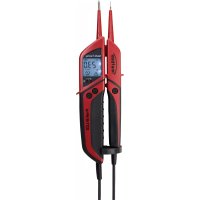
Profi III LCD - Measuring equipment Testboy - Free user manual and instructions
Find the device manual for free Profi III LCD Testboy in PDF.

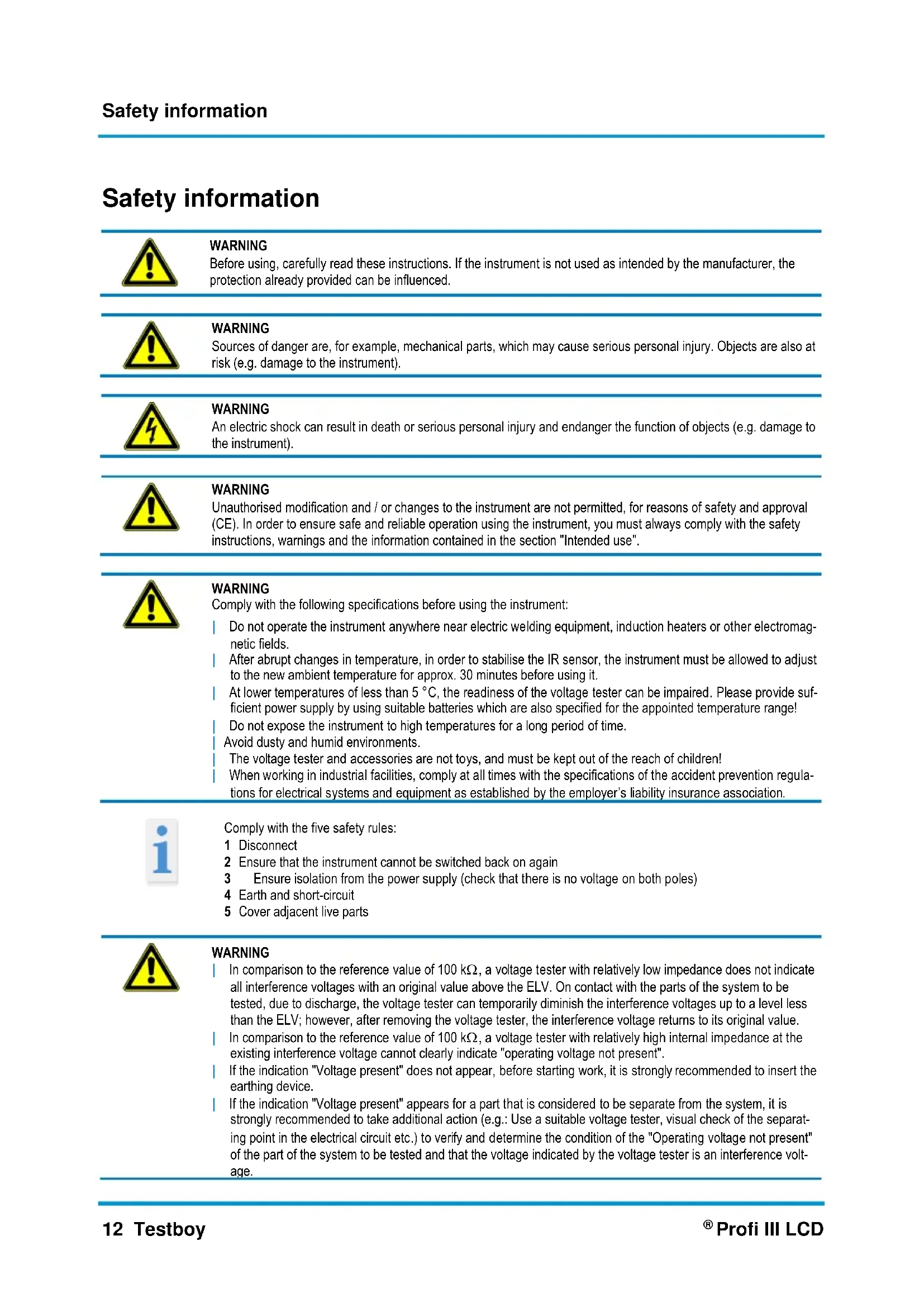


| Product type | Bipolar voltage tester with LCD display |
| Brand | Testboy |
| Model | Profi III LCD |
| Power supply | 2 x 1.5 V AAA Micro batteries |
| AC voltage range (TRMS) | 6...1000 V AC |
| DC voltage range | 6...1400 V DC |
| Frequency display | 0, 16.66...500 Hz |
| Continuity test | 0.1...200 kΩ with audible signal |
| Phase test | Pole > 100 V AC |
| Rotary field test | Yes, from 200 V / 50/60 Hz |
| RCD / FI test | Switchable load 30 mA at 230 V AC |
| DATA HOLD function | Yes, via L.H. button |
| Measurement point illumination | Yes, can be activated by long press on L.H. |
| Display backlight | Permanent, automatic switch-off after a few seconds |
| Dangerous voltage indication (ELV) | Flashing red LED and vibration from 45 V AC / 110 V DC |
| Overvoltage category | CAT IV 1000 V |
| Protection class | IP65 |
| Operating temperature | -15 to +45 °C |
| Standard | EN 61243-3:2014 |
| Cleaning | Damp cloth with mild detergent, avoid solvents and moisture inside the housing |
| Battery replacement | Open the compartment, observe polarity, remove test probes beforehand |
| Auto-off | Yes, after inactivity (SCAN countdown) |
Frequently Asked Questions - Profi III LCD Testboy
User questions about Profi III LCD Testboy
0 question about this device. Answer the ones you know or ask your own.
Ask a new question about this device
Download the instructions for your Measuring equipment in PDF format for free! Find your manual Profi III LCD - Testboy and take your electronic device back in hand. On this page are published all the documents necessary for the use of your device. Profi III LCD by Testboy.
USER MANUAL Profi III LCD Testboy
Testboy® Profi III LCD
Version 4.4
Cd = Cadmium, Hg = Quecksilber, Pb = Blei, Mn = Mangan, Li = Lithium.
Checking the DC voltage 16
Check AC voltage (TRMS) 16
DATA HOLD Function 16
Phase test 16
Phase sequence testing (> 200 V AC) 16
One-hand test (e.g. Schuko socket) 16
Test location lighting 16
Continuity test 17
Load connection / FI/RCD trigger test, PE (protective earth test) 17
Backlighting 17
Frequency indication 17
Cleaning 17
Maintenance 17
Replacing the battery 17
Technical data 18
Safety information
 | WARNINGBefore using, carefully read these instructions. If the instrument is not used as intended by the manufacturer, the protection already provided can be influenced. |
 | WARNINGSources of danger are, for example, mechanical parts, which may cause serious personal injury. Objects are also at risk (e.g. damage to the instrument). |
 | WARNINGAn electric shock can result in death or serious personal injury and endanger the function of objects (e.g. damage to the instrument). |
 | WARNINGUnauthorised modification and / or changes to the instrument are not permitted, for reasons of safety and approval (CE). In order to ensure safe and reliable operation using the instrument, you must always comply with the safety instructions, warnings and the information contained in the section "Intended use". |
 | WARNINGComply with the following specifications before using the instrument:Do not operate the instrument anywhere near electric welding equipment, induction heaters or other electromagnetic fields.After abrupt changes in temperature, in order to stabilise the IR sensor, the instrument must be allowed to adjust to the new ambient temperature for approx. 30 minutes before using it.At lower temperatures of less than 5 °C, the readiness of the voltage tester can be impaired. Please provide sufficient power supply by using suitable batteries which are also specified for the appointed temperature range!Do not expose the instrument to high temperatures for a long period of time.Avoid dusty and humid environments.The voltage tester and accessories are not toys, and must be kept out of the reach of children!When working in industrial facilities, comply at all times with the specifications of the accident prevention regulations for electrical systems and equipment as established by the employer's liability insurance association. |
 | Comply with the five safety rules:1 Disconnect2 Ensure that the instrument cannot be switched back on again3 Ensure isolation from the power supply (check that there is no voltage on both poles)4 Earth and short-circuit5 Cover adjacent live parts |
 | WARNINGIn comparison to the reference value of 100 kΩ, a voltage tester with relatively low impedance does not indicate all interference voltages with an original value above the ELV. On contact with the parts of the system to be tested, due to discharge, the voltage tester can temporarily diminish the interference voltages up to a level less than the ELV; however, after removing the voltage tester, the interference voltage returns to its original value.In comparison to the reference value of 100 kΩ, a voltage tester with relatively high internal impedance at the existing interference voltage cannot clearly indicate "operating voltage not present".If the indication "Voltage present" does not appear, before starting work, it is strongly recommended to insert the earthing device.If the indication "Voltage present" appears for a part that is considered to be separate from the system, it is strongly recommended to take additional action (e.g.: Use a suitable voltage tester, visual check of the separating point in the electrical circuit etc.) to verify and determine the condition of the "Operating voltage not present" of the part of the system to be tested and that the voltage indicated by the voltage tester is an interference voltage. |
Intended use
Only intended for use by qualified electricians and specialized personnel.
The instrument is only intended for the applications described in the operating instructions, such as AC, DC and continuity checks, phase and rotating field tests. Any other usage is forbidden, and may result in accidents or destruction of the instrument. Any such misapplication will result in the immediate expiry of all guarantee and warranty claims on the part of the operator against the manufacturer.
Everybody who uses this test instrument should be appropriately trained and be familiar with the required safety precautions and the procedure for checking the correct function of the instrument, before and after using each time, particularly for hazards occurring during voltage testing.

In order to protect the instrument from damage, remove the batteries if the instrument is not in use for a long period of time.

We assume no liability for damage to property or personal injury resulting from improper handling or non-compliance with the safety instructions. In such cases, any warranty claim becomes invalid. An exclamation mark in a triangle indicates safety instructions in the operating instructions. Read the instructions through before beginning initial commissioning. This instrument is CE-approved and thus fulfils the required guidelines.
We reserve the right to change specifications without prior notice © 2017 Testboy GmbH, Germany.
Disclaimer

The warranty claim expires in cases of damage caused by failure to comply with the instructions! We assume no liability for any resulting damage!
Testboy is not responsible for damage resulting from
failure to observe the instructions
changes to the product that have not been approved by Testboy or
the use of spare parts that have not been manufactured or approved by Testboy
The use of alcohol, drugs or medication.
Accuracy of the operating instructions
These operating instructions have been compiled with due care and attention. No guarantee is given that the data, illustrations and drawings are complete or correct. All rights reserved with regard to changes, printing mistakes and errors.
Disposal
Dear Testboy customer: purchasing our product gives you the option of returning the instrument to suitable collection points for waste electrical equipment at the end of its lifespan.

The WEEE directive regulates the return and recycling of electrical appliances. Manufacturers of electrical appliances are obliged to take back and recycle all electrical appliances free of charge. Electrical devices may then no longer be disposed of through conventional waste disposal channels. Electrical appliances must be recycled and disposed of separately. All equipment subject to this directive is marked with this logo.
Disposal of used batteries

As end user, you are legally obliged (battery law) to return all used batteries;
disposal by the household waste is forbidden!
Batteries containing contaminant material are labelled with this symbol indicating that they may not be disposed of in normal domestic waste.
The designations for the essential heavy metals are, amongst others:
Cd = Cadmium, Hg = Mercury, Pb = Lead, Mn = Manganese, Li = Lithium.
You can return your used batteries to collection points in your community or anywhere where batteries are sold free-of-charge.
Certificate of quality
All activities and processes carried out within Testboy GmbH relating to quality are subject to ongoing monitoring within the framework of a Quality Management System. Furthermore, Testboy GmbH confirms that the testing equipment and instruments used during the calibration process are subject to an ongoing inspection process.
Declaration of conformity
The product conforms to the most recent directives. For more information, go to www.testboy.de
Operation
Thank you very much for deciding on the Testboy® Profi III LCD, a two-pole voltage tester with LCD display. DC voltages (6 V to 1400 V) and AC voltages (6 V to 1000 V) against earth, polarity, rotating field and continuity tests of up to 199.9 Ω, as well as FI/RCD tests are carried out.
Due to the rotary distance piece, it is possible to operate with one hand for voltage measurement.
Because of the high protection class (IP65), the Testboy® Profi III LCD can also be used under harsh conditions.
The display of the two-pole voltage tester Testboy Profi III LCD is intended as guide value, not as measured value.
Please use suitable measuring equipment for this purpose!
Safety information
You have decided on an appliance that offers you a high degree of safety. In order to ensure safe and correct application, before using initially it is necessary to fully read these operating instructions.
The following safety precautions are applicable:
Immediately before using, carry out a function check of the voltage tester (VDE regulation 0105, Part 1). Make sure that the test line and appliance are fully serviceable. Check the appliance on a known source of voltage, e.g. 230 V socket.
Hereby, if the display fails to indicate one or more functions, do not use the appliance and it must be checked by a specialist.
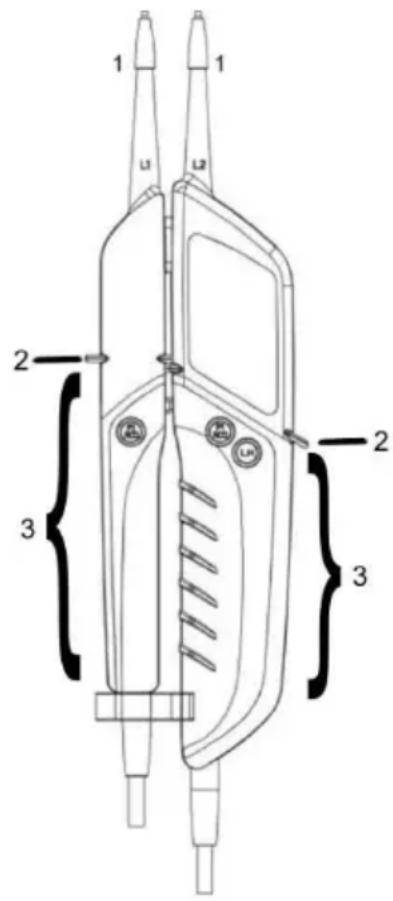
Only hold the instrument on the handles (3) below the mechanical mark (2), avoid contact with the test probes (1)! (Refer to the figure)
Only carry out for isolation from the power supply on both poles!
The appliance must not be operated in a moist environment!
Do not use with the battery compartment open! Whilst replacing the battery, the test probes must be removed from the test circuit.
Correct indication is ensured in the temperature range of -15\ °C to +45\ °C .
Always keep the appliance dry and clean. Only use a moist cloth to clean the housing.
The additional warning symbol and vibration for voltages > 45 V AC / 110 V DC are only for warning of hazardous voltages, not for test purposes!
Immediately replace the batteries if a warning signal sounds shortly after switching on the instrument, or when the instrument is switched on and immediately switches off.
The different signals of the voltage tester (including the ELV limit value) displayed must not be used for measurement.
General
Voltages have priority. If no voltage is applied at the test probes (< 6 V), the appliance is in the continuous test mode.
Function
To switch on the instrument, simply hold the test probes on one another.
In the stand-by condition, the display indicates "SCAN" and a number counting backwards. If this attains the value 0, the instrument switches off. To switch on the instrument again, just momentarily hold the test probes on one another.
Attaching and removing the adapter for the test probes makes it easier to carry out tests at the socket.
For safe keeping, a suitable bracket is located at the captive test probe protection.
The nominal In current is a maximum of 3.5 mA.
Self-Test / Auto Power-Off
When initially switching on, either when inserting a new battery or when the test probes are held on one another if the instrument is off. Shortly afterwards, the instrument changes to the SCAN mode and a number counts the seconds backwards.
Hereby, if the display fails to indicate one or more functions, do not use the appliance and it must be checked by a specialist.
To test, in order to ensure that the instrument is ready to use, place the test probes on one another. This should be carried out immediately before and after use.
If the LCD does not, or only faintly illuminates, replace the batteries.
If the appliance does not function with new batteries, it must be protected from being used incorrectly.
After a period without using, the display counts the seconds and the instrument automatically switches off by the "Auto Power Off" function.
To switch on the instrument again/self test, momentarily hold the test probes on one another.
Checking the DC voltage
When placing the probes on a DC voltage within the rated voltage range, the voltage is indicated in Volts and "DC" also appears on the display. If a negative voltage is applied at the probe "L2", a "-" (minus) is indicated in front of the value. From a voltage of approx. 110 V, the hazardous voltage is indicated by a red flashing LED behind the display and a vibrating signal is indicated.
The ELV LED must not be used for measurement.
If the batteries are completely discharged, if voltage is applied, a warning triangle is indicated on the display.
Check AC voltage (TRMS)
When placing the probes on an AC voltage within the rated voltage range, the voltage is indicated in Volts and "AC" also appears on the display. The mains frequency is also indicated. From a voltage of approx. 45 V, the hazardous voltage is indicated by a flashing LED behind the display and a vibrating signal is indicated.
The ELV LED must not be used for measurement.
If the batteries are completely discharged, if voltage is applied, a warning triangle is indicated on the display.
DATA HOLD Function
By briefly activating the "L.H." button (save data), a test value can be saved on the LC display. The "DATA HOLD" function is indicated on the display by the symbol "D.H." and can be switched off by again briefly activating the button.
Phase test
Protective clothing and insulation locations can influence the function!
With the test probe "L2", contact the large hand parts of a conductor. If a phase (Pol >100 V AC) of min. 100 V\~ is applied, the display indicates "<L", the warning triangle and the red flashing LED, as well as vibration.

For determining the phase conductor, the perceptibility of the indication can be impaired, e.g. by insulating fixtures to protect against direct contact, in adverse positions, for example on wooden ladders or insulating floor coverings, of a voltage not earthed or also in adverse lighting conditions.
For safety, check for two-pole deenergization.
The phase can also be determined by checking the external conductor against the protective earth. The voltage applied should be indicated at the phase conductor.

During this test, make sure that an additional current flows across the protective conductor. This is added to that already existing and could trigger the circuit breaker (FI)!
Phase sequence testing (> 200 V AC)
Protective clothing and insulation locations can influence the function.
Fully encompass the handles L1 and L2 (refer to the figure on Page 15) below the mechanical mark.
Place the probes L1 and L2 on two external conductors (phases) and check to see whether the external conductor voltage of, e.g. 400 V is applied.
An anticlockwise sequence (phase L2 before phase L1) is present if the letter "R" appears on the display.
An anticlockwise sequence (phase L2 before phase L1) is present if the letter "L" appears on the display.
Determination of the phase sequence must always be carried out with a check for transposed probes. Thereby, the phase sequence must change.
Please note:
The phase sequence test is possible in earthed AC voltage mains supply from 200 V, 50/60 Hz (phase to phase).
The "third" phase (L3) is simulated with the aid of a sensor in the instrument, by using the hand parts.
One-hand test (e.g. Schuko socket)
Locking both hand parts is possible by the distance piece located on the test line in the lower section on the L1 hand parts. The distance of the test probes can be adjusted by simply rotating. (Schuko / CEE).
Test location lighting
Lighting of the test locations is switched on and off by prolonged activation of the "L.H" button (save data).
Carefully insert these because, due to the additional load, the batteries become discharged prematurely.
Continuity test
(To switch on, place the test probes on one another)
Place the test probes on the line to test, fuse or similar. With a resistance of <10.0\ kΩ “OL” will appear on the display and the acoustical signal will sound, with a resistance >10.0 - 199.9\ kΩ , the resistance value appears on the display, if the resistance is >200\ kΩ , the overflow indicator "OL" appears on the display.
Load connection / FI/RCD trigger test, PE (protective earth test)
Interference voltages and inductives, as well as capacitive coupling can be reduced during the voltage test by simultaneously pressing both buttons, FI/RCD. Thereby, a lower impedance is switched on.
When activating the button, the peak current is less than 0.3 A (ls).
This additional load circuit is protected against overloading and reduces the load current after a few seconds.
This in-built load enables a FI/RCD circuit breaker to trigger.
The FI/RCD (max. 30 mA @ 230 V AC) is tested between the phase and protective earth.
Hold a test probe on a phase-carrying conductor (refer to the phase test), the other at the protective earth and press in both FI/RCD buttons as far as possible.
In the normal case, the FI is not triggered without pressing both buttons!

NOTE
Only carry out the FI/RCD test on fixed installations and power circuits. In the event of a fault, a test on movable and devices not permanently wired, extension leads, amongst other things, can result in excessive current flow in metallic parts connected to the protective earth.
This test does not replace tests on the FI/RCD protective earth, in accordance with VDE 0100!
For this, Testboy ® provides the appropriate instruments.
Backlighting
The display backlighting is permanently present, to protect the battery power it automatically switches off after a few seconds and on again as soon as a test is carried out.
Frequency indication
During the voltage test, the frequency of the AC voltage applied is recorded and indicated on the display, in complete Hertz, by the small figures.
Cleaning
Use a damp cloth and mild household detergent to clean the instrument should it become soiled through daily use. Never use aggressive cleaning agents or solvents to clean the instrument.

To prevent electric shocks, do not allow moisture to ingress the housing.
Maintenance
During operation in accordance with the operating instructions, the instrument does not require special maintenance, with the exception of the batteries.
Replacing the battery
If the batteries are discharged, the battery symbol appears on the display and the instrument automatically switches off as necessary. Immediately replace the batteries in order to ensure accuracy of the test values.
Before opening the battery compartment, disconnect the test probes from the test circuit!
To replace the batteries, open the battery compartment on the main housing. Use a suitable screwdriver and alternately release the screws. When inserting the batteries, ensure that the polarity is correct. Carefully close and lock the battery compartment with the screws.
With the aid of an LED and without batteries, the instrument indicates an applied voltage of more than the ELV value.
At lower temperatures of less than 5° C, the readiness of the voltage tester can be impaired. Please provide sufficient power supply by using suitable batteries which are also specified for the appointed temperature range!

Batteries must not be disposed of with normal domestic waste. There will be a collection point near you!
Technical data
| Display | LC display with backlighting |
| Rated voltage range | 6...1000 V AC (TRMS) +/- 5%, +10 Digits6...1400 V DC +/- 5%, +10 Digits |
| Phase sequence indication | Yes |
| Indication | 0.85 Un |
| Frequency indication | 0, 16.66...500 Hz |
| Switchable load | 30 mA at 230 V AC |
| Duty cycle | 30 s on \ 240 s off |
| Nominal In current | < 3.5 mA |
| Peak current Is | < 0.3 A, with buttons pressed (FI/RCD) |
| Phase test Pol | > 100 V AC |
| Protection class | II |
| Impedance | 625 kΩ for ELV AC |
| Continuity test | 0.1...199.9 kΩ |
| Climate category | N Normal |
| Operating temperature | -15 to +45 °C, at > 95% RH to +31 °C |
| Protection class | IP 65 |
| Overvoltage category | CAT IV 1000 V |
| Testing standard | EN 61243-3:2014 |
| Voltage supply | 2x 1.5 V Type AAA Micro |
Table des matières
Cd = cadmium, Hg = kwikzilver, Pb = lood, Mn = mangaan, Li = lithium.
Testboy GmbH Tel: +49 4441 89112-10
Germany info@testboy.de




- TESTBOY® PROFI III LCD
- TECHNICAL DATA 18
- INTENDED USE
- DISCLAIMER
- ACCURACY OF THE OPERATING INSTRUCTIONS
- DISPOSAL
- DISPOSAL OF USED BATTERIES
- CERTIFICATE OF QUALITY
- DECLARATION OF CONFORMITY
- OPERATION
- SAFETY INFORMATION
- GENERAL
- FUNCTION
- SELF-TEST / AUTO POWER-OFF
- CHECKING THE DC VOLTAGE
- CHECK AC VOLTAGE (TRMS)
- DATA HOLD FUNCTION
- PHASE TEST
- PHASE SEQUENCE TESTING (> 200 V AC)
- PLEASE NOTE
- ONE-HAND TEST (E.G. SCHUKO SOCKET)
- TEST LOCATION LIGHTING
- CONTINUITY TEST
- LOAD CONNECTION / FI/RCD TRIGGER TEST, PE (PROTECTIVE EARTH TEST)
- NOTE
- BACKLIGHTING
- FREQUENCY INDICATION
- CLEANING
- MAINTENANCE
- REPLACING THE BATTERY
- TABLE DES MATIÈRES
Brand : Testboy
Model : Profi III LCD
Category : Measuring equipment