IAN 414697 - Weather Station AURIOL - Free user manual and instructions
Find the device manual for free IAN 414697 AURIOL in PDF.



| Product type | Indoor weather station with alert function |
| Brand | Auriol |
| Model | IAN 414697 |
| Temperature measurement range | 0 °C to 50 °C |
| Temperature accuracy (central range) | ±1 °C |
| Humidity measurement range | 20 % to 95 % |
| Humidity accuracy (41 % – 80 %) | ±3 % |
| Dimensions | 115 x 74 x 24 mm |
| Weight (without batteries) | approx. 97 g (model 1) / approx. 93 g (model 2) |
| Power supply | 2 x 1.5 V AAA R03/LR03 batteries |
| Display | LCD screen with comfort, mold, flu, heat symbols |
| Main functions | Temperature/humidity measurement, dew point, humidity alarm, max/min values, comfort index |
| Comfort index | COMFORT displayed between 45 % and 65 % humidity and 20 °C to 25 °C |
| Alarm | Red LED + flashing symbols for high/low humidity and mold |
| Mounting | Wall hanging, magnetic stand or foldable stand |
| Battery compartment | On the back, cover |
| Cleaning | Soft, dry, lint-free cloth |
| Storage | Remove batteries, dry and cool place |
| Safety | Battery instructions: do not short-circuit, do not mix types, etc. |
| Warranty | 3 years from date of purchase |
| Repairability | Contact customer service; wear parts (batteries) excluded |
| Compliance | CE, RoHS (2011/65/EU), EMC (2014/30/EU) |
| Disposal | Device and batteries: separate collection, do not dispose of with household waste |
Frequently Asked Questions - IAN 414697 AURIOL
User questions about IAN 414697 AURIOL
0 question about this device. Answer the ones you know or ask your own.
Ask a new question about this device
Download the instructions for your Weather Station in PDF format for free! Find your manual IAN 414697 - AURIOL and take your electronic device back in hand. On this page are published all the documents necessary for the use of your device. IAN 414697 by AURIOL.
USER MANUAL IAN 414697 AURIOL
Usage and safety instructions ....- 1
DE AT CH
Usage and safety instructions
Table of contents
Table of contents ..... - 1 -
Introduction - 3 -
Intended use - 3 -
Package contents ...... - 4 -
Technical specifications - 4 -
Explanation of the battery symbols ...... - 7 -
Important safety Instructions Important safety instructions
Safety instructions for the user .... - 8 -
Battery safety instructions - 9 -
Display - 13 -
Control panels - 14 -
Position the device securely - 15 -
Start-up - 16 -
Basic settings - 17 -
Dew point temperature Indicator .... - 17 -
Dew point temperature ..... - 17 -
Setting humidity limits.... - 19 -
Enable or disable humidity alarm - 20 -
Comfort index - 20 -
Room temperature indicator ...... - 21 -
Setting the mould warning - 22 -
-1 - GB IE NI CY MT
Flu and heat index - 23 -
Flu warning indicator - 23 -
Heat warning indicator ...... - 24 -
Display MAX.MIN recording - 24 -
Deleting the MAX.MIN recording ...... - 24 -
Battery level indicator - 25 -
Cleaning Instructions - 25 -
Storage - 26 -
Simplified EU declaration of conformity ..... - 26 -
Disposal - 26 -
Disposal of the electrical device - 27 -
Disposal of batteries - 30 -
Recycling - 33 -
Waste disposal - 33 -
The digi-tech gmbh warranty - 34 -
Warranty terms - 34 -
Warranty period and statutory claims for defects - 35 -
Scope of Warranty - 35 -
Processing in the event of a warranty claim - 36 -
Service - 37 -
Supplier - 39 -
ROOM CLIMATE MONITOR
Introduction

Congratulations on purchasing your indoor climate control station with warning function (hereinafter referred to as "device"). In doing so, you have chosen to purchase a high-quality product.
These operating instructions form an integral part of this device. It contains important instructions pertaining to its safety, use and disposal. Please familiarise yourself with all the operating and safety instructions before using this device. Use the device only as described for the indicated purposes.
If you pass this device on to anyone else, please be sure to pass on these documents with it. Please keep the packaging and operating instructions for future reference.
Intended use
The device is suitable for using the described functions. Any other use or modification of the device is considered improper use. The manufacturer is not liable for damage caused by improper use. The device is not intended for commercial use.
-3-

Package contents
Note: Please check the contents of the package after purchase. Check that all parts are present and not defective. If the delivery is incomplete and/or parts are damaged, do not use the device. Contact the service department (see "What to do to use the warranty").
• 1 x Room climate control station
• 2 x batteries 1.5 V AAA LR03
- 1 x user manual
Technical specifications
- Measuring range/temperature: 0 °C - 50 °C
• Measuring range/humidity: 20% - 95% - Temperature display/tolerance in the core measuring range: +/- 1 °C
- Humidity indicator/tolerance in the core measuring range: 41% - 80% - ±3%; other range: ±5%
• Dimensions: approx. 115 x 74 x 24 mm
• Weight: Model 1: approx. 97 g (excl. batteries) Model 2: approx. 93 g (excl. batteries)
GB IE NI CY MT -4-
• Batteries: 2 x 1.5 V AAA R03/LR03
- Indicator for DC voltage
Explanation of symbols

WARNING!
This signal symbol/word indicates a hazard with a medium level of risk, which, if not avoided, could result in death or serious injury.
| Note: | This signal word is used for additional information. | |
 | Improper use of the batteries/accumulators may result in explosion and leakage of the battery fluid. | |
 | Incl. | Alkaline batteries included |
 | - + | Batteries: 2 x 1.5V AAA R03/LR03 |
-5-

 | Indicator for DC voltage | |
 | Operating instructions | |
 | Read through these operating instructions! | |
 | digi-tech gmbh uses the CE marking to show compliance with the applicable EU directives. | |
| Temperature inside | ||
| Air humidity | ||
| Mould warning | ||
| Flu warning |
GB IE NI CY MT -6-

Heat alert
Explanation of the battery symbols

Always keep batteries out of children's reach.

Do not throw batteries into the fire or place them near fire.

Batteries must always be inserted with the correct polarity.

Do not deform or damage batteries.

Do not open or disassemble batteries.

Do not mix batteries of different brands or types.

Do not mix new and used batteries.
-7-
GB IE NI CY MT

Do not charge batteries.

Protect batteries from moisture and keep them away from liquids.

Do not short-circuit batteries.

Always insert the batteries in the correct polarity.
Important safety Instructions
Safety instructions for the user

WARNING!
RISK OF INJURY!
This appliance may be used by people (including children over the age of 8) with reduced physical, sensory or mental abilities or by those without experience and/or knowledge, if they
GB IE NI CY MT
-8-
are supervised or have been instructed in the safe use of the appliance and have understood the dangers that are associated with using it. Children should not play with the device. Cleaning and user maintenance must not be carried out by children without supervision. Also keep the packaging films away from children. There is a risk of suffocation.
Battery safety instructions

WARNING!
HEALTH RISK! RISK OF EXPLOSION!
Keep new and old batteries/accumulators out of reach of small children. If a battery/accumulator is
-9-
GB IE NI CY MT
swallowed, seek medical attention immediately.
The batteries/accumulators must always be inserted with the correct polarity.
Clean battery and device contacts beforehand if necessary. Do not attempt to recharge, short-circuit or open the batteries. Never heat the batteries/accumulators to recharge them. Never expose the batteries/accumulators to excessive heat such as sunshine, fire or the like. There is an increased risk of leakage! Never throw the batteries/accumulators into the fire as they may explode.
Improper use of the batteries/accumulators may
result in risk of explosion and leakage of the battery fluid.

GB IE NI CY MT
-10-
If the batteries/accumulators have run out, avoid contact with skin, eyes and mucous membranes. Use gloves. In the event of contact with battery fluid, rinse the affected areas immediately with plenty of clear water and seek medical attention immediately. Remove depleted batteries from the device immediately — there is an increased risk of leakage.
Note:
- Non-rechargeable batteries are not to be recharged!
- Different battery types or new and used batteries may not be used together!
- The connection terminals and device contacts must not be short-circuited!
- Empty batteries/accumulators must be removed from the device and

disposed of safely (see Disposal of batteries)!
- If the device is stored unused for a long period of time, the batteries/accumulators should be removed.
Display
text_image
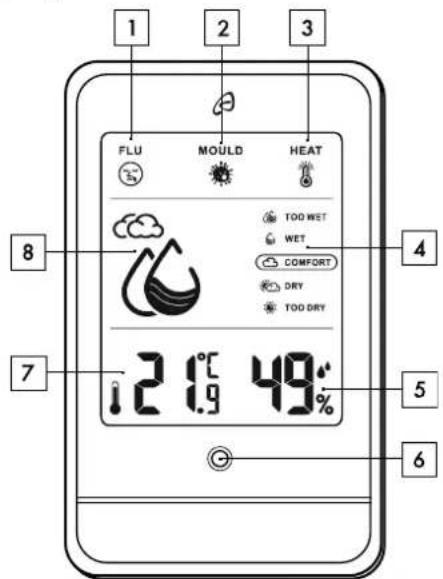
FLU MOULD HEAT 8 7 21.9 °C 49° 4 5 6| 1 | Flu warning | 2 | Mould warning |
| 3 | Heat alert | 4 | Comfort level indicator |
| 5 | Room humidity | 6 | Led alarm signal |
-13-

| 7 | Room temperature | 8 | Humidity symbol |
Control panels
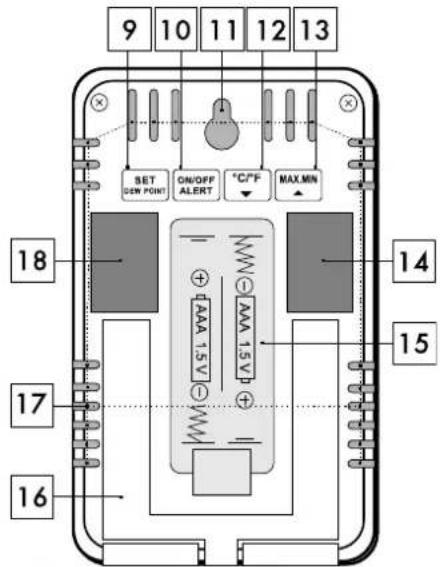
text_image
9 10 11 12 13 SET ON/OFF MAX MIN GEN POINT ALERT °C°F 18 AAA 15 V 14 AAA 15 V 15 17 16| 9 | SET, Dew Point | 10 | ON/OFF, ALERT |
| 11 | Suspension device | 12 | °C/°F, ▼ down button |

-14-
| 13 | MAX.MIN, up button | 14 | Magnetic holder |
| 15 | Battery compartment | 16 | Stand, foldable |
| 17 | Sensors | 18 | Magnetic holder |
Position the device securely
You can hang the device from a nail or screw with the suspension device (11). Simply affix it to a magnetic metal surface or set it up with the folding stand (16).
Before affixing it to the wall, make sure that there is no gas, water or electricity pipe at the connection point. Be mindful of the wall's condition.
The manufacturer assumes no liability for damage caused by improper fastening.
Protect easily damaged surfaces when attaching the device to the wall, otherwise scratches may occur. Make sure that
- there is always sufficient ventilation (do not place the device on shelves or where curtains or furniture cover the sensors (17) and leave a distance of at least 10 cm on all sides);

- the device is not placed on a thick carpet or bed when operating and it is not in the direct path of any heat sources (e.g., heaters);
- it is not placed in the path of direct sunlight;
- to avoid contact with splashing and dripping water (do not place objects filled with liquids, e.g., vases, on or next to the device);
- the device is not in the immediate vicinity of magnetic fields (e.g., loudspeakers);
• to avoid having foreign objects interfere with it; - candles and other naked flames are kept away from the device at all times to prevent the spread of fire.
Start-up
- Open the battery compartment (15) on the back of the device.
- Insert two batteries (1.5 V AAA R03/LR03) in the correct polarity.
- Close the battery compartment (15). After inserting the batteries, the display will be briefly shown in full, the LED alarm signal (6) will flash briefly, and the device will switch to the normal display.
Basic settings
After inserting the batteries, the device will be preset to mould alarm at 65%, upper humidity limit at 95%, and lower humidity limit at 20%.
Dew point temperature Indicator
- In the normal display, press the SET button (9) to display the dew point temperature.
- Press the SET button (9) again to return to the normal display/current room temperature (7).
Dew point temperature
The dew point temperature is used as a measure for the air's humidity ratio. It describes how much water vapour is in the air and is calculated from the ratio of relative humidity to air temperature. If the respective air temperature corresponds to the dew point temperature, the relative humidity is 100%. The warmer the air temperature, the more moisture it can absorb. For example, it will feel muggy when the dew point temperature exceeds approx. 16 °C. On cold exterior walls, the dew point temperature drops and the air humidity condenses on the walls, leading to mould growth over an extended period of time.

| Dew point temperature in °C | Human perception | Relative humidity at 32 °C |
| > Higher than 26 °C | Very high, very bad for asthmatic conditions | 65% and above |
| 24 – 26 °C | Very unpleasant and oppressive, especially for elderly people | 62% |
| 21 – 24 °C | Very damp and unpleasant | 52% - 60% |
| 18 – 21 °C | Somewhat uncomfortable for most elderly people | 44% - 52% |
| 16 – 18 °C | Fine for most people, but everyone notices the humidity | 37% - 46% |
| 13 – 16 °C | Comfortable, pleasant | 38% - 41% |
| 10 – 12 °C | Very comfortable and pleasant | 31% - 37% |
| < 10 °C | A bit dry for some people | 30% |
GB IE NI CY MT
If the dew point temperature rises above 50 °C, "HH.H" is displayed.
If the dew point temperature falls below 0 ^ , "LL.L" is displayed.
Setting humidity limits

- In the normal display, press and hold the SET button (9). The upper limit value of the room air humidity (5) and ▲will flash.
- You can set it with the °C/°F, ▼ button (12) or the MAX.MIN, ▲ button (13) in 5% steps.
- Confirm by pressing the SET button (9). The lower limit value of the room air humidity (5) and ▼ will flash.
- Set it with the °C/°F, ▼ button (12) or the MAX.MIN, ▲ button (13).
- Confirm by pressing the SET button (9). You will now be back in the normal display/current room humidity (5).

| Low humidity | |
| Normal humidity | |
| High humidity |
Enable or disable humidity alarm ALERT
• In the normal display, press the ON/OFF,
ALERT button (10) to enable the humidity alarm.
▲ ALERT ▼ will appear on the display. As soon as the set values are exceeded or undershot,
▲ ALERT ▼ and the red LED alarm signal (6) will flash.
- Press any button to switch off the red LED alarm signal (6). ▲ will continue to flash until the humidity has returned to a normal value, for example due to ventilation.
- Press the ON/OFF, ALERT button (10) to disable the humidity alarm.
▲ ALERT ▼ will disappear from the display.
Comfort index
Simply read the comfort level on the comfort indicator (4) on the display.
GB IE NI CY MT
-20-
| Comfort level Relative humidity | |
 Too wet Too wet | ≥ 85% |
 Wet Wet | 66% - 84% |
 comfortable comfortable | 45% - 65% |
 Dry Dry | 30% - 44% |
 Too dry Too dry | ≤ 29% |
Note: The comfort indicator is based on the relative room temperature. If the relative humidity range is between 45% and 65%, but the relative room temperature of approx. 20 °C - 25 °C is not reached, COMFORT (comfortable) is not displayed.
Room temperature indicator
- In the normal display, press the °C/°F, button (12) to select the temperature unit of degrees Celsius (°C) or degrees Fahrenheit (°F).


Setting the mould warning

• In the normal display, press and hold the
°C/°F, ▼ button (12). The upper limit value of the room air humidity (5) and the mould warning
symbol (2) will flash.
- Set it with the °C/°F, ▼ button (12) or the MAX.MIN, ▲ button (13).
- After about 10 seconds, the set value will be accepted and the device will return to the normal display. As soon as the set values are exceeded,
the symbol (2) for mould warning and the red LED alarm signal (6) will flash.
- Press any button to reduce the red LED alarm signal (6) to flashing about every 7 seconds. The
symbol 📄) for mould warning will continue to flash until the humidity has fallen below the set value again, for example due to ventilation.
GB IE NI CY MT
Flu and heat index

text_image
°C 45 35 25 15 10 5 10 20 30 40 50 60 70 80 90 % 10 20 30 40 50 60 70 80 90 %Flu warning indicator

Your device is equipped with a flu warning
indicator. If the flu warning symbol (i) flashes on the display, remedy the situation, for example by heating.
-23-

Heat warning indicator
Your device is equipped with a heat warning
indicator. If the symbol (3) for heat warning flashes in the display, remedy the situation, for example by ventilating.

Display MAX.MIN recording
The maximum and minimum temperature and humidity values are stored from the time the batteries are inserted.
- Press the MAX.MIN, ▲ button (13) in the normal display — MAX II appear and the recorded maximum recorded temperature and humidity values will be displayed.
- Press the MAX.MIN, ▲ button (13) again — MIN will appear and the minimum recorded temperature and humidity values will be displayed.
- Wait about 10 seconds until the device returns to the normal display, or press the MAX.MIN, ▲ button (13).
Deleting the MAX.MIN recording
- Press the MAX.MIN, ▲ button (13) in the normal display — 📄 all appear.
GB IE NI CY MT
-24-
- Press and hold the MAX.MIN, ▲ button (13) to delete the maximum and minimum recorded temperature and humidity values. The maximum and minimum temperature and humidity values will be deleted, and start to be recorded again from that moment.
- Wait about 10 seconds until the device returns to the normal display.
Battery level indicator
When the batteries become too low to keep the device running, the battery level indicator will appear in the display above the room temperature (7).
Replace the batteries as soon as possible.
Cleaning Instructions
Improper cleaning can damage the device. Do not immerse the device in water or other liquids. Avoid any aggressive cleaning agents, brushes with metal or nylon bristles, or any sharp or metallic cleaning objects such as knives, hard spatulas and the like. These can damage the surface. Clean the device with a soft, dry, lint-free cloth, such as that used for cleaning glasses lenses.

Storage
If the device will not be used for an extended period of time, remove the batteries and store the device, cleaned and protected from sunlight, in a dry, cool place, ideally in the original packaging.
Simplified EU declaration of conformity

digi-tech gmbh hereby declares that the Room Climate Control Station with Warning Function 4-LD6112-1-2 is in compliance with RoHS Directive 2011/65/EU and Directive 2014/30/EU.
You can download your operating instructions and declaration of conformity here: www.digi-tech-gmbh.com/downloads
Then click on the magnifying glass and enter the item number 414697_2201.
Disposal
The product and the packaging materials are recyclable. Please dispose of them separately for better waste treatment. To learn options for disposal of the used product, please contact your municipal or city administration.

Check the labelling on the packaging materials when separating waste — they are marked with abbreviations (a) and numbers (b) with the following meaning:
1-7: Plastics
20-22: Paper and cardboard 80-98: Composites

Disposal of the electrical device
The symbol with the crossed-out dustbin means that electrical and electronic equipment must not be disposed of together with household waste.
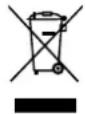
Consumers are legally obliged to dispose of electrical and electronic devices at the end of their service life separately from unsorted municipal waste. This is to ensure environmentally friendly and resource-saving recycling.
Batteries and accumulators that are not firmly enclosed in the electrical or electronic device and which can be removed without being destroyed, must be separated from the device before handing it in at a collection point and taken to a designated disposal point. The same

applies to lamps that can be removed from the unit without destroying them.
Owners of electrical and electronic devices from private households can hand it in at the collection points of the public waste management authorities or at the collection points set up by the manufacturers or distributors in accordance with the The Electrical and Electronic Equipment Act (ElektroG). Returning old devices is free of charge.
Please return the old device to your LIDL branch.
Dealers with a sales area of at least 400 m^2 for electrical and electronic devices are obliged to take back the devices. The same applies to food retailers with a total sales area of at least 800 m^2 , provided they offer electrical and electronic devices on a continuous basis or at least several times a year. Distance sales dealers with a storage area of at least 400 m^2 for electrical and electronic devices or a total storage area of at least 800 m^2 are also obliged to take them back. In general, distributors have the obligation to ensure the free return of old devices by providing suitable return facilities within a reasonable distance.
GB IE NI CY MT
-28-
Consumers have the option to return an old device free of charge to a distributor who is obliged to take it back if they purchase an equivalent new device with essentially the same function. This option also exists for deliveries to a private household. In the distance sales trade, the option of free collection when purchasing a new device is limited to heat exchangers, display screen units, and large devices that have at least one outer edge with a length of more than 50 cm. The distributor must ask the consumer at the time of concluding the sales contract about the intention to return the product. Apart from that, consumers can hand in up to three old devices of one type free of charge at a distributor's collection point without this being linked to the purchase of a new device.
However, the edge lengths of the respective devices must not exceed 25 cm.
Consumers are encouraged to take measures to avoid waste. With regard to electrical and electronic devices, this means extending their life by repairing defective devices and selling functioning used devices instead of sending them for disposal.

Remove the battery without destroying it before disposal and dispose of it separately (see Disposal of batteries).
Disposal of batteries
The accompanying symbol indicates that batteries and rechargeable batteries must not be disposed of with normal household waste. Defective or used batteries/rechargeable batteries must be recycled in accordance with Directive 2006/66/EU and its amendments. Consumers are legally obliged to dispose of all batteries and rechargeable batteries, regardless of whether they contain harmful substances such as: Cd = cadmium, Hg = mercury, Pb = lead, Li = lithium or not, at a collection point in their municipality/district or at a retail outlet, for environmentally friendly disposal and for the recovery of valuable raw materials such as cobalt, nickel or copper.

Batteries and rechargeable batteries may be returned free of charge.

WARNING!
Environmental damage due to incorrect disposal of batteries/ rechargeable batteries!
Some of the possible materials such as mercury, cadmium and lead are poisonous and, if not disposed of properly, endanger the environment. Heavy metals, for example, can have harmful effects on the health of humans, animals and plants and accumulate in the environment and in the food chain, and then enter the body indirectly via food.


WARNING!
Risk of explosion!
With used batteries containing lithium (Li = lithium) there is a high risk of fire. Therefore, special attention must be paid to the proper disposal of used and rechargeable batteries containing lithium. Incorrect disposal can also lead to internal and external short circuits due to thermal effects (heat) or mechanical damage. A short circuit can lead to a fire or an explosion and have serious consequences for humans and the environment. For this reason, tape off the poles of lithium-based and rechargeable
GB IE NI CY MT
-32-
batteries prior to disposal in order to avoid an external short circuit.
Batteries and rechargeable batteries that are not permanently installed in the device must be removed and disposed of separately before disposal of the device.
Please only return empty batteries and rechargeable batteries!
Use rechargeable batteries instead of disposable batteries whenever possible.
Recycling
This product packaging consists of recyclable materials. Dispose of them in an environmentally friendly way using the collection systems available.
Waste disposal
Please dispose of packaging in an environmentally friendly manner. Note the labelling on the various packaging



materials and dispose of them separately if necessary.
The digi-tech gmbh warranty
This device has a 3 year warranty valid from the date of purchase. In the event of defects in this device, you have statutory rights against the seller of the product. These statutory rights are not limited by our warranty set out below.
Warranty terms
The warranty period begins on the date of purchase. Please keep the receipt. This document is required as proof of purchase. If a material or manufacturing defect occurs within three years of the date of purchase of this device, we will replace or repair the device – at our own discretion – free of charge. This warranty service is subject to the condition that the defective device and the proof of purchase (receipt) are presented within the three-year period and that a brief written description describing the nature of the defect and when it occurred is provided. If the defect is covered by our warranty, we will either repair your device or send you a replacement. There is no new warranty period

starting with the repair or replacement of the product.
Warranty period and statutory claims for defects
The warranty does not extend the warranty period. This also applies to replaced and repaired parts. Any damage or defects already present at the time of purchase must be reported immediately after unpacking. After the warranty has expired, any repairs are subject to a charge.
Scope of Warranty
The device was carefully manufactured according to strict quality guidelines and carefully checked before delivery. The warranty applies to material or manufacturing defects. This warranty does not cover parts of the product that are subject to normal wear and tear and can therefore be regarded as wear parts or damage to fragile parts, e.g. switches, or parts made of glass. This warranty is void if the unit has been damaged or improperly used or maintained. For proper use of the device, all instructions given in the manual must be closely observed. Uses and actions that are advised against or warned

against in the operating instructions must be avoided at all costs.
The device is designed exclusively for private and not for commercial use. The warranty expires in the event of abusive or improper handling, the use of force or repairs that were not carried out by our authorised service branch.
Processing in the event of a warranty claim
To ensure that your request is processed quickly, please follow the instructions below:
- Please have the receipt and item number (414697_2201) ready as proof of purchase for all enquiries.
- Please refer to the type plate, engraving, title page of your manual (bottom left) or to the sticker on the back or underside for the item number.
- If functional errors or other defects occur, please contact the following service department by phone or email first.

You can download this manual and many other user manuals, product videos and software at www.lidl-service.com.
GB IE NI CY MT
text_image
PDF ONLINE www.lidi-service.comThis QR code takes you directly to the Lidl service page (www.lidl-service.com) and you can open your operating instructions by entering the item number (414697_2201).
Service
Inter-Quartz GmbH
Valterweg 27A
65817 Eppstein
GERMANY
Email: support@inter-quartz.de
Telephone: +49 (0)6198 571825

AT BE DE ES FI FR GB IE
IT NI NL PT SE
00800 5515 6616
BG 00800 1114916
CH 0800 563862
-37-
GB IE NI CY MT
CY 8009 4403
CZ 800 142 315
DK 800 5515 6616
EE 80000 49116
GR 00800 44140855
HR 0800 222943
HU 0680 981220
LT 8800 33139
LV 8000 5884
MT 800 62851
PL 00800 44 11 493
RO 0800 896640
RS 0800 191026
SI 0800 80847
GB IE NI CY MT
-38-
IAN 414697_2201
Itemno.: 4-LD6112-1-2

Year of manufacture: 2022

Supplier
Please note that the following address is not a service address. Contact the service point named above first.
digi-tech gmbh
Valterweg 27A
65817 Eppstein
GERMANY

-39-

| WETHumide | 66% - 84% |
| COMFORTagréable | 45% - 65% |
| DRYsec | 30% - 44% |
| TOODRYtrop sec | ≤29% |
KAMERKLIMAATSTATION MET WAARSCHUWINGSFUNCTIE
Inleiding

Open of demonteer batterijen niet.
www.digi-tech-gmbh.com/downloads
text_image
9 10 11 12 13 SET Dew Point ON/OFF ALERT °C/°F MAX.MN 18 14 15 17 16 9 SET, Dew Point 10 ON/OFF, ALERT-303-
ES
rugiada/DEW POINT - 386 -
text_image
9 10 11 12 13 SET SEW POINT ON/OFF ALERT °C/°F MAX MIN 18 14 17 15 16 9 SET, Dew Point 10 ON/OFF, ALERT-383-
IT MT CH
www.digi-tech-gmbh.com/downloads
Pooblaščeni serviser:
support@inter-quartz.de
Garancijski list
www.digi-tech-gmbh.com/downloads
Zatim kliknite povećalo i upišite broj artikla 414697_2201.
Odlaganje
www.digi-tech-gmbh.com/downloads
www.digi-tech-gmbh.com/downloads
Apt.-N°: 4-LD6112-1-2

Imported for GB market by:
Lidl Great Britain Ltd,
Lidl House,
14 Kingston Road,
Surbiton, KT5 9NU
digi-tech gmbh
Valterweg 27A
65817 Eppstein
GERMANY
text_image
PDF ONLINE www.idl-service.com