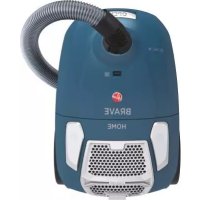
BV50HM 021 - Vacuum Cleaner HOOVER - Free user manual and instructions
Find the device manual for free BV50HM 021 HOOVER in PDF.



| Product type | Canister vacuum |
| Brand | Hoover |
| Model | BV50HM 021 |
| Category | Household vacuum |
| Power supply | Mains (power cord) |
| Suction power | Variable (power control) |
| Suction control on the brush | 3 positions: hard floor, standard carpet, long-pile carpet |
| Bag capacity | Dust bag (periodic replacement, permanent bag available on some models) |
| Pre-motor filter | Washable with warm water |
| Exhaust filter | Washable with warm water |
| Included accessories | Crevice tool/upholstery brush 2-in-1, mini turbo brush for pet hair*, mini turbo brush for allergens*, parquet brush* (*depending on version) |
| Main brush | Brush for carpet and hard floor with suction control |
| Special functions | Bag fill indicator, automatic cord rewind, thermal circuit breaker |
| Safety | Automatic shut-off in case of overheating, thermal cut-out |
| Use | On hard floors, rugs, carpets (not on wet surfaces or outdoors) |
| Maintenance | Bag replacement, regular filter cleaning (pre-motor and exhaust) |
| Warranty | Terms according to retailer (invoice required) |
| Compliance | European directives 2014/35/EU, 2014/30/EU, 2011/65/EU |
| After-sales service | Hoover authorized repairer |
| Estimated weight | 5 kg |
| Estimated cord length | 7 m |
Frequently Asked Questions - BV50HM 021 HOOVER
User questions about BV50HM 021 HOOVER
0 question about this device. Answer the ones you know or ask your own.
Ask a new question about this device
Download the instructions for your Vacuum Cleaner in PDF format for free! Find your manual BV50HM 021 - HOOVER and take your electronic device back in hand. On this page are published all the documents necessary for the use of your device. BV50HM 021 by HOOVER.
USER MANUAL BV50HM 021 HOOVER
INSTRUCTIONS FOR SAFE USE
This appliance should only be used for domestic cleaning, as described in this user guide. Please ensure that this guide is fully understood before operating the appliance.
Do not leave the appliance plugged in. Always switch off and remove the plug from the socket after use, or before cleaning the appliance or any maintenance task.
This appliance can be used by children aged from 8 years and above and persons with reduced physical, sensory or mental capabilities or lack of experience and knowledge if they have been given supervision or instruction concerning use of the appliance in a safe way and understand the hazards involved. Children shall not play with the appliance. Cleaning and user maintenance shall not be made by children without supervision.
If the power cord is damaged stop using the appliance immediately. To avoid a safety hazard, an authorised HOOVER service engineer must replace the power cord.
Keep hands, feet, loose clothing and hair away from rotating brushes.
Use only attachments, consumables or spares recommended or supplied by HOOVER.
Static electricity: Some carpets can cause a small build up of static electricity. Any static discharge is not hazardous to health.
Do not use your appliance out of doors or on any wet surface or for wet pick up.
Do not pick up hard or sharp objects, matches, hot ashes, cigarette ends or other similar items.
Do not spray with or pick up flammable liquids, cleaning fluids, aerosols or their vapours.
Do not run over the power cord when using your appliance or remove the plug by pulling on the power cord.
Do not continue to use your appliance if it appears faulty.
HOOVER service: To ensure the continued safe and efficient operation of this appliance we recommend that any servicing or repairs are only carried out by an authorised HOOVER service engineer.
Do not stand on or wrap the cord around arms or legs when using your appliance.
Do not use the appliance to clean animals or people.
Do not position the appliance above you when cleaning the stairs.
The Environment
The symbol on this appliance indicates that this appliance may not be treated as household waste. Instead it must be handed over to the applicable collection point for the recycling of electrical and electronic equipment. Disposal must be carried out in accordance with local environmental regulations for waste disposal. For more detailed information about treatment, recovery and recycling of this appliance, please contact your local city office, your household and waste disposal service or the shop where you purchased the appliance.
CE This product complies with the European Directives 2014/35/EU, 2014/30/EU and 2011/65/EU.
CANDY HOOVER GROUP S.r.l. Via Comolli 16, 20861 Brugherio(MB), ITALY
GB
GETTING TO KNOW YOUR CLEANER
A. On/Off Button
B. Bag Door
C. Telescopic Tube Adjuster
D. Telescopic Tube
E. Suction Regulator
F. Hose Handle
G.Hose
H. Bag Check Indicator
I. Cord Rewind Button
J. Exhaust Filter Cover
K. 2 in 1 Tool
L. Suction Control Slider
M. Carpet and Floor Nozzle
N. Main Cleaner
O. Bag Door Release Latch
P. Bag Holder
Q. Pre-motor Filter Frame
R. Pre-motor Filter
S. Exhaust Filter
T. Pet Hair Remover Mini Turbo Nozzle
U. Allergy Remover Mini Turbo Nozzle
V. Parquet Nozzle
ASSEMBLING YOUR CLEANER
Remove all components from the packaging.
- Connect the hose to the cleaner main body, ensuring it clips and locks into position. [1] To release: simply press the two buttons on the hose end and pull, [1]
- Connect the tube upper end to the handle. [2]
- Connect the tube lower end to the carpet and floor nozzle**. [3]
USING YOUR CLEANER
- Extract power cord and plug it into the power supply. Do not pull the cord beyond the red marker. [4]
- Adjust the length of telescopic tube by moving the telescopic tube adjuster up, and raise or lower the handle to the most comfortable cleaning position. [5]
- After connecting the telescopic tube to the Carpet and Floor Nozzle, adjust the suction control slider on the nozzle according to your cleaning needs [6]:
Hard Floor Cleaning: Adjust the suction control slider on the nozzle to the symbol. [6] Standard Carpet: Adjust the suction control slider on the nozzle to the symbol. [5]
Long Pile Carpet: Adjust the suction control slider on the nozzle to the symbol. [6] To obtain the best performance and efficiency on Carpet adjust the suction control slider on the nozzle to the symbol. [2]
The suction control can also be used to reduce the operating push force.
- Switch the cleaner on by pressing the on/off button on the cleaner main body. [7]
- Adjust the suction regulator to the desired level. [8]
-
Switch off at the end of use by pressing the on/off button. Unplug and press the cord rewind button to wind the power cord back into the cleaner. [9]
-
Certain Models Only ** Certain models only, nozzles may vary according to model
-
Packing and storage - The tube can be parked for temporary storage while in use, or in the storage position when not in use. [10]
CLEANER MAINTENANCE
Replacing the Dust Bag
If the bag check indicator is red please check and, if necessary, replace the bag.
- Lift the bag door release latch [11] to open the bag door. Pull the bag holder [12] and pull the bag collar to remove the bag. [13]
- Apply the peel and seal sticker, located on the bag collar, to the bag inlet. The full dust bag should be disposed of correctly and carefully.
- Fold a new bag as shown on the bag and fit by inserting the collar into the bag holder. [13]
- Refit the bag holder and close the bag door.
WARNING: The bag door will NOT close if the dust bag and/or the bag holder are not assembled to the cleaner. Always ensure the bag and bag holder are present when closing the bag door.
REMEMBER: The bag check indicator may also be red if an obstruction has occurred. In this case, refer to 'Removing a blockage from the system'.
Cleaning the Filters
To maintain optimum performance of your cleaner, please wash the filters after each 5 bag changes.
Cleaning the pre-motor filter:
- Lift the bag door release latch [11] to open the bag door and remove the bag. [12]
- To remove the pre-motor filter, slide the pre-motor filter frame from the cleaner. [14]
- Remove the filter from the holder. [15]
- Wash it in hand warm water [18], and allow it to dry thoroughly before replacing it in the cleaner. [19]
Cleaning the exhaust filter:
- To remove the exhaust filter, unclip the exhaust filter cover [16] and remove the exhaust filter pack. [17]
- Wash the filter in hand warm water [18] and allow it to dry thoroughly before replacing it in the cleaner. [19]
REMEMBER: Do not use hot water or detergents. In the unlikely event of the filters becoming damaged, fit a genuine Hoover replacement. Do not try and use the product without a dust bag or filter fitted.
Cleaning the permanent cloth dust bag*:
To maintain optimum performance we recommend that you wash the permanent cloth dust bag under hand warm water after every 5 full bags. Remove excess water and leave to dry fully before replacing.
Removing a Blockage From The System
If the bag check indicator is red:
- Check if the bag is full. If so refer to 'Replacing the dust bag'.
- If it is not full, then:
A. Do the filters need cleaning? If so refer to 'Cleaning the filter'.
B. Check if there is any other blockage in the system - Use a rod or a pole to remove any blockage from telescopic tube or flexible hose.
WARNING: The bag check indicator will turn red if the cleaner is used when the bag is full, if there is a blockage or if the filters are dirty. If the cleaner is used for a significant period of time with bag check indicator is red, a thermal cut out will switch the cleaner off to prevent any risk of overheating. The bag check indicator turn green once the cleaner has switched off to signal that the thermal cut out has been activated. If this should happen, switch the cleaner off, unplig and correct the fault. It will take about 30 minutes for the cut out to automatically reset.
ACCESSORIES AND NOZZLES
All accessories can be fitted to the end of the handle or the end of the tube.
2 In 1 tool - Combines two functions in one, the 2 in 1 tool can be connected as a crevice tool. By rotating the end piece converts to a dusting brush. The 2 in 1 tool can be stored neatly at the rear of the cleaner. [21]
Crevice Tool - For corners and hard to reach areas. [K]
Dusting Brush - For bookshelves, frames, keyboards and other delicate areas. To extend the brushes push the button on the body of the tool. [K]
Pet Hair Remover Mini Turbo Nozzle* - Use the mini turbo nozzle on stairs or for deep cleaning on textile surfaces and other hard to clean areas. [T]
Allergen Remover Mini Turbo Nozzle* - Use the mini turbo nozzle on stairs or for deep cleaning on textile surfaces and other hard to clean areas. [U]
Parquet Nozzle* - For wooden floors and other delicate floors. [V]
IMPORTANT: Do not use the grand turbo nozzle or mini turbo nozzles on rugs with long fringes, animal hides and carpet pile deeper than 15mm . Do not keep the nozzle stationary while the brush is rotating.
USER CHECKLIST
Should you have a problem with the product, complete this simple user checklist before calling your local Hoover service.
- Is there a working electricity supply to the cleaner? Please check with another electrical appliance.
-
Certain Models Only ** Certain models only, nozzles may vary according to model
-
Is the dust bag over-filled? Please refer to 'Cleaner Maintenance'.
- Is the Filter blocked? Please refer to 'Cleaning the filter'
- Is the hose or nozzle blocked? Please refer to 'Removing a blockage from the system'.
- Has the cleaner overheated? If so, it will take approximately 30 minutes to automatically reset.
IMPORTANT INFORMATION
Hoover spares and Consumables
Always replace parts with genuine Hoover spares. These are available from your local Hoover dealer or direct from Hoover. When ordering parts always quote your model number.
Hoover Service
Should you require service at any time, please contact your local Hoover Service Office.
Quality
BSI ISO 9001
Hoover's factories have been independently assessed for quality. Our products are made using a quality system which meets the requirements of ISO 9001.
Your Guarantee
The guarantee conditions for this appliance are as defined by our representative in the country in which it is sold. Details regarding these conditions can be obtained from the dealer from whom the appliance was purchased. The bill of sale or receipt must be produced when making any claim under the terms of this guarantee.
Subject to change without notice.
INSTRUCTIONS POURUNE UTILISATION EN SÉCURITÉ
VEDLIKEHOLD AV STØVSUGEREN
Bytte stovposen
O kataaekuaotn diatnpie to idaiuwa va eniipeepa aalayec xwpic npoyevotepn evnpwn.
MHCTPYKUNI NOBE3OJNACHOMYNCIOJIb3OBAHNUO
DAnHbI npn6op npeHa3Haueh TOnbKO DnI DOMaHrero NcNoB3OBaHnB CooTBeCTBnC OOncaHnEm, PnPBedeHHbIM B HAcToaem PyKOBoCTBe NcNoB3OBaTeN. NcNoB3OBaHne 3TOrO yCTpoiCTBa BYCNOBHX,OTnUChbIX OT DOMaHnIX,NN C FyHKUraMn, OTNlYbIMN OTObuHbX FyHKUIN DOMaHrero XO3AInCTBa,TakoE KAK KOMMePueCKoe NcNoB3OBaHnE NcKIOUeHO.HeHaNExKaUee NcNoB3OBaHnEYCTPOINCTBaIPNBODNTKCHNXeHNOCpOKaERocnyk6bl I PneKpaaaet DeCTBnE rapaHTMN PpON3BOInTeJI. PpON3BOInTeJI He Heecet OTBETCTBeHHOCT3a NOBpeJHmE YCTPOINCTBa,y6bITOK JNJN Notepn, BB3BaHbHe NcNoB3OBaHnEM PpexJe QmnpctTyNTb K kCNpyataun DaHHoro 6bITobORo 3NeKtponpnpopa, y6beInTeCB TOM, YTO Bbl NoHimaTe HaCTOaee pyKOBoCTBO.
He octabnIe np6op BkHIOueHHbIM B po3eKy. Iocne nCNoB3OBAHnN nn nepeoUcTkoN nn O6CnyKaHnEM Bcerda BbIHMaTe BnKy n3 po3eTKn.
DaHHbI np6Op He npEHa3HaueH nIe NcNoJIb3OBaHnIuIaMn (BKNIOUaI DeTe I Do 8 Iet) C NOHIXeHHbIMN fN3NuEcKIMN, CNNXuYeCKIMN IIN yMCTBeHHbIMN cNOco6HOCTAm nIN pIn OTCyTCTBmY HINX ONbIa IIN 3HaHn, ECNI OHn HE HaxOJATCn IOJ KOHTpOlem IIN He pONHCTpyKTIpOBaHbI O BcNOLb3OBaHn Inp6oBa IuIOM, OTBeauIoum 3a IN 6e3OnaChocTb. DeTN dIoJxHbI HaxOJNbCBn IOJ pNcMOTpOM nIe HeDOnyUeHnI rPbI c np6Opom. BCE yNaKOBouHbI MaTePnaJIbI DOnJXbI XpaHNTbcBn A HeDOCTyHOM IIN DeTe MeCe (pNUck yDuWeHn).
Ecn npoBOD nHTaHnI NOBpeKDeH, HeMeJeHHO OTKIOUHTe np6Op.Bo n36ExaHne yrpo3bI 6eOanacHO 3ameHy npoBDo nHTaHnI DOJIKeH npoBDntb TOnbKO MaTeP aBTOpN3OBaHHo cepBnCHOH cnyk6bl HOOVER.
He np6nkaTe Bpaauouee c uetkn K pykam,Horam, 6oIaoueoc OeXde N BOLOcam.
IcnoB3yTe TOnbKO Te HacaKn, paXoHbIe MaTePnAbI Nn 3aNaChbIe qAcTn, KOToPiE peKomeHdye TnNIOCTabJIeT HOOVER.
Ctunueckoe 3neKtpnueCTBO: HekoTOpbl BNDIO KOBPOB
Moryt HakaanBbTbe6oJbwoe KOINueCTBO CTaTNueCKORO 3neKtpnueCTBa.Pa3pI CTaTNueCKORO 3neKtpnueCTBa He npedctabnreTOnachocTn Dnra 3doPobBa.
He npimehnTe npnbop Bhe nomeeHn, Ha BnaXhbx IOBepxHOCTx INI dNc6oopa KNDKocTe.
He nCnOJb3yIte npnbop dIa c6opa ocTpbx npEMeTOB, CnUeK, ropyeo neIIa, OKypkOB nn anAHOUNHbIX npEMeTOB.
He pacnbIyIaTe nHn He cO6upaTe roIpoune JxNkoCTn, uHCTaIue CpeCTBa, aP030Jn nn npOu ne napbl.
He nepeBo3nTe nbInecoc uee3 npoBOD nHTaHnI He TAHNTe 3a npoBOD, BbIHMaBnIKy n3 pOeTKn.
B cnyuae HeucnpaBHocTu He cneJeT npoOnKaTb noJb3ObaTbcr npu6opom.
CepBnchoe 06cnykubahne: Ira rapaHTnn 63onachOn n HadeXho pa6oTb daHHoro npnbopamblpeKomeHnyemnpnrlaWt bABTOp3OBaHHbIX NHKehepoB cepBnchOn cnykbHIO HOVER dI BAIOJHeHnTexHueckOrO 6cnykubAHn n peMOHTa.
He cToIe Ha npOBoe n He HamaTbIaBte ero Ha pyky nn Hory B npouecce nCnOJb3OBaHn np6opa.
He nCnoB3yIe np6op dIg OUcTkn JINBOTbIX NII IIOJe.
He pa3meaIte np6op nao co6oB BO BpeM y6OpKn IecTHnU.
Okpykaiouaa cpea
CMMBOH HADAHON NPMBOPGE yka3bBAeT HA TO,TOE EHOH53R yTNINNIOPOBAT BMEcTe C6b0tBBMIM OTXoAMn. ERO HeO6xOIMO cBaTBaB CootBTCTBNOI NYKT PnMEMA DnA DnBHeuWnepepabOTK INEETPKUeCKNX INEETPOHNH XACTeR. YTNIN3AQUA DIOJXA HPOBOITBCB COOTBCTCBM CMECTHBmnpABNAmno 3aIHTe OKpyKaIOUIe CPdeBnYTNIN3AQUIM OTXoOB. 3A GoNEe NOpO6HbN HOpPMAueMeNo oBpaueHIno C daHHbIM npBOpOM,ero yTNIN3aUNn npepaboTKe b Opatntbc B MecThIbe OprAhbl NaCTh, B cnky6y YTNIN3aUNn OTXoOB Nm B MarAnH, TBe BnPiNOpebn DaHHN pN6Op
CéAaHbI npB6Op oTBeuayet Tpe6oBaHnM Ebponecknx DmpeKTHB 2014/35/EU, 2014/30/EU n 2011/65/EU.
CANDY HOOVER GROUP S.r.l. Via Comolli 16, 20861 Brugherio(MB), ITALY
I03HAKOMbTECb C KOHCTPYKUme BAAWEO PbJIECOCA
A. Khonka BkN./BbIKN.
B.Дерца отсека мшka дсбора nbm C.PerynTOp TeneckOnnueckOуtpbI
D.TeneckonnueckanTrepa
E. Peryntop MoHocn Tn NotKa Bo3dyxa
F. PykOraTka uHaHra
G. Winahr
H. Hmikatop 3aonHeHH Meoka dna c6opa nbin
I.KHONKAcMaTbIbAHINWHypa
J.PeWetKa BbIXoHOrO 0nNbTpa
K. Hacajka 2-B-1
L. Non3yHOKynpaBHeHHMOuHOCbIOBCaCbIBaHH
M. Hacaika non/koBep*
N. Kopnyc
O.Pyuka oTKpbTnA OTeKa nbIe6OpHnKa
P.ДерхаТeль Мeшka
Q.Pama npedmOTOPHOro 0nNbTpa
R. PpOmbiBaembI ΦnIbTp
S.BbXoHOnOΦnIbTp
T. MnHn Typ6oouctKa dny ydaeneHH WepCTN XMBOTbIX
U. MInn-typ6oHaacapaKa ynaeYnaeHnAnnepeReHoB
V.HacajkaIy ybOpkn TBepdix noIob
CBOPKA NblIECOCA
IOCTaHbTe COCTaBHeIe 4actn nbinecoCA n ynaKOBKn.
1.ПИСОЕДИНТЕЛУАНКОΥРSCYБЛБЕСОСА,СЕДА 3A Tem,ЧТБОЛ BOШЕЛВ ГЕЗДЮ ВСТАЛ РAPВИДНМОLOXЕNW.【1】
Даггл.TORA,TOB6TO OBIeOEDHnIHbIaNHaR,нakMmTeIbe DRe KHOKNHa H KOHNJIaNHaRa I NOTAHErE hOc6B.1
2.Писоедине ручк К врхиму KOHу Tpyбbl.[2]
3.ПисоeMHHTe HxHmKoHeu Tpyb6i K hacdKe nuaCTkn KoBpO B nnona.[3]
3KCNJYATAUINIbIIECOCA
- 3aIeKHeNt bHpy nITnA HnIOKHNHTBbIy K pO3eTKe 3eKTKpONITAHN. 1AnepeuaeTaB bTHyPd JaJIee KPcOHOnOTMeKN. [4]
2.YCTAHOBITE TENECKNECKCYTO BYH NXYKHO BICOTE,NEPEGINAR yPERTANT 2. YCTAHOBITE TENECKNECKYTO BYBEXN,NOHNHAGATAI INN ONYCTIE PYKORKBY T BOJDOHEO NOONOKEHENE.[5]
3.Послп посднгеля.TelckoNMeCkoIpy6blK HacaIkeДЯчСКИ KOBPOBИ NOIJI, nepemcHTIneNoIyHOKynpaBHeNIO MOUHOCTbBO BCaCMBaHnB B COOTBCTCBN C BaUMMNotpeHoCTHM NByO6pke[6]:
U6pKa TBePbHAnONbHbX NOKbTHI: Iepemctite Non3yHOK YnpabNcHn MOuHocTbK BCAbCBHAnIO CmBOnBA. [6]
TAnThAPrOe KOBPOBe NOKPBtHe: IpeMeCHTte ION3YHOK UYPaBJIeHN MOnUHOCTbIO BCAChBaHnA JO CmCBNA. [6]
Kobporboe noeknthe CnnHbM borpcom: PeneMeCTte nolnyOK ynpablenHMy MOUHOBCBcABHNAO DO CmNBOLA. [6]
Длд OвгЕКИМAKIMBЛБОН NOПВОДУЛБЕСТЕКOMЕСНДТСЕРЕМЕСТВЛ
ПОПЗИКYNΥРANБЕЦИМΟΥΝΟΥΤΒΚΟΥСВΙΑΝΗЗАКHA经HACDADEKHISCMONB.12
C NOMOUIbY npaBHeH MOnHocTbBCacbBAHn TaKKe MOXHO CHNHTb pa6oec TOLKAIOUe ycInne.
TOnbko y HeKoToPbIX MoDenei
**TOnbKO nIa HeKoToPbIX MoDeneH. HacaKn Moryr OTnnuatbcra B 3abucmoCTN OT moen
- BkIOuHTe nbIEcOC, HaxaB KONky BkN/BbIK Ha Kopnyce nbIeococa. [7]
- Otperynpynt npn nmoos perynatopao moochctb BcabaHnra. [8]
- IIO OKOHuaHHaPi PaobTb BblkHouHte Pbneococ,HaxabKhoNky "on/off".Iocne OTKnUOeHHaOT ceTH NITAHnIHympoXHO yOpTaBbHyTp bIeNcoCa, Haxab KhoNky CMtBbHaHHuHypa.[9]
- NoxoxennoctahOBKn Hpaehn -EcnBb He noBcyetec nbinecoom, Ty6y MoKHO OCTaBHTB B NoXoxenHHn DnB BPemEHnO INN NOCToAHHOrO Xpaehnra.[10]
TEXHUNECKOE OBCJNYKUBAHNE PBILIECOCA
3aMeHa MeiKa dJa c6opa nbIn
EINHnIHNtAPOT3aONHnENbIyNEcOOPHnKa KPCHN, pNOBepbTe cOCTOHnne MEuKa I B CNYUae HeoXbDMOCHTaAMCHTErO.
1.ПОДИММЕТЕЗAMOKДБЕРСИОТСЕКМЕСКДПЯСБОППЛN [11].ЧТББОТКРБТВДБЕРЦ. ПOTAHMITEDEPJAATENB[12]иNETIIOМЕСК,ТФББИЗBEHbIENECBOPMHK.[13]
2PiOcEIDHnATE HnHyHK, HxOaIyHKo HA nTe MEuKa, KxOyHOYOBETpCHIO nBnEC60pHnKa. YtINIIa3IaNNOHOTeMnKdA TnBnO DnKHa pNO3BnOITCBnKkAPTHoN npAbaHbNO.
3.CnoKHTe HOBm MEoK, KaT 3TO yKa3aHO Ha HcM, N 3aKpeHrte erO nyTeM nOMeuChnR roPNOHb B DEpKaTeB MeuKa. [13]
4. UCTAHOBITe DepeKtaTeB MeUka Ha npexKHee MecTo n 3akpoTteBepu.
BHUMAHNE: DBepz aOteCeA bIeNc6OpHNHa 3EaKpoeTcra, cEmn MeWOk n/nn depKeatneB MeuKa He yctahOBHeBb TbeNecoc. PnI 3akpBtIN Baeptb OTeCe KaIeNc6OpHNKa, MeWOk IN depKeTaeMbMeuKa Bcerda oJONHb HaxoDttBa HcBOEM MecTe.
NOMHHTE: INdKATOP 3aONHeHMe MEka MoKet 6bTb KpaChbIM TAKKe, cCIN 3aBnCnA WnAr Hnn Tpy6Ka.Cm. paZdien YcTaPHeHMe 3acOpOB B CnCTeMe".
OuCTKaΦnBtPOB
IIN NOIDepKaHnMakCMaMbHbX paOoHX XapAKeTnK NbIeocCa, npOMbIaTe FnIbTpbl nocne KaJbIX 53aMeH MeKa-NbIeC6OpHnKa.
OuHCTKa npEeMOTOpHOro 0nIbTpA:
1.ПОДИМЛТЕЗAMOKДБЕРСИОТСЕКAМЕШКАДЯСБОРANTOБИОТКБПВДБЕPSU[11].N BbHbTe MEWIOK.[12]
2.ДудалениФнльразаэктpoDburgaTeBBHbTe pAMkyФньtpaИЗ nbilencoca.[14]
3.BbHbTe fMbTp n3 epKataTn.[15]
4. BbMoTe ero B tennoB OBe [18] n daTe nonHOCTbIO npocOxHyTB nepey yctAHOBKO B nbInecoc.[19]
OuCTKa BixoHoro OunbTa:
1.YTO6b CHATB BbIyNcKHOH 0mbltp,OTkpoTte KpIbIKy OTcKa BbIyckHOrO 0mbltpa [16] m BbIhBe NaKeT 0mblTpOB. [17]
2. BbMoIe pInbTp B TnIOB OBe [18] n daIte nonHocTbIO npocxHyb nepeD yctAHOBKO B nblncoc. [19]
NOMHHTE:3anpeaaetcnpmbaTbfnbtpBTOPOBueBOIOIINMOOUMIN CpeCTBAAMN. NOBpEXeHneFnBbTOPmABoepoTHc.EcnJKe 30 pno30HO,3aMeHNTe NOBpEXeHnhBn FOBHMnBbTPOPN3BOCTBaFNPMHoover.3anpeaaertcNcONb3OBAHne bInecoc6e3MeKAnDc6opbaNNnnNtCTAOBENHOro fNOPTpa.
OuNTka MHoropa3oBOro nbIe6OpHnKa*:
IINIIOEPAHINHOITMMLHIXPABOHXHPaAMETPOB NILNEOCATnPAHTRE MHORAP3OBIM MEWOK B TEIOIIOBOIE NOCTKAKBIXIIHN HINHEMHENMeUKA. YDAJITRE JINWHIOO BOUYI H3 MEUKA N DAIYE EMNIOHIOI IPOCOXYTIbpepeyctAHONKI aNIEOCEC.
ydaene3acopa
EcHn HnKATOp 3aONHeHHMe WnKa rOHT KpaCtBIM,
- IpoBepTe, he 3aIJIHEn IIN MIEoK dIy c6Opa IIyIe.IcII aIJIoHEn, cm. paIaIeI "3aMeHa IIyIe6bOpIro HoeKiKa".
2.EcHn OH He 3aNoJIHe, TOrJa:
A.IpOBepeIte,HeHJXHO HnOCHHTBФJIbTp.EcHn3aONHHcMa. paaeI“OuHCTKaФJIbTppa."
B. IPOBpeH, HET AH DYPYTHA 36ACOP- C HOMOUMBO CTEPCKH IIN IIN IIN YADJIHE 3AC9 H3 TELECKNOHYCKO Tpyb6 HIN HNFOKORI XHJHA.
BHAMAHIE: HJHKATOP 30NIHHeHH MeIHKA CTANET KpacnH, ecnn MeHOK bIeococ a noi, JI6o IMeTcTc 3acOpHe, IIOO 3aqrHHeHH pblpIb. EcnH IIIEOC HCIOJIyETcC HOIIIEM KUMOH B TeueHH dIuIeBHO BPEMeHH, peIe TEIOOB 3auHTb OTKIOOH bIeococ BO H36eKaHHe erO nepePBeA. HJHKATOP 30NIHHeHH MeIHKA CTANET 3eHHeHH OIOJIe BIKIOUeHH bIeococ, IpduYIpEJaO cPcbatbIBAHHH CCHTeMaTE TELIOOB 3auHTb. B OTM CIyuae BIKIOHrte bIeococ, ocoeiHHTe erO eOT cTHINH N yctPAHrte np6bnemy. PImepHE Ypeez 30MHyt bIeococ ATOmatmHecku Byetd CHOb rTOB k paObe.
AKCECCYAPbI HACADKIN
Bce akcccyapbMoRyt bHbYcTahOBHeHb Ha KOHJe pyuKn HmTepeckOnueeckO Tpyb.
Hacaja 2-1-0e Taet Ibe yuikn H ooi H moke T Hcnoonbtae kak iueenba Hacaika. 20epbHy hncTpymeir, bB MOKeTe npoeBpAHTB er BO eKry dy yobpkn pbln Hacajky 2-B 1MOHO xpaHIT,Ha zhaJe hacth KpOyca blneccoc.[21]
IeeneBaHacapKa- npHaHaHaeHcH aTJIOHCTKNyTIOB N TpyHOOCTYTHBX MECT. [K]
Seta kya yanaednabnnbIy -IJIIB KIOBHXI NIOJIK, PAMOK KOTHIK, KIIABHATYI IPOPHQYI DEHNKHATBXI NOHEXPXHOETI. TTOShI 3aIEJCTBOBTAI. IIETKIN, HAKMMEHT KOHNKY HA KOHPYE HACdKYN. [K]
MHH Tpy6oetKa Jn yyaneHH wepctn XNBOThbIX-MHH Tpy6oetKa IpeHa3aHaeha Mnn HCTK NcTNNHJY6KOI OXCTKH TKAHEbIX NOEPEXPHOCTEH ppyHX TpyHOCTOHTNHJx Dm HCTK MeC. [T]
MHH Tpy6oetka Iy daneHnA anpehReHob* - MHH Tpy6oetka IIpeHa3HaueHaIaIy HCTKN IcTHTNIOIy60KoOCHTKAHEBbIX IOBEpHXOCETI HApYTHX TpyHOCTYINbIXdIHNCTKH MeCT. [U]
Hacakda y60pn TBepbix nonOB* ,npepebnihnx no1OB n apyHX deHHKATHX IOBEPXHOCTE, Tpebyuux octopokhoTO opaueHH. [V]
BHUMAHME! 3npeiepaetc HnoHIOIIOHIE 6oHIOH IN MTHIN TpybOietKHa KOBpAX C IHHHO BaxpOMoi HA IIkypAX JKBOTMHIX HA KOBpAX C BOPCM, YIHINHE 15 MM. HeJepKHTE HAcADy HEHIOBDIIKHO BO BPEMAI PbaeINHIE QHTKHa.
- TOnbKO v HeKOTOpBIX MoaIeN
**TobkoIaHEKOTopbIXMoDeneH.HacadknMoryrOTnHaTbcB3BaBcMMOCTNOTMOe
IEPEDTEM, KAKOBPATNTbCRA BCEPBCHYQ CNYK6y
EcynyBacBo3HKnH3aTpydneHnBxOe3KcIyTaAunmblncoca,nonpo6yHreycanOBHTb npHHbMeHKHXHeHOJADOKIpeEoBaPaeHEmBMeCTbHbCEpBcHbCHeHpEOpyKuH Hoover.
PiOaerTnHa HbIeocpabooyee HaipKaeHHe?PiOpBeTe Haunue 3eKTPueCTBa C nMOoBIOpyrTO 3eKTPueCKTO np60pa.
- He nepenonhen nn Meowok nnnnBn? Cm. pa3deI «TexHHueckoe 06cnyKbHbHHe Nleceocca"
He3acopenJHnHnIbtp?Cm.pa3deJ《OuHCTKa HnIbtpoBv.
Her n3acopa B mHaHre Hn HacaKe? Cm. pa3en «YcTpaIeHne 3acopoB»
He IeperepeiHJ HJIIEOC? ECHI 10 TAK, IIIMMEPHO uep3 45 MHHY OH CHOBA cAHET paofoTOncO6bHbM.
BAXHAR INΦOPMAJIUR
3ANACHbIE YACTIN PACXODHbIE MATEPNAJIbl
I\Pi\ZaMeHe uacteH HIOJIb3yHrte TOnIbKOpHITnHaJIbHBe 3aJIaChIe 3aCTH N paCXoJHbIe MaTePraJIb KaOMHIINu HOH. Ix MoXIO npHO6peTc H y BaUero MeTCHIO DaJIepa KaOMIIINu HOoHer H bOfHuaJIbOM HHTtpeHrMa3aJIHne shop.HoOHru (KPome 3aJIaCILIX XaCTei). II\Pi\NopOpMlEHHI 3ak4a3a H 3aIaChIbue cAChTb O6BaJIbHo Y kA3BIAitre HmOp MoeJIMI INIEcoCoA.
Cepbuchoe 6cnykubahne komnH Hoover
B Cnyae He6bOxHMOCTn cepBCHORo 06cIyKHBHn Ntlecoa No3BOHHTe B MeCThnn cepBCHN CEHTp IPOdyKuHH Hoover.
KaueCTBO
BSI ISO 9001
3abdo kommaHH Hoovro pnoHn H3aBCHMyO uOeKyHa npEIMet c6bNDHeHr Tpe6oAHnn KaeCEBy BwUcyaMoi IpoDyKmH Nhaa IpOdyKmH 3IOTAB/IBaCt C nPImEHHeHem CTChEMY KauCTBa, yOJIOETBPOAIIpI Tpe60BAHn CTnApTa ISO 9001.
YCIOBNA TAPAHNTN
YcnoBnra rapaHnnn da DaHHIO b6rTOBO 3eKTPueckO npHbopa onpeJeHHOTca HnHm
npCTaHnREbCTOBnBCTPA,deIOT3eIKTPOpHNO BpoJad.BoJIeIOpO6HyHOHOPaMluHO
063THyOCBnHx BMOkote POnyHTb y npOdaHn HnH3 rpaHHITNO cepTHfHKATA HaanHn
PnHbOp. Bclyae BoHNKnOBHeNn CHrtaHIN, NOKpbAeMoH raPaHHINbHMn OBsTaTEbAMn
H3OTOBHTEIN, IIIN o6paAeHN B YIOIOHOMOeHHO CepEHCHyO pIaH3aHIO Heo6OaHMO
npTeBBnToBapHO-KacCOBnYek HnHn HOyMeHT, NOIeBepKdAoIHn HanaNo HcTeHeHH
rapaHHIO cPoKa, IpyCmOTpeHHO Yc0OBHmri RaPHTNH daHHOTIOpHbO.
BnIpeCTabHnHnBn HINCTpyKnnn HNFOPMaHn, KACAOHnAeKOMIIeKTAuHn, TExHHueCKHX XapAKTEPHCTHK, DyHKnH, IBETOBbX COUETAHN H.10.HOCHT HNDOPMAHNOHNH XIAPAKTEP H INp KANX yCIOBnx N IABTcNpy6HmHOnOepeToH.N3rTOBNTe, Ne YcTaNABNaETY CIOBNN HIOLOKEHN HOKUKN, OHN IOJIOHbCOOTBEcTBOBaTb TpeBOBAHN pEHOHbTO HnHn HauHOHnHOHoro 2AKOHIDATEbCTBa CTpaHn PPOJADK TOBAPON.
INSTRUKCJE BEZPIECZNEGUZYTKOWANIA
NAVODILA ZA VARNO UPORABO
He cTbNaBte Bbpxu He HabBaIte Ka6ena OKoNpBcTe nnKpaKaTa cn, KOraTO n3nON3BaTe ype#.
He n3non3BaIte ypeDa, 3a Da nouchTBate JKNBOTHn IIN Xopa.
He no3nnoHpaayepeaHaBac,koTAtoNouchBaTe CtbI6n.
Ona3BaHe Ha OKoHaTa CpeDa
CIMMBONBbpyo3n ypeo 603HyaBa,yeypeBt H Me Moke da 6bde TpeTnpaH KaTO DOMAKINKcOtnabu. BMeTO Ta,ypeBt TpBba Da 6bne npedae H CBoTBETe NHT 3a cbipna H Otnabu C cien peukKnipane Ho ENEkTPueckKeN t ENEKPOHNHte Na3XbBpIReHTo Tp6Ba Da 6bde H3BpueHo H CBoTBCTBe C MEChTHa PAsIOPeD63 a 0KNHATA CpeDA OTHOCHO INxBpIReHTo Ha OTnAbu. 3a noNDoPbHa IHOPOpMaOH OTHCOH TpeTpIpaHEo, cbipNAHTo H peukKnipAHeTo Ha To3nypeD, MOIR, CBpIeTe Ce B CaWata MeCHTA O6UHnA, C BaWata Cny6a 3a cbipNAe Ha OTnAbu nIn C TpbROCKINO6EKT, B KOITOn Cte 3aKynmHypeDa.

O3n npdyKT c0tBcTcBA Ha eBponeckite npekTb2 2014/35/EC, 2014/30/EC m 011/65/EC.
CANDY HOOVER GROUP S.r.l. Via Comolli 16, 20861 Brugherio(MB), ITALY
ONICAHHE HA IIPAXOCMYKAUKATA
A. BytoH BKn./u3Kn. (On/Off)
B. KanakHaTOP6uKaTa
C. PerynaTop Ha Teneckonkata Tpb6a
D.Teneckoncka Tpb6a
E. Perynatop Ha 3aCMyKbaHeTo
F.ДрьжкнHa Маркучa
G. Mapkyu
H. KOnTpOneH INdIkaTOp 3a Top6Mvkata
I. ByTOH 3a HABUBAHC Ha Ka6cna
J.KanakHaH3nyckauuAΦnTbp
K.ПпuctаKa2В1
L.Пьзрауз кOTрон Ha 3aCMyKBAHeTO
M. HApaiHnK 3a KNIMN N NOOBn HACTnKn
N.OchOBHa npaxocmykaKa
O.Панчыз acbббждаванe ha Kanaka Ha Top6uKata
P.ДыржанHaTop6nKaTa
Q. Pamka Ha ΦιπΤβρα πρειδ ΜΟΤορα
R.Фиntbpnpedmotopa
S.ⅢnyckaaΦnntbp
T. MnHn Tpy6o HApKaHnK 3a OtctpaHnBaHe HA KOsHa Ha DOMaHn NIO6MmN
U. MHHI Typ6o HkpaHnK 3a
OTCTpaHbBaHe Ha anepreHn*
V. HacpaHnK 3a napKeT*
CTIIO6BAHE HA IIPAXOCMYKAUKATA
13BaTe BCnK KOMnOHeHT O TOnaKOBKaTa.
- CbPbKetpe MaKHa KbM KOpNya Ha npaxoCMyKaHkata, Kato ye yBepIne, Ye ToH mIzpaKaBa nE ch 60KeHApHa MactOTo cI.[1]
3a oCbo6oKdBaHae: npocTo haTncHe DbTa 6yToHa BbPxy Mapkyu u N3DbpnaTe. [1]
2.CbbpkTe rOpHnKa paHa Tpb6aTa KbM dpbKkata. [2] - CbpxkTe DoHnna Kpa H Ta KbM HaKpaHnka 3a KNIM m NOI**. [3]
N3I0JI3BAHE HA IIPAXOCMYKAUKATA
- 13a3eTae uenceena U fo nctabete B enelktpuecksn KOHTAK. He 33bprnaTe Ka6ena 3aJn cepheHata MapKnIOBQA. [4]
- Harnacete IbIknHATA h Teneckonckata Tp6a, Kato MeCTne peryIaTOpA h Tp6bata Harope m BmIrate nnn CBAIe Tp6kata do Hau-yo6HOTo NIOKHe 3 aNoHCTBaHe.[5]
- CnEeBcENHBAHETO Ha TENECKONKCTA TpBb KaM HAKpAHIKA 3a KINIM INoI HArlacETe Nblr4ra 3a KOHTPO Ha 3aCMyKBaHETO Bbpyx HAKpAHNIGA B 3aBNCIMOCT OTHyKdIte Ha NOUcTBaHETO [6]:
NOMCTBAHNA H TBpD noJI pEmeCTe TnB3raa 3a KOTPON HA 3aCMyKBAHETO Bbpxy HAKPAHNI CnPRAO CMMBOA. [6]
CTaHapTeN KIMII: PImeMeTETe NtB3raA 3a KOHTPOH A3cMcyKBaHETO BbPxy HApKaHINKA cnpAOMCMBOLA, [6]
KINMM CbBbKcMb: IpeMeCTeIpb3raa 3a KOHTPOH a3acMYKBAHETO Bbpy HAKPAHIIKA CNPAMO CMNBOA. [6]
3a da DOCTHNEH HAD-NOBIPEyNTU IN eEKFTHBHOCT BpXy KIIMUN, Harnacete Nn3Ba74a 3a KOHTPON HA 3aCMYKBAHETO BpXy HAPAKHNI CnpRAOMCINOMA. [2]
KoHTpOJIbTHa3acMyKBaHe MoKeJa 6bJe N3NON3BaH 3a HamaNnBaHe Ha pa60THaTcNla Ha HATCKA.
* Camo 3a Hekon Moen ** Camo npn HAKON MOeHN HAKPaiHnnte MoKe DA BapnPAT B aBcHmOCT OT MoEna
- BkIIOUe npaxoCMyKaIKAta, KATO HATNCHETe 6yToHa 3a BKn./n3Kn. (On/off) bbpxy OCHOBHnKopIyc Ha npaxoCMyKaIKAta.[7]
- HactponTe perynataTopa Ha 3acMyKBaHcTo Do JeNaHOTo HNOB. [8]
- CnD npKnHouBaHe HA nI3N03BaHETO nKnIOHcTe ypeJa, KATO HATNCKATE KOHTe BKNJ/3KnI (On/Off). N3BaTeTe uenCcnca O t KOHTaTa NAtCHNeTe KOHTe 3a HABuBaHe Ha Ka6ena, 3a Da HABMeTe 3axPbAuaBuaAua Ka6en o6pArh B pNxocMykauKaTae.[9]
- Onakoaba Bc xpaHbAbe - Tpbbaata MoKe Da 6Ba de noqnpHaBpeMEOHO, KOZAO ta MnON3aBA, MNIOCTABeA B NOXOKHEMa 3a CxbpaHENaO, KORATO HE cne MnON3Ba.[10]
NODPbXKA HA IIPAXOMyKAyKATA
CmHa Ha Top6uKaTa 3a npaxTa
Ako KOHTPONHNIH INIIMKAATOP 3a TOp6uKkata e HpeBHe, ro npOBepeTe I, aKO e Heo6XoDmO, CmeHENe TOsp6uKATA.
- BdHHTe ECHETO 3a OCB60KDaBAHe Ha Bpata HA Top6uKATA [11], 3a Da OTBOPNTe Bpata HA Top6uKATA, N3DbpnaTe DpbKaHa Top6uKATA [12] N3DbpnaTe RaKaTt HTop6uKATA, 3a Da N3BaDInTe. [13]
- Hanoxete Bpxy TpnoTo HA Top6nKata CTnKepa 3a OTenBnAe H zaneuTbaHe, HAMPAuPc CEbpykXaKa. TbHnTa TOp6nKca 3a npaxT Tp6Ba da b6be n3XBpbIHa No pOdxOaH ukyapTeH naHIn.
- CrbHETe HOba TOp6bHka, KaKTo E nOKA32H0 BbPxy HeA CamATA I A NOCTABEt, KATO PbXHETe kAbaT BbPkcaHa To HAp6bKaTa. [13]
- IocTabete DbpxkaHa ToP6nKata Ha Macto N 3aTbOpTe BpataHa TOp6nKaTa.
PNEUYPENKDEHME: Bpatata Ha TOp6nKATA HRMA Da ce 3aTbOpn, Ako TOp6nKATA aa npax I/ nIu IdbpKaHa Ha TOp6nKATA He Ca cBaPbAn KBM pIaxocMcyKaKaTa. BHaNar Ce yBepaBaiTe, He TOp6nKATA Ha IbPbKaAHT Ha TOp6nKATA Ca HauHInu, KOrato ATBaPae Bpatata Ha TOp6nKATA.
HE3A5PABYIe:KoHTpOINHnT INHInKaTOp 3a Top6HnKaTAt MOKe Ja CBTeN UpeBaHo, Ako HMa 3aNyBaHe.B TaKb Cnyayan HapabBe cnpBaKc a "OTcTaPAnBaHa He bIoKak B CnCTemata".
NouCTBaHnΦnTpnte
3a da noDbPkaTe ONTMAMHnnooHTBaTpeyNTaHa BaAata npaxOCMyKaKa,IMMBaIte
fntpuTe cneBceKs 5cmEHn Ha TOp6Wkata.
NoCTBaHHe Ha HnIbpa nped MoTopa:
1.BINHHTENE eMHcETa 03cOB6OxJDaBAHE Na bPATAHa T a HOp6UKkATA [11]. 3a Da oTbOPnTe BpATA na HnBaBnTe Toop6uKnata. [12]
2. 3a da IzBaIte FeIbIbpa npEe MOpTa, pIb3Hete paMkKaHa nIbIbpa npEe MOpTa m3BbH npXacMoKaKata. [14]
3.ИЗВадente ФиNTьра оТ ДБрЖач. [15]
4. 4. MIMTE ro cIaJka BOJa [18] n o octabete da IaIcBxHe NaHbIHO, npedn da rO bo bphetene o6pArho BnpaxocMkyakata. [19]
TouncBaHe Ha n3nyckaunuΦnntbP:
- 3a nH3BaIte H3nyckatelenHHaHnTbp, ot6nokmpaTe naHHTbpa [16] n H3BaIeTe KOMNNeKTA Ha H3nyckatelenHHaHnTbp.[17]
2.ИМнITEФmTbpaCxIaKaBoDa[18]nroocTabete Da n3cbxHe HAnbHNo,npdN da ro BbpHETe 6opathoB npaxocMykaKATA.[19]
HE 3AEBAPBARE: He nonn3aBte ropeua Boda nnn noN NOCTBaun pnpanpatn. B manko BepoTHnI cnyau, ye fwhtpite ce nobpeT, zamHeTe Tc o pOHHHnHauct HaHoover. He ce onnTbTa de hnon3aBe Tpe yeda 36 topeh62 a npax 66 ne30aene HnFTPn.
NoCTBaHe Ha HecMeHReMaTa NnATheHa Top6uKa 3a npax\*:
3a Da nopDbPbKATE MAKCMANHATA epeKTNBHOCT, Hne Bn npenOpbTuBaMa cHa NIMBATE HeCmHeMaTa PIIaTheHa TopbUka 3a pNx CxIaKa Boda cIeN BCsKa NaHaTbIHeHa TOp6Uka. HuaTepeJ o BDTaA u OCTABete Da IINcBxHe HauNbHo, npDei a bVbPhe Ta HcSTOTO h.
OTcpaHbAHe Ha 6nOKK OT CNTeMaTa
Ako KOHTPOJHnIyT HnDnKaTOp 3a TOP6uKaTa CBETn CEPBcHo:
- Поверете далл Торбчкata He e nbнla. Ако тoba e taKa, HanpaBeTe cnpaBkaCBC "СmaHa
На Торбчкata 3a npax".
2.AKO TOp6uKaTa He e mblHa,TORaBa:
A.ФИNTPte mAt hYkDa oT nOuHCTBaHe? AkoToBa e Taka, HAnpaBete cnpaBka c "IouHCTBaHe HaФИNTbpa".
B.IpOBepete daHn Hama dpy Brckokax B CInCTemata -V3non3BaIte Knaa nnn npbT, 3a da OTcpaHnTe KaKBOTo n Da e 3anyuBAe OTEneCKOnCKATA Tpb6a nnfBkABmApkny.
PNEUYPENKDEHNE: KOHTPOINHIM INDINKA TOPA HTOBNUKATAIe PIPMEH B UEPBEHO, AOKI pIAXOCMYKA KATAE I N3N3BA, DOKATO TOPOBUKAe I bTHa, AOKI MMA 6NOKIPAHE IINI AKO qHNTPTAE ca ZAMbpcEHNI. AOKI pPACOMCYKA KATAE c I N3N3BA 3a npOblkntenepnHOIT OBPME, DOKOTOKOTPHINIR INDHIKATOP 3A TOPOBHKATAe I CHPBEN, EHNTPMCHEN PpNDNA3iTEIe I3KNIOUc INPAXOCMYKAckATA, 3a da I pCpDTBpaTbBCAKKBbNCKt ONpERpBaHc. KOHTPOINHIM INDINKATOP HA TOPOBHKATAIe CTAE ZENH, KORATO pPACOCMYKA KATAE 6bDe I3KNIOUe, 3a Da CnHAN3N3IPA, ye e BNJ AKTNIBPAH pTePNMH UpeN3aNTEN. AOKI TOBA CTAE, I3KNIOUe TPOXOCMYKA, I3BADte IeCNCENA OTCCTPAHETe HEN3nPaBHCTTA. Ile Ca HeOBxODmM OKO10 30MNHTI, 3a DA MOKE ABAPINHINT PKeBcBAA da CE bBpHe ABOTAMUH NO X3NOHO NONOHEHNE.
PINHAADLEXHOCTN HAKPAHINU
BcNn npHnAdnKHO MoT a Da 6bDaT nOCTaEN B Kpa H a DpBkaTa mN b Kpa H TpbKaTa.
Pnctabka 2 B 1-Kom6Hnnpa DBe FyHKmB EEdna; npctabkaTata 2 B 1 MoKe da bde cbbp3aHa Kato npctabka 3a npocei. Ype3 zabptane Ha kpaHnata qact Ce npoe6pa3ya B yetka 3a 063npaaabahe. Pnctabka tata 2 B 1 MoKe da bde ydo6ho CxbpHaBaHa B 3aHATA qact Ha paxocmykauKata. [21]
Hnctpyment 3a npouena -3a brrnn n Tpydnooctbnnn 30HN. [K]
Yetka 3a 06e3npaabahe - 3a KhNKHNbNAHMI, pAMKNI, KNaBnATy IN dpyTNI dNkNAHTHIOHNI. 3a Da yBuJNtkehETKITE, HATCHTEE 6yTOHa BbXpy KOpNYCA h NpCTABAKA. [K]
MHHH tyko HapkainHK 3a OCTpAHBaHe Ka03Ha Ha Domaunn HIO6MaN* - I3noB3Bai Te MHH tyko HakpainnKa Bbpyx CTb16n 3a aateHNO nOuCTBaHe H TKeCTNNH NOBbPXHOIN dpyrT pyDHN 3a NOCHTBAO 3OH. [T]
* Camo 3a HkON moeinn ** Camo npn HAKON MOeHN HApaiHnnte MoKe da BapnP aT B3abHmOCT O MOnel
MHHI Typ6o HApKaHnK 3a OCTpaHbaHe Ha anepreHn* - INIOJNBAITE MHaH NTyp6o HapKaHnKa BByx cyBbO nn 3a 10ateIHO NOcHTBaHe Ha TEKTmHnNOBbPbXHOCTn I dpyrT TpyDnA 3a NoIcHTBaHe 3Oni. [U]
HakpainHK 3a napker*-3a dbpBCHN HAcTNIK IN DpyTN DeJIKATHN NOOBc. [V]
BAXHO: He nIaIIraIe IoreMNIpyo HAKaIIMNK INMI MNNH typo HAKaIINHnIte Bbpxy UepRcN cbltnpeChn, JxNBOITMHCKO KOKH NKOBMa HA KINUMa NO-ROIMn O15 MM.He octabIte HAKpaIIHnKa H aEDHO MCTO, DOKATO HEKTaCbe CPMt.
NOTPBEBNTENCKM CINNCbK 3A IPOBEPKA
Ako n3nntate Hkakb np6bnem C ypeJa, nonbnHete To3n necen notpe6nTcck cnncbK 3a npoBepka, npdi da ce Cbbpxte C Baun Mecehen Teexnueeckn cepBm Ha Hoover.
Hannuho n e paobTHO eneKTPnuecko 3axpaHbaHe Kb m npaxocmykaKaKata? Mo, onntaIte CDPY eneKTPnueckn KOHTAKT.
- Top6nukata 3a npax npenbIHeHa n e? Mona, HanpaBete cnpaBka c "IopdpkKa ha npaxocmykaKATA".
ΦHnTbpt6nokpahnn e? AkoToBa cTaKa, Hapabete CnpaBka C "TouncTBaHe Ha nntbpa".
- MapkybT IIN KAPRAHNIKBT 6IOKIPAH NII e? MoJI, napBaTe c PnPABA c "OTcPNAHBAHe H BAONKAOT CNTCEMATA".
Pperpnpa n i e npaxocmykaKATA? Ako Toba e Taka, ipe OTHEMO OKO NO 36eYHnI, 3a Ja ce Ptctaptnaia BOATMUTNUHO.
BAXHA WHΦOPMALU
Pe3epBn qactn KOHCymaHbHa Hoover
BnHArI 3aMeHrIe TaHrIe COpHINHaHIn HauHoover. BcHITe MOrat Da BdAT NOnyEHn OTo BaHmM MeTeH NbPb HooHer IVN DpupeKTHO To Hoover. Korato nopBbATE ChTn, BnHARIOncOoBaHTe Hooma Ha BaHmM Doen.
TexHnuecko 06cnykBaHe Ha HOOVER
Ako mATE hyka oT cepBn3, koraTo n da e, mona, cBpKeTe ce C Baunr MeCTeH TexHueckn cepBn3 Ha Hoover.
KaueCTBO
BSI ISO 9001
3aBIOJte Ha Hoover ce ouChEBat 3a KaeeCTBO OHTe3aBcHMM KOMnAHn. HauJIte npOpyKTnc pnpO3BeKdAup3e3aIOnl3BaHETo HA CInCTEMa 3a KaeeCTBO, KOITo CbOTBETCTBA Ha M3NCKBAHNrHa CTAnDAPT ISO 9001.
BawaTa rapaHua
YcnoBnraHa rapaHnna 3a To3n ype, ce onpeJeTOn HauHn npceTcBaHTen B bIpbKaBaTa, B KOrTo ypeBtCe ppeNlara Ha na3apa. NIOeue NoPpO6HoCTNa 3a Te3n cNoBnMoXe Da HayuInTe O tBpRoBeca, o NTKOro TcAkynnTo3n 3o ypeD. TprBaDa npceTcBaTbe AokTyPaTAA Kacobata BengeKka, KORato nppeDnBbATE ICKAHe BpaMknTE HaHctOniata rapaHnua.
CbIbpxKaHHeTo MoKe Ja Ce IpomEna 6e3 npEpaTneHIO n3BecTe.