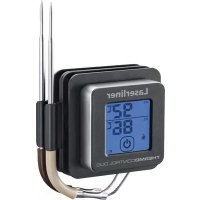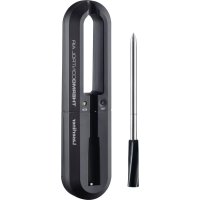
ThermoControl Air - Food thermometer Laserliner - Free user manual and instructions
Find the device manual for free ThermoControl Air Laserliner in PDF.



| Brand | Laserliner |
| Model | ThermoControl Air |
| Product Type | Food thermometer |
| Usage | Cooking, barbecue, roasting |
| Measuring range (contact temperature) | 0°C to 85°C |
| Accuracy (contact temperature) | ±1°C |
| Measuring range (ambient temperature) | 0°C to 300°C |
| Protection rating (probe) | IP66 |
| Base power supply | 1 AA 1.5V LR6 battery |
| Probe power supply | Integrated rechargeable battery (via base) |
| Probe battery life | Approximately 4 hours |
| Dimensions (base) | 168 x 24 x 40 mm |
| Dimensions (probe) | Length 90 mm, diameter 5.9 mm |
| Total weight | 80 g (battery included) |
| Connectivity | Bluetooth LE 4.x, max range 10 m |
| Mobile app | Yes, available for iOS and Android |
| LED display | Charge indicator (base and probe) |
| Cleaning | Damp cloth, do not immerse, do not wash in dishwasher |
| Safety | Sharp tip: risk of injury. Hot probe: wear gloves. Do not expose >85°C. |
| Storage temperature | -10°C to 60°C |
| Operating humidity | Max. 85% RH, non-condensing |
| Operating conditions | Probe: 0°C to 85°C, Base: -10°C to 50°C |
Frequently Asked Questions - ThermoControl Air Laserliner
User questions about ThermoControl Air Laserliner
0 question about this device. Answer the ones you know or ask your own.
Ask a new question about this device
Download the instructions for your Food thermometer in PDF format for free! Find your manual ThermoControl Air - Laserliner and take your electronic device back in hand. On this page are published all the documents necessary for the use of your device. ThermoControl Air by Laserliner.
USER MANUAL ThermoControl Air Laserliner
natural_image
Black laser control air device with a test probe and a separate tool (no visible text or symbols on the device itself)
Bluetooth

PENETRATOR
[Non-Text]
5.9mm

WIRELESS PROBE

DUAL SENSORS

QUICK CHARGE
10min
Laserliner
| DE | 02 |
| EN | 08 |
| NL | 14 |
| DA | 20 |
| FR | 26 |
| ES | 32 |
| IT | 38 |
| PL | 44 |
| FI | 50 |
| PT | 56 |
| SV | 62 |
| NO | 68 |
| TR | |
| RU | |
| UK | |
| CS | |
| ET | |
| RO | |
| BG | |
| EL | |
| SL | |
| HU | |
| SK | |
| HR |
Laserliner
!
natural_image
Two black rectangular objects with circular symbols on their bases, one open and one vertically inserted (no text or labels)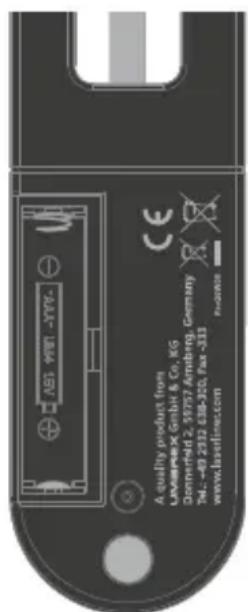
text_image
ASG VIRT -YYY- A quality product from Limaeeck GmbH & Co. KG. Dornerfeld 2, 59757 Artrnbrg. Germany Tel.: -49 2312 618-300, Fax :311 www.laserfinac.com e-mail: xjx@csbLaserliner
text_image
THERMOCONTROL AIR 1 TST K0 Laserliner 4 5 6 7Ladeschale
natural_image
Technical diagram of a mechanical component with two circular indicators and an arrow pointing to a feature (no text or symbols present)text_image
QR code image containing encoded data, no visible human-readable text
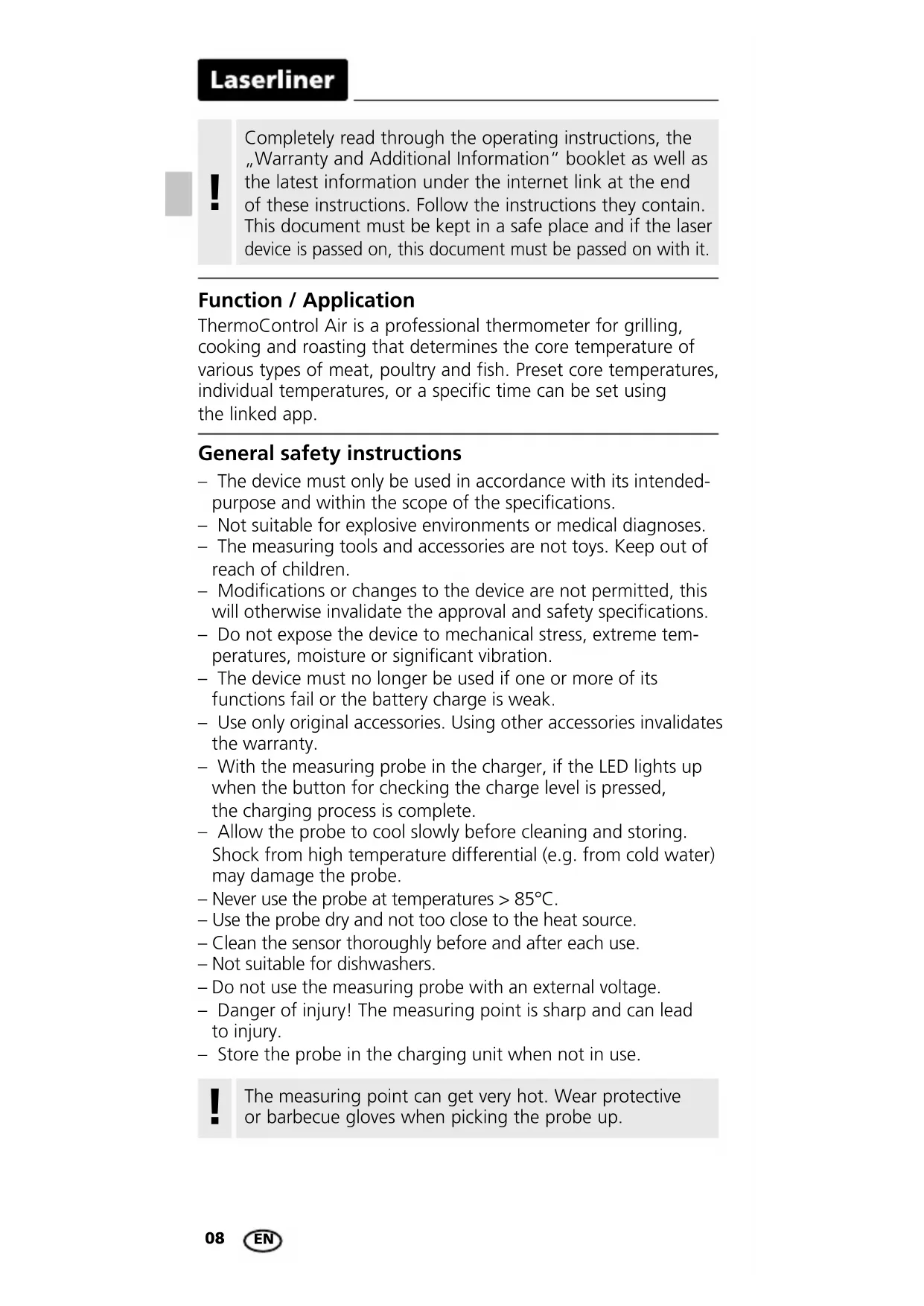
Completely read through the operating instructions, the "Warranty and Additional Information" booklet as well as the latest information under the internet link at the end of these instructions. Follow the instructions they contain. This document must be kept in a safe place and if the laser device is passed on, this document must be passed on with it.
Function / Application
ThermoControl Air is a professional thermometer for grilling, cooking and roasting that determines the core temperature of various types of meat, poultry and fish. Preset core temperatures, individual temperatures, or a specific time can be set using the linked app.
General safety instructions
- The device must only be used in accordance with its intended-purpose and within the scope of the specifications.
- Not suitable for explosive environments or medical diagnoses.
- The measuring tools and accessories are not toys. Keep out of reach of children.
- Modifications or changes to the device are not permitted, this will otherwise invalidate the approval and safety specifications.
- Do not expose the device to mechanical stress, extreme temperatures, moisture or significant vibration.
- The device must no longer be used if one or more of its functions fail or the battery charge is weak.
- Use only original accessories. Using other accessories invalidates the warranty.
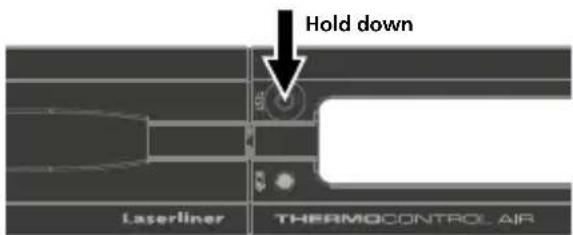
- With the measuring probe in the charger, if the LED lights up when the button for checking the charge level is pressed, the charging process is complete.
- Allow the probe to cool slowly before cleaning and storing. Shock from high temperature differential (e.g. from cold water) may damage the probe.
- Never use the probe at temperatures >85^ C .
- Use the probe dry and not too close to the heat source.
– Clean the sensor thoroughly before and after each use. - Not suitable for dishwashers.
- Do not use the measuring probe with an external voltage.
- Danger of injury! The measuring point is sharp and can lead to injury.
- Store the probe in the charging unit when not in use.
!
The measuring point can get very hot. Wear protective or barbecue gloves when picking the probe up.

The probe can be washed (IP 66) but may not be immersed!
Safety instructions
Dealing with electromagnetic radiation
- The measuring device complies with electromagnetic compatibility regulations and limits in accordance with the EMC Directive 2014/30/EU which is covered by the Radio Equipment Directive 2014/53/EU.
- Local operating restrictions – for example, in hospitals, aircraft, petrol stations or in the vicinity of people with pacemakers – may apply. Electronic devices can potentially cause hazards or interference or be subject to hazards or interference.
- The measuring accuracy may be affected when working close to high voltages or high electromagnetic alternating fields.
Safety instructions
Dealing with RF radiation
- The measuring device is equipped with a wireless interface.
- The measuring device complies with electromagnetic compatibility and wireless radiation regulations and limits in accordance with the RED 2014/53/EU.
– Umarex GmbH & CO. KG hereby declares that the ThermoControl Air radio equipment meets the requirements and other specifications of the European Radio Equipment Directive 2014/53/EU (RED). The EU Declaration of Conformity can be found in its entirety at the following address:
http://laserliner.com/info?an=AJI
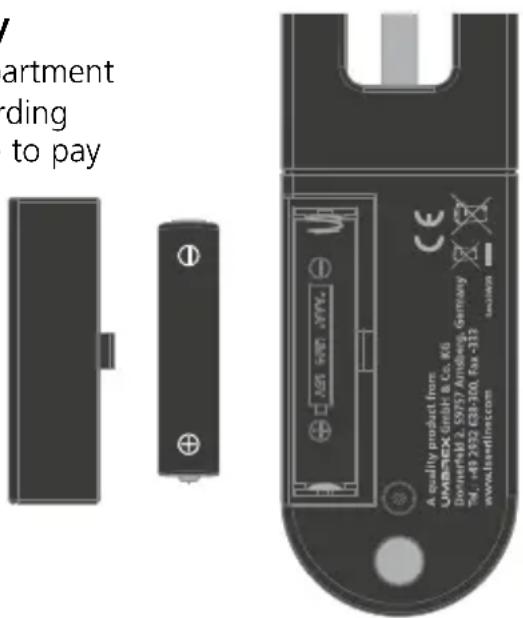
1 Inserting battery
Open the battery compartment and insert battery according to the symbols. Be sure to pay attention to polarity.
text_image
V artment ding to pay A quality product from UMBRECK GmbH & Co. KG Dorwertel 2, 59757 Andring, Germany Tel.: +40 352 E38-101, Fax: 372 www.ubreline.comLaserliner
text_image
THERMOCONTROL AIR 1 TIST K0 Laserliner 4 5 6 7Charger
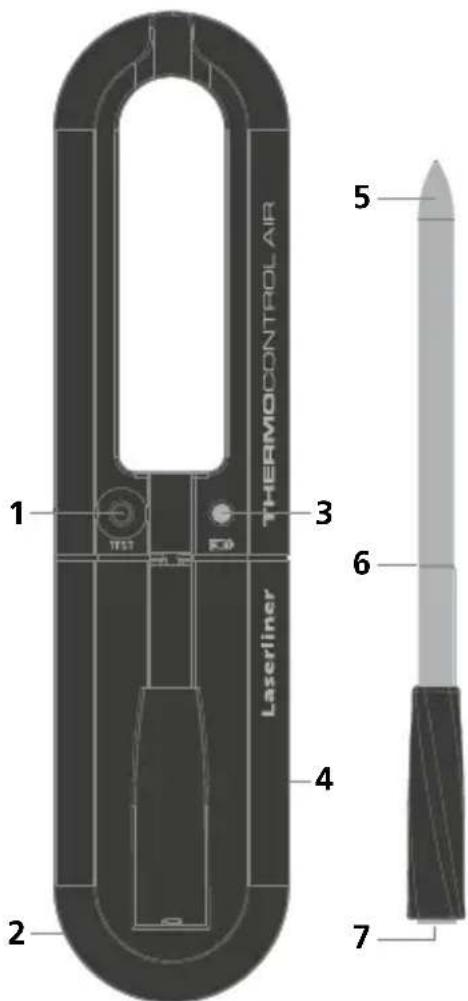
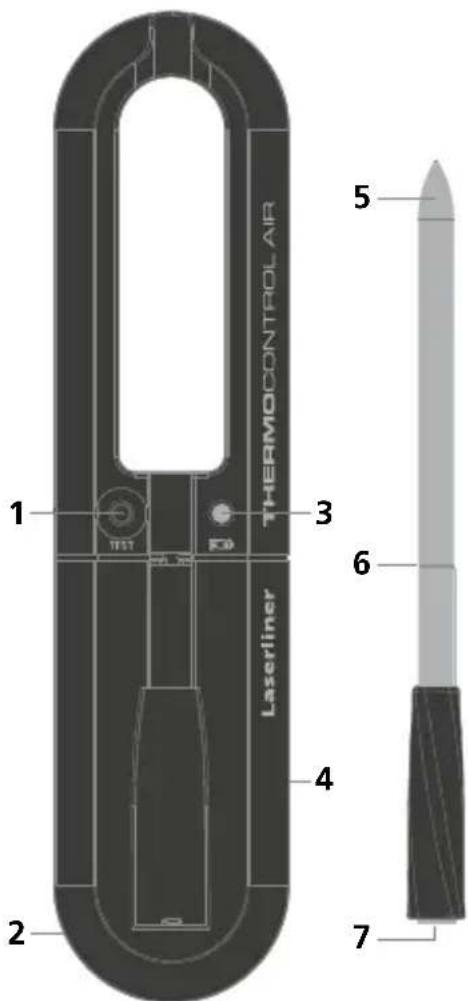
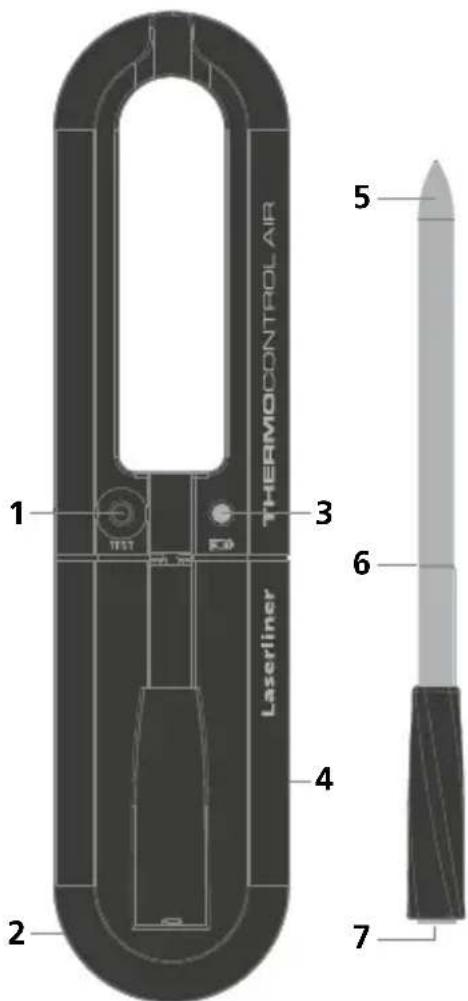
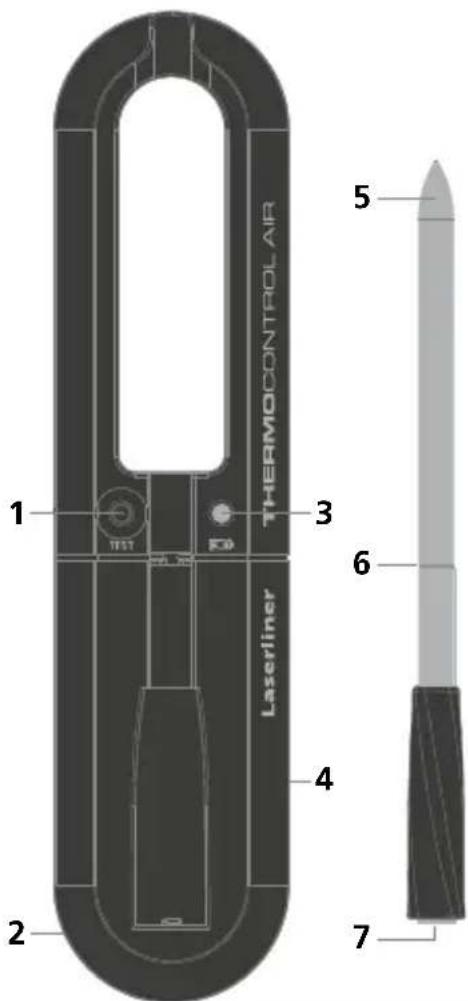
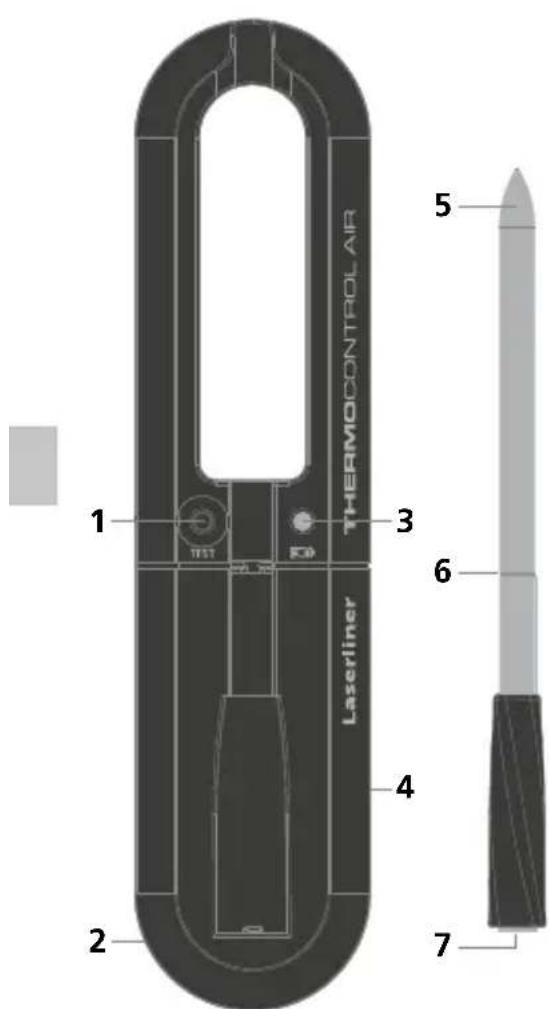
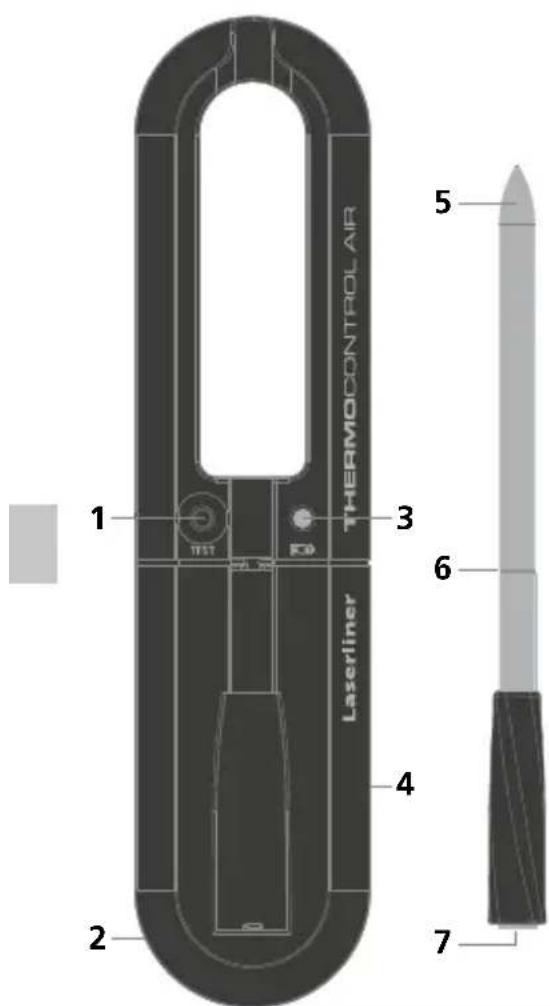
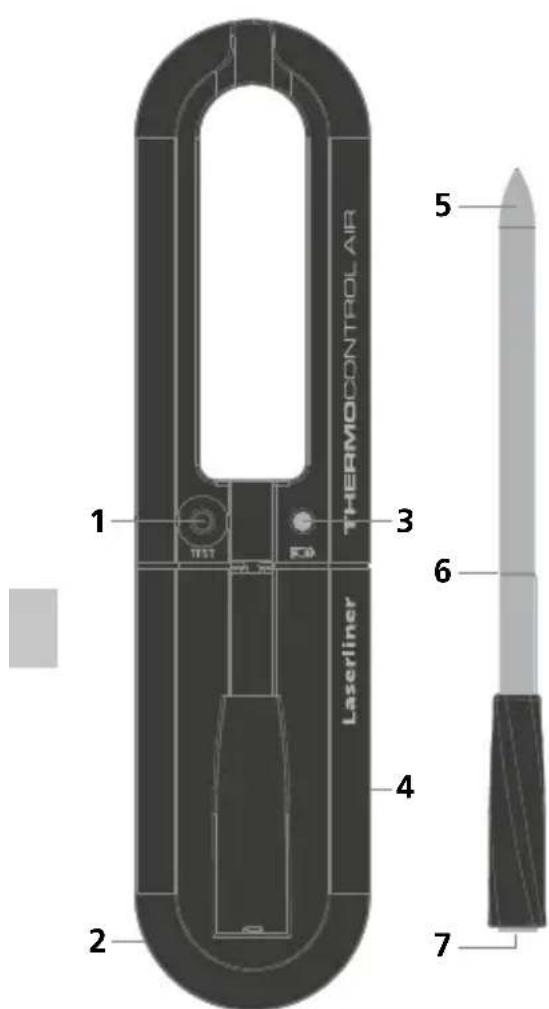
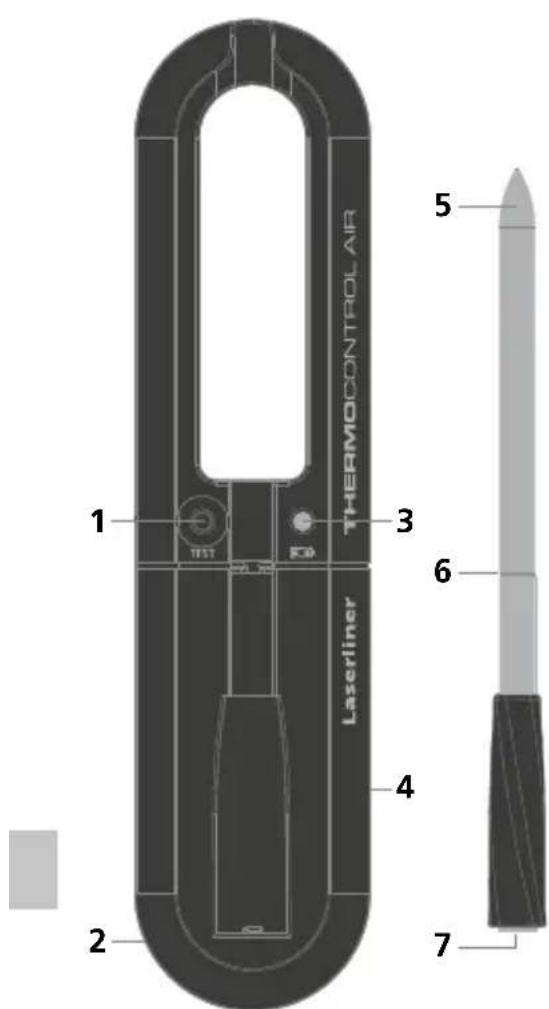
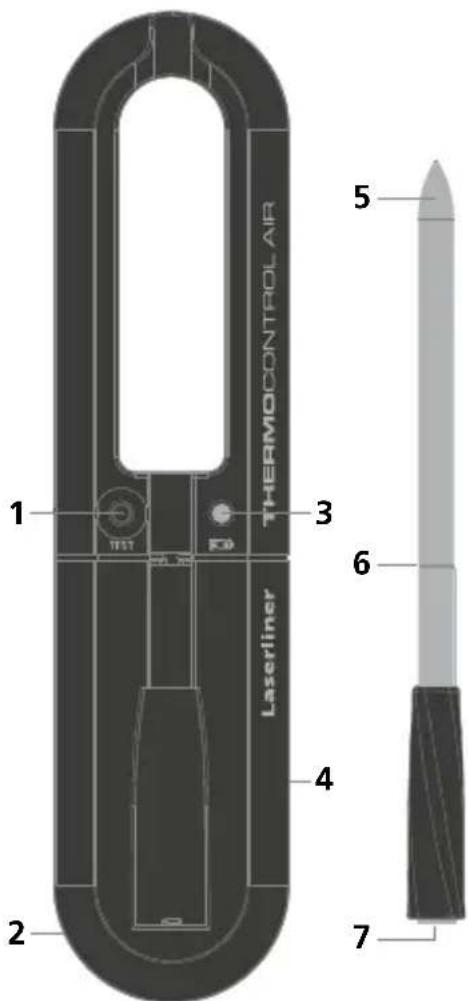
1 Button for checking the battery charge level (charger and measuring probe)
2 Integrated magnet holder (rear)
3 LED charge level display (1)
4 Battery compartment (rear)
Measuring probe
5 Point for measuring the contact temperature
6 Insert marking / charging contact
7 Sensor for measuring the environmental temperature / charging contact
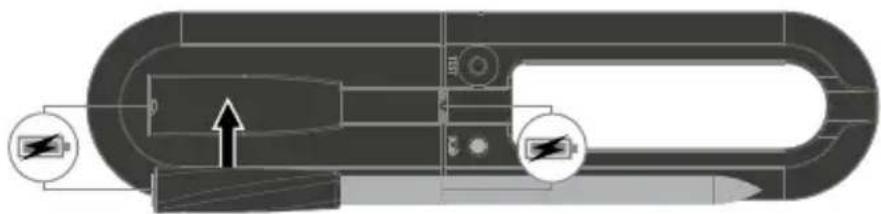
2 Charging the battery (measuring probe)
natural_image
Technical diagram of a mechanical component with two circular indicators and an arrow pointing to a feature (no text or symbols present)3 Charge level display
Battery (charger)
LED (3) illuminated: battery is charged
LED (3) not illuminated: replace battery
text_image
Hold down Laserliner THERMOCONTROL AIRBattery (measuring probe)
LED (3) flashes: battery charging
LED (3) illuminated: battery is fully charged
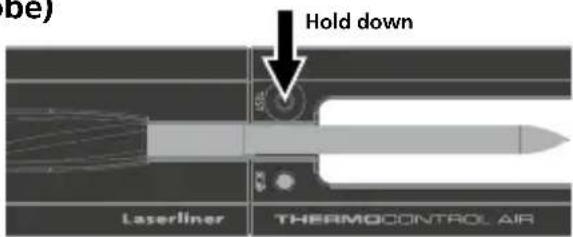
text_image
be) Hold down Laserliner THERMOCONTROL AIR4 Insert probe in item to be measured
text_image
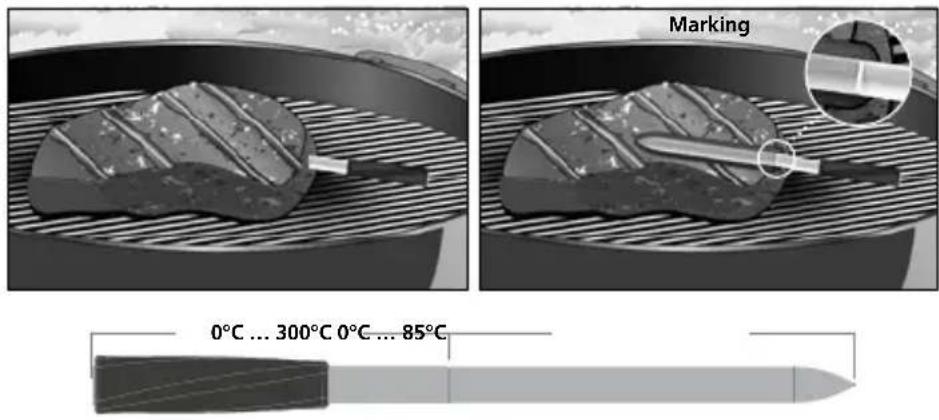
Marking 0°C ... 300°C 0°C ... 85°C
To avoid damage, the probe must always be inserted into the item to be measured up to the marking and the core temperature may not exceed a temperature of 85^ C.
Data transfer
The device features a Bluetooth ^® function that enables wireless data transfer to mobile devices with a Bluetooth ^® interface (such as a smartphone or tablet).
The system prerequisites for a Bluetooth®* connection are specified at http://laserliner.com/info?an=ble
The device can set up a Bluetooth ^®* connection with Bluetooth 4.0 compatible devices.
The range is set to a maximum distance of 10 m from the terminal device and greatly depends on the ambient conditions such as the thickness and composition of walls, sources of interference as well as the transmit / receive properties of the terminal device.
Application (app)
An app is required to use the Bluetooth®* function. You can download the app from the corresponding stores for the specific type of terminal device:



text_image
QR code image containing encoded data, no visible human-readable text
Make sure that the Bluetooth ^®* interface of the mobile device is activated.
Bluetooth ^®* is always activated once the probe is removed from the charger. A mobile device can connect to the removed probe via an app.
Laserliner
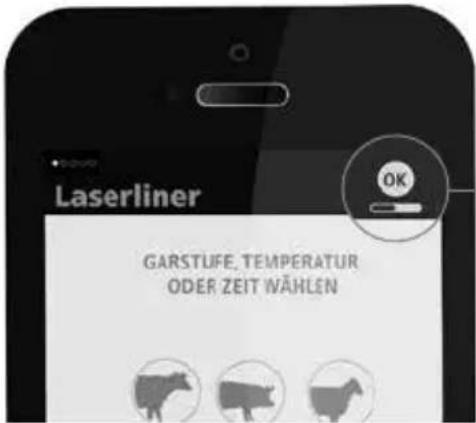
Once the app is open, the connection assistant provides information on the status of the Bluetooth®* connection to the measuring device.
If the app identifies more than one device, these can be individually selected using the connection assistant.
* The Bluetooth® word mark and the logo are registered trademarks of Bluetooth SIG Inc.
text_image
Laserliner GARSTUFE, TEMPERATUR ODER ZEIT WÄHLENThe status symbol appears as soon as the probe has been recognised by the app.
Danger – powerful magnetic fields
Powerful magnetic fields can adversely affect persons with active medical implants (e.g. pacemaker) as well as electromechanical devices (e.g. magnetic cards, mechanical clocks, precision mechanics, hard disks).
With regard to the effect of powerful magnetic fields on persons, the applicable national stipulations and regulations must be complied with such as BGV B11 §14 „electromagnetic fields“ (occupational health and safety - electromagnetic fields) in the Federal Republic of Germany.
To avoid interference/disruption, always keep the implant or device a safe distance of at least 30 cm away from the magnet.
Information on maintenance and care
Clean all components with a damp cloth and do not use cleaning agents, scouring agents and solvents. Remove the battery(ies) before storing for longer periods. Store the device in a clean and dry place.
Technical Data
| Measured variable | Contact temperature Ambient temperature |
| Contact temperature measuring range | 0°C ... 85°C |
| Contact temperature accuracy | ± 1°C |
| Ambient temperature measurement range | 0°C ... 300°C |
| Degree of protection | IP 66 |
| Power supply 1 x 1.5V | LR6 (AA) |
| Operating time approx. | 4 hours |
| Operating conditions | Probe: 0°C ... 85°C, Charger: -10°C ... 50°C, max. humidity 85% rH, no condensation, max. working altitude 2000 m above sea |
| Storage conditions | -10°C ... 60°C, max. humidity 85% rH, no condensation |
| Radio module operating data | Bluetooth LE 4.x interface; Frequency band: ISM band 2400–2483.5 MHz, 40 channels; Transmission power: max. 10 mW; Bandwidth: 2 MHz; Bit rate: 1 Mbit/s; Modulation: GFSK/FHSS |
| Dimensions (W x H x D) | 168 x 24 x 40 mm |
| Probe 90 mm, ø 5,9 mm | |
| Weight 80 g (incl. battery) |
Subject to technical changes without notice. 20W05
EU directives and disposal
This device complies with all necessary standards for the free movement of goods within the EU.
This product is an electric device and must be collected separately for disposal according to the European Directive on waste electrical and electronic equipment.
Further safety and supplementary notices at: http://laserliner.com/info?an=AJI

Laserliner
!
text_image
A quality product from UMARTEX GmbH & Co. Den-Welfd 2.5937/Arslung- Germany TRU: +19.002.618-300, Fax: 323 www.danellmar.comLaserliner
text_image
THERMOCONTROL AIR 1 T11 K0 Laserliner 4 5 6 7Laadstation
natural_image
Technical diagram of a mechanical component with labeled parts and arrows indicating motion (no readable text or symbols)text_image
QR code image containing encoded data, no visible human-readable text
natural_image
Two black rectangular electronic components with mounting holes, one side and one upright (no text or symbols visible)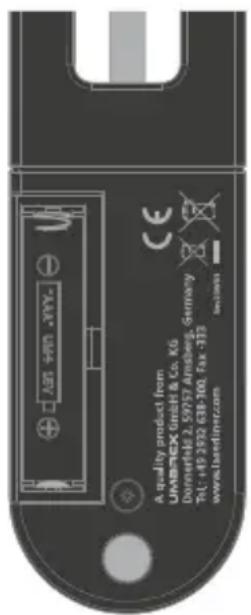
text_image
A quality product from UMB-TEX GmbH & Co. KG Dorriefer 2.59757 Ainsberg, Germany Tel: +19 392 638-100, Fax: 372 www.bardiner.comLaserliner
text_image
THERMOCONTROL AIR Laserliner 1 2 3 4 5 6 7Oplader
natural_image
Technical diagram of a mechanical component with labeled parts and an arrow indicating direction (no readable text or symbols)text_image
QR code image containing encoded data, no visible human-readable text
Kontrollér, at Bluetooth®-interfacet i den mobile enhed er aktiveret.
natural_image
Technical diagram of a mechanical component with two circular features and an arrow indicating direction (no text or symbols)text_image
QR code image containing encoded data, no visible human-readable text
natural_image
Two black rectangular electronic components with circular symbols, one vertical and one horizontal, shown without any text or labels.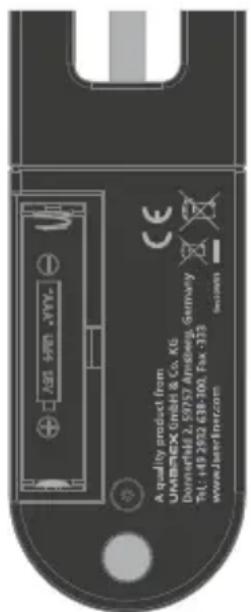
text_image
A quality produt from UMB-TEX GmbH & Co. KG. Dunisfeld 2.5975 Almberg, Germany Tel: +19 2092 618-300, Fax: 333 www.Jate-Incr.comLaserliner
text_image
THERMOCONTROL AIR 1 3 6 4 2 7 LaserlinerCargador
natural_image
Technical diagram of a mechanical component with two circular annotations and an arrow indicating direction (no text or symbols present)text_image
QR code image containing encoded data, no visible human-readable text
natural_image
Two black rectangular objects with circular symbols, one vertical and one upright, shown side by side (no text or labels)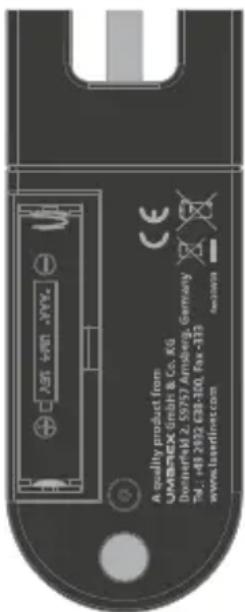
text_image
A quality product from UMBA-CK GmbH & Co. KG DornerHM 2.59757 Amberg, Germany Tel.: +8 2022 CB8-300, Fax-183 www.bserlinc.comLaserliner
text_image
THERMOCONTROL AIR 1 2 3 4 5 6 7 LaserlinerBase di ricarica
natural_image
Technical diagram of a mechanical component with two circular indicators and an arrow pointing to a feature (no text or symbols present)text_image
QR code image containing encoded data, no visible human-readable text
natural_image
Two black rectangular electronic components with circular symbols, one on the left and one on the right (no text or labels visible)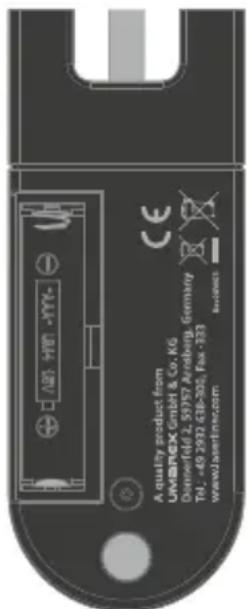
text_image
A quality product from LIMBINGX GmbH & Co. KG Dennfeld 2, 5997 Aredberg, Germany Tel: +40 293 618-301, Fax: 233 www.laserim.comLaserliner
text_image
THERMOCONTROL AIR 1 3 6 4 2 7 LaserlinerPodstawka ładująca
natural_image
Technical diagram of a mechanical component with two circular indicators and an arrow pointing to a feature (no text or symbols present)text_image
QR code image containing encoded data, no visible human-readable text
natural_image
Technical diagram of a mechanical component with two circular indicators and an arrow pointing to a feature (no text or symbols present)text_image
QR code image containing encoded data, no visible human-readable text
natural_image
Technical diagram of a mechanical component with two circular indicators and an arrow pointing to a specific feature (no text or symbols present)Download on the App Store

GET IT ON Google Play

text_image
QR code image containing encoded data, no visible human-readable text!
natural_image
Two black rectangular objects with circular symbols, one on a side and one vertically aligned (no text or labels)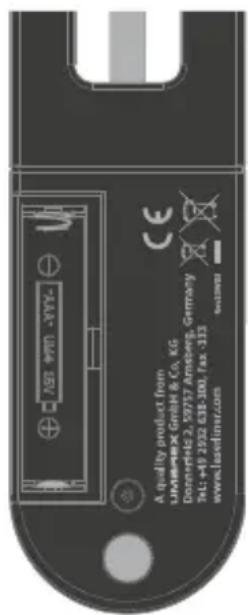
text_image
JASF A quality product from LAMWESX GmbH & Co. KG Dorringer 2, 50757 Ameberg, Germany Tel: +48 2922 638-300, fax: -313 www.elsefinz.comLaserliner
text_image
THERMOCONTROL AIR 1 3 6 4 2 7 LaserlinerLaddningsdocka
natural_image
Technical diagram of a mechanical component with labeled parts and an arrow indicating direction (no text or symbols present)text_image
QR code image containing encoded data, no visible human-readable text
natural_image
Two black rectangular objects with circular symbols on their bases, one side and one with a plus sign (no text or labels)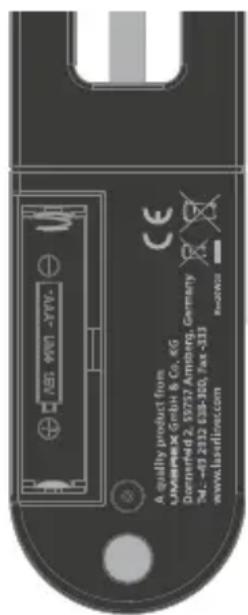
text_image
A quality product from UNIMARK GmbH & Co. 46 Dorringer 2, 59757 Ambrig. Germany Tel.: +8-2122 638-100, Tax -313 www.laserlinecc.comLaserliner
text_image
THERMOCONTROL AIR 1 2 3 4 5 6 7 LaserlinerLadeskål
natural_image
Technical diagram of a mechanical component with two circular features and an arrow indicating direction (no text or symbols)text_image
QR code image containing encoded data, no visible human-readable text
Pass på at Bluetooth®*-grensesnittet til det mobile sluttapparatet er aktivert.
Bluetooth®* er alltid aktivert när sonden tas ut av ladeskålen. En mobil terminal kan koble seg opp til sonden som er tatt ut vha. en app.