MultiSync ME551 - Monitor NEC - Free user manual and instructions
Find the device manual for free MultiSync ME551 NEC in PDF.



| Product Type | LCD Monitor |
| Screen Size | 55 inches (diagonal) |
| Native Resolution | 3840 x 2160 (4K UHD) |
| Brightness | 500 cd/m² |
| Contrast Ratio | 4000:1 |
| Viewing Angle (H/V) | 178°/178° |
| Connectivity | HDMI, DisplayPort, USB, LAN |
| Power Supply | 100-240 V AC, 50/60 Hz |
| Power Consumption (Typical) | 200 W |
| Weight (with stand) | approx. 30 kg |
| Dimensions (with stand) | 1240 x 780 x 300 mm (W x H x D) |
| VESA Standard | 400 x 400 mm |
| Key Features | Digital display, dynamic signage, VESA compatibility |
| Maintenance | Clean with a dry cloth; do not use flammable substances |
| Safety | Wall mount recommended; do not block ventilation openings |
| Supplied Accessories | Remote control, power cable, HDMI cable, DisplayPort cable |
| General Information | Limited warranty, NEC technical support |
Frequently Asked Questions - MultiSync ME551 NEC
User questions about MultiSync ME551 NEC
0 question about this device. Answer the ones you know or ask your own.
Ask a new question about this device
Download the instructions for your Monitor in PDF format for free! Find your manual MultiSync ME551 - NEC and take your electronic device back in hand. On this page are published all the documents necessary for the use of your device. MultiSync ME551 by NEC.
USER MANUAL MultiSync ME551 NEC
Important Information. English-1
Installation English-8
NOTE: This product can only be serviced in the country where it was purchased.
(1) The contents of this manual may not be reprinted in part or whole without permission.
(2) The contents of this manual are subject to change without notice.
(3) Great care has been taken in the preparation of this manual; however, should you notice any questionable points, errors or omissions, please contact us.
(4) The image shown in this manual is indicative only. If there is inconsistency between the image and the actual product, the actual product shall govern.
(5) Notwithstanding articles (3) and (4), NEC will not be responsible for any claims on loss of profit or other matters deemed to result from using this device.
(6) This manual is commonly provided to all regions so they may contain descriptions that are pertinent for other countries.
Important Information
Safety Precautions and Maintenance
FOR OPTIMUM PERFORMANCE, PLEASE NOTE THE FOLLOWING WHEN SETTING UP AND USING THE LCD COLOR MONITOR:
About the Symbols
To ensure safe and proper use of the product, this manual uses a number of symbols to prevent injury to you and others as well as damage to property. The symbols and their meanings are described below. Be sure to understand them thoroughly before reading this manual.
| WARNING | Failing to heed this symbol and handling the product incorrectly could result in accidents leading to major injury or death. |
| CAUTION | Failing to heed this symbol and handling the product incorrectly could result in personal injury or damage to surrounding property. |
Examples of symbols
| ▲ Indicates a warning or caution. This symbol indicates you should be careful of electric shocks. | ||
| ○ Indicates a prohibited action. This symbol indicates something that must be prohibited. | ||
| ● Indicates a mandatory action. This symbol indicates that the power cord should be unplugged from the power outlet. | ||
| WARNING | ||
| 1 | UNPLUGTHE POWERCORD | Unplug the power cord if the product malfunctions.Should the product emit smoke or strange odors or sounds, or if theproduct has been dropped or the cabinet broken, turn off the product'spower, then unplug the power cord from the power outlet. Failure todo so could not only lead to fire or electric shock, it could also result invision impairment. Contact your dealer for repairs.Never try to repair the product on your own. Doing so is dangerous. |
| 2 | 4 | Do not open or remove the product's cabinet.Do not disassemble the product.There are high voltage areas in the product. Opening or removingproduct covers and modifying the product may expose you to electricshock, fire, or other risks.Refer all servicing to qualified service personnel. |
| 3 | ∅ | Do not use the product if it has structural damage.If you notice any structural damage such as cracks or unnaturalwobbling, please refer servicing to qualified service personnel. If theproduct is used in this condition, the product may fall or cause personalinjury. |
| 4 | ∅ | Handle the power cord with care. Damaging the cord could lead to fireor electric shock.Do not place heavy objects on the cord.Do not place the cord under the product.Do not cover the cord with a rug, etc.Do not scratch or modify the cord.Do not bend, twist or pull the cord with excessive force.Do not apply heat to the cord.Should the cord be damaged (exposed core wires, broken wires, etc.),ask your dealer to replace it. |
| 5 | ∅ | Do not touch the power plug if you hear thunder. Doing so could resultin electric shock. |
| 6 | ∅ | Please use the power cord provided with this product in accordancewith the power cord table.If a power cord is not supplied with this product, please contact NEC.For all other cases, please use the power cord with the plug stylethat matches the power socket where the product is located. Thecompatible power cord corresponds to the AC voltage of the poweroutlet and has been approved by, and complies with, the safetystandards in the country of purchase. |
| 7 | For proper installation it is strongly recommended to use a trained service person. Failure to follow the standard installation procedures could result in damage to the product or injury to the user or installer. | |
| 8 | Please install the product in accordance with the following information. This product cannot be used or installed without the table top stand or other mounting accessory for support. ·ME651: DO NOT use this product on the floor with the table top stand. Please use this product on a table or with a mounting accessory for support. When transporting, moving, or insalling the product, please use as many people as necessary to be able to lift the product without causing personal injury or damage to the product. We recommend two or more people for the ME431/ME501/ME551 and four or more people for the ME651. Please refer to the instructions included with the optional mounting equipment for detailed information about attaching or removing. Do not cover the vent on the product. Improper installation of the product may result in damage to the product, an electric shock or fire. Do not install the product in the locations below: ·Poorly ventilated spaces. ·Near a radiator, other heat sources, or in direct sunshine. ·Continual vibration areas. ·Humid, dusty, steamy, or oily areas. ·Outdoors. ·High-temperature environment where humidity changes rapidly and condensation is likely to occur. ·A ceiling or wall that is not strong enough to support the product and mounting accessories. Do not mount the product upside down. | |
| 9 | ⊗ | Prevent tipping and falling for earthquakes or other shocks. To prevent personal injury or damage to the product caused by tipping over due to earthquakes or other shocks, make sure to install the product in a stable location and take measures to prevent falling. The measures to prevent falling and tipping are intended for reducing the risk of injury, but may not guarantee the effectiveness against all earthquakes. The product may tip causing personal injury. ·When using the product with the optional table top stand, fasten the product to a wall using a cord or chain that can support the weight of the product in order to prevent the product from falling. Fasten the cord or chain to the product using the clamps and screws provided with the product or the table top stand. Depending on the table top stand, the stand has the structure for preventing tipping. Please refer to the table top stand manual. ·Be sure to remove the cord or chain from the wall before moving the product to prevent personal injury or damage to the product. The product may fall causing personal injury. ·Do not attempt to hang the product using an installation safety wire. ·Please install the product in an area on the wall or ceiling strong enough to support the weight of the product. ·Prepare the product using mounting accessories, such as hook, eyebolt, or mounting parts, and then secure the product with a safety wire. The safety wire must not be tight. ·Please make sure the mounting accessories are strong enough to support the product weight and size before installing it. |
| 9 | ⊗ | Stability Hazard. The product may fall, causing serious personal injury or death. To prevent injury, this product must be securely attached to the floor/wall in accordance with the installation instructions. Many injuries, particularly to children, can be avoided by taking simple precautions such as: ·ALWAYS use stands or installation methods recommended by the manufacturer of the product set. ·ALWAYS use furniture that can safely support the product. ·ALWAYS ensure the product is not overhanging the edge of the supporting furniture. ·ALWAYS educate children about the dangers of climbing on furniture to reach the product or its controls. ·ALWAYS route cords and cables connected to your product so they cannot be tripped over, pulled or grabbed. ·NEVER place a product in an unstable location. ·NEVER place the product on tall furniture (for example, cupboards or bookcases) without anchoring both the furniture and the product to a suitable support. ·NEVER place the product on cloth or other materials that may be located between the product and supporting furniture. ·NEVER place items that might tempt children to climb, such as toys and remote controls, on the top of the product or furniture on which the product is placed. If the existing product is going to be retained and relocated, the same considerations as above should be applied. |
| 10 | ⊗ | Do not place this product on a sloping or unstable cart, stand or table. Doing so could lead to falling or tipping and cause personal injury. |
| 11 | ⊗ | Do not insert objects of any kind into the cabinet slots. It may cause electric shock, fire, or product failure. Keep objects away from children and babies. |
| 12 | ⊗ | Do not spill any liquids into the cabinet or use your product near water. Immediately turn off the power and unplug your product from the wall outlet, then refer servicing to qualified service personnel. It may cause an electric shock or start a fire. |
| 13 | ⊗ | Do not use flammable gas sprays to remove dust when cleaning the product. Doing so could lead to a fire. |
| 14 | ⊗ | Securely fasten the Option Board. Ensure the Option Board is securely fastened using the original screws to prevent the Option Board from falling out the product. A falling Option Board may expose you to danger. |
| CAUTION | ||
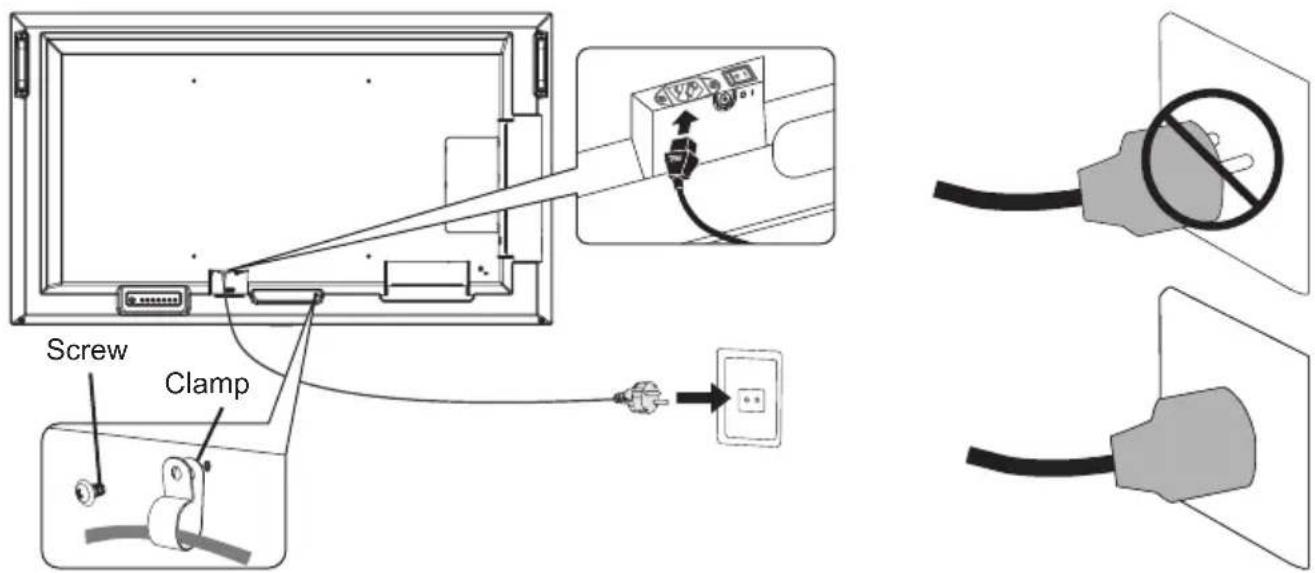
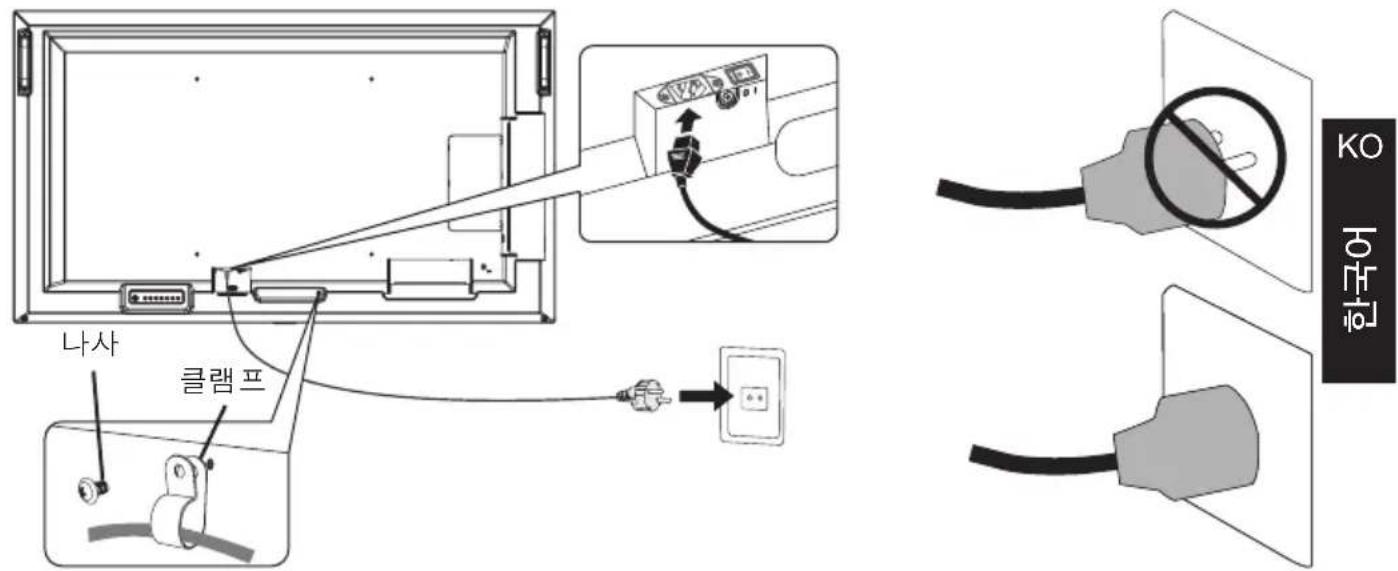
| 1 | Handling the power cord. Handle the power cord with care. Damaging the cord could lead to fire or electric shock. ·When connecting the power cord to the product's AC IN terminal, make sure the connector is fully and firmly inserted. ·Fasten the power cord to the product by attaching the screw and clamp to prevent loose connection. (Recommended Fasten Force: 120 - 190 N·cm). ·Do not connect or disconnect the power cord with wet hands. ·When connecting or disconnecting the power cord, pull the power cord out by holding onto its plug. ·When cleaning the product, for safety purposes, unplug the power cord from the power outlet beforehand. Regularly dust off the power cord by using a soft dry cloth. ·Before moving the product, make sure the product power is off, then unplug the power cord from the power outlet and check that all cables connecting the product to other devices are disconnected. ·When you are not planning to use the product for an extended period of time, always unplug the power cord from the power outlet. ·This equipment is designed to be used in the condition of the power cord connected to the earth. If the power cord is not connected to the earth, it may cause electric shock. Please make sure the power cord is earthed properly. | |
| 2 | Do not bind the power cord and the USB cable. It may trap heat and cause a fire. | |
| 3 | Do not connect to a LAN with excessive voltage. When using a LAN cable, do not connect to a peripheral device with wiring that might have excessive voltage. Excessive voltage on the LAN port may cause an electric shock. | |
| 4 | Do not climb on the table where the product is installed. Do not install the product on a wheeled table if the wheels on the table have not been properly locked. The product may fall, causing damage to the product or personal injury. | |
| 5 | Installation, removal, and height adjustment of the optional table top stand. ·When installing the table top stand, handle the unit with care to avoid pinching your fingers. ·Installing the product at the wrong height can cause tipping. Please install your product at proper height to prevent personal injury or damage to the product. | |
| 6 | Do not push or climb on the product. Do not grab or hang onto the product. The product may fall, causing damage to the product or personal injury. | |
| 7 | Do not impact the LCD panel surface, it can cause serious damage to the product or personal injury. | |
| 8 | Incorrect usage of batteries can result in leaks or bursting. • Insert batteries matching the (+) and (-) signs on each battery to the (+) and (-) signs of the battery compartment. • Do not mix battery brands. • Do not combine new and old batteries. This can shorten battery life or cause liquid leakage of batteries. • Remove dead batteries immediately to prevent battery acid from leaking into the battery compartment. • Do not touch exposed battery acid, it may injure your skin. • Disposal of a battery into fire or a hot oven, or mechanically crushing or cutting of a battery, that can result in an explosion. • Leaving a battery in an extremely high temperature surrounding environment, or a battery subject to extremely low air pressure, that can result in an explosion or the leakage of flammable liquid or gas. • Contact your dealer or local authorities when disposing of batteries. | |
| 9 | Suitable for entertainment purposes at controlled luminous environments, to avoid disturbing reflections from the screen. | |
| 10 | When running the cooling fan continuously, we recommend wiping clean the ventilation holes a minimum of once a month. Failure to do so could lead to fire or electric shock or damage to the product. | |
| 11 | To ensure the product's reliability, please clean the ventilation holes at the rear side of the cabinet at least once a year to remove dirt and dust. Failure to do so could lead to fire or electric shock or damage to the product. | |
For box contents, please refer to the printed contents sheet provided in the box.
Product warranty does not cover damage caused by improper installation. Failure to follow these recommendations could result in voiding the warranty.
WARNING: Please refer to "WARNING 7", "WARNING 8", and "WARNING 9".
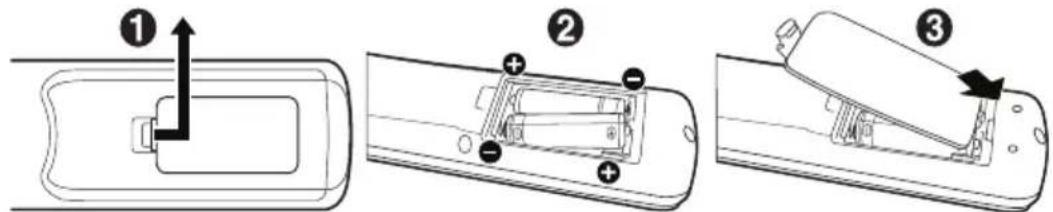
- Install the remote control batteries
The remote control is powered by two 1.5 V AAA batteries.
To install or replace batteries:
NEC recommends the following battery use:
CAUTION: Please refer to "CAUTION 8".
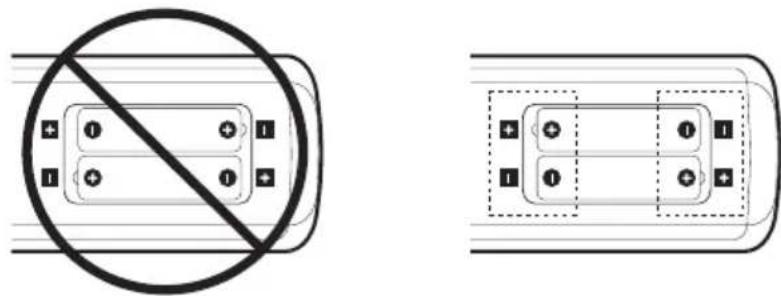
NOTE: If you do not intend to use the Remote Control for a long period of time, remove the batteries.
-
Connect external equipment
-
To protect the external equipment, turn off the main power before making connections.
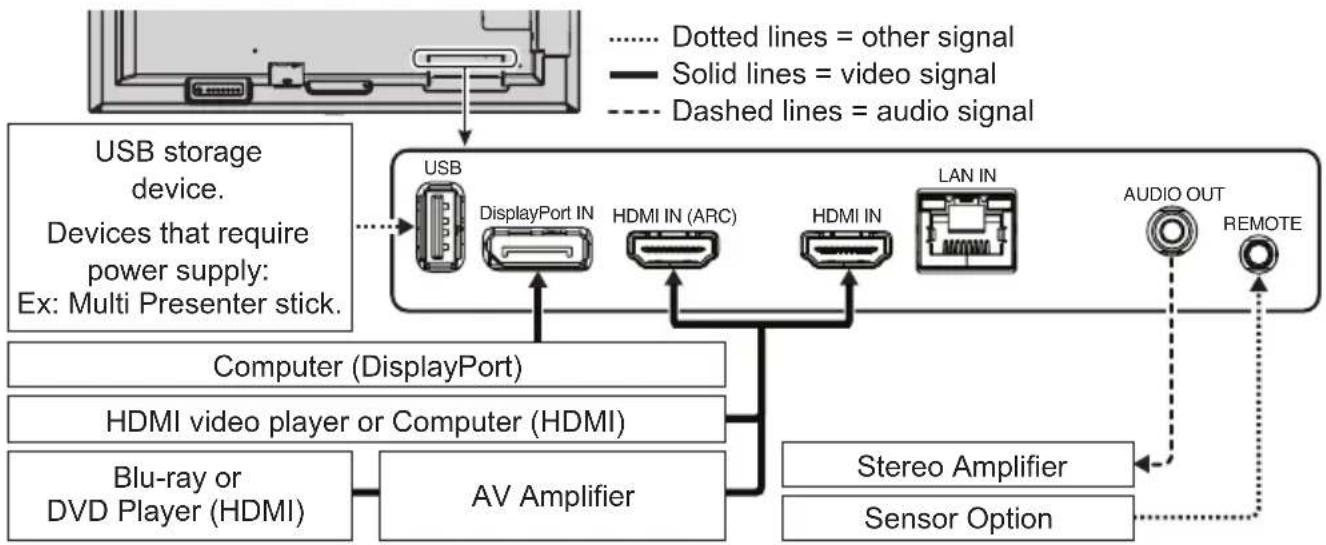
Connecting to a TV*1
-
Cable distribution system should be grounded (earthed) in accordance with ANSI/NFPA 70, the National Electrical Code (NEC), in particular Section 820.93, Grounding of Outer Conductive Shield of a Coaxial Cable.
-
The screen of the coaxial cable is intended to be connected to earth in the building installation.
*1: The product you purchased may not have this feature.
3. Connect the supplied power cord
WARNING: Please refer to the "Important Information" section for proper selection of an AC power cord.
CAUTION: Please refer to "CAUTION 1".
NOTE: The monitor should be installed close to an easily accessible power outlet.
- Please make sure that enough power is supplied to the monitor. Please refer to the "Power Supply" in the specification (See User's manual).
4. Cable information
CAUTION: Use the provided specified cables with this product so as not to interfere with radio and television reception.
For USB, please use a shielded signal cable with ferrite core.
For HDMI and DisplayPort, please use a shielded signal cable.
Use of other cables and adapters may cause interference with radio and television reception.
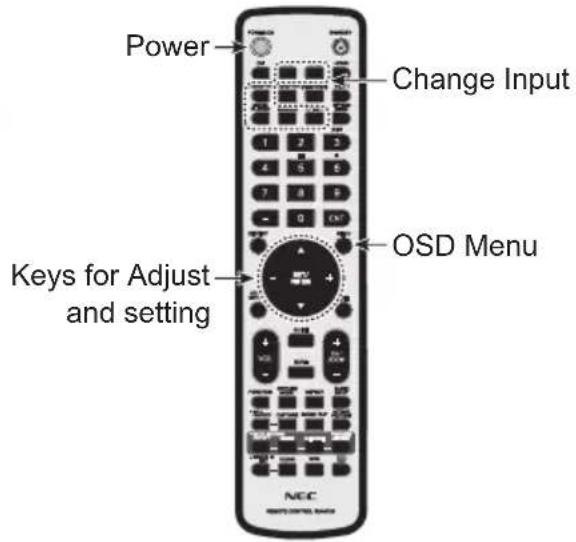
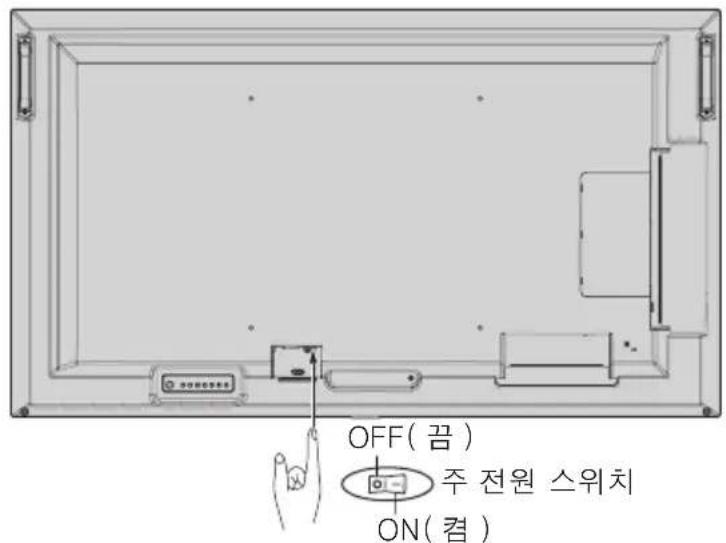
- Turn on the power for the monitor and the external equipment
Switch on the monitor power first.
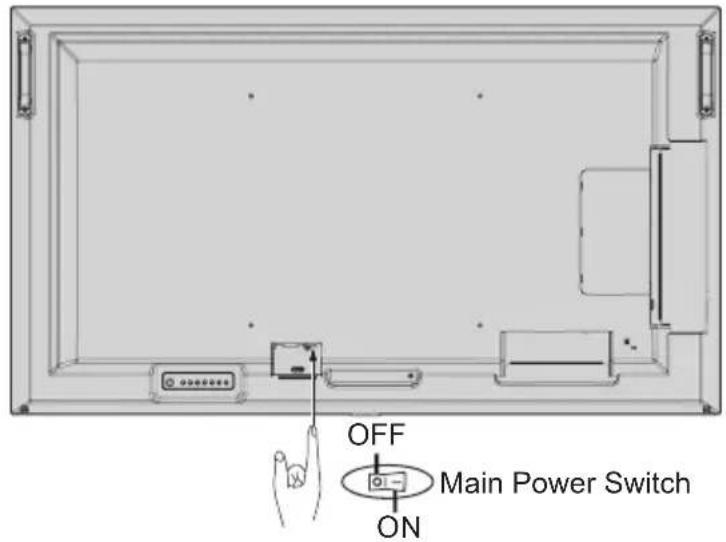
Main Power Switch Wireless Remote Control
Prevent Tipping
CAUTION: Please refer to "WARNING 7" and "WARNING 9".
- Please refer to the table top stand manual of ST-401 and ST-43M for "structure of Prevent Tipping".
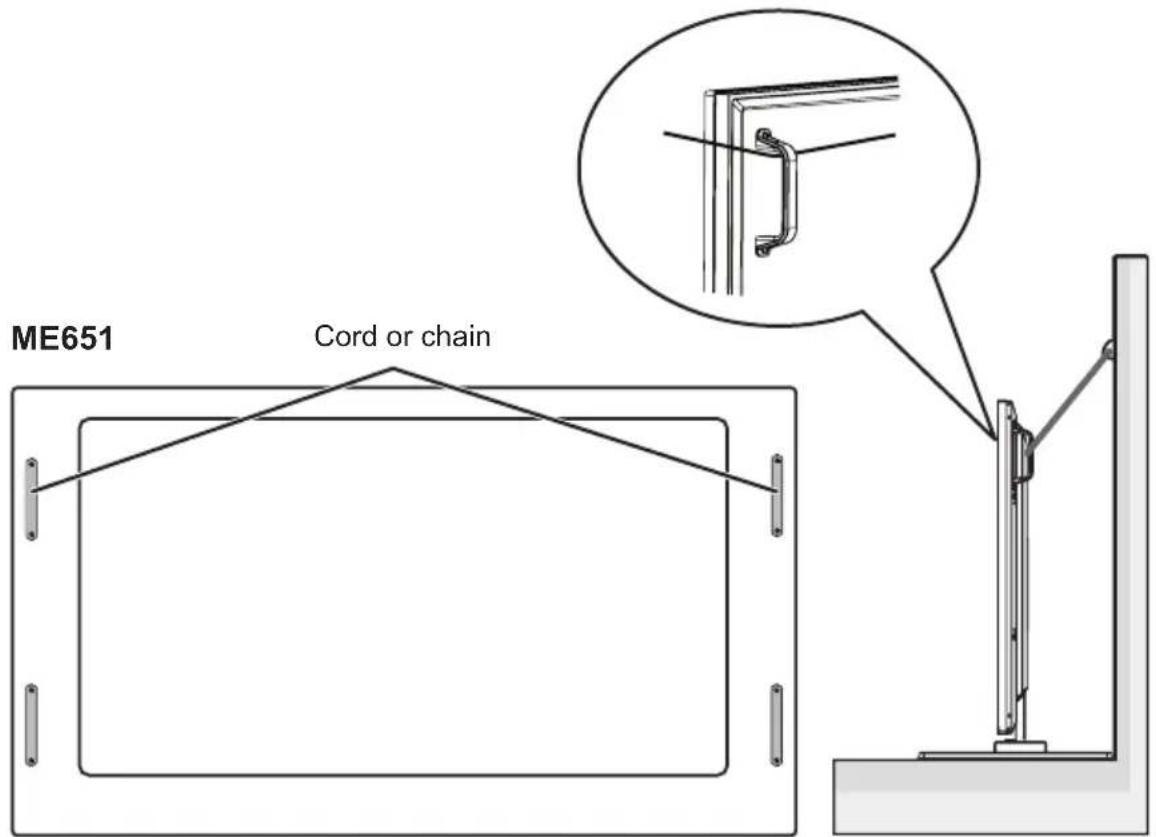
Before attaching the monitor to the wall, make sure that the wall can support the weight of the monitor.
V ANSI/NFPA (p) (L) (L) L (L) L (L) L (L) L (L) L (L) L (L) L (L) L (L) L (L) L (L) L (L) L (L) L (L) L (L) L (L) L (L) L (L) L (L) L (L) L (L) L (L) L (L) L (L) L (L) L (L)
ΓIA BEATI ΣTH ANO O ΣH, ΑABETE Y N O Ψ H TO E Ε H Σ, OTAN Π P A Γ M A T O N O I E I T E E KATA Σ T A Σ H KAI X P H Σ I M O N O I E I T E THN O G O N H L C D:
WAARSCHUWING: Zie "WAARSCHUWING 7", "WAARSCHUWING 8", en "WAARSCHUWING 9".
LET OP!: Zie "WAARSCHUWING 7" en "WAARSCHUWING 9".
- Instale as pilhas no controlo remoto
https://www.nec-display.com/jp/environment/recycle/display.html
| 1 | 선원 썠드다류기. 선원 썠드를 主干해서다류심지오 . 썠드가 옆상에서화재 퍼는 갑前端이 新闻发布수有问题ledge. • 전원 썠드를 썠들어 친에 기재터가 옆前端이 相关内容이에体现在지 • • • • • • • • • • • • • • • • • • • • • • • • • • • • • • • • • • • • • • • • • • • • • • • • • • • • • • • • • • • • • • • • • • | ||
| 2 | 선원 썠드와 USB 썠이들을목지마심지오 . • • • • • • • • • • • • • • • • • • • • • • • • • • • • • • • • • • • • • • • • • • • • • • • • • * • • • • • • • • • • • • • • • • • • • • • • • • • • • • • • • • • • • • • • • • • • • • • • • • • • | ||
| 3 | 과원일 LAN 于 端 end to 非常の連続。LAN 썠이들어 LAN 썠이들어 MASSIVE PRODUCTION. LAN foet of the second in line with the first in line with the second in line with the second in line with the second in line with the second in line with the second in line with the second in line with the second in line with the second in line with the second in line with the second in line with the second in line with the second in line with the second in line with the second in line with the second in line with the second in line with the second in line with the second in line with the second in line with the second in line with thesecond in line with the second in line with the second in line with the second in line with the second in line with the second in line with the second in line with the second in line with the second in line with the second in line with the second in line with the second in line with the second in line with the second in line with the second in line with the second in line with the second in line with the second in line with the second in line with the second in line with theSecond in line with the second in line with the second in line with the second in line with the second in line with the second in line with the second in line with the second in line with the second in line with the second in line with the second in line with the second in line with the second in line with the second in line with the second in line with the second in line with the second in line with the second in line with the second in line with the second in line with the Second in line with the second in line with the second in line with the second in line with the second in line with the second in line with the second in line with the second in line with the second in line with the second in line with the second in line with the second in line with the second in line with the second in line with the second in line with the second in line with the second in line with the second in line with the second in line with the second in line with the • • • • • • • • • • • • • • • • • • • • • • • • • • • • • • • • • • • • • • • • • • • • • • • • • • • • * • • • • • • • • • • • • • • • • • • • • • • • • • • • • • • • • • • • • • • • • • • • • • • • • • * • | ||
| 5 | 상품사용 ※ ※ ※ ※ ※ ※ ※ ※ ※ ※ ※ ※ ※ ※ ※ ※ ※ ※ ※ ※ ※ ※ ※ ※ ※ ※ ※ ※ ※ ※ ※ ※ ※ ※ ※ ※ ※ ※ ※ ※ ※ ※ ※ ※ ※ ※ ※ ※ ※ ※ ※ |
☆:·MNTT 1
·MOniTeH 1
4. 内部环境
季的:i 期,
USB的终用匝拉电三知者有在的,
HDMI及DisplayPort的成云相端丝回
d.
- 运用到“与”字的拼写
明者,
주 전원스워지
CAUTION: Use the provided specified cables with this product so as not to interfere with radio and television reception.
For USB, please use a shielded signal cable with ferrite core.
For HDMI and DisplayPort, please use a shielded signal cable.
Use of other cables and adapters may cause interference with radio and television reception.
WARNING: The Federal Communications Commission does not allow any modifications or changes to the unit EXCEPT those specified by NEC Display Solutions of America, Inc. in this manual.
Failure to comply with this government regulation could void your right to operate this equipment.
This equipment has been tested and found to comply with the limits for a Class B digital device, pursuant to part 15 of the FCC Rules. These limits are designed to provide reasonable protection against harmful interference in a residential installation. This equipment generates, uses and can radiate radio frequency energy, and, if not installed and used in accordance with the instructions, may cause harmful interference to radio communications.
However, there is no guarantee that interference will not occur in a particular installation. If this equipment does cause harmful interference to radio or television reception, which can be determined by turning the equipment off and on, the user is encouraged to try to correct the interference by one or more of the following measures:
- Reorient or relocate the receiving antenna.
- Increase the separation between the equipment and receiver.
- Connect the equipment into an outlet on a circuit different from that to which the receiver is connected.
- Consult the dealer or an experienced radio/TV technician for help.
If necessary, the user should contact the dealer or an experienced radio/television technician for additional suggestions.
The user may find the following booklet, prepared by the Federal Communications Commission, helpful: "How to Identify and Resolve Radio-TV Interference Problems." This booklet is available from the U.S. Government Printing Office, Washington, D.C., 20402, Stock No. 004-000-00345-4.
SUPPLIER'S DECLARATION OF CONFORMITY
This device complies with Part 15 of FCC Rules. Operation is subject to the following two conditions. (1) This device may not cause harmful interference, and (2) this device must accept any interference received, including interference that may cause undesired operation.
U.S. Responsible Party: NEC Display Solutions of America, Inc.
Address: 3250 Lacey Rd, Ste 500
Downers Grove, IL 60515
Tel. No.: (630) 467-3000
Type of Product: Display Monitor
Equipment Classification: Class B Peripheral
Model: ME431
ME501
ME551
ME651
Iata n3roTOBJIeHn yka3aHa Ha KapToHHo Kopo6Ke. O3HaKoMbTeCb c Hei.
HmnpTeP-H3K Dnncnnei CoJIOUeHc Ebpona Fm6X
119034, MockBa, TypcaHINOB nepeyloK, d. 6, cTpoEHe 2, oΦnc 39-50.
NEC Display Solutions, Ltd.
4-28, Mita 1-chome, Minato-ku, Tokyo, Japan
CdeJanaHO B Kntae
Bb moxete cBra3aTbcra C npedctabntbCTbOM H3K DnCnnei CoHoueHc Ebpona B Pocnn, no emey
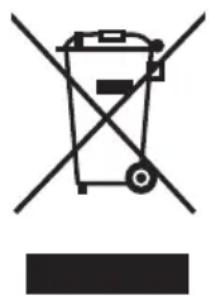
WEEE Mark (European Directive 2012/19/EU and amendments)
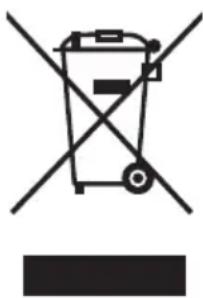
Disposing of your used product: In the European Union
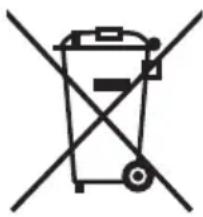
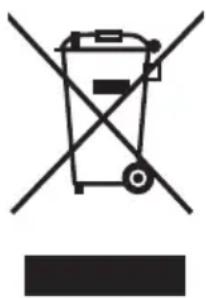
EU-wide legislation as implemented in each Member State requires that used electrical and electronic products carrying the mark (left) must be disposed of separately from normal household waste. This includes monitors and electrical accessories, such as signal cables or power cords. When you dispose of such products, please follow the guidance of your local authority or ask the shop where you purchased the product, or if applicable, follow applicable legislation or agreement you may have.
The mark on electrical and electronic products may only apply to the current European Union Member States.
Outside the European Union
If you wish to dispose of used electrical and electronic products outside the European Union, please contact your local authority and ask for the correct method of disposal.
EU/19/4.14 100000000000000000000000000000000000000000000000000000
J 1 J 1 J 1 J 1 J 1 J 1 J 1 J 1 J 1 J 1 J 1 J 1 J 1 J 1 J 1 J 1 J 1 J 1 J 1 J 1 J 1 J 1 J 1 J 1 J 1 J 1 J 1 J 1 J 1 J 1 J 1 J 1 J 1 J 1 J
1
Jusy, yj, jy, jy, jy, jy, jy, jy, jy, jy, jy, jy, jy, jy, jy, jy, jy, jy, jy, jy, jy, jy, jy, jy
aill 100
WEEE mapknopobka (Ebponecka dinpeKtNbA 2012/19/EU n HeiHnTe nonpaBKn)
I3XbpyHe Ha n3noJ3BaHnI npOdyKT: B EbponecknCbIO3
3aKoHOdaTeJIcTBOTO 3a ueHnE C, npInarao HO BbB BcraKa Dbpxkaba YIeHka, n3NCKBa n3NoJ3BaHnTE eJeKtpnueckn n eJeKtpoHHn IpOdyKTn, Hoceun Ta3n MapKnipOBKa (BJIaBO), da ce n3XBpJrT OTdEJIHO OT o6nKHOBeHnTE 6nTOBn OTnAbu. ToBa BKIOUyBa MOHTOpn IeKeTpneckn akcecoapn, KaTo HanPImep BnDeo Ka6eJIu NII 3axpaHbaun Ka6eJI. Korato n3XbPnIte TaKnBa IpOdyKTn, cIeDbaIte yKa3aHnTa Ha MeCTHnTE Bnactn INI NN ONNTaTe B Mara3Ha, OT
KoITo CTe KUnII INpOdyKTa, IIN aKO e npInIOxIMo, CJIeDBAITe npInIOxIMOTO 3aKoHOdaTeJIcTBo IIN CNopa3yMeHHeTO, KOEtO MOKe Da IMaTe. MapKnipOBkaTa 3a eJNeKTPnueCKN IeKeKTPOnHH INpOdyKTn MOKe Da BaXn CamO 3a NaCTOaNTe DbPjKaBn YIeHKN Ha EBrponeckn cbl03.
N3BbH Ebponeckn cbo3
Ako nckate da n3xBpIte ynoTpe6aHn eJektpueckn eJekTpOHn npOdykTN, KOrato ce HAMnPATE n3BbH EbponeNcKnCbIO3, CbPKeTe ce C MeCTHnte BJaCTN I nonTaTe 3a npaBnHn Haunn Ha n3XBpJIHe.
WEEE MaK (European Directive 2012/19/EU >개선 사형)
Service & Support in Europe
Please contact:
NEC Display Solutions Europe GmbH.
Landshuter Allee 12-14, D-80637 München
Phone: +49 (0) 89/99699-0
Fax: +49 (0) 89/99699-500
For the latest information please see
https://www.nec-display-solutions.com
Data is subject to change without notice.
Sales Office List for Asia/Pacific
For the latest information please see
https://www.nec-display.com/ap/contact/index.html#ap


- Important Information
- Safety Precautions and Maintenance
- About the Symbols
- Examples of symbols
- Connecting to a TV*1
- Connect the supplied power cord
- Cable information
- Prevent Tipping
- 内部环境
- SUPPLIER'S DECLARATION OF CONFORMITY
- WEEE Mark (European Directive 2012/19/EU and amendments)
- Disposing of your used product: In the European Union
- Outside the European Union
- EU/19/4.14 100000000000000000000000000000000000000000000000000000
- WEEE mapknopobka (Ebponecka dinpeKtNbA 2012/19/EU n HeiHnTe nonpaBKn)
- I3XbpyHe Ha n3noJ3BaHnI npOdyKT: B EbponecknCbIO3
- N3BbH Ebponeckn cbo3
- WEEE MaK (European Directive 2012/19/EU >개선 사형)
- Service & Support in Europe
- Sales Office List for Asia/Pacific
Brand : NEC
Model : MultiSync ME551
Category : Monitor