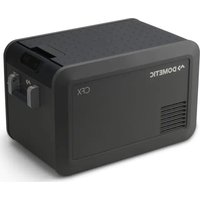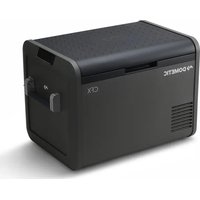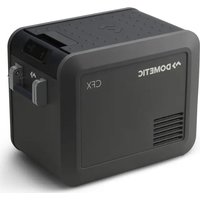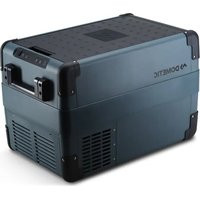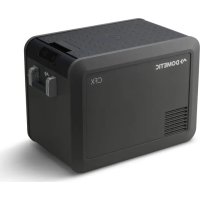
CFX5 45 - Refrigerator DOMETIC - Free user manual and instructions
Find the device manual for free CFX5 45 DOMETIC in PDF.



| Brand | Dometic |
| Model | CFX5 45 |
| Category | Portable refrigerator / Electric cooler |
| Product type | Compressor refrigerator |
| Useful volume | 45 liters |
| Dimensions (W x D x H) | 570 x 446 x 451 mm (handles included) |
| Weight | 20.5 kg |
| Power supply | 12/24 V DC (battery) and 100-240 V AC (mains) |
| Nominal consumption | 5.0 A (12 V), 2.5 A (24 V), 0.8 A (230 V) |
| Temperature range | -18 °C to +10 °C (adjustable in 1 °C steps) |
| Refrigerant | R1234yf (30 g) |
| Climate class | N/T (ambient temperature from 16 °C to 43 °C) |
| Display | Digital screen with temperature in °C/°F |
| Connectivity | Built-in Bluetooth and Wi-Fi (Mobile Cooling app) |
| USB port | Yes (5 V, 2.1 A) for charging mobile devices |
| Battery protection | 3 levels (Low, Medium, High) – auto shut-off in case of undervoltage |
| Handles | Foldable |
| Lid | Reversible (left or right opening) |
| Removable basket | Yes (removable storage element) |
| Screen lock | Yes (by key combination) |
| Defrosting | Manual (turn off appliance, clean frost) |
| Ventilation | Free space of 10 cm around the appliance required |
| Cleaning | Damp cloth, do not immerse, avoid abrasive products |
| Warranty | Legal warranty (see manufacturer conditions) |
| Repairability | Replaceable 12V fuse (in plug and appliance), repair by authorized service center |
| Included accessories | 12 V DC cable, 230 V AC cable, basket |
| Standards | Compliant with EC directives, radio (Bluetooth/Wi-Fi) certified |
Frequently Asked Questions - CFX5 45 DOMETIC
User questions about CFX5 45 DOMETIC
0 question about this device. Answer the ones you know or ask your own.
Ask a new question about this device
Download the instructions for your Refrigerator in PDF format for free! Find your manual CFX5 45 - DOMETIC and take your electronic device back in hand. On this page are published all the documents necessary for the use of your device. CFX5 45 by DOMETIC.
USER MANUAL CFX5 45 DOMETIC
A BCBD Eomatic Group. The visual appearance of the contents of this manual is protected b" cop"right and design law. Fhe underl"ing technical design and the products contained herein ma" be protected b" designh patent or pending patent. Fhe trademarks mentioned in this manual belong to Eomatic I weden J B. J ll rights are reserved.
Li/t o( Fig9re/





CFX5 55, CFX5 55IM,
CFX5 75DZ, CFX5 95DZ
CFX5 25,
CFX5 35, CFX5 45
CFX525,CFX535,
CFX545,CFX555
CFX5 55IM
CFX5 75DZ, CFX5 95DZ
1
□
EN0 CFX5
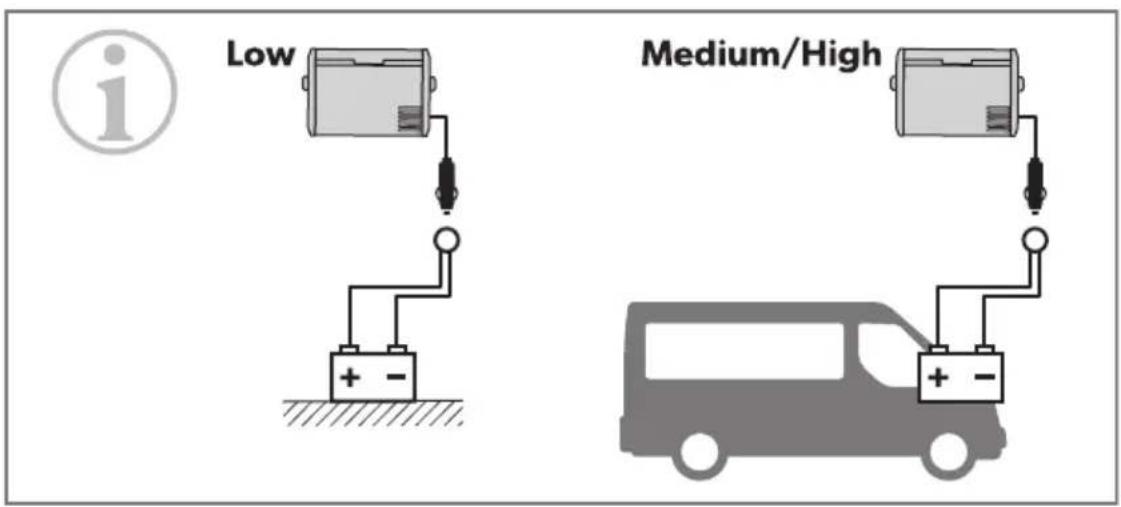
| Low | Medium | High | ||
| 12V | OFF | 10.1V | 11.2V | 11.8V |
| ON | 11.4V | 12.2V | 12.6V | |
| 24V | OFF | 21.5V | 24.1V | 24.6V |
| ON | 23.0V | 25.3V | 26.2V |
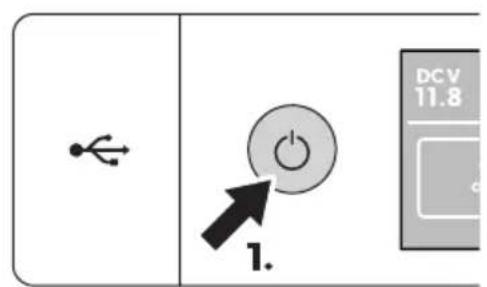
□
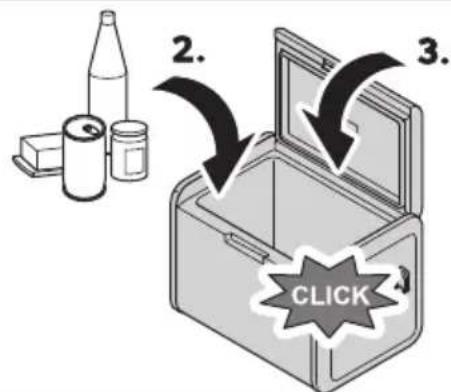
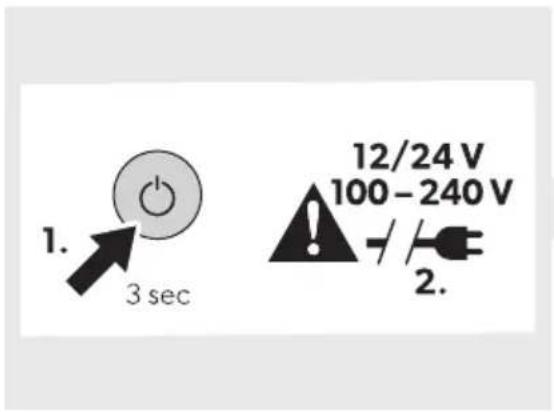
1
A
B
C
CFX5 25/CFX5 35/
CFX5 45/CFX5 55
CFX5 55IM
CFX5 75DZ/
CFX5 95DZ


Set temp

Battery protection

Bluetooth

WIFI

Display

Temp units
CFX525/CFX535/CFX545/CFX555/CFX555IM
CFX5 75DZ/CFX5 95DZ
CFX575DZ/CFX595DZ
CFX5 55IM

□
A
B
Engli/h
Q Important notes.
B RSplanation o6 s"mbols. QM
K I aGet" instructions.. .ON
D RSplanation o's"mbols on the device. 00
L | cope of deliver" . QP
M J ccessories. QP
N Intended use. QP
O Technical description.. BC
P Before Trst use. BQ
QC Operation. BB
QQ Ueaning and maintenance. .BO
QB Froubleshooting. BO
QK V arrant" .KC
QD E isposal. KC
QL Technical data. KC
P14) ortant note/
Please read these instructions carefully and follow all instructions' guidelines and warnings included in this product manual in order to ensure that "ou install' use' and maintain the product proper" at all times. These instructions MUI F sta with this product.
B" using the productou hereb" conTm that "ou have read all instructionsguidelinesand warningscareull" and that "ou understand and agree to abide b" the terms and conditions as set forth herein. You agree to use this product onl for the intended purpose and application and in accordance with the instructions guidelines and warnings as set forth in this product manual as well as in accordance with all applicable laws and regulations. J failure to read and follow the instructions and warnings set forth herein ma result in an injur to "oursi and others damage to our product or damage to other propert in the vicinit'. This product manuill including the instructions guidelines' and warnings' and related documentationma be subject to changes and updates. Yor up-to-date product information' please visit documents.dometic.com.
2 Ex) lanation o( /14 bol/
signal word will idente" saet" messages and propert" damage messagesH and also will indicate the degree or level of hazard seriousness.

D,NGERQ
Indicates a hazardous situation that if not avoided will result in death or serious injur".

R, RNINGQ
Indicates a hazardous situation that if not avoided could result in death or serious injur".

C, U'12Nq
Indicates a hazardous situation that if not avoided could result in minor or moderate injur".

N2 ICEQ
Indicates a situation that if not avoided can result in propert damage.

N2'E | supplementar information for operating the product.
3 Safety instructions

DANGER! Electrocution hazard
On boats if the device is powered b" the mains ensure that the power suppl" has a residual current device (RUE) a residual current circuit breaker (RUUB) or a ground fault circuit interrupter (GYUI). Installation especially in potential damp areas must be in accordance with all applicable installation regulations.
E o not touch eSposed cables with "our bare hands. This applies especiall" when operating the device from the J U mains.
Before starting the device, ensure that the power suppl line and the plug are dr".

WARNING! Explosion hazard
E o not store an" eSplosive substances such as spra" cans with a flammable propellant in the cooling device.

WARNING! Electrocution hazard
E o not operate the cooling device if it is visibly" damaged.
If the cooling device's power cable is damaged, it must be replaced with a suitable power cable or assembly available from the manufacturer or its service agent to prevent safe hazard.
This cooling device ma" onl" be repaired b" ' ualiTed personnel. Improper repairs can lead to considerable hazards.
Wlug the device to sockets that ensure proper connection especially" when the device needs to be earthed.

WARNING! Fire hazard
V hen positioning the cooling device ensure that the suppl cord is not trapped or damaged.
E o not locate multiple portable socket-outlets or portable power supplies at the rear of the device.
In the event of an" damage to the refrigerant circuit?
a eep open flames and potential ignition sources awa" from the cooling device.
a ventilate the room well.
a | witch oc the cooling device.
Yor cooling devices with RMCCa refrigerant? The refrigeration circuit contains a small 'uantit' of an environmentall" friendl" but flammable refrigerant. It does not damage the ozone la" er and does not increase the greenhouse eect. J n" leaking refrigerant ma" ignite.
eep the ventilation openings on the device housing or in installations free of obstructions.
E o not use an" mechanical objects or other means to speed up the de-frosting process unless the" have been recommended b" the manufacturer for this purpose.
E o not open or damage the refrigerant circuit.
E o not use electrical devices inside the cooling device unless the " are recommended b" the manufacturer or that purpose.

WARNING! Health hazard
This cooling device can be used b" children aged from O "ears and above and persons with reduced ph"sicalH sensor" or mental capabilities or lack of eSperience and knowledge is the" have been given supervision or instruction concerning use of the cooling device in a sae wa" and understand the hazards involved.
Uhildren aged from K to O "ears are allowed to load and unload cooling devices.
Children must be supervised to ensure that the do not pla with the device.
Uleaning and user maintenance must not be carried out b" unsupervised children.

Before starting the cooling device, ensure that the power suppl line and the plug are dr".
E isconnect the cooling device from the power suppl"
a Before each cleaning and maintenance
a J der ever" use

C, U'12 NQ Health ha: ar6
Fo avoid contamination of GoodH observe the following instructions?
a Uheck is the cooling capacit" othe cooling device is suitable for storing the good to be cooled.
a Yood ma" onl" be stored in its original packaging or in suitable containers.
a Opening the cooling device for long periods of time can cause signiTcant increase of the temperature in the compartments of the device.
a Ulean regularl" surfaces that can come in contact with food and accessible drainage s"stems.
Is the cooling device is led empt" for long periods?
a | witch oc the cooling device.
a Erost the cooling device.
a Ulean and dr" the cooling device.
a >eave the lid open to prevent mold from developing within the cooling device.

N2 ICE0 Da4 age ha: ar6
Uheck that the voltage speciTcation on the data plate corresponds to that of the energ" suppl".
Onl" connect the cooling device as follows?
a Vith the EU connection cable to a EU power suppl" in the vehicle
a Vith the J U connection cable to an J U power suppl"
&ever pull the plug out of the socket b" the cable.
I's the cooling device is connected to a E U outlet disconnect the cooling device and other power consuming devices from the batter before connecting a uick charging device.
If the cooling device is connected to a E U outlet, disconnect the cooling device or switch it on when turning on the engine. Otherwise the batter "ma" be discharged.
The cooling device is not suitable for transporting caustic materials or materials containing solvents.
The insulation of the cooling device contains flammable c" clopentane and re" uires special disposal procedures. E eliver the cooling device at the end of its life-c"cle to an appropriate rec" cling center.
E o not place the cooling device near open flames or other heat sources (heatersH direct sunlightH gas ovens⓪ etc.).
Ri/. o(overheating) Rnsure at all times that there is a minimum of LC mm ventilation on all sides of the cooling device. eep the ventilation area free an" objects that could obstruct the air flow to the cooling components. E not use or store the cooling device in closed compartments or areas with none or minimal air flow.
E o not Till the inner container with ice or fluids.
&ever immerse the cooling device in water.
Wprotect the cooling device and cables against heat and moisture.
Fhe cooling device shall not to be eSposed to rain.
4 Ex) lanation o( /14 bol/ on the 6evi e
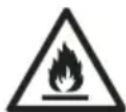
V arninge Risk of Tre f Yflammable materials
A2L
5 S o) e o(6eliver1
Fig on) age3
| Ite4 in ☑ | T 9antit1 De/ ri) tion | |
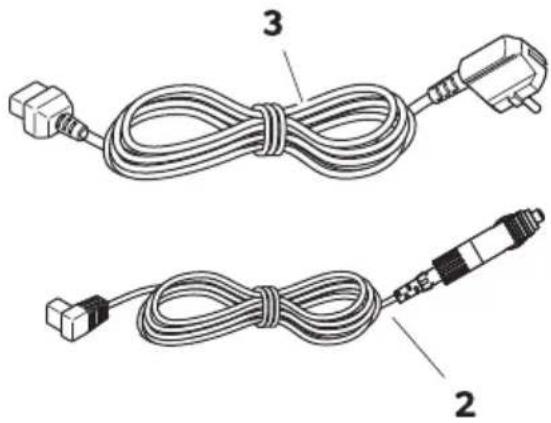
| Q Q Uooler | ||
| B Q Uonnection cable for EU connection | ||
| K Q Uonnection cable for J U connection | ||
U, e//orie/
J vailable as accessor"(not included in scope of deliver")
| De/ignation Re(noMo6el | ||
| Prote tive over | ||
| WUBL PMBCCBOCO UYgL BL | ||
| WUKL PMBCCBOCM UYgL KL | ||
| WUDL PMBCCBOCL UYgL DL | ||
| WULL PMBCCBOQC UYgL LL | ||
| UYgL LLIM | ||
| WUNL PMBCCBOQQ UYgL NLE h | ||
| WUPL PMBCCBOCN UYgL PLE h | ||
| Fri6ge /li6e | ||
| I>ELKLDLU | PMBCCQBDLD UYgL KL | |
| UYgL DL | ||
| I>ELLU | PMBCCQBDLL UYgL LL | |
| UYgL LLIM | ||
| I>ENLU | PMBCCQBDLM UYgL NLE h | |
| I>EPLOCCU | PMBCCQBDLN UYgL PLE h | |
| T9i . (ixing . it | ||
| i Y BL | PMCCCCQMM UYgL BL | |
| i Y KLDL | PMCCCBPLPP | UYgL KL |
| UYgL DL | ||
| Mobile Uooling app | j | suits all models |
&ote that the app ma" not be available in "our countr".
7 Inten6e6 9/e
The cooling device is suitable for cooling good. The cooling device is also suitable for use on vehicles.
The cooling device is designed to be operated from a EU on-board power suppl" of a vehicle or boat from a EU auSiliar" batter" or from an J U power suppl".
The cooling device is suitable for camping or other similar recreational uses.
The cooling device is intended to be used in household and similar applications such as
a | tac kitchen areas in shops | ok ces and other working environments
a Yarm houses
a Clients in hotels' motels and other residential t" pe environments
a Bed and breakfast t"pe environments
a Uatering and similar non-retail applications
This product is on! suitable for the intended purpose and application in accordance with these instructions.
This manual provides information that is necessary for proper installation and/or operation of the product. Woor installation and or improper operation or maintenance will result in unsatisfactor performance and a possible failure.
The manufacturer accepts no liability for an "injur" or damage to the product resulting from
a Incorrect installation"assembl"or connection including eScess voltage
a Incorrect maintenance or use of spare parts other than original spare parts provided b" the manufacturer
a J Iterations to the product without eSpress permission from the manufacturer
a Use for purposes other than those described in this manual
Eometric reserves the right to change product appearance and product speciTcations.
low maintenance refrigerant circuit with compressor provides the cooling. The generous insulation and the powerful compressor ensure ek cient and fast cooling.
The cooling device is portable.
The cooling device can withstand a short-term inclination of KCIH for eSample on boats.
VSP S o) e o(9n tion/
a Wower suppl" with priorit" circuit for connecting to the J U power suppl"
a Three-level batter" monitor to protect the vehicle batter" (switches oc automaticall" at low batter" voltage)
a Eispla" with temperature gauge in I U and I Y
a Temperature setting? In steps oQU (QY)
a Integrated Bluetooth and V iYi function hence controllable using an app
a Yoldable carr" handles
a UI B charger for portable devices such as mobile phones
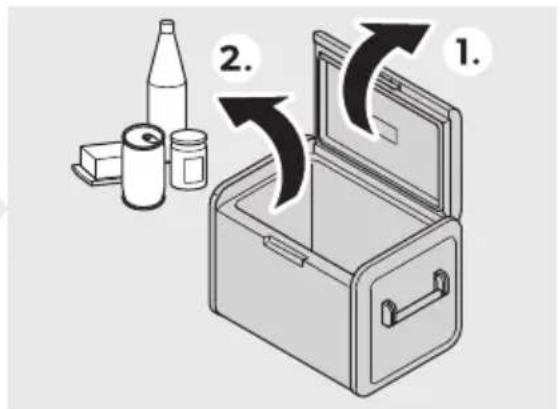
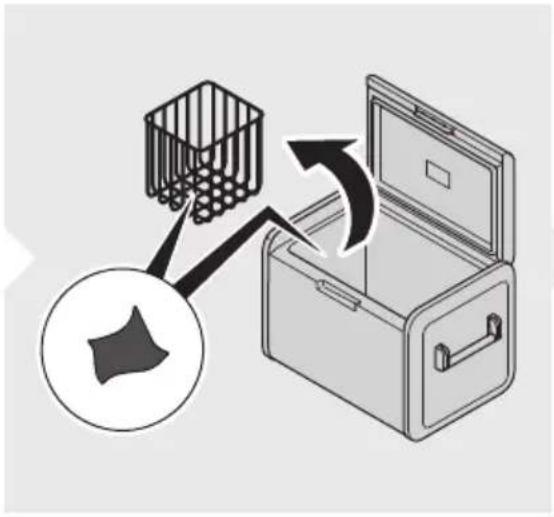
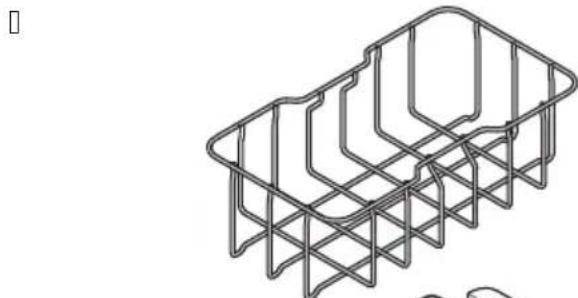
a Removable wire basket
a Integrated bottle opener
a CFX5 55IM onl1W Ice maker
VS2 2) erating an6 6i/) la1 ele4 ent/
Li6 lat he/ X 10
Fig on) age3
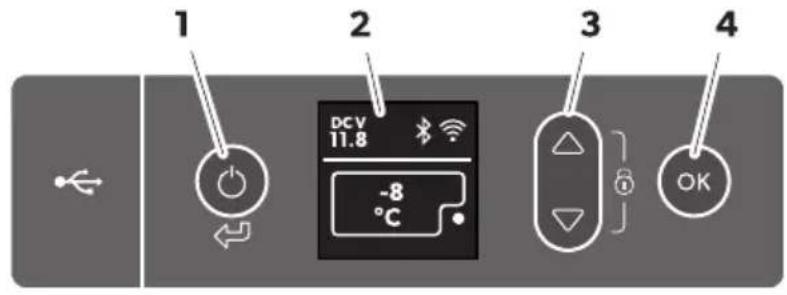
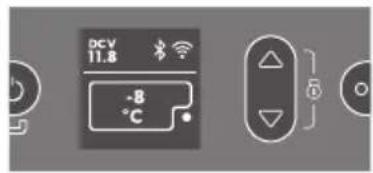
2) erating ) anel X Fi
FigSoll on) age4
| Ite4 De/ ri) tion Ex) lanation |
| Q I witches the cooling device on when the button is pressed brief!" I witches the cooling device on when the button is pressed for three seconds Returns to the previous menu |
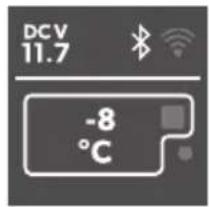
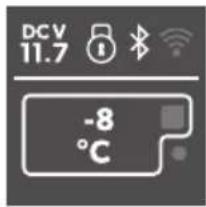
| B Eispla" ZJ U power suppl" is connected DCVZ EU power suppl" is connected *2 Bluetooth is activated *2 V iYi is activated *2 Eispla" is locked *2 Uompressor is working *2 Ice maker is working (UYgl LLLIM onl") |
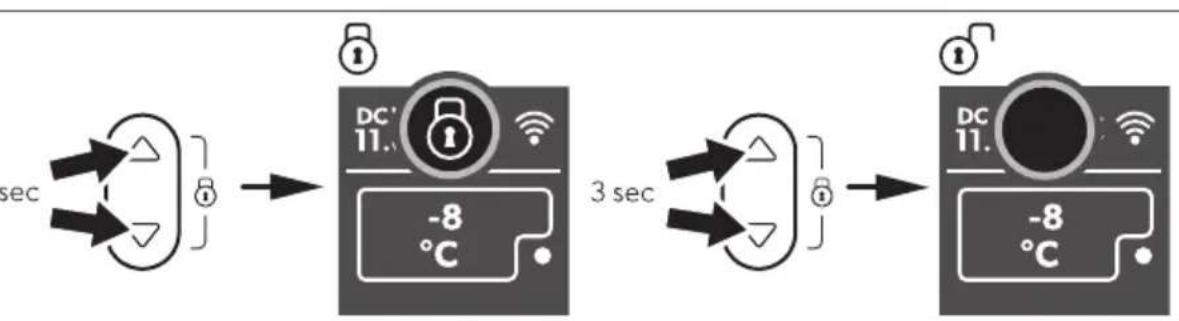
| K Wress to navigate upwards or to increase the selected value. Wress to navigate downwards or to decrease the selected value. Wress and simultaneous" for K s to lock or unlock the displa". |
| D Wress to select a menu or to save the selected value. |
N2' E Before starting the cooling device for the Trst time clean it inside and outside with a damp cloth for h" gienic reasons (see Ueaning and maintenance).
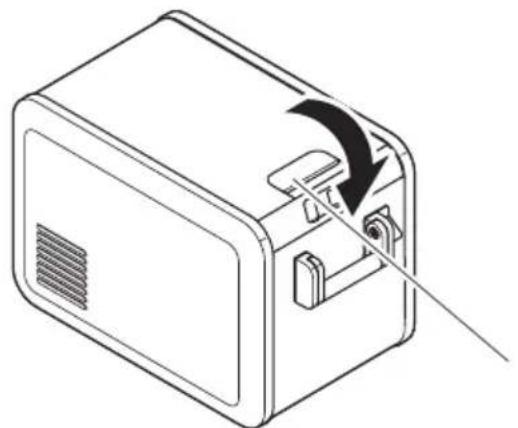
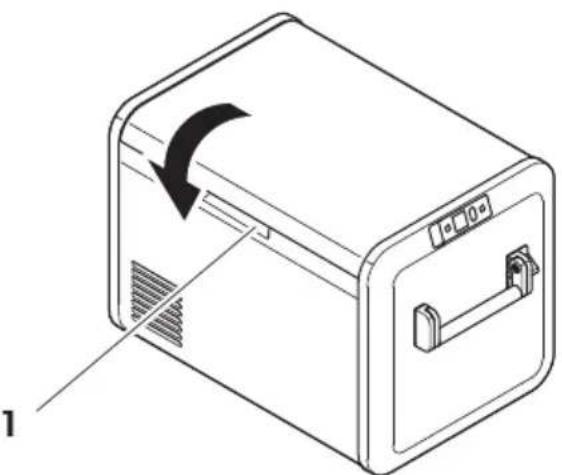
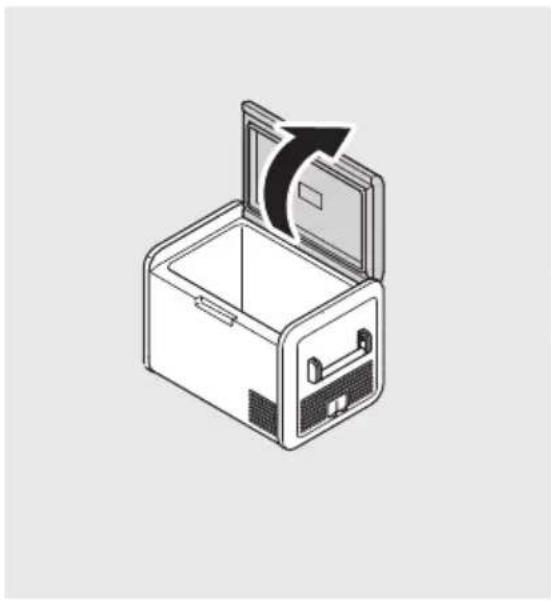
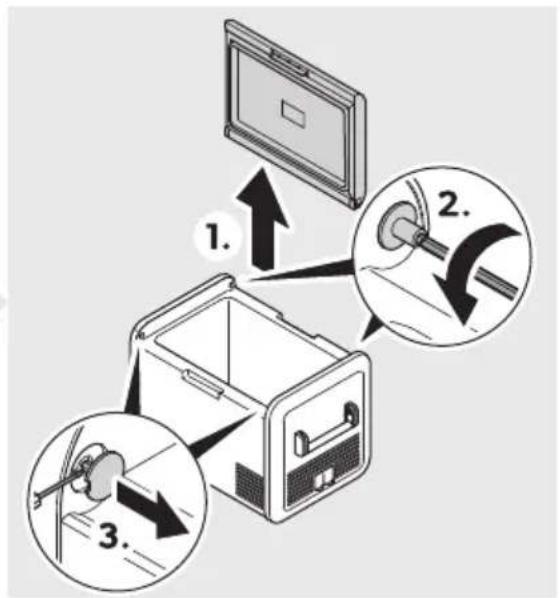
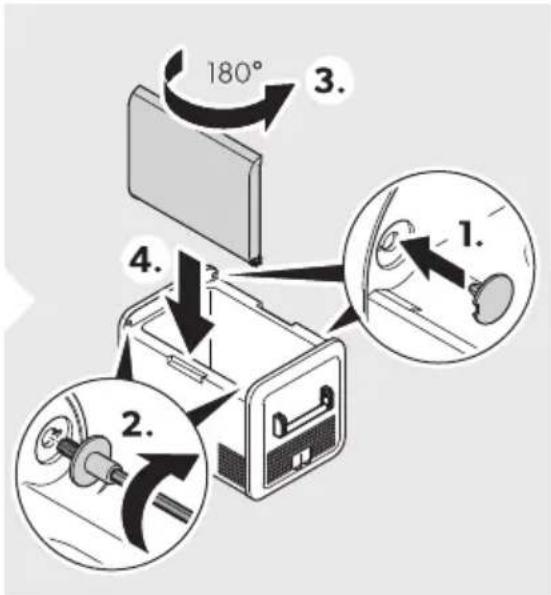
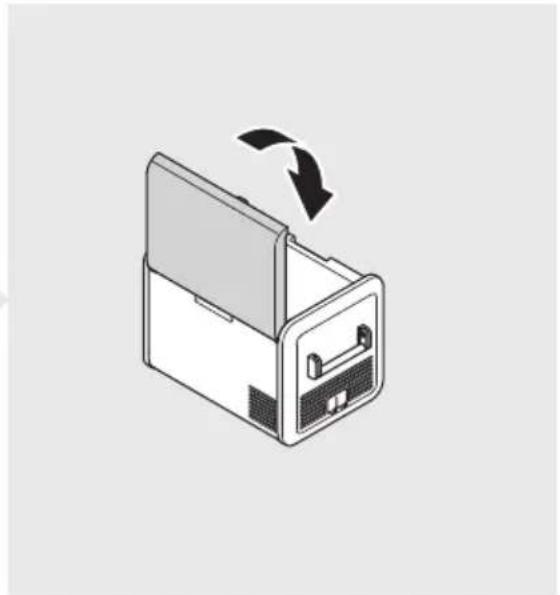
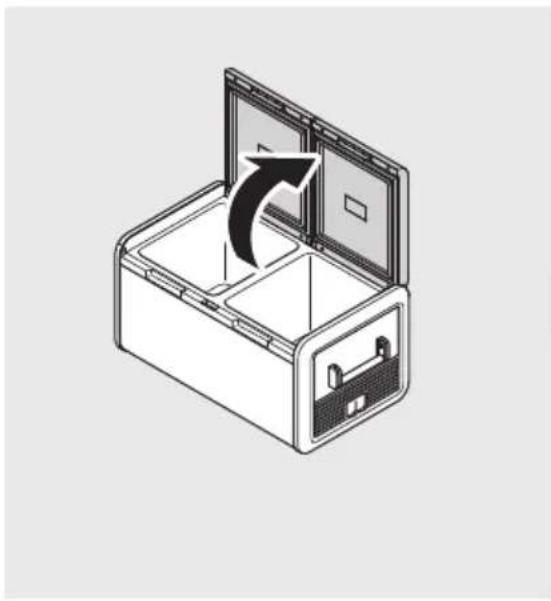
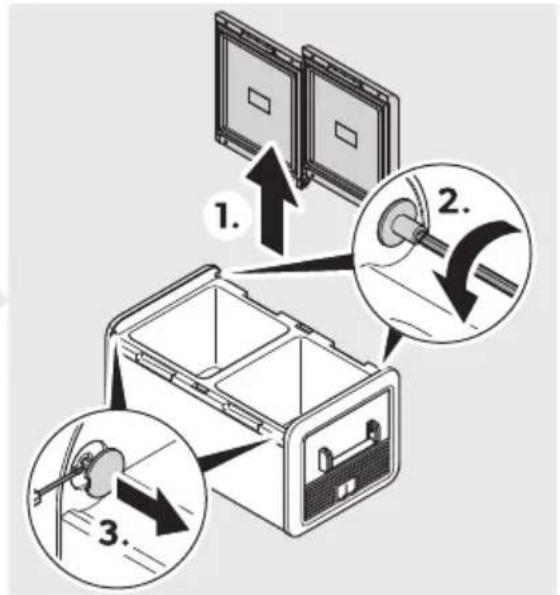
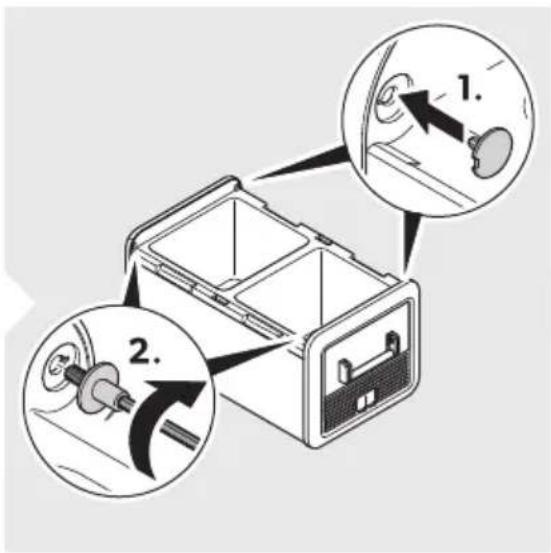
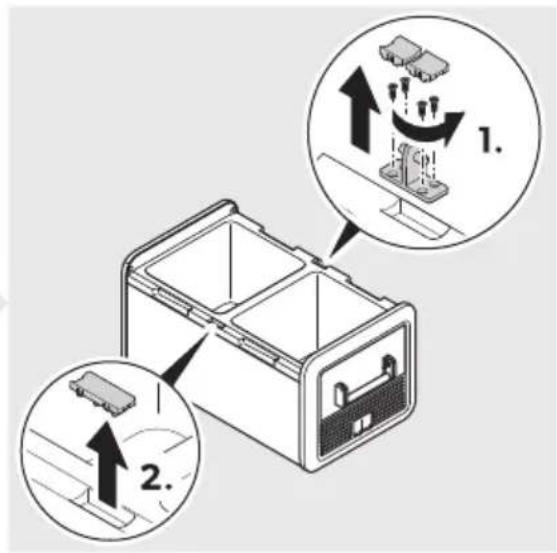
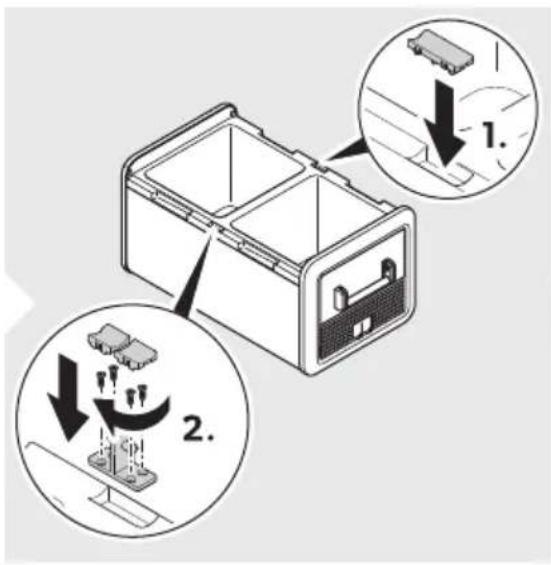
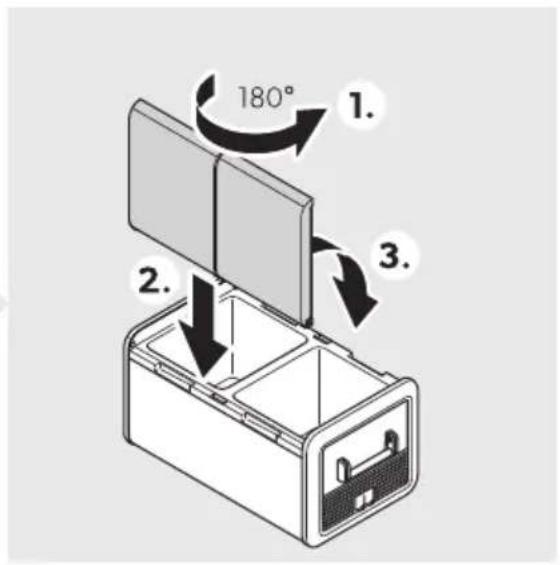
Rever/ing the li6 o) ening
Fo reverse the lid opening proceed as shown?
a CFX5 55, CFX5 55IM
FigS01 on) age05
a CFX575DZ, CFX5 95DZ
FigSOn) ageU
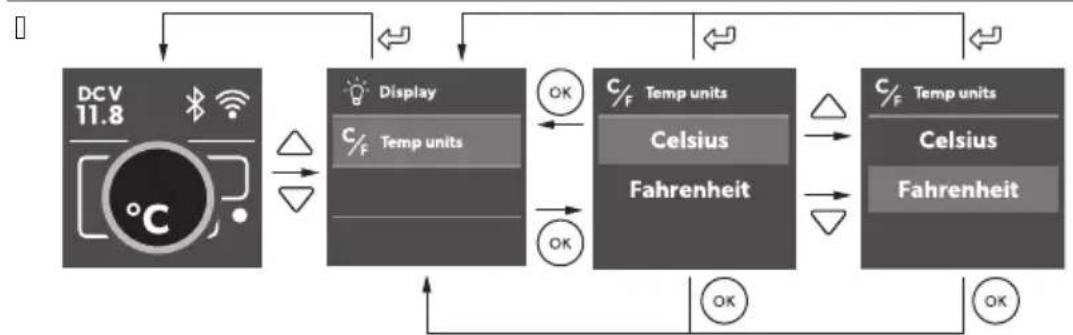
Se ting the te4) erat9re 9nit/
Wroceed as shown?
Fig on) age7
PZ 2) eration
PZSP, voi6ing (oo6 8 a/te
Fo avoid good wasteH note the following
eep temperature fluctuation as low as possible. Onl" open the cooling device as oden and for as long as necessary". I tore the goodstuc in such a wa" that the air can still circulate well.
djust the temperature to the 'uantit' and t"pe of the goodstuc.
Yoodstuc can easil" absorb or release odor or taste. J Iwa"s store oodstuc covered or in closed containersf bottles.
PZS2 Saving energ1
Uchoose a well ventilated location which is protected from direct sunlight.
I low warm food to cool down Trst before placing it in the cooling device to keep cool.
E o not open the cooling device more oden than necessar".
E o not leave the cooling device open for longer than necessar".
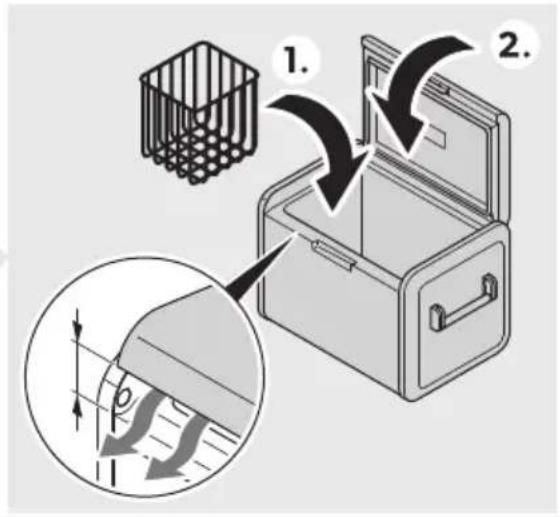
I' the cooling device has a basket? Yor optimal energ" consumption? position the basket according to its position on deliver".
On a regularl" basis ensure the lid seal still Tts proper".
voidunnecessaril"lowtemperatures.
PZS3 Conne ting the ooling 6evi e
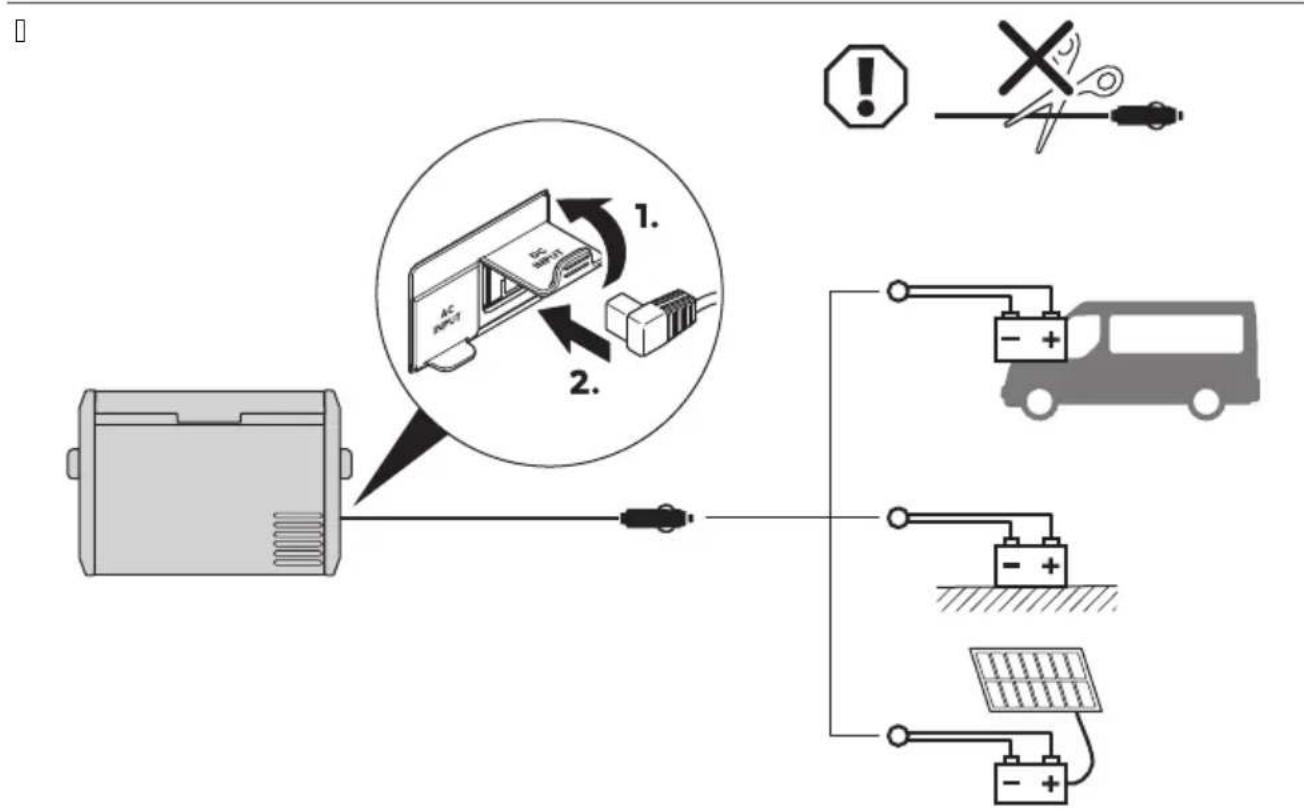
Conne ting to a DC /o9r e

N2 ICE0 Da4 age ha: ar6
Yor protection of the device the EU cable supplied includes a fuse inside the plug. E o not remove the fused EU plug. Onl" use the EU cable supplied.
Wproceed as shown?

FigS00 on) age07
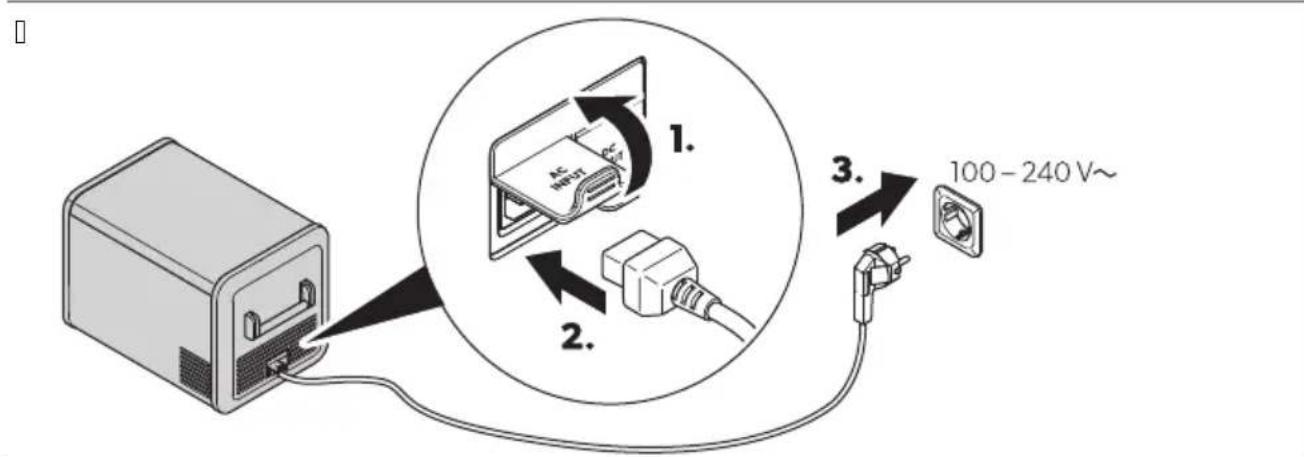
Conne ting to an, C) o8 er /9)) 11

D,NGERQEle tro 9tion ha:ar6
&ever handle plugs and switches with wet hands or if "ou are standing on a wet surface.
I's necessary to seek advice from a trained technician.Wroceed as shown?

FigS00 on)age07
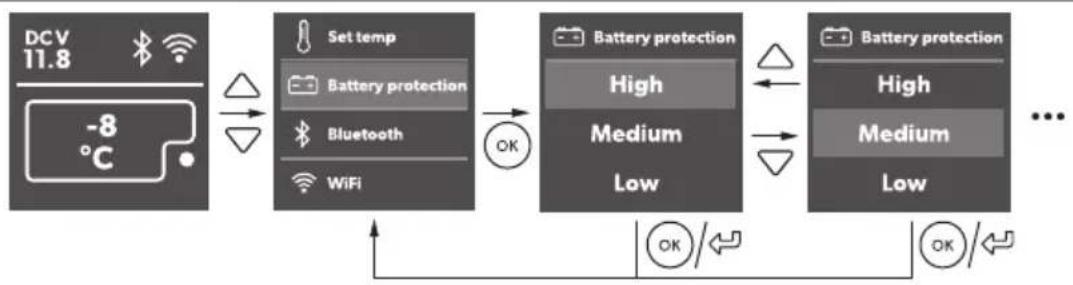
PZS4 U/ing the batter1 4 onitor
The cooling device is e' uipped with a batter" monitor that provides a K-stage batter" protection. The batter" protection prevents eScessive discharging when the cooling device is connected to a vehicle starter batter" or maSimises the use of a suppl" batter".
If the cooling device is operated when the vehicle ignition is switched on, the cooling device switches on automaticall as soon as the suppl voltage falls below a set level. The cooling device will switch back on once the batter has been recharged to the restart voltage level.

N2' ICE0 Da4 age ha: ar6
V hen switched oc b" the batter" monitor the batter" will no longer be full" charged. J void starting repeatedl" or operating current consumers without longer charging phases. Rnsure that the batter" is recharged.

N2' E V hen the cooling device is supplied b" the starter batter" select the batter" monitor mode m( IG( n. If the cooling device is connected to a suppl" batter" h the batter" monitor mode m>OV n will suk ce.
Wroceed as shown?

FigS00 on) ageV
PZS5 U/ing the ooling 6evie

N2 ICE Ri/. o/ overheating
Rnsure at all times that there is suk cient ventilation so that the heat that generated during operation can dissipate. Rnsure that the ventilation slots are not covered. Rnsure that the device is suk clientl" far awa" from walls and other objects so that the air can circulate.

N2 ICE Da4 age ha: ar6 (ro4 ex e//ivel1 lo8 te4) erat9re
"Rnsure that onl" those objects are placed in the cooling device that are intended to be cooled at the selected temperature.

N2'E V hen operating with the batter"7
a V hen voltage is o O b the displa" switches oc automaticall".
a V hen voltage is ≥ 0 b and ≤ 0 b the displa" ma" show mej >RRF - boltage lown depending on the batter" monitor mode setting.
| witch the cooling device on?

FigS0 on) ageV
| witch the cooling device oc?

FigS01 on) age9
PZSU U/ing the 6i/) la1
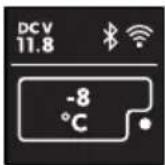
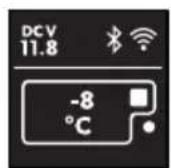
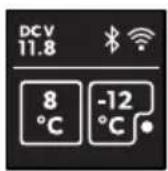
Di/la1/tate/W

FigS0 on) age9
Ite4 De/ ri) tion
J tand b"
ENwCFX5
Ite4 De/ri) tion
B Idle
U>ocked
Di/ la1 overvie8
FigS0 on) agePZ
Navigatingthro9gh the 4 en9/
The highlighted menu is selected.
Wress to navigate upwards.
Wress to navigate downwards.
Choo/ing a 4 en9
Wress to select the re' uired menu.
Changing /etting/
The highlighted value or setting is selected.
Wress to increase the selected value or to choose the previous setting.
Wress to decrease the selected value or to choose the neSt setting.
Ret9rning to the) revio9/4 en9
Wress to return to the previous menu without saving.
PZS7 Lo . ing/9nlo . ing the 6i/) la1
Wress and shantaneous! for K's to lock or unlock the displa".
FigSOn)agePZ
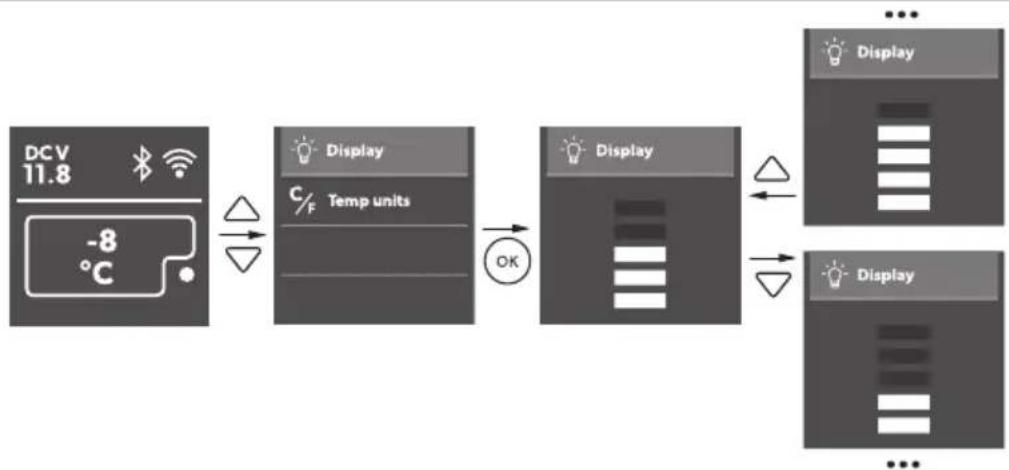
PZSV Setting the 6i/) la1 brightne//
Wroceed as shown?
FigS0 on) agePZ
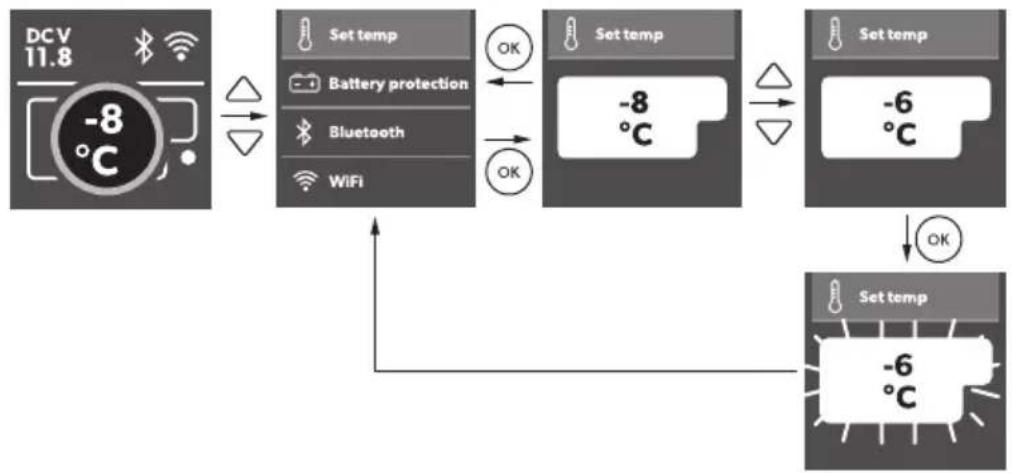
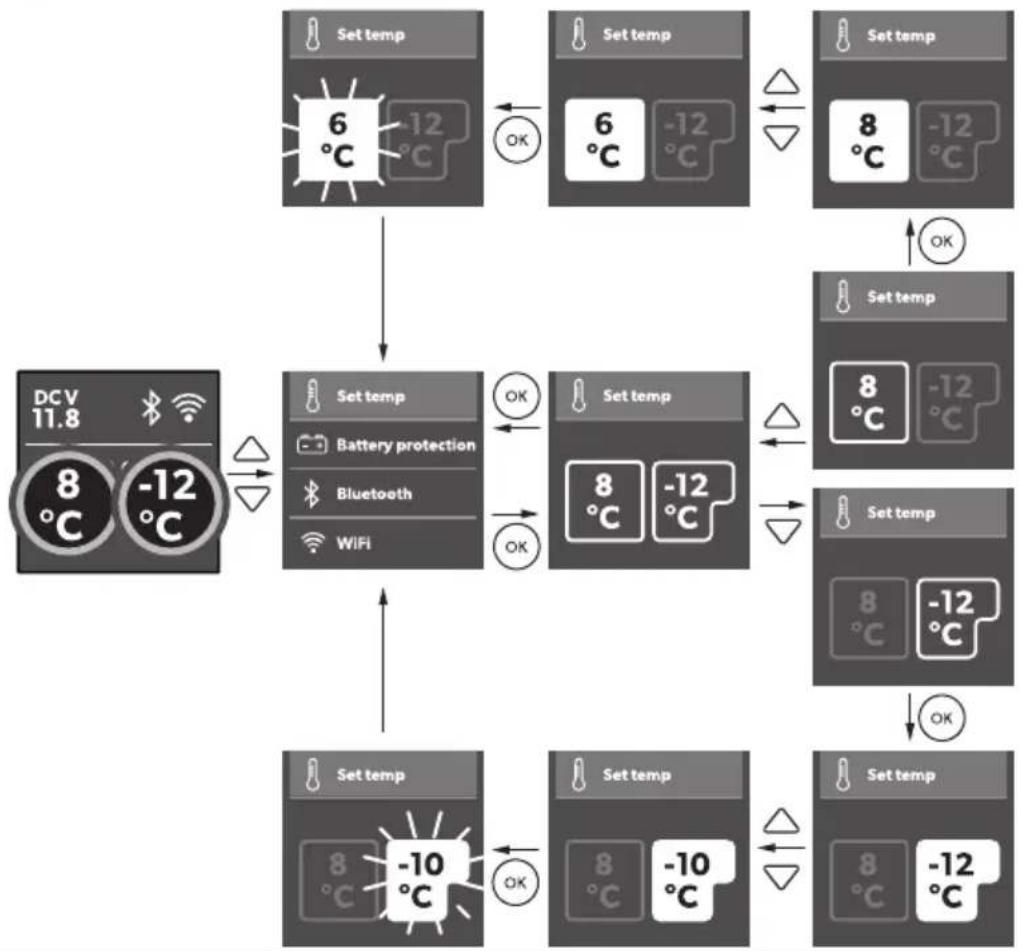
PZS9 Setting the te4) erat9re
Wroceed as shown?
FigS0 on) agePP
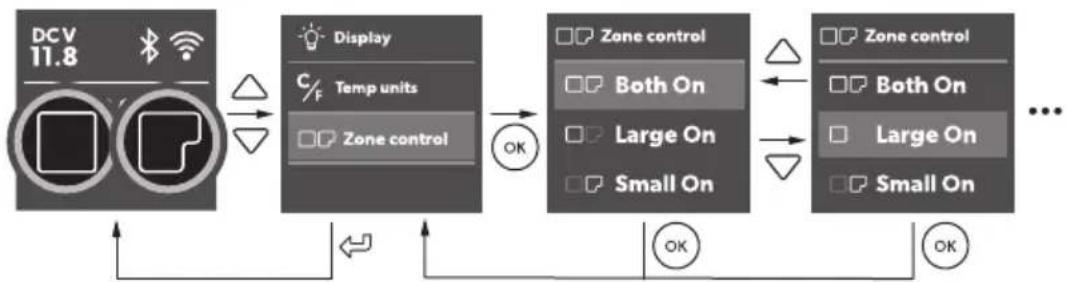
PZSPZ S8 it hing a o4) art4 ent o(( or on XCFX5 75DZ, CFX5 95DZ onlY
You can activate each zone individual" or both of them.
Wroceed as shown?
FigSoll on) ageP2
PZSPP U/ing the i e 4 a. er XCFX5 55IM onlY

N2'E
Independent of the main compartments temperature setting the ice maker zone is designed for making ice cubes if the ice maker is switched on.
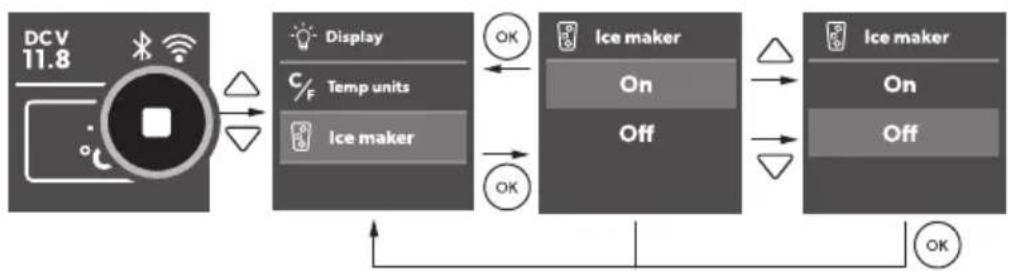
Fhe cooling device's energ consumption increases with ice maker on. Therefore "ou should switch o the ice maker is it is not needed.
The factor" setting for the ice maker is OYY.
Fips for using the ice maker
a Fhe ice maker makes ice fast for a number of hours afer switching on and then automatically "goes into an ice maintenance mode to reduce energy consumption. If multiple batches of ice are re' uired as ' uickl" as possible, switching the ice maker oC and back on will set it back into fast ice making mode. Repeat as re' uired.
a >ow freezer temperature settings in the main compartment ma" not be maintained in high ambient temperature conditions with the ice maker switched on.
Fo turn the ice maker on or oc proceed as shown?
FigSoll on) ageP2
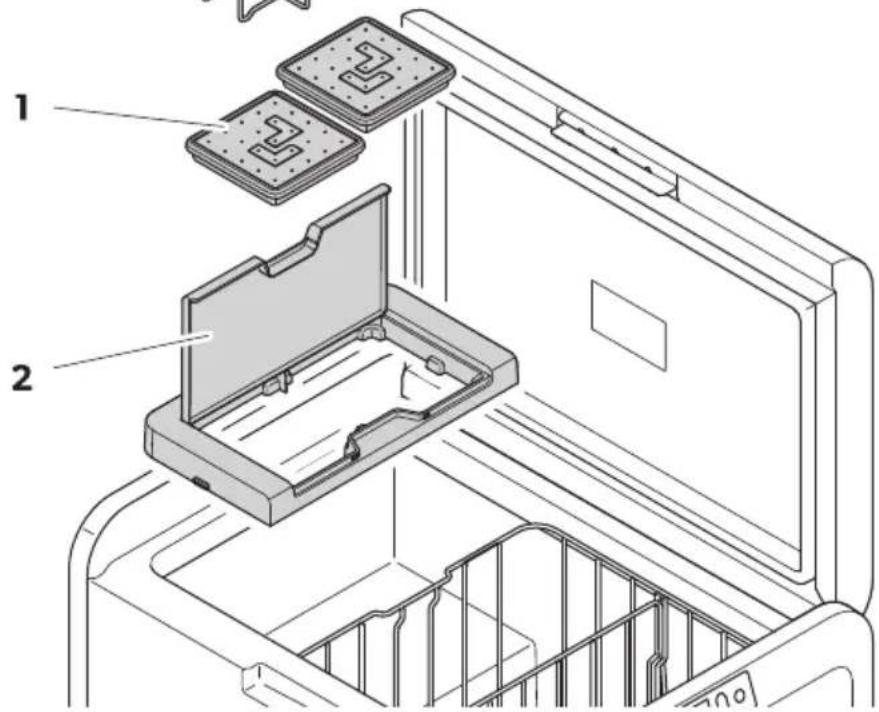
Filling the i e tra1/8ith 8 ater
Remove the ice tra"s (Yig. P) from the ice maker housing (Yig. 2).
FigS00 on) ageP2
Re4 oving the i e 9be/

N2'E
Removal ma" re' uire additional force using two hands in high humidit" conditions which ma" create an ice bond underneath the ice tra"s.
- Open the ice maker housing lid and lid under the front of the ice tra"s.
B. Remove the ice tra " covers and twist tra"s to release the ice cubes.
Re4 oving the i e 4 a. er ho9/ing
The ice maker housing can be removed for cleaning or when not in use to increase usable space inside the cooling device.
id the housing at one end until the lug unclips then remove.
Reverse procedure for re-Tt pushing down on lugs to snap into position.
Cleaning an6 6r1ing the i e 4 a. er
V hen not in use clean and dr" the ice tra"s and inside the ice maker housing to prevent mould.
J der eStended periods of non-use clean the inside of the ice tra's with a mild dish washing solution and rinse with clean water prior to use.
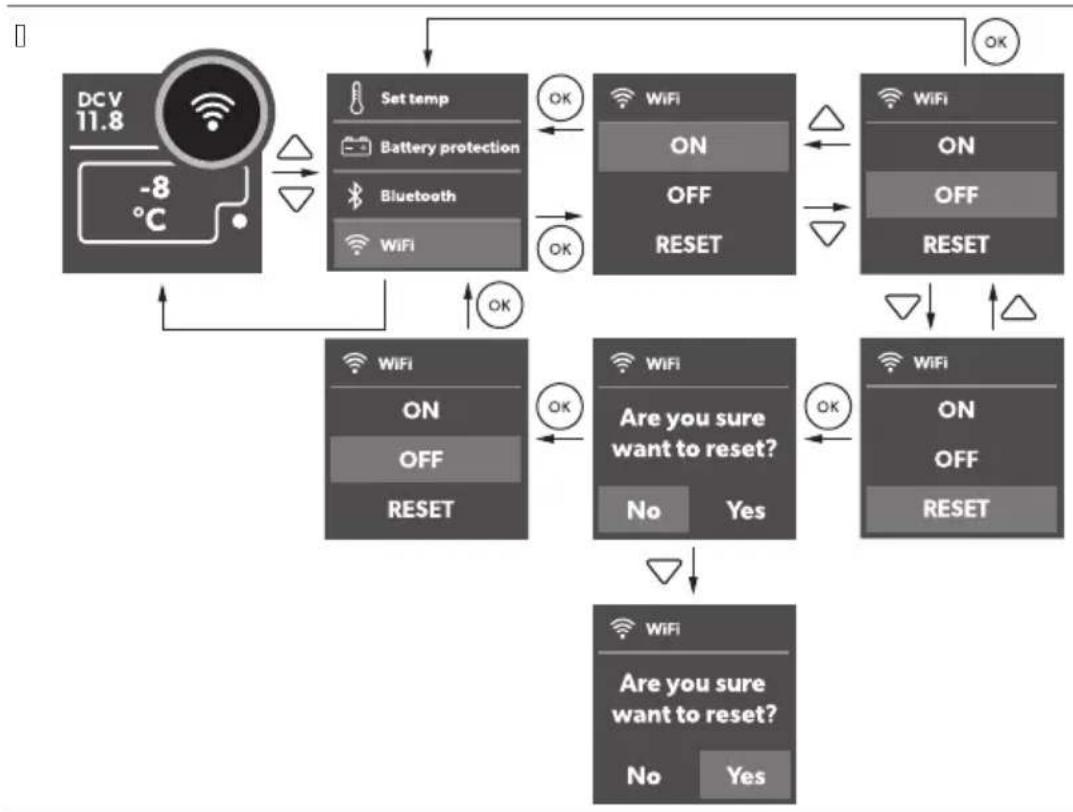
PZSP2 U/ing Cl9etooth an6 R i-Fi
Do8 nloa6ing the Mobile Cooling a)
The cooling device can be monitored and controlled via Bluetooth or V i-Yi using an app that "ou can install on a compatible device.

Download the Mobile Uooling app.
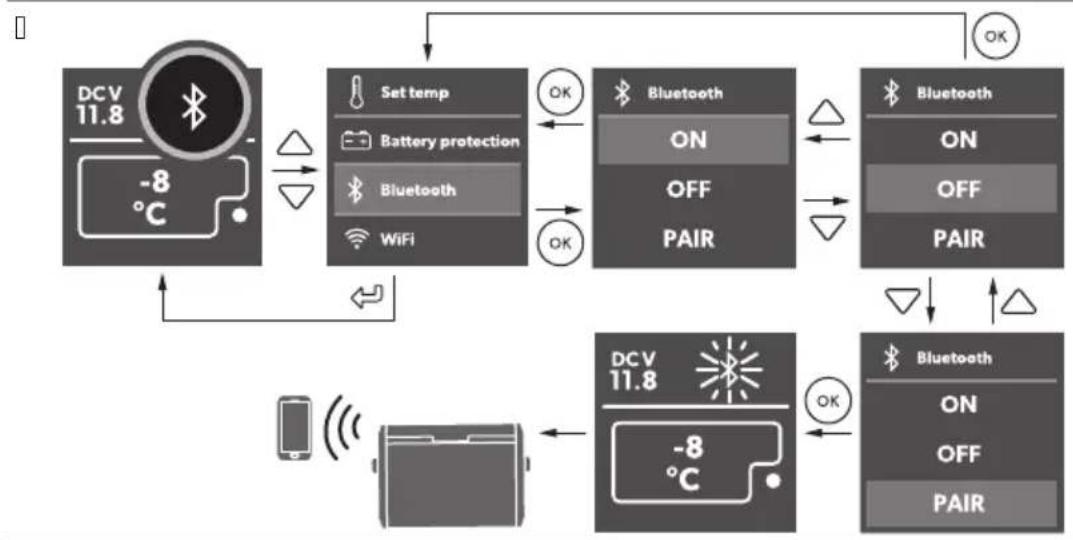
Setting the Cl9etooth /signal an6 onne ting to the a)
The cooling device can be monitored and controlled via Bluetooth. Fo do so pair the cooling device with "our Bluetooth device.

N2'E
a Wairing must be done within the Mobile Uooling app not in device settings.
a Fhere is no password re' uired for Bluetooth connection.
Wroceed as shown?
FigSoll on) ageVP3
Setting the R i-Fi /signal
Wroceed as shown?
FigS0 on) ageVP3
2) erating Cl9etooth an6 R i-Fi
Yollow the instructions in the mobile cooling app.
Fhe Bluetooth or V i-Yi RE lights up when the cooler is connected.
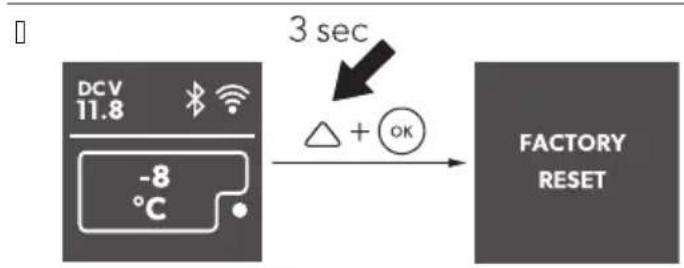
PZSP3 Re/etting to (a tor1 /etting/
The reset function changes all displa" menu and app Telds to the original factor" settings.
Wroceed as shown?
FigS0 on) ageP3
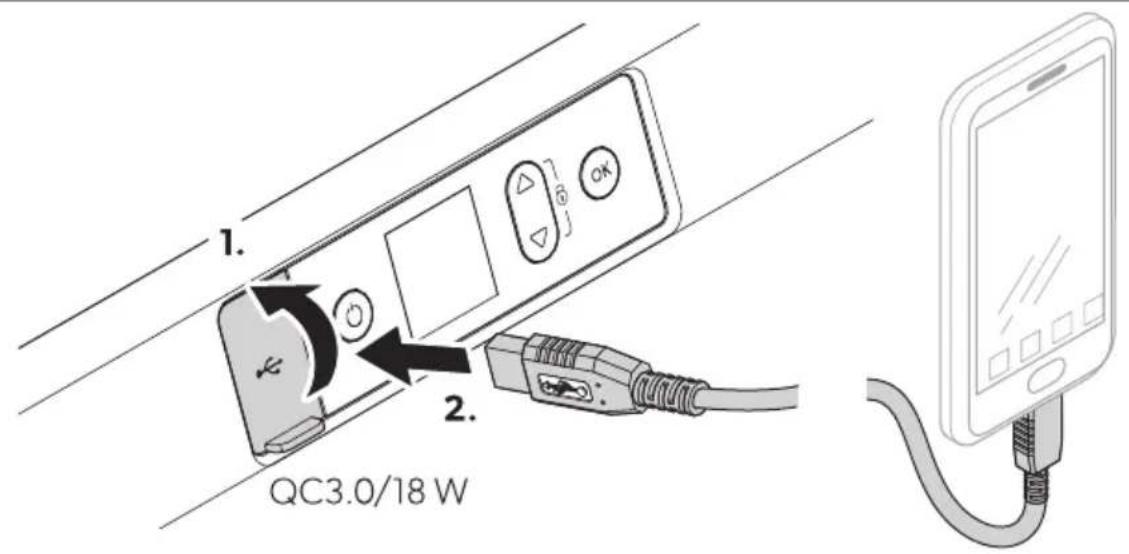
Fhe UI B port allows "ou to charge small devices like mobile phones and mpK pla"ers.

N2'E Rnsure that an" small device connected to the UI B port is compatible with L bf B.L J operation.
Wroceed as shown?
FigSoll on) ageOP4
PZSP5 De(ro/ting the ooling 6evi e
( umidit" can form frost in the interior of the cooling device or on the evaporator. This reduces the cooling capacit".

N2 ICE0 Da4 age ha: ar6
&ever use hard or pointed tools to remove ice or to loosen objects which have frozen in place.
Fo defrost the cooling device proceed as follows?
- Remove the contents of the cooling device.
B. If necessar"H place the contents in another cooling device to keep them cold.
K. I witch of the cooling device.
D. >eave the lid open.
L. Vipe oc deistrosted water.
PZSPU Re) la ing the, C (9/e

D,NGERQ Ele tro 9tion ha:ar6
E isconnect the power suppl" and the connection cable before "ou replace the device fuse.
- E isconnect the power suppl" to the device.
B. Remove the connection cable.
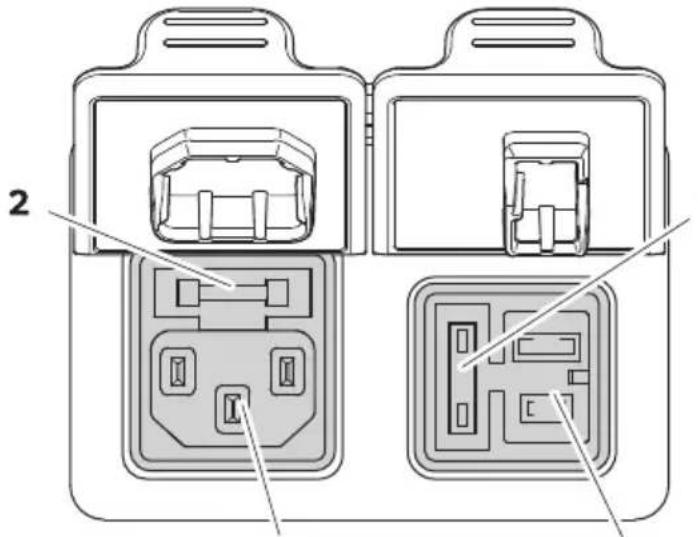
K. Wr" out the Guse insert ( Yig.d 2) with a screwdriver.
D. Replace the defective glass fuse with a new one of the same t"pe and rating (Yast actingH D J H BLC b).
L. Wress the Guse insert back into the housing.
M. Reconnect the power suppl" to the device.
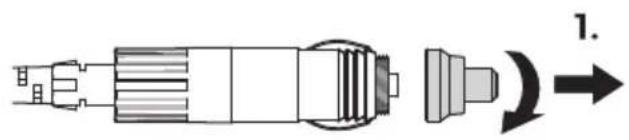
PZSP7 Re) la ing the DC (9/e
Q. E isconnect the power suppl" to the cooling device.
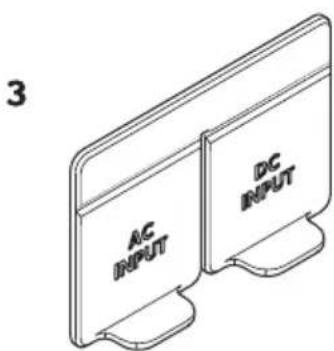
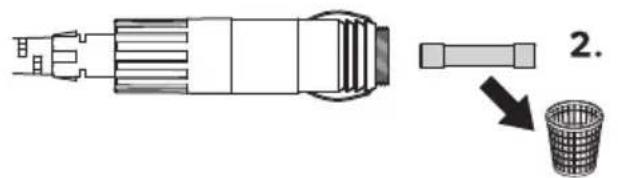
B. Wr" out the Guse cover (Yig.3) with a screwdriver.
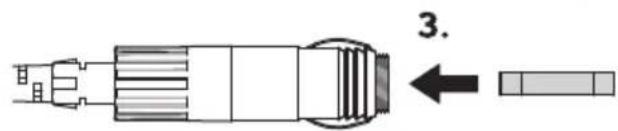
K. Reverse the fuse cover and use hook to remove the defective blade fuse.
D. Wush in a new 6use of the same t"pe and rating.
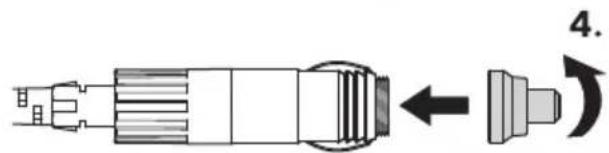
a UYgL BLUYg KLUYg DLUYg LLUYg LLIMQJ
L. Re-Tt the fuse cover.
M. Reconnect the power suppl" to the cooling device.
PZSPV Re) la ing the DC) 19g (9/e
Replace the defective fuse with a new fuse of the same t"pe and rating as shown.
FigSoll on) ageOP4
a UYgl BLHUYgl KLHUYgl DLHUYgl LLHUYgl LLIMZQJ
a UYgL NLEhhUYgL PLEhZQLJ
PZSP9 Re) la ing the light PCC

N2 ICE0 Da4 age ha: ar6
The lamp can onl" be replaced b" the manufacturer` a service agent` or similarl'' ualiTed person to avoid hazard.
PP Cleaning an6 4 aintenan e

Ensure that the cooling device is disconnected from the power suppl" before an" cleaning or maintenance work.

N2' ICE0 Da4 age ha: ar6
&ever clean the cooling device under running water or in dish water.
E o not use abrasive cleaning agents or hard objects during cleaning.
Occasional" clean the device interior and eSterior with a damp cloth.
Rnsure that the air inlet and outlet vents on the cooling device are free of an" dust and dirt so that heat can be released and the cooling device is not damaged.
P2 'ro9ble/hooting
| Proble4 Po//ible a9/e S9gge/te6 re4 e61 | ||
| Fhe device does not function (EU modeH ignition on). | &o voltage was detected in the EU power outlet | > In most vehicles the ignition must be turned on before power will be supplied to the EU power outlet. |
| Fhe EU outlet is dirt". This results in a poor electrical contact. | > Is the plug of the device becomes ver" warm in the EU outletH either the EU outlet must be cleaned or the plug has not been assembled correct". | |
| Fhe fuse of the EU plug has blown. Replace the detective fuse in the EU plug see Replacing the EU plug fuse. | ||
| Fhe device EU fuse has blown. Replace the EU device fuseH see Replacing the EU fuse. | ||
| Fhe vehicle fuse has blown. Replace the vehicle's EU outlet fuse. Refer to "our vehicle's operat-ing manual. | ||
| E device does not function (J U mode). | &o voltage was detected in the J U voltage socket. | > Fr" using another plug outlet. |
| Fhe device J U fuse has blown. Replace the J U device fuseH see Replacing the J U fuse. | ||
| Fhe integrated J U adapter is defe- tive. | This can onl" be repaired b" an autho- rized repair center. | |
| Fhe displa" does not respond to ke"- strokes. | Fhe displa" is locked. Unlock the displa"seeockingf un locking the displa". | |
| Proble4 Po//ible a9/e S9gge/te6 re4 e61 | |
| Fhe app cannot control the device. | Bluetooth or V i-Yi is not connected. |
| > Connect to Bluetooth (see | et ting the Bluetooth signal and con- necting to the app) or connect to V i-Yi (see | etting the V i-Yi signal. | |
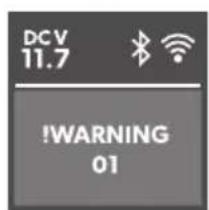
| Fhe displa" shows an alert message or j | ee the following tables. warning code. | |
P2SP, lert 4 e//age/
RSample2
FigS0U on) ageOP4
lert 4 e//age De/ ri) tion Po//ible a9/e S9gge/te6 re4 e61
| e) >RRF - >id open r K min | >id open more than K min | >id not full" latched | Uheck lid latched full" |
| Internal fault J authorized repair center in-spection re' uired | |||
| e) >RRF - voltage low | The device has stopped work-ing on EU due to low voltage | Insufficient suppl" voltage Uheck voltage drop from bat-ter" to power outlet and in-crease wiring gauge if neces-sar" | |
| Batter" voltage is too low Fest the batter" and charge as needed | |||
| Batter" protection is set too high | I elect a lower batter" protec-tion setting | ||
| The device has stopped work-ing on EU due to abnormal-1" high voltage r KCL b (un-likelihood" event j for electronics protection onl" j uses same alert message as low voltage above) | Vrong EU suppl" voltage specification | Rnsure EU suppl" voltage specification matches product rating label | |
| Yault" suppl" volt-age | Uheck EU voltage suppl" and repair or replace it fault" | ||
| Internal fault J authorized repair center in-spection re' uired | |||
P2S2 R arming o6e/
RSampleZ Yig.
| R arning o6e | Fa9lt Po//ible a9/e S9gge/te6 re4 e61 | ||
| eV J R&I&G CQ | &FU open circuit I h s Eh >RGR | Internal fault | J authorized repair center in-spection re' uired |
| eV J R&I&G CB | &FU short circuit I h s Eh >RGR | ||
| eV J R&I&G QQ | &FU open circuit Eh | M| >> | ||
| eV J R&I&G QB | &FU short circuit Eh | M| >> | ||
| eV J R&I&G CKf DK | Ummunication error | Woder oc the device for at least 0 min then restart. If the problem persistsH authorized repair center inspection is re-' uired. | |
| eV J R&I&G CP | Eh valve or Ice maker valve fault" | ||
R arning o6e Fa9lt Po/illble a9/e S9gge/te6 re4 e61
| eV J R&I&G KB Yan over-current | Internal fault Wower oc the device for at least L minh then restart. If the problem persists, authorized repair center inspection is re- uired. |
| eV J R&I&G KK Uompressor start fail | |
| eV J R&I&G KD Uompressor speed low | a (igh ambient temperature a)ir vent blocked or insuffi-cient clearance a Internal fault a Wower oc the device for at least KC min or move to a cooler location then restart. a Ulear the vents a J authorized repair center inspection re' uired |
| eV J R&I&G KL Uontroller over-temperature |
P3 R arrant
The statutor " warrant" period applies. If the product is defective, please contact the manufacturer's branch in "our counr" (see dometic.comf dealer) or "our retailer.
Yor repair and warrant" processingH please include the following documents when "ou send in the device?
a cop" of the receipt with purchasing date
a] reason for the claim or description of the fault
&ote that self-repair or nonprofessional repair can have saet" conse' uences and might void the warrant".
P4 Di/) o/al

Rec" cling packaging material? Wlace the packaging material in the appropriate rec" cling waste bins wherever possible.

R, RNING Ri/. o(hil6 entra)4 ent
Before disposing of "our old cooling deviceH dismantle the lid. >eave the baskets in place so that children ma" not easil" climb inside.
If "ou wish to Tnall" dispose the product ask "our local rec" cling center or specialist dealer or details about how to do this in accordance with the applicable disposal regulations. The product can be disposed free of charge.

If the product contains an "non-replaceable batteries" rechargeable batteries or light sources, "ou don't have to remove them before disposal.
P5 'ehnial 6ata

N2'E The minimum temperature shown in mUooling capacit"n ma" be attained if the ambient temperature is above KBI U.
Festf certiTcates?
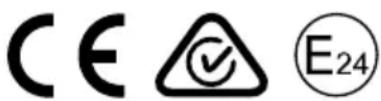
Yellow RWJ use conditions.
| CFX5 25 | |
| Uonnection voltage | QB b≠f BD b=QCC b≠f BDC b~ |
| Rated current | QB b≠P.BJBD b≠D.BJQCC b≠0.0JBDC b≠C.DMJ |
| Uooling capacit" BCI U#t j | BBIU |
| Ultimate class &HF | |
| volume BL > | |
| J ambient temperature QMI U#t DKI U | |
| Refrigerant RMCCA | |
| Refrigerant 'uantit" OL g | |
| Yre' uenc" range V iYiZ BDCC M( z#t BDOK.L M( z | Bluetooth B>RZ BDCC M( z#t BDOK.L M( z |
| Yre' uenc" band (V iYi) B.D G( z | |
| RY output power V iYiZ QP.P0 dBm (OCB.00b)H | |
| QP.PQ dBm (OCB.00g)+QP.PQ dBm (OCB.00n)+Bluetooth Z 00.BK dBmBluetooth >RZ 00.BK dBm | |
| Dimensions V S E S ( (including handles) | KDB mm#u LMP mm#u DBC mm |
| V eight OM kg |
| CFX5 35 | |
| Uonnection voltage | QB b#f BD b =QCC b#f BDC b ~ |
| Rated current | QB b#70.P JBD b#7K.OJQCC b#70JBDC b#7C.DG J |
| Uooling capacit" BCI U#t j | BBI U |
| Ultimate class &H F |
ENw CFX5
| CFX5 35 | |
| bolume KM > | |
| J ambient temperature QMI Uqt DKI U | |
| Refrigerant RMCCA | |
| Refrigerant 'uantit" ON g | |
| Yre' uenc" range V iYiZ BDCC M( zit BDOK.L M( z) | Bluetooth B>R2 BDCC M( zit BDOK.L M( z) |
| Yre' uenc" band (V iYi) B.D G( z) | |
| RY output power V iYiZ QP.PQ dBm (OCB.00b)H | QP.PQ dBm (OCB.00g)+ |
| QP.PQ dBm (OCB.00n)+ | |
| Bluetooth Z00.BK dBm | |
| Bluetooth >R2 00.BK dBm | |
| E dimensions V S E S ( (including handles) | KPO mmμ MPD mmμ DCN mm |
| V eight QP.O kg | |
| CFX5 45 | |
| Uonnection voltage | QB b≠f BD b = |
| QCC b≠f BDC b ~ | |
| Rated current | QB b≠f P.D J |
| BD b≠f D.G J | |
| QCC b≠f Q.CM J | |
| BDC b≠f C.DJ | |
| Uooling capacit" BCI Uqt j | BBI U |
| Ultimate class & F | |
| volume DM > | |
| J ambient temperature QMI Uqt DKI U | |
| Refrigerant RMCCA | |
| Refrigerant 'uantit" BC g | |
| Yre' uenc" range V iYiZ BDCC M( zit BDOK.L M( z) | Bluetooth B>R2 BDCC M( zit BDOK.L M( z) |
| Yre' uenc" band (V iYi) B.D G( z) |
CFX5MEN
| CFX5 45 | |
| RY output power V iYiZ QP.PQ dBm (OCB.00b)H | QP.PQ dBm (OCB.00g)+ |
| QP.PQ dBm (OCB.00n)+ | |
| Bluetooth® 00.BK dBm | |
| Bluetooth® R2.00.BK dBm | |
| E dimensions V S E S ( (including handles) | KPO mmμ MPD mmμ DN M mm |
| V eight B0.N kg | |
| CFX5 55 | |
| Uonnection voltage | QB b≠f BD b = |
| QCC b≠f BDC b ~ | |
| Rated current | QB b≠f P.M J |
| BD b≠f D.B J | |
| QCC b≠f Q.CO J | |
| BDC b≠f C.DM J | |
| Uooling capacit" BCI U± j | BBI U |
| Ultimate class & H F | |
| Fotal volume LL > | |
| J ambient temperature OMI U± DKI U | |
| Refrigerant RMCCA | |
| Refrigerant 'uantit" BB g | |
| Yre' uenc" range V iYiZ BDCC M( z≥t BDOK.L M( z | Bluetooth B>R2 BDCC M( z≥t BDOK.L M( z |
| Yre' uenc" band (V iYi) B.D G( z | |
| RY output power V iYiZ QP.PQ dBm (OCB.00b)H | QP.PQ dBm (OCB.00g)+ |
| QP.PQ dBm (OCB.00n)+ | |
| Bluetooth® 00.BK dBm | |
| Bluetooth® R2.00.BK dBm | |
| E dimensions V S E S ( (including handles) V eight BK.O kg | NBC mmμ DLL mmμ DOC mm |
EN@CFX5
| CFX5 55IM | |
| Uconnection voltage | QB b#f BD b = OCC b#f BDC b ~ |
| Rated current | QB b#f P.M.J BD b#f D.B.J OCC b#f Q.CO.J BDC b#f C.D.M.J |
| Uooling capacit" BCI U#t j | BBI U |
| Ultimate class &H F | |
| Fotal volume LL > | |
| Jmbient temperature QMI U#t DKI U | |
| Refrigerant RMCCA | |
| Refrigerant 'uantit" BB g | |
| Yre' uenc" range V iYiZ BDCC M( z#t BDOK.L M( z | Bluetooth B>RZ BDCC M( z#t BDOK.L M( z |
| Yre' uenc" band (V iYi) B.D G( z | |
| RY output power V iYiZ 0P.PQ dBm (OCB.00b)H | QP.PQ dBm (OCB.00g)H |
| QP.PQ dBm (OCB.00n)H | |
| Bluetooth Z 00.BK dBm | |
| Bluetooth RZ 00.BK dBm | |
| E dimensions V S E S ( (including handles) | NBC mmu DLL mmu DOC mm |
| V eight BL kg | |
| CFX5 75DZ | |
| Uconnection voltage | QB b#f BD b = OCC b#f BDC b ~ |
| Rated current | QB b#f P.O.J BD b#f D.M.J OCC b#f 0.0.J BDC b#f C.D.N.J |
| Uooling capacit" BCI U#t j | BBI U |
| Ultimate class &H F | |
| Total volume NL > (DL >f KC >) |
CFX5MEN
| CFX5 75DZ | |
| Jmbient temperature 0M Uct DKU | |
| Refrigerant RMCCA | |
| Refrigerant 'uantit" BN g | |
| Yre' uenc" range V iYiZ BDCC M( zzt BDOK.L M( z | Bluetooth B>R2 BDCC M( zzt BDOK.L M( z |
| Yre' uenc" band (V iYi) B.D G( z | |
| RY output power V iYiZ GP.P0 dBm (OCB.00b)H | QP.P0 dBm (OCB.00g)+QP.P0 dBm (OCB.00n)+Bluetooth Z00.BK dBmBluetooth >R2 00.BK dBm |
| E dimensions V S E S ( (including handles) | OPB mmμ DPL mmμ DN B mm |
| V eight K0.0 kg | |
| CFX5 95DZ | |
| Uonnection voltage | QB b#f BD b=QCC b≠BDC b~ |
| Rated current | QB b≠O.C.D JBd≠D.NJQCC b≠Q.BB JBDC b≠C.L0 J |
| Uooling capacit" BCI U#t j | BBI U |
| Ultimate class & H F | |
| Fotal volume PD>(LL>f KP>) | |
| Jmbient temperature 0M U#t DKU | |
| Refrigerant RMCCA | |
| Refrigerant 'uantit" KC g | |
| Yre' uenc" range V iYiZ BDCC M( zzt BDOK.L M( z | Bluetooth B>R2 BDCC M( zzt BDOK.L M( z |
| Yre' uenc" band (V iYi) B.D G( z |
ENwCFX5
| CFX5 95DZ | |
| RY output power V iYiZ QP.PQ dBm (OCB.00b)H | QP.PQ dBm (OCB.00g)H |
| QP.PQ dBm (OCB.00n)H | |
| Bluetooth Z 00.BK dBm | |
| Bluetooth >R2 00.BK dBm | |
| Dimensions V S E S ( (including handles) | PMB mmμ LKC mmμ DNB mm |
| V eight KK.K kg |
(ereb"HEometric declares that the radio e' uipment t"pe UYgL is in compliance with E injective BCQDf L Kf RU. Fhe full teSt of the RU declaration of conformit" is available at the following internet address documents.dometic.com
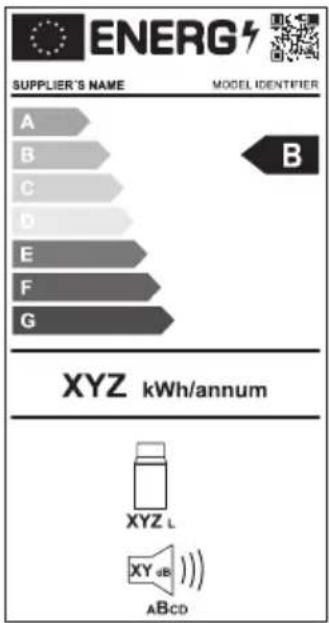
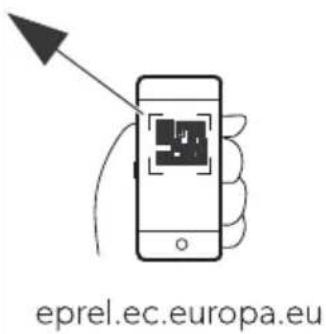
Yurther product information can be accessed via i R code on the energ" label or via eprel.ec.europa.eu.

FigS0 on) ageVP5
De9t/ h
WUBL PMBCCQBOCO UYgL BL
WUKL PMBCCQBOCM UYgL KL
WUDL PMBCCQBOCL UYgL DL
WULL PMBCCGBOGC UYgL LL
UYgl LLIM
WUNL PMBCCQBOQQ UYgL NLEh
WUPL PMBCCQBOCN UYgL PLEh
Kuhl/ hran./ hiene
I>ELKLDLUPMBCCGBDLDUygl KL
UYgL DL
I>ELLU PMBCC0BDLL UYgL LL
UYgl LLIM
I>ENL U PMBCC0BDLM
UYgL NLEh
I>EPLQCCU PMBCCQBDLN
UYgL PLEh
S hnellver/ hl9//-Ce(e/tig9ng/.it
iYBL PMCCCCCGMMUYgL BL
iYKLDL PMCCCBPLPP UYgL KL
Ce:ei hn9ng, rtS-Nr5 Mo6ell
UYgL DL
MobileUoolingj ppj passendwr alle Modelle
V'ehni/ he Ce/hreib9ng
R arn4 el69ng Ce/ hreib9ng Mogli he Ur/a he L0/9ng/vor/ hlag
R arm4 el69ng Ce/ hreib9ng Mogli he Ur/a he Lof/9ng/vor/ hlag
R am o6e Stor9ng Mogli he Ur/a he L0/9ng/vor/ hlag
R arn o6e Stor9ng Mogli he Ur/a he Lof/9ng/vor/ hlag
WUBL PMBCCQBOCO UYgL BL
WUKL PMBCCQBOCM UYgL KL
WUDL PMBCCGBOCL UYgL DL
WULL PMBCCGBOGC UYgL LL
WUNL PMBCCGBOQ UYgL NLEh
WUPL PMBCCGBOCN
UYgL PLEh
Gli//i!re) o9r ra(rigarate9r
ELKLDLU
PMBCCQBDLD UYgL KL
UYgL LTIM
UYgL DL
|>ELLU
PMBCCQBDLL UYgL LL
Da/ignation Ne 6barti le Mo6! le
UYGLLLIM
I>ENL U PMCCQBDLM UYgL NLEh
I>EPLOCCU PMBCCGBDL N UYgL PLEh
i Y KLDL PMCCCBPLPP UYgL KL
UYgL DL
PZS7 Oerro9illage/6averro9illage 6e Iba ran
a UYgL BLUygL KLUYgL DLUYgL LLHUYgL LLLIMQJ
a UYgL NLEhUYYGLPLEhZQLJ
| C9bierta 6e) rote i7n | ||
| WUBL PMBCCQBOCO UYgL BL | ||
| WUKL PMBCCQBOCM UYgL KL | ||
| WUDL PMBCCQBOCL UYgL DL | ||
| WULL PMBCCQBOC UYgL LL | ||
| UYgL LLIM | ||
| WUNL PMBCCQBOQ UYgL NLEh | ||
| WUPL PMBCCQBOCN UYgL PLEh | ||
| Riel 6e/li: ante ) ara nevera | ||
| I >ELKLDLU | PMBCCQBDLD UYgL KL | |
| UYgL DL | ||
| I >ELLU | PMBCCQBDLL UYgL LL | |
| UYgL LLIM | ||
| I >ENLU | PMBCCQBDLM | UYgL NLEh |
| I >EPL&CCU | PMBCCQBDLN | UYgL PLEh |
Deno4ina i7n NsK 6e artS Mo6elo
i Y KLDL PMCCCBPLPP UYgL KL
UYgL DL
WUBL PMBCCQBOCO UYgBL
WUKL PMBCCQBOCM UYgL KL
WUDL PMBCCQBOCL UYgL DL
WULL PMBCCGBOGC UYgL LL
UYglLLIM
WUNL PMBCCGBOQUYgL NLEh
WUPL PMBCCQBOCN UYgL PLEh
i Y KLDL PMCCCBPLPP UYgL KL
UYgL DL
j plicacao de reirigeraaoevityodos os modelos
NUKL PMBCCQBOCM UYgl KL
NUDL PMBCCQBOCL UYgl DL
NULL PMBCCQBOQC UYgL LL
UYgl LLIM
WUNL PMBCCQBOQQ UYgL NLEh
WUPL PMBCCQBOCN UYgL PLEh
S ivolo (rigori(ero
I >ELKLDLU PMBCCOBDL UYgL KL
UYgL DL
I>ELLU PMBCCOBDLL UYgL LL
UYgL LTM
I>ENL U PMBCCQBDLM
UYgLPLEh
I>EPLQCCU PMBCCQBDLN
PZS7 Clo are//blo are il 6i/) la1
a UYgl BLUygL KLUYgL DLUYgL LLUYgL LLIMQCJ
| Ce/ her4 . a) | ||
| WUBL PMBCCQBOCO UYgL BL | ||
| WUKL PMBCCQBOCM UYgL KL | ||
| WUDL PMBCCQBOCL UYgL DL | ||
| WULL PMBCCQBOC UYgL LL | ||
| UYgL LLLIM | ||
| WUNL PMBCCQBOQQ UYgL NLEh | ||
| WUPL PMBCCQBOCN UYgL PLEh | ||
| S h9i(. oel. a/t | ||
| I >ELKLDLU | PMBCCQBDLD UYgL KL | |
| UYgL DL | ||
| I >ELLU | PMBCCQBDLL UYgL LL | |
| UYgL LLLIM | ||
| I >ENLU | PMBCCQBDLM UYgL NLEh | |
| I >EPLQCCU PMBCCQBDLN UYgL PLEh | ||
| Snelbeve/tiging//et | ||
| i Y BL | PMCCCCQMM UYgL BL | |
| i Y KLDL | PMCCCBPLPP | UYgL KL |
| UYgL DL | ||
, an69i6ing, rti. elmrMo6el
a bed and breakfast-accommodities
V'ehni/ he be/hri3ving
a UYgl BLUygL KLUYgL DLUYgL LLUYgL LLIMQCJ
OIG'IG'Fare (or be/.a6igel/e
WUKL PMBCCGBOCM UYgL KL
WUDL PMBCCGBOCL UYgL DL
WULL PMBCCQBOC UYgL LL
WUNL PMBCCQBOQQ UYgL NLEh
WUPL PMBCCQBOCN UYgL PLEh
K-le/.ab/gli6er
I>ELKLDLU
PMBCC0BDLD UYgL KL
JYgl LLIM
UYgL DL
|>ELLU
PMBCCQBDLL UYgL LL
UYgl LLIM
ENLU
PMBCCQBDLMUYgL NLEh
1>EPCLCCU
PMBCCQBDLN UYgL PLEh
Lln(a/tg-rel/e//u t
iYBL
PMCCCCCQMMAUYgl BL
iY KLDL
PMCCCBPL PP
UYgL KL
UYgL DL
Cet3ening/) anel X (ig
(igSII)t/i6e4
, rti. el Ce/.rivel/e For. laring

B E ispla" 2 beikelstromnet er tiltslufer
OIG'IG'Fare (or be/.a6igel/e
Fr"k pə/ sor at navigere op.
Fr"k pa'or at navigere ned.
0alg a(en4 en9
s n6ring a(in6/tillinger
0IG'IG' Fare (or be/. a6igel/e
Jnvend aldrig hardt eller spidst varktoj til at derne is ell er til at ousne genstandeH som er grossset cast.
Yortsaet pa 6lgende made for at aprime koleapparatet
a UYgL BLHUYgL KLHUYgL DLHUYgL LLHUYgL LLIMZQJ
a UYgL NLEhUYYGLPLEhzQLJ
PZSP9 U6/. i(tning a()rint) la6en

OIG'IG'Fare (or be/.a6igel/e
ampen kan kun udskides at producentenH en servicerepresentant aller en tilsvarende kvaliTceret person for at undgåGarer.
PP Reng-ring og ve6ligehol6el/e

F2 RSIG' IGQ Fare (or ele.tri/. /t-6
2 CSER0ER, Ri/. (or/.a6a
Cete. ning, rtSnr Mo6ell
S.166/hol3e
WUBL PMBCCQBOCO UYgBL
WUKL PMBCCQBOCM UYgL KL
WUDL PMBCCQBOCL UYgL DL
WULL PMBCCGBOQC UYgLL
UYgl LLIM
WUNL PMBCCQBOO QUYgL NLE h
WUPL PMBCCQBOCN UYgL PLEh
K11/.39t) latta
ELKLDLU
PMBCCQBDLD UYgL KL
UYgL DL
|>ELLU
PMBCCQBDLL UYgL LL
UYgl LLIM
ENLU
PMBCCQBDLMUYgL NLEh
EPLOCCU
PMBCC0BDLNUYgLPLEh
Snabb4 ontering//at/
iYBL
PMCCCCCQMM UYgl BL
iY KLDL
PMCCCBPLPP
UYgL KL
UYgL DL
Jppen Mobile Uooling
j
2 CSER0ER, Ri/. (or/. a6a
Yor att sk"dda apparaten har likstromskabeln utrustats med en s! kring inuti kontakten. Fa inte ut den s! kringsorssedda likstromskontakten. J nv! nd endast den medoljande likstromskabeln.
2 CSER0ER, Rr/. (or/. a6a
!mta append Mobile Uooling.
St5IIa in Cl9etooth-/ignalen o h an/l9ta till a) en
PZSP4 USC-an/19tning (or/) 5nning/(or/or3ning
2 CSER0ER, Ri/. (or/. a6a
Jnvnd inte hards erer spetsiga verkt"g for att ta bort is ell er lossa pa fastrusna goremal.
a UYgL BLUYgL KLUYgL DLUYgL LLUYgL LLLIMQCJ
a UYgL NLEhUYYGL PLEhZQLJ
a UYgL BLHUYgL KLHUYgL DLHUYgL LLHUYgL LLIMZQJ
a UYgL NLE hH UYgl PLEhZQL J
PZSP9 C1ta l39/. ret/. ort

2 CSEROER, Rr/. (or/. a6a
2 CSEROER, Rr/. (or/.a6a
P, SS PwQ Fare (or/.a6er
WUBL PMBCCQBOCO UYgL BL
WUKL PMBCCQBOCM UYgl KL
WUDL PMBCCGBOCL UYgL DL
WULL PMBCCQBOQC UYgL LL
UYgl LLIM
WUNL PMBCCQBOQQ UYgL NLEh
WUPL PMBCCQBOCN UYgL PLEh
K3-le/.a) //.1ver
I>ELKLDLU
PMBCC0BDLD UYgL KL
UYgL DL
ELLU
PMBCCQBDLL UYgL LL
UYgl LLIM
ENLU
PMBCCQBDLMUYgL NLEh
I>EPCLCCU
PMBCCQBDLN UYgL PLEh
H9rtig/e/te/ett
iYBL
PMCCCCCQM UYgL BL
iY KLDL
PMCCCBPLPP
UYgL KL
UYgL DL
Mobilapp for kjøling
j passer for alle modeller
Cet3ening/) anel X (ig
(igS)t/i6e4
Ele4 ent Ce/.rivel/e For. laring
G I lar kjoleapparatet pa nár knappen tr"kkes pa kort
I lar kjoleapparatet av nár knappen tr"kkes inn i tre sekunder
Ele4 ent Ce/.rivel/e
Q Filkoblingskontakt vekselspenningsfors"ning
B bekselstrom-sikringsholder
K >ikestrøm-sikringsholder
D Filkoblingskontakt likespenningsstor"ning
9 F-r (-r/te br9.

P,SS PwQ Fare (or/.a6er
Yor besk"ttelse avenheten har den medolgende likestromkabelen en sikring pa innate i pluggen. I.. eern den sikrede likestrompluggen. Bruk kun den medolgende likestromkabelen.
Ga grem som vist?

(igS0)t/i6e07
il. obling til et ve. /el/tr- 4 nett

F, REQ Fare (or ele. tri/. /t- t
Fa aldri i stopser og br"tere med vate hender ellher his det er vatt der du sta.
Be om rād āra āgōolk om nödvendig.
Ga orem som vistZ
(igS)t/i6e7
P, SS PwQ Fare (or/.a6er
P, SS PwQ Fare (or overo)) hetning
P, SS PwQ Fare (or/.a6e (ra e./tre4 t lav te4) erat9r
Ele4 ent Ce/.rivel/e
J lar til drid
B Ikke i drid
U1perret
Di/la1over/i.
(igS0)t/iGePZ
Navigere g3enno4 4 en1ene
PZSP4 USC-til. obling (or /) enning/(or/1 ning
P, SS PwQ Fare (or/.a6er
a UYgL BLUYgL KLUYgL DLUYgL LLUYgL LLLIMQCJ
a UYgL BLHUYgL KLHUYgL DLHUYgL LLHUYgL LLIMZQJ
a UYgL NLE hH UYgL PLEhZQLJ
PZSP9 S. i(te 11/. ortet

P, SS PwQ Fare (or/.a6er
P, SS PwQ Fare (or/.a6er
P4, v(all/htn6tering

Resirkulering av emballasje ever emballasje til resirkulering sa langt det er mulig.

, DO, RSELQ Fare (or at barn blir innate/tengt
Yor du kaster det gamle kjoleapparatet dit mdu ta lokket gra hverandre. a kurvene bli varende pplssh sik at det icke er enkelt for barn 己 kr"pe inn.
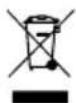
Resirkulering avprodukter med ikke-erstattbare batterier#opplabare batterier erer 1"skilderr?
a ( vis produitur inneholder icke-erstattbare batterieropplabare batterier erler 1'skildertrenger du icke Ierne dem or avhending.
a vis du onsker avallsbehandle Produktet ma du radore deg med naerneste gjenvinningsstasjon ell er din saghandler om hvordan du kan gore dette i overensstemmelse med gjeldende deponeringsstorskrider.
WUBL PMBCCQBOCO UYgBL
WUKL PMBCCQBOCM UYgL KL
WUDL PMBCCQBOCL UYgL DL
WULL PMBCCQBOOC UYgLL
UYgl LLIM
WUNL PMBCCQBOO UYgL NLE h
WUPL PMBCCQBOCN UYgL PLEh
L55.aa))i.el..a
I>ELKLDLU
PMBCCQBDLD UYgL KL
UYgL DL
ELLU
PMBCCQBDLL UYgL LL
UYgl LLIM
I>ENLU
PMBCCQBDLMUYgL NLEh
I>EPLOCCU
PMBCCQBDLN UYgL PLEh
Pi. a. iinnit//ar3a
iYBL
PMCCCCCQMM UYgl BL
iY KLDL
PMCCCBPL PP
UYgL KL
UYgL DL
Mobile Uooling -sovellus
j
aaiia jjaiy jaiy jaiy aaiy aaiy aaiy aaiy aaiy aaiy aaiy aaiy aaiy aaiy aaiy aaiy aaiy aaiy aaiy aaiy aaiy aaiy aaiy aaiy aaiy aaiy aaiy aaiy aaiy aaiy aaiy aaiy aaiy aaiy aaiy aaiy aaiy aal y
10.2
. 1
13y 15
j 2
gai jia jia jia jia jia jia jia jia jia jia jia jia jia jia jia jia jia jia jia jia jia jia jia jia jia jia jia jia jia jia jia jia jia jia jia jia jia jia jia jia jia jia
aaiy
J 1
Wi-Fi Bluetooth 10.12
algaaill jgsu 1yjbi jji
Wi-Fi Bluetooth
algssall jgsuSul yjll gbsjjj

Bblblblblblblblblblblblblblblblblblblblblblblblblblblblblblblblblblblblblblblblblblblblblblblblblblblblblblblblblblblblblblblblblblblblblblbl
blt 1
四边形 AOBC 为正方形

-Bluetooth
:aaii
13 a#

Wi-Fi oJ
y
13 aie 1

Wi-Fi Bluetooth
aagaaal jgsuysuysuysuysuysuysuysuysuysuysuysuysuysuysuysuysuysuysuysuysuysuysuysuysuysuysuysuysuysuysuysuysuysuysuysuysuysuysuysuysuysuysuysuys
V i-Yi Bluetooth
Guaal lal 10.13
Aaallll lalld!
ailll bllg
13 a.s. J.

abulbubus USB 10.14
.mp3 1
2,5/5 5 USB jj j j j j j j j j j j j j j j j j

:a
14 aannn

10.15
a 1
i 1
a

aill 1
- 2.1
3.
a 4.1
.5.
10.16
y 1
jll jnnn nn nnnn nn nnnn nn nnnn nn nnnn nn nnnn nn nnnn nn nnnn nn nnnn nn nnnn nn nnnn nn nnnn nn nnnn nn nnnn nn nnnn nn nnnn nn nnnn nn nnnn nn nnnn nn nnnn nn nnnn nn nnnn nn nnnn nn nnnn nn nnnn nn nnnn nn

- 2.
2
.3
2504 1
.5.
.6.
yannnnn 10.17
1.
3 1
.2
- 4.1g2s1g;
CFX5551
CFX595I
.5.
.6.
10.18
e 1
14

- CFX5 55
- CFX595
10.19
1
11
y
auii i 1
abla clg g jyjclal yj 1
y

J 1
y 1
12
4 12.1
| الإستعمال الحرفية | الإستعمال الحرفية | |
| الإستعمال الحرفية الحرفية | <sup>1</sup> محيى بعس الحرفية الحرفية | الإستعمال الحرفية الحرفية |
| <sup>2</sup> محيى بعس الحرفية الحرفية | (الإستعمال الحرفية) | |
| الإستعمال الحرفية الحرفية | <sup>3</sup> محيى بعس الح註冊 الإستعمال الح註冊 | (الإستعمال الح註冊) |
| <sup>4</sup> محيى بعس الح註冊 الإستعمال الح註冊 | (الإستعمال الح註冊) | |
| الإستعمال الح註冊 | <sup>5</sup> محيى بعس الح註冊 الإستعمال الح註冊 | (ال,en) |
| ال,en | <sup>6</sup> محيى بعس الح註冊 ال,en | (ال,en) |
| ال,en | <sup>7</sup> محيى بعس الح註冊 ال,en | (ال,en) |
| ال,en | <sup>8</sup> محيى بعس الح註冊 ال,en | (ال,en) |
| ال,en | <sup>9</sup> محيى بعس الح註冊 ال,en | (ال,en) |
| ال,en | <sup>10</sup> محيى بعس الح註冊 ال,en | (ال,en) |
| ال,en | <sup>11</sup> محيى بعس الح註冊 ال,en | (ال,en) |
| ال,en | <sup>12</sup> محيى بعس الح註冊 ال,en | (ال,en) |
| ال,en | <sup>13</sup> محيى بعس الح註冊 ال,en | (ال,en) |
| ال,en | <sup>14</sup> محيى بعس الح註冊 ال,en | (ال,en) |
| ال,en | <sup>15</sup> محيى بعس الح註冊 ال,en | (ال,en) |
| ال,en | <sup>16</sup> محيى بعس الح註冊 ال,en | (ال,en) |
| ال,en | <sup>17</sup> محيى بعس الح註冊 ال,en | (ال,en) |
| ال,en | <sup>18</sup> محيى بعس الح註冊 ال,en | (ال,en) |
| ال,en | <sup>19</sup> محيى بعس الح註冊 ال,en | (ال,en) |
| ال,en | <sup>20</sup> محيى بعس الح註冊 ال,en | (ال,en) |
| ال,en | <sup>21</sup> محيى بعس الح註冊 ال,en | (ال,en) |
| ال,en | <sup>22</sup> محيى بعس الح註冊 ال,en | (ال,en) |
| ال,en | <sup>23</sup> محيى بعس الح註冊 ال,en | (ال,en) |
| ال,en | <sup>24</sup> محيى بعس الح註冊 ال,en | (ال,en) |
| ال,en | <sup>25</sup> محيى بعس الح註冊 ال,en | (ال,en) |
| ال,en | <sup>26</sup> محيى بعس الح註冊 ال,en | (ال,en) |
| ال,en | <sup>27</sup> محيى بعس الح註冊 ال,en | (ال,en) |
| ال,en | <sup>28</sup> محيى بعس الح註冊 ال,en | (ال,en) |
| ال,en | <sup>29</sup> محيى بعس الح註冊 ال,en | (ال,en) |
| ال,en | <sup>30</sup> محيى بعس الح註冊 (ال,en) | (ال,en) |
| <sup>31</sup> محيى بعس الح註冊 (EN) | <sup>32</sup> محيى بعس الح註冊 (EN) | (EN) |
| <sup>33</sup> محيى بعس الح註冊 (EN) | <sup>34</sup> محيى بعس الح註冊 (EN) | (EN) |
| <sup>35</sup> محيى بعس الح註冊 (EN) | <sup>36</sup> محيى بعس الح註冊 (EN) | (EN) |
| <sup>37</sup> محيى بعس الح註冊 (EN) | <sup>38</sup> محيى بعس الح註冊 (EN) | (EN) |
| <sup>39</sup> محيى بعس الح註冊 (EN) | <sup>40</sup> محيى بعس الح註冊 (EN) | (EN) |
| <sup>41</sup> محيى بعس الح註冊 (EN) | <sup>42</sup> محيى بعس الح註冊 (EN) | (EN) |
| <sup>43</sup> محيى بعس الح註冊 (EN) | <sup>44</sup> محيى بعس الح註冊 (EN) | (EN) |
| <sup>45</sup> محيى بعس الح註冊 (EN) | <sup>46</sup> محيى بعس الح註冊 (EN) | (EN) |
| <sup>47</sup> محيى بعس الح註冊 (EN) | <sup>48</sup> محيى بعس الح註冊 (EN) | (EN) |
| <sup>49</sup> محيى بعس الح註冊 (EN) | <sup>50</sup> محيى بعس الح註冊 (EN) | (EN) |
| <sup>51</sup> محيى بعس الح註冊 (EN) | <sup>52</sup> محيى بعس الح註冊 (EN) | (EN) |
| <sup>53</sup> محيى بعس الح註冊 (EN) | <sup>54</sup> محيى بعس الح註冊 (EN) | (EN) |
| <sup>55</sup> محيى بعس الح註冊 (EN) | <sup>55</sup> محيى بعس الح註冊 (EN) | (EN) |
| <sup>56</sup> محيى بعس الح註冊 (EN) | <sup>57</sup> محيى بعس الح註冊 (EN) | (EN) |
| <sup>57</sup> محيى بعس الح註冊 (EN) | <sup>58</sup> محيى بعس الح註冊 (EN) | (EN) |
| <sup>58</sup> محيى بعس الح註冊 (EN) | <sup>59</sup> محيى بعس الح註冊 (EN) | (EN) |
| <sup>59</sup> محيى بعس الح註冊 (EN) | <sup>60</sup> محيى بعس الح註冊 (EN) | (EN) |
| <sup>61</sup> محيى بعس الح註冊 (EN) | <sup>62</sup> محيى بعس الح註冊 (EN) | (EN) |
| <sup>63</sup> محيى بعس الح註冊 (EN) | <sup>64</sup> محيى بعس الح註冊 (EN) | (EN) |
| <sup>65</sup> محيى بعس الح註冊 (EN) | <sup>66</sup> محيى بعس الح註冊 (EN) | (EN) |
| <sup>67</sup> محيى بعس الح註冊 (EN) | <sup>68</sup> محيى بعس الح註冊 (EN) | (EN) |
| <sup>69</sup> محيى بعس الح註冊 (EN) | <sup>69</sup> محيى بعس الح註冊 (EN) | (EN) |
| <sup>70</sup> محيى بعس الح註冊 (EN) | <sup>71</sup> محيى بعس الح註冊 (EN) | (EN) |
| <sup>72</sup> محيى بعس الح註冊 (EN) | <sup>73</sup> محيى بعس الح註冊 (EN) | (EN) |
| <sup>74</sup> محيى بعس الح註冊 (EN) | <sup>75</sup> محيى بعس الح註冊 (EN) | (EN) |
| <sup>76</sup> محيى بعس الح註冊 (EN) | <sup>77</sup> محيى بعس الح註冊 (EN) | (EN) |
| <sup>77</sup> محيى بعس الح註冊 (EN) | <sup>78</sup> محيى بعس الح註冊 (EN) | (EN) |
| <sup>79</sup> محيى بعس الح註冊 (EN) | <sup>79</sup> محيى بعس الح註冊 (EN) | (EN) |
| <sup>80</sup> محيى بعس الح註冊 (EN) | <sup>81</sup> محيى بعس الح註冊 (EN) | (EN) |
| <sup>82</sup> محيى بعس الح註冊 (EN) | <sup>82</sup> محيى بعس الح註冊 (EN) | (EN) |
| <sup>83</sup> محيى بعس الح註冊 (EN) | <sup>83</sup> محيى بعس الح註冊 (EN) | (EN) |
| <sup>84</sup> محيى بعس الح註冊 (EN) | <sup>84</sup> محيى بعس الح註冊 (EN) | (EN) |
| <sup>85</sup> محيى بعس الح註冊 (EN) | <sup>85</sup> محيى بعس الح註冊 (EN) | (EN) |
| <sup>86</sup> محيى بعس الح註冊 (EN) | <sup>86</sup> محيى بعس الح註冊 (EN) | (EN) |
| <sup>87</sup> محيى بعس الح註冊 (EN) | <sup>87</sup> محيى بعس الح註冊 (EN) | (EN) |
| <sup>88</sup> محيى بعس الح註冊 (EN) | <sup>88</sup> محيى بعس الح註冊 (EN) | (EN) |
| <sup>89</sup> محيى بعس الح註冊 (EN) | <sup>89</sup> محيى بعس الح註冊 (EN) | (EN) |
| <sup>90</sup> محيى بعس الح註冊 (EN) | <sup>90</sup> محيى بعس الح註冊 (EN) | (EN) |
| <sup>91</sup> محيى بعس الح註冊 (EN) | <sup>91</sup> محيى بعس الح註冊 (EN) | (EN) |
| <sup>92</sup> محيى بعس الح註冊 (EN) | <sup>92</sup> محيى بعس الح註冊 (EN) | (EN) |
| <sup>93</sup> محيى بعس الح註冊 (EN) | <sup>93</sup> محيى بعس الح註冊 (EN) | (EN) |
| <sup>94</sup> محيى بعس الح註冊 (EN) | <sup>94</sup> محيى بعس الح註冊 (EN) | (EN) |
| <sup>95</sup> محيى بعس الح註冊 (EN) | <sup>95</sup> محيى بعس� (EN) | (EN) |
| <sup>96</sup> محيى بعس الح註冊 (EN) | <sup>96</sup> محيى بعس� (EN) | (EN) |
| <sup>97</sup> محيى بعس الح註冊 (EN) | <sup>97</sup> محيى بعس� (EN) | (EN) |
| <sup>98</sup> محيى بعس الح註冊 (EN) | <sup>98</sup> محيى بعس� (EN) | (EN) |
| <sup>99</sup> محيى بعس الح註冊 (EN) | <sup>99</sup> محيى بعس� (EN) | (EN) |
| <sup>100</sup> محيى بعس الح註冊 (EN) | <sup>100</sup> محيى بعس� (EN) | (EN) |
:
14.

(s (dometic.com/dealer 1)
j 1
Jall
aallll, aallllglaii gai i y d jn jn jn jn jn jn jn jn jn jn jn jn jn jn jn jn jn jn jn jn jn jn jn jn jn jn jn jn jn jn jn jn jn jn jn jn
14
y
JibbIy
Ae 1

sulay jnaiy aiey ayi yj yj yj yj yj yj yj yj yj yj yj yj yj
J 1
.
15
32


.EPA 2
| CFX5 95DZ | |
| \( \mathrm{~~\sim~~\sim~~\sim~~\sim~~\sim~~\sim~~\sim~~\sim~~\sim~~\sim~~\sim~~\sim~~\sim~~\sim~~\sim~~\sim~~\sim~~\sim~~\sim~~\sim~~\sim~~\sim~~\sim~~\sim~~\sim~~\sim~~\sim~~\sim~~\sim~~\sim~~\sim~~\sim~~\sim~~\sim~}24/12 \) \( \sim \sim \sim \sim \sim \sim \sim \sim \sim \sim \sim \sim \sim \sim \sim \sim \sim \sim \sim \sim \sim \sim \sim \sim \sim \sim \sim \sim \sim \sim \sim \sim \sim \sim \sim \sim \sim \sim \sim \sim \sim \sim \sim \sim \sim \sim \sim \sim \sim \sim \) 100 | \( \mathrm{~~\sim~~\sim~~\sim~~\sim~~\sim~~\sim~~\sim~~\sim~~\sim~~\sim~~\sim~~\sim~~\sim~~\sim~~\sim~~\sim~~\sim~~\sim~~\sim~~\sim~~\sim~~\sim~~\sim~~\sim~~\sim~~\sim~~\sim~~\sim~~\sim~~\sim~~\sim~~} \) |
| \( \mathrm{~~\sim~~\sim~~\sim~~\sim~~\sim~~\sim~~\sim~~\sim~~\sim~~\sim~~\sim~~\sim~~\sim~~\sim~~\sim~~\sim~~\sim~~\sim~~\sim~~\sim~~\sim~~\sim~~\sim~~\sim~~\sim~~\sim~~\sim~~\sim~~\sim~~\sim~~\cdot 10.4:~\sim~~\sim~~\sim~~\sim~~\sim~~\sim~~\sim~~\sim~~\sim~~\sim~~\sim~~\sim~~\sim~~\sim~~\sim~~\sim~~\sim~~\sim~~\sim~~\sim~~\sim~~\sim~~\sim~~\sim~~\sim~~\sim~~\sim~~\sim~~\sim~~\sim~~\sim~~\sim~~\sim~~} \) 12\( \mathrm{~~\sim~~\sim~~\sim~~\sim~~\sim~~\sim~~\sim~~\sim~~\sim~~\sim~~\sim~~\sim~~\sim~~\sim~~\sim~~\sim~~\sim~~\sim~~\sim~~\sim~~\sim~~\sim~~\sim~~\sim~~\sim~~\sim~~\sim~~\sim~~\sim~~\sim~~\sim~~\cdot 4.7:~\sim~~\sim~~\sim~~\sim~~\sim~~\sim~~\sim~~\sim~~\sim~~\sim~~\sim~~\sim~~\sim~~\sim~~\sim~~\sim~~\sim~~\sim~~\sim~~\sim~~\sim~~\sim~~\sim~~\sim~~\sim~~\sim~~\sim~~\sim~~\sim~~\sim~~\sim~~\sim~~\cdot 24 \) \( \mathrm{~~\sim~~\sim~~\sim~~\sim~~\sim~~\sim~~\sim~~\sim~~\sim~~\sim~~\sim~~\sim~~\sim~~\sim~~\sim~~\sim~~\sim~~\sim~~\sim~~\sim~~\sim~~\sim~~\sim~~\sim~~\sim~~\sim~~\sim~~\sim~~\sim~~\sim~~\sim~~\sim~1.22:~\sim~~\sim~~\sim~~\sim~~\sim~~\sim~~\sim~~\sim~~\sim~~\sim~~\sim~~\sim~~\sim~~\sim~~\sim~~\sim~~\sim~~\sim~~\sim~~\sim~~\sim~~\sim~~\sim~~\sim~~\sim~~\sim~~\sim~~\sim~~\sim~~\sim~~\sim~~\sim~~\mathrm{~0.51:~}\sim~~\sim~~\sim~~\sim~~\sim~~\sim~~\sim~~\sim~~\sim~~\sim~~\sim~~\sim~~\sim~~\sim~~\sim~~\sim~~\sim~~\sim~~\sim~~\sim~~\sim~~\sim~~\sim~~\sim~~\sim~~\sim~~\sim~~\sim~~\sim~~\sim~~\sim~~\sim~~\sim~~\mathrm{~~\sim~~\sim~~\sim~~\sim~~\sim~~\sim~~\sim~~\sim~~\sim~~\sim~~\sim~~\sim~~\sim~~\sim~~\sim~~\sim~~\sim~~\sim~~\sim~~\sim~~\sim~~\sim~~\sim~~\sim~~\sim~~\sim~~\sim~~\sim~~\sim~~\sim~~\sim~~\sim~~ \) | \( \mathrm{~~\sim~~\sim~~\sim~~\sim~~\sim~~\sim~~\sim~~\sim~~\sim~~\sim~~\sim~~\sim~~\sim~~\sim~~\sim~~\sim~~\sim~~\sim~~\sim~~\sim~~\sim~~\sim~~\sim~~\sim~~\sim~~\sim~~\sim~~\sim~~\sim~~\sim~~\sim~~ \) |
ARCFX5
| CFX5 95DZ | |
| 22- | |
| 22- | |
| 22- | |
| 22- | |
| 22- | |
| 22- | |
| 22- | |
| 22- | |
| 22- | |
| 22- | |
| 22- | |
| 22- | |
| 22- | |
| 22- | |
| 22- |
J 2014/53/EU CFX5 Dometic dometic documents.dometic.com
eprel.ec.europa.eu eeggag gaggagg qR jrae aalaaa aaa
15 aaiy

dometic.com
YOUR LOCAL DEALER
dometic.com/dealer
YOUR LOCAL SUPPORT
dometic.com/contact
dometic.com/sales-offices