
SnapDrop 00173192 - Speaker HAMA - Free user manual and instructions
Find the device manual for free SnapDrop 00173192 HAMA in PDF.



| Product type | Portable Bluetooth speaker |
| Brand | Hama |
| Model | SnapDrop 00173192 |
| Bluetooth technology | Bluetooth v4.2 |
| Supported profiles | A2DP V1.2, AVRCP V1.4, HFP V1.5 |
| Bluetooth range | < 10 m |
| Max. music power | 3 W |
| Sound system | Mono |
| Dimensions (L x W x H) | 76 x 56 x 41 mm |
| Battery capacity | Li-Polymer 400 mAh (1.48 Wh) |
| Charging voltage | Max. 5 V, 400 mA |
| Charging time | Approx. 2 hours |
| Bluetooth playback battery life | Up to 4 hours (depending on volume and audio content) |
| Connection | Micro USB (charging) |
| Main functions | Play/Pause, track change, volume, camera function (selfie/photo/video), hands-free kit, remote trigger |
| Auto standby | After 10 minutes of inactivity |
| Package contents | SnapDrop speaker, micro USB cable, wrist strap, instruction manual |
| Care and cleaning | Clean with a slightly damp, lint-free cloth, avoid harsh detergents |
| Safety | Do not expose to moisture, heat, do not open, do not dispose of in fire, recycle according to directives |
| Frequency bands | 2402 MHz ~ 2480 MHz |
| Max. radio-frequency power | 0.4 mW |
| General information | Manual available in multiple languages, support via www.hama.com |
Frequently Asked Questions - SnapDrop 00173192 HAMA
User questions about SnapDrop 00173192 HAMA
0 question about this device. Answer the ones you know or ask your own.
Ask a new question about this device
Download the instructions for your Speaker in PDF format for free! Find your manual SnapDrop 00173192 - HAMA and take your electronic device back in hand. On this page are published all the documents necessary for the use of your device. SnapDrop 00173192 by HAMA.
USER MANUAL SnapDrop 00173192 HAMA
Mobile Bluetooth Speaker SNAPDROP
Mobiler Bluetooth-Lautsprecher
GB
Operating Instructions
D
Bedienungsanleitung
F
Moded'employoi
E
Instruccionesdeuso
RUS
PykoBODCTBOONKcNlyatauH
Pa6oTHaHnHcTpkyKuJy
Istruzioniperl'uso
Gebruiksaanwijzing
Instrukcjaobsfugi
Hasznalatiutmutato
Návodk p oužití
Návodnapoužitie
Manualdeinstruções
Manualdeutilizare
BG
1
NL
PL
H
CZ
SK
P
RO
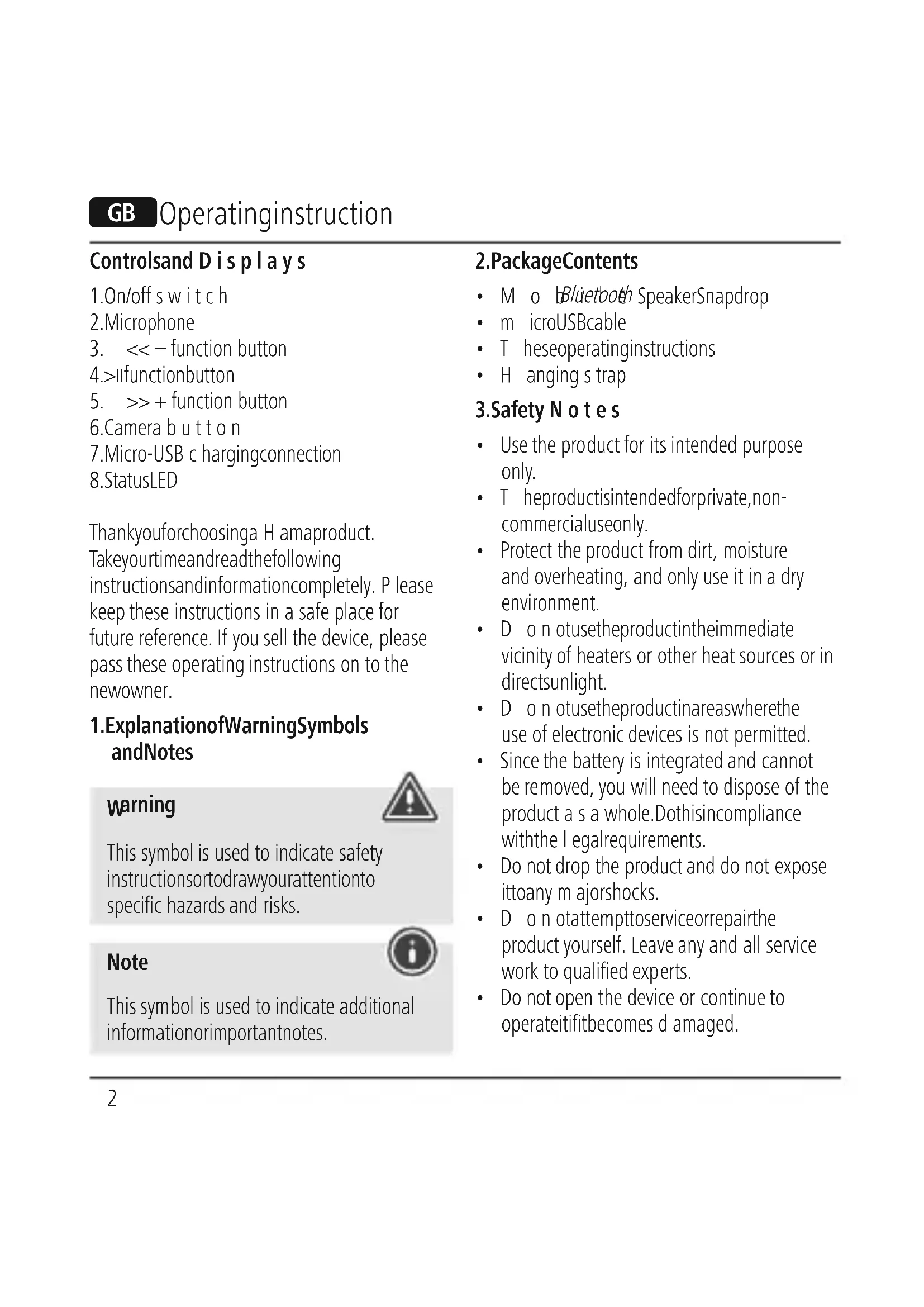
GB Operatinginstruction
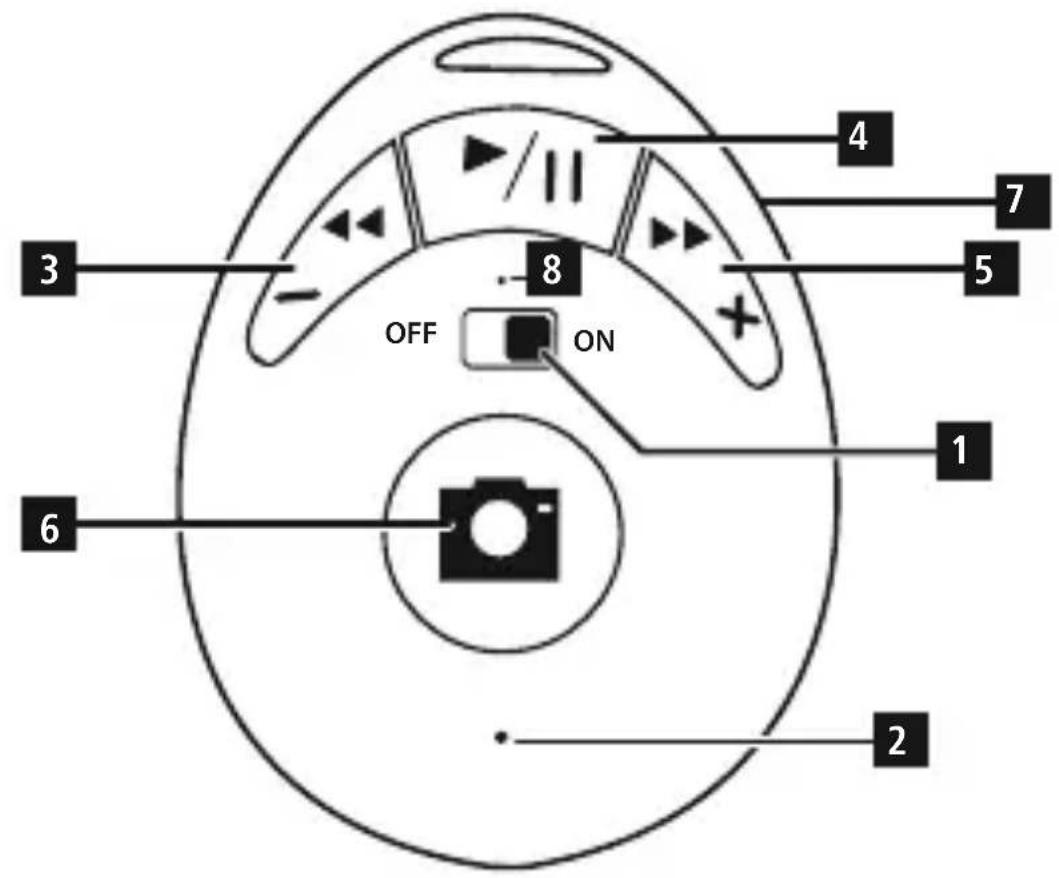
Controlsand Displays
- On/off switch
2.Microphone - << - function button
4.>uifunctionbutton -
- function button
6.Camera button
- function button
- Micro-USB c hargingconnection
8.StatusLED
Thankyouforchoosinga H amaproduct. Takeourtimeandreadthefollowing instructionsandinformationcompletely. P lease keep these instructions in a safe place for future reference. If you sell the device, please pass these operating instructions on to the newowner.
1.ExplanationofWarningSymbols andNotes
warning

This symbol is used to indicate safety instructionsortodrawyourattentionto specific hazards and risks.
Note

This symbol is used to indicate additional information or important notes.
2.PackageContents
- M o bBluetboth SpeakerSnapdrop
- m icroUSBcable
- T heseoperatinginstructions
- Hanging s trap
3.Safety Notes
- Use the product for its intended purpose only.
T heproductisintendedforprivate,non-commercialuseonly. - Protect the product from dirt, moisture and overheating, and only use it in a dry environment.
- D o n otusetheproductintheimmediate vicinity of heaters or other heat sources or in directsunlight.
- D o n otusetheproductinareaswhere the use of electronic devices is not permitted.
- Since the battery is integrated and cannot be removed, you will need to dispose of the product as a whole. Dothisincompliance with the legalrequirements.
- Do not drop the product and do not expose ittoany majorshocks.
- D o n otattemptoserviceorrepairthe product yourself. Leave any and all service work to qualified experts.
-
Do not open the device or continue to operate ititifit becomes damaged.
-
K eepthepackagingmaterialoutof the reach of children due to the risk of suffocation.
- Be considerate. Loud volumes can have a detrimental effect on your surroundings.
- D isposeofpackagingmaterialimmediately accordingly tolerocallyapplicableableregulations.
- Do not modify the product in any way. Doingsovouldsthe w arranty.
- Keep this product, as all electrical products, out of the reach of children!
- Do not throw the battery or the product into fire.
- Do not tamper with or damage/heat/disassemble the batteries/rechargeable batteries.
4. Gettingstartedandoperation
4.1Switchingon/off
- Use Power (1) to switch on the speaker. Power (1) is in the ON position.
- A voice notification confirms that the device is ready for operation. The LED indicator (8) lightsupblue.
Note - A utomaticstandby

Note that the speaker will automatically switch to standby mode after 10 minutes without action (no audio playback/no Bluetoothfunction).
4.2Chargingthebattery
Warning - Rechargeable battery

- Only use suitable charging devices with USBconnectionsforcharging.
- A s a rule,donotusechargingdevicesor USB connections that are defective and do not try to repair them yourself.
- Avoid storing, charging or using the deviceinextremetemperatures and extremely low atmospheric pressure (for example, at high altitudes).
- When stored for a long period of time, batteriesshouldbechargedregularly(at leastevery t hre-months).
- Only use suitable charging devices with USBconnectionsforcharging.
- A s a rule,donotusechargingdevicesor USB connections that are defective and do not try to repair them yourself.
- Avoid storing, charging or using the deviceinextremetemperaturesand extremely low atmospheric pressure (for example, at high altitudes).
-
When stored for a long period of time, batteriesshouldbechargedregularly(at leastevery t hre-months).
-
Charge the speaker fully before using it for the first time.
- C onnecttheincludedMicro-USBCharging cable to the speaker's Micro-USB port (7).
- C onnecttheunused c onnectoronthe Micro-USB charging cable to a suitable USB charger. Please refer to the operating instructions for the USB charger used.
- The status LED (8) lights up constantly in red during the charging process.
If the battery is fully charged, the status LED (8)willgoout.
Note- C harging

It takes approx. 2 hours to completely charge t heproduct.
- The speaker's battery can be charged whetherthespeakerisonoroff.
- If the battery capacity is less than 10% , the speaker willemmittwo a coustic signals. You will only receive this information if the speaker is on.
- T heactualbatterylifevariesdepending on use of the device, the settings and the ambient conditions (rechargeable batteries have a limitedservicelife).
4.3 Bluetooth pairing

Note
- Check whether your mobile device (MP3 player, mobile phone, etc.) is Bluetooth capable.
Note that the maximum range for Bluetooths10metreswithoutobstacles suchaswalls,people,etc. -
Makesure that your Bluetooth capable terminal device is activated.
Make sure that the speaker is located within t h Bluetooth rangeofmax. 10metres. -
Switch on the speakers as described in 4.1 Switching the product on and off.
- The status LED (8) begins to flash. The speaker searches for a connection.
- O pen t Bluetooth settingsson your terminal deviceandwaituntil Hama
- Snapdrop appears in the list of Bluetooth devicesfound.
- Select Hama Snapdrop and wait until the speakerislistedasconnectedinthe Bluetoothsettingsyouterterminaldevice. Anacousticsignalconfirmsthat c onNECTION was successful.
The status LED (8) now remains.
Note - Bluetooth password
- Some terminal devices require a password in order to connect to another Bluetooth device.
If your terminal device requests a password for connection to the speaker, enter0000.
4.4Automatic Bluetooth connection (aftersuccessful piring)
- Makesure that you'll be able to use a device on the Internet.
Make sure that the speaker is located within the Bluetooth range of max. 10 metres. - Switch on the speakers as described in 4.1
- Switchingtheproductonandoff.
After successful connection, the status LED (8) will light up in blue. An acoustic signal confirms that connection was successful.

Note - C onnnectionimpaired

After the speaker and terminal device have been paired, a connection is established automatically. If the Bluetooth connection is not established automatically, check the following:
- ChecktheBluetooth settings of your terminal device evicetoseewhat Hama.
Snapdropisconnected.Ifnot,repeat thesteps listed und Bluetooth pairing.
4.5 Audiplayback ( v i aBluetooth)
Start and control audio playback on the connectedterminaldeviceaccordingly.
Alternatively, audio playback can also be controlled on the speaker (if the connected device supports this function).
- Press the >11 function button (4) to start or pause audioplayback.
- Briefly press the >> + function button (5) to skipto t henexttrack.
- Briefly press the << function button (3) to go back to the previous track.
- Hold down the >> + function button (5) to increase the hevolume.
- Hold down the << function button (3) to reduce the volume.
4.6Remotereleasefunction
- After successfully establishing a Bluetooth connection, open the camera function on your terminaldevice.
- Switch the Hama Snapdrop from Audio mode to Camera mode by pressing and holding the camera button (6) until an acoustic signal confirms that the mode has been c hanged.
- Set your device to use the camera on the front so that you can take a selfie, or use the camera on the backtotakepicturesor recordvideosnormally.
- Press the camera button (6) to trigger the selected function(selfie,photo,video).
- I y ouwanttolistentomusicagainusing theHamaSnapdrop,switchback to the Audiomodebypressing a ndholdingthe camera b utton ( 6).
4.7 Hands-free function
You can use the speaker as a hands-free set for your mobile phone. For this function, the mobile phone must be connected to the speakevia Bluetooth.
- Press the Play/Pause/Mode button >11 (4) once to answer an incoming call.
- Press and hold the Play/Pause/Mode button > (4) for about 3 seconds to reject an incoming c all.
If you would like to end a call, press the Play/Pause/Modebutton>II(4)once duringthe c all.
Note-Call quality

To increase the call quality, make sure that you are near the speaker with your mobile phoneduringthe c all.
5.Care and Maintenance
Only clean this product with a slightly damp, lint-free cloth and do not use aggressive cleaningagents.
6.WarrantyDisclaimer
Hama GmbH & Co KG assumes no liability and provides no warranty for damage resulting from improper installation/mounting, improper use of the product or from failure to observe the operating instructions and/or safetynotes.
7. Service and Support
Please contactHamaProductConsultingifyou have any questions about this product. Hotline:<<-499091502-0(German/English) Further support information can be found here: www.hama.com
8. Service and Support
| Mobile Bluetooth Speaker S napdrop | |
| Bluetooth Technology | Bluetooth v4.2 |
| Supported p rofiles | A2DP V 1.2;AVRCP V1.4; H FPV1.5 |
| Range | < 10m |
| Max.musicoutput3W | |
| Charging v oltridgeMax.5V =400mA | |
| Sound SystemMono | |
| Size76x56x41mm | |
| ConnectionsMicroUSB | |
| Battery | |
| Type | 3.7V L i-polymer400 mAh,1.48Wh |
| Chargingtime~ 2 h | |
Playback
Via Bluetooth: 4 h (depending on volume and a di o content)
9.Declaration of Conformity
C E HerebyHamaGmbH & CoKG declaresthattheradioequipment type[00173192]isincompliance
with Directive 2014/53/EU. The full text of the EU declaration of conformity is available at the following internetaddress: www.hama. com->00173192->Downloads.
Frequency b and(s)
2402MHz\~ 2480 MHz
Maximumradio-frequency powertransmitted
0.4mW
10RecyclingInformation
Note on environmental protection:
Afterthe implementation of the European Directive 2012/19/EU and 2006/66/EU in t henational legal system,thefollowing applies: E lectricandelectronic
devices as well as batteries must not be disposed of with household waste. Consumers are obliged by law to return electrical and electronic devices as well as batteries at the end of their service lives to the public collecting points set up for this purpose or point of sale. Details to this are defined by the national law of the respective country. This symbol on the product, the instruction manual or the package indicates that a product is subject to these regulations. By recycling, reusing the materials or other forms of utilising old devices/batteries, you are making an important contribution to protecting o urenvironment.
Elenmtn3ao6cnyxbaHEn Hnkaun
1.ByToH3aBKn./n3KJI.
2.Mnkpooh
3.ФункциоHAJIeH6yTOH<<
4.Функционален>II
5.ФункционаленьTOH>>+
6. BytoH3akamepata
7. Micro-USB n3b0d 3a 3apexdahe
8.LEDnHnKaaJ3aCTaTyca
4.23apekdaheHaakymyIaTopHnTe 6aTeepu
PpeDynpexdeneaKymylatopn6aTepn

- Използва само поховши 3ардни устюйства с USВ изворни за 3аразждане.
-
По пинцин He n3ползвайт edeфektн 3ардн yctpoicTba nJN USB n3bOДи n He ce onNTbaIte da rN nonpaBATE.
-
368BaTeBxpaHHe,3apExdaHe n 3no3BaHepnEeKCTpeMn HmnpaTpyn n N3KnIOuHTeHNO HnCKo Bb3DyUHO HaIraHe (Ha np. Ha roJIemn BnCOuHH).PpN DblroTpaiHo CbxpaHHeHnepe3apeJdAitpeEOBHO (NoHe BeHNbX Ha Tpr Meceua).
-праздльрвOTOBьБжДаHeB ekПLOaTuaЯ 3apeTe TOHKOJOHaTa HAnbJIHo.
Cbpxe BkHoueHnB DocTabKaTa Mlro-USB Ka6en 3a 3apeXdaHe KbM Micro-USB n3B0da (7) Ha ToHKoJOhata.
CbpxeTcBO6OHNHnueKepeHa Micro-USBka6eIa3a3apeXdaHeKbM npirodeHo USB 3apAHO yCTPOINCTBO. 3a ceIta c6IIOJaBAInTe pBKOBOdCTBOTo 3a o6cIyXbaHe Ha n3noJ3BaHOTo USB 3apAnHOYCTPOINCTBO.
CBeToIOIObT 3a CtAtyCa (8) CBeTI NO BpeMeHaIpoUcEcaHazapexJaHepaHHO BuepeBHeO.
Korato akymylatophata 6atepna ce 3apeiHaBJIHO,CBEToIOIObT 3a CTAtyc n3ragBa(8).
yka3aHne-npouecha 3apekdahe

- Κέπητηρούςησα3ερχήαηθητραε OKΟΝΟ2ΥΑς.
- Akymylatophata 6atepy Ha ToHKOJIHOHaTMOxe Da ce 3apeXda KaKTo BbB BKIOUcHo, TaKa N B IN3KIOUcHo CbCTOHNHe.
Korato kanauTebHa akymyIaTopHaTa 6aTepe nO-HncbK OT 10% ,ce cyBa DBycTepeHHeKaYcTnEHCnHaj.Ta3n HOpMaunJeNoJyUte cMo npB KJIoueHa TOHKoJOna. - IpoIbJIxHITeJIHOCCTHa ha pa6Ota Ha akymlyaTOPHITe6aTepeIMMOxEdaBapnpa cnopei ekCnIIOaTaunrTa Ha yCTPOINCTBOTo, HAcTPOIKITE n ycIOBnraTa Ha OKoJHaTa cpeDa (akymlyaTOPHITe 6aTeepn Imat orpaHUneH XIBOT Ha pa6Ota).
4.3Пьвоначално BluetoothСБьрЗВаHe (Pairing)
3a6eJekka

- Поверетал вашето мбинокраино устю (MP3-плейьр, мбилен телефони.T.H.) подьржaBluetooth
- Osbphe Te BHMaHne, Ye o6cera Ha Bluetooth meKc. 10 metpa, 6e3 npenTCTBn KaTO CTeHn, Xopa n T.H.
YbepTe ce, Ye Baunr T noDbpxaUu BluetoothpeE e BkIoueH u yHKnraTa Bluetoothe a KtBnpaHa.
YbepeTe ce, ye ToHkoJIoHaTa ce HaMnpa B Bluetooth oBcera Ha MaKc. 10 MeTpa.
BkIIOUeTe TOHKOJIOHaTa, KaKTo e ONuCaHO B 4.10ncaHne BkIOUyBaHe/N3KIOUyBaHe -Bkn.
-ПокаЗВацяТСТатусавETODиОД(8) 3апчБа Дa МИг.TOнКолонота Tьрс 3abpb3ka.
HabaunnypeoTBopeTe Bluetooth HactpoNKte Nn3yaKaite,doKaTo Ha JnCTaHaHaMepeHt eBluetooth yctpoNCTBaCenOKaXeHamaSnapdrop.
Hama Snapdrop n 3aKeT, OkaTo TOHkoJOnHaTa 6bJe Noka3aHa KaTo CBp3aHAB Bluetooth HAcTPOKHTeHa BaIeTO KpaHNo yCTpoNCTBO. YcNeUHOTO CBp3BaHe6nBaNtBbpDeHoc a KyCTnueH CNHaJI.
- POKa3BaUHrT CTatYca CBeToIIOu (8) CBETNIOCTOJHHO.
3a6eJekka-Bluetooth napola

HЯkon KpaHH yCTpoiCTBa ce hyKdAaT OT npoJa npn HacTPOBHaHeTo Ha Bpb3KaTa CД pyroBluetoothyctpoiCTBO.
3a Cbbp3BaHToC ToHKOJHOHaTbBBeJeTe napolata0000,korato6bJeTe NOKaHeHn Da r BbBeJeTe ot BaWeTo KpaHoycTpoIcTBO.
4.4 ABTomatmyho BluetoothcBbP3BaHe (cIeD Beue ycneu Hen Pairing)
YBepTe ce,Ye BaIaIaT POnIbPxaIe BluetoothpeI e BkJIoueH I cyHKuIraT a Bluetootha KTNBIPAHa.
- YBepete ce, Ye ToHKOJIOHaTa ce HAMnpa B Bluetootho6cera Ha MaKc. 10 MeTpa.
BkIIOUeTe TOHKOJHOHaTa KaKTo e OINcAHO B 4.1 OINcaHne BkIOuBaHe/U3KIOUoBaHe -Bkn.
CneIyCnEshOcBbP3BaHeCBeToIONoT 3a CtaTyc (8) CBeTBA B CnHbO. YcneShHOTo CBbp3BaHe6NBaNtTBbpDeHoc a KcyTnueH cnHaJ.
3a6eJekKa-Bpb3ka HapyuSha

CneIy cneuHOBpBOHaayalHo CBbp3BaHeHaTOHKOJHOHaTaN KpaHOTO yCTPOINCTBOTO OTCeRa HATAbK CBbp3BaHeTO Ce N3BbpWBA aBTOMaTHUHO. Ako Bluetooth Bpb3KaTaHece Bb3CTaHOBraABTomaTHUHO, npOBepTe CJeHNHTeTOUKN:
B Bluetooth HacTpoNKeHaKpaHOTO yCTPOINCTBO npOBepTe daJIHama Snapdrop e CBp3aHa. Korato He e,NOBTopeTenoCOueHInTeCTbIINoD BluetoothpbBOHaayHOCBbp3BaHe.
- Поберете дали краиноустю в тонковлеса с одалочен на по-mалко ot 10metpa edno ot dpyro. Koratoонee,Hamaltepea3ctoaneto мжduyypeinte.
- Правереталлима пpenTCTBnry, konto npeat Ha o6cera. Korato Ima, noctabete yctpoiCTBaTa lo-6IIn3O eHNOdoDpyrO.
4.5AydnoBb3np0n3BeDaHe(npe3 Bluetooth)
CTapTnpaITeu npablaBaIte ayINOBb3POn3BexJaHTo C bOTBeTHO HacBbP3aHOTOKpaHHOyCTPOINCTBO. MoXeTeaJItepHaTnBHOdaynpaBIABaTe ayINOBb3POn3BexJaHTo N OT TOHKoJIOHaTa (ako yHKUraTa e POnDbpxKaHa OT CBbp3aHOTO yCTPOINCTBO).
HaTnCHeTe yHKUHOHaJIHnIyToH>II (4),3a da cIapTpIpaTe nIIN cIpeTe ayDnO Bb3IpOn3BexKdAHeTO.
- HataKpaTkofoHaHn6ytoh >> + (5) 3a da npeckOHTe Ha cIeDbauataNaceH.
HaTnchHe 3a KpaTko cyHKUHOHaJIHn86yToH<<-(3),3a Da npemHeTe KbMnpeduHaTaNaCeH.
HaTnchTe npoBJIxIteJHo 6yToH>>+ (5),3a da yBeJIuNTecNJaTaHa3ByKa.
HaTnCHTepeoBJIxHteJHo 6yHKUHOHaJIHna 6yToH<<-3),3a Da HamaJIITecuIaTaHa3ByKa.
4.6Функця3aДиСТаHцINHHO 3aДeИCTBaHe
- Cnéi ycπeшно n3rρaχdāhe ha Bluetooth Bpb3ka OTBopete ΦyHKζηra 3a kaMepa Ha BaIeTo K paHoyctpoICTBO.
- Празьклоче Hama Snapdrop ot pexим „Aydno"В рexиm „Kamepa",КATO 3альржITE haTINCHAT 6уToHa 3a KaMepaTa (6),ДOKATO CMЯнATA Ha pexиma 6bde NOTBbpDHeHa CbC 3ByKOB CnHajl.
HactpoTe Ha BaWeTo yCTpoIcTBo 0yHKzIyTa 3 a 3 aChemaHeHaPeiHaTa KaMepa, 3a Da Cn HApBaNTe CeIΦN, NIMIN3NoJ3BaIteФyHKzIyTaHa3aIHaTa KaMepa,3aIaIpaBnteCTaHdapTHN CHIMKUNII B IJeA. - Hatnchete bytoHa 3a KaMepata (6), 3a da3aJeIcTBaTeN36paHatayHKuJ3a 3aChemaHe (ceJfU, ChIMKa, BnDeO).
Korato OTHOBO nCKaTe Da ClyuMaTe My3nKa cHamaSnapdrop,ceBbPheTeo6paTHOB peXIM „Aydno", KaTo 3aIbPxNte HaTnCHaT 6yToHa3aKaMepaTa(6).
4.7Функця_Cвбо overdи рьцe"
CbueCTByBa Bb3MOxHocTtA Da N3NOJ3BaTe
TOHKOJIOHaTa KaTo pa3rOBOpHa CnCTema
"CbO6oHN Pbue" 3a Baunr Mo6nIeH
TeJe0H.3ata3uФyHKUraMo6nIhNrt
TeJe0H Tp6Ba Da e Cbbp3aH npe3 Bluetooth
CT OHKOJIOHaTa.
- Hatachete eHn nT 6yToH Pycn/ay3a/ Pekm>II (4), 3a da npneMeTe BXoJau
-ПОВИКВаHe. - HatncheTe n 3aДрьЖTe 6byToH Пусн/Пay3a/ Pexm>II (4) 3a OKOto 3 cekyHn, 3a da OxBbPJIte BXODIaTO NOBnKBaHe.
HaTnCHeTe eINH nBt 6yToH Nycn/Naay3a/ Pexm>II (4) no BpeMe Ha TeJefoHeh pa3roBOp, 3a Da ro IpeKpaTnte.
3a6eJexKa - KaueCTBO Ha pa3roBopa

OsbpHeTe BnImaHne,YeNoBpeMe Ha pa3roBopa Bue n Mo6nInnT Bn Telefoh Tp6Ba Da ce HAmnPate B 6JIn30CT Do TOHKoJIHOHaTa,3a Da IIOBVUnTe KaueCTBOTo Hapa3roBopa.
5. TexHHuecko obcnyXbaHe n noDpBxka
Почистваши.To3nпрдукт самос Лек Навлajх He Na,КОТо He NyskaВlaacnHkn, И He n 3NoJ3BaITeaIgrecuBHeNIOUChTbAun претаTN.BHIMaBaITeJaHEnOJaIaBOda В п рdуKta.
6.ИЗКЛЮУВаHeHаragaHциЯ
XamaΓm6X&KoKΓhenoemaKaKBa OTROBOPHOC TnI rapaHcIa 3a IOBpeI N B pe3yIITaTHaHepaBUNHaHcTalaCIIa,MOHTaK I He npaBUNHa yNoTpe6a Ha npOyKTa nI Hecna3BaHe Ha yNbTBaHeto 3a O6cJyXbaHe n/ nIINHCTpykUInTe3a6e30NaCHocT.
7.CepBn3n c bnpT
3a Bbnpocn BvB Bpb3ka C npOyKta ce obbpHn KbM OTdela 3a KOHCyIaTua 3a npOyKTn Ha Xama. Topeu a TeJefoHna LInn: << -49 9091 502-0 (Hemckn/aHrnnckn) DoIbHnTeHnHaHΦopMaun3acbnpT u e Hamepnte TuK: www.hama.com
8.TexHnuecknDaHHN
| Ст装配 Тонколону SnapshotBluetooth | |
| Bluetooth Текhalогия | Bluetooth v4.2 |
| Повлбжан прфел | A2DPV1.2;AVRCP V1.4;HFPV1.5 |
| Оьсer< 10m | |
| Макс.MузICALMошноCT | 3 W |
Avertizare - accumulator

The Bluetooth word mark and logos are registered trademarks owned by Bluetooth SIG, Inc. and any use of such marks by Hama GmbH & Co KG is under license. Other trademarks and trade names are those of their respective owners.
All listed brands are trademarks of the corresponding companies. Errors and omissions excepted, and subject to technical changes. Our general terms of delivery and payment are applied.



- Mobile Bluetooth Speaker SNAPDROP
- Mobiler Bluetooth-Lautsprecher
- GB Operatinginstruction
- Controlsand Displays
- 1.ExplanationofWarningSymbols andNotes
- warning
- Note
- 2.PackageContents
- 3.Safety Notes
- Gettingstartedandoperation
- 4.1Switchingon/off
- Note - A utomaticstandby
- 4.2Chargingthebattery
- Warning - Rechargeable battery
- Note- C harging
- Bluetooth pairing
- Note - Bluetooth password
- 4.4Automatic Bluetooth connection (aftersuccessful piring)
- Note - C onnnectionimpaired
- Audiplayback ( v i aBluetooth)
- 4.6Remotereleasefunction
- Hands-free function
- Note-Call quality
- 5.Care and Maintenance
- 6.WarrantyDisclaimer
- Service and Support
- Service and Support
- 9.Declaration of Conformity
- 10RecyclingInformation
- Note on environmental protection:
- Elenmtn3ao6cnyxbaHEn Hnkaun
- 4.23apekdaheHaakymyIaTopHnTe 6aTeepu
- PpeDynpexdeneaKymylatopn6aTepn
- yka3aHne-npouecha 3apekdahe
- 4.3Пьвоначално BluetoothСБьрЗВаHe (Pairing)
- 3a6eJekka
- 3a6eJekka-Bluetooth napola
- ABTomatmyho BluetoothcBbP3BaHe (cIeD Beue ycneu Hen Pairing)
- 3a6eJekKa-Bpb3ka HapyuSha
- 4.5AydnoBb3np0n3BeDaHe(npe3 Bluetooth)
- 4.6Функця3aДиСТаHцINHHO 3aДeИCTBaHe
- 4.7Функця_Cвбо overdи рьцe"
- 3a6eJexKa - KaueCTBO Ha pa3roBopa
- TexHHuecko obcnyXbaHe n noDpBxka
- 6.ИЗКЛЮУВаHeHаragaHциЯ
- 7.CepBn3n c bnpT
- 8.TexHnuecknDaHHN
- Avertizare - accumulator
Brand : HAMA
Model : SnapDrop 00173192
Category : Speaker