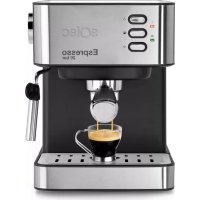
Espresso 20 Bar S92010800 - Coffee machine SOLAC - Free user manual and instructions
Find the device manual for free Espresso 20 Bar S92010800 SOLAC in PDF.



| Product Type | Espresso Coffee Machine |
| Brand | Solac |
| Model | Espresso 20 Bar S92010800 |
| Maximum Pressure | 20 bars |
| Power | Approximately 1350 W |
| Power Supply | 220-240 V ~ 50/60 Hz, 10 A |
| Water Tank Capacity | Approximately 1.2 L (MIN and MAX levels) |
| Weight | Approximately 5 kg |
| Dimensions (approx.) | 30 x 20 x 30 cm |
| Main Functions | Espresso, hot water, steam (milk froth) |
| Filter Holder | Double spout, 1 or 2 cups |
| Included Filters | Filter for 1 cup and filter for 2 cups (ground coffee) |
| Cup Warming Surface | Yes, integrated |
| Automatic Shut-off | Yes, after a few minutes of inactivity |
| Safety | Do not open the filter holder under pressure; overheat protection |
| Cleaning and Maintenance | Descaling recommended every 6 to 12 weeks depending on water hardness; clean steam tube after each use |
| Spare Parts | Available through Solac authorized service (filters, filter holder, tank) |
| Repairability | Repair by authorized technical service only |
| Use | Household use only |
Frequently Asked Questions - Espresso 20 Bar S92010800 SOLAC
User questions about Espresso 20 Bar S92010800 SOLAC
0 question about this device. Answer the ones you know or ask your own.
Ask a new question about this device
Download the instructions for your Coffee machine in PDF format for free! Find your manual Espresso 20 Bar S92010800 - SOLAC and take your electronic device back in hand. On this page are published all the documents necessary for the use of your device. Espresso 20 Bar S92010800 by SOLAC.
USER MANUAL Espresso 20 Bar S92010800 SOLAC
natural_image
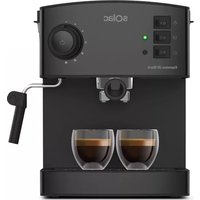
Exterior view of a modern espresso machine with 'sOlaC' branding and 'Espresso 20 bar' label (no additional text or symbols visible)CAFETERA
INSTRUCCIONES DE USO
COFFEE-MAKER
INSTRUCTIONS FOR USE
CAFETIÈRE
MODE D'EMPLOI
KAFFEEMASCHINE
GEBRAUCHSANLEITUNG
CAFETEIRA
INSTRUÇÕES DE USO
MACCHINA PER IL CAFFÈ
ISTRUZIONI PER L'USO
KOFFIEMACHINE
GEBRUIKSAANWIJZING
KÁVOVAR
NÁVOD K POUZITÍ
EKSPRES DE KAWY
INSTRUKCJA OBSŁUGI
KÁVOVAR
NÁVOD NA POUŽITIE
KÁVÉFÖZÓ
HASZNÁLATI UTASÍTÁS
КАФЕВАРКА
ГЛАДЕНЕ
ESPAÑOL ES
Many thanks for choosing to purchase a SOLAC brand product.
Its technology, design and practicality, along with fact that it has passed the strictest quality tests, will bring total satisfaction for a long time, and will enable you to discover the pleasure of savouring real espresso coffee.
- Read these instructions carefully before switching on the appliance and keep them for future reference. Failure to follow and observe these instructions may result in an accident.
SAFETY ADVICE AND WARNINGS
- Clean all the parts of the product that will be in contact with food, as indicated in the cleaning section, before use.
- This appliance is only for domestic use, not for industrial or professional use. It is not intended to be used by guests in hospitality environments such as bed and breakfast, hotels, motels, and other types of residential environments, even in farm houses, areas of the kitchen staff in shops, offices and other work environments.
- This appliance can be used by people with reduced physical, sensory or mental capabilities or lack of experience and knowledge if they have been given supervision or instruction concerning use of the appli-
ance in a safe way and understand the hazards involved.
- This appliance can be used by children aged from 8 years and above if they have been given supervision or instruction concerning use of the appliance in a safe way and if they understand the hazards involved.
· Cleaning and user maintenance shall not be made by children unless they are older than 8 and supervised
- Keep the appliance and its cable out of reach of children under the age of eight.
- This appliance is not a toy. Children should be supervised to ensure that they do not play with the appliance.
· Never submerge the appliance in water or any other liquid, or place it under a running tap.
- If the connection is damaged it must be replaced. Take the appliance to an authorised Technical Assistance Service. Do not try to dismantle or repair without assistance, as this may be dangerous.
- Ensure that the voltage indicated on the name plate matches
EN
the mains voltage before plugging in the appliance.
- Connect the appliance to a base with an earth socket withstanding a minimum of 10 amperes.
- The appliance's plug must fit into the mains socket properly. Do not alter the plug. Do not use plug adaptors.
- Do not force the power cord. Never use the power cord to lift up, carry or unplug the appliance.
- Do not wrap the cable around the appliance.
- Do not clip or crease the power cord.
- Do not allow the power cord to hang or to come into contact with the hot surfaces of the appliance.
- Check the state of the power cord. Damaged or tangled cables increase the risk of electric shock.
- Do not touch the plug with wet hands.
- Do not use the appliance if the cable or plug is damaged.
- If any of the appliance casings breaks, immediately disconnect the appliance from the mains to prevent the possibility of an electric shock.
- Do not use the appliance if it has fallen on the floor, if there are visible signs of damage or if it has a leak.
- Do not place the appliance on hot surfaces, such as cooking plates, gas burners, ovens or similar.
- The appliance should be used and kept over a flat and stable surface.
- This appliance is not suitable for outdoor use.
- Supply cord should be regularly examined for signs of damage, and if the cord is damaged, the appliance must not be used.
- Do not use the appliance, in the case persons insensitive to heat (the appliance has heated surfaces).
- Do not touch the heated parts of the appliance, as it may cause serious burns.
USE AND CARE:
- Do not use the appliance if its accessories are not properly fitted.
- Do not switch the appliance on without water.
- Do not use the appliance if the on/off switch does not work.
- Do not move the appliance while in use.
-
Respect the MAX and MIN levels
-
Disconnect the appliance from the mains when not in use and before undertaking any cleaning task.
- Unplug the appliance from the mains before refilling the water tank.
- Store this appliance out of reach of children and/or persons with physical, sensory or reduced mental or lack of experience and knowledge.
- Do not store the appliance if it is still hot.
- Only use water with the appliance.
- The use of bottled mineral water adapted for human consumption is recommended.
- Never leave the appliance connected and unattended if is not in use. This saves energy and prolongs the life of the appliance.
- Do not remove the filter holder when coffee is being made, as at that time it is under pressure.
SERVICE
- Make sure that the appliance is serviced only by specialist personnel, and that only original spare parts or accessories are used to replace existing parts/accessories.
- Any misuse or failure to follow the instructions for use renders the guarantee and the manufacturer's liability null and void.
DESCRIPTION
A Water Tank Lid
B Water tank
C Hot plate for warming cups
D Connection pilot light (red)
E Heating pilot light (green)
F ON/OFF Switch
G Coffee outlet/Water outlet Switch
H Steam heating Switch
I Steamer pipe
J Filter holder
K Measuring spoon
L Ground coffee filter (1 cup)
M Ground coffee filter (2 cups)
N Supply cable
O Drip tray
P Tray grill
R Steam knob
ENGLISH EN
INSTRUCTIONS FOR USE
BEFORE USE:
- Make sure that all the product's packaging has been removed.
- Before using this product for the first time, it is advisable to test it only with water.
- Before using the product for the first time, clean the parts that will come into contact with food in the manner described in the cleaning section.
- Before connecting the machine, check that the buttons (F, G) are not pressed, and steam control (R) is closed
PRIMING THE CIRCUIT:
- This simple operation ensures optimum dispensing and must be carried out:
- When first starting:
- When the machine has been out of use for a long time (1 or 2 weeks)
- After making steam
WHEN THE TANK HAS RUN OUT OF WATER.
- Fill the receptacle taking care to observe the MAX level
- Connect the appliance to the mains.
- Press the on/off switch (F) to ON position. The (D) pilot light will come on
- You do not have to wait for the machine to heat up for this operation
- Without fitting the filter holder (or with the filter holder fitted, but without coffee), place a recipient under the steam pipe (I)
- Open the steam knob (R) by turning counterclockwise
- Press the coffee switch / water (G) to ON position
- Water will exit through the steam pipe. Wait until approximately one cupful has exited
- o finish serving, back coffee / water switch to OFF position and close the steam knob (R) by turning clockwise
- This will complete the priming operation.
FILLING WITH WATER:
- The tank must be filled with water before turning the appliance on.
- Remove the water tank.
- Open the cover.
- Fill the tank taking care to observe the MAX level (Fig. 1)
- Close the lid.
- Replace the tank in its housing, ensuring that it is well fitted.
FILLING OF COFFEE:
- Remove the filter holder.
- Position the ground chosen coffee filter ((L ó M) in the filter holder
- We recommend using natural toast coffee, as using roasted coffee may affect the operation of the machine.
- Fill the removable filter with ground coffee (6-7 g per cup to be prepared).
- If you wish to make 1 coffee, use 1 filter coffee and, fill the ladle (1 spoonful) and take the capacity of the measuring spoon as the measure for one coffee until half its capacity.
- For 2 coffees, use 2 cups filter (M), and put in 2 spoonfuls.
- Next lightly press down the ground coffee with the back of the spoon.
- Fit the filter holder in the appliance once more.
- Position the filter holder in the coffee assembly by inserting the assembly downwards and turning it from left to right until it locks.
USE
- Before connecting the machine, check that the buttons (F, G) are not pressed, and steam control (R) is closed
- Connect the appliance to the mains.
- Turn the appliance on using the on/off switch (F)
• The (D) pilot light comes on. - Wait until the pilot light (E) is lighting. It means right temperature is reached
- Place one or two preheated cups at the filter holder outlet.
- Press the coffee switch (G) to the ON position The coffee infusion will begin to exit. When you have obtained the desired quantity of espresso coffee (short or long), come back switch to OFF position
- Once serving has finished, wait a few seconds and remove the cups with the coffee.
- Remove the filter holder and empty the grounds from it.
- Wash the filter holder with running water and dry it well.
- Check that the removable filter is perfectly fitted into the filter holder.
- Fit the filter holder in the appliance once more.
EN
GETTING HOT WATER:
- Put the device in ON situation, pressing the knob ON/OFF (F)
- The Heating indicator light (D) will illuminate indicating that the water is heating up.
- Wait Until the pilot light (E) is also highlighted. This situation indicates that the water has reached the right temperature.
- Place A container under the nozzle.
- Open The steam control (R), turning him to the left, counterclockwise
- Press The button coffee /water outlet (G)
- The Hot water began to come out of the vaporizer.
- Once obtained the desired amount of hot water, press the coffee outlet button (G) again, which stops the pump
- Close The turning knob (R) to the right, clockwise
OBTAINING STEAM:
- The steam is used to foam milk for cappuccino, and also to heat other liquids.
- Turn the appliance on using the on/off switch.
- Wait until the pilot light (G) has gone out which will indicate that the appliance has reached an adequate temperature for making coffee
- For Steam, press the Steam heating button (H) and continue heating until the steam temperature has been reached.
- The warning light (E) will illuminate indicating that the water has reached the necessary temperature for generating steam.
- Place a recipient under the steam tube.
- Open Steam knob (R) anticlockwise
- Steam only will begin to exit.
- When you have enough, close the control and remove the recipient.
AUTOOFF FEATURE:
- The SOLAC machines are designed to save energy
- To that end, after some minutes from the last operation, the unit switches to energy saving mode
- To return to normal operation you should just Switch OFF and Switch ON the connect button (F)
ONCE YOU HAVE FINISHED USING THE APPLIANCE:
- Turn the appliance off, using the on/off switch (F) to OFF
- Unplug the appliance to the mains.
- Remove the water from the water tank.
- Clean the appliance
CLEANING
A. BASIC CLEANING
- Disconnect the appliance from the mains and let it cool before undertaking any cleaning task.
- Clean the equipment with a damp cloth with a few drops of washing-up liquid and then dry.
- Do not use solvents, or products with an acid or base pH such as bleach, or abrasive products, for cleaning the appliance.
- Do not let water or any other liquid get into the air vents to avoid damage to the inner parts of the appliance.
- Neither parts of this appliance are suitable for cleaning in the dishwasher.
- After washing, dry all the parts before fitting them together and storing.
B. CLEANING THE FROTHING WAND
- CAUTION! The frothing wand, frothing tip, and frothing sleeve may be VERY HOT
- It is recommended to purge and wipe the frothing wand after steaming milk to prevent deposits of dirt and before turning off the machine
- To do this, pull the black frothing sleeve down
- Fill a cup with a bit of water, immerse the frothing wand into the water
- Drain hot water through the pipe, following the instructions "Getting hot water"
- Use a cloth to dry the frothing wand and replace the frothing sleeve
- In case no steam comes out of the frothing wand, hardened milk blocks its path.
- Carefully use a needle to loosen the milk residue from the opening of the frothing tube
- to remove any blockage,
- Once clean, rinse with running water from the tap and reassemble it. Then steam again
HOW TO DEAL WITH LIME SCALE INCRUSTATIONS:
- For the appliance to work correctly it should be kept free of lime scale or magnesium incrustations caused by the use of hard water.
- To prevent this kind of problem, we recommend the use of water with low lime or magnesium mineralisation.
ENGLISH EN
- However, if it is not possible to use the kind of water recommended above, you should periodically remove the lime scale from the appliance:
Every 6 weeks if the water is "very hard".
Every 12 weeks if the water is "hard".
- o do so, we recommend the use of a specific product Taurus Decal for this kind of product which can be found in specialised shops and authorised technical services.
- Homemade solutions are not recommended in the descaling of this appliance, such as the use of vinegar.
ANOMALIES AND REPAIR
• Take the appliance to an authorised technical support service if problems arise. Do not try to dismantle or repair without assistance, as this may be dangerous.
- If the connection to the mains has been damaged, it must be replaced and you should proceed as you would in the case of damage.
If you detect any anomalies, refer to the following table:
| Anomaly Possible cause Solutions | ||
| Water flows out of the side of the holder | -The filterholder is not fitted correctly.- The Edge of the sieve is covered coffee.-The brewing group is dirty. | -See Section “filling coffee”-Clean the sieve around the edge and clean the brewing of coffee group-Clean With a damp cloth. |
| No coffee comes out | - There is no water- The water tank is not properly placed.- The filter holes are clogged, the coffee is ground too fine or has been pressed too much | - Fill the water tank- Make sure the tank is properly seated, pressing on the top-Empty the filter basket and clean with water. Clean the brewing unit with a damp cloth. Fill the sieve again and press the coffee slightly |
| The coffee comes out slowly or drop by drop | -The coffee grinding is too fine or too pressed | -Make sure grinding is OK and it's not too pressed. |
| The coffee comes without cream | -The used Coffee is out of date-The Coffee has not been pressed enough.-The Ground coffee is too coarse. | -Use Fresh coffee and once opened store in an airtight container.-Press slightly the coffee.-Grind finer the coffee |
| The coffee comes out too fast | -The ground coffee is too coarse.-There is not enough coffee in the sieve.-The Coffee has not been pressed enough | -Grind coffee finer-Ensure that it's the right amount of coffee in the sieve.-Press slightly the coffee |
| No steam escapes from the evaporator tube | -The Tube is clogged Clean the steam tube | with a damp cloth to remove any traces of milk have dried and unblock holes using a needle. Press the corresponding switch and remove steam until it goes out continuously |
FOR EU PRODUCT VERSIONS AND/ OR IN THE CASE THAT IT IS RE- QUESTED IN YOUR COUNTRY:E- COLOGY AND RECYCLABILITY OF THE PRODUCT
- The materials of which the packaging of this appliance consists are included in a collection, classification and recycling system. Should you
wish to dispose of them, use the appropriate public recycling bins for each type of material.
- The product does not contain concentrations of substances that could be considered harmful to the environment

This symbol means that in case you wish to dispose of the product once its working life has ended, take it to an authorised
waste agent for the selective collection of waste electrical and electronic equipment (WEEE)
FRANÇAIS FR
Cher Client,
NIEPRAWIDŁOWOŚCI I NAPRAWA
This product enjoys the recognition and protection of the legal guarantee in accordance with current legislation. To enforce your rights or interests you must go to any of our official technical assistance services.
You can find the closest one by accessing the following web link: http://solac.com
You can also request related information by contacting us by phone.
You can download this instruction manual and its updates at http://solac.com
DE) GARANTIE UND TECHNIS- CHER SERVICE
Unit 25 & 26, San Croy Office Park, Die Agora
Road, Croydon, Kempton Park, 1619
Johannesburg
(+27) 011 392 5652
sOlac
- CAFETERA
- COFFEE-MAKER
- CAFETIÈRE
- KAFFEEMASCHINE
- CAFETEIRA
- MACCHINA PER IL CAFFÈ
- KOFFIEMACHINE
- KÁVOVAR
- EKSPRES DE KAWY
- KÁVÉFÖZÓ
- КАФЕВАРКА
- ESPAÑOL ES
- SAFETY ADVICE AND WARNINGS
- EN
- the mains voltage before plugging in the appliance.
- USE AND CARE:
- SERVICE
- DESCRIPTION
- ENGLISH EN
- INSTRUCTIONS FOR USE
- BEFORE USE:
- PRIMING THE CIRCUIT:
- WHEN THE TANK HAS RUN OUT OF WATER.
- FILLING WITH WATER:
- FILLING OF COFFEE:
- USE
- GETTING HOT WATER:
- OBTAINING STEAM:
- AUTOOFF FEATURE:
- ONCE YOU HAVE FINISHED USING THE APPLIANCE:
- CLEANING
- BASIC CLEANING
- CLEANING THE FROTHING WAND
- HOW TO DEAL WITH LIME SCALE INCRUSTATIONS:
- ANOMALIES AND REPAIR
- FOR EU PRODUCT VERSIONS AND/ OR IN THE CASE THAT IT IS RE- QUESTED IN YOUR COUNTRY:E- COLOGY AND RECYCLABILITY OF THE PRODUCT
- FRANÇAIS FR
- NIEPRAWIDŁOWOŚCI I NAPRAWA
- DE) GARANTIE UND TECHNIS- CHER SERVICE
- sOlac
Brand : SOLAC
Model : Espresso 20 Bar S92010800
Category : Coffee machine