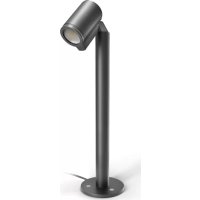
Spot Way - Lighting STEINEL - Free user manual and instructions
Find the device manual for free Spot Way STEINEL in PDF.



| Product type | LED spot for outdoor ground mounting |
| Brand | STEINEL |
| Model | Spot Way (NightAuto, SC variants) |
| Dimensions (L × W × H) | 140 × 226 × 572 mm |
| Cable length | 2500 mm |
| Mains voltage | 220-240 V, 50/60 Hz |
| Power consumption (standard) | 6.70 W |
| Luminous flux | 512 lm |
| Color temperature | 3000 K (warm white) |
| Color rendering index (Ra) | >80 |
| Average lifespan (L70B50 at 25°C) | >20,000 h |
| Protection rating | IP44 |
| Protection class | I |
| Ambient temperature | -20 to +40 °C |
| Detection technology (SC models) | Passive infrared |
| Detection angle (SC models) | 90° |
| Max detection range (SC models) | 10 m |
| Time setting (SC models) | 5 s to 60 min |
| Trigger threshold adjustment (NightAuto) | 2 to 1000 lx |
| Trigger threshold adjustment (SC) | 2 to 2000 lx |
| Light source | Replaceable LED GU10 max 9 W |
| Additional functions (SC) | Motion detector, control via Smart Remote Bluetooth app |
| Additional functions (NightAuto) | Brightness sensor, dusk threshold adjustment |
| Package contents | Spot, column, base, cable with plug, screws, dowels |
| Maintenance | Clean with a damp cloth without detergent |
| Safety | Disconnect power before intervention, use original parts |
| Warranty | 36 months |
Frequently Asked Questions - Spot Way STEINEL
User questions about Spot Way STEINEL
0 question about this device. Answer the ones you know or ask your own.
Ask a new question about this device
Download the instructions for your Lighting in PDF format for free! Find your manual Spot Way - STEINEL and take your electronic device back in hand. On this page are published all the documents necessary for the use of your device. Spot Way by STEINEL.
USER MANUAL Spot Way STEINEL
GB . . . . 20 Follow written instructions!
- Please read carefully and keep in a safe place.
-Undercopyright.
Reproduction either in whole or in part only with our consent.
- Subject to change in the interest of technical progress.
-All product dimensions in mm.
Symbols

Hazard warning!

Reference to other information in the document.
2. General safety precautions

Disconnect the power supply before attempting any work on the unit.
- Only use genuine replacement parts.
- Repairs may only be made by specialist workshops.
- Not suitable for use with halogen lamps.
3. Way/Garden
Proper use
- Outdoor LED light for mounting on the ground.
-For connection to an IP44 power socket.
Spot Way NightAuto / Spot Garden NightAuto
- The sensor-switched LED light contains a light-level sensor.
Spot Way SC / Spot Garden SC
- The sensor-switched LED light contains an infrared motion detector and can only be adjusted via Bluetooth and app.
Non-intended use
- The LED light cannot be dimmed.

Not dimmable
Way spot package contents (Fig. 3.1)
- Light including pillar, ground plate and power cord cable with mains plug
-Three screws
-Three ground plugs
Garden spot package contents (Fig. 3.2)
Light including power cord cable with mains plug
Ground spike
-Two screws
Spot Way product dimensions (Fig. 3.3)
Spot Garden product dimensions (Fig. 3.4)
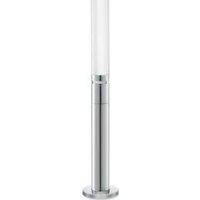
Product parts (Fig. 3.5 - 3.10)
A Light enclosure
B Motion sensor (Spot Way / Spot Garden SC only)
C Light-level sensor (Spot Way / Garden NightAuto only)
D Twilight setting (Spot Way / Garden NightAuto only)
E Pillar with ground plate (Spot Way only)
F Ground spike (Spot Garden only)
G Mains power cord with plug
Detection zone for Spot Way / Spot Garden SC (Fig. 3.11 - 3.16)
Luminous intensity distribution (Fig. 3.17)
4. Installation
- Check all components for damage.
- Do not use the product if it is damaged.
- This light's external, flexible cord cannot be replaced.
If the cord gets damaged, the entire light must be replaced.
- When installing the light, make sure the installation site is not subject to vibration.
- Select an appropriate mounting location, taking the reach and motion detection into consideration.
Spot Way / Spot Garden SC only:
The most reliable way to detect movement is given by mounting the light to point across the direction in which people walk and by making sure no obstacles (e.g. trees, walls etc.) interrupt the line of sensor vision.
Way mounting procedure
- Fit floodlight head on pillar and turn until it clicks into place. (Fig. 4.1)
- Mark drill holes for ground plate. (Fig. 4.2)
- Drill holes and fit ground plugs. (Fig. 4.3)
- Procedure for mounting light on ground. (Fig. 4.4)
- Connect plug. (Fig. 4.5)
- Make settings. ,5. Function
Mounting procedure for Garden
- Attach ground spike to light. (Fig. 4.6)
- Push light into ground. (Fig. 4.7)
- Connect plug. (Fig. 4.8)
- Make settings. ,5. Function
Information for NightAuto version
- Make sure that the light-level sensor is not covered (e.g. by leaves).
5. Function
Spot Way NightAuto / Spot Garden NightAuto
Factory settings
- Control dial set to = permanently ON
Twilight setting (Fig. 5.2 D)
The light's chosen response threshold can be infinitely varied from approx. 2 to 1000 lux.
-
Control dial set to = permanently ON
-
Control dial set to = night-time operation (approx. 2 lux)
For performing the functional test in daylight, the control dial must be set to

Spot Way SC / Spot Garden SC
Factory settings
-Twilight setting: 2000 lux
-Time setting: 5 seconds
Smart Remote app
To configure the light via smartphone or tablet, you must download the STEINEL Smart Remote app from your app store. You will need a Bluetooth-capable smartphone or tablet.

Android iOS

Following functions can be set via Smart Remote app:
-Time setting
-Twilight setting
-ON and OFF times
-Automatic/manual control, depending on situation
-Interconnection
-Grouping
-Naming groups and lights
Note:
After the light switches OFF, it takes approx. 1 second before it is able to start detecting movement again. The light will only switch ON in response to movement once this period has elapsed.
The Spot SC has an internal clock for time-based activation and deactivation. This automatically synchronises with the clock of the connected smartphone via the Smart Remote app each time a Bluetooth connection is established.
To ensure correct function following an interruption in the light's power supply, it must be re-connected via the Smart Remote app. The internal clock is re-synchronised with the smartphone clock.
6. Light tilting/swivelling range / Changing lamp
Light tilting/swivelling range
-Way (Fig. 6.1)
-Garden (Fig. 6.2)
Changing lamp
- Undo glass cover and detach from light enclosure. (Fig. 6.3)
- Disconnect and remove lamp. (Fig. 6.4)
- Insert new lamp and twist to engage. (Fig. 6.5)
- Fit glass cover and twist to engage. (Fig. 6.6)
Important:
Only use GU10 LED lamp with a wattage up to 9 W.
Note:
- On changing a lamp, make sure that the seal and sealing surface are not soiled or damaged.
7. Maintenance
The product requires no maintenance.
The light can be cleaned with a damp cloth (without detergents) if dirty.
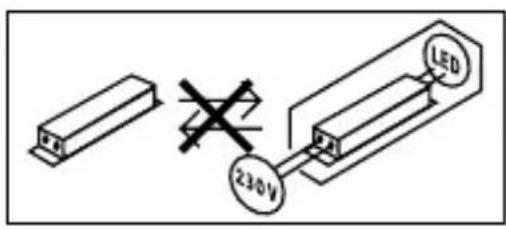
Important note: the control gear cannot be replaced.
8. Disposal
Electrical and electronic equipment, accessories and packaging must be recycled in an environmentally compatible manner.

Do not dispose of electrical and electronic equipment as domestic waste.
EU countries only:
Under the current European Directive on Waste Electrical and Electronic Equipment and its implementation in national law, electrical and electronic equipment no longer suitable for use must be collected separately and recycled in an environmentally compatible manner.
9. Declaration of Conformity
Hereby, STEINEL Vertrieb GmbH declares that the radio equipment type Spot Way SC / Spot Garden SC is in compliance with Directive 2014/53/EU. The full text of the EU declaration of conformity is available at the following internet address: www.steinel.de
10. Manufacturer's Warranty
This Steinel product has been manufactured with utmost care, tested for proper operation and safety and then subjected to random sample inspection. Steinel guarantees that it is in perfect condition and proper working order. The warranty period is 36 months and starts on the date of sale to the consumer. We will remedy defects caused by material flaws or manufacturing faults. The warranty will be met by repair or replacement of defective parts at our own discretion. The warranty shall not cover damage to wear parts, damage or defects caused by improper treatment or maintenance. Further consequential damage to other objects shall be excluded.
Claims under the warranty will only be accepted if the unit is sent fully assembled and well-packed with a brief description of the fault, a receipt or invoice ( date of purchase and dealer's stamp ) to the appropriate Service Centre.
Repair service:
If defects occur outside the warranty period or are not covered by the warranty, ask your nearest service station for the possibility of repair.
3 YEAR MANUFACTURER'S WARRANTY
| 11. Technical specifications | |
| Dimensions (W × D × H) | Spot Way: 140 × 226 × 572 mm Spot Garden: 69 × 118 × 369 mm |
| (W × D × H) | |
| Cord length 2,500 mm | |
| Supply voltage 220 - 240 V, 50/60 Hz | |
| Power consumption (Pon) Light* | Spot Way / Garden: 6.70 W Spot Way / Garden NightAuto: 7.86 W Spot Way / Garden SC: 7.90 W |
| Luminous flux / brightness Light* | Spot Way / Garden: 512 lm; 76.40 lm/W Spot Way / Garden NightAuto: 512 lm; 65.10 lm/W Spot Way / Garden SC: 512 lm; 64.80 lm/W |
| Luminous flux Lamp 620 lm 92.5 lm/W | |
| Power consumption Lamp 6.7 W | |
| Standby (light) | Spot Way / Garden NightAuto: 0.20 W Spot Way / Garden SC: 0.42 W |
| Standby (network) (Pnet) Spot Way / Garden SC: 0.42 W | |
| Colour temperature* | 3,000 K (warm white) |
| Colour rendering index* | R>a>80 |
| Average rated life expectancy* | L70B50 at 25°C: >20,000 hours. |
| Colour consistency SDCM* | 6 |
| Sensor technology Passive infrared (Spot Way / Garden SC only) | |
| Detection zone | (Spot Way / Garden SC only) |
| • Angle of coverage | 90° |
| • Angle of aperture | 90° |
| Reach max. 10 m (Spot Way / Garden SC only) | |
| Time setting 5 s - 60 min (Spot Way / Garden SC only) | |
| Twilight setting 2 - 1,000 lux (Spot Way / Garden NightAuto only) 2 - 2,000 lux (Spot Way / Garden SC only) | |
| IP rating IP44 | |
| Protection class I | |
| Ambient temperature -20 to +40°C | |
| Bluetooth frequency 2.4 - 2.48 GHz (Spot Way / Garden SC only) | |
| Bluetooth transmitter power (Pnet) | 5 dBm / 0.60 mW (nur Spot Way / Garden SC) |
| This product contains an energy efficiency class „F“ light source. | |
12. Troubleshooting
| Malfunction Cause Remedy | ||
| LED light does not switch ON | Fuse has tripped, not switched ON, break in wiring | Activate, change fuse, turn ON mains switch, check wiring with voltage tester Check connections Change lamp |
| Short circuit Lamp faulty | ||
| NightAuto LED light does not switch ON | Twilight setting in night-time mode during daytime operation Mains switch OFF Fuse has tripped Detection zone not correctly adjusted | Reset Switch ON Activate, change fuse, check connection if necessary Readjust |
| NightAuto LED light does not switch OFF | The twilight setting is set to permanently ON during night-time operation Continued movement within the detection zone Light-level sensor is covered (e.g. by leaves). | Reset Check zone and readjust if necessary or apply shroud Remove shrouds from light-level sensor |
| SC LED light keeps switching ON/OFF | Animals moving in detection zone | Tilt sensor higher or fit shrouds to target sensor; adjust detection zone or fit shrouds |
Malfunction Cause Remedy
| SC LED light switches ON when it should not | ■ Wind is moving trees and bushes in the detection zone | ■ Change detection zone |
| ■ Cars in the street are being detected | ■ Change detection zone | |
| ■ Sudden temperature changes due to weather (wind, rain, snow) or air expelled from fans or open windows | ■ Adjust detection zone or install in a different place | |
| ■ Sensor-switched LED light is swaying (moving) due to gusts of wind or heavy rain | ■ Mount sensor-switched LED light on a firm surface |
FR
Application Smart Remote
Alleen spot Way / spot Garden SC:
Solo Spot Way / Spot Garden SC:
Solo Spot Way / Garden SC:
Monteringstrin for Garden
- Monter jordspyddet på lampen (fig. 4.6)
Stik lampen i jorden (fig. 4.7) - Saet stikket i (fig. 4.8)
- Foretag indstillinger "5. Funktion"
3 Å R S PRODUCENT GARANTI
| 11. Tekniske data | |
| Mål (B × D × H) | Spot Way: 140 × 226 × 572 mm Spot Garden: 69 × 118 × 369 mm |
| Ledningslænge 2.500 mm | |
| Netspænding 220 - 240 V, 50/60 Hz | |
| Effektforbrug (Pon) for lampe* | Spot Way / Garden: 6,70 W Spot Way / Garden NightAuto: 7,86 W Spot Way / Garden SC: 7,90 W |
| Lysstrøm / lysstyrke for lampe* | Spot Way / Garden: 512 Im; 76,40 Im/W Spot Way / Garden NightAuto: 512 Im; 65,10 Im/W Spot Way / Garden SC: 512 Im; 64,80 Im/W |
| Lysstrøm for lyskilde 620 Im 92,5 Im/W | |
| Effektforbrug for lyskilde 6,7 W | |
| Standby (lampe) | Spot Way / Garden NightAuto: 0,20 W Spot Way / Garden SC: 0,42 W |
| Standby (netværk) (Pnet) Spot Way / Garden SC: 0,42 W | |
| Farvetemperatur* | 3.000 K (warm hvid) |
| Farvegengivelsensindeks* | R>a>80 |
| Gennensnitig beregnet levetid* | L70B50 ved 25 °C: >20.000 timer |
| Farvekonsistens SDCM* | 6 |
| Sensorteknik Passiv infrarød (kun Spot Way / Garden SC) | |
| Overvågningsområde | (kun Spot Way / Garden SC) |
| • Overvågningsvinkel | 90° |
| • Åbningsvinkel | 90° |
| Rækkevidde maks. 10 m (kun Spot Way / Garden SC) | |
| Tidsindstilling 5 s - 60 min (kun Spot Way / Garden SC) | |
| Skumringsindstilling 2 - 1.000 lux (kun Spot Way / Garden NightAuto) 2 - 2.000 lux (kun Spot Way / Garden SC) | |
| Kapslingsklasse IP44 | |
| Beskyttelsesklasse I | |
| Omgivelsester temperatur -20 til +40 °C | |
| Bluetooth-frekvens 2,4 - 2,48 GHz (kun Spot Way / Garden SC) | |
| Bluetooth-sendeeffekt (Pnet) | 5 dBm/0,60 mW (kun Spot Way / Garden SC) |
| * for medfølgende LED-lyskilde Dette produit indeholder en lyskilde i energieffektivitetsklasse „F". | |
-Skruknappen stilt pa = permanent PÅ
Skumringsinnstilling (ill. 5.2 D)
-Skruknappen stilt pa = permanent PÅ
-Innstillingsknappen stilt på = skumringsdrift (ca. 2 lux.)
-Way (ill. 6.1)
-Garden (ill. 6.2)
Skifte lyselement
Móvo Spot Way / Spot Garden SC:


- Symbols
- General safety precautions
- Way/Garden
- Proper use
- Spot Way NightAuto / Spot Garden NightAuto
- Spot Way SC / Spot Garden SC
- Non-intended use
- Way spot package contents (Fig. 3.1)
- Garden spot package contents (Fig. 3.2)
- Spot Way product dimensions (Fig. 3.3)
- Spot Garden product dimensions (Fig. 3.4)
- Product parts (Fig. 3.5 - 3.10)
- Installation
- Spot Way / Spot Garden SC only:
- Way mounting procedure
- Mounting procedure for Garden
- Information for NightAuto version
- Function
- Factory settings
- Twilight setting (Fig. 5.2 D)
- Smart Remote app
- Note:
- Light tilting/swivelling range / Changing lamp
- Changing lamp
- Important:
- Maintenance
- Disposal
- EU countries only:
- Declaration of Conformity
- Manufacturer's Warranty
- Repair service:
- Troubleshooting
- FR
- Application Smart Remote
- Alleen spot Way / spot Garden SC:
- Solo Spot Way / Spot Garden SC:
- Solo Spot Way / Garden SC:
- Monteringstrin for Garden
- Skumringsinnstilling (ill. 5.2 D)
- Skifte lyselement
- Móvo Spot Way / Spot Garden SC:
Brand : STEINEL
Model : Spot Way
Category : Lighting