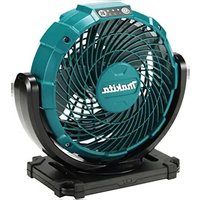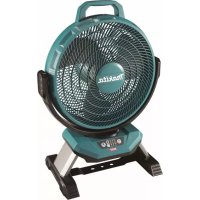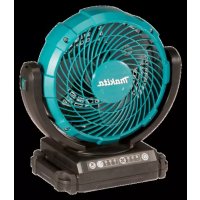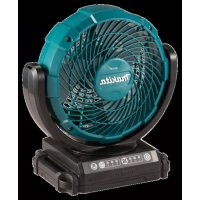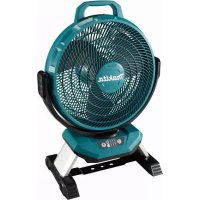
DCF301Z - Fan MAKITA - Free user manual and instructions
Find the device manual for free DCF301Z MAKITA in PDF.
 FR
FR
 BG
BG
 CS
CS
 DA
DA
 DE
DE
 EL
EL
 EN
EN
 ES
ES
 ET
ET
 FI
FI
 HU
HU
 IT
IT
 KK
KK
 LT
LT
 LV
LV
 MK
MK
 NL
NL
 NO
NO
 PL
PL
 PT
PT
 RO
RO
 RU
RU
 SK
SK
 SQ
SQ
 SR
SR
 SV
SV
 TR
TR
 UK
UK
 ZH
ZH
| Product type | Cordless Fan |
| Brand | Makita |
| Model | DCF301Z |
| Rated voltage | 14.4 V DC / 18 V DC (battery) |
| Mains power supply | Mains adapter 100-240 V AC, 50/60 Hz, output 12 V DC, 3.5 A |
| Compatible batteries | Makita BL14xx (14.4 V) and BL18xx (18 V) Li-ion series |
| Dimensions (L x W x H) | 261 x 439 x 602 mm |
| Weight (without battery) | 3.8 kg |
| Fan speeds | 3 speeds (high, medium, low) |
| Oscillation | Yes, 90 degrees, button controlled |
| Auto-off timer | 1 h / 2 h / 4 h |
| Angle adjustment | Manual, range illustrated in the manual |
| Battery life (BL1860B) | Up to 850 min at low speed |
| Built-in protections | Overload, overheating, deep discharge |
| Use | Indoor only, domestic use |
| Maintenance | Clean with a cloth moistened with soapy water; remove the cover for interior cleaning |
| Repairs | Reserved for a Makita authorized service center, use original parts |
| Optional accessories | Original Makita batteries and chargers |
| Warranty | Warranty void if non-original battery used |
Frequently Asked Questions - DCF301Z MAKITA
User questions about DCF301Z MAKITA
0 question about this device. Answer the ones you know or ask your own.
Ask a new question about this device
Download the instructions for your Fan in PDF format for free! Find your manual DCF301Z - MAKITA and take your electronic device back in hand. On this page are published all the documents necessary for the use of your device. DCF301Z by MAKITA.
USER MANUAL DCF301Z MAKITA
natural_image
Line drawing of a portable fan with a power outlet connected to its cable, labeled Fig.8 (no text or symbols on the fan itself)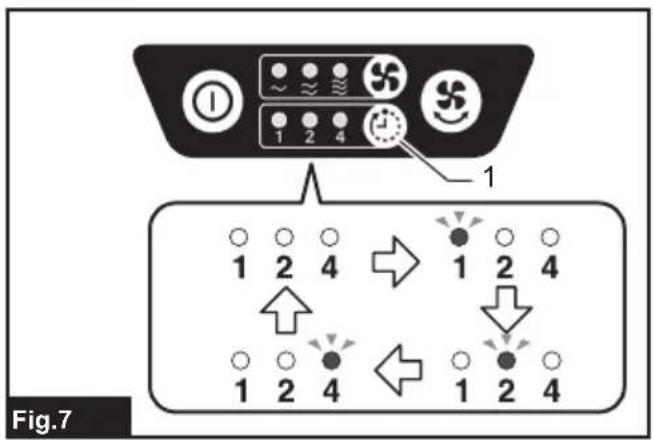
natural_image
Technical line drawing of a fan or fan assembly with internal grid structure and labeled component '1' (no text or symbols beyond label)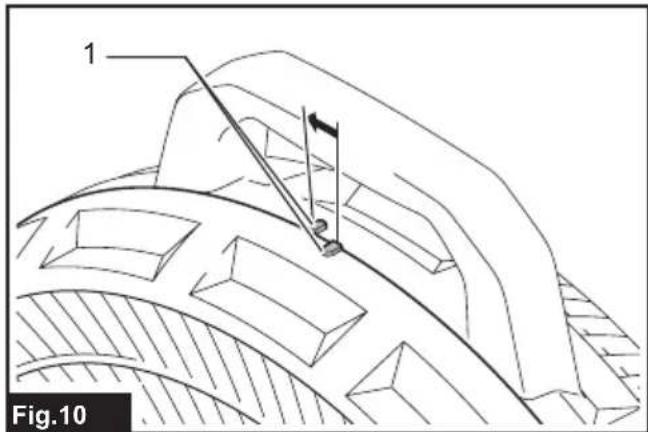
natural_image
Technical line drawing of a fan assembly with a separate circular component (no text or symbols)WARNING
- For users in Europe: This appliance can be used by children aged from 8 years and above and persons with reduced physical, sensory or mental capabilities or lack of experience and knowledge if they have been given supervision or instruction concerning use of the appliance in a safe way and understand the hazards involved. Children shall not play with the appliance. Cleaning and user maintenance shall not be made by children without supervision.
- For users in areas other than Europe: This appliance is not intended for use by persons (including children) with reduced physical, sensory or mental capabilities, or lack of experience and knowledge, unless they have been given supervision or instruction concerning use of the appliance by a person responsible for their safety. Children should be supervised to ensure that they do not play with the appliance.
SPECIFICATIONS
This fan is equipped with 3-speed control, fan head oscillation, and auto-off timer functions. Power supply can be with Makita battery cartridge or AC adaptor.
| Model: DCF301 | ||
| Rated voltage D.C. 14.4 V / 18 V | ||
| AC adaptor Input 100 – 240 V, 50 | / 60 Hz, 1.2 A max | |
| Output 12 V, 3.5 A | ||
| Dimensions (L x W x H) 261 x 439 x 602 mm | ||
| Net weight (without battery cartridge) 3.8 kg | ||
- Due to our continuing program of research and development, the specifications herein are subject to change without notice.
• Specifications may differ from country to country.
Applicable battery cartridge and charger
| Battery cartridge D.C.14.4 V Model | BL1415N / BL1430B / BL1440 / | BL1460B |
| D.C.18 V Model BL1815N | / BL1820B / BL1830B / BL1840B / BL1850B / BL1860B | |
| Charger DC18RC / DC18RD / DC18RE / DC18SD / DC18SE / DC18SF /DC18SH | ||
- Some of the battery cartridges and chargers listed above may not be available depending on your region of residence.
WARNING: Only use the battery cartridges and chargers listed above. Use of any other battery cartridges and chargers may cause injury and/or fire.
Battery running time
Following table refers to some of battery cartridges from Makita. The estimated running time of full charged battery is shown:
| Battery cartridge Wind speed | |||
| High Medium | Low | ||
| BL1460B 160 min 320 min 630 min | |||
| BL1860B 215 min 430 min 850 min | |||
Symbols
The followings show the symbols which may be used for the equipment. Be sure that you understand their meaning before use.


Ni-MH Li-ion
Read instruction manual.
Only for EU countries
Due to the presence of hazardous components in the equipment, waste electrical and electronic equipment, accumulators and batteries may have a negative impact on the environment and human health. Do not dispose of electrical and electronic appliances or batteries with household waste!
In accordance with the European Directive on waste electrical and electronic equipment and on accumulators and batteries and waste accumulators and batteries, as well as their adaptation to national law, waste electrical equipment, batteries and accumulators should be stored separately and delivered to a separate collection point for municipal waste, operating in accordance with the regulations on environmental protection.
This is indicated by the symbol of the crossed-out wheeled bin placed on the equipment.

Only for EU countries
Correct Disposal of this product
This marking indicates that this product should not be disposed with other household wastes throughout the EU. To prevent possible harm to the environment or human health from uncontrolled waste disposal, recycle it responsibly to promote the sustainable reuse of material resources. To return your used device, please use the return and collection systems or contact the retailer where the product was purchased. They can take this product for environmental safe recycling.
Due to the presence of hazardous components in the equipment, used electrical and electronic equipment may have a negative impact on the environment and human health.
Intended use
The appliance is intended for generating air flow.
SAFETY WARNINGS
To prevent serious injury, please read and understand all warnings and instructions before use.
You will need this manual for the safety warnings and precautions, assembly, operating, inspection, maintenance procedures. Keep this manual in a safe and dry place for future reference.
IMPORTANT SAFETY INSTRUCTIONS
When using an electrical appliance, basic precautions should always be followed, including the following:
READ ALL INSTRUCTIONS BEFORE USING THIS APPLIANCE.
WARNING
To reduce the risk of fire, electric shock or injury:
-
Do not expose to rain. Store indoors.
-
Do not allow to be used as a toy. Close attention is necessary when used by or near children.
-
Use only as described in this manual. Use only manufacturer's recommended attachments.
-
Do not use with damaged battery. If appliance is not working as it should have been dropped, damaged, left outdoors, or dropped into water, return it to our service center.
-
Do not handle the appliance with wet hands.
-
Do not put any object into openings.
-
Keep hair, loose clothing, finger and all parts of body away from openings and moving parts.
-
Turn off all controls before removing the battery.
-
Use only the AC adaptor and charger supplied by the manufacturer. Accessories that may be suitable for the appliance may become hazardous when used on others.
-
Do not charge the battery outdoors.
-
Do not expose to fire or high temperatures.
-
Do not use near open flames, glowing embers or explosive atmospheres, such as in presence of flammable liquids, gases or dust. The appliance creates sparks which may ignite the dust or fumes.
-
Never use the appliance in humid locations such as in a bathroom.
-
This appliance is indoor use only. Never use the appliance outdoors.
-
This appliance is intended for household use.
-
Read this instruction manual and the charger instruction manual carefully before use.
-
Stop operation immediately if you notice any abnormal.
- If you drop or strike the appliance, check it carefully for cracks or damage before operation.
- Do not bring the appliance close to stoves or other heat sources.
- Do not use if broken, bent, cracked or damaged parts are present. Any appliance that appears damaged in any way or operates abnormally must be removed from service immediately. Inspect before each operation.
- Do not leave the appliance energized and unattended.
- Don't abuse the AC adaptor. Never use the adaptor cord to carry the appliance or pull the plug out from an outlet. Keep the AC adaptor away from heat, oil, sharp edges, or moving parts. Replace damaged adaptor immediately. Damaged adaptor may increase the risk of electric shock.
Battery tool use and care
- Recharge only with the charger specified by the manufacturer. A charger that is suitable for one type of battery pack may create a risk of fire when used with another battery pack.
- Use power tools only with specifically designated battery packs. Use of any other battery packs may create a risk of injury and fire.
- When battery pack is not in use, keep it away from other metal objects, like paper clips, coins, keys, nails, screws or other small metal objects, that can make a connection from one terminal to another. Shorting the battery terminals together may cause burns or a fire.
- Under abusive conditions, liquid may be ejected from the battery; avoid contact. If contact accidentally occurs, flush with water. If liquid contacts eyes, additionally seek medical help. Liquid ejected from the battery may cause irritation or burns.
- Do not use a battery pack or tool that is damaged or modified. Damaged or modified batteries may exhibit unpredictable behaviour resulting in fire, explosion or risk of injury.
- Do not expose a battery pack or tool to fire or excessive temperature. Exposure to fire or temperature above 130 °C may cause explosion.
- Follow all charging instructions and do not charge the battery pack or tool outside the temperature range specified in the instructions. Charging improperly or at temperatures outside the specified range may damage the battery and increase the risk of fire.
CORDLESS FAN USE AND CARE
- Use the correct cordless fan for your application. Do not use the fan for a purpose for which it is not intended.
-
The appliance can work by Makita Li-ion battery cartridge designated in "SPECIFICATIONS" section in this instruction manual or AC adaptor. Use of any other batteries may create a risk of fire. Recharge batteries only with the specified charger. A charger that may be suitable for one type of battery may create a risk of fire when used with another battery.
-
Store idle appliance out of reach of children and other untrained persons.
- Disconnect battery cartridge and the AC adaptor from the power source before storing the appliance, performing any inspection, maintenance, or cleaning procedures. Such preventive safety measures may reduce the risk of starting the appliance accidentally.
- When battery cartridge is not in use, keep it away from other metal objects. Shortening the battery terminals together may cause sparks, burns or a fire.
- Unplug unit and allow it to cool before performing any inspection, maintenance, cleaning procedures or storage.
- Do not allow familiarity with appliances to make you careless. Remember that a careless fraction of a second is sufficient to inflict serious injury.
- Always place the appliance on a level and stable surface. If the appliance falls, it may cause personal injury or damage to the appliance.
- Do not use any batteries, attachments or accessories not recommended by the manufacturer of this appliance. The use of batteries, attachments or accessories not recommended can result in serious personal injury.
- Keep hair or loose clothing like a scarf away from the fan. It may be caught in the fan and result in personal injury.
- Ensure the switch is in the off-position before picking up or carrying the appliance. Carrying the appliance with your finger on the switch invites accidents.
- Do not modify or attempt to repair the appliance or the battery cartridge except as indicated in the instructions for use and care.
SERVICE
- This appliance service must be performed only by qualified repair personnel. Service or maintenance performed by unqualified personnel could result in a risk of injury.
- When servicing this appliance, use only identical replacement parts. Use of unauthorized parts or failure to follow maintenance instructions may create a risk of electric shock or injury.
- Do not incinerate this appliance, even if it is severely damaged. The batteries can explode in a fire. Dispose of the appliance in accordance with the local regulations.
Important safety instructions for battery cartridge
- Before using battery cartridge, read all instructions and cautionary markings on (1) battery charger, (2) battery, and (3) product using battery.
- Do not disassemble or tamper with the battery cartridge. It may result in a fire, excessive heat, or explosion.
-
If operating time has become excessively shorter, stop operating immediately. It may result in a risk of overheating, possible burns and even an explosion.
-
If electrolyte gets into your eyes, rinse them out with clear water and seek medical attention right away. It may result in loss of your eyesight.
- Do not short the battery cartridge:
(1) Do not touch the terminals with any conductive material.
(2) Avoid storing battery cartridge in a container with other metal objects such as nails, coins, etc.
(3) Do not expose battery cartridge to water or rain.
A battery short can cause a large current flow, overheating, possible burns and even a breakdown.
- Do not store and use the tool and battery cartridge in locations where the temperature may reach or exceed 50 °C (122 °F).
- Do not incinerate the battery cartridge even if it is severely damaged or is completely worn out. The battery cartridge can explode in a fire.
- Do not nail, cut, crush, throw, drop the battery cartridge, or hit against a hard object to the battery cartridge. Such conduct may result in a fire, excessive heat, or explosion.
- Do not use a damaged battery.
- The contained lithium-ion batteries are subject to the Dangerous Goods Legislation requirements.
For commercial transports e.g. by third parties, forwarding agents, special requirement on packaging and labeling must be observed.
For preparation of the item being shipped, consulting an expert for hazardous material is required. Please also observe possibly more detailed national regulations.
Tape or mask off open contacts and pack up the battery in such a manner that it cannot move around in the packaging.
- When disposing the battery cartridge, remove it from the tool and dispose of it in a safe place. Follow your local regulations relating to disposal of battery.
-
Use the batteries only with the products specified by Makita. Installing the batteries to non-compliant products may result in a fire, excessive heat, explosion, or leak of electrolyte.
-
If the tool is not used for a long period of time, the battery must be removed from the tool.
- During and after use, the battery cartridge may take on heat which can cause burns or low temperature burns. Pay attention to the handling of hot battery cartridges.
- Do not touch the terminal of the tool immediately after use as it may get hot enough to cause burns.
- Do not allow chips, dust, or soil stuck into the terminals, holes, and grooves of the battery cartridge. It may result in poor performance or breakdown of the tool or battery cartridge.
- Unless the tool supports the use near high-voltage electrical power lines, do not use the battery cartridge near high-voltage electrical power lines. It may result in a malfunction or breakdown of the tool or battery cartridge.
- Keep the battery away from children.
SAVE THESE INSTRUCTIONS.
CAUTION: Only use genuine Makita batteries. Use of non-genuine Makita batteries, or batteries that have been altered, may result in the battery bursting causing fires, personal injury and damage. It will also void the Makita warranty for the Makita tool and charger.
Tips for maintaining maximum battery life
- Charge the battery cartridge before completely discharged. Always stop tool operation and charge the battery cartridge when you notice less tool power.
- Never recharge a fully charged battery cartridge. Overcharging shortens the battery service life.
- Charge the battery cartridge with room temperature at 10 °C - 40 °C (50 °F - 104 °F). Let a hot battery cartridge cool down before charging it.
- When not using the battery cartridge, remove it from the tool or the charger.
- Charge the battery cartridge if you do not use it for a long period (more than six months).
PARTS DESCRIPTION
▶ Fig.1
| 1 | Power switch button | 2 | Wind speed change button | 3 | Auto-off timer button |
| 4 | Oscillation button | 5 | Wind speed indicator | 6 | Auto-off timer indicator |
| 7 | Battery slot | 8 | 12V DC socket | 9 | AC adaptor |
FUNCTIONAL DESCRIPTION
⚠️CAUTION: Always be sure that the appliance is switched off and the battery cartridge is removed before adjusting or checking function on the appliance.
Installing or removing battery cartridge
⚠️CAUTION: Always switch off the appliance before installing or removing of the battery cartridge.
⚠️CAUTION: Hold the appliance and the battery cartridge firmly when installing or removing battery cartridge. Failure to hold the appliance and the battery cartridge firmly may cause them to slip off your hands and result in damage to the appliance and battery cartridge and a personal injury.
To remove the battery cartridge, slide it from the appliance while sliding the button on the front of the cartridge.
To install the battery cartridge, align the tongue on the battery cartridge with the groove in the housing and slip it into place. Insert it all the way until it locks in place with a little click.
▶ Fig.2: 1. Button 2. Battery cartridge
⚠️CAUTION: Always install the battery cartridge fully. If not, it may accidentally fall out of the appliance, causing injury to you or someone around you.
⚠️CAUTION: Do not install the battery cartridge forcibly. If the cartridge does not slide in easily, it is not being inserted correctly.
Indicating the remaining battery capacity
Only for battery cartridges with the indicator
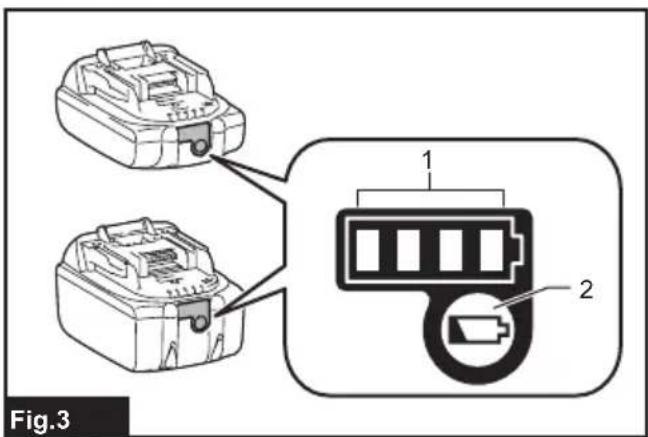
▶ Fig.3: 1. Indicator lamps 2. Check button
Press the check button on the battery cartridge to indicate the remaining battery capacity. The indicator lamps light up for a few seconds.
| Indicator lamps Remaining | capacity | ||
| Lighted Off | Blinking | ||
| 75% to 100% | |||
| 50% to 75% | |||
| 25% to 50% | |||
| 0% to 25% | |||
| Charge the battery. | |||
| The battery may have malfunctioned. | |||
NOTE: Depending on the conditions of use and the ambient temperature, the indication may differ slightly from the actual capacity.
NOTE: The first (far left) indicator lamp will blink when the battery protection system works.
Appliance / battery protection system
The appliance is equipped with the protection system. This system automatically cuts off power to the motor to extend appliance and battery life. The appliance will automatically stop during operation if the appliance or battery is placed under one of the following conditions.
• Overload protection : When the appliance or battery is operated in a manner that causes it to draw an abnormally high current, the appliance automatically stops without any indication. In this situation, turn the appliance off and stop the application that caused the appliance to become overloaded. Then turn the appliance on to restart.
• Overheat protection : When the appliance or battery is overheated, the appliance automatically stops. Let the appliance cool down before turning it on again.
• Overdischarge protection : When the battery capacity becomes low, the appliance stops automatically. If the appliance does not operate even when the switches are operated, remove the battery cartridge from the appliance and charge it.
OPERATION
CAUTION: The fan is made from polypropylene resin. Some kind of oil agent or chemicals which deteriorate resin may break the fan and cause an injury.
Starting / stopping the fan
Press the power switch button to turn on the fan. Press the power switch button again to turn off the fan.
Changing wind speed
Press the wind speed change button while the fan is running. The wind speed increases every time you press the button. The wind speed will return to the lowest speed when running in the highest speed. The cordless fan will start in the same speed as the previous setting.
▶ Fig.4: 1. Wind speed change button
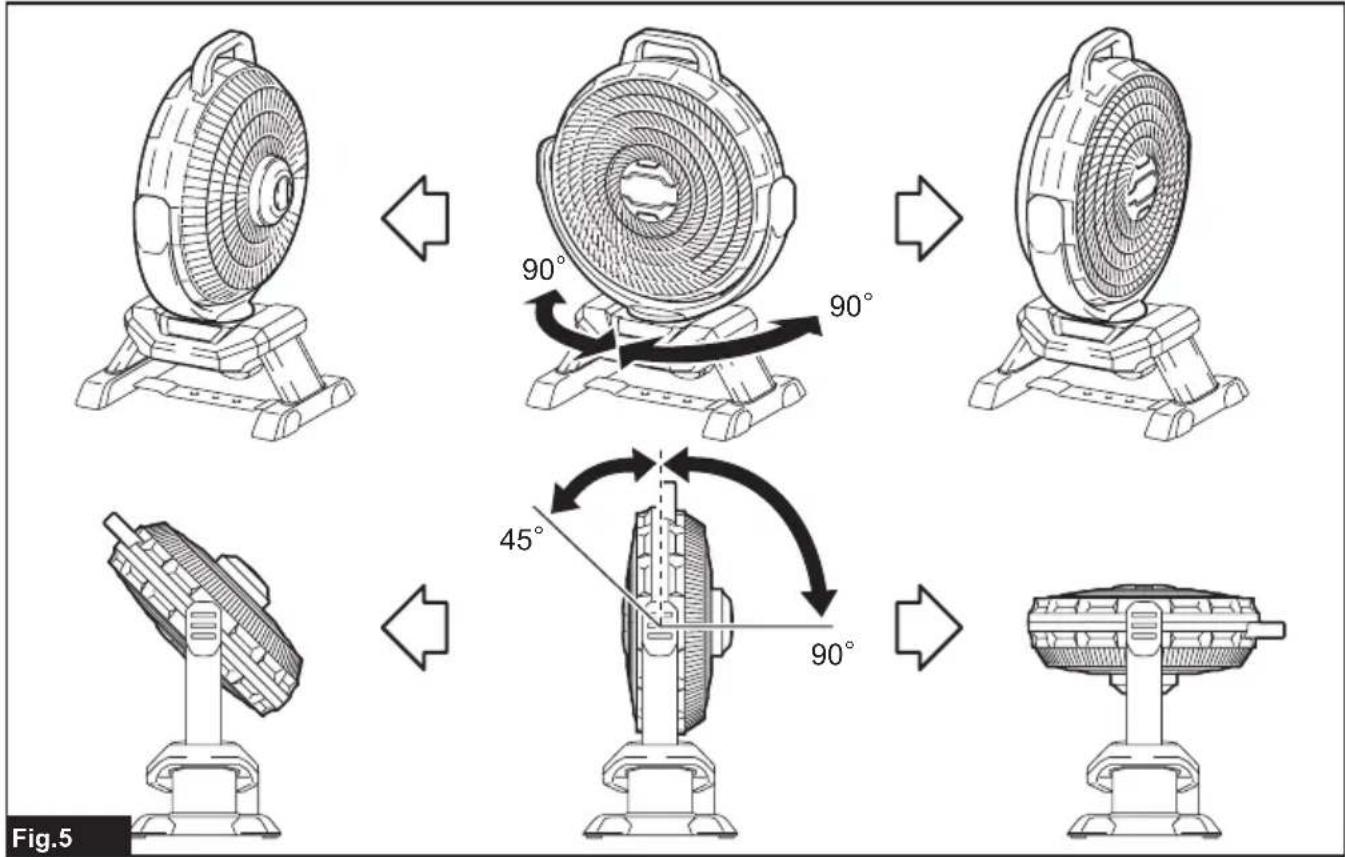
Adjusting fan head angle
The angle of the fan head can be adjusted manually. The adjustable range of the fan head is as shown in the figure. ▶ Fig.5
NOTICE: Do not turn the fan head beyond the adjustable range.
Oscillating the fan head
⚠️CAUTION: When oscillating the fan head, keep obstacles clear of the moving range of the fan head. The cordless fan may be pushed and fall by the oscillation.
⚠️CAUTION: Do not stop the oscillation by holding the fan head. Always press the oscillation button to stop.
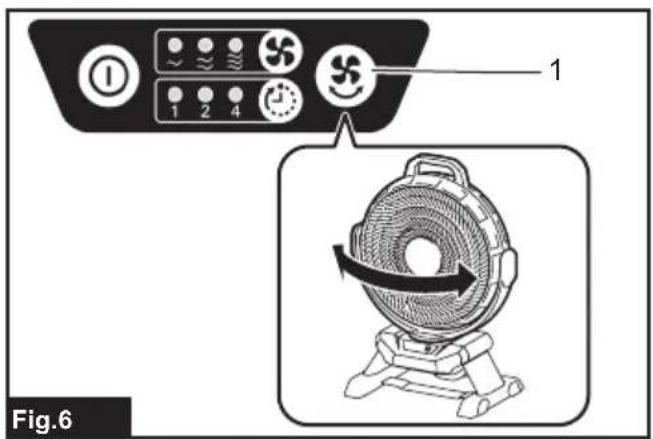
Press the oscillation button to oscillate the fan head. Press the button again to stop the oscillation. The fan head begins to oscillate from the current position when the oscillation button is pressed. The fan head oscillates in the range of 90-degrees.
▶ Fig.6: 1. Oscillation button
NOTE: Depending on the fan head position, the fan head may not oscillate soon after the oscillation button is pressed because of the oscillation mechanism.
Auto-off timer
Press the auto-off timer button while the fan is running. The duration to activate auto-off timer changes every time you press the button (1 hour / 2 hours / 4 hours / off). The number under each auto-off timer indicator shows the remaining hour(s) to turn off the fan. The auto-off timer indicator will turn off with time.
▶ Fig.7: 1. Auto-off timer button
NOTE: Depending on the battery cartridge type and its remaining capacity, the auto-off timer may be activated earlier than the set time.
Using AC adaptor
⚠ WARNING: Never use the appliance when the cord or plug is damaged.
⚠ WARNING: Do not handle the plug with wet or greasy hand.
WARNING: Do not leave the AC adaptor disconnected from the appliance while the power is supplied from the mains. Small children may put the live plug in their mouth and cause injury.
⚠ WARNING: Do not put the live plug or cord into your mouth. Doing so might cause an electric shock.
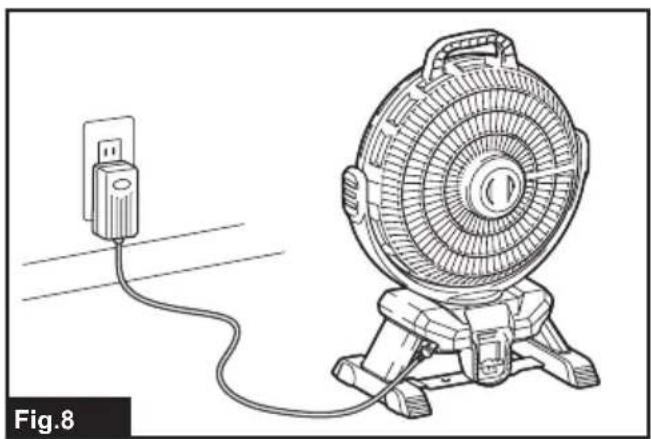
Insert the 12V DC plug of AC adaptor into the 12V DC socket, and then plug the AC pins into a main power supply. Make sure that the voltage rating of the main power supply corresponds with that of the adaptor.
▶ Fig.8
NOTE: After the AC adaptor is connected, the appliance may take 3–5 seconds to start.
NOTE: The adaptor might creak while using it for the power supply. This doesn't affect normal use.
NOTE: Even operating in DC power mode, the appliance is automatically changed into AC power mode when plugged in.
NOTE: When the cordless fan switches the power mode from DC to AC, and vice versa, the wind speed may change temporarily.
NOTE: The AC adaptor does not charge the battery inserted to the appliance.
MAINTENANCE
CAUTION: Always be sure that the appliance is switched off, unplugged, and the battery cartridge is removed before attempting to perform inspection or maintenance.
NOTICE: Never use gasoline, benzine, thinner, alcohol or the like. Discoloration, deformation or cracks may result.
To maintain product SAFETY and RELIABILITY, repairs, any other maintenance or adjustment should be performed by Makita Authorized or Factory Service Centers, always using Makita replacement parts.
General maintenance
After the appliance is cooled, use clean clothes to remove dirt, dust, oil, grease etc.
⚠ WARNING: All parts should be replaced at an Authorized Service Center.
Fan Cleaning
CAUTION: Ensure that the fan is switched off from the supply mains before removing the guard.
When cleaning the inside of fan-cover, remove the fan-cover by following way.
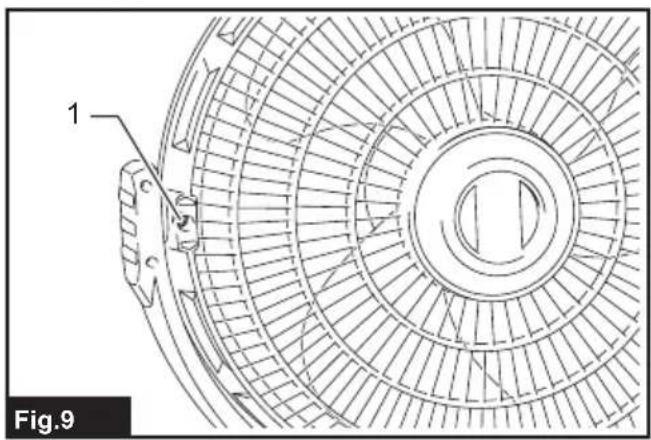
- Loosen the screw located on the back of the fan-cover.
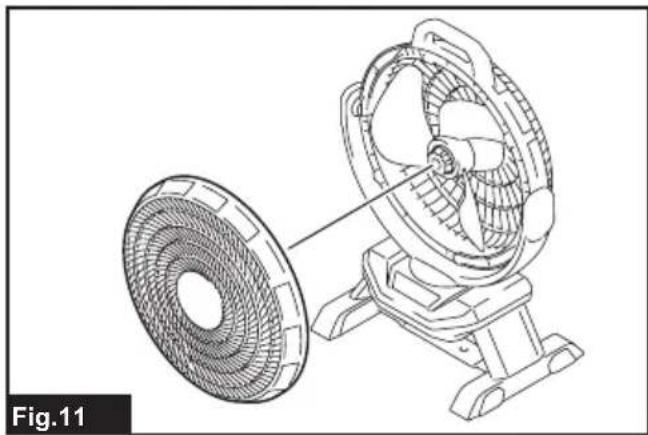
▶ Fig.9: 1. Screw - Turn the fan-cover counterclockwise, and remove the fan-cover when the markings are aligned as illustrated.
▶ Fig.10: 1. Marking
▶ Fig.11
Wipe off the fan and fan-cover using a cloth dampened in soapy water.
To attach the fan-cover, follow the removing procedure in reverse. When attaching the fan-cover, make sure that the fan-cover is locked with a click.
⚠️CAUTION: Always make sure that the fan-cover is attached before use.
⚠️CAUTION: Attach the fan-cover securely. If the fan-cover is attached halfway or incorrectly, it may come off and result in personal injury or damage to the appliance.
NOTICE: Avoid applying too much load on the fan-cover. It may lead to breakage.
Storage
To prevent fire or burning, allow the appliance to cool down completely before you store it. Do not store the discharged battery for long periods, as it can shorten its service life.
OPTIONAL ACCESSORIES
⚠️CAUTION: These accessories or attachments are recommended for use with your Makita appliance specified in this manual. The use of any other accessories or attachments might present a risk of injury to persons. Only use accessory or attachment for its stated purpose.
If you need any assistance for more details regarding these accessories, ask your local Makita Service Center.
- Makita genuine battery and charger
NOTE: Some items in the list may be included in the tool package as standard accessories. They may differ from country to country.
AVERTISSEMENT
▶ Abb.2: 1. Knopf 2. Akku
VEILIGHEIDSWAAR- SCHUWINGEN
▶ Fig.2: 1. Knop 2. Accu
OPTIONELE ACCESSOIRES
▶ Fig.2: 1. Knap 2. Akku
▶ Fig.6: 1. Oscillationsknap
▶ Fig.6: 1. Oscillationsknapp
▶ Rys.2: 1. Przycisk 2. Akumulator
DÔLEŽITÉ BEZPEČNOSTNÉ POKYNY
TIETO POKYNY USCHOVAJTE.
TYTO POKYNY USCHOVEJTE.
VOLITELNÉ PŘÍSLUŠENSTVÍ
VAŽNE SIGURNOSNE UPUTE
Pri upotrebi električnog uređaja uvijek se pridržavajte osnovnih mjera opreza, uključujući sljedeće:
PROČITAJTE SVE UPUTE PRIJE UPOTREBE OVOG UREĐAJA.
UPOZORENJE
Da biste smanjili rizik od požara, strujnog udara ili ozljede:
-
Nemojte izlagati kiši. Pohranite u zatvorenom prostoru.
-
Ne dopustite da se koristi kao igračka. Posebno pazite kad ga koriste djeca ili kad se koristi u blizini djece.
-
Koristite samo na način opisan u ovom priručniku. Koristite isključivo preporučene dodatke proizvođača.
-
Ne koristite s oštećenom baterijom. Ako uređaj ne radi kako bi trebao ili je pao, bio oštećen, ostavljen na otvorenom ili ispušten u vodu, vratite ga u naš servis.
-
Nemojte rukovati uređajem mokrim rukama.
-
Ne stavljajte predmete u otvore.
-
Držite kosu, široku odjeću i sve dijelove tijela dalje od otvora i pomičnih dijelova.
-
Isključite sve kontrole prije uklanjanja baterije.
-
Upotrebljavajte samo strujni adapter i punjač proizvođača. Dodatni pribor koji je prikladan za određeni uređaj može postati opasan kada se koristi s drugim uređajima.
-
Ne punite bateriju na otvorenom.
-
Nemojte izlagati plamenu ili visokim temperaturama.
-
Nemojte koristiti u blizini otvorenog plamena, žara ili eksplozivne atmosfere, npr. u prisutnosti zapa-ljivih tekućina, plinova ili prašine. Uređaj stvara iskre koje mogu zapaliti prašinu ili isparavanja.
-
Nikad ne koristite uređaj na vlažnim mjestima kao što je kupaonica.
- Ovaj je uređaj namijenjen samo za upotrebu u zatvorenim prostorima. Nikad ne koristite uređaj na otvorenom.
- Ovaj je uređaj namijenjen za kućnu upotrebu.
- Pažljivo pročitajte ovaj priručnik s uputama i pri- ručnik s uputama za punjač prije upotrebe.
- Odmah prestanite s radom ako primijetite nešto neobično.
- Ako ispustite ili udarite uređaj, pažljivo provjerite ima li pukotina ili oštećenja prije rada s njime.
- Ne približavajte uređaj štednjacima i drugim izvorima topline.
- Nemojte ga upotrebljavati ako sadrži slomljene, savijene ili oštećene dijelove. Ako se čini da je uređaj na bilo koji način oštećen ili nepravilno radi, potrebno ga je odmah ukloniti iz upotrebe. Prije svake radnje provjerite radi li uređaj ispravno.
- Ne ostavljajte uređaj da radi bez nadzora.
- Nemojte zloupotrebljavati strujni adapter. Nemojte upotrebljavati kabel adaptera za nošenje uređaja ili izvlačenje utikača iz utičnice. Držite strujni adapter podalje od izvora topline, ulja, oštrih rubova i pomičnih dijelova. Oštećeni adapter odmah zami- jenite. Oštećeni adapter povećava opasnost od električnog udara.
Registered in Belgium 0416848590
Makita Corporation
3-11-8, Sumiyoshi-cho,
Anjo, Aichi 446-8502 Japan