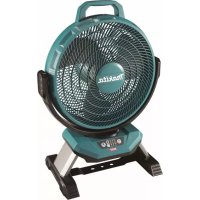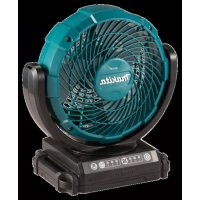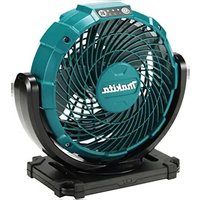
CF100D - Fan MAKITA - Free user manual and instructions
Find the device manual for free CF100D MAKITA in PDF.

 FR
FR
 BG
BG
 CS
CS
 DA
DA
 DE
DE
 EL
EL
 EN
EN
 ES
ES
 ET
ET
 FI
FI
 HU
HU
 IT
IT
 LT
LT
 LV
LV
 MK
MK
 NL
NL
 NO
NO
 PL
PL
 PT
PT
 RO
RO
 RU
RU
 SK
SK
 SL
SL
 SQ
SQ
 SR
SR
 SV
SV
 UK
UK
 ZH
ZH
| Product type | Cordless Fan |
| Brand | Makita |
| Model | CF100D |
| Dimensions (L x W x H) without battery | 148 mm x 260 mm x 252 mm |
| Dimensions with battery BL1015/BL1016/BL1020B/BL1021B | 149 mm x 260 mm x 252 mm |
| Dimensions with battery BL1040B/BL1041B | 168 mm x 260 mm x 252 mm |
| Net weight | 1.2 – 1.4 kg |
| Power supply | Makita lithium-ion battery 10.8 V / 10.8 V–12 V max or AC adapter 100-240 V, 50/60 Hz |
| Number of speeds | 3 speeds (high, medium, low) |
| Battery life with battery BL1040B | Up to 275 min (high), 380 min (medium), 630 min (low) |
| Adjustable head angle | Yes, defined range of motion (see manual) |
| Mounting options | Suspension hook, tripod mounting (5/8"-11 UNC or Makita light tripod), wall mounting |
| Maintenance and cleaning | Clean with a clean cloth after cooling. Do not use solvents. Repair by Makita authorized service center. |
| Safety | Do not expose to rain. Use only recommended accessories. Disconnect before maintenance. Read all instructions. |
| Spare parts | Use only genuine Makita spare parts identical to the original parts. |
| Warranty | Makita warranty for tool and charger. Use of non-authentic batteries voids warranty. |
Frequently Asked Questions - CF100D MAKITA
User questions about CF100D MAKITA
0 question about this device. Answer the ones you know or ask your own.
Ask a new question about this device
Download the instructions for your Fan in PDF format for free! Find your manual CF100D - MAKITA and take your electronic device back in hand. On this page are published all the documents necessary for the use of your device. CF100D by MAKITA.
USER MANUAL CF100D MAKITA
1
2
3
flowchart
graph TD
    A["Control Panel 1"] --> B["Component Module 3"]
    B --> C["Control Panel 2"]
    C --> D["Component Module 4"]
4
5
natural_image
Technical line drawing of a mechanical fan or motor component with a 90-degree angle annotation (no text or symbols on the diagram itself)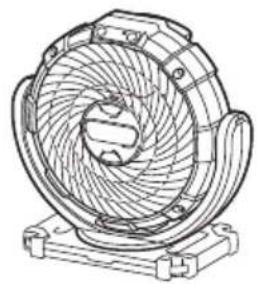
natural_image
Technical line drawing of a mechanical fan or turbine component (no text or symbols)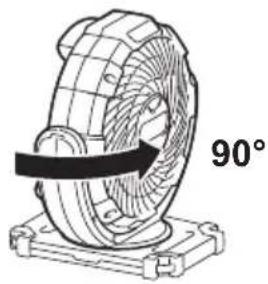
natural_image
Technical line drawing of a mechanical component with a 90-degree rotation indicator (no text or symbols on the diagram itself)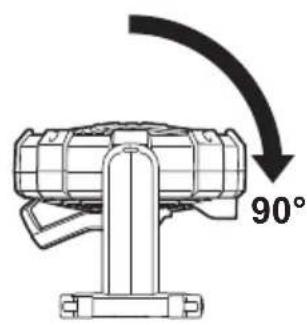
natural_image
Technical line drawing of a mechanical device with no visible text or symbols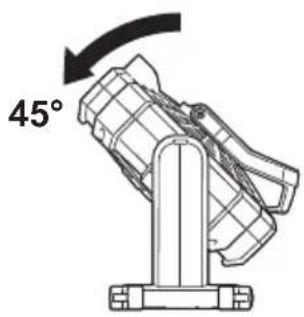
6
7
8
9
English
This appliance can be used by children aged from 8 years and above and persons with reduced physical, sensory or mental capabilities or lack of experience and knowledge if they have been given supervision or instruction concerning use of the appliance in a safe way and understand the hazards involved. Children shall not play with the appliance. Cleaning and user maintenance shall not be made by children without supervised.
To prevent serious injury, please read and understand all warnings and instructions before use.
SAVE THIS MANUAL
You will need this manual for the safety warnings and precautions, assembly, operating, inspection, maintenance and cleaning procedures, parts list. Keep this manual in a safe and dry place for future reference.
WARNING AND SAFETY RULES
IMPORTANT
SAFETY INSTRUCTION
When using an electrical appliance, basic precautions should always be followed, including the following:
READ ALL INSTRUCTIONS BEFORE USING THIS APPLIANCE.
WARNING- To reduce the risk of fire, electric shock or injury:
- Do not expose to rain. Store indoors.
- Do not allow to be used as a toy. Close attention is necessary when used by or near children.
- Use only as described in this manual. Use only manufacturer's recommended attachments.
-
Do not use with damaged battery. If appliance is not working as it should have been dropped, damaged, left outdoors, or dropped into water, return it to a service center.
-
Do not handle the appliance with wet hands.
-
Do not put any object into openings.
-
Keep hair, loose clothing, finger and all parts of body away from openings and moving parts.
-
Turn off all controls before removing the battery.
-
Use only the AC adaptor or charger supplied by the manufacturer. Accessories that may be suitable for one cordless fan may become hazardous when used on others.
-
Do not charge the battery outdoors.
-
Do not expose to fire or high temperatures.
-
Do not use near open flames, glowing embers or explosive atmospheres, such as in presence of flammable liquids, gases or dust. Cordless fans create sparks which may ignite the dust or fumes.
SAVE THESE INSTRUCTIONS
This appliance is intended for household use.
ADDITIONAL SAFETY RULES
- Read this instruction manual and the charger instruction manual carefully before use.
- Stop operation immediately if you notice any abnormal.
- If you drop or strike the fan, check it carefully for cracks or damage before operation.
- Do not bring it close to stoves or other heat sources.
- Do not use if broken, bent, cracked or damaged parts are present. Any cordless fan that appears damaged in any way or operates abnormally must be removed from service immediately. Inspect before each operation.
- Do not leave cordless fan energized and unattended.
- Don't abuse the AC adaptor. Never use the adaptor cord to carry the fans or pull the plug out from an outlet. Keep the AC adaptor away from heat, oil, sharp edges, or moving parts. Replace damaged adaptor immediately. Damaged adaptor may increase the risk of electric shock.
SAVE THESE INSTRUCTIONS
CORDLESS FAN USE AND CARE
- Use the correct cordless fan for your application. Do not use the fan for a purpose for which it is not intended.
- The cordless fan can work by AC adaptor supplied or 10.8 V / 10.8 V–12 V max Li-ion battery cartridge that was provided by Makita. Use of any other batteries may create a risk of fire. Recharge batteries only with the specified charger.
- Store idle cordless fan out of reach of children and other untrained persons.
- Disconnect battery cartridge or the AC adaptor from the power source before storing the fan. Such preventive safety measures may reduce the risk of starting the fan accidentally. Always unplug the fan from its electrical outlet before performing any inspection, maintenance, or cleaning procedures.
- When battery cartridge is not in use, keep it away from other metal objects. Shortening the battery terminals together may cause sparks, burns or a fire.
- Unplug unit and allow it to cool before attempting any cleaning or maintenance.
SERVICE
- Cordless fan service must be performed only by qualified repair personnel. Service or maintenance performed by unqualified personnel could result in a risk of injury.
- When servicing a cordless fan, use only identical replacement parts. Use of unauthorized parts or failure to follow maintenance instructions may create a risk of electric shock or injury.
SYMBOLS
The following are symbols used for the equipment. Be sure that you understand their meaning before use.

- Read instruction manual.
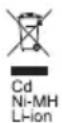
- Only for EU countries
Due to the presence of hazardous components in the equipment, waste electrical and electronic equipment, accumulators and batteries may have a negative impact on the environment and human health.
Do not dispose of electrical and electronic appliances or batteries with household waste!
In accordance with the European Directive on waste electrical and electronic equipment and on accumulators and batteries and waste accumulators and batteries, as well as their adaptation to national law, waste electrical equipment, batteries and accumulators should be stored separately and delivered to a separate collection point for municipal waste, operating in accordance with the regulations on environmental protection.
This is indicated by the symbol of the crossed-out wheeled bin placed on the equipment.
SPECIFICATIONS
| Battery cartridge Makita 10.8 V / 10.8 V–12 V max | Li-ion rechargeable battery | |
| AC adaptor Input: 100–240V, 50/60 Hz, 0.6 A max; | Output: 12 V 1.5 A | |
| Dimension (L x W x H) | Without battery 148 mm x 260 mm | x 252 mm |
| With BL1015/BL1016/BL1020B/ BL1021B battery | 149 mm x 260 mm x 252 mm | |
| With BL1040B/BL1041B battery 1 | 68 mm x 260 mm x 252 mm | |
| Net weight 1.2–1.4 kg | ||
- The weight may differ depending on the attachment(s), including the battery cartridge. The lightest and heaviest combination, according to EPTA-Procedure 01/2014, are shown in the table.
BATTERY RUNNING TIME
Only refers to the following types of battery provided by Makita.
The estimated running time of full charged battery is showing below:
| Air speed | Battery | ||
| BL1015BL1016 | BL1020BBL1021B | BL1040BBL1041B | |
| High Approx. 105 mins Approx. 135 mins Approx. 275 mins | |||
| Medium Approx. 145 mins Approx. 190 mins Approx. 380 mins | |||
| Low Approx. 240 mins Approx. 315 mins Approx. 630 mins | |||
- Power switch button 2. Speed indicator 3. Speed change button
- Strap hole 5. Handle 6. Battery slot
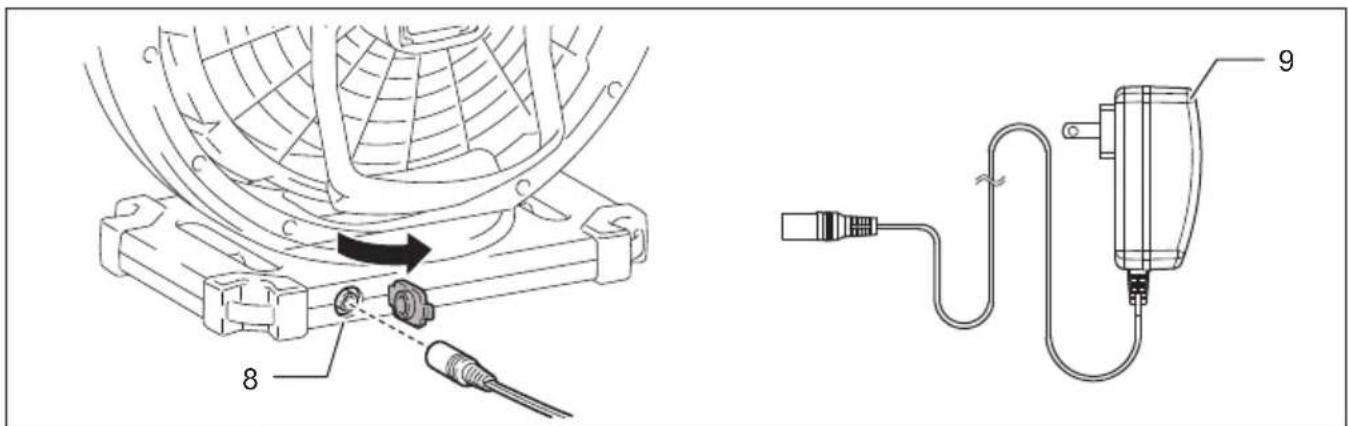
- Hook 8. 12V DC socket 9. AC adapter
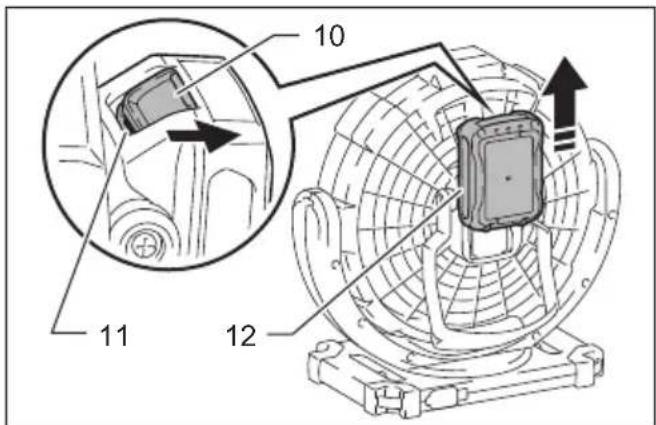
- Button 11. Red indicator 12. Battery cartridge
- Indicator lamp 14. Check button 15. Screw hole A (5/8"-11 UNC)
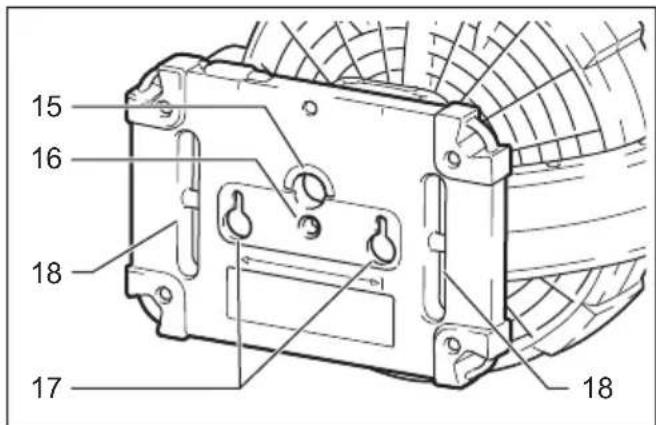
- Screw hole B 17. Hole for wall mounting 18. Slit for hooking
- Thumb screw
HOW TO OPERATE THE UNIT

WARNING
- Do not allow familiarity with tools to make you careless. Remember that a careless fraction of a second is sufficient to inflict serious injury.
- Do not use any batteries, attachments or accessories not recommended by the manufacturer of this tool. The use of batteries, attachments or accessories not recommended can result in serious personal injury.
- Do not handle the cord and battery with wet or greasy hand.
- Never use the cordless fan when the cord or plug is damaged.
- Do not leave the AC adapter disconnected from the cordless fan while the power is supplied from the mains. Small children may put the live plug in their mouth and cause injury.
- When inserting/removing the battery or plugging/unplugging the AC adapter, always place the cordless fan on a flat and stable surface.
This fan is equipped with a 3-speed control using the speed switch. Power supply can be with AC adaptor or battery cartridge (OPTIONAL ACCESSORIES).
USING AC ADAPTOR
Insert the 12V DC plug of AC adaptor into the 12V DC socket (Fig. 2), and then plug the AC pins into a main power supply. Make sure that the voltage rating of the main power supply corresponds with that of the adaptor.
SAVE THESE INSTRUCTIONS
After the AC adaptor is connected, the cordless fan may take 3–5 seconds to start.
The adaptor might creak while using it for the power supply. This doesn't affect normal use.
The supplied AC adapter does not charge the battery inserted to the cordless fan.
USING BATTERY CARTRIDGE
IN ORDER TO ENSURE THE BATTERY MAXIMUM PERFORMANCE, IT IS RECOMMENDED THAT THE BATTERY CARTRIDGE SHOULD BE CHARGED BEFORE BEING USED FOR THE FIRST TIME.
- Before using battery cartridge, read all instructions and cautionary markings on (1) battery charger, (2) battery, and (3) product using battery.
- Do not disassemble battery cartridge.
- If operating time has become excessively shorter, stop operating immediately. It may result in a risk of overheating, possible burns or even an explosion.
-
If electrolyte gets into your eyes, rinse them out with clear water and seek medical attention right away. It may result in loss of your eyesight.
-
Do not shorten the battery cartridge:
(1) Do not touch the terminals with any conductive material.
(2) Avoid storing battery cartridge in a container with other metal objects such as nails, coins, etc.
(3) Do not expose battery cartridge to water or rain.
A battery short can cause a large current flow, overheating, possible burns and even a breakdown.
-
Do not store the tool and battery cartridge in locations where the temperature may reach or exceed 50°C (122°F).
-
Do not incinerate the battery cartridge even if it is severely damaged or is completely worn out. The battery cartridge can explode in a fire.
-
Be careful not to drop or strike battery.
-
Do not use a damaged battery.
-
Never recharge a fully charged battery cartridge. Overcharging shortens the battery service life.
-
The contained lithium-ion batteries are subject to the Dangerous Goods Legislation requirements. For commercial transports e.g. by third parties, forwarding agents, special requirement on packaging and labeling must be observed. For preparation of the item being shipped, consulting an expert for hazardous material is required.
Please also observe possibly more detailed national regulations. Tape or mask off open contacts and pack up the battery in such a manner that it cannot move around in the packaging. - Follow your local regulations relating to disposal of battery.
SAVE THESE INSTRUCTIONS

CAUTION: Only use genuine Makita batteries.
Use of non-genuine Makita batteries, or batteries that have been altered, may result in the battery bursting causing fires, personal injury and damage. It will also void the Makita warranty for the Makita tool and charger.
Tips for maintaining maximum battery life:
- Charge the battery cartridge before completely discharged. Always stop tool operation and charge the battery cartridge when you notice less tool power.
- Never recharge a fully charged battery cartridge.
Overcharging shortens the battery service life. - Charge the battery cartridge with room temperature at 10^ C– 40^ C ( 50^ F– 104^ F). Let a hot battery cartridge cool down before charging it.
- Charge the battery cartridge if you do not use it for a long period (more than six months).
Installing or removing of battery cartridge (Fig. 3)
To remove the battery cartridge, slide it from the tool while sliding the button (10). Make sure to hold the cordless fan when sliding out the cartridge.
To install the battery cartridge, align the tongue on the battery cartridge with the groove in the housing and slip it into place. Always insert it all the way until it locks in place with a little click. If you can see the red indicator (11) on the upper side of the button, it is not locked completely. Install it fully until the red indicator (11) can not be seen. If not, it may accidentally fall out of the tool, causing injury to you or someone around you.
Do not use force when installing the battery cartridge. If the cartridge does not slide in easily, it is not being inserted correctly.
To operate the cordless fan using battery cartridge, please refer to the instruction of AC adaptor.
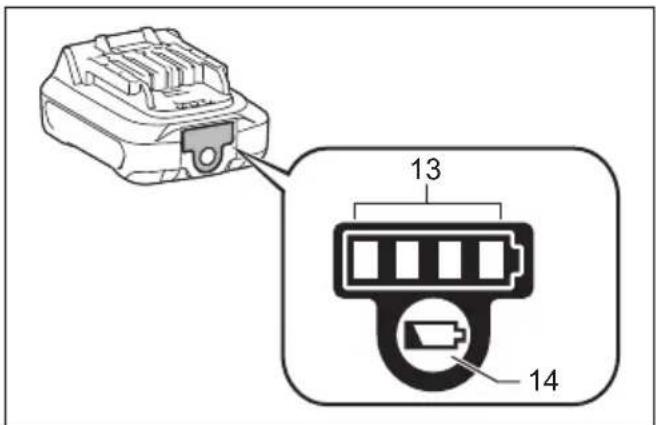
Indicating the remaining battery capacity (Fig. 4)
Only for battery cartridges with the indicator
Press the check button (14) on the battery cartridge to indicate the remaining battery capacity. The indicator lamps (13) light up for few seconds.
| Indicator lamps | Remaining capacity | |
| Lighted Off | ||
| 75% to 100% | ||
| 50% to 75% | ||
| 25% to 50% | ||
| 0% to 25% | ||
NOTE:
- Depending on the conditions of use and the ambient temperature, the indication may differ slightly from the actual capacity.
- The overdischarge protection for the battery will work when the battery capacity becomes low. In this case, cordless fan stops automatically. If the cordless fan does not operate even when the switch is operated, remove the battery from the tool and charge the battery.
Starting / stopping the fan (Fig. 1)
Push the power switch button (1) to turn on the fan. Push the power switch button again to turn off the fan.
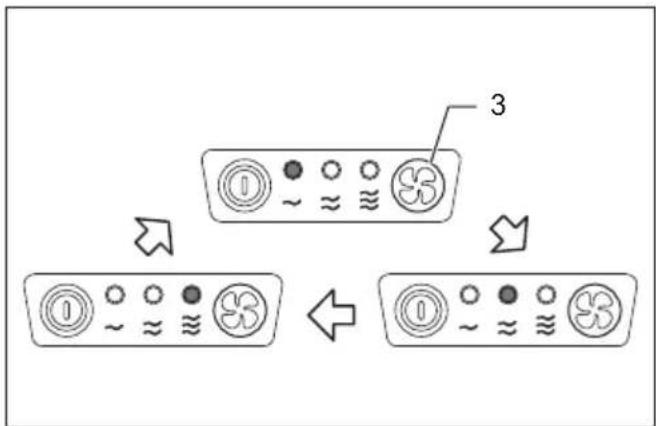
Changing wind speed (Fig. 5)
Push the speed change button (3) while the fan is running. The wind speed increases every time you push the button. The wind speed will return to the lowest speed when running in the highest speed.
The cordless fan will start in the same speed as the previous setting.
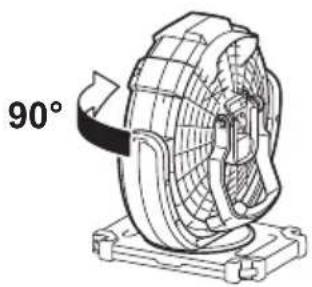
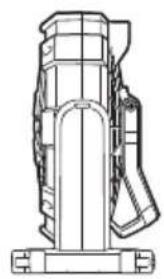
Adjusting fan head angle (Fig. 6)
The angle of the fan head can be adjusted. The range of motion in the fan head is as shown in the figure.
NOTE:
- Do not turn the fan head further than its range of motion.
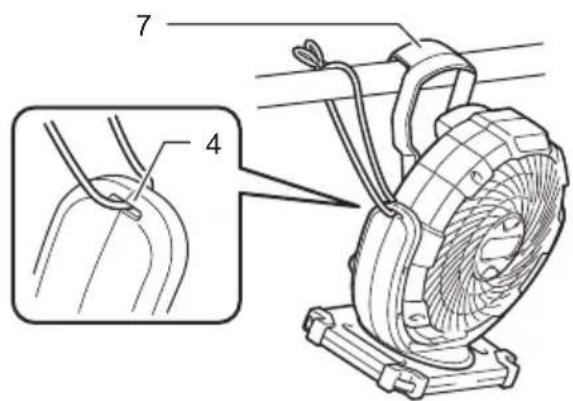
Use hook on the handle to hang the cordless fan on a pole or other usable places. To prevent the cordless fan accidentally dropped, attach a strap using the strap hole (4) and secure it.

CAUTION:
- Never hook the cordless fan at high locations or on the surfaces where the tool may lose the balance and fall.
- For hanging the cordless fan, use a hard material such as a metal pole. The diameter of the hooking pole should be smaller than 24 mm and can withstand 5.6 kg. Do not hang the cordless fan higher than 2.3 m.
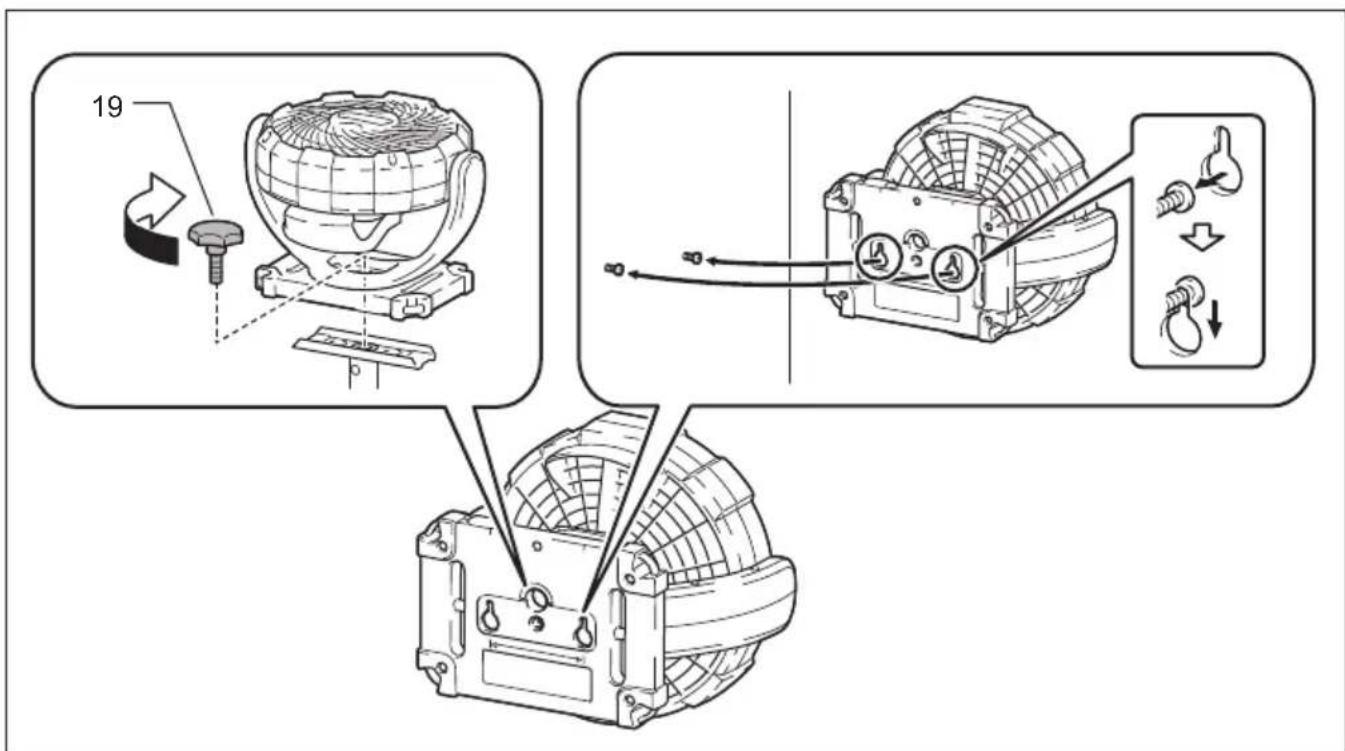
Mounting on a tripod (Fig. 8, Fig. 9)
The cordless fan can be mounted on some Makita tripods.
When using the tripod with the threaded shaft 5/8"-11 UNC, mount the cordless fan using the screw hole A (15).
When using the tripod for Makita work light, mount the cordless fan by fixing the thumb screw (19) into the screw hole B (16).
Mounting on a wall (Fig. 8, Fig. 9)
Prepare two screws and fix them on the wall as shown in the figure. Hang the cordless fan using the wall mounting holes (17).

CAUTION:
- When hanging on the wall, unplug and remove battery from the cordless fan.
- Carefully choose a stable wall for mounting the cordless fan. Make sure that the cordless fan is securely hooked on the wall.
- Always remove the cordless fan from the wall when installing/removing the battery. Otherwise the cordless fan may fall off and cause an injury.
- This fan is intended to be mounted at high level and has to be installed so that the blades are more than 2.3 m above the floor or windows.
MAINTENANCE

WARNING
- When servicing, ask Makita authorized service centers and with only identical replacement parts. Use of any other parts may create a hazard or cause product damage.
- To avoid serious personal injury, always remove the AC adaptor or battery cartridge from the unit when cleaning or performing any maintenance.
- Allow the cordless fan to cool completely before performing any inspection, maintenance, cleaning procedures or storage.
GENERAL MAINTENANCE
Avoid using solvents when cleaning plastic parts. Most plastics are susceptible to damage from various types of commercial solvents and may be damaged by their use. After the portable fan cooled, use clean clothes to remove dirt, dust, oil, grease etc.

WARNING
- Do not at any time let brake fluids, gasoline, petroleum-based products, penetrating oils etc., contact with plastic parts. Chemicals can damage, weaken or destroy plastic which may result in serious personal injury.
- All parts should be replaced at an Authorized Service Center.
STORAGE
To prevent fire or burning, allow the portable fan to cool down completely before you store it. Do not store the discharged battery for long periods, as it can shorten its service life.
For technical questions, please contact sales agent.
Français
WAARSCHUWINGEN EN VEILIGHEIDSREGELS
BELANGRIJK
VEILIGHEIDSVOORSCHRIFTEN
GENERELT VEDLIKEHOLD
Skrūves caurums A (5/8"-11 UNC)
- Sprauga aizākēšanai
IERICES LIETOŠANAS NORĀDĪJUMI

BRĪDINĀJUMS
UPOZORENJA I SIGURNOSNA PRAVILA
VAŽNO
SIGURNOSNE UPUTE
DODATNA SIGURNOSNA PRAVILA
- Prije upotrebe pažljivo pročitajte ove upute za korištenje, kao i upute za korištenje punjača.
- Odmah prekinite upotrebu primijetite li išta neobično.
- Ako ventilator padne ili ga udarite, prije upotrebe pažljivo pregledajte ima li pukotina ili oštećenja.
- Uređaj držite podalje od peći ili ostalih izvora topline.
- Ne koristite uređaj ako je slomljen, iskrivljen, popucao ili ako su dijelovi oštećeni. Bilo koji bežični ventilator koji se čini oštećen na bilo koji način ili koji ne radi ispravno, mora se odmah ukloniti iz upotrebe. Prije svake upotrebe pregledajte uređaj.
-
Ne ostavljajte bežični ventilator pod naponom i bez nadzora.
-
Ne koristite AC adapter u druge svrhe. Nikada ne koristite kabel adaptera za nošenje ventilatora ili za povlačenje utikača iz utičnice. Držite AC adapter podalje od topline, ulja, oštrih rubova ili pokretnih dijelova. Odmah zamijenite oštećeni adapter. Oštećeni adapter može povećati rizik od strujnog udara.
SAČUVAJTE OVE UPUTE
UPOTREBA I ODRŽAVANJE BEŽIČNOG VENTILATORA
- Koristite ispravni bežični ventilator za vaše potrebe. Ventilator nemojte koristiti za svrhe za koje nije namijenjen.
- Bežični ventilator može raditi s priloženim AC adapterom ili priloženim 10,8 V / 10,8 V–12 V max Li-ion Makita baterijskim uloškom. Upotreba bilo kojih drugih baterija može stvoriti rizik od požara. Baterije punite samo s navedenim punjačem.
- Isključeni bežični ventilator pohranite podalje od djece i osoba koje nisu osposobljene za njegovo rukovanje.
- Izvadite baterijski uložak ili isključite AC adapter iz izvora energije prije pohranjivanja ventilatora. Navedene sigurnosne mjere mogu smanjiti rizik od slučajnog pokretanja ventilatora. Uvijek isključite ventilator iz električne utičnice prije provođenja bilo kakvih provjera, održavanja ili postupaka čišćenja.
- Kada baterijski uložak nije u upotrebi, držite je podalje od ostalih metalnih predmeta. Kratko spajanje kontakata baterije može uzrokovati iskre, opekline ili požar.
- Isključite uređaj i dozvolite da se ohladi prije čišćenja ili održavanja.