USER MANUAL GMM41MSBEM LG
Before beginning installation, read these instructions carefully. This will simplify installation and ensure that the product is installed correctly and safely. Leave these instructions near the product after installation for future reference.
ENGLISH
Refer to the owner's manual on LG website for more detailed information.
MFL72087002
Rev.01_040924
www.lg.com
Copyright © 2024 LG Electronics Inc. All Rights Reserved.
TABLE OF CONTENTS
This manual may contain images or content that may be different from the model you purchased.
This manual is subject to revision by the manufacturer.
SAFETY INSTRUCTIONS
READ ALL INSTRUCTIONS BEFORE USE. 3
WARNING 3
CAUTION 9
INSTALLATION
Before Installation 12
Removing the Fridge and Freezer Door 13
Levelling and Door Alignment. 15
Turning on the Power. 15
Moving the Appliance for Relocation 15
OPERATION
Before Use 17
Product Features. 19
Control Panel 20
MAINTENANCE
Cleaning 23
TROUBLESHOOTING
Before Calling for Service 24
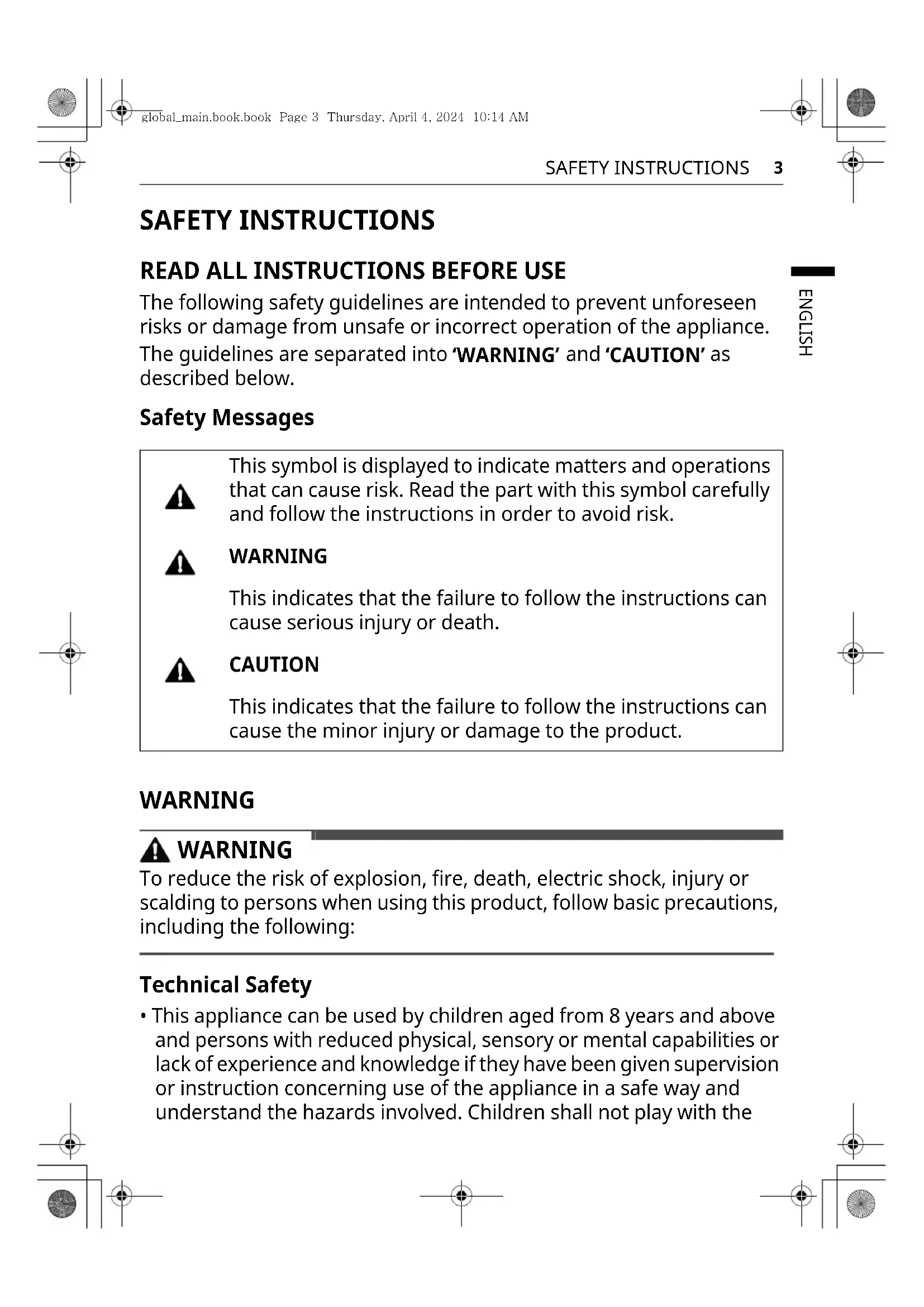
SAFETY INSTRUCTIONS
READ ALL INSTRUCTIONS BEFORE USE
The following safety guidelines are intended to prevent unforeseen risks or damage from unsafe or incorrect operation of the appliance. The guidelines are separated into 'WARNING' and 'CAUTION' as described below.
Safety Messages

This symbol is displayed to indicate matters and operations that can cause risk. Read the part with this symbol carefully and follow the instructions in order to avoid risk.

WARNING
This indicates that the failure to follow the instructions can cause serious injury or death.

CAUTION
This indicates that the failure to follow the instructions can cause minor injury or damage to the product.
WARNING

WARNING
To reduce the risk of explosion, fire, death, electric shock, injury or scalding to persons when using this product, follow basic precautions, including the following:
Technical Safety
- This appliance can be used by children aged from 8 years and above and persons with reduced physical, sensory or mental capabilities or lack of experience and knowledge if they have been given supervision or instruction concerning use of the appliance in a safe way and understand the hazards involved. Children shall not play with the
4 SAFETY INSTRUCTIONS
appliance. Cleaning and user maintenance shall not be made by children without supervision.
- This appliance is not intended for use by persons (including children) with reduced physical, sensory or mental capabilities, or lack of experience and knowledge, unless they have been given supervision or instruction concerning use of the appliance by a person responsible for their safety. Children should be supervised to ensure that they do not play with the appliance. Children aged from 3 to 8 years are allowed to load and unload refrigerating appliances.
- This appliance is intended to be used in household and similar applications such as:
- staff kitchen areas in shops, offices and other working environments;
- farm houses and by clients in hotels, motels and other residential type environments;
- bed and breakfast type environments;
- catering and similar non-retail applications.
- This refrigerating appliance is not intended to be used as a built-in appliance.
- This appliance is not for use in portable or mobile installations, such as marine or RV uses, where it will be in motion while operating.
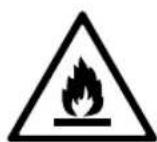
This symbol alerts you to flammable materials that can ignite and cause a fire if you do not take care.
- This appliance contains a small amount of isobutane refrigerant (R600a), but it is also combustible. When transporting and installing the appliance, care should be taken to ensure that no parts of the refrigerating circuit are damaged.
- The refrigerant and insulation blowing gas used in the appliance require special disposal procedures. Consult with service agent or a similarly qualified person before disposing of them.
- Do not damage the refrigerant circuit.
- If the power cord is damaged or the outlet socket hole is loose, it must be replaced. Do not use the power cord and contact an authorized service center to avoid a hazard.
- Do not place multiple portable socket-outlets or portable power supplies at the rear of the appliance.
- Securely plug the power plug into the outlet socket after completely removing any moisture and dust.
- Never unplug the appliance by pulling on the power cable. Always grip the power plug firmly and pull straight out from the outlet socket.
- Keep ventilation openings, in the appliance enclosure or in the built-in structure, clear of obstruction.
- Do not store explosive substances such as aerosol cans with a flammable propellant in this appliance.
- Do not tilt the appliance to pull or push it when transporting.
- When positioning the appliance, ensure the supply cord is not trapped or damaged.
- Do not use mechanical devices or other means to accelerate the defrosting process.
- Do not use a hair dryer to dry the inside of the appliance or place a candle inside to remove odors.
- Do not use electrical appliances inside the food storage compartments of the appliance, unless they are of the type recommended by the manufacturer.
- Make sure not to get a body part such as a hand or foot stuck while moving the appliance.
- Disconnect the power cord before cleaning the appliance interior or exterior.
- Do not spray water or inflammable substances (toothpaste, alcohol, thinner, benzene, flammable liquid, abrasive, etc.) over the interior or exterior of the appliance to clean it.
- Do not clean the appliance with brushes, cloths or sponges with rough surfaces or which are made of metallic material.
6 SAFETY INSTRUCTIONS
- Only qualified service personnel from LG Electronics service centre should disassemble, repair, or modify the appliance. Contact an LG Electronics customer information centre if you move and install the appliance in a different location.
Risk of Fire and Flammable Materials
- If a leak is detected, avoid any naked flames or potential sources of ignition and air the room in which the appliance is standing for several minutes. In order to avoid the creation of a flammable gas air mixture if a leak in the refrigerating circuit occurs, the size of the room in which the appliance is used should correspond to the amount of refrigerant used. The room must be 1 m² in size for every 8 g of R600a refrigerant inside the appliance.
- Refrigerant leaking out of the pipes could ignite or cause an explosion.
- The amount of refrigerant in your particular appliance is shown on the identification plate inside the appliance.
Installation
- This appliance should only be transported by two or more people holding the appliance securely.
- Install the appliance on a firm and level floor.
- Do not install the appliance in a damp and dusty place. Do not install or store the appliance in any outdoor area, or any area that is subject to weathering conditions such as direct sunlight, wind, rain, or temperatures below freezing.
- Do not place the appliance in direct sunlight or expose it to the heat from heating appliances such as stoves or heaters.
- Be careful not to expose the rear of the appliance when installing.
- Install the appliance in a place where it is easy to unplug the power plug of the appliance.
- Be careful not to let the appliance door fall during assembly or disassembly.
- Be careful not to pinch, crush, or damage the power cable during assembly or disassembly of the appliance door.
- Be careful not to point the power plug up or let the appliance lean against the power plug.
- Do not connect a plug adapter or other accessories to the power plug.
- Do not modify or extend the power cable.
- Ensure that the outlet socket is properly grounded, and that the earth pin on the power cord is not damaged or removed from the power plug. For more details on grounding, inquire at an LG Electronics customer information centre.
- This appliance is equipped with a power cord having an equipment-grounding conductor and a grounding power plug. The power plug must be plugged into an appropriate outlet socket that is installed and grounded in accordance with all local codes and ordinances.
- Never start up an appliance showing any signs of damage. If in doubt, consult your dealer.
- Dispose of all packaging materials (such as plastic bags and styrofoam) away from children. The packaging materials can cause suffocation.
- Do not plug the appliance into a multi socket adapter which does not have a power cable (mounted).
- The appliance should be connected to a dedicated power line which is separately fused.
- Do not use a multi socket outlet which is not properly grounded (portable). In case of using a properly-grounded multi socket outlet (portable), use the multi socket outlet with the current capacity of the power cord rating or higher and use the multi socket outlet only for the appliance.
Operation
- Do not use the appliance for any purpose other than domestic household food storage (e.g., storing medical or experimental materials, or shipping).
8 SAFETY INSTRUCTIONS
- If water penetrates electrical parts of the appliance, disconnect the power plug and contact an LG Electronics customer information centre.
- Unplug the power plug during a severe thunderstorm or lightning, or when not in use for a long period of time.
- Do not touch the power plug or the appliance controls with wet hands.
- Do not bend the power cable excessively or place a heavy object on it.
- Immediately unplug the power plug and contact an LG Electronics customer information centre if you detect a strange sound, odour, or smoke coming from the appliance.
- Do not place hands or metallic objects inside the area emitting cold air, the cover, or the heat-releasing grille on the back.
- Do not apply excessive force or impact to the back cover of the appliance.
- Be careful of nearby children when you open or close the appliance door. The door may bump the child and cause injury.
- Avoid the danger of children getting trapped inside the appliance. A child trapped inside the appliance can cause suffocation.
- Do not put animals, such as pets, into the appliance.
- Do not place heavy or fragile objects, containers filled with liquid, combustible substances, flammable objects (such as candles, lamps, etc.), or heating devices (such as stoves, heaters, etc.) on the appliance.
- Do not place any electronic appliance (such as a heater or mobile phone) inside the appliance.
- If there is a gas leakage (isobutane, propane, natural gas, etc.), do not touch the appliance or power plug and ventilate the area immediately. This appliance uses a refrigerant gas (isobutane, R600a). Although it uses a small amount of the gas, it is still combustible gas. Gas leakage during appliance transport, installation, or operation can cause fire, explosion, or injury if sparks are caused.
- Do not use or store flammable or combustible substances (ether, benzene, alcohol, chemical, LPG, combustible spray, insecticide, air freshener, cosmetics, etc.) near the appliance.
- This appliance incorporates an earth connection for functional purposes.
- Connect to potable water supply only.
- If connected to a water supply, connect to a potable water supply only.
- Fill with potable water only.
- If using an icemaker or dispenser water tank, make sure to fill it with potable water only.
Disposal
- When discarding the appliance, remove the door gasket while leaving the shelves and baskets in place and keep children away from the appliance.
CAUTION
CAUTION
To reduce the risk of minor injury to persons, malfunction, or damage to the product or property when using this product, follow basic precautions, including the following:
Installation
- After unpacking, check the appliance for any damage that may have occurred during transit.
- Wait for at least 3 to 4 hours in order to ensure the refrigerant circuit is fully efficient.
- Move the appliance carefully on sensitive floors to avoid damage to the floor.
10 SAFETY INSTRUCTIONS
Operation
- Do not touch frozen food or the metal parts in the freezer compartment with wet or damp hands. It may cause frostbite.
- Do not place glass containers, bottles or cans (especially those containing carbonated drinks) in the freezer compartment, shelves or ice bucket that will be exposed to temperatures below freezing.
- The tempered glass on the front side of the appliance door or the shelves can be damaged by an impact. If it is broken, do not touch it with hands.
- Do not hang from the appliance doors, storage room, shelf or climb up into it.
- Do not store an excessive amount of water bottles or containers for side dishes on the door baskets.
- Do not open or close the appliance door with excessive force.
- If the hinge of the appliance door is damaged or operates improperly, stop using the appliance and contact an authorized service centre.
- Prevent animals from nibbling on the power cable or water hose.
- Never eat frozen foods immediately after they have been taken out in the freezer compartment.
- Make sure not to get a hand or foot stuck upon opening or closing the appliance door or door in door.
Maintenance
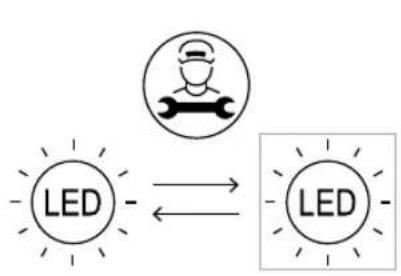
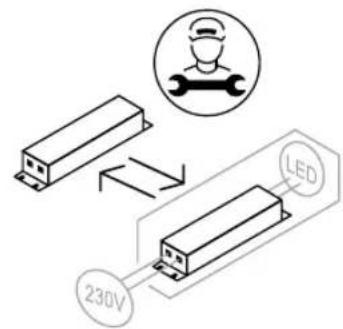
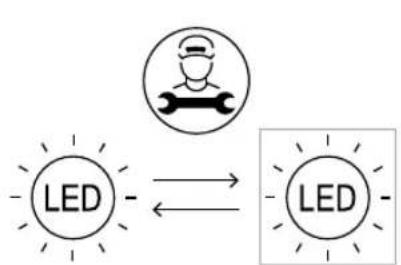
- This appliance is equipped with maintenance-free LED interior light. Do not remove the cover or LED lamp in any attempt to repair or change it. Contact an LG Electronics customer information centre.
- Do not clean glass shelves or covers with warm water when they are cold. They may shatter if exposed to sudden temperature changes.
- Do not insert the shelves upside down. The shelves may fall.
- To remove frost from the appliance, contact an LG Electronics customer information centre.

- Dispose of the ice inside the ice bucket in the freezer compartment during an extended power outage.


12 INSTALLATION
INSTALLATION
Before Installation
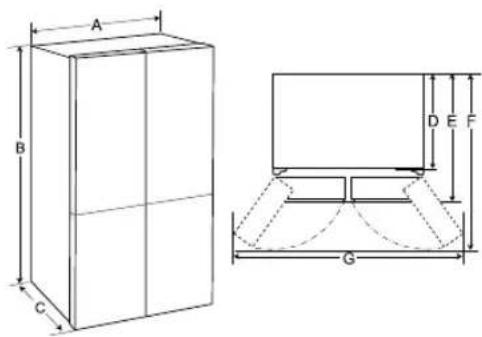
Dimensions and Clearances
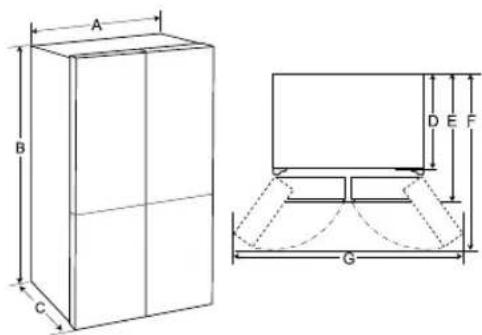
Too small a distance from adjacent items may result in the degradation of freezing capability and increased electricity costs. When installing the appliance, a minimum distance of 100 mm must be maintained from all neighbouring walls.
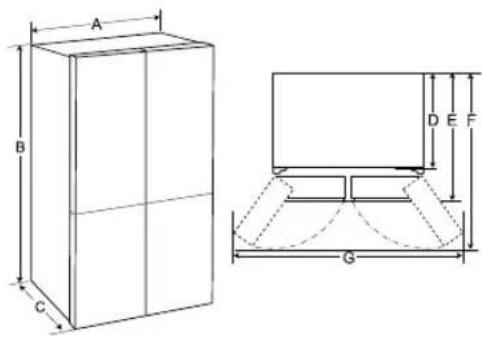
| - Type A (mm) |
| A | 833 |
| B | 1 |
| C | 653 |
| D | 570 |
| E | 653 |
| F | 1 |
| G | 1 |
NOTE
- You can determine what type of appliance it is by looking at the label inside the appliance.
Ambient Temperature
- The appliance is designed to operate within a limited range of ambient temperatures, depending on the climate zone.
- The internal temperatures could be affected by the location of the appliance, the ambient temperature, the frequency of door opening and so on. The climate class can be found on the rating label.
| Climate Class | Ambient Temperature Range °C |
| SN (Extended Temperate) | +10 - +32 |
| N (Temperate) +16 - +32 |
| ST (Subtropical) +16 - +38 / +18 - +38** |
| T (Tropical) +10 - +43* / +16 - +43 / +18 - +43** |
* Australia, India, Kenya
** Argentina
7
NOTE
The appliances rated from SN to T are intended to be used at an ambient temperature between 10°C and 43°C.
0 0
4 0 0
Accessories
*1 This feature is only available on some models.

C-Clip (Snap Ring)*1
Removing the Fridge and Freezer Door
If your entrance door is too narrow for the appliance to pass through, remove the appliance doors and pass the appliance laterally.
WARNING
- Disconnect the power cord, house fuse or circuit breaker before installing, removing the doors, or cleaning the appliance. Failure to follow these instructions may result in death, fire or electric shock.
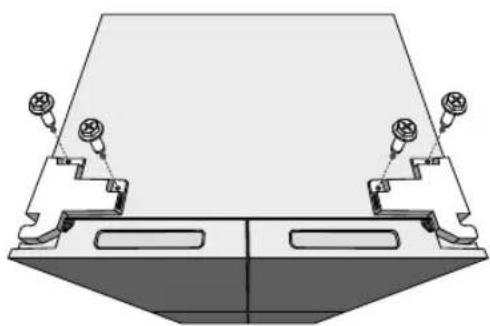
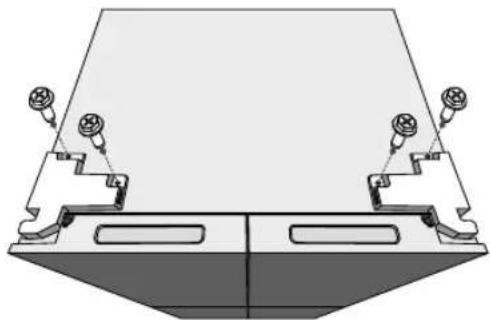
Removing the Hinge Cover
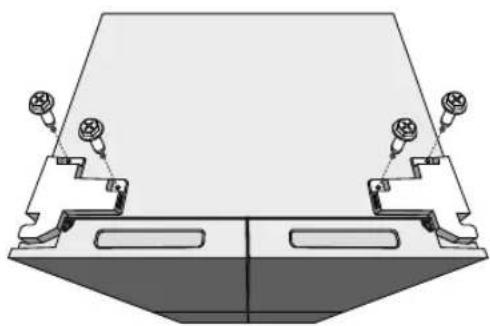
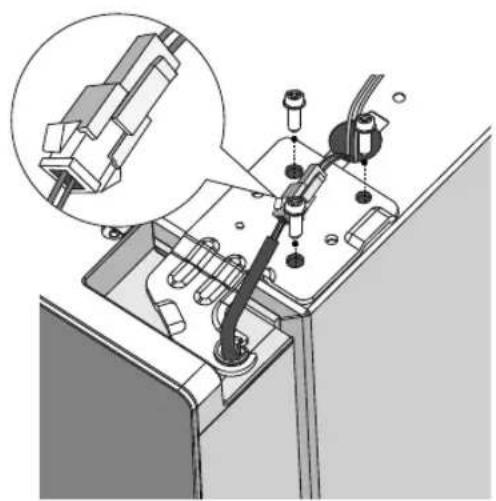
Remove the screws from the hinge cover at the top of the appliance. Lift the hook (not visible), located at the bottom of the front side of the cover, with a flat-head screwdriver.
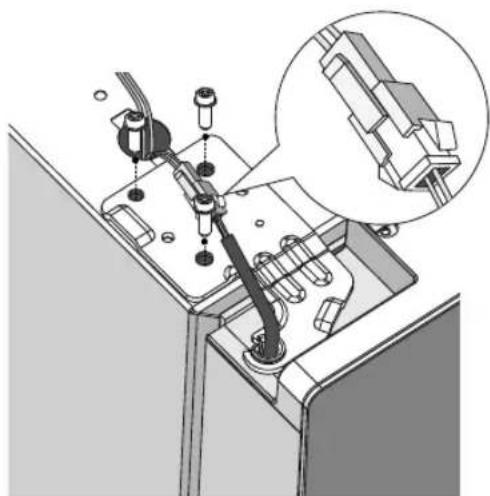
Removing the Left Fridge Door
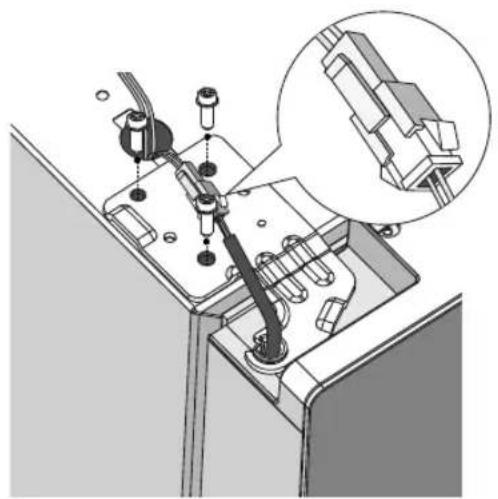
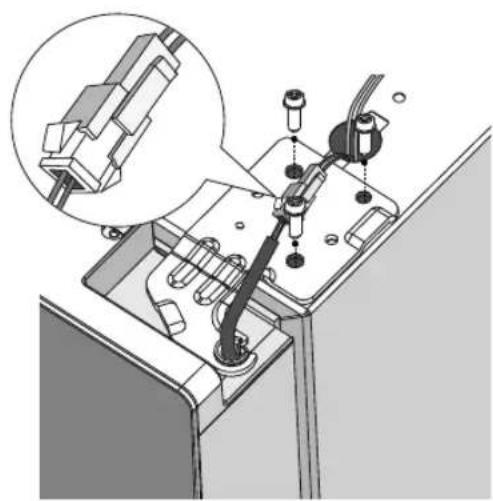
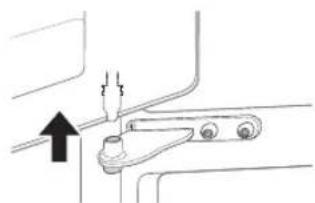
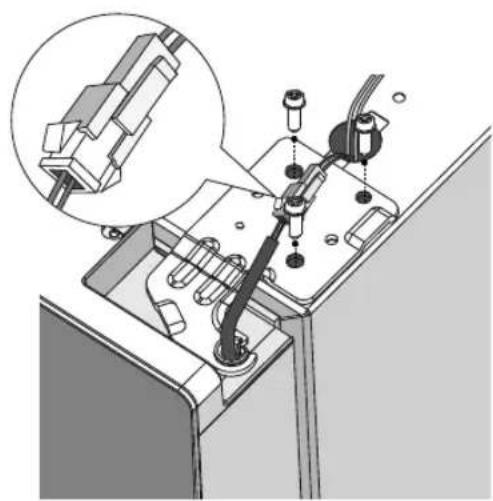
1. Disconnect all wire harnesses. Unscrew the screws.
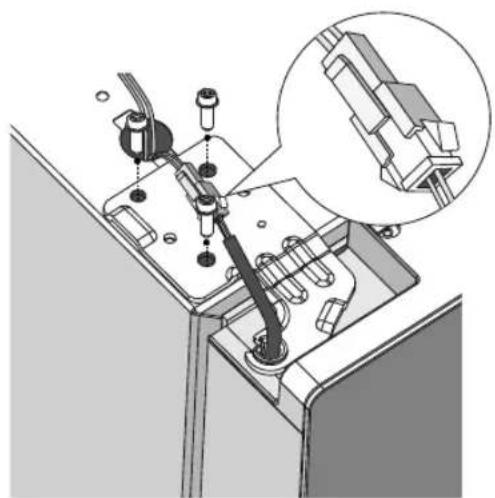
NOTE
- The number of wire harnesses may vary depending on the model. 2. Lift the door from the middle hinge pin and remove the door.
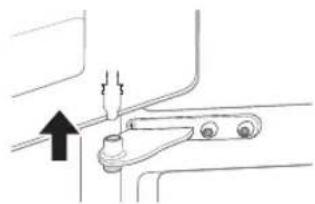
CAUTION
- Place the door, inside facing up, on a nonscratching surface.
14 INSTALLATION
Removing the Right Fridge Door / Removing the Freezer Door
1. Disconnect all wire harnesses.
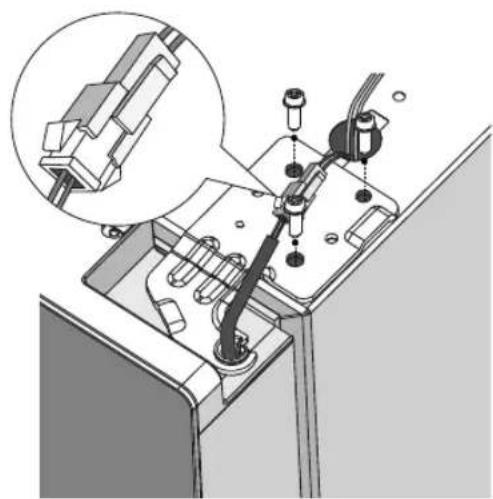
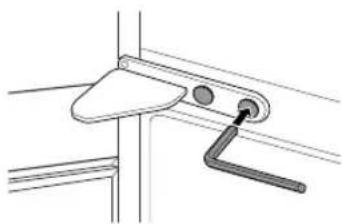
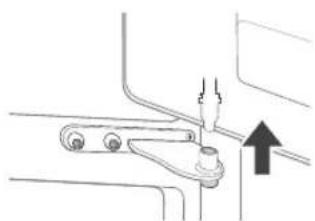
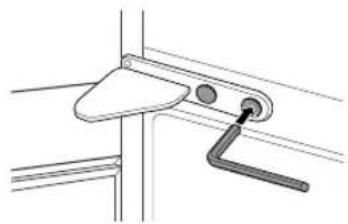
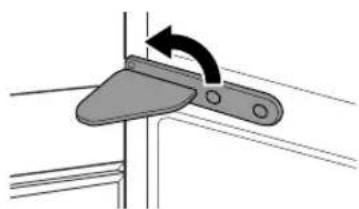
1. Remove the two hinge bolts.
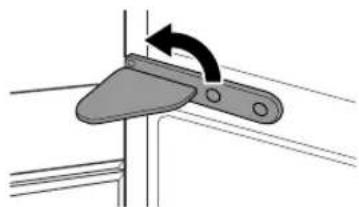
2. Twist the hinge to raise the pivoting end so that the door can be lifted off. Lift the door off the lower hinge pin and remove it.
NOTE
- The number of wire harnesses may vary depending on the model. 2. Lift the right fridge door until it is free of the middle hinge assembly.
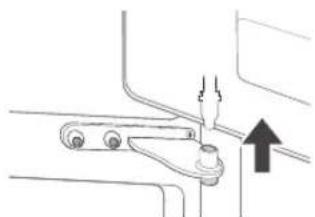
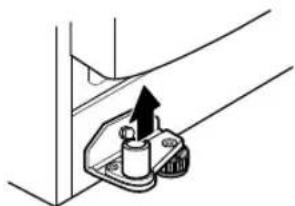
3. Remove the door by lifting it off the lower hinge pin.
CAUTION
- Place the door on a non-scratching surface with the inner side facing up.
Refitting the Fridge and Freezer Door
Refit the doors in the reverse sequence of their removal once the appliance has been passed through all access doors.
Levelling and Door Alignment
Before Beginning
When the appliance doors appear to be uneven, follow the instructions below to align the doors.
Levelling the Appliance
The appliance has two front levelling legs. Adjust the legs to alter the tilt from front to back or side to side. If the appliance seems unsteady, or the doors do not close easily, adjust the appliance's tilt using the instructions below.
It is quite normal for the appliance to have a backward lean even when the front legs are turned all the way.
Adjusting procedures:
- Turn the feet clockwise to raise the fridge.
- Turn the feet counterclockwise to lower the fridge.
- Adjust the right and left feet based on the procedures above to a horizontal level.
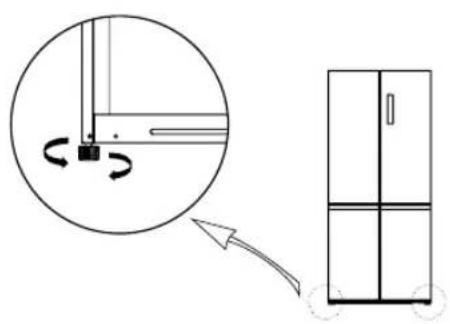
NOTE
- Levelling the doors may not be possible when the floor is not level, or is of weak or poor construction.
- The refrigerator is heavy and should be installed on a rigid, flat and solid surface.
- Some timber flooring may cause levelling difficulties if it flexes excessively.
Door Alignment for Fridge Door
If the door is too low, lift the door up and use a pair of long nose pliers to insert C-Clips until both doors are level.
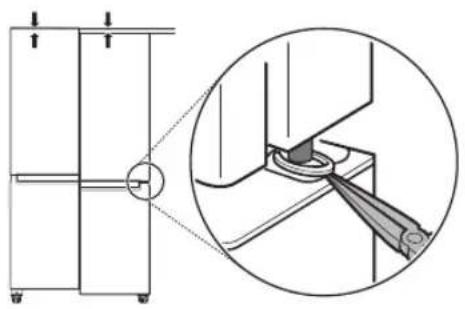
Turning on the Power
Connecting the Appliance
To turn on the appliance, connect the power plug into the outlet socket. Do not double up with other appliances on the same outlet.
NOTE
- After connecting the power supply cord (or plug) to the outlet, wait 3 or 4 hours before you put food into the appliance. If you add food before the appliance has cooled completely, your food may spoil.
- To turn off the appliance, disconnect the power plug from the outlet socket.
Moving the Appliance for Relocation
Moving the Appliance
1. Remove all food from inside the appliance. 2. Fix the power plug.
- Models with a power plug hook:
16 INSTALLATION
Pull the power plug out, insert and fix it into the power plug hook at the rear or on top of the appliance.
- Models without a power plug hook:
Pull the power plug out and fix the power supply cable with a tape to the side of the appliance where the power socket is located at the installation site.
3 Tape parts such as shelves and the door handle to prevent from falling off while moving the appliance. 4 Move the appliance with more than two people carefully. When transporting the appliance over a long distance, keep the appliance upright.
CAUTION
- Move the appliance carefully on sensitive floors to avoid damage to the floor.
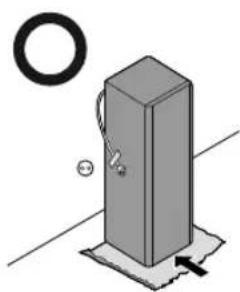
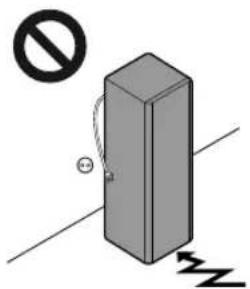
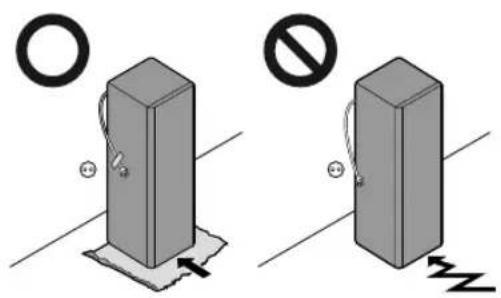
- Use cardboard, floor mat or carpet to prevent scratches on the floor when installing or moving the appliance.
- Do not move the appliance in zigzags.
5 After installing the appliance, connect the power plug into a mains outlet socket and switch it on.
OPERATION
Before Use
Notes for Operation
- Users should keep in mind that frost can form if the door is not closed completely or if the humidity is high during the summer.
- Ensure there is sufficient space between food stored on the shelf or door basket to allow the door to close completely.
- Opening the door for long periods can cause a significant increase of the temperature in the compartments of the appliance.
- If the refrigerating appliance is left empty for long periods, switch off, defrost, clean, dry, and leave the door open to prevent mould developing within the appliance.
- Note that a temperature rise after defrosting has a permissible range in the appliance specifications. If you wish to minimise the impact on the food storage due to a temperature rise, seal or wrap the stored food in several layers.
Door Open Alarm
This feature is only available on some models.
The alarm sounds if the door is left open or not completely closed.
NOTE
- Contact the LG Electronics customer information centre if the alarm sound continues even after closing all doors.
Failure Detection
The appliance can automatically detect problems during the operation.
NOTE
- If a problem is detected, the appliance may not operate and an error code is displayed even when any button is pressed.
- If an error code is indicated on the display, do not turn off the power. Immediately contact the LG Electronics customer information centre and report the error code. If you turn off the power, the repair technician from our information centre may have difficulty finding the problem.
Suggestion for Energy Saving
- For the most efficient use of energy, keep all inner parts (e.g. door baskets, drawers and shelves) on their original location.
- Ensure there is sufficient space between stored foods. This allows cold air to be circulated evenly and lowers electricity bills.
- Store hot food only after it has cooled in order to prevent dew or frost.
- When storing food in the freezer compartment, set the freezer temperature lower than the temperature indicated on the food.
- Do not set the temperature of the appliance lower than needed.
- Do not put food near the temperature sensor of the fridge compartment. Keep a distance of at least 3 cm from the sensor.
Storing Foods Effectively
- Food may freeze or spoil if stored at the wrong temperature. Set the refrigerator to the correct temperature for the food being stored.
- Store frozen food or refrigerated food inside sealed containers.
- Check the expiration date and label (storage instructions) before storing food in the appliance.
- Do not store food for a long period of time if it spoils easily at a low temperature.
- Do not place unfrozen food in direct contact with food that is already frozen. It could be necessary to reduce the quantity to be frozen if freezing every day is anticipated.
18 OPERATION
- Place the refrigerated or frozen food in each fridge or freezer compartment immediately after purchasing.
- Store raw meat and fish in suitable containers in the refrigerator, so that it is not in contact with or dripping onto other food.
- Refrigerated foods and other food items can be stored on top of the vegetable drawer.
- Avoid refreezing any food that has been completely thawed. Refreezing completely thawed food will lower its taste and nutritional value.
- Do not overfill the appliance. Cold air cannot circulate properly if the appliance is overfilled. Cool hot food before storing. If too much hot food is placed inside, the internal temperature of the appliance can increase and negatively affect other foods stored in the appliance.
- If you set an excessively low temperature for food, it may become frozen. Do not set a temperature lower than the required temperature for the food to be stored correctly.
- If there are chill compartments in the appliance, do not store vegetables and fruits with higher moisture content in the chill compartments as they may freeze due to the lower temperature.
- In the event of a blackout, call the electricity company and ask how long it is going to last.
- You should avoid door openings while the power is off.
- When the power supply gets back to normal, check the condition of the food.
Maximum Freezing Capacity
- For maximum freezing capacity, set the freezer temperature to the coldest temperature setting. The Super Freeze function will allow the freezer to reach its maximum freezing capacity. This generally takes up to 43 hours and automatically switches off. Super Freeze must be switched on for 5 hours before fresh products are placed in the freezer compartment.
- To freeze food items quickly, store the food on the top freezer trays. Food items will freeze most quickly on the freezer trays.
- To get better air circulation, insert all inner parts like baskets, drawers, and shelves.
Freezing the Maximum Amount of Food
If large quantities of food are to be stored, all the freezer drawers should be taken out of the appliance except the bottom one and the food shall be stacked directly on the freezer compartment.
CAUTION
- To remove the drawers, first remove the food from drawers and then pull out the drawers carefully. Not doing so could cause injury or damage to the drawers.
NOTE
- The shape of each drawer may be different, insert in the right position.
Product Features
The appearance or components of the appliance may differ from model to model.
Food Storage Compartments
Storing Food in the Fridge Compartment
Shelf
- Store refrigerated foods and other food items.
- Store the foods with higher moisture content at the front of the shelf.
- Fridge Printer
- Keeps fruits and vegetables fresh.
- Door Basket
- Store small packages of refrigerated foods, drinks and sauce containers.
Storing Food in the Freezer Compartment
Freezer Tray - Stores small packaged frozen food or frequently-used foods. The sliding trays allow easy access and convenience of use. - Freezer Printer - Stores frozen food for longer storage.
NOTE
For more information about other compartments, visit lg.com and download owner's manuals.
20 OPERATION
Control Panel
The actual control panel may differ from model to model.
Control Panel and Functions
*1 This feature is only available on some models.
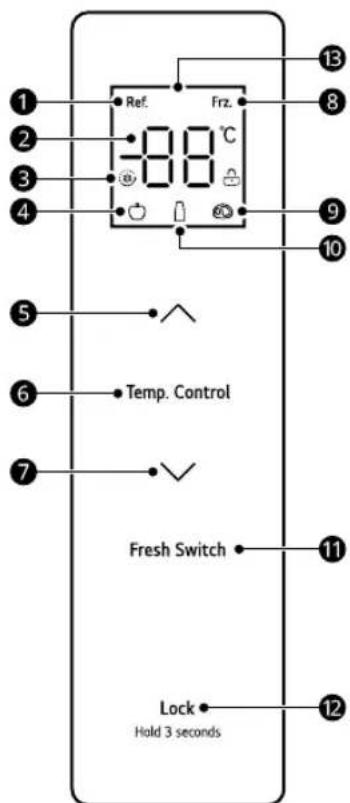
Refrigerating Icon, 2 Temperature Display, Super Cool/Freeze Icon, 4 Fruit/Vegetable Icon, Temperature Up Button, Temp. Control, Temperature zone selection button, 7 Temperature Down Button, 3 Freezer Icon, Meat Icon, Drink Icon, 1 Fresh Switch
Press the button to adjust the set temperature of the various temperature compartments.
12 LOCK
Lock/Unlock Button
Display
Operation Instructions
Display
- When the fridge is turned on, the display screen lights up for 3 seconds and the alarm sounds.
- The default fridge and freezer temperatures are 4°C and -18°C.
- When an error occurs, the display shows the error code (refer to the Error Indication section).
- Under normal circumstances, if there is no operation on the display panel or door opening action within 30 seconds, then the display is locked.
Lock/Unlock
This locks the buttons on the control panel.
- To lock the control panel buttons, press and hold the LOCK button 2 for 3 seconds in the unlocked state until the function is activated.
- To disable the function, press and hold the LOCK button 2 for 3 seconds until the function is deactivated.
Setting the temperature of the refrigerating compartment
- Press the Temp. Control button to choose the setting temperature zone of the refrigerating compartment, and then press ∧ or ∨ to adjust the setting temperature of the refrigerating compartment. The temperature setting range for the refrigerating compartment is between 2°C and 8°C.
Setting the temperature of the freezer compartment
- Press the Temp. Control button to choose the setting temperature zone of the freezer compartment, and then press ∧ or ∨ to adjust the setting temperature of the freezer compartment. The temperature setting range for the freezer compartment is between -24°C and -16°C.
Setting the temperature of the variable temperature compartment
Press the Fresh Switch button to adjust the setting temperature of the compartment.
- Fruit/Vegetable: suitable for storing all kinds of fruits and vegetables
- Drink: suitable for storing dry goods and drinks
- Meat: suitable for a small amount of meat stored for 1-2 days
Setting the Super Cool and Super Freeze mode
Super Cool mode
- To set the Super Cool mode, press the temperature down button (V) after the temperature of the refrigeration compartment is adjusted to 2°C. In the Super Cool mode, the temperature of the refrigerating compartment is automatically set to 2°C.
- The Super Cool mode automatically exits after 6 hours. To disable the mode manually, press the temperature up button (A). After exiting the Super Cool mode, the temperature of the refrigeration compartment will automatically return to the temperature set before the mode.
Super Freeze mode
This function can quickly freeze a large amount of ice or frozen foods.
- To set the Super Freeze mode, press the temperature down button (V) after the temperature of the freezer compartment is adjusted to -24 °C. In the Super Freeze mode,
the temperature of the freezer compartment is automatically set to -24 °C.
- The Super Freeze mode automatically exits after 43 hours. To disable the mode manually, press the temperature up button (A). After exiting the Super Freeze mode, the temperature of the freezer compartment will automatically return to the temperature set before the mode.
Shabbath mode
- To set the Shabbath mode, unlock the fridge, and then press the V button and the LOCK button at the same time for 4 seconds.
- To disable the mode, press any button to exit.
In Shabbath mode:
Control panel and lights remain off, and the alarm is disabled. - The fridge cools normally. - Compressor and fan motor status does not change within five minutes of the door opening.
Error Indication
The appliance can automatically detect problems during the operation.
- If a problem is detected, the appliance may not operate and an error code is displayed even when any button is pressed.
- If an error code is indicated on the display, do not turn off the power. Immediately contact the LG Electronics customer information centre and report the error code. If you turn off the power, the repair technician from the information centre may have difficulty finding the problem.
| Error Code Description |
| E1 Temperature | sensor failure in the fridge compartment |
| E2 Temperature | sensor failure in the freezer compartment |
| E3 Temperature | sensor failure in the variable temperature compartment |
| Error Code Description |
| E4 Defrosting sensor failure in the
fridge compartment |
| E5 Freezing defrost sensor
detection circuit error |
| E6 Communication Error |
| E7 Circulation of temperature
detection circuit error |
| EH Moisture sensor error |
MAINTENANCE
Cleaning
General Cleaning Tips
Performing manual defrosting, maintenance, or cleaning of the appliance while food is stored in the freezer can raise the temperature of the food and reduce its storage life. - Regularly clean any surfaces that can come in contact with food. - When cleaning the inside or outside of the appliance, do not wipe it with a rough brush, toothpaste, or flammable materials. Do not use cleaning agents containing flammable substances. This may cause discolouration or damage to the appliance.
- Flammable substances: alcohol (ethanol, methanol, isopropyl alcohol, isobutyl alcohol, etc.), thinner, bleach, benzene, flammable liquid, abrasive, etc. After cleaning, check if the power cable is damaged.
Cleaning the Exterior
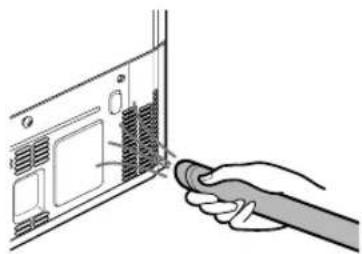
- When cleaning the outside air vents of the appliance by means of vacuuming, then the power cord should be unplugged from the outlet to avoid any static discharge that can damage the electronics or cause an electric shock. Regular cleaning of the rear and side ventilation covers is recommended to maintain reliable and economical operation of the unit.
- Keep the air vents on the exterior of the appliance clean. Blocked air vents can cause fire or appliance damage.
- For the appliance exterior, use a clean sponge or soft cloth and a mild detergent in warm water. Do not use abrasive or harsh cleaners. Dry thoroughly with a soft cloth. Do not use contaminated cloths when cleaning the stainless steel doors. Always use a dedicated cloth and wipe in the same direction as the grain. This helps reduce surface staining and tarnishing.
Cleaning the Interior
- When removing a shelf or drawer from inside the appliance, remove all stored foods from the shelf or drawer to prevent injury or damage to the appliance. Otherwise, injury may occur due to the weight of stored foods.
- Detach the shelves and drawers and clean them with water, and then dry them sufficiently, before replacing them.
- Regularly wipe the door gaskets with a wet soft towel.
- Door basket spills and stains should be cleaned as they can compromise storage ability of the basket and could even be damaged.
- Never clean the shelves or containers in the dishwasher. The parts may become deformed due to the heat.
- The automatic defrosting system in the appliance ensures that the compartment remains free of ice buildup under normal operating conditions. Users do not need to defrost it manually.
Cleaning the Condenser Cover
Use a vacuum cleaner with a brush to clean the condenser cover and vents. Do not remove the panel covering the condenser coil area.
We strongly recommend that this be done every 12 months to maintain operating efficiency. Failing to do so could cause loss of cooling, higher energy usage and compressor overheating.
24 TROUBLESHOOTING
TROUBLESHOOTING
Before Calling for Service
Customer Care and Service
Contact an LG Electronics customer information centre.
To find information on LG authorized service centre, visit our website at www.lg.com. - Only qualified service personnel from LG authorized service centre should disassemble, repair, or modify the appliance. - The minimum warranty period of this refrigerating appliance is 24 months. - Spare parts referenced in Regulation EU 2019/2019 are available for 7 years (only door gaskets are available for 10 years). To purchase spare parts, contact an LG Electronics customer information centre or our website at www.lg.com.
NOTE
- Regulation EU 2019/2019, valid from 1st March 2021, is related to the Energy Efficiency classes by Regulation EU 2019/2016.
- For more information about the energy efficiency of the appliance, visit https://eprel.ec.europa.eu and search using the model name (valid from 1st March 2021).
- Scan the QR code on the energy label supplied with the appliance, which provides a web link to the information related to the performance of the appliance in the EU EPREL database. Keep the energy label for reference and all other documents supplied with the appliance (valid from 1st March 2021).
- The model name can be found on the rating label of the appliance.
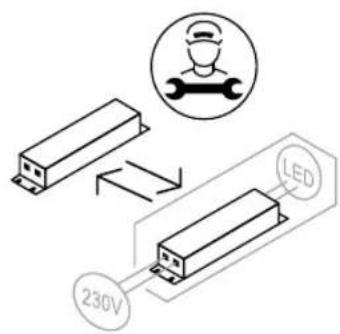
- This product contains a light source of energy efficiency class G.
OPERATING INSTRUCTIONS
REFRIGERATOR
FRIDGE

Installation manual for the appliance. This will simplify and guarantee, if the product is installed correctly and safely. Keep these instructions near the product after installation for future reference.
BULGARIAN
See the LG operating instructions for more detailed information.
www.lg.com
Copyright © 2024 LG Electronics Inc. All rights reserved.
CONTENTS
This manual may contain images and content different from the model you purchased.
The instructions are subject to change by the manufacturer.
SAFETY INSTRUCTIONS
SAFETY INSTRUCTIONS FOR USE
WARNING
BHIMAHNE 10
MOHTIUPAHE
Ipei MoNTupaHe 12
CbaIHe Ha BpaTnte Ha xlaIINHnka n pns3epa 13
HnBvIpaHe n n3paBnBaHe Ha BpataTa. 15
BkHouBaHe B eIeKtpo3axpaHbaHeTo 15
IpeMeCTBaHe Ha ypeHa Ha pyrO McTo 16
EKCПLOATAЦИ
Ppeyn ynoTpe6a 17
XapakTepeuCTnKHa n3dJIeNeTo. 20
KoHTpOJIen napanel 21
IODAPbXkA
Почистван.. 24
OTCTPAHRABE HA HEN3ПРABHOCTN
Ipei Da ce o6aInTe Ha cepBn3Hna ceHTbp. 26
Safety instructions
Read all instructions before use
The safety instructions below are intended to prevent hazards, injuries, or incorrect use of the device.
The instructions are divided into the sections "WARNING" and "CAUTION", as described below.
Safety-related information

This symbol is used to highlight factors and uses that may pose a risk. Read the section marked with this symbol carefully and follow the instructions to avoid risks.

WARNING
This indicates that failure to follow the instructions may result in serious injury or death.

CAUTION
This indicates that failure to follow the instructions may result in minor injury or damage to the product.
WARNING

WARNING
To minimize the risk of fire, electric shock, or injury to persons when using the product, the following basic safety precautions must be followed, including:
Technical safety
- The device may be used by children aged 8 years and above and by persons with reduced physical, sensory, or mental
Read the instructions carefully before using the appliance to avoid any hazards. Children should not play with the appliance. Cleaning and maintenance must not be performed by children without supervision.
- This appliance is not intended for use by persons (including children) with reduced physical, sensory or mental capabilities, or lack of experience and knowledge, unless they have been given supervision or instruction concerning use of the appliance by a person responsible for their safety. Children should be supervised to ensure that they do not play with the appliance.
- Children aged from 8 years may load and unload refrigerating appliances. This appliance is intended for use in household and similar applications, such as:
- Staff kitchen areas in shops, offices and other working environments;
- Farm houses and by clients in hotels, motels and other residential type environments;
- Bed and breakfast type environments;
- Catering and similar non-retail applications.
This refrigerating appliance is not intended to be used as a built-in appliance. The appliance must not be used in mobile or portable installations, such as on a boat or in a camper/caravan, while it is in motion.
This symbol warns about flammable materials that can ignite and cause a fire if you are not careful.
This appliance contains a small quantity of flammable refrigerant (R600a), but it is still flammable. When transporting
SAFETY INSTRUCTIONS
and installing the appliance, be careful not to damage any part of the refrigeration circuit.
The appliance must be checked for refrigerant leaks and the insulation, after installation, by a technician. Consult a technician or another similarly qualified person before performing the checks. Do not damage the refrigerant circuit. If the supply cord is damaged or the contact opening is loose, it must be replaced. Do not perform supply cord repairs and contact an authorized service center to avoid danger. - Do not place multiple sockets or portable power supply devices on the back side of the appliance. - Connect the supply cord plug to the contact, after removing all moisture and dust. - Never disconnect the appliance by pulling the supply cord. Hold the plug firmly and pull it straight out of the contact. Do not place obstacles in the ventilation openings or in the ventilation walls of the appliance or in the built-in structure. Do not store explosive substances, such as aerosol cans with flammable gas, in the appliance. Do not tilt the appliance to lift or move it during transport. When moving the appliance, make sure the supply cord is not pinched or damaged. - Do not use mechanical devices or other means to speed up the defrosting process. Do not use a hair dryer to dry the inside of the appliance, and do not place a candle inside to remove moisture. Do not use electrical appliances inside the food storage compartment of the appliance, unless they are of the type recommended by the manufacturer.
6 SAFETY INSTRUCTIONS
Be careful not to pinch parts of your body. When opening or closing the appliance door, keep your hands and fingers away from the hinges. - Disconnect the supply cord before cleaning the appliance opening or the door. Do not spray water or flammable substances (toothpaste, alcohol, thinner, benzene, flammable liquids, abrasives, etc.) for cleaning the appliance opening or the door. Do not clean the appliance with brushes, rags, or sponges with rough surfaces or sharp metal materials. - Only authorized service personnel from the LG Electronics service center may disassemble, repair, or modify the appliance. Contact the LG Electronics customer information center if you need to move or install the appliance in another location.
Risk of fire and flammable materials
If a leak is detected, avoid open flames or potential ignition sources and ventilate the room where the appliance is located for a few minutes. To avoid the formation of a flammable gas-air mixture, if a leak occurs in the refrigerant circuit, the size of the room where the appliance is used must correspond to the amount of refrigerant used. The room must be at least 1 m² for every 8 g of R600a refrigerant in the appliance. The refrigerant that escapes from the pipes may ignite or cause an explosion. The amount of refrigerant for your specific appliance is indicated on the identification plate in the appliance.
Installation
This device must be transported only in its original packaging or in a protective cover. Place the device on a stable, flat surface. Do not install the device in a damp or wet place. Do not install or store the device in an open place or in a place that is
SAFETY INSTRUCTIONS
Exposed to atmospheric conditions such as direct sunlight, wind, rain, or temperatures below zero.
Do not place the device near direct sunlight and do not expose it to heat from heating devices such as stoves or radiators. Be careful not to expose any part of the device to direct contact. Place the device in a place where its plug can be easily disconnected from the outlet. Be careful that the device's door does not fall during opening or closing. Be careful not to puncture, crush, or damage the cable when opening or closing the device's door. Be careful not to perform any maintenance above and do not leave the device lying on it. Do not connect other appliances to the same outlet. Do not modify or repair the electrical cable. Make sure that the plug is properly grounded and that the grounding pin is on the electrical cable and is not damaged or detached from the plug. For more information about grounding, consult the LG Electronics customer information center. This device is equipped with a grounding conductor for grounding the equipment and with a grounding plug. The plug must be connected to a suitable outlet that is installed and grounded in accordance with all local codes and regulations. Never connect the device if it shows signs of damage. If you have doubts, consult your supplier. Keep flammable materials (such as plastic parts and Styrofoam) away from the device. Flammable materials can catch fire. Do not connect the device to a multi-outlet adapter that does not have a grounding cable (grounded). The device must be connected to a separate electrical circuit and fuse.
8 SAFETY INSTRUCTIONS
Do not use extension cords that are not properly grounded (with ground). If you use properly grounded extension cords (with ground), use extension cords with a three-prong plug and a grounding cable or use only for the device.
Operation
Do not use the device for any purpose other than its intended use (preservation of medical or experimental material or for transport), different from the conditions for preservation at home. - If water penetrates the electrical parts of the device, unplug it and contact the LG Electronics customer information center. - Unplug the device during strong thunderstorms, lightning, or when it is not used for a long time. Do not touch the plug or the device controls with wet hands. - Do not overload the socket with too many appliances and do not place heavy objects on it. Always remove the plug from the socket and contact the LG Electronics customer information center if you notice unusual noise, smell, or smoke from the device. Do not place wet or metal objects in the area where cold air comes out, on the duct or the grille that blows hot air in the rear part. - Do not apply excessive force to the rear wall of the device. Be careful if there are children nearby when you open or close the device door. The door may be damaged and cause injury. Do not allow anyone to sit or stand on the door, as this may cause the device to tip over and cause serious injury. Be careful of the danger of children getting trapped in the device. A child, locked inside the device, may suffocate.
Do not place animals in the device, such as pets. Do not place heavy or sharp objects, containers with liquids, flammable substances, easily ignitable items (e.g., candles, lamps, etc.) or heating devices (ovens, radiators, etc.) on top of the device. Do not place other electrical devices (such as heaters or mobile phones) inside the device. If there is a gas leak (butane, propane, natural gas, etc.), do not touch the device, do not unplug the power cord, and immediately ventilate the area. This device uses refrigerant gas (isobutane, R600a). Although it uses a small amount of gas, it is still flammable. Gas leakage during transport, installation, or operation may cause fire, explosion, or injury if sparks are present. Do not use or store flammable substances (ether, benzene, alcohol, chemicals, liquefied petroleum gas, flammable spray, insecticides, air fresheners, cosmetics, etc.) near the device. This device includes a grounding wire for functional safety. Connect it only to a potable water source.
- If connecting to a water supply, connect only to a potable water supply.
- Connect only to potable water.
- If using a water purifier or water tank, be careful to connect only to potable water.
Disposal
When disposing of the device, remove the door gasket, leave the shelves and baskets in place, and do not allow children to approach the device.
10 SAFETY INSTRUCTIONS
WARNING
WARNING
To reduce the risk of unexpected injury, incorrect operation, or damage to the product or materials, follow the basic safety precautions, including:
Installation
- Before unpacking, check the device for damage that may have occurred during transport.
- Wait 2 to 4 hours to ensure the cooling circuit is fully effective.
- Place the device carefully on sensitive floors to avoid damage to the floor.
Explanation
Do not touch with wet or damp hands frozen food or metal parts in the freezer compartment. This may cause frostbite. Do not place glass containers, bottles, or cans (especially those with carbonated drinks) in the freezer, on the shelves, or in the ice maker, where they will be exposed to temperatures below freezing. Glass containers in the appliance door or on the shelves may break if dropped. Do not handle them with wet hands if they are cold. Do not lean on the appliance doors, the storage compartment, or the drawers. Do not climb on them. Do not store excessive amounts of bottles with water or drinks for the refrigerator in the door compartments. Do not open or close the appliance door with excessive force.
If the appliance door is damaged or does not work properly, stop using it and contact an authorized service center. Do not allow pets to chew on the power cord or water connection. Never refreeze frozen food that has been completely thawed after being removed from the freezer. Be careful not to pinch your hand or fingers when opening or closing the door or when closing the door of the appliance.
Troubleshooting
This appliance is equipped with an LED lighting inside that does not require maintenance. Do not remove the cover or the LED lamp during repair or cleaning. Contact the LG Electronics customer information center. Do not touch glass shelves or covers with hot water if they are cold. They may break if exposed to sudden temperature changes. Do not place the shelves upside down. They may fall. To remove frost from the appliance, contact the LG Electronics customer information center. Remove the ice from the ice maker in the freezer during prolonged power outages.
12 INSTALLATION
INSTALLATION
Before installation
Dimensions and clearances
Insufficient clearance between elements may lead to reduced freezing capacity and increased energy consumption. When installing the appliance, a minimum distance of 100 mm from all surrounding walls must be maintained.
| -Тип A (mm) |
| A | 833 |
| B | 1 |
| C | 653 |
| D | 570 |
| E | 653 |
| F | 1 |
| G | 1 |
NOTE
- You can determine the type by looking at the label inside it.
Ambient temperature type
- The device is intended for operation in a limited temperature range depending on the climate zone. The temperature of the device can be influenced by its location, ambient temperature, frequency of door openings, etc. The climate class can be indicated with data.
| Климатическая Клас | Диапазон на okолhaту TemпераTypeВ°C |
| SN (Раширеен умeperн) | +10 - +32 |
| N (Умeperн) +16 - +32 | |
| ST (Субтоpaneчesen) +1 | 6 - +38 / +18 - +38** |
| T (Трочen) +10 - +43* / +16 - +43 / +18 - +43** |
**Argentina
APPLIANCE
- The device with category from SN to T is intended for use at an ambient temperature from 10°C to 43°C
0 0 0 4 0 0
Accessories
*1 This characteristic is offered only in some models.

C-shaped door handles (pull handles)
Door hinges of refrigerator and freezer
If the door hinge is too tight and the door cannot pass through, loosen the door hinges and adjust the door accordingly.
I PRELIMINARY WARNINGS
Unplug the electrical cable, bulb, or fuse before opening the door or cleaning the device. Failure to follow these instructions can lead to death, fire, or electrical shock.
Door hinge of the appliance
Unscrew the screws from the cable on the mounting bracket. Lift the hook (not visible), located in the lower part of the front side of the cable, with a flat screwdriver.
Removing the two refrigerator doors
1. Unplug all cable ties. Unscrew the screws.
CAUTION
The cable ties may vary depending on the model.
2. Lift the door up off the middle hinge and remove it.
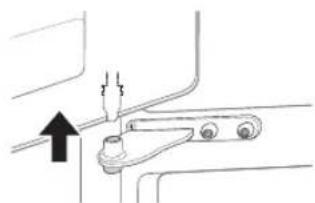
WARNING
- Place the door with the inner side facing up on a non-scratching surface.
14 INSTALLATION
Removing the left refrigerator door
1. Unplug all cable ties.
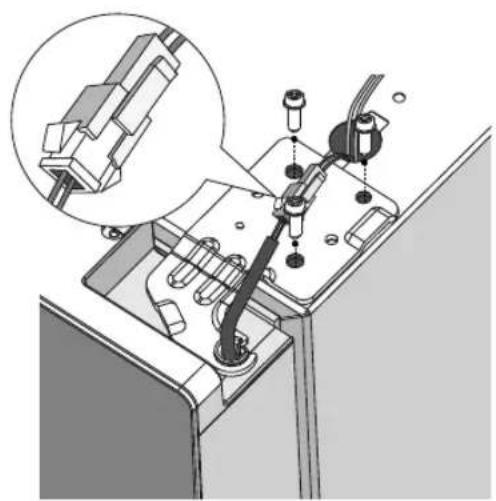
CAUTION
- The cable ties may vary depending on the model. 2. Lift the left door of the refrigerator until it is free of the middle hinge pin.
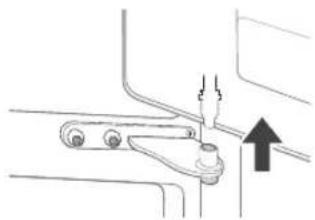
WARNING
- Place the door on a non-scratching surface with the inner side facing up.
- Turning the door may not be possible if it has not been leveled with the weak floor structure.
The appliance must be mounted on a solid, flat, and stable surface. Some floor materials may cause noise or vibration if the appliance is not properly leveled.
Leveling the refrigerator door
If the floor is uneven, adjust the feet with a wrench until the door is level. Place shims under the feet if necessary.
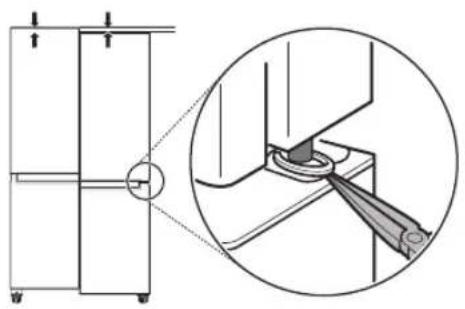
- Do not use the appliance without the feet.
After mounting the appliance, connect the power cord to the electrical outlet and turn it on.
Secure the parts by tightening the screws and hinges of the door with a screwdriver to prevent them from falling out while moving the appliance. Move the appliance with more than one person. When moving the appliance over a long distance, keep it in an upright position.
WARNING
- Place the appliance carefully on sensitive floors to avoid damage.
Use cardboard, floor protection, or similar to prevent scratches on the floor when moving or placing the appliance.
OPERATION
Before use
Operating the appliance
The appliance must have clearance to allow air circulation. Frost may form if the door is not closed properly or if the ambient temperature is high. - Ensure there is enough space between the stored food and the door shelves so the door can close completely. - Keeping the door open for a long time may cause a significant increase in the temperature inside the appliance. If the refrigerator is left open for a long time, you should turn it off, defrost, clean, dry, and leave the door open to prevent mold. Note that the temperature increase is within the acceptable range specified in the appliance's specifications. If you want to minimize the impact of this temperature increase on food storage, close the door tightly or store food in sealed containers.
Door open alarm
The characteristics described here apply to this model.
The alarm sounds if the door is left open or not properly closed.
TROUBLESHOOTING
Contact the LG Electronics Customer Information Center if the alarm does not stop after closing all doors.
Opening the door
The device may open the door by itself during operation.
TROUBLESHOOTING
If a problem is detected, the device will operate and show an error code on the display. If the display shows an error code, do not disconnect the power. Immediately contact the LG Electronics Customer Information Center and provide the error code. If you disconnect the power, it may be difficult for our service technicians to identify the problem.
Energy saving tips
For the most efficient use of energy, keep all inner parts (e.g., door shelves, drawers) in their original position. - Ensure there is enough space between stored items. This allows for even circulation of cold air and reduces electricity bills. - Let hot food cool down before storing it to avoid the formation of ice crystals. When storing food in the freezer, set the freezer temperature to a lower setting than the temperature indicated on the food. Do not set the temperature lower than necessary. Do not place food near the temperature sensor of the refrigerator. Leave a distance of at least 3 cm from the sensor.
18 OPERATION
Efficient food storage
Food may freeze if stored at incorrect temperature. Set the refrigerator to the correct temperature for the food being stored. Store frozen or chilled food in sealed containers. Check the expiration date on the label (storage instructions) before placing food for storage in the refrigerator. Do not store food for a long time if it has already started to spoil at low temperature. Do not place frozen food in direct contact with already frozen food. You may need to reduce the quantity for freezing if freezing is expected every day. Place chilled or deeply frozen food in the refrigerator or freezer immediately after purchasing. Store raw meat in suitable containers in the refrigerator, so that it does not come into contact with other food or drip on it. Chilled other food can be stored on the upper shelves. - Avoid refreezing food that has been completely thawed. Refreezing food that has been completely thawed will reduce the taste and nutritional properties. Do not exceed the limit. The air circulation cannot work properly if the drawer is overfilled. Cool hot food before placing it in the freezer. If too much hot food is placed in the drawer, its internal temperature may increase, which can have a negative effect on the rest of the food in it. If you set a lower temperature, the food may freeze. Do not set the temperature lower than necessary for proper food storage.
If the drawer is set for rapid cooling, do not store in it leafy vegetables or fruits with high moisture content, as they may freeze at lower temperatures. The power supply side is connected to the electricity company. Contact them in case of power outage. - Avoid opening the door while the storage is in progress. When the power supply is restored, check the condition of the food.
Maximum freezer capacity
For maximum freezer capacity, set the freezer temperature to the lowest setting. The Super Freeze function quickly freezes food in the freezer to its maximum capacity. This usually lasts for 43 hours and turns off automatically. Super Freeze should be turned on for 5 hours before placing fresh products in the freezer compartment. To freeze food products quickly, store the food on the top shelves. Food products freeze fastest on the freezer shelves. For better air circulation, clean the interior and parts such as drawers, shelves, and racks.
Freezing maximum quantity of food
If large quantities of food need to be stored, all drawers and shelves of the compartment must be removed and the food should be placed directly in the freezer compartment.
20 OPERATION
Product characteristics
The appearance and components of the drawer may vary depending on the model.
Copyright © 2024 LG Electronics Inc. All Rights Reserved.
INDEX
TROUBLESHOOTING
Before calling for service 26
SAFETY INSTRUCTIONS
READ ALL INSTRUCTIONS BEFORE USING THE APPLIANCE
Dimensions and distances
C-Clip (elastic ring)*1
Removing the refrigerator and freezer door
TROUBLESHOOTING
Before calling for service
Customer care and technical service
Shabbath mode (Sabbath)
TROUBLESHOOTING
TABLE OF CONTENTS
This manual is intended for the product you purchased.
The manual is subject to review by the manufacturer.
SAFETY INSTRUCTIONS
READ ALL INSTRUCTIONS BEFORE USE. 3
INTRODUCTION 3
WARNING 10
INSTALLATION
Before installation. 13
Removal of the water inlet hose and the drain hose 14
1 Connect the hoses.
NOTE
The number of hoses may vary depending on the product. 2 Connect the water inlet hose to the tap after removing the cap.
A WARNING
Place the hose in a location that does not interfere with the door and is directed upwards.
PROGRAMMING PROBLEMS
Piv Zntnoe T Epcic
Eeunnpetnon n ealawv kal oepic
Eikovvnte e eva kevtpo nnpoopnnc nlaatw tng LG Electronics.
Ia IAnpoopiec oxetikae Eeouolodotnva Kevtpa EunnpentnC Tc LG, EIOkeptite tov totoio mac otn 8eiuuvon www.lq.com. - Móvo éξειδικευμενο προσωπικό σερβις ἀπο εξουαιδοθημενο κεντρο εξιπηρετηός τής LG θα πρεπεύν αποσυναρολογέ, va επιδιρθώνει ἡν τροποποίει τή συακεύŋ. H 3xioTn npiooE yunonc autou tou yueoi eivai 24 mveC. Ta avtalakikauov avapopovtal otov kavovioe EE 2019/2019 ivai siathetaiya yia 7 etn (movo ta napeuouata yia ticnpetc ivai sithetaiya yia 10 etn). - I a ayopá avtaalaktkwv, eikovwvohte me to kevpo mnpofo npnC nAatw v tnc LG Electronics n EIOKEFTEITE Tov lototono mac stn 8euuvon www.lq.com.
NOTE
O kavovlouoC (EE) 2019/2019, nou toxuei anto 1n Maptiou 2021, oxtizetai tyn Katnyopia Evpyelaknc anofoonc ouuowva tev kavovlouo (EE) 2019/2016. Ia neipoootepe nnpoopoe c oxetka me tnv evpeyiaakn anodoon tnC oukeunc, enkoekteite tn 6duovon https://eprel.ec.europa.eu kai npaymuatoioute avazntnon xpnouotowvtaC to ovoua tou movtelaou (toxue1 aio tnV 1n Maptiou 2021). - Zapwote tov kwdiok QR otyn etiketa evepyiaq nou napexetai me tn ouokeun, no onoia avaypaei evav diaktuakocuvdeoio npoc tic nnpoopiec nou oxetizovtal me tn andoan tnc ouokeunc otn baon deoevvw EU EPREL. Kpatne Tnv etiketa evepyiaq ia loyouc avapopac ma zi me ola ta aaaa eypaqaounpexovtau qzi me tn oukeun (oyuei ano ty 1n Maptiou 2021). To ovoua uovteau Boiketai otny nuvakiKaataEnc tnc ouokeuhc. Auto to npoiov nepiexel mtny nfoevepyiaac anodooa katnyopiac G.
Memorandum
OWNER'S MANUAL
Clip-C (Bagued blocage)*1
hu-hu_main.book.book Page 24 Thursday, April 4, 2024 10:51 AM
TROUBLESHOOTING
Copyright © 2024 LG Electronics Inc. All Rights Reserved.
INDEX
Copyright © 2024 LG Electronics Inc. All rights reserved.
CONTENTS
This instruction manual contains information about the product you have purchased.
This instruction manual is subject to revision by the manufacturer.
SAFETY INSTRUCTIONS
READ ALL INSTRUCTIONS BEFORE USE
PREPARATION
ATTENTION 10
INSTALLATION
Installation 13
Troubleshooting the refrigerator door lock.......14
Leveling and aligning the doors. 16
Connecting the power supply 16
Relocating the appliance to a new location. 17
OPERATION
Before use. 18
MAINTENANCE
Instructions. 25
TROUBLESHOOTING
Before contacting service 27
SAFETY INSTRUCTIONS
10 SAFETY INSTRUCTIONS
- Fill only with drinking water.
- Fill only with drinking water.
- If you use a coffee maker or water dispenser, fill it only with drinking water.
Draining
- When draining the appliance, remove the plug from the socket, leave the hoses and pipes inside, and let the water drain from the appliance.
WARNING

WARNING
If the appliance is damaged, does not function properly, or for any issues during use, follow the basic safety measures, including the following:
INSTALLATION
- After unpacking, check the appliance for any transport damage.
- Wait at least 2 hours before connecting to ensure the refrigerant circuit is fully sealed.
- Place the appliance carefully. Be careful not to damage the floor.
OPERATION
Do not refreeze thawed food or put beverages in the freezer compartment. They may burst. Do not place glass containers, cans, or aerosols (especially those containing flammable gases) in the freezer compartment.
Freezer compartment, shelves, or in the refrigerator compartment, as they will be exposed to freezing temperatures.
- The glass shelf on the front side of the door or on the shelves may break if hit. If it is cracked, do not touch it with your hands. Do not lean on the door of the appliance, the storage space, the shelves, and do not hang on it. Do not place excessive amounts of water or other containers on the inner parts of the door shelves. Do not open and close the door with excessive force.
- If the door of the appliance is damaged and does not function properly, stop using it and contact the LG Electronics service center. Do not allow pets to chew on the power cord or the water hose.
- Never refreeze thawed food immediately after removing it from the freezer. Make sure that the door or the drawer does not get stuck when opening or closing the appliance door or drawer.
MAINTENANCE
- This appliance is equipped with an internal LED light that does not require maintenance. Do not touch the cover or the LED light to repair or replace it. Contact the LG Electronics customer information center. Do not wash the glass shelves or covers with hot water when they are cold. They may crack if exposed to sudden temperature changes. Do not use abrasive cleaners on the shelves. Shelves may break. To remove frost from the appliance, contact the LG Electronics customer information center.

12 TROUBLESHOOTING
- Remove the frost from the freezer compartment using a plastic scraper.
MOUNTING
MOUNTING
DIMENSIONS
The minimum distance from adjacent articles may result in reduced ability to seal and drain the air flow. When installing the device, a minimum distance of 100 mm from adjacent devices must be maintained.
| -Тип А (mm) |
| A | 833 |
| B | 1 |
| C | 653 |
| D | 570 |
| E | 653 |
| F | 1 |
| G | 1 |
NOTE
You can determine the type of device with the help of the label on the inside of the device.
Ambient temperature
The device is designed to operate in a limited range of ambient temperatures, depending on the climate zone. The location of the device, ambient temperature, and the level of air intake of the doors can affect the internal temperatures. The climate class can be found on the rating label.
| КлиматICA Клaca | Опсег на'amбийтулиу TemпераТура °C |
| SN (Проблжень умeperна) | +10 - +32 |
| N (Умeperна) +16 - +32 |
| ST (Сунtrponда) +16 | - +38 / +18 - +38** |
| T (Тропсан) +10 - +43* / +16 - +43 / +18 - +43** |
**Appliance class 5
NOTE
The devices are rated for use with a room temperature between 10°C and 43°C
14 MOUNTING
Additional equipment
*1 Obaa 4yHkUja e 0ctTaHa cMo 3a HeKoMdoJIi.

C-npcteh (npcteh Ha YukpanHyBaHb)
OTcTpaHyBaHBe Ha BpaTnTe Ha φρnxKnDEpoT nIa3amp3HyBaUTo
AkoBnE3HaTa BpTa e MHOry TeCha 3a da NOMHe anapaTOT Hn3 Hea, n3BaTe rBpaTITe Ha anapaTOT IN BheceTe ro CTpaHnUHO.
I P E D U N P E D Y B A H E
- NcknyeTe ro Ka6enot 3a ctpya, ocnrgpyBaOT nnn FND-cknonkata nped da rO MOHntnpate, da rN OTCpaHyBaTe BpATNE nn n da rO uCTnTe anapatOT. Bo cnpOTNBHO, moKe da dojde DO cmPT, noKap nn n CTpyeh ydap.
Badebe Ha Kanakot Ha WapkaTa
OTcpaHeTe r3aBpTKnTe oKanakot Ha wapKaTa, KOjUTo ce Haora Hajrope Ha anapaTOr. IOnIrHeTe ja Kykata (He e BnDnBa), KojaUTo e loCuPanaHa HajOly Ha npEHaTa CToPaHa Od KaNakOT co NOMoH HoDpTyBauch pAmHa rlaBa.
BaDeHBe Ha JIeBaTa BpaTa Ha φριχκηdepot
1 NcknyuTe rncnte ka6enckn npnknyoou. OaBpTeTe rnaBpTKnTe.
HANOMEHA
- BpojoT Ha Ka6eIckn npKnyoCu MoKe DaBapnpa 3aBnCHO Od MoJeIoT.
2 IodnHeTe ja BpaTaTa Od KInHot Ha cpeHaTa 1apka n otctpaHete ja.
BHUMAHVE
IocTaBeTe ja BpaTata co BHaTpseHnOt deI cBpTeH Harope, Ha nobPunHa KoJaTuTo He npedn3BnkyBa rpe6eHe.
1. Electrical connection.
Defrosting the appliance
1. Pull out the two side screws of
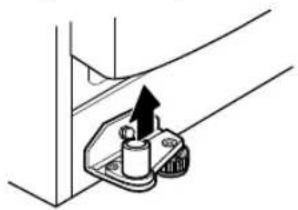
2. Turn the door so that the hinges can be pulled out, so that the door can be lifted. Lift the door off the bottom hinge and remove it.
NOTE
- The number of electrical connections may vary depending on the model.
2. Turn the right door from the hinge to release it from the middle hinge.
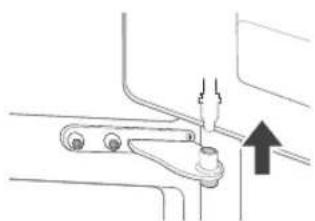
3. Remove the door, lifting it off the bottom hinge.
WARNING
- Place the door on a flat surface that cannot be scratched, with the inner side facing up.
Relocating the appliance
Relocating the appliance
Efficient food storage
Food can freeze or spoil if stored at the wrong temperature. Set the temperature in the fridge to the correct one for the food stored in it. Store frozen or chilled food in closed containers. - Check the expiration date on the packaging (storage instructions) before placing food in the appliance. Do not store food beyond the period during which it can safely spoil at low temperatures. Do not place unfrozen food in direct contact with already frozen food. If you freeze food frequently, you may need to adjust the quantity to be frozen. Place chilled or frozen food in the fridge or freezer immediately after purchase. - Store fresh meat first in suitable containers in the fridge to avoid contact or dripping onto other food. Food in the fridge and other food can be placed on the vegetable drawer shelf. Avoid refreezing food that has been completely thawed. Refreezing any food that has been completely thawed will affect its taste and nutritional value. Do not overload the appliance. Cold air cannot circulate properly if the freezer is overloaded. Remove food before placing it in the freezer. If you place a large quantity of warm food inside, the internal temperature of the appliance may rise and negatively affect other food in it. If you set a very low temperature, food may freeze. Do not set the temperature lower than necessary for proper food storage. If the appliance is defrosting, do not store vegetables and fruits with high
The appliance can be used to replace the specified temperature.
In case of a power outage, contact the electricity company and ask how long the outage will last.
Avoid opening the door while the power is off. When the power returns to normal, check the condition of the food.
Maximum freezing capacity
For maximum freezing capacity, set the freezer temperature to the lowest temperature. The Super Freeze function will allow the freezer to reach the maximum freezing capacity. This function lasts up to 43 hours and turns off automatically. Super Freeze must be enabled 5 hours before placing fresh produce in the freezer compartment. For quick freezing of fresh produce, place them on the top shelves in the freezer. On those shelves, fresh produce freezes fastest. For better air circulation, remove the internal drawers, i.e., the baskets and shelves.
Freezing maximum amount of food
If you need to store large quantities of food, then, except for the bottom, the baskets in the freezer should be removed and the food should be placed directly in the freezer compartment.
OPERATION
WARNING
To remove the baskets, first remove the food from them, then pull them out carefully. If you do not do this, you may damage or break the baskets.
NOTE
- The shape of each basket may be different, so place them in the corresponding slot.
Product characteristics
The appliance or parts of the appliance may differ from model to model.
Compartment for storing food
Store food in the refrigerator
- Food
- Store food and drinks in the refrigerator. -Food that spoils quickly should be placed on the correct shelf.
Freezer compartment
- Fresh vegetables and greens.
Storage area
Store food in the refrigerator, following the recommended storage times.
Storing food in the freezer
- Freezing table
- Store small packages of frozen food that are used frequently. The recommended storage times are easy to follow and suitable for use. -Freezer compartment
- For freezing food for a longer period.
NOTE
For more information about other appliances, visit lg.com and the product user guide.
22 PABOTEHe
Control table
The control table can be adjusted according to the model.
Control table functions
*1 This function is available only for some models.
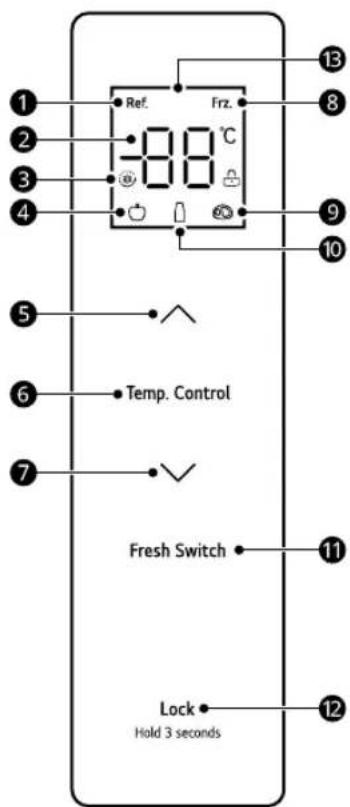
1 Temperature indicator 2 Temperature setting knob 3 Super freeze/frost switch 4 Fruit/vegetable drawer knob 5 Temperature adjustment knob 6 Temp. Control
Knob for selecting temperature zone
7 Temperature adjustment knob 8 Freeze switch 9 Meat knob 10 Poultry knob
1 Fresh Switch
Turn the knob to adjust the temperature to different levels.
12 LOCK
Lock/unlock knob
1 Indicator
Counting unit
Indicator
When the alarm sounds, the buttons are activated and the alarm is turned off. The standard temperatures of the freezer are set at 4°C and -18°C. When a fault occurs, the display shows a fault code (the lights indicate a fault). In normal operation, if the buttons for display do not show a function or if the doors do not open within 30 seconds, the display turns off.
Switching on/off
Switch on the control panel.
To switch on the control panel, press and hold the LOCK button for 3 seconds until the function is activated. To switch off the function, press and hold the LOCK button for 3 seconds until the function is deactivated.
Setting the temperature of the refrigerator compartment
- Press the Temp. Control button to select the temperature zone of the refrigerator compartment, and then press A or V to adjust the temperature of the refrigerator compartment.
- The range in which the temperature of the refrigerator can be set is between 2°C and 8°C.
Setting the temperature of the freezer compartment
- Press the Temp. Control button to select the temperature zone of the freezer compartment, and then press A or V to adjust the temperature of the freezer compartment. The range in which the temperature of the freezer can be set is between -24°C and -16°C.
Setting the temperature of the variable temperature compartment
Press the Fresh Switch button to adjust the temperature of the different compartments.
Fruits/Vegetables: suitable for storing all types of fruits and vegetables - Fish: suitable for storing fresh fish and meat - Meat: suitable for storing small quantities of meat that will be stored for 1-2 days
Setting the Super Freeze and Super Cool modes
To set the Super Cool mode, press the temperature decrease button (∨) until the temperature of the cooling compartment is adjusted to 2°C. In Super Cool mode, the temperature of the cooling compartment is automatically set to 2°C - it automatically exits Super Cool mode after 6 hours. To disable the mode earlier, press the temperature increase button (∧). After exiting Super Cool mode, the temperature of the cooling compartment automatically returns to the temperature set before the mode.
The freezer function can be quickly filled with a large amount of food after the freezing process.
To set the Super Freeze mode, press the temperature control button (V) until the temperature display for freezing adjusts to -24°C. In Super Freeze mode, the freezing temperature display automatically sets to -24°C. - The Super Freeze mode automatically turns off after 43 hours. To deactivate the mode early, press the temperature adjustment button (A). After exiting Super Freeze mode, the freezing temperature display automatically returns to the set temperature before the mode.
Fridge Mode
To set the Fridge mode, open the refrigerator door and press the IN LOCK button simultaneously for 4 seconds. To deactivate the mode, press any button to exit.
In Fridge mode:
The control and light remain off, and the alarm is deactivated. - The refrigerator operates normally. The compressor and fan motor status do not change for 5 minutes after opening the door.
Error indication
The appliance can automatically detect problems during operation.
If a problem is detected, the appliance stops working and an error code appears on the display. When any button is pressed, the error code disappears. If the error code persists, do not disconnect from the power supply. Contact the LG Electronics Information Center and provide the code. If you disconnect from the power supply, the service center from the Information Center will not be able to troubleshoot the issue.
24 OPERATION
For service call 26
SAFETY INSTRUCTIONS
READ ALL INSTRUCTIONS BEFORE USE
26 TROUBLESHOOTING
TROUBLESHOOTING
Before calling for service
Customer service
1 Turn off all appliances.
NOTE
Copyright © 2024 LG Electronics Inc. All Rights Reserved.
TABLE OF CONTENTS
Copyright © 2024 LG Electronics Inc. All Rights Reserved.
TABLE OF CONTENTS
This manual may contain figures or materials different from the model you purchased.
Disposal of Your Old Appliance
- This crossed-out wheeled bin symbol indicates that waste electrical and electronic products (WEEE) should be disposed of separately from the municipal waste stream.
- Old electrical products can contain hazardous substances so correct disposal of your old appliance will help prevent potential negative consequences for the environment and human health. Your old appliance may contain reusable parts that could be used to repair other products, and other valuable materials that can be recycled to conserve limited resources.
- You can take your appliance either to the shop where you purchased the product, or contact your local government waste office for details of your nearest authorised WEEE collection point. For the most up to date information for your country please see www.lg.com/global/recycling.
BULGARIAN
The symbol on the product indicates that this product must not be treated as household waste. Instead, it must be handed over to an applicable collection point for the recycling of electrical and electronic equipment. By ensuring this product is disposed of correctly, you will help prevent potential negative consequences for the environment and human health, which could otherwise be caused by inappropriate waste handling of this product. The recycling of materials will help to conserve natural resources. For more detailed information about recycling of this product, please contact your local city office, your household waste disposal service or the shop where you purchased the product.
CATALÀ