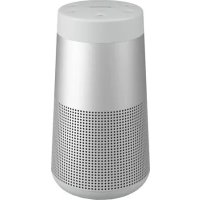
USER MANUAL SoundLink Revolve II BOSE
Please read and keep all safety, security, and use instructions.

Bose Corporation hereby declares that this product is in compliance with the essential requirements and other relevant provisions of Directive 2014/53/EU and all other applicable EU directive requirements. The complete declaration of conformity can be found at: www.Bose.com/compliance
Important Safety Instructions
- Read these instructions.
- Keep these instructions.
- Heed all warnings.
- Follow all instructions.
- Do not install near any heat sources such as radiators, heat registers, stoves, or other apparatus (including amplifiers) that produce heat.
- Only use attachments/accessories specified by the manufacturer.
- Unplug this apparatus during lightning storms or when unused for long periods of time.
- Refer all servicing to qualified personnel. Servicing is required when the apparatus has been damaged in any way, such as power-supply cord or plug is damaged, objects have fallen into the apparatus, does not operate normally, or has been dropped.
WARNING/CAUTIONS

This symbol means there is uninsulated, dangerous voltage within the product enclosure that may constitute a risk of electrical shock.

This symbol means there are important operating and maintenance instructions in this guide.

This product contains magnetic material. Consult your physician on whether this might affect your implantable medical device.
- Keep the product away from fire and heat sources. Do NOT place naked flame sources, such as lighted candles, on or near the product.
- Do NOT make unauthorized alterations to this product.
- Do NOT use a power inverter with this product.
- Use this product only with an agency-approved LPS power supply that meets local regulatory requirements (e.g., UL, CSA, VDE, CCC).
- Where the mains plug or an appliance coupler is used as the disconnect device, the disconnect device shall remain readily operable.
- Do not expose products containing batteries to excessive heat (e.g. from storage in direct sunlight, fire or the like).
- The product label is located on the bottom of the product.
NOTE: This equipment has been tested and found to comply with the limits for a Class B digital device, pursuant to Part 15 of the FCC Rules. These limits are designed to provide reasonable protection against harmful interference in a residential installation. This equipment generates, uses, and can radiate radio frequency energy and, if not installed and used in accordance with the instructions, may cause harmful interference to radio communications. However, there is no guarantee that interference will not occur in a particular installation. If this equipment does cause harmful interference to radio or television reception, which can be determined by turning the equipment off and on, the user is encouraged to try to correct the interference by one or more of the following measures:
- Reorient or relocate the receiving antenna.
- Increase the separation between the equipment and receiver.
- Connect the equipment into an outlet on a circuit different from that to which the receiver is connected.
- Consult the dealer or an experienced radio/TV technician for help.
Changes or modifications not expressly approved by Bose Corporation could void the user's authority to operate this equipment.
This device complies with part 15 of the FCC Rules and with ISED Canada license-exempt RSS standard(s). Operation is subject to the following two conditions: (1) This device may not cause harmful interference, and (2) this device must accept any interference received, including interference that may cause undesired operation.
This device complies with FCC and ISED Canada radiation exposure limits set forth for general population. This equipment should be installed and operated with a minimum distance of 20~cm between radiator and your body. This transmitter must not be co-located or operating in conjunction with any other antenna or transmitter.
Meets IMDA Requirements.
CANICES-3(B)/NMB-3(B)
Management Regulation for Low-power Radio-frequency Devices
Article XII
According to "Management Regulation for Low-power Radio-frequency Devices" without permission granted by the NCC, any company, enterprise, or user is not allowed to change frequency, enhance transmitting power or alter original characteristic as well as performance to an approved low power radio-frequency devices.
Article XIV
The low power radio-frequency devices shall not influence aircraft security and interfere legal communications; If found, the user shall cease operating immediately until no interference is achieved. The said legal communications means radio communications operated in compliance with the Telecommunications Act.
The low power radio-frequency devices must be susceptible with the interference from legal communications or ISM radio wave radiated devices.
DON'T attempt to remove the rechargeable lithium-ion battery from this product. Contact your local Bose retailer or other qualified professional for removal.

雪池回收
Please dispose of used batteries properly, following local regulations. Do not incinerate.
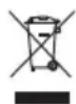
This symbol means the product must not be discarded as household waste, and should be delivered to an appropriate collection facility for recycling. Proper disposal and recycling helps protect natural resources, human health and the environment. For more information on disposal and recycling of this product, contact your local municipality, disposal service, or the shop where you bought this product.

Removal of the rechargeable lithium-ion battery in this product should be conducted only by a qualified professional. Please contact your local Bose retailer or see products.bose.com/static/compliance/index.html for further information.

The product, in accordance with the Ecodesign Requirements for Energy Related Products Directive 2009/125/EC, is in compliance with the following norm(s) or document(s): Regulation (EC) No. 1275/2008, as amended by Regulation (EU) No. 801/2013.
| Required Power State Information | Power Modes |
| Standby Networked Standby |
| Power consumption in specified power mode, at 230V/50Hz input | ≤ 0.5 W Bluetooth® | ≤ 2.0 W |
| Time after which equipment is automatically switched into mode | ≤ 20 minutes | ≤ 5 minutes |
| Power consumption in networked standby if all wired network ports are connected and all wireless network ports are activated, at 230V/50Hz input | N/A | ≤2.0 W |
| Network port deactivation/activation procedures.Deactivating all networks will enable standby mode. | Bluetooth: Deactivate by clearing the pairing list by pressing and holding the Bluetooth button for 10 seconds. Activate by pairing with a Bluetooth source. |
For Europe:
Frequency band of operation 2400 to 2483.5MHz
Maximum transmit power less than 20 dBm EIRP.
Maximum transmit power is below regulatory limits such that SAR testing is not necessary and exempt per applicable regulations.
China Restriction of Hazardous Substances Table
| Names and Contents of Toxic or Hazardous Substances or Elements |
| Toxic or Hazardous Substances and Elements |
| Part Name | Lead(Pb) | Mercury(Hg) | Cadmium(Cd) | Hexavalent(CR(VI)) | PolybrominatedBiphenyl(PBB) | Polybrominated diphenylether(PBDE) |
| PCBs X 0 0 0 0 0 | | | | | | |
| Metal Parts X 0 0 0 0 0 | | | | | | |
| Plastic Parts O | 0 0 0 0 | 0 | | | | |
| Speakers | X 0 0 | 0 0 0 | | | | |
| Cables | X 0 0 | 0 0 0 | | | | |
| This table is prepared in accordance with the provisions of SJ/T 11364.
O: Indicates that this toxic or hazardous substance contained in all of the homogeneous materials for this part is below the limit requirement of GB/T 26572. | 5 |
| X: Indicates that this toxic or hazardous substance contained in at least one of the homogeneous materials used for this part is above the limit requirement of GB/T 26572. |
Taiwan Restriction of Hazardous Substances Table
| Equipment name: Bose SoundLink Revolve II, Type designation: 419357 |
| Restricted substances and its chemical symbols |
| Unit | Lead(Pb) | Mercury (Hg) | Cadmium (Cd) | Hexavalent chromium(Cr+6) | Polybrominated biphenyls (PBB) | Polybrominated diphenylethers (PBDE) |
| PCBs | -0 | 0 | 0 | 0 | 0 | 0 |
| Metal Parts | -0 | 0 | 0 | 0 | 0 | 0 |
| Plastic Parts | 0 | 0 | 0 | 0 | 0 | 0 |
| Speakers | -0 | 0 | 0 | 0 | 0 | 0 |
| Cables | -0 | 0 | 0 | 0 | 0 | 0 |
| Note 1:"o" indicates that the percentage content of the restricted substance does not exceed the percentage of reference value of presence.Note 2:The "−" indicates that the restricted substance corresponds to the exemption. |
Please complete and retain for your records
The serial and model numbers are located bottom of the speaker.
Serial number:
Model number: 419357
Please keep your receipt with your owner's guide. Now is a good time to register your Bose product.
You can easily do this by going to global.Bose.com/register
Date of Manufacture: The eighth digit in the serial number indicates the year of manufacture; "0" is 2010 or 2020.
China Importer: Bose Electronics (Shanghai) Company Limited, Part C, Plant 9, No. 353 North Riying Road, China (Shanghai) Pilot Free Trade Zone
EU Importer: Bose Products B.V., Gorslaan 60, 1441 RG Purmerend, The Netherlands
Taiwan Importer: Bose Taiwan Branch, 9F-A1, No. 10, Section 3, Minsheng East Road, Taipei City 104, Taiwan Phone Number: +886-2-2514 7676
Mexico Importer: Bose de Mexico, S. de R.L. de C.V., Paseo de las Palmas 405-204, Lomas de Chapultepec, 11000 Mexico, D.F. Phone Number: +5255 (5202) 3545
The CMIIT ID is located on the rubber foot on the bottom of the product.

This product is capable of receiving security updates from Bose automatically when connected to the Bose Connect app. In order to receive security updates via the mobile application, you must complete the product setup process in the Bose Connect app. If you do not complete the setup process, you will be responsible for installing security updates that Bose makes available via btu.Bose.com
Apple, the Apple logo, iPad, iPhone, iPod, and Siri are trademarks of Apple Inc., registered in the U.S. and other countries. App Store is a service mark of Apple Inc. The trademark "iPhone" is used in Japan with a license from Aiphone K.K.
The Bluetooth® word mark and logos are registered trademarks owned by Bluetooth SIG, Inc. and any use of such marks by Bose Corporation is under license.
Google and Google Play are trademarks of Google LLC.
The N-Mark is a trademark or registered trademark of NFC Forum, Inc. in the United States and in other countries.
Bose, Bose Home Speaker, Bose Music, Bose Portable Home Speaker, Bose Portable Smart Speaker, Bose Smart Soundbar, Bose Smart Speaker, Bose Soundbar, SimpleSync, SoundLink, and SoundLink Revolve are trademarks of Bose Corporation.
Bose Corporation Headquarters: 1-877-230-5639
©2020 Bose Corporation. No part of this work may be reproduced, modified, distributed, or otherwise used without prior written permission.
WHAT'S IN THE BOX
Contents 10
BOSE CONNECT APP SETUP
Download the Bose Connect app 11
SPEAKER PLACEMENT
Placement guidelines 12
POWER
Connect to power 13
Power on/off your speaker 13
Battery protection mode 14
Auto-off 14
Disable auto-off 14
SPEAKER CONTROLS
Media playback and volume 16
Phone calls. 17
Access voice control. 17
Voice alerts 17
VOICE PROMPTS
Pre-installed languages 18
Select a language 18
Change the language 18
Disable voice prompts 18
BLUETOOTH® CONNECTIONS
Choose your pairing method 19
Pair your mobile device. 20
Pair a mobile device with NFC 21
Pair an additional mobile device 22
Disconnect a device 22
Reconnect a device 22
MULTIPLE BLUETOOTH CONNECTIONS
Identify connected mobile devices 23
Switch between two connected devices 23
Connect a previously paired device 23
Clear the speaker pairing list. 23
Use the Bose Connect app 23
WIRED CONNECTIONS
Connect the 3.5 mm stereo cable 24
Connect the USB cable 24
SPEAKER STATUS
Battery status 26
Bluetooth status 26
Input status 26
PAIR BOSE PRODUCTS
Choose your pairing method 27
Pair with another Bose SoundLink Bluetooth speaker 27
Pair the speakers using the Bose Connect app (recommended) 27
Pair the speakers manually 28
Switch between Party mode and Stereo mode 29
Disable Party mode or Stereo mode 29
Pair with a Bose Smart Speaker or Soundbar 30
Compatible products 30
Pair using the Bose Music app 30
Reconnect to a Bose Smart Speaker or Soundbar 31
CARE AND MAINTENANCE
Clean the speaker 32
Replacement parts and accessories 32
Limited warranty 32
Technical information 32
TROUBLESHOOTING
Try these solutions first 33
Other solutions 33
Reset your speaker 35
CONTENTS
Confirm that the following parts are included:

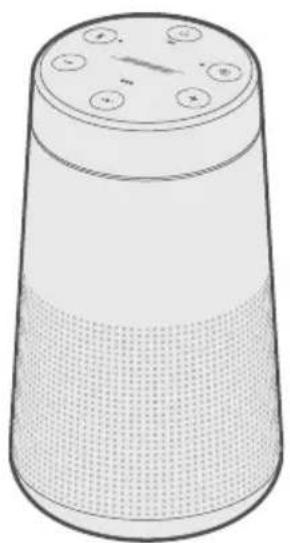
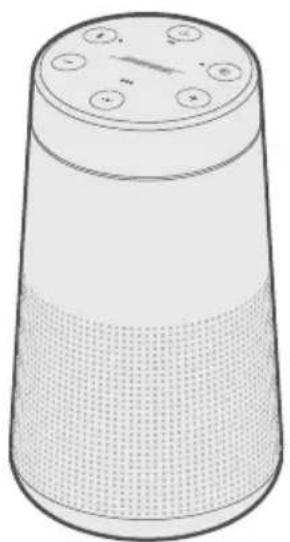
SoundLink Revolve II Bluetooth speaker
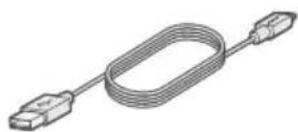
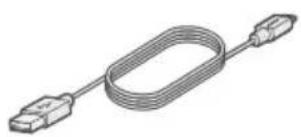
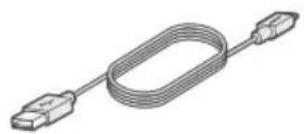
USB cable
NOTE: If any part of the product is damaged, don't use it. Contact your authorized Bose dealer or Bose customer service.
Visit: worldwide.Bose.com/Support/SLRii
The Bose Connect app lets you set up and control the speaker from any mobile device, such as a smartphone or tablet.
Using the app, you can manage Bluetooth connections, choose your voice prompt language, manage speaker settings, and get new features.
DOWNLOAD THE BOSE CONNECT APP
- On your mobile device, download the Bose Connect app.


- Follow the app instructions.
PLACEMENT GUIDELINES
- For best Bluetooth performance, place your mobile device within 30 ft (9 m) of your speaker, and make sure there is a clear line of sight between you and your speaker. Moving your device farther away, or not having a clear line of sight may impact sound quality, and your device may disconnect from your speaker.
- Keep other wireless equipment at least 3 ft (1 m) away from your speaker.
- Place your speaker and your device outside of and away from metal cabinets, other audio/video components, and direct heat sources.
CAUTIONS
- Stand your speaker on its base. Standing your speaker on any other side may cause damage to your speaker and affect sound quality.
- Avoid placing your speaker on wet or dirty surfaces.
CONNECT TO POWER
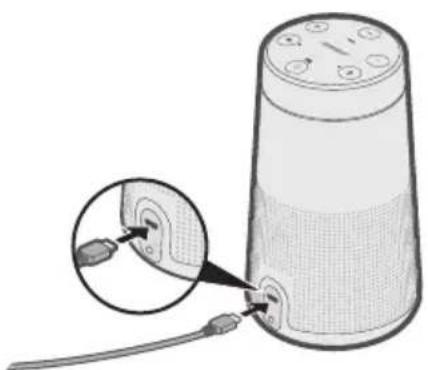
Your speaker ships with a partial charge. Before using your speaker for the first time, connect it to an AC (mains) outlet. Your speaker does not need to be fully charged, but it does require the initial connection to activate the battery.
NOTE: Use a 1500mA (1.5A) USB power supply for the best speaker charging experience. Using a power supply with less than 1500mA (1.5A) may result in a slower charging time or your speaker may not be able to charge while playing audio.
- Plug the small end of the USB cable into the micro-B USB connector on your speaker.
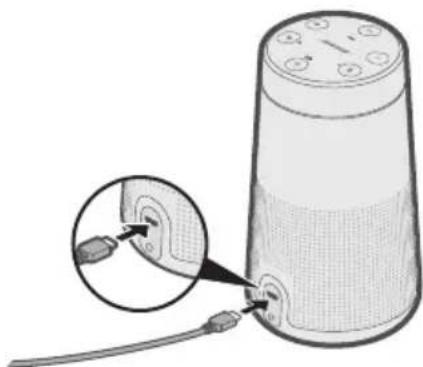
- Plug the other end into a USB power supply (not provided).
The battery light blinks amber, and your speaker emits a tone. When fully charged, glows green.
- The first time you power on your speaker, the Bluetooth light glows blue, and you hear a voice prompt to select a language (see page 18).
- If you have already powered on your speaker and paired at least one mobile device, the Bluetooth light blinks white and connects to the last two paired mobile devices. You hear "Battery percent. Connected to <mobile device name)." The Bluetooth light glows solid white.
BATTERY PROTECTION MODE
When your speaker is unplugged and unused for more than three days with a remaining charge of less than 10 percent, it enters battery protection mode to preserve battery power. To reactivate your speaker, connect it to AC (mains) power.
When not in use, store your speaker in a cool place.
CAUTION: Do not store your speaker for extended periods when fully charged or when the battery light blinks red.
AUTO-OFF
Your speaker powers off after 20 minutes of inactivity (no sound coming from your speaker) while using the following connections and power sources:
- AUX connection operating on battery or AC (mains) power.
- Bluetooth connection operating on battery power.
Disable auto-off
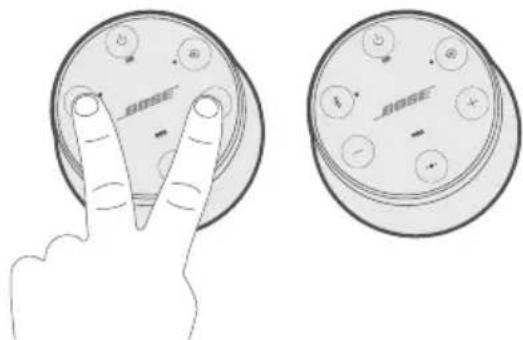
- Press and hold + and the Input mode button simultaneously.
You hear "Auto-off disabled."
- Repeat to re-enable the auto-off feature.
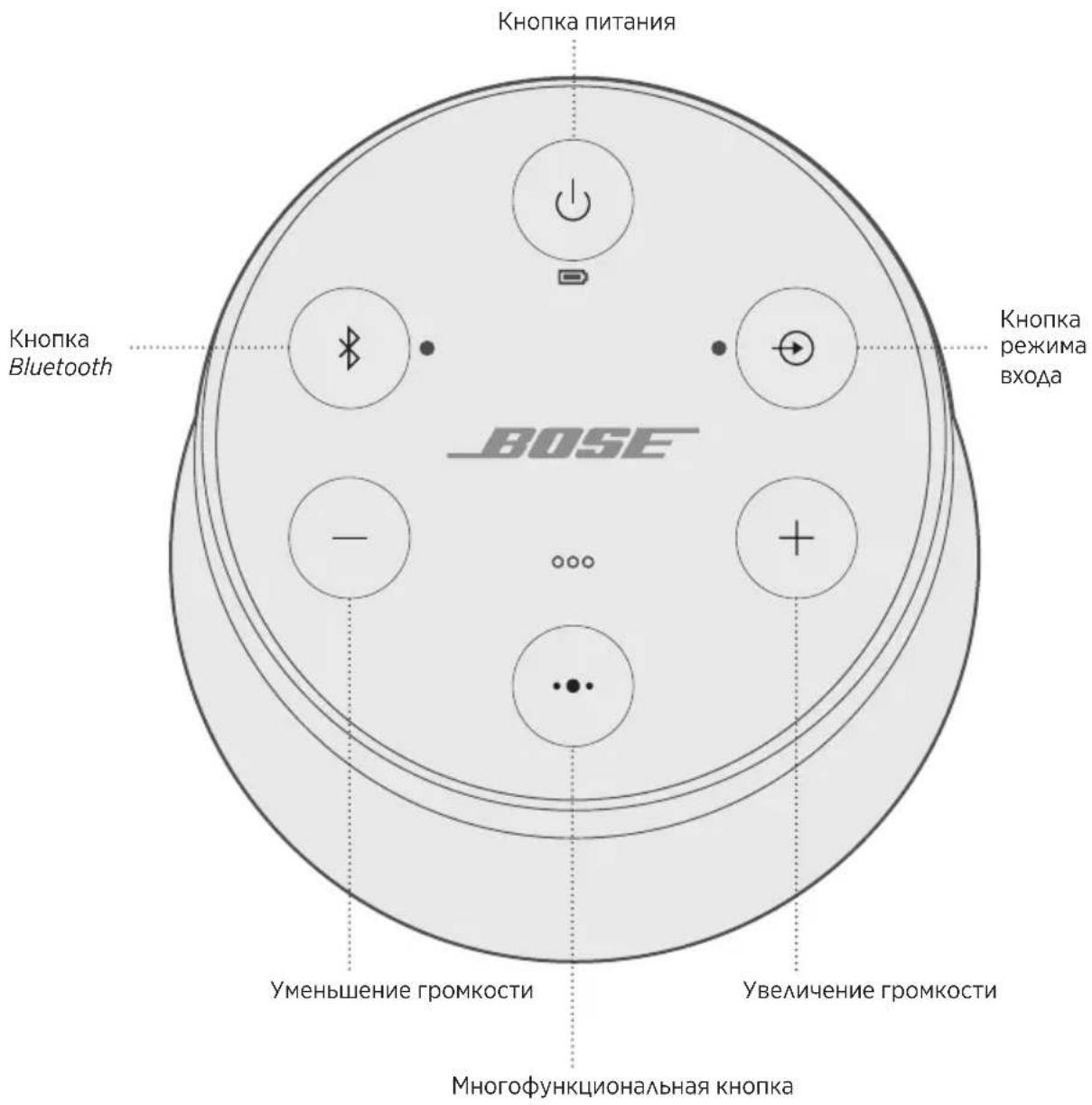
The button pad enables you to power on your speaker and control your speaker's playback, volume, and speakerphone.
NOTE: Certain mobile devices may not support these functions.
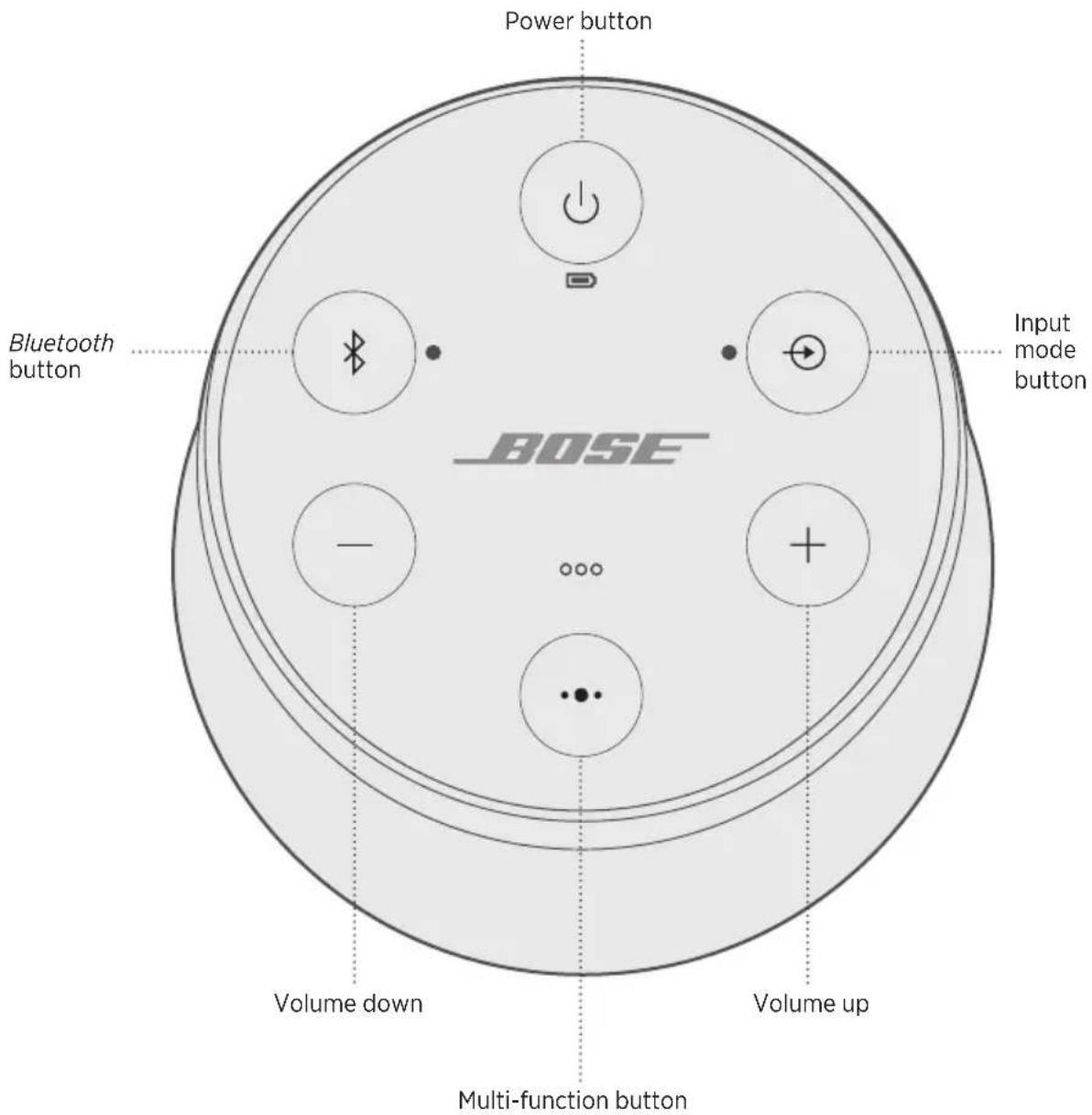
The Multi-function button controls music sources and speakerphone calls on your mobile device from your speaker.
FUNCTION WHAT TO DO
| Play/Pause | Press ···.
NOTE: In Input mode, pressing ··· mutes the audio
(see page 24). |
| Skip forward to the
next track | Double-press ···. |
| Skip backward to the
previous track | Triple-press ···. |
| Volume up | Press +. |
| Volume down | Press -. |
PHONE CALLS
FUNCTION WHAT TO DO
| Make a call | Press and hold the Multi-function button •• to activate voice control on your mobile device. See “Access voice control” below. |
| Switch a call from speakerphone to your mobile device, while on a call | Press and hold ••. |
| Answer/End a call | Press ••. |
| Decline an incoming call | Press and hold ••. |
| Answer a second incoming call and put the current call on hold | While on a call, press •• to answer a second call. |
| Decline a second incoming call and stay on current call | While on a call, press and hold •• for one second. |
| Switch between two calls | With two active calls, double-press ••. |
| Mute/unmute a call | While on a call, press + and — simultaneously. |
Access voice control
The microphone in the speaker acts as an extension of the microphone in your smartphone. Using on the speaker, you can access voice control on your mobile device to make/take calls, play music, tell you the weather, give you the score of a game, and more.
Press and hold to access voice control on your device. You hear a tone that indicates voice control is active.
Voice alerts
Your speaker identifies incoming callers (when applicable). To disable this feature, see page 18.
Voice prompts guide you through the Bluetooth pairing and connecting processes.
PRE-INSTALLED LANGUAGE
- English - German - Korean - Swedish - Polish
- Spanish • Mandarin • Italian • Dutch
- French - Japanese - Portuguese - Russian
SELECT A LANGUAGE
- Press - or + to scroll through available languages.
- When you hear your language preference, press and hold the Multi-function button to select it.
You hear a beep and "Ready to pair."
CHANGE THE LANGUAGE
- Press and hold — and the Input mode button ⊙ simultaneously until you hear the voice prompt for the first language option.
- Press - or + to scroll through available languages.
- When you hear your language preference, press and hold until you hear a beep, and "Connected to ."
DISABLE VOICE PROMPTS
Press and hold - and + simultaneously until you hear "Voice prompts off."
NOTE: Repeat to re-enable voice prompts.
Bluetooth wireless technology lets you stream music from mobile devices such as smartphones, tablets, and computers. Before you can stream music from a device, you must pair the device with your speaker.
CHOOSE YOUR PAIRING METHOD
You can pair your device with your speaker using Bluetooth wireless technology or Near Field Communication (NFC).
You can also use the Bose Connect app to pair your device (see page 11).
What is NFC?
NFC is a technology that enables mobile devices to establish wireless communication with each other by simply tapping the devices together. Refer to your device owner's guide to see if your model supports NFC.
| If your device does not support Bluetooth pairing via NFC or if you are unsure: | Follow the instructions for “Pair your mobile device” on page 20. |
| If your device supports Bluetooth pairing using NFC: | Follow the instructions for “Pair a mobile device with NFC” on page 21. |
NOTE: If your device supports Bluetooth pairing via NFC, you can use either pairing method.
PAIR YOUR MOBILE DEVICE
When you power on your speaker for the first time, the speaker automatically searches for your mobile device.
- On your device, turn on the Bluetooth feature.
TIP: The Bluetooth feature is usually found in the Settings menu.
- Select your Bose Revolve II SoundLink speaker from the device list.
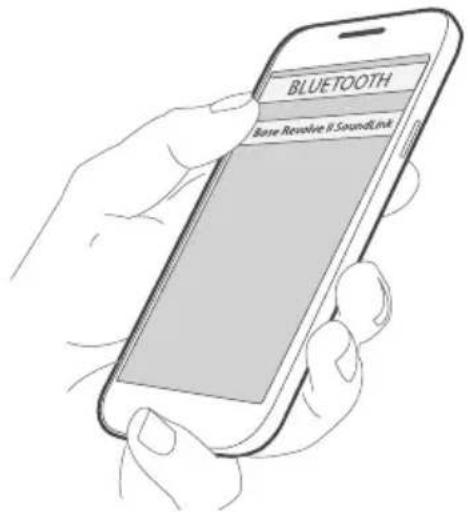
Once paired, you hear "Connected to ," and the Bluetooth light glows solid white.
NOTE: To pair an additional device, see page 22.
PAIR A MOBILE DEVICE WITH NFC
NOTE: When you power on your speaker for the first time, make sure a language is selected before you pair your mobile device with NFC.
- Unlock your mobile device, and turn on the Bluetooth and NFC features.
Refer to your device owner's guide to learn more about these features.
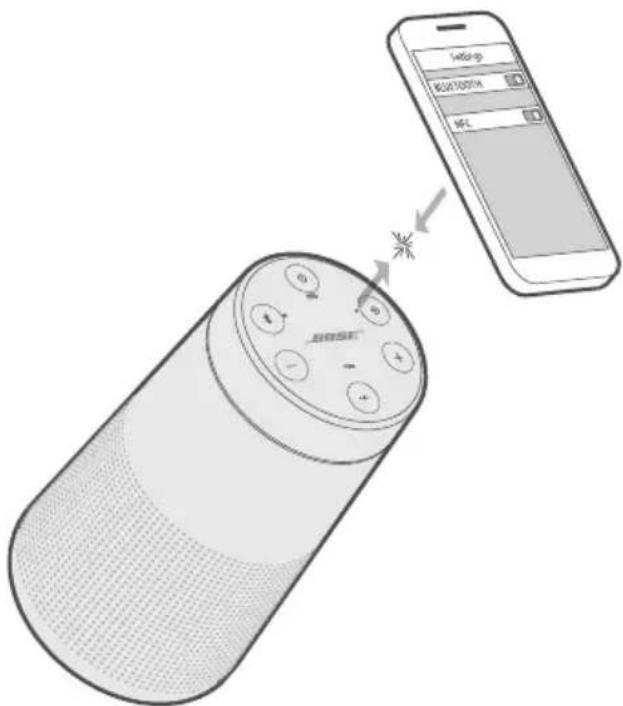
- Tap and hold the NFC touchpoint on your device to the top center of your speaker. The target area is the Bose logo.
Your device may prompt you to accept pairing.
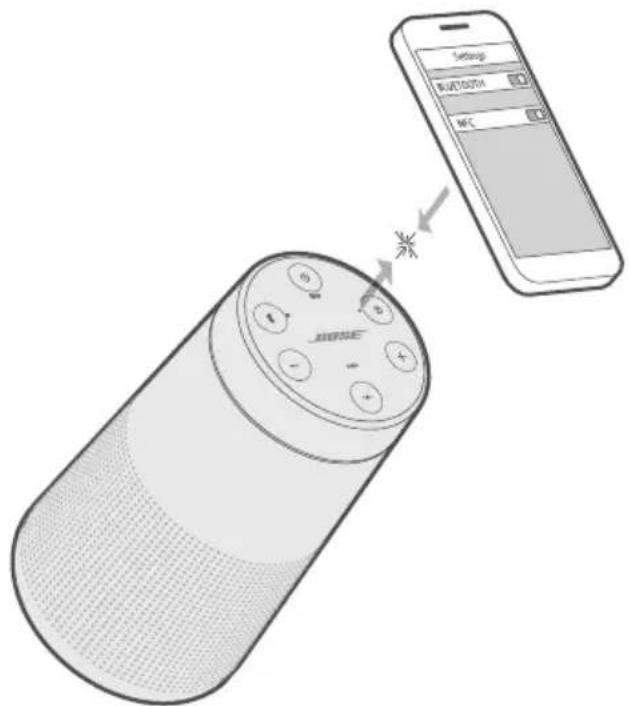
Once paired, you hear "Connected to ," and the Bluetooth light glows solid white.
PAIR AN ADDITIONAL MOBILE DEVICE
You can store up to eight paired mobile devices in the speaker pairing list.
- Press and hold the Bluetooth button × until the Bluetooth light blinks blue, and you hear, "Ready to pair another device." Pair your device to the speaker (see page 20).
If your device supports pairing via NFC, see page 21.
DISCONNECT A DEVICE
- Turn off the Bluetooth feature on your device.
- If your device supports pairing via NFC, tap and hold the NFC touchpoint on your device to the top center of your speaker. The target area is the Bose logo.
RECONNECT A DEVICE
When powered on, your speaker tries to reconnect with the two most recently-connected devices.
NOTE: The devices must be within range and powered on.
If your device supports pairing via NFC, tap and hold the NFC touchpoint on your device to the top of your speaker. The target area is the Bose logo.
You can store up to eight paired mobile devices in the speaker pairing list, and your speaker can be actively connected to two mobile devices at a time.
NOTE: You can only play audio from one device at a time.
IDENTIFY CONNECTED MOBILE DEVICES
Press the Bluetooth button 喜 to hear which devices are currently connected.
SWITCH BETWEEN TWO CONNECTED DEVICES
- Pause audio on your first device.
- Play audio on your second device.
CONNECT A PREVIOUSLY PAIRED DEVICE
- Press 喜 to hear which device is currently connected.
- Press within two seconds to connect to the next device in your speaker's pairing list.
- Repeat until you hear the desired device name.
You hear a tone that indicates the device is connecting.
- Play audio on the connected device.
CLEAR THE SPEAKER PAIRING LIST
- Press and hold × for 10 seconds, until you hear "Bluetooth device list cleared. Ready to pair."
All devices are cleared and your speaker is ready to pair a new device.
- Delete your speaker from the Bluetooth list on your device.
USE THE BOSE CONNECT APP
You can also easily manage multiple connected devices using the Bose Connect app (see page 11).
You can connect the audio output of a smartphone, tablet, computer or other type of mobile device to the AUX connector or micro-B USB connector.
CONNECT THE 3.5 MM STEREO CABLE
The AUX connector accepts a 3.5mm stereo cable plug (not provided).
- Using a 3.5mm stereo cable, connect your mobile device to the AUX connector on your speaker.
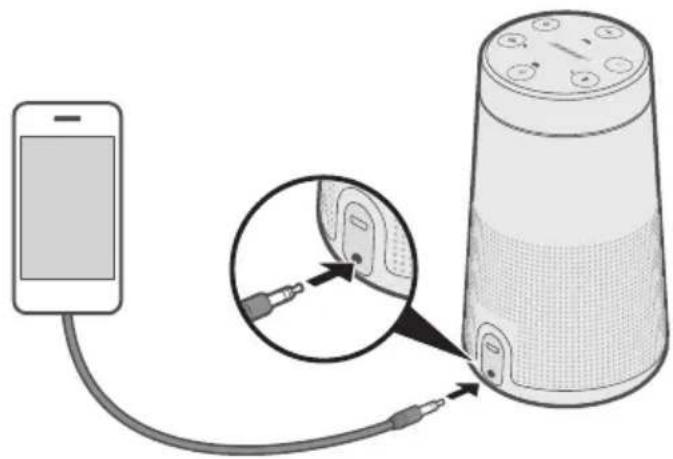
- Press the Power button on your speaker.
- Press and release the Input mode button until you hear "AUX audio."
CONNECT THE USB CABLE
- Using the USB cable, connect your device to the micro-B USB connector on your speaker.
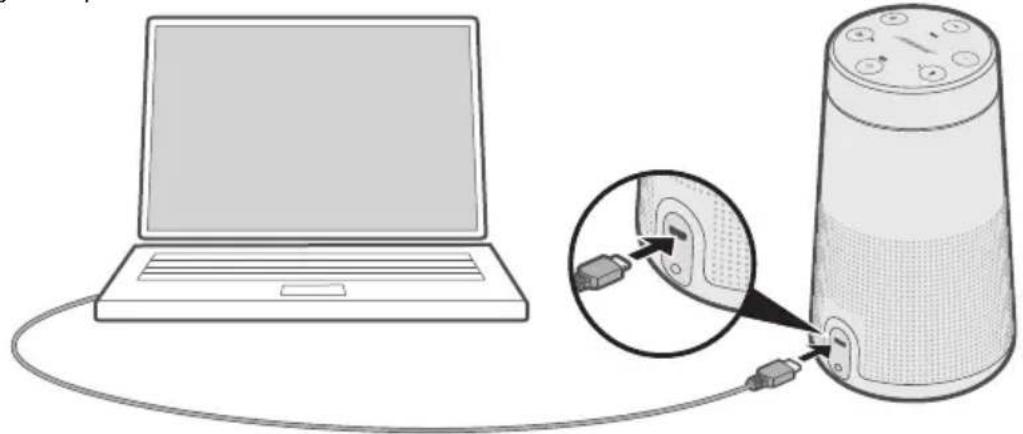
- Press on your speaker.
- Press and release until you hear "USB audio."
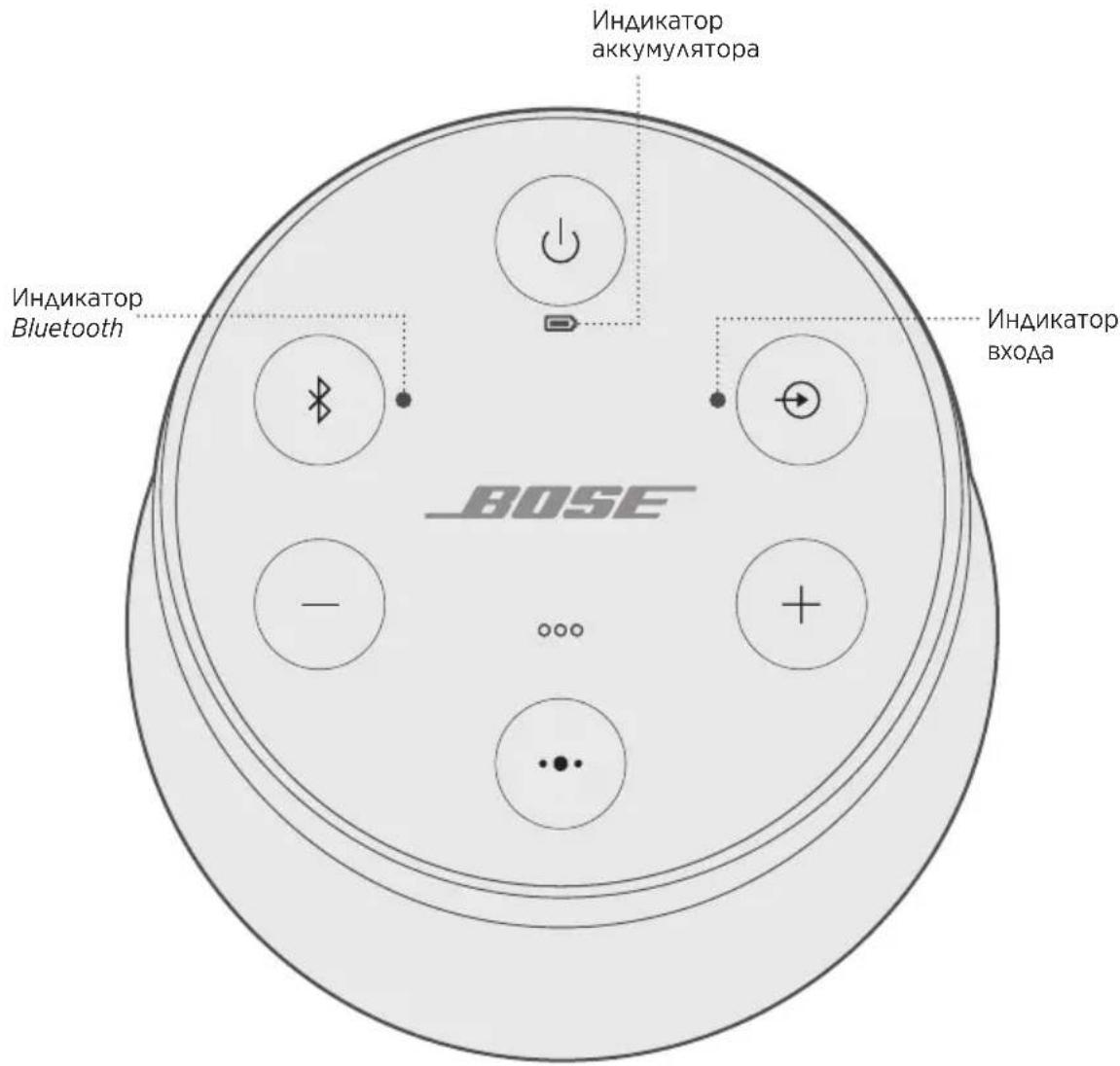
The top of the speaker has a series of lights that glow according to system state.
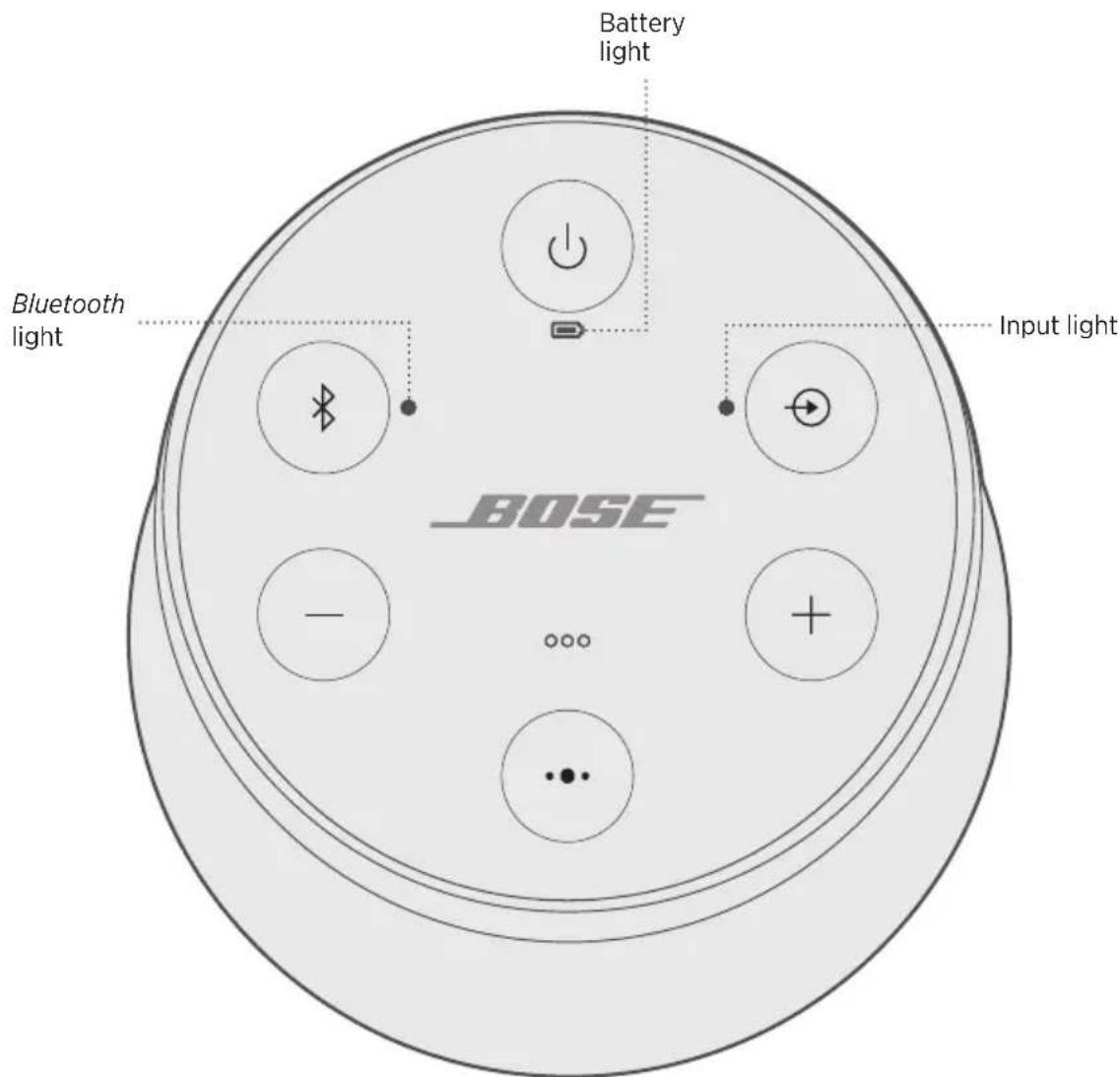
BATTERY STATUS
Shows the battery charge level. Each time you power on your speaker, the battery light displays the battery charge level for two seconds and a voice prompt announces the battery charge level.
To check the battery charge level, press and hold the Power button for three seconds while checking .
NOTE: Battery performance varies with the content played and the volume level at which it is played. In typical use, the speaker battery lasts up to 13 hours.
LIGHT ACTIVITY SYSTEM STATE
| Solid green Medium to full charge | |
| Blinks amber Charging | |
| Solid amber Medium charge | |
| Blinks red Need to charge | |
BLUETOOTH STATUS
Shows the connection status of a mobile device.
LIGHT ACTIVITY SYSTEM STATE
| Blinks blue Ready to connect | |
| Blinks white Connecting | |
| Solid white Connected | |
Shows the connection status of a device connected with an AUX or micro-B USB cable.
LIGHT ACTIVITY SYSTEM STATE
| Solid white Speaker is ready to play content from a device |
NOTE: For more information on using a cable to connect a device, see page 24.
You can pair your SoundLink Revolve II speaker with other Bose speakers to play audiotogether.
CHOOSE YOUR PAIRING METHOD
The way you pair with another Bose speaker varies depending on the type of speaker you're pairing with. Choose your pairing method from the table below.
SPEAKER PAIRING METHOD
| Bose SoundLink Bluetooth speaker | See “Pair with another Bose SoundLink Bluetooth speaker” below. |
| Bose Smart Speaker or Soundbar | See “Pair with a Bose Smart Speaker or Soundbar” on page 30. |
PAIR WITH ANOTHER BOSE SOUNDLINK BLUETOOTH SPEAKER
You can pair your Bose SoundLink Bluetooth speakers together to play in the following modes using the Bose Connect app (recommended) or the speaker control buttons:
- Party mode (left and right speakers play in unison)
- Stereo mode (left speaker and right speaker play separately)
You can set this up using the Bose Connect app (recommended) or the speaker control buttons.
Refer to your Bose owner's guide to determine if your secondary speaker supports these modes.
Pair the speakers using the Bose Connect app (recommended)
For more information, download the Bose Connect app.
Pair the speakers manually
If you are unable to access the Bose Connect app, follow the instructions below.
Party mode
- Make sure both speakers are powered on.
- Make sure a speaker is connected to your mobile device.
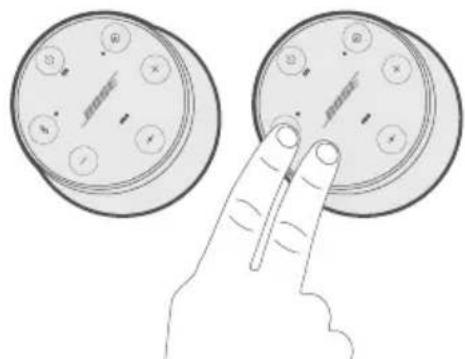
- On the speaker connected to your device, press and hold the Bluetooth button 串 and ^+ simultaneously.
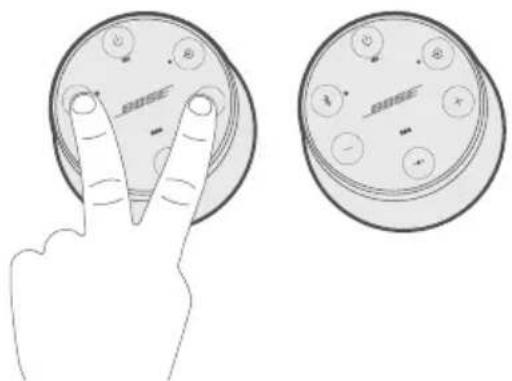
- Release the buttons when you hear "Press the Bluetooth and volume down buttons simultaneously on a second Bose device."
- On the other speaker, press and hold 且 and - simultaneously.
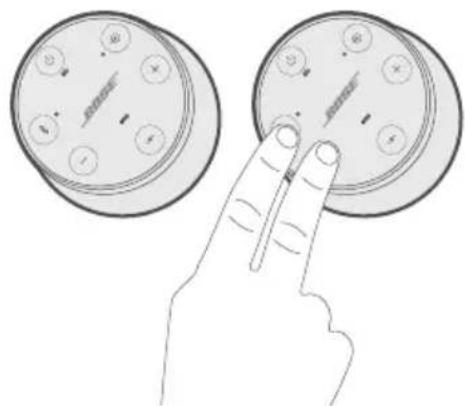
- Release the buttons when the speaker emits a tone.
After 10 seconds, you hear "Party mode" from both speakers simultaneously. Party mode is enabled. You are now able to play audio in unison using your device.
-
For an optimal experience, position your speakers:
-
In the same room or outdoor area
- So there are no obstructions between them
NOTE: Performance may vary based on mobile device, distance and environmental factors.
Stereo mode
- Configure your speakers for Party mode (see page 28).
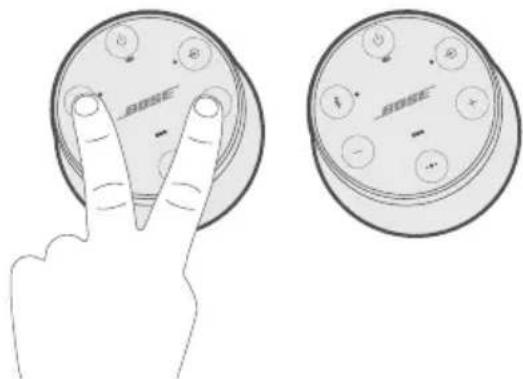
- On a speaker, press the Bluetooth button 串 and ^+ simultaneously.
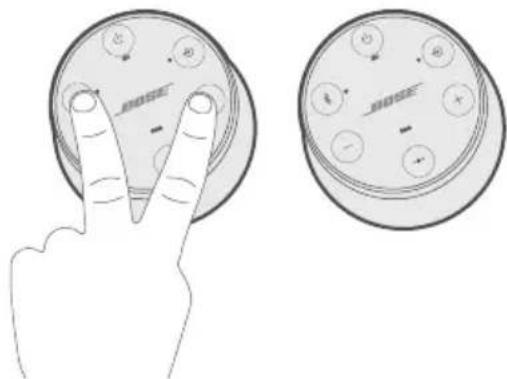
- Release the buttons when you hear "Stereo mode." You hear "Left" from the left speaker and "Right" from the right speaker.
Stereo mode is enabled. You are now able to play audio in stereo using your mobiledevice.
-
For an optimal experience, position your speakers:
-
In the same room or outdoor area
- Within 10 feet of each other, free from obstructions
- So that your distance to each speaker is equal
NOTE: Performance may vary based on mobile device, distance and environmental factors.
Switch between Party mode and Stereo mode
On either speaker, press 喜 and ^+ simultaneously.
Disable Party mode or Stereo mode
Do one of the following on either speaker:
- Press and hold until you hear "Bose speakers unlinked."
- Press and hold the Multi-function button and + simultaneously until you hear "Bose speakers unlinked."
- Press the Power button to power off the speaker.
PAIR WITH A BOSE SMART SPEAKER OR SOUNDBAR
With Bose SimpleSync™ technology, you can pair your SoundLink Revolve II speaker with a Bose Smart Speaker or Bose Smart Soundbar to listen to the same song in two different rooms at the same time.
NOTE: SimpleSync™ technology has a Bluetooth range of 30 ft (9 m). Walls and construction materials can affect reception.
Compatible products
You can pair your SoundLink Revolve II speaker with any Bose Smart Speaker or Bose Smart Soundbar.
Popular compatible products include:
- Bose Smart Soundbar 700/Bose Soundbar 700
- Bose Smart Soundbar 300
- Bose Smart Speaker 500/Bose Home Speaker 500
- Bose Home Speaker 300
- Bose Portable Smart Speaker/Bose Portable Home Speaker
New products are added periodically. For a complete list and more information, visit: worldwide.Bose.com/Support/Groups
Pair using the Bose Music app
- On your SoundLink Revolve II speaker, press and hold the Bluetooth button 串 until the Bluetooth indicator blinks blue, and you hear "Ready to pair another device."
- Use the Bose Music app to connect your speaker to a compatible Bose product. For more information, visit: worldwide.Bose.com/Support/Groups
NOTES:
- Make sure that your SoundLink Revolve II speaker is within 30 ft (9 m) of your Bose Smart Speaker or Bose Smart Soundbar.
- You can pair your SoundLink Revolve II speaker with only one product at a time.
RECONNECT TO A BOSE SMART SPEAKER OR SOUNDBAR
Power on your SoundLink Revolve II speaker (see page 13).
Your SoundLink Revolve II speaker tries to connect to the two most recently-connected Bluetooth devices, including your Bose Smart Speaker or Bose Smart Soundbar.
NOTES:
- Your Bose Smart Speaker or Bose Smart Soundbar must be within range (30 ft or 9 m) and powered on.
- If your SoundLink Revolve II speaker doesn't connect, see "Connect a previously paired device" on page 23.
CLEAN THE SPEAKER
- Clean the surface of the speaker with a soft, damp cloth (water only).
- Do not use any sprays near the speaker. Do not use any solvents, chemicals, or cleaning solutions containing alcohol, ammonia or abrasives.
- Do not allow liquids to spill into any openings.
REPLACEMENT PARTS AND ACCESSORIES
Replacement parts and accessories can be ordered through Bose customer service.
Visit: worldwide.Bose.com/Support/SLRii
LIMITED WARRANTY
The speaker is covered by a limited warranty. Visit our website at global.Bose.com/warranty for details of the limited warranty.
To register your product, visit global.Bose.com/register for instructions.
Failure to register will not affect your limited warranty rights
Input Voltage: 5V
Input Current: 1.6A
TRY THESE SOLUTIONS FIRST
If you experience problems with the speaker:
- Check the battery light (see page 26). Charge your speaker if necessary.
- Secure all cables.
- Check the state of status lights (see page 26).
- Place your speaker according to placement guidelines (see page 11).
- Make sure your mobile device supports Bluetooth or pairing via NFC technology (see page 21).
OTHER SOLUTIONS
If you could not resolve your issue, see the table below to identify symptoms and solutions to common problems. If you are unable to resolve your issue, contact Bose customer service.
Visit: worldwide.Bose.com/contact
SYMPTOM SOLUTION
| No power (battery) | Battery may be in protection mode or discharged. Connect it to AC (mains) power. |
| Battery does not charge | Connect the USB cable to a different USB power supply.
Use a different USB cable.
Connect to a different AC (mains) power source. |
| Speaker does not pair with mobile device | On your mobile device, turn the Bluetooth feature off and then on. Remove your speaker from the Bluetooth list on your device.
Pair your device again.
Pair a different device (see page 22).
Clear your speaker's pairing list (see page 23). Pair your device again.
Reset your speaker (see page 35). |
SYMPTOM SOLUTION
| Speaker does not pair with NFC | Unlock your device and turn on the Bluetooth and NFC features. Tap and hold the NFC touchpoint on the back of your device to the top of your speaker. Remove your device from the case. Make sure a language is selected (see page 18). Use Bluetooth to pair your device (see page 20). |
| Bose SoundLink Bluetooth speakers do not pair together manually | Download the Bose Connect app for an additional method for pairing your Bose speakers (see page 11). |
| No sound | On your mobile device, turn the Bluetooth feature off and then on. Remove your speaker from the Bluetooth list on your device. Pair your device again. Increase the volume on your speaker, your device and music source. Make sure voice prompts are on. Press the Bluetooth button & to hear the connected mobile device. Make sure you are using the correctdevice. Use a different music source. Pair a different device (see page 22). If two devices are connected, pause your other device. |
| No sound from a cabled device | Power on the device and play music. Increase the volume on your speaker and device. Press and release the Input mode button ⊙ until the Input light glows white. Use a different cable. Connect a different device. |
| Poor sound quality | Use a different music source. Pair a different device (see page 22). If there are two devices connected, disconnect the second device. Increase the volume on the device. Check device audio settings. |
| Poor sound quality from a cabled device | Increase the volume on your speaker and device. Use a different cable. Connect a different device. Check device audio settings. |
SYMPTOM SOLUTION
| Audio plays from the wrong device (when two devicesareconnected) | Make sure voice prompts are on. Press the Bluetooth button to hear the connected device(s). Make sure you are using the correct device.
Pause or quit the music source on the device playing music.
Disconnect the second device. |
| Speaker powers off | If using a cabled device, increase the volume on your device.
Disable auto-off (see page 14). |
| Speaker does not pair with a Bose Smart Speaker or Soundbar | Press and hold until the Bluetooth indicator blinks blue, and you hear “Ready to pair another device.”
Make sure that your SoundLink Revolve II speaker is within 30 ft (9 m) of your Bose Smart Speaker or Bose Smart Soundbar. |
| Speaker does not reconnect to a previously-paired Bose Smart Speaker or Soundbar | See “Connect a previously paired device” on page 23. |
| Delayed audio when paired with a Bose Smart Speaker or Soundbar | Download the Bose Connect app and run available software updates(seepage 11). |
RESET YOUR SPEAKER
Factory reset clears paired mobile devices and language settings from your speaker and returns it to the original factory settings.
- Power on your speaker.
- Press and hold the Power button for 10 seconds.
The speaker powers off.
- Press
The Bluetooth light glows blue, and you hear a voice prompt to select a language (see page 18).
Management Regulation for Low-power Radio-frequency Devices
ArticleXII
Importar i Kina: Bose Electronics (Shanghai) Company Limited, Part C, Plant 9, No. 353 North Riying Road, Kina (Shanghai) Pilot Free Trade Zone
Importar i EU: Bose Products B.V., Gorslaan 60, 1441 RG Purmerend, Holland
Importar i Taiwan: Bose Taiwan Branch, 9F-A1, No. 10, Section 3, Minsheng East Road, Taipei City 104, Taiwan Telefonnummer: +886-2-2514 7676
Importar i Mexico: Bose de Mexico, S. de R.L. de C.V., Paseo de las Palmas 405-204, Lomas de Chapultepec, 11000 Mexico, D.F. Telefonummer: +5255 (5202) 3545
CMIIT ID kan findes pa gummifoden i bunden afproduktet.
HVAD ER DER I AESKEN?
Indhold 10
OPSÄETNING AF BOSE CONNECT-APPEN
Download Bose Connect-appen 11
HØJTTLERPLACERING
Besog: worldwide.Bose.com/Support/SLRii
China-Import: Bose Electronics (Shanghai) Company Limited, Part C, Plant 9, No. 353 North Riying Road, China (Shanghai) Pilot Free Trade Zone
EU-Import: Bose Products B.V., Gorslaan 60, 1441 RG Purmerend, Niederlande
Taiwan-Import: Bose Taiwan Branch, 9F-A1, No. 10, Section 3, Minsheng East Road, Taipei City 104, Taiwan
Telefonnummer: +886-2-2514 7676
Mexiko-Import: Bose de Mexico, S. de R.L. de C.V., Paseo de las Palmas 405-204, Lomas de Chapultepec, 11000 Mexico, D.F. Telefonummer: +5255 (5202) 3545
Importeur in China: Bose Electronics (Shanghai) Company Limited, Part C, Plant 9, No. 353 North Riying Road, China (Shanghai) Pilot Free Trade Zone
Importeur in de EU: Bose Products B.V., Gorslaan 60, 1441 RG Purmerend, Nederland
Importeur in Taiwan: Bose Taiwan Branch, 9F-A1, No. 10, Section 3, Minsheng East Road, Taipei City 104, Taiwan Telefoonnummer: +886-2-2514 7676
Importeur in Mexico: Bose de Mexico, S. de R.L. de C.V., Paseo de las Palmas 405-204, Lomas de Chapultepec, 11000 Mexico, D.F. Telefoonnummer: +5255 (5202) 3545
Gaaar: worldwide.Bose.com/Support/SLRii
Gaaar:worldwide.Bose.com/Support/SLRii
BEPERKTE GARANTIE
Gaaar: worldwide.Bose.com/contact
SYMPTOOM OPLOSSING
Importador en China: Bose Electronics (Shanghai) Company Limited, Part C, Plant 9, No. 353 North Riying Road, China (Shanghai) Pilot Free Trade Zone
Importador en UE: Bose Products B.V., Gorslaan 60, 1441 RG Purmerend, Pafes Bajos
Importador en Taiwán: Sucursal de Bose en Taiwán, 9F-A1, No. 10, Section 3, Minsheng East Road, Taipei City 104, Taiwan Número de téléphone: +886-2-25147676
Importador en Mexico: Bose de Mexico, S. de R.L. de C.V., Paseo de las Palmas 405-204, Lomas de Chapultepec, 11000 Mexico, D.F.Numero de téléphone: +5255 (5202) 3545
Visite: worldwide.Bose.com/Support/SLRij
Visit: worldwide.Bose.com/Support/SLRii
GARANTÍA LIMITADA
Visite: worldwide.Bose.com/contact
SINTOMA SOLUCIOn
Maahantuoja Kiinassa: Bose Electronics (Shanghai) Company Limited, Part C, Plant 9, No. 353 North Riying Road, China (Shanghai) Pilot Free Trade Zone
Maahantuoja EU:ssa: Bose Products B.V., Gorslaan 60, 1441 RG Purmerend, The Netherlands
Maahantuoja Taiwanissa: Bose Taiwan Branch, 9F-A1, No. 10, Section 3, Minsheng East Road, Taipei City 104, Taiwan Puhelin: +886-2-2514 7676
Maahantuoja Meksikossa: Bose de Mexico, S. de R.L. de C.V., Paseo de las Palmas 405-204, Lomas de Chapultepec, 11000 Mexico, D.F. Puhelinn numero: +5255 (5202) 3545
CONNEXIONS BLUETOOTH
Consultez le site worldwide.Bose.com/Support/SLRii
Consultez le site worldwide.Bose.com/Support/SLRii
GARANTIE LIMITEE
Consultez le site worldwide.Bose.com/contact
SYMPTOME SOLUTION
Importatore per la Cina: Bose Electronics (Shanghai) Company Limited, Part C, Plant 9, No. 353 North Riying Road, China (Shanghai) Pilot Free Trade Zone
Visitare: worldwide.Bose.com/Support/SLRij
Visitare: worldwide.Bose.com/Support/SLRij
GARANZIA LIMITATA
Visitare: worldwide.Bose.com/contact
SINTOMO SOLUZIONE
Kinai importor: Bose Electronics (Shanghai) Company Limited, Part C, Plant 9, No. 353 North Riying Road, Kina (Shanghai) Pilot Free Trade Zone
EU-importor: Bose Products B.V., Gorslaan 60, 1441 RG Purmerend, Hollandia
Tajvani importor: Bose Taiwan Branch, 9F-A1, No. 10, Section 3, Minsheng East Road, Taipei City 104, Tajvan. Telefonszam: +886-2-2514 7676
Mexikó importo: Bose de México, S. de R.L. de C.V., Paseo de las Palmas 405-204, Lomas de Chapultepec, 11000 México, D.F. Telefonszám: +5255 (5202) 3545
A CMIIIT-azonositó a termek aljan, a gumitalpon talalható.
ELÖRE TELEPİTETT NYELVEK
Management Regulation for Low-power Radio-frequency Devices
Artikkel XII
Importor for Kina: Bose Electronics (Shanghai) Company Limited, Part C, Plant 9, No. 353 North Riying Road, Kina (Shanghai) Pilot Free Trade Zone
Importor for EU: Bose Products B.V., Gorslaan 60, NL-1441 RG Purmerend, Nederland
Importor for Taiwan: Bose Taiwan Branch, 9F-A1, No. 10, Section 3, Minsheng East Road, Taipei City 104, Taiwan Telefonnummer: +886-2-25147676
Importor for Mexico: Bose de Mexico, S. de R.L. de C.V., Paseo de las Palmas 405-204, Lomas de Chapultepec, 11000 Mexico, D.F. Telefonummer: +5255 (5202) 3545
STELL OG VEDLIKEHOLD
Importer — Chiny: Bose Electronics (Shanghai) Company Limited, Part C, Plant 9, No. 353 North Riying Road, China (Shanghai) Pilot Free Trade Zone
Importer - UE: Bose Products B.V., Gorslaan 60, 1441 RG Purmerend, The Netherlands
Importer — Tajwan: Bose Taiwan Branch, 9F-A1, No. 10, Section 3, Minsheng East Road, Taipei City 104, Taiwan
Numer telefonu: +886-2-2514 7676
Importer - Meksyk: Bose de Mexico, S. de R.L. de C.V., Paseo de las Palmas 405-204, Lomas de Chapultepec, 11000 Mexico, D.F. Numer Telefonu: +5255 (5202) 3545
WSTEPNIE ZAINSTALOWANE JęZYKI
Importador na China: Bose Electronics (Shanghai) Company Limited, Part C, Plant 9, No. 353 North Riying Road, China (Shanghai) Pilot Free Trade Zone
Importador na CE: Bose Products B.V., Gorslaan 60, 1441 RG Purmerend, The Netherlands
Importador em Taiwan: Bose Taiwan Branch, 9F-A1, No. 10, Section 3, Minsheng East Road, Taipei City 104, Taiwan -Numero de téléphone: +886-2-2514 7676
Importador no Mexico: Bose de Mexico, S. de R.L. de C.V., Paseo de las Palmas 405-204, Lomas de Chapultepec, 11000 Mexico, D.F.Numero de téléphone: +5255 (5202) 3545
Bose, Bose Home Speaker, Bose Music, Bose Portable Home Speaker, Bose Portable Smart Speaker, Bose Smart Soundbar, Bose Smart Speaker, Bose Soundbar, SimpleSync, SoundLink e SoundLink Revolve sãomares commerciais da Bose Corporation.
Sede da Bose Corporation: 1-877-230-5639
Visite: worldwide.Bose.com/Support/SLRij
Gracias à Tecnología ose SimpleSync™, é possiévíl emparelhar o alto-falante SoundLink Revolve II com um Bose Smart Speaker ou Bose Smart Soundbar para escutar simultaneamente a mesma música eminous comoșmos diferentes.
Visite: worldwide.Bose.com/Support/SLRii
GARANTIA LIMITADA
Visite: worldwide.Bose.com/contact
SINTOMA SOLUÇAO
Kinainportor: Bose Electronics (Shanghai) Company Limited, Part C, Plant 9, No. 353 North Riying Road, China (Shanghai) Pilot Free Trade Zone
EU-importor: Bose Products B.V., Gorslaan 60, 1441 RG Purmerend, Nederländerna
Taiwanimportor: Bose Taiwan Branch, 9F-A1, No. 10, Section 3, Minsheng East Road, Taipei City 104, Telefonummer Taiwan: +886-2-2514 7676
Mexikoimportor: Bose de Mexico, S. de R.L. de C.V., Paseo de las Palmas 405-204, Lomas de Chapultepec, 11000 Mexico, D.F. Telefonummer: +5255 (5202) 3545
VAD FINNS I FÖRPACKINGEN?
Innehall 10
INSTALLATION AV BOSE CONNECT-APPEN
Ladda ner Bose Connect-appen 11
HÖGTALARPLACERING
Riktlinjer for placering. 12
POWER
Besök: worldwide.Bose.com/Support/SLRii
Besök: worldwide.Bose.com/Support/SLRii
BEGRÄNSAD GARANTI
FCC 1SED Canada 2020
山IMDA
CANICES-3(B)/NMB-3(B)
nssnnnnnnnnnnnnnnnnnnnnnnnnnnnnnnnnnnnnnnnnnnnnnnnnnnnnnnnnnnnnnnnnnnnnnnnnnnnnnnnnnnnnnnnnnnnn
12
"ngn nnnnnnnnnnnnnnnnnnnnnnnnnnnnnnnnnnnnnnnnnnnnnnnnnnnnnnnnnnnnnnnnnnnnnnnnnnnnnnnnnnnnnnnnnnnnnnnnnnnnnnnnnnnnnnnnnnnnnnnnnnnnnnnnnnnnn
15
nannnnnnnnnnnnnnnnnnnnnnnnnnnnnnnnnnnnnnnnnnnnnnnnnnnnnnnnnnnnnnnnnnnnnnnnnnnnnnnnnnnnnnnnnnnnnnnnnnnnnnnnnnnnnnnnnnnnnnnnnnnnnnnnnnnnnnnnnn
I 1

雪泡池回收
y

mnnnnaaennnnae nannnne nnnnne nnnnne nnnnne nnnnne nnnnne nnnnne nnnnne nnnnne nnnnne nnnnne nnnnne nnnnne nnnnne nnnnne nnnnne nnnnne nnnnne nnnnne nnnnne nnnnne nnnnne nnnnne nnnnne nnnnne nnnnne nannnee nannnee nannnee nannnee nannnee nannnee nannnee nannnee nannnee nannnee nannnee nannnee nannnee nannnee nannnee nannnee nannnee nannnee nannnee nannnee nannnee nannnee nannnee nannnee nannnee nannnee nannnee nannnee nannnee nannnee nannnee nannnee nannnee nannnee

2009/125/EC 801/2013
| ### | ### |
| ### | ### |
| ### 230V/50Hz | ≤ 0.5W Bluetooth* | ≤ 2.0 W |
| ≤ 20 w/n | ≤ 5 w/n |
| ### | ≤ 2.0 W |
| ### 230V/50Hz | Bluetooth: ### | Bluetooth: ### |
| Bluetooth: 10 w/n | Bluetooth: 10 w/n |
| Bluetooth | |
nssu
2400 2483.5 MHz
mnnnnn nnnn 20 dBm EIRP
mnnnnaannnnnnnnnnnnnnnnnnnnnnnnnnnnnnnnnnnnnnnnnnnnnnnnnnnnnnnnnnnnnnnnnnnnnnnnnnnnnnnnnnnnnnnnnnnnnnnnnnnnnnnnnnnnnnnnnn
y
|
| |
| (Pb) | (Pg) | (Hg) | (Cd) | (CR(VI)) | (PBB) |
| PCB X O O O O | | | | | | |
| X O O | 000 | | | | |
| 000 | 000 | | | | |
| X O O | 000 | | | | |
| X O O | 000 | | | | |
| SJ/T 11364
O: | 5 |
|
| X: |
y
| ###: Bose SoundLink Revolve II, ###: 419357 |
| ###: Bose SoundLink Revolve II, ###: 419357 |
| ### | ### (Pb) | ### (Hg) | ### (Cd) | ### (Cr+6) | ### (PBB) | ### (PBDE) |
| PCB | -0 | 0 0 0 0 | | | | |
| ### | -0 | 0 0 0 0 | | | | |
| ### | 0 0 | 0 0 0 0 | 0 | | | |
| ### | -0 | 0 0 0 0 | | | | |
| ### | -0 | 0 0 0 0 | | | | |
| ###: "0" ###: "0" ###: "0" ###: "0" ###: "0" ###: "0" ###: "0" ###: "0" ###: "0" ###: "0" ###: "0" ###: "0" ###: "0" ###: "0" ###: "0" ###: "0" ###: "0" ###: "0" ###: "0" ###: "0" ###: "0" |
Jusansanayaaaunuuiuunnu
W
WuYueWu 419357
B
Jnglobal.Bose.com/register
:nnaaannn8nnnnnnnnnnnnnnnnnnnnnnnnnnnnnnnnnnnnnnnnnnnnnnnnnnnnnnnnnnnnnnnnnnnnnnnnnnnnnnnnnnnnnnnnnnnnnnnnnnnnnnnnnnnnnnnnnnnnnnnnnnnnnnnnnn
Bose Electronics (Shanghai) Company Limited, Part C, Plant 9, No. 353 North Riying Road, China (Shanghai) Pilot Free Trade Zone
EU: Bose Products B.V., Gorslaan 60, 1441 RG Purmerend, The Netherlands
Bose Taiwan Branch, 9F-A1, No.10, Section 3, Minsheng East Road, Taipei City 104, +886-2-25147676
Bose de Mexico, S. de R.L. de C.V., Paseo de las Palmas 405-204, Lomas de Chapultepec, 11000 Mexico, D.F. www.mexico.mx: +5255 (5202) 3545
CMIT ID 1
yuaanuunuaa

Wnwnnnnwnnnnwnnnnwnnwnnwnnwnnwnnwnnwnnwnnwnnwnnwnnwnnwnnwnnwnnwnnwnnwnnwnnwnnwnnwnnnnnnnnnnnnnnnnnnnnnnnnnnnnnnnnnnnnnnnnnnnnnnnnnnnnnnnnnnnnnnnnnnnnnnnnnnnnnnnnnnnnnnnnnnnnnnnnnnnnnnnnnnnnnnnnnnnnnnnnnnnnnnnnnnnnnnnnnnnnnnnnnnnnnnnnnnnnnnnnnnnnn
Apple, Ia! Apple, iPad, iPhone, iPodau Siri uwwuwwuwwuwwuwwu Apple Inc. 10000000000000000000000000000000000000000000000000000000000000000000000000000000000000000000000000000
App Store uwwuwwuwwuwwuwwuwwu Apple Inc. 19999999999999999999999999999999999999999999999999999999999999999999999999999999999999
N Mark N Mark, N Mark, N Mark, N Mark, N Mark, N Mark, N Mark, N Mark, N Mark, N Mark, N Mark, N Mark, N Mark, N Mark, N Mark, N Mark, N Mark, N Mark, N Mark, N Mark, N Mark, N Mark, N Mark, N Mark, N Mark, N Mark
Bose Corporation: 1-877-230-5639
2020 Bose Corporation unuwww wunwnnnaaennnnn nannn nn nnnn nnnn nnnn
aunai
aunnnnna 10
NOSE CONNECT
Bose Connect. 11
n
12
//
13
13
Inwomssunjuaaunnna 14
14
14
H
16
mrsns 17
17
17
1
18
18
18
18
nREONBLUETOOTH
mraanrnnn 19
20
NFC 21
22
mssaaaunn 22
22
nREBLUETOOTH
23
23
23
23
LauwwoBnB. Bose Connect 23
7
3.5 24
24
aunu
26
mblt Bluetooth 26
26
WANBNOBSE
27
Bose SoundLink Bluetooth 27
Bose Connect (1) 27
28
29
29
Bose Smart Speaker Soundbar 30
30
Bose Music 30
Bose Smart Speaker Soundbar 31
nnaa
32
32
32
32
nunnn
worldwide.Bose.com/Support/SLRii
Bose Conenct 1w
nwnnnnwwnne nnnnnnnnnnnnnnnnnae Bnoototh nannnnnne nnne nnnnnnne nnnn
BOSE CONNECT
- 1

2.
nunnnnnnnnnnnnnnn
- Wauuuaanwnnnaaennnnnnaaee 9 w.
- 1
- 7wJWuHuaunueyuaanuaaunauanunnnaeunnnnwn/
10
-
W
AC (anu)
WuWuWu USB 1500mA (1.5A) Wwauwu wuuwuwu wuuwuwu wuuwuwu wuuwuwu wuuwuwu wuuwuwu wuuwuwu wuuwuwu wuuwuwu wuuwuwu wuuwuwu wuuwuwu wuuwuwu wuuwuwu wuuwuwu wuuwuwu wuuwuwu wuuwuwu wuuwuwu wuuwuwu wuuwuw
- USB micro-Bu
uuiuuiu uuuu uuuu uuuu uuuu uuuu uuuu
nnae nnnn
Bluetooth Near Field Communication (NFC)
Bose Connect (11)
NFC 1
NFC 1
waaananaananaananaananaananaananaananaananaananaananaananaananaananaananaananaananaananaananaananaananaananaananaananaananaananaananaananaananaananaananaananaananaananaananaananaananaananaananaananaananaananaananaananaananaananaananaananaananaananaananaanaraannnaa
Jn
nunnnnnaaannnnnnnnnnnnnnnnnnnnnnnnnnnnnnnnnnnnnnnnnnnnnnnnnnnnnnnnnnnnnnnnnnnnnnnnnnnnnnnnnnnnnnnn
B
Bose
nui/
BOWO BOSE SMART SPEAKER SOUNDBAR
Bose SimpleSync™ SoundLink Revolve II Audio n Bu Bose Smart Speaker n Bese Smart Soundbar wewwewewwwewww
worldwide.Bose.com/Support/Groups
Bose Music
- uW SoundLink Revolve Iuwnn nwnu Bluetooth *nwnnwnnwnnwnnbluetooth nwnnnnwnnwnnwnnwnnwnnwnnwnnwnnwnnwnnwnnwn
- luewwnne Bose Music wannnnn nnwannnnn nnnn Boso nnwnnnn nnrnnnnae
WJIT
SoundLink Revolve II 9.
SoundLink Revolve II nnnnne nnne nee nee nee nee nee nee nee nee nee nee nee nee nee nee nee nee nee nee nee nee nee nee nee nee nee nee nee nee nee nee nee nee nee nee nee nee nee nee nee nee nee nee nee nee nee nee nee nee nee nee nea
BOSE SMART SPEAKER SOUNDBAR
SoundLink Revolve II 13
SoundLink Revolve ll wwnwunwnnwnnwnnbluteoth nnnnne nnnnne nnnnne nnnnne nnnnne nnnnne nnnnne nnnnne nnnnne nnnnne nnnnne nnnnne nnnnne nnnnne nnnnne nnnnne nnnnne nnnnne nnnnne nnnnne nnnnne nnnnne nnnnne nnnnne nnnnne nnnnnee
WJITIL
- Bose Smart Speaker 9 w.)
SoundLink Revolve II "aianan anan anan anan anan anan anan anan anan anan anan anan anan anan anan anan anan anan anan anan anan anan anan anan anan anan anan anan anan anan anan anan anan anan anan anan anan anan anan anan anan anan anan
nnaaanaanw
()
aannnnnnaanennnne aannnnnnaanennnne
·
2n
Bose
w: worldwide.Bose.com/Support/SLRii
n
global.Bose.com/warranty
nnaaannnnnnaanennnnnne nnnnnnne annnnnne nnnnnnne global.Bose.com/register
y
2aannnnae
uWnW: 5V--
nsuaWn: 1.6A
aavuunnuanauunn
wnnnaaaynnnnaa:
·(26)
a
· 26)
77wWJ20yHnHnHnHnHnHnHnHnHnHnHnHnHnHnHnHnHnHnHnHnHnHnHnHnHnHnHnHnHnHnHnHnHnHnHnHnHnHnHnHnHnHnHnHnHnHnHnHnHnHnH
- 语音识别
- 音频识别
- 调音识别
- 声音识别
- 音频识别
- 音频识别
- 音频识别
- 音频识别
- 音频识别
- 音频识别
- 音频识别
- 音频识别
- 音频识别
- 音频识别
- 音频识别
- 音频识别
- 音频识别
- 音频识别
- 音频识别
- 音频识别
- 音频识别
-
JnJynn
wnnnn nn nnnnnnnnnnnnnnnnnnnnnnnnnnnnnnnnnnnnnnnnnnnnnnnnnnnnnnnnnnnnnnnnnnnnnnnnnnnnnnnnnnnnnnnnnnnnnnnnnnnnnnnnnnnnnnnnnnnnnnnnnnnnnnnnnnnnnnnnn
: worldwide.Bose.com/contact
aannn
Ie 209/125/EC of Ecodesign 801/2013
中國國社:Bose Electronics (Shanghai) Company Limited, Part C, Plant 9, No. 353 North Riying Road, China (Shanghai) Pilot Free Trade Zone
EU Suilmerte: Bose Products B.V., Gorslaan 60, 1441 RG Purmerend, The Netherlands
©2020 Bose Corporation.
<|im_start|>assistant
©2020 Bose Corporation.
<|im_start|>assistant
©2020 Bose Corporation.
<|im_start|>assistant
©2020 Bose Corporation.
<|im_start|>assistant
©2020 Bose Corporation.
<|im_start|>assistant
©2020 Bose Corporation.
<|im_start|>assistant
©2020 Bose Corporation.
<|im_start|>assistant
©2020 Bose Corporation.
<|im_start|>assistant
©2020 Bose Corporation.
<|im_start|>assistant
©2019 Bose Corporation.
<|im_start|>assistant
©2019 Bose Corporation.
<|im_start|>assistant
©2019 Bose Corporation.
<|im_start|>assistant
©2019 Bose Corporation.
<|im_start|>assistant
©2019 Bose Corporation.
<|im_start|>assistant
©2019 Bose Corporation.
<|im_start|>assistant
©2019 Bose Corporation.
<|im_start|>assistant
©2019 Bose Corporation.
<|im_start|>assistant
©2019 Bose Corporation.
#
目录 10
BOSE CONNECT客户端
Bose Connect abd doudrodt 11
山币
[Bai] 12
朝元
第五回结 13
SfF 13
BateRl BHOH MoD 14
14
14
△扌扌 元旦署
MiD1rEJ 16
朝海 17
音生 17
音呈 17
音呈
18
18
18
音生 18
BLUETOOTH® 品種連接
19
20
NFC将*
奉告马巴日管司 22
长切 22
长垣卡尼
网易 BLUETOOTH 品
员 23
2
23
S. 23
Bose Connect 宏
京通
3.5mm S-TeRReO KcIeIeBEnEel 24
USBKeIeBJ 24
S形表
BateRi 26
Bluetooth上面.. 26
日历的性质 26
BOSE 産業広語
印语元典 27
DareBoseSoundLinkBluetoothsFfKwJF 27
Bose Connect 27
S形Kn 28
Parri MoDroWo SToReo MoDroKan 29
Parri MoD 29
Bose Smart Speaker 30
海 壬的 30
Bose Music 30
Bose Smart Speaker 此 Soundbar 没有连接 31
国
32
32
32
32
注释
33
33
35
号补
dānBabngiEfoHbHcHJHt
SoundLink Revolve II Bluetooth 3.0
USB制写
相:日月台自云,山。
[BaT] 10000000000000000000000000000000000000000000000000000000000000000000000000000000
S形表 1.1.1
把这期上,从前的
- Sfrkrn rnrnnrbrnbln 18e i j
- Sūfū-Kuīn 1. "Sūfū-Kuīn" (1980)
- Sūfū-Kuīn 2. "Sūfū-Kuīn" (1980)
- Sūfū-Kuīn 3. "Sūfū-Kuīn" (1980)
- Sūfū-Kuīn 4. "Sūfū-Kuīn" (1980)
- Sūfū-Kuīn 5. "Sūfū-Kuīn" (1980)
- Sūfū-Kuīn 6. "Sūfū-Kuīn" (1980)
- Sūfū-Kuīn 7. "Sūfū-Kuīn" (1980)
- Sūfū-Kuīn 8. "Sūfū-Kuīn" (1980)
- Sūfū-Kuīn 9. "Sūfū-Kuīn" (1980)
- Sūfū-Kuīn 10. "Sūfū-Kuīn" (1980)
- Sūfū-Kuīn 11. "Sūfū-Kuīn" (1980)
- Sūfū-Kuīn 12. "Sūfū-Kuīn" (1980)
- Sūfū-Kuīn 13. "Sūfū-Kuīn" (1980)
- Sūfū-Kuīn 14. "Sūfū-Kuīn" (1980)
- Sūfū-Kuīn 15. "Sūfū-Kuīn" (1980)
- Sūfū-Kuīn 16. "Sūfū-Kuīn" (1980)
- Sūfū-Kuīn 17. "Sūfū-Kuīn" (1980)
- Sūfū-Kuīn 18. "Sūfū-Kuīn" (1980)
- Sūfū-Kuīn 19. "Sūfū-Kuīn" (1980)
- Sūfū-Kuīn 20. "Sūfū-Kuīn" (1980)
- Sūfū-Kuīn 21. "Sūfū-Kuīn" (1980)
- Sūfū-Kuīn 22. "Sūfū-Kuīn" (1980)
- Sūfū-Kuīn 23. "Sūfū-Kuīn" (1980)
- Sūfū-Kuīn 24. "Sūfū-Kuīn" (1980)
- Sūfū-Kuīn 25. "Sūfū-Kuīn" (1980)
- Sūfū-Kuīn 26. "Sūfū-Kuīn" (1980)
- Sūfū-Kuīn 27. "Sūfū-Kuīn" (1980)
- Sūfū-Kuīn 28. "Sūfū-Kuīn" (1980)
- Sūfū-Kuīn 29. "Sūfū-Kuīn" (1980)
- Sūfū-Kuīn 30. "Sūfū-Kuīn" (1980)
- Sūfū-Kuīn 31. "Sūfū-Kuīn" (1980)
- Sūfū-Kuīn 32. "Sūfū-Kuīn" (1980)
- Sūfū-Kuīn 33. "Sūfū-Kuīn" (1980)
- Sūfū-Kuīn 34. "Sūfū-Kuīn" (1980)
- Sūfū-Kuīn 35. "Sūfū-Kuīn" (1980)
- Sūfū-Kuīn 36. "Sūfū-Kuīn" (1980)
- Sūfū-Kuīn 37. "Sūfū-Kuīn" (1980)
- Sūfū-Kuīn 38. "Sūfū-Kuīn" (1980)
- Sūfū-Kuīn 39. "Sūfū-Kuīn" (1980)
- Sūfū-Kuīn 40. "Sūfū-Kuīn" (1980)
- Sūfū-Kuīn 41. "Sūfū-Kuīn" (1980)
- Sūfū-Kuīn 42. "Sūfū-Kuīn" (1980)
- Sūfū-Kuīn 43. "Sūfū-Kuīn" (1980)
- Sōdōrōsōrōsōrōsōsōsōsōsōsōsōsōsōsōsōsōsōsōsōsōsōsōsōsōsōsōsōsōsōsōsōsōsōsōsōsōsōsōsōsōsōsōsōsōsōsōsōsōsōsōsōsōsōsō
[BaTeRl] Bofo MoTr
请访问:worldwide.Bose.com/Support/SLRii
worldwide.Bose.com/Support/Groups
使用 Bose Music 应用配对
请访问:worldwide.Bose.com/Support/SLRii
有限质保
請造訪:worldwide.Bose.com/Support/SLRii
worldwide.Bose.com/Support/Groups
請造訪:worldwide.Bose.com/Support/SLRii
有限保固
This is the best way to treat the patient.
中国におはし輸入元:Bose Electronics (Shanghai) Company Limited, Part C, Plant 9, No. 353 North Riying Road, China (Shanghai) Pilot Free Trade Zone
EUにおはの輸入元:BoseProductsB.V.,Gorslaan60,1441RG Purmerend,The Netherlands
台湾におけの輸入元:Bose Taiwan Branch, 9F-A1, No. 10, Section 3, Minsheng East Road, Taipei City 104, Taiwan Phone Number: +886-2-2514 7676
Meki C. 11000 Mexico, D.F. Phone Number: +5255 (5202) 3545
This is the product of Bose Connect. It has been developed and is used in the market of the company.
Bose Corporation Headquarters: 1-877-230-5639
Chenoln Aayalatok: Bose Electronics (Shanghai) Company Limited, Part C, Plant 9, No. 353 North Riying Road, China (Shanghai)
Bose Products B.V., Gorslaan 60, 1441 RG Purmerend, The Netherlands
Lalaiyavan: Bose Taiwan Branch, 9F-A1, No. 10, Section 3, Minsheng East Road, Taipei City 104, Taiwan
Koian: +886-2-25147676
Ménièvíssákó é de Aúryaolak: Bose de México, S. de R.L. de C.V., Paseo de las Palmas 405-204, Lomas de Chapultepec, 11000 México, D.F. Fóñon Lánzabár: 1(+5255)3545
CMIT ID Uotpada kef tal parr rbrk k Padaa parr
Sukhata Janaikarai
! yeh uotpawd boksa kcnokc t eep sse kcnokc t hohne parr rvevayalilit kcp se bosar sere kshata Aaduyatlan prapctn kkrnene m sahakm he! Mabaiul aepilkckr shanke maeyam sre khaia Aeduyatlan prapctn kkrnene k liri, Aapakco boksa kcnokc t eep mdtcpad sotetAappraikya ka pa ra kcrnana hogaa| yad i Aapy sotetAappraikya pa rni n hi kkrnte, toa Aapw unn suhksb Aappeettsk o sghayipit kkrnne k jiej
Eepal, Eepal 5000000000000000000000000000000000000000000000000000000000000000000000000000000000000000000000000000
Bulud 3 5 1 1 1 1 1 1 1 1 1 1 1 1 1 1 1 1 1 1 1 1 1 1 1 1 1 1 1 1 1 1 1 1 1 1 1 1 1 1 1 1 1 1 1 1
Google 3014 Google Play, Google LLC
N-Mark NFC Pfoerma k a Eek Tefedmakc y a Pjikk Tefedmakc h, rukat raay Aamorireka Aar Aenoy desha me ick.1
Bose, Bose Home Speaker, Bose Music, Bose Portable Home Speaker, Bose Portable Smart Speaker, Bose Smart Soundbar, Bose Smart Speaker, Bose Soundbar, SimpleSync, SoundLink, अोर SoundLink Revolve बोस्थकागिकान्यूर्व रैगा दिल्ली के ूर्षडमाटकृति ठह
Bose Corporation 1-877-230-5639
Kikrsi 8hai k a chayn k
HATA 18
Vayahs Pramcctu Ka 3
K
Achpane 19
Ahpne maoabadul uhpkrarpa k o pnyar k
NFC 21
22
34 22
Uppokarpa kpo p: kneekr 22
Eekaiik k k
Kanokotad Mabaiu 23
23
Pahelpeyayar kavi gavu 0upkurga k o knekek 23
Ranpokar Pnyarig 23
Bosak knonokot 137
TataRyukkut kafneek
3.5 mm 500000000000000000000000000000000000000000000000000000000000000000000000
USB 24
K
泰尼瓦 哈密尔
26
26
Bosat Uclpada K o Peyar K
Aepnpeyraing 27
Aonny 27
Bosam kneoket Eepy (Aunu Sotil) ke Uppayogg dovarat rmpiekarr ko poyar k. 27
Rrpokar k o munu 28
paot Moadi 29
paot Moady a rreiruy moa k o Aghm Karrola 29
worldwide.Bose.com/Support/SLRii
Bosar kaneekot eep Aapoko rmaatpfoan yta teelot jesr oiksi mabaiqul adivaaas rse pokkar ko sot eep Acp kcrne aor naynngnntkkrnne dela t
eep k a upeyogg kkr, Aapkukutk knonekshan k a prabghon k r sakte h, Aupn i Aavag k a
sok t bapaa ksaikot h, rppiaikr sotetgsk k a prbghon k r sakket h 3 4 5
prapt k r saokt
BOSE kneekr eep iunlloe
- Aapnne mabaiuul divaiuusr pR, Bose knonekT eep 2aunlaoe ka

- 2.
Aot- Aok k o Akhm k r d
- + 3+ 巴 _ 巴 -2- 巴 _ 巴 -2- 巴 _ 巴 -2- 巴 _ 巴 -2- 巴 _ 巴 -2- 巴 _ 巴 -2- 巴 _ 巴 -2- 巴 _ 巴 -2- 巴 _ 巴 -2- 巴 _ 巴 -2- 巴 _ 巴 -2- 巴 _ 巴 -2- 已 -2- 已 -2- 已 -2- 已 -2- 已 -2- 已 -2- 已 -2- 已 -2-
- 3aTe 3aF 5uivgha kfo pun: 5kHm Krnrn HeTu dOhraray
Babotn Pnd Aapokn Eepnne Kco chaluk kkrn e Tgha Ussk Cpebok, Aavag Jnr Rpokrpoon kno nnyiobrit kkrnne m sakshm bgnalata h
not: kshs mabai uppkran n kay k a s mghn n h i k r k
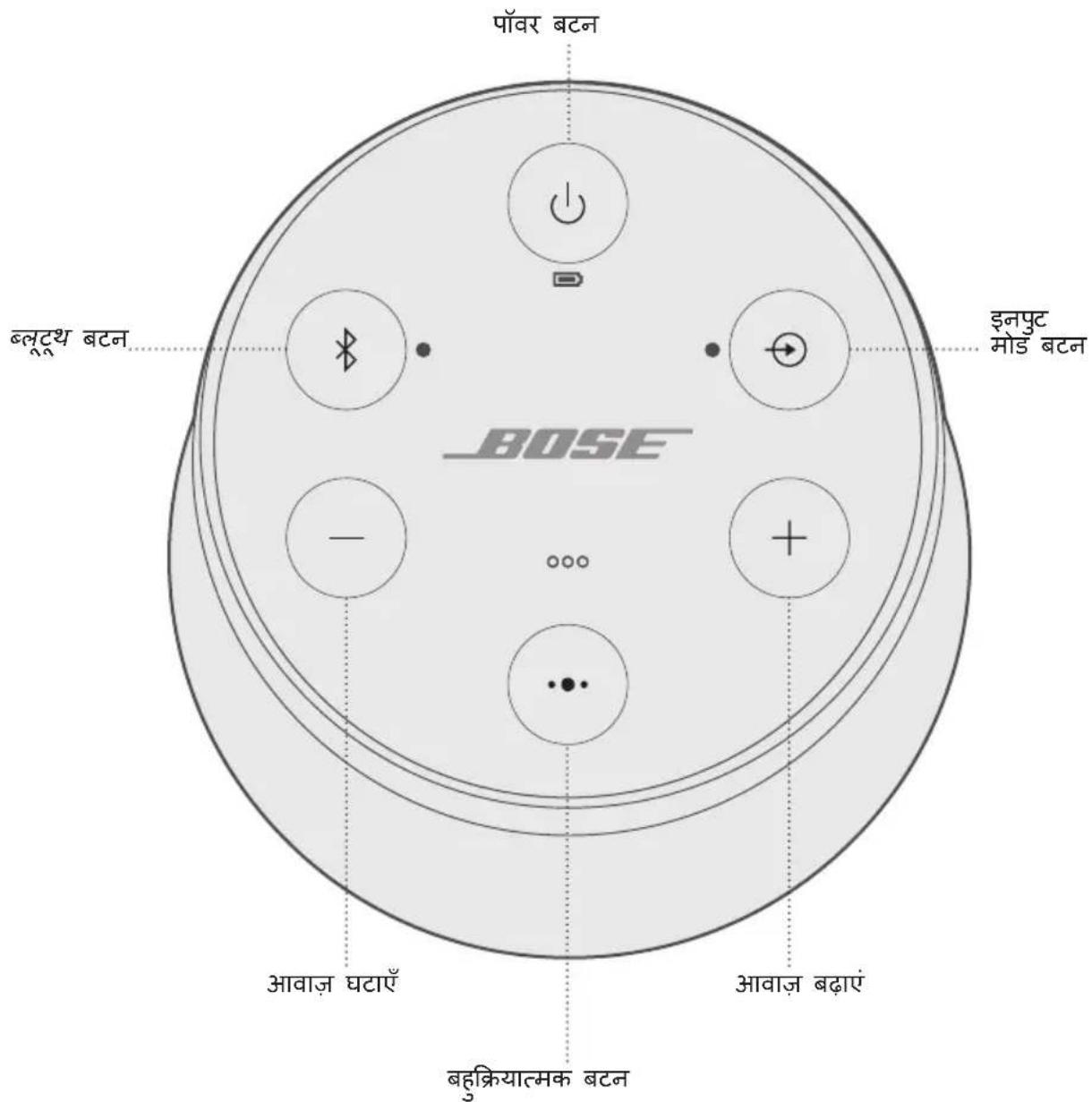
Buh-kraya 8eetn . . . 5015 t 5015 t 5015 t 5015 t 5015 t 5015 t 5015 t 5015 t 5015 t 5015 t 5015 t 5015 t 5015 t 5015 t 5015 t 5015 t 5015 t 50
MioiOyia PloeBok Aor VaiL
K kshan Kya a Kraa
K kshan Kya a Kharana
Kekshi Bhayka chayon
- 3
- 2.
Aep Eek Biep Eev “peyar ke 1e Teyar"
B
- Jzab tak Aap Pahelse Aap A bokkcp k e lie E dovin sanke te nohi stotet zab tak - 3aer
- 23
- Jzab 3Aap 3Apnni 3Apa 4aBimikelta kao su n e t o . . . ka dabakar 3Ame rRzj 3Aap 1ek biaep 1eV 一 < M aIul 3PkuRnK TnAM> sE KneokTcD" nHl Ssun
Vayahs PraCuts kof Agham K
- Aor + koe eak satah dabaa kare thamre raye Jzb tke Aap "vayas" Pnmpctus Aap" nhi sunnte
Not: vayas Pranmptu k o pun: sahakm kranne hut doharra
LUTTAYAAYARALI KAKANIK AHP KO MAOBAIDIL UPPKARUNA JOSAE RMMATOTPPOON, TEBALOT 3AOR K PATEUR SRTS MAGHOT LADAVAH KARANDELTALA H! KISsI UPPKARUNA SE SAGHOT LALAN SE PAHGLNE AHPKo AININIBAAVATYAT: USH UPPKARUNA KO AHPN EPMIOKRASE PEPYAR KARONA HOAGA
Jnot: Jabh Aap Pahelil bhar Aapnana rmpiokar chaluk kkrte, to NFC ke saaah Aapne n Mabai
- 34567890000000000000000000000000000000000000000000000000000000000000000000000000000000
e 1
- 3456789012345678901234567890123456789012345678901234567890123456789012345678901234567890123456789012345678901
Aapok aepokarup Aapoko poyarigk o kovdikar kkrn ehtu praekct kkr sakltla h
EeK 24R PpeyR Hto JAne K 3Aad, AAp 5g> ," s e knoekotie 3r 3t 3r 3r 3r 3r 3r 3r 3r 3r 3r 3r 3r
Eek Aotitirikel T MoeBaiel Upkarup K opeyur k
Rnepiokar ki peyayirigg saeyi me Aap Aat Peyar mabaiagl upkkarg aek k a sivit kkrakot
Keksi Eek rmpiokar P, 3 + koe Eek saaah dab
Padaeti Maody a Rrreiy o Moad k O
dotonai me s e efak kipokar prar nghn mse efak kaay
Leer: worldwide.Bose.com/Support/SLRii
SriMinit vare
Aapok k aepoikr eak simimil t vaarot ke Aotgol t h | sioimit vareet te vivraa k liep hmae neabasai global.Bose.com/warranty pR Jaa
Aapnne oLpnd k o pnnjiknt knrn eht, niree k c global.Bose.com/register prar jarei
Pajayan krrane ne m Aasaphalatn Aapok
taknike Jalnka
伊尼普瓦洛:5V
伊尔那夫·克雷特: 1.6A
Pahel e 2n Smaaagan o s Prayas
yadit 34
worldwide.Bose.com/contact
藥藻
AaHHe yCTPOBCTBO COOTBECTByeT OrpaHueHnM IO 3AekTpMaHHTHomy N3AYueHnIO npabua FCC n CTaHaapTOB ISED KaHAbI, yCTaHOBAAEHHbIM AAR Bcero HaceHn. AaHHe o6OpyOBAHne DOAXHO YCTaHaBAABaTbcra N cNoA3OBaTbCRA HA MInHMaaHOM paCtOAHN20 CM MeKdpyaNaTOPOM IN TEaOM POAB3OBATeA. AaHHbI PepeDaTHNK He DOxKeH yCTaHaBAAIBaTbCRA PAdOM NAn COBMeCTHO NCNOAB3OBAbCBRA MecTe C AIOBOI dpyoR aHTEHNO NAn PepeDaTCHKOM.
COOTBeTCTByET Tpe6OBaHnM IMDA.
CtahapT CAN ICES-3(B)/NMB-3(B)
Tpe6obHnA MaOMOuHbIX paAnOuaCTOTbIX yCTPOIcTB
CtaTbXII
B cootbETCBn C «Tpe6oBaHnMn AAN MaIOMOuHbIX paAnOuaCTOTbIX UcTPOINTB» KOMNaHnM, PpeApnTnM mN IIOa3OBaTeAam 3aPpeUaTcra N3MeHrTa ChTOy, YBeAunBaTb MOHOCb NepeDaTnKa MAn MeHrTa NCxOdHbIe XapaKTEpncTNKn pa3peuHbIX MaIOMOuHbIX paAnOuaCTOTbIX UcTPOINTB 6e3 pa3peuHnN NCC.
CTaTbXIV
MaOMOUsHbIe paAnOaCTOTHbIe yCtPOINCTBa He DOAnXHbI BANrTb Ha 6e30NaCHOCTb ABnAIOAETOB IAN CO3DaBaTb
POMExI AAR 3aKOHbIX CpeACTB CB3N; B CAYae O6HApXeHn IIOo6hBIX POMex IIOAB3OBATeAb DOAnKeH HEmdAeHHO
PiEePaITb EKCnAYatauHO. IOD BblweynomarHyTBIMn 3aKOHbIMn CpeCTBaMn CB3N IOHmAmOTc CpeCTBa
paAnOCBzR, EKcNAYATnpyemBIE B COOTBETCBn C AKTom 06 ObecneeyHn TeLekOMMyHnKaun.
MaAOMOHbIe paAnOaCToTHbIe yCTpOJIcTBA DOANKHbI 6bITb BOCIPINMmHBbl K NOMExaM OT 3aKOHbIX CpeACTB CBa3N IAN yCTpOJIcTB, IN3AYuAIOUx paAnOBaHbI ISM.
HE nbItaTecb N3BVeKaTa b IANTH-NOHbI aKKMyAIATOP I3 DaHHOrO yCTpoiCTBa. AAn N3BAeueHnAkkMyAIATopa 6paTntEc b K MeCTHOMy IpOaBuY Bose nn DpyROMy KBaANuINpOBaHNOMy CneuaNCTy.

YTHAN3HpyTe NcNOb3OBAHHbIe AKKyMyAaTOpbl HaAeKaUIM 06pa3OM, CO6AIOaJ MecThbIe HopmatNBhIe Tpe6oBaHn. He cKurat!
3TOT CMMBO O3Haayet, YTO yCTPOIcTB 3aIIpeUaETCy yTHAN3HIOBAtb C 6bITOBbIMN OTXoAMn, eRO HeOxOAnMo DOCTaBnTb B COOTBeTCTByIOUm C6OpOHyI PyHK T AIA nepepa60TK. HAdAeKaaJzA yTuIN3aun I nepepa60TKa NOMORAOT 3aUNITb PnPOADhIE pecypcbI, 3AOPOBBe AIODeI N OKpykaIOUcpeyD. AOIOAHNTaBHeI CBeDEHnO 6bYTHAN3aUIn I nepepa60Te DaHHORo yCTPOIcTBa MOxHO NOAUHTB M MeCTHO aAMMHNCtPaUn, cAyK6e yTHAN3aUIn IAN B MaRa3InE, rDe yCTPOIcTB 6bIAO pPiO6peTeHO.

AaIINBaeHnnaKkMyAToPtoHnAnHn-NOHHo6batapeu, YCTaHOBaeHHoB 3TOM yCTpOCTBE, CLeAyeT BcERda oBaatbcra K KBaAnPhuNPoBAHHOMy CneuaNCTy. AAnIOaUeHnAdoNoAHHTeABHO INHΦOpMaun ObaTntecb K MeCTHOMy pOaBBy Bose nAm cm. products.bose.com/static/compliance/index.html.

Aahnoe yctpoiCTBO corgaCHO Tpe6oBaHnM 3KoAoIHaZaun AnpeKTnBbI NO npOyKUn, CBzAHHO C 3Hepronotpe6aHnEM, 2009/125/EC COOTBeTCTByET CaeDyUoIm HOpMaH IAN DOkUmeHTAM: PeLaMeHT (EK) Homep 1275/2008 c nonpaBkAmn, BheceHHbIMN B COOTBeTCTBmC PeLaMeHTOM (EC) Homep 801/2013.
MmnpTeB Kntae: Bose Electronics (Shanghai) Company Limited, Part C, Plant 9, No. 353 North Riying Road, China (Shanghai) Pilot Free Trade Zone
MMnoptep B EC: Bose Products B.V., Gorslaan 60, 1441 RG Purmerend, The Netherlands
Mmnpotep B TaBHe: Bose Taiwan Branch, 9F-A1, No. 10, Section 3, Minsheng East Road, Taipei City 104, Homep TeAeOHa B TaBHe: +886-2-2514 7676
Hmnpotep B MeKcKe: Bose de Mexico, S. de R.L. de C.V., Paseo de las Palmas 405-204, Lomas de Chapultepec, 11000 Mexico, D.F. Homep TelefoHa: +5255 (5202) 3545
IaHTnФkaTOp CMIIT HaxoAnTcHa pe3uHOBOH OHXKe Ha HxKHe uactn npOdykTa.
HΦopMaζη no 6e3onachoctn

AaHHe yCTPOIcTBO MOKeT NOAyuTaB ABTOMaTIueCKne 06HOBAeHnnaCtEmbI 63OAnacHOCTOn OT Bose npi PNOKALOeHn K pNIAoXeHnIO Bose Connect. AAn NOyUeHnna 06HOBAeHn CnCTEmbI 63OAnacHOCTn Upe3 MoNAbHOe pNIAoXeHnne Heo6xOAnMo BblIOANHTb PPOeDpy HAcTPOIK NycTPOIcTBa B pNIAoXeHn Bose Connect. ECan npoeDpya HAcTPOIK NHe BblIOANHe, TO OTBEcTBeHHOCb 3a YCTaHOBky O6HOBAeHn CnCTEmbI 63OAnacHOCTn, PpeOCTaBAAReMbIX KOMNaHne Bose Ha caTe btu.Bose.com, Hecet POAb3OBaTEb.
Apple, Aorotn Apple, iPad, iPhone, iPod n Siri rBAAOTc TOBAPbIMn 3HaKAMn Apple Inc., 3aperncptpOBAHHbIMn B CUSA n dpynx cTpaHax. App Store rBAAETc 3HaKOM o6cayxmbAHnAe Apple Inc. TobapbIy 3hak iPhone nCnoab3yeTcR no AnueH3nn Aiphone K.K.
CIOBecHbI 3HaK BToothoN I AOOTnblbY ABIAOTc 3apeNCTpnpOBaHHbIMTOBapHbIMN 3HaKaMNI, PnHaADeXaUmm KOMNaHNN Bluetooth S1G, Inc., n cnoAob3yIOCTc Kopnpaunei Bose no AnueH3nn.
Google n Google Play rBAAOTc TOBapHbIMn 3HaKaAMn Google LLC.
MeTka «N» RAABETcTOBapHbIM 3HaKOM NAN 3apeRnCTpnpoBaHHbIM TOBapHbIM 3HaKOM KOMNaHm NFC Forum, Inc., B CUSA IN pyrnx ctpaHax.
Bose, Bose Home Speaker, Bose Music, Bose Portable Home Speaker, Bose Portable Smart Speaker, Bose Smart Soundbar, Bose Smart Speaker, Bose Soundbar, SimpleSync, SoundLink and SoundLink Revolveяваяются Товарнызнakами корпорачи Bose.
山Ta6-KbapTnpa Kopnpaunn Bose:1-877-230-5639
Bose Corporation, 2020. 3anpeuaetc BOCPON3BOADnTb, IN3MeHrTB NAn pacnpocpAraTb AIO6bIe aactN 3Toi pa60tbi 6e3 npeBapnteAho HOro nCbMeHHoro pa3peuHnIa.
KOMNAEKT NOCTABKN
CoepkaHne 10
YCTAHOBKA ПИΝΑΟχΕΝΗ ΜΒΟSE CONNECT
3a rgy3ka npnloxkeHna Bose Connect 11
PA3MELUHNE ANHAMKA
Hnctpykun no pa3MeuneHHIO 12
ПИТАНЕ
IopKluOHTe K nCTouHnky nITaHna 13
BkIoueHne/BbIKIoueHne NITaHHaMnKa 13
PexkIM 3aunTbI aKKyMaTopa. 14
ABTOOTKIAOueHne. 14
OTMeHa yHKun aBToMaTnueckoro OTKauyeHna 14
3AEMEHTbI YNPABAEHnAINHAMnKA
Bocnpon3BeDeHHe HocHTeIeN yypabAeHne rpoMkoctbIO 16
TeaeohHbIe Bbl3OBbl 17
OCTyn K roLoOCOBMy ynpaBHeHIO 17
TolocobIe npedynpeKdEHH 17
TGAOCOBbie NOACKA3KN
IpeBapnteAho yCTaHOBaeHHbIe a3bIKN 18
BbI6op Ra3bika 18
CmeHa 3bika 18
OTKIOUeHHe rOIOCOBbIX NOAcka3OK 18
BLUETOOTH-NOADKAIOUOHEHNA
BbI6op MeToDa coPraJKeHn. 19
CopjxHHe Mo6nBHO yCTpoiCTBa. 20
CopjxHHe MoBnAbHoro yCTpoiCtBa c NOMoUbNFC 21
CopjxHHe cdoonAnHTeAbHbIM Mo6nAbHbIM ycTpoIcTBOM 22
OTKIAUeHHe ycTpoiCtBa. 22
IobtopHoe noDKKluOeHne ycTpoiCtBa 22
HECKOaBKO BLUETOOTH-NOADKAIOUeyHn
OnpeaeneHne noKaueHHbIX Mo6nAbhix ycTpoiCTB. 23
IpekeAIOueHne MeKdY ABMy NOAKIAOyeHHbIM yCTpoiCTBaMn. 23
IopKluoyehne pahee copjxKeHHoro yctpoiCTBa 23
OuncTka cnpcka copjxkeHn DaHaMnKa 23
IcnoB3OBaHne npAnOxKeHna Bose Connect 23
ПОНБАньIE ПОДКАIOUЧЕНЯ
IopKluoyeHne cTepeoka6a 3,5 MM 24
Poiokluoyene Ka6eJy USB 24
COCTOHHNE ANHAMKKA
CocToHnE aKKymyTopa 26
CocToHnE coeAnHeHnEBluetooth 26
CocToHHne BxoDa 26
COINPRJXEHNE YCTPOICTBAMN BOSE
BbI6op MeToDa coPraJKeHn. 27
Coprajxene C npymn DnHaMKom Bose SoundLink c noaepkKoJ Bluetooth 27
CoprajkeHne AnHaMkoB C nCnoAboHaHne m npNIOxKeHnBose Connect (peKoMeHdyeTc) 27
CoprajkeHne AnHaMnKOB BpyHyu 28
IpeekJIoueHne MeJx dy peXmOM BeuepHKn i CteopepeXmOM ... 29
OTKAnoueHne peXnMa BeueepnHKn nAn cTepeopeXnMa. 29
CopjKeHne c dHaMkoB Bose Smart Speaker nAn 3ByKOBoi NaHeAbyo 30
COBmecTnMbIe npOdyKtbl 30
CoprajkeHne c nOmoUb npnAoKeHna Bose Music 30
Повторhoe NOДКЮчЕпк ДИнамиky Bose Smart Speaker ИAN 3BykoBoI NaHeAn. 31
OBCAUYKINBAHNEI YXOa
OuIncTka dHaMnKa 32
3aMeHa DeTaIeN aKceccyapOB 32
OrpaHnueHHa rapaHTna 32
Texnueckne cBeDeHna 32
ПОИСК И YYSTPAHEHNE HENCINPABHOCTEД
Ipeuehpehen Hau6oee pacnpocTpaHbIX npo6aem. 33
Apyrhe peuhenia 33
C6poc HacTpoek AnHaMnKa 35
COAEPXAHNE
Y6eAnTEcB HaHnHn CaeDyUxKOMNoHEtOB.
AnHaMnK SoundLink Revolve II Bluetooth
Ka6eAb USB
ПРИМЕЧАН.В сауае поврждени Кakoro-лбОКOMпонERTа ИдeэнЯ He
ИсноьзуиTe erO.ОьразиТecь K abTOpиЗOBaHHOMу ДИаур Bose ИAN
ПОЗBOHInTe B сayк6у NO pa6OTe c KAneHTamKOMпани Bose.
Посетиев-сай: worldwide.Bose.com/Support/SLRii
PpnaOxkeHne Bose Connect no3BOaTe HacTpaNBaTb AnHaMn K ynpaBArTb m C Mo6nAbHO rO yCTpoiCTBa, HapnMepe Co cMaprTOHa IAn PAAHseTa.
C NOMOUIIIOIINAOJKeHnMOXHO ynpaBArTB NOKAIoueHnMaN Bluteoth, BbIbpaTb 3bIK TLOACOBIX IOCKa3OK, ynpaBArTB HAcTPOiKaMn DInHaMkA, a TaKKe IOnyUaTb HOBbie YHKcUN.
Hdukatop aKKMyAToPa Mmraet XeATbIM, a HAMNK 3daeT 3ByK.
Pn noAHOCTbIO 3apXKeHHOM aKKMyATope INaIKaTOp 一 RopNT 3eAeHbIM.
BKAIOUeyHNE/BbIKAOUeyHNE INTAHNAnHAMnKA
Ha KhoNoUHOI naHeIa HaxMnte KhoNkY nITaHn
- Пи повом вкалочендунамнka унадикатор Bluetooth gropит сним, и 3Вучт Галобoe yka3aHne Bbl6paTbя3bIK (CM.стp.18).
- ECAN Bby Jyke BKAIOUaAN DnHaMnK I NOdKAIOUaAN K MObNAbHOMy yCTpoiCTBy, INDAkATop Bluetooth 3amiraet 6eAblm N BblnoAHIT COpRAKeHne C DByMa PIocAEHNMI NOdKAIOUaBUNMNCRA MObNAbHbIMN yCTpoiCTBaMn. Pa3daeTcra coo6uHHe «AkkymayTop 3apJxeh Ha npoceHToB. Connected to > (Hn3Kn/CpeADn/HbICOKn 3apJa, AKKymayTopa. POnKaIOUeHO K ). INDAkATop Bluetooth 3arOpNTcra 6eAblm UBeTom.
PEKIM 3AUHTbI AKKYMAYTOPA
EcaHAMK OK KIOUeH OT NITAHN I He NCNOb3yeTc 6Oaee Tpex dHei, Pn3TOM 3apraAkkymyAToPA Mehee 10 npoceHTOB, BKAIOuayaeTcpeKIM 3aunTbI AKKymyAToPA DAA COXpaHeHna erO 3apra. UTo6bl NOBTOpHO BKAIOuHTb DAHAMK, POCoEDHNTE erO K NITaHIO OT CeTI NepemHHoro TOKa.
Korda DNHaMnK He nCNoB3yeTcR, XpaHNTe eRO B npoxaDHOM MeCTe.
BHIMAHHE. He xpaHnTe B TeueHne dAnTeAbHO BpeMeHN dHaMnK POANOCbIO 3apJxKeHHbIM IAN B COCTOHN, KOJa INdNKaTOP aKKyMyAToPa MInraet KpacHbIM.
ABTOOTKAIOUQEHNE
AnHaMnK OTKIAOyAeTcayepe3 20 MNHyT 6e3deICTBna (Yepe3 AnHaMnK He BOCPpON3BOaNTcra BYK) ppi nCPOAb3OBaHnn CaeDyIOxN POAKIOueHn NICTOuHKnOB PNTAHN:
- Поdkлоченue AUX BO Врем петаня OT akkymaTopa nAN CETN nepemehHoro Toka.
- Поdkалочиь Bluetooth BO BpeM nTahnO t akymyAToPa.
OTMeHaΦyHKcHn aBTOMaTHueCKOTo OTKIAUoyehna
- Haxmnte oJHOBpeMeHNO u ydepxnBaIte KhoNky + n KhoNky peKIma BXOda Ipo3ByuNT coo6ueHne «Auto-off disabled» (ABTOOTKluOeHne OTKluOyeHo).
- NOBTOPHe, UTo6bI CHOba BkAIOUHTb FyHKcNIO aBtOMaTnueCKOro OTKIAUOeHnra.
C NOMOUIKHOKNOHIOHMOXHO BKAIOaTb DINHAMIK UYPABARbBOCPON3BeDeHNEM, yPOBHe rPOMKOCTN I rPOMKOB CB83bU.
ПРИМЕЧАН.на HeKOTOpbIX MO6nAusbHbIX yCTpoiCTBax 3Tи ФункUn MOryT He NOAdepeKINBaTbcr.
C NOMOJIIO 3TOI KHOJIKI OCUJcTBAeTcYnpaBaeHne ICTOuHNKaMn My3bIKN BbI3OBAMn Ha «rPOMKoI» CBr3N Ha MObuaHOM yCTpOiCTBe C dINHaMnKa.
BOCPON3BEAEHNE HOCNTEEN YN PABAEHNE POMKOCTbIO
ФУнкцЯ PELSEHNE
COPRJXEHNE MOBnAbHOYCTPOIcTBA
COINPRAJXEHNE MOBnAbHOYCTPOIcTBA C NOMOUsbIO NFC
OuNCTKA CnNCKA COINPRAJXEHNr ANHAMKAK
- Haxmnte n ydepnBaiTe KhoNky B TeueHne 10 ceKyHa, Noka He ycAblnte coo6uHne «Bluetooth device list cleared. Ready to pair>. (Cnncok ycToPoiCTB Bluetooth ouHsien. IOTOBHocbK coppJKeHIO.)
Bce yctpoiCTBa 6ydyT ydaaleHbl, a dHaMK - rOTOB K cOpjxehIO C HOBbIM yctpoiCTBOM.
- YdaNTe dHAmNK n3 cnNcKa Bluetooth Ha BaWeM yCTpOYCTBe.
NCIOAb3OBAHNE PnAOXEHNBOSE CONNECT
C nOMOuIIO npIAoXeHnBose Connect moKHO aeKo ynpaBArTb HeCKoAkBIMN IOkAUOueHHbIMN yCTPOINCTBaMn (cm. cTp. 11).
HaBepxHei PaHei dHAmKa IMeTcra PAd HAnKaTopoB, KOToPbIe 3aRopaOTcB 3aBnCmOCTN OT COCTOHH CnCTEmbl.
COCTOHHE AKKYMAYA TOPA
Ioka3bIbAeT yPOBeHb 3apra aKKyMaJrTopa. KaXdbi pa3 npn BkAUoyehn dINHaMnKa INdNkaTOp aKKMyAToPa B TeueHne DByx CekyHd Ioka3bIAeT yPOBeHb 3apra aKKyMaJrTopa, a TaKxe 3ByuHT rOLOcoBaar NODCKa3Ka, INΦopMnpyUoJaa o6 yPOBHe 3apra aKKyMaJrTopa.
YTo6bl npOBepntb ypoBeHb 3apra aKKyMaTopa,HaXMMte n ydepxnBaIte KhoNky NITaHnB B TeueHne Tpex ceKyHd, KOHTPOAnpyu INAnKaTOp
ПРИМЕЧАН. Времаразы akKуMaTopa 3aBnCt OT BOCnpOu3BOaMOro KOHTeHTa И урOBня ГомКоCTи пи BOCnpOu3BeDeHn. Пп OБчHom ИсpoIb3OBAHnAkKуMaTop aKyCTnueCKoN CnCTeMbI pa60Taetdo13YacOB.
COCTOHRNE HANKATOPOB COCTOHRNE CNTTEMbl
ANHAMK METOAD CONPAXEHN
COINPRAXHEHNCAPYUM ANHAMKOM BOSESOUNDLINK C NOADEPKOIBLUETOOTH
Moxho BbIOAHNtB cOpJKeHne AnHaMnKOB Bose SoundLink Bluetooth ABOcnpOn3BeDeHn 3Byka B CLeAduuux peKImax, nCnoAbyr npIaoKeHne Bose Connect (peKOMeHApYeTc) nAn KHOKN ynpaBHeHn AnHaMnKOB:
- Pexim BueepnHKN (npaBbI N AeBbI dHAmNKc cHxPOHHO)
- Ctepeopexkm (npaBbI N Aebbl AnHaMkn OTeAbo)
CoprajxheNne AnHaMnKOB BpyHyIO
Ecan He ydaetc oTkpblb npnloKeHne Bose Connect, BblnoHnte cAeDyUOuNe HnCTpyKcun.
Pexm BeepnHKN
- Y6eAnTeEcB TOM, yTO o6a AnHaMnKa BkAIOueHbl.
- Y6eAnTeCb B TOM, UTO AnHaMnK NODKIAOye K MoBnAbHOMy yCTpOYCTBY.
- Ha dHamaKe, NOdKaIOueHHOM K yCTpoiCTBy, HaxMMTe N yApKINBaIte KHOJKy Bluetooth 品 n+OdHOBpeMeHHo.
- OTnyctnte KhoNk, KoIa yCbIuTe coo6uHne «Press the Bluetooth and volume down buttons simultaneously on a second Bose device» (HaXmTe oHOBpeMeHNO KhoNky Bluetooth n KhoNk yMeHbUeHn rPOMKocTn Ha BToPOM yCTpOiCTBe Bose).
- Ha pyrom AnHaMnke HaxmTe n yApexKnBaTKe KhoNky 日 OHOBpeMeHHO.
- OTnyCTnte KhoNKn, KOrDa npO3ByuHT 3ByKOBoi CnHaAn DnHaMnKa.
Yepe3 10 cekyHd n3 o6oHX dHaMnKOB OaHOBpeMeHHO npo3ByuHT COo6ueHne «Party mode» (Pexim BeeepnKn). Pexim BeeepnKn 6ydt BkAouen. Teepb MOxHObCpON3BOAnTb 3ByK C NOMOUsbIO BaIeRo yCTpoiCTBa OaHOBpeMeHHO n3 AByX dHaMnKOB.
- ANI ONTUMaHOrO KaueCTBa 3ByaHn paCNOAOXnTe DnHaMnKn:
B ODHON KOMHaTe HAn Ha ODHOM yAcTKe BHe NOMEUeHn;
- yctpaHnTe BCE npenrTCTBm MeKdY HmN.
ПРИМЕУAHNE. Каессво 3Вучаня может pa3AnuЧьсь B 3aBnCIMOCTN OT MOБиьHorO yCTpoIcTBa,pacSTOrHnI ΦaKTOpOB OKpyжкюшe n CpeДbl.
CTepeopexm
- HactpoTe dHnAmNKI dApeKIMa BeepuHKn (cM. cTp. 28).
- HaДиНамиke HaxмпTe KhoNky Bluetooth * n + oДоврemeHNo.
- OTnyctnte KhoNk, Korda npo3ByuHt coo6ueHne «Stereo mode» (CtepeopeKm). N3 Aeboro dInhamika npo3ByuHt «Left» (Aebu), a n3 npaBoro - «Right» (PpaBbI).
Ctepeopejkm 6ydt BkAIOueH. Teepb MOxHO BOCPON3BOaNTb 3ByK C NOMOuB BaUero MObNAbHO yCTPOINCTBa.
- AnonTmAmbHoroKaueCTBa3ByaHnpaacnooXKeDHaMnK:
B ODHON KOMHaTe HAn Ha ODHOM yAcTke BHe NOMEuEHHa;
Ha pacctoHn 3 M dpyr ot dpyra 6e3 npenrTCTBm MeKdy HnMn;
- Ha OДинанкOBOM paCCTOЯHn OT yCTpoIcTbA.
IPIMMEUAHNE. KaueCTBO 3ByaHnMAoKeT pa3AnuTaBcra B 3aBNCUMOCTN OT MO6nAbHO rO yCTpOInCTBa, pAcCToHnI n oAkTopOB OKpyKaIOUeN CpeDbI.
IpekeIooueHne MeKd y peXHMOM BeuepHHKn I cTepeopeXHMOM
HaIHO6OM AnHAMnke Haxmnte KhoNky N + OdHOBpeMeHHO.
OTKIAUOyeHne peXkMa BeuepNHKn NAn CTepeOpexkMa
BbINOANTe OAnO n3 CKeDyUoIux DeiCTBn Ha IIO6OM n3 DAHAMKOB:
- Haxmte u yepxnbate KhoNky , noka he ycblnte coo6ueHne «Bose speakers unlinked» (AnHaMnKn Bose oTKaIoueHbI).
HaXMMTe OAnOBpeMeHNO uYdePKNBaIe MHOroOyHKUHOHaAHyO KHOKky IN KHOkky ^+ ,noka He npo3ByuT coo6ueHne «Bose speakers unlinked» (CopraJxHeN AnHaMkoB Bose otMeHeno).
- HaKMTe KhoNky NtHaHnY U, YTO6bI BbIKAOHTb AnHaMnK.
COPRJXEHNE C AnHAMKOM BOSE SMART SPEAKER HAN 3BYKOBOI PAHEAbIO
C nOMOJIbTO texHOIoRnBose SimpleSyncTM MoXHo BbIIOAHHTb COpRAKeHne dINHAMka SoundLink Revolve II c dINAMIKoM Bose Smart Speaker nn 3ByKOBoi naHeIbHO Bose Smart, uTo6bl cAuwaTb OAnHy neCHIO B dBvX KOMHaTax OAnHOBpeMeHHO.
ПРИМЕЧАН. ТхногSimpleSync™ pa6otaetВ paAnyce DeiCTBnB Bluetooth 9M.CTeHbI n CTponTeAhbIe MaTepHaIbI MOrYT BANrTb Ha KaueCTBO npHeMa.
COBmecTnMbIe npoAykTbI
(FCC)ylll (1):i#i#j# j#j#j#j#j#j#j#j#j#j#j#j#j#j#j#j#j#j#j#j#j#j#j#j#j#j#j#j#j#j#j#j#j#j#j#j#j#j#j#j#j#
y 1 20 20 20 20 20
.(IMDA) 1
CANICES-3(B)/NMB-3(B)
aaiiaiaiaiaiaiaiaiaiaiaiaiaiaiaiaiaiaiaiaiaiaiaiaiaiaiaiaiaiaiaiaiaiaiaiaiaiaiaiaiaiaiaiaiaiaiaiaiaiaiaiaiaiaiaiaiaiaiaiaiaiaiaiaiaiaia
yie ailil oalil
a a a a a a a a a a a a a a a a a a a a a a a a a a a a a a a a a a a a a a a a a a a a a a a a a a a a a a a
a
()aagaiil 10g jaiy y gaii blln aie iiaaiiaiaiaiaiaiaiaiaiaiaiaiaiaiaiaiaiaiaiaiaiaiaiaiaiaiaiaiaiaiaiaiaiaiaiaiaiaiaiaiaiaiaiaiaiaiaiaiaiaiaiaiaiaiaiaiaiaiaiaiaiaiaiaiaia
aJglal a jgj gaiil 1y 10 Jlall a jge ai baiiaiaia i sluill cll lglal j s gall n
aalaaal lalalal alalal alalal alalal alalal alalal alalal alalal alalal

海電池回收
y 1

(2009/125/EC 4aBbIaIaIaIaIaIaIaIaIaIaIaIaIaIaIaIaIaIaIaIaIaIaIaIaIaIaIaIaIaIaIaIaIaIaIaIaIaIaIaIaIaIaIaIaIaIaIaIaIaIaI a
| الإستعمال الحرفية | الإستعمال الحرفية | |
| الإستعمال الحرفية | |
| Bluetooth® ≤ 2.0 | 上限 0.5 ≥ 10 | الإستعمال الحرفية محيى并与 محيى بعس.
الإستعمال الحرفية 50/ال ADS 230 | |
| ≥ 5≥ | ≥ 20≥ | الإستعمال الحرفية محيى并与 محيى بعس.
الإستnzر الحرفية 50/ال ADS 230 | |
| ≥ | 上限 2.0 | الإستnzر الحرفية محيى并与 محيى بعس.
الإستnzر الحرفية 50/ال ADS 230 | |
| Bluetooth® ≤ 2.0 | 上限 2.0 | Bluetooth®
Bluetooth
Bluetooth
Bluetooth
Bluetooth
Bluetooth
Bluetooth
Bluetooth
Bluetooth
Bluetooth
Bluetooth
Bluetooth
Bluetooth
Bluetooth
Bluetooth
Bluetooth
Bluetooth
Bluetooth
Bluetooth
Bluetooth
Bluetooth
Bluetooth
Bluetooth
Bluetooth
Bluetooth
Bluetooth
Bluetooth
Bluetooth
Bluetooth
Bluetooth
Bluetooth
Bluetooth
Bluetooth
Bluetooth
Bluetooth
Bluetooth
Bluetooth
Bluetooth
Bluetooth
Bluetooth
Bluetooth
Bluetooth
Bluetooth
Bluetooth
Bluetooth
Bluetooth
Bluetooth
Bluetooth
Bluetooth
Bluetooth
Bluetooth
蓝牙
Bluetooth
蓝牙
Bluetooth
蓝牙
Bluetooth
蓝牙
Bluetooth
蓝牙
Bluetooth
蓝牙
Bluetooth
蓝牙
Bluetooth
蓝牙
Bluetooth
蓝牙
Bluetooth
蓝牙
Bluetooth
蓝牙
Bluetooth
蓝牙
Bluetooth
蓝牙
Bluetooth
蓝牙
Bluetooth
蓝牙
Bluetooth
蓝牙
Bluetooth
蓝牙
Bluetooth
蓝牙
Bluetooth
蓝牙
Bluetooth
蓝牙
Bluetooth
蓝牙
Bluetooth
蓝牙
Bluetooth
蓝牙
Bluetooth
蓝牙
Bluetooth
蓝牙
Bluetooth
Bluetooth
蓝牙
Bluetooth
蓝牙
Bluetooth
蓝牙
Bluetooth
蓝牙
Bluetooth
蓝牙
Bluetooth
蓝牙
Bluetooth
蓝牙
Bluetooth
蓝牙
Bluetooth
蓝牙
Bluetooth
蓝牙
Bluetooth
蓝牙
Bluetooth
蓝牙
Bluetooth
蓝牙
Bluetooth
蓝牙
Bluetooth
蓝牙
Bluetooth
蓝牙
Bluetooth
蓝牙
Bluetooth
蓝牙
Bluetooth
蓝牙
Bluetooth
蓝牙
Bluetooth
蓝牙
Bluetooth
蓝牙
Bluetooth
蓝牙
Bluetooth
蓝牙
蓝牙
Bluetooth
蓝牙
Bluetooth
蓝牙
Bluetooth
蓝牙
Bluetooth
蓝牙
Bluetooth
蓝牙
Bluetooth
蓝牙
Bluetooth
蓝牙
Bluetooth
蓝牙
Bluetooth
蓝牙
Bluetooth
蓝牙
Bluetooth
蓝牙
Bluetooth
蓝牙
Bluetooth
蓝牙
Bluetooth
蓝牙
Bluetooth
蓝牙
Bluetooth
蓝牙
Bluetooth
蓝牙
Bluetooth
蓝牙
Bluetooth
蓝牙
Bluetooth
蓝牙
Bluetooth
蓝牙
Bluetooth
蓝牙
Bluetooth
蓝牙
Bluetooth
蓝牙
蓝牙
蓝牙
Bluetooth
蓝牙
Bluetooth
蓝牙
Bluetooth
蓝牙
Bluetooth
蓝牙
Bluetooth
蓝牙
Bluetooth
蓝牙
Bluetooth
蓝牙
Bluetooth
蓝牙
Bluetooth
蓝牙
Bluetooth
蓝牙
Bluetooth
蓝牙
Bluetooth
蓝牙
Bluetooth
蓝牙
Bluetooth
蓝牙
Bluetooth
蓝牙
Bluetooth
蓝牙
Bluetooth
蓝牙
Bluetooth
蓝牙
Bluetooth
蓝牙
Bluetooth
蓝牙
Bluetooth
蓝牙
Bluetooth
蓝牙
Bluetooth
蓝牙
Bluetooth
Bluetooth
Bluetooth
Bluetooth
Bluetooth
Bluetooth
Bluetooth
Bluetooth
Bluetooth
Bluetooth
Bluetooth
Bluetooth
Bluetooth
Bluetooth
Bluetooth
Bluetooth
Bluetooth
Bluetooth
Bluetooth
Bluetooth
Bluetooth
Bluetooth
Bluetooth
Bluetooth
Bluetooth
Bluetooth
Bluetooth
Bluetooth
Bluetooth
Bluetooth
Bluetooth
Bluetooth
Bluetooth
Bluetooth
Bluetooth
Bluetooth
Bluetooth
Bluetooth
Bluetooth
Bluetooth
Bluetooth
Bluetooth
Bluetooth
Bluetooth
Bluetooth
Bluetooth
Bluetooth
Bluetooth
Bluetooth
Bluetooth
Bluetooth
Bluetooth
Bluetooth
Bluetooth
Bluetooth
Bluetooth
Bluetooth
Bluetooth
Bluetooth
Bluetooth
Bluetooth
Bluetooth
Bluetooth
Bluetooth
Bluetooth
Bluetooth
Bluetooth
Bluetooth
Bluetooth
Bluetooth
Bluetooth
Bluetooth
Bluetooth
Bluetooth
Bluetooth
Bluetooth
Bluetooth
Bluetooth
Bluetooth
Bluetooth
Bluetooth
Bluetooth
Bluetooth
Bluetooth
Bluetooth
Bluetooth
Bluetooth
Bluetooth
Bluetooth
Bluetooth
Bluetooth
Bluetooth
Bluetooth
Bluetooth
Bluetooth
Bluetooth
Bluetooth
Bluetooth
Bluetooth
Ethernet
Ethernet
Ethernet
Ethernet
Ethernet
Ethernet
Ethernet
Ethernet
Ethernet
Ethernet
Ethernet
Ethernet
Ethernet
Ethernet
Ethernet
Ethernet
Ethernet
Ethernet
Ethernet
Ethernet
Ethernet
Ethernet
Ethernet
Ethernet
Ethernet
Ethernet
Ethernet
Ethernet
Ethernet
Ethernet
Ethernet
Ethernet
Ethernet
Ethernet
Ethernet
Ethernet
Ethernet
Ethernet
Ethernet
Ethernet
Ethernet
Ethernet
Ethernet
Ethernet
Ethernet
Ethernet
Ethernet
Ethernet
Ethernet
Ethernet
Ethernet
Ethernet
Ethernet
Ethernet
Ethernet
Ethernet
Ethernet
Ethernet
Ethernet
Ethernet
Ethernet
Ethernet
Ethernet
Ethernet
Ethernet
Ethernet
Ethernet
Ethernet
Ethernet
Ethernet
Ethernet
Ethernet
Ethernet
Ethernet
Ethernet
Ethernet
Ethernet
Ethernet
Ethernet
Ethernet
Ethernet
Ethernet
Ethernet
Ethernet
Ethernet
Ethernet
Ethernet
Ethernet
Ethernet
Ethernet
Ethernet
Ethernet
Ethernet
Ethernet
Ethernet
Ethernet
Ethernet
Ethernet
Ethernet
Ethernet
ETHNICITY | |
:g
2483.5 2400 :
aalll aellal aeall 20 jolj
SAR gill salia Jaa Jai jai laa aai bll dall Jai aal lall
Jgall
Apple Inc. Siri, iPod, iPhone, iPad Apple "iPhone" App Store
Aiphone K.K 45
Bluetooth SIG, Inc.
Bose Corporation
Google LLC
NFC Forum, Inc.
Bose, Bose Portable Home Speaker, Bose Music, Bose Home Speaker, Bose
- Bose Soundbar, - Bose Smart Speaker, - Bose Smart Soundbar, - Portable Smart Speaker
. Bose 4kSoundLink Revolve,SoundLink,SimpleSync,
1-877-230-5639:Bose 4
aclal l 100gall 100gall 100gall 100gall 100gall 100gall
Jgai jn Jn Jn Jn Jn Jn Jn Jn Jn Jn Jn Jn Jn Jn Jn Jn Jn Jn Jn Jn Jn Jn Jn Jn Jn Jn Jn Jn Jn Jn Jn Jn Jn Jn Jn Jn Jn Jn Jn Jn Jn Jn Jn Jn
aagai
.18 aalg jaiiaaii (a) (a)
.
a aaii
a 111 1
4yjg 1
aagjj 1
i
alilal llll alla Jds yraill + -ge bial .1
.2
. (工 j) ^ Ready to pair."
aii
aaiia aieiie 1
1
aliall llll aill jyraill + -ie bial 2
4 3
Jsuaiy1
aigaii iilbai jia
"aiyjwlll llllal 100000000000000000000000000000000000000000000000
y j 1000
a 111 111 111 111 111 111 111 111 111 111 111 111 111 111 111 111 1
aaiiaai jai bai jai
.(NFC)
(11) Bose Connect
(NFC)
Jn Jn Jn Jn Jn Jn Jn Jn Jn Jn Jn Jn Jn Jn Jn Jn Jn Jn Jn Jn Jn Jn Jn Jn Jn Jn Jn Jn Jn Jn Jn Jn Jn Jn Jn Jn Jn Jn Jn Jn Jn Jn Jn Jn Jn Jn Jn Jn Jn Jn Jn
ab = 22 4.5
NFC
NFC 1
NFC,Bluetooth
J 1
aagaaalabill. aclll jyglall jjll jgNFC mlaabai 2 .Bose Jaaia
J 1
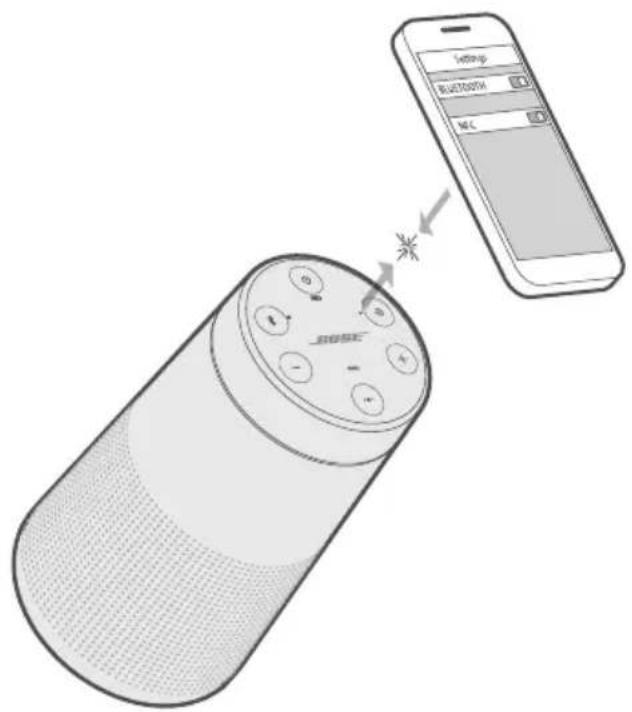
Bnblueoth 1
a! jgaa jzj
aclawlll aalalil jyaiiai gai yjao aai i jg jai lla
Bluetooth 青 Bluetooth 青 RjZrJrRzal 青 g (R) aclllb jg jg jg jg jg jg jg jg jg jg jg jg jg jg jg jg jg jg jg jg jg jg jg jg jg jg jg jg jg jg jg jg jg jg jg jg jg jg jg jg
(20 4.15
.21NFC
jg
.
NFC 15000000000000000000000000000000000000000000
. Bose Jauia aiaa aiai iiaai iiaai jao bui
jg juaa 1
LgJuaJI p jj JuaIy IaI y
:a 1
NFC 15 NFC 15
. Bose jai aibio ayiinall abill
Ji jie kai ciie laow aaiall i jyai aiia gai jiaia algao zjaiai li Jau la jia jia di kai
aoli aillalai aaii ci gai jgao jj
:abla. 0oJ
aaii jgaaai jzj
iiaiaiaiae jiej eaw iawl Bluetooth 8 jie bai
山
1.
2.
a aai jj
1.
L 2
3.
Jaiy jie j 1
4.
a
8 jiejiai 10 1 .
j 1 j 1 j 1 j 1 j 1 j 1 j 1 j 1 j 1 j 1 j 1 j 1 j 1 j 1 j 1 j 1 j 1 j 1 j 1 j 1 j 1 j 1 j 1 j 1 j 1 j 1 j 1 j 1 j 1 j 1 j 1 j 1 j 1 j 1 j
Jj j 2
BOSE CONNECT
.(11) Bose Connect
Bai jia Ii Jn jin gil aclawgol Bose aclawbclawj 4a
J 1
aeeaae
| "Böse SoundLink Bluetooth" | Rajal
العربية
العربية |
| "Bose SoundLink Bluetooth" | Soundbar
Bose Smart Speaker |
| "Soundbar
J Bose Smart Speaker | Soundbar
J Bose Smart Speaker |
BOSE SOUNDLINK BLUETOOTH
Bose i aiee
()
()
Aoc
J 1000000000000000000000000000000000000000000000000
(4) Bose Connect
.Bose Connect
Lg
Bose Connect
J 1
- 2.
Ae+JgJgJgJgJgJgJgJgJgJgJgJgJgJgJgJgJgJgJgJgJgJgJgJgJgJgJgJgJgJgJgJgJgJgJgJgJgJgJgJgJgJgJgJgJgJgJgJgJgJgJ
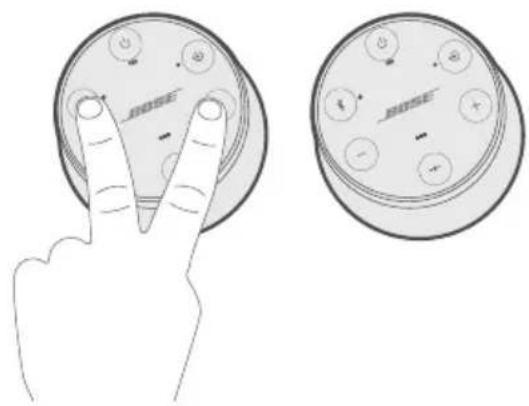
4
Ae 5
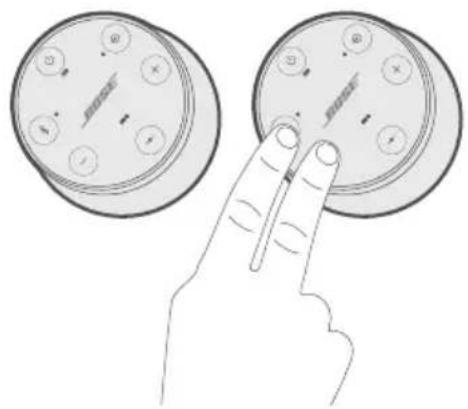
6. iL
10
J 1
.
a
logi jg 1
jglgall jglal 1cclly aliy d:alldal Jol gell
.(28)
.2
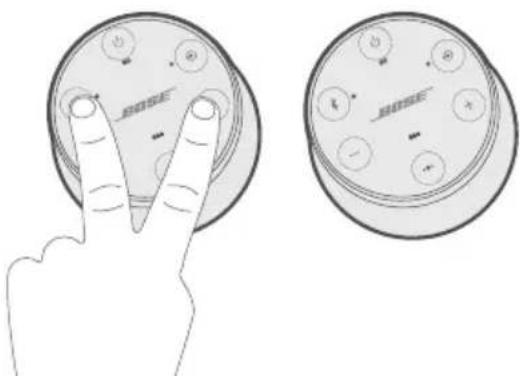
"Jy"g yll acll j "Jy" aik gaiu .yj yj 3.
4
1
·gall
a
j0000000000000000000000000000000000000
y
Aaai ci 10g + jy8 yj glal juiell
y
:Laio aclaw gie ylll lal jai
"Bose
Bose 1
aclawl jaiy y 1 aill jie bial
SOUNDBAR BOSE SMART SPEAKER
SoundLink Revolve II aclaw J Bose SimpleSyncTM aiaa b
30 30 Bluetooth SimpleSyncTM jaij: aJao g Jia
aaii
Bose Smart Bose Smart Speaker aSoundLink Revolve II .Soundbar
:la laaiiaai aaiiaai
- Bose Sr
- Bose Sr
- Bose Sr
- Bose Ho
- Bose Pd
Bose Music 2. J worldwide.Bose.com/Support/Groups
垂直!
30SoundLink Revolve II aclaw n d • Bose S .Bose Smart Soundbar aclaw Speaker
1.0J5
SOUNDBAR BOSE SMART SPEAKER
(13)SoundLink Revolve II
eclawdblnblnblnblnblnblnblnblnblnblnblnblnblnblnblnblnblnblnblnblnblnblnblnblnblnblnblnblnblnblnblnblnblnblnblnblnblnblnblnblnblnblnblnblnblnblnblnblnblnblnbl
.Bose Smart Soundbar ^ 已 Bose Smart Speaker
= 1
30) Bose Smart Soundbar Bose Smart Speaker
J 9
Saaee aiee eae ee aeae aeae aeae aeae aeae aeae aeae aeae aeae aeae aeae aeae aeae aeae aeae aeae aeae aeae aeae aeae aeae aeae aeae aeae aeae aeae aeae aeae aeae aeae aeae aeae aeae aeae aeae aeae aeae aeae aeae aeae aeae aeae aeae aeae aeae aeae aeae aeae aeae aeae ae
.23
aclawl a
S CBA = S CBA ( B 点)
y
S BCD = S COD + S BDO - S BOC
jui jil gll 2
aalalgljai jai gba
Bose 4o 5y Jx Jx Jx Jx
worldwide.Bose.com/Support/SLRii
#
Jgall global.Bose.com/warranty 1e 10000000000000000000000000000000000000000000
jiaolall jiaolll juaolglc
p global.Bose.com/register a
aall jai all aegkall gai wll
aaiil clogal
5 1
1.6
gj jgl0
:clawl jL bD s 1,1
.
中
(26)
g 11
(21 aag) NFC 4aiae g Jn jnbluteoth 8
s
1 1
. Bose eXac aiai Juaai jia iia
worldwide.Bose.com/contact