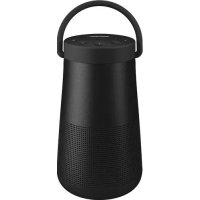
SoundLink Revolve+ II - Speakers BOSE - Free user manual and instructions
Find the device manual for free SoundLink Revolve+ II BOSE in PDF.



| Product type | Portable Bluetooth speaker |
| Brand | Bose |
| Model | SoundLink Revolve+ II |
| Power supply | USB mains adapter (5V, 1.6A) or built-in rechargeable lithium-ion battery |
| Battery life | Up to 17 hours of normal use |
| Wireless connectivity | Bluetooth 4.2 (range up to 10 m) and NFC |
| Wired inputs | 3.5mm AUX input and micro-USB port |
| Number of memory devices | Up to 8 Bluetooth devices |
| Simultaneous connections | Up to 2 active Bluetooth devices |
| Playback functions | Play/pause, next/previous track, volume, voice commands |
| Hands-free calls | Built-in microphone with reject and hold functions |
| Voice prompts | 13 pre-installed languages, can be deactivated |
| Multi-speaker pairing | Party mode (stereo) and Stereo mode (left/right) with compatible Bose SoundLink speakers |
| SimpleSync | Pairing with Bose Home Speaker or Soundbar (range 9 m) |
| Dedicated app | Bose Connect (iOS/Android) for setup and updates |
| LED indicators | Battery (green/orange/red), Bluetooth (blue/white), input (white) |
| Battery protection | Auto standby mode after 3 days of inactivity if battery < 10% |
| Automatic power off | After 20 minutes of inactivity (can be deactivated) |
| Care and cleaning | Soft, damp cloth (water only), avoid solvents and chemicals |
| Package contents | Speaker, USB power supply, USB cable, regional mains adapters |
| Warranty | Limited warranty included, online registration available |
| Reset | Hold the power button for 10 seconds |
| Software updates | Via the Bose Connect app or btu.Bose.com website |
| Certifications | FCC, ISED, CE, IMDA, RoHS |
Frequently Asked Questions - SoundLink Revolve+ II BOSE
User questions about SoundLink Revolve+ II BOSE
0 question about this device. Answer the ones you know or ask your own.
Ask a new question about this device
Download the instructions for your Speakers in PDF format for free! Find your manual SoundLink Revolve+ II - BOSE and take your electronic device back in hand. On this page are published all the documents necessary for the use of your device. SoundLink Revolve+ II by BOSE.
USER MANUAL SoundLink Revolve+ II BOSE
Please read and keep all safety, security, and use instructions.

Bose Corporation hereby declares that this product is in compliance with the essential requirements and other relevant provisions of Directive 2014/53/EU and all other applicable EU directive requirements. The complete declaration of conformity can be found at: www.Bose.com/compliance
Important Safety Instructions
- Read these instructions.
- Keep these instructions.
- Heed all warnings.
- Follow all instructions.
- Do not install near any heat sources such as radiators, heat registers, stoves, or other apparatus (including amplifiers) that produce heat.
- Only use attachments/accessories specified by the manufacturer.
- Unplug this apparatus during lightning storms or when unused for long periods of time.
- Refer all servicing to qualified personnel. Servicing is required when the apparatus has been damaged in any way, such as power-supply cord or plug is damaged, objects have fallen into the apparatus, does not operate normally, or has been dropped.
WARNING/CAUTIONS

This symbol means there is uninsulated, dangerous voltage within the product enclosure that may constitute a risk of electrical shock.

This symbol means there are important operating and maintenance instructions in this guide.

This product contains magnetic material. Consult your physician on whether this might affect your implantable medical device.
- Keep the product away from fire and heat sources. Do NOT place naked flame sources, such as lighted candles, on or near the product.
- Do NOT make unauthorized alterations to this product.
- Do NOT use a power inverter with this product.
- Use this product only with the power supply provided.
- Where the mains plug or an appliance coupler is used as the disconnect device, the disconnect device shall remain readily operable.
- Do not expose products containing batteries to excessive heat (e.g. from storage in direct sunlight, fire or the like).
- The product label is located on the bottom of the product.
NOTE: This equipment has been tested and found to comply with the limits for a Class B digital device, pursuant to Part 15 of the FCC Rules. These limits are designed to provide reasonable protection against harmful interference in a residential installation. This equipment generates, uses, and can radiate radio frequency energy and, if not installed and used in accordance with the instructions, may cause harmful interference to radio communications. However, there is no guarantee that interference will not occur in a particular installation. If this equipment does cause harmful interference to radio or television reception, which can be determined by turning the equipment off and on, the user is encouraged to try to correct the interference by one or more of the following measures:
- Reorient or relocate the receiving antenna.
- Increase the separation between the equipment and receiver.
- Connect the equipment into an outlet on a circuit different from that to which the receiver is connected.
- Consult the dealer or an experienced radio/TV technician for help.
Changes or modifications not expressly approved by Bose Corporation could void the user's authority to operate this equipment.
This device complies with part 15 of the FCC Rules and with ISED Canada license-exempt RSS standard(s). Operation is subject to the following two conditions: (1) This device may not cause harmful interference, and (2) this device must accept any interference received, including interference that may cause undesired operation.
This device complies with FCC and ISED Canada radiation exposure limits set forth for general population. This equipment should be installed and operated with a minimum distance of 20~cm between radiator and your body. This transmitter must not be co-located or operating in conjunction with any other antenna or transmitter.
Meets IMDA Requirements.
CANICES-3(B)/NMB-3(B)
Management Regulation for Low-power Radio-frequency Devices
Article XII
According to "Management Regulation for Low-power Radio-frequency Devices" without permission granted by the NCC, any company, enterprise, or user is not allowed to change frequency, enhance transmitting power or alter original characteristic as well as performance to an approved low power radio-frequency devices.
Article XIV
The low power radio-frequency devices shall not influence aircraft security and interfere legal communications; If found, the user shall cease operating immediately until no interference is achieved. The said legal communications means radio communications operated in compliance with the Telecommunications Act.
The low power radio-frequency devices must be susceptible with the interference from legal communications or ISM radio wave radiated devices.
DON'T attempt to remove the rechargeable lithium-ion battery from this product. Contact your local Bose retailer or other qualified professional for removal.

Please dispose of used batteries properly, following local regulations. Do not incinerate.
This symbol means the product must not be discarded as household waste, and should be delivered to an appropriate collection facility for recycling. Proper disposal and recycling helps protect natural resources, human health and the environment. For more information on disposal and recycling of this product, contact your local municipality, disposal service, or the shop where you bought this product.

Removal of the rechargeable lithium-ion battery in this product should be conducted only by a qualified professional. Please contact your local Bose retailer or see products.bose.com/static/compliance/index.html for further information.

The product, in accordance with the Ecodesign Requirements for Energy Related Products Directive 2009/125/EC, is in compliance with the following norm(s) or document(s): Regulation (EC) No. 1275/2008, as amended by Regulation (EU) No. 801/2013.
| Required Power State Information | Power Modes | |
| Standby Networked Standby | ||
| Power consumption in specified power mode, at 230V/50Hz input | ≤ 0.5 W Bluetooth® | ≤ 2.0 W |
| Time after which equipment is automatically switched into mode | ≤ 20 minutes | ≤ 5 minutes |
| Power consumption in networked standby if all wired network ports are connected and all wireless network ports are activated, at 230V/50Hz input | N/A | ≤ 2.0 W |
| Network port deactivation/activation procedures.Deactivating all networks will enable standby mode. | Bluetooth: Deactivate by clearing the pairing list by pressing and holding the Bluetooth button for 10 seconds. Activate by pairing with a Bluetooth source. | |
External Power Supply Technical Information
The external power supply provided with the product, in accordance with the Ecodesign Requirements for Energy Related Products Directive 2009/125/EC, is in compliance with the following norms(s) or documents(s): Commission Regulation (EU) 2019/1782.
| Manufacturer Bose Products B.V. | |
| Commercial registration number 36037901 | |
| Address | Gorslaan 60 1441 RG Purmerend The Netherlands |
| Model identifier F5V-1.6C-1U-WW | |
| Input voltage 100V-240V | |
| Input AC frequency 50Hz/60Hz | |
| Output voltage 5V DC | |
| Output current 1.6A | |
| Output power 8W | |
| Average active efficiency 78.8% | |
| Efficiency at low load (10%) 73.4% | |
| No-load power consumption 0.07W |
| Manufacturer Bose Products B.V. | |
| Commercial registration number 36037901 | |
| Address | Gorslaan 60 1441 RG Purmerend The Netherlands |
| Model identifier S008AIM0500160 | |
| Input voltage 100V-240V | |
| Input AC frequency 50Hz/60Hz | |
| Output voltage 5V DC | |
| Output current 1.6A | |
| Output power 8W | |
| Average active efficiency 78.5% | |
| Efficiency at low load (10%) 74.5% | |
| No-load power consumption 0.06W |
For Europe:
Frequency band of operation 2400 to 2483.5MHz
Maximum transmit power less than 20 dBm EIRP.
Maximum transmit power is below regulatory limits such that SAR testing is not necessary and exempt per applicable regulations.
China Restriction of Hazardous Substances Table
| Names and Contents of Toxic or Hazardous Substances or Elements | ||||||
| Toxic or Hazardous Substances and Elements | ||||||
| Part Name | Lead(Pb) | Mercury(Hg) | Cadmium(Cd) | Hexavalent(CR(VI)) | PolybrominatedBiphenyl(PBB) | Polybrominated diphenylether(PBDE) |
| PCBs X 0 0 0 0 0 | ||||||
| Metal Parts X 0 0 0 0 0 | ||||||
| Plastic Parts 0 0 0 0 0 0 | 0 | |||||
| Speakers X 0 0 0 0 0 | ||||||
| Cables X 0 0 0 0 0 | ||||||
| This table is prepared in accordance with the provisions of SJ/T 11364. O: Indicates that this toxic or hazardous substance contained in all of the homogeneous materials for this part is below the limit requirement of GB/T 26572. X: Indicates that this toxic or hazardous substance contained in at least one of the homogeneous materials used for this part is above the limit requirement of GB/T 26572. | 5 | |||||
Taiwan Restriction of Hazardous Substances Table
| Equipment name: Bose SoundLink Revolve+ II, Type designation: 419356 | ||||||
| Restricted substances and its chemical symbols | ||||||
| Unit | Lead (Pb) | Mercury (Hg) | Cadmium (Cd) | Hexavalent chromium (Cr+6) | Polybrominated biphenyls (PBB) | Polybrominated diphenyl ethers (PBDE) |
| PCBs | - | ○ | ○ | ○ | ○ | ○ |
| Metal Parts | - | ○ | ○ | ○ | ○ | ○ |
| Plastic Parts | ○ | ○ | ○ | ○ | ○ | ○ |
| Speakers | - | ○ | ○ | ○ | ○ | ○ |
| Cables | - | ○ | ○ | ○ | ○ | ○ |
| Note 1:"○" indicates that the percentage content of the restricted substance does not exceed the percentage of reference value of presence. Note 2: The "--" indicates that the restricted substance corresponds to the exemption. | ||||||
Please complete and retain for your records
The serial and model numbers are located bottom of the speaker.
Serial number:
Model number: 419356
Please keep your receipt with your owner's guide. Now is a good time to register your Bose product.
You can easily do this by going to global.Bose.com/register
Date of Manufacture: The eighth digit in the serial number indicates the year of manufacture; "0" is 2010 or 2020.
China Importer: Bose Electronics (Shanghai) Company Limited, Part C, Plant 9, No. 353 North Riying Road, China (Shanghai) Pilot Free Trade Zone
EU Importer: Bose Products B.V., Gorslaan 60, 1441 RG Purmerend, The Netherlands
Taiwan Importer: Bose Taiwan Branch, 9F-A1, No. 10, Section 3, Minsheng East Road, Taipei City 104, Taiwan Phone Number: +886-2-2514 7676
Mexico Importer: Bose de Mexico, S. de R.L. de C.V., Paseo de las Palmas 405-204, Lomas de Chapultepec, 11000 Mexico, D.F. Phone Number: +5255 (5202) 3545
The CMIIT ID is located on the rubber foot on the bottom of the product.
Security Information

This product is capable of receiving security updates from Bose automatically when connected to the Bose Connect app. In order to receive security updates via the mobile application, you must complete the product setup process in the Bose Connect app. If you do not complete the setup process, you will be responsible for installing security updates that Bose makes available via btu.Bose.com
Apple, the Apple logo, iPad, iPhone, iPod, and Siri are trademarks of Apple Inc., registered in the U.S. and other countries. App Store is a service mark of Apple Inc. The trademark "iPhone" is used in Japan with a license from Aiphone K.K.
The Bluetooth® word mark and logos are registered trademarks owned by Bluetooth SIG, Inc. and any use of such marks by Bose Corporation is under license.
Google and Google Play are trademarks of Google LLC.
The N-Mark is a trademark or registered trademark of NFC Forum, Inc. in the United States and in other countries. Bose, Bose Home Speaker, Bose Music, Bose Portable Home Speaker, Bose Soundbar, SimpleSync, SoundLink, and SoundLink Revolve are trademarks of Bose Corporation.
Bose Corporation Headquarters: 1-877-230-5639
©2020 Bose Corporation. No part of this work may be reproduced, modified, distributed, or otherwise used without prior written permission.
WHAT'S IN THE BOX
Contents 12
BOSE CONNECT APP SETUP
Download the Bose Connect app 13
SPEAKER PLACEMENT
Placement guidelines 14
POWER
Connect to power 15
Power on/off your speaker 15
Battery protection mode 16
Auto-off 16
Disable auto-off 16
SPEAKER CONTROLS
Media playback and volume. 18
Phone calls. 19
Access voice control. 19
Voice alerts 19
VOICE PROMPTS
Pre-installed languages 20
Select a language 20
Change the language 20
Disable voice prompts 20
BLUETOOTH® CONNECTIONS
Choose your pairing method 21
Pair your mobile device 22
Pair a mobile device with NFC 23
Pair an additional mobile device 24
Disconnect a device 24
Reconnect a device 24
MULTIPLE BLUETOOTH CONNECTIONS
Identify connected mobile devices 25
Switch between two connected devices 25
Connect a previously paired device 25
Clear the speaker pairing list. 25
Use the Bose Connect app 25
WIRED CONNECTIONS
Connect the 3.5 mm stereo cable 26
Connect the USB cable 26
SPEAKER STATUS
Battery status 28
Bluetooth status 28
Input status 28
PAIR BOSE PRODUCTS
Choose your pairing method 29
Pair with another Bose SoundLink Bluetooth speaker 29
Pair the speakers using the Bose Connect app (recommended) 29
Pair the speakers manually 30
Switch between Party mode and Stereo mode 31
Disable Party mode or Stereo mode 31
Pair with a Bose Home Speaker or Soundbar 32
Compatible products 32
Pair using the Bose Music app 32
Reconnect to a Bose Home Speaker or Soundbar 33
CARE AND MAINTENANCE
Clean the speaker 34
Replacement parts and accessories 34
Limited warranty 34
Technical information 34
TROUBLESHOOTING
Try these solutions first 35
Other solutions 35
Reset your speaker 37
CONTENTS
Confirm that the following parts are included:
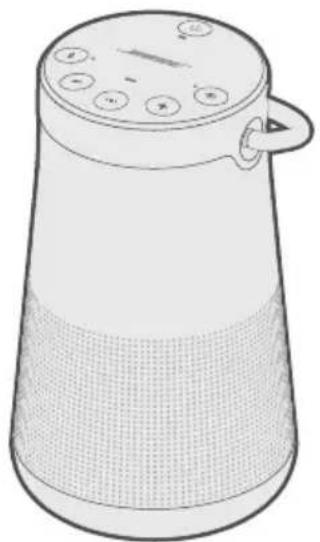
SoundLink Revolve + II Bluetooth speaker
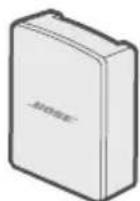
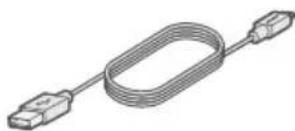
USB power supply* USB cable
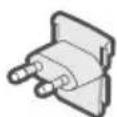
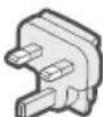
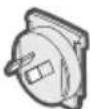
AC power adapters*
- The USB power supply and AC power adapters may vary slightly. Use the AC power adapter for your region.
NOTE: If any part of the product is damaged, don't use it. Contact your authorized Bose dealer or Bose customer service.
Visit: worldwide.Bose.com/Support/SLRPii
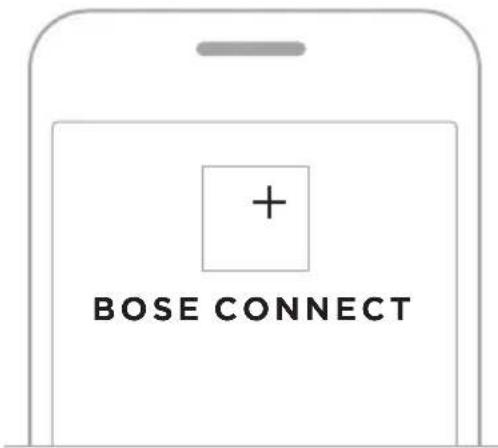
The Bose Connect app lets you set up and control the speaker from any mobile device, such as a smartphone or tablet.
Using the app, you can manage Bluetooth connections, choose your voice prompt language, manage speaker settings, and get new features.
DOWNLOAD THE BOSE CONNECT APP
- On your mobile device, download the Bose Connect app.


- Follow the app instructions.
PLACEMENT GUIDELINES
- For best Bluetooth performance, place your mobile device within 33 ft (10 m) of your speaker, and make sure there is a clear line of sight between you and your speaker. Moving your device farther away, or not having a clear line of sight may impact sound quality, and your device may disconnect from your speaker.
- Keep other wireless equipment at least 3 ft (1 m) away from your speaker.
- Place your speaker and your device outside of and away from metal cabinets, other audio/video components, and direct heat sources.
CAUTIONS
- Stand your speaker on its base. Standing your speaker on any other side may cause damage to your speaker and affect sound quality.
- Avoid placing your speaker on wet or dirty surfaces.
CONNECT TO POWER
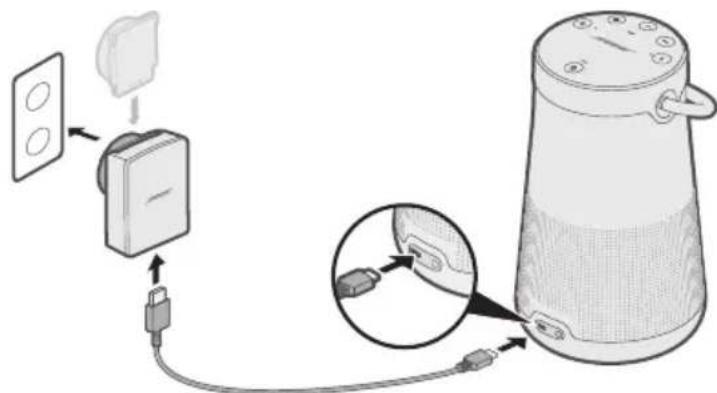
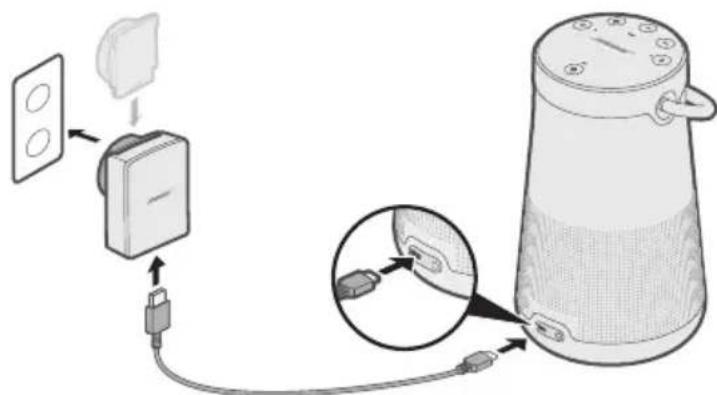
Your speaker ships with a partial charge. Before using your speaker for the first time, connect it to an AC (mains) outlet. Your speaker does not need to be fully charged, but it does require the initial connection to activate the battery.
- Plug the small end of the USB cable into the micro-B USB connector on yourspeaker.
-
Plug the other end into the USB power supply.
-
Plug the USB power supply into an AC (mains) outlet.
NOTE: If necessary, plug the AC adapter for your region into the AC (mains) outlet.
The battery light blinks amber, and your speaker emits a tone. When fully charged, glows green.
-
The first time you power on your speaker, the Bluetooth light glows blue, and you hear a voice prompt to select a language (see page 20).
-
If you have already powered on your speaker and paired at least one mobile device, the Bluetooth light blinks white and connects to the last two paired mobile devices. You hear "Battery
percent. Connected to <mobile device name)." The Bluetooth light glows solid white.
BATTERY PROTECTION MODE
When your speaker is unplugged and unused for more than three days with a remaining charge of less than 10 percent, it enters battery protection mode to preserve battery power. To reactivate your speaker, connect it to AC (mains) power.
When not in use, store your speaker in a cool place.
CAUTION: Do not store your speaker for extended periods when fully charged or when the battery light blinks red.
AUTO-OFF
Your speaker powers off after 20 minutes of inactivity (no sound coming from your speaker) while using the following connections and power sources:
- AUX connection operating on battery or AC (mains) power.
- Bluetooth connection operating on battery power.
Disable auto-off
- Press and hold + and the Input mode button simultaneously.
You hear "Auto-off disabled."
- Repeat to re-enable the auto-off feature.
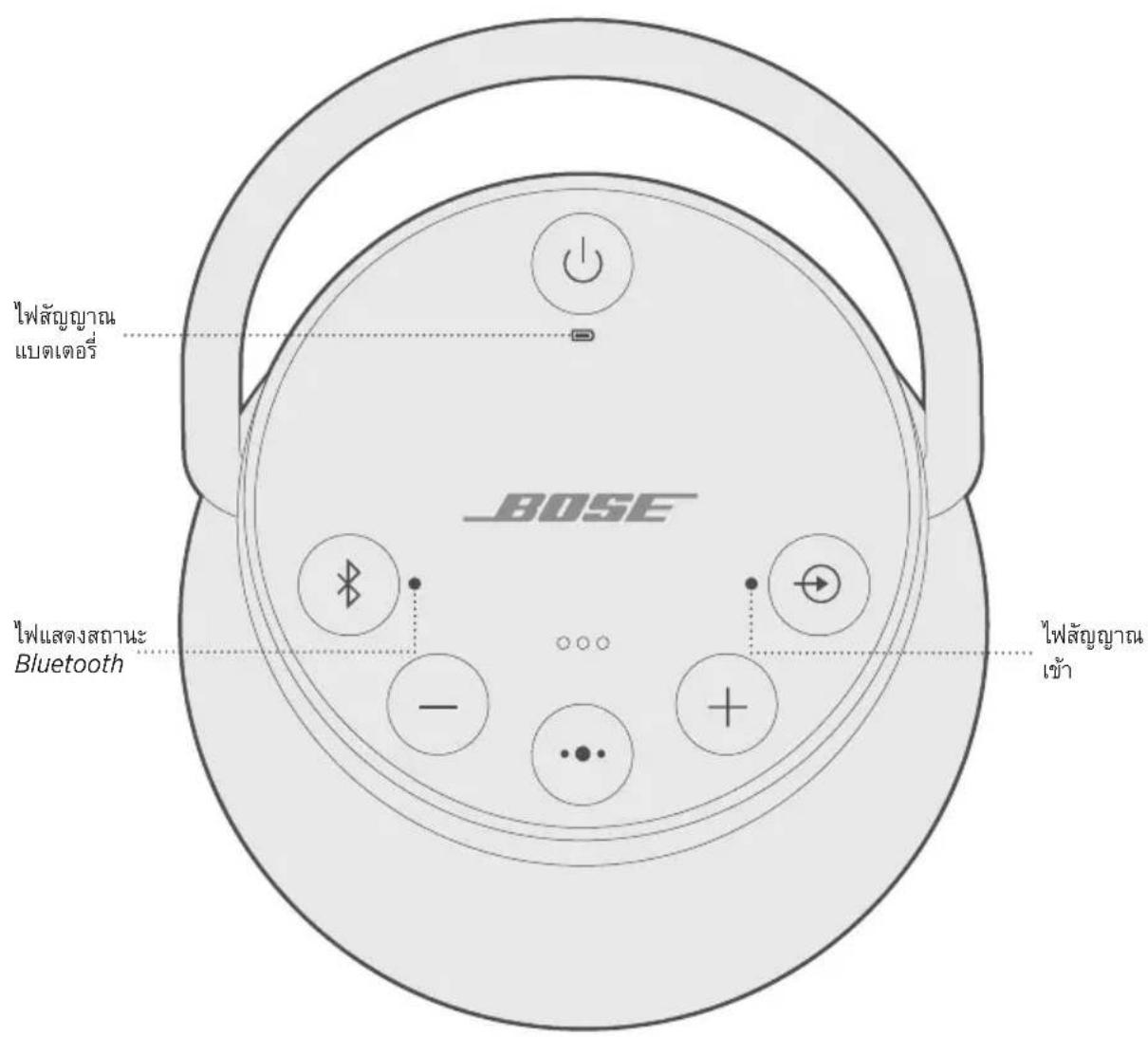
The button pad enables you to power on your speaker and control your speaker's playback, volume, and speakerphone.
NOTE: Certain mobile devices may not support these functions.
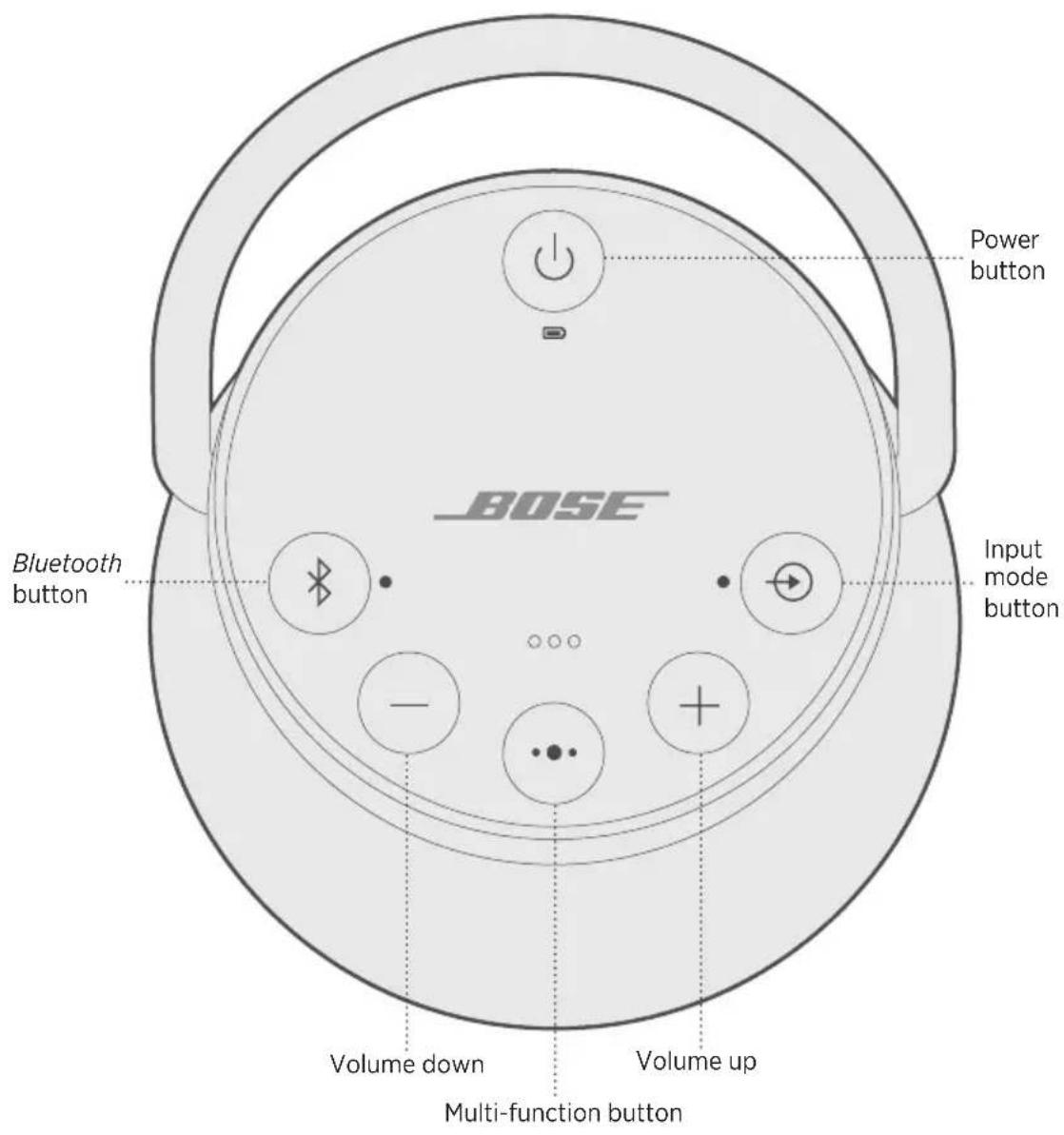
The Multi-function button controls music sources and speakerphone calls on your mobile device from your speaker.
MEDIA PLAYBACK AND VOLUME
FUNCTION WHAT TO DO
| Play/Pause | Press ···. NOTE: In Input mode, pressing ··· mutes the audio (see page 26). |
| Skip forward to the next track | Double-press ···. |
| Skip backward to the previous track | Triple-press ···. |
| Volume up | Press +. |
| Volume down | Press -. |
PHONE CALLS
FUNCTION WHAT TO DO
| Make a call | Press and hold the Multi-function button •• to activate voice control on your mobile device. See “Access voice control” below. |
| Switch a call from speakerphone to your mobile device, while on a call | Press and hold ••. |
| Answer/End a call | Press ••. |
| Decline an incoming call | Press and hold ••. |
| Answer a second incoming call and put the current call on hold | While on a call, press •• to answer a second call. |
| Decline a second incoming call and stay on current call | While on a call, press and hold •• for one second. |
| Switch between two calls | With two active calls, double-press ••. |
| Mute/unmute a call | While on a call, press + and — simultaneously. |
Access voice control
The microphone in the speaker acts as an extension of the microphone in your smartphone. Using on the speaker, you can access voice control on your mobile device to make/take calls, play music, tell you the weather, give you the score of a game, and more.
Press and hold to access voice control on your device. You hear a tone that indicates voice control is active.
Voice alerts
Your speaker identifies incoming callers (when applicable). To disable this feature, see page 20.
Voice prompts guide you through the Bluetooth pairing and connecting processes.
PRE-INSTALLED LANGUAGE
- English - German - Korean - Swedish - Polish
- Spanish • Mandarin • Italian • Dutch
- French - Japanese - Portuguese - Russian
SELECT A LANGUAGE
- Press - or + to scroll through available languages.
- When you hear your language preference, press and hold the Multi-function button to select it.
You hear a beep and "Ready to pair."
CHANGE THE LANGUAGE
- Press and hold — and the Input mode button simultaneously until you hear the voice prompt for the first language option.
- Press - or + to scroll through available languages.
- When you hear your language preference, press and hold until you hear a beep, and "Connected to
."
DISABLE VOICE PROMPTS
Press and hold — and + simultaneously until you hear "Voice prompts off."
NOTE: Repeat to re-enable voice prompts.
Bluetooth wireless technology lets you stream music from mobile devices such as smartphones, tablets, and computers. Before you can stream music from a device, you must pair the device with your speaker.
CHOOSE YOUR PAIRING METHOD
You can pair your device with your speaker using Bluetooth wireless technology or Near Field Communication (NFC).
You can also use the Bose Connect app to pair your device (see page 13).
What is NFC?
NFC is a technology that enables mobile devices to establish wireless communication with each other by simply tapping the devices together. Refer to your device owner's guide to see if your model supports NFC.
| If your device does not support Bluetooth pairing via NFC or if you are unsure: | Follow the instructions for “Pair your mobile device” on page 22. |
| If your device supports Bluetooth pairing using NFC: | Follow the instructions for “Pair a mobile device with NFC” on page 23. |
NOTE: If your device supports Bluetooth pairing via NFC, you can use either pairing method.
PAIR YOUR MOBILE DEVICE
When you power on your speaker for the first time, the speaker automatically searches for your mobile device.
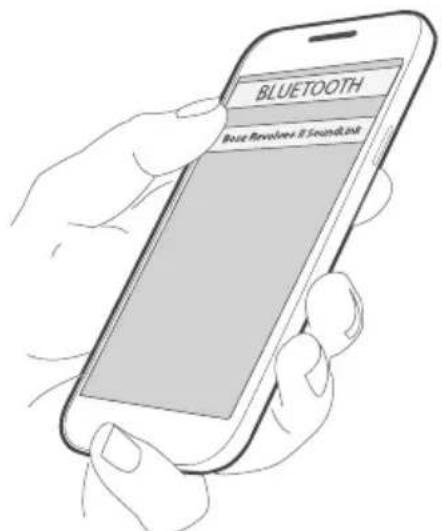
- On your device, turn on the Bluetooth feature.
TIP: The Bluetooth feature is usually found in the Settings menu.
- Select your Bose Revolve + II SoundLink speaker from the device list.
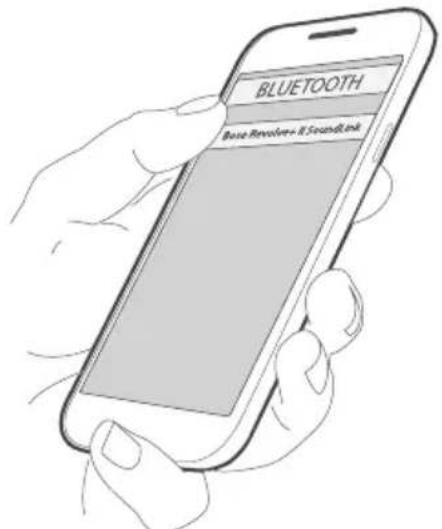
Once paired, you hear "Connected to
NOTE: To pair an additional device, see page 24.
PAIR A MOBILE DEVICE WITH NFC
NOTE: When you power on your speaker for the first time, make sure a language is selected before you pair your mobile device with NFC.
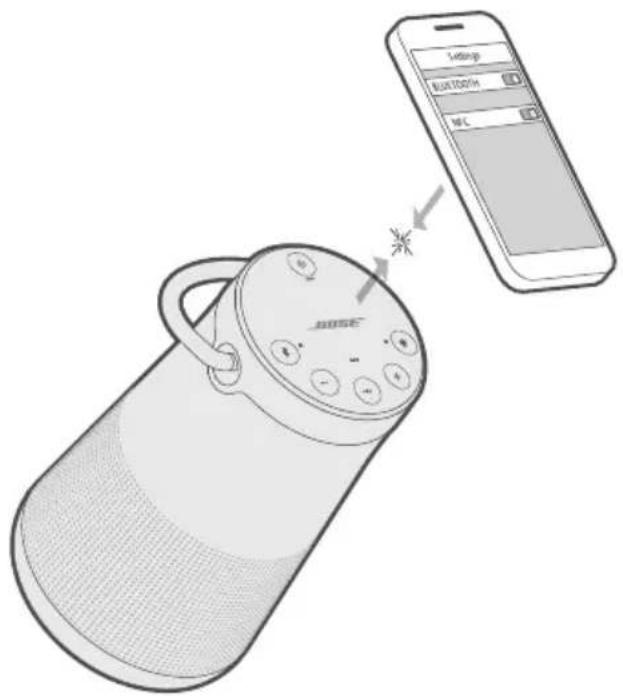
- Unlock your mobile device, and turn on the Bluetooth and NFC features.
Refer to your device owner's guide to learn more about these features.
- Tap and hold the NFC touchpoint on your device to the top center of your speaker. The target area is the Bose logo.
Your device may prompt you to accept pairing.
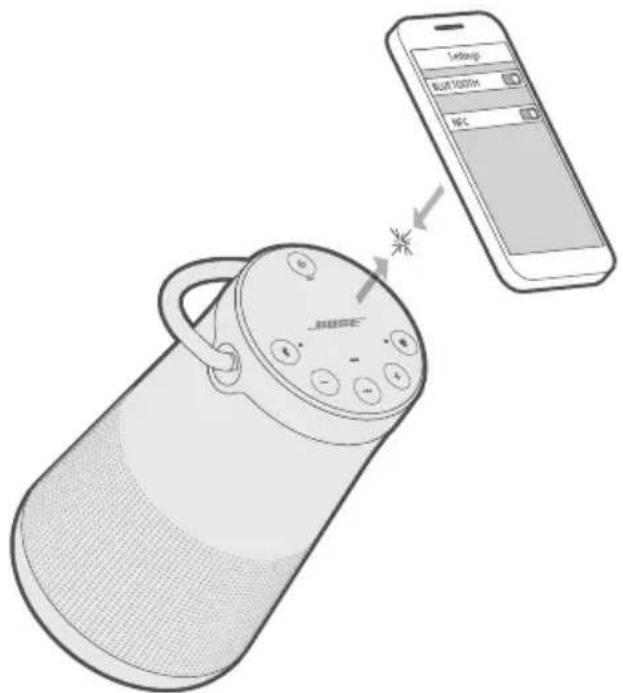
Once paired, you hear "Connected to
PAIR AN ADDITIONAL MOBILE DEVICE
You can store up to eight paired mobile devices in the speaker pairing list.
- Press and hold the Bluetooth button × until the Bluetooth light blinks blue, and you hear, "Ready to pair another device." Pair your device to the speaker (see page 23).
If your device supports pairing via NFC, see page 23.
DISCONNECT A DEVICE
- Turn off the Bluetooth feature on your device.
- If your device supports pairing via NFC, tap and hold the NFC touchpoint on your device to the top center of your speaker. The target area is the Bose logo.
RECONNECT A DEVICE
When powered on, your speaker tries to reconnect with the two most recently-connected devices.
NOTE: The devices must be within range and powered on.
If your device supports pairing via NFC, tap and hold the NFC touchpoint on your device to the top of your speaker. The target area is the Bose logo.
You can store up to eight paired mobile devices in the speaker pairing list, and your speaker can be actively connected to two mobile devices at a time.
NOTE: You can only play audio from one device at a time.
IDENTIFY CONNECTED MOBILE DEVICES
Press the Bluetooth button 喜 to hear which devices are currently connected.
SWITCH BETWEEN TWO CONNECTED DEVICES
- Pause audio on your first device.
- Play audio on your second device.
CONNECT A PREVIOUSLY PAIRED DEVICE
- Press 喜 to hear which device is currently connected.
- Press within two seconds to connect to the next device in your speaker's pairing list.
- Repeat until you hear the desired device name.
You hear a tone that indicates the device is connecting.
- Play audio on the connected device.
CLEAR THE SPEAKER PAIRING LIST
- Press and hold × for 10 seconds, until you hear "Bluetooth device list cleared. Ready to pair."
All devices are cleared and your speaker is ready to pair a new device.
- Delete your speaker from the Bluetooth list on your device.
USE THE BOSE CONNECT APP
You can also easily manage multiple connected devices using the Bose Connect app (see page 13).
You can connect the audio output of a smartphone, tablet, computer or other type of mobile device to the AUX connector or micro-B USB connector.
CONNECT THE 3.5 MM STEREO CABLE
The AUX connector accepts a 3.5 mm stereo cable plug (not provided).
- Using a 3.5mm stereo cable, connect your mobile device to the AUX connector on your speaker.
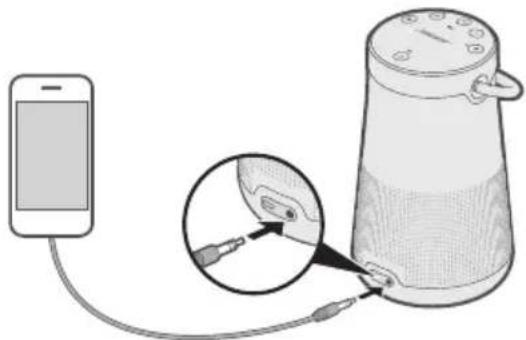
-
Press the Power button on your speaker.
-
Press and release the Input mode button until you hear "AUX audio."
CONNECT THE USB CABLE
- Using the USB cable, connect your device to the micro-B USB connector on your speaker.
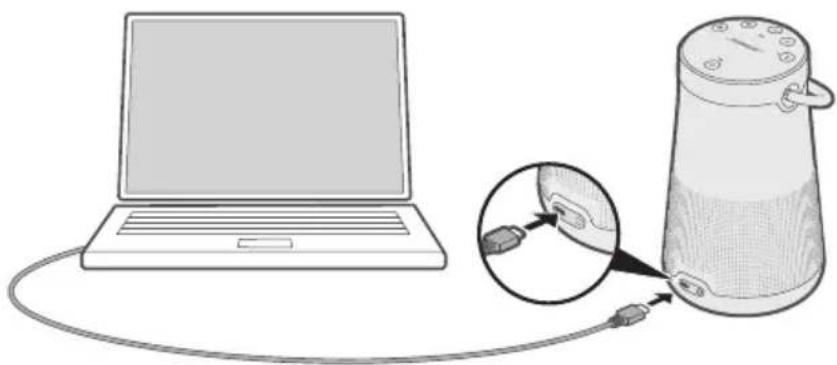
- Press on your speaker.
- Press and release until you hear "USB audio."
The top of the speaker has a series of lights that glow according to system state.
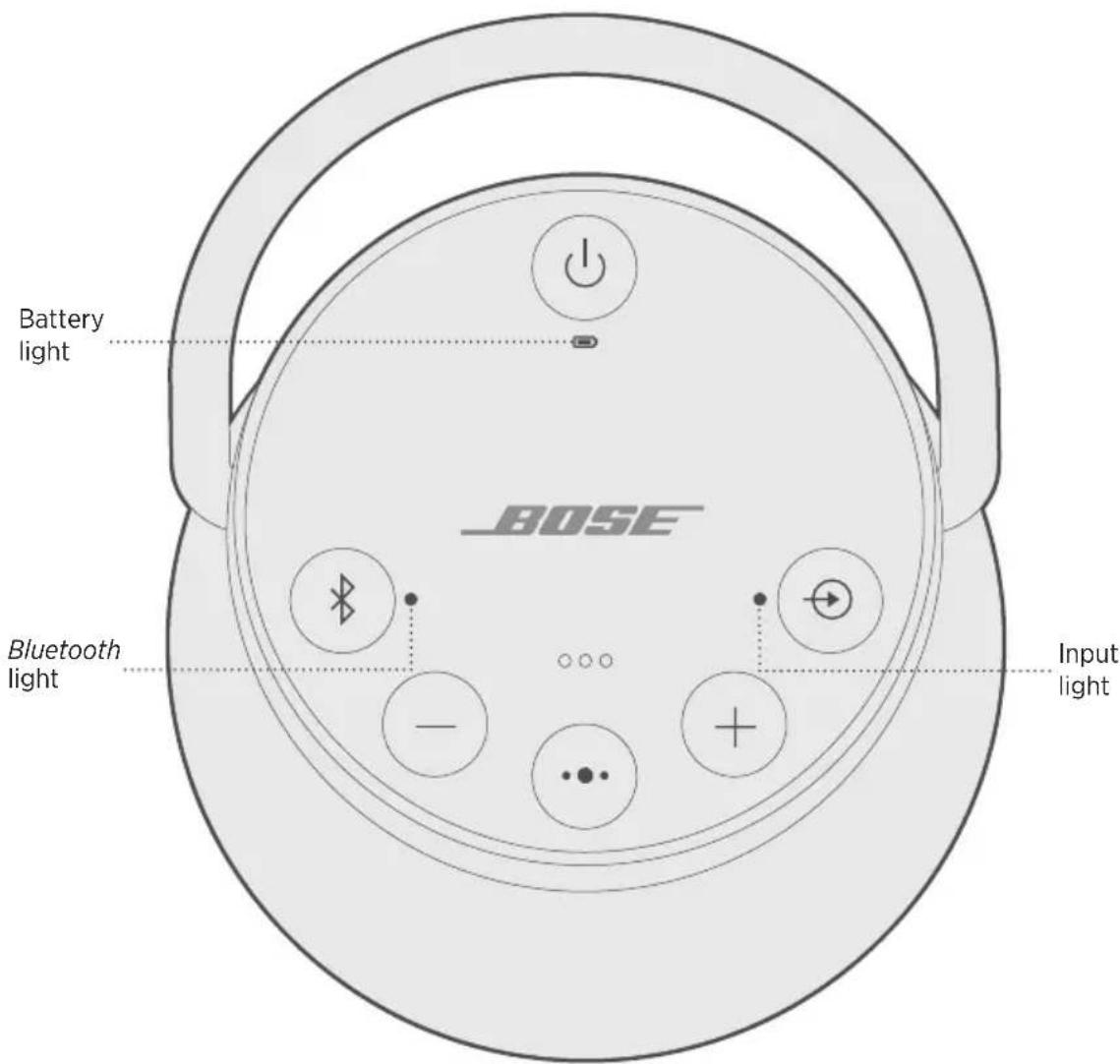
BATTERY STATUS
Shows the battery charge level. Each time you power on your speaker, the battery light displays the battery charge level for two seconds and a voice prompt announces the battery charge level.
To check the battery charge level, press and hold the Power button for three seconds while checking .
NOTE: Battery performance varies with the content played and the volume level at which it is played. In typical use, the speaker battery lasts up to 17 hours.
LIGHT ACTIVITY SYSTEM STATE
| Solid green Medium to full charge | |
| Blinks amber Charging | |
| Solid amber Medium charge | |
| Blinks red Need to charge |
BLUETOOTH STATUS
Shows the connection status of a mobile device.
LIGHT ACTIVITY SYSTEM STATE
| Blinks blue Ready to connect | |
| Blinks white Connecting | |
| Solid white Connected |
INPUT STATUS
Shows the connection status of a device connected with an AUX or micro-B USB cable.
LIGHT ACTIVITY SYSTEM STATE
| Solid white Speaker is ready to play content from a device |
NOTE: For more information on using a cable to connect a device, see page 26.
You can pair your SoundLink Revolve+ II with other Bose speakers to play audiotogether.
CHOOSE YOUR PAIRING METHOD
The way you pair with another Bose speaker varies depending on the type of speaker you're pairing with. Choose your pairing method from the table below.
SPEAKER PAIRING METHOD
| Bose SoundLink Bluetooth speaker | See “Pair with another Bose SoundLink Bluetooth speaker” below. |
| Bose Home Speaker or BoseSoundbar | See “Pair with a Bose Home Speaker or Soundbar” on page 32. |
PAIR WITH ANOTHER BOSE SOUNDLINK BLUETOOTH SPEAKER
You can pair your Bose SoundLink Bluetooth speakers together to play in the following modes using the Bose Connect app (recommended) or the speaker control buttons:
- Party mode (left and right speakers play in unison)
- Stereo mode (left speaker and right speaker play separately)
You can set this up using the Bose Connect app (recommended) or the speaker control buttons.
Refer to your Bose owner's guide to determine if your secondary speaker supports these modes.
Pair the speakers using the Bose Connect app (recommended)
For more information, download the Bose Connect app.
Pair the speakers manually
If you are unable to access the Bose Connect app, follow the instructions below.
Party mode
- Make sure both speakers are powered on.
- Make sure a speaker is connected to your mobile device.
- On the speaker connected to your device, press and hold the Bluetooth button × and + simultaneously.
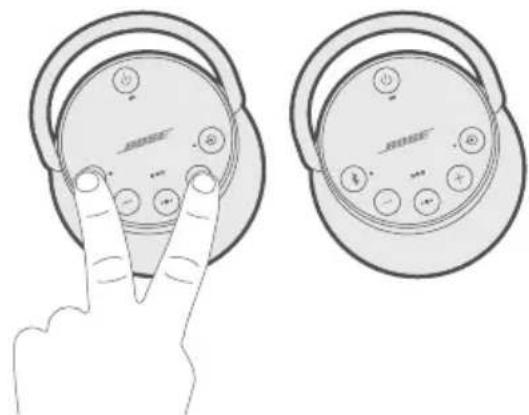
- Release the buttons when you hear "Press the Bluetooth and volume down buttons simultaneously on a second Bose device."
- On the other speaker, press and hold 喜 andsimultaneously.
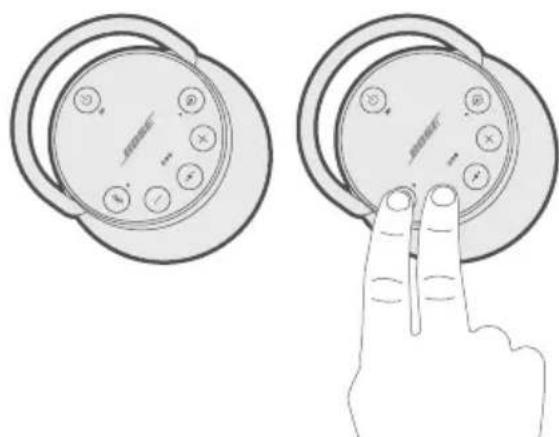
- Release the buttons when the speaker emits a tone.
After 10 seconds, you hear "Party mode" from both speakers simultaneously. Party mode is enabled. You are now able to play audio in unison using your device.
-
For an optimal experience, position your speakers:
-
In the same room or outdoor area
- So there are no obstructions between them
NOTE: Performance may vary based on mobile device, distance and environmental factors.
Stereo mode
- Configure your speakers for Party mode (see page 30).
- On a speaker, press the Bluetooth button 串 and ^+ simultaneously.
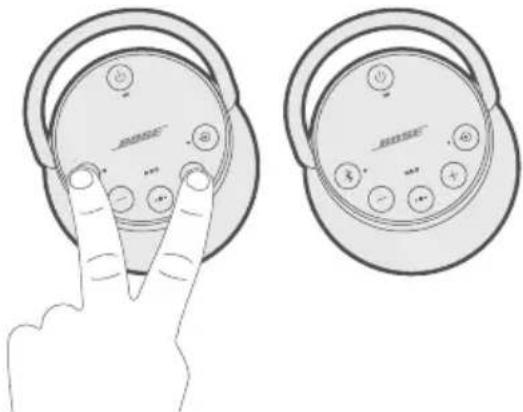
- Release the buttons when you hear "Stereo mode." You hear "Left" from the left speaker and "Right" from the right speaker.
Stereo mode is enabled. You are now able to play audio in stereo using your mobiledevice.
-
For an optimal experience, position your speakers:
-
In the same room or outdoor area
- Within 10 feet of each other, free from obstructions
- So that your distance to each speaker is equal
NOTE: Performance may vary based on mobile device, distance and environmental factors.
Switch between Party mode and Stereo mode
On either speaker, press button 串 and ^+ simultaneously.
Disable Party mode or Stereo mode
Do one of the following on either speaker:
- Press and hold until you hear "Bose speakers unlinked."
- Press and hold the Multi-function button and + simultaneously until you hear "Bose speakers unlinked."
- Press the Power button to power off the speaker.
PAIR WITH A BOSE HOME SPEAKER OR SOUNDBAR
With Bose SimpleSync technology, you can pair your SoundLink Revolve+ II speaker with a Bose Home Speaker or Bose Soundbar to listen to the same song in two different rooms at the same time.
NOTE: SimpleSync technology has a Bluetooth range of 30 ft (9 m). Walls and construction materials can affect reception.
Compatible products
You can pair your SoundLink Revolve+ II speaker with any member of the Bose Home Speaker family.
Popular compatible products include:
- Bose Soundbar 700
- Bose Soundbar 500
- Bose Home Speaker 500
- Bose Home Speaker 300
- Bose Portable Home Speaker
New products are added periodically. For a complete list and more information, visit: worldwide.Bose.com/Support/Groups
Pair using the Bose Music app
- On your SoundLink Revolve + II speaker, press and hold the Bluetooth button until the Bluetooth indicator blinks blue, and you hear "Ready to pair another device."
- In the Bose Music app, from the My Bose screen, select your Bose Home Speaker or Bose Soundbar.
NOTE: To return to the My Bose screen, tap 6 in the top-left corner of the screen.
- Tap the product image in the bottom-right corner of the screen.
- Tap Group Speakers.
- Follow the app instructions to connect a new Bluetooth device using SimpleSync.
NOTES:
- Make sure that your SoundLink Revolve + II speaker is within 30 ft (9 m) of your Bose Home Speaker or Bose Soundbar.
- You can pair your SoundLink Revolve+ II speaker with only one product at a time.
RECONNECT TO A BOSE HOME SPEAKER OR SOUNDBAR
Power on your SoundLink Revolve+ II speaker (see page 15).
Your SoundLink Revolve+ II speaker tries to connect to the two most recently-connected Bluetooth devices, including your Bose Home Speaker or Bose Soundbar.
NOTES:
- Your Bose Home Speaker or Bose Soundbar must be within range (30 ft or 9 m) and powered on.
- If your SoundLink Revolve + II speaker doesn't connect, see "Connect a previously paired device" on page 25.
CLEAN THE SPEAKER
- Clean the surface of the speaker and handle with a soft, damp cloth (water only).
- Do not use any sprays near the speaker. Do not use any solvents, chemicals, or cleaning solutions containing alcohol, ammonia or abrasives.
- Do not allow liquids to spill into any openings.
REPLACEMENT PARTS AND ACCESSORIES
Replacement parts and accessories can be ordered through Bose customer service.
Visit: worldwide.Bose.com/Support/SLRPii
LIMITED WARRANTY
The speaker is covered by a limited warranty. Visit our website at global.Bose.com/warranty for details of the limited warranty.
To register your product, visit global.Bose.com/register for instructions.
Failure to register will not affect your limited warranty rights.
TECHNICAL INFORMATION
Input Voltage: 5V
Input Current: 1.6A
TRY THESE SOLUTIONS FIRST
If you experience problems with the speaker:
- Check the battery light (see page 28). Charge your speaker if necessary.
- Secure all cables.
- Check the state of status lights (see page 28).
- Place your speaker according to placement guidelines (see page 13).
- Make sure your mobile device supports Bluetooth or pairing via NFC technology (see page 21).
OTHER SOLUTIONS
If you could not resolve your issue, see the table below to identify symptoms and solutions to common problems. If you are unable to resolve your issue, contact Bose customer service.
Visit: worldwide.Bose.com/contact
SYMPTOM SOLUTION
| No power (battery) | Battery may be in protection mode or discharged. Connect it to AC (mains) power. |
| Battery does not charge | Make sure you are using the Bose-provided USB cable and USB power supply. Connect the USB cable to a different USB power supply. Use a different USB cable. Connect to a different AC (mains) power source. |
| Speaker does not pair with mobile device | On your mobile device, turn the Bluetooth feature off and then on. Remove your speaker from the Bluetooth list on your device. Pair your device again. Pair a different device (see page 24). Clear your speaker's pairing list (see page 25). Pair your device again. Reset your speaker (see page 37). |
| Speaker does not pair with NFC | Unlock your device and turn on the Bluetooth and NFC features. Tap and hold the NFC touchpoint on the back of your device to the top of your speaker. Remove your device from the case. Make sure a language is selected (see page 20). Use Bluetooth to pair your device (see page 22). |
SYMPTOM SOLUTION
| Bose SoundLink Bluetooth speakers do not pair together manually | Download the Bose Connect app for an additional method for pairing your Bose speakers (see page 13). |
| No sound | On your mobile device, turn the Bluetooth feature off and then on. Remove your speaker from the Bluetooth list on your device. Pair your device again. Increase the volume on your speaker, your device and music source. Make sure voice prompts are on. Press the Bluetooth button Ⓒ to hear the connected mobile device. Make sure you are using the correct device. Use a different music source. Pair a different device (see page 24). If two devices are connected, pause your other device. |
| No sound from a cabled device | Power on the device and play music. Increase the volume on your speaker and device. Press and release the Input mode button ⍻ until the Input light glows white. Use a different cable. Connect a different device. |
| Poor sound quality | Use a different music source. Pair a different device (see page 24). If there are two devices connected, disconnect the second device. Increase the volume on the device. Check device audio settings. |
| Poor sound quality from a cabled device | Increase the volume on your speaker and device. Use a different cable. Connect a different device. Check device audio settings. |
| Audio plays from the wrong device (when two devicesareconnected) | Make sure voice prompts are on. Press the Bluetooth button Ⓒ to hear the connected device(s). Make sure you are using the correct device. Pause or quit the music source on the device playing music. Disconnect the second device. |
SYMPTOM SOLUTION
| Speaker powers off | If using a cabled device, increase the volume on your device. Disable auto-off (see page 16). |
| Speaker does not pair with a Bose Home Speaker or BoseSoundbar | Press and hold ※ until the Bluetooth indicator blinks blue, and you hear “Ready to pair another device.” Make sure that your SoundLink Revolve+ II speaker is within 30 ft (9 m) of your Bose Home Speaker or Bose Soundbar. |
| Speaker does not reconnect to a previously-paired Bose Home Speaker or Bose Soundbar | See “Connect a previously paired device” on page 25. |
| Delayed audio when paired with a Bose Home Speaker or Bose Soundbar | Download the Bose Connect app and run available software updates(seepage 13). |
RESET YOUR SPEAKER
Factory reset clears paired mobile devices and language settings from your speaker and returns it to the original factory settings.
- Power on your speaker.
- Press and hold the Power button ( ) for 10 seconds.
The speaker powers off.
- Press
The Bluetooth light glows blue, and you hear a voice prompt to select a language (see page 20).
Management Regulation for Low-power Radio-frequency Devices
ArticleXII
I henhold til "Management Regulation for Low-power Radio-frequency Devices" ma ingen virksomhed, organisation erer bruger uten tilladelse fra NCC aendre frekvensen, oge transmissonseffekten erer aendre de oprindelige eigenskaber erer ydeevnen for godkendte laveffektradiofrefkvensenheder.
ArticleXIV
Importar i Kina: Bose Electronics (Shanghai) Company Limited, Part C, Plant 9, No. 353 North Riying Road, Kina (Shanghai) Pilot Free Trade Zone
Importer i EU: Bose Products B.V., Gorslaan 60, 1441 RG Purmerend, Holland
Importar i Taiwan: Bose Taiwan Branch, 9F-A1, No.10, Section 3, Minsheng East Road, Taipei City 104, Taiwan
Telefonnummer: +886-2-2514 7676
Importar i Mexico: Bose de Mexico, S. de R.L. de C.V., Paseo de las Palmas 405-204, Lomas de Chapultepec, 11000 Mexico, D.F. Telefonummer: +5255 (5202) 3545
HVAD ER DER I AESKEN?
Indhold 12
OPSÄETNING AF BOSE CONNECT-APPEN
Download Bose Connect-appen 13
HØJTTLERPLACERING
Besog: worldwide.Bose.com/Support/SLRPIi
China-Import: Bose Electronics (Shanghai) Company Limited, Part C, Plant 9, No. 353 North Riying Road, China (Shanghai) Pilot Free Trade Zone
EU-Import: Bose Products B.V., Gorslaan 60, 1441 RG Purmerend, Niederlande
Taiwan-Import: Bose Taiwan Branch, 9F-A1, No.10, Section 3, Minsheng East Road, Taipei City 104, Taiwan
Telefonnummer: +886-2-2514 7676
Mexiko-Import: Bose de Mexico, S. de R.L. de C.V., Paseo de las Palmas 405-204, Lomas de Chapultepec, 11000 Mexico, D.F. Telefonummer: +5255 (5202) 3545
Importeur in China: Bose Electronics (Shanghai) Company Limited, Part C, Plant 9, No. 353 North Riying Road, China (Shanghai) Pilot Free Trade Zone
Importeur in de EU: Bose Products B.V., Gorslaan 60, 1441 RG Purmerend, Nederland
Importeur in Taiwan: Bose Taiwan Branch, 9F-A1, No.10, Section 3, Minsheng East Road, Taipei City 104, Taiwan Telefoonnummer: +886-2-2514 7676
Importeur in Mexico: Bose de Mexico, S. de R.L. de C.V., Paseo de las Palmas 405-204, Lomas de Chapultepec, 11000 Mexico, D.F. Telefonnummer: +5255 (5202) 3545
Gaaar: worldwide.Bose.com/Support/SLRPii
Gaaar: worldwide.Bose.com/Support/SLRPpii
BEPERKTE GARANTIE
Gaaar: worldwide.Bose.com/contact
SYMPTOOM OPLOSSING
Importador en China: Bose Electronics (Shanghai) Company Limited, Part C, Plant 9, No. 353 North Riying Road, China (Shanghai) Pilot Free Trade Zone
Importador en UE: Bose Products B.V., Gorslaan 60, 1441 RG Purmerend, Paises Bajos
Importador en Taiwan: Sucursal de Bose en Taiwan, 9F-A1, No.10, Section 3, Minsheng East Road, Taipei City 104, Taiwan Nstreamo de telfono: +886-2-25147676
Importador en Mexico: Bose de Mexico, S. de R.L. de C.V., Paseo de las Palmas 405-204, Lomas de Chapultepec, 11000 Mexico, D.F.Numero de téléphone: +5255 (5202) 3545
Visite: worldwide.Bose.com/Support/SLRPji
Visit: worldwide.Bose.com/Support/SLRPiji
GARANTÍA LIMITADA
Visite: worldwide.Bose.com/contact
SINTOMA SOLUCIOn
CONNEXIONS BLUETOOTH
Importatore per la Cina: Bose Electronics (Shanghai) Company Limited, Part C, Plant 9, No. 353 North Riying Road, China (Shanghai) Pilot Free Trade Zone
Visitare: worldwide.Bose.com/Support/SLRPji
Visitare: worldwide.Bose.com/Support/SLRpii
GARANZIA LIMITATA
Visitare: worldwide.Bose.com/contact
SINTOMO SOLUZIONE
Kinai importor: Bose Electronics (Shanghai) Company Limited, Part C, Plant 9, No. 353 North Riying Road, Kina (Shanghai) Pilot Free Trade Zone
EU-importor: Bose Products B.V., Gorslaan 60, 1441 RG Purmerend, Hollandia
Tajvani importor: Bose Taiwan Branch, 9F-A1, No.10, Section 3, Minsheng East Road, Taipei City 104, Tajvan. Telefonszam: +886-2-2514 7676
Mexikó importor: Bose de México, S. de R.L. de C.V., Paseo de las Palmas 405-204, Lomas de Chapultepec, 11000 México, D.F. Telefonszám: +5255 (5202) 3545
A CMIIT-azonositó a termek aljan, a gumitalpon talalható.
Management Regulation for Low-power Radio-frequency Devices
Artikkel XII
Importor for Kina: Bose Electronics (Shanghai) Company Limited, Part C, Plant 9, No. 353 North Riying Road, Kina (Shanghai) Pilot Free Trade Zone
Importer for EU: Bose Products B.V., Gorslaan 60, NL-1441 RG Purmerend, Nederland
Importor for Taiwan: Bose Taiwan Branch, 9F-A1, No.10, Section 3, Minsheng East Road, Taipei City 104, Taiwan Telefonnummer: +886-2-2514 7676
Importar for Mexico: Bose de Mexico, S. de R.L. de C.V., Paseo de las Palmas 405-204, Lomas de Chapultepec, 11000 Mexico, D.F. Telefonummer: +5255 (5202) 3545
STELL OG VEDLIKEHOLD
Rengjore hoyttaleren 34
Importer — Chiny: Bose Electronics (Shanghai) Company Limited, Part C, Plant 9, No. 353 North Riying Road, China (Shanghai) Pilot Free Trade Zone
Importer - UE: Bose Products B.V., Gorslaan 60, 1441 RG Purmerend, The Netherlands
Importer - Tajwan: Bose Taiwan Branch, 9F-A1, No. 10, Section 3, Minsheng East Road, Taipei City 104, Taiwan
Numer telefonu: +886-2-2514 7676
Importer - Meksyk: Bose de Mexico, S. de R.L. de C.V., Paseo de las Palmas 405-204, Lomas de Chapultepec, 11000 Mexico, D.F. Numer Telefonu: +5255 (5202) 3545
WSTEPNIE ZAINSTALOWANE JęZYKI
Importador na China: Bose Electronics (Shanghai) Company Limited, Part C, Plant 9, No. 353 North Riying Road, China (Shanghai) Pilot Free Trade Zone
Importador na CE: Bose Products B.V., Gorslaan 60, 1441 RG Purmerend, The Netherlands
Importador em Taiwan: Bose Taiwan Branch, 9F-A1, No.10, Section 3, Minsheng East Road, Taipei City 104, Taiwan - Nstream de tefone:+886-2-25147676
Importador no Mexico: Bose de Mexico, S. de R.L. de C.V., Paseo de las Palmas 405-204, Lomas de Chapultepec, 11000 Mexico, D.F.Numero de téléphone: +5255 (5202) 3545
O identificador CMIIT encontrar-se no pé de borracha na parte inferior do produits.
Visite worldwide.Bose.com/Support/SLRPij
Visite worldwide.Bose.com/Support/SLRPii
GARANTIA LIMITADA
Visite worldwide.Bose.com/contact
SINTOMA SOLUÇAO
Kinainportor: Bose Electronics (Shanghai) Company Limited, Part C, Plant 9, No. 353 North Riying Road, China (Shanghai) Pilot Free Trade Zone
EU-importor: Bose Products B.V., Gorslaan 60, 1441 RG Purmerend, Nederländerna
Taiwanimportor: Bose Taiwan Branch, 9F-A1, No.10, Section 3, Minsheng East Road, Taipei City 104, Telefonummer Taiwan: +886-2-2514 7676
Mexikoimportor: Bose de Mexico, S. de R.L. de C.V., Paseo de las Palmas 405-204, Lomas de Chapultepec, 11000 Mexico, D.F. Telefonummer: +5255 (5202) 3545
CMIIT ID ar placerat pà gummifoten pà produits undersida.
Sakerhetsinformation

VAD FINNS I FÖRPACKINGEN?
Innehall 12
INSTALLATION AV BOSE CONNECT-APPEN
Ladda ner Bose Connect-appen 13
HÖGTALARPLACERING
Riktlinjer for placering 14
POWER
"ngn nnnn nn nnnn nnnn nnnn nnnn nnnn nnnn nnnn nnnn nnnn nnnn nnnn nnnn nnnn nnnn nnnn nnnn nnnn nnnn nnnn nnnn nnnn nnnn nnnn nnnn nnnn nnnn nnnn nnnn nnnn nnnn nnnn nnnn nnnn nnnn nn
15
nwnnnnnnnnnnnnnnnnnnnnnnnnnnnnnnnnnnnnnnnnnnnnnnnnnnnnnnnnnnnnnnnnnnnnnnnnnnnnnnnnnnnnnnnnnnnnnnnnnnnnnnnnnnnnnnnnnnnnnnnnnnnnnnnnnnnnnnn
I 1

y


mnnnnaaennnne nannnnnne nnnnnnne nnnnnnne nnnnnnne nnnnnnne nnnnnnne nnnnnnne nnnnnnne nnnnnnne nnnnnnne nnnnnnne nnnnnnne nnnnnnne nnnnnnne nnnnnnne nnnnnnne nnnnnnne nnnnnnne nnnnnnne nnnnnnne nnnnnnne nannnnnne nannnnnne nannnnnne nannnnnne nannnnnne nannnnnne nannnnnne nannnnnne nannnnnne nannnnnne nannnnnne nannnnnne nannnnnne nannnnnne nannnnnne nannnnnne nannnnnne nannnnnne nannnnnne nannnnnne nennnnnne nannnnnne nannnnnne nannnnnne nannnnnne nannnnnne nannnnnne nannnnnne nannnnnne nannnnnne nannnnnne nannnnnne nannnnnne nannnnnne nannnnnne nannnnnne nannnnnne nannnnnne nannnnnne nannnnnne namm

Nnannnnn nn nnnnnnnnnnnnnnnnnnnnnnnnnnnnnnnnnnnnnnnnnnnnnnnnnnnnnnnnnnnnnnnnnnnnnnnnnnnnnnnnnnnnnnnnnnnnnnnnnnnnnnnnnnnnnnnnnnnnnnnnnnnnnnnnnnnnnnnnnnnnnnnnnnnnnnnnnnnnnnnnnnnnnnnnnnnnennn nn nannn (EC) 1275/2008 0000000000000000000000000000000000000000000000000000000000000000000000000
global.Bose.com/register
nwnnnn nnnn 8 nnnnnnnnnnnnnnnnnnnnnnnnnnnnnnnnnnnnnnnnnnnnnnnnnnnnnnnnnnnnnnnnnnnnnnnnnnnnnnnnnnnnnnnnnnnnnnnnnnnnnnnnnnnnnnn
Bose Electronics (Shanghai) Company Limited, Part C, Plant 9, No. 353 North Riying Road, China (Shanghai) Pilot Free Trade Zone
EU: Bose Products B.V., Gorslaan 60, 1441 RG Purmerend, The Netherlands
Bose Taiwan Branch, 9F-A1, No.10, Section 3, Minsheng East Road, Taipei City 104, 886-2-2514 7676
Bose de Mexico, S. de R.L. de C.V., Paseo de las Palmas 405-204, Lomas de Chapultepec,
11000 Mexico, D.F. nununununwn: +5255 (5202) 3545
CMIT ID auiuueuaaunauanauanau
yuaan 1

Nnwnnnn nn nnnnnn nn nnnnnn nn nnnnnn nn nnnnnn nn nnnnnn nn nnnnnn nn nnnnnn nn nnnnnn nn nnnnnn nn nnnnnn nn nnnnnn nn nnnnnn nn nnnnnn nn nnnnnn nn nnnnnn nn nnnnnn nn nnnnnn nn nnnnnn nn nnnnnn nn nnnnnn nn nannnnn nn nnnnnn nn nnnnnn nn nnnnnn nn nnnnnn nn nnnnnn nn nnnnnn nn nnnnnn nn nnnnnn nn nnnnnn nn nnnnnn nn nnnnnn nn nnnnnn nn nnnnnn nn nnnnnn nn nennnnn nn nannnnn nn nannnnn nn nannnnn nn nannnnn nn nannnnn nn nannnnn nn nannnnn nn nannnnn nn nannnnn nn nannnnn nn nannnnn nn nannnnn nn nannnnn nn nannnnn nn nannnnn nn nannnnn nn nannnnn nn nannnnn nn nannnnn nn nannnnn nn nenn
Apple, Ia! Apple, iPad, iPhone, iPodu Siri uwwwnwunwau Apple Inc. 100000000000000000000000000000000000000000000000000000000000000000000000000000000000000
Bnnaaennnnnnae nnnnne Bnnee 111111111111111111111111111111111111111111111
Google uas Google Play 1
Bose Corporation: 1-877-230-5639
2020 Bose Corporation unu uwww wunwauan ananr wunlulng
aynayunaiy
aunai 12
BOSE CONNECT
Bose Connect. 13
mnnnnaa
14
#
15
15
J: worldwide.Bose.com/Support/SLRPji
Bose Conenct 1
wnnnnwwn nnnnnnnnnnnnnnnnnae Bluteothn nnnnnnnnnnnnnnnnnnn
NOVAHNAHNAHBA BOSE CONNECT
- 1

2.
nunnnnnaa
- u. uauuuaaunuunuuuauuauuauuuuuuuuuuuuuuuuuuuuuuuuuuuuuuuuuuuuuuuuuuuuuuuuuuuuuuuuuuuuuuuuuuuuuuuuuuuuuuuuuuuuuuuuuuuuuuuuuuuuuuuuuuuuuuuuuuuuuuuuuuuuuuuuuuuuuuuuuuuuuuuuuuuuuuuuuuuuuuuuuuuuuuuuuuuuuuuuuuuuuuuuuuuuuuuuuUU
-
- 1
100
-
W
AAC (nun)
- USB micro-B
- 1
- 1234567890123456789012345678901234567890123456789012345678901234567890123456789012345678901234567890123456789
n781u: wnuu uauuuaunauuAC uuuuunuunuunuunw uwn AC (
| lnsaoan | namuwaiaiwaiaiaiaiaiaiaiaiaiaiaiaiaiaiaiaiaiaiaiaiaiaiaiaiaiaiaiaiaiaiaiaiaiaiaiaiaiaiaiaiaiaiaiaiaiaiaiaiaiaiaiaiaiaiaiaiaiaiaiaiaiaiaiaiaiaiaiaiaiaiaiaiaiaiaiaiaiaiaiaiaiaiaiaiaiaiaiaiaiaiaiaiaiaiaiaiaiaiaiaia |
| maaanaaataaataaataaataaataaataaataaataaataaataaataaataaataaataaataaataaataaataaataaataaataaataaataaataaataaataaataaataaataaataaataaataaataaataaataaataaataaataaataaataaataaataaataaataaataaataaataaataaataaataaATAA | naa |
| maaanaaataaataaataaataaataaataaataaataaataaataaataaataaataaataaataaataaataaataaataaataaataaataaataaataaataaataaataaataaataaataaataaataaataaataaataaataaataaataaataaataaataaataaataaataaataaataaATAA | |
| maaanaaataaataaataaataaataaataaataaataaataaataaataaataaataaataaataaataaataaataaataaataaataaataaataaataaataaataaataaataaataaataaataaataaataaataaataaataaataaataaataaataaataaataaataaataaataaataa | |
| maaanaaataaataaataaataaataaataaataaataaataaataaataaataaataaataaataaataaataaataaataaataaataaataaataaataaataaataaataaataaataaataaataaataaataaataaataaataaataaataaataaataaataaataaataaataaataaataaaataaaataaaataaaataaaataaaataaaataaaataaaataaaataaaataaaataaaataaaataaaataaaataaaataaaataaaataaaataaaataaaataaaataaaataaaataaaataaaataaaataaaataaaataaaataaaataaaataaaataaaataaaataaaataaaataaaataaaataaaataaaataaaataaaataaaataaaataaaataaaataaaataaaataaaaataaaataaaataaaataaaataaaataaaataaaataaaataaaataaaataaaataaaataaaataaaataaaataaaataaaataaaataaaataaaataaaataaaataaaataaaataaaataaaataaaataaaataaaataaaataaaataaaataaaataaaataaaataaaataaaataaaataaaataaaataaaataaaataaaataaaataaaataaaataaaataaaataaaataaataaaataaaataaaataaaataaaataaaataaaataaaataaaataaaataaaataaaataaaataaaataaaataaaataaaataaaataaaataaaataaaataaaataaaataaaataaaataaaataaaataaaataaaataaaataaaataaaataaaataaaataaaataaaataaaataaaataaaataaaataaaataaaataaaataaaataaaataaaataaaataaaataaaaataaaaataaaaataaaaataaaaataaaaataaaaataaaaataaaaataaaaataaaaataaaaataaaaataaaaataaaaataaaaataaaaataaaaataaaaataaaaataaaaataaaaataaaaataaaaataaaaataaaaataaaaataaaaataaaaataaaaataaaaataaaaataaaaataaaaataaaaataaaaataaaaataaaaataaaaataaaaataaaaataaaaataaaaataaaaataaaaataaaaataaaaataaaaataaaaataaaaataaaataaaaataaaaataaaaataaaaataaaaataaaaataaaaataaaaataaaaataaaaataaaaataaaaataaaaataaaaataaaaataaaaataaaaataaaaataaaaataaaaataaaaataaaaataaaaataaaaataaaaataaaaataaaaataaaaataaaaataaaaataaaaataaaaataaaaataaaaataaaaataaaaataaaaataaaaataaaaataaaaataaaaataaaaataaaaataaaaataaaaataaaaataaaaataaaaataaaataaaataaaataaaataaaataaaataaaataaaataaaataaaataaaataaaataaaataaaataaaataaaataaaataaaataaaataaaataaaataaaataaaataaaataaaataaaataaaataaaataaaataaaataaaataaaataaaataaaataaaataaaataaaataaaataaaataaaataaaataaaataaaataaaataaaataaaataaaataaaataaaaataaaaaaataaaataaaataaaataaaataaaataaaataaaataaaataaaataaaataaaataaaataaaataaaataaaataaaataaaataaaataaaataaaataaaataaaataaaataaaataaaataaaataaaataaaataaaataaaataaaataaaataaaataaaataaaataaaataaaataaaataaaataaaataaaataaaataaaataaaataaaataaaataaaataaaataaaatabaaataaaataaaataaaataaaataaaataaaataaaataaaataaaataaaataaaataaaataaaataaaataaaataaaataaaataaaataaaataaaataaaataaaataaaataaaataaaataaaataaaataaaataaaataaaataaaataaaataaaataaaataaaataaaataaaataaaataaaataaaataaaataaaataaaataaaataaaataaaataaaataaaataaaatabaaaataaaaataaaaataaaaataaaaataaaaataaaaataaaaataaaaataaaaataaaaataaaaataaaaataaaaataaaaataaaaataaaaataaaaataaaaataaaaataaaaataaaaataaaaataaaaataaaaataaaaataaaaataaaaataaaaataaaaataaaaataaaaataaaaataaaaataaaaataaaaataaaaataaaaataaaaataaaaataaaaataaaaataaaaataaaaataaaaataaaaataaaaataaaaataaaaataaaaatabaaataaaataaaataaaataaaataaaataaaataaaataaaataaaataaaataaaataaaataaaataaaataaaataaaataaaataaaataaaataaaataaaataaaataaaataaaataaaataaaataaaataaaataaaataaaataaaataaaataaaataaaataaaataaaataaaataaaataaaataaaataaaataaaataaaataaaataaaataaaataaaataaaataaaaatabaaataaaataaaataaaataaaataaaataaaataaaataaaataaaataaaataaaataaaataaaataaaataaaataaaataaaataaaataaaataaaataaaataaaataaaataaaataaaataaaataaaataaaataaaataaaataaaataaaataaaataaaataaaataaaataaaataaaataaaataaaataaaataaaataaaataaaataaaataaaataaaataaaaataaaaatabaaataaaataaaataaaataaaataaaataaaataaaataaaataaaataaaataaaataaaataaaataaaataaaataaaataaaataaaataaaataaaataaaataaaataaaataaaataaaataaaataaaataaaataaaataaaataaaataaaataaaataaaataaaataaaataaaataaaataaaataaaataaaataaaataaaataaaataaaataaaataaaaatabaaataaaatabaaataaaatabaaataaaatabaaataaaatabaaataaaatabaaataaaatabaaataaaatabaaataaaatabaaatabaaatabaaatabaaatabaaatabaaatabaaatabaaatabaaatabaaatabaaatabaaatabaaatabaaatabaaatabaaatabaaatabaaatabaaatabaaatabaaatabaaatabaaatabaaatabaaatabaaatabaaatabaaatabaaatabaaatabaaatabaaatabaaatabaaatabaaatabaaatabaaatabaaatabaaatabaaatabaaatabaaatabaaatabaaatabaaatabaaatabaaatabaaatabaaatabaaATABaaatabaaatabaaatabaaatabaaatabaaatabaaatabaaatabaaatabaaatabaaatabaaatabaaatabaaatabaaatabaaatabaaatabaaatabaaatabaaatabaaatabaaatabaaatabaaatabaaatabaaatabaaatabaaatabaaatabaaatabaaatabaaatabaaatabaaatabaaatabaaatabaaatabaaatabaaatabaaatabaaatabaaatabaaatabaaatabaaatabaaatabaaatabaaatabaaatabaa metabaaatabaa metabaa metabaa metabaa metabaa metabaa metabaa metabaa metabaa metabaa metabaa metabaa metabaa metabaa metabaa metabaa metabaa metabaa metabaa metabaa metabaa metabaa metabaa metabaa metabaa metabaa metabaa metabaa metabaa metabaa metabaa metabaa metabaa metabaa metabaa metabaa metabaa metabaa metabaa metabaa metabaa metabaa metabaa metabaa metabaa metabaa metabaa metabaa metabaa metabaa metabaa MBAT |
27777777777
WuJnWuJnWuJnWuJnWuJnWuJnWuJnWuJnWuJnWuJnWuJnWuJnWuJnWuJnWuJnWuJnWuJnWuJnWuJnWuJnWuJnWuJnWuJnWuJnWuJnWuJ
n 1
n
20
yannnnnne nnnnnnnnnnnnnnnnnnnnnnnnnnnnnnnnnnnnnnnnnnnnnnnnnnnnnnnnnnnnnnnnnnnnnnnnnnnnnnnnnnnnnnnnnnnnnnnnnnnnnnnnnnnnnnnnnnnnnnnnnnn
nnaa
- English
German
Korean
Swedish
Polish
- Spanish
Mandarin
Italian
Dutch
-
French
-
Japanese
Portuguese
Russian
1
- n - +
- 1
山
- nuiu - uauuuiuuaa
- n - +
- wannnunnnnnnnnnnnnnnnnnnnnnnnnnnnnnnnnnnnnnnnnnnnnnnnnnnnnnnnnnnnnnnnnnnnnnnnnnnnnnnnnnnnnnnnnnnnnnnnnnnnnnnnnnnnnnnnnnnnnnnnnnnnnnnnnnnnnnnnnnnnnnnnnnnnnnnnnnn nn
Jn
$$ n n - 4 2 2 + n n \text {l} _ {1} ^ {\prime} \text {l} _ {2} ^ {\prime} \text {l} _ {3} ^ {\prime} \text {l} _ {4} ^ {\prime} \text {l} _ {5} ^ {\prime} \text {l} _ {6} ^ {\prime} \text {l} _ {7} ^ {\prime} \text {l} _ {8} ^ {\prime} \text {l} _ {9} ^ {\prime} \text {l} _ {1 0} ^ {\prime} \text {l} _ {1 1} ^ {\prime} \text {l} _ {1 2} ^ {\prime} \text {l} _ {1 3} ^ {\prime} \text {l} _ {1 4} ^ {\prime} \text {l} _ {1 5} ^ {\prime} \text {l} _ {1 6} ^ {\prime} \text {l} _ {1 7} ^ {\prime} \text {l} _ {1 8} ^ {\prime} \text {l} _ {1 9} ^ {\prime} \text {l} _ {2 0} ^ {\prime} \text {l} _ {2 1} ^ {\prime} \text {l} _ {2 2} ^ {\prime} \text {l} _ {2 3} ^ {\prime} \text {l} _ {2 4} ^ {\prime} \text {l} _ {2 5} ^ {\prime} \text {l} _ {2 6} ^ {\prime} \text {l} _ {2 7} ^ {\prime} \text {l} _ {2 8} ^ {\prime} \text {l} _ {2 9} ^ {\prime} \text {l} _ {3 0} ^ {\prime} \text {l} _ {3 1} ^ {\prime} \text {l} _ {3 2} ^ {\prime} \text {l} _ {3 3} ^ {\prime} \text {l} _ {3 4} ^ {\prime} \text {l} _ {3 5} ^ {\prime} \text {l} _ {3 6} ^ {\prime} \text {l} _ {3 7} ^ {\prime} \text {l} _ {3 8} ^ {\prime} \text {l} _ {3 9} ^ {\prime} \text {l} _ {4 0} ^ {\prime}. $$
:
Bnblalblllbrnblnblnblnblnblnblnblnblnblnblnblnblnblnblnblnblnblnbln
nnae nnnn
| wnuulnauwauwauwauwauwauwauwauwauwauwauwauwauwauwauwauwauwauwauwauwauwauwauwauwauwauwauwauwauwauwauwauwauwauwauwauwauwauwauwauwauwauwauwauwauwauwauwauwauwauwauwu: | wnuulnauwauwauwauwauwauwauwauwauwauwauwauwauwauwauwauwauwauwauwauwauwauwauwauwauwauwauwauwauwauwauwauwauwauwauwauwauwauwauwauwauwauwauwauwauwauwauwAU" 22 |
| wnuulnauwauwauwauwauwauwauwauwauwauwauwauwauwauwauwauwauwauwauwauwauwauwauwauwauwauwauwauwauwauwauwauwauwauwauwauwauwauwauwauwauwauwauwauwauwauwauwuuNFC: | wnuulnauwauwauwauwauwauwauwauwauwauwauwauwauwauwauwauwauwauwauwauwauwauwauwauwauwauwauwauwauwauwauwauwauwauwauwauwauwauwauwauwauwauwauwauwauwauwauW" 23 |
Nnna: nnaaunnnnnaanennnnnnae Nnnae Nnnae Nnnae
yuaunrnnnnaaannn
1
- uNnssyBnBbln Bleetoth
nauu: uauuuiu Bluetooth
- Bose Revolve+ II SoundLink
B
24
NFC
NNTT: 1nwnnnn nn nnnnnnnnnnnnnnnnnnnnnnnnnnnnnnnnnnnnnnnnnnnnnnnnnnnnnnnnnnnnnnnnnnnnnnnnnnnnnnnnnnnnnnnnnnnnnnnnnnnnnnnnnnn
- Janaanannnnnnaaennnnnnaeennnnnneennnnnneeennnnnneennnnnneennnneennnneennnneennnneennnneennnneennnneennnneennnneennnneennnneennnneennnneennnneennnneennnneennnneennnneennnneennnneennnneennnneennnneennnneennnnnnnnnnnnnnnnnnnnnnnnnnnnnnnnnnnnnnnnnnnnnnnnnnnnnnnnnnnnnnnnnnnnnnnnnnnnnnnnnnnnnnnnnnnnnnnnnnnnnnnn
- NFC uununununununununununununununununununununununununununun
Wuwwuuwuuwuuwuuwuuwuuwuuwuuwuuwuuwuuwuuwuuwuuwuuwuuwuuwuuwuuwuuwuuwuuwuuwuuwuuwuuwuuwuuwuuwuuwuuwuuwuuwuuwuuwuuwuuwuuwuuwuuwuuwuuwuuwuuwuuwuuwuuwuuwuuwuuwuu
yuaunrnnnnaaannn
W
Bluetooth Wuaanwauuue Bluetooth 2wnwuuu uuuu uuuu uuuuuuuuuuuuuuuuuuuuuuuuuuuuuuuuuuuuuuuuuuuuuuuuuuuuuuuuuuuuuuuuuuuuuuuuuuuuuuuuuuuuuuuuuuuuuuuuuuuuuuuuuuuuuuuuuuuuuuuuuuuuuuuuuuuuuuuuuuuuuuuuuuuuuuuuuuuuuuuuuuuuuuuuuuuuuUU
NFC 23
nannnnnnaaannnnn
Bluetooth
NFC 111111111111111111111111111111111111111
2
1
HJHJHJH:
Nnnaaannnnnnaanennnnnnae NFC nnnnnnnnnnnnne NFC nnnnnnnnnnnnnne
:
yuaunrnnnnaaannnnaa
nuiu Bluetooth Wawwnrnnnnaa
a
- 2.
1
- nuiu/
- nuaaiauuiinnaaunauo aunnnaeauauauauauauauauauauauauauauauauauauauau
USB
- USB USB micro-B USB

- n
- nuaaiaou
ywwwyyjwWyyjwWyyjwyyjw
a
2 2
nannnnnnaaennnnnnae nnnnnnne nnnnnnne nnnnnnne nnnnnnne nnnnnnne nnnnnnne nnnnnnne nnnnnnne nnnnnnne nnnnnnne nnnnnnne nnnnnnne nnnnnnne nnnnnnne nnnnnnne nnnnnnne nnnnnnne nnnnnnne nnnnnnne nnnnnnne nnnnnnnee
| NZFWWUWUWUWUWUWUWUWUWUWUWUWUWUWUWUWUWUWUWUWUWUWUWUWUWUWUWUWUWUWUWUWUWUWUWUWUWUWUWUWUWUWUWUWUWUWUWUWUWUWUW NZFWWUWUWUWUWUWUWUWUWUWUWUWUWUWUWUWUWUWUWUWUWUWUWUWUWUWUWUWUWUWUWUWUWUWUWUWUWUWUWUWUWUWUWUWUWUWUWUWUW NZFVWUWUWUWUWUWUWUWUWUWUWUWUWUWUWUWUWUWUWUWUW NZFWWUWUWUWUWUWUWUWUWUWUWUWUW NZFWWUWUWUWUWUWUWUWUWUW NZFWWUWUWUWUWUWUWUW NZFWWUWUWUWUWUW NZFWWUWUWUW NZFWWUWUW NZFWWUW NZFWWUW NZFWWUW NZFWWUW NZFWWUW NZFWWUW NZFWWUW NZFWWUW NZFWWUW NZFWWUW NZFWWUW NZFWWUW NZFWWUW NZFWWUW NZFWWUW NZFWWUW NZFWWUW |
aannnnaananaan
AUX micro-B USB
mnnnnaaW ananee
2016 1016 1016 1016
26
SoundLink Revolve+ II wBnBnBnBnBnBnBnBnBnBnBnBnBnBnBnBnBnBnBnBnBnBnBnBnBnBnBnBnBnBnBnBnBnBnBnBnBnBnBnBnBnBnBnBnBnBnBnBnBnBnB
aannnnnnae
Bose 10000000000000000000000000000000000000000000000000000
mww
| Bose SoundLink Bluetooth | “JNJNININJW Bose SoundLink Bluetooth JNJININJW” |
| Bose Home Speaker WIND Bose Soundbar | JNJININJW“JNJININJW Bose Home Speaker WIND Soundbar” JNJININJW 32 |
BOSSE SOUNDLINK BLUETOOTH
- uSoundLink Revolve+ II uovnnn nnu Bluetooth mnuuwnnuuauu unuuauu uuuu uuuuuuuuuuuuuuuuuuuuuuuuuuuuuuuuuuuuuuuuuuuuuuuuuuuuuuuuuuuuuuuuuuuuuuuuuuuuuuuuuuuuuuuuuuuuuuuuuuuuuuuuuuuuuuuuuuuuuuuuuuuuuuuuuuuuuuuuuuuuuuuuuuuuuuuuuuuuuuuuuuuuuuuuuuuuuuuuuuuuuuuuuuuuuuuuuUU
- lueawwBose Music nnne Boso yauu Hn Bose Home Speaker nBose Soundbar yauu
HJNJI: nnnnaeauuBose yuaue 60
- 1
- nannnnnnaaennnnaaennnnaeennnnaeeennnneennnneeBBLueothn nnlauu SimpleSync
VJITIJI:
SoundLink Revolve+ IlavnBnunuBnBn Bose Home Speakern Bose Soundbar 9w.
SoundLink Revolve+II nnnnnne nnnnnnnnnnnnnnnnnnnnnnnnnnnnnnnnnnnnnnnnnnnnnnnnnnnnnnnnnnnnnnnnnnnnnnnnnnnnnnnnnnnnnnnnnnnnnnnnnnnnnnnnnnnnn
BOSE HOME SPEAKER S SOUNDBAR
SoundLink Revolve+ II yon (15)
SoundLink Revolve+ II wwnwunwnnwnnwnn nwnn nwnn nwnn nwnn nwnn nwnn nwnn nwnn nwnn nwnn nwnn nwnn nwnn nwnn nwnn nwnn nwnn nwnn nwnn nwnn nwnn nwnn nwnn nwnn nwnn nwnn nwnn nwnn nwnn nwnn nwnn nwnn nwnn nww
WJNTB
- Bose Home Speaker n° Bose Soundbar vavnnaovnnuu (30 w9u 9 u.)
SoundLink Revolve+ 12
nnaaeeaaeae
()
a
·
2n
Bose
lun: worldwide.Bose.com/Support/SLRPji
n
global.Bose.com/ warranty
nnaananaananaananaananaananaananaananaananaananaananaananaananaananaananaananaananaananaananaananaananaananaananaananaananaananaananaananaananaananaananaananaananaananaananaananaananaananaananaananaananaananaananaananaananaananaananaananaananaananaananaan ana
2017
uWnWn: 5V
nsuaalwn: 1.6A
auiunynnnaun
wnnnaaunynnnn
·(28)
28
1111111111111111111111111111111
- 59201111111111111111111111111111111111111111111111111
yunyn
Bose
lun: worldwide.Bose.com/contact
aannn
| laiyuanzhuangw (wuxue) | |
| laiyuanzhuangw (wuxue) | |
| laiyuanzhuangw (wuxue) | |
| laiyuanzhuangw (wuxue) | |
| laiyuanzhuangw (wuxue) | |
| laiyuanzhuangw (wuxue) | |
| laiyuanzhuangw (wuxue) | |
| laiyuanzhuangw (wuxue) | |
| laiyuanzhuangw (wuxue) | |
| laiyuanzhuangw (wuxue) | |
| laiyuanzhuangw (wuxue) | |
| laiyuanzhuangw (wuxue) | |
| laiyuanzhuangw (wuxie) | |
| laiyuanzhuangw (wuxie) | |
| laiyuanzhuangw (wuxie) | |
| laiyuanzhuangw (wuxie) | |
| laiyuanzhuangw (wuxie) | |
| laiyuanzhuangw (wuxie) | |
| laiyuanzhuangw (wx) | |
| laiyuanzhuangw (wx) | |
| laiyuanzhuangw (wx) | |
| laiyuanzhuangw (wx) | |
| laiyuanzhuangw (wx) | |
| laiyuanzhuangw (wx) | |
| laiyuanzhuangw (wx) | |
| laiyuanZhuangWuNFC | |
| laiyuanZhuangWuNFC | |
| laiyuanZhuangWuNFC | |
| laiyuanZhuangWuNFC | |
| laiyuanZhuangWuNFC | |
| laiyuanZhuangWuNFC | |
| laiyuanZhuangWuNFC | |
| laiyuanZhuANGWuNFC | |
| laiyuanZhuANGWuNFC | |
| laiyuanZhuANGWuNFC | |
| laiyuanZhuANGWuNFC | |
| laiyuanZhuANGWuNFC | |
| laiyuanZhuANGWuNFC | |
| laiyuanZhuANGWuNFC | |
| lalysanZhuangWuNFC | |
| lalysanZhuangWuNFC | |
| lalysanZhuangWuNFC | |
| lalysanZhuangWuNFC | |
| lalysanZhuangWuNFC | |
| lalysanZhuangWuNFC | |
| lalysanZhuangWuNFC | |
| lALysanZhuangWuNFC | |
| lALysanZhuangWuNFC | |
| lALysanZhuangWuNFC | |
| lALysanZhuangWuNFC | |
| lALysanZhuangWuNFC | |
| lALysanZhuangWuNFC | |
| lALysanZhuangWuNFC |
a
| 蓝牙无线 Bose SoundLink Bluetooth 5.0 Bluetooth 4.0 Bluetooth 3.0 | 蓝牙蓝牙蓝牙蓝牙蓝牙蓝牙蓝牙蓝牙蓝牙蓝牙蓝牙蓝牙蓝牙蓝牙蓝牙蓝牙蓝牙蓝牙蓝牙蓝牙蓝牙蓝牙蓝牙蓝牙蓝牙蓝牙蓝牙蓝牙蓝牙蓝牙蓝牙蓝牙蓝牙蓝牙蓝牙蓝牙蓝牙蓝牙蓝牙蓝牙蓝牙蓝牙蓝牙蓝牙蓝牙蓝牙蓝牙蓝牙蓝牙蓝牙蓝牙蓝牙蓝牙蓝牙蓝牙蓝牙蓝牙蓝牙蓝牙蓝牙蓝牙蓝牙蓝牙蓝牙蓝牙蓝牙蓝牙蓝牙蓝牙蓝牙蓝牙蓝牙蓝牙蓝牙蓝牙蓝牙蓝牙蓝牙蓝牙蓝牙蓝牙蓝牙蓝牙蓝牙蓝牙蓝牙蓝牙蓝牙蓝牙蓝牙蓝牙蓝牙蓝牙蓝牙蓝牙蓝牙蓝牙蓝牙蓝牙蓝牙Bluetooth |
| 蓝牙蓝牙 | 蓝牙蓝牙蓝牙蓝牙蓝牙蓝牙蓝牙蓝牙蓝牙蓝牙蓝牙蓝牙蓝牙蓝牙蓝牙蓝牙蓝牙蓝牙蓝牙蓝牙蓝牙蓝牙蓝牙蓝牙蓝牙蓝牙蓝牙蓝牙蓝牙蓝牙蓝牙蓝牙蓝牙蓝牙蓝牙蓝牙蓝牙蓝牙蓝牙蓝牙蓝牙蓝牙蓝牙蓝牙蓝牙蓝牙蓝牙蓝牙蓝牙蓝牙蓝牙蓝牙蓝牙蓝牙蓝牙蓝牙蓝牙蓝牙蓝牙蓝牙蓝牙蓝牙蓝牙蓝牙蓝牙蓝牙蓝牙蓝牙蓝牙蓝牙蓝牙蓝牙蓝牙蓝牙蓝牙蓝牙蓝牙蓝牙蓝牙蓝牙蓝牙蓝牙蓝牙蓝牙蓝牙蓝牙蓝牙蓝牙蓝牙蓝牙蓝牙蓝牙蓝牙蓝牙蓝牙蓝牙蓝牙蓝牙Bluetooth 蓝牙蓝牙蓝牙蓝牙蓝牙蓝牙蓝牙蓝牙蓝牙蓝牙蓝牙蓝牙蓝牙蓝牙蓝牙蓝牙蓝牙蓝牙蓝牙蓝牙蓝牙蓝牙蓝牙蓝牙蓝牙蓝牙蓝牙蓝牙蓝牙蓝牙蓝牙蓝牙蓝牙蓝牙蓝牙蓝牙蓝牙蓝牙蓝牙蓝牙蓝牙蓝牙蓝牙蓝牙蓝牙蓝牙蓝牙蓝牙蓝牙蓝牙蓝牙蓝牙蓝牙蓝牙蓝牙蓝牙蓝牙蓝牙蓝牙蓝牙蓝牙蓝牙蓝牙蓝牙蓝牙蓝牙蓝牙蓝牙蓝牙蓝牙蓝牙蓝牙蓝牙蓝牙蓝牙蓝牙蓝牙蓝牙蓝牙蓝牙蓝牙蓝牙蓝牙蓝牙蓝牙蓝牙蓝牙蓝牙蓝牙蓝牙蓝牙蓝牙蓝牙蓝牙蓝牙蓝牙蓝牙蓝牙蓝牙雷达蓝牙蓝牙蓝牙蓝牙蓝牙蓝牙蓝牙蓝牙蓝牙蓝牙蓝牙蓝牙蓝牙蓝牙蓝牙蓝牙蓝牙蓝牙蓝牙蓝牙蓝牙蓝牙蓝牙蓝牙蓝牙蓝牙蓝牙蓝牙蓝牙蓝牙蓝牙蓝牙蓝牙蓝牙蓝牙蓝牙蓝牙蓝牙蓝牙蓝牙蓝牙蓝牙蓝牙蓝牙蓝牙蓝牙蓝牙蓝牙蓝牙蓝牙蓝牙蓝牙蓝牙蓝牙蓝牙蓝牙蓝牙蓝牙蓝牙蓝牙蓝牙蓝牙蓝牙蓝牙蓝牙蓝牙蓝牙蓝牙蓝牙蓝牙蓝牙蓝牙蓝牙蓝牙蓝牙蓝牙蓝牙蓝牙蓝牙蓝牙蓝牙蓝牙蓝牙蓝牙蓝牙蓝牙蓝牙蓝牙蓝牙蓝牙蓝牙蓝牙蓝牙蓝牙蓝牙蓝牙蓝牙蓝牙蓝牙BTouch 蓝牙蓝牙蓝牙蓝牙蓝牙蓝牙蓝牙蓝牙蓝牙蓝牙蓝牙蓝牙蓝牙蓝牙蓝牙蓝牙蓝牙蓝牙蓝牙蓝牙蓝牙蓝牙蓝牙蓝牙蓝牙蓝牙蓝牙蓝牙蓝牙蓝牙蓝牙蓝牙蓝牙蓝牙蓝牙蓝牙蓝牙蓝牙蓝牙蓝牙蓝牙蓝牙蓝牙蓝牙蓝牙蓝牙蓝牙蓝牙蓝牙蓝牙蓝牙蓝牙蓝牙蓝牙蓝牙蓝牙蓝牙蓝牙蓝牙蓝牙蓝牙蓝牙蓝牙蓝牙蓝牙蓝牙蓝牙蓝牙蓝牙蓝牙蓝牙蓝牙蓝牙蓝牙蓝牙蓝牙蓝牙蓝牙蓝牙蓝牙蓝牙蓝牙蓝牙蓝牙蓝牙蓝牙蓝牙蓝牙蓝牙蓝牙蓝牙蓝牙蓝牙蓝牙蓝牙蓝牙蓝牙蓝牙Bluetooth* |
aannnnn
| noon### | noon### |
| Bose Home Speaker ### | ### |
| Bose Soundbar | ### |
| Bose Home Speaker ### | ### |
| Bose Soundbar | ### |
| Bose Home Speaker ### | ### |
| Bose Soundbar | ### |
1
mnnn nnnnnnnnnnnnnnnnnnnnnnnnnnnnnnnnnnnnnnnnnnnnnnnnnnnnnnnnnnnnnnnnnnnnnnnnnnnnnnnnnnnnnnnnnnnnnnnnnnnnnnnnn
- nuiu/10 10 u
- 那
Wuaanannnue Bluetooth 20
M
Bose Corporation是iJ 2014/53/EU及之TtoM的成有能EU
中
Ie 209/125/EC of Ecodesign 801/2013
| 菲尔数 => 0 => 1 => 2 => 3 => 4 => 5 => 6 => 7 => 8 => 9 => 10 => 11 => 12 => 13 => 14 => 15 => 16 => 17 => 18 => 19 => 20 => 21 => 22 => 23 => 24 => 25 => 26 => 27 => 28 => 29 => 30 => 31 => 32 => 33 => 34 => 35 => 36 => 37 => 38 => 39 => 40 => 41 => 42 => 43 => 44 => 45 => 46 => 47 => 48 => 49 => 50 => 51 => 52 => 53 => 54 => 55 => 56 => 57 => 58 => 59 => 60 => 61 => 62 => 63 => 64 => 65 => 66 => 67 => 68 => 69 => 70 => 71 => 72 => 73 => 74 => 75 => 76 => 77 => 78 => 79 => 80 => 81 => 82 => 83 => 84 => 85 => 86 => 87 => 88 => 89 => 90 => 91 => 92 => 93 => 94 => 95 => 96 => 97 => 98 => 99 => 100 => 101 => 102 => 103 => 104 => 105 => 106 => 107 => 108 => 109 => 110 => 111 => 112 => 113 => 114 => 115 => 116 => 117 => 118 => 119 => 120 => 121 => 122 => 123 => 124 => 125 => 126 => 127 => 128 => 129 => 130 => 131 => 132 => 133 => 134 => 135 => 136 => 137 => 138 => 139 => 140 => 141 => 142 => 143 => 144 => 145 => 146 => 147 => 148 => 149 => 150 => 151 => 152 => 153 => 154 => 155 => 156 => 157 => 158 => 159 => 160 => 161 => 162 => 163 => 164 => 165 => 166 => 167 => 168 => 169 => 170 => 171 => 172 => 173 => 174 => 175 => 176 => 177 => 178 => 179 => 180 => 181 => 182 => 183 => 184 => 185 => 186 => 187 => 188 => 189 => 190 => 191 => 192 => 193 => 194 => 195 => 196 => 197 => 198 => 199 => 200 => 201 => 202 => 203 => 204 => 205 => 206 => 207 => 208 => 209 => 210 => 211 => 212 => 213 => 214 => 215 => 216 => 217 => 218 => 219 => 220 => 221 => 222 => 223 => 224 => 225 => 226 => 227 => 228 => 229 => 230 => 231 => 232 => 233 => 234 => 235 => 236 => 237 => 238 => 239 => 240 => 241 => 242 => 243 => 244 => 245 => 246 => 247 => 248 => 249 => 250 => 251 => 252 => 253 => 254 => 255 => 256 => 257 => 258 => 259 => 260 => 261 => 262 => 263 => 264 => 265 => 266 => 267 => 268 => 269 => 270 => 271 => 272 => 273 => 274 => 275 => 276 => 277 => 278 => 279 => 280 => 281 => 282 => 283 => 284 => 285 => 286 => 287 => 288 => 289 => 290 => 291 => 292 => 293 => 294 => 295 => 296 => 297 => 298 => 299 => 300 => 301 => 302 => 303 => 304 => 305 => 306 => 307 => 308 => 309 => 310 => 311 => 312 => 313 => 314 => 315 => 316 => 317 => 318 => 319 => 320 => 321 => 322 => 323 => 324 => 325 => 326 => 327 => 328 => 329 => 330 => 331 => 332 => 333 => 334 => 335 => 336 => 337 => 338 => 339 => 340 => 341 => 342 => 343 => 344 => 345 => 346 => 347 => 348 => 349 => 350 => 351 => 352 => 353 => 354 => 355 => 356 => 357 => 358 => 359 => 360 => 361 => 362 => 363 => 364 => 365 => 366 => 367 => 368 => 369 => 370 => 371 => 372 => 373 => 374 => 375 => 376 => 377 => 378 => 379 => 380 => 381 => 382 => 383 => 384 => 385 => 386 => 387 => 388 => 389 => 390 => 391 => 392 => 393 => 394 => 395 => 396 => 397 => 398 => 399 => 400 => 401 => 402 => 403 => 404 => 405 => 406 => 407 => 408 => 409 => 410 => 411 => 412 => 413 => 414 => 415 => 416 => 417 => 418 => 419 => 420 => 421 => 422 => 423 => 424 => 425 => 426 => 427 => 428 => 429 => 430 => 431 => 432 => 433 => 434 => 435 => 436 => 437 => 438 => 439 => 440 => 441 => 442 => 443 => 444 => 445 => 446 => 447 => 448 => 449 => 450 => 451 => 452 => 453 => 454 => 455 => 456 => 457 => 458 => 459 => 460 => 461 => 462 => 463 => 464 => 465 => 466 => 467 => 468 => 469 => 470 => 471 => 472 => 473 => 474 => 475 => 476 => 477 => 478 => 479 => 480 => 481 => 482 => 483 => 484 => 485 => 486 => 487 => 488 => 489 => 490 => 491 => 492 => 493 => 494 => 495 => 496 => 497 => 498 => 499 => 500 => 501 => 502 => 503 => 504 => 505 => 506 => 507 => 508 => 509 => 510 => 511 => 512 => 513 => 514 => 515 => 516 => 517 => 518 => 519 => 520 => 521 => 522 => 523 => 524 => 525 => 526 => 527 => 528 => 529 => 530 => 531 => 532 => 533 => 534 => 535 => 536 => 537 => 538 => 539 => 540 => 541 => 542 => 543 => 544 => 545 => 546 => 547 => 548 => 549 => 550 => 551 => 552 => 553 => 554 => 555 => 556 => 557 => 558 => 559 => 560 => 561 => 562 => 563 => 564 => 565 => 566 => 567 => 568 => 569 => 570 => 571 => 572 => 573 => 574 => 575 => 576 => 577 => 578 => 579 => 580 => 581 => 582 => 583 => 584 => 585 => 586 => 587 => 588 => 589 => 590 => 591 => 592 => 593 => 594 => 595 => 596 => 597 => 598 => 599 => 600 => 601 => 602 => 603 => 604 => 605 => 606 => 607 => 608 => 609 => 610 => 611 => 612 => 613 => 614 => 615 => 616 => 617 => 618 => 619 => 620 => 621 => 622 => 623 => 624 => 625 => 626 => 627 => 628 => 629 => 630 => 631 => 632 => 633 => 634 => 635 => 636 => 637 => 638 => 639 => 640 => 641 => 642 => 643 => 644 => 645 => 646 => 647 => 648 => 649 => 650 => 651 => 652 => 653 => 654 => 655 => 656 => 657 => 658 => 659 => 660 => 661 => 662 => 663 => 664 => 665 => 666 => 667 => 668 => 669 => 670 => 671 => 672 => 673 => 674 => 675 => 676 => 677 => 678 => 679 => 680 => 681 => 682 => 683 => 684 => 685 => 686 => 687 => 688 => 689 => 690 => 691 => 692 => 693 => 694 => 695 => 696 => 697 => 698 => 699 => 700 => 701 => 702 => 703 => 704 => 705 => 706 => 707 => 708 => 709 => 710 => 711 => 712 => 713 => 714 => 715 => 716 => 717 => 718 => 719 => 720 => 721 => 722 => 723 => 724 => 725 => 726 => 727 => 728 => 729 => 730 => 731 => 732 => 733 => 734 => 735 => 736 => 737 => 738 => 739 => 740 => 741 => 742 => 743 => 744 => 745 => 746 => 747 => 748 => 749 => 750 => 751 => 752 => 753 => 754 => 755 => 756 => 757 => 758 => 759 => 760 => 761 => 762 => 763 => 764 => 765 => 766 => 767 => 768 => 769 => 770 => 771 => 772 => 773 => 774 => 775 => 776 => 777 => 778 => 779 => 780 => 781 => 782 => 783 => 784 => 785 => 786 => 787 => 788 => 789 => 790 => 791 => 792 => 793 => 794 => 795 => 796 => 797 => 798 => 799 => 800 => 801 => 802 => 803 => 804 => 805 => 806 => 807 => 808 => 809 => 810 => 811 => 812 => 813 => 814 => 815 => 816 => 817 => 818 => 819 => 820 => 821 => 822 => 823 => 824 => 825 => 826 => 827 => 828 => 829 => 830 => 831 => 832 => 833 => 834 => 835 => 836 => 837 => 838 => 839 => 840 => 841 => 842 => 843 => 844 => 845 => 846 => 847 => 848 => 849 => 850 => 851 => 852 => 853 => 854 => 855 => 856 => 857 => 858 => 859 => 860 => 861 => 862 => 863 => 864 => 865 => 866 => 867 => 868 => 869 => 870 => 871 => 872 => 873 => 874 => 875 => 876 => 877 => 878 => 879 => 880 => 881 => 882 => 883 => 884 => 885 => 886 => 887 => 888 => 889 => 890 => 891 => 892 => 893 => 894 => 895 => 896 => 897 => 898 => 899 => 900 => 901 => 902 => 903 => 904 => 905 => 906 => 907 => 908 => 909 => 910 => 911 => 912 => 913 => 914 => 915 => 916 => 917 => 918 => 919 => 920 => 921 => 922 => 923 => 924 => 925 => 926 => 927 => 928 => 929 => 930 => 931 => 932 => 933 => 934 => 935 => 936 => 937 => 938 => 939 => 940 => 941 => 942 => 943 => 944 => 945 => 946 => 947 => 948 => 949 => 950 => 951 => 952 => 953 => 954 => 955 => 956 => 957 => 958 => 959 => 960 => 961 => 962 => 963 => 964 => 965 => 966 => 967 => 968 => 969 => 970 => 971 => 972 => 973 => 974 => 975 => 976 => 977 => 978 => 979 => 980 >> |
外版原装国音图
貢和合賊貢公道是向本版首用公国管电的,新国理,E
中國國社:Bose Electronics (Shanghai) Company Limited, Part C, Plant 9, No. 353 North Riying Road, China (Shanghai) Pilot Free Trade Zone
EU Suillertel: Bose Products B.V., Gorslaan 60, 1441 RG Purmerend, The Netherlands
大明社:Bose Taiwan Branch, 9F-A1, No.10, Section 3, Minsheng East Road, Taipei City 104, Taiwan
朝海复印: +886-2-25147676
Bose Connect abd. 13
山
[Bai] 14
朝元
第五回 安
SfiKer 15
BateRl BHOH MoD 16
自通开
16
△扌扌 元旦署
MiDiorerJrEiR. 18
朝会通 19
19
19
音呈
2 (204
-
20
-
20
音生 20
BLUETOOTH® 品種連接
21
22
NFC将*
奉告马巴尔普切.. 24
长切关联结海
长切 拉尼 24
网易 BLUETOOTH 品
25
25
25
SfiKfEerLngRto 25
Bose Connect 宏
京通
3.5mm S-TeRReO KcIeIeJenJ 26
[BaT] 10000000000000000000000000000000000000000000000000000000000000000000000000000000000
SITKTRI/
把这期三店里,前的
-
Sfrkrn rnrnnr nbrnbln 10000000000000000000000000000000000000000000000000000
-
Sūfū-Kuīn 1. "Sūfū-Kuīn" (1980)
- Sūfū-Kuīn 2. "Sūfū-Kuīn" (1980)
- Sūfū-Kuīn 3. "Sūfū-Kuīn" (1980)
- Sūfū-Kuīn 4. "Sūfū-Kuīn" (1980)
- Sūfū-Kuīn 5. "Sūfū-Kuīn" (1980)
- Sūfū-Kuīn 6. "Sūfū-Kuīn" (1980)
- Sūfū-Kuīn 7. "Sūfū-Kuīn" (1980)
- Sūfū-Kuīn 8. "Sūfū-Kuīn" (1980)
- Sūfū-Kuīn 9. "Sūfū-Kuīn" (1980)
- Sūfū-Kuīn 10. "Sūfū-Kuīn" (1980)
- Sūfū-Kuīn 11. "Sūfū-Kuīn" (1980)
- Sūfū-Kuīn 12. "Sūfū-Kuīn" (1980)
- Sūfū-Kuīn 13. "Sūfū-Kuīn" (1980)
- Sūfū-Kuīn 14. "Sūfū-Kuīn" (1980)
- Sūfū-Kuīn 15. "Sūfū-Kuīn" (1980)
- Sūfū-Kuīn 16. "Sūfū-Kuīn" (1980)
- Sūfū-Kuīn 17. "Sūfū-Kuīn" (1980)
- Sūfū-Kuīn 18. "Sūfū-Kuīn" (1980)
- Sūfū-Kuīn 19. "Sūfū-Kuīn" (1980)
- Sūfū-Kuīn 20. "Sūfū-Kuīn" (1980)
- Sūfū-Kuīn 21. "Sūfū-Kuīn" (1980)
- Sūfū-Kuīn 22. "Sūfū-Kuīn" (1980)
- Sūfū-Kuīn 23. "Sūfū-Kuīn" (1980)
- Sūfū-Kuīn 24. "Sūfū-Kuīn" (1980)
- Sūfū-Kuīn 25. "Sūfū-Kuīn" (1980)
- Sūfū-Kuīn 26. "Sūfū-Kuīn" (1980)
- Sūfū-Kuīn 27. "Sūfū-Kuīn" (1980)
- Sūfū-Kuīn 28. "Sūfū-Kuīn" (1980)
- Sūfū-Kuīn 29. "Sūfū-Kuīn" (1980)
- Sūfū-Kuīn 30. "Sūfū-Kuīn" (1980)
- Sūfū-Kuīn 31. "Sūfū-Kuīn" (1980)
- Sūfū-Kuīn 32. "Sūfū-Kuīn" (1980)
- Sūfū-Kuīn 33. "Sūfū-Kuīn" (1980)
- Sūfū-Kuīn 34. "Sūfū-Kuīn" (1980)
- Sūfū-Kuīn 35. "Sūfū-Kuīn" (1980)
- Sūfū-Kuīn 36. "Sūfū-Kuīn" (1980)
- Sūfū-Kuīn 37. "Sūfū-Kuīn" (1980)
- Sūfū-Kuīn 38. "Sūfū-Kuīn" (1980)
- Sūfū-Kuīn 39. "Sūfū-Kuīn" (1980)
- Sūfū-Kuīn 40. "Sūfū-Kuīn" (1980)
- Sūfū-Kuīn 41. "Sūfū-Kuīn" (1980)
- Sūfū-Kuīn 42. "Sūfū-Kuīn" (1980)
- Sōdōrōsōrōsōrōsōsōsōsōsōsōsōsōsōsōsōsōsōsōsōsōsōsōsōsōsōsōsōsōsōsōsōsōsōsōsōsōsōsōsōsōsōsōsōsōsōsōsōsōsōsōsōsōsōsō
[BaTeRl BcHo MoD]
- SπfFJFJFJFJFJFJFJFJFJFJFJFJFJFJFJFJFJFJFJFJFJFJFJFJFJFJFJFJFJFJFJFJFJFJFJFJFJFJFJFJFJFJ
- 103
S.
- ① 言 青 韩
worldwide.Bose.com/Support/Groups
使用 Bose Music 应用配对
请访问:worldwide.Bose.com/Support/SLRPii
有限质保
請造訪:worldwide.Bose.com/Support/SLRPii
請造訪:worldwide.Bose.com/Support/SLRPii
有限保固
中国におはし输入元:Bose Electronics (Shanghai) Company Limited, Part C, Plant 9, No. 353 North Riying Road, China (Shanghai) Pilot Free Trade Zone
EUにお願いいたします输入元:Bose Products B.V., Gorslaan 60, 1441 RG Purmerend, The Netherlands
台湾におけの輸入元:Bose Taiwan Branch, 9F-A1, No.10, Section 3, Minsheng East Road, Taipei City 104, Taiwan Phone Number: +886-2-2514 7676
×希コにおはし輸入元:Bose de Mexico, S. de R.L. de C.V., Paseo de las Palmas 405-204, Lomas de Chapultepec, 11000 Mexico, D.F. Phone Number: +5255 (5202) 3545
This is the product of Bose Connect and its development will be carried out by the company of the following companies: Bose Connect, Btu, Bose.com and Bose.
Bose Corporation Headquarters: 1-877-230-5639
Choiin Aayaluk: Bose Electronics (Shanghai) Company Limited, Part C, Plant 9, No. 353 North Riying Road,
Lataeovlao: Bose Taiwan Branch, 9F-A1, No.10, Section 3, Minsheng East Road, Taipei City 104, Taiwan
fokonn nabhar: +886-2-25147676
Uppokarpa kpo p: kneekr 24
Eekaiik k Cey Kneek
Kanokotad Mabaiu 25
dfo kanekeet uepkerrnne e 25
Pahelpeyayar kivg aeg 0upkkrn ka o knekek 25
Rrpovikr Ppeyirigrae
25
TataRyukkut kgnok
3.5mm 501010101010101010101010101010101010101010101010101010101010101010101010101010101010101010101010101010
USB ke 26
K
8eT# 28
28
28
Bosat Uclpada K o Peyar K
Aepnpeyraing 29
Aonny 29
Bosar knonekot Epp (AunuSdot) ke Uppoyogg duvaRr Rmpikr ko pnyar k.. 29
Rrpokr k e 30
paotf moad 31
paot Moad yaa rntiRiyog aod koe Aaham Karrola 31
Kikrisi abas hohm mepokar yaa bosat saaundzbar koe poykar kare 32
Sangalat 32
Bosar shangilat 1eep k 32
Kikshi 33
定迦赫哈拉夫
K 34
Pahet 34
Sioimil T 34
tukonik jauanokar
沙曼卡·尼维拉
Pahelne 2n n mHaagaln o s e prayasak k
35
Atpunrmpiokar kpo pun: sotck
V
Purit kre kin nnnnaiy hag aanm
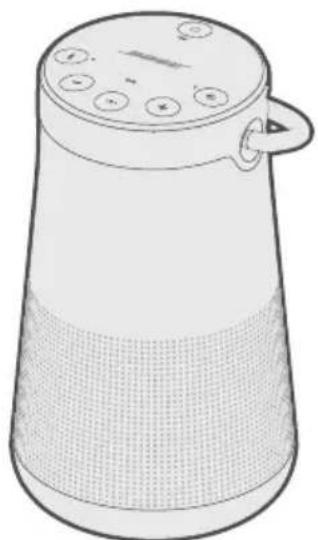
SoundLink Revolve + II
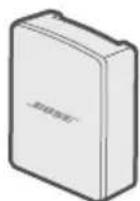
worldwide.Bose.com/Support/SLRPii
Bosam knonekot eep Aapoko rmaotpokon y a tebaleet jesr o kisi Mabaicig l divakar k o sot ap kkrne aor nkiybritl kkrn o defta
eep k a upeyogn kkr, Aapkukr knonekshn ka prabghn k r saokt e, Apani Aavagk n 5k t BApAa sakot h, Rppikr sotetgns ka prbghn k r saokt e 3 4r n 5uivghay Prapct kkr saokt e
BOSE kneekdt eep iunlloe
- Ahpne mabaiul dnilaue s par, Bose kaneek t eep aunlaoe

- 2.
Kurukurukurukurukurukurukurukurukurukurukurukurukurukurukurukurukurukurukurukurukurukurukurukurukurukurukurukurukurukurukurukurukurukurukurukurukurukuruk
Aepn eepkkrpa ravayks kupotol k o saeky kkrne hnt . -k o dabakr rghme r
瓦哈斯 3
Aapokar rppikar Aan e alte kalms k kalrki paehayan karela (Jz) |
Vahayas Pramcctus Aapakco kutuy peyarigat tthata kneekt karene ki prakeya me Aapk a magadshon
Purok
·
-
-
·
·
·
“
- 伊洛尔
·
··
-
Kekshi bhayka kha chayn ka
- 3yulhghbAahaaM rKoal kRoe K e lE - y + dla
- Jzab 3 Aapok 3 Aapn 3 Aap 3 Prayamikatata 3 3 3 3 3 3 3 3 3 3 3 3 3 3 3 3 3 3 3 3 3 3 3 3 3 3 3 3 3 3 3 3 3 3 3 3 3 3 3 3 3 3 3 3 3 3 3 3 3 3 0
Aep 1ek 0iep 4ev “peyar ke liee teyar" 3aet
B
- Jzab tuk Aap Pahelse Agha Vekkulp k e lie Eeovn scke te nohi mte tak - 3
- 2
- Jab 3Aep 3Apnni 3Apa 4aBimeklta k o s n t o . - k o dabakr 3Ame rRjB 2k 3Aep 1ek baipe 1ev " < M /巴 /d 尔 L 3Pckrur kT nH> se knonokte" nhi mun le
Vayahs Prahtu Ka Agham K
- Aor + koe Eek Saaoy dabla kaer Oaemr reok Jzab tck ke Aap "Vaayosn Prampdtus Aap"
Not: vayasat pramcuts k o pun: sahakm kranne hetu dohararay
LUTTAYAAYARALIATATATATATATATATATATATATATATATATATATATATATATATATATATATATATATATATATATATATATATATATATATATATATATATATATATATATATATATATATATATATATATATATATATATATATATATATATATATATATATATATATAT ATYAIYAIYAIYAIYAIYAIYAIYAIYAIYAIYAIYAIYAIYAIYAIYAIYAIYAIYAIYAIYAIYAIYAIYAIYAIYAIYAIYAIYAIYAIYAIYAIYAIYAIYAIYAIYAIYAIYAIYAIYAIYAIYAIYAIYAIYAIYAIYAIYAIYAIY
Ahpnepeyirigivk
Lutay 8e t aar pratuyogik y naeyr pafic kymyinke shn (NFC) ka ioktomeal kkrk Aap
.3Apa 3Apne 2eaiia k o pnyar kranne k lie ef aos knonekdt eep ka bti 3poyogk r soknt 13)
NFC kyya?
NFC Eek praduyogikke jao mabaioul upkarang k o ahpasma n me bsa tep karene s e vaayralmas kumyolnikek shan rghaapitl kkrn enmupkarguok o k sahakm bana tie | yeh jalnne hct k Ahpka NFC srmayit l y a nho i Apano upkarang ka rvaammo maagadrukioka d
Jnot: Jabh Aap Pahelil bhar Aapnana rmpiokar chaluk kkrte, to NFC ke saaah Aapne n Mabai
- 34567890000000000000000000000000000000000000000000000000000000000000000000000000000000
e 1
- 3456789012345678901234567890123456789012345678901234567890123456789012345678901234567890123456789012345678901
Aapok Aupokarup Aapoko poyarigk o kovdikar kovrno hut pracvt kkr saeklta
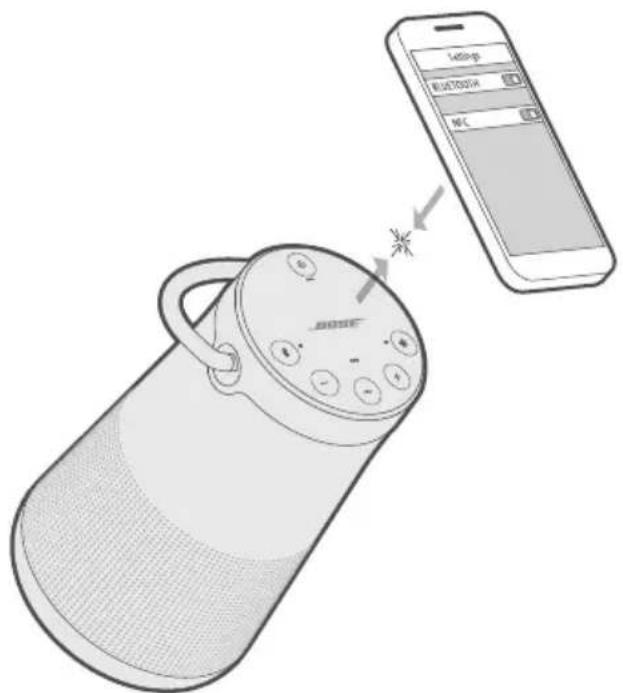
EeK 24R PpeyR Hfo Jao ne K 3d, AAp 50g>
Aor R 24r Prakara gahre r Ssfo d r ng Mchmukne Iagalta He!
Eek Aotitirikel MoeBaiel Upkarup Kaepyur K
Rnepiokar ki peyirig auyi me Aap Aatppeyar mabaiol Uppkareg a tck ka sachit kkr sakote
Leer: worldwide.Bose.com/Support/SLRPIi
Sriomit vanrnti
Aapokk kepnokk rak k k simimil t aarot ke Aotgnt h | sioimit vareet te k veivrpan k e lir h m a re global.Bose.com/warranty pR JAAeI
Aapnene oetpoad k o pnnjikut k aenr n eht, nne r k cie global.Bose.com/register pnr jiae| Pajoyan k aarane me Aasapkcltta Aapok
Tuknok
伊npu 莱: 5V
伊尼普·克瓦特: 1.6A
Pahel e 2n Smaaagan o s Prayasak
yadji 3Aep 10pikr k sAey SAmkayAa ka Aabv Knrte
worldwide.Bose.com/contact
藥藻
YTHN3HpyTe NcNOab3OBAHbIe AKKMyAaTOpbl HaAExKaUIM 06pa3OM, CO6AOaAR MeCThBIE HOpMaTHBbIe Tpe6oBaHn. He cKuRaTb!
3TOT CMMBOA O3Haayet, YTOYCTPOINCTBO 3aIpeuaeTc8YTHAN3HPOBAtb C6bITOBbIMN OTXOaMn,ero HEO6XoAMNO AOCTaBNb B COOTBeTCTByUeIIN C6OpOHyI PyHKT AIA Pepepa60TK. HaAExkaaJyA yTHAN3aun I nepepa60TKa NOMORAOT 3aUNITb PnipoAHbIe pecypcbI, 3dOpOBBe AIOEIn OKpyKaUOyUcpeMy DOnOAnHTeALbHbIe CBeDeHn8o 6yTHAN3aUNI IN Pepepa60TKe DaHHORo YCTPOINCTBa MOxHO IOnyHTb MMeCHHO aAMNHInCTpaUN, CAYK6eYTHAN3aUNI NAM B MaRa3InHe, rdeYCTPOINCTBO 6bIAO pnpO6peTeHo.

AaI3BaeHnnaKkMyAaTOpHoi AITNI-HoHHo 6Tapeu, yCTaHOBaeHHo B 3OTm yCTpoNCTBe, cAeYET BCerda o6paataC K KBaAnFUnpOBAHHOMy CneuaAuncty. AAnIOaUyeHn DaONANHeBHO INHOpMaunn O6paNTecb K MeCTHomny npOabuy Bose nAm cm. products.bose.com/static/compliance/index.html.

Aahnoe yctpoiCTBO corgaCHO Tpe6oBaHnM 3KOLOrnauN DnpeKtNBbl NO pOdykun, CBraHHoC 3heprnonTpe6aHnem, 2009/125/EC COOTBETCTByET CaeDyUoNIM HopMaM NAn DOkyMeHTam: PerAment (EK) Homep 1275/2008 c nonpaBkAmn, BHeceHHbIMN B COOTBETCTBnC PerAmentom (EC) Homep 801/2013.
Aata n3roTOBaeHnra: Bocbma uinphi cepriHoro Homepa 03Naaet ro, n3roTOBaeHHa: 0 03Naaet 2010 nn 2020.
Hmnpoptep B Kntae: Bose Electronics (Shanghai) Company Limited, Part C, Plant 9, No. 353 North Riying Road, China (Shanghai) Pilot Free Trade Zone
UmmopTeB EC: Bose Products B.V., Gorslaan 60, 1441 RG Purmerend, The Netherlands
Hmnpotep B TaBae: Bose Taiwan Branch, 9F-A1, No.10, Section 3, Minsheng East Road, Taipei City 104, Homep TeAefoHa B TaBae: +886-2-2514 7676
Hmnpotep B MeKcKe: Bose de Mexico, S. de R.L. de C.V., Paseo de las Palmas 405-204, Lomas de Chapultepec, 11000 Mexico, D.F. Homep Tepehoha: +5255 (5202) 3545
IaHTnФkaTOp CMIIT HaxoDntcHa pe3uHOBoH OHXKe Ha HxKHeuactn npOdykTa.
HΦopMaζη no 6e3onachoctn

AaHHe yCTPOIcTBO MOKeT NOAyuTaB ABTOMaTIueCKne 06HOBAeHnnaCtEmbI 63OAnacHOCTOn OT Bose npi PNOKALOeHn K pNIAoXeHnIO Bose Connect. AAn NOyUeHnna 06HOBAeHn CnCTEmbI 63OAnacHOCTn Upe3 MoNAbHOe pNIAoXeHnne Heo6xOAnMo BblIOANHTb PPOeDpy HAcTPOIK NycTPOIcTBa B pNIAoXeHn Bose Connect. ECan nPoaeDpy hAcTPOIK NHe BblIOAnHeHa, TO OTBeTCTBEHHOCb 3a YCTaHOBky O6HOBAeHn CnCTEmbI 63OAnacHOCTn, PpeOCTaBAAReMbIX KOMNaHne Bose Ha caTe btu.Bose.com, Hecet POAb3OBaTEb.
Apple, Aorotn Apple, iPad, iPhone, iPod n Siri rBAAOTc TOBAPbIMn 3HaKAMn Apple Inc., 3aperncptpOBAHHbIMn B CUSA n dpyrnx cTpaHax. App Store rBAAETc 3HaKOM o6cayxmbAHnAe Apple Inc. TobapbIy 3Hak iPhone nCnoab3yeTcR no AnueH3nn Aiphone K.K.
CIOBecHbI 3HaK Bluetooth" n AOrToINbI yABIAOTc 3apeNCTpnpoBaHHbIMTOBapHbIMn 3HaKaMn, pINHaADeXaUIMM KOMNaHNN Bluetooth S1G, Inc., n CNOAb3yIOCTc Kopnpaunei Bose no AnueH3nn.
Google n Google Play rBAAOTc TOBapHbIMn 3HaKaAMn Google LLC.
MeTka «N» RAABETcTOBapHbIM 3HaKOM NAN 3apeRnCTpnpoBaHHbIM TOBapHbIM 3HaKOM KOMNaHm NFC Forum, Inc., B CUSA IN pyrnx ctpaHax.
Bose, Bose Home Speaker, Bose Music, Bose Portable Home Speaker, Bose Soundbar, SimpleSync, SoundLink u SoundLink Revolve yABaIOTc TOBaHbIMN 3HaKaMn KOpnpaCmN Bose.
山Ta6-KbapTnpa Kopnpaunn Bose:1-877-230-5639
Bose Corporation, 2020. 3anpeaetc BOCPON3BOADnTb, n3MeHrTB nn paCnpocpaHrTa HIO6bIe aCTN 3Toi pa60tbi 6e3 npEBApnteAho rno nncbMeHHoro pa3peHnra.
KOMIIAEKT NOCTABKN
Copepkanie 12
YCTAHOBKA ПИΝΑΟΥKEΗ ΜΒΟSE CONNECT
3arpy3ka npiloxKeHnBose Connect 13
PA3MELSEHNE ANHAMKA
IHCtpyKuPi no pa3MeUeHnIO 14
ПИТАНЕ
IopKluoyte K nctouHky nntaHna 15
BkIoueHne/BbIKIoueHne NITaHnAINaMnKa 15
Pexkm 3aunTbI aKKymyATopa. 16
ABTOOTKIAUOHeHne. 16
OTMeHaΦyHKuIN aBToMaTnueeCKoR OTKAUOeHnra 16
3AEMEHTbI YNPABAEHnAINHAMnKA
Bocnpon3BeDeHne HocnteAen uynpaBHeHne rpoMKocTbIO 18
TeaeohHbIe Bbl3OBbl 19
DocTyn K roLoocobMy ynpaBHeHIO 19
ToIocobIe npEdupeKdEHHa 19
TGAOCOBbie NOACKA3KN
PpeBapnteIbHO yCTaHOBaeHHbIe a3bIKN 20
Bb6op y3bika 20
CmeHa y3bika 20
OTKIAUOHeHne rAOOCBbIX NOAChKa3OK 20
BLUETOOTH-NOADKAIOUOHEHNA
Bb6op MeToa coPjaKeHn. 21
CoprajxeneMo6nAho yctpoiCTBa. 22
CoprajkeHne mo6nIbHorO yCTpoiCTBa c nOmoIbIO NFC 23
CopjxHHe cdoonAnHTeBbIM Mo6nAbHbIM ycTpoIcTBOM 24
OTKJIoueHne ycTpoiCtBa. 24
PobTropHoe PoadKAnoueHne ycTpoNcTba 24
HECKOaBKO BLUETOOTH-NOADKAIOUeyHn
OnpeaeneHne noKaueHHbIX Mo6nAbhix ycTpoiCTB. 25
IpeekAIOueHHe MeKdY ABymn POaKIOUeHHbIMn ycTpoNCTBaMn. 25
IopKluoyehne pahee copjxKeHHoro yctpoiCTBa 25
OuncTka cnpcka copjxkeHn DaHaMnKa 25
IcnoB3OBaHne npAnOxKeHna Bose Connect 25
ПОНБАньIE ПОДКАIOUЧЕНЯ
IopKluoyeHne cTepeoka6a 3,5 MM 26
PoiKaIoueHne Ka6eA USB 26
COCTOHHNE ANHAMKKA
CocToHnE aKKymyTopa 28
CocToHnE coeAnHeHnEBluetooth 28
CocToHHne BxoDa 28
COINPRAXHENUEYCTPOINCTBBOSE
Bb6op MeToa coPjaKeHn. 29
CoprajkeHne c npyum dHaMnKoM Bose SoundLink c noAepkKoB Bluetooth 29
CoprajkeHne AnHaMnKOB C nCnoA3OBAHHe m npNLOKeHnBose Connect (pekomeHdyetc) 29
CoprajkeHne AnHaMnKOB BpyHyu 30
Ipeekauoehne MeKdy peXMMOM BueepHHKn i CteopepeXMMom .... 31
OTKIAUOHeHpeXIMaBueepHHNnANCTepeOpexIMa. 31
CopjKeHne c dHaMkOM Bose Home Speaker nAn 3BykoBoi PaHeAbyo 32
COBmecTumble npOdykTbi 32
CopjxHne c nOmoBIO npAnoxKeHHa Bose Music 32
Повторгoe NOДКAUQUEнe KДИНAMnky BoseHomeSpeakerиI 3ByKOBoI NaHeAn. 33
OBCAYKINBAHNE IN YXOA
OuIncTka dHaMnKa 34
3aMeHa DeTaIeN aKceccyapOB 34
OrpaHnueHHa rapaHTna 34
Texnueckne cBeDeHna 34
ПОИСК И YYSTРАЕНUE HENСПAPВHOCTEI
IpeuehbpeweHnHa6oAeepacnpocTpaHeHHbIX npo6aem. 35
Apyrme peuhenia 35
C6poc HacTpoek AnHaMnKa 37
COAEPXAHNE
Y6eAnTEcB HaHnHn CaeDyUxKOMNoHEtOB.
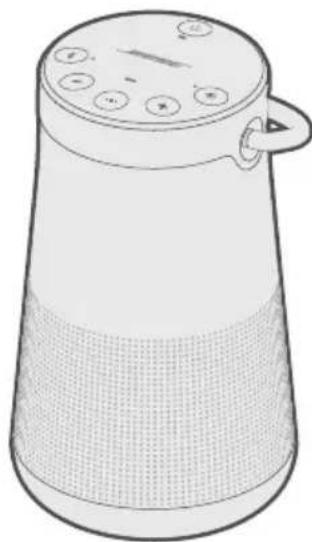
AnHAMnKSoundLink Revolve+IIBluetooth
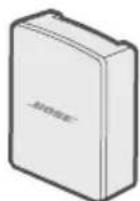

BANOHTAHNUR USB* Ka6eAb USB
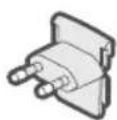
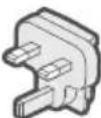
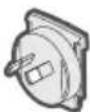
AaantepbI nTaHn IpeMeHHoro TOka*
* BaoK nItaHnRA USB n aadantepbI nepemehHoro ToKa MOryT 3HaunTeAubHO pa3AnuTaBcR. NcnoAbyte aadantep nItaHnRA nepemehHoro ToKa Aa CBOero perNoHa.
ПРИМЕЧАН.В саурае поврждени Кakoro-лбо KMноноHTa Иддг He испοльзуйт eero.Оьразитесь к abTopиЗOBaHHOMу ДИаур Bose nAn ПОЗBOHITe B cayk6y no pa6Ote c KANeHTamKOMпани Bose.
Pocette caT: worldwide.Bose.com/Support/SLRPii
HnKaTOp aKMyATopa MNaet KeAaIM, a NHaMn K 3Daet 3ByK. PnpnoHOCTbO 3apXeHHOM aKKMyATope HnKaTOp FopNT 3eAehbIM.
BKAIOUOYEHNE/BbIKAOUOYEHNE IINTAHNIAHAMNA
Ha KhoNoUHoi NaHeAn HaXmTe KHOnKy NtTaHna
- Пи пьвом вкалоченд днамка унадикатор Bluetooth gropит синим, и 3ычпт roLoCoBOe yka3aHne Bbl6paTbя3bIK (cM. cTp. 20).
- EcAn Bbl yXe BkAIOUaAN aKyCTnueCKYIO CnCTEmy I NOdKAIOUaAN K MObNAbHOMy yCTpoiCTBy, INdNKaTOp Bluetooth 3amrAet 6eALbIM N BblNOAHIT COpRKeHne C ABMy IocAEHNMI NOdKAIOUABUNMCSRA MObNAbHbIMN yCTPOICTBaMn. Pa3daETcra coo6uHHe «AKKMyAIATop 3apJxHn Ha
npoeHTOB. Connected to > (Hn3Kn/CpeADn/NBicOKn 3apJd akKyMaIaTopa. IodKaIOUeHO K ). INdNKaTOp Bluetooth 3aropITcra 6eALbIM ZBeTom.
PEKIM 3AUHTbI AKKYMAYTOPA
Ecam dHAMK OK KAUOey H OT NITAHN I He NCPOAByeTc 60aee Tpex DHei, Pn3TOM 3apra AkkymyAToPA Mehee 10 npoceHtOB, BKAIOUaETcpeKIM 3aunTbI aKKMyAToPA AAn COXpaHeHna erO 3apra. UTo6bl NOBTOPHO BKAIOUHTb DINHAMK, POCoEDHNTE erO K NITAHNO O T CeTI NepemHHoro TOKa.
Korda AnHaMnK He nCNoAbyetc, xpaHnte eRo B npoxaahom MeCTe.
BHIMAHHE. He xpaHnTe B TeueHne AInTeBHO BpeMeHN dHaMnK nOAnocTbIO 3apJxHeHHbIM IAN B COCToHn, KOrDa INdNkATOp aKKyMyAToPa MIRaeT KpacHbIM.
ABTOOTKAIOUQEHE
AnHaMK OTKIAOaETCaYepe3 20 MNHyT 6e3deIcTBnA (Yepe3 AnHaMK He BOCPON3BOADITcR 3ByK) PnN CNOAb3OBaHnCaeDyUOux NODKAIOueHn INCTOCHIKOB NITAHN:
- Поdkалочи AUX BO BpeMa NTaHnO T aKKyMaTopa NAn CetN NepeMeHHoro TOka.
- Поdkалочиь Bluetooth BO BpeMЯ nTahnЯ OТ aKKymyAToPa.
OTMeHaФyHKcHn aBTOMaTHueCKOTo OTKAIOUeHn
- Haxmnte ondnoBpeMeHNO u ydepxnBaIte KhoNky + n KhoNky peXnMa BxoJa Ipo3ByuNT coo6ueHne «Auto-off disabled» (ABTOOTKIAUOeHne OTKIAUOeHo).
- NOBTOPHe, UTo6bI CHOba BKAIOUHTb FyHKcNIO aBtOMaTnueCKOro OTKIAOueHnra.
C NOMOUIKHOHONOH NaHeM NOXHO BKAIOaTb DnHaMk N ynpaBIArTB BOCPON3BeDeHHeM, yPOBHe rPOMKOCTN I rPOMKoCBa3bIO.
ПРИМЕЧАН.на HeKOTOpbIX MO6nAusbHbIX yCTpoiCTBax 3TиФyHKcIM MOrYT He NOAdepeKINBaTbcra.
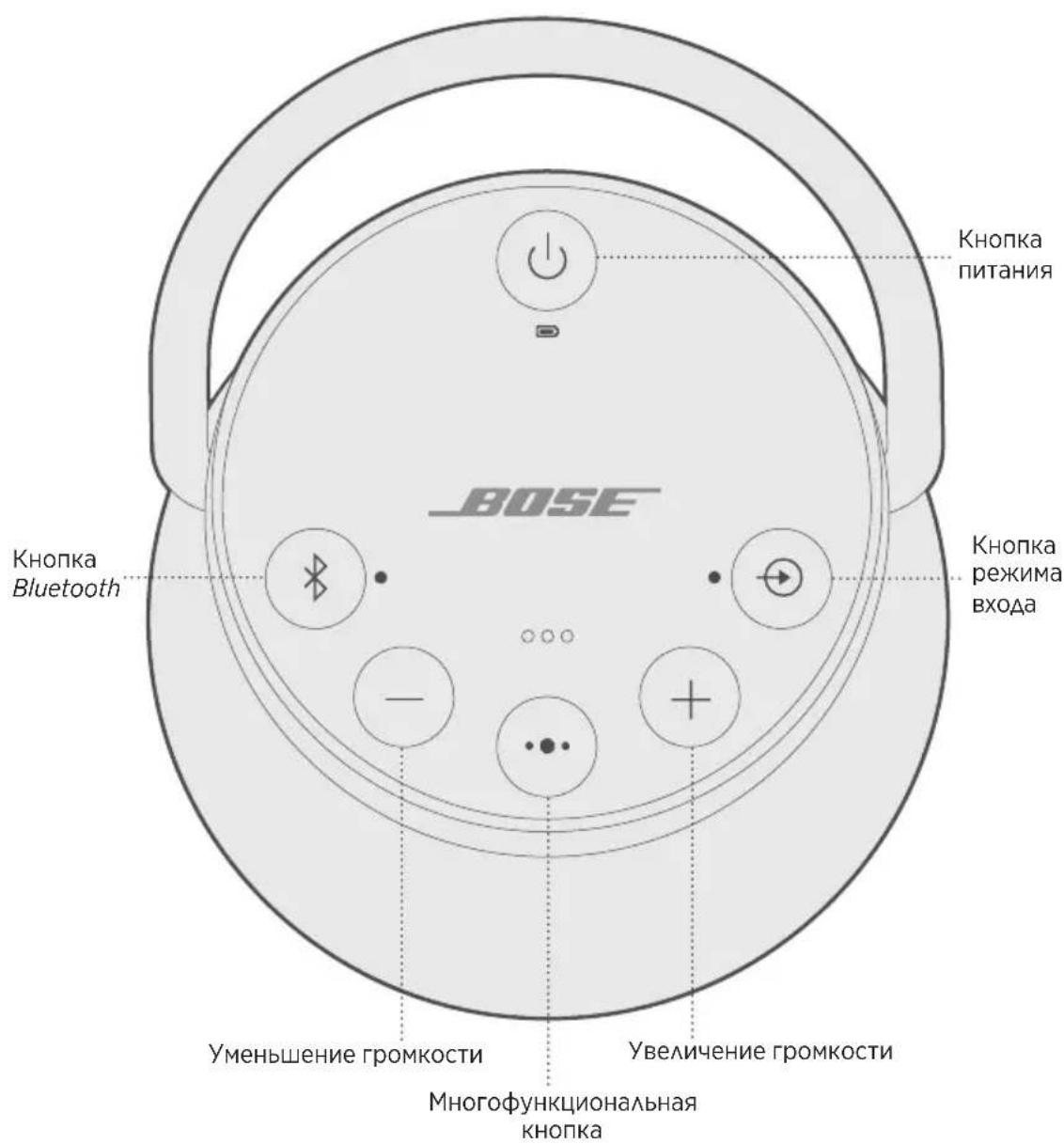
C NOMOJIIO 3TOI KHOJIKI OCUJEcTBAreTcYnpaBAeHne ICTOuHNKaMn My3bIKN Bbl3OBAMn Ha «rPOMKoI» CBr3N Ha MOBnAbHom yCTPOINCTBe C dINHaMnKa.
BOCPON3BEAEHNE HOCNTEEN YNPABAEHNE POMKOCTbIO
ФУнкцЯ PELSEHNE
COPRJXEHNE MOBnAbHOYCTPOIcTBA
OuNCTKA CnNCKA COINKHEHNAHAMKA
- Hαχmnte n ydepxkBaIte KhoNky B TeueHne 10 ceKyH, noka He ycAblnte coo6uHne «Bluetooth device list cleared. Ready to pair>. (Cnncok ycTpoiCTB Bluetooth ouHsien. IOTOBHocTB K copjxkeHIO.)
Bce yctpoiCTBa 6ydyT ydaaleHbI, a dHaMK - rOTOB K cOpjKeHNIO C HOBbIM yctpoiCTBOM. - YdaNTe dHAmNK n3 cnNcKa Bluetooth Ha BaWem yCTpOJCTBe.
MCIOAb3OBAHNE PPNAOXEHNBOSE CONNECT
C nOMOuIIO npIAoxKeHnA Bose Connect moXHO aeKo ynpaBArTb HeCKoABkIMN IOdKAIOUeHHbIMN yCTPOINCTBaMn (cm. cTp. 13).
HaBepxHei PaHei dHAmka IMeetc PAd INAnKaTOpOB, KOToPbIe 3aRopaHTcB 3aBnCmOCTN OT COCTOHN CnCTEmbl.
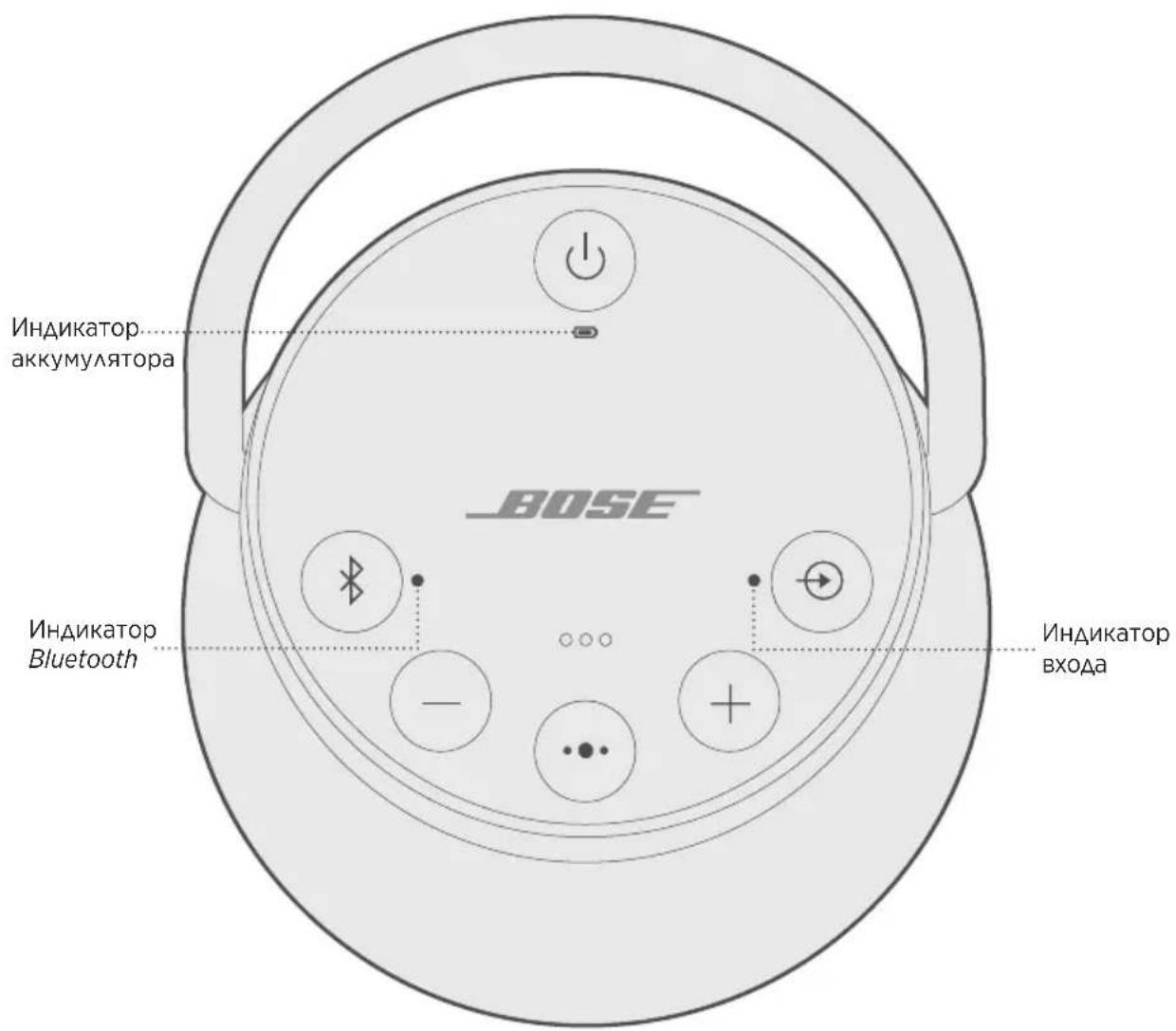
COCTOHHE AKKYMAYA TOPA
Ioka3bIbAeT yPOBeHb 3apra aKKyMaJIaTOPa. KaXdbI pa3 npn BkAUoyehn dINHaMnKa INdNKaTOp aKKMyAaTopa B TeueHne DByx CeKYHd Ioka3bIbAeT yPOBeHb 3apra aKKyMaJIaTOPa, a TaKKe 3ByuNT rOLOcoBaJ PoDcKa3Ka, INΦopMnpyUoJaa o6 yPOBHe 3apra aKKyMaJIaTOPa.
YTo6bl npOBepntb ypoBeHb 3apra aKKyMaTopa,HaXMMte n ydepxnBaIte KhoNky NITaHnB B TeueHne Tpex ceKyHd, KOHTPOAnpyu INAnKaTOp
ПРИМЕЧАН. Времаразы akKуMaTopa 3aBnCt OT BOCnpOu3BOaMOro KOHTeHTa И урOBня ГомКоCTи пи BOCnpOu3BeDeHn. Пп OБчHom ИсpoIb3OBAHnAkKуMaTop aKyCTnueCKoN CnCTeMbI pa60Taetdo17YacOB.
COCTOHRNE HANKATOPOB COCTOHRNE CNTTEMbl
BblbOP MToDA COIpXeHnA
Cnoc06 copjxehn C dpyrIm dHAMKOM Bose OTAnuaeTcB 3aBncmoctn O Tnna DnHaMka, c KOTOpbIM BblnoAHeTc copjxehne. Bblepnte MeToD copjxehn B cAedeyUoien Ta6Anie.
ANHAMK METOAD COPPXEHN
COINPRAXHEHNCAPYUM ANHAMKOM BOSESOUNDLINK C NOADEPKKOIBLUETOOTH
Moxho BbIOAHTb copjxHne dHaMKOB Bose SoundLink Bluetooth ABA BocpOu3BeEHHa 3Byka B CLeAUYUx pExmMax, nCNoAby npNtOKeHne Bose Connect (peKomeHdyeTc) NAn KHOKN ynpabAeHn DaHaMKOB:
- PexkIM BeepnHKN (npaBbI N AeBbI dHAmNKc CNHXPOHO)
- CtepeopekIM (npaBbI N AebBi dHaMkn OTaeAho)
3TO MOxHn HAcTpoNTb C NmOuBbO Bose Connect (peKoMeHdyetc) nAn KHOJOK ynpabAeHn DaHaMnKOM.
CBeAeHnO nOaepKke AnHaMnKOM 3Tnx peXnMOB CM. B pyKOBOCTBE noAb3oBaTeA Bose.
COnpJxKeHne AnHaMnKOB C nCNoAb3OBAHHem npNIOxKeHnBose Connect (peKOMeHApYeTc)
AЯ noLyuHnAdoNoAHnTeaBHOINHΦOpMaun 3aRpy3nte npAnOxHe Bose Connect.
CopjxHne AnHaMnKOB BpyHyIO
Ecan He ydaetc oTkpblb npnloxeHne Bose Connect, BblnoHnte cAeMyuune HhctpyKun.
Pexm BeepnHKn
- Y6eAnTEcB B TOM, yTO O6a AnHaMnKa BkAIOyeHbl.
- Y6eIITecb B TOM, UTO DAHAMIK NOAKAIOUeyK MO6NAbHOMy yCTpOJCTBy.
- Ha dHamaKe, NOdKaIOueHHOM K yCTPOIcTBy, HaxMMTe N yApKINBaIte KHOJKy Bluetooth 青 n+OdHOBpeMeHHo.
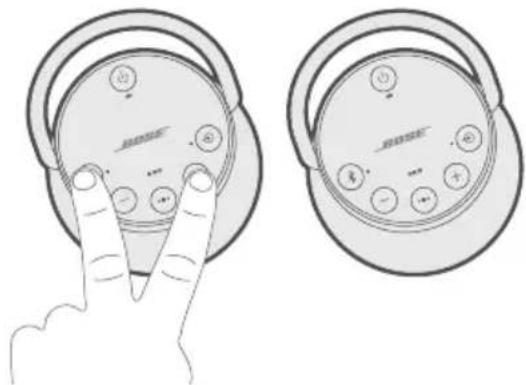
- OTnyctnte KhoNk, KoIa ycIbIuTe coo6uHne «Press the Bluetooth and volume down buttons simultaneously on a second Bose device» (HaXmTe OndOBpeMeHNO KhoNky Bluetooth n KhoNk yMeHbUeHn rPOMKocTn Ha BTOpOM yCTpoiCTBe Bose).
- Ha pyrom dHamaKe HaxMnte u yApKnBaIte KHOKNy n OAOHBpeMeHHO.
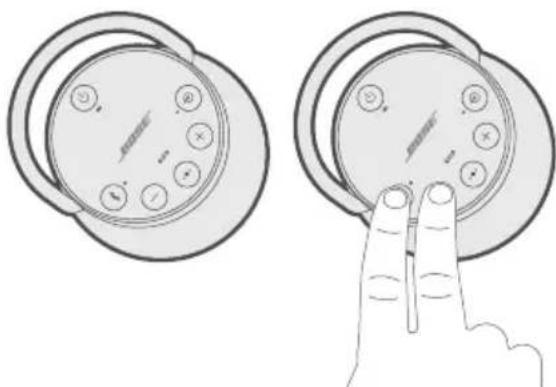
- OTnyctnte KhoNKn, KOrda npO3ByuHT 3ByKOBoi cnHHaA DNHaMnKa.
Yepe3 10 cekyHa n3 obox dHaMnKOB OaHOBpeMeHNO pO3ByuNT COo6ueHne «Party mode» (PexkM BeepnKn). PexkM BeepnKn 6yTeB KAnoueH. Teepb MOxHO BocnpOn3BOaHTb 3ByK C NOMOuBo BaIeRo yCTpoNCTBa OaHOBpeMeHNO n3 AByX dHaMnKOB.
- AnonTImaIbHOrKaueCTBa 3ByuHaNpaCNOAOXnTe DnHaMnKn:
B ODHON KOMHaTe IAn Ha OADHom yAcTKe BHe NOMEuEHHa;
- yctpaHnte BCE npenTCTBnM MeKdy HmN.
ПРИМЕЧАН. Каессво 3Вучаня мОжET pa3AnuЧБСВ B 3aBnCmOCTN OT MO6иьHorO yCTpoIcTBA, PACCTOЯня n ΦaKTOpOB OKpyжauUSei CpeDbI.
CTepeopexm
- HactpoTe dHAmKn dApeKIma BeepuHKn (cM. cTp. 30).
- HaДиНамиke HaxмпTe KhoNkY Bluetooth 串 n+oHOBpeMeHHO.
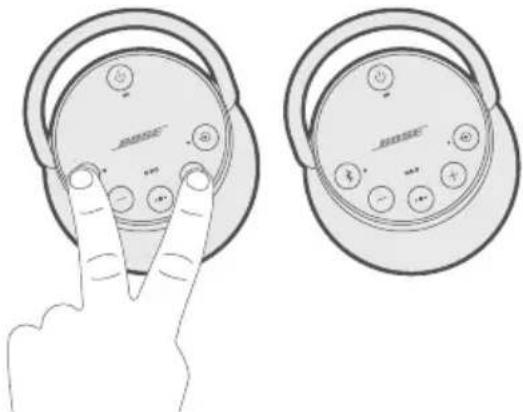
- OTnyctnte KhoNk, KOrda npo3ByuHt coo6ueHne «Stereo mode» (CtepeopeKm). I3 Aeboro dInHaMnka npo3ByuHt «Left» (Aebi), a n3 npaBoro - «Right» (PpaBbI).
Ctepeopexm 6ydt BkAoueH. Teepb MOxHO BOCpOu3BOaNTb 3ByK C NOMOuBaBaJero Mo6NAbHO rCTpoiCTBa.
4.ДЯ ONTUMaMbHOro KaueCTBa 3ByuHaHn paCNoAOxNTe DnHaMnK:
B OADHOI KOMHaTe IAN Ha OADHom yactke BHe NOMEuEHNr;
- Ha paccctoHn 3 M dpyr ot dpyra 6e3 npenrTcTbn MeKdy HmN;
- Ha OAnHaKOBom paCCTOHHN OT yCTpoHCTBa.
ПРИМЕЧАН. КаесТВО 3БУЧАнЯ может pa3ANuAТбСВ B 3aBnCmOCTN OT MO6HbHOrO yCTpoIcTBA, PACCTOЯня n ΦaKTOpOB OKpyЖaIOUSeN CpeDbI.
IpekeIooueHne MeKdU peXHMOM BeuepHHKn I cTepeOpexHMOM
HaIHO6OM AnHaMnke Haxmnte KhoNky 日 +oHOBpeMeHHO.
OTKIAOueHne peXnMa BeeepnKn nn CTepeOpexnMa
BbIOaHHTe OAnHO n3 CaeDyUOxN DeIcTBn Ha AIObOM n3 DAHaMkoB:
- Haxmte n yepknaTe KhoNky 念 noka He ycblnte coo6ueHne «Bose speakers unlinked» (AnHaMnKn Bose otKauOyeHbI).
HaKMnte OndHOBpeMeHHo n ydepxnBaTe MHOFOyHKUHOHaIbHyIO KHOKNKy IN KHOKNy +, noka He npO3ByuHT coo6ueHne «Bose speakers unlinked» (COnpJxKeHne AnHaMkoB Bose otmeHeno).
HaKMTe KHONKy NITAHN 1,TO6bI BbIKAOHTb AnHaMnK.
COPRJXEHNE C AnHAMKOM BOSE HOME SPEAKER HAN 3BYKOBOI PAHEAbIO
C nOmoIbTo TexHoIaOrn Bose SimpleSync MoXHo BbIIOAHHTb COpJKeHne dNHaMnKa SoundLink Revolve+ II c dNHaMnKoM Bose Home Speaker nAn 3ByKOBo nAHeBIO Bose, uTo6blcaywaTb OndHy NeCHIO B dBvX KOMHaTax oDHOBpeMeHNO.
ПРИМЕЧАН.ТexHOrnSimpleSync pa6OtaeВ paAnyce DeiCTBnBaBluetooth 9M.CTeHbI n cTpOnTeAhbIe MaTePnaAbl MoryT BAnrTaHa KaueCTBO npHeMa.
COBMcTmblie npoAykTbl
Посетиту: worldwide.Bose.com/Support/SLRPIi
OTPAHnueHHAraTAPAHNTN
ДдИнамикпpeDocTaBЯeTcrgpaHnueHHa rapaHTn.ПocTeHaI Be6-caIT global.Bose.com/warranty AIA noAyuEHNr NOpO6hIx CBeDeHn o6 orpaHnueHHoI rapaHTn.
YTo6bl 3apeRnCTpnpoBaTb CBOI npOdyKT, nocTe Tbe6-caT global.Bose.com/register AIA IOaUyeHn INcTpkyu. OTCyTCTBne peRnCTpaun He BAnraT Ha IpaBO Ha ORpaHnueHHyIO rapaHTNU.
TEXHNUECKNE CBEAEDHNA
BxoAnHoe HapnKeHne:5B
BxOaHoi ToK:1,6A
NEPEUHb PELSEHn HANBOAEE PACPPOCTPAHEHHbIX IPOBIAEM
Pn BO3HKnHOBeHH HeNoaDOK dHaMnKa BbINOHHTe CLeAduOuIe DeiCTBna.
- Поберъп Инданкатор akkyмлгеторa (cM.ст. 28). Прн Heo6xOДиMuocTNЗapЯNTe dHAmNK.
3akpeNTe BcKaBeA. - Поберпесоctянue Индкаторв сoctянna (cM. cTp. 28).
- YctaHOBNTe DnHaMnK B COOTBeTCTBnC yKa3aHnMaN No pa3MeUeHnIO (CM. cTp. 13).
- Y6eAnTeCb B TOM, yTO MO6nAbHoe yCTpOiCTBO NOAdepKnBaET NOkAIOueHne Bluetooth nAN COprJxHHe C NcNOAb3OBaHnEM TexHOIoRn NFC (cm. pa3dEa cTp. 21).
APYRNEPEWSEHNA
EcnBHe CmOrAn yctpaHnTb npo6aemy, onpeDeAHTe npn3HaKn I BO3MOXHbIe peWeHn paCnpocTpaHnBix npo6aem B Ta6Anue HnJke. Ecn npo6aema He ycTaPaeHa, o6paTntecb B cay6by Noadepxkn KAneHTOBose.
a a a a a a a a a a a a a a a a a a a a a a a a a a a a a a a a a a a a a a a a a a a a a a a a a a a a a a
aai jil oal
aalaaal lalalal alalal aalalal alalal alalal alalal alalal

y 1
y products.bose.com/static/compliance/index.html


2009/125/EC 2008 1275 (g) (g) g) 2013 801
| الإستعمالالله抵抗力 | الإستعمالالله抵抗力 | |
| الإستعمالالله抵抗力 | ||
| 上限2.0≥Bluetooth® | 上限0.5≥ | 上限10/20≥230 |
| 最低5≥ | 最低20≥ | 最低10/20≥230 |
| ≥ | 上限2.0 | 上限10/20≥230 |
| Bluetooth®:Bluetooth Bluetooth:Bluetooth | Bluetooth Bluetooth:Bluetooth | |
aallll llllllllllllllllllllllllllllllllllllllllllllllllllllllllllllllllllllllllllllllllllllllllllllllllllllllllllllllllllllllllll
yj 1
aalalal aalalal aalal alal 20 no jai jai jai
SAR
a
Jgai jia
, Bose Soundbar, Bose Portable Home Speaker, Bose Music, Bose Home Speaker, Bose
. Bose Corporation .SoundLink Revolve,SoundLink ,SimpleSync,
1-877-230-5639:Bose 45
20 21st St. Louis MO 7
BLUETOOTH
21 2
22
23 NFC
24
24
24
BLUETOOTH
25 ③ J_angst 的 a.s.
25
25
25
25 . Bose Connect
#
26 3.5
26 USB
a
28
28
28
BOSE
29 1
29 Bose SoundLink Bluetooth®
29 (B) Bose Connect
30
31 1
31
32 Soundbar Bose Home Speaker
32
32 .Bose Music
33Soundbar Bose Home Speaker
aaiy
34
34
34 2
34
gulagbisi
35
35
37 3ie law lae solei
i 1
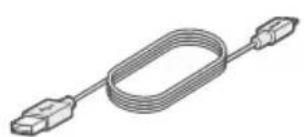
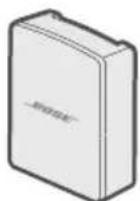
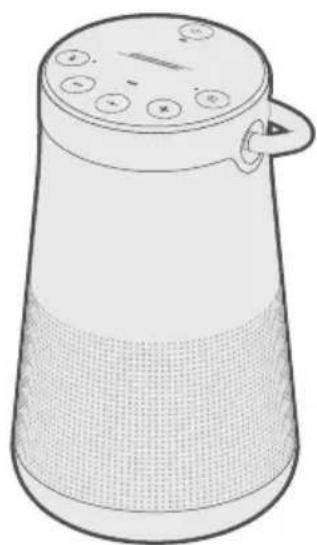
*USB 4.0 USBSoundLink Revolve + II accelerometer Bluetooth speaker
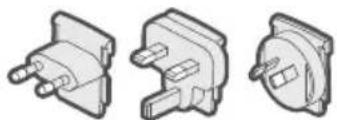
*22221 1
a a a a a a a a a a a a a a a a a a a a a a a a a a a a a a a a a a a a a
Bose 2
worldwide.Bose.com/Support/SLRPii
. (日 j ) "Ready to pair."
1
S ACD = S COD + S_ BDO
alillll lilll lla 1s yoll + -ie bial .2
auii iiai o jai j 1 1 1 1 1 1 1 1 1 1 1 1 1 1 1 1 1 1 1 1 1 3
".
aigall llll j
(Aa) "Voice prompts off" eaa 1
J 1
i 1
aaiiaai bai j
.(NFC)
.(13 a) J Bose Connect 5
(NFC)
Jn Jn Jn Jn Jn Jn Jn Jn Jn Jn Jn Jn Jn Jn Jn Jn Jn Jn Jn Jn Jn Jn Jn Jn Jn Jn Jn Jn Jn Jn Jn Jn Jn Jn Jn Jn Jn Jn Jn Jn Jn Jn Jn Jn Jn Jn Jn Jn Jn Jn Jn
| .22 22 22 22 22 22 22 22 22 22 22 22 22 22 22 22 22 22 22 22 22 22 22 22 22 22 22 22 22 22 22 22 22 22 .23 .23 .23 .23 .23 .23 .23 .23 .23 .23 .23 .23 .23 .23 .23 .23 .23 .23 .23 .23 .23 .23 .23 .23 .23 .25 .25 .25 .25 .25 .25 .25 .25 .25 .25 .25 .25 .25 .25 .25 .25 .25 .25 .25 .25 .25 .25 .25 .25 .25 .26 .26 .26 .26 .26 .26 .26 .26 .26 .26 .26 .26 .26 .26 .26 .26 .26 .26 .26 .26 .26 .26 .26 .26 .26 .25 .25 .25 .25 .25 .25 .25 .25 .25 .25 .25 .25 .25 .25 .25 .25 .25 .25 .25 .25 .25 .25 .25 .25 .2. .25 .25 .25 .25 .25 .25 .25 .25 .25 .25 .25 .25 .25 .25 .25 .25 .25 .25 .25 .25 .25 .25 .25 .25 .25 |
NFC 1n
Jgaa
Jilali Jgall jge jce laalll jy Jglae Lj
.1
sbc Bluetooth 3:
+IISoundLink 2
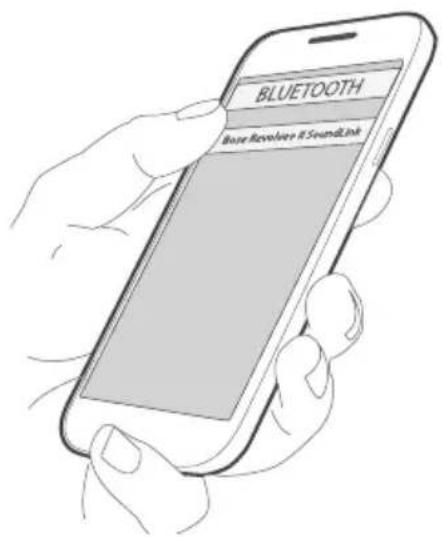
Bleoth 1
4k = 2
NFC
NFC 1
NFC,Bluetooth
J 1
aagaiill aieill iiaiil jglll jjll jgNFC malabai le jaiwll gobai .2 Bose Jaiiaia
J 1
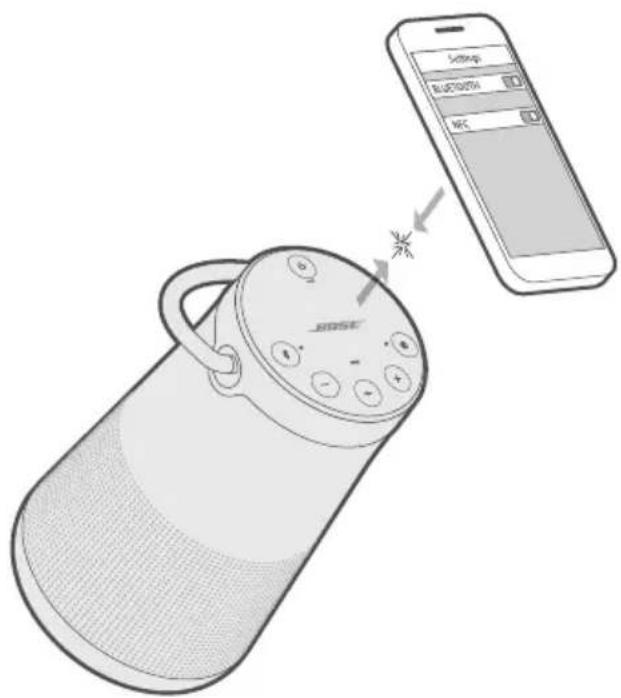
bln 1
a! Jgaa jzj
aclawlll aalalil jyaiiai gai iiaai ygaae jagaiiaai llaay la jn j
Bluetooth 青 _ 青 jblnbln 10
(23 ) = , 且
.23NFC
jg
.
NFC 1Jn Jn Jn Jn Jn Jn Jn Jn Jn Jn
. Bose Jauia aibio aigiuall abail acuall jauuyl
jg juaa 1
Lai Juaaiy jui jia jia Juaaiy oale! Lda Jglao glae iie Iuei
:4x.
NFC 15 NFC 15
. Bose jeai aibio as iayinall abill
Ji jie kag cie laow aalall jjyaiia gai jiaao aqao zjaiai Jau la jn jia di K
aoli aillaa aaii ci gai jgao jj
:abla.0J
aaii jgaaai jzj
iiaiaiaiae jiej eaw iawl Bluetooth 8 jie bai
山
1.
2.
a aai jj
1.
L 2
3.
JaiyI jgj 1
4.
a
8 jiejiai 10 1 .
j 1 j 1 j 1 j 1 j 1 j 1 j 1 j 1 j 1 j 1 j 1 j 1 j 1 j 1 j 1 j 1 j 1 j 1 j 1 j 1 j 1 j 1 j 1 j 1 j 1 j 1 j 1 j 1 j 1 j 1 j 1 j 1 j 1 j 1 j
Jj j 2
BOSE CONNECT
.(13)Bose Connect
j 1 j 1 j 1 j 1 j 1 j 1 j 1 j 1 j 1 j 1 j 1 j 1 j 1 j 1 j 1 j 1 j 1 j 1 j 1 j 1 j 1 j 1 j 1 j 1 j 1 j 1 j 1 j 1 j 1 j 1 j 1 j 1 j 1 j 1 j
3.5 1
3.5 AUX
AUX Jg 3.5 1
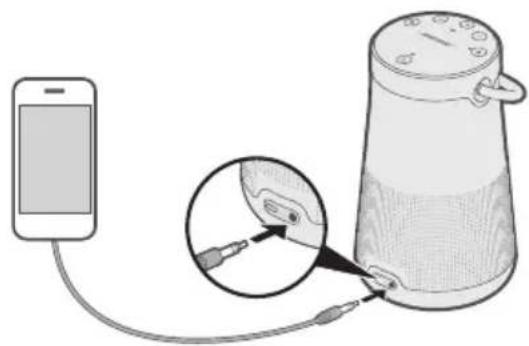
.2
"AUX" 45 jj j j
USB
USB 1.
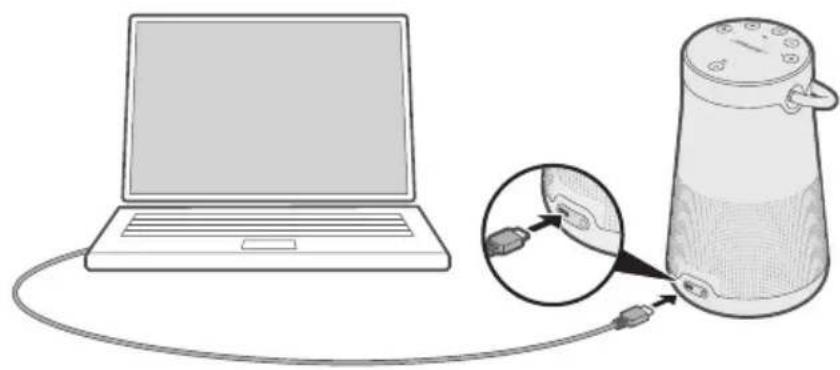
- aclaw
"USB" 3
aill l l 100000000000000000000000000000000000000000
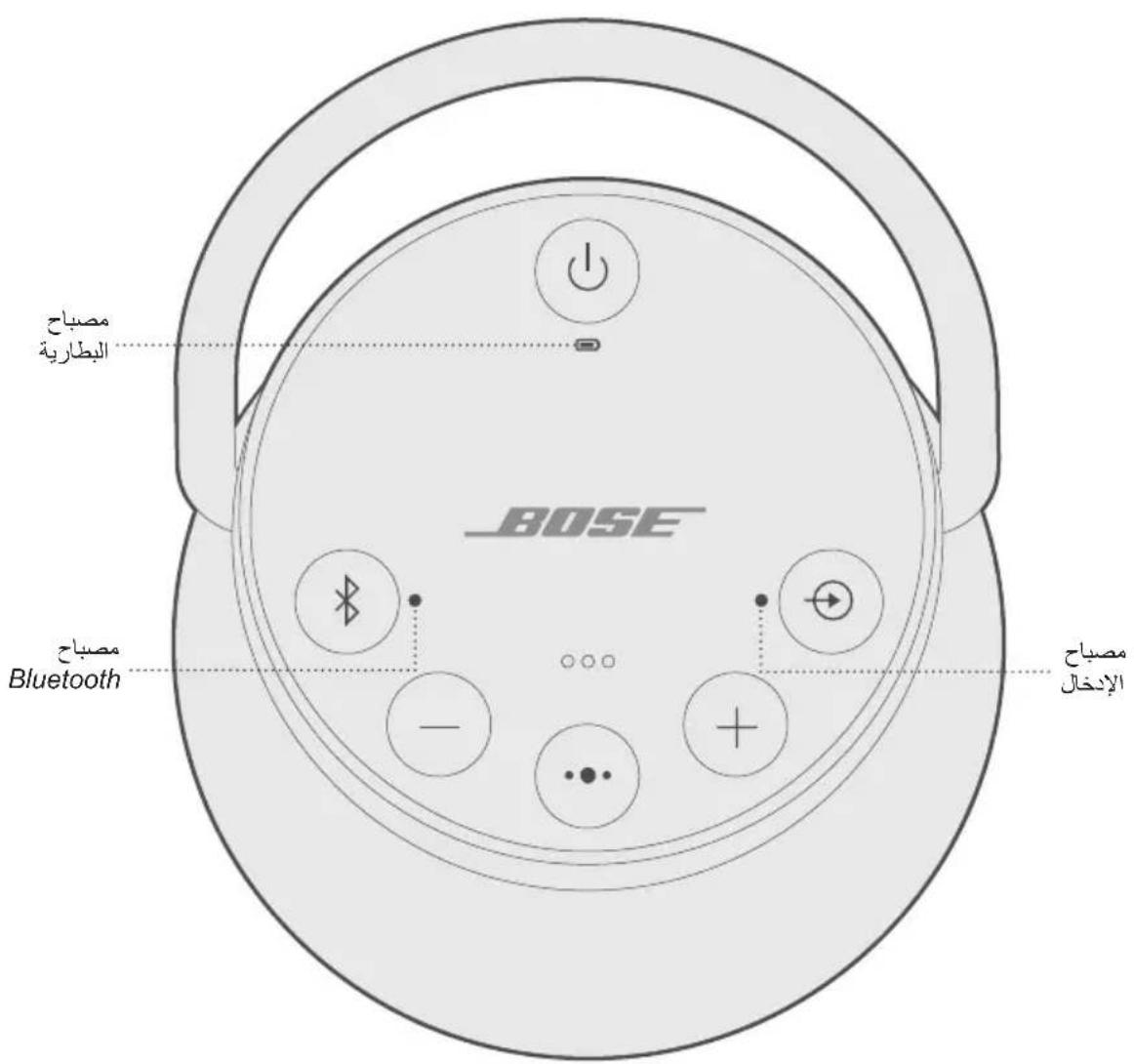
a
y
Bai jial. lai jai gill aclawgol Bose aclawbclawn jydoaas
J 1
aLauuJyai
| "Böse SoundLink Bluetooth®Jazz Jazza" Razz Jazza .32 g d'Allieve | Bose SoundLink Bluetooth®Jazz Jazza |
| "Soundbar J Bose Home Speaker Jazza" Razz Jazza .32 g d'Allieve | J Bose Home Speaker Bose Soundbar |
BOSE SOUNDLINK BLUETOOTH
Bose SoundLink Bluetooth
:elal l kll j (y) Bose Connect
()
()
AeIaIg kaii j (4) Bose Connect 1
Xg 1000000000000000000000000000000000000000000000000000
4) Bose Connect
.Bose Connect
Lg
Bose Connect
J 1
- 2.
aaii 3
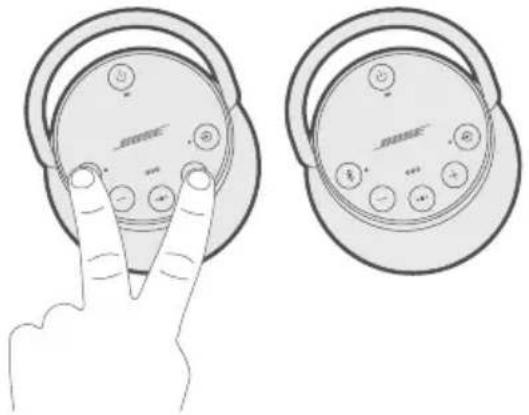
4
5
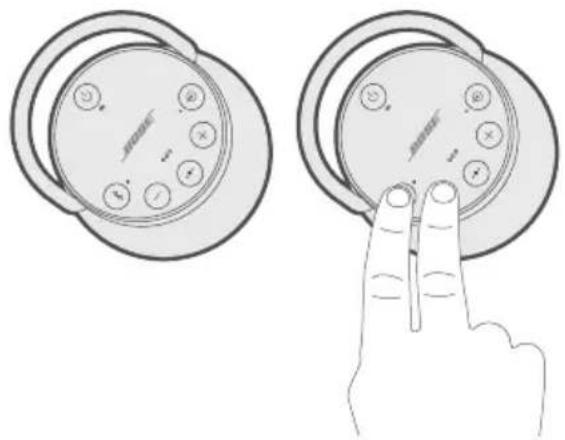
- a < 1
10 1
- 11 1
logii 1g
gJg2all jglll 1c 15y1 4y 4y
(30 aall) Jaiy jiei laill 1
.2
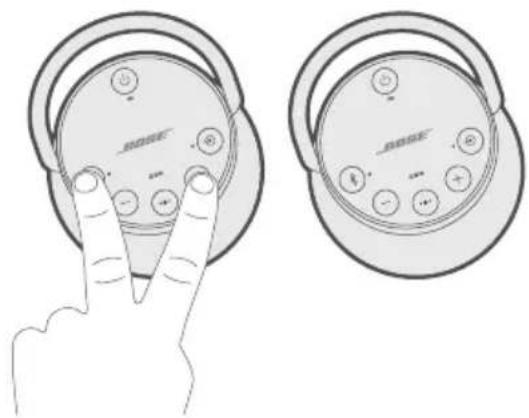
i"gsslll acllln "Ijw" aek gawu".yysy! gaoa laie jr jil 3 . ielau
Jgaaal jgej y baiy 1aag aai Jgaae 1s
4
11 1
·gall
i
Jgaoall jglal 1c allyi y
y
aaii 1 + jg8 jjbcai, jicai
y
:logio aclaw s1 1 1 1 1 1 1 1 1
"Bose 1
.Bose 1
·aclawlJ
SOUNDBAR BOSE HOME SPEAKER
SoundLink Revolve + II aclaw jBose SimpleSync aiai b
30 31 Bluetooth SimpleSync yj: aLc
aaiil
.Bose Home Speaker SsSoundLink Revolve ^+ II
J 1
- Bose Sc
- Bose Sc
- Bose Ho
- Bose Ho
alal E
cagalall jyjll galsaillgusall,albiilyiiaaiisLs worldwide.Bose.com/Support/Groups
Bose Music
Bluetooth Bluetooth 青 _ 青 jj 1 . (j j j) "Ready to pair another device"
Bose Home Speaker My Bose Music
My Bose 6 My Bose
aaii i 1
4.
SimpleSyncBluetooth
= 1
aclawn (j9) 30SoundLink Revolve ^+ l aclawn . Bose Soundbar aclaw Bose Home Speaker
SoundLink Revolve + II aee
SOUNDBAR BOSE HOME SPEAKER
(15)SoundLinkRevolve ^+ IIeLJ
eawdblnblnblnblnblnblnblnblnblnblnblnblnblnblnblnblnblnblnblnblnblnblnblnblnblnblnblnblnblnblnblnblnblnblnblnblnblnblnblnblnblnblnblnblnblnblnblnblnblnblnbl
. Bose Soundbar j Bose Home Speaker
= 1
30) 30) Bose Soundbar Bose Home Speaker (J9
SoundLink Revolve + II aclaw Jaaa 125
aclawl a
( l0 + 1) · ( l0 - 1) = 0
y
ab = 1( p - q) ( r2 + r_3)
jui jil gail 2
aalalgljai jai gba
Bose 4o 5y Jx Jx Jx Jx Jx
worldwide.Bose.com/Support/SLRPii
#
Jgall global.Bose.com/warranty 1e 10000000000000000000000000000000000000000000
jiaolall jiaiall juaalei gie
global.Bose.com/register
aall aalll aal lal alal al
aaiil clogal
5 1
1.6
gj jgl 0
iLd
.(28)
中
.28
a 13
(21 aag) NFC 4aiae g Jn jnbluteoth y
s
1 1
Bose cXac aiai Juaai jia iia
worldwide.Bose.com/contact
| الصباحية الحرفية较为 سل寫 بعس الحرفية较为 سل寫 | (الصZRطبيعة)الصZRطبيعة |
| .Bose USB USB USB USB USB USB USB USB USB USB USB USB USB USB USB USB USB USB USB USB USB USB USB USB USB USB USB USB USB USB USB USB USB USB USB USB USB USB USB USB USB USB USB USB USB USB USB USB USB USB USB USB USB USB USB USB USB USB USB USB USB USB USB USB USB USB USB USB USB USB USB USB USB USB USB USB USB USB USB USB USB USB USB USB USB USB USB USB USB USB USB USB USB USB USB USB USB USB USB USBUSB USB USB USB USB USB USB USB USB USB USB USB USB USB USB USB USB USB USB USB USB USB USB USB USB USB USB USB USB USB USB USB USB USB USB USB USB USB USB USB USB USB USB USB USB USB USB USB USB USB USB USB USB USB USB USB USB USB USB USB USB USB USB USB USB USB USB USB USB USB USB USB USB USB USB USB USB USB USB USB USB USB USB USB USB USB USB USB USB USB USB USB USB USB USB USB USB USB USB USB UBUBUBUBUBUBUBUBUBUBUBUBUBUBUBUBUBUBUBUBUBUBUBUBUBUBUBUBUBUBUBUBUBUBUBUBUBUBUBUBUBUBUBUBUBUBUBUBUBUBUBUBUBUBUBUBUBUBUBUBUBUBUBUBUBUBUBUBUBUBUBUBUBUBUBUBUBUBUBUBUBUBUBUBUBUBUBUBUBUBUBUBUBUBUBUBUBUBUBUBUBIBUBUBUBUBUBUBUBUBUBUBUBUBUBUBUBUBUBUBUBUBUBUBUBUBUBUBUBUBUBUBUBUBUBUBUBUBUBUBUBUBUBUBUBUBUBUBUBUBUBUBUBUBUBUBUBUBUBUBUBUBUBUBUBUBUBUBUBUBUBUBUBUBUBUBUBUBUBUBUBUBUBUBUBUBUBUBUBUBUBUBUBUBUBUBUBUBUBUBUBBUBUBUBUBUBUBUBUBUBUBUBUBUBUBUBUBUBUBUBUBUBUBUBUBUBUBUBUBUBUBUBUBUBUBUBUBUBUBUBUBUBUBUBUBUBUBUBUBUBUBUBUBUBUBUBUBUBUBUBUBUBUBUBUBUBUBUBUBUBUBUBUBUBUBUBUBUBUBUBUBUBUBUBUBUBUBUBUBUBUBUBUBUBUBUBUBUBUBUBBBUBUBUBUBUBUBUBUBUBUBUBUBUBUBUBUBUBUBUBUBUBUBUBUBUBUBUBUBUBUBUBUBUBUBUBUBUBUBUBUBUBUBUBUBUBUBUBUBUBUBUBUBUBUBUBUBUBUBUBUBUBUBUBUBUBUBUBUBUBUBUBUBUBUBUBUBUBUBUBUBUBUBUBUBUBUBUBUBUBUBUBUBUBUBUBUBUBUBUB | |
| .AFCC ALL J. Audio Quality Conference (IEEE) | (24 24 24 24 24 24 24 24 24 24 24 24 24 24 24 24 24 24 24 24 24 24 24 24 24 24 24 24 24 24 24 24 24 24 15 15 15 15 15 15 15 15 15 15 15 15 15 15 15 15 15 15 15 15 15 15 15 15 15 15 15 15 15 15 15 15 15 15 |
| .NFC & Bluetooth 3.0, 3.0, 3.0, 3.0, 3.0, 3.0, 3.0, 3.0, 3.0, 3.0, 3.0, 3.0, 3.0, 3.0, 3.0, 3.0, 3.0, 3.0, 3.0, 3.0, 3.0 | (20 20 20 20 20 20 20 20 20 20 20 20 20 20 20 20 20 20 20 20 20 20 20 20 20 20 20 20 20 20 20 20 20 20 15 15 15 15 15 15 15 15 15 15 15 15 15 15 15 15 15 15 15 15 15 15 15 15 15 15 15 15 15 15 15 15 15 (20 20 20 20 20 20 20 20 20 20 20 20 20 20 20 20 20 20 20 20 20 20 20 20 20 20 20 20 20 20 20 20 20 (20 20 20 20 20 20 20 20 20 20 20 20 20 20 20 20 20 20 20 20 20 20 20 20 20 20 20 20 20 20 20 20 2 (20 20 20 20 20 20 20 20 20 20 20 20 20 20 20 20 20 20 20 20 20 20 20 20 20 20 20 20 20 20 20 20 2 |
| Bose D'Addis Bose (13 35 20) | Bose SoundLink Bluetooth ### |
| Bose SoundLink Bluetooth ### | |
| . (16 89) "Ready to pair another device" w (الله缺乏) (الله 9) 30 30 SoundLink Revolve + II SoundLink .Bose Soundbar 25 "الصيرة" رحز" بعس .(13 33 33 (الله缺乏) (الله 9) 30 SoundLink Revolve + II SoundLink .Bose Soundbar 25 "الصيرة" رحز" بعس .(13 33 33 (الله缺乏) (الله 9) 30 SoundLink Revolve + II SoundLink .Bose Soundbar 25 "الصيرة" رحز" بعس .(13 33 33 (الله缺乏) (الله 9) 30 SoundLink Revolve + II SoundLink .Bose Soundbar 25 "الصيرة" رحز" بعس .(13 33 33 (الله缺乏) (الله 9) 30 SoundLink Revolve + II SoundLink .Bose Soundbar 25 "الصيرة" رحز" بعس .(13 33 34 (الله缺乏) (الله 9) 30 SoundLink Revolve + II SoundLink .Bose Soundbar 25 "الصيرة" رحز" بعس .(13 33 33 (الله缺乏) (الiale缺乏) (الiale缺乏) (الiale缺乏) (الiale缺乏) (الiale缺乏) (الiale缺乏) (الiale缺乏) (الiale缺乏) (الiale缺乏) (الiale缺乏) (الiale缺乏) (الiale缺乏) (الiale缺乏) (الiale缺乏) (الiale缺乏) (الiale缺乏) (الiale缺乏) (الiale缺乏) (الiale缺乏) (الiale缺乏) (الalic (الiale缺乏) (الiale缺乏) (الiale缺乏) (الiale缺乏) (الiale缺乏) (الiale缺乏) (الiale缺乏) (الiale缺乏) (الiale缺乏) (الiale缺乏) (الiale缺乏) (الiale缺乏) (الiale缺乏) (الiale缺乏) (الiale缺乏) (الiale缺乏) (الiale缺乏) (الiale缺乏) (الiale缺乏) (الiale缺乏) | . . . . . . . . . . . . . . . . . . . . . . . . . . . . . . . . . . . . . . . . . . . . . . . . . . . . . . . . . . . . . . . . . . . . . . . . . . . . . . . . . . . . . . . . . . . . . . . . . . . . ? . . . . . . . . . . . . . . . . . . . . . . . . . . . . . . . . . . . . . . . . . . . . . . . . . . . . . . . . . . . . . . . . . . . . . . . . . . . . . . . . . . . . . . . . . . . . . . . . . . . - . . . . . . . . . . . . . . . . . . . . . . . . . . . . . . . . . . . . . . . . . . . . . . . . . . . . . . . . . . . . . . . . . . . . . . . . . . . . . . . . . . . . . . . . . . . . . . . . . . . ; . . . . . . . . . . . . . . . . . . . . . . . . . . . . . . . . . . . . . . . . . . . . . . . . . . . . . . . . . . . . . . . . . . . . . . . . . . . . . . . . . . . . . . . . . . . . . . . . . . . - - - - - - - - - - - - - - - - - - - - - - - - - - - - - - - - - - - - - - - - - - - - - - - - - - - - - - - - - - - - - - - - - - - - - - - - - - - - - - - - - - - - - - - - - - - - - - - - - - - - - - - - - - - - - - - - - - - - - - - - - - - - - - - - - - - - - - - - - - - - - - - - - - - - - - - - - - - - - - - - - - - - - - - - - - - - - - - - - - - - - - - - - - - - - - - - - - - - - - - - - - - - - - - - - - - - - - - - - - - - - - - - - - - - - - - - - - - - - - - - - - - - - - - - - - - - - - - - - - - - - - - - - - - - - - - - - - - - - - - - - - - - - - - - - - - - - - - - - - - - - - - - - - - - - - - - - - - - - - - - - - - - - - - - - - - - - - - - - - - - - - - - - - - - - - - - - - - - - - - - - - - - - - - - - - - - - - - - - - - - - - - - - - - - - - - - - - - - - - - - - - - - - - - - - - - - - - - - - - - - - - - - - - - - - - - - - - - - - - - - - - - - - - - - - - - - - - - - - - - - - - - - - - - - - - - - - - - - - - - - - - - - - - - - - - - - - - - - - - - - - - - - - - - - - - - - - - - - - - - - - - - - - - - - - - - - - - - - - - - - - - - - - - - - - - - - - - - - - - - - - - - - - - - - - - - - - - - - - - - - - - - - - - - - - - - - - - - - - - - - - - - - - - - - - - - - - - - - - - - - - - - - - - - - - - - - - - - - - - - - - - - - - - - - - - - - - - - - - - - - - - - - - - - - - - - - - - - - - - - - - - - - - - - - - - - - - - - - - - - - - - - - - - - - - - - - - - - - - - - - - - - - - - - - - - - - - - - - - - - - - - - - - - - - - - - - - - - - - - - - - - - - - - - - - - - - - - - - - - - - - - - - - - - - - - - - - - - - - - - - - - - - - - - - - - - - - - - - - - - - - - - - - - - - - - - - - - - - - - - - - - - - - - - - - - - - - - - - - - - - - - - - - - - - - - - - - - - - - - - - - - - - - - - - - - - - - - - - - - - - - - - - - - - - - - - - - - - - - - - - - - - - - - - - - - - - - - - - - - - - - - - - - - - - - - - - - - - - - - - - - - - - - - - - - - - - - - - - - - - - - - - - - - - - - - - - - - - - - - - - - - - - - - - - - - - - - - - - - - - - - - - - - - - - - - - - - - - - - - - - - - - - - - - - - - - - - - - - - - - - - - - - - - - - - - - - - - - - - - - - - - - - - - - - - - - - - - - - - - - - - - - - - - - - - - - - - - - - - - - - - - - - - - - - - - - - - - - - - - - - - - - - - - - - - - - - - - - - - - - - - - - - - - - - - - - - - - - - - - - - - - - - - - - - - - - - - - - - - - - - - - - - - - - - - - - - - - - - - - - - - - - - - - - - - - - - - - - - - - - - - - - - - - - - - - - - - - - - - - - - - - - - - - - - - - - - - - - - - - - - - - - - - - - - - - - - - - - - - - - - - - - - - - - - - - - - - - - - - - - - - - - - - - - - - - - - - - - - - - - - - - - - - - - - - - - - - - - - - - - - - - - - - - - - - - - - - - - - - - - - - - - - - - - - - - - - - - - - - - - - - - - - - - - - - - - - - - - - - - - - - - - - - - - - - - - - - - - - - - - - - - - - - - - - - - - - - - - - - - - - - - - - - - - - - - - - - - - - - - - - - - - - - - - - - - - - - - - - - - - - - - - - - - - - - - - - - - - - - - - - - - - - - - - - - - - - - - - - - - - - - - - - - - - - - - - - - - - - - - - - - - - - - - - - - - - - - - - - - - - - - - - - - - - - - - - - - - - \n - - - - \n - - - - \n - - - - \n - - - - \n - - - - \n - - - - \n - - - - \n - - - - \n - - - - \n - - - - \n - - - - \n - - - - \n - - - - \n - - - - \n - - - - - - \n - - - - \n - - - - \n - - - - \n - - - - \n - - - - \n - - - - \n - - - - \n - - - - \n - - - - \n - - - - \n - - - - \n - - - - \n - - - - \n - - - - - - - - - - - - - - - - - - - - - - - - - - - - - - - - - - - - - - - - - - - - - - - - - - - - - - - - - - - - - - - - - - - - - - - - - - - - - - - - - - - - - - - - - - - - - - - - - - - - - - - - \n - - - - - - - - - - - - - - - - - - - - - - - - - - - - - - - - - - - - - - - - - - - - - - - - - - - - - - - - - - - - - - - - - - - - - - - - - - - - - - - - - - - - - - - - - - - - . - - - - - - - - - - - - - - - - - - - - - - - - - - - - - - - - - - - - - - - - - - - - - - - - - - - - - - - - - - - - - - - - - - - - - - - - - - - - - - - - - - - - - - - - - - - - - - - - - - - . - - - - - - . - - - - - - - - - - - - - - - - - - - - - - - - - - - - - - - - - - - - - - - - - - - - - - - - - - - - - - - - - - - - - - - - - - - - - - - - - - - - - - - - - - - - - - - - - - - - . - - - - - - - - - - - - - - - \n - - - - - - - - - - - - - - - - - - - - - - - - - - - - - - - - - - - - - - - - - - - - - - - - - - - - - - - - - - - - - - - - - - - - - - - - - - - - - - - - - - - - - - - - - - - - - - - - \n . - - - - - - - - - - - - - - - - - - - - - - - - - - - - - - - - - - - - - - - - - - - - - - - - - - - - - - - - - - - - - - - - - - - - - - - - - - - - - - - - - - - - - - - - - - - - - - - - - - . . - - - - - - - - - - - - - - - - - - - - - - - - - - - - - - - - - - - - - - - - - - - - - - - - - - - - - - - - - - - - - - - - - - - - - - - - - - - - - - - - - - - - - - - - - - - - - - - - - - > - + . - - - - - - - - - - - - - - - - - - - - - - - - - - - - - - - - - - - - - - - - - - - - - - - - - - - - - - - - - - - - - - - - - - - - - - - - - - - - - - - - - - - - - - - - - - - - - - - - - - - . - . - . - . - . - . - . - . - . - . - . - . - . - . - . - . - . - . - . - . - . - . - . - . - . - . - . - . - . - . - . - . - . - . . - . - . - . - . - . - . - . - . - . - . - . - . - . - . - . - . - . - . - . - . - . - . - . - . - . - . - . - . - . - . - . - . - - . - . - . - . - . - . - . - . - . - . - . - . - . - . - . - . - . - . - . - . - . - . - . - . - . - . - . - . - . - . - . - . - . = 0 = 0 = 0 = 0 = 0 = 0 = 0 = 0 = 0 = 0 = 0 = 0 = 0 = 0 = 0 = 0 = 0 = 0 = 0 = 0 = 0 = 0 = 0 = 0 = 0 = 0 |
sclaw buaa 1
1 1
i 1. iCLau
10 1 aal 2
3.
(20 1) 1
- Please read and keep all safety, security, and use instructions.
- Important Safety Instructions
- WARNING/CAUTIONS
- CANICES-3(B)/NMB-3(B)
- Management Regulation for Low-power Radio-frequency Devices
- Article XII
- Article XIV
- Please dispose of used batteries properly, following local regulations. Do not incinerate.
- External Power Supply Technical Information
- For Europe:
- China Restriction of Hazardous Substances Table
- Taiwan Restriction of Hazardous Substances Table
- Please complete and retain for your records
- Security Information
- WHAT'S IN THE BOX
- BOSE CONNECT APP SETUP
- SPEAKER PLACEMENT
- POWER
- SPEAKER CONTROLS
- VOICE PROMPTS
- BLUETOOTH® CONNECTIONS
- MULTIPLE BLUETOOTH CONNECTIONS
- WIRED CONNECTIONS
- SPEAKER STATUS
- PAIR BOSE PRODUCTS
- CARE AND MAINTENANCE
- TROUBLESHOOTING
- CONTENTS
- DOWNLOAD THE BOSE CONNECT APP
- PLACEMENT GUIDELINES
- CAUTIONS
- CONNECT TO POWER
- BATTERY PROTECTION MODE
- AUTO-OFF
- Disable auto-off
- MEDIA PLAYBACK AND VOLUME
- PHONE CALLS
- Access voice control
- Voice alerts
- PRE-INSTALLED LANGUAGE
- SELECT A LANGUAGE
- CHANGE THE LANGUAGE
- DISABLE VOICE PROMPTS
- CHOOSE YOUR PAIRING METHOD
- What is NFC?
- PAIR YOUR MOBILE DEVICE
- PAIR A MOBILE DEVICE WITH NFC
- PAIR AN ADDITIONAL MOBILE DEVICE
- DISCONNECT A DEVICE
- RECONNECT A DEVICE
- IDENTIFY CONNECTED MOBILE DEVICES
- SWITCH BETWEEN TWO CONNECTED DEVICES
- CONNECT A PREVIOUSLY PAIRED DEVICE
- CLEAR THE SPEAKER PAIRING LIST
- USE THE BOSE CONNECT APP
- CONNECT THE 3.5 MM STEREO CABLE
- CONNECT THE USB CABLE
- BATTERY STATUS
- BLUETOOTH STATUS
- INPUT STATUS
- PAIR WITH ANOTHER BOSE SOUNDLINK BLUETOOTH SPEAKER
- Pair the speakers using the Bose Connect app (recommended)
- Pair the speakers manually
- Party mode
- Stereo mode
- Switch between Party mode and Stereo mode
- Disable Party mode or Stereo mode
- PAIR WITH A BOSE HOME SPEAKER OR SOUNDBAR
- Compatible products
- Pair using the Bose Music app
- NOTES:
- RECONNECT TO A BOSE HOME SPEAKER OR SOUNDBAR
- CLEAN THE SPEAKER
- REPLACEMENT PARTS AND ACCESSORIES
- LIMITED WARRANTY
- TECHNICAL INFORMATION
- TRY THESE SOLUTIONS FIRST
- OTHER SOLUTIONS
- RESET YOUR SPEAKER
- ArticleXII
- ArticleXIV
- HVAD ER DER I AESKEN?
- OPSÄETNING AF BOSE CONNECT-APPEN
- HØJTTLERPLACERING
- BEPERKTE GARANTIE
- GARANTÍA LIMITADA
- CONNEXIONS BLUETOOTH
- GARANZIA LIMITATA
- Artikkel XII
- STELL OG VEDLIKEHOLD
- WSTEPNIE ZAINSTALOWANE JęZYKI
- GARANTIA LIMITADA
- Sakerhetsinformation
- VAD FINNS I FÖRPACKINGEN?
- INSTALLATION AV BOSE CONNECT-APPEN
- HÖGTALARPLACERING
- 15
- yuaan 1
- aynayunaiy
- BOSE CONNECT
- mnnnnaa
- #
- NOVAHNAHNAHBA BOSE CONNECT
- nunnnnnaa
- 100
- -
- W
- 27777777777
- n
- nnaa
- 1
- 山
- Jn
- nnae nnnn
- yuaunrnnnnaaannn
- NFC
- nannnnnnaaannnnn
- 2
- a
- USB
- aannnnaananaan
- aannnnnnae
- BOSSE SOUNDLINK BLUETOOTH
- VJITIJI:
- BOSE HOME SPEAKER S SOUNDBAR
- WJNTB
- nnaaeeaaeae
- 2n
- 2017
- auiunynnnaun
- ·(28)
- yunyn
- M
- 中
- 外版原装国音图
- 朝元
- △扌扌 元旦署
- 音呈
- BLUETOOTH® 品種連接
- 网易 BLUETOOTH 品
- 京通
- SITKTRI/
- [BaTeRl BcHo MoD]
- 使用 Bose Music 应用配对
- 有限质保
- 有限保固
- Eekaiik k Cey Kneek
- TataRyukkut kgnok
- K
- Bosat Uclpada K o Peyar K
- 定迦赫哈拉夫
- 沙曼卡·尼维拉
- V
- BOSE kneekdt eep iunlloe
- 瓦哈斯 3
- Purok
- Kekshi bhayka kha chayn ka
- B
- Vayahs Prahtu Ka Agham K
- Ahpnepeyirigivk
- NFC kyya?
- Eek Aotitirikel MoeBaiel Upkarup Kaepyur K
- Sriomit vanrnti
- Tuknok
- Pahel e 2n Smaaagan o s Prayasak
- YTHN3HpyTe NcNOab3OBAHbIe AKKMyAaTOpbl HaAExKaUIM 06pa3OM, CO6AOaAR MeCThBIE HOpMaTHBbIe Tpe6oBaHn. He cKuRaTb!
- HΦopMaζη no 6e3onachoctn
- KOMIIAEKT NOCTABKN
- YCTAHOBKA ПИΝΑΟΥKEΗ ΜΒΟSE CONNECT
- PA3MELSEHNE ANHAMKA
- ПИТАНЕ
- 3AEMEHTbI YNPABAEHnAINHAMnKA
- TGAOCOBbie NOACKA3KN
- BLUETOOTH-NOADKAIOUOHEHNA
- HECKOaBKO BLUETOOTH-NOADKAIOUeyHn
- ПОНБАньIE ПОДКАIOUЧЕНЯ
- COCTOHHNE ANHAMKKA
- COINPRAXHENUEYCTPOINCTBBOSE
- OBCAYKINBAHNE IN YXOA
- ПОИСК И YYSTРАЕНUE HENСПAPВHOCTEI
- COAEPXAHNE
- BKAIOUOYEHNE/BbIKAOUOYEHNE IINTAHNIAHAMNA
- PEKIM 3AUHTbI AKKYMAYTOPA
- ABTOOTKAIOUQEHE
- OTMeHaФyHKcHn aBTOMaTHueCKOTo OTKAIOUeHn
- BOCPON3BEAEHNE HOCNTEEN YNPABAEHNE POMKOCTbIO
- COPRJXEHNE MOBnAbHOYCTPOIcTBA
- OuNCTKA CnNCKA COINKHEHNAHAMKA
- MCIOAb3OBAHNE PPNAOXEHNBOSE CONNECT
- COCTOHHE AKKYMAYA TOPA
- BblbOP MToDA COIpXeHnA
- COINPRAXHEHNCAPYUM ANHAMKOM BOSESOUNDLINK C NOADEPKKOIBLUETOOTH
- COnpJxKeHne AnHaMnKOB C nCNoAb3OBAHHem npNIOxKeHnBose Connect (peKOMeHApYeTc)
- CopjxHne AnHaMnKOB BpyHyIO
- Pexm BeepnHKn
- CTepeopexm
- IpekeIooueHne MeKdU peXHMOM BeuepHHKn I cTepeOpexHMOM
- OTKIAOueHne peXnMa BeeepnKn nn CTepeOpexnMa
- COPRJXEHNE C AnHAMKOM BOSE HOME SPEAKER HAN 3BYKOBOI PAHEAbIO
- COBMcTmblie npoAykTbl
- OTPAHnueHHAraTAPAHNTN
- TEXHNUECKNE CBEAEDHNA
- NEPEUHb PELSEHn HANBOAEE PACPPOCTPAHEHHbIX IPOBIAEM
- APYRNEPEWSEHNA
- BLUETOOTH
- BOSE
- Jgaa
- a! Jgaa jzj
- jg
- jg juaa 1
- 1
- BOSE SOUNDLINK BLUETOOTH
- Lg
- J 1
- SOUNDBAR BOSE HOME SPEAKER
- Bose Music
- aclawl a
- aalalgljai jai gba
- aaiil clogal
- gj jgl 0
- s
- sclaw buaa 1
Brand : BOSE
Model : SoundLink Revolve+ II
Category : Speakers