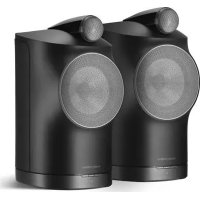
Formation Duo - Hi-fi system BOWERS & WILKINS - Free user manual and instructions
Find the device manual for free Formation Duo BOWERS & WILKINS in PDF.



| Product type | Stereo wireless active speaker system |
| Brand | Bowers & Wilkins |
| Model | Formation Duo |
| Configuration | 2 speakers (stereo pair) |
| Dimensions (H x W x D) | 340 x 200 x 280 mm (approx.) |
| Unit weight | 8.5 kg (approx.) |
| Power supply | Mains (power cable supplied) |
| Network connectivity | Wi-Fi 802.11 a/b/g/n/ac, Ethernet 10/100 Mbps |
| Wireless connectivity | Bluetooth 4.1 (BT-LE), Apple AirPlay 2 |
| Streaming services | Spotify Connect, Apple Music, Tidal, Roon, Internet radio |
| Control | Bowers & Wilkins Home app (iOS/Android), touch controls on speaker (Play/Pause, Volume, Source selection) |
| Mobile compatibility | iOS 14+ or Android 8.1+ (location service required for Android) |
| Standby mode | Automatic after 20 minutes of inactivity |
| Maintenance | Soft lint-free cloth, soft brush for grille; avoid abrasive or acidic products |
| Safety and environment | Compliant with RoHS, REACH, WEEE |
| Included accessories | 2 speakers, power cables, documentation |
| Options | FS Duo stands (sold separately) |
Frequently Asked Questions - Formation Duo BOWERS & WILKINS
User questions about Formation Duo BOWERS & WILKINS
0 question about this device. Answer the ones you know or ask your own.
Ask a new question about this device
Download the instructions for your Hi-fi system in PDF format for free! Find your manual Formation Duo - BOWERS & WILKINS and take your electronic device back in hand. On this page are published all the documents necessary for the use of your device. Formation Duo by BOWERS & WILKINS.
USER MANUAL Formation Duo BOWERS & WILKINS
Welcome to Bowers & Wilkins and Formation Duo.
Thank you for choosing Formation. When John Bowers first established Bowers & Wilkins he did so in the belief that imaginative design, innovative engineering and advanced technology were keys that could unlock the enjoyment of audio in the home. That belief continues to inspire every product we design and in Formation has found its most advanced expression yet.
Formation Duo is a network connected, wireless stereo active network speaker system that provides extremely high performance reproduction of Formation audio streams. Formation Duo are primarily intended to be configured and controlled using the Bowers & Wilkins Home app. The app is available for both iOS and Android devices. Some commonly used control functions are also available via touch buttons on the Formation Duo front panels. It is only possible to install and configure Formation Duo using the Bowers & Wilkins Home app.
Formation Duo will enable you to:
- Listen to audio from streaming services like Spotify, Apple Music, and Roon.
- Listen to network stored audio files.
- Listen to audio over Bluetooth from appropriately enabled Bluetooth source devices.
- Listen to audio from devices such as turntables (via a phono preamp) and CD players that are connected to a Bowers & Wilkins Formation Audio.
- Listen to audio, such as Internet Radio, from Airplay or Bluetooth compatible services and apps.
- Listen to audio playing anywhere in your home on any Formation device connected to your home network.
The Bowers & Wilkins Home app is required to connect your Formation Duo to your home network and also to establish connection with other Formation products in your home. The Bowers & Wilkins Home app also provides some control and configuration functions during use. Before you begin your Formation Duo installation please download and install the Bowers & Wilkins Home app on your iOS or Android device. The Bowers & Wilkins Home app requires iOS V11.4 or later, or Android V8.1 or later. Bluetooth, and WiFi services must be enabled on your iOS or Android device. You will also need to know your WiFi network password.
Note: Location Services must be enabled on Android devices during the Formation setup process. This is because Formation products use a low power form of Bluetooth (BT-LE) for service communication which on Android devices is only switched on when Location Services are enabled. Bowers & Wilkins do not use any location services data for marketing purposes.
1. Formation Duo Carton Contents
2x Formation Duo
Mains power cable set appropriate for your territory Document pack
2. Installing Your Formation Duo
Your Formation Duo speakers each require a mains power supply to operate so must be located within reach of mains sockets. You may wish to install suitable mains sockets once you have decided on the locations of your Formation Duo in your listening room. If your Formation Duo are to use a wired connection to your network router one of them will need to be located within reach of an appropriate network cable.
Formation Duo are primarily intended to be used on Formation FS Duo stands but can also be placed on shelves, wall brackets or furniture units. Formation FS Duo stands will however provide both the best performance and enable the greatest flexibility in positioning. The stands will also place your Formation Duo at the correct height - approximately head height when listening.
Note: If your Formation Duo are to be mounted on Formation FS Duo stands, please assemble the stands and secure the speakers to them before you set up the speakers. Remember that the Formation Duo mains cables and network cable (if required) should run through the legs of the speaker stands. The Formation FS Duo stands are supplied with rubber and spike foot options. The spike foot option should be used when the stands are to be placed on a carpeted floor. The spikes pierce the carpet to rest on the surface underneath. Adjust the spike to ensure that the stands are vertical and don't rock. Use the rubber foot option the stands are to be placed on tiled or wooden floors.
If you still however prefer to install your Formation Duo on shelves, brackets or furniture units please ensure that:
both speakers are located at approximately the same height.
the shelves, brackets and furniture are easily able to support the weight of the speakers and are rigid and non-resonant.
Stud-work and plasterboard walls are unlikely to provide adequate strength or rigidity to support Formation Duo. If you are unsure of the suitability of a wall, or of your ability to install shelf or bracket hardware, you should seek professional help.
In the majority of listening rooms your Formation Duo should be between 2.0m and 4.0m (6.5ft and 13ft) apart and a similar distance from the listening area. If the speakers are positioned too close together, the stereo reproduction may lack scale; if they are too far apart, the stereo focus may be weak. There is no need to angle your Formation Duo inwards towards the listening area however doing so may tighten the stereo focus. Diagram 1 illustrates basic speaker positioning.
Like all speakers, Formation Duo radiates sound energy not only forward but also to the side and, particularly at bass frequencies, to the rear. As a result, if they are positioned too close to room boundaries their performance will be affected. Try to keep your Formation Duo at least 0.5m (1.6ft) away from any room boundary.
Even with your Formation Duo placed away from room boundaries, the material and acoustic character of the boundaries will still have an effect on the sound. Try to ensure that immediate surroundings of each speaker have similar acoustic qualities. Different acoustic qualities would be heavy curtains and bare walls, for example.
Connections
In addition to mains power sockets, Formation Duo carry an Ethernet socket for connection to a network router if a wired network connection is to be used in preference to a wireless (WiFi) connection. Only one speaker of a Formation Duo pair requires a router connection.
Note: The USB socket located on the Formation Duo rear panel is intended for service and diagnostic use only. It cannot be used for any other purpose.
Note: The Formation Duo connection panel is not easily accessible once the speakers are attached to Formation FS Duo stands.


Diagram 2
Formation Duo rear panel
Switch On and Off
With all connections made, and the Bowers & Wilkins Home app installed on your mobile device, your Formation Duo are ready to be set up. Formation Duo have no mains power switch and, following a short start-up routine, will be operational as soon as they are connected to mains power. They will play an audio prompt when their startup routine is complete.
When Formation Duo, that have not been previously used, are first switched on they will automatically enter setup mode to enable their connection to your home network and to any other available Formation devices. Setup mode is indicated by a slow amber pulse illumination of the speaker's Form buttons
Formation Duo will also appear in the Bowers & Wilkins Home app as available for setup, either on the initial app page, or after selecting 'Add Formation product' from the app Settings page.
Your Formation Duo manage their operational state and power consumption entirely automatically and will switch to a power saving mode after twenty minutes of inactivity. There is no need ever to switch off your Formation Duo, however should you wish to do so, simply disconnected them from mains power. Your Formation Duo will retain their settings without mains power.
You can restart each Formation Duo by a short press and release of the reset buttons located on their rear panels Pressing the button will switch the Formation Duo off and on again. All settings will be retained when your Formation Duo restart. You can also restart your Formation Duo via the Bowers & Wilkins Home app Settings page. The reset button is illustrated in Diagram 3.
If you wish to reset your Formation Duo to their default settings, press and hold each reset button for five seconds. On restart, your Formation Duo will enter setup mode. All settings will be deleted when your Formation Duo reset. You can also reset your Formation Duo via the Bowers & Wilkins Home app Settings menu.
Network Setup
- With your Formation Duo in setup mode, with their Form button illumination pulsing slowly amber, launch the Bowers & Wilkins Home app on your iOS or Android device. The app will guide you with prompts though the setup process.
Note: Formation Duo employ a Bluetooth connection to the device running the Bowers & Wilkins Home app during the setup process. Bluetooth signals have a relatively short range and can be interrupted by room boundaries, so we recommend that your Formation Duo and Bowers & Wilkins Home app device remain in close proximity during the setup process.
- The Bowers & Wilkins Home app will first search for Formation products in setup mode and display a screen inviting the selection of one. Tap to select your Formation Duo. If you have already set up a Formation product and are adding an additional one, select 'Add Formation product' from the app Settings menu.
The Bowers & Wilkins Home app will next invite you to name the "space" in which your Formation Duo are to be used. A list of default space names is provided but you can also create your own. When you have selected, or created, a space name, the app will ask you to touch the Form button on the front of one Formation Duo to confirm the selection.
If a wireless network connection for your Formation Duo is to be used, the next setup stage will connect your Formation Duo to your home WiFi network. The app will ask you to confirm the correct WiFi network and ask you to input its password. Alternatively, if your Formation Duo are connected to your network router using an Ethernet cable, this stage of the setup process will be bypassed.
Note: If you already have other Formation products connected to your WiFi network, Formation Duo setup will not require you to input the WiFi password.
- With WiFi network configuration, and space selection complete, your Formation Duo are ready for use. Your Formation Duo will play an audio prompt to confirm successful setup.
Bluetooth Setup
You can connect your Formation Duo to a Bluetooth enabled audio source device, such as a smartphone, to play audio over Bluetooth. Your Formation Duo must first be "paired" with the Bluetooth audio source device.
Once you have completed the Formation Duo network setup, open the Bowers & Wilkins Home app Settings page, and select the Formation Space that you wish to pair a Bluetooth device with. Next select + Pair a new device from the Bluetooth menu and follow the app instructions to complete pairing. Your Formation Duo will play an audio prompt when pairing is complete and their Space will become available to the paired Bluetooth device for audio playback.
Note: Up to eight Bluetooth devices can be simultaneously paired with each Formation space, however devices will not connect and play to paired spaces automatically.

Diagram 3
Reset button
3. Using Your Formation Duo
The Basics
You can use your Formation Duo to play audio from streaming services such as Spotify, Apple Music, and Tidal, from the Roon music library service and from internet radio via an appropriate iRadio app. If you have further Formation devices connected to your network, a Formation Audio for example, conventional audio sources connected to it will also be available through your Formation Duo.
Spaces
Spaces are a core concept of the Formation product family. A Formation "Space" is a room or a specific area in your home in which you listen to music. Each space can include different combinations of Formation products. The possible configurations are displayed in Diagram 4.
Playing Audio
The Bowers & Wilkins Home app enables you to select and play any available audio source or stream. However, in much the same way that conventional audio source playback requires initiation through a play command, Formation streams must be first initiated through their own gateway app: the Spotify app for example, or a music library app such as Roon. Each gateway or library app will list your Formation Duo space as an available playback device using Airplay, Bluetooth or in the case of Spotify, Spotify Connect.
Once streams are playing on the Formation network they can be selected via the Bowers & Wilkins Home app or via a Formation Duo front panel Form touch button. Touching a Form button will cycle though the available streams and sources.
Formation Duo Front Panel Controls and Illumination
Your Formation Duo have buttons on their front panels that provide play/pause control, volume adjustment and source/Stream selection.
- Touching the Play/Pause will ultimately stop and restart audio playback.
Note: Play/pause will only operate if the stream source has play and pause functions that can be accessed through Bluetooth or network connections.
-
Touching volume up+ or down will adjust the local volume of any network stream or local source. Pressing and holding the + and — buttons will continuously increase or decrease volume.
-
Touching the Form button will cycle through and play the active streams and sources available to the Formation Duo.
Form Button Illumination
The Formation Duo Form button illumination changes to indicate a variety of operational states. The illuminations are displayed in Diagram 5.
TV Space configurations
Formation Bar (3.0)

Formation Bar + Formation Bass (3.1)

Formation Bar + Formation Flex (5.0)

Formation Bar + Formation Bass + Formation Flex (5.1)

Music Space configurations
Formation Audio

Formation Wedge

Formation Wedge + Formation Audio

Formation Wedge + Formation Bass

Formation Wedge + Formation Audio + Formation Bass

Formation Duo

Formation Duo + Formation Audio

Formation Duo + Formation Bass

Formation Duo + Formation Audio + Formation Bass

Diagram 4
Space configurations
Formation Flex

Formation Flex + Formation Audio

Formation Flex + Formation Bass

Formation Flex + Formation Audio + Formation Bass

Formation Flex (stereo pair)

Formation Flex (stereo pair) + Formation Audio

Formation Flex (stereo pair) + Formation Bass

Formation Flex (stereo pair) + Formation Audio + Formation Bass

4. The Bowers & Wilkins Home App
With your Formation Duo configured and connected to your network, the Bowers & Wilkins Home app will open to its Home screen where the Formation Duo space and any other available Formation spaces will be listed.
Tap on a Formation space to select from any available streams or inputs. If there are no streams available, open a streaming app, Spotify for example, and select an item to play, then select the Formation Space from the list of available playback devices. Now, when you return to the Bowers & Wilkins Home app, the Spotify stream will be listed on the Formation Duo space page.
The Bowers & Wilkins Home app Home page has a Settings icon in the top right corner. Tap the icon to open the app Settings menu. The Settings menu provides options to configure and reset your Formation devices and re-name your Formation spaces. App and Formation device firmware updates are also initiated from the Settings menu.
Finding Your Way Around the Bowers & Wilkins Home App
The Bowers & Wilkins Home app will search for available Formation spaces when opened then display its Home page with the spaces listed.
Beneath each space the app will display its current activity. Tapping on an active space will open a "now playing" screen that enables volume and play/pause control.
The 'now playing' screen also provides an 'Available Spaces' option that enables the stream playing in the selected space to be transferred to another space or played in multiple spaces. The 'Available Spaces' screen also provides the opportunity to control volume, both globally across all spaces, or in individual spaces.
The Bowers & Wilkins Home app Settings page is opened by tapping on the settings icon. The initial Settings menu lists each space and the number of Formation devices present in each one.
Tapping on a space listed in the Settings menu provides access to its Space and Formation device settings. Tap the Space name to access the space settings and tap the device name to access the device settings. The device settings available will depend on the device in question.
Note: If the Settings icon on the Bowers & Wilkins Home app displays an amber dot this indicates that a Formation firmware update is available. The firmware update process is initiated from the Settings menu. You should always aim to keep the Bowers & Wilkins Home app and your Formation devices up to date with the latest version and firmware. Not only will this help ensure the most reliable performance, it will ensure that you benefit from new Formation features.
5. Formation Music Streams and Sources
Using Spotify
Use your phone, tablet or computer as a remote control for Spotify. Go to Spotify.com/connect to learn how.
The Spotify Software is subject to third party licenses found here: https://www.spotify.com/connect/third-party-licenses.
Using Airplay
Airplay enables audio apps on Apple mobile, laptop or desktop devices to stream material over a network to Airplay compatible speakers such as Formation Duo. Airplay enabled apps will display the Airplay icon.
To use Airplay, open the audio app you wish to use and select the music you wish to play. Tap on the Airplay icon to display a list of available devices followed by the Formation Space you wish to use.
Note: It is possible to stream audio via Airplay on multiple devices simultaneously, however the playback quality and synchronisation may then depend on the capabilities of your home network. If you wish to play material simultaneously in more than one Formation space, synchronization can be greatly improved by selecting multiple spaces through the Bowers & Wilkins Home app.
Using Roon
Roon is a feature rich music library and playback app that compiles all the music files available to your network and makes them easily available to play across all your Formation Spaces and any other Roon enabled audio devices. Roon is available for mobile, laptop or desktop devices.
When you open Roon it will display your complete audio library together with its metadata and artwork along with all the Formation Spaces and any other available network audio devices. Simply select the music you wish to play and Formation space in which you want to hear it.
Note: It is possible to stream audio from Roon on multiple devices simultaneously, however the playback quality and synchronisation may then depend on the capabilities of your home network. If you wish to play material simultaneously in more than one Formation space, synchronization can be greatly improved by selecting multiple spaces through the Bowers & Wilkins Home app.
Using Bluetooth
Bluetooth enables audio apps on mobile, laptop or desktop devices to stream material over a wireless connection to compatible hardware such as the Formation Duo.
To use Bluetooth, ensure that the required Formation Space is selected in your device Bluetooth settings menu, open the audio app you wish to use and select the music you wish to play. Tap on the playback devices icon to display a list of those available followed by Formation Space you wish to use.
6. Cleaning
Should your Formation Duo need cleaning you can wipe its top surface with a clean, lint-free cloth and brush its grille with a soft brush. If you wish to use any cleaning fluid, apply it onto the cleaning cloth and not directly onto the Formation Duo. Test a small area first, as some cleaning products may damage some of the surfaces. Avoid products that are abrasive, or contain acid, alkali or antibacterial agents.
7. Support
Should you require further help or advice regarding your Formation Duo please visit the Formation support site here www.bowerswilkins.com/support.
Environmental Information
This product complies with international directives, including but not limited to the Restriction of Hazardous Substances (RoHS) in electrical and electronic equipment, the Registration, Evaluation, Authorisation and restriction of Chemicals (REACH) and the disposal of Waste Electrical and Electronic Equipment (WEEE). Consult your local waste disposal authority for guidance on how properly to recycle or dispose of this product.
Indicator Operational state
| Flashing white Start-up in progress |
| Pulsing amber Ready for setup |
| Flashing amber Firmware update in progress |
| Pulsing white Audio pull in progress |
| Pulsing red Error - contact support |
| Solid red Error - contact support |
| Flashing red Factory reset in progress |
Diagram 5
Form button illuminations
Formation Duo yous permittra :
Formation Bar + Formation Bass (3.1)

Formation Bar + Formation Flex (5.0)

Formation Bar + Formation Bass + Formation Flex (5.1)

Formation Wedge + Formation Audio

Formation Wedge + Formation Bass

Formation Wedge ^+ Formation Audio ^+ Formation Bass

Formation Duo

Formation Duo + Formation Audio

Formation Duo + Formation Bass

Formation Duo + Formation Audio + Formation Bass

Scheme 4
Configurations d'espaces
Formation Flex

Formation Flex + Formation Audio

Formation Flex + Formation Bass

Formation Flex + Formation Audio + Formation Bass

Formation Flex (stereo pair)

Formation Flex (stereo pair) + Formation Audio

Formation Flex (stereo pair) + Formation Bass

Formation Flex (stereo pair) + Formation Audio + Formation Bass

4. L'application Bowers & Wilkins Home
Formation Bar + Formation Bass (3.1)

Formation Bar + Formation Flex (5.0)

Formation Bar + Formation Bass + Formation Flex (5.1)

Formation Wedge + Formation Audio

Formation Wedge + Formation Bass

Formation Wedge ^+ Formation Audio ^+ Formation Bass

Formation Duo

Formation Duo + Formation Audio

Formation Duo + Formation Bass

Formation Duo + Formation Audio + Formation Bass

Abbildung 4
Raumkonfigurationen
Formation Flex

Formation Flex + Formation Audio

Formation Flex + Formation Bass

Formation Flex + Formation Audio + Formation Bass

Formation Flex (stereo pair)

Formation Flex (stereo pair) + Formation Audio

Formation Flex (stereo pair) + Formation Bass

Formation Flex (stereo pair) + Formation Audio + Formation Bass

4. Die Bowers & Wilkins Home App
Formation Bar + Formation Bass (3.1)

Formation Bar + Formation Flex (5.0)

Formation Bar + Formation Bass + Formation Flex (5.1)

Formation Wedge + Formation Audio

Formation Wedge + Formation Bass

Formation Wedge + Formation Audio + Formation Bass

Formation Duo

Formation Duo + Formation Audio

Formation Duo + Formation Bass

Formation Duo + Formation Audio + Formation Bass

Diagrama 4
Configurations de Espacio disponibles
Formation Flex

Formation Flex + Formation Audio

Formation Flex + Formation Bass

Formation Flex + Formation Audio + Formation Bass

Formation Flex (parastereofiction)

Formation Flex (par estereofonico) + Formation Audio

Formation Flex (par estereofonico) Formation Bass

Fomation Fox (parcstocofinico) + Fomation Audio + Formation Bass

4. La Bowers & Wilkins Home App
Formation Bar + Formation Bass (3.1)

Formation Bar + Formation Flex (5.0)

Formation Bar + Formation Bass + Formation Flex (5.1)

Formation Wedge + Formation Audio

Formation Wedge + Formation Bass

Formation Wedge ^+ Formation Audio ^+ Formation Bass

Formation Duo

Formation Duo + Formation Audio

Formation Duo + Formation Bass

Formation Duo + Formation Audio + Formation Bass

Imagem 4
Formation Flex + Formation Audio

Formation Flex + Formation Bass

Formation Flex + Formation Audio + Formation Bass

Formation Flex (stereo pair)

Formation Flex (stereo pair) + Formation Audio

Formation Flex (stereo pair) + Formation Bass

Formation Flex (stereo pair) + Formation Audio + Formation Bass

Formation Bar + Formation Bass (3.1)

Formation Bar + Formation Flex (5.0)

Formation Bar + Formation Bass + Formation Flex (5.1)

Formation Wedge + Formation Audio

Formation Wedge + Formation Bass

Formation Wedge ^+ Formation Audio ^+ Formation Bass

Formation Duo

Formation Duo + Formation Audio

Formation Duo + Formation Bass

Formation Duo + Formation Audio + Formation Bass

Figuur 4
RuiMeconfiguraties
Formation Flex

Formation Flex + Formation Audio

Formation Flex + Formation Bass

Formation Flex + Formation Audio + Formation Bass

Formation Flex (Stereo pair)

Formation Flex (Stereo paar) + Formation Audio

Formation Flex (Stereo paar) + Formation Bass

Formation Flex (Stereo paar) + Formation Audio + Formation Bass

4. De Home-app van Bowers & Wilkins
2x konohn Formation Duo
Ka6eBnTAnHnI DnF OarriFoDuo, noXoDaun Ia BauuX pozetok
Paketokymehtaun
2.YctaHOBka Baunx KOHOK
Formation Duo
KaXJaIa NapbI KOHOK Formatio DuO Tpe6yert HAIHINMOCTOHNkAeKKTPOHTAHINPAoBtIO, NOToTOM OHNOLKNb bIbTB paONIOXCHb I pncDax IOcHHaEMOCNT O pTe3Rn. Nocne ToTO, KAK Bbl BbEpeTe MecTA DnYcTHAOBNKOHOKFormatio DUo,BAMMOxETNOTpe6OBATCBQYcTHAOBtBIOJONIHENTbHBe PO3EKNIeKPTOMHIN. Ecmn Formation DUO DOxHHa NcONLb3OBATb PpOBOHoe NDKNIOHHeK DOMaUNHeCOTN, OHaONXHa 6BbTb pacOnIOXeHa IIpeDeIAXDOcHraEMoCTHeNo6xoMmBX (Ethernet) KaEben.
BaHa Formation Duo npedna3aueha, npexde acero, dya ctaHaoKn Hc TOnKn Formation FS Duo, Ho moKet 6bTu TAKCe yctAHOBnHa h NOnk NnnpcMCTe MeBEn, ee MoXHO TaKe XoDaeCtBu HA CteHe. OJnako CTOnKn Formation FS Duo oecneuNbaot HAnyUwOg KaCCTBO 3yKa h MauKImAMLHyO rkoctb B paaMeuen. Kpome toro, OHn noDeepxMaorf Formation Duo Ha npabInbHo HBicote -npnIbnTeBho H a ypoBHe ronobu cnqraCto ciuaTae
IpymecAHme: Ecm Formation Duo hyxho
yctahOBHb ha cTouNn FOrrmae FS DUO, cnEeyET
3aepHee coobBx Hn npKpEnNTb KOONHK,
npexJe Oom HacptpanBbTx. NOMHtE, TTO Ka6cnl
nHTAHIN Dn KOnoHOK Foarrn DuO nCetBOB
KaEBn (ecn OH HyXeR) CNEyEt npNOxHb
BHyTPn onOp cToek. CToKN FS DUO noCTabJNiotc
cUmmn A p3aHHOBMn ONOPAM, UInn
cNeyET NCNOBbSOT, KOrJa CTQKn DOJIHNb BItb
paMaOChHb Ha NoYc KOBpOBbIM NOkPbITNCM,
UInn doXn bPOTKBy TBOe, TTOb IMETb
OOnyH TaEPdON NOBpXHOCTN IOHMM.
OTperynpYrte Wnblb TaK, TTOb CTQKn bbln
BCPTAKNbHb Hc PaKaWBAbnL Pc3HOBbc
OOnp di I cTaek NCIOBbSyTe npn PA3MeEHHN
Ha INTOUYHb Nm DEpeBBHbN IOXn.
OHaKa,ecnBbace-TaKn npepnoHTaTe yeTaHOHTb cBOH Formation Dua Ha noJkax, kpoHtseHax nn ppeMTox MeBEN, noXaYyNCTa oBeCneBte CneDyoUe yCNOBn
6e KOLOHNOJIOHXNbIbBpaCIOHOXeHNPiPMePHO HbOHOH BbCtce.
NONK, KPOHHTeHb H MeBb DONXb H NERKO BbDEPJKNtBt Bec KOJHO, A TAKKe 6bTb DoCTaTOHO TBCDPMH IN HC PC3OHIOOBATb.
TnncokpToHbte Hn nnnnBbPnDn noCoc6Hb 0eocneHHeoXoMyIOPOOHCTbKcKcOe bnnnoepckn Formation Dua. EcnBn He ypepeh B npraQHOCTn cHb, NauuX CnoC6HOCTe no yctahOBKe NOKNn XPOHHTHa, Bam cNeyET 6obpatnb3a nnMOUHO KcneuNACY.
B60bHCTBE KOMHaT DnI npocnyuBaHn BAuIN KOJIHN FormaOn DuonKbHbSbIt paCIOIOXeHb Ha paccTOHm MEXy2.0M4.0M(6.5pyTOBn 13 cyTOB)DPYrOTDPyra npn TaKOM Jep paccToHneO 3oHbPiocNyuaBHn. EcnI KOJHOKn PaCIOIOXeHb ONIJKOM 5bnkO DPyr Kdpry, cTepeo eFpckTy MOKHe X HbAbaTaB MaouTaTa, aEOON OH NaxoDpTa CNIJKOM DaNEKO ppyr, to FOkyocpuBa CtepeoOHmecKeRo o6paMa MoKet OKa3aBcN CNIJKOM Ona60N. Het HeoOxmoOTo NobOpaHbTa KONHKn BHytpk K OHe IPOcyuBHnA, OJNAKO 0To MOKet PnpBcTc KycInHIO cTepeoOHnueckO FOkyocpuBKn HA DnArpMaMe 1 NoxaHbOCHOHBie BapAAHb PAmeUeHM KONOHK.
KaN NOAeAAOoee BoBshINHO TBO KOHOK,BAHn
FoMaTion DUa NmaiAoiY BAOyIO HepriHO He TaIbKO
BIIpeE,HO H CTOPOH,Ha HnMIX KAcYACTOx HnBaD,
CneOBaTeBHo,ecnN FormaTio DUO yCTAHOBHeH
CNMIKOM 63Nko KCTeHAM KOMHATu,OC6BHH O BYITy,
BAC MoKET cTb 50oe NoJepKHyTH. OncapTaTcB
PaeMeCTb OBON FormaTio DUO n KpAHH Mepe
Ha pacCTOBHM B0,5 M (1,6 ΦyTA) OT IIObO rpaHUM
KOMHATH.
JaKc cnn Formation Dua yctahobnchI dancko
OT pAHM KOMHbI, Hx MATEpAIN N kcyCTNecKe
CBOCTBA Bce paBHO 6dyT BNITb HA 3ByK. Y6eNTceB,
YTO B HONCPcDETBCHNO B13030NT O KaKdoN KOJHKN
IMEOTCA MATEPNAI b CO CXXKM N AkyCTNecKIMN
XapAKTEpNtKAMN.PaANHbM N AkyCTNecKIMN
CBOCTBaMn ObnadAOT.K PnIMepy,TkXeJIbe TOpBbI
TBoIe CTBbI.
PoiKJIIOUeHnA
BdoHHe HcetBo poTe K,FormaOn DuO nMeet XoHIOH PAEBM EnerHET JINI NOKHOHeHH KpOtepy-B Cnyae bibOpa npBOHOrO coeHNHeHH BMeToWi-Fi TOnko OJHa NAPH KOLOHK FormaT ODo JOxHa 6HTb NcOeHNHe H KpOtepy.
Ipymuehnc:pa3bem USB,pacnoJooHnnHa Ha 3a#neuHanEe Formation Duo, npednHasHneu ToLko dpcbpNCHO INAHTHOCTNCKOro NcNOJIb3oBAHN. OH HC MOXOT6BtI NCNoNBJ3oBAH dN KAKNX-ImoD apyTKUeNei
PnmeaHae:NaHepn paBemOB Formation Duo CTaHOBRTcTpyHOdOCTyHbIMN, NOCE TOROKoHONK pINKpENHeH K cTOKaM.


Dnarpamma 2
3aHnnaHb Formation Duo
BkIOueHne N BbIKIOueHne
NoCte BnHHeHHBex NoKnOHeHm 3anycka
PnHOeHNBowers & Wilkins Home, yctAHOBHeHHo
HaBaWemMObHbOMyTOPOCTBe, BaA napa
Formation Duro rotobA K HactpoKe mncnboaHIO.
Formation DuOn He MeMeT CBeBO RbKIOuTeaH
NtAHAn NnoToM NoCne KopoTKn pOeDpybl
3anycka, NaHcHr PabotA, kK ToNkBo6 BydET
NOKIOUeHa K Cetn NITAHNA. OHa BBJaC T AByKOoe
nprrnaWeHne, KOrdaero npOeDpya 3anycka BydET
3abepeHa.
Korda napa Formation Duo, KOtopa pahee He
KCNJIOBAAJIACB, BKNHCACTOBpBpa3, OHa
ABOMATUWECKN IIEPEXOJDIT B PEXIM HACTPOKN, YTO6bI
3adaTb NOKNOCHENK K Baewd DOMAHN CETNI K
NIObHM DpyTNM DOOTNHBM YcptoNTBAM cemcETBA
Formation. PEXIM HACTPOKN INHINUPYETC
MeDNEHBMM MRANHEM opAHXeBOI MMYNbCHOI
nOcbETKN CCHOOPOH KHONr Form 1Pnp otom
Formation DuONANTRAK TAE B pINOJOEHN BOWers
& Wilkins Horne, DoCTYINOM DIN IBACPTPOKN, INBO H
NaHbALbON CTPAHNIe pINIOXENHNI, INBO NOOE BIBOPa
onmAdd Formotion product)- "DoBaanTH npOyKT
Formation" Ha cTPAHNIe HAcTPOE KpINIOXENHNI.
BaaI npa KIOHOK Formatio Dyoipabniet caom
paOOM COCTOHREM N sEHPONTOpebHEM
nonHOCTBO AOTAMATMOCKN IN PCCKKHOACTCR B
peKM sHEPROCEPEXEHN NOOE JBAUATMHNYF
6e3dETBn.BooOE HET HeCOXoDMOCN KOJDAIIBO
BblKNOHTBFon Formatio DU, ONGAO CCNBA Bu XOTNE
cJIeNTb 310, IPOCTO OTKIOHNIIE EOT CENITINAHNI.
BaA Formation Duo coxPAHNT CaON HACTPOK N Be3 cTeBOrO nITAHNA.
Moxho nepeazanyctnb kaxdyko konohky Formation
Duo KpataKm haxtaHem n OTHNYCAHMe KHOKN Rset,
pacnozhenHOHa aaeHNnPAe. PnAHXaTm
3oT KOHNkFonatlon Dua BbIKNOHTCnB KINQHTCn
BHOB.Bce HAcTpoKn npTaKOM nepeaznycke
coxaPHTKn.KpOme toro,nepeazanyctbFonatlon DuO
MOxHO Ha cTpaHHe HAcTPOeK pInIOXeHn Bowers &
WilkinsHomeapp-Settings.KhONKa rcset nokaaHa Ha
dvarpamme 3.
EcnJKe BxOToTe CbPocnBce HacTpoKn Forma tion
Duo KxHxAeHHM No yMOJauHnO, HaxmTne i
ydepckte KaKaHyo KNkOny ReS te Uehme 5 cekhyd.
Iocne CbPoCa, Baun KoONHKn Forma tion DuO ChOba
BoaYtB Pekm HAcTpoKn. PpN Takom CbPoCe BaaH NactPoKn Formation DuO dyDt CTepTb. KpOme
Toro, CbPocnBce HacTpoKn Forma tion DuO MoXho
Ha cTaPAnue HacTpoK npInnoJeHH Bowers & Wilkins
Home app- Settings.
CetebIbe HAcTpoKIM
KoHaFornation Duo HaxoJntcB pexnme HactpoKn, n OdaCetKa ee KhoKnFo Form MedieHbIyIbIpyer opAaXeBbM IueToM, 3anyctne npinoXeHne Bowers & Wilkins Home Haawem ytoOpNtBe IOS nn Android. npinoXeHne Byedan HapaaHb Taac nockcaakamn BxoJe npioecca HactpoKn.
PnmuueHnc:Formation Duo nCOnb3yct
BluTooth-coeDHeHHeNc C yCTPOBCTOB, H KATOPOM
paOaTeT npnoXeHne BOWrs &WilkinsHome,BO
BpEMnPoCCsE yCTAOHBK, CnHbAbl BoUtho0
HMIEOT ATIOOCNTBILMOIy OXYO XOBAI MORY
6bTy bOLOKIPoBAHb IpaHuaM KOMHAtb, NOATOMY
MB PCKOMCHyDM, TTObbl BAWE YOTPONTBc
Formatio Duo uYcPTaTcNo c npnoXeHMe
BOWrs & Wilkins Home app octabNaCb B
HeNoocpeCTBeHHoB 6bn3OCTn BO BpEMnPoceCa
Hactpokn.
PnpnoxHae Bowers & Wilkins Home B pexnme HAcptpkn chana 6ydt nckta npdykTb Formation n oToxbpakBekap, nprrnaaoucn Cenatb Bb6op Odnoro n3 HN. KInKHTne HyKyho kkye HacpOnnn Formation Dco NdoGabnene DononHtncbHoc yctpoCTBO,Bb6epnte Add Formation product"Dobabn npdykt Formation" B MeHIO HAcptpek npinoXHn
PnpnoxHb Bowers & Wilkins Home 3aTeM npnoXHTBAM HaaBHt "npocpaCTBO" (Space), B KOTOPOM ByiET NIOIIO308aTcBBAI Ipa Formation Duo.CnncOK TINOB npocpTaCB (Space) NoymoAHNIO npocDABAETC, HO Bn TaKKe MoXe CoO3d ChOn CO6CTBEHHN TNI. KorDa Bbl Bbopnnu nn Cooan HAmMeHOBaHne npocpTaCBTA npnoXHHe NnonpoCt Bac HAKaTb KHkny Form HaepxHn Naepn BaIero Formation Duo, UtoBo nOtaepntb BbOp.
EeHbOxDmIOoNbOsbTaB6cnpOBHOe cetooe BoNOckOHene DnBaWaeFonation DuO To HcCpUoem stane HAcPOnkOA hOyET OIOKIOHOH K JOMAHIEN Cet n WiFi PnIOJOHXeHN nonpocint Bac noTBePntb npaBnHyto ceto WiFi n nonpocint Bac BCCTe nCBn TcBn napoi. KpOme To,ecn Formotion DuO NOIOKIOHOH K ceteBOCM Mappytn3atopy c nomObo Kabena Ethernet, aToT 0tAn npocceoa yctahOBKn bcyet
PpmeHmE: Ecm y Bac yke eob dyuHne npdykTb Formation, noKIOUeHNbc K bawc cotn WiFi, npoeypa Hactponn He notpebyet ABOda napoIra WiFi.
Pnncie KOnpHpypaun Cetu WiF n noHoro Bb6opa OkpykaUero npocptpAChTBa Spae Baua Formation DuO roTobA KNCNtBcBAHIO.BauA Formation Duo Bduact anyKOBoe pnpnaeHene nnoNTBepxDeyyCneuHOH HAcTPOKn.
HactpoKa Bluetooth
JINBOCPON3HENAHyKAepeBaBLuTooth
MOHOIOJKNIOHTBFOrMaTiooDuoKcYCTPOIcIBy c
noNDepKKoBIuTooth,HaNPIMKcCMapTFOHy.BaTa
FouroDIOJQKHA6BHChCHaHAYC"conpXHe"Ca
BluToothycPoIcTBoM-NCTOHnKOM3bYKa
Iocne 3aBepChnCCTeBbHacTpoK Formatio
Duo otkoonTe cTpaHnHy Settings (HaCtpoKn) npnoxohn Bowers &Wilkins Homs Hb6bpnte
Formatio Spacc, C KOTOPUM BxOHTTO BbINONHTB coPpKeHeNc yctpOcTBa Bluetooth.3aTEM b6bpnte " conpKeHeNc HOBOr yctpOcTBa" B MeHO BluTooth n CnOdyntnc HcTpykunm npnoxohn DIn h3aBephenhcn coPpKeHnBa BaRa FoRration DuO
bEydt BoCppon3BOJNb T3ByKOBoe nprrnaueHne,
KoTaD paopKeHeNc 3aBepUeNo, n erO Space cTahot dOocYtHMd mnnconpKeHNrOyctpOnCTBa Bluteoth
dBoCppon3BeDeHn 3ByKa.
PnmeHne:doBcMbmyyctpoaTBbIeothMOTy6bblOHOBBPEMHNOcPAnxHeBcKaKdbmFormatio Spacc,OdNakoYCTPOCBA He dyuyTNDKINNAETBCNBOONPOMSBDMTCBN NAPbIXNPocTpAHCTBaAEBMATUeCKn.

Диагамma 3 Khonka Reset
3. Mcnoj3oBaHne Formation Duo
OCHOBbl
Bb MoXeTe NcNcB30BaT CBOO TaPy KOnOHK
FoRmation Dua nIa BocipnCbeHEna 3ayka n
notokOBHX cepBcOu, TAKXK Ka Spoty, Aple Mucie
tidal, n3 cnyk6 My3bKaIbHO b6nIOTeKe Roon
n3 INHTepHET-paHNOpe3 CoOTERCTByouJee
pnnoXHe HrAio. Ecm K aauB cetn NoKNIOHey
doONHInTeHbYe yCTpoHCTBa FormatioN, HanpMep
FormatioA uio, To6bHue ayDIO mctOHNKn,
NoKNIOeHHBe K Hemy, TaKke ByyIyT DCyTHyHpe3
KOnOHKn Formation DuO.
PoctpaHCTBa - Spaces
Ipoctba (Space) - 30 KIOeBaKoHcEua
ceMCTBA npOyKTob Formation. Dn formation
"space" - 30 KOmHata NIOJIOJIbHa 30Ha BAAuEM
Dome, B KOTOPOB Bbl CNYaTe My3bKy, B KaXDM
IpoctbaTBE (Space) MOrTy 6bTy yCTaHOaNHe
paunHbte KOMBnauIm npOyKTob Formation.
CIOCK BO3MOxHbX KOpYpaun IpeCTabnH H
Dnarpamme 4.
Bocnpon3BeHne ayno
PpnoKHeBOWs & Wilkins Home No8oBnert
Bb6paTb N BocponBaeeN IIOoB IOOyIINHb
IOCTOHN3 3ya KIN NOTOK. TeM He MeHne, BO MHOOM
TOHO TAK Xc, KAK O6bHnOe BOCponABCDHCNE
IOCTOHN3 3ya TpeBy EITnAIIaAIAuYIeepz
KOMAHy BOCponBaueHEn, NOToKn Formation DAnKb
6bTy CHaHaNt HmUmpoBaHb Hcpc3 IN Co6CTBOHnOe
11030oe npJIOKeHHe: HApIMpe, pnpioKeHne
Spotyi, mN pnpioKeHne MyBaXaJIbHO B6nIoTeKn,
TaKe oK Raon. KaekDyI WnKoN n npipooKeHne
6n6nToEKN bdyet ChntaB PoctpaHCTBa (Spaccs)
BaWero FOration Duo DOctyrINHMa yCpoIcTAMn
BOponpBaBeHn e c nmoUbo Airplay, Blouetoh uN B
cryyae Spotfiy, Spotliy Connect.
Kordaayno notokn BocnpnsBodTcB cetn
Formn, kXMOHbBipbC nmoospo npnokeHH
Bowers & Wilkins Home nncm omoosbo cecoepohn
KhoNKr Form Ha ncpndn naHOn Formation Duo.
Pi np noceobatbnbHom haxatnn HeckonBo paHa
KhoNKy Form moKHO nepe6paB BCEoctynhie notOKn
N 10CTOHKN
OprahbI ynpaBHeHn I nOcbTeKa nepeHne HnEHN KOHOK Formation Duo
Ha nepeJHnX nahEnjK KOHOH KOrMaTiou Dua
eCTb KHONK, KOtOpBe oecneHbAotynpaBHeHne
BOoCpMBoBeDEHMeM / na3Oy, peYIpyoBkyrpoMkOCTN
In Bb6op IcTHcHnKa/Notoka.
Kacahne Play/Pause 6ydeT cctaHaBnBaTbnn H036HnHbTOBcPONabeHHe aytno.
PnMCHHHe:BOCpON3BcHHe/na3a6ydt
PabotatbTolkoB TOM CNYae,ECN NOTOKOBIN
NCTOUYHK NMeET yHKn BOCPON3BcHHe
nayts,KOTOpE MOrYt 6bTyDooTyHb Hcpoe
Blctooth nnn cetBbe NoKIOHcHn.
PnHKoCHOBHeHKe KpeyIIMPOBKe rPMKooTH (BBepx Hnnn BnH3 1yEET peryIPOAHT NOKANbHyO rPMKocTbIOOOr cTeBOrO NOTOKn NOKaNbHOr OTOHHKa. Haxatne n yepkaHne KHONK dyet HEPpeBbHO yaeJNUBaT bNm yMeHBuTaB rPMKocTb.
Pn nocjnoBATEbHOM HAKATN HA KHOIky
Fo 6yET cAeH uKmueckn nepe6p n
BOcnpOnBcDEChNE AKTMBHX NTOXOB INTOCHNKOB,
NOCTYINBX DIn Formation Duo.
IodCBetKa KHONKn Form
PocBcTeKa HONKn Form N3MENRETcI DnYyK3aHaHn PAaJIHybXpOoVx CoCTOHN. PexMmI HINKaUN pncdTabNOHb Ha DaarpamMe 5
Kohmyypaum TV Space
Formation Bar (3.0)

Formation Bar + Formation Bass (3.1)

Formation Bar + Formation Flex (5.0)

Formation Bar + Formation Bass + Formation Flex (5.1)

KoHpypaMn Music Space
Formation Audio

Formation Wedge

Formation Wedge + Formation Audio

Formation Wedge + Formation Bass

Formation Wedge + Formation Audio + Formation Bass

Formation Duo

Formation Duo + Formation Audio

Formation Duo + Formation Bass

Formation Duo + Formation Audio + Formation Bass

Dnarpamma4
KoHpyaun npoctpaHCTB (Space)
Formation Flex

Formation Flex + Formation Audio

Formation Flex + Formation Bass

Formation Flex + Formation Audio + Formation Bass

Formation Flex (stereo pair)

Formation Flex (stereo pair) + Formation Audio

Formation Flex (stereo pair) + Formation Bass

Formation Flex (stereo pair) + Formation Audio + Formation Bass

4. Пишихенье Bowers & Wilkins Home App
Korda Baa napa konohok Formation Duo hactpocha nnoikcHae K BaeB cTe,Ha rnaBHOM kpahe OTkBaetbepnnpokHe Bowers & Wilkins Horne,rdyedyt yxa3HO npoctpaHCTBO (Space) Formatioe Duo niobbe dpyrncdoctynhbe npoctpaHCTBA cemoeCTBA Formation.
Haxmte Ha npocphaHcTo (Space) FormaTion, 406b BbopaTb OIN H3 DocTyHbIX NTOKOB INB XBOoB. EcnH HeDcTbHbIX NTOKOB,OTKpOte NTOKOBepnpoxeHne, HanPmep Spotify, n BbepTe 3nEMENT for BOCPOUNSEHnA a 3ATEM BbepTe npoctpaHbTO Formation SpotN 3nONCA DOCTynHbX yctpoCTB BCPOUNSEHnA TenePb, KOrDa bBepHTec B pniloxeHne Bowers & Wilkins Home, notok Spotify Byet ykaanHa cTpaHnE poctpaHCTBa (Space)Formatio Duo.
DamaHra CpaHnA npnoXeH Bowers & Wilkins
Home Meet HAcHcAtePoK Settings a npabom
BepxHem yIy. HaxMHe Ha 3ot hAnok, YTObO bTKpbTb
MeHO HAcTPOeK Settings npnoXeHMa. MeHO Settings
codePKNI npamETpbl DnHactpoKn n cbopca
ycptoCTB Formation in nepeMehoHOBanN poctpaHCTB
Formation.O6hoBHeHn npooNk npnoXeHm n
ycptoCTB Formation tAKKe HnHnnpYIOCTn Ma MeHO
hactpoK Settings.
Ponck Bawsero nytB npinoXeHH Bowers & Wilkins Home
PpnoKHe Bowers & Wilkins Home 6ydt nckatb DocTynHie npOCTPACTB (Space) Formation np OTKpbTN, a 3aTeM oTObpaKaT b CBOI pMAuHHIO CTPAHN yco CNCKOM npOCTPACTB (Space).
PNDKAKDINpOCTPAHCTOB(Soace)npINOXeHNHE 6ydtOTOpBpaKaTbCBOKTeKyUQkAHTNBHOCTb. HAKATNEA KAtNBOHeNO pOCTPAHCTOB OTKoPcE kApAH"now playng"(CeHAc uRpaert),KOTOPb N03BoJrTcPcYPiPoBaTb POMKcTbNanyckTa BocnpoA3BDOHcN/naay.
3KpaH "now playing" TAKKc Ppeoctaannet OunuO Available Spaces (TOCTyTHNE npoctpaTbA) KOTOPAN NO3BOIeN TOTOKY, BOCPNO3BOIMOMYB BbipahHom NPocpTaHCTBE, NepHOCHTCB DpyTOE npoctpaHCTBO INBOCPOPMBOJNTCB H RECKOJIbKIN npocpTaHCTBAx. 3KpaH "Available Spaces" (TOCTyTHIE npoctpaHCTBa)npocctaannet TAKKc BO3MOKHOCTb YpabnTb rpoMcoCTbO, KaTIO6bAnbHO BOCX npoctpaHCTBAx, TAKB OTOEHNHIXNPoctpaHCTBAx.
CTpaHua Hactpoe Settings npnnoexen Bowers &WilkinsHomeOTpkbaeicn HkataeHmHa3hauok hactpoe. B MeHO npepoHaHbHbX Hactpoe nepncnbeH kaoJoe va npocpTaHbN KOINuectBO ycpOaTB Formation, npcyTcBIOUx B Kaxdom n HIX.
HaxaTne Ha npocpahctBO, ykazHHoe B MeHO hactpock Settings, o6cncnnaeTdoCnK cero hactpoikam Hactpoikam yctpoiCTBa FORM. KocHTecb IMeHn IpocpAHCTBA, YO6bI NOnyUInB DOcTyN K cero HACTPOKAM. IIN KOCHTecb IMcHN yctpoCTBA, YO6bI NOnyUInB DOcTyN K cero HACTPOKAM. DcToYInBe HactpoKn 6dyT 3abncTe b OT KOHNPTHO rOyctpoCTBA.
PpimmeyHc:ecnHa 3hAuke Settings
B npinnoeHbOWs & Wilkins Home
OTobpaaxactcXJepTAA TOCA-3TOOaHaeT,TO
IMeTeCn oOBnEHe NPOoWbKn dN Formation.
PiOpoecc OOBNoHHe NPOoWbKn IO aYnckcaetn
N3 MeNO HAcToeck Settings.Bu Bccra da DOnkBu CTpeMItbc nOaepxmbaTb npinnoeHBe Womers &WilkinsHomeNBAUycTpoAcrTaFormation a AkytaHOM CoocrHM-CncOedBcpcn Hn pOwMbKo,30 He ToIbko NMOxET ObceMeHT HAmBoeNe HAdekHyoo Pa6Oy,HO uObecneHT BAM POnyChnc PocmMyucCTB CT HObIX yHKuN Formation.
5.CtpmHroBbIe NtOKn NCTOCHKmMy3bKn dFormation
Mcnonb3oBaanneSpotify
IcnoIb3yTe Cao CMapTFOH,IIaHHeT IIN KOMblbTeB KAECTBE NytBa TMCTAHIOHOHORO ynpA8CNHnDA SpOTy. IocpeNtHa caat spotcy.com/connect YTO6b HAYHTb8a TOMY.
PprrpammHoe oeceneHneSpOtfy aenrTcR
PpeMeTOM LmEHN TpTeBx CTropOH, HnFpOmaIIO O
KOTOpBX MoXHO HaTNI 3eBc: https://www.spotfly.com/
connect/thirdparty-licenses.
Mcnonb3oBaHne Airplay
Airplay no3aonrAayno npnOxenHMa MouNbHbX yctpoTbAe Apple, HOy6yKAn Nn HactoBbX yctpoTbAe nepeBaTa B MaepnIbNo ceTHa coMeCTMbE C Airplay yctpoTbA, Taekne KaK Formation Duo. PnpoxenHc NoepexkOg Airplay or06pa3a 3h4ok Airplay.
TTOBnNCnonb0aBtAirlay,CTKpoTe ayINO npnoXeHne,KOTOpoe Bx OTNtE NCnonb0BaTb, IN BbOcPm My3uKy, KOTOpyo Bx OTNtC BOpnpoNBOCTN. HaxMNTe HsHaovk Airlay,TOBn OToSpaatnt CBnCOK DoCTyINhBx yctPoCTB, a 3aTe NPOcTpaHCTBO Formation Spaco, KOtOpoe Bx OTNtC MCnonb0BaTb.
PnmeHneMxHOpepaBbAbynope3 AirpHa HA HeCKNkoYcTOPOBCTOHOOBPEMeHNO ONGKAO KAYEOTBOACNPONBSEBENHn CnHXPOHN3aUMMOXET3ABNCeTBOTBO3MOXHOCTe Bauen domaunu cTt. Ecn bKoNTe BOCNPONBDOytn 3ANCN OJHOOPEMHO B Gonee yem ODMOM NPocTpaHCTBe Formation Space, CnHXPOHN3aUMMOXET6bIb 3AHHTeNHO ynyuHepaYrTe ABbopaHEckONkxnpocPaCTbCepe3 npnoKeHne Bowers & Wilkins Home.
Mcnonb0BaHne Roon
Roan-30MHOOROyHKUONHbHaMy3sKaIbHbHa 6bIIOTEKaI npINOxHeJe DnBocPOn3BeDEHnR, KOtPOe Co6Baep BcE My3sKaIbHbHa (fain) DOCTYbHe B BaueB cTeN, N daaET XN IERKO DOCTYbHMn DnBocPOn3BeDEHnBO C8cxBaWux npocTbnBx Formation Space nMo6bx Jpynx ayDNOcTOpCBxBACo NDdEpxKoi Roan. Roan.docTyne HnnMObINbHbX, NOPTaTNbHbIX MIn HAcToNbHbIX yctpoNTb
KordaBbOTkoPeRoC,OHOTobpaaNTBaUyNONHy
BbIIOTEkyAaMBeMeCTe Cee METaJIHbIMn
xyIOXeCTBEHHbIMN 6OIOKAMn,IPINOTOMBcTe Co
BCEMNPoCTPAHCTBAm Formation Spocns IN IObSbMn
IpyTMMDCCTYHMMBCEtEBMaMyyDyNOyCTPOCTBAm.
PiTOcTOBbEPte My3bIKy,KOTOpYO BblXOTITNE
BOCCPON3BecTN,NpOCPTpaHcToBcFo Formation Space,B
KOTOPOMBXoTNEe yCJbMbtaB.
PnMmehn:MOHNOpepaabTaaynoN3Roon
HaNECKoBkoYcTPOpOBCTOHOpeMeHHo,OnHAKO
KauCtEOBOcTPOpOBaEDHnMnCNHXPOHMAU
MOxETaBACetbOTBOsMOxHocTeBaWei
DOMAHINeCBnEcmhXoNTBEOCNPONBOuHTb
MATEPNAnOHOpeMeHHaBOgneemOHom
IPOCPaHCTBeFoMaRrCeSpace,CnHxPOH3Aua
MOxETbTHbAchTuBHeYyHueHnPyTeM BbOpaa
HECKoJIkXnpocpAChTepeepnIOxoKeHne
Bowers&WilkinsHome.
McnoJb3ObaHne Bluetooth
Bluetooth no30BOLRE ayDIO npnNOXCHHMA H
MOINBLHX, NOPTATNBHX NIM HACTOBLHX YCTPONTBAX
IpeepaBb ayDIO IO BECNPOHOYMO C OEBMCTNMBM 600yD0BAHCM, TAKIM KAK Formation
Duo. B ayDIO npnNOXeHHx COBmCTNMBc C Bluetooth,
OToPbAe3h 7HwK AirPlay.
Tc06bHIOJIb3oBtBluOothy6eITeB,HTOBMeHO
HaCTpoek BluToothBaIeroYcTOpOCTBABbIpaHO
HeOxDIOIMoeNooCTPAHCTBOFormatioSoc,OTKPOte
ayIOIOPIIOJOKHNC,KOTOpOE BAtXOTNTIECNOJIb3O8BTB,N
BbEpeNTe MybIKy,KOTOpOBy BAtXOTNTIECNOPIONV3BECTN.
HAXMite HA ZHAWCKYcTOpOCTBABOcPOMP3BENHn,
Tc06bOtO6pAAITCbCNOCIOCTYNbIXYcTOPTB,a
a3aTeMIOoPcTAPCHTOFormatioSpace,KOTOpOE bI
XtOHTe cNIOJIb3O8BTB.
6. OuncTka
EcmnBaunxKoHOKFormatioDuo notpe6yertc
OHTCKA, npntpntnxNOBepxHOCTbHCTOYTKAHBO
B63BOPCA, a3aTHNYKOPEtky OHNTNE MAKKON
LcKoN, EcmnXe Bbl 3axOTNTe MONl0b8aTbHCTAUY
XuXIOCTb, To Hauocite EE HIpOPOHYTKAHb, a
He Ha KopnyCOr formation. NmpoSyIte erO CHANA
Ha HeBoHHOM YUACTE NOBepxHOCTn, T.K.HekOtOpBe
MOUINBEUECTBA MOITNOBepxHdTaOTENKY.
3beraTe NPnmeHHeYNXIAKOCTe C a5pa3NBHMn
actiAmn, OOdepXaNXKNOTy INN LEOHs, a TaKke
antihBaKeptnaHHeBEueCTBa.
7.Подержka
EcnBamTrebyeTcnoMoUbMNcoBETnnaJadeneBFormaTioNoxanynta,ncetntecaaNTnndepkKnFormataionwww.bowerswilkincs.com/support.
3KoIoruuecka uHΦopMaun
3OT npdykCooBCTOByMEXHyHApDhBM
mpeKtBEM, BIOOHABHO HOr OpaHHaBBcB
oPAHHeHM OAnbChix BeeCTB (Restriction of
Hazardous Substances -ROHS) aIEKtpnueckOM
3NEKtpONHOM 6OpbyBaAHm, peIcTpaAUN, OJIeHNKE,
ABIOPTMAUN oPpAHyHeHM HA NCHIOBSSOBAHNE
XMMHECKHX BeEeOET (REACH) uYdANHEK OTOxDOB
3NEKtpnecKO IN 3NEKtpONHOro 6OpbyBaHm
(WEEE). IpokOHyIbNyIpyTeC BAIIM MEHTBHm
opAHNO yTNIN3aAMOn OTXoDB JnOJyHeHNA
peKOMHaJauN O TOM, KAP IpaBAAHo peUKNIpOBaTB
Iny TYNImXPoABHbTb OT npOyDK.
HnDnkaaNa Pa6ooye coctOHaHe
HdkaumpekmOBnocbetKKnHONKnForm
3. Xpion tou Formation Duo
Taβaokaσtoiεia
Mnpette va xnpouonnoe to Formation Duo yva va atapadyete hxo ano unpeede porc hxov ot Spoty, Apple Music Kai Tidal, ano tvn unpeoia biAIOBNCmuoua Roan kai ano diaiktuako padiofovo meau maac kataoanc epapoyociradio. Av exete uovdeoi oto diktuo ag emtaneov ouokuec Formatio, va npadeyua eva Formatio Audio, ot aubetaiKec nyece hou tou etwai ouvdssevec oe autiy th eivai enianic diaheoeimec meow tou Formation Duo.
Formation Bar + Formation Bass (3.1)

Formation Bar + Formation Flex (5.0)

Formation Bar + Formation Bass + Formation Flex (5.1)

AiaopphiwaeicxwpouuovaiKtC
Formation Audio

Formation Wedge

Formation Wedge + Formation Audio

Formation Wedge + Formation Bass

Formation Wedge + Formation Audio + Formation Bass

Formation Duo

Formation Duo + Formation Audio

Formation Duo + Formation Bass

Formation Duo + Formation Audio + Formation Bass

△iaypa4
△aupphiωoicxwpo
Formation Flex

Formation Flex + Formation Audio

Formation Flex + Formation Bass

Formation Flex + Formation Audio + Formation Bass

Formation Fliex (Ceyoc oTepeoovKuv nyeluv)

Formation Flex (Keteyoc, ctepeoovukuv nyetow + Formation Audio

Formation Flex (Ptyoic orpeoouwukivy) - Formation Bass

Formation Flex (Suyucr oesopodovivudiv ytsov) + Formation Audio + Formation Bass

Tuv diu wuiu uukwiv avanapayync. Tupa, otav eiuatpeyeote oyn epaoyn Bowers & Wilkins Home, npol Spolye aepavietai on ciaia xwpou Tou Formation Duo.
H apxik aeia Tc epapayoc Bowers & Wilkins
Home exi evia kovilio puoioeaw atnu entavw
8eia yvua. nathote to ekiaviio yia va avoilete
to neuou pueioeow tnc epapoyoc. To neuou
puoiaeuw npexei enlaoyec yia va diaupopoeaetkai
va etavaepete tic dke cac ouakeec Formotion
kai va metovopdaete touc xipouc Formation. OI
evnepaeic nC epapayoc kai tau ukaolayukoi
ouakeuw Formation ekkvovtai erianc ano to
neuovpuioeow.
Nepunynon otnv eapuoyn Bowers & Wilkins Home
H epapoyn Bowers & Wilkins Home 0a avacntnei
diagheouc xpuoc Formation otav avoxte kai, otn
auvexia, 0a eupaviote np axik nei6a nuc me touc
xpuoc va napatiEvta.
Katu ano kao xipo, n eapuoyn ta epaivce mTv texouaaepaonpnta tou. Me to nana o evay eveyoxipo Ta aoviejmu oEvoy avanapayuyn oe EEAAEN, nootia emptepet Eeyxoy Evtaocn hXou ka avanapayynic/naong.
H oBvN avanapayuyn 6 EeAen] napexEi enIanc
mu erTaoyn Available Spaces (Deltaeouoi xupoi)
n otia eTepaTe n on pion rou avanapayetai otov
emayevo xwpo va mtapepeoi de dLo xwo np
va avanapaxBei ne noarlanocxwpuoc.H oBvN
Available Spaces (Deltaeouoi xupoi) napexei enIanc
tn duvatotnta eeyxou tnc evtaon hou, toooyevika
oe aouc toux wpuoc 000 ka ie muovwveouc
xwpuoc.
H aiaia puuieuw tepapoy Bowers & Wilkins
Home aoiveta patwvac to eiovio pubieew. To
aipko mevo puigieuw npaetc ta koe xwpo ka
tov apiou Twu uakeuw Formation Tou undpov
ctov kaeva.
Me to natae evav xipou nupapatetal oTo
meovpuiaewvnapextal ppaacnTic dkcs Tou
puiaecxwpoakoukeuv Formation. Patntote
to ovuaou wipou ya vipootieAadete TIC
puiaei xipou kal patnote to ovua tnc ouakeunq
ya va npootieAadete Tc puiaoeic oukeunc.
Ou piueiic oukeunc Tou eivai diaeaeeuc Ba
eepotwvai anty kcvkatoe oukeun.
Ineiwn Av to eikovidio puogiaew aty
epaoy Bowers & Wilkins Home eufavietai
mu kipivn koukka, auto unodekvui ot
eivai diaeoi ma evnpewu ukoaioukou
Formatio. Hdiakiaoa evnpewonc
ukoaiayukou ekkvietai ano tevo
puoiaeuv. O npenei va pphivtce va
biatnpte iTv nepaoy Bowers & Wilkins Home
kai tickeac oukeuoc Formatio vpepc
teyn taleutai ekboan ukoaioukou. Me
autov tov panto, dev thia daofoiaote mvo ot
theta nT NIO aEiontoT ano0an, aAka
ot ta enwfeiantheite an ovec duvatotntec
Formation.
5. Poec kai npyec mououkic Formation
XpighouSpotify
Xpnouonoiote to mEepwvo. to tablet n to UtoAoxoaytnacao wTnExeipotno yia to Spotyf. Metaeite ot n tieuovon spotyf.com/connect yia va duethe nncmuopeite va to kavete.
To loyauqko Spoty unoketai otic desei xpono ptivuou avapepovtai. https://www.spotfly. com/connect/third-party-licenses.
Xpion tou Airplay
To Airplay emtpenie 6e epapoyoc hyou nou evai ykateotnevec 8e opontec oukeuec, opontouc unoayotec n emtpaetouc unoayotctnc Apple va avanapayouv poec meow dktouc ne xeiia nou elavuouba tse Airplay, otw to Formation Duo. Oi eepayoc tou unoontipouv Airplay 0a biqetouy to ekovisio Airplay.
Tia va xnpaonoiote to Airplay, aovite nV
epapoyn houou neo the vX npaonoiote kai
eTE Tn ooukniou neo thee va anatapayete.
Ntne To ekovllo Airplay ia va eupvatae meia
Aia Taue vdiokouw oukeuw kakaoauow toy
xipo Formation no thet eva npaonoiote.
Enueiwn: Elvai duvat n poj hou oaw Airplay
ae naaattac ouakeuec tauroxpova, auucn
noiota avarapaywycn ka ouyxoviaoc
evbexra va eaputvatao tic duvatotntec tao
okiaokac diktou. Av thee at va anatapyete
kanaia poin tauoxpova ae nepiaotepuoc an
evav wupoc Formation, ouyxovopoc npopei
va baliowka ta naoi eniyovtac noanlaouc
wupoc meoTc eoepauoync Bowers & Wilkins
Home.
Xpion tou Roon
To Roan eivai pia epapayoyn BiaOthnnc ouokn kai avanapaywyc npe naoecduvatoTc, no otla oukyevtpwe oia ta apexia ouakcnou evai diaBaeiaota oia sktuoc aac ka Ta Kaohota ekoala diabeia yia avanapaywyn ae baouc touc xpaouc Formatio kai oe onoaofojntote aaec ouakeuex npouoatnpoiou To Roan To Roan eivai diaBaeia yia opontc ouakevc, dopontou uolaoiyotet, n emtpantoeuoc unoloyiotc.
OtaavaoEteTo Roon,0a eauavioeTnVraen
BiauwnhynxouacuaIeTaetaebouevaKa
taeaofuAaTNC,kabwkaolaoou Tocxwpoc
Formatiank anoaeotne aalecuokecicxuy
sival diaheaeocto siktuwo.Aanl emieTe Tn
ouaioun 0eETe va avantapayetekai Toxwp
Formation oovtoio 0eETe va tvakoueTe.
Enpeiwn: Eiva duvatn np nXou an to Roon
oe naAarLec ouakvec tauroxa, uucn
noiota avanapayuynk cai ouyxoviauc
evexei tva eapwivra anto tic duvatotntec tou
okikau oac biTuou. Av thee va avanapayete
kanaia pora tauoxpova ae peioaoetpouc ano
evav youpoc Formation, ouyxovuaocmuopei
va bAtwkei kara noAo enuoyvtaac noAanlouc
yupoc meu Tc eoepaoync Bowers & Wilkins
Home.
Xpion tou Bluetooth
To Bluetooth eittpertei o efapouyec nou ouival ekateotnueveoc o pontec uokoevc, opontouc utoayatc n tputaneiou unc tolayoiatev va avanapayou poec caw auupatnc ouvdeanc o oubaotoeonlaio, anu To Formation Duo. O efapouyec houououuoumptiouv Bluteoth 8a diaetou to eikovidio Airplay.
Tua va xpnouonoe To Bluetooth, Baeaiwote ot o anatoupeovc xwpoc Formation eva enuayevoc 0to nevo puemauveu Bluetooth Tnc ouakeue cac, avolte TnV epapoyn hou nou TE Xpouonouroet KAI erualeTe Tn ouokn Tou OeETe va avanapdyete. Ntote to ekovidoo uokewiyavanapayyoh yia va ephiaviote ma laota tvw diaeouu ovakewuy kai akaoowcTv wipoc Formation Tou eEeTe va xpnouonoe
6. Kaθaipσμος
Ze nepiwnn to Formation Duo npen va kaepiote, niopelte va okounoote nvy enavw emphiave tou eva KaBap naiv Tou dev ahyve xybi kai va kaepiote T ypiia Tou me ia paakb huptoa. Av thee va xpojmoioheote oioishtnoote uydo Kaapou, anawto to 0nvi Kaapoukai oxi katebeiv enaw to Formalion Duo. Okaotne npu ta o ma pki npepxki Kaowoc opieva npoiovta KaBapou evexetai va bauov opievec nniadvec.Antoepyete ra laivtka npoiovta n npoiovta Tou pieneyov oeiwiokuc, akaikouc n avtbaeknpdiakouc napayvtc.
7.YtooTnpEiN
Av xpeiaotte nepoote np Bonbeia ououboucexetka me To Formation Duo, emokpctre Tny toonoeia unoogntnc Tou Formation edw: www. bowerswilkins.com/support.
2. Instalace Formation Duo
Formation Bar + Formation Bass (3.1)

Formation Bar + Formation Flex (5.0)

Formation Bar + Formation Bass + Formation Flex (5.1)

Konfigurace prostoru Music (Hudba)
Formation Audio

Formation Wedge

Formation Wedge + Formation Audio

Formation Wedge + Formation Bass

Formation Wedge + Formation Audio + Formation Bass

Formation Duo

Formation Duo + Formation Audio

Formation Duo + Formation Bass

Formation Duo + Formation Audio + Formation Bass

Obrázek 4
Konfigurace prostor
Formation Flex

Formation Flex + Formation Audio

Formation Flex + Formation Bass

Formation Flex + Formation Audio + Formation Bass

Formation Flex (stereo pair)

Formation Flex (stereo pair) + Formation Audio

Formation Flex (stereo pair) + Formation Bass

Formation Flex (stereo pair) + Formation Audio + Formation Bass

Formation Bar + Formation Bass (3.1)

Formation Bar + Formation Flex (5.0)

Formation Bar + Formation Bass + Formation Flex (5.1)

Zene Helység konfiguración
Formation Audio

Formation Wedge

Formation Wedge + Formation Audio

Formation Wedge + Formation Bass

Formation Wedge ^+ Formation Audio ^+ Formation Bass

Formation Duo

Formation Duo + Formation Audio

Formation Duo + Formation Bass

Formation Duo + Formation Audio + Formation Bass

4. Abra
Helység konfiguraciónk
Formation Flex

Formation Flex + Formation Audio

Formation Flex + Formation Bass

Formation Flex + Formation Audio + Formation Bass

Formation Flex (stereo pair)

Formation Flex (stereo pair) + Formation Audio

Formation Flex (stereo pair) + Formation Bass

Formation Flex (stereo pair) + Formation Audio + Formation Bass

4. A Bowers & Wilkins Home App
Formation Bar + Formation Bass (3.1)

Formation Bar + Formation Flex (5.0)

Formation Bar + Formation Bass + Formation Flex (5.1)

Formation Wedge ^+ Formation Audio

Formation Wedge + Formation Bass

Formation Wedge + Formation Audio + Formation Bass

Formation Duo

Formation Duo + Formation Audio

Formation Duo + Formation Bass

Formation Duo + Formation Audio + Formation Bass

Rysunek 4
KonfiguracaoPokoi
Formation Flex

Formation Flex + Formation Audio

Formation Flex + Formation Bass

Formation Flex + Formation Audio + Formation Bass

Formation Flex (stereo pair)

Formation Flex (stereo pair) + Formation Audio

Formation Flex (stereo pair) + Formation Bass

Formation Flex (stereo pair) + Formation Audio + Formation Bass

2. Formation Duo kurulum
Formation Bar + Formation Bass (3.1)

Formation Bar + Formation Flex (5.0)

Formation Bar + Formation Bass + Formation Flex (5.1)

Formation Wedge + Formation Audio

Formation Wedge + Formation Bass

Formation Wedge + Formation Audio + Formation Bass

Formation Duo

Formation Duo + Formation Audio

Formation Duo + Formation Bass

Formation Duo + Formation Audio + Formation Bass

Sema 4
Formation Flex + Formation Audio

Formation Flex + Formation Bass

Formation Flex + Formation Audio + Formation Bass

Formation Flex (stereo pair)

Formation Flex (stereo pair) + Formation Audio

Formation Flex (stereo pair) + Formation Bass

Formation Flex (stereo pair) + Formation Audio + Formation Bass

Formation Bar + Formation Bass (3.1)

Formation Bar + Formation Flex (5.0)

Formation Bar + Formation Bass + Formation Flex (5.1)

音乐空间配置
Formation Audio

Formation Wedge

Formation Wedge + Formation Audio

Formation Wedge + Formation Bass

Formation Wedge ^+ Formation Audio ^+ Formation Bass

Formation Duo

Formation Duo + Formation Audio

Formation Duo + Formation Bass

Formation Duo + Formation Audio + Formation Bass

图4
空间配置
Formation Flex

Formation Flex + Formation Audio

Formation Flex + Formation Bass

Formation Flex + Formation Audio + Formation Bass

Formation Flex (stereo pair)

Formation Flex (stereo pair) + Formation Audio

Formation Flex (stereo pair) + Formation Bass

Formation Flex (stereo pair) + Formation Audio + Formation Bass

4. Bowers & Wilkins Home应用程序
Formation Bar + Formation Bass (3.1)

Formation Bar + Formation Flex (5.0)

Formation Bar + Formation Bass + Formation Flex (5.1)

音樂空間配置
Formation Audio

Formation Wedge

Formation Wedge + Formation Audio

Formation Wedge + Formation Bass

Formation Wedge ^+ Formation Audio ^+ Formation Bass

Formation Duo

Formation Duo + Formation Audio

Formation Duo + Formation Bass

Formation Duo + Formation Audio + Formation Bass

图5
空間配置
3. 使用Formation Duo
基本
Formation Bar + Formation Bass (3.1)

Formation Bar + Formation Flex (5.0)

Formation Bar + Formation Bass + Formation Flex (5.1)

音案用Spaceの構成
Formation Audio

Formation Wedge

Formation Wedge + Formation Audio

Formation Wedge + Formation Bass

Formation Wedge + Formation Audio + Formation Bass

Formation Duo

Formation Duo + Formation Audio

Formation Duo + Formation Bass

Formation Duo + Formation Audio + Formation Bass

图4
Spaceの構成
Formation Flex

Formation Flex + Formation Audio

Formation Flex + Formation Bass

Formation Flex + Formation Audio + Formation Bass

Formation Flex (stereo pair)

Formation Flex (stereo pair) + Formation Audio

Formation Flex (stereo pair) + Formation Bass

Formation Flex (stereo pair) + Formation Audio + Formation Bass

4.Bowers & Wilkins Home
Bowers & Wilkins Home [設定] =、[設定] [設定] [設定] [設定] [設定] [設定] [設定] [設定] [設定] [設定] [設定] [設定] [設定] [設定] [設定] [設定] [設定] [設定] [設定] [設定] [設定] [設定] [設定] [設定] [設定] [設定] [設定] [設定] [設定] [設定] [設定] [設定] [設定] [設定] [设定]
Welcome to Bowers & Wilkins and Formation Duo.
Hg:Formation Duo Formation FS Duo
SthBnDnE CNTCHHrnnsTnHnHnHnHnHnHnHnHnHnHnHnHnHnHnHnHnHnHnHnHnHnHnHnHnHnHnHnHnHnHnHnHnHnHnHnHnHnHnHnHnHnHnHnHnHnHnHnHnHnHn HJF.10000000000000000000000000000000000000000000000000000000000000000000000000000000000000000000
Formation Duo将返回,拉拉贝卡的吉阿里
-
Hnnnnaeepnneaeepnneepnneepnneepnneepnneepnneepnneepnneepnneepnneepnneepnneepnneepnneepnneepnneepnneepnneepnneepnneepnneepnneepnneepnneepnneepnneepnneepnneepnneepnneepnneepnneepnneepnne
Formation Duo SFlKrAoii Aiknre 2.0m-4.0m
Luyi tao hao liSnsng WeiTto MuaDto Btuouh cHnnuRuiyUqiHaO
SsTeAeO O sTeJIeI MyoAaeHcTo Nue uWuO
Ooo nn SsTeReO oFkSto AokHeJtQwO
LisNgel WeTto Hae Formation Duo wuO-1
siKetJyO an otJin taon -an siKetJGwO sTeReo
FkTcoA 美HtQwO
GtJF1n GjFkTn
DnBmDnSsFKnMnHnJGnTnOFormnDuo n 10000000000000000000000000000000000000000000000000000000000000000000000000000
Formation Bar + Formation Bass (3.1)

Formation Bar + Formation Flex (5.0)

Formation Bar + Formation Bass + Formation Flex (5.1)

异义 且
Formation Audio

Formation Wedge

Formation Wedge + Formation Audio

Formation Wedge + Formation Bass

Formation Wedge + Formation Audio + Formation Bass

Formation Duo

Formation Duo + Formation Audio

Formation Duo + Formation Bass

Formation Duo + Formation Audio + Formation Bass

4
S301S5
Formation Flex

Formation Flex + Formation Audio

Formation Flex + Formation Bass

Formation Flex + Formation Audio + Formation Bass

Formation Flex (stereo pair)

Formation Flex (stereo pair) + Formation Audio

Formation Flex (stereo pair) + Formation Basis

Formation Flex (stereo pair) + Formation Audio + Formation Bass

4. The Bowers & Wilkins Home
Formation Duo 那里有网 电电电电电电电电电电电电电电电电电电电电电电电电电电电电电电电电电电电电电电电电电电电电电电电电电电电电电电电电电电电电电电电电电电电电电电电电电电电电电电电电电电电电电电电电电电电电电电电电电电电电
Formation S#eIIS # 50
Formation S#eIIS # 50
Formation S#eIIS # 50
I 10000000000000000000000000000000000000000000000000000000000000000000000000000000000000000000000
Bowers & Wilkins Home
Bowers & Wilkins Home 哪里就用谁用谁用
SsOoS OaRee HcHJKe AotEbiTe 1000000000000000000000000000000000000000000000000000000000000000000000000
now playing' 10000000000000000000000000000000000000000000000000000000000000000000000000000000000000000000000000
Spotify S. P. T. E. W. H. E. H. E. H. E. H. E. H. E. H. E. H. E. H. E. H. E. H. E. H. E. H. E. H. E. H. E. H. E. H. E. H. E. H. E. H. E. H. E. H. E. H. E. H. E. H. E. H. E. H. H. E. H. E. H. E. H. E. H. E. H. E. H. E. H. E. H. E. H. E. H. E. H. E. H. E. H. E. H. E. H. E. H. E. H. E. H. E. H. E. H. E. H. E. H. E. H. E. H.
Airplay
jglg jglg jglg jglg jglg jglg jglg jglg jglg jglg jglg jglg jglg jglg jglg jglg jglg jglg jglg jglg jglg jglg jglg jglg jglg jglg jglg jglg jglg jglg jglg jglg jglg jglg j
"g"g 1000000000000000000000000000000000000000000000000000000000000000000000000
gagwga jlll
gjuiuogaoaLbuaqgao
aagallalalalj
J 1 J 1 J 1 J 1 J 1 J 1 J 1 J 1 J 1 J 1 J 1 J 1 J 1 J 1 J 1 J 1 J 1 J 1 J 1 J 1 J 1 J 1 J 1 J 1 J 1 J 1 J 1 J 1 J 1 J 1 J 1 J 1 J 1 J 1 J

jL jnog+ jL jnog

puiuipiao+gogjuiyao+uslo

(g)iun 1

gjg jaiogj+(gjuiu g)ufo

juiygi(g)u

jui jyjg+(gj)jyjg+(gj)jyjg


aeg

ggluogc

auiuog+

auiiung+giuuiug+2g

gjgj

gjg jwag gqg qg

4444444+9333333

auiuiae+gaiiogaiiaegai

4
jll山
aagaaalalal
glll aagjog jy jilai lge jagglll plssuill gail gajg jay g agjjgll calea gall gaaagall jzg alasw w g eey jgall gajal sall oegai gaiig.1gaii gaii gaii gaii gaii gaii gaii gaii gaii gaii gaii gaii gaii gaii gaii gaii gaii gaii gaii gaii gaii gaii gaii gaii gaii gaii gaii gaii gaii gaii gaii gaii gaii gaii gali i y
a. b. c. d. e.
g jll gill gill gil gil gill gill gill gill gill gill gill gill gill gill gill gill gill gill gill gill gill gill gill gill gill gill gill gill gill gill gill gill gill gill gill gill gill gill gill gill gill gill
yjg jyjg cagc lco ysaal yagalo
jaiill oaj gog a ul, ails wag g axe ojglc
auiail ciuia jie sllv xaiai sajolilg
jao jao qugw oslo jauo g nei liig
jolill nssn saaq aiis wag uagga jua
sjjg qubai gus je jldoc jubl bds ayj
jiall jislig
gj pss
aag aie aagaaagagagagagagagagagagagagagagagagagagagagagagagagagagagagagagagagagagagagagagagagagagagagagagagagagagagagagagagagagagagagagagagagagagagagagagagagagagagagagagagagagag
gaiug aolll agaill ciao 100 gauu
jlll jslg sd jglg sbi.4
aaii aaii iie jlll lgl 1j gai bia iaaa
aagaa jla sglg gaa aaiaae aaiaae aaiaae
aai aai aai aai aai aai aai aai aai
j 1 j 1 j 1 j 1 j 1 j 1 j 1 j 1 j 1 j 1 j 1 j 1 j 1 j 1 j 1 j 1 j 1 j 1 j 1 j 1 j 1 j 1 j 1 j 1 j 1 j 1 j 1 j 1 j 1 j 1 j 1 j 1 j 1 j 1 j
agll g cslxg aigai jjial jisgl sij jgl gubuag
gukill cshzal agta piai agai lglagagai gai
ogai jauo oedg agui cui hsclll qalga
los, uuggo jai aawoi oedg ciaill uuggo
guibilng uuggo jgol oj oj cui liy csi
la lslxg qalno
jll jlsg sif jgl gbi jc aill
jusie aiae jiaial jisig il jjgl gaii caiu aiaa eaaill aiaa oai aiaal joojg jll
jagg gaaall bdo sld j
5
jgjjzglj