EasyManual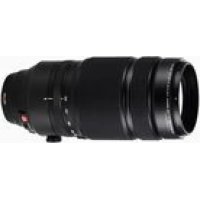
XF100400mmF4.55.6 R LM OIS WR - Lens FUJIFILM - Free user manual and instructions
Find the device manual for free XF100400mmF4.55.6 R LM OIS WR FUJIFILM in PDF.



Frequently Asked Questions - XF100400mmF4.55.6 R LM OIS WR FUJIFILM
User questions about XF100400mmF4.55.6 R LM OIS WR FUJIFILM
0 question about this device. Answer the ones you know or ask your own.
Ask a new question about this device
Download the instructions for your Lens in PDF format for free! Find your manual XF100400mmF4.55.6 R LM OIS WR - FUJIFILM and take your electronic device back in hand. On this page are published all the documents necessary for the use of your device. XF100400mmF4.55.6 R LM OIS WR by FUJIFILM.
USER MANUAL XF100400mmF4.55.6 R LM OIS WR FUJIFILM
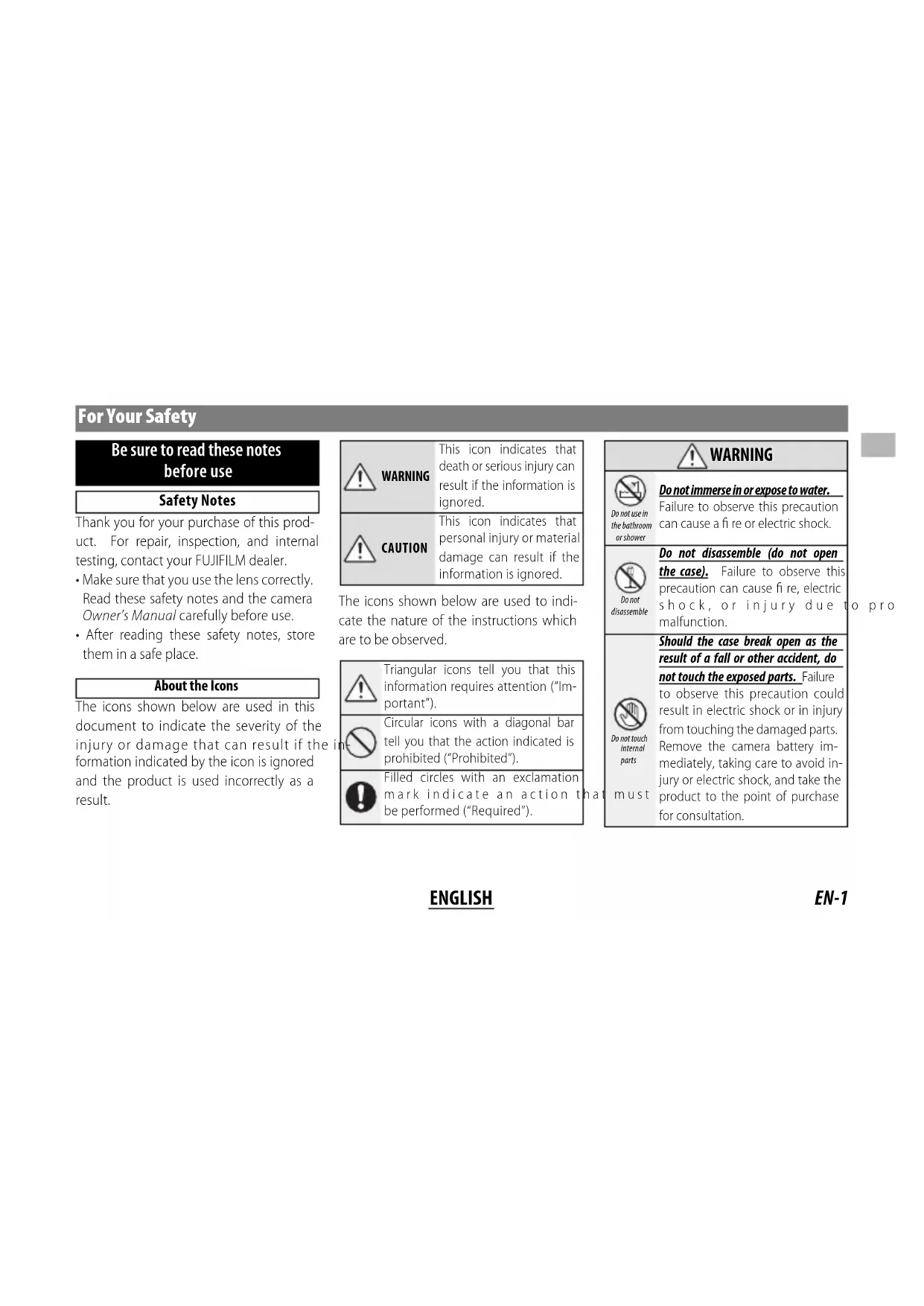
Be sure to read these notes before use
Safety Notes
Thank you for your purchase of this product. For repair, inspection, and internal testing, contact your FUJIFILM dealer.
Make sure that you use the lens correctly. Read these safety notes and the camera Owner's Manual carefully before use.
After reading these safety notes, store them in a safe place.
About the icons
The icons shown below are used in this document to indicate the severity of the injury or damage that can result if the formation indicated by the icon is ignored and the product is used incorrectly as a result.
The icons shown below are used to indicate the nature of the instructions which are to be observed.

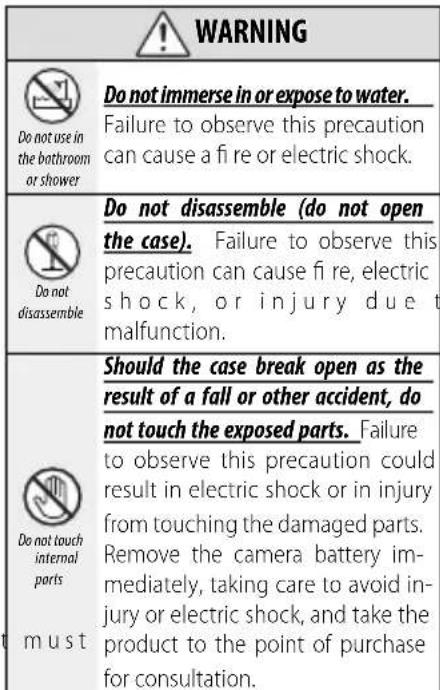
WARNING

Do not place on unstable surfaces. The product may fall, causing injury.

Do not view the sun through the lens or camera viewfnders. Failure observe this precaution can cause permanent visual impairment.
CAUTION

Do not use or store in locations that are exposed to steam, or smoke or are very humid or extremely dusty. Failure to observe this precaution can cause fire or electric shock.

Do not leave in direct sunlight or in locations subject to very high temperatures, such as in a closed vehicle on a sunny day. Failure to observe this precaution can cause fire.

Keep out of the reach of small children. This product could cause injury in the hands of a child.

Do not handle with wet hands. Failure to observe this precaution can cause electric shock.
CAUTION

Keep the sun out of the frame when shooting backlit subjects. Sunlight focused into the camera when the sun is in or close to the frame can cause fire or burns.

When the product is not in use, replace the lens caps and store out of direct sunlight. Sunlight focused by the lens can cause fire or burns.

Do not carry the camera or lens while they are attached to a tripod. The product can fall or strike other objects, causing injury.

Do not rapidly rotate the camera while holding the grip. Your hand could strike the tripod or tripod collar foot, causing injury.

Before handling the camera, fully tighten or loosen the tripod collar lock screw according to whether the camera will be used in a fixed orientation or rotated. If the screw is only partially tightened, the camera may move unexpectedly, causing injury.
For Customers in the U.S.A.
Tested To Comply With FCC Standards FOR HOME OR OFFICE USE
FCC Statement: This device complies with Part 15 of the FCC Rules. Operation is subject to the following two conditions: (1) This device may not cause harmful interference, and (2) this device must accept any interference received, including interference that may cause undesired operation.
CAUTION: This equipment has been tested and found to comply with the limits for a Class B digital device, pursuant to Part 15 of the FCC Rules. These limits are designed to provide reasonable protection against harmful interference in a residential installation. This equipment generates, uses, and can radiate radio frequency energy and, if not installed and used in accordance with the instructions, may cause harmful interference to radio communications. However, there is no guarantee that interference will not occur in a particular installation. If this equipment does cause harmful interference to radio or television reception, which can be determined by turning the equipment off and on, the user is encouraged to try to correct the interference by one or more of the following measures:
Reorient or relocate the receiving antenna.
- Increase the separation between the equipment and receiver.

EN-2
ENGLISH
- Connect the equipment into an outlet on a circuit different from that to which the receiver is connected.
- Consult the dealer or an experienced radio/TV technician for help.
- You are cautioned that any changes or modifications not expressly approved in this manual could void the user's authority to operate the equipment.
Notes on the Grant: To comply with Part 15 of the FCC Rules, this product must be used with a Fujii Im-specific ed ferrite-core A/V cable, USB cable, and DC supply cord.
For Customers in Canada
CANICES-3(B)/NMB-3(B)
CAUTION: This Class B digital apparatus complies with Canadian ICES-003.
IMPORTANT SAFETY INSTRUCTIONS
- Read these instructions.
- Keep these instructions.
Heed all warnings.
Follow all instructions. - Do not use this apparatus near water (excluding waterproof products).
Clean only with a dry cloth. - Do not block any ventilation openings. Install in accordance with the manufacturer's instructions.
- Do not install near any heat sources such as ra
diators, heat registers, stoves, or other apparatus (including amplifiers) that produce heat.
- Protect the power cord from being walked on or pinched particularly at plugs, convenience receptacles, and the point where they exit from the apparatus.
Only use attachments/accessories specified by the manufacturer. - Unplug this apparatus during lightning storms or when unused for long periods of time.
Refer all servicing to qualified service personal. Servicing is required when the apparatus has been damaged in any way, such as power supply cord or plug is damaged, liquid has been spilled or objects have fallen into the apparatus, the apparatus has been exposed to rain or moisture, does not operate normally, or has been dropped.
Disposal of Electrical and Electronic Equipment in Private Households
In the European Union, Norway, Iceland and Liechtenstein: This symbol on the product, or in the manual and in the warranty, and/or on its packaging indicates that this product shall not be treated as household waste. Instead it should be taken to an applicable collection point for the recycling of electrical and electronic equipment.
By ensuring this product is disposed of correctly, you will help prevent potential negative consequences to the environment and human health, which could otherwise be caused by inappropriate waste handling of this product.
The recycling of materials will help to conserve natural resources. For more detailed information about recycling this product, please contact your local city office, your household waste disposal service or the shop where you purchased the product.
In Countries Outside the European Union, Norway, Iceland and Liechtenstein: If you wish to discard this product, including the batteries or accumulators, please contact your local authorities and ask for the correct way of disposal.
U.K. Importer:
FUJIFILM UK Ltd.
Fujii Im House, Whitbread Way, Bedford,
Bedfordshire, MK42 0ZE, United Kingdom
EU Importer:
FUJIFILM Germany GmbH
Balcke-Durr-Allee 6,40882 Ratingen, Germany
Australian RCM

EN-3
ENGLISH
Before Using This Product
Some lens features are not available with older versions of the camera firmware. Be sure to update the camera firmware to the latest version. Instructions on viewing the camera firmware version and updating camera firmware are available from the following website:
http://www.fujifilm.com/support/digital Cameras/software/#firmware
If you do not have access to a computer, support is available from the local distributor listed in the "FUJIFILM Worldwide Network" material provided with your camera.
Product Care
- When using a lens hood, do not pick up or hold the camera using only the hood.
- Keep the lens signal contacts clean.
- Use a blower to remove dust and lint from the glass surfaces of the lens or fi Iter. To remove
smudges and fingernprints, apply a small amount of lens cleaner to a soft, clean cotton cloth or lens-cleaning tissue and clean from the center outwards using a circular motion, taking care not to leave smears or touch the glass with your fingers.
- Never use organic solvents such as paint thinner or benzene to clean the lens.
- Attach the front and rear caps when the lens is not in use.
- Store the lens and fi Iter in cool, dry locations to prevent mold and rust. Do not store in direct sunlight or with naphtha or cam moth balls.
- Keep the lens dry. Rusting can cause irreparable damage. Wipe off rain and water droplets.
- Leaving the lens in extremely hot locations could cause damage or warping.
- Note that depending on the positions of the camera and tripod, the hand holding the camera grip may contact the tripod or tripod collar foot when the camera is rotated.
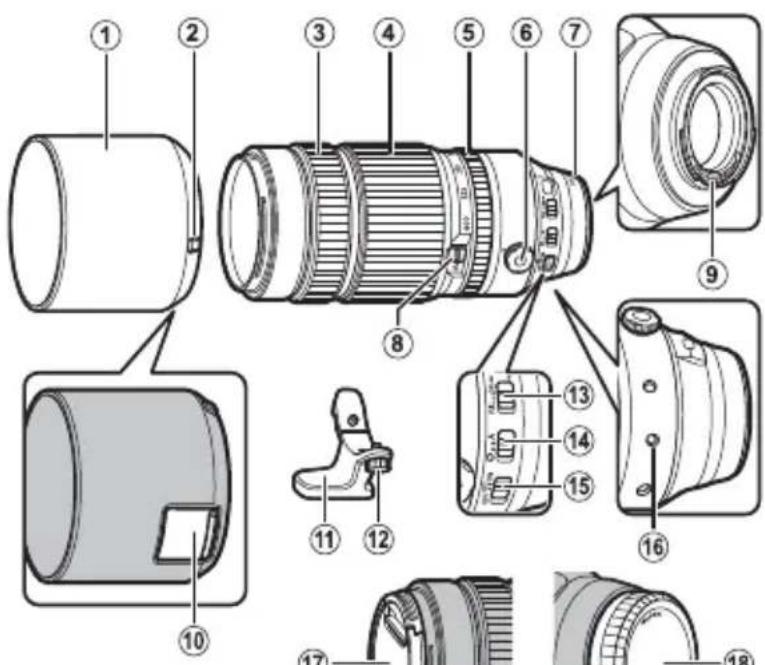
Parts of the Lens
XF100-400 mm F4.5-5.6 R LM OIS WR
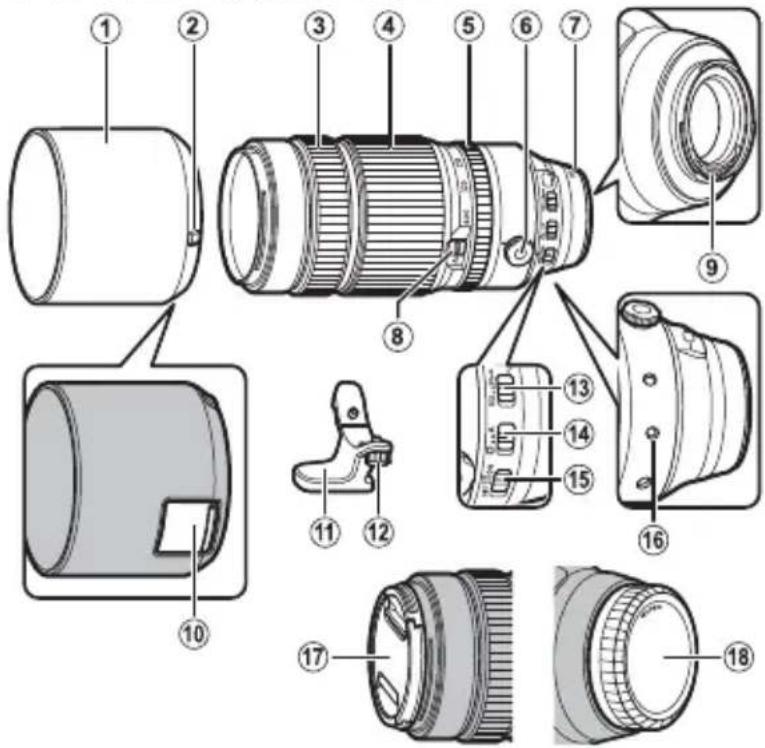
① Lens hood
② Hood latch release
③ Focus ring
④ Zoom ring
⑤ Aperture ring
⑥ Tripod collar lock screw
⑦ Mounting marks (focal length)
⑧ Zoom lock switch
Lens signal contacts
Filter access port
⑪ Tripod collar foot
⑫ Tripod foot mounting screw
⑬ Focus range selector
⑭ Aperture lock switch
15 O.I.S. switch
Lens rotating position index
17 Front lens cap
⑱ Rear lens cap
The lens mount includes a rubber ring to ensure that the lens remains dust- and splash-proof. The ring can be replaced for a fee at any FUJIFILM service center.
ENGLISH
EN-5
Supplied Accessories
- Front lens cap
Rear lens cap - Lens hood
- Cloth wrapping
- Tripod collar foot
Attaching the Lens
See the camera manual for information on attaching and removing lenses. Note that this product is not compatible with X mount fi lm cameras.
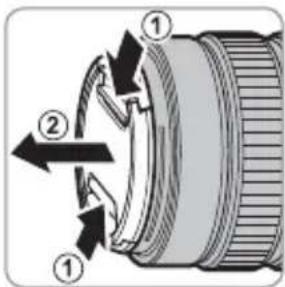
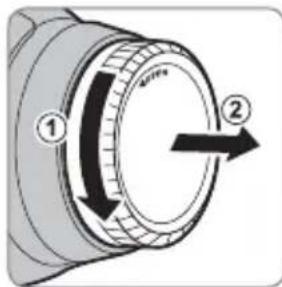
Removing the Caps
Remove the caps as shown.
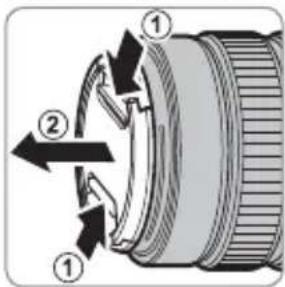
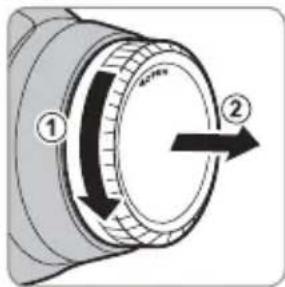
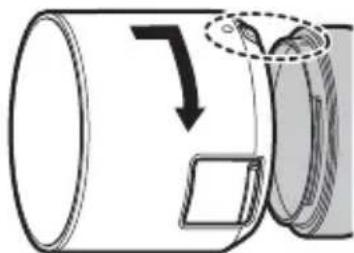
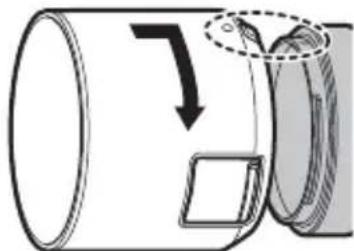
Attaching the Hood
When attached, lens hoods reduce glare and protect the front lens element.
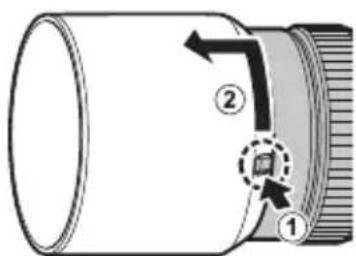
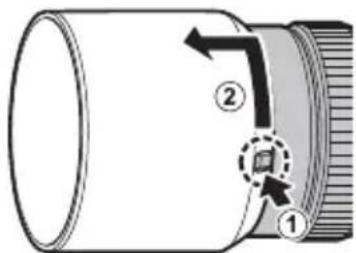
Removing the Hood
To remove the hood, press and hold the hood latch release while rotating the hood counterclockwise.
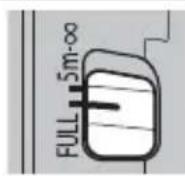
The Focus Range Selector
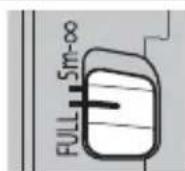
Choose the focus range for autofocus. Choose FULL to focus on subjects at any distance, 5m - for faster focus when photographing subjects at distances of 5m or more.
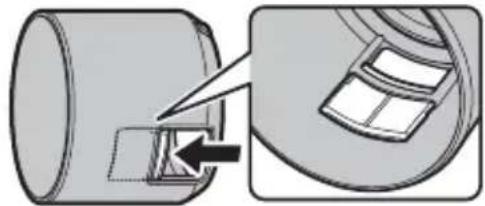
The Polarizing Filter
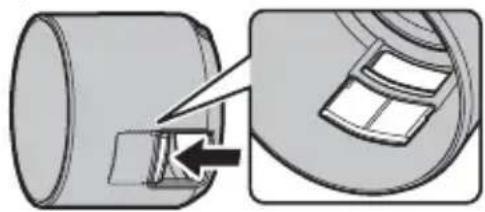
To access the polarizing filter, open the fi iter access port cover.
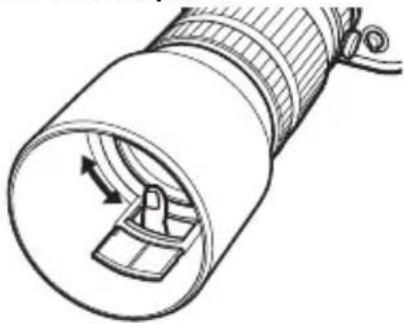
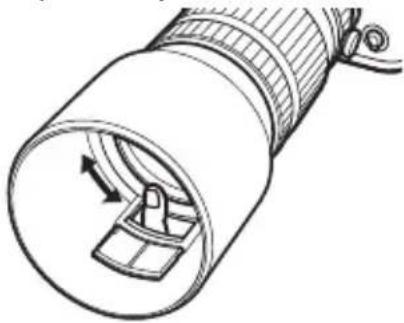
The fiter can be rotated by inserting a finger through the access port.
EN-7ENGLI
The Tripod Collar Foot
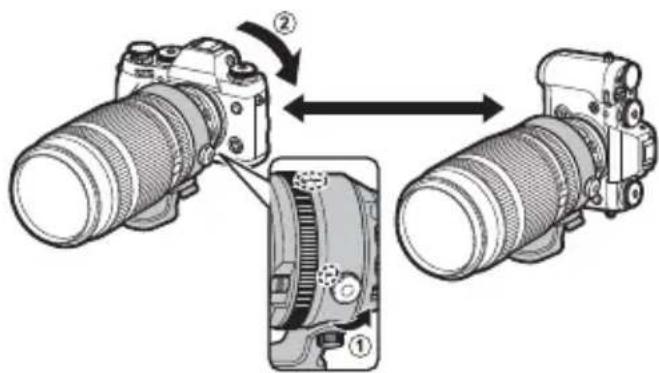
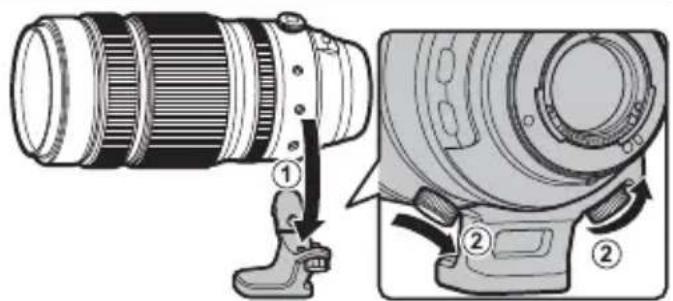
To attach the tripod collar foot, align the mounting mark on the foot with the lens rotating position index and tighten the tripod foot mounting screw.
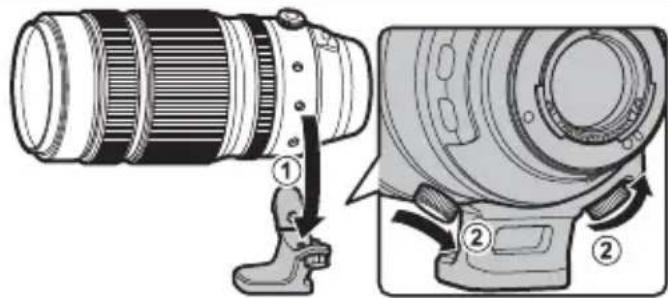
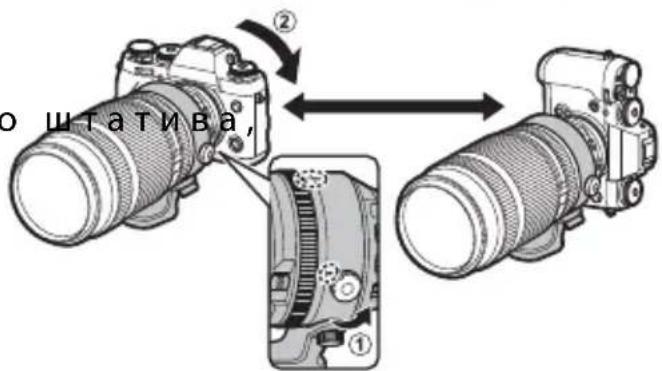
To rotate the camera from landscape to portrait orientation or back again without taking it off the tripod, loosen the tripod collar lock screw.
Tighten the screw securely to prevent the camera rotating unexpectedly.
Zoom
Rotate the zoom ring left to zoom out, reing magnification and increasing the area visible in the frame. Rotate the ring right to zoom in, increasing magnificatioso that the subject occupies more of the frame.
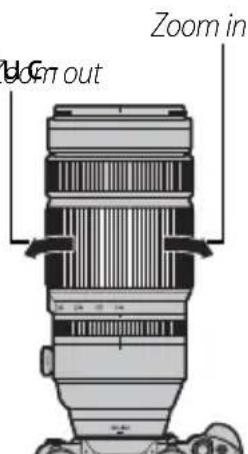
Using the zoom ring while the lens is wet makes it easier for water to find its way inside the lens. Wipe any water from the lens before using the zoom ring.
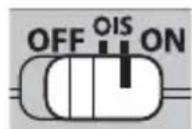
Optical Image Stabilization (OIS)
To use optical image stabilization, slide the O.I.S. switch to ON.
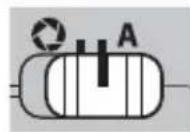
Aperture
For auto aperture control, slide the aperture mode switch to A.
To adjust aperture manually, slide the switch to and rotate the aperture ring. Rotate the ring left for wider apertures (lower f-numbers), right for smaller apertures (higher f-numbers).

Specifications
| Type XF100-400 mm F4.5-5.6 R LM OIS WR | |
| Lens construction | 21 elements in 14 groups (includes 5 extra-low dispersion elements and 1 super extra-low dispersion element) |
| Focal length (35 mm format equivalent) | f=100-400mm (152-609 mm) |
| Angle of view 16.2°-4.1° | |
| Max. aperture f/4.5-5.6 | |
| Min. aperture f/22 | |
| Aperture control | |
| Number of blades | 9 (rounded diaphragm opening) |
| Stop size | 1/3 EV (15 stops) |
| Focus range (measured from focal plane) | Full: 1.75 m-infinity Restricted: 5 m-infinity |
| Max. magnification T: 0.19 × | |
| External dimensions: Diameter × Length * (approx.) * Distance from camera lens mount flange | W: ∅94.8 × 210.5 mm T: ∅94.8 × 270 mm |
| Weight * (approx.) * Excluding caps, hoods, and tripod collar feet | 1375 g |
| Filter size | ∅77 mm |
① Improvements may result in unannounced changes to specifications and appearance.
Owing to how this lens is constructed, the "Distance indicator" displayed by the camera may in some cases differ from the actual focus distance. Use the "Distance indicator" as a guide only.
This lens uses linear motors to ensure fast and accurate auto focus while maintaining the highest image quality. When the camera is turned off, the lens is disconnected from the camera body, or the playback feature is turned on, there may be an audible sound and slight physical vibration due to the linear motor's magnets being disengaged. This is perfectly normal and will not negatively affect image quality or lens performance.
Pour vous sécurité
http://www.fujifilm.com/support/digital Cameras/software/#firmware
http://www.fujifilm.com/support/digital Cameras/software/#firmware
http://www.fujifilm.com/support/digital Cameras/software/#firmware
http://www.fujifilm.com/support/digital Cameras/software/#firmware
Optical Image Stabilization (OIS)
http://www.fujifilm.com/support/digital Cameras/software/#firmware
Om du inte har tillgang till en dator, kan du fahos den lokala aterforsljare som listedi FUJIFILM Worldwide Network-materialialet, vilket medfoljer kameran.
Produktvård
http://www.fujifilm.com/support/digital Cameras/software/#firmware
http://www.fujifilm.com/support/digital Cameras/software/#firmware
http://www.fujifilm.com/support/digital Cameras/software/#firmware
B cnyuae, ecn y Bac HeT doctyna K KOMnbIoTepy, o6paTntecb 3a noDpeKkoN K MeCTHOMy IInCTpN6bIoTpO npCnCKA «FUJIFILM Worldwide Network», nocTabJeHHoro c Bauei foToKaMepoi.
yXoD3a n3deJnHeM
- Pn nCnoJb3ObaHn 6JeHbI o6BeKtNbA He 6epntecb 3a foTOKaMepu Hne DePKeHTe ee ToIbKO 3a 6NeHdy.
He onyckaTe 3arpa3HeHnCnHaNbHbIX KOHTaKTOB o6bekTnBa.
-Пиьзутесь рушей дя удаленя nbiin n nyxa co cTeклЯньхпobерхнocтew obbeKTnBa nIn φнlbTpra. Дя удаленя пяtenи OTneuaTkoB пalbueВ haheCtte He6oIbwoe konuyeCTBO xNdkOcTN dЯ чSTKN obbeKtNBOB Ha mRkyU, uNCTyU Xlonuato6ymaxkHyIO TkaHb
HnCaΦeTKyIaYnCTKNoBIO npOTpnte ObeKTIB OT cHTpa K KpaM KpyTOBbIMN DnBXKeHNr M,Co6JIoJaOCTOpOXHOCTb,He OCTaJIa pa3BOIOB N He KaCaeCb CTeKla NaIbCuAM.
- Hukorda He nCnoJb3yIe dJa YnCTKn O6BeKtNbBa opraHnueckne pactBOpuTeN, TaKne KaK pa36abnteJb dJa Kpackn nn 6eH3nH.
3aKpOte KpbIuKy 06BeKTHBa u KpbIuKy 6aNoHeta o6BeKTHBa, KOrDa 06BeKTHB He nCNoJIb3yeTc.
XpaHnTe o6bekTnB nHbTp B npoxlaHbIX, cyxnx Me-ctax, yTo6bl npeoTbpaTntb o6pa3OBaHne nIeceHN u Koppo3nn. He xpaHnTe B MeCtax, rKe Ha Hero nonaAet npamO conHeuHb CBeT, nIi PraOM c HafTaIIINHOblMN nn KaMΦOpHbIMN waPknAM O T MoNl. - Bepernte obkeTb OT Bnarn. Koppo3na MoXeT haHeCTn HEnonpaBmbl yUep6. Pn nonaHnn DoJxDeBbIX KaneIb nn 6pb13r BoDbl nx CneJeYET BbItepeTb.
- Ecnn 06bekTNB OCTaBnTb B MeCTax, NOBBepraHuxxC8 BO3dEeCTBnIO BBICOKNX TemnepaTyp, TO 3TO MOKeT IOBpeDnTb INN DeΦOpMnPOBaTb erO.
- ImeIte B Bnu, yTO B 3aBucMocTOn OT NOJIOKeHNI - TokaMepbI n WtTaTnBa, pyKa, yIepKNaBaIOuza pyKOaTKy - TokaMepbI, MoKeT COpNKaCaTbCc CO WtTaTnBOM nn NaKo Koblca WtTaTnBa pN IOBOpTe - TokaMepbl.
Yactn o6bekTnBa
XF100-400 mm F4.5-5.6 R LM OIS WR
① BneHda oBekmua
② 3aueenKa 6neHobbl
③ Φokycupo60Hoe KOnbUO
④ KonbuO macwma6bpuo8aHua
⑤ Konbuo duappaMbl
6 Dukpyouu uHm nanku konbua wamuba
⑦ Memku dny ycmahOBku (fokychoe paccmORHue)
⑧ IpekeHouameIb 6nokupobku obekmuBa c nepemehhmbfokychbIM paccmoraHueM
CuzhanbHbe KOHMkmbi oBekmua
10 NopmdocmynaKfunbmpy
① JIANKA KONbua umamuba
12 KpenexhbuHm汗ku konbua umamuba
13 Ipeeknoyamelb pekuma fokycupobku
14 Ipeeknoyamnb 6nokupo8ku duappaMbl
15 Ipeeknioqamene O.l.S.
16 VHdeK nonoxenu epaueHu oBekmuba
⑰ Kpbuuka obekmuBa
18 Kpbuuka 6auHema o6bekmu8a
PYCCKN
PpnilaraemblepnHaIeXHoCTN
Kpbioka o6beKeTnBa
-Kpbiuka 6aioHeTa o6bekTnBa
-Бленьда obьektива
Tkaheba ynaKOBKa
JaKa KOnbua WTaTnBa
YctahOBka 06beKTHBa
Cm.pyKOBOCTBO NOIb3OBaTeNIA FOToKa-MepoI IINIOJUeHnI INFOpMaunO6YCTAHOBKe I CHrTUN OBeKtNBa.IMeIteB BNDy, YTO DaHHoe N3dEJIne HecOBMeCTNMO C FOToKAMepamn C 6aNoHEtOM X.
CHaTne KpbIeK
CHIMMTE KpbIiKn, KaN oKa3aHo Ha pncyHKe.
yTaHOBka 6IeHdbI
Pn noDcoeHHeHnn 6IeHdbI oBbEKTINBa yMeHbShaIOT 6NIKN 3aUHsaIOT nepeHNIOJINH3y.
ChTne 6nHdbI
YTO6bI CHaTb 6NeHdy, HaxMITE u ydePknBaInTe 3aueJky, Bpa-aa 6JeHdy npOTNB acOBON CTpeJKN.
IpeeknloaTeB dnaana30Ha oKycnpOBKn
Bb6epTe dnaa3OH oKycn-POBKn IaABTOoKycnPOBKn. Bb6epTe FULL(IOHbI) Ira oKycnpOBKn Ha obkeTx Ha IIO6om pacCTOHN, 5 m-oo nn 60nee 6bictporo oKyca npn cbeMe oBeKTOB Ha paCCTOHN 5 Mnn 60nee.
PonpaunHbIΦnltp
YTo6bI NOnyUHTb DoCTyn K NoJApn3a- CuNoHHOMy FInbTpY, OTKpoTe KpbIwKy npTa DoCTyna K FInbTpY.
ФильтpoMOxHObOPaUHBaTb,BCTaBnB NaIeuC BnopTdoCTyna.
RU-7PYCCKI
Janka Konbua wTaNbA
YTo6bI yCTaHOBnTb IaNk Ky KOnbua WtTaTnBa, COBMecHTe MeTKy KpePJIeHnHa IaNKe C INHeKCOM NIOJXeHn BpaUeHn OBeEKTuBa I 3aTAHnTe KpeJeXhBn BVHT IaNKn KOJIbca WtTaTnBa.
YTo6bI NOBepHyTb FOToKaMepy n3 rOpn- 3OHTaJIbHO B BePTNKaJIbHyIO OpiEHTaCNIIO nn o6paTHo, He cHmam eecocna6bTe fHKcnpuOni BNHT IaIKN KOJIb-za WtTaTNaBa.
HaJExKHO 3aTAHHT BnHT, YTO6bI npeD0TbpATnB BHe3aHHe Bpa-
MacwTa6npoBaHne
http://www.fujifilm.com/support/digital Cameras/software/#firmware
http://www.fujifilm.com/support/digital Cameras/software/#firmware
http://www.fujifilm.com/support/digital Cameras/software/#firmware
http://www.fujifilm.com/support/digital Cameras/software/#firmware
http://www.fujifilm.com/support/digital Cameras/ software/#firmware
http://www.fujifilm.com/support/digital Cameras/ software/#firmware
Coupter to sucnch n, kmae r and hcpne cckonf "FUJIFLM Worldwide Network" JcR eelgrd HjT jtJgHepr tJi
奈吾北
- RENs Hua He Ta Hua He Ta Hua He Ta Hua He Ta Hua He Ta Hua He Ta Hua He Ta Hua He Ta Hua He Ta Hua He Ta Hua He Ta Hua He Ta Hua He Ta Hua He Ta Hua He Ta Hua He Ta Hua He Ta Hua He Ta Hua He Ta Hua He Ta Hua He Ta Hua He Ta Hua He Ta Hua He Ta Hua He Ta Hua HeTa Hua He Ta Hua He Ta Hua He Ta Hua He Ta Hua He Ta Hua He Ta Hua He Ta Hua He Ta Hua He Ta Hua He Ta Hua He Ta Hua He Ta Hua He Ta Hua He Ta Hua He Ta Hua He Ta Hua He Ta Hua He Ta Hua He Ta Hua He Ta Hua He Ta Hua He Ta Hua He Ta Hua He Ta Hua He Tae
- RENZI
·隆罗语人,普用者,贝斯,是的,国之,,。
KO-4
喜。
J 1 J 1 J 1 J 1 J 1 J 1 J 1 J 1 J 1 J 1 J 1 J 1 J 1
cuii11ie euiuaiu
pIaJn aEe dll lalol y 08gto nAe eel Ijgo jy
oall Jzaii all pblc iDoo nn o S.12okJy jao Jl kaii
pIaJrO! oR gCtLzill fglss.12okJy
Jolul Jolll Jusuill pblc yodg Jolul Jolll Jusuill 1jgl jolll cdozo Jio goc yio :JUJ 3gJyI g6bl
http://www.fujifilm.com/support/digital Cameras/
software/firmware
Jgssd 415 0000000000000000000000000000000000000000000000000000000000000
·JScV(2015)11111111111111111111111111111111111
g l a 13 d 10 10 10 10 10 10 10
#
1.5mol 14.
baa aaiy
· = 1
PQ = 1

AR-4
aBbIyUjkl 4 aRySlyg aig kSyI cgsyJy