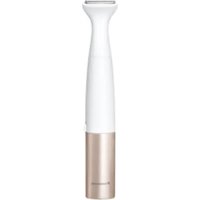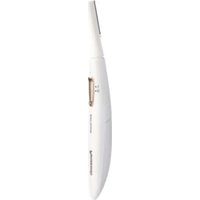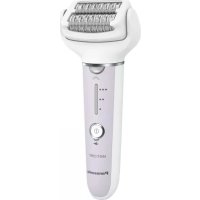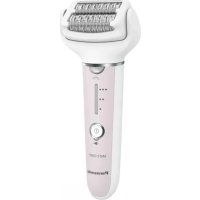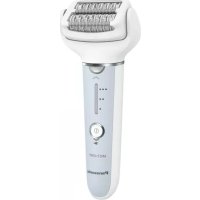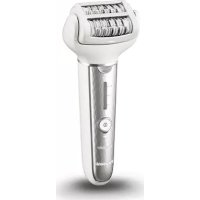
ESEL9A - Epilator PANASONIC - Free user manual and instructions
Find the device manual for free ESEL9A PANASONIC in PDF.



User questions about ESEL9A PANASONIC
0 question about this device. Answer the ones you know or ask your own.
Ask a new question about this device
Download the instructions for your Epilator in PDF format for free! Find your manual ESEL9A - PANASONIC and take your electronic device back in hand. On this page are published all the documents necessary for the use of your device. ESEL9A by PANASONIC.
USER MANUAL ESEL9A PANASONIC
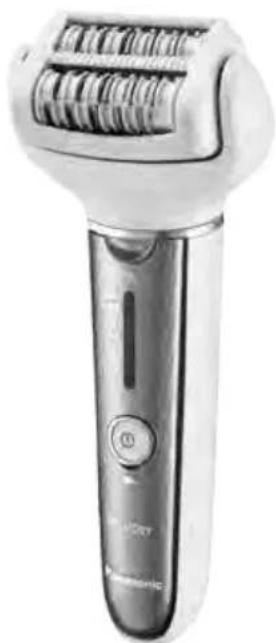
Operating Instructions (Household) Epilator
ES-EL9A Model No. ES-EL7A
CE
English. 7 Svenska. 229
Deutsch 29 Suomi 251
Francais. 55 Polski 273
Italiano 81 Cesky 297
Nederlands... 105 Slovensky. 319
Espanol. 131 Magyar. 343
Dansk. 157 Româna 367
Portugues. 181 Türkce. 391
Norsk 207

3
Panasonic
Operating Instructions (Household) Epilator
ES-EL9A Model No. ES-EL7A
Contents
Safety precautions. 10
Important information 16
Quick steps for using. 16
Parts identification 16
Charging. 17
Before use 18
How to use 18
Cleaning 21
Replacing the outer foil and the inner blade. 22
Replacing the file 23
Replacing the sonic scrub brush. 23
Troubleshooting 24
Battery life 27
Removing the built-in rechargeable battery (Fig. 27).27
Guarantee. 27
Specifications 27
Thank you for purchasing this Panasonic product. Before operating this unit, please read these instructions completely and save them for future use.
Warning
-
This appliance can be used by children aged from 8 years and above and persons with reduced physical, sensory or mental capabilities or lack of experience and knowledge if they have been given supervision or instruction concerning use of the appliance in a safe way and understand the hazards involved. Children shall not play with the appliance. Cleaning and user maintenance shall not be made by children without supervision.
-
The supply cord cannot be replaced. If the cord is damaged, the AC adaptor should be scrapped.
-
Do not use anything other than the supplied AC adaptor for any purpose. Also, do not use any other product with the supplied AC adaptor. (See page 17.)
-
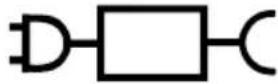
The following symbol indicates that a specific detachable power supply unit is required for connecting the electrical appliance to the supply mains. The type reference of power supply unit is marked near the symbol.
Using the head of epilation/shaver, and the brush
- The heads and brush can be used when wet.
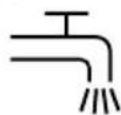
The following symbol means suitable for use in a bath or shower.

Using the foot care head
- The foot care head is washable. The following symbol means that the foot care head can be cleaned under the water.
- Detach the main body from the AC adaptor before cleaning it in water.
Safety precautions
To reduce the risk of injury, loss of life, electric shock, fire, and damage to property, always observe the following safety precautions.
Explanation of symbols
The following symbols are used to classify and describe the level of hazard, injury, and property damage caused when the denotation is disregarded and improper use is performed.

DANGER
Denotes a potential hazard that will result in serious injury or death.

WARNING
Denotes a potential hazard that could result in serious injury or death.

CAUTION
Denotes a hazard that could result in minor injury or property damage.
The following symbols are used to classify and describe the type of instructions to be observed.

This symbol is used to alert users to a specific operating procedure that must not be performed.

This symbol is used to alert users to a specific operating procedure that must be followed in order to operate the unit safely.

WARNING
Power supply
Do not damage or modify, or forcefully bend, pull, or twist the cord. Also, do not place anything heavy on or pinch the cord.
Do not immerse the AC adaptor in water or wash it with water.

Do not place the AC adaptor over or near water filled sink or bathtub.
Never use the appliance if the AC adaptor is damaged or if the power plug fits loosely in a household outlet.
- Doing so may cause electric shock or fire due to a short circuit.

Do not connect or disconnect the adaptor to a household outlet with a wet hand.
- Doing so may cause electric shock or injury.
Do not use in a way exceeding the rating of the household outlet or the wiring.

-Exceeding the rating by connecting too many plugs to one household outlet may cause fire due to overheating.

Always ensure the appliance is operated on an electric power source matched to the rated voltage indicated on the AC adaptor.
Fully insert the adaptor or appliance plug.
- Failure to do so may cause fire or electric shock.

WARNING
This product
This product has a built-in rechargeable battery. Do not throw into flame or heat. Do not charge, use, or leave in high temperatures.
- Doing so may cause overheating, ignition, or explosion.

Do not modify or repair.
- Doing so may cause fire, electric shock, or injury. Contact an authorized service centre for repair (battery change etc.).

Never disassemble except when disposing of the product.
- Doing so may cause fire, electric shock, or injury.

case of an abnormality or malfunction
Immediately stop using and remove the adaptor if there is an abnormality or malfunction.
- Failure to do so may cause fire, electric shock, or injury.
- The main unit, adaptor or cord is deformed or abnormally hot.
The main unit, adaptor or cord smells of burning. - There is abnormal sound during use or charging of the main unit, adaptor or cord.
- Immediately request inspection or repair at an authorized service centre.
Preventing accidents
Do not place within reach of children or infants. Do not let them use it.

- Doing so may cause an accident or injury due to accidental ingestion of the inner blade, brush, etc.
Cleaning

Always unplug the adaptor from a household outlet when cleaning.
- Failure to do so may cause electric shock or injury.
Regularly clean the power plug and the appliance plug to prevent dust from accumulating.

- Failure to do so may cause fire due to insulation failure caused by humidity. Disconnect the adaptor and wipe with a dry cloth.

CAUTION
To protect the skin
The following persons should not use this appliance:
- Persons suffering from atopic dermatitis or rashes and other skin diseases
-
Persons with allergic diathesis or persons who are easily irritated by cosmetics, clothing, metals, etc.
-
Persons who are easily supplurated
- Persons suffering from varicose veins, diabetes, hemophilia, etc.
- Persons who have trouble stopping bleeding
- Use in such cases may cause the skin to become sensitive or cause inflammation, bleeding, or increased pain.

Do not use in the following cases:
During menstruation, pregnancy, or about one month after giving birth
- When you are not well or when you feel an abnormality in your skin or body
After drinking alcohol or taking medicine, or when you are very tired
- Use in such cases may cause the skin to become sensitive or cause inflammation, bleeding, or increased pain.
Do not use in the following body area:

- Injury, rash, moles, bruises, warts, pimples, etc.
- On suntanned skin
- Doing so may cause injury, inflammation of the skin, or bleeding.

Do not press on the blade too strongly when using the shaver head.
- Doing so may cause damage which results in injury to the skin.

Do not touch the blade section (metallic section) of the inner blade when using the shaver head.
- Doing so may cause injury to your hands.

Do not turn ON the switch without the head attached.
-Doing so may cause finger injury or cause hair or clothing entanglement and damage.

Do not use with the frame removed.
-Doing so may cause finger injury or cause hair or clothing entanglement and damage.

Do not use the soap with a scrub or with peeling effect.
- Doing so may cause injury to the skin, color stains or other skin trouble.

Always attach the sensitive area cap for underarms/ bikini-line when epilating your underarms and
bikini-line. Do not use the fast cap for legs/arms or the gentle cap for legs/arms.
- Failure to do so may cause injury, inflammation, or increased pain.

CAUTION
The skin protector and the outer foil are fragile.
Store the shaver head with the bikini comb attached.

- Failure to do so may result in deformation or damage to the skin protector or outer foil, which may cause injury to skin.
- Please store the skin protector and the outer foil with care.

Before using, check that the skin protector, disc, blade, frame and brush are free from deformities, cracks, and damage.
- Failure to do so may cause injury to the skin.

Apply the skin protector and the epilation discs at a 90^ angle to your skin with gentle force.
- Failure to do so may cause injury to the skin or cause hair or clothing entanglement and damage.
If skin problems continue for 2 days or longer after

treatment, stop using the unit and contact a dermatologist.
- Failure to do so may cause symptoms to worsen.
Turn the switch off when the appliance becomes hot, and use the appliance only after it has cooled.
- Failure to do so may cause low temperature burn.
About using the epilation/ shaver head
Do not use in the following body area:
- Face, genitals and genital area, or thighs
- Inner side of the upper arms and areas such as elbows or knees which are prone to sagging
- Doing so may cause injury, inflammation of the skin, or bleeding.
The following persons should not use this appliance:
- Persons who have suffered skin problems (suppuration, inflammation, etc.) caused by epilation (plucking, depilation, waxing, etc.)
- Use in such cases may cause the skin to become sensitive or cause inflammation, bleeding, or increased pain.
Do not use epilation/shaver head in the following ways:
- Using just before swimming or sea bathing (use at least 2 days before such activities)
- Using just before bathing
- Engaging in extreme sports or exercise right after epilation
- Doing so may cause infection or inflammation resulting from bacteria that enter the body through the pores.
Do not apply strong pressure to the skin, move repeatedly over the same area or move back and forth in one area. Also, do not use with a jabbing motion.
- Doing so may cause injury or inflammation of the skin, or increased pain.

CAUTION
About using the foot care head Do not use on blisters and corns.

- Doing so may cause injury, inflammation of the skin, or bleeding.

Do not use foot care head in the following ways:
Filing too deeply
- Letting the file touch soft skin
- Using the foot care head in the bath
- Doing so may cause injury to the skin, infection, inflammation, bleeding or other trouble, or worsening of such symptoms.
People suffering from poor circulation in the feet; or swelling, itchiness, pain, or excessive warmth in the feet should consult their doctor before using the foot care head.
- If skin appears abnormal after filing, stop using the foot care head and consult a dermatologist.
- File the hardened skin little by little over a few days.
- File only calluses or hardened skin on your feet.
- Failure to follow the above instruction may cause injury to the skin, infection, inflammation, bleeding or other trouble, or worsening of such symptoms.
When using the appliance for filing, be careful of the direction in which the main body moves.

- Rotation of the file may cause the main body to move in an unexpected direction and cause injury to the skin.

Store the foot care head with the protection cap attached.
-Failure to do so may cause damage to surrounding items.
About using the sonic scrub brush
Do not use in the following body area:

- Face, throat, genitals and genital area
- Doing so may cause injury, inflammation of the skin, or bleeding.
Do not use sonic scrub brush in the following ways:
- Apply with strong pressure to the skin
- Use continuously for long periods of time on the same area
- Doing so may cause injury to the skin, infection, inflammation, bleeding, or other trouble, or worsening of such symptoms.

If skin problems continue for 2 days or longer after

treatment, stop using the unit and contact a dermatologist.
- Failure to do so may cause symptoms to worsen.

Use to remove calluses on the knees or elbows.
- Failure to do so may cause injury, inflammation of the skin, or bleeding.

CAUTION
Note the following precautions
Do not share with your family or others.
- Doing so may cause infection or inflammation.

Do not allow metal objects or trash to adhere to the power plug or the appliance plug.
- Doing so may cause electric shock or fire due to a short circuit.

Do not continuously aim the LED light directly into your eyes.
-Doing so may cause dizziness.

Do not drop or subject to shock.
- Doing so may cause injury.

Do not wrap the cord around the adaptor or the appliance when storing.
- Doing so may cause the wire in the cord to break with the load, and may cause fire due to a short circuit.

Disconnect the adaptor or the appliance plug by holding onto the adaptor or the appliance plug instead of the cord.
- Disconnecting by holding onto the cord may cause electric shock or injury.

Disconnect the adaptor from the household outlet when not charging.

- Failure to do so may cause electric shock or fire due to electrical leakage resulting from insulation deterioration.
Handling of the removed battery when disposing

DANGER
The rechargeable battery is exclusively for use with this appliance. Do not use the battery with other products.
-
Do not charge the battery after it has been removed from the product.
-
Do not throw into fire or apply heat.
-
Do not hit, disassemble, modify, or puncture with a nail.
-
Do not let the positive and negative terminals of the battery get in contact with each other through metallic objects.
-
Do not carry or store the battery together with metallic jewellery such as necklaces and hairpins.
-
Do not use or leave the battery where it will be exposed to high temperatures, such as under direct sunlight or near other sources of heat.
-
Never peel off the tube.
-
Doing so may cause overheating, ignition, or explosion.

WARNING
After removing the rechargeable battery, do not keep it within reach of children and infants.

- The battery will harm the body if accidentally swallowed. If this happens, consult a physician immediately.
If the battery fluid leaks out and comes in contact with the eyes, do not rub the eyes, and thoroughly rinse with clean water, such as tap water.
-Failure to do so may cause eye injury. Consult a physician immediately

CAUTION

If the battery fluid leaks out and comes in contact with the skin or clothes, rinse off with clean water, such as tap water.
- Failure to do so may cause inflammation.

Important information
Do not use alcohol or nail polish remover, etc. to clean the appliance. Doing so may cause failure, cracking or discoloration of the main body. Keep the appliance away from sinks, bathrooms or other high-humidity areas where it could be exposed to water and moisture after use.
Keep the appliance away from where it will be exposed to high temperatures or direct sunlight.
When storing, always attach the protection cap for the foot care head and shaver head.
Quick steps for using

Charging (Page 17)

Removing and attaching the head ( Page 18)

How to use (Page 18)
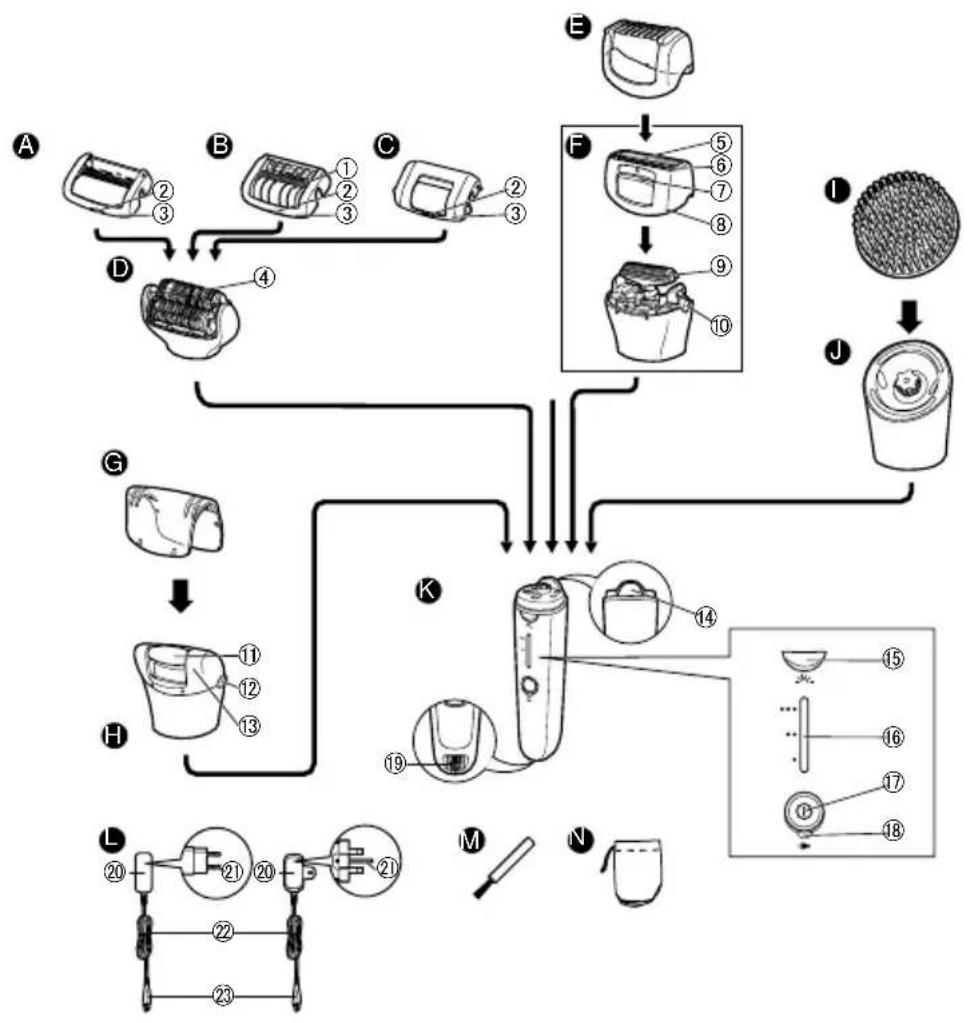
Parts identification (See page 3)
| Attachments | ES-EL9A | ES-EL7A |
| Fast cap for legs/ arms [▲] | ✓ | ✓ |
| Gentle cap for legs/ arms [■] | ✓ | ✓ |
| Sensitive area cap for underarms/bikini-line [◎] | ✓ | ✓ |
| Epilation head [◎] | ✓ | ✓ |
| Bikini comb (Protection cap for shaver head) [◎] | ✓ | ✓ |
| Shaver head [■] | ✓ | ✓ |
| Protection cap for foot care head [◎] | ✓ | — |
| Foot care head [◎] | ✓ | — |
| Sonic scrub brush [●] | ✓ | — |
| Brush head [◎] | ✓ | — |
A Fast cap for legs/arms
Gentle cap for legs/arms (▶ Page 20)
Sensitive area cap for underarms/bikini-line
① Skin protector
② Cap release ribs
③ Frame
Epilation head
(4) Epilation discs
Bikini comb (Protection cap for shaver head)
F Shaver head
⑤ Outer foil
⑥ Trimmer
⑦ Pop-up trimmer switch
⑧ Frame
⑨ Innerblade
⑩ Frame release button
Protection cap for foot care head
Foot care head
(1) File
⑫ Frame release buttons
③ Frame
Sonic scrub brush
Brush head
K Main body
14 Head release button
⑮ LED light
16 Mode lamps
1 Power switch (power off/on/ mode selection)
18 Charging indication/notification light
19 Socket
AC adaptor (RE7-87)
(The shape of the AC adaptor differs depending on the area.)
2Adaptor
② Power plug
② Cord
② Appliance plug
Accessories
Cleaning brush
Pouch
Charging
For best performance, fully charge the appliance before use.
You cannot operate the appliance while charging.
Charging time = Approx. 1 hour
The epilator can be used for approximately 30 minutes (35 minutes when using the gentle cap for legs/ arms) after 1 hour of charging.
This will differ depending on the temperature.
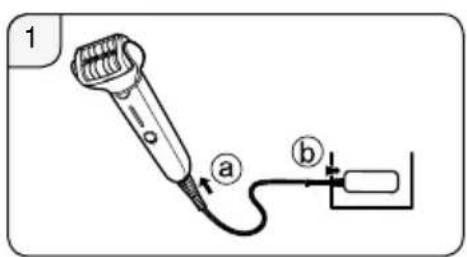
Plug the AC adaptor into the epilator (a) and a household outlet (b). (Fig. 1)
Charging indication/Notification light
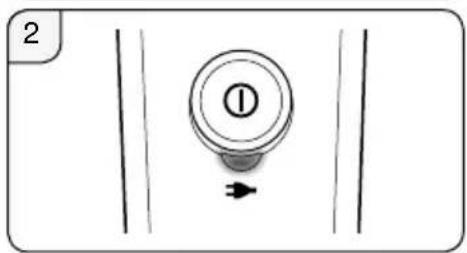
[K18] glows red while charging. (Fig. 2) It turns off after charging is completed. It blinks twice every second when abnormal charging.
-
Recommended ambient temperature for charging is 15^ - 35^ . The battery may not charge properly or not at all if outside the recommended temperature.
-
The charging time may decrease depending on the charging capacity.
- Charging the appliance every time it is used will not affect the life of the rechargeable battery.
- When charging the appliance for the first time or when it has not been in use for more than 6 months, the charging time may change or the charging indication/ notification light may not glow for a few minutes. It will eventually glow if kept connected.
- If there is noise from the radio or other sources while using or charging the appliance, move to a different location to use the appliance.
If you remove and reinsert the appliance plug while charging, the charging indication/Notification light glows and turns off after approximately 5 seconds.
Before use
Removing and attaching the head
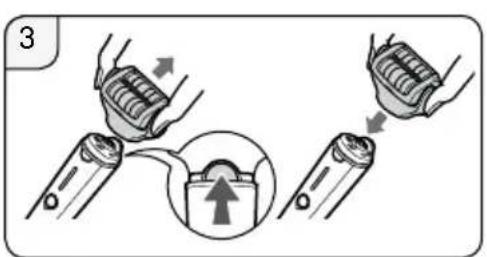
Remove the head while pushing the head release button and push the head until it clicks. (Fig. 3)
Using the bikini comb
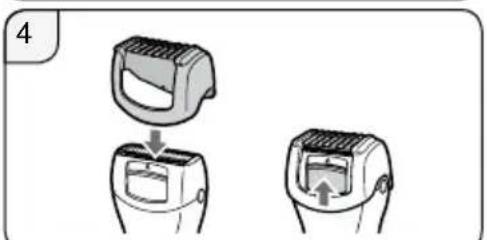
Place the bikini comb onto the shaver head and slide trimmer up. (Fig. 4)
- When the bikini comb is in place, make sure the comb is in close contact with the skin.
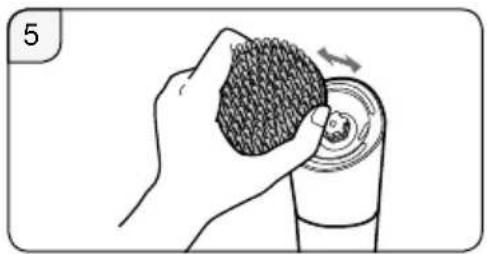
Removing and attaching the sonic scrub brush (Fig. 5)
(when cleaning and replacing)
Holding the brush by side, remove from the brush head.
Press firmly until a click is heard.
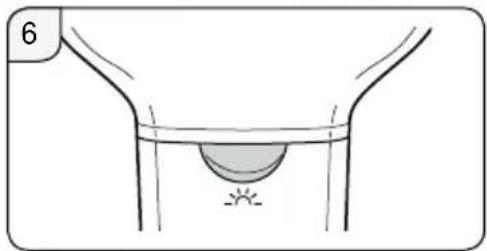
The LED light glows when the power is turned on. The light will remain on while the power is ON.
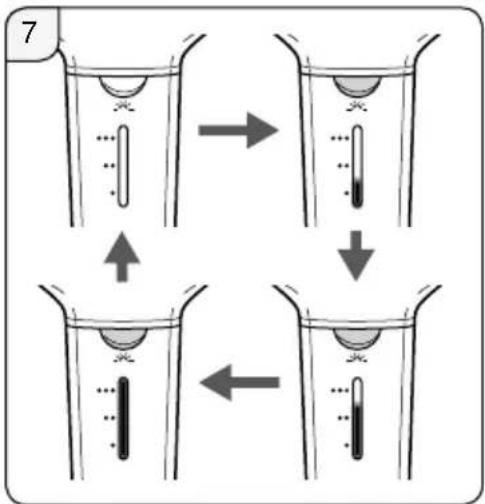
- The disc rotation speed can be switched between 3 stages. Try using the SOFT mode when you are concerned about irritation when removing hairs.
Operation will change in order from (SOFT) (NORMAL)
(POWER) "OFF" each time the power switch is pressed.
- When using the foot care head, using the POWER mode is recommended.
: SOFT
The disc will rotate at a low speed.
- 1 of Mode lamps will glow blue.
: NORMAL
The disc will rotate at a normal speed.
- 2 of Mode lamps will glow blue.
: POWER
The disc will rotate at a high speed.
- 3 of Mode lamps will glow blue.
OFF
The power will be switched OFF.
The charging indication/ notification light [K18] blinks once every second.
- The operating time varies depending on usage or temperature after the charging indication/notification light blinks.
How to use
Epilation head
The fast cap for legs/arms and the gentle cap for legs/arms should be used only for legs/arms.
The sensitive area cap for underarms/bikini-line should be used only for underarms/bikini-line.
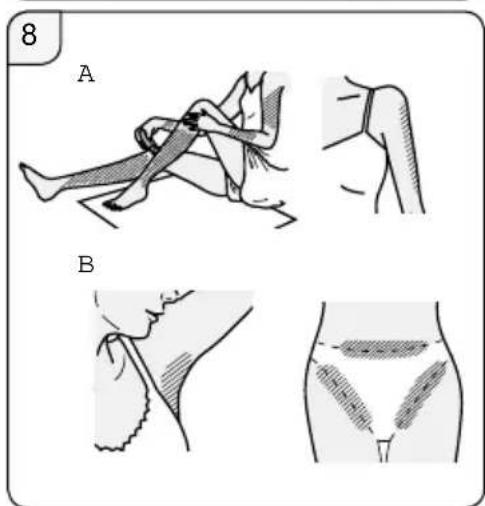
Areas suitable for epilation (Fig. 8)
A. Use the fast cap for legs/arms and the gentle cap for legs/arms.
B. Use the sensitive area cap for underarm/bikini-line. Before epilating the bikini-line, be sure to put on your swim wear or underwear etc. and check the areas you wish to epilate.
- Using the epilator on areas other than those marked areas may cause pain or skin trouble.
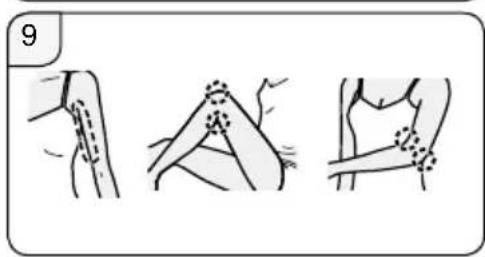
Areas not suitable for epilation (Fig. 9)
The epilator should not be used on the inner side of the upper arms and areas such as elbows or knees which are prone to sagging.
WET epilation (epilating after wetting the skin and epilator and then applying foam) makes the skin softer so it is gentler to your skin when epilating.
- For DRY epilation, begin at step 3. Before DRY epilation, wipe dry any moisture or sweat from the skin.
1 Wet your skin.
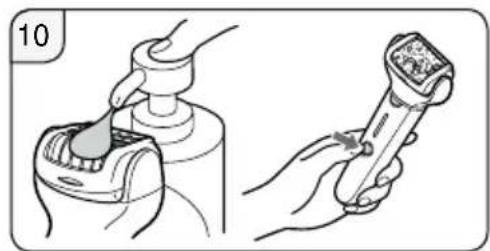
2 Wet the discs and place a small quantity of liquid shower gel on the discs. (Fig. 10)
Always use shower gel when wet epilating.
- Do not use a shower gel with a scrub or with granular salt, this may cause a malfunction.
- Rinse any shower gel out of your hands.
3 Select the mode by pressing the power switch [K⑦].
-
Foam is created. Foam makes the epilator slide better, so you can move it fast.
-
The appliance may not operate in an ambient temperature lower than approximately 5^ .
-
Apply the epilator at 90^ to your skin and move it slowly so that it slides over your skin.
![PANASONIC ESEL9A - Select the mode by pressing the power switch [K⑦]. - 1](/content/2026/03/460388/images/e0ff6574e4ef58a11aeed8729d4a31eb936c9c33f068d2a532ca86f60d75ced4.jpg)
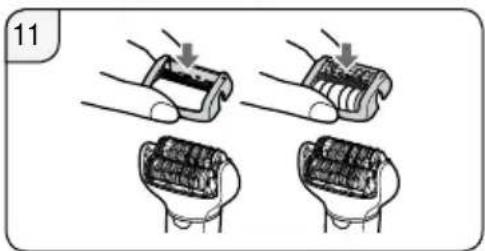
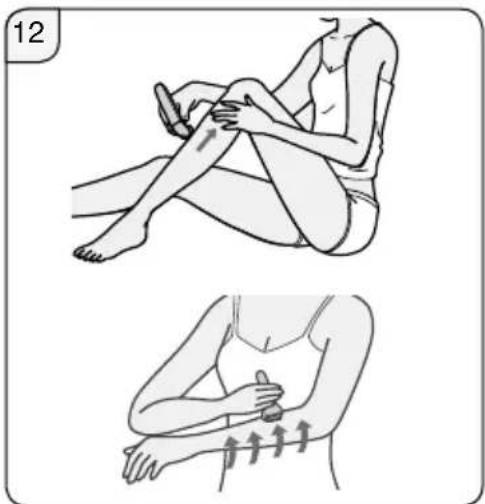
Attach the fast cap for legs/ arms or the gentle cap for legs/arms. (Fig. 11)
Upwards from the bottom of the leg.
Inwards from the outside of the arm. (Fig. 12)
![PANASONIC ESEL9A - Select the mode by pressing the power switch [K⑦]. - 1](/content/2026/03/460388/images/37e590684469025514ed1d65067a00b5ad602965cb0f2648983c1449867dadaf.jpg)
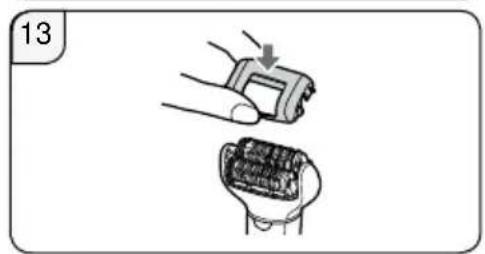
Attach the sensitive area cap for underarms/ bikini-line. (Fig. 13)
Lightly apply the epilator at a 90^ angle to your skin and be in close contact with your skin.
Do not move the appliance back and forth while applying it to the skin. Remove it from the skin, change the direction, and then move.
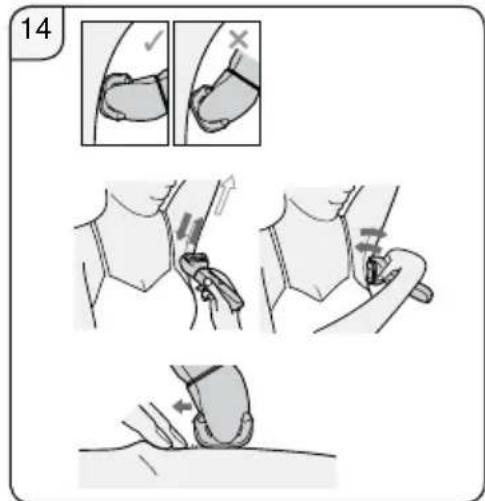
Efficiently stretch the skin with your fingers to prevent sagging of your skin, and move slowly going against the flow of hair. (Fig. 14)
The hair removal is not permanent, so from the second use, it is recommended to epilate the underarms about once a week, and the bikini-line about once every two weeks.
- We also recommend to use the SOFT mode rotation. (▶ Page 18) Using the gentle cap for legs/arms that comes with the skin guard is recommended for people using the epilator for the first time or for those with sensitive skin. The gentle cap for legs/arms has a skin protector for gentler epilation, to remove hair by holding the skin down to reduce pain.
- Massaging with a body puff may help to prevent ingrown hairs.
- Reddening might appear after use. A cool towel will help if you feel pain or there is a rash.
If your skin gets dry after epilation, we recommend applying a moisture lotion two days after epilation.
Make sure skin is clean before and after use.
Shaver head
WET Shaving with soap lather makes the skin slippery for a closer shave. For DRY shaving, step 3 is unnecessary. Before DRY shaving, wipe dry any moisture or sweat from the skin.
1 Attach the shaver head [F]. Confirm the bikini comb [E] detached.
2 Check that the outer foil is not deformed or damaged.
3 Wet your skin and put shower gel on your skin.
- Do not use a shower gel with a scrub or with granular salt. Also do not use shaving cream, skin cream or skin lotion. Doing so may clog the blade and cause a malfunction.
4 Select the mode by pressing the power switch [K⑦].
- Press gently so that the whole blade is in close contact with the skin and the surface of the blade does not move up and down.
Foot care head ES-EL9A
- The foot care head cannot be used in a bath or shower.
- Before use, be sure to fully charge the appliance.
- We recommend using the product within 30 minutes after bathing or showering. With the feet clean, wipe off any water on the skin.
Each use should be approximately 10 minutes (5 minutes on each foot, 10 minutes total for both feet).
1 Attach the foot care head [O]. -Push down firmly until you hear a "click".
2 Select the mode by pressing the power switch [K17].
- POWER mode is recommended for rotation speed. (▶ Page 18)
3 Bring the foot care head into contact with the skin, and begin filing.
The basics of foot care
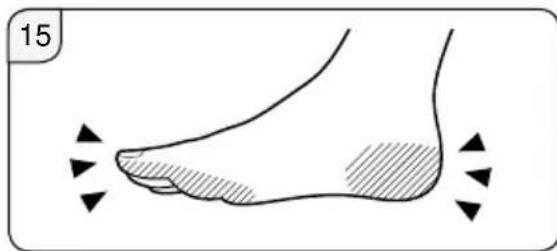
Use the product only for filing calluses and hardened skin on the feet. (Fig. 15)
Callus
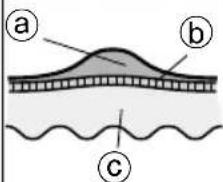
A callus is a hardened layer that forms through repeated pressure or abrasion.
Hardened layer
⑥ Epidermis
Derma
Things to be careful of when filing
- Filing too large an area can result in even larger calluses forming. Therefore, be sure to leave some of the hardened layer.
Before use After use
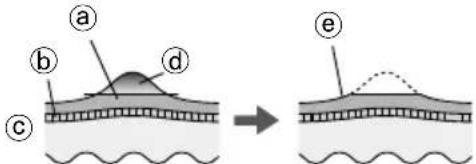
Hardened layer
⑥ Epidermis
Derma
④ Portion to be removed
Leave some of the hardened layer
- Filing a single location for a long time can cause it to become hot with friction. To avoid this, be sure to make small changes in the filing position while filing.
Filing an area too deeply can cause it to become sore or inflamed. - Filing should be performed about once every two weeks.
Tips for moving the foot care head
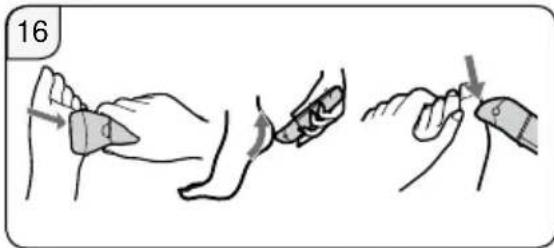
Move in the direction indicated by the arrows.
Use your free hand to support filing. (Fig. 16)
Sonic scrub brush ES-EL9A
We recommend using about once per week.
- We recommend using on areas for epilation about 2 days before actual epilation. Exfoliation may help to prevent ingrown hairs.
1 Attach the brush head.
-
Push down firmly until you hear a "click".
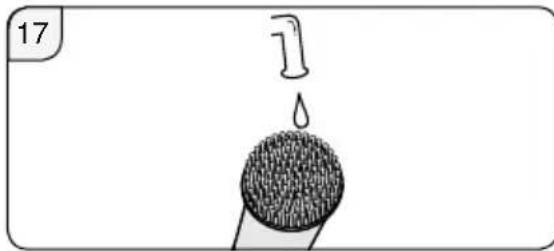
2 Wet the sonic scrub brush. (Fig. 17)
3 Apply shower gel to your skin.
4 Select the mode by pressing the power switch [K⑦].
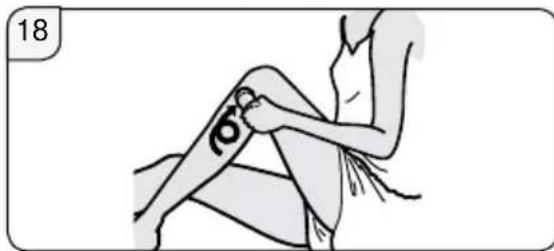
5 Put the sonic scrub brush onto your skin and begin exfoliation. (Fig. 18) -
We recommend using on legs, arms (especially elbows and knees) and neckline. Do not use on sensitive areas of skin, face or throat.
- Do not continue to hold in one place. Slide over skin in a circular pattern.
- Apply to the same area of skin for approximately 30 seconds each time, check your skin and adjust usage accordingly.
6 Press the power switch to turn off the power.
- Moisturise by applying a moisturiser that suits your skin on the area where the sonic scrub brush was used.
Cleaning
Always clean the heads and caps after use to keep them in a hygienic state.
- Switch off and unplug the appliance before cleaning.
- Take care not to damage the skin protector, the frame, the caps for legs/arms and for underarms/bikini-line during cleaning.
Dry cleaning [ABCDEF]
Epilation head/Shaver head
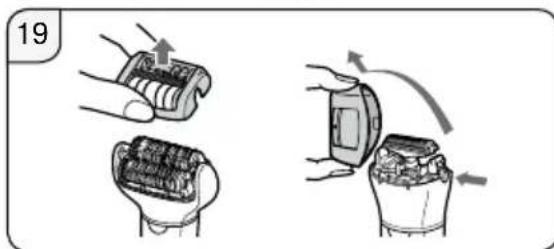
- Lift the caps and the frame upward while holding the cap release ribs [AEC2] or remove the frame by pushing the frame release button [F10]. (Fig. 19)
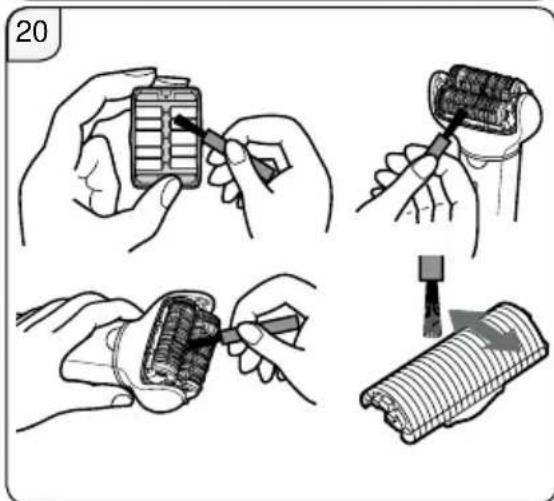
- Clean the caps [A B C], the epilation head [D] and the shaver head [F] with the cleaning brush [W]. (Fig. 20)
Wet cleaning [ABCDEFHIOJ]
Epilation head/Shaver head
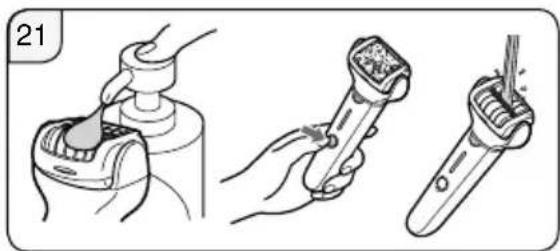
(Fig. 21)
- Wet the discs and blades, and then apply liquid hand soap.
- Turn the switch on and then foam is created.
-
Wash the head with water to wash out hair.
-
Do not use hot water.
- If soap is not completely washed away, then a white deposit can accumulate and prevent the discs and the blades from moving smoothly.
-
Rinse the shaver head with the frame removed.
-
Turn the switch off, wipe the appliance with a dry cloth and dry it well.
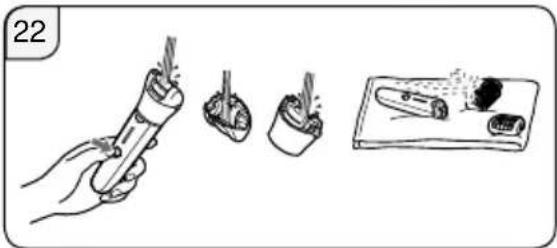
Foot care head
(Fig. 22)
- Apply liquid hand soap to the central part of the file.
- Pour a small amount of water on the file and turn the switch on.
22
- Rinse any debris thoroughly with water or lukewarm water.
- After turning the switch off, remove the frame and rinse inside.
- Wipe with a dry cloth and dry in a well-ventilated location.
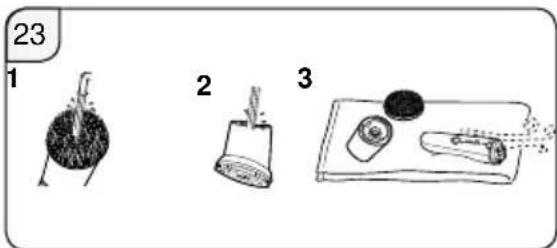
Sonic scrub brush and brush head
(Fig. 23)
- Press the power switch to turn on the power, and thoroughly rinse debris from the sonic scrub brush.
- Press the power switch to turn off the power, remove the brush head, and thoroughly rinse the underside of the brush head.
-
Wipe the appliance with a dry cloth and dry it well.
-
To protect deformation of the brush, dry it facing upward, and then store the brush.
Replacing the outer foil and the inner blade
We recommend replacing the outer foil [F⑤] every year and the inner blade [F⑨] every two years. Remove the outer foil of the shaver head [F] only when replacing it.
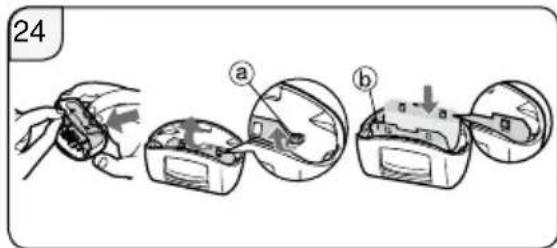
Replacing the outer foil (Fig. 24)
- While pushing the outer foil gently with the fingers, use a fingernail to release the plastic panel (⑥) on the blade from the hooks (⑧) on the inside of the frame.
- The new outer foil should be slightly bent and pushed in until it is hooked in the frame.
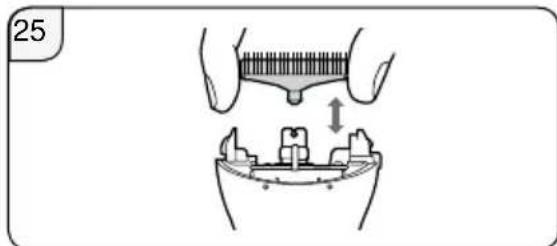
Replacing the inner blade (Fig. 25)
- Remove the inner blade by holding it at both ends and pulling straight away from the shaver.
- Insert the inner blade by holding it at both ends and press downward.
Replacing the file ES-EL9A
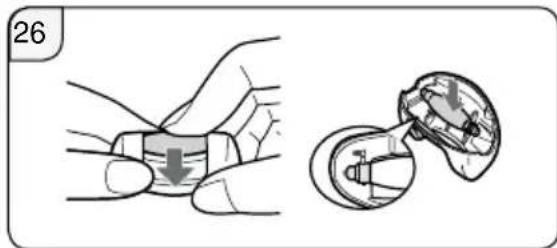
The file lifetime is approximately 1 year (assuming a single use every 2 weeks with approximately 10 minutes per use). We recommend replacing the file about once a year. (Fig. 26)
- Press down with your finger and release the file.
- Align the shaped part with the mark side and press down.
Replacing the sonic scrub brush ES-EL9A
Sonic scrub brush (Scrub brush)
once a year (assuming 3 minutes use per week)
See page 18 for details regarding replacement of the brush.
Troubleshooting
| Problem Possible cause Action | |||
| It is not charged. | Fully charge the appliance. | ||
| The switch is turned ON with the adaptor connected to the household outlet. | Charging is only possible when connected to the household outlet. Disconnect from the household outlet before use. | ||
| The appliance does not operate. | When epilating | The skin protector or discs are deformed, cracked, or damaged. | Request repair at an authorized service centre. |
| When epilating or shaving | Hair dust has accumulated. | Clean the hair dust. | |
| Shower gel has adhered to the discs and blade. | Wash it off by soaking in warm water. | ||
| When caring for feet | The frame is not securely attached. | Reattach it. | |
| When exfoliating | Shower gel has adhered to the sonic scrub brush or brush head. | Rinse in warm water. If shower gel does not rinse away, remove the sonic scrub brush or brush head and soak in warm water. | |
| The usage time gets short. | The appliance is used with approximately 5 °C or lower. | Use the appliance in an ambient temperature approximately 5 °C or higher. | |
| The appliance is pressed against skin too hard. | Contact to skin with gentle force. | ||
| Not charged fully. | Fully charge the appliance. | ||
| The appliance stops during operation. | The appliance is pressed against skin too hard. | Contact to skin with gentle force. | |
| Not charged fully. | Fully charge the appliance. | ||
| Cannot remove hair. | When epilating | The appliance is used on long hair. | Use on hair approximately 2 to 3 mm long. |
| The hair becomes stubble. | The way the appliance is applied or moved is not correct. | Refer to page 19. | |
| The appliance is not removing the hair as well as before. | Hair dust has accumulated. | Clean the hair dust. | |
| The skin protector or discs are deformed, cracked, or damaged. | Request repair at an authorized service centre. | ||
| Sensitive area cap comes off during operation. | The appliance is pressed against skin too hard. | Contact to skin with gentle force. (Refer to page 19.) | |
| The appliance is not applied at a 90° angle to your skin. | Apply at a 90° angle to your skin. (Refer to page 19.) | ||
| The appliance is not cutting as well as before. | When shaving | Hair dust has accumulated. | Clean the hair dust. |
| The blade is deformed. | Replace the blade. Guidelines for replacement: Outer foil: Approximately 1 year Inner blade: Approximately 2 years | ||
| The blade is worn out. | |||
085
| Problem Possible cause Action | |||
| Cannot file. | When caring for feet | The file is worn out. | Replace the file. Guidelines for replacement: Approximately 1 year |
| The appliance is used in the SOFT mode. | Try using it in POWER mode. | ||
| Cannot get rid of odor. | It is dirty. | Soak the file in water for approximately 24 hours before washing. | |
| Does not remove cuticles or dirt sufficiently. | When exfoliating | Not applying enough pressure to the skin or for a long enough time. | Adjust degree of pressure and/or amount of time while monitoring the condition of your skin. |
| Brush deterioration from continuous use | Replace the brush. Guidelines for replacement: Sonic scrub brush: once a year | ||
If the problems still cannot be solved, contact the store where you purchased the appliance or a service centre authorized by Panasonic for repair.
Battery life
Approximately 3 years.
If the operating time is significantly shorter even after a full charge, the battery has reached the end of its life. (The battery life may change due to usage and storage conditions.)
The battery in this appliance is not intended to be replaced by consumers. Have the battery replaced by an authorized service centre.
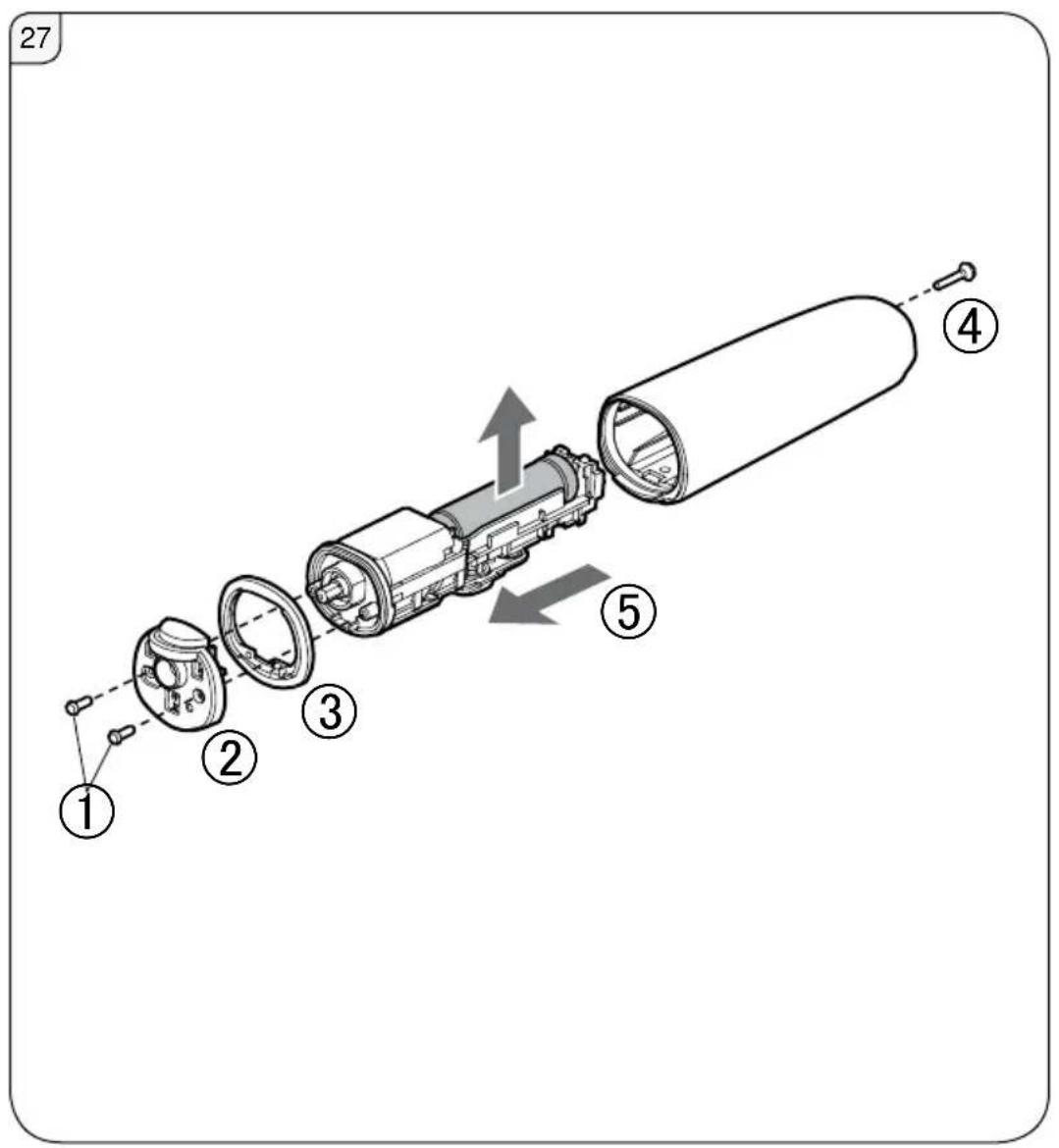
Removing the built-in rechargeable battery (Fig. 27)
Remove the built-in rechargeable battery before disposing of the appliance.
Please make sure that the battery is disposed of at an officially designated location if there is one. This figure must only be used when disposing of the appliance, and must not be used to repair it. If you dismantle the appliance yourself, it will no longer be waterproof, which may cause it to malfunction.
- Remove the appliance from the AC adaptor.
- Use the battery until it fully discharges if there is any charge remaining.
- Perform steps ① to ⑤ and lift the battery, and then remove it.
Take care not to short circuit the positive and negative terminals of the removed battery, and insulate the terminals by applying tape to them.
For environmental protection and recycling of materials This appliance contains a Li-ion battery. Please make sure that the battery is disposed of at an officially assigned location, if there is one in your country.
Guarantee
Please visit Panasonic web site http://www.panasonic.com or contact an authorized service centre (You find its contact address in the pan european guarantee leaflet.) if you need information or if the epilator or the cord get damaged.
Specifications
| Power supply | See the name plate on the AC adaptor. (Automatic voltage conversion) |
| Charging time | Approx. 1 hour |
| Airborne Acoustical Noise | Epilation head: 74 (dB (A) re 1 pW) Shaver head: 64 (dB (A) re 1 pW) Foot care head: 69 (dB (A) re 1 pW) Brush head: 65 (dB (A) re 1 pW) |
This product is intended for household use only.
Disposal of Old Equipment and Batteries
Only for European Union and countries with recycling systems
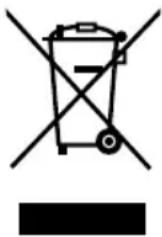
These symbols on the products, packaging, and/or accompanying documents mean that used electrical and electronic products and batteries must not be mixed with general household waste.
For proper treatment, recovery and recycling of old products and batteries, please take them to applicable collection points in accordance with your national legislation.
By disposing of them correctly, you will help to save valuable resources and prevent any potential negative effects on human health and the environment.
For more information about collection and recycling, please contact your local authority.
Penalties may be applicable for incorrect disposal of this waste, in accordance with national legislation.
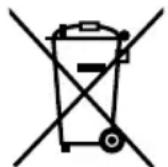
Note for the battery symbol (bottom symbol)
This symbol might be used in combination with a chemical symbol. In this case it complies with the requirement set by the Directive for the chemical involved.
Panasonic
Betriebsanleitung
Identification of dele 167
Opladning. 168
Indenbrug 169
Anvendelse 170
Rengoring. 173
Epilatorhoved/shaverhoved
Epilatorhoved/shaverhoved
(Figur 21)
-Az serulest okozhat.

33, Wanbao North Street, Wanbao Industry Zone, Zhongcun, Panyu District, Guangzhou City, Guangdong Province, China
YETKILI TEMSILCI
Ithalatci Firma:
Tesan Iletisim A.S.
Cobançesme Mah. Bilge Sok. No:17
34196 Yenibosna- Istanbul
Tel: 0212 454 60 70 Faks: 0212 454 60 20
www.tesan.com.tr
URUNUN KULLANIM OMRU 7 YILDIR
© Panasonic Corporation 2018
EN,GE,FR,IT,DU,SP,DA,PT,NW
SW, FI, PL, CZ, SK, HU, RO, TK
Printed in China
ES9700EL9A1503 X1218-0