IR 120 - Thermometer MICROLIFE - Free user manual and instructions
Find the device manual for free IR 120 MICROLIFE in PDF.



User questions about IR 120 MICROLIFE
0 question about this device. Answer the ones you know or ask your own.
Ask a new question about this device
Download the instructions for your Thermometer in PDF format for free! Find your manual IR 120 - MICROLIFE and take your electronic device back in hand. On this page are published all the documents necessary for the use of your device. IR 120 by MICROLIFE.
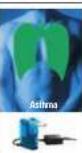
USER MANUAL IR 120 MICROLIFE

Guarantee Card IR 120



Europe/World News
www.euro.com
Euro 2017: The European Union
http://www.euro.org/
Tel: +45 27 197 38 60
Fax: +45 27 197 38 60
Email: info@euro.org
Ass
Make a decision
The whole body
Taste the food
The UNICOM FISH
The UNICOM FISH
The first world
The second world
Unsure about
North Central State University
NCAA 1401
2000 North Central State University
Columbia, MD 20004-1854
Tel. (717) 673-3783
Fax: (717) 673-3783
E-mail: info@ctu.edu

Mcmull


-
- 3.
Microlde 16 120
MrrnEer Tmernrnr R 120
Guarantee Card IR 120
| Name of Taxon | Name of the taxon | Description of taxon |
| Taxon: Dactylodes hongkongensis | D. hongkongensis | This taxon is a taxon from the family Dactylidae, and its taxon is currently not known. |
| Taxon: Dactylodes koreanus | D. koreanus | This taxon is a taxon from the family Dactylidae, and its taxon is currently not known. |
| Taxon: Dactylodes japonicus | D. japonicus | This taxon is a taxon from the family Dactylidae, and its taxon is currently not known. |
| Taxon: Dactylodes koreanus | D. koreanus | This taxon is a taxon from the family Dactylidae, and its taxon is currently not known. |
| Taxon: Dactylodes japonicus | D. japonicus | This taxon is a taxon from the familyDactylidae, and its taxon is currently not known. |
| Taxon: Dactylodes japonicus | D. japonicus | This taxon is a taxon from the familyDactylidae, and its taxon is currently not known. |
| Taxon: Dactylodes japonicus | D. japonicus | This taxon is a taxon from the familyDactylidae, and its taxon is currently not known |
| Taxon: Dactylodes japonicus | D. japonicus | This taxon is a taxon from the familyDactylidae, and its taxon is currently not known |
| Taxon: Dactylodes japonicus | D. japonicus | This taxon is a taxon from the familyDactylidae, and its taxon is currently not known |
| Taxon: Dactylodes japonicus | D. japanensis | This taxon is a taxon from the familyDactylidae, and its taxon is currently not known |
Table of Contents
- The Advantages of this Ear Thermometer
- Important Safety Instructions
- How this Ear Thermometer measures Temperature
- Control Displays and Symbols
- Directions for Use
- Changing between Celsius and Fahrenheit
- How to recall 12 readings in Memory Mode
- Error Messages
- Cleaning and Disinfecting
- Battery Replacement
11.Guarantee - Technical Specifications
- www.microlife.com
Guarantee Card (see Back Cover)
1. The Advantages of this Ear Thermometer
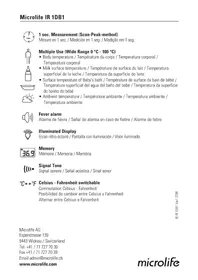
Multiple Uses (Wide Range Measurement)
This thermometer offers a wide measurement range feature from 0 - 100.0^ / 32.0 - 212.0^ , meaning the unit can be used as an ear thermometer to measure body temperature or it can be used to measure surface temperature of following objects:
Milk surface temperature in a baby's bottle
Surface temperature of a baby's bath
- Ambient temperature
Probe Cover Free
This thermometer is more user-friendly and more cost-effective since a probe cover is not required.
Measurement in 1 second
The innovative infrared technology allows measurement of ear temperature in only 1 second.
Accurate and reliable
The unique probe assembly construction, incorporating an advanced infrared sensor, ensures that each measurement is accurate and reliable.
Gentle and Easy to Use
- The ergonomic design enables simple and easy use of the thermometer.
- This thermometer can even be used on a sleeping child, thereby causing no disruption.
This thermometer is quick, therefore child-friendly.
Auto-Display Memory
The last reading is automatically displayed for 2 seconds when the unit is switched ON.
Multiple Reading Recall
Users will be able to recall the last 12 readings when entering the recall mode, enabling efficient tracking of temperature variations.
Safe and Hygienic
No risk of broken glass or mercury ingestion.
- Completely safe for use on children
- Cleaning of the probe can be done with an alcohol-moistened cotton tissue, making this thermometer completely hygienic for use by the whole family.
Fever Alarm
10 short beeps and a red LCD backlight alert the patient that he/she may have a temperature equal to or higher than 37.5^
2. Important Safety Instructions
This instrument may only be used for the purposes described in this booklet. The manufacturer cannot be held liable for damage caused by incorrect application.
- Never immerse this instrument in water or other liquids. For cleaning please follow the instructions in the «Cleaning and Disinfecting» section.
- Do not use the instrument if you think it is damaged or notice anything unusual.
- Never open the instrument.
- Earwax in the ear canal may cause a lower temperature reading. Therefore it is important to ensure the subject's ear canal is clean.
- This instrument comprises sensitive components and must be treated with caution. Observe the storage and operating conditions described in the «Technical Specifications» section!
-
Protect it from:
-
extreme temperatures
impact and dropping
contamination and dust
direct sunlight
heat and cold
If the instrument is not going to be used for a prolonged period the battery should be removed.
- Ensure that children do not use the instrument unsupervised; some parts are small enough to be swallowed.
WARNING: Use of this instrument is not intended as a substitute for consultation with your physician. This instrument is NOT waterproof, so never immerse in liquids.
3. How this Ear Thermometer measures Temperature
This thermometer measures infrared energy radiated from the eardrum and the surrounding tissue. This energy is collected through the lens and converted to a temperature value. The measured reading obtained directly from the eardrum (Tympanic Membrane) ensures the most accurate ear temperature.
Measurements taken from the surrounding tissue of the ear canal generate lower readings and may result in misdiagnosis of fever.
To avoid an inaccurate measurement:
- Switch on the thermometer by pressing the ON/OFF button (4).
- After one beep is heard (and the temperature scale icon is flashing), straighten the ear canal by gently pulling the middle of the ear back and up.
- Place the probe 1 firmly into the ear canal, press the START button 2 and keep the probe in the ear until the thermometer beeps to signal the completion of the measurement.
4. Control Displays and Symbols
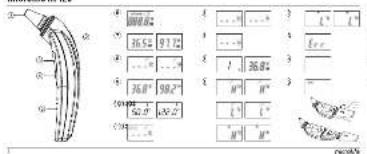
- All segments displayed (6): Press the ON/OFF button (4) to turn on the unit; all segments will be shown for 2 seconds.
Memory 7: The last reading will automatically be shown on the display for 2 seconds. - Ready for measurement (8): When the unit is ready for measurement, the «°C» or «°F» icon will keep flashing.
- Measurement complete (9): The reading will be shown on the display (3) with the «°C» or «°F» icon; the unit is ready for the next measurement, when the «°C» or «°F» icon is flashing again.
- Out-of-ear temperature indication 10: A crossed-ear icon will appear on the display ③ if the reading falls outside the range 32.0 42.2^ C / 89.6 108.0^ F .
- Low battery indication ⑪: When the unit is turned on, the battery icon will keep flashing to remind the user to replace the battery.
5. Directions for Use
-
Press the ON/OFF button 4. The display 3 is activated to show all segments for 2 seconds.
-
The last measurement reading will automatically be shown on the display for 2 seconds with the «M» icon (7).
- When the «°C» or «°F» icon is flashing, a beep sound is heard and the thermometer is ready for measurement (8).
-
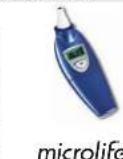
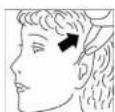
Straighten the ear canal by pulling the ear up and back to give a clear view of the eardrum.
-
For children under 1 year; pull the ear straight back.
-
For children of 1 year to adult; pull the ear up and back. Also refer to the short instructions at the front.
-
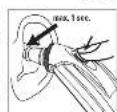
While gently pulling the ear, insert the probe snugly into the ear canal (max. 1 sec.) and immediately press the START button (2). Release the button and wait for the beep sound. This is the indication that confirms the end of measurement.
- Remove the thermometer from the ear canal. The display shows the measured temperature (9).

NOTE:
To ensure accurate readings, wait at least 30 sec. after 3-5 continuous measurements.
- Accumulation of ear wax on the probe can result in less accurate temperature readings or cross infection between users. Therefore, it is essential that the probe is clean before each measurement. For cleaning, follow the instructions in the «Cleaning and Disinfecting» section.
After cleaning the measuring sensor ① with alcohol, wait 5 minutes before taking the next measurement, in order to allow the thermometer to reach its operating reference temperature.
10 short beeps and a red LCD backlight alert the patient that he/she may have a temperature equal to or higher than 37.5^
- For an infant, it is best to have the child lying flat with his/her head sideways so the ear is facing upwards. For an older child or adult, it is best to stand behind and slightly to the side of the patient.
Always take the temperature in the same ear, since the temperature readings may be different from ear to ear.
- Wait for a few minutes to take the ear temperature after sleeping.
- In the following situations it is recommended that three temperatures in the same ear be taken and the highest one taken as the reading:
- New born infants in the first 100 days.
- Children under three years of age with a compromised immune system and for whom the presence or absence of fever is critical.
- When the user is learning how to use the thermometer for the first time until he/she has familiarized himself/
herself with the instrument and obtains consistent readings.
4. If the measurement is surprisingly low.
6. Changing between Celsius and Fahrenheit
This thermometer can display temperature measurements in either Fahrenheit or Celsius. To switch the display between ^ C and ^ F , simply turn OFF the unit, press and hold the START button (2) for 5 seconds; after 5 seconds, the current measurement scale ( ^ C ) or ( ^ F ) icon) will be flashing on the display (12). Change the measurement scale between ^ C and ^ F by pressing the START button (2). When the measurement scale has been chosen, wait for 5 seconds and the unit will automatically enter the ready for measuring mode.
7. How to recall 12 readings in Memory Mode
This thermometer can recall the last 12 readings.
- Recall mode ①: Press the START button ② to enter Recall mode when power is off. The memory icon «M» will flash.
-
Reading 1 - the last reading ① : Press and release the START button ② to recall the last reading. Display 1 alone with memory icon.
-
Reading 12 - readings in succession: Press and release the START button (2) consecutively to recall the last 12 readings in succession.
Pressing and releasing the START button (2) after the last 12 readings have been recalled will resume the above sequence from reading 1.
8. Error Messages
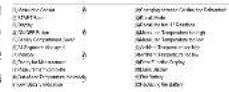
Measured temperature too high 13: Displays H when measured temperature is higher than 100.0^ / 212.0^.
Measured temperature too low 16: Displays L when measured temperature is lower than 0^ / 32.0^.
- Ambient temperature too high ①: Displays «H» in conjunction with the «▲» when ambient temperature is higher than 40.0^ / 104.0^ .
- Ambient temperature too low (18): Display «L» in conjunction with the «▼» when ambient temperature is lower than 5.0^ / 41.0^ .
- Error function display: The system has a malfunction.
- Blank display 20: Check if the battery has been loaded correctly. Also check polarity (< + > and < -> of the battery.
- Flat battery indication 21: If the steady battery icon is the only symbol shown on the display, the battery should be replaced immediately.
9. Cleaning and Disinfecting
Use an alcohol swab or cotton tissue moistened with alcohol (70% Isopropyl) to clean the thermometer casing and the measuring probe. Ensure that no liquid enters the interior of the thermometer. Never use abrasive cleaning agents, thinners or benzene for cleaning and never immerse the instrument in water or other cleaning liquids. Take care not to scratch the surface of the probe lens and the display.
10.Battery Replacement
This instrument is supplied with one lithium battery, type CR2032. Replace with a new CR2032 battery when the flashing battery symbol appears on the display (21). Remove the battery cover by sliding it in the direction shown. Remove the battery and replace with a new one (22).

11.Guarantee
This instrument is covered by a 2 year guarantee from the date of purchase. The guarantee is valid only on presenta
tion of the guarantee card completed by the dealer (see back) confirming date of purchase or the receipt.
- The guarantee covers the instrument. Batteries and packaging are not included.
- Opening or altering the instrument invalidates the guarantee.
- The guarantee does not cover damage caused by improper handling, discharged batteries, accidents or non-compliance with the operating instructions.
Please contact Microlife-service.
12. Technical Specifications
Type: Ear Thermometer IR 120
Measurement
range: 0^ to 100.0°C (32.0°F to 212.0°F)
Resolution: 0.1^ / ^
Measurement Laboratory:
accuracy: ±0.2°C, 32.0 ~ 42.2°C (±0.4°F, 89.6 ~ 108.0°F)
Display: Liquid Crystal Display, 4 digits plus special icons
| Acoustic: The unit is turned ON and ready for the measurement: 1 short beep Complete the measurement: 1 long beep System error or malfunction: 3 short beeps Fever alarm: 10 short beeps |
| Memory: | Auto-Display the last measured temperature 12 readings recall in the Memory Mode |
| Backlight: The display light will be GREEN for 4 seconds, when the unit is turned ON. The display light will be GREEN for 5 seconds, when a measurement is completed with a reading less than 37.5 °C (99.5 °F). The display light will be RED for 5 seconds, when a measurement is completed with a reading equal to or higher than 37.5 °C (99.5 °F). |
| Operating temperature: | 5 °C to 40 °C (41.0 °F to 104 °F) |
| 15-95 % relative maximum humidity |
Storage -25°C to +55°C (-13°F to 131°F)
Temperature: 15-95% relative maximum humidity
Automatic Approx. 1 minute after last measurement
Switch-off: has been taken
Battery: CR2032 Battery (X1) 3V - at least 1000 measurements
Dimensions: 140 × 47 × 15 ~mm
Weight: 59 g (with battery), 56 g (w/o battery)
Reference to EN 12470-5; ASTM E1965; standards: IEC 60601-1; IEC 60601-1-2 (EMC)
This device complies with the requirements of the Medical Device Directive 93/42/EEC.
Technical alterations reserved. According to the Medical Product User Act a biennial technical inspection is recommended for professional users. Please observe the applicable disposal regulations.
13. www.microlife.com
Detailed user information about our thermometers and blood pressure monitors as well as services can be found at www.microlife.com.
ment: Humidite relative 15-95% max.
normes: IEC 60601-1; IEC 60601-1-2 (EMC)
EN 12470-5; ASTM E1965;
estandares:
IEC 60601-1; IEC 60601-1-2 (EMC)
N 12470-5; ASTM E1965; IEC
60601-1; IEC 60601-1-2 (EMC)
0e3pka 5oC eog40oC (41,0oF eog104oF)
Aerouyac: 15-95 % eyioTOnxetikuypaia
Oepoekpaia -25°C +55^ (-13°F 131^ aTothkeuans: 15 - 95% MIyioTn OxETIK uypaia
Autóμatn
ATTEVEpyo
noinan:
Mntatapi: MNTATAPIA CR2032 (X1) V3 - TouaixioTov 1000 mepnoeis
Aiaotaeic: 140x47x15mm
3 KopoTkX 3ByKOBbIX CnHnHa
Ppeynpexdne O nobbienHc Htemepatype:10KopoTkix3BykoBbIX CnHaIOB
Pamr: ABtOMaTHueCKoe OTo6paXeHne NocJeHne H3MepeHHoTempeaTpbl
Bocnpn3BeDeneHne 12 noCneHnx pe3yIb- TaTOB B pexIMe nAMrTn
POncBTeKa:
PnB KlnHcHm np6opA dnCnIe 3acBeTITc8 3EJIeHbIM cBTom Ha 4 cekyHdb.
Pn3aBepWeHH n3MepeHH C nOlyeHHbIM 3aHeHHem MeHbIe 37.5°C (99,5°F) dncnIe 3acBeTITc8 3EJIeHbIM cBTom Ha 5 cekyHd.
Pn3aBepHmN3MepeHnC nOly- YHeHHbIM 3HaueHEme,PaBHIM UIN IpeBbluOOM 37,5°C (99,5°F),Dncnné 3acBeTITcKPAChbIM uBETOM Ha 5 ckyH.
Dnana3OH
pa6oynx
TEMNepatyp:
Normy: EN 12470-5; ASTM E1965;
IEC 60601-1; IEC 60601-1-2 (EMC)
PpOyTeTe BnHMaTeIHO HNCTpyKuINTE, npeM DaNo13BaTeTO3n ypeI.

CbDbpkaHne
- Ппсиму事业单位На ТОЗи Ушени Термометьр
2.BaXHHnHcTpyKm3a6e3oNaChOCT - KaK To3n YuIeH TePmOMeTbp N3MepBa TempePaTypata
4.KoHTpOJIHn DcIeN n CmMbON
5.Yka3aHn3a non3BaHe - Bb3MOxHOCr 3a npeBKnIOuBaHe MeKdy LcIe3n I ΦapeHXaNT
- KaK ce H3BnKBaT 12 noka3aHm B pexM HA 3anaMetraBaHe
8.Cb06eHHa3a rpeuka
9.ПоунсТВаHeиДeЗИнФeКТиРаНe
10.CmHaHa6aTepeyra
11.Гаранця
12.Texhueckn CneuФнkaun - www.microlife.bg
TapaHmOHHa KaPa (BnKte 3aHmKaNaK)
1. Ппенихоста на тои ушен Термогьр
MhoroKpaTha ynoTpe6a (HnPOK 06xBaT Ha n3MePbaHe)
To3n TepMometbnppeDnara shpok 0xbat Ha n3MepeBaHe oT 0-100,0°C /32,0-212,0°F; ToBa 03Haaba, ye ToT MoKeJa ca cnoN3Ba KaTo yUweh TepMometbP 3a n3MepeBaHe Ha TeNechata TempepaTypa, Ho CbIo TaKa NMOe Ja ce NOn3Ba 3a M3MepeBaHe Ha TempepaTypa Ha NobbpX-HocCTTa HcneDnHte O6EKN:
TemnepaypataHaNoBbpxHOCTTHaMnKOTOB6e6eKo 1Wuwe
TempeatypataHaNoBbpxHocTtHaBoDAtaB6e6ko KOpHTO
- OkonhaTatemepaTypa
COnda6e3Kanak
To3n TepMOMeTbpe No-NeceH 3aNoJIBaHe NIO-KHOHmUeH,3aIoTO HMa HxKDa OT KaNk Ha CoHdTa
N3mepBaHe 3a 1 cekyHda
Hobatopckata HnphpaepeBena TexhnoTn no3Bolna h3MepBaHe Ha yuHaTa TemnepaTypa cmo 3a 1cekynda.
ToeHnHaedJeH
YHKaHATA KOHCTpyKUHa HOHATA,BKIOUBAua BnCO-KOTExHOLOmUe HINppaepBHe DaTtM,OCNpyBaTOOHCT HaDEXDHOCHT HA BCaKO N3MEpBaHe.
PnraTeH nIeCEH 3a noJ3BaHe
EproHommHata KOHCTpyKnna No3B0nBa npocTo Iecho NOI3BaHe Ha TepMometbpa.
To3n TepMometbpoKe da 6bJe noJI3BaH dopn npin cTIO DeTe, 6e3 da npEiN3Bvka cmUyIeHne.
- TepMometbpbTe 6b3n 3aTOba e npiaTeH 3a non3BaHe npi Deca.
ABTomaTHNO NOKa3BaHe Ha NaMeTTa
TocneHOTOnok3aHHeABTomATnHOceNOKa3Ba3aDBe CEkyHmKOraTOyCTPOIcTBOTO6bDeBKJIIOUeHO.
3aONMHNHe Ha NOBeue NOKa3AHN
ItopeBnteHNTe 10 MOrat Da N3BnKbAT NoCneHnTe 12 NOkA3AHN, KORATO BnH3aT B pEXKIM Ha 3aONMHeH CTOnHOCTN, KOEt NO3BOJBA eFKNACHO pOcNeJaBaHa H npOMHeB TEmHepaTpata.
Be3onaceH xHMeHHyEh
Hama onaCHOCTOTcynBaHeHaCTbKnIOIINNORnBuaHe HaXMBaK.
HambnHO6e3oNaCeH3aNo3BaHe npi Deua.
-ПОИСТВАБЕТоHaCOHДаТМоКeДаCEи3BbPиN cNamYнaТБан,HANOЕHAcCnIPT,KOETО npABIn TepMOMeTbaHaHbTHO XINHEMHeH 3aNon3BaHeOT UrNOTOCEmECTBO.
IpeynpexdHne3a BnCoka TemnepaTpa
10 Kcs3BnyKOBn CnHana N OUYBeten H UcpeBHO DmCnneI npdynpexdaBat,Ne naueHbT moKe da IMa TMnepa-typa paBaHa Na IINo-BMCoka ot 37.5°C
2.BaxHHn HnctpyKuHn 3a 6e3oNaCHOCT
To3n np60mpoMe da ce non3Ba eHINCTBeHO 3a CEJTa, oncaHa B Ta3n KHHK. PpOu3BOInTeIeT He MoKe Da
HOCN OTROBOPHOCT 3a NOBpeDN, PnPNHEHNOT HENpaBUNHa yNoTpe6a.
Hnkora He NotanrIe np6opabBbB B0a nnDpyr TeuHocTn.3aNoHCtBaHe cneDbaiTe yka3aHnra Ta pa3deJa IToNcTBaHe n De3HfKeKtnpaHe
He non3aBaiTe npin6pa, ako MMcnIte, ye nOBpehen nn 3a6eKeXnTe Heo HepEnHO.
Hikora He oTbapnepnp6opa.
- USHA KAN B YUHUN KAHA NMOK DE Da NOBede DO NO-HNCKO nOKa3aHne 3a TemnepaTpyata.3aTOBa E BAKHO YUHNAT KAHAN HA cybEka Tda B6de qYCT.
BTO3nPnp6opHMAyBCTBnTeHNDeTaiHHNcHero Tp8BaDaCe6bpABnBHmATEHNO.Cna3BaIteYcNoBnTa 3a CbXpaAHHeHn EKcnNoaTaU,OnnCaHn B pa3DeN 《Texhueckn CneuФнkaUm》!
- Na3Te ro or:
-ekCTpeMHTeMnepaTpyn
- ynap n m3nyckaHe
-3aMbpcBaHe H
- npraKa CbHcEeBa CBetJlnHa
-TOJINHAnCTyD
Ako npnbopbT Hma da ce non3Ba 3a npobIknTeHepnooT O BpeMe,6aTeepyTa Tp6Ba Da ce n3Baxda.
He no3BolraBeHa dea da n3non3Bat np6opa 6e3 poNTeJIckn KOHTPOJ; HAKO uactu ca doCTaTbHOMajIK, 3a Da 6bDat nOrbIHATN.
PENPENPEXHEME:Non3aHToHaTo3n np6Op He 3aMeHRe KOHCyTTaunTe C Baunr Nekap. To3n np6Op HE E BoDcyTouH! HIKOFA He ro notanre B TEHQCTN.
3. KaK To3n yueH TePmOMeTbP n3MepBa Tempepatypata
To3n TepMometbnp3MEpBa NmHpauepeBHeataehePnna, n3MbuaHaOTbNaHcTeoNOKpbXabaaTATAO TBKaH. Ta3n eEnerpyce b6bpia np3neuatai ne pneo6pa3yBaBTemepaTyPha cToHHCT.3MepeHOTo NOKa3AnHe, B3eTO HapnoBO tTBnAHTe,OCNpyRa HauToHaTc TEMepaTpHa Ha yxOTO. 3MepeBAHnraT OKONHaTbKHnHa yUHNRA KANMORAT da THeHepnat No-HnCKN NOKa3AnHn Da DoBeDat DO norPeuHa DnArHo3a 3a BnCoka TempePaTypa.
3a da n36eHHeTe HeToUHo n3MepBaHe:
1.BKIOHOTepMOMETbpaCHaTNCKaHeHa6yToHa3a BKIOUBAHeN3KIOUBAHe④.
2.CneK Kato YyeTe Einn CnHAn (N IKoHATA 3a TemnepaTyPhaTc CKana Mna), N3PpABeTe yUHNA KaHAN, KATO NkOu N3DbPnATE cpeTa Ha yXOTo H3aD n Harope.
- NocTabete coHdTa (1) nIbTHo B yHnHa KaHAn, HATmChTe 6yToHa START (CTAPT) (2) uDpBkTe coHdTa B yXOTo, DOKaTO TepMOMeTbpBt CnHaN3Hpa 3a 3aBbPbBaHe Ha m3MePBaHeto.
4. KoHTpONHn DnCnIe N CmBOnN
- POKa3BaHe Ha BCuKn CeMeHTn 6:HaTHcHete 6yToHa 3a BKNIOUBAHe H N3KIOUBAHe 4 3a BKNIOUBAHe Ha yCTpoI CTBOTo. BcUKN CERMeHTn 1e Ce NOkaxat 3a 2 ckyHdN.
Pamet7:PiocneHnTo nokazAHne aBTOMTuHNo ce nokae Ha dncnner 3a 2 cekyHn.
ΓOTOBaH3MEpBaHe (8):YcTPOIcTBOTo eTOBO 3a H3MEpBAHe,IKOHATA C>INN F>>Ie npOdbnKJaMaMira. - 3MepBaHeTo e 3aBpweH (9):N3MepEHaTc TOnHOCTe c NoKaKe Ha dncnpe (3) C IKoHA «C» mnn «F»,ycPoTcBOTo e rOToBO 3a cneDbaIoTo N3MepBaHe,KORAto IKoHota «C» mIn «F» 3aOnOpHe da Mmra OTHOB.
- INMnkaaHa 3a TempepaTpy H3BbH yxoto 10:VIKoHa Cbc 3aIpaKaHO yXo Ce NOBABa HA DcNIIe npu H3MepeHa CTIOHOCT M3BbH dIaNa3OHa 32,0\~42,2°C/89.6\~108,0°F
- Mdkaua 3a n3toeHa 6atey 11:Korato YcpoCTBOTo 6bJe BKNIOeHO, IKOHATA c 6atepyTa Ipe npDJIkNJaMra, 3a DaHAnOMHn Ha Notpe6teTae da CMeHb 6atepyHa
5. Yka3aHn3a nOJI3BaHe
1.HATNCHE6byoHa3aBKNIOVABeHnN3KIOUBAe ④ HcNPIEETCceAKINbMa,3aDaNOKaeBCHN CERMEHTH3a2CEkyHJn.
2. NocneHOTO NOKA3AHNE ABTOMATNHO Ue CE NOKAKHe HaDCnner 3a 2 CekyHd CnKOHaTa «M» Do Hero
3. Korato INKOHATA «°C» INI «°F» MInA, ce yBa CNIHAN TepMOMETbPbTe rOTOB 3a IN3MEpBaHe (8).
4.ИиравeteушняkanCи3dpbnBaHeHa yxOToHarope nH3aD,3aДnoIyNHTe npRABIMOCKbM TbNaHETo. 3a DeuaNoI 1 roInHa:N3dbpnaTe yxOTo npabo H3aD. 3a DeuaHd 1 roInHa N3bpaCTHn:N3dbpnaTe yxOToHarope nH3aD.
MOnI, BmKTe CbUo I KpaTko Yka3aHne OTnpE!
5.Pa3noJoxTe coHdaTa B yUHnHa KaHn yObHo,doKaTo BHMMATEHO IbPnATE YXOTo HaaI (max.1 cekyHda) IN BeHaraHaTcHete 6yToHa START (CTAPT) ②. PycHeTe 6yToHa N3uKaHae CnHana. Toba 0603HaHaa 3ABBbUbaHE Ha 3MPEBAHTo.
6.ИЗВАДЕТЕТЕМОТБРОТУСИЙΚAнД.ΗДИСПЕЯ
CE NOKA3BA ИЗМЕРЕНАТЕТМЕРАТура (9).
3ABELIXKA:
3a da cnc OCHyprnte ToCHN NOKaAHH, MoJI, nUcA KaBte Nohe 30 ceKHyd n Cnep 3-5 nocneobatenH M3MEPBAHN.
HaTpynBaHTo Ha yuHa KaI NO coHdTa MoKe da DOBeDe Do No-HeToH N3MePbAHn HA TempeaTypaTa HIN B3aAMHO 3ap3aBaHae HA NotPe6bTeNITe.3aTOBa e INKIOUHTENHO BaxHO IpeN BcpeKo N3MePbAHa de Ce ON3BaVCTa COHa.3aNoYCTBaHae cneBaNte Yka3a-HnTA B pa3deJa «IOnuCTBaHa Nde3HHOeKtIPhaE.
CneKaTo NoHCTnTe H3MepBaunJaTnK ①cBc cnpt, e Heo6XoIMMo Da n3yakate 5MHyTH, npedn da HanaPabnBe CNeBaUO To N3MepBaHe, 3a Da No3BOJnte Ha TepMOMeTpa Da DCtTNHe CBORA HomHaHaPa6OTHa TEMnepaTypa.
10KbC3BKYOBKnHnAaN OUbTeH B UepeHo DnCnneI npeynpexDaBaT,ye NaueHentbT MoKe Ta HMa Temnepatypa pabHa hnn No-BnCocKa ot 37.5°C.
3a DetE hain-dObeTo da Jn EeKHe HnoBnxHo Ha eHaCTpaHc yxo o6bPhaTO Harope.3a no-roJMo dTe HnBb3pacte Hain-dObe Pa ce cTOn OT3ad JNeKOBCTPAHOT NaUeHNTa.
BHNH NmepBaTe TemnepaTpya B EJHO N CbIoo yxo, Tb KaTo TEmnpaTpya B IABOTO IN DcHOTO yxo MOKe Da ce p3Anuaba.
MOnla,34aKaBaiTe HRAKoIko MmHyTn, KOrato N3MePbaTe yUHaTa TEMnepatypca CneD cbH.
B cnEHNHTe CNTaUIMCe npnpOpbYBa da ce HappaT TPN INMepBAHn HA TeMnepaTpyTa B eDOn c bIoN yOxu N HAI-BINCOKOTO NOKA3AHne Da ce CHTA 3A BRPHO:
1.HobopoDeneH npe3 npbPnte 100dHn.
2.Дeuca TpI rOIMnC HApUeHa MmYHn CnCTema, 3a KOnTO HAnuMeTo N IINCaTa Ha BnCOKa TEMnPepaTypa e OT KpTNuHO 3HaueHne.
3. Korato noTpeBntenTc yuK ka Da nol3Ba TePMoMeTbpa 3a npBb TbT,doKaTo ce 3ano3Hae doBe C np6opa 3anoOHe da npabu TOHn 3MepBaHHa.
4.AkoN3MepBaHeToeN3HaHeDbaUoHnCKO.
6. Bb3MOxHocT 3a IpeBkIIOvBaHe MeXdY UeJ3nN OapeHxaNT
To3n TepMometbpoMoKe Da nokKa3Ba TeMtnpeAtypata KaKTO No APaeHxAaT,TAKA N NO LcIeI3N.3a Da npBeknIOuHTe nOKa3BaHeTo MeKdy ^o C IN ^o F ,npOCTo nIKIOUHTe YCTPOCTBOTO,HATNCHETe 3aApbXte6yTOHa START (CTAPT) ② 3a5 cekyHn. Korato nycHeTe 6yTOHa START (CTAPT) ② cne5 cekyHn, TeKyuata ckaTa 3a n3MePBAHe NKoHA( 一 ^ 心 C )nnN 一 ^ 心 F )ue Ce nokaKe Ha
12.MoKete Da npeBekIOHTe cKaIATA 3a n3MePBAHe MeKdy ^o C IN ^o F c HATNCaKe Na 6yTOHa START (CTAPT) ② OTHOBO.Korato ckanata 3a n3MePBAHe 5bDe
13bpaHa, u3hakaiTe 5 cekyHn IN yCTPOCTBOTo ue BNE3e ABTOMATUHO B pexIM HA rTOBHOCT 3a n3MePBAHe.
7. KaK ce n3BnKBaT 12 noka3aHnB peXnM Ha 3anaMetrahe
To3n TepmometbpoMoKe da 3anomHnnoCneHnTe 12 noka3aHn.
Pekn3a nok3BaHe Ha 3aONmHHe cToHocTHn13 HATNCHe6yToHa START (CTAPT)23a Da Bne3eB pexkna 3a nok3BaHe Ha 3aONmHHe cToHocTHn, KORATO TEPMOMeTbpTe H3KnIOHcU. MOKoHATAa NAMET《M》MNIA.
- Noka3aHne 1 - nocnepHoto noka3aHne ①: HATNCHETe OTNCHETe 6yToHa START (CTAPT) ②3a noka3BaHe Ha nocnepHata nMepeHa cToHcT. Dncnne 1 caMo C KOKATA 3a Namet.
- Nokaahme 12-nocneobateHNO nokaBaHe:HaTmcheTe OTnycheTe 6yToHa START (CTAPT) ② nocneobateHNO, 3a da BmKdte nokaahmta eHNo cnei dpyro, do nocneHto 12-to nokaahme.
HaTnCKaHToN OITnyckaHTo Ha 6yToHa START (CTAPT)② cnE nOKa3BaHe Ha nOcneHnTe 12 aanomHeHn ctoHoctn, ue Bbpe Nopeuata KbM nokazHne 1.
8. CbO6eHn3a rpeoka
-
3MpeHata TemepaTpe TBpde BnCoka15: Poka3Ba《H》npu 3MpeHa TemepaTpa no-BnCoka ot 100,0°C / 212,0°F.
-
N3MepeHaTeMnepeAtya e TBbPde HnCKa 16: NaKba3a «L» pRi N3MepeHa TeMnepeAtya no-HnCKa oT 0^ / 32.0^
- OkonHata Tempeatypa e TBbpde Bncoka 17: Noka3Ba H BcyeTaHne C «▲» npTeMpeatypa Ha okonHata cpea no-BncoKa o40,0°C / 104,0°F.
- Okonhata Temnepatya e TBpde Hncka 18: Dicnnne L B cbtehanme C Pnp tempepatya ha okonhata cpe na-Hncka ot 5,0oC/41,00oF.
- POKa3BaHe HaФyHKUHOHaJIHra rpeKska 19:Korato B CNTeMaTt HMA HRAKaBA HeN3nPaBHOCT.
- Ppa3eH ducnne 20: Mon, npoBepete daHm bate-pnra t e noctabeHa npaBnHO. PpoBepete cbto Taka nonHocnte (< + ) n<-) ha batepura.
Hnkaa 3a n3toeha6atepna 2)Ako HnoBnKaHaTa NKoHa C 6atepna e EINHCTBeHNrT NOKa3AH CMBON Ha DnCnner, 6atepnta TpaBa Da Ce MEnH He3abABHO
9.Почнстваимдзинфктupaнe
Non3aIte TaMnOH NmNamyHbTaKaH, HanoEHn Cbc cnpt (70% n3OpPON) 3a noocTbaHe Ha Kopnyca Ha TepMometbpa Hn3MeBaTeHNa COHa. BnIMAbae Ta He npOnHKTeuHOCTBbB BtpeUHOCHTa Ha TepMometbpa.HNKORA He nO3BaTe a6pa3uBNH NoocTbaDu npenapATn, pa3TbOpTeINn M6eHcON 3a noocTbaHe n
HKKORA He notanraite npnbopa BbB BOa nIN dpyrn NOCHBaun TeuHcTn. BHIMabaIte Da he Haapackate NOBbpXHOCTTa HaJeataHa coHdTaN dncnner.
10.CmHa Ha 6aTepeyra
To3n np6op ce DocTabra c EDA NITHeBa 6aTePnna TIN CR2032.CMeHnIe r C HOBa 6aTePnR CR2032 npn NOBATA Ha Mrrau cMMBOI 3a 6aTePnHa DnCnIIe 21. CBanete KaNaka Ha 6aTePnTa C Nll3rahe B NOKa3HaT a nocKa. H3BaDte 6aTePnTa I R CMEHETe C HOBA 22

BatepHNTe n eKTPoHHNTE ypeDn Tpr6Ba da ce 3XHBpIaT CbINaCHO MeCTHNE npINIOXMn pa3- nope6n, a He c 6BtOBnE OtnaBn.
11.Fapanzna
To3n ype n c2-roHnHa rapaunna O T daTata Ha 3aKnyBaHe. IpaHnTa Baxn cAmo pIn NOKa3BaHe Ha rapaHcNHOHATA KapTa, nonbIHeNAOT npOdaBau (BIXTe OT3aD) CNOTbPckDeHne 3a DaTata HnokynKa N Kacoba bEnexka.
- Rapaunra TnOKPnBa npnbopa, 6atepeHnTe n onakOBKaTa He ca BKNIOeHN B rapaunra.
-
OTBAPARHETO MIMMOIMMFOKAUNITE NO npi6opa npaBRT rapaHNTA HeBaAMHa.
-
FapauuTa He npKpMa nobpei, npuHHeHn ot HnpaBnHNo nO3BaHe, nToUeHn bTeepn, 3noNoyKn IIn HeCna3BaHa He yKaazAHnTa 3a ekCnloTaun. Monc cBpxKeTce c Microlife 3a o6cnyKBaHe.
12.TexnueckcnceuΦkaun
TIN: Yueh TepMometbP IR 120
06xbatHa
H3MepBaHe: or0°Cdo100,0°C (ot 32,0°F do 212,0°F)
PazdelenTeJIHa
cnoc6hct: 0,1°C /°F
ToHocT Ha JIabopaTopna:
H3MepBaHe: ±0,2°C, 32,0 ~ 42,2°C
(± 0,4^,89.6 108,0^)
Dncnne: TeHNOKpNCTaJIeH Ncnnne, 4 LmΦpn nIIOC CNEUHaHNI KOHNI
3Byu: YcTPOCTBOTo e BVKIOH E IeTOBO 3a N3MEpBaHe:1KbCmHnA
13MepBaHToe 3aBbpuHeo:1dIbIbr CnHaJ
CnCTeMHaIpeIkaHINHeN3npaBHOCT:
3 Kbcn CnHana
PpenpaKa KbM EN 12470-5; ASTM E1965;
CTaHapT: IEC 60601-1; IEC 60601-1-2 (EMC)
Toba n3dJIne oTOBapra Ha n3NCKBaHnRA Ta Ha NipeKTHBA tata 3a MeduINCHKn n3dJIeN 93/42/EEC.
TexHueeCKn 3MeHeHn 3ana3EHn
Ito Medical Product User Act (3aKoHa 3a noTpeBnteHa Ha MeuHnckn H3dennna) 3a npocecnoHAnHInTe noTpeBnteHn e Heo6xOma TeXnuecKa npOBepka Ha BceKn Dbe roDHN. MoNa3BaAte Cb0TBeTHnTe pa3npoeBn 3a n3XbPnHe.
13. www.microlife.bg
Iopob6ha HnHpOmau3a NoTpe6nte 3a HaWite TepMOMeTp n anapatn 3a CneDeHe Ha KpbBHO HAIraHe, KaKTo I 3a HaWite ycnyn, MoKeTe Da HAMepNe Ha www.microlife.bg.
J 1 J 1 J 1 J 1 J 1 J 1 J 1 J 1 J 1 J 1 J 1 J 1 J 1 J 1 J 1 J 1 J 1 J 1 J 1 J 1 J 1 J 1 J 1 J 1 J 1 J 1 J 1 J 1 J 1 J 1 J 1 J 1 J 1 J 1 J
J 12
12
12
12
12
12
12
12
12
12
12
12
12
12
12
12
12
12
12
12
12
12
12
12
12
12
12
12
12
12
12
12
12
12
J 12
12
12
12
12
12
12
12
12
12
12
12
12
12
12
12
12
12
12
Jlglal gl Jgll Ia Jy
IlaIeIg jy jy (10
. 1
Jie g a i yjagall Jgall Jaaas
Jle Jgai jgi hao
Jajglal qia
Jgai jay jay
Jai jay jay
Jai jay jay
Jai jay jay
Jai jay jay
LCD 1
J L J
J L J
J L J
J L J
J L J
J L J
J L J
J L J
J L J
J L J
J L J
J L J
J L J
J L J
J L J
J L J
J L J
J L J
J L J
J L J
J L J
J L J
J L J
J L J
J L J
J L
J 1
J 1
J 1
J 1
J 1
J 1
J 1
J 1
J 1
J 1
10 10
3 ③ 1
4 1
5 1
6 1
7 1
8 1
9 1
a a a a a a a a a a a a a a a a a a a a a a a a a a a a a a a a a a a a a a a a a a a a a a a a a a a a a a a a a aaa
aillg aill.9
JgSll JI 1000000000000000000000000000000000000000000000000000000000000000000000000000000
| EN 12470-5:ASTM E1965,ISO 8378:2015 IEC 60601-1:IEC 60601-1-2 (EMC) | JISGALBAS1 | JISGALBAS1 | CR 2032-0015 | JISGALBAS1 | JISGALBAS1 | JISGALBAS1 | JISGALBAS1 | JISGALBAS1 | JISGALBAS1 | JISGALBAS1 | JISGALBAS1 | JISGALBAS1 | JISGALBAS1 | JISGALBAS1 | JISGALBAS1 | JISGALBAS1 | JISGA1 |
| JISGALBAS1 | JISGALBAS1 | JISGALBAS1 | JISGALBAS1 | JISGALBAS1 | JISGALBAS1 | JISGALBAS1 | JISGALBAS1 | JISGALBAS1 | JISGALBAS1 | JISGALBAS1 | JISGALBAS1 | JISSA1 | JISSA1 | JISSA1 | JISSA1 | JISSA1 | |
| JISGALBAS1 | JISGALBAS1 | JISGALBAS1 | JISGALBAS1 | JISGALBAS1 | JISGALBAS1 | JISGALBAS1 | JISGALBAS1 | JISGALBAS1 | JISGALBAS1 | JISGALBAS1 | JISSA1 | JISSA1 | |||||
| .93/42/EEC PAA RAYA BUBA LIL LIL LIL LIL LIL LIL LIL LIL LIL LIL LIL LIL LIL LIL LIL LIL LIL LIL LIL LIL LIL LIL LIL LIL LIL LIL LIL LIL LIL LIL LIL LIL LIL LIL LIL LIL LIL LIL LIL LIL LIL LIL LIL LIL LIL LIL LIL LIL LIL LIL Lill | JISGALBAS1 | JISGALBAS1 | JISGALBAS1 | JISGALBAS1 | JISGALBAS1 | JISGALBAS1 | JISGALBAS1 | JISGALBAS1 | JISGALBAS1 | JISGALBAS1 | JISGALBAS1 | JISSA1 | JISSA1 | ||||
| JISGALBAS1 | JISGALBAS1 | JISGALBAS1 | JISGALBAS1 | JISGALBAS1 | JISGALBAS1 | JISGALBAS1 | JISGALBAS1 | JISGALBAS1 | JISGALBAS1 | JISSA1 | JISSA1 | ||||||
| .93/42/EEC PAA RAYA BUBA LIL LIL LIL LIL LIL LIL LIL LIL LIL LIL LIL LIL LIL LIL LIL LIL LIL LIL LIL LIL LIL LIL LIL LIL LIL LIL LIL LIL LIL LIL LIL LIL LIL LIL LIL LIL LIL LIL LIL Lill | JISGALBAS1 | JISGALBAS1 | JISGA1 | JISGA1 | JISGA1 | JISGA1 | JISGA1 | JISGA1 | JISGA1 | JISGA1 | JISSA1 | JISSA1 | |||||
| JISGALBAS1 | JISGALBAS1 | JISGALBAS1 | JISGA1 | JISGA1 | JISGA1 | JISGA1 | JISGA1 | JISGA1 | JISGA1 | JISSA1 | JISSA1 | ||||||
| www.microlife.com.1R | (0°1.25' 9.00' 10' 9.00' 10' 9.00' 10' 9.00' 10' 9.00' 10' 9.00' 10' 9.00' 10' 9.00' 10' 9.00' 10' 9.00' 10' 9.00' 11' 9.00' 10' 9.00' 10' 9.00' 10' 9.00' 10' 9.00' 10' 9.00' 10' 9.00' 10' 9.00' 10' 9.00' 10' 9.00' 12' 9.00' 10' 9.00' 10' 9.00' 10' 9.00' 10' 9.00' 10' 9.00' 10' 9.00' 10' 9.00' 10' 9.00' 10' 9.00' 13' 9.00' 10' 9.00' 10' 9.00' 10' 9.00' 10' 9.00' 10' 9.00' 10' 9.00' 10' 9.00' 10' 9.00' 10' 9.00' 15' 9.00' 10' 9.00' 10' 9.00' 10' 9.00' 10' 9.00' 10' 9.00' 10' 9.00' 10' 9.00' 10' 9.00' 10' 9.00' 9.00' 10' 9.00' 10' 9.00' 10' 9.00' 10' 9.00' 10' 9.00' 10' 9.00' 10' 9.00' 10' 9.00' 10' 9.00' 9' 9.00' 9.00' 10' 9.00' 9.00' 10' 9.00' 9.00' 10' 9.00' 9.00' 10' 9.00' 9.00' 10' 9.00' 9.00' 10' 9.00' 9.00' 10' 9. www.microlife.com | (0°1.25' 9.00' 10' 9.00' 10' 9.00' 10' 9.00' 10' 9.00' 10' 9.00' 10' 9.00' 10' 9.00' 10' 9.00' 10' (0°1.25' 9.00' 10' 9.00' 10' 9.00' 10' 9.00' 10' 9.00' 10' 9.00' 10' 9.00' 10' 9.00' 10' 9.00' 10' 15' 9.00' 10' 9.00' 10' 9.00' 10' 9.00' 10' 9.00' 10' 9.00' 10' 9.00' 10' 9.00' 10' 9.00' 10' 9.50' 10' 9.50' 10' 9.50' 10' 9.50' 10' 9.50' 10' 9.50' 10' 9.50' 10' 9.50' 10' 9.50' 10' 9.50' 10' 9.00' 10' 9.00' 10' 9.00' 10' 9.00' 10' 9.00' 10' 9.00' 10' 9.00' 10' 9.50' 10' 9.50' 10' 9.00' 10' 9.50' 10' 9.50' 10' 9.50' 10' 9.50' 10' 9.50' 10' 9.50' 10' 9.50' 10' 9.50' 10' 9.00' 10' 9.50' 10' 9.50' 10' 9.50' 10' 9.50' 10' 9.50' 10' 9.50' 10' 9.00' 10' 9.50' 10' 9.50' 10' 9.00' 10' 9.50' 10' 9.50' 10' 9.50' 10' 9.50' 10' 9.50' 10' 9.00' 10' 9.50' 10' 9.50' 10' 9.50' 10' 9.00' 10' 9.50' 10' 9.50' 10' 9.50' 10' 9.50' 10' 9.50' 10' 9.00' 10' 9.00' 10' 9.50' 10' 9.50' 10' 9.50' 10' 9.50' 10' 9.50' 10' 9.50' 10' 9.50' 10' 9.00' 10' 9.50' 10' 9.00' 10' 9.50' 10' 9.50' 10' 9.50' 10' 9.50' 10' 9.50' 10' 9.50' 10' 9.50' 10' 9.00' 10' 9.00' 10' 9.50' 10' 9.50' 10' 9.00' 10' 9.50' 10' 9.50' 10' 9.50' 10' 9.50' 10' 9.00' 10' 9.50' 10' 9.50' 10' 9.50' 10' 9.50' 10' 9.00' 10' 9.50' 10' 9.00' 10' 9.50' 10' 9.50' 10' 9.00' 10' 9.50' 10' 9.50' 10' 9.50' 10' 9.50' 10' 9.00' 10' 9.00' 10' 9.50' 10' 9.50' 10' 9.50' 10' 9.00' 10' 9.50' 10' 9.50' 10' 9.50' 10' 9.50' 10' 9.00' 10' 9.00' 10' 9.00' 10' 9.50' 10' 9.50' 10' 9.50' 10' 9.50' 10' 9.50' 10' 9.50' 10' 9.00' 10' 9.50' 10' 9.00' 10' 9.00' 10' 9.50' 10' 9.50' 10' 9.50' 10' 9.50' 10' 9.50' 10' 9.50' 10' 9.00' 10' 9.00' 10' 9.50' 10' 9.00' 10' 9.50' 10' 9.50' 10' 9.50' 10' 9.50' 10' 9.50' 10' 9.50' 10' 9.00' 10' 9.00' 10' 9.00' 10' 9.50' 10' 9.50' 10' 9.00' 10' 9.50' 10' 9.50' 10' 9.50' 10' 9.00' 10' 9.50' 10' 9.50' 10' 9.00' 10' 9.50' 10' 9.50' 10' 9.00' 10' 9.50' 10' 9.50' 10' 9.50' 10' 9.00' 10' 9.50' 10' 9.00' 10' 9.50' 10' 9.50' 10' 9.50' 10' 9.00' 10' 9.50' 10' 9.50' 10' 9.50' 10' 9.00' 10' 9.50' 10' 9.00' 10' 9.00' 10' 9.50' 10' 9.50' 10' 9.00' 10' 9.50' 10' 9.50' 10' 9.50' 10' 9.00' 10' 9.00' 10' 9.50' 10' 9.50' 10' 9.50' 10' 9.50' 10' 9.00' 10' 9.50' 10' 9.50' 10' 9.50' 10' 9.00' 10' 9.00' 10' 9.50' 10' 9.00' 10' 9.50' 10' 9.50' 10' 9.00' 10' 9.50' 10' 9.50' 10' 9.50' 10' 9.00' 10' 9.00' 10' 9.00' 10' 9.50' 10' 9.50' 10' 9.50' 10' 9.00' 10' 9.50' 10' 9.50' 10' 9.50' 10' 9.00' 10' 9.00' 10' 9.00' 10' 9.00' 10' 9.50' 10' 9.50' 10' 9.50' 10' 9.50' 10' 9.50' 10' 9.00' 10' 9.50' 10' 9.50' 10' 9.00' 10' 9.00' 10' 9.50' 10' 9.50' 10' 9.50' 10' 9.50' 10' 9.50' 10' 9.00' 10' 9.50' 10' 9.00' 10' 9.50' 10' 9.00' 10' 9.50' 10' 9.50' 10' 9.50' 10' 9.50' 10' 9.50' 10' 9.00' 10' 9.50' 10' 9.00' 10' 9.00' 10' 9.00' 10' 9.50' 10' 9.50' 10' 9.50' 10' 9.50' 10' 9.50' 10' 9.00' 10' 9.00' 10' 9.50' 10' 9.00' 10' 9.00' 10' 9.50' 10' 9.50' 10' 9.50' 10' 9.50' 10' 9.50' 10' 9.00' 10' 9.00' 10' 9.00' 10' 9.50' 10' 9.00' 10' 9.50' 10' 9.50' 10' 9.50' 10' 9.50' 10' 9.50' 10' 9.00' 10' 9.00' 10' 9.00' 10' 9.00' 10' 9.50' 10' 9.50' 10' 9.00' 10' 9.50' 10' 9.50' 10' 9.00' 10' 9.50' 10' 9.50' 10' 9.00' 10' 9.00' 10' 9.50' 10' 9.50' 10' 9.00' 10' 9.50' 10' 9.50' 10' 9.00' 10' 9.50' 10' 9.00' 10' 9.50' 10' 9.50' 10' 9.50' 10' 9.50' 10' 9.00' 10' 9.50' 10' 9.50' 10' 9.00' 10' 9.50' 10' 9.00' 10' 9.50' 10' 9.00' 10' 9.50' 10' 9.50' 10' 9.00' 10' 9.50' 10' 9.50' 10' 9.00' 10' 9.50' 10' 9.00' 10' 9.80' 10 www.microlife.com | www.microlife.com |
FA
a a a a a a a a a a a a a a a a a a a a
41 1000
jglgmoagw waiuysdglwolal
j 1 j 1 j 1 j 1 j 1 j 1 j
jLs0gSb, bW SLOO
SogS plos yg w slos g
Iodogos
5j 0j j j j j j j j j j j j j j j j j j j j j j j j j j j j j j j j j j j j j
wJ 1
L 1
jss sla saa jajgao aaiy
jLw gJgJgJgJgJgJg
Lolol JIg
gLo a 100000000000000000000000000000000000000000
a aai jiaiabol Jg gaae aaijoo
0512w1gogwg
yol
S OBC = S COD + S_ BOC
wglg pleso sgs yolatl l
L 1
jolalw gaoLac
g51s
girg ggo
g
j 1
olaiololololololol
y
a 1
[ \Leftrightarrow \frac{p}{p - 1} = \frac{q}{q - 1}]
2015,2016,2017,2018,2019
S5 = 5a1 + 5a2 + 5a3 + 5a4 + 5a5
w.11
i
www.microlife.com.1
m = 311
jla jagg 12:JLwJg JLLs g
,
1aas aglaol, uaiu laib
m = 311
:
EN 12470.5; ASTM E1965:
:
IEC 60601-1:IEC 60601-1-2 (EMC)
5
DriE 93/42/EEC
1
a 5 a
1,44; pIggl jyol g aS piaaagalgs pIg 1
www.microlife.com
e i 100000000000000000000000000000000000000000000000000000000000000
aolal 9 00000000000000000000000000000
s
sles jLiol:olg
0g≤g+1-2p
5g 5g 5g
a + b = 3
m = 311
!
1
1
Lioos
3.5.15.51
| x^ | = 1| x| · | r1^2 + r2^2 + r_3^2| ≤ 34| x| ^2
Lio
s_1 = 4 L = L
olE:
1200g 11111111111
aigwLofslabio

1
Jia 100000000000000000000000000000000000000000
g jg 40000000000000000000000000000000000000
y
cuii gai iai gylilol Jolil cia
goo
ggljyjL 1
algaii iaiq JALI Laii j 5g p g
S AOB = S COD + S BOC - S BOC
i0
IR 120
111
()
y
000
4
- A 19/5 C. ()
()
jL