IR 1DB1 - Thermometer MICROLIFE - Free user manual and instructions
Find the device manual for free IR 1DB1 MICROLIFE in PDF.



| Product Type | Infrared Ear Thermometer |
| Brand | Microlife |
| Model | IR 1DB1 |
| Dimensions (L x W x H) | 128 mm x 48 mm x 30 mm |
| Weight | 52 g with battery, 48 g without battery |
| Power Supply | 1 CR2032 battery (lithium), at least 1000 measurements |
| Measurement Range | 0°C to 100°C (32°F to 212.0°F) |
| Accuracy (human body) | ±0.2°C from 32.0 to 42.2°C (±0.4°F from 89.6 to 108.0°F) |
| Accuracy (other ranges) | ±1°C outside the above range |
| Display | LCD screen with resolution of 0.1°C / 0.1°F, backlight |
| Memory | Automatic display of last measurement when turning on |
| Fever Alarm | 10 short beeps if temperature > 37.5°C |
| Operating Temperature | 10°C to 40°C (50°F to 104°F) |
| Auto Shut-off | After about 1 minute without use |
| Disposable Probe Covers | Yes, change for each use to ensure hygiene |
| Usage | Ear body temperature measurement, surface temperature (milk, bath, ambient) |
| Safety | Mercury-free, safe for children |
| Maintenance and Cleaning | Clean the probe and body with a soft cloth moistened with 70% isopropyl alcohol. Do not immerse. |
| Warranty | 2 years from date of purchase |
| Standards | Compliant with EN12470-5, ASTM E-1965 |
Frequently Asked Questions - IR 1DB1 MICROLIFE
User questions about IR 1DB1 MICROLIFE
0 question about this device. Answer the ones you know or ask your own.
Ask a new question about this device
Download the instructions for your Thermometer in PDF format for free! Find your manual IR 1DB1 - MICROLIFE and take your electronic device back in hand. On this page are published all the documents necessary for the use of your device. IR 1DB1 by MICROLIFE.
USER MANUAL IR 1DB1 MICROLIFE
1 sec. Measurement (Scan-Peak-method)
natural_image
Simple line icons representing human, baby bottle, a bowl, and cloud (no text or symbols)Multiple Use (Wide Range 0 °C - 100 °C)
- Body temperature / Température du corps / Temperatura corporal / Temperatura corporal
- Milk surface temperature / Température de surface du lait / Temperatura superficial de la leche / Temperatura da superficie do leite
- Surface temperature of Baby's bath / Température de surface du bain de bébé / Temperatura superficial del agua del baño del bebé / Temperatura da superficie do banho do bébé
- Ambient temperature / Température ambiante / Temperatura ambiente / Temperatura ambiente
Fever alarm
natural_image
Close-up of a woman and a baby in blue-tinted, monochrome photo (no text or symbols visible)Microlife IR 1DB1
EN Digital Infrared Ear Thermometer Instruction Manual (1-8)
natural_image
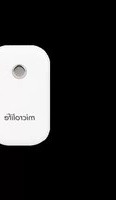
White medical or laboratory thermometer with a digital display showing the temperature reading of 36.24°C (no visible text beyond the display)microlife®
Digital Infrared Ear Thermometer
Instruction Manual

Please read these instructions carefully before using the instrument and keep them in a safe place.
The Microlife Digital Infrared Ear Thermometer IR 1DB1 is a high quality product incorporating the latest technology and tested in accordance with international standards. With its unique technology, the IR 1DB1 can provide a stable, heat-interference-free reading with each measurement. The instrument performs a self-test every time it is switched on to always guarantee the specified accuracy of measurements.
The Microlife Digital Infrared Ear Thermometer IR 1DB1 is intended for the intermittent measurement and monitoring of human body temperature in the home. It is intended for use on people of all ages.

Batteries and electronic instruments must be disposed of in accordance with the locally applicable regulations, not with domestic waste.
Table of Contents
| 1. The Advantages of this thermometer |
| 2. Important Safety Instructions |
| 3. Product Description |
| 4. How this thermometer Measures Ear Temperature |
| 5. Control Displays and Symbols |
| 6. How to Reload a New Probe Cover |
| 7. Directions for Use |
| 8. Changing from Fahrenheit to Celsius and vice-versa |
| 9. Error Messages |
| 10. Cleaning and Storage |
| 11. Technical Specifications |
| 12. Replacing the Battery |
| 13. Guarantee |
| 14. www.microlife.com |
1. The Advantages of this thermometer
Multiple Use (Wide Range Measurement)
The IR 1DB1 offers a wide range measurement feature ranging from 0 °C to 100.0 °C (32.0 °F to 212.0 °F); the product can be used as an ear thermometer to measure body temperature, but it can also be used to measure surface temperature of following objects:
- Milk surface temperature in baby's bottle.
• Surface temperature of baby's bath. - Ambient temperature.
Measurement in 1 second
The innovative infrared technology allows measurement of ear temperature in only 1 second.
Accurate and reliable
Due to the unique probe assembly construction, the advanced infrared sensor, and the complete calibration process this unit can offer a very accurate and reliable ear temperature measurement.
Gentle and Easy to Use
- Special ergonomic design enables simple and easy use of the thermometer.
- This thermometer can be used without interference to daily lifestyle. A measurement can be taken even while a child is sleeping.
- This thermometer is convincent to use for children.
- This thermometer is less threatening to a child than a rectal thermometer and more pleasant to use than an oral thermometer.
Auto-Display Memory
The product displays the last reading automatically for 2 seconds when the unit is switched ON.
Safe and Hygienic
- No risk of broken glass or mercury ingestion.
- Completely safe for use on children.
- Disposable probe covers make IR 1DB1 completely hygienic.
Fever Alarm
10 short beeps alert the patient that he/she may have fever.
2. Important Safety Instructions
- Never use the thermometer for purposes other than those it has been intended for. Please follow the general safety precautions when using on children.
- Always use the thermometer with a new undamaged Probe Cover for each measurement to prevent infections. Only Microlife branded probe covers can ensure that you get an accurate measurement from the IR 1DB1.
- Never immerse the thermometer into water or other liquids (not waterproof). For cleaning and disinfecting please follow the instructions in the «Cleaning and Storage» section.
- Keep the instrument and the probe covers away from direct exposure to the sun and keep it in a dust-free, dry area at a temperature between 10 °C - 40 °C (50 °F - 104 °F).
- Do not use the thermometer if there are signs of damage on the measuring tip or on the instrument itself. If damaged, do not attempt to repair the instrument! Please contact your nearest Microlife customer service bureau.
- Earwax in ear canal may cause a lower temperature reading. Make sure subject's ear canal is clean to ensure an accurate reading.
- This thermometer consists of high-quality precision parts. Do not drop the instrument! Protect it from severe impact and shock. Do not twist the instrument and the measuring probe!
WARNING:
- Please keep the probe covers out of the reach of children.
• Use of this IR thermometer is not intended as a substitute for consultation with your physician. - Thermometer is not waterproof! Please NEVER immerse into liquids!
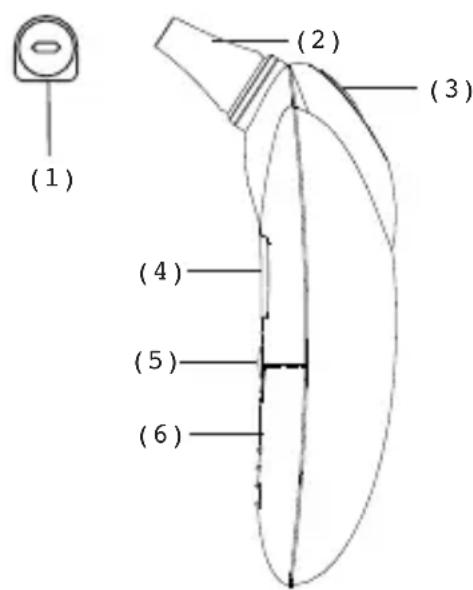
3. Product Description
(1) Probe Cover
(2) Probe
(3) Start button
(4) LCD Display
(5) O/I button
(6) Battery Cover
4. How this thermometer measures Ear Temperature
This thermometer measures infrared energy radiated from the eardrum and the surrounding tissue. This energy is collected through the lens and converted to a temperature value. The measured reading obtained directly from the eardrum (Tympanic Membrane) can ensure the most accurate ear temperature. Measurements taken from the surrounding tissue of the ear canal generate lower readings and may result in misdiagnosis of a fever.
To avoid an inaccurate measurement:
- First slip on a probe cover.
- Switch on the thermometer by pressing the O/I button.
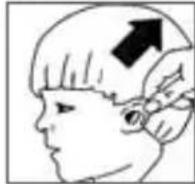
- After one beep is heard (and the temperature scale icon is flashing), straighten the ear canal by gently pulling the middle of the ear back and up.
- Place the probe firmly into the ear canal, press the Start button and keep the probe in the ear until the thermometer beeps to identify the completion of the measurement.
This thermometer has been clinically tested and proven to be safe and accurate when used in accordance with its operating instruction manual.
- Control Displays and Symbols
| LCD Display | Display Meaning | Description | |
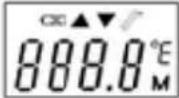 | All segments displayed | Press the O/I button to run on the unit, all segments will be shown for 2 seconds. | |
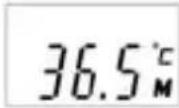 | 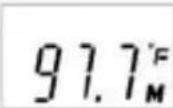 | Memory | The last reading will be shown on the display automatically for 2 seconds. |
 | 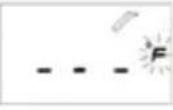 | Ready | The unit is ready for the measurement, the °C or °F icon will keep flashing. |
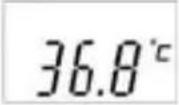 | 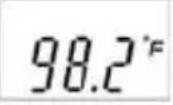 | Measurement complete | The reading will be shown on the LCD display with the °C or °F icon flashing, the unit is ready again for the next measurement. |
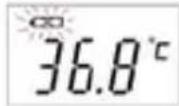 | Low battery indication | When the unit is turned on, the battery icon will keep flashing to remind the user to replace the batteries. | |
6. How to Reload a New Probe Cover
natural_image
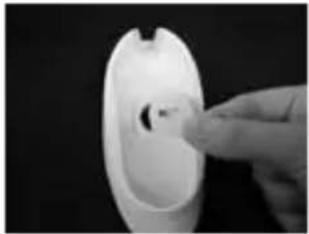
Close-up of a hand inserting a small object into a white plastic container (no text or symbols visible)(1) Place a probe cover onto the storage case hole with paper side upwards.

natural_image
Close-up of a hand pressing down on a smooth, curved object against a black background (no text or symbols visible)(2) Take the unit, vertically penetrate the probe into the center part of the probe cover.
natural_image
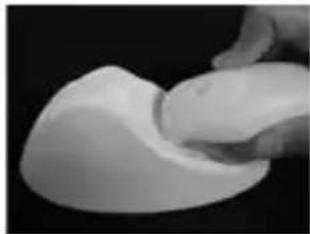
Close-up of a hand holding a white, smooth object against a black background (no text or symbols visible)(3) Completely push the probe into the probe cover holder hole.
natural_image
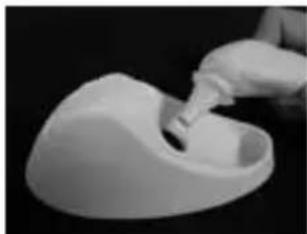
Close-up of a gloved hand pouring liquid into a white plastic container (no text or symbols visible)(4) After feeling a slight «click», take out the probe with cover attached tightly.
NOTE:
- In order to avoid cross-contamination, please reload a new probe cover for each measurement.
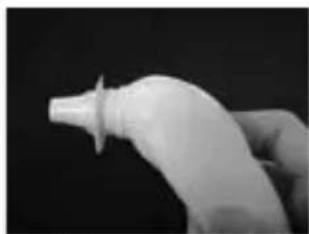
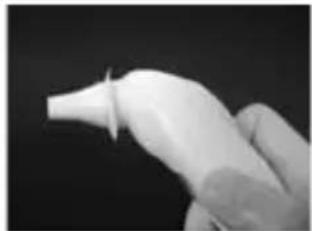
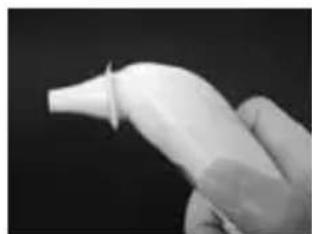
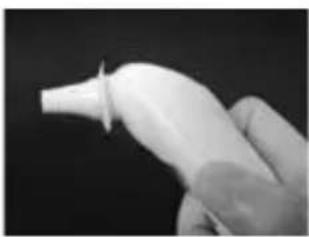
- Please check if the probe cover is fitted on firmly before use (please see the diagrams below); If the probe cover is broken, discard the probe cover and reload a new one immediately.
natural_image
Close-up of a gloved hand holding a white plastic bottle against a dark background (no text or symbols visible)(X) Incorrect (O) Correct
natural_image
Close-up of a gloved hand holding a white plastic tool against a dark background (no text or symbols visible)7. Directions for Use
Important: Prior to every measurement, fit a new undamaged Probe Cover on the measuring probe. Failure to do so may result in incorrect temperature measurement.
- Press the O/I button. The LCD is activated to show all segments for 2 seconds.
- The last measurement reading will be shown on the display automatically for two seconds with the «M» icon.
- When the °C or °F icon is flashing, a beep sound is heard and the thermometer is ready for the measurement.
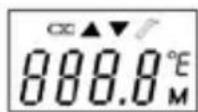
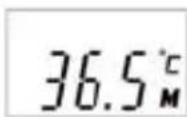
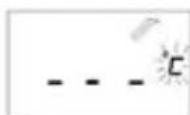
-
Straighten the ear canal by pulling the ear up and back to give a clear view of the eardrum.
-
For children under 1 year:
- Pull the ear straight back.
• Children above 1 year and adult: - Pull the ear up and back.
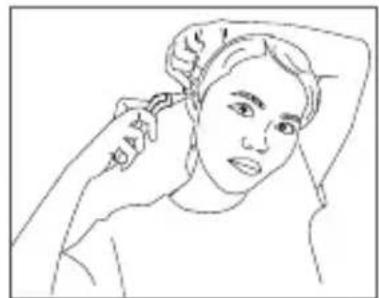
natural_image
Line drawing of a person with hair near their head, no text or symbols present< 1 year

1 year
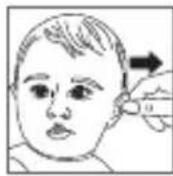
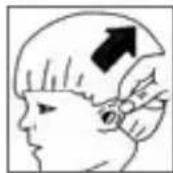
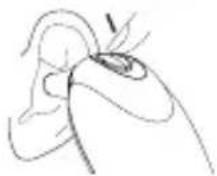
- While tugging the ear, insert the probe snugly into the ear canal and press the «START» button. Release it, when you hear a beep sound. This is the reminding signal that comfirms the end of measurement.
- Remove the thermometer from the ear canal. The LCD displays the measured temperature.
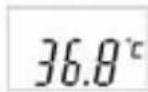
NOTE: 10 short beeps will sound when the temperature is higher than 37.5 °C in order to alert the patient that he/she may have fever.
7. Replace the probe cover after each measurement. To do this, please follow the instruction in point 6 «How to reload a new and clean probe cover?».
8. In order to assure the accurate readings, phase wait at least 30 seconds after 3-5 continuous measurements.
NOTE:
- For an infant, it is best to have the child laying flat with his head sideways so the ear is facing upwards. For an older child or adult, it is best to stand behind and slightly to the side of the patient.
- Always take the temperature in the same ear, since the temperature readings may be different from the right ear and left ear.
- Please wait for a few minutes to take the ear temperature after sleeping.
- In the following situations it is recommended that three measurements are done in the same ear and the highest one is taken as the reading:
1) New born infants in the first 100 days.
2) Children under three years of age with a compromised immune system and for whom the presence or absence of fever is critical.
3) When the user is learning how to use the IR thermometer for the first time until he/she has familiarized himself/herself with the instrument and obtains consistent readings.
8. Changing from Fahrenheit to Celsius and vice-versa
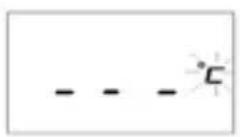
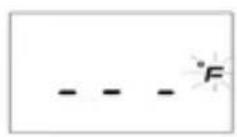
This thermometer can display temperature measurements in either Fahrenheit or Celsius. To switch the display between °C and °F, simply turn OFF the unit, press and hold the Start button for 5 seconds; When you stop pressing the Start button after 5 seconds, the current measurement scale (°C or °F icon) will be flashed on the display. Toggle the measurement scale between °C and °F by pressing the start button again. When the measurement scale has been chosen, wait for 5 seconds and the unit will enter the ready for measuring mode automatically.
9. Error Messages
| Display / Problem Display Meaning | Possible cause and fault remedy | |
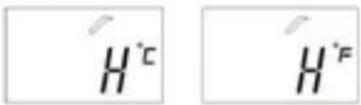 | Measured Temperature too high | Displays «H» when measured temperature higher than 100 °C or 212.0 °F. |
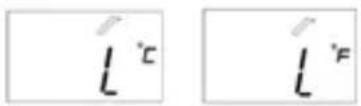 | Measured temperature too low | Displays «L» when measured temperature lower than 0 °C or 32.0 °F. |
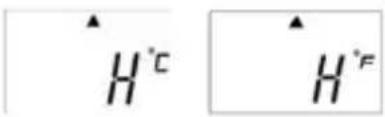 | Ambient temperature too high | Displays «H» in conjunction with the «▲» when ambient temperature is higher than 40.0 °C or 104.0 °F. |
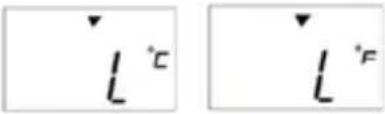 | Ambient temperature too low | Displays «L» in conjunction with the «▼» when ambient temperature is lower than 10 °C or 50.0 °F. |
 | Error function display | When system has malfunction. |
 | Blank display | Please check if the battery has been loaded correctly. Also check polarity (<+> and <->) of batteries. |
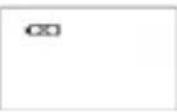 | Dead battery indication | If the steady battery icon is the only symbol shown on the display, the batteries should be replaced immediately. |
10. Cleaning and Storage
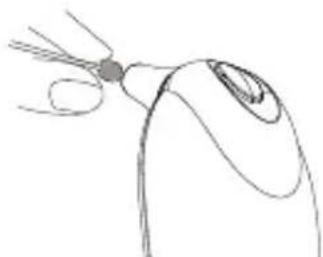
Use an alcohol swab or cotton swab moistened with alcohol (70% Iso-propyl) to clean the thermometer casing and the measuring probe. Ensure that no liquid enters the interior of the thermometer. Never use abrasive cleaning agents, thinners or benzene for cleaning and never immerse the instrument in water or other cleaning liquids. Take care not to scratch the surface of the LCD.
Remove the battery from the instrument if it is not required for extended periods of time in order to avoid damage to the thermometer resulting from a leaking battery.
natural_image
Line drawing of a computer mouse with a handle and scroll (no text or symbols)11. Technical Specifications
| Type: | Digital Infrared Thermometer IR 1DB1 |
| Measuring Range: | 0 °C to 100.0 °C (32.0 °F to 212.0 °F) |
| Accuracy: | Laboratory: ±0.2 °C, 32.0 ~ 42.2 °C(±0.4 °F, 89.6 ~ 108.0 °F)±1 °C, 0 ~ 31.9°C, 42.3 ~ 100.0 °C(±2 °F, 32.0 ~ 89.5 °F, 108.1~ 212.0 °F) |
| Display: | Liquid Cristal Display with indicating unit 0.1 °C (0.1 °F) |
| Accoustic: | a. The unit is turned ON and ready for the measurement: 1 short «bi» sound.b. Complete the measurement: 1 long beep sound.c. System error or malfunction: 3 short «bi» sounds. |
| Memory: | Auto-Display the last measured temperature |
| Nite Glow: | a. The display will be lighted for 4 seconds when the unit is turned ON.b. The display will be lighted again for 5 seconds when the measurement has been completed. |
| Operating temperature: | 10 °C to 40 °C (50 °F to 104 °F) |
| Storage/transport temp.: | -25 °C to +55 °C (-13 °F to 131 °F) |
| Automatic Switch-off: | Approx. 1 minute after last measurement has been taken. |
| Battery: | CR2032 BATTERY (X1) - at least 1000 measurements |
| Dimensions: | 128 mm (L) x 48 mm (W) x 30 mm (H) |
| Weight: | 52 g (with battery), 48 g (without battery) |
| Standards: | Complies with EN12470-5 and ASTM E-1965 requirements |
According to the Medical Product User Act a biennial technical inspection is recommended for professional users. Please observe the applicable disposal regulations.
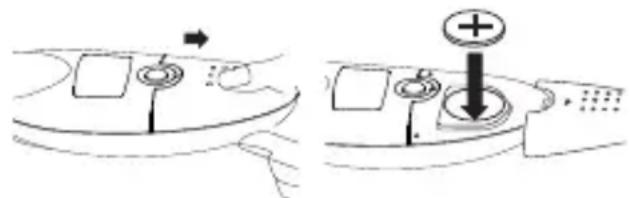
12. Replacing the Battery
This thermometer is supplied with one lithium battery, type CR2032. Replace with a new CR2032 battery when the flashing battery symbol appears on the LCD display.
13. Guarantee
Subject to the following conditions this high-quality measuring instrument is covered by a 2 year guarantee from the date of purchase. Warranty claims must be lodged within the guarantee period.
This product was manufactured with the utmost of care according to international quality standards.
Should you have reason for complaints despite this, please send the instrument, accompanied by the completed Guarantee Card with dealer's stamp as well as original proof of purchase directly or through your medical supplier to your closest Microlife Distributor.
Damage resulting from incorrect use is not covered by the guarantee. Battery and packaging are excluded from the guarantee. Claims beyond this, including claims for damages, are excluded.
Name and adress of responsible dealer:
14. www.microlife.com
Detailed user information about our thermometers and blood pressure monitors as well as services can be found at www.microlife.com.
natural_image
Close-up of a hand inserting a small object into a white plastic housing (no text or symbols visible)natural_image
Close-up of a hand pressing down on a smooth, curved object against a black background (no text or symbols visible)natural_image
Close-up of a white, smooth, sculpted object with no visible text or symbolsnatural_image
Close-up of a gloved hand pouring liquid into a white, bowl-shaped container (no text or symbols visible)natural_image
Close-up of a hand holding a white plastic bottle against a dark background (no text or symbols visible)(X) Incorrect (O) Correct
natural_image
Close-up of a gloved hand holding a white plastic bottle against a dark background (no text or symbols visible)natural_image
Line drawing of a stylized insect head with antennae (no text or symbols)13. Garantie
natural_image
Close-up of a hand holding a small, dark object against a black background (no text or symbols visible)natural_image
Close-up of a hand holding a white plastic object with a pointed tip, against a black background (no text or symbols visible)natural_image
Close-up of a white, curved object with a dark top against a black background (no text or symbols visible)natural_image
Close-up of a hand pouring liquid into a white, bowl-shaped container (no text or symbols visible)natural_image
Close-up of a hand holding a white plastic bottle against a dark background (no text or symbols visible)natural_image
Close-up of a hand holding a white plastic bottle against a dark background (no text or symbols visible)natural_image
Line drawing of a person with hair near their ear, no text or symbols present< 1 año

1 año

natural_image
Line drawing of a finger pointing to a curved object with a small circular mark (no text or symbols)13. Garantía
natural_image
Close-up of a hand inserting a small black object into a white plastic container (no text or symbols visible)natural_image
Close-up of a hand pressing down on a smooth, curved object against a black background (no text or symbols visible)natural_image
Close-up of a hand holding a white, smooth, rounded object against a black background (no text or symbols visible)natural_image
Close-up of a gloved hand pouring liquid into a white plastic container (no text or symbols visible)natural_image
Close-up of a hand holding a small, bulbous object against a dark background (no text or symbols visible)(X) Errado (O) Certo
natural_image
Close-up of a gloved hand holding a white plastic tool against a dark background (no text or symbols visible)natural_image
Line drawing of a finger pointing to a curved object with a small circular mark (no text or symbols)13. Guarantia



- sec. Measurement (Scan-Peak-method)
- Multiple Use (Wide Range 0 °C - 100 °C)
- Fever alarm
- Microlife IR 1DB1
- Digital Infrared Ear Thermometer
- Instruction Manual
- The Advantages of this thermometer
- Multiple Use (Wide Range Measurement)
- Measurement in 1 second
- Accurate and reliable
- Gentle and Easy to Use
- Auto-Display Memory
- Safe and Hygienic
- Important Safety Instructions
- WARNING:
- Product Description
- How this thermometer measures Ear Temperature
- To avoid an inaccurate measurement:
- How to Reload a New Probe Cover
- NOTE:
- Directions for Use
- Changing from Fahrenheit to Celsius and vice-versa
- Error Messages
- Cleaning and Storage
- Technical Specifications
- Replacing the Battery
- Guarantee
- www.microlife.com
- Garantie
- Garantía
- Guarantia
Brand : MICROLIFE
Model : IR 1DB1
Category : Thermometer