
EWDL40 - Toothbrush PANASONIC - Free user manual and instructions
Find the device manual for free EWDL40 PANASONIC in PDF.
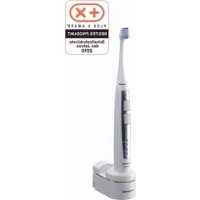


| Product Type | Sonic vibration electric toothbrush |
| Brand | Panasonic |
| Model | EWDL40 |
| Dimensions (main unit) | 25-29 mm (diameter) x 165 mm (length) |
| Dimensions (charger) | 47 mm (H) x 44 mm (W) x 80 mm (D) |
| Weight (main unit) | 125 g |
| Weight (charger) | 150 g |
| Battery type | Built-in rechargeable lithium-ion |
| Battery voltage | 3.6 V DC |
| Battery capacity | 530 mAh |
| Charging time | 12 hours |
| Battery life | Approximately 60 minutes of continuous use (full charge) |
| Brushing speed | Approximately 31,000 horizontal oscillations per minute |
| Brushing modes | POWERFUL (strong) and SOFT (gentle) |
| Built-in timer | Signal every 30 seconds (4 zones) and every 2 minutes |
| Pressure limiting function | Yes, automatically reduces vibration intensity when excessive pressure is applied |
| Soft start | Yes, reaches normal speed in 2 seconds |
| Charge indication | Battery capacity indicator and charging status indicator |
| Brush head included | Double-edge brush head |
| Recommended replacement brush head | Panasonic EW0925 (double-edge brush head) |
| Brush head replacement frequency | Every 3 months |
| Device cleaning | Rinse under running water (max 40°C), do not immerse |
| Charger cleaning | Wipe with a soft cloth, do not wash with water |
| Safety | Do not use in bath, do not touch plug with wet hands |
| Charging temperature | 15 - 35 °C |
| Noise level | 54 dB(A) (ref. 1 pW) |
| Intended use | Household only |
Frequently Asked Questions - EWDL40 PANASONIC
User questions about EWDL40 PANASONIC
0 question about this device. Answer the ones you know or ask your own.
Ask a new question about this device
Download the instructions for your Toothbrush in PDF format for free! Find your manual EWDL40 - PANASONIC and take your electronic device back in hand. On this page are published all the documents necessary for the use of your device. EWDL40 by PANASONIC.
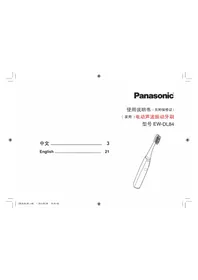
USER MANUAL EWDL40 PANASONIC
Operating Instructions Sonic Vibration Toothbrush
Model No. EW-DL40
English 2 Dansk 44 Cesky 86
Before operating this unit, please read these instructions completely and save them for future use.

Important
For your personal dental care
Thank you for purchasing the Sonic Vibration Toothbrush. The Sonic Vibration Toothbrush is a new kind of electric toothbrush designed for those who wish to keep their teeth clean and healthy. This appliance will enable you to maintain good dental hygiene, which is as important as other forms of personal hygiene.
Sonic Vibration Toothbrush Technology
The Sonic Vibration Toothbrush incorporates the innovative "linear motor" technology that uses magnetic attraction and repulsion to provide outstanding performance. The brush's 31000 horizontal strokes per minute help remove plaque gently yet effectively.
Before use
This high-speed, vibrating, electric toothbrush is different from conventional electric toothbrushes. Therefore:
- You only need to lightly press the bristles against your teeth for brushing.
- When first using this appliance, some may experience a tickling or tingling sensation caused by the high-speed vibrations. The sensation should subside after you use the toothbrush several more times.
Warning
- Do not use the charger in the bath. Doing so may result in electric shock.
- Do not touch or pull out the plug with wet hands. Doing so may result in electric shock.
- This appliance is not intended for use by persons (including children) with reduced physical, sensory or mental capabilities, or lack of experience and knowledge, unless
2
they have been given supervision or instruction concerning the use of the appliance by a person responsible for their safety.
Children should be supervised to ensure that they do not play with the appliance.
- If the power cord of the charger is damaged, the entire charger should be discarded. Always ensure the appliance is operated on an electric power source matched to its rated voltage. Failure to do so may result in fire or electric shock.
- Be sure to switch off the appliance and remove the plug from a household outlet before performing any maintenance. Failure to do so may result in electric shock.
- Do not wash the charger. Doing so may result in electric shock.
- Clean the plug periodically so that dust does not accumulate in it. Such dust buildup may trap moisture over time and reduce the effectiveness of the insulation, thus resulting in overheating and fire.
- Do not modify, disassemble, or repair the appliance at any time except when disposing of it. Doing so may result in fire, electric shock, and/or burns.
Caution
- Do not place any metal objects, such as coins and clips, on the charger. Doing so may cause the objects to heat up, resulting in burns.
Parts identification
A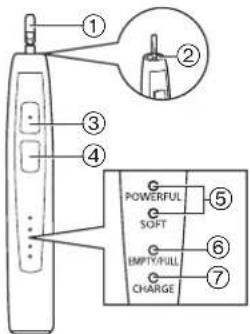
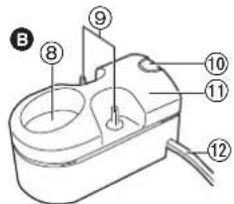
C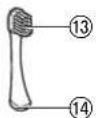
D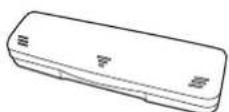
A Main unit
① Toothbrush shaft ② Waterproof rubber seal ③ OFF/ON button ④ Mode selector ⑤ Mode indicator ⑥ Battery capacity lamp ⑦ Charge status lamp
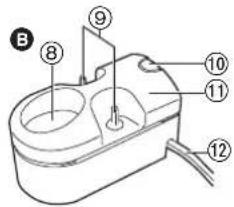
B Charger (RE8-42)
Charging section ⑨ Brush stand
Charger cover release button Charger cover ⑫ Power cord
Accessories
Double-edge brush
⑬ Bristles ⑭ Identification ring Carrying case
Store and Charge
Storing and charging the toothbrush
The battery capacity is low when the battery capacity lamp blinks. You can fully charge the toothbrush in 12 hours. A full charge will supply enough power for 60 minutes of use.
Pass the power cord through one of the cord guides on the right or left.
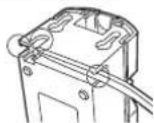
2 Turn off the main unit. 3 Place the main unit upright on the charger and plug the power cord into a household outlet.
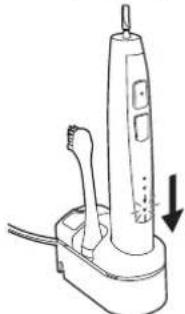
- The charge status lamp glows and the charging will start.
- Charging is completed when the battery capacity lamp blinks.
- You can keep the main unit attached on the charger when not in use to maintain the full battery capacity. It will not overcharge the main unit.
- Adequate ambient temperature for charging is 15 - 35°C . The lifespan of the rechargeable battery may shorten when charging at 15°C or less.
The charger may stop functioning when charging at 0°C or less.
The main unit may become warm during use and charging. However, this is normal. - Use the EW-DL40 toothbrush with the RE8-42 charger only.
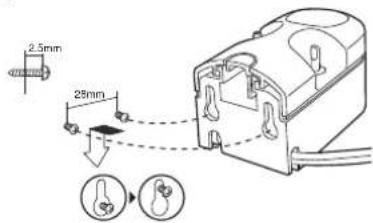
Mounting the charger to the wall
- Attach two screws to the wall as illustrated.
- Please be careful as to not drill a cable or water pipe in the wall.
- Screws and anchors are sold separately.
- Hook the charger onto these screws.
- Plug the power cord into a household outlet.
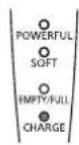
About the LED display
When the battery capacity is low
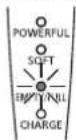
The battery capacity lamp blinks.
While charging
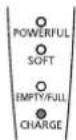
The charge status lamp glows.
After charging is completed
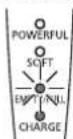
The charge status lamp glows. The battery capacity lamp blinks.
Use
Using the toothbrush
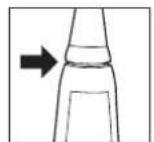
1 Place the brush firmly onto the toothbrush shaft. There will be a small gap between the brush and the main unit. 2 Place the toothbrush in your mouth before turning it on. - Apply a small amount of toothpaste to the brush, if desired, before turning the power on to prevent the toothpaste from spattering. 3 Press the mode selector to select the mode. - Pressing the mode selector toggles the operation mode between "POWERFUL" and "SOFT".
Mode Description
| POWERFUL SOFT | For standard brushing Brush moves horizontally only. |
| POWERFUL SOFT | When teeth or gums are sensitive. When brushing in the POWERFUL mode is too strong. Brush moves horizontally only. |

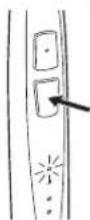
4 While the mode indicator is glowing, press the OFF/ON button to turn on the main unit.
- When the toothbrush first starts, the soft-start function cause it to take about 2 seconds to reach its normal speed.
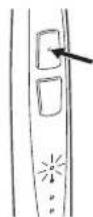
5 Turn off the main unit when you have finished brushing.
- Turn off the main unit before removing it from your mouth to prevent foam from spattering.
Brushing duration notification timer
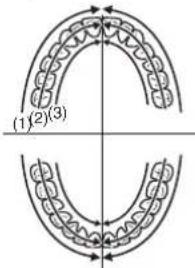
The timer will signal once at 30-second intervals to indicate the brushing time for each part of your mouth. It will signal twice at 2-minute intervals to indicate the recommended total brushing time.
- It is important to brush each area in the same sequence and with the same amount of time, every time you brush, to uniformly brush and clean your teeth. Use the 30 second brushing duration notification timer wisely so there will be no missed spot in your mouth.
- Divide your teeth into 4 parts (upper and lower, left and right), and brush one part in order such as "(1) front of the teeth", "(2) biting plane of the teeth", and "(3) back of the teeth" spending 30 seconds. Brush the other parts in the same manner, and brush your whole mouth in about 2 minutes.
Strong pressure prevention function
Pressing the brush bristles too hard against your teeth will activate this feature, causing the intensity of the vibration to be weakened automatically as a safeguard against excessive pressure.
Precaution
- When you first begin using the toothbrush, you may experience slight bleeding of the gums even though your gums may be healthy. This is because your gums are receiving stimulation by the toothbrush for the first time. The bleeding should stop after one or two weeks of use. Bleeding that persists for more than two weeks may be indication of an abnormal condition of your gums, such as pyorrhea. In this case, stop using the toothbrush and consult your dentist.
- Do not allow hair products (e.g., gel or oil) or hand lotion to come in contact with the unit as they may damage its surface.
Tips on usage
Place the bristles of the brush gently against your teeth and move the toothbrush slowly in a circular motion.
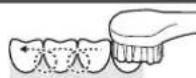
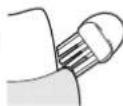
For in between the teeth and the gums
Place the bristles at a 45-degree angle. Place the brush so that the minute side bristles can fit in between the teeth and gums.
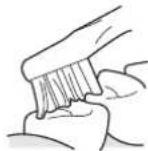
For reaching the far side of the back teeth
Place the brush so that the dense tip bristles can reach the molars.
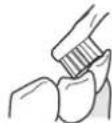
For the back side of front teeth
Brush vertically.
Move toothbrush to match the angle of the teeth.
After use
Cleaning the main unit and the brush
Main unit
- Turn off the main unit.
- Remove the brush from the main unit.
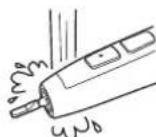
- Wash the main unit under running water -Do not rub or damage the waterproof
- Do not immerse the main unit under water. Do not wash with water hotter than 40 degrees Celsius.
After washing with water
- Wipe dry with a cloth.
- Do not charge while it is wet.
- Return the main unit and the brush to the charger. It is recommended to place the brush facing toward the back of the charger when placing the brush on the charger.
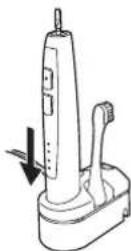
Brush
- Turn off the main unit.
- Remove the brush from the main unit.
- Wash the brush under running water.
- Shake well to remove water after washing.
- Do not pull the bristles of the brush.
- Do not wash with water hotter than 80°C.
- Do not shake the main unit strongly with the brush attached.
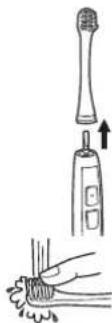
Replacing the brush every 3 months is recommended. If the bristles are bent to one side or worn, the toothbrush is not very effective for brushing. Replace the brush with a new one.
Use the EW0925 double-edge brush for the EW-DL40 toothbrush.
If the identification ring comes off
Put the identification ring back on. - Do not forcibly pull the identification ring since it can break easily. - Using the toothbrush without the identification ring has no effect on its performance. The ring is simply for user identification purposes.
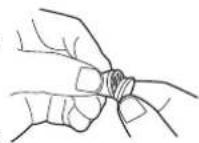
After use
Maintenance
Charger
- Pull the charger cover while pressing the charger cover release button.
- Wipe off any dirt on the charger and the charger cover using a soft cloth.
- Wipe the prongs of the plug with a dry cloth about once every 6 months.
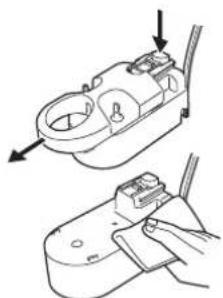
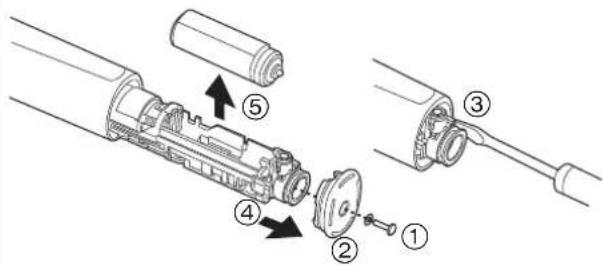
Removing the built-in rechargeable battery
Remove the built-in rechargeable battery before disposing of the toothbrush. Please make sure that the battery is disposed of at an officially designated location if there is one. Do not dismantle or replace the battery so that you can use the toothbrush again. This could cause a fire or an electric shock. Replace it at an authorized service center.
- Perform steps ① to ⑤ and lift the battery, and then remove it.
For environmental protection and recycling of materials This toothbrush contains a Lithium-ion battery.
Please make sure that the battery is disposed of at an officially assigned location, if there is one in your country.
Specifications
Related voltage:
See the name plate on the product.
(Automatic voltage conversion)
Battery: 1 Lithium-ion battery (3.6 V DC; 530 mAh)
Charging time: 12 hours
Input current: 36 mA
Power consumption: 2 W (when fully charged)
Brush rotating speed:
approx. 31000 horizontal strokes/min.
Brush movement (with no load):
POWERFUL mode: approx. 1.0 mm horizontal (width) movement
SOFT mode: approx. 0.7 mm horizontal (width) movement
Operating time:
approx. 60 minutes of continuous use (with 300 g load at a room temperature of 20°C after the battery has been fully charged.)
Dimensions:
Main unit: 25-29 mm (diameter) x 165 mm (length)
Charger: 47 mm (H) x 44 mm (W) x 80 mm (D)
Weight:
Main unit: 125 g
Charger: 150 g
This product is intended for household use only.
Airborne Acoustical Noise: 54 (dB (A) re 1 pW)
Specifications to be changed without notice
Information for Users on Collection and Disposal of Old Equipment and used Batteries
These symbols on the products, packaging, and/or accompanying documents mean that used electrical and electronic products and batteries should not be mixed with general household waste.
For proper treatment, recovery and recycling of old products and used batteries, please take them to applicable collection points, in accordance with your national legislation and the Directives 2002/96/EC and 2006/66/EC.
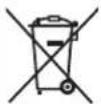
By disposing of these products and batteries correctly, you will help to save valuable resources and prevent any potential negative effects on human health and the environment which could otherwise arise from inappropriate waste handling.

For more information about collection and recycling of old products and batteries, please contact your local municipality, your waste disposal service or the point of sale where you purchased the items.
Penalties may be applicable for incorrect disposal of this waste, in accordance with national legislation.
For business users in the European Union
If you wish to discard electrical and electronic equipment, please contact your dealer or supplier for further information.
If you wish to discard electrical and electronic equipment, please contact your dealer or supplier for further information.
[Information on Disposal in other Countries outside the European Union]
These symbols are only valid in the European Union. If you wish to discard these items, please contact your local authorities or dealer and ask for the correct method of disposal.
Note for the battery symbol (bottom two symbol examples):
This symbol might be used in combination with a chemical symbol. In this case it complies with the requirement set by the Directive for the chemical involved.
Important
Identification of parts
A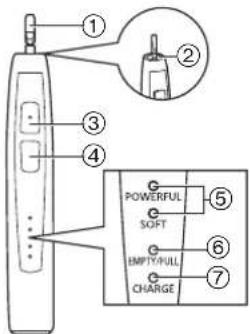
C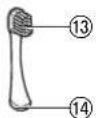
D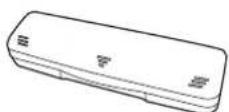
A Main unit
The capacity indicator lamp flashes and then goes out.
At the head
The head level lamp lights up.
The battery capacity lamp lights up and sounds.
Usage
Using the toothbrush


- IMPORTANT
- FOR YOUR PERSONAL DENTAL CARE
- SONIC VIBRATION TOOTHBRUSH TECHNOLOGY
- BEFORE USE
- WARNING
- CAUTION
- PARTS IDENTIFICATION
- ACCESSORIES
- STORE AND CHARGE
- STORING AND CHARGING THE TOOTHBRUSH
- MOUNTING THE CHARGER TO THE WALL
- ABOUT THE LED DISPLAY
- USE
- USING THE TOOTHBRUSH
- WHILE THE MODE INDICATOR IS GLOWING, PRESS THE OFF/ON BUTTON TO TURN ON THE MAIN UNIT
- TURN OFF THE MAIN UNIT WHEN YOU HAVE FINISHED BRUSHING
- BRUSHING DURATION NOTIFICATION TIMER
- STRONG PRESSURE PREVENTION FUNCTION
- PRECAUTION
- TIPS ON USAGE
- FOR IN BETWEEN THE TEETH AND THE GUMS
- FOR REACHING THE FAR SIDE OF THE BACK TEETH
- FOR THE BACK SIDE OF FRONT TEETH
- AFTER USE
- CLEANING THE MAIN UNIT AND THE BRUSH
- MAIN UNIT
- AFTER WASHING WITH WATER
- BRUSH
- IF THE IDENTIFICATION RING COMES OFF
- MAINTENANCE
- CHARGER
- REMOVING THE BUILT-IN RECHARGEABLE BATTERY
- SPECIFICATIONS
- INFORMATION FOR USERS ON COLLECTION AND DISPOSAL OF OLD EQUIPMENT AND USED BATTERIES
- FOR BUSINESS USERS IN THE EUROPEAN UNION
- [INFORMATION ON DISPOSAL IN OTHER COUNTRIES OUTSIDE THE EUROPEAN UNION]
- NOTE FOR THE BATTERY SYMBOL (BOTTOM TWO SYMBOL EXAMPLES)
- IDENTIFICATION OF PARTS
- USAGE
Brand : PANASONIC
Model : EWDL40
Category : Toothbrush