
ERGC70 - Electric mower PANASONIC - Free user manual and instructions
Find the device manual for free ERGC70 PANASONIC in PDF.
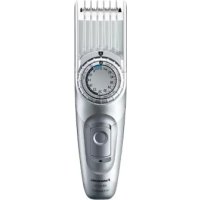



| Product Type | Rechargeable electric hair clipper |
| Brand | Panasonic |
| Model | ERGC70 |
| Power Source | Built-in rechargeable Ni-MH battery + mains via adapter RE9-49/RE9-52 |
| Motor Voltage | 1.2 V DC |
| Charging Time | Approximately 8 hours (first charge or after 6 months of inactivity: 16 hours) |
| Operating Time | Approximately 40 minutes of use |
| Mains Operation | Possible while charging |
| Combs (attachments) | 3 combs: [A] 1-5 mm, [B] 6-25 mm, [C] 26-45 mm |
| Cut without comb | Approximately 0.5 mm |
| Cleaning | Washable under running water (removable blade) and cleaning brush included |
| Lubrication | Oil provided, apply before and after each use |
| Included Accessories | 3 combs, mains adapter, oil, cleaning brush, travel pouch |
| Blade Lifespan | Approximately 2 years (use 2 times per month, 20 min) |
| Battery Lifespan | Approximately 3 years (3 charges per month) |
| Water Resistance | Washable under water, sealed housing (do not remove) |
| Environmental Protection | Recyclable Ni-MH battery; crossed-out wheelie bin symbol |
Frequently Asked Questions - ERGC70 PANASONIC
User questions about ERGC70 PANASONIC
0 question about this device. Answer the ones you know or ask your own.
Ask a new question about this device
Download the instructions for your Electric mower in PDF format for free! Find your manual ERGC70 - PANASONIC and take your electronic device back in hand. On this page are published all the documents necessary for the use of your device. ERGC70 by PANASONIC.
USER MANUAL ERGC70 PANASONIC
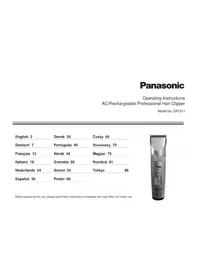
Operating Instructions
(Household) AC/Rechargeable Hair Clipper
Model No. ER-GC70/ER-GC50
English 2 Dansk 39 Cesky 75
Before operating this unit, please read these instructions completely and save them for future use.
Thank you for choosing a Panasonic AC/Rechargeable Hair Clipper. Please read all instructions before use.
Important
This clipper has a built-in rechargeable battery. Do not throw into fire, apply heat, or charge, use, or leave in a high temperature environment.
Using the clipper
Charging the clipper
- Check that the blades are not damaged or deformed before use.
- Terminate the usage when there is abnormality or failure.
- Turn off the appliance before changing the trimming length or removing the comb attachment.
- Before each use, apply oil at the places marked with arrows. (See page 6.)
- The appliance should not be used on animals.
- Do not press the blade against the skin.
- Do not use the clipper for any purpose other than trimming.
- This appliance is not intended for use by persons (including children) with reduced physical, sensory or mental capabilities, or lack of experience and knowledge, unless they have been given supervision or instruction concerning use of the appliance by a person responsible for their safety. Children should be supervised to ensure that they do not play with the appliance.
- Never use the AC adaptor in the bathroom or shower room.
- Do not use any power cord or AC adaptor other than this AC adaptor (RE9-49/RE9-52 for United Kingdom).
- Charge the appliance in a location where it will not be exposed to direct sunlight or other heat sources, at temperatures of 5°C to 35°C.
- Plug in the AC adaptor into a household mains socket where there is no moisture and handle it with dry hands.
- Hold the AC adaptor when disconnecting it from the household mains socket. If you tug on the power cord, you may damage it.
- Do not damage or deform the power cord. Do not place heavy objects on the power cord or trap it between objects.
- Do not use the clipper if the power cord or the AC adaptor is worn, or if the AC adaptor does not fit snugly in the outlet.
- The power cord cannot be replaced. If the cord is damaged, the AC adaptor should be scrapped.
Cleaning the clipper
Warning
Disconnect the power cord from the clipper before cleaning it in water to prevent electric shock.
- The housing should not be taken apart as this can affect the watertight construction of the appliance.
- If you clean the clipper with water, do not use salt water or hot water. Do not soak the clipper in water for a long period of time.
- Clean the housing only with a soft cloth slightly dampened with tap water or soapy tap water. Do not use thinner, benzine, alcohol or other chemicals.
- Clean the power plug regularly to remove any dust or dirt.
Storing the clipper
- Store the clipper in a place with low humidity after use.
- Do not store the clipper where it will be exposed to direct sunlight or other heat sources.
- Store the AC adaptor in a dry area where it is protected from damage.
- Keep the oil away from children.
Parts identification
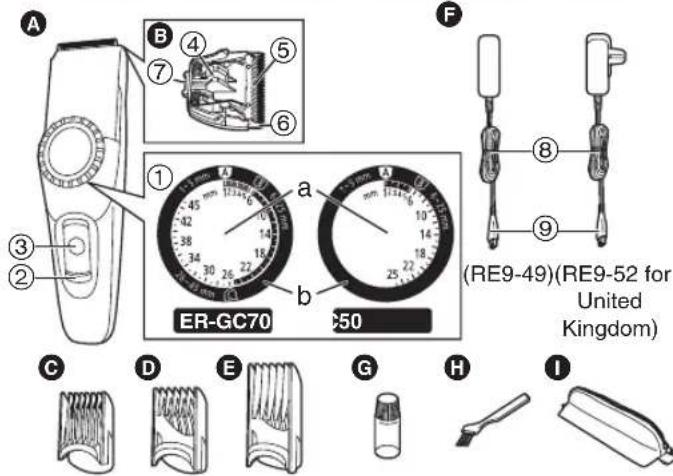
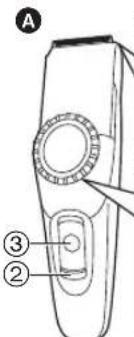
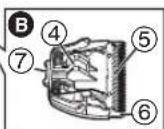
A Main body
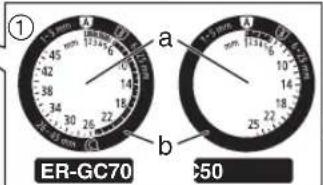
① Dial a. Scale marks b. Instruction marks ② Charge indicator lamp ③ Power switch [0/1] Blade block ④ Cleaning lever ⑤ Moving blade ⑥ Stationary blade ⑦ Mounting hook
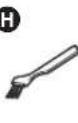
Comb attachment [A] (1 mm to 5 mm) Comb attachment [B] (6 mm to 25 mm) Comb attachment [C] (26 mm to 45 mm) AC adaptor (RE9-49/RE9-52) ⑧ Power cord ⑨ Appliance plug Oil Cleaning brush 1 Travel pouch
| Accessories ER-GC70 ER-GC50 | ||
| Comb attachment [A] (1mm to 5 mm) | ✓ | ✓ |
| Comb attachment [B] (6 mm to 25 mm) | ✓ | ✓ |
| Comb attachment [C] (26 mm to 45 mm) | ✓ | - |
| Travel pouch | ✓ | - |
Charging the clipper
If the clipper is losing speed, it can be fully charged in 8 hours. A full charge supplies enough power for approximately 40 minutes of use.
- Slide the power switch on the main body to the "0" position to turn off the clipper.
- Plug the AC adaptor into a household mains socket.
- Insert the appliance plug into the clipper.
The charge indicator lamp lights and stays on until the AC adaptor is removed from a household mains socket.
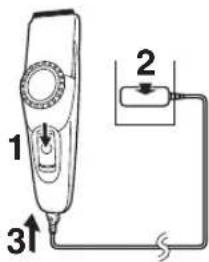
- Disconnect the AC adaptor from a household mains socket when charging is completed.
When charging the clipper for the first time or when it has not been in use for more than 6 months, please charge it for 16 hours (in order to activate the rechargeable battery). If you charge the clipper with the battery completely discharged, the charge indicator lamp may not glow immediately. However, the lamp will glow normally after charging for a few minutes.
AC operation
You can use the clipper while charging, even if the battery capacity is low.
If the clipper does not work, continue charging it for approx. 1 minute.
Using
Using comb attachments
- Slide the power switch on the main body to the "0" position to turn off the clipper.
- Make sure there is no damage to the blade.
- Mount the attachment and adjust the dial. See pages 4 and 5.
- Slide the power switch on the main body to the "1" position to turn on the clipper.
After adjusting the trimming length, make sure the attachment is fixed with the switch in the "1" position. When the attachment is mounted correctly, the dial will not turn with the switch set to "1".
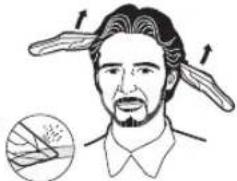
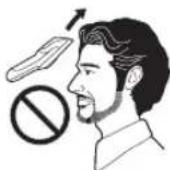
- Cut hair to the correct height by moving the clipper back against the flow of the hair.
Do not use the clipper in an inverted position. This can cut hair too deeply.
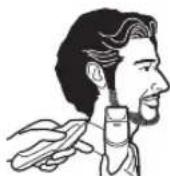
Trimming without attachment combs
Trimming your hair without an attachment will trim hair length to approx. 0.5 mm.
- Cut hair by placing the clipper head directly on the scalp.
Installing the attachment comb
Comb attachment [A] (1 mm to 5 mm)
![PANASONIC ERGC70 - Comb attachment [A] (1 mm to 5 mm) - 1](/content/2026/03/448112/images/1791215ad88443abe18b56bd8a1bfd6b77e0ce3e470f5ede7e0c84fc2016b83c.jpg)
![PANASONIC ERGC70 - Comb attachment [A] (1 mm to 5 mm) - 2](/content/2026/03/448112/images/a796e192ef0529d36a7cc1b75824a7878a43c36a833108104c388f053c4a448a.jpg)
![PANASONIC ERGC70 - Comb attachment [A] (1 mm to 5 mm) - 3](/content/2026/03/448112/images/0c494acb0d8243ba915aa3a62741bdf60bab51e1e76abc0f3db9a3da5afe226e.jpg)
- Align the instruction mark "A" to "1".
- Mount the comb attachment [A] to the main body.
- Align the instruction mark to the length you want to cut.
| Cutting length (mm)(estimate) | 1 2 | 3 4 5 | |||
| Scale marks 1 2 3 4 5 |
- The dial will turn past the indicator "6" even when the comb attachment [A] is being used. The clipper will not cut well above 6 mm, so do not try to cut more than 6 mm with the comb attachment [A] mounted. Actual hair length will be a little longer than the height you set.
Comb attachment [B] (6 mm to 25 mm)
1. Align the instruction mark "B" to "6".![PANASONIC ERGC70 - Comb attachment [B] (6 mm to 25 mm) - 1](/content/2026/03/448112/images/88dde4308c8c13c32cdb8538e4a1b415f8e2e1100e472a682fdf09e3c9d5547f.jpg)
2. Mount the comb attachment [B] to the main body.![PANASONIC ERGC70 - Comb attachment [B] (6 mm to 25 mm) - 2](/content/2026/03/448112/images/a0555208492df1b667bfe9d36ff4dcbedd979848b8842701de5f61cda6c77685.jpg)
3. Align the instruction mark "U" to the length you want to cut.![PANASONIC ERGC70 - Comb attachment [B] (6 mm to 25 mm) - 3](/content/2026/03/448112/images/80ee6e6f85cb486cd0b98cba6560f80fd8ad791523508078546ac9fd436a756d.jpg)
| Cutting length (mm)(estimate) | 6 7 | 8 9 | 10 | 11 | 12 | |||
| Scale marks 6···10··· |
| Cutting length (mm)(estimate) | 13 | 14 | 15 | 16 | 17 | 18 | 19 | ||
| Scale marks | • 14 • • • | 18 • | |||||||
| Cutting length (mm)(estimate) | 20 | 21 | 22 | 23 | 24 | 25 | ||
| Scale marks···22··· |
Actual hair length will be a little longer than the height you set.
Comb attachment [C] (26 mm to 45 mm) ER-GC70
1. Align the instruction mark "0" to "26".![PANASONIC ERGC70 - Comb attachment [C] (26 mm to 45 mm) ER-GC70 - 1](/content/2026/03/448112/images/6a5efbc37e778e065aa7af04e801de9fc2efa44543d745e3b6610c0ac9e616b5.jpg)
2. Mount the comb attachment [C] to the main body.![PANASONIC ERGC70 - Comb attachment [C] (26 mm to 45 mm) ER-GC70 - 2](/content/2026/03/448112/images/3c84286f58823c5be04510341aa5c87e55134ea78345aea3dda7a00bb140bdee.jpg)
3. Align the instruction mark "to the length you want to cut.![PANASONIC ERGC70 - Comb attachment [C] (26 mm to 45 mm) ER-GC70 - 3](/content/2026/03/448112/images/c23982a66f3615b085a1bf558860f3bb26a5f06f880a10e9c3642807a0d921fd.jpg)
| Cutting length (mm)(estimate) | 26 | 27 | 28 | 29 | 30 | 31 | 32 | ||
| Scale marks 26 | 30 |
| Cutting length (mm)(estimate) | 33 | 4 35 | 36 37 | 38 39 | |||
| Scale marks | • | 34 • | • • 38 • |
| Cutting length (mm)(estimate) | 40 | 41 | 42 | 43 | 44 | 45 | ||
| Scale marks | ··· | 42 · | · | 45 | ||||
Actual hair length will be a little longer than the height you set.
Cleaning
Cleaning with brush
- Disconnect the power cord from the clipper.
- Be sure to set the switch to "0" before you remove the blade.
- Remove the comb attachment.
- Hold the main body, place your thumb against the blades and then push them away from the main body.
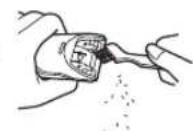
- Brush off any hair trimmings from the main body and from around the blade.
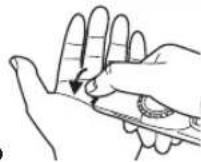
- Brush any hair trimmings out from between the stationary blade and the moving blade while pressing down the cleaning lever to raise the moving blade.
Cleaning in water

The mark on the left means suitable for cleaning under an open water tap.
Warning
Disconnect the power cord from the clipper before cleaning it in water to prevent electric shock.
- Disconnect the power cord from the clipper.
- Remove the blade.
- Rinse off any hair trimmings that are sticking to the blades with running water.
- Rinse out any hair trimmings that are inside the clipper with running water.
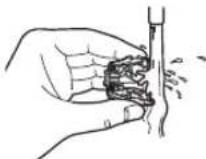
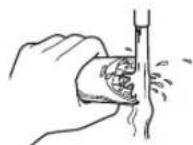
- Gently shake the clipper 4 or 5 times and then wipe off any water drops from the clipper and the blade.
- Place the clipper on a towel with the power switch on the main body facing downwards to let it dry fully.
Lubrication
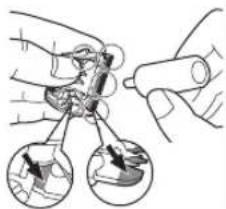
Apply the oil to the clipper before and after each use.
Apply a drop of the oil to the points indicated by the arrows.
Remounting the blade
Fit the mounting hook into the blade mounting on the clipper and then push in until you hear a click.
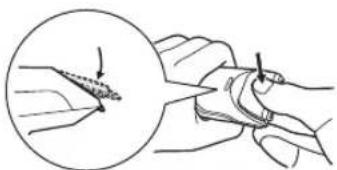
Blade life
Blade life will vary according to the frequency and length of use. It is expected to be about 2 years when using the clipper twice a month for 20 minutes each time. If cutting efficiency is reduced despite proper maintenance, change the blades.
Battery life
Battery life will vary according to the frequency and length of use. If the batteries are charged 3 times a month, the service life will be approximately 3 years. - It is recommended that the clipper be recharged at least every 6 months even when not in regular use because the charge will drain from the battery and its service life may be shortened.
Disposal of the clipper battery
Remove the built-in rechargeable battery before disposing of the clipper. Please make sure that the battery is disposed of at an officially designated location if there is one. Do not dismantle or replace the battery so that you can use the clipper again. This could cause fire or an electric shock. Replace it at an authorized service center.
- Disconnect the power cord from the clipper when removing the battery.
- Discharge the battery completely before removing it.
- Be careful not to short the + and - terminals of the battery after removing it.
- Perform steps 1 to 8 and lift the battery, and then remove it.
- Disconnect the power cord from the clipper.
- Remove the blade from the clipper. Remove the 2 screws (a).
- Remove the screw (b).
- Detach the dial cover (c), remove the screw (d), and disconnect the dial (e).
- Detach the housing (f).
- Remove the screws (g).
- Disconnect housing (h).
- Disconnect the battery chamber (i) and remove the battery (j).
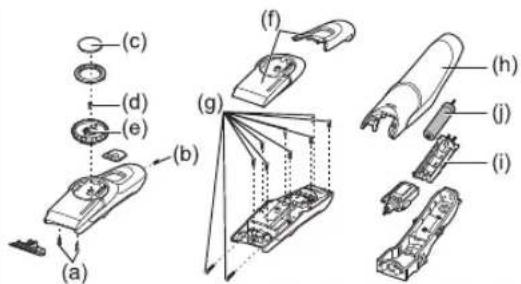
WARNING
Do not attempt to replace the battery for the purpose of reusing the clipper. This could result in the risk of fire or electric shock.
Important notice regarding environmental protection
The built-in rechargeable Nickel-Metal Hydride battery contains substances that may be environmentally harmful. Please remove the battery before discarding your clipper.
For environmental protection and recycling of materials
This clipper contains a Nickel-Metal Hydride battery. Please make sure that the battery is disposed of at an officially assigned location, if there is one in your country.
Specifications
| Power source | See the name plate on the AC adaptor. (Automatic voltage conversion) |
| Motor voltage 1.2 | V DC |
| Charging time Approx. | 8 hours |
This product is intended for household use only.
Airborne Acoustical Noise: 60 (dB (A) re 1 pW)
Please read "Information for Users on Collection and Disposal of Old Equipment and used Batteries" on page 107.
| Accessoires ER-GC70 ER-GC50 | ||
| Sabot [A] (1 mm à 5 mm) | ✓ | ✓ |
| Sabot [B] (6 mm à 25 mm) | ✓ | ✓ |
| Sabot [C] (26 mm à 45 mm) | ✓ | - |
| Pochette de voyage | ✓ | - |
Charging the trimmer
G
H
| Toebehoren ER-GC70 ER-GC50 | ||
| ◎ Kamhulpstuk [A] (1 mm tot 5 mm) | ✓ | ✓ |
| ◎ Kamhulpstuk [B] (6 mm tot 25 mm) | ✓ | ✓ |
| ◎ Kamhulpstuk [C] (26 mm tot 45 mm) | ✓ | - |
| ◎ Reistasje | ✓ | - |
Charging the trimmer
Identification of parts
F (RE9-49) (RE9-52 for United Kingdom)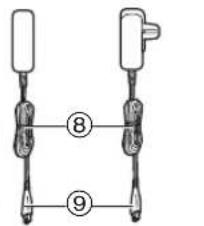
C
D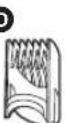


Therefore, m = 3/11

a. Scale markings
b. Instruction markings
Wanbao Base, Shiguang Road, Panyu District, Guangzhou,
Guangdong, China
AUTHORIZED REPRESENTATIVE
Panasonic Elektronik Satis A.S.
Maslak Mah. Bilim Sok.
Sun Plaza No:5 K:16
34398 Maslak-Sisli
Istanbul Turkey
Tel: (+90) 212 367 94 00
Fax: (+90) 212 286 21 11
www.panasonic.com.tr
CUSTOMER SERVICES: 444 72 62
PRODUCT LIFETIME IS 7 YEARS
Information for Users on Collection and Disposal of Old Equipment and used Batteries
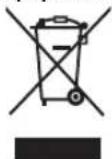
These symbols on the products, packaging, and/or accompanying documents mean that used electrical and electronic products and batteries should not be mixed with general household waste.
For proper treatment, recovery and recycling of old products and used batteries, please take them to applicable collection points, in accordance with your national legislation and the Directives 2002/96/EC and 2006/66/EC.
By disposing of these products and batteries correctly, you will help to save valuable resources and prevent any potential negative effects on human health and the environment which could otherwise arise from inappropriate waste handling.
For more information about collection and recycling of old products and batteries, please contact your local municipality, your waste disposal service or the point of sale where you purchased the items.
Penalties may be applicable for incorrect disposal of this waste, in accordance with national legislation.
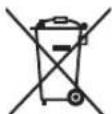
For business users in the European Union If you wish to discard electrical and electronic equipment, please contact your dealer or supplier for further information.
[Information on Disposal in other Countries outside the European Union]
These symbols are only valid in the European Union. If you wish to discard these items, please contact your local authorities or dealer and ask for the correct method of disposal.
![PANASONIC ERGC70 - [Information on Disposal in other Countries outside the European Union] - 1](/content/2026/03/448112/images/6601a4b8df3c83fe600aaa2495029766679f611ccb01f135e40c91f0ed38276f.jpg)
Note for the battery symbol (bottom two symbol examples):
This symbol might be used in combination with a chemical symbol. In this case it complies with the requirement set by the Directive for the chemical involved.
German
Therefore, m = 3/11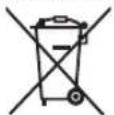
Therefore, m = 3/11;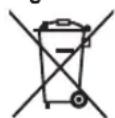

- IMPORTANT
- USING THE CLIPPER
- CHARGING THE CLIPPER
- CLEANING THE CLIPPER
- WARNING
- DISCONNECT THE POWER CORD FROM THE CLIPPER BEFORE CLEANING IT IN WATER TO PREVENT ELECTRIC SHOCK
- STORING THE CLIPPER
- PARTS IDENTIFICATION
- A MAIN BODY
- AC OPERATION
- USING
- USING COMB ATTACHMENTS
- INSTALLING THE ATTACHMENT COMB
- COMB ATTACHMENT [A] (1 MM TO 5 MM)
- COMB ATTACHMENT [B] (6 MM TO 25 MM)
- COMB ATTACHMENT [C] (26 MM TO 45 MM) ER-GC
- CLEANING
- CLEANING WITH BRUSH
- CLEANING IN WATER
- LUBRICATION
- REMOUNTING THE BLADE
- BLADE LIFE
- BATTERY LIFE
- DISPOSAL OF THE CLIPPER BATTERY
- IMPORTANT NOTICE REGARDING ENVIRONMENTAL PROTECTION
- FOR ENVIRONMENTAL PROTECTION AND RECYCLING OF MATERIALS
- SPECIFICATIONS
- CHARGING THE TRIMMER
- IDENTIFICATION OF PARTS
- AUTHORIZED REPRESENTATIVE
- INFORMATION FOR USERS ON COLLECTION AND DISPOSAL OF OLD EQUIPMENT AND USED BATTERIES
- FOR BUSINESS USERS IN THE EUROPEAN UNION IF YOU WISH TO DISCARD ELECTRICAL AND ELECTRONIC EQUIPMENT, PLEASE CONTACT YOUR DEALER OR SUPPLIER FOR FURTHER INFORMATION
- [INFORMATION ON DISPOSAL IN OTHER COUNTRIES OUTSIDE THE EUROPEAN UNION]
- NOTE FOR THE BATTERY SYMBOL (BOTTOM TWO SYMBOL EXAMPLES)
- GERMAN
Brand : PANASONIC
Model : ERGC70
Category : Electric mower