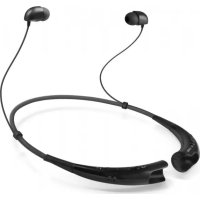
BT710 - Earphones SBS - Free user manual and instructions
Find the device manual for free BT710 SBS in PDF.

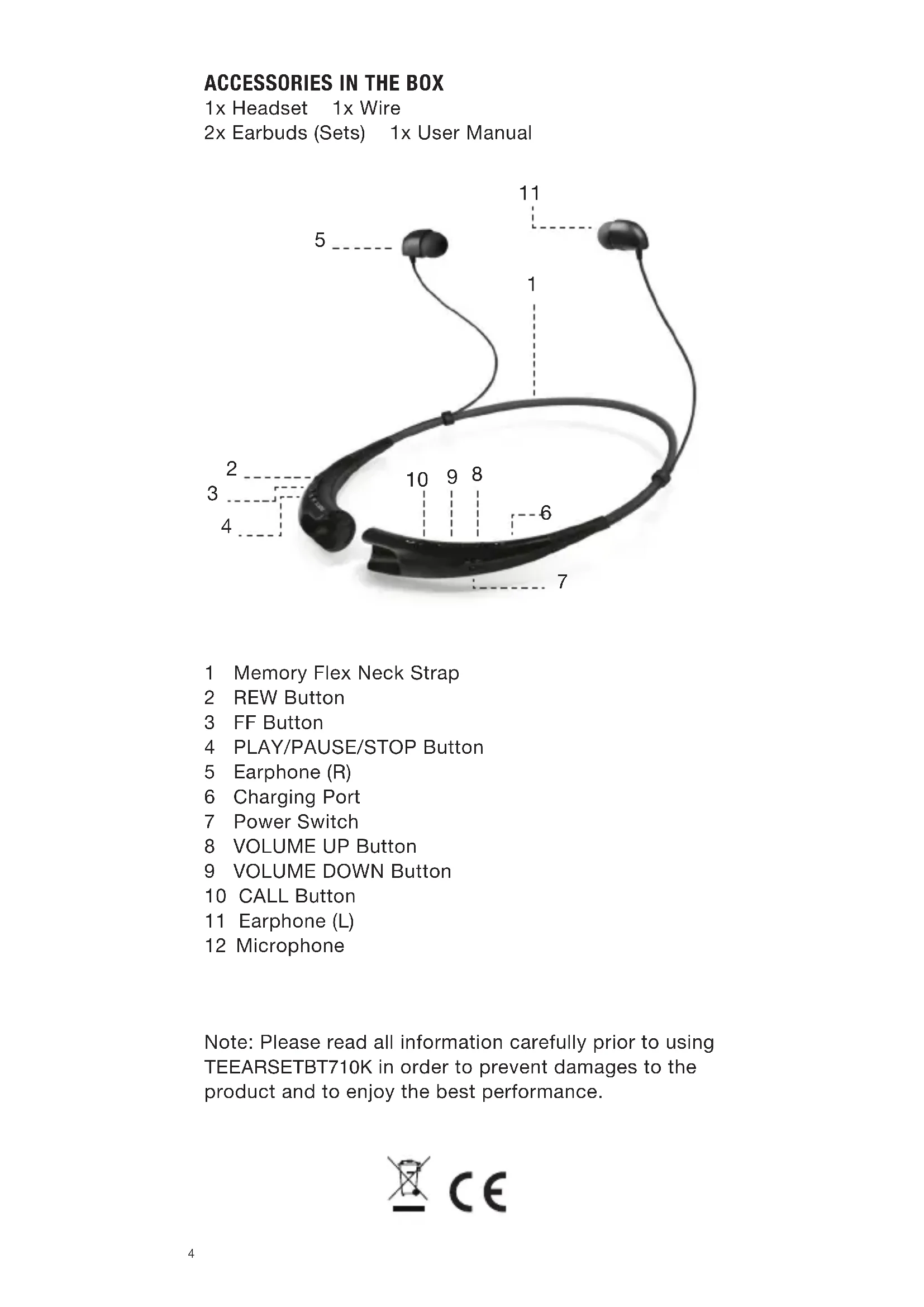


| Product Type | Bluetooth Headset (Earphone) |
| Brand | SBS |
| Model | BT710 |
| Bluetooth Version | 3.0 |
| Bluetooth Profiles | Headset, Hands-free, A2DP |
| Battery Type | Lithium Polymer 3.7 V / 195 mAh |
| Talk Time | Up to 10 hours |
| Music Play Time | Up to 10 hours |
| Standby Time | Up to 500 hours |
| Charging Time | Less than 2 hours |
| Operating Temperature | -10°C to 60°C |
| Dimensions | 135.6 mm (width) x 167.3 mm (length) x 16.9 mm (thickness) |
| Weight | 32 g |
| LED Indicator | Yes (blue/red) |
| Main Functions | Call, music, volume control, multipoint, voice command, redial, call reject, mute |
| Power Supply | Rechargeable via cable (charger not included) |
| Maintenance | Clean with a dry cloth, avoid alcohol and solvents |
| Safety | Do not expose to water, fire, do not disassemble |
Frequently Asked Questions - BT710 SBS
User questions about BT710 SBS
0 question about this device. Answer the ones you know or ask your own.
Ask a new question about this device
Download the instructions for your Earphones in PDF format for free! Find your manual BT710 - SBS and take your electronic device back in hand. On this page are published all the documents necessary for the use of your device. BT710 by SBS.
USER MANUAL BT710 SBS
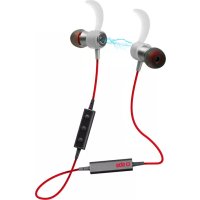
Stereo handsfree with magnetic latching
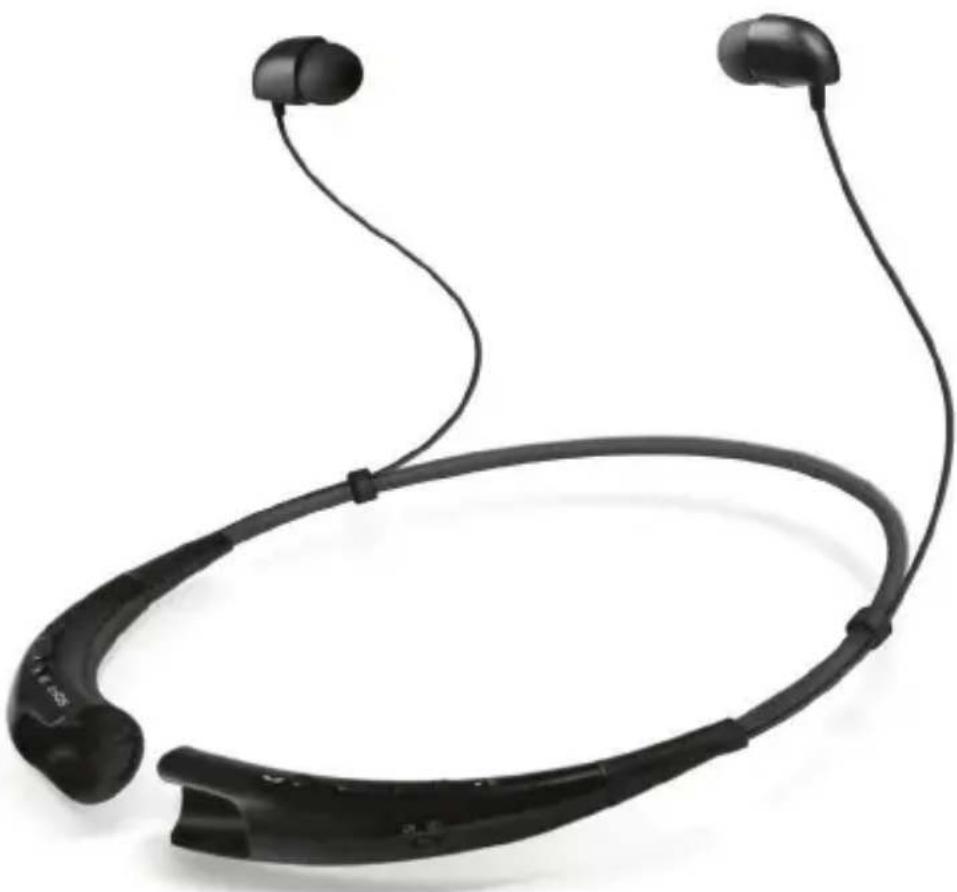
sbs
TEEARSETB710K
Neck Bluetooth Headset
Stereo hands-free with magnetic latching
UK User Manual 4
For other languages please contact us at info@sbsmobile.com to receive your specific user manual.
ACCESSIONS IN THE BOX
1x Headset 1x Wire
2x Earbuds (Sets) 1x User Manual
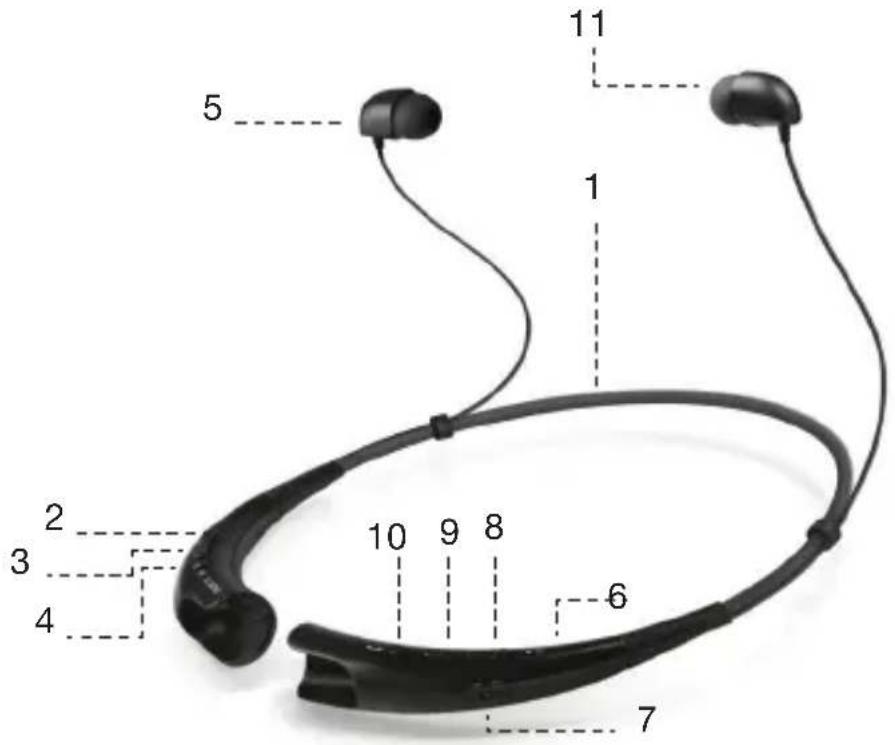
1 Memory Flex Neck Strap
2 REW Button
3 FF Button
4 PLAY/PAUSE/STOP Button
5 Earphone (R)
6 Charging Port
7 Power Switch
8 VOLUME UP Button
9 VOLUME DOWN Button
10CALLButton
11 Earphone (L)
12 Microphone
Note: Please read all information carefully prior to using TEEARSETBT710K in order to prevent damages to the product and to enjoy the best performance.
UK - USER'S GUIDE
CHARGING
When the charger is connected, with the power on or off, the headset will turn off. While charging, the LED indicator will show a solid red light.
LOW BATTERY
lay once every 2 minutes. If the battery is not charged, the head
BATTERY STATUS ALERT
By pressing and holding the VOLUME DOWN button for 1 second, you can check the battery status of the TEEARSETBT710K while in standby mode or playing music. The audible battery status alert will inform you of the battery level. There are 3 levels of battery power:
- Battery High
- Battery Medium
- Battery Low
Slide the power switch to the 'ON' or 'OFF' position.
PAIRING
Before using the headset for the first time, you must pair it with a Bluetooth-enabled device.
There are 2 pairing mode methods with the TEEARSETB710K.
1) Easy Pairing
a) Slide the power switch to the "ON" position.
b) If it is your fi time pairing the device it will automatically enter pairing mode. If it has been paired but no paired device is in range it will enter pairing mode after 10 seconds. The LED indicator will be solid blue.
c) On the device you wish to pair, find the Bluetooth menu and "search for" or "add" new devices.
d) Select "TEEARSETBT710K" from the list of devices.
e) If asked for a Pass/Pin Code enter 0000 (4 Zeros).
f) Once the devices are paired, you will hear "headset paired". The TEEARSETBT710K will automatically turn off if not paired within 3 minutes.
2) Manual Pairing (pairing with another phone or re-pairing)
a) With the power off, press the CALL button and slide the power switch to the 'ON' position at the same time for 1 second.
b) When the headset enters Pairing Mode, the LED indicator will show a solid blue light. After the procedure repeat Easy Pairing steps c) through "f".
MULTI-CONNECTION
Advanced Multipoint
The TEEARSETBT710K is capable of having two devices connected to the headset at the same time. This will give you the freedom of using call waiting between calls on both of your connected phones.
Connection
- Pair the headset with one of your Bluetooth-enabled handsets. (pairing instructions on page 4).
-
Turn off the headset.
-
With the power off, press the CALL button and slide the power switch to the 'ON' position at the same time for 2 seconds to enter Manual Pairing mode.
- Now, pair and connect the headset with your other Bluetooth-enabled handset. (this will be your primary handset).
-
Once this handset is paired and connected, go back and connect the originally paired handset to the headset. This will now be your secondary handset.
-
NOTE: When the TEEARSETB710K is connected to two handsets at the same time(Multipoint), the headset calling functions will work with the primary handset.
-
NOTE: In case of failure to connect to the primary phone through Easy Pairing, TEEARSETBT710K will enter pairing mode.
Calling Function
Voice Dialing and Last Number Redial features work with the primary handset (or handset which made the last outgoing call).
Call Waiting
- While speaking on an active call, press the call button for 1 second to switch to an incoming call.
- To switch between 2 active calls, press the call button for 1 second.
- To end both calls briefly press the call button.
- If both handsets are receiving an incoming call, the headset will default to the primary device.
Auto Reconnect
If the TEEARSETBT710K is turned off (either accidentally or intentionally) while connected to a handset, the headset and handset will disconnect. The headset and handset will automatically reconnect when the TEEARSETBT710K is turned back on while in range.
Out of Range
If the paired devices are separated by a range of 33 feet (10 meters) or more, the headset and handset will disconnect and TEEARSETBT710K will vibrate to alert. If the headset and handset do not automatically reconnect when they are back within the required range, briefly press the CALL button on the TEEARSETBT710K to reconnect manually.
Audio Streaming
Play: Briefly press the PLAY/PAUSE/STOP Button.
Pause: While playing music, briefly press the PLAY/PAUSE/STOP button.
Stop: While playing music, press and hold the PLAY/PAUSE/ STOP button for 1 second.
Next song: Briefl press the FF button.
Previous song: Briefl press the REW button.
Fast Forward: Press and hold the FF button.
Rewind: Press and hold the REW button.
VOLUME CONTROL
Press the VOLUME UP or VOLUME DOWN button to adjust the speaker volume. There are eight levels of speaker volume in Hands-Free mode.There are eight levels of speaker volume in Audio Streaming mode.
Calling
Answering a Call
When there is an incoming call, the headset will ring and vibrate. Briefly - press the VOLUME DOWN button to stop vibration. Briefly - press the CALL button to answer the incoming call.
Transferring a Call
- If you make a call from the handset, the call will (depending on the phone settings) automatically transfer to the headset. If the call is not automatically transferred, you can manually transfer the call to, or from, the headset by pressing and holding VOLUME UP button for 3 seconds on the TEEARSETBT710K (handset and headset must be paired).
Voice Dialing
- Briefly press the CALL button to activate "Voice Command". For best results,
record the voice dialing tag through your headset.
NOTE: If your handset does not support voice dialing, this action may activate Last Number Redial.
Last Number Redial
- Press and hold the CALL button for 1 second to activate "Last Number Redial". The headset will beep and then call the last number dialed.
Ending a Call
Brief press the CALL button.
Call Waiting
Answer a second call without hanging up the fi call by pressing the CALL button for 1 second. Press the CALL button for 1 second to return to the original call.
Brief press the CALL button to terminate both calls at once.
Rejecting a Call
Activate call reject by pressing the CALL button for 1 second when the handset rings.
These functions may only be used if your handset supports them. For further information about using these features, please consult your handset's user manual.
Mic Mute
Press and hold the VOLUME UP and VOLUME DOWN buttons simultaneously for 1 second to mute/unmute the Mic during conversation.
SUMMARY
Button Functions
| Function Action | ||
| Power on Power off Slide the power switch to the 'ON' side. | ||
| Power off Power on Slide the power switch to the 'OFF' side. | ||
| Volume up Talking Briefly press the VOLUME UP button. | ||
| Volume down Talking Briefly press the VOLUME DOWN button. | ||
| Transferring a call Talking Press and hold VOLUME UP button for 3 seconds. | ||
| Answering a call Ringing Briefly press the CALL button. | ||
| Stop incoming call vibration alerting | Ringing Briefly press the VOLUME DOWN button. | |
| Ending a call Talking Briefly press the CALL button. | ||
| Call waiting Talking Press the CALL button for 1 second. | ||
| Last number radial Idle Press the CALL button for 1 second. | ||
| Voice dialing (handset must support) | Idle Briefly press the CALL button. | |
| Call reject Ringing Press the CALL button for 1 second. | ||
| Mic mute on/off | Talking Press and hold VOLUME UP and VOLUME DOWN buttons simultaneously for 1 second. | |
| Pairing mode | Power off Press the CALL button and slide the power switch to the 'ON' side at the same time for 4 seconds. | |
| Battery status check | Idle Press the VOLUME DOWN button for 1 second. | |
| Play | Power on Briefly press the PLAY/PAUSE/STOP button. | |
| Pause | Music on Briefly press the PLAY/PAUSE/STOP button. | |
| Stop | Music on Press and hold the PLAY/PAUSE/STOP button for 1 second. | |
| Next song | Music on Briefly press the FF button. | |
| Previous song | Music on Briefly press the REW button. | |
| Fast forward | Music on Press and hold the FF button. | |
| Rewind | Music on Press and hold the REW button. | |
| Equalizer settings Music on Press and hold VOLUME UP and VOLUME DOWN buttons simultaneously for 1 second. | ||
LED Indication
| Function Action | ||
| Operating Power on The blue LED light flickers 4 times. | ||
| Power off The blue LED | light flickers 4 times and then turns off. | |
| Pairing mode The blue | LED light stays on. | |
| Headset / hands-free profile connected | The blue LED light flickers 2 times every 5 seconds. | |
| Call connected The blue | LED light flickers 2 times every 5 seconds. | |
| Charging Charging The red LED light stays on. | ||
| Charging complete LED turns off. | ||
Specification
| Item Description | |
| Bluetooth® 3.0 (Headset) / Hands-Free / A2DP Profiles | |
| Battery Battery 3.7 V / 195 mAh Li-Polymer | |
| Talk Time Up to 10Hrs | |
| Music play time Up to 10Hrs | |
| Standby time Up to 500 hours | |
| Charging time < 2.0Hrs | |
| Operation temperature 14°F ~ 140°F (-10°C ~ 60°C) | |
| Dimension / weight | 135.6mm(W)x167.3mm(L)x16.9mm(T) / 32g |
Precautions
Do not drop the device. Do not modify, repair, or disassemble. Do not expose directly to water, alcohol, benzene, etc., for cleaning. Do not expose directly to flammables. Do not place or keep the device near flammables. Keep the device away from excessive humidity and dust. Do not place heavy objects on the device. Only charge the headset with an original charger, otherwise it may be damaged.
Battery information
A rechargeable battery has a long service life if treated properly. A new battery or one that has not been used for a long period of time could have reduced capacity the first few times it is used. Do not expose the battery to extreme temperatures, never above +60°C(+140°F) or under -20°C(-4°F) . For maximum battery capacity, use the battery at room temperature. If the battery is used in low temperatures, the battery capacity will be reduced. The battery can only be charged in temperatures between +10°C(+50°F) and +45°C(+113°F) . For your safety, do not remove the battery incorporated in the product.
Recycling the battery in your Bluetooth® headset
The battery in your Bluetooth® Headset must be disposed of properly and should never be placed in municipal waste.
Jexkan KaKdbie 2 MInHyTbI. Ecnn aKKymyIaTOp He 3apKaaeTcra, rnaBa
PPEyIPEKDEHNE COCTOHNBE BATAPEI
HaxaB u ydepKnBa KONkY rPOMKOCTN BHN3 B TeueHne 1 ceKyHdbI, Bbl MOxTe npOBepntb coCToHne 6atapen TEEARSETBT710K B pexmme oXnDaHn nn npocnyuWBAHn My3bIKn. PpeDynpexKeHne cTatyc CbluHo 6atapee 6ydet HΦOpMnPOBaT BAC O ypOBE 3apJa 6atapee. Ectb 3 ypOBHn 3apJa 6atapee:
1.Батapestя ВсICOKО
2. BaTapeA CpeHn
3. Hn3kn ypoBeHb 3apJa 6aTapeN
BKJIIOUeyHNE/BbIKJIIOUeyHNE
YctahOBInTe nepeKlnOuateJIb nITaHnB nNoJoxeHne 'BKl' nn nNoJoxeHne "BbIK".
CNAPUBAHNE
Ipepe nCnoJb3ObaHnEM rapHnTypb I BnepBbIe, Heo6xOJmO BblONHHTb conpJKeHne eroc yctpoiCTBOM Bluetooth BKIOUeHa.
EcTB 2 cnoc6a pexn m cnpjxehn c TEEARSETBT710K.
1)Ierko ConpjaXeHne
a) YcTaHOBnTe nepeKIOuOATEIb NITaHnB NOIOKeHne "BKJ".
6) Ecnn 3To BaWe BpemFi COnpJxHnY yCTPOINCTBa 6yDen ABTOMaTnueckn NepexoNTB pexIM COnpJxHnY. Ecnn OH 6blN B nape, Ho He B nape yCTPOINCTBO He HaxOHTCnB Dnana3OHe OH BOJET B pexIM COnpJxHnY uepe3 10 cekyND.CBeTODNOHb INHdNKATOp 6yDen TROPebt CINHM UBeTOM.
B) Ha yctpoiCTBe Bbl XOTnTe Ha napy, HauTn MeHIO Bluetooth n "NONCK" IIN "Dio6aNTb" HOBBIX yCTPOICTB.
d) Bb6epnTe "TEEARSETBT710K" n3 cnncka yctpoiCTB.
d) Ecn nonpocnil Koidekca Pacc / Pin BveiTe 0000 (4 Hyn).
e) Nocne toro, kak yctpoiCTBa B nape, Bby cblbIuTe "rapHtpya B nape".
TEEARSETB710K aBbOMaTnueckn BbIKIOuHTc, eCIn He B nape B TeueHne 3 MNHyT.
2)PykoBoCTBO ConpJxKeHne (cnapNBaHne c pyrM TeJefoHom nn NOBtOPO HorCnapNBaHna)
a)ПиВыКИLOЧEHOMПИТAHIN,HAЖMЛTEKHONKY Bbl3OBAиСДВИHBTeпеpeKIOUaTeJIb ПИТAHINВПОJOKEHNE“BKЛ"ВTOJKe BpEmB TeueHne 1CEkyHdbI.
6) Korda raphnItypa nepexoOHT B pexkM cOnpJKeHnA, CBeToNDnHBi INHdkatop nOKaKet TBepDoe CnHm CBET. Iocne npOceDpybI NOBTOPntb JERko ConpJKeHne warrc) uepe3 "e".
Mynbtn-coeHneHne
PacunpeHHbIM MHOROTOueHbIX
TEEARTHETBT710K cnoc6ha nMeTb Dba yctpoiCTBa, nodknIOueHHble K rapHnType OndHOBpeMeHHo. 3To DaCT Bam CBO6Oy NcnoJb3OBaHHN OxuHaHH Bbl3OBA MExdy Bbl3OBaMn Ha o6a BaIIN NOkKnIOueHHbIX TeIefoHOB.
Поdklioуенe
-
ConpЯженье rapнHTypbI c OdHIM n3 BaWux Bluetooth-BKJIoueH TeJeΦOHOB. (cnapuBaHne nHCTpyKcunn Ha CTpaHnce 4).
-
BbIKIIOUHTe raphNtypy.
-
Pn BbIKNoeHHOM NtAHn, HaxMnte KONky BblOBA u CdBnHbTe nepeKlouateBn NtAHn B noLoXeHne "BK" B To Xe Bpem B TeueHne 2 cekHyd, yTo6bl BoITN B pexm copjxehn BpyHyIO.
-
Tenepb, conpJxHne n noKluOeHne rapHnTypb c pyroB BluetoothCOBMeCTUMORo TeNefoHa. (3TO 6yDeT BaW OCHOBHO TenefoH).
-ПослTeTOR,КAK3TOTTeNefoHВnapeNCBra3aHbI,BepHytbcHa3aI NCoeINHHTe nepBOHaayabHo cnapeHHbI TeNefoH C rapHnTypoN.Tenepb 3TO6ydet Baw BTOpuHbI TeNefoH.
- PIPIMEUYAHIE: Korda TEEARSETBT710K nodknoueH K DByM TepeHOB B To Jx e Bpem (Multipoint), rapHntypa BbI3Oba fYHKuN 6yJeT pa6oTaB c OCHOBHOn TepeOH.
*Pnpmeuahne: B cnyae OTka3a, uTO6bI NOKJIIOUHTbcR KOCHOBHO TeJeO
uepe3 Easy copjxehn, TEEARSETB710K BOJETB pexim copjxehn.
Bb3OByHK4M
Tolocobn H6op n NOBtOpHbI Ha6op NocJeHero Homepa npedCTaBHeHbI pa60tb C nepBnuHOn Tpy6Kn (uNn TeNefoH, KOtOpbI cDenan NocJeHn NCxOJaun Bbl3OB).
OxuaHne BbI3Oba
- TOBOPA AKTINBHO BbI3OBA, HAXMITE KHONKY Bbl3OBA B TeueHne 1 CeKyHdbI, YTO6bl nepeKJIIOHTbcra Ha BXODauii Bbl3OB.
-ДяпpeклioченmaKd2aKTINBbIX Bbl3OBOB,нжмITE KHONky Bbl3Oba B TeueHne 1cekyHdbI. - 4To6b3aBepuNTb 06a Bbl3Oba KpaTKOBpeMeHHo HAXMITE KHONKy Bbl3Oba.
- Ecnn 06a TelefoHa nonyauoBxOJaBn Bbl3OB, rapHntypa 6ydet no yMOnuAHIO OCHOBHO yCTPOINCTBa.
ABTOIopKnIOUHTe
Ecn TEEARSETBT710K BbIKHueh (cIyauHo nn HaMepeHHO) npn NOkHueHnn K TelefoHHo Tpy6ke, raphHTypa n TelefoH OTKIOuAT. RaphHTypa n TelefoH abTomatueckn NOkHIOUHTcra, Korda TEEARSETBT710K 6ydet CHOBa BKHoueH B TO Bpem dnaana3OHe.
BHe dmana30Ha
Ecn npHbIe yctpoiCTBa pa3deneHb dnaana3OHe 33 cyTob (10 metpoB) nn 6oJIbwe, raphnIpya n Telefoh 6ydet OTKIOUeyen TEEARSETBT710K 6yDet Bn6pnpOBaTb, YTO6bl npdeynpeINTB. Ecn raphnIpya n Telefoh ABTomatNueckn He NOkJIOUHTe, KOrDa OHN BepHyIncB Tpe6yEmOM dnaana3OHe, KpaTKOBpeMeHHo HaxMITE KHOINKBy BbIOBA Ha TEEARSETBT710K BOCCTaHOBtB BpyHyIO.
ItoKoBoe aydno
IrpaTb: KopOTko Haxmnte Bocnpoun3BeJeHne / Naay3a / KhoNky CTOnI.
Nay3a: BO BpeM BocnpOn3BeDeHn My3bIK, KpaTKOBpeMeHHo HaKMITE KhoNky PAY3A / IVPATb / CTON.
Cton:PnBocnpoN3BeHeHmMy3bIKn,HaxMnte n ydepXnBaIte KhoNky IAY3A INrPATb/CTOIN B TeueHne 1 cekynbl.
Cneyuoua nech: Briefn HauKmTe KhoNky FF.
Ppebduyua necr: Brief haxmnte KhoNky REw.
БыICTpar nepemotka BnpeД: Haxmnte u ydepxkBaTe KhONky FF.
Nepemotka: Haxmnte uyepejmbaTe KhoNky REW.
KoHTpoJIb rPOMKOCTN
HaKmTe KhONkY rPOMKOcTB BBepx nn KhONkY 3BYK TNIUE, qTO6bl OTpeRyInpOBaTb rPOMKOcTB DnHAMnka. Ectb BOCem yPOBHeN rPOMKOCTn DnHAMnka B pexIme hands-free mode.There BOCem yPOBHeN rPOMKOCTn DnHAMnka B pexIme NOTOKOBORO ayDIO.
IPNU3BAHNE
OTBet Ha Bbl3OB
Kordaecb BXOJaun 3BOHOK, rapHHTypa 6ydeT 3BOHntb N Bu6pnpoBaTb. KpaTKo - HaxMnte KhoNky UMEHbJEHNE IPOPKOCTN, UTo6bl OCTaHOBNTb Bn6paunIO.KpaTKo - HaxMnte KhoNky BblOba IJRA OTBeTa Ha BXOJaun Bbl3OB.
IpeepaA Bbl30Ba
- EcnB BbI DeNaTe 3BOHOK C Mo6nJbHoro TeJefoHa, 3BOHOK 6yDet (B 3aBncmocTn OT HacTpoek TeJefoHa) NepeKJIouaetc Ha raphHTpy. EcnB BbIOB He aBTOMaTHueCKN NpeJaETcR, Bbl MOKeTe BpyHyIO nepeBeCTn BblOB, INN IN3, raphHTypbl, HaxBa N ydePknBaar KHOKNy yBeJIuHeHHr pOMKOCTN B TeueHne 3 cekyHd Ha TEEARSETBT710K (TeJefoH n raphHTypa DoJxHa 6bITb B nape).
TolocobH6op
- Kopotko Haxmite KhoNky Bb3Oba, yTo6bl aKTHBnPoBaTb "Voice Command".Длг поуеня Hannyuwxpe3yIbTaTOB,
3aHncaTb MeKn rOIOcoBOro Ha6opa Chepe3 rapHnIpy.
PIMMEAHHE: EcnBaw TelefoH He noDpeKnBaet rOncobOn Ha6Op, 30 DeiCTBne MoKeT aKTbNupoBaTb NOBtOpHbI Ha6Op nocJeHero Homepa.
NoBtOpHbI Ha6op nocJeHero Homepa
-HaxmTe n ydepKnBaTe KhONky Bbl3OB, nla 1 cekynda, tTO6bI aKTBNpOBAtB "NoBToPbHn Ha6Op nocJeHrero Homepa". FapHNTypa nOdact 3ByKOBoN CnHaJ, a 3aTeM Bbl3BaTb NocJIeHNn Ha6paHHbI HOMep.
3aBepueHne Bbl3Oba
Briefl HaxMnte KHonky Bbl3OB.
OxuaHne BbI3Oba
OTBet Ha BTOPOB BbI3OB, He BNCNT Ha BbI3OB φ aHTACTNueckn Haxab KHOIKy Bbl3OBA B TeueHne 1 cekyHdbi. HaxmTe KHOKNy Bbl3Oba Ha 1 cekyHdy, YTo6bI BepHyTbcr K NcXODHomy Bbl3OBy.
Brief HaKMnte KHONky Bbl3OBA, yTO6bl npeKpaTnTB 060x Bbl3OBOB OJHOBpeMeHHO.
OTKJOHOHeHHe Bbl3Oba
AkTNBnpyNe Bbl3OB OTKIOHnTb, HaxaBa HA KHOIky Bbl3OB, B TeueHne 1 cekyHdbI, KOrda Tpy6ka 3BOHNT.
3TnФyHKUIMMOrTyNcNoIb3OBAbC8a,ToIbKOeCNBaWTelefoH NOIDepKINBaETnx.ДЯ NOlyeHnI DONoHNHeJIbHOH NfOpMaun O6 NcNoIb3OBAHm 3TNX BO3MOxHOCTe,NOKaIyIcTa,ObpatNTecb KpyKOBoDCTBy NcNoB3OBaTeLn BaUero TelefoHa.
Mukpooh3Byka
Haxmnte u yepxnbate FPOMKCTN u BHn3 oJHObpemHeo B TeueHne 1 cekyndbln OTKIOUeHn / BKIOUeHn 3Byka MKNpOfoHa BO BpeMa pa3roBopa.
PE3IOME
Функциин к"HONOK
CbeToaNoDHaMaHdNkaua
- Battery High
- Battery Medium
- Battery Low
POWER ON/OFF POWER
Slaidu barosanas sledzi uz "ON" vai "OFF" stavokli.
PARI
3a6eJexka: Ako TelefoHbT Bn He NpOdbpxa rlaCoBO Ha6npaHe, Ye e Bb3MOxHo, Ye Ta3N Opeaqna Ce n3BbPwBa Ha npEHa6npaHe Ha NocJeHnA HOMep.
Nobtopho n36upahe
HaTnchete n 3aIpbXte 6yToHa OBAni CE 3a 1 cekynda, 3a da akTnBnpate "PpeHa6npaHe Ha nocJeHnra Homep".
Cnyuankte ige n3daBa 3ByKOB cnHajn i ige ce o6aJa Ha nocleHna H6paH Homep.
Cnei o6aXdane
HaTncheTe 3a KpaTko OBAAn CE.
NOBUKBAHNA34aKBaHe
Mожete Да OTROBOPHTe Ha BTOPO NOBINKBaHc, 6e3 Да Hanycka ПьрВаТа Урет haTиСКане Ha 6уToHa OБАДИ CE 3a 1 ceKунда. HaTиСНeTe 6уToHa OБАДИ CE 3a 1 ceKунда, 3a Дa ce BьрНeTe Kыm ПьрВОнчання pa3roBOp. HaTиСНeTe 3a КраТko OБАДИ CE 3a Кран Ha pa3roBopa.
OTXBbPnIeHaIOBnKBaHnA
HaTnchete 6yToHa OBAn CE 3a 1 cekynda, KOrato TeJefoHbT 3BbHn.


- SBS
- NECK BLUETOOTH HEADSET
- ACCESSIONS IN THE BOX
- UK - USER'S GUIDE
- CHARGING
- LOW BATTERY
- BATTERY STATUS ALERT
- PAIRING
- EASY PAIRING
- MANUAL PAIRING (PAIRING WITH ANOTHER PHONE OR RE-PAIRING)
- MULTI-CONNECTION
- ADVANCED MULTIPOINT
- CONNECTION
- CALLING FUNCTION
- CALL WAITING
- AUTO RECONNECT
- OUT OF RANGE
- AUDIO STREAMING
- VOLUME CONTROL
- CALLING
- ANSWERING A CALL
- TRANSFERRING A CALL
- VOICE DIALING
- LAST NUMBER REDIAL
- ENDING A CALL
- REJECTING A CALL
- MIC MUTE
- SUMMARY
- BUTTON FUNCTIONS
- LED INDICATION
- SPECIFICATION
- PRECAUTIONS
- BATTERY INFORMATION
- RECYCLING THE BATTERY IN YOUR BLUETOOTH® HEADSET
- PPEYIPEKDEHNE COCTOHNBE BATAPEI
- BKJIIOUEYHNE/BBIKJIIOUEYHNE
- CNAPUBAHNE
- 1)IERKO CONPJAXEHNE
- 2)PYKOBOCTBO CONPJXKEHNE (CNAPNBAHNE C PYRM TEJEFOHOM NN NOBTOPO HORCNAPNBAHNA)
- MYNBTN-COEHNEHNE
- PACUNPEHHBIM MHOROTOUEHBIX
- ПОDKLIOУЕНE
- BB3OBYHK4M
- OXUAHNE BBI3OBA
- ABTOIOPKNIOUHTE
- BHE DMANA30HA
- ITOKOBOE AYDNO
- KOHTPOJIB RPOMKOCTN
- IPNU3BAHNE
- OTBET HA BBL3OB
- IPEEPAA BBL30BA
- TOLOCOBH6OP
- NOBTOPHBI HA6OP NOCJEHERO HOMEPA
- 3ABEPUEHNE BBL3OBA
- OTKJOHOHEHHE BBL3OBA
- MUKPOOH3BYKA
- PE3IOME
- POWER ON/OFF POWER
- PARI
- NOBTOPHO N36UPAHE
- CNEI O6AXDANE
- NOBUKBAHNA34AKBAHE
- OTXBBPNIEHAIOBNKBAHNA
Brand : SBS
Model : BT710
Category : Earphones