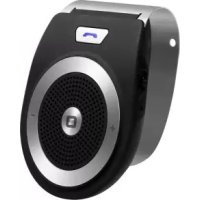
Bt Wireless Portable Car Kit - Earphones SBS - Free user manual and instructions
Find the device manual for free Bt Wireless Portable Car Kit SBS in PDF.

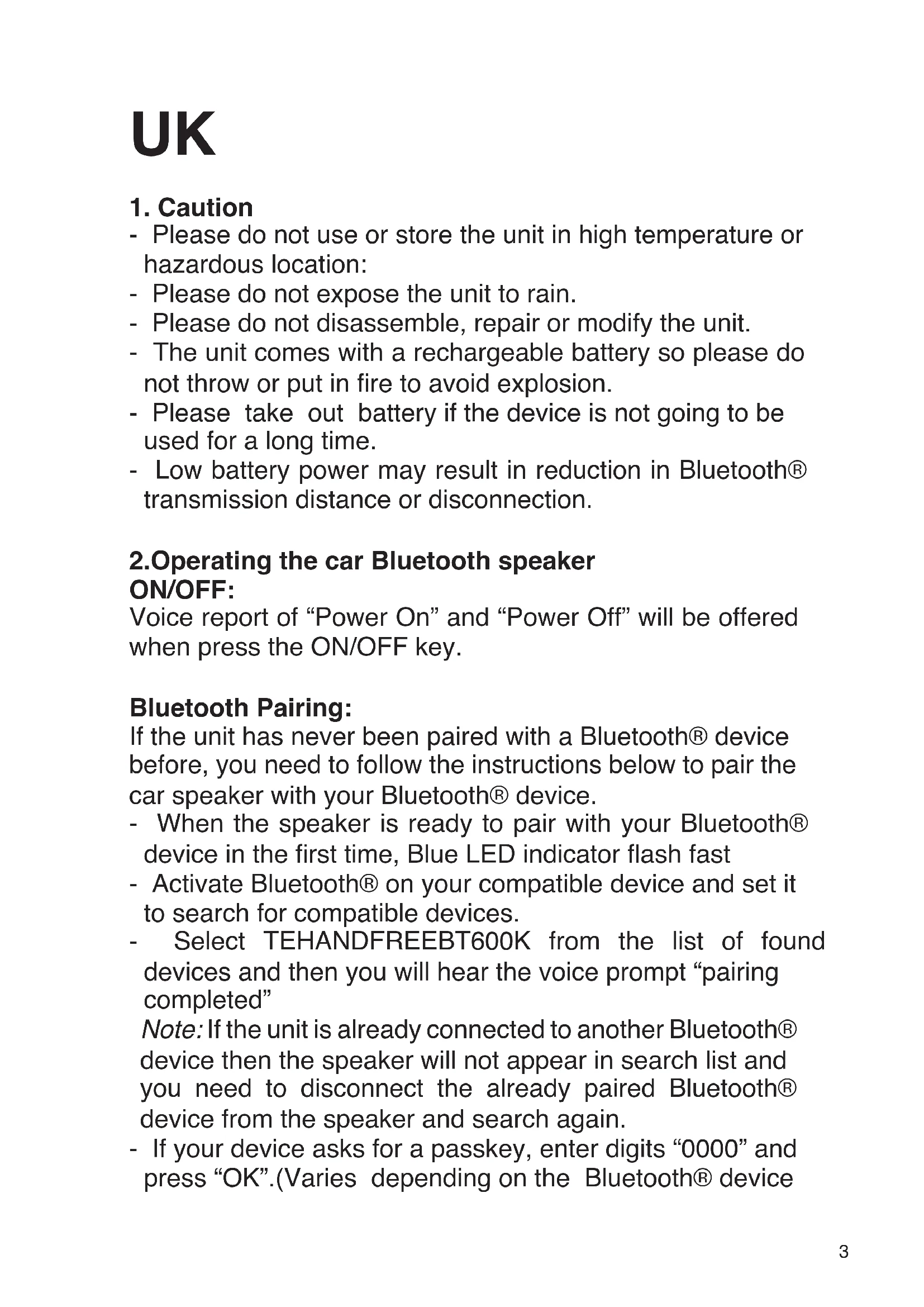


| Product Type | Bluetooth Car Handsfree Kit |
| Brand | SBS |
| Model | Bt Wireless Portable Car Kit |
| Bluetooth Version | Bluetooth V3.0 + EDR |
| Transmission Distance | 8 to 10 meters |
| Supported Bluetooth Profiles | HFP, A2DP, AVRCP, HSP, GAVDP |
| Input Power | DC 5V 400mA |
| Charging Time | 1.5 to 2 hours |
| Talk Time | 6 to 8 hours |
| Standby Time | Up to 20 days |
| Battery Type | Built-in rechargeable Lithium-ion |
| LED Indicator | Blue (Bluetooth) and red (charging) |
| Main Functions | Handsfree calls, wireless music playback, last number redial, switching between speaker and phone |
| Volume Control | + and - buttons |
| Voice Assistance | Voice prompts (connection, low battery, incoming call) |
| Approximate Dimensions | 100 x 50 x 20 mm |
| Approximate Weight | 50 g |
| Material | ABS plastic |
| Care Instructions | Wipe with a soft dry cloth. Do not use abrasive products. |
| Safety | Do not expose to water, do not disassemble, do not throw into fire. Store away from high temperatures. |
| Box Contents | Handsfree kit, USB cable, car charger, user manual |
Frequently Asked Questions - Bt Wireless Portable Car Kit SBS
User questions about Bt Wireless Portable Car Kit SBS
0 question about this device. Answer the ones you know or ask your own.
Ask a new question about this device
Download the instructions for your Earphones in PDF format for free! Find your manual Bt Wireless Portable Car Kit - SBS and take your electronic device back in hand. On this page are published all the documents necessary for the use of your device. Bt Wireless Portable Car Kit by SBS.
USER MANUAL Bt Wireless Portable Car Kit SBS
Bt Wireless Portable Car Kit
Multipoint connection
UK User Manual 3
IT Manuale di istruzioni
D Bedienungsanleitung
F Mode d'emploi
ES Manual de instructaciones
P Manual de instruções
NL Gebruikershandleiding
BG PbKOBOcTBo 3a nOtpe6nteIa
For other languages please contact us at
info@sbsmobile.com to receive your specific user manual.
UK
1. Caution
- Please do not use or store the unit in high temperature or hazardous location:
- Please do not expose the unit to rain.
- Please do not disassemble, repair or modify the unit.
- The unit comes with a rechargeable battery so please do not throw or put in fire to avoid explosion.
- Please take out battery if the device is not going to be used for a long time.
- Low battery power may result in reduction in Bluetooth® transmission distance or disconnection.
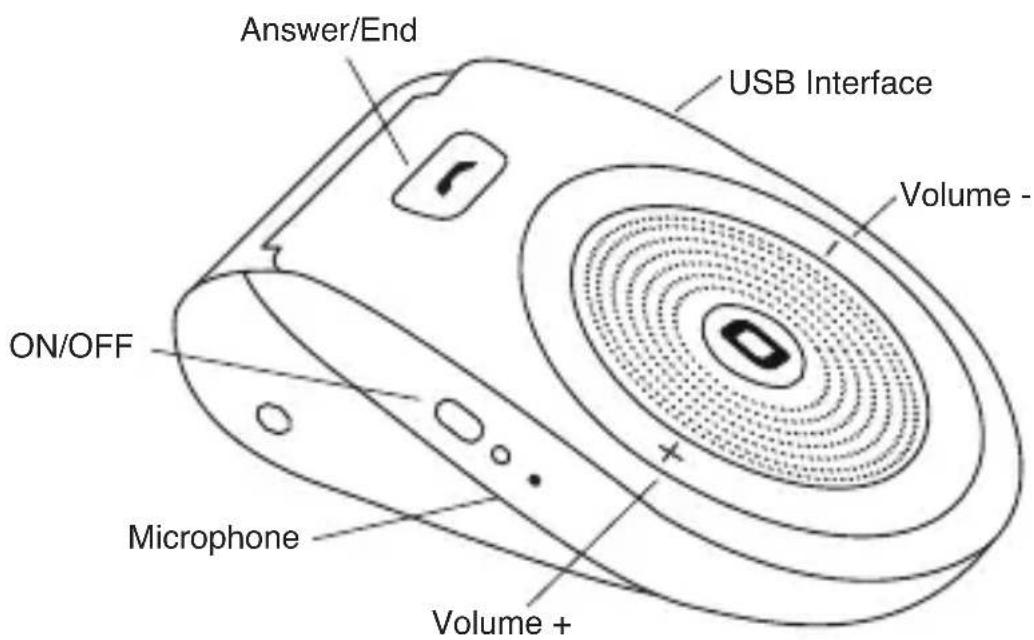
2.Operating the car Bluetooth speaker ON/OFF:
Voice report of "Power On" and "Power Off" will be offered when press the ON/OFF key.
Bluetooth Pairing:
If the unit has never been paired with a Bluetooth® device before, you need to follow the instructions below to pair the car speaker with your Bluetooth® device.
- When the speaker is ready to pair with your Bluetooth® device in the first time, Blue LED indicator flash fast
- Activate Bluetooth® on your compatible device and set it to search for compatible devices.
- Select TEHANDFREEBT600K from the list of found devices and then you will hear the voice prompt "pairing completed"
Note: If the unit is already connected to another Bluetooth® device then the speaker will not appear in search list and you need to disconnect the already paired Bluetooth® device from the speaker and search again.
- If your device asks for a passkey, enter digits "0000" and press "OK".(Varies depending on the Bluetooth® device
manufacturers, model and software version)
- If the pairing is successful, you will hear "Beep" sound and the speaker will have Voice Prompt "connected `and the Blue LED indicator will flash slowly and your speaker is ready to receive calls from mobile or play the music Wirelessly.
Note: If the speaker has been paired to the Bluetooth® device before you need to follow the pairing instructions below to connect the speaker to the Bluetooth® device:
Activate Bluetooth® on your compatible device and put the speaker on "Bluetooth Mode" and the speaker will connect automatically to the compatible device and you will hear a Voice Prompt "connected".
- Pair the second phone
The unit allows to pair two Bluetooth enabled phones device at the same time. PIs refer the follow
Steps to pairing:
a) Turn off your mobile phone's Bluetooth function or disconnect the Bluetooth connection.
b) Please pairing for the second cellphone as the above steps. After the second cellphone pairing successfully and with voice prompt pairing completed, connected, then please connect the first phone. And now the two phones pairing at the same time.
3. Bluetooth in Car Speakerphone Operation Answer a call
When comes a call, Bluetooth® in car speakerphone will ring and report voice of "incoming call", press answer key to answer.
Remark: The voice prompt "incoming call" is available for Android mobile phones, Iphone has no voice prompt"incoming call"
Hang up a call
Press answer key to hang up it during a call.
Redial last number
Short press the answer key twice when the Bluetooth in-car speakerphone is on and not in use, you can call the last number you dialed.
Volume Control
Short press volume- (-) or volume + (+) to adjust volume.
Play music
In standby mode, short press the Bluetooth in-car speakerphone answer key, start playing mobile phone inside the music; Long press“+”or “—”to change the “next”and the “previous”music.
Remarks: When unit is on no working status, no connect Bluetooth, then it will auto-off after 10minutes.
Car speaker and mobile headset transformation
When the conversation is in progress via the car speaker, short press the ANSWER key for twice then the conversation will be switched to mobile phone, short press the ANSWER key again, the conversation will be switched back to car speaker unit again.
Remarks: This function is not available for all Bluetooth enabled device, it depends on the compatibility of the paired device.
4. Car Speaker Charging
This device is with rechargeable battery. During the charging, When unit is at OFF status, the LED indicator will be RED on; When unit is at ON status, then LED indicator will be RED on and Blue LED will flash on every 3 seconds; When full charged, the LED light will turn off. It's strongly recommended to make it fully charged before using. Normal full charging time is approx 2 hrs.
Important Notice:
-
The charging LED indicator will have a short delay, if the Bluetooth in car speakerphone is long-time non occupied or power run out.
-
In order to extend durability of battery and ensure the stability of speakerphone's performance, it's recommended to charge the speakerphone immediately whenever low battery appeared, the LED indicator flash every 3 seconds in red color battery durability, device stand-by time will be shorter if the device is still used in case of low-battery, also, charging time will be more hours than usual. Meanwhile, it will shut down automatically soon under a very low battery condition.
-
While charging, the LED indicator will always light up in red color, and will put out after charging complete.
5. Device Self-protection and Low-power
When battery power is less than 3.3v, voice prompt "battery low" and device turn off automatically when less than 3.0v.
6. Compatibility
BLUETOOTH V3.0, HFPV1.5, A2DPV1.2,
AVRCPV1.4HSP1.2, GAVDP1.2IOP
Product features:
Bluetooth version BLUETOOTH V3.0+EDR
Transmission distance ≤8- 10M This may vary according toenvironment and connected Bluetooth device )
Charge input DC 5V 400mA
Build-in Rechargeable Battery:3.7V 400mAh
Frequency2.4GHz-2.480GHz
Charge time:1.5-2 Hours
Talking time:6-8 Hours
Standby time:20 days
7.Trouble Shooting Guide
| Fault Reason Solution | |
| Not Charging The Car charger (not included) is not plugged well or the USB cable (included) is not plugged into the micro USB jack behind the speaker. | Plug the car charger (not included) into cigarette lighter socket well and plug the USB cable (included) into the micro USB jack of the speaker. |
| Car cigarette socket is no function | Plug another device into the same socket to confirm the socket is working. |
| Computer USB port is not function. | Make sure your computer power is turned on and try another USB port. |
| No Sound The battery is dead. Recharge the unit | |
| The car speaker is not linked to the cell phone. | Go through “Car Speaker Operations” process to connect the speaker. |
| Volume set is too low. Increase the volume of your device. | |
| No Audio Signal via Bluetooth Connection | Speaker is not paired to the audio source. |
| Check whether a connection exists. If necessary pair the speaker again to the audio source | |
| Volume too low Increase the volume on the speaker | |
| Increase the volume on the audio source. |
| Car Speaker cannot be Connected | Pairing does not work Check whether the audio source supports the A2DP protocol | |
| Audio source is switched off Switch on the audio source | ||
| Bluetooth is switched off at Switch on the Bluetooth function in the audio source. | ||
| Bluetooth version is not supported. | Use a different playback unit. | |
| Poor Sound quality from a Bluetooth device | Bluetooth device is almost out of range of the speaker | Move your Bluetooth device closer to the speaker |
1. Attenzione
Version: BLUETOOTH V3.0 + EDR
Build-in battery rechargeable: 3.7V 400mAh
Frequency2.4GHz-2.480GHz
Frequency2.4GHz-2.480GHz
- 3aTbopeTe Ha NOBnKBaHe
HaTnchete 6yToHa OTROBOp Ha 3aTBOPr rO nO BpeMe Ha pa3roBOp.
3A6EIXK: KoraTo yCTpoiCtBO e B HnKaKbB cIyauH He Ha TpyIOBnA CtaTyc, He ce CBbp3BaT Bluetooth, cIeI KOeTO T' uE aBTOMaTNUHO n3KJIIOUvBaHe cIeI 10 MmHyTuIrpa.
- Car robopntel n TpaHcΦopMaζma Mo6nIHN cIywaJIKN
Korato pa3ROBOpbT e B xoI npOeDpya ROBOpTeI Ha aBTOMo6nI, HATNCHeTe KpaTKO KlaBnIa 3a OTROBOP Ha dBa PtTn CneI TOBa pa3ROBOpbT ige 6bJe BKIOUeyen KbM MO6nJIeH TelefoH, HATNCHeTe KpaTKO KlaBnIa 3a OTROBOP OTHOBO, pa3ROBOpbT ige Ce IpeBKnIOuN KbM eDINHua KOJa ROBOpTeI OTHOBO.
3a6eJekn: Ta3n ФункиЯ He e HaJIuHa 3a BCnUKn Bluetooth CbBMeCTNMO yCTpoIcTBO, TOBa 3aBnCn OT CbBMeCTNMOcTTa Ha CBbp3aHOTO yCTpoIcTBO.
4. Car Speaker 3apeKdAnHeTo
ToBa yCtpoiCTBO e c akymylaTOpHa 6aTePnI. IIO BpeMe Ha 3apeXdAHeTo, Korato eDInHua e Hai 'OFF' cTaTyT, CBeToOnOHNrT INDnKaTOp 1e 6bDe RED Bbpx; Korato eDInHua e Hai ONcTaTyc, Toraba CBeToOnoJeHnDnKaTOp 1e 6bDe RED Bbpxu n Blue LED 1e Mira Ha BceKn 3 ceKyni; Korato IIJHo 3apeDeHa, LED CBeTlnHa 1e Ce n3KlIoUy. TRe e CINHO npenopbUnTeJIHO Da Ce HnPaBn HnblHo 3apeDeHa, IpeDi a N3NoJ3BaTe. HopMaJHo BpeMe IIJHo 3apeXdAne e OKoLo 2 Yaca.
BaxkHO cbo6eHne:
-
3apexkahe LED Индикаторьт ще Има КраТКо 3абавяHe,aco Bluetooth B колаТа спИКьрфОн e Дьлro Врeme ИЗВьн -occupied Или мошноCT ИЗерПи.
-
3a da ce ydblkntra ha 6aTeepnTa n da ce rapaHTnpa
CTa6HIOCTTa Ha N3TbJIHeHne CnIKepe, e IprOpbUHTeJHo Da ce 3apejda MmKpOfoHa BeHara, KOraTo Ce IoRbN Cna6a 6aTePnI, CBeTOIoNoDeH INDnKaTOP CBETKaBnCaTa Ha BcEKn 3 CEkyHdN B UepBeHO n3dpbXJINBOCT Ha 6aTePnI Ta, CTeHd-6aYCTPOICTBO BpeMe 7e 6bDaT NO-KpaTbK, aKO YcTPOICTBOTO BCE OSe Ce N3noJ3Ba B ClyuA H NsCKO HnBO Ha 6aTePnI Ta, CbIoo, BpeMeTO 3a 3apejdaHe 7e 6bJe IOBeue YacOBe, OTKoJIKOTO ObnKHObeHo. B cbIoTO BpeMe, ToJ 7e Ce N3KJIOnyIn ABtOMaTHUHO, BeHara POD MHoro HNCKO CbCTOJHNeto Ha 6aTePnI Ta.
- По Врeme Ha 3apeЖдаHe, CBeToДиОДнЯТ ИнДИКaTOp BInHaN ISe CBETHe B YerBeHo, N Ize n3rache CJIeD 3apeXdAHeTo PpNKJIIOUH.
5. Device Self-3aunta n Hncka Mouhoct
Korato HnBOTO Ha 6aTePnTa e NO-MaJko OT 3.3v, rJaCoBO cbo6eHne "n3ToUeHa 6aTePn" n yCTpoJCTBO n3KJIIOuBa aBTOMaTnUHO, KORATO No-MaJko OT 3.0V.
6. CbBmectnMOCT
BLUETOOTH V3.0, HFPV1.5, A2DPV1.2, AVRCP 1.4, HSP 1.2, GAVDP1.2, IOP
XapakTepeNCTnKHa npOdyKta:
Bluetooth Берсma BLUETOOTH V3.0 + EDR
ПразаВане pa3ctOЯнe ≤8-10M ToBa може за ВарираВ 3aВиСИМоCT OT OKOLнaТа срEDA и CBьрЗанBluetooth yCTpoIcTBO)
3apeTeBxoD DC 5V 400 mA
I3rpaXdaneHaakymyLatopHa6aTePn:3.7V400mAu
Frequency2.4GHz-2.480GHz
Bpeme 3a 3apekdahe:1.5-2 yaca
TobopeiKn BpeMe: 6-8 yaca
Bpeme Ha rTOBHOCT: 20 dHn
7.OTCTpaHЯBaHe Ha npo6JIeMn
| Вина priчина Рецени | ||
| He e 3a Зарочданe | Зарочны устroy ство За кола (ВКличени в КOMплесда) He e ВКличени И USB кабел пли (BКличени) He e ВКличени В мNKро USB жak за, �оворiteл. | ВКличete зарочны устroy ство 3a Кола (BKличени вkomплесда) В Геоздота на заалкata добре и ВКличete USB Кабела (ВКличени) в МNKро USB конektор на �оворiteл. |
| Гнедо Car цигара He e функцяя | ВКличete друг устroy ство в сыши Контакт, за на ce notвърди ГеоздOTO разоти. | |
| Компютbp USB поТ He e функцяя. | Уberete ce, чe вашя! КOMпютbp мошноct e ВКличени и орига te с друг USB поТ. | |
| Бeз 3вук Бateрията | e ИЗтошени. Зарадete устroy СтвOTO | |
| Високогорител за Кола He e CBьрзано C мбилени Телегон. | Go through "Car Speaker Operations" process to connect the speaker. | |
| Volume habор e ТВьрд Ниска. | Уberочete сизала на 3Вуka на вшиeto устroy STBO. | |
| No Audio Signal ЧерEZBluetooth Connection | Speaker He e сдвоен Кьм aydno ИЗTOUHnik. | Пробerte Дали сьшоствуba врьзka. Ако e HeobхODIMо ДвОйката OTHOBO ГоворiteлЯ на aydno ИЗTOUHnik |
| Volume ТВьрде ИSCа Yвелη | Чe сизала нa 3Вуka на ВисокогорITEля | |
| Уberочete сизала на 3Вуka на aydno ИЗTOUHnik. | ||
| Car Speaker He剂量はda 6bde CBvp3aHa | Сдвоганeto He paBOTи ПрО | Вере толу щdnoи иЗTOчнК пДьржа прToKоЛа A2DP |
| Audio ИЗTOчнК e ИЗКПючeн | Вкliчete щdnoи ИЗTOчнК | |
| Bluetooth e ИЗКПючeн в aydno ИЗTOчнК. | Вкliчete ФункциЯта Bluetooth в щdnoи ИЗTOчнК. | |
| Bluetooth ворсян се пODьржa. | ИЗpoIЗBaIte рaЗлича ВьзproIЗВexДанe ЕдИнцa. | |
| Лошо качево На зБукac Bluetooth устroy CTBO OT | Bluetooth устroyCTBO e почТи ИЗВьн обхВаT ha ВисOKOROBOPITELЯ | Премecтвае на Vaши Bluetooth устroyCTBO блиzo доRobopITELЯ |
Printed in China
SBS Go Life
Free download available on App Store and Google Play
sbsmobile.com



- BT WIRELESS PORTABLE CAR KIT
- UK
- CAUTION
- 2.OPERATING THE CAR BLUETOOTH SPEAKER ON/OFF
- BLUETOOTH PAIRING
- BLUETOOTH IN CAR SPEAKERPHONE OPERATION ANSWER A CALL
- HANG UP A CALL
- REDIAL LAST NUMBER
- VOLUME CONTROL
- PLAY MUSIC
- CAR SPEAKER AND MOBILE HEADSET TRANSFORMATION
- CAR SPEAKER CHARGING
- IMPORTANT NOTICE
- DEVICE SELF-PROTECTION AND LOW-POWER
- COMPATIBILITY
- PRODUCT FEATURES
- 7.TROUBLE SHOOTING GUIDE
- ATTENZIONE
- 3ATBOPETE HA NOBNKBAHE
- CAR ROBOPNTEL N TPAHCΦOPMAΖMA MO6NIHN CIYWAJIKN
- CAR SPEAKER 3APEKDANHETO
- BAXKHO CBO6EHNE
- DEVICE SELF-3AUNTA N HNCKA MOUHOCT
- CBBMECTNMOCT
- XAPAKTEPENCTNKHA NPODYKTA
Brand : SBS
Model : Bt Wireless Portable Car Kit
Category : Earphones