
BT830 - Earphones SBS - Free user manual and instructions
Find the device manual for free BT830 SBS in PDF.


| Product type | Wireless Bluetooth earphones |
| Brand | SBS |
| Model | BT830 |
| Dimensions (earphone) | Approximately 25 x 20 x 30 mm |
| Weight (earphone) | Approximately 5 g each |
| Weight (charging case) | Approximately 30 g |
| Power | Rechargeable lithium-ion battery |
| Battery life | Up to 4 hours of listening |
| Charging time | Approximately 2 hours |
| Main functions | Music playback, hands-free calls, volume control, track change |
| Connectivity | Bluetooth 5.0 |
| Care and cleaning | Clean with a soft, dry cloth. Do not use chemicals. |
| Safety | Do not expose to water, avoid strong impacts |
| Spare parts available | Silicone ear tips, USB charging cable |
| Repairability | Battery not user-replaceable |
| General information | In-ear earphones with charging case |
Frequently Asked Questions - BT830 SBS
User questions about BT830 SBS
0 question about this device. Answer the ones you know or ask your own.
Ask a new question about this device
Download the instructions for your Earphones in PDF format for free! Find your manual BT830 - SBS and take your electronic device back in hand. On this page are published all the documents necessary for the use of your device. BT830 by SBS.
USER MANUAL BT830 SBS
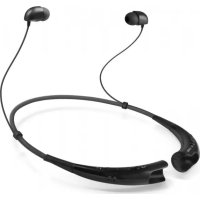
Neck Bluetooth® Handsfree
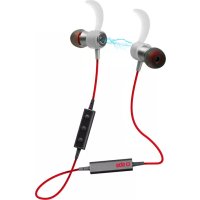
Stereo handsfree with magnetic latching

PRODUCT OVERVIEW

1 Volume+ / Track forward
2 Multifunction button
3 Volume- / Track back
4 Charge port
5 Status indicator
6 Talking mic.
7 Turn on / off
□ sbs
TEEARSETB830K
Neck Bluetooth Handsfree
Stereo handsfree with magnetic latching
UK User Manual 4
For other languages please contact us at info@sbsmobile.com to receive your specific user manual.
UK - USER'S GUIDE
BASIC OPERATION
Volume control
Press the Volume “+” or “-” to turn volume up or down, you hear beep once reach the maximum or minimum volume.
Status indicator
| INSTRUCTIONS | LED STATUS VOICE | PROMPTS |
| Power on Stays blue | 1.5 seconds | Power on |
| Power off Stays red | 1.5 seconds | Power off |
| Standby Blink blue | twice every 5 seconds | |
| Pairing Flashes Red | and Blue alternately | Pairing |
| Incoming call Blink | blue once every 3 seconds | |
| Batterylow The LED turn to red | D turn to red | Battery low |
| Charging Stays on red | while charging Stays on blue after fully charged |
PAIRING
To pair one phone
- Press and hold the Power button far about 3 seconds until LED flashes blue and red alternately, you hear "Power on" and "Pairing", now earphone is in pairing mode.
- Activate Bluetooth on your phone and set it to search far new devices.
- Select the Earphone. If your phone asks, enter 0000 (four zeros) for the passcode or accept the connection. The LED indicator stops flashing red and blue once successfully paired, you hear "Connection successful". Some phone list an option to "Play through earphone", select to use the earphones.
Pair another phone
Multipoint technology enables you to pair another phone and take a call from either. To pair with another mobile phone, follow the steps Pair one phone" After pairing successfully, restart the earphone to connect to 2 paired mobile phone automatically.
CALL
Answer a call
Press any button (Multifunction, Volume “+”, Volume “-”, ...)
Reject a call
Press and hold the Multifunction button for about 2 seconds.
End a call
Press the Multifunction button once.
Redial the last call
Double-press the Multifunction button in standby mode. The mobile phone will redial the last call number.
Mute on/off
Press the Volume “+” far about 2 seconds to mute on/off.
Switch between the earphone and phone
Press the Volume “-” for about 2 seconds during a call, the call will be switched to the mobile phone, redo this operation again, the call will be switched to the earphone.
End current call and answer new call
When a new call rings during a call. Press the Multifunction button once to answer new call and end current call simultaneously.
On hold current call and answer new call
When a new call rings during a call, hold the Multifunction button for 2 seconds to hold current call and answer new call. To switch between held call and active call, hold the multifunction button for 2 seconds.
MUSIC (Need media player support)
Music play/pause
Press Multifunction button once to play/pause music. (Some phones may require you to start a media player first)
Track back/forward
Press the Volume “+” for 2 seconds once to skip track forward, press Volume “-” for 2 seconds once to skip track backward
Switch Music end Call
When a call rings during a music playing, the music automatically pauses to allow you to answer or ignore the call. Once the call is ignored or ends, the music is resumed.
MORE FEATURES
Battery indicator
When the earphone is connected to a device with iOS system, a battery indicator will appear at the upper right of the system, indicating battery status of the earphone.
Auto power-off
When the distance between the earphone and the mobile phone is beyond effective range, a voice prompt ‘Connection lost’ and earphone disconnects with the mobile phone, the earphone will power off automatically once no active far 15 minutes.
Automatic connection after powering on
When the earphone and phone have been paired once, they will automatically connect when the earphone is on and Bluetooth is activated on the phone.
Connection standby
After successful pairing and connection, you will hear the voice prompt “Connection successful” and the earphone will be in tuning mode or standby mode automatically and the blue LED will flash twice every 5 seconds, when the earphone disconnect the phone, you will hear the voice prompt “Connection lost”.
Voice dial (Need phone support's)
Press Volume “+” and Volume “-” simultaneously, you will hear beep, and wait for phone prompt and then tell the phone to dial the name of a stored contact.
Charging
Your earphone has enough power to complete the pairing and a few calls. When battery is low, you will hear the voice prompt “Battery low”. It takes 1.5 hours to fully charge the earphone. The red LED turns on during charging. The red LED will turn off and the blue LED will turn on after being fully charged.
Note: The lifetime of the battery will be significantly reduced if your earphone is left uncharged fora long period. We recommend that you recharge your earphone at least once a month.
Clear paired list
In standby mode, press Volume “+”, Volume “-” and Multifunction buttons simultaneously far about 5 seconds, LED indicator flashes blue & red 5 times quickly, then clear all paired list, the earphone will enter pairing mode automatically after power on next time.
Hard reset
If the earphone can not be turned on even when fully charged or does not respond during use, follow the instructions below to reset it:
-
While pressing and holding the multifunction button, connect the earphone to your PC's USB or a USB adapter with the charging cable.
-
Keep pressing and holding the multifunction button until earphone turns on. The earphone is now reset.
IT - ISTRUZIONI
OPERAZIONI DI BASE
Volume
Track back / forward


- NECK BLUETOOTH® HANDSFREE
- PRODUCT OVERVIEW
- SBS
- TEEARSETB830K
- NECK BLUETOOTH HANDSFREE
- STEREO HANDSFREE WITH MAGNETIC LATCHING
- UK - USER'S GUIDE
- BASIC OPERATION
- VOLUME CONTROL
- PAIRING
- TO PAIR ONE PHONE
- PAIR ANOTHER PHONE
- CALL
- ANSWER A CALL
- REJECT A CALL
- END A CALL
- REDIAL THE LAST CALL
- MUTE ON/OFF
- SWITCH BETWEEN THE EARPHONE AND PHONE
- END CURRENT CALL AND ANSWER NEW CALL
- ON HOLD CURRENT CALL AND ANSWER NEW CALL
- MUSIC PLAY/PAUSE
- TRACK BACK/FORWARD
- SWITCH MUSIC END CALL
- MORE FEATURES
- BATTERY INDICATOR
- AUTO POWER-OFF
- AUTOMATIC CONNECTION AFTER POWERING ON
- CONNECTION STANDBY
- VOICE DIAL (NEED PHONE SUPPORT'S)
- CHARGING
- CLEAR PAIRED LIST
- HARD RESET
- IT - ISTRUZIONI
- OPERAZIONI DI BASE
- VOLUME
- TRACK BACK / FORWARD
Brand : SBS
Model : BT830
Category : Earphones