AAS 14 4 Li - Drill Alpha Tools - Free user manual and instructions
Find the device manual for free AAS 14 4 Li Alpha Tools in PDF.



| Features | Details |
|---|---|
| Product type | Cordless drill |
| Battery voltage | 14.4 V |
| Battery capacity | 4 Ah |
| Battery type | Li-ion |
| No-load speed | 0-400 / 0-1400 rpm |
| Maximum torque | 30 Nm |
| Chuck | 13 mm keyless chuck |
| Weight | 1.5 kg |
| Recommended use | Drilling in wood, metal, and plastic |
| Maintenance | Clean regularly, check battery and chuck condition |
| Safety | Wear safety glasses, do not overload the battery |
| Warranty | 2 years |
Frequently Asked Questions - AAS 14 4 Li Alpha Tools
User questions about AAS 14 4 Li Alpha Tools
0 question about this device. Answer the ones you know or ask your own.
Ask a new question about this device
Download the instructions for your Drill in PDF format for free! Find your manual AAS 14 4 Li - Alpha Tools and take your electronic device back in hand. On this page are published all the documents necessary for the use of your device. AAS 14 4 Li by Alpha Tools.
USER MANUAL AAS 14 4 Li Alpha Tools
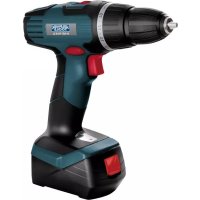
GB Original operating instructions Cordless drill/screwdriver
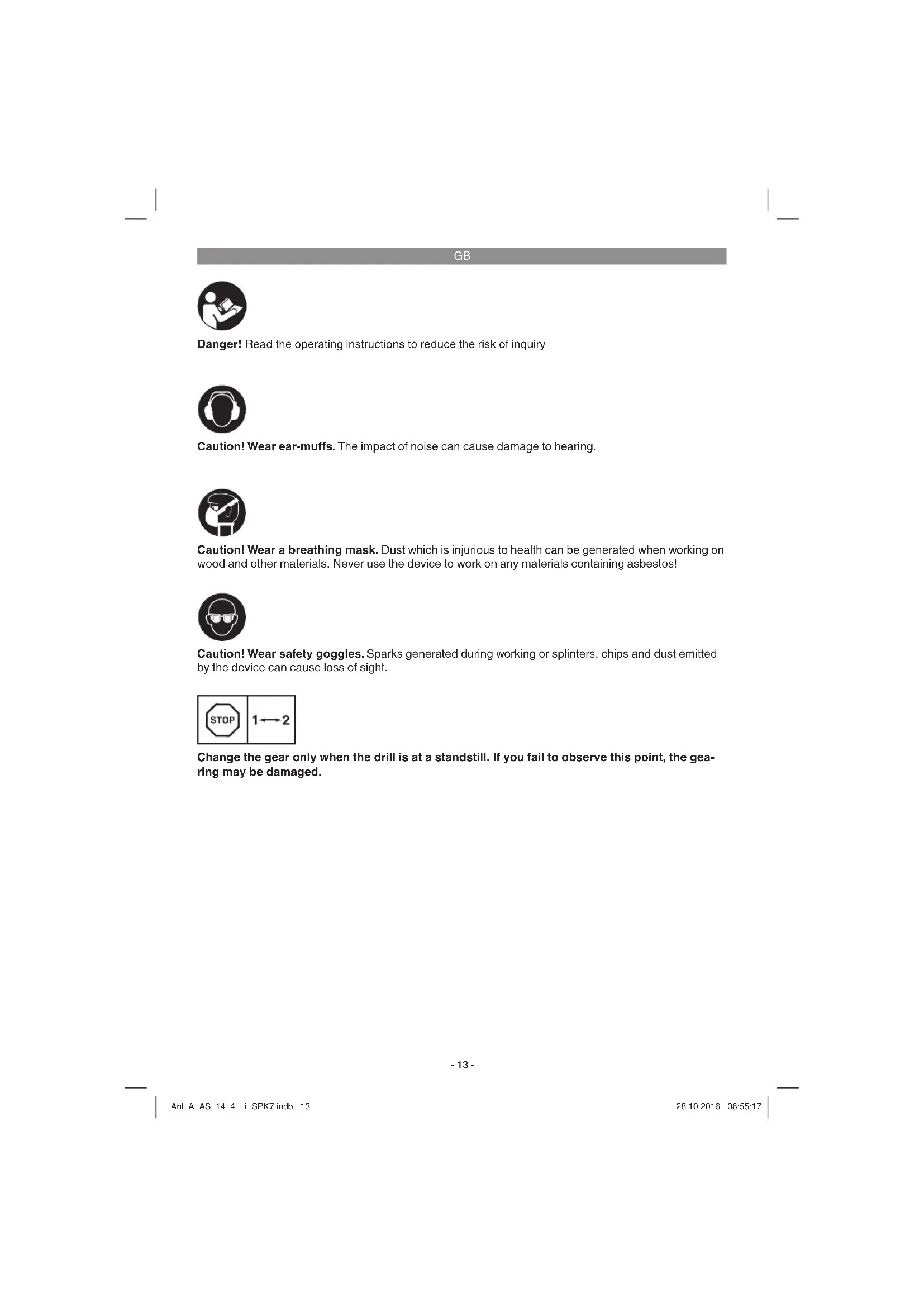
Danger! Read the operating instructions to reduce the risk of inquiry

Caution! Wear ear-muffs. The impact of noise can cause damage to hearing.

Caution! Wear a breathing mask. Dust which is injurious to health can be generated when working on wood and other materials. Never use the device to work on any materials containing asbestos!

Caution! Wear safety goggles. Sparks generated during working or splinters, chips and dust emitted by the device can cause loss of sight.
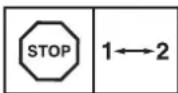
Change the gear only when the drill is at a standstill. If you fail to observe this point, the gearing may be damaged.
GB
Danger!
When using the equipment, a few safety precautions must be observed to avoid injuries and damage. Please read the complete operating instructions and safety regulations with due care. Keep this manual in a safe place, so that the information is available at all times. If you give the equipment to any other person, hand over these operating instructions and safety regulations as well. We cannot accept any liability for damage or accidents which arise due to a failure to follow these instructions and the safety instructions.
1. Safety regulations
The corresponding safety information can be found in the enclosed booklet.
Danger!
Read all safety regulations and instructions. Any errors made in following the safety regulations and instructions may result in an electric shock, fire and/or serious injury.
Keep all safety regulations and instructions in a safe place for future use.
2. Layout and items supplied
2.1 Layout (Fig. 1)
- Torque adjustment (setting ring)
- Quick-change drill chuck
- Changeover switch
- On/Off switch
- Battery
- Charging unit
- Charging adapter
- Pushlock button
- Magnetic screw holder
- Selector switch for 1st/2nd gear
- Battery capacity indicator
- Switch for battery capacity indicator
2.2 Items supplied
Please check that the article is complete as specified in the scope of delivery. If parts are missing, please contact our service center or the sales outlet where you made your purchase at the latest within 5 working days after purchasing the product and upon presentation of a valid bill of purchase. Also, refer to the warranty table in the service information at the end of the operating instructions.
- Open the packaging and take out the equipment with care.
- Remove the packaging material and any packaging and/or transportation braces (if available).
Check to see if all items are supplied. - Inspect the equipment and accessories for transport damage.
If possible, please keep the packaging until the end of the guarantee period.
Danger!
The equipment and packaging material are not toys. Do not let children play with plastic bags, foils or small parts. There is a danger of swallowing or suffocating!
- Cordless drill/screwdriver
Battery - Charging unit
- Charging adapter
- Original operating instructions
- Safetyinstructions
3. Proper use
The cordless drill/screwdriver is designed for tightening and undoing screws, as well as for drilling in wood, metal and plastic.
The equipment is to be used only for its prescribed purpose. Any other use is deemed to be a case of misuse. The user / operator and not the manufacturer will be liable for any damage or injuries of any kind caused as a result of this.
Please note that our equipment has not been designed for use in commercial, trade or industrial applications. Our warranty will be voided if the machine is used in commercial, trade or industrial businesses or for equivalent purposes.
GB
4. Technical data
Motor supply voltage: 14.4 V DC
ldling speed: 0-350/0-1150 min
Torque settings: 19+1
Clockwise/Counter-clockwise: Yes
Clamping range of drill chuck: ...max. 10 mm
Battery charge voltage: 17 V DC
Battery charge current: 0.33 A
Battery charger supply voltage: 100-240V~50-60Hz
Charging time: max. 3-5 hours
Battery type: Li-Ion
Weight: 1.3 kg
Danger!
Sound and vibration
Sound and vibration values were measured in accordance with EN 60745.
L_pa sound pressure level 83.1 dB(A)
K_pA uncertainty 3 dB
L_peak sound power level 94.1 dB(A)
K_WA uncertainty 3 dB
Wear ear-muff s.
The impact of noise can cause damage to hearing.
Total vibration values (vector sum of three directions) determined in accordance with EN 60745.
Drilling in metal
Vibration emission value a_h ≤ 2.5 m/s^2
Kuncertainty = 1.5m / s^2
Screwing without hammer action
Vibration emission value a_h = 10.77 m/s^2
Kuncertainty = 1.5m / s^2
The specified vibration value was established in accordance with a standardized testing method. It may change according to how the electric equipment is used and may exceed the specified value in exceptional circumstances.
The specified vibration value can be used to compare the equipment with other electric power tools.
The specified vibration value can be used for initial assessment of a harmful effect.
Keep the noise emissions and vibrations to a minimum.
Only use appliances which are in perfect working order.
Service and clean the appliance regularly.
Adapt your working style to suit the appliance.
Do not overload the appliance.
- Have the appliance serviced whenever necessary.
- Switch the appliance off when it is not in use.
- Wear protective gloves.
Caution!
Residual risks
Even if you use this electric power tool in accordance with instructions, certain residual risks cannot be rules out. The following hazards may arise in connection with the equipment's construction and layout:
- Lung damage if no suitable protective dust mask is used.
- Damage to hearing if no suitable ear protection is used.
- Health damage caused by hand-arm vibrations if the equipment is used over a prolonged period or is not properly guided and maintained.
5. Before starting the equipment
Be sure to read the following information before you put the cordless screwdriver into operation:
- Charge the battery only with the charging unit supplied.
- Only ever use sharp drill bits and screwdriver bits which are suitable for the purpose and in faultless condition.
- Always check for concealed electric cables and gas and water pipes when drilling and screwing in walls.
GB
6. Operation
6.1 Charging the battery (Fig. 2-3)
- Take the battery pack (5) out of the handle (Fig. 2), pressing the pushlock button (8) of the battery pack as you do so.
- Check that your mains voltage is the same as that marked on the rating plate of the battery charger. Plug the mains plug of the charger (6) into the mains socket outlet.
- Connect the charging cable (a) to the charging adapter (7).
- Both LEDs are lit. Push the charging adapter (7) onto the battery pack (5). The green LED extinguishes to indicate that the battery pack is being charged. When the charging period is completed after approx. 3 to 5 hours, both LEDs will come on again. The battery pack may become a little warm during the charging process. This is normal.
If the battery pack fails to charge, check for the following:
Voltage at the power socket
Good contact at the charging contacts of the charging unit
If the battery pack still fails to charge, send
the charging unit
and the battery pack
to our customer service center.
To ensure that the battery pack provides long service, you should take care to recharge it promptly. You must recharge the battery pack when you notice that the power of the cordless equipment drops.
6.2 Torque setting (Fig. 4 / Item 1)
The cordless screwdriver is fitted with a mechanical torque selector.
The torque for a particular screw size is set with the setting ring (1). The torque is dependent on a number of factors:
- On the type and hardness of the material involved
On the type and length of the screws used - On the requirements that the screw connection has to satisfy
The grating disengagement of the coupling indicates that the selected torque level has been reached.
Caution! Only ever adjust the setting ring when the equipment is at a standstill.
6.3 Drilling (Fig. 4/Item 1)
For drilling purposes, adjust the setting ring for the torque to the last setting "Drill". In the drill setting the slip coupling is non-functional. The maximum torque is available for drilling.
6.4 Changeover switch (Fig. 5/Item 3)
The slide switch above the On/Off switch is for setting the direction of rotation of the cordless screwdriver and for preventing the cordless screwdriver from being switched on inadvertently. You can select between clockwise and counterclockwise rotation. To avoid causing damage to the gearing, the direction of rotation must only be changed when the screwdriver is at a standstill. When the slide switch is in the middle position, the On/Off switch is blocked.
6.5 On/Off switch (Fig. 5/Item 4)
Infinitely variable speed control is possible with the On/Off switch. The further you push the switch, the higher the speed of the cordless screwdriver.
6.6 Changing the bit (Fig. 6)
Caution! Set the changeover switch (3) to its center position whenever you carry out any work (for example changing the tool, maintenance work, etc.) on the cordless screwdriver.
- The cordless screwdriver is fitted with a quick-action chuck (2) with an automatic spindle stop.
- Open the chuck (2).
The chuck opening (a) must be large enough to hold the tool (drill bit or screwdriver bit). - Select the suitable tool. Push the tool as far as possible into the chuck opening (a).
- Tighten the chuck (2) and then check that the tool is secure.
6.7 Screwing
It is advisable to use self-centering screws (e.g. Torx, cross recessed head) as these will enable you to work safely and reliably. Always make sure that the bit used is of the same size and shape as the screw. Set the torque to suit the screw size as specified in the instructions.
GB
6.8 Magnetic screw holder (Fig. 4/Item 9)
Screws can be placed on the magnetic screw holder for easy reach during operation.
6.9 Selector switch for 1st/2nd gear (Fig.4 / Item 10)
You can work with a higher or lower speed depending on the position of the selector switch. Change the gear only when the drill is at a standstill. If you fail to observe this point, the gearing may be damaged.
6.10 Battery capacity indicator (Fig. 2/Item 11)
Press the button for the battery capacity indicator (12). The battery capacity indicator (11) indicates the charge state of the battery on 3 colored LEDs.
All the LEDs are lit:
The battery is fully charged.
The yellow and red LEDs are lit:
The battery has an adequate remaining charge.
Red LED:
The battery is empty, recharge the battery.
7. Cleaning, maintenance and ordering of spare parts
Danger!
Always pull out the mains power plug before starting any cleaning work.
7.1 Cleaning
- Keep all safety devices, air vents and the motor housing free of dirt and dust as far as possible. Wipe the equipment with a clean cloth or blow it with compressed air at low pressure.
We recommend that you clean the device immediately each time you have finished using it.
Clean the equipment regularly with a moist cloth and some soft soap. Do not use cleaning agents or solvents; these could attack the plastic parts of the equipment. Ensure that no water can seep into the device. The ingress of water into an electric tool increases the risk of an electric shock.
7.2 Maintenance
There are no parts inside the equipment which require additional maintenance.
7.3 Ordering replacement parts:
Please quote the following data when ordering replacement parts:
Type of machine
Article number of the machine
Identification number of the machine
- Replacement part number of the part required For our latest prices and information please go to www.isc-gmbh.info
8. Disposal and recycling
The equipment is supplied in packaging to prevent it from being damaged in transit. The raw materials in this packaging can be reused or recycled. The equipment and its accessories are made of various types of material, such as metal and plastic. Never place defective equipment in your household refuse. The equipment should be taken to a suitable collection center for proper disposal. If you do not know the whereabouts of such a collection point, you should ask in your local council offices.
9. Storage
Store the equipment and accessories out of children's reach in a dark and dry place at above freezing temperature. The ideal storage temperature is between 5 and 30^ . Store the electric tool in its original packaging.
GB

For EU countries only
Never place electric power tools or batteries in your household refuse!
Recycling alternative to the requested returning of equipment:
Instead of returning the equipment to the manufacturer, the owner of the electrical equipment is obliged to ensure that the equipment is properly disposed of if relinquishing ownership. The old equipment as well as any batteries can be returned to a suitable collection point that will dispose of the equipment in accordance with the national recycling and waste disposal regulations. This does not apply to any accessories or aids without electrical components supplied with the old equipment.
The reprinting or reproduction by any other means, in whole or in part, of documentation and papers accompanying products is permitted only with the express consent of the iSC GmbH.
Subject to technical changes
This consignment contains lithium-ion batteries.
In accordance with special provision 188 this consignment is not subject to the ADR regulations. Handle with care. Danger of ignition in case of damage to the consignment package. If the consignment package is damaged: Check and if necessary repackage. For further information contact: 0049 1807 10 20 20 66 (fixed network 14 ct/min, mobile phone max. 42 ct/min) Outside Germany charges will apply instead for a regular call to a landline number in Germany.
GB
Service information
We have competent service partners in all countries named on the guarantee certificate whose contact details can also be found on the guarantee certificate. These partners will help you with all service requests such as repairs, spare and wearing part orders or the purchase of consumables.
Please note that the following parts of this product are subject to normal or natural wear and that the following parts are therefore also required for use as consumables.
| Category Example | |
| Wear parts* Drill chuck, Battery | |
| Consumables* Bit inserts/drill bits | |
| Missing parts |
- Not necessarily included in the scope of delivery!
In the effect of defects or faults, please register the problem on the internet at www.isc-gmbh.info. Please ensure that you provide a precise description of the problem and answer the following questions in all cases:
Did the equipment work at all or was it defective from the beginning?
Did you notice anything (symptom or defect) prior to the failure?
What malfunction does the equipment have in your opinion (main symptom)?
Describe this malfunction.
GB
Warranty certificate
Dear Customer,
All of our products undergo strict quality checks to ensure that they reach you in perfect condition. In the unlikely event that your device develops a fault, please contact our service department at the address shown on this guarantee card or the sales outlet from where you bought the device. Please note the following terms under which guarantee claims can be made:
- These guarantee terms apply to consumers only, i.e. natural persons intending to use this product neither for their commercial activities nor for any other self-employed activities. These warranty terms regulate additional warranty services, which the manufacturer mentioned below promises to buyers of its new products in addition to their statutory rights of guarantee. Your statutory guarantee claims are not affected by this guarantee. Our guarantee is free of charge to you.
- The warranty services cover only defects due to material or manufacturing faults on a product which you have bought from the manufacturer mentioned below and are limited to either the rectification of said defects on the product or the replacement of the product, whichever we prefer. Please note that our devices are not designed for use in commercial, trade or professional applications. A guarantee contract will not be created if the device has been used by commercial, trade or industrial business or has been exposed to similar stresses during the guarantee period.
-
The following are not covered by our guarantee:
-
Damage to the device caused by a failure to follow the assembly instructions or due to incorrect installation, a failure to follow the operating instructions (for example connecting it to an incorrect mains voltage or current type) or a failure to follow the maintenance and safety instructions or by exposing the device to abnormal environmental conditions or by lack of care and maintenance.
- Damage to the device caused by abuse or incorrect use (for example overloading the device or the use or unapproved tools or accessories), ingress of foreign bodies into the device (such as sand, stones or dust, transport damage), the use of force or damage caused by external forces (for example by dropping it).
-
Damage to the device or parts of the device caused by normal or natural wear or tear or by normal use of the device.
-
The guarantee is valid for a period of 60 months starting from the purchase date of the device. Guarantee claims should be submitted before the end of the guarantee period within two weeks of the defect being noticed. No guarantee claims will be accepted after the end of the guarantee period. The original guarantee period remains applicable to the device even if repairs are carried out or parts are replaced. In such cases, the work performed or parts fitted will not result in an extension of the guarantee period, and no new guarantee will become active for the work performed or parts fitted. This also applies if an on-site service is used.
-
To make a claim under the guarantee, please register the defective device at: www.isc-gmbh.info. Please keep your bill of purchase or other proof of purchase for the new device. Devices that are returned without proof of purchase or without a rating plate shall not be covered by the guarantee, because appropriate identification will not be possible. If the defect is covered by our guarantee, then the item in question will either be repaired immediately and returned to you or we will send you a new replacement.
Also refer to the restrictions of this warranty concerning wear parts, consumables and missing parts as set out in the service information in these operating instructions.
FR

Chere cliente, cher client,
6.1 Nabijeni akumulatoru (obr. 2-3)
1. INHctpyKuIN 3a 6e3onacHOCT
CbOTBeHTHnTE HNCTpyKuun 3a 6e30NaCHocT ue HamepuTe B npIIOKeHaTa 6poWypa.
Onachoct!
Ipooyete BCnHN yHa3aHn 3a 6e3oNaCHOT n HcTpyKn. IpnOycknte npn cna3BaHeTo Ha yHa3aHnraTa 3a 6e3oNaCHOCT n HcTpyKnHTe Moar Da nMaT KaTO nocJeNuca eJeKTPnuCeKn ydap, NoKap W/nn TeKKn HapaRaBHn.CbXpaHete 3a B 6bDee BCnHN yHa3aHn 3a 6e3oNaCHOT n HcTpyKnH.
2.ОпсанеHaуретаиобemHadoctabka
2.1 OnncanHe Ha ypega (fHr.1)
- HacptpoKa Ha BbPTru, MOMENT (peylnpa, npbCTeH)
2.Бbp30aateratehennatpoHHK 3a cBpeIIO - PpeBknHoyBaTeI 3a NocokTa Ha BbpTeHe
4.BKJ/N3KIOUOBATEI - AkymyNatop
- 3apdno yctpOCTBO
- 3apraen aanntep
- ByToH 3a 6NoKInpOBKa
9.MaHHTeH BINTOB bbpKaay
10.ПревнлочьATEN 1 chopocT-2 chopocT
11.Инданацma 3a kanaunTeTa Ha akymlyaTopa
12.Превкючвateн Иднkaция 3a KanaцnteHa akymlyaTopa
2.2 06em Ha doCTaBHa
Moln, npOBepTe OKOMJIeKTOBaHocTtHa apTNKyla c NOMOHTa Ha ONNcaHn O6em Ha doCTabHa. PnI LnINcBAuq YactH, MoJl, o6bPHeTe ce Hau-KbCHO B pAMKeT He 5 pa6OTHN dHcNEoKynKa Ha aPTNHyla KbM HauN ZEHTbp 3a 06CnyKBAhe NIN KbM nyHKTa Ha npOdaXb6a, KaTo npEcdTaNBe BAInDa PA3NNcKa 3a NOKyNpa pecn. INaTeKeHek DOkymeH. MoJl, o6bPHeTe BnHMaHne 3a CEltA Ha rapaunOHnTa TabNiua B INHOpMaunra OTHOCHO6CNYKBAHETo B kpar Ha yTBaHETo.
- OTbopete onaKoBkata N BHIMateJIHO 3BaJeTe ypeJaOT onaKoBkata.
- OTeTpaHete onaKOBbYHnMaTepeHn KaKTo n OnaKOBbYHnTe/H TpaHCnOpTHN OCHpyOBKn (aKO NMa TaKNBa).
- PpOBepTe DaJIH OeMbT Ha DoCTaBka e IbJeH.
- PpOBepTe DaIypeBt IN npHaJaIeKHOCTHe HMaT NOBpeN OTO TpaHCnOpTnpaHe.
IIOBb3MOxHOCT3aNa3eTeOnaKOBKaTaDoN3TnHaHeHa rapaHcNoHHnCpOK.
Onachoct!
YpebT noAnOBbUHNr MaTePnA Hc ca detChn NrpauHKn Dea He 6Nba Da HrpaT CPiactMACOBn Top6uHKn, FOJHoMaKn DetAaH! CbueCTByBa Oanchoct Da Tn IbTHaTn da ce3adyuwar!
AkymylaTopeH npo6nBEH BHTOBeP
Akymnyatop
3apraHNOyCTPOINCTBO
3apaeH aanTep
OpunnaHNO yntbTbahe 3a ynTope6a
- Yka3aHnHa 3a TEXHnKa Ha 6e3oNaCHOCT
3. Ynotpe6a no npedHa3HaueHne
AkyMaIaTOPHnAT yApEN BnHTOBepTe NOxOJaU 3a 3aBnHTBaHe NOTBnHTBaHe Ha BnHTOBe, KaKTo n 3a PpObHaBe BDbpBo, MetaI IN PaTMcaca.
MaunhaTpa 166ba da ce n3no3ba camo no npedna3nauheno Bcra Ka no-haTaBua H3bBn TOBA ynotpe6a He e no npdeHa3nauhene. 3a npdN3BnKaHn OT ToBa uetn nn HapaHaaHHaOT BCsKaBb BVd OTROBOPHOCT Hocn Notpe6ntIa/T/O6CnyKbaOTo Jnue, a He npounboDnteJIaT.
BG
Molra, maaTe npedBn, ye haWite ypeDn CbIaCHO npeHa3NaHeHneTO cn He ca npOn3BeDeHN 3a pOmUeHeA, zHaarTmcka nnIn HndCtpnaHa yNoTpbe6.Hne He NoeMaMe OTROBPOCT, aKO ypeDbT ce n3no3Ba B nPOMuJeHn, 3aHaTnCKn nn INdCtpnaHn npEepnTnK, KaTOn N pRn paBHOCTOn. DeHHocTH.
4. TexHHueckn daHHN
3axpaHbAeHa HAppeKeHne
Dbratel: 14,4Vd.c.
O6opOTn Ha npa3eH xoJ:....0-350/0-1150 MHN
CTeEHn Ha BpTua MOMENT: 19+1
Decen -IABxoJ: .
ShnpOuHa Ha OTBOP NaTPOHHK
3a CBpeNo: MaHC.10 MM
HanpeKeHne npi 3apeKaDahe
Ha akymyIaTOP: 17 V d.c.
3apJeH ToK Ha akymyIaTOP: 0,33 A
MpeKOBo IInHeHo HAppeKeHne
3apJHO ycTpoiCTBO: 100-240V~50-60Hz
PiOdbJIHXITHeOCT
Ha 3apeXdaHe: MaHC.3-5 q
AkymyIaTOP TIN: Li-Ion
Terno: 1,3 Kr
Onachoct! WmN B6paun
CTOnHocHTe 3a Wm N Bn6paunca nOlyuHen CbrnaCHO EN 60745.
HnBOHa3BvKOBOHaJIraHeLpA 83,1dB(A) KoIe6aHneKpA .3dB HnBOHa3BvKOBAMoHOCTWwA 94,1dB(A) KoIe6aHneKwa .3dB
Hocete 3aunTa 3a clyxa. BInnHeTo Ha UyMa MoKe Da npuHn 3ary6a Ha clyxa.
OboHTe CToHocTHn Ha TpeNTeHn (BeKTOpHa cyMa Ha TpTE NOcOH) NOnyueHn CbIaCHO EN 60745.
PpO6nBaHcB MeTaN
CTOHOCHaEMHCnHa TpENTHe a_n≤ 2,5m / c^2 KoJIe6aHne K=1,5M/c²
BeydapHo 3aTraHe
CTOnHOCT Ha emCnHa TpENTeHn a_n = 10,77M / c^2 KoJIe6aHne K=1,5M/c²
IocohetaCTOnHocHTHa H3JIbYBaHN Bn6paunE h3Mepena NO HopmnpaH KOHTpOJeH MeToN B3ABCHMOCT OT HAuHaHa, NO KIOTo CE H3No3BaEJETPNueCKnT NcTpyMeH, MOKe Da cpeMHeA, A b H3KIOUHTeHN CnyaH MoKe da npBnHaaNOCoHeHa TcOHOCT.
IocohetaCTOnHocHT Ha n3bYBaHN Bn6paun MoKe da ce n3no3Ba 3a cpaBHeHne Ha eDIn EeHTPnueckn INCTpyMeNT C dpyr.
IocouheHATA CTOHOCHT Ha H3JIbYBaHN Bn6paCnn MOHe Da BCE H3NON3Ba CbIoo 3a HaHaJIHa OueHka HA OTPuCaTeJHO BnIyHne.
OrpaHnue Te 6pa3yBaHeto Ha yM n Bn6paunraTdo MNHMym!
- N3noJ3BaIte camo 6e3ynpeHNO
- yHKnOHHpaUypeN.
IopdbpkaHTe n nouchBaTe ypeapeDobHO.
- yHKnOHHpaUypeN.
- PnirroTe HauHnHa Cn Ha pa6Ota cnPraMo ypeDa.
He npetobapBaTe ypea.
Hocete ypea npn Heo6xOIMOCT 3a npOBepka. - N3KIIIOUBAIte ypeDa, aHO He ce H3NOJ3Ba.
HocTe pBkAByu.
BhimaHne!
OctaTbHH pncHOBE
Dopn aHO o6cnyHbATE To3n eJeleKtpnuechn HNCTpymeT CbIraCHO npednncaHHa, BHNAR CbIeCTByBAT OCTaTBHN PnCHOB. Morat Da Bb3HHHAT cJeHNTE ONaCHOCT NBBBp3Ha C KOHCTpyKuHTA N H3NbJIHeHHeTO Ha To3n eJeleKtpnueChn HNCTpymeHT:
- YbpeKdaneHa6eInteIpo6oBe,aHO He ce HOCn IOxOJa7aUHTHa MaCKa IpOTNB npax.
- YbpeKdane Ha clyxa, aKO He ce Hocn noxDoHa clyxOba 3aunTa.
- YBpeJdHnHa 3dpaBeTo, pe3yItnpaun O T B6paunTe Bbpxpy PbKaTa, aHO ypeDbT Ce IINo13Ba npOdbLnHtEnHo Bpeme H He Ce BOHNIOBbPka KaKTo TpRbBA.
BG
Ako 3apeKdaHTo Ha aHyMaIaTopa Bce Oue He e b3MOHO, TO Bn MoIM Da n3npaTne
3aPAnHOyUCTpOcTBO
aKMyaTopa
B Haaata cepBn3Ha cnly6a.
B INTEpec Ha eDIN Dblr cpoK Ha
eKnloataaHa haAkyMylatopa CneBa Da
ce NorpHXeTe 3a CBOEbPeMeHHOTo NOBTOPO
3apeHdane Ha AkyMylatopa. Toba BbB BCEk
CnyaehO6xOIMO, Ako YCTaHOBITE, Ye
MOUHOCTTa Ha AkyMylatOPHNBA HHTOBePT
HAMALRA.
6.2 HacpoHa Ha BbptuM oMeHT (n3o6p.4/n03.1)
AkymlyaTopHnT BnHTOBePt e OobpyDbaH c MExaHnHa HacTpOJa 3a BbPTaIc MOMENT.
BbptuNTMOMeT3aOnpeJeHa RoJIemHa Ha BnHTa Ce HactpoBa B peryIlnpaun npbCTeH (1).BbptuNTMOMeT3aBcNOT HrkoIko fakTopa:
OTBndaH TBbpOcTTHa MaTepeHaJa 3a o6pa6oTHa.
OTBndaNdbNkHaTaHaN3NOJ3BaHHTe BNHTOBE.
OTN3NCHBaHHa, KOHTO CE NOCTABRT NO OTHOWeHHe Ha BnHTOBOTcBeHNHeHne.
IOCTTnraHTo HA BbPTAunN MOMENT CE CnTHaJIIN3npa NocpeDCTBOM IPO3ByuBaUO n3KIIIOUBAHe Ha CbeDNHTeIa.
BHHMaHHe! HAcTpoBaTe peryIpaunn npbCTeH 3a BbptTuM OMeHT cMoB CbctOAHHe Ha NOKH Ha ypea.
6.5 BnI/H3HIOUBaTeI (H3O6p. 5/No3.4)
C NOMOUITa Ha BKN/H3KIOUByaTeI MOHETe 6e3CTeENHO Da ynpabJIbRAte OOBOTnTe. KoIHOTO NOBHe YAHTcHcATE ppeBHKIOUByaTeI, TOnIKBaNo-TOJEMn Ca OOBOTnTe Ha aHyMylatOPHH BHTOBePT.
6.6 CmHa Ha nHCTpyMeHT (fHypa 6)
BnHMaHne!PnBcKaKaBn paobTn (HaNP. CmHa Ha NHCtpyMeHT; NOdRpBxHa N.T.H.) no AkyMlaTOPHH BnHTOBePT NoCTaBnTe npEKBIOyBaTe3a NOCoKaTa Ha BbPTHe (3) B cpeHNO pIoJKeHne.
AHyMylatopHnT BnHTOBepTe cHa6dEn C 6bp30aTgaau, nAtpOHHNK 3a CBpeIIO (2) c ABTomATUHO QHKcnpaHe Ha BpETHO.
OTBnIte natpOHHnKa 3a CBpeJIO (2)
- OTbOpbT Ha nataPOnHHnHa 3a CBpeJNo (a) Tp6Ba Da e DocTaBHyHO rOJaM, 3a Da NoeMe HnCTpyMeHTA (CBpeJNo pecn. 6HT Ha BnHTOBePT).
136epTe npDxOaIuNnHCTpyMeNT. Pn6yTaIe nHCTpyMeNTa DOKoIKOTO e Bb3MOKHO B OTBopa Ha naTPOHHKa 3a CBpeJIO (a).
3aBbptete 3npabo natpoHHnka 3a CbpeIIO (2) INpOBepeTe CneT TOBa CTa6HINHA CToEK Ha HNCTpyMeHTa.
6.73aBnHTBaHe
N3noJ3BaIte Hau-Do6pe BNHTOBe cbc
camoEHTnpaHe (Happ. TOpKc, KpbCToo6pa3HO
rhe3do), KOHTO da rapaHTnpat 6e3oNaChata
pa6ota. O6bPHTe BHHMaHne Ha TOBA,
N3noJ3BaHnT 6NT N BHNT Da cBnAdat No
fopma n rolemHa. N3bPwTe NaCTpoKaTa Ha
BbptuHm MoMeHT C6o6pa3HO RolemHaHa
BnHTA, KaKTo e OOncaHO B pKOBODCTBOTO.
6.8 MarHHTEN BHTOB dbpnaay (fHr. 4/No3.9)
B MaHHTNBA HNTOB DbPnHaMOra Da ce nonarat BHTOBe, KOINTo NO Bpeme Ha pa6oTaTa CTe NDoTBIIN B RotOB 3a NoI3BaHe BND.
6.9 PpeBnIOuBaHe cHOpoc1 - cHOpoc2 (n3o6p.4/n03.10)
CnopeI noIOHeHHeTo Ha npeBnIOuBaTeJI MOnHeTe Da paObHTne C No-BNCOKn NnN NOHnCKn OobpOtN. 3a Da ce H36eHrNe NobpeJa Ha npEdaBkata, npeBnIOUbaHeTo Ha cKOpocTne TprBa Da ce KOMyTnpa CaMo B cbCToRHe Na nOKoI.
6.10 INHINHAUN3a KanaNTeta Ha anymylatopa (ΦnR.2/no3.11)
HaTnchTe npeBkHIObATEla 3a HnDnKaunna KaanHTeHa aKymLaTopa(12).HnDnKaunTa 3a KaanHTeHa aKymLaTopa(11) Bn CnHnI3npa 3a cBCToRHeTo Ha 3apeKdaHe Ha aKymLaTopa c NMOuTa Ha 3 cbETn CBETOnOda.
BcHn CBeToNDn CBETAT:
AkymnyatopbTe Hnblno 3apehen.
HbntnTnuepBeHHATCBeTOHOcBETT:
AkymyaIopbTa p3nolara c doCTaTbH0 octTaTbueh 3apd.
UepBcBToaOa:
AkymylaTopbTe npa3eH, 3apeTe akymylaTopa
BG
7.Поунствае,подрьннHa nopьчHa Ha pe3epBnЧаctn
Onachoct!
IpeDn BCNUKn DeHOCTH NO NOYNCBaHe n3dbpNaBte 电cnceJa.
7.1NoCTBaHe
No Bb3MOKHOCT NOdIbPkaIte 3aunTHnTE yctpoiCTBa, BEHTINaUOHNITE npope3n I KOpNyca Ha DBIrataJIeB63 npax n 3aMbpCRBaHn. NOnCTeTe ypeDa C YnCTa KbPna Hnro O6dyXaIte CbC CbCTeH Bb3dyx Prn HnCKo HnlaRaHe.
PepenopbHameBndaNouctBaTe ypea dInpeKTHO cIeB C8Ka ynoTpe6a.
IocntBaTe ypea peoBHO C BnaKha Kbpna N MaIO KaINEB canyH.He n3no3BaTe NoCTBaU npenapatn Hn pa3TbOpHTe; Te mora da pa3aDt PnactMacOBte YactNoypeA. BHmabaTe 3a ToBA BB BbTpEshOcCTTa Ha ypeDa He noPaNDe BOda. IpoHnKBaHeTo Ha BOda B eJeKTPOpyeDa yBemuaba pncsAOT eJeKTpUcheN Udap.
7.2 PpBnHa
BbB BbTpewHocTtHa ypeDa Hma dpyn Yactn, KOHTO N3NCKBaT NOdPbKHa.
7.3 NopbUka Ha pe3epBHH qactn:
Pnp npbukata nape3epBn yactn Tp6Ba da ce nocoyat cneHNTE daHHN:
Tnype
ApTNkyIeH HOMep HaypeI
- IeHTnKauHOH Homep Ha ypeI
Homep Ha Heo6xOIMMaTa pe3epBHa qact AKTyaHn CEHN HNΦopMaun ige OTKpIeHa www.isc-gmbh.info
BG

Cama 3a dbpjkabn oT EC
He n3xBpbIyTe eIeHTpIuecknte HnCTpyMeHTu akymlaTOPte np6tOBITE OTnaDbu!
AJItePHaTbBa 3a peuKInpAne No OTHoWeHne Ha npu3NbBa 3a BpIaHe:
CobCTBeHnKbT Ha eIeKTPoypeda BMeTO BpBuaHe aJItePhaTHBHO C cIe IcBdIeCTBne E 3aIbJIkeH no OTHoWeHne Ha zeneCbOpa3HOTo ONJL3OTBOPraBaHE B cLyauHa HA OTKa3 OT Co5CTBeHoCT. CTapnRType, CbIo ta Ka akymyIaTOPrte, 3a cJeTa CbIo TaKa MORa Tda Ce IpeDooCTABRT B pNHT 3a o6paTHO B3emaHe, KbTeO ce H3BbPbBa OTCpaHRABa He NO CMNCbJa Ha NaIOHOaHInHe 3aKOHN 3a Cb6npaHTo, H3BO3BaHTo, ChLaInpaHTo n peuKlnpaHTo Ha OTNaDbTu. ToBa He 3acra IprINOKeHHe T KbM CTapnTE yPeDN O TeJIHH NaCTn OT pINHaIeJXHOCTHNe N NOMUHN CpECDTBa 6e3 eIeKTPueeCKN KOMNOHENTH.
PpeetaBHeToHnDpyrBnpa3mHOkaBaHeHaDOKMeHTaunNcBpOBoNDteHNDOKMeHTn Ha npOdyKTnTe,cbtoKaHaYactnEdoynCTmOcAmocn3prHOTcBrlacneHaISCGmbH/INCH Tm6X/.
3ana3eHoe npaboto 3a n3BbPbBaHe HaTexHHueckn npomeHH
BG
HΦopMaun OTHOCHO6cnyHbHeTo
Bb BCnHKn DbpKaBn, KOnto Ca yIonomeHaTn B rapaHNoHHaTa KapTa, Hne pa3noIarame C KOMNEHTHN B O6cLyKbaHeTo napThbOpN, YIHTO KOHTaKTn Iue HamePte B rapaHNoHHaTa KapTa. CbIHTe ca Ha BaWe pa3noJIOKeHHe 3a BCRAKbB Bd cepBn3Hn pa60TN kato peMOHT, HabABHe Ha pe3epBnH nI3HocBaUe Ce qactn nn ChabdAbaHe C KOHCymaTHBn.
HeoXoHMo e da ce B3eMe NOB BHIMaHne,Ye CJIeHNTE YAcTHn PnTO3N IpOyKr NOpJEAkHa ecTeCTBeHO 3HOCBaHe IIN TaKOBa BCJeCDTBHe HA yIOTpe6aTa Hm peCn. CJIeHNTE YAcTHn Ca HeoXoHMM KATO KOHCymaTbN.
5. Pre puštanja u pigeon
Pre korišcenja akumulatorskog izvijača obavezno procitajte ove napomene:
- Akumulator punite samo prilozenim punjaem.
- Smeju da se koriste samo ostre burgije kao i besprekorni i podesni nestavci izvijača.
- Kod bušenja i uvrtanja zavrtanja u zidove proverite da li u njima postoje sakkriveni strujni i gasni vodovi ili vodovodne cevi.
RS
6. Rukovanje
6.1 Punjenje akumulatora (sl. 2-3)
- Izvadite akumulator (5) iz ručke (slika 2), pri tom pritsinite taster za fi ksiranje (8) na akumulatoru (5).
- Uporedite da li napon naveden na natpisnoj pločici odgovara postojćem naponu mreže. Utaknite mrežni utikać uredaja za punjenje (6) u utićnicu.
- Spojite kabl punjača (a) s adapterom za punjenje (7).
- Svetle oba LED-svetla. Utaknite bateriju (5) u adapter za punjenje (7). Ugasi se zeleno LED-svetlo. Time se signalizuje da se baterija puni. Kada nakon cirka 3 - 5 casa okonca postupak punjenja, ponovno svetle oba LED svetla. Tokom procesa punjenja akumulator moze malo da se zagreje, ali to je normalno.
Ako punjenje akumuladoraijke mogué, molimo
Vas da proverite
da li na uticnici postoji napon
da li su kontakti na uredaju za punjenje besprekorni.
Kirmizi LED Iambasi:
2. CoCTaB yCTpoIcTBA n COCTaB yNaHOBHN
2.1 CoCTAB yCTPOINCTBA (pncyHN 1)
- PerjIaTOp MOMeHTa BpaueHnY (yCTaHOBOUHHe KOJIbUO)
- 6bICTpo3aXHmHbI naTPOH
3.Переклочаелнанравлиения врашиеля. - NpeeknIOuateIb BkIOUeHO-BbIKIOUeHO
5.AKHyMyJrTOp - 3apraHoe yctpoNCTBO
-
3apdHbI aadantep
8.ФИКСИРУЮSHA.KLABNISHA -
MarHHThbI DepeKaTeJIb BnHTa
-
NpeeknouateIb 1.npepa-2.npepa
11.Индкатор заразда Akkymлтopa - IpeekIIOUaTeIb INIDnKaTopa 3apra aKMyJrToPA
2.2 CoCTaB KOMnJIeKtA yCTpoIcTbA
IpoBepbTe KOMnJIeKTHoCtB H3dEINHa OCHOBAHIN OHNCaHHO OBema NocTabKn.
PnO6hApyHeHH HeOCTaHa KOMNoHETOB 6paTntecb B hau CepBnchbI cHTp
HIM MaRaIH, B KOtOpom Bbl npIObpeHN
ycToPiCTBO, He No3dHee Yem B TeHeHne 5-TN
PabOChN dNe NocLe npIObPeTeHN H3dEINl,
npEdyBnB DeJCTBnTEbHyIO KBNTaHUNO O nOKynke. ObpaTte BNImaHne Ha TabnUc y
yKa3aHnEM rapaHTnHBix CpOKOB B DOKyMeHTE C
HnOFopMaueH O cepBnCHOM OcbLyKHBaHN.
- OTKpOInTe ynaKOBky N BbInbTe OCTOpOJHO n3 ynaKOBKn yCTPOINCTBO.
- YdaJIte ynaKOBOHyI MaTeHnA, a TaKHe npncnocoblenHa 3aunTbI ycTpoNCTBa npu ynaKObbAHn n TpaHCnpTnPoBKe (pni HaJIyHH).
- PpOBepbTe KOMnJIeKTHoCTb yCTpoIcTBA.
- Поверьтей устюс.TВО И пинадлжнocтп
- На наличе BO3нкшиnp
- ТраHCNotPOBHe NOBpeJdeHn.
CoxpaHnIe ynaKOBHy NO BO3MOkHOCTN Do nCTeHnI cPoka rapaHTnHbIX 06B3aTeJIbCTB.
OnachocTb!
YcTpoHCTBO ynaHOBbHe ABIAOTCA
DETCHMn HpyuHKamn! 3anpeeHO DetAM
HRpaTb C nlaactHOBBIM NaKeTAmn,
PLeHekmN MeHKmN DeTaJAMn! OnaCHOctb
3aKIOUaETcB TOM, YTO OHN MOrYT
npORIoNTb HnN NOrn6HybOT ydywba!
AkkymyIaTOpHbIraIKOBePT
AkkymyTOp
3apAnHoe yCtpoiCTBO
3apnHbnaaanTep
OpnHnHaJIbHOe pyKOBoDcTBO no 3KcIyatauIN
- Yka3aHnno TEsHHke 6e3oNaCHOCTN
RU
EMCCHOHHIOKAa3aTeB Bn6paunna 5m/ceK HeonpeJeHHOCTb K=1,5M/ceK
Бezударhoe 3abHHuBaHne
EMCCHOHHIOHA3aTeB Bn6paunn a_h = 10,77M / c k^2 HeonpeJeHHOCTbK=1,5M/ceK
Ппвьденhoe 3начени Emnccn Bn6paци ИЗМЕрEO CTaHdapTHbIM MeTODOM npOBeDEHnI ИСпьТани,ОНо мОжET N3MeHЯТьСВ В 3aBcNCHMOCHT O T bДи И снOсба ИСпОЛьЗОВАнУ 3JIeKTPuYeCKOTO INHCTpyMeHTa И В INCHIQUHITIELbHbIX CnlyaXrnpEBbIaTb уКaЗaHHYU BOENHHy.
PnBedeHHe 3HaueHne 3MnCCn Bn6paun MoKeT 6bIb HcNoJIb3ObaHO dIg CpABHeHr OJHOro 3JIeKTPnueCKOrIO INCTpyMeHTa CdpyHM.
PnBBeHHe 3aueHne 3MnCCnn B6paun MoKET 6bTb HcNoJIb3ObaHO JI npEJaBapTeJIbHO OeHKn HeRaTHBHO BIIHHJ.
RU
CbeNTe 06pa3OBaHHe WymoB N Bn6paun K MNHMMyM!
IcnoJIb3yIteToJIbKO6e3yKOpn3HeHHo paOtaUHneYCTpoIcTBA.
PeyIaRHO npoBOAnTe texHnueChoe 06cnyHMBAHHe n OCHCTy ycToPnCTBa.
- Pn pa60Te yuHTbIaIte OocbeHHocTn BaJero yCTpOcTbA.
He noDBepraTe yCTpoiCTBO neperpy3ke.
Pn Heo6xOIMOCn DaIte npOBepntb yCTpoCTBO CNEaJINCTam.
- OTKJIUOaIte yCTpoIcTBO, ecJIb Iero He HcNoJIb3yTe.
NcnoJb3yIte nepaTNI.
Octopokho!
OctaToHbIe OnaCHOCTn
DAneB TOM Cnyae,ecn BbI HcNoIb3yeTe OINCbIBaEMbI 3NeHTprHecHm HNCTpyMeH B COOTBeTCTBmC npeINHCANHeM TO I TOrDa BCERda OCTaetcr MeTO dI pncKa.HnKe npHBen cINCOH OCTatoTHbIX ONACHOtei CBRAAHbIX C KOHCTpyKHeH NACTOHER 3NEHTpHecHO HNCTpyMeHa:
- 3a6oJIeBaHHe JERKHX, B TOM Clyuae ecn He NcNoJIb3yETcA COOTBeTCTByIOUni peCNIparOp.
- NOBpeHJeHHe Cnyxa, B TOM Cnyae ecn HcNoJIb3yETc4 COOTBeTCTByIOUe cpeIcTB0 3aunTbI Cnyxa.
3.HapuHnna 3OpOBbB Pe3yIbTaTe BO3deNCTBnB N6paun Ha pyKu npi DInTeJbHom HcNoJIb3OBAHn YcTPOcTBA nnPi HnePbaINbHOM NIOb3OBAHNn HHeaJeKaUeM TexHnueChom yXoJe.
6.1 3apnka ankymnyltopa (pnc.2-3)
- N3BLeHnTe aKHyMnyrTop (5) n3 pyKoTKn (pnc.2), npn 3ToM HaHHMaIte fHKcnpyUOuy KlaBnUy (8) aKHyMnyrTopa (5).
- 乌6eHntecb,HTOyka3aHHoeHaTINOBbIX TaBnHxKan HApRKeHne cTeN COOTBeCTByET NMeIOUeMyc B HAnHInn HApRKeHnHO 3JIeKTPnuecko cTeN.BcTaBte WTeKepe NITAHNA 3aprHOrO yCtpoiCTBa (6)B p03eTHy 3JIeKTPocetN.
- CoeHHInTe KaBeIb 3apJa (a) c 3apJnHbIM aanTepom (7).
4.CBETTc8O6aCBTeDnOda.BBnHbTe 3apnHbI aadTep (7) B cepXHIOu cactb aKHyMylrTopa(5).Fachet 3eJeHbI bCETODIO.OTOT CINHaI O3HaAeT,HTO aKHyMylrTop 3apRkAeTCR.KaTOnbKO npoecccc 3apnHn 3aBepWNTcR npmepHOpe3-5 yaca,BHOb HauHnAOT CBETtcbO6aCBTeDnOda.BpEma PPOecca 3apnKn AKKMyJrTObpIMoYrCT CERKa HarpTeCb,TO RBAJIeTcR BONHe HOPMaJIbHbIM.
EcnHbO3MOxHO 3aApIbT bAkhymyIaTOpHbI 6Lok, Heo6xoJIMO npOBepnTcJeDyUoee:
HaJIyue HAnpJxHEnIe CETN B WITencelbHOI pO3ETke;
- npabnIbHoe coeINHeHne Ha 3apdNbIX KOHTaKTx 3apdHoro yctpOcTBA.
EcHn BCE He HbO3MOKHO 3apJNTb aKHyMylTOpHbI 6NOK, npeWJInte 3apJHHe oYCTpOHTBO
aKKyMylTOpHbI 6JOK
B HauO TdE O6cIyHbHaH.
Дяообсесенядпгьornoсрka cnKbIakKymIANTOPHOrO6NoHa Heo6xmo
ObecneHTBeroCBOeBpeMeHHy3apdKy.
3aRJaKaOB3aTeNbHa,ecnI3aMeTHO
ymeBshWeHHeMOUHcTnAkKymIANTOPHO
uypynOBepTa.
RU
6.2 UcTpoIcTBo peryNpOBKn MOMeHTa BpaIeHn (Pnc.4/No3.1)
AkkymyIaTOpHbI WpypnoBepT OChaIeH MExAHuecknM yCTpoiCTBOM peYIpOBKn MOMHTa BpaIeHn.
Momet BpaueHn dIa onpeJeHnHO pa3Mepa BNHTa HAcTpaNBAeTC npH NOMOu n yCTaHOBOUHOro KOJIbca (1). Momet BpaueHn 3aBNCHT OT MHORNX fakTOPOB:
TINa IN TBepDOCTN o6pa6aTBiBaemoromatepnaIa;
TNNA IN DINHbI NCIOJb3YEMbIX BNHTOB;
Tpe6oBaHn, KOTOpbIe NpEdbBIAJIOCTaK BInHTOBOMY COeHNHeHIO.
CnHAnOIOOCTHKHeHHMOMeHTA BpaueHHN NOaETcNpyTEM BbIKIIOUeHHMyTbI, COpOBOKJaEMoR3BykOM TpeIoTKn.
BHHMaHHe! BpaaIte yctAHOBOHyoe HoJIbIcpepyIHTopA MOMeTA BpaIeHNr TOnbKO pN BbIKIOUeHNOM yCTpOICTBE.
6.3 CbepeHne (pnc.4 / no3.1)
Дясевлenerу yctahOBHTe yCTaHOBOHoe KOLbIPOperyIATOPa MOMeHTA BpaUeHnI B nOcJIeHHe noLOKeHne «CbePINO».B noLOKeHnE pOcKaIb3bIbAIOua MyФТа He pa6ToaET.Пи CBseHnI DoCTypeH MaKcIMaJIbHbI MOMeHT BpaUeHnI.
6.4IpeKIOUOaTeIb HAnpaBNeHnBpaueHn (pnc.5/no3.3)
Pn nOMOUs CdBNKHOpeKIOUaTeHaN peKIOUaTeIeB“BKIOUeHO-BbIKIOUeHO" MOHNO HACTpAnBaTb HApPaBLeHne BpaSeHnA KcMylrTOHPoro WpypNoBepTa I npEoXpaHrtb erO OT HePPO3BOJbHO RbIKIOUeHn. MoKHO bblpaTb BpaSeHne BLeBO NIN BnPaBO. JnnpDoTbPAuHn IOBpeKJeHn peyKTopa nepeKIOUaTb HApPaBLeHne BpaSeHn MOKHO ToIbKO NocLe BblIOUeHN yCTpoIcTBa. EcNI cDvNKHOpeKIOUaTeJIb HaxOHTcB B cpeHem NIOJOKeHN,peKIOUaTeJIb “BkIOUeHO-BblIOUeHO” 3a6IOnipOBaH.
6.5 NpeKIOUaTeIb «BKNIOeHO BbIKIOeHO» (pnc. 5 / no3.4)
Pn NMOUHnepeKIOUaTeJIYBKOIOHO BbIIOUHO MOJHO PIAIBHO peryIINPOBaT CHOPOCTb BpaueHJIe. Cme CNbHee HauKaT nepeKIOUaTeJIb, TEM Bblie CHOPoCTb BpaueHJIaAHHyMylrTOPHOrO WpyuNoBepTa.
6.6 CmeHa HacaHn (pncyHok 6)
BHHMaHHe! YcTaHOBnTe nepeKIOuOaTeIb HAnpAbEHHa BpaUeHHa (3) npH BCex paObotax (HAnpHmep: 3aMeHa hAcAdKn;TexO6CJyHNBaHne nT.D.) Ha aKHyMnAToPOM WypynOBPeT B CpeDHe NOJOKHeHne.
AkhymyIaTOPbI BNHTOBepT OCHaIeH 6blcTpo3aHHMbIM NaTpOHOM (2) c aBtOMaTHueCKM fHKCaTOPOM WINHdJIa.
- PackpyTnte CbeplnIbHbI nIatpoH (2).
OTBepCTHe CBePnIbHorO nAtPOHa (a) DOJHXHO 6bITB DOCTATOHO 60JIbIIM DnTTO, YTO6bl B HEM MOxHO 6bIIO 3aKaTb HacaIky (CBepINO IIN OTBepTOHn HAcAka).
Bb6epnte npdoaIyH hacky. BcTaBBte HacaKy B OTBepCTne CbeplnbHO natoHa (a) KaK MoHHO Iy6Ke.
HaekHO 3aBHTte CbePnJIbHbIy NaTPOH (2), aTaTEM npOBepbTe HaekHOCTb KpeJIeHHaHcAKn.
6.7 BnHTbl
Jyue BCero HcnoIb3yIte BHTbIC
camoepHTnpobAHnEM (HanpIMep, Torx,
kpcTobbl Wnui), o6ecneuBaOUIe
6e3onacHypo60Ty. CJeHITe 3a Tem, YTO6bl
HCNOJIb3yEma HaCaHa N BVHT CoBnaJaN
no FOpeM n pa3Mepy. BbIbpaTe Momet
BpaEHHN B COOTBeTCTBnC p3MePOM BHTA,
KAK ONCAHO BYPOBODCTBE.
6.8 MarHHThbI depHKeTb BnHTa (pncyHO4 /no3.9)
Ha MaHHTHOM DepeKaTeIe BNHTa MoKHO 3aKpeNlTb BnHTbI, KOToPbIe 6laRoApra 3tOMy 6byT y Bac nO pkyoB BO Bpempa60tbl.
RU
6.9 NpeKIOUOaTeIb «NepeJaHa 1- nepeJaHa 2» (pnc.4/ no3.10)
B 3aBnCmOCTN OT NIOJKeHnI nepeKIOuHaTeJI MOnHO paOBtAb C BoJee BbICoHoi NIN BOJeE Hn3KoI CKOpOCTbIO BpaUeHnI.Bo n36eKaHne NOpeXdEHnI peyKToppa nepeKIOuTaB nepeDaHn MOKHO ToblKO nOcNe BblIOueHnI yCTpOCTBA.
6.10 NHHHATOP 3apra aHHyMnTOpa (pnc.2/no3.11)
HaKMMte nepeKJIIOUyATEb INHdNKATOpa 3apra da aKHymyTopa(12).INHdNtOp 3apra da aKHymyTopa(11)coo6aaet O cTepehi 3aprKn aKHymyTopa pnpn NOMOu 3-x UBeTHbIX CBEToHOHOOB.
CBETTCTBCE CBETOHObl:
AkkymyIaTOp nOJIHoCTbIO 3apRHeH.
CBETC HENTBIM KpachbI CBTONDoBIO DcTAtOHTbIOCTaTOHbI 3apdAnKHyMnTopa
Hpacbni CBETOHOJ:
AkhymyIaTOp pa3pRKeH, Heo6xOdImo 3aprAnTb aKhyMylaTOp.
7. OuHCTHa, Texo6cnyKHBaHne n 3aHa3 3anachbIX deTaJIeN
OnachocTb!
Ipeep Bcempa6oTaMn no OuchTKe Heo6xoJIMOBbHyTb uTeKep H3 po3eTKn 3JeKtPoCetN.
7.1 OUmCTHa
CoeepKHe 3aunTHbIe npncnocobHnR, BEHTINIAUONHbIe UeJIIN KOpNc DInrTaTeJI CBO6OJIbHM HAcKOJIbHO 3TO BO3MOJHO OT Nblnn Ipr3N.IpoTpIte YcTPOINCTBO YnCToB BeToBbIO NpOdyTE CKaTbIM Bo3DyXOM NDHN3KM DaJIeHNEM.
MbpeKomeHnyem OunuTaB yCtpoCTBO cpa3y nocJe KaJDoRo HcNoJIb3OBAHN.
PeyIaRHO OuHuaTe ycTpoiCTBO BlaJXHoB BeToBbO C HeoJbShIM KOJIueCTBOM KnIOKOro MblA. He NcNoJb3yIte cpeDCTBa IAnOuHCTKn HnIpaTBoPbI; OHN MOrYT NOBpeDnTb IIaCTMaCCOBbIe qactn ycTpoiCTBa.CneIte 3a TeM, YTObi BOda He nonaja BOHyTp bYcTpoiCTBa. IOnaJaHHe BOByI B aJeKTPnHeCKoe YcTpoiCTBO NOBbIaEaT OnaCHOctb NoIyueHnYdapa TOKOM.
7.2 Texo6cnyKuBaHne
BHytpn yctpnoCTBa HET NHKaKnx DetaJe, HxKaIOUxCBA TExHnueckom yxoJe.
7.33aKa3 3anaChbIX DeTaeIe:
Pn3a3e 3anachbix DeTaneHne Heo6xOIMO yka3aTb CNeDyUOuNE daHHbe;
Tyn yctpoictBa
Homep apTuKyna yctpoiCTBa
- ΜεHTHΦNkAùHbH HOMep yCTpOHTBa
- HOMep HEO6xOμmO 3aNaCHO detaH
AkyaIbHbIe HebI INHΦopMaun HaxOyTcHa CTpaHnue www.isc-gmbh.info
8. YtHn3aun H BTOpHoe HcNoIb3ObaHne
YctpoCTBO NOCTABJIReTcB ynaKOBHe
dIy npdeOTbpaueHn NOBpeJdeHn npi
TpaHCnpTIpOBHe.3Ta ynaKOBKa JIBJIeTcR
cbIpbEM HNO3OMy MOxET 6bITb NcNoJIb3OBAHa
BHOB bN HApPAbJeHa H NoTOBpHyIO
nepepa6oTHy CbIPb.yCTPOINCTBO Hero
pnHaJNeXHoCTN 13rTOBJeHb I3 pa3InuHbIX
matepNaIOB, HApPmEp, MeTaN I nIaCTMaCC.
He BbIbPaCbBaIte DeEeHTbYe YcTOPTCB
BMecTe C 6bITbOBIM OTXdAMn.ДЯ npabNBoHO
ytNtN3aun yCTPOCTBO Heo6XoDmO cTaTb B
noXoJusn pyHKT npHema.EcnB Bi He 3Haete,
rIe HaxOJTcN PyHKT npHema,yToCHnTe 3TO B
OpraHax KOMMyHaNbHorO ynpAbeHnra.
9. XpaheHne
XpaHnTe yCtpoiCTBOI eO npHaJNeHHoCTN B TEMHOM, CYXOM I HEnOpDBepKeHHOM BO3eICTBHO MOp03a, a TaKHe HeDocTynHom dJIaTeMeCTe. ONImalbHaTempePaTypa XpaHnHa HaxoDITc MeHdy 5°C n 30°C. XpaHnTe 3JeKtpOnHCTpymeT B OPHInHaJIbHoYyNAkOBke.
RU

ToIbKO dIa CTrpaH-HeHOB EC
He ytni3npyte 3nehtponHcTpymeHT n akKymyIaTOpblc 6bIToBbIMN OTXoamn!
AJIbTePHaTHBa BO3BpaTy yctpoiCTBa:
BnadeIbIbIy 3JIeKTPoIHCTpyMeHTa O6raIbI C0dEiCTBOBaTb HADJIeKaIeJyTNIIN3aIcN B ClyIae
OTKh3a OTnpBa CO6CTBeHIOCTN B KauCTBe TBA JIbEPHaNTbI B O3BPAty YcTOPOCTBa.ДЯ STOrO
OTcLyKNIBWeepCpOK yCTPOCTBQ, a TaKHe aKHMyIATOpbI MOKeIaTB B NHyKT PnIeMa, KOTOpbIMOOCyUeCTBNTYtIN3aIuN B COOTBETCTBN C HAIOHOJIbHIMN 3aKOHAMN O 3AmHHTbIX cHKnIax
PnOMOBCTBa n OTxOax. 3To He KAcAEITc KOMPiLeKTYOUIX ONOTcLYIKNBUnx CpOK yCTPOCTB NBCOMORATElbHbIX cpeCTB 6e3 3JIeKTPoKOMNOHETOB.
IpeeneaTbBAnHe Nn npOe BnDpa3MHoKeHn DOKyMeHTaun n COpOBoNTeNbHbIX INCTOB npOdyKcHn FnpMb, noHocTbHO nn ChaTmHo, pa3peSeHn PpOn3BOuNTb TToJbKO COnHO3HaHNO pa3peSeHn ISC GmbH.
CoxpaHraTcR npaBo HaTexHnueckne H3MeHenHn
RU
HΦopMaζη O cepBnCHOM 06cIyKHBaHH
Bo BCex ctpaHax, yHa3aHHbIX B rapaHTnHOM CBnDETeJIbCTBe, y Hac IMeIOTcKOMnTeHTHbcepeBnCHbe npTHePbI, KOHTaTHbe daHHbIE KOtOpbIX Bbl NaIeTe B rapaHTnHOM CBnDETeJIbCTBe. OHn Bcerda BaWem pacopJHEnH nIpeHHeN IIObIX BonpocOB, CB3aHHbIX C o6ClyKuBAHNEM, HanPMep, JIpeMOnTA, NOCTABH 3aINaCTeN I b6ICTPOIN3HaUNBaUOUXc DeTaJIe, a TaHOKe npNo6peTHeN paXoDnBIX MaTePnaIIOB.
ClepyetobhHMHnneHaTo,HTOB3OMn3dJIINcIeDyUOuNEDeTaJIINnoDBepKeHbI cTeCTBENHOHOMYN3HOcyNIIN3HOcyBCB3N C3KcIIyatauNei /cIeDyUOuNEDeTaJIIN Tpe6yOTcB HaeCTBe paCXoNDbIX MaTePnaIOB.
TapaHTnHoe CBnTeJIbCTBO
YbKaemnokyntelbHnca,yBaKaemnokyntelb
Haun npodykbl npoxoJr taateJIbHeuHm KOhtpoJI kauecTBA.EcIn 30 yctpoCTBO BCE He 6ydt FHyHKUHOPOBAt 6e3ynpeHNO, Mbl pOcmn Bac o6patntbc B haw cepBNCbY otJeNo aDpcy, Yka3aHHOM By TOM rapaHTHOM TaIone, HnB Ma3anH, B KOTopom Bbl npno6pennycToPCTBO. Pnp npdeBLaENnnpaHTNbHxTre6oAHnn DeiCTByOT CneDyoHue ycIOBN.
- HactoIe npaBnla rapaHTn DeECTByOT NcHIOHTelbHO B OTHOWeHN NOB3ObaTeJe, T.e. fH3MHeCHNX LIuC, KOtOpBe He HaMepeBaOTcN cNOb3ObaTb HactoJIeEE N3dJIeN B pAMKax CBOeIN npoFecCHOnAHLbHn IIN dpyrO camocToTbeHJDeTAEhBocTH. HactoJIe npaBnla rapaHTn peyIpyOT dONlHInTeHbIy eycNoBna OKa3AHNA rapaHTnHbIX yCny, KOTOpBe HnKeYOMnHYtB INpO3BDmTeB o6ceNeHBAeT NOKyATAeLM CBOX NBbIX yCTpoCTB B DOJONHeNE K YcNoBmR rapaHTn B COOTBETCTBN C 3aKOHOM. 3TN rapaHTnHbIe O83ATEbCTBa HE 3atparnBAOT Baun 3aKOHbIe rapaHTnHbIe Tpe6OBaHHa. HaUNr rapaHTnHbIe ycLyr nIraBac 6ecnLaThbl.
- TapaHTnHbIe ycIyI paCpOcTpaHJOTc TOnbKO Ha deFeKtBHOBOY cTPOINCTBa HKeynomHyTO npON3BOInTeJI, KOTope Bbl npNo6peN, CBr3aHHbIe C HeIOCTaTHOM MaepnAHa IIN npON3BOdCTBeHNbIM 6paHOM, N OrpAHuHBAOTc NO HaWemy BbIbOpy YcTpaHeHem TaHx DeFeKtOB yCTPOINCTBA HIN 3aMeHOY yCTPOINCTBA YcTPOINCTBa H NepeHa3HaYeHbI Dn HCNoB3OBAHnB IN POMbUHeHbIX cEJaX, B peMeCLeHHOM npON3BOdCTBe H Na pOoCeCNHOHbOH OCHOB. PoTOMy rapaHTnHbI DOROBOP cHTaETc HNeiCTBnTEhBIM, ecNI yCTPOINCTBO HcNOB3OBAIOCb B TeeHne rapaHTnHOrO cPoka Ha KycTApHbIX, npOMbUHeHbIX npeDpPrnTIAHX IN B peMeCLeHHOM npON3BOdCTBe, a TaHoKe NDBeprAIOCb conocTabmOH Harpy3ke.
-
Hawa rapaHTnHe paocpOcTpaHaeTcHa:
-
NOBpeKdEHHy yCtpoiCTBa, BO3HKnUHne B pe3yIbTaTe HecO6JIIODeEHn pyKOBODcTBA NO MOHTaKy IHN HeNPaBnHbHO MOHTaHa, HecO6JIIODeHHy pyKOBODcTBA NO 3HCINPyatauN (HaprIMep, npN pOKnIIOHeHH N K cETn C HepPaBnHbHbIM HApPaeHeHem NIn pOdom TOka), HecO6JIIODeHHra Tpe6OBaHn KacaTEbHO TexNueCKoRO ObcLyHbNAHn N Tpe6OBaHn TeXHKn Be3OnaCHocTN, BO3eHCTBn HaYcTOpCTBO aHOMaBbIy xCLOBn OkpyJauoJe cpeDbI N HeOcTaTOHOrO YxOda N TexNueCKoRO ObcLyHbNAHn;
- NOBpeKJdeHn yCTPOIcTBA, BO3NHKUwne B pe3yIbTaTe HnnpAunlbHOro HnHeHaJIeKaIeRO
NCNoIb3OBAHHa (HApnIMep, nepePry3Ka YCTPOIcTBA HN nPImHeHE He DOnyUeHNbIX K
HCNoIb3OBAHIO HacaOK HN nPnHaJNeKHOCTe), NoPAaHnB Y cTPOIcTBO NocToPOHnx
npEdMeTOB (HApnIMep, NECKa, KamHeN Nn PbJIn, NOBpeKJdeHn Pn TpaHCNOPTOpOBke),
PpImeHEHn Cnbl Nn BHeUNHX Bo3DeICTBHn (HApnIMep, NOBpeKJdeHn Pn NaDEHH); - NOBpeHdHn yCTpoiCTBa HIN YACTeY yCTpoiCTBa, CB3aHHbIe C N3HOCOM B CBAH C 3KcNpyataueH, O6bHbIM IN DpyHM ECTECTBEHHbIM N3HOCOM.
RapaHTnHbI cPOK COCTaBnEET 60 MeCA, OTCeT HauHaAeTcC SO nHr NOKyKn yCTpoiCTBa. RapaHTnHbI epaba Heo6xOdMIO npdeBbNtB do nCTeYehn CPOKa rapaHTnB TeeyHN DByX HeJeB NoCte TORO KAK 6yDcT ObHApUKeHa HeNCnPabHocTb. 3aBLeHnHa rapaHTnHoe oCzynBaHne NoCte NcTeYehn CPOKa rapaHTnHe npHHMaKoTc. PeMOHT HJN 3aMeHa yCTpoiCTBa HE Beet K PpOJIeHNO rapaHTnHoro CPOKa, TaHOpe pN OKa3aHNr TAOJ YcLytn OTCeH TBOHO rapaHTnHoro CPOKa HA yCTpoiCTBO HIN BO3MOHX YoCTaHOBLeHHBe DeTaNN He HaunHaeTc3 aHOBo. 3To yCNoBHe DeIcTByET TAOHe pN ObaueHN B MecTHbI cepBnCHbI OTDen. - InpeBbIeHra pAHINbIX Tpe6oAHN COO6uHTe O HeCNpABHOCTNu yCTPOIcTBa Ha caIte www.isc-gmbh.info. PnpiroTOBtE KBBTANUIO O NOyIKe NII DpyrNe Ooka3aTeNbCTBa npno6peHn BAmn HOBO YCTPOIcTBa. OKa3aHne rapaHTn HbIX ycYr npmEHNTeBHO K ycTPOIcTBAM, HappaJIeHbIM Ha paccMOtePHe 6e3 COOTBeTcBYIOUX DOHa3aTeNbCTB INI FInpMeHHo TaBNUHk, NCHIOUaETCBA BNDy HeOcTaK dAHHbX IINeHTNfHKauuN TaKHX YCTPOIcTB.Ecnl HaHa rapaHTn PaCNPocTpaHReTcRA Ha HcENpABoHcObT bYCTPOIcTBa,Bbl HEmdJIeHHo NOUYHTE OTpemOHtnPOBaHHOe NII HOBOyeYCTPOIcTBO.
TcKacaetc 6bIcTpOun3HaUNBaUoXxCra, pacxoHbIX DeTaJIeN HeoCTaOuNX KOMHOENTOB, Mbl ObaPaaem BHNMaHHe Ha OrpaHueHn EToI rapaHTn COIaCHO HOpMaun O cepBCHOM 0cbNyINBaHHn HactoJzero pykoBOdCTBa nO hKnLyataun.
DK

Fare! Laes betjeningsvejledningen for at reducere risikoen for personskade

Alle lysiodene lyser:
2.1 Taekislysing (myndir 1a/1b)
- Stilling snuningsmattar
- Sjalfherdandi borpatrona
- Stilling snuningsattar
- Hófuǎrofi
- Hleosurafhdaa
- Hleoslutaeki
- Hleoslustandur
- Rafliouaesing
- Segul-skrufuhaldari
- Skiptirofi a milli 1. girs og 2. girs
- Hleosluastandsmaelir
- Rof raflioumaelis
2.2 Innihald
Vinsamlegast yfi rfi o hlutinn og athugio hvort allir hlutir fylgi me sem taldir eru upp i notandaleiobeiningunum. Ef a hlutivantar, hafi pa tafarlaust, eoa innan 5 vinnudaga etfir kaup a taki, samband vio bjonustubod okkar eoa pa verslun sem taekoi var keyp i og hafi meinkappa tonotauna. Vinsamlegast athugio tofU u aftast i leiobeiningunum varandi hluti sem eru abyrgoir.
Opni ombuDIRn ar og takiO takiO varlega ut ur umbuDunum.
Fjarlegi oumbuodirnag og lssingar umbudtaekis (ef slikt er til staar).
- Athugio hvort ao allir hlutir fylgi meo taekinu.
Yfirfari takiog aukahluti pess og athugihvort aofrutninqemmdir séu afinna.
Geymið umbúðirmar ef hægt er part til áabyrgöartimabil hefur runniodú.
Haettal!
GB explains the following conformity according to EU directives and norms for the following product
□90/396/EC_2009/142/EC
89/686/EC_96/58/EC
2011/65/EU
区2006/42/EC
Annex IV
Notified Body:
Notified Body No.:
Reg.No.
2000/14/EC_2005/88/EC
Annex V
Annex VI
Noise: measured LNA = dB (A); guaranteed LNA = dB (A)
P = KW; L/0 = cm
Notified Body:
2012/46/EU
Emission No.:
Standard references: EN 60745-1; EN 60745-2-1; EN 60745-2-2; EN 60335-1; EN 60335-2-29; EN 62233; EN 55014-1; EN 55014-2; EN 61000-3-2; EN 61000-3-3
Subject to change without notice
Archive-File/Record: NAPR014518
Documents registrar: Georg Riedel
Wiesenweg 22, D-94405 Landau/Isar
EH 10/2016 (01)