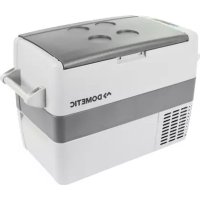
CoolFreeze CF 50 - Fridge DOMETIC - Free user manual and instructions
Find the device manual for free CoolFreeze CF 50 DOMETIC in PDF.



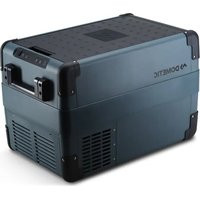
| Product Type | Compression Cooler |
| Brand | Dometic |
| Model | CoolFreeze CF 50 |
| Total Volume | 48 L |
| Dimensions (W × H × D) | 630 × 480 × 360 mm |
| Weight | 18 kg |
| Power Supply | 12/24 V DC (cigarette lighter socket) and 100-240 V AC |
| Nominal Current (12 V) | 7.0 A |
| Nominal Current (24 V) | 3.0 A |
| Nominal Current (100-240 V~) | 1.3 to 0.7 A |
| Temperature Range | +20 °C to -18 °C |
| Climate Class | N, ST, T (ambient temperature +16 °C to +43 °C) |
| Noise Emissions | 45 dB(A) |
| Refrigerant | R134a, 41 g |
| CO₂ Equivalent | 0.059 t |
| Global Warming Potential (GWP) | 1430 |
| Main Functions | 3-level battery protector, Turbo mode, digital temperature display, 1 °C step adjustment, lid lock, mountable carrying handles, reversible lid hinge |
| Maintenance and Cleaning | Clean inside and outside with a damp cloth; defrost regularly; do not use abrasive cleaners |
| Safety | Protection against reverse polarity and short circuits; battery protector preventing excessive discharge; automatic shutdown at low voltage |
| Spare Parts and Repairability | Appliance fuse (T4AL 250V), connector fuse 12/24 V (8A 32V), internal DC fuse (10A blade); replacement of LED light components; repairs by authorized service |
| General Information | Intended use: cooling food, use in camping and vehicles (tilt up to 30° on boat); do not use for corrosive substances or freezing |
Frequently Asked Questions - CoolFreeze CF 50 DOMETIC
User questions about CoolFreeze CF 50 DOMETIC
0 question about this device. Answer the ones you know or ask your own.
Ask a new question about this device
Download the instructions for your Fridge in PDF format for free! Find your manual CoolFreeze CF 50 - DOMETIC and take your electronic device back in hand. On this page are published all the documents necessary for the use of your device. CoolFreeze CF 50 by DOMETIC.
USER MANUAL CoolFreeze CF 50 DOMETIC
© 2020 Domatic Group. The visual appearance of the contents of this manual is protected by copyright and design law. The underlying technical design and the products contained herein may be protected by design, patent or be patent pending. The trademarks mentioned in this manual belong to Domatic Sweden AB. All rights are reserved.

4
5
9
eprel.ec.europa.eu
Please read these instructions carefully and follow all instructions, guidelines, and warnings included in this product manual in order to ensure that you install, use, and maintain the product properly at all times. These instructions MUST stay with this product.
By using the product, you hereby confirm that you have read all instructions, guidelines, and warnings carefully and that you understand and agree to abide by the terms and conditions as set forth herein. You agree to use this product only for the intended purpose and application and in accordance with the instructions, guidelines, and warnings as set forth in this product manual as well as in accordance with all applicable laws and regulations. A failure to read and follow the instructions and warnings set forth herein may result in an injury to yourself and others, damage to your product or damage to other property in the vicinity. This product manual, including the instructions, guidelines, and warnings, and related documentation, may be subject to changes and updates. For up-to-date product information, please visit www.dometic.com.
Contents
1 Explanation of symbols 8
2 Safety instructions 8
3 Scope of delivery. 11
4 Intended use 1]
5 Function description 12
5.1 Scope of functions 12
5.2 Operating and display elements 12
6Operation 13
6.1 Before initial use 14
6.2 Saving energy 14
6.3 Connecting the cooler 15
6.4 Using the battery monitor 16
6.5 Using the cooler 17
6.6 Setting the temperature 18
6.7 Switching off the cooler 18
6.8 Defrosting the cooler 19
6.9 Replacing the device fuse 19
6.10 Replacing the plug fuse (12/24 V) 19
6.11 Replacing the light bulb 20
7 Cleaning and maintenance 20
8 Troubleshooting 21
9 Warranty 22
10 Disposal 22
11 Technical data 23
1 Explanation of symbols

DANGER!
Safety instruction: Indicates a hazardous situation that, if not avoided, will result in death or serious injury.

WARNING!
Safety instruction: Indicates a hazardous situation that, if not avoided, could result in death or serious injury.

CAUTION!
Safety instruction: Indicates a hazardous situation that, if not avoided, could result in minor or moderate injury.

NOTICE!
Indicates a situation that, if not avoided, can result in property damage.

NOTE
Supplementary information for operating the product.
2 Safety instructions

WARNING! Failure to obey these warnings could result in death or serious injury.
Electrocution hazard
- Do not operate the cooling device if it is visibly damaged.
- If this cooling device's power cable is damaged, it must be replaced by the manufacturer, a service agent or a similarly qualified person in order to prevent safety hazards.
- This cooling device may only be repaired by qualified personnel. Improper repairs can lead to considerable hazards.
Fire hazard
- When positioning the device, ensure the supply cord is not trapped or damaged.
- Do not locate multiple portable socket-outlets or portable power supplies at the rear of the device.
Health hazard
- This device can be used by children aged from 8 years and above and persons with reduced physical, sensory or mental capabilities or lack of experience and knowledge if they have been given supervision or instruction concerning use of the device in a safe way and understand the hazards involved.
Children shall not play with the device. - Cleaning and user maintenance shall not be made by children without supervision.
- Children aged from 3 to 8 years are allowed to load and unload cooling devices.
Explosion hazard
- Do not store any explosive substances such as spray cans with a flammable propellant in the cooling device.

CAUTION! Failure to obey these cautions could result in minor or moderate injury.
Electrocution hazard
- Before starting the cooling device, ensure that the power supply line and the plug are dry.
- Disconnect the cooling device from the power supply
- before each cleaning and maintenance
- after every use
Health hazard
- Please check if the cooling capacity of the device is suitable for storing the food or medicine you wish to cool.
- Food may only be stored in its original packaging or in suitable containers.
- Opening the cooling device for long periods can cause significant increase of the temperature in the compartments of the device.
- Clean regularly surfaces that can come in contact with food and accessible drainage systems.
-
If the device is left empty for long periods:
-
Switch off the device.
- Defrost the device.
- Clean and dry the device.
- Leave the lid open to prevent mould developing within the device.

NOTICE! Damage hazard
- Risk of overheating!
- Check that the voltage specification on the type plate corresponds to that of the energy supply.
- Only connect the cooling device as follows:
- With the DC connection cable to a DC power supply in the vehicle
- Or with the AC connection cable to an AC power supply
- Never pull the plug out of the socket by the cable.
- If the cooling device is connected to a DC outlet: Disconnect the cooling device and other power consuming devices from the battery before connecting a quick charging device.
- If the cooling device is connected to a DC outlet: Disconnect the cooling device or switch it off when you turn off the engine. Otherwise you may discharge the battery.
- The cooling device is not suitable for transporting caustic materials or materials containing solvents.
- Do not use electrical devices inside the cooling device unless they are recommended by the manufacturer for the purpose.
- Do not place the cooling device near naked flames or other heat sources (heaters, direct sunlight, gas ovens etc.).
Ensure at all times that there is a minimum of 50 mm ventilation on all four sides of the cooling device. Keep the ventilation area free of any objects that could restrict the air flow to the cooling components. Do not place the cooling device in closed compartments or areas with none or minimal air flow.
- Ensure that the ventilation openings are not covered.
- Do not fill the inner container with ice or fluids.
- Never immerse the cooling device in water.
- Protect the cooling device and cables against heat and moisture.
- The device shall not to be exposed to rain.
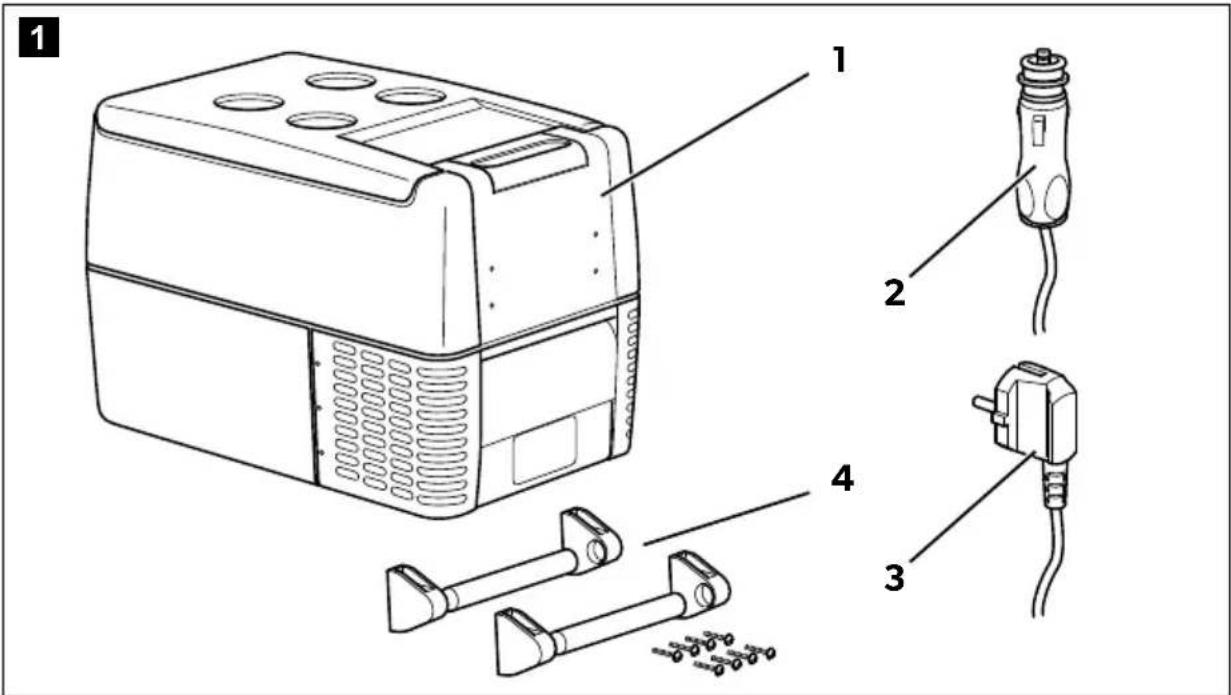
3 S C O P E O F D
| No. in fig. 1, page 3 | Quantity Description |
| 11 cooler | |
| 2 | 1 Connection cable for 12/24 V= connection |
| 3 | 1 Connection cable for 100-240 V~ connection |
| 4 2 Carrying handle, consisting of: | |
| - 2 h o l d e r s | |
| - 1 h a n d l e | |
| - 4 fastening screws | |
| - | 1 O p e |
4 Intended use
The cooling box is suitable for cooling food. The cooling box is also suitable for use on vehicles. The cooling box is designed to be operated from a DC power supply socket of a vehicle or from an AC power supply.
The cooling box is suitable for camping use.
The cooling box is not suitable for:
- storage of corrosive, caustic or solvent-containing substances
- freezing of food
This cooling box is not intended to be used as a built-in appliance.
This cooling box is only suitable for the intended purpose and application in accordance with these instructions.
This manual provides information that is necessary for proper installation and/or operation of the cooling box. Poor installation and/or improper operating or maintenance will result in unsatisfactory performance and a possible failure.
The manufacturer accepts no liability for any injury or damage to the product resulting from:
- Incorrect assembly or connection, including excess voltage
- Incorrect maintenance or use of spare parts other than original spare parts provided by the manufacturer
-
Alterations to the product without express permission from the manufacturer
-
Use for purposes other than those described in this manual
Domatic reserves the right to change product appearance and product specifications.
5 Function description
A maintenance-free refrigerant circuit with compressor provides the cooling. The extra strong insulation and powerful compressor ensure especially fast cooling.
The cooler is portable.
When used on boats, the cooler can be withstand a constant heel (inclination) of 30° .
5.1 Scope of functions
- Power supply with priority circuit for connecting to the AC mains
- Three-level battery monitor to protect the vehicle battery
- Turbo mode for rapid cooling
- Display with temperature gauge switches off automatically at low battery voltage
- Temperature setting: With two buttons in steps of 1° C ( 2° F )
- Removable carrying handles
5.2 Operating and display elements
CF35, CF40
Lock for lid: fig. 2 1, page 3
CF35, CF40, CF50
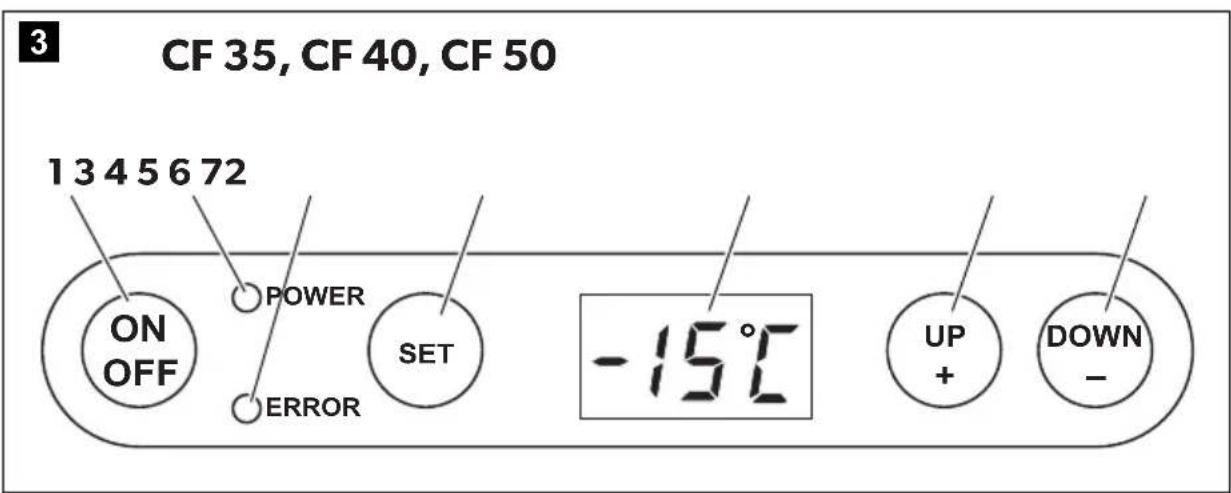
Operating panel (fig. 3, page 3)
Item Description Explanation
1 ON OFF
Switches the cooler on or off when the button is pressed for between one and two seconds
| Item Description | Explanation |
| 2 POWER Status indication | |
| LED lights up green: Compressor is on | |
| LED lights up orange: Compressor is off | |
| LED flashes orange: display switched off automatically due to low battery voltage | |
| 3 ERROR LED flashes red: Device is switched on but not ready for operation | |
| 4 SET Selects the input mode - Temperature setting - Celsius or Fahrenheit display - Set battery monitor | |
| 5 – Display, shows the information | |
| 6 UP + Press once to increase the value | |
| 7 DOWN – Press once to decrease the value | |
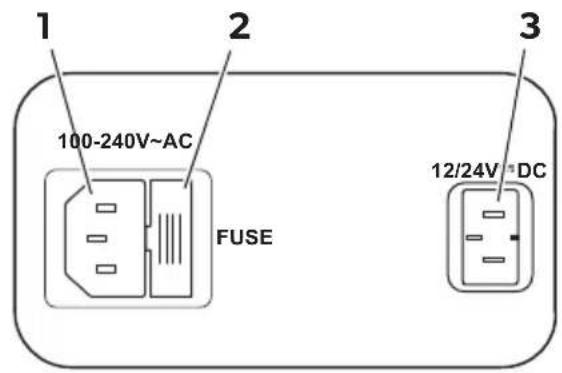
Connection sockets (fig. 4, page 4):
Item Description
1 Connection socket AC voltage supply
2 Fuse holder
3 Connection socket DC voltage supply
6 O p e r a t i o n

WARNING! Fire hazard!
- When positioning the device, ensure the supply cord is not trapped or damaged.
- Do not locate multiple portable socket-outlets or portable power supplies at the rear of the device.
6.1 Before initial use

NOTE
Before starting your new cooler for the first time, you should clean it inside and outside with a damp cloth for hygienic reasons (please also refer to the chapter "Cleaning and maintenance" on page 20).
Mounting the handles
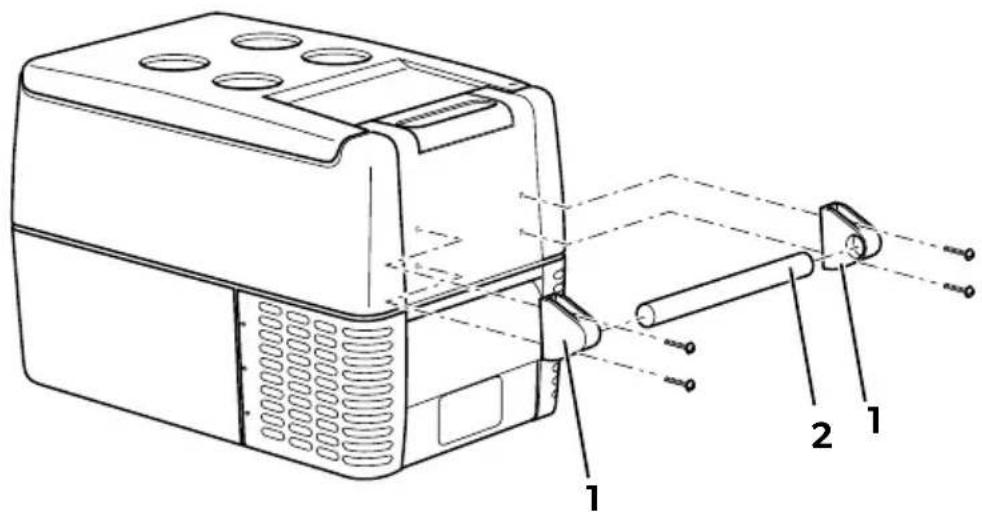
The handles are enclosed unassembled. If you wish to attach the handles, proceed as follows:
Make a handle by putting two holders (fig. 5 1, page 4) and a handle (fig. 5 2, page 4) together.
Fasten the grip with the enclosed screws in the holes provided.
Turning the lid stop around (CF50)
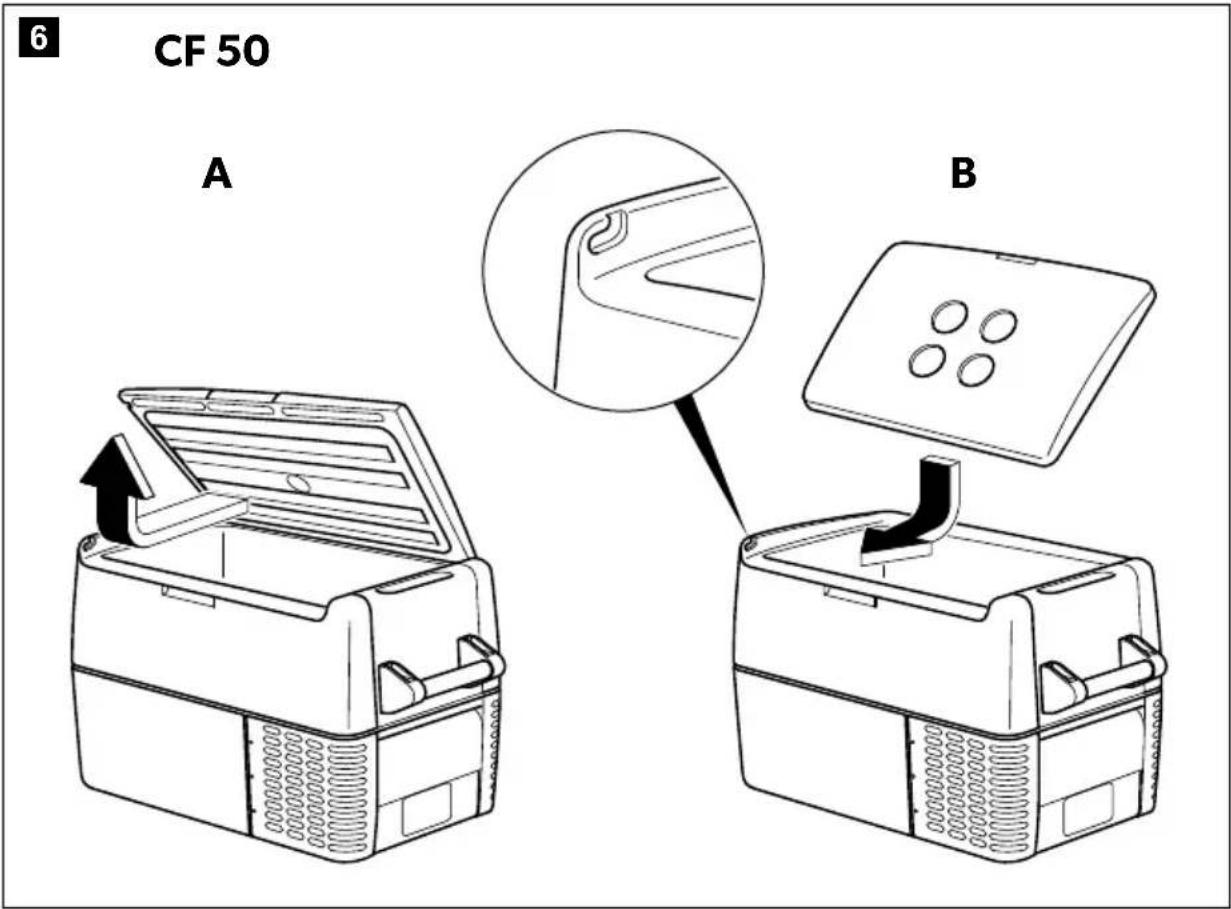
You can turn the lid stop around if you want to open the lid from the other side. To do this, proceed as follows:
Open the lid and pull it out (fig. 6 A, page 5).
Turn the lid.
Insert the lid in the lid holders on the side opposite the cooler (fig. 6 B, page 5).
Selecting the temperature units
You can switch the temperature display between Celsius and Fahrenheit. This is how to do it:
Switch on the cooler.
Press the "SET" button (fig. 3 4, page 3) twice.
Use the "UP+" (fig. 3 6, page 3) and "DOWN-" (fig. 3 7, page 3) buttons to select Celsius or Fahrenheit.
- The selected temperature units then appear in the display for a few seconds. The display flashes several times before it returns to the current temperature.
6.2 Saving energy
- Choose a well ventilated location which is protected from direct sunlight.
-
Allow warm food to cool down first before placing it in the cooling device to keep cool.
-
Do not open the cooling device more often than necessary.
- Do not leave the cooling device open for longer than necessary.
- If the cooler has a basket: For optimal energy consumption, position the basket according to its position on delivery.
- On a regularly basis, make sure the lid seal still fits properly.
6.3 Connecting the cooler
Connecting to a battery (vehicle or boat)
The cooler can be operated with 12V = or 24V = .

NOTICE! Danger of damage!
Disconnect the cooler and other consumer units from the battery before you connect the battery to a quick charging device.
Overvoltage can damage the electronics of the device.
For safety reasons the cooler is equipped with an electronic system to prevent the polarity reversal. This protects the cooler against short-circuiting when connecting to a battery.
Plug the 12/24V connection cable (fig. 1 2, page 3) into the DC voltage socket and also into the cigarette lighter or a 12V or 24V socket.
Connecting to a 100 - 240 V AC mains (e.g. in the home or office)

DANGER! Danger of electrocution!
- Never handle plugs and switches with wet hands or if you are standing on a wet surface.
- If you are operating your cooler on board a boat from a mains connection of 100 - 240V , you must install a residual current circuit breaker between the 100 - 240V AC mains and the cooler. Seek advice from a trained technician.
The coolers have an integrated multi-voltage power supply with priority circuit for connecting to an AC voltage source of 100 - 240V . The priority circuit automatically switches the cooler to mains operation, if the device is connected to a 100 - 240V AC mains, even if the 12/24V connection cable is still attached.
When switching between the AC mains and the battery supply, the red LED may light up briefly.
Plug the 100-240 V connection cable (fig. 1 3, page 3) into the AC voltage socket and connect it to the 100 - 240 V AC voltage mains.
6.4 Using the battery monitor
The device is equipped with a multi-level battery monitor that protects your vehicle battery against excessive discharging when the device is connected to the on-board 12/24 V supply.
If the cooler is operated when the vehicle ignition is switched off, the cooler switches off automatically as soon as the supply voltage falls below a set level. The cooler will switch back on once the battery has been recharged to the restart voltage level.

NOTICE! Danger of damage!
When switched off by the battery monitor, the battery will no longer be fully charged. Avoid starting repeatedly or operating current consumers without longer charging phases. Ensure that the battery is recharged.
In "HIGH" mode, the battery monitor responds faster than at the levels "LOW" and "MED" (see the following table).
| Battery monitor mode LOW MED HIGH | ||
| Switch-off voltage at 12 V | 10.1 V 11.4 V 11.8 V | |
| Restartvoltage at 12 V | 11.1 V 12.2 V 12.6 V | |
| Switch-off voltage at 24 V | 21.5 V 24.1 V | 24.6 V |
| Restart voltage at 24 V | 23.0 V | 25.3 V |
| 26.2 V | ||
This is how to select the battery monitor mode:
Switch on the cooler.
Press the "SET" button (fig. 3 4, page 3) three times.
Use the "UP+" (fig. 3 6, page 3) and "DOWN-" (fig. 3 7, page 3) buttons to select the battery monitor mode.
- The selected mode then appears in the display for a few seconds. The display flashes several times before it returns to the current temperature.

NOTE
When the cooler is supplied by the starter battery, select the battery monitor mode "HIGH". If the cooler is connected to a supply battery, the battery monitor mode "LOW" will suffice.
If you wish to operate the cooler from the AC mains, set the battery monitor to the "LOW" position.
6.5 Using the cooler

NOTICE! Danger of overheating!
Ensure at all times that there is sufficient ventilation so that the heat that generated during operation can dissipate. Ensure that the ventilation slots are not covered. Make sure that the device is sufficiently far away from walls and other objects so that the air can circulate.
To avoid food waste, note the following:
- Keep temperature fluctuation as low as possible. Only open the cooling box as often and for as long as necessary. Store the foodstuff in such a way that the air can still circulate well.
- Adjust the temperature to the quantity and type of the foodstuff.
- Foodstuff can easily absorb or release odor or taste. Always store foodstuff covered or in closed containers/bottles.
Place the cooler on a firm foundation.
Make sure that the ventilation slots are not covered and that the heated air can dissipate.

NOTE
Place the cooler as shown (fig. 1, page 3). If you operate the box in a different position it can be damaged.
Close the cooler, see chapter "Connecting the cooler" on page 15.

NOTE
If you wish to operate the cooler from the AC mains, set the battery monitor to the "LOW" position.

NOTICE! Danger from excessively low temperature!
Ensure that the only those objects are placed in the cooler that are intended to be cooled at the selected temperature.
Press the "ON/OFF" button (fig. 3 1, page 3) for between one and two seconds.
The "POWER" LED lights up.
The display (fig. 3 5, page 3) switches on and shows the current cooling temperature.

NOTE
The temperature displayed is that of the middle of the interior. The temperatures elsewhere can deviate from this temperature.
The cooler starts cooling the interior.

NOTE
When operating with the battery, the display switches off automatically if the battery voltage is low. The LED "POWER" flashes orange.
Locking the cooler (CF35, CF40)
Close the lid.
Press the lock (fig. 2 1, page 3) down, until it latches in place audibly.
6.6 Setting the temperature
Press the "SET" button (fig. 3 4, page 3) once.
Use the "UP+" (fig. 3 6, page 3) and "DOWN-" (fig. 3 7, page 3) buttons to select the cooling temperature.
- The cooling temperature appears in the display for a few seconds. The display flashes several times and then the current temperature is displayed again.
6.7 Switching off the cooler
Empty the cooler.
Switch the cooler off.
Pull out the connection cable.
If you do not want to use the cooler for a longer period of time:
Leave the cover slightly open. This prevents odour build-up.
6.8 Defrosting the cooler
Humidity can form frost in the interior of the cooling device or on the vaporiser. This reduces the cooling capacity. Defrost the device in good time to avoid this.

NOTICE! Danger of damage!
Never use hard or pointed tools to remove ice or to loosen objects which have frozen in place.
To defrost the cooler, proceed as follows:
Take out the contents of the cooling device.
If necessary, place them in another cooling device to keep them cool.
Switch off the device.
Leave the cover open.
Wipe off the defrosted water.
6.9 Replacing the device fuse

DANGER! Danger of electrocution!
Disconnect the connection cable before you replace the device fuse.
Pull off the connection cable.
Pry out the fuse insert (fig. 4 2, page 4) with a screwdriver.
Replace the defective fuse with a new one that has the same rating (T4AL 250V).
Press the fuse insert back into the housing.
6.10 Replacing the plug fuse (12/24 V)
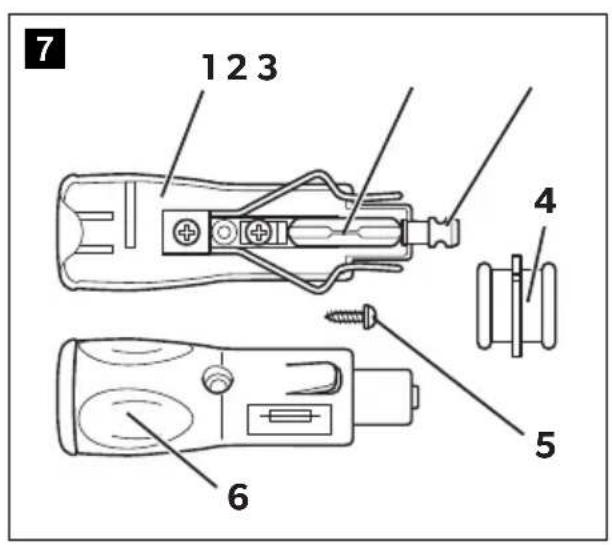
Pull the adapter sleeve (fig. 4, page 5) off of the plug.
Unscrew the screw (fig. 5, page 5) out of the upper half of the housing (fig. 1, page 5).
Carefully raise the upper half of the housing from the lower (fig. 7 6, page 5) half.
Take out the contact pin (fig. 3, page 5).
Replace the defective fuse (fig. 2, page 5) with a new one that has the same rating (8 A, 32 V).
Re-assemble the plug in the reverse order.

NOTE - Internal DC fuse
There is an additional DC fuse inside the device (Automotive standard blade fuse, 10 A). This fuse can only be replaced by an authorised repair centre.
6.11 Replacing the light bulb
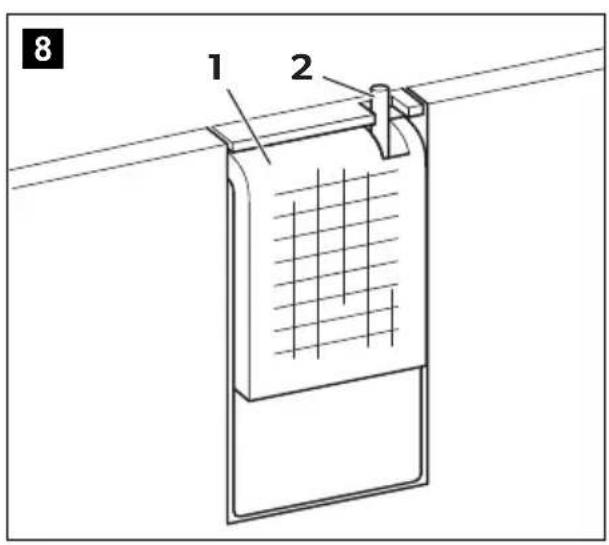
Press the switch pin (fig. 8 2, page 5) downwards so that the transparent part (fig. 8 1, page 5) of the lamp can be removed at the front.
Replace the light bulb.

NOTE
The LEDs in the light bulb must be aligned with the transparent part of the lamp.
Press the transparent part of the lamp back into the housing.
7 Cleaning and maintenance

NOTICE! Damage hazard
- Never clean the cooler under running water or in dish water.
- Do not use abrasive cleaning agents or hard objects during cleaning as these can damage the cooler.
Occasionally clean the device interior and exterior with a damp cloth.
Make sure that the air inlet and outlet vents on the device are free of any dust and dirt, so that heat can be released and the device is not damaged.
8 Troubleshooting
Fault Possible cause Suggested remedy
| Device does not function, LED does not glow. | There is no voltage present in the 12/24 V socket (cigarette lighter) in your vehicle. | The ignition must be switched on in most vehicles to apply current to the cigarette lighter. |
| No voltage present in the AC voltage socket. | Try using another plug socket. | |
| The device fuse is defective. | Replace the device fuse, see chapter “Replacing the device fuse” on page 19. | |
| The integrated mains adapter is defective. | This can only be repaired by an authorised repair centre. | |
| The device does not cool (plug is inserted, “POWER” LED is lit). | Defective compressor. This can only be repaired by an authorised customer services unit. | |
| The device does not cool (plug is inserted, “POWER” LED flashes orange, display is switched off). | Battery voltage is too low. | Test the battery and charge it as needed. |
| When operating from the DC outlet: The ignition is on and the device is not working and the LED is not lit. | The DC outlet is dirty. This results in a poor electrical contact. | If the plug of your cooler becomes very warm in the DC outlet, either the DC outlet must be cleaned or the plug has not been assembled correctly. |
| The fuse of the DC plug has blown. | Replace the fuse in the DC plug, see chapter “Replacing the plug fuse (12/24 V)” on page 19. | |
| The DC fuse inside the device has blown. | This can only be repaired by an authorised repair centre. | |
| The vehicle fuse has blown. | Replace the vehicle’s DC outlet fuse. Please refer to your vehicle’s operating manual. | |
| The display shows an error message (e.g. “Err1”) and the appliance does not cool. | The appliance has switched off due to an internal fault. | This can only be repaired by an authorised repair centre. |
9 W a r r a n t y
The statutory warranty period applies. If the product is defective, please contact the manufacturer's branch in your country (see dometic.com/dealer) or your retailer.
For repair and warranty processing, please include the following documents when you send in the device:
- A copy of the receipt with purchasing date
- A reason for the claim or description of the fault
10 Disposal
Place the packaging material in the appropriate recycling waste bins wherever possible.
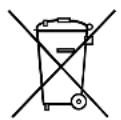
If you wish to finally dispose of the product, ask your local recycling centre or specialist dealer for details about how to do this in accordance with the applicable disposal regulations.
11 Technical data

NOTE
If the ambient temperature is above +32°C (+90°F) , the minimum temperature cannot be attained.
Test/certificates:
The refrigerant circuit contains R134a.
Contains fluorinated greenhouse gases
Hermetically sealed equipment
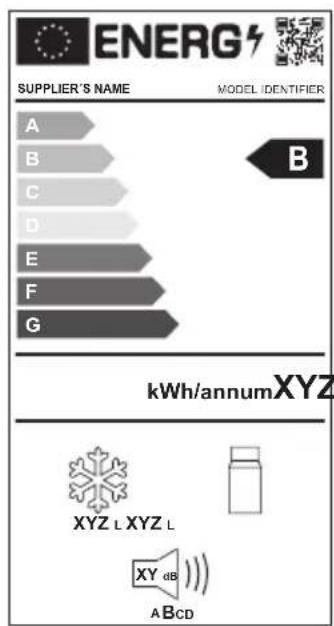
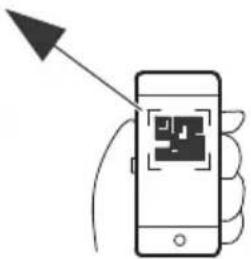
Further product information can be accessed via QR code on the energy label in the figures or via eprel.ec.europa.eu.
| CF35 CF40 | ||
| Connection voltage: | 12/24 V---and 100-240 V~ | |
| Rated current: | ||
| -12 V: | 6.0 A | |
| -24 V: | 3.0 A | |
| -100-240 V~: | 1.3 to 0.7 A | |
| Cooling capacity: | +20°C to -18°C (+68°F to 0°F) | |
| Total volume: 35 l 39 l | ||
| Climate class: N, ST, T | ||
| Intended ambient temperature use: | +16°C to +43°C | |
| Noise emission: 45 dB(A) | ||
| Refrigerant quantity: 38 g 41 g | ||
| CO2equivalent: 0.054 t | 0.059 t | |
| Global warming potential (GWP): | 1430 | |
| Dimensions (W x H x D) in mm: | 580 x 385 x 360 | 580 x 445 x 360 |
| Weight: | 15 kg | 16 kg |
| CF50 | |
| Connection voltage: | 12/24 V---and 100 - 240 V~ |
| Rated current: - 12 V: - 24 V: - 100 - 240 V~: | 7.0 A 3.0 A 1.3 to 0.7 A |
| Cooling capacity: | +20 °C to -18 °C (+68 °F to 0 °F) |
| Total volume: 48 l | |
| Climate class: N, ST, T | |
| Intended ambient temperature use: +16 °C to +43 °C | |
| Noise emission: 45 dB(A) | |
| Refrigerant quantity: 41 g | |
| CO2 equivalent: 0.059 t | |
| Global warming potential (GWP): 1430 | |
| Dimensions (W x H x D) in mm: | 630 x 480 x 360 |
| Weight: 18 kg | |
Risque de surchauffe!
WAARSCHUWING! Brandgevaar
6.6 Indstilling at temperatures
Tryk en gang på tasten „SET" (fig. 3 4, side 3).
Kylboxen ar lampie for mobil anvandning.
Kylboxen tãl konstant krängning pâ 30° (for användning pâ bâtar).
5.1 Funktioner
PASS PÅ! Fare for skade
- Fare for overoppheting!
PASS PÀ! Fare for overopbehing!
6.6 Stille inn temperature
Trykk på tasten «SET» (fig. 3 4, side 3) en gang.
YKA3AHNE-BHyTpEnHn npedeoxpaHntb NOcToHHoro ToKa
BHytpn yctpoiCTBa IMeetcIOnOpHnteNbHbI npedeoxpaHnteNb NOCTOHNHO ToKa (CTaHdapThbI aBTOMo6NtBbI pNOCKN npedeoxpaHnteB, 10 A).3aMeHy npedeoxpaHntePa3pe7aeTcBbIOJHrToNbKO aBTOPN3OBaHHOMy cepBvCHOMy ueHTpy.
6.11 3aMeHa IaMnbl
ПрижмITE KOHTaKTbIи UTnФT (pnc. 8 2, ctp.5) BHN3 TaK, YTO6bl MOxHO 6blIO CHrTb npO3paHyIO qAcTb (pnc. 8 1, ctp.5) CBetnIbHnKa.
3aMeHnte naMny.

YKA3AHNE
CBeToaIObI B IaMne OJXHbI 6bITb 6paueHbIK npO3paHNo YaCTN CBETINbHnKa.
YcTaHOBInTe npo3paHHyIO qAcTb CBETnIbHNKa B KOpnyC.
7Чистка и ухов

BHIMAHHE! Onachoctb nobpexdeHn!
- KaTeOpnueckn 3aPpeUaetcYnCTITb npI6Op NOd cTpyeB ODoB INN daJxe B eMKoCTN C BODoN.
He nCnoB3yIe IJIa YnCTKn a6pa3NBHbIe YnCTaIue CpeDCTBa HIN OCTpbIe PpeMeTb, T. K. OHN MOrY TnpNBecT N K NOBpeXdEHNAM XONoDInbHnKa.
Pernoiueckn ouuau Te np6op cnapx n n3Hytpn BnaXHO TpIko.
Y6eIITecb B TOM, yTO npHTOCHo-BbITJXHbIE BeHTINJUHOHHbIE OTBepCTn OUYIeHbI OT nbIN 3aIpy3HeHn, yTO6bl MOxHO 6blIO OTBcTn BO3HkaOuue npi pa6Ote TeIPO I ppeD0TBpaHTb ONaCHOCTb NOBpeXdHnI prN6opa.
8 YcTaPaHHe HeNcPpaBHOCTe
HencnpabHoctb Bo3moXHa npuHa BapnaHT ycTaPHeHn
Прибор He pa6o-taet, cBeToIIOI He rOpNT.
Bpo3eTke 12/24 B (npnkypmbaTe) BA bTOMO6Hne OTCytCTByeT HapjxHne.
B 60nbHnHCTBe aBTOMo6nnei dny
noaun HapxEHHa npKypuBaTeNb
Heo6XoIMO BkIIOHTb 3axnHaHne.
OTcyTCTByet HanpJxHHe Bpo3EtKe NepemEHHO TOka.
Ponpo6yIte npncoeHHnHb npn60p Kdpuro pO3eTke.
HEnCnpaBEN npedoxpa- HnteIb np6opa.
3aMeHnte npedeoxpaHNTenb np6opa, cm. Tn. «3aMeHa npedeoxpaHNTenp6opa» Ha cTp. 227.
IobpeXdeH BCTpoeHHbI 6nok nITaHnO t cETn.
PemOH pa3peaetc BbINONHtB TOnbKO aBTopn3OBaHHOMy cepBnCHOMy ceHTpy.
| Heincpapabnoctb Bo3moxhna prnchina BapnaHT yctpaHneHn | ||
| Прибор не охлax-DAET (штесер Вставпен, светоюд«POWER» ropit). | Heincpabvenkomпсccop. | Ремонт разршаetсь винолгь толъкobavtopиЗованому сервисому ceHTpy. |
| Прибор не охлaxdaet (штесерВставпен, светоюд«POWER» miraetopaнжевим сvetOM,dincпл徴ы ВькlioчeH). | Heioctatoohoe haprajehne 6atapen. | Проберъte батарец и, prihiNeobxodimocstn, заради te ee. |
| При pa6ote otГнебда постоногToKa:Зжигане вкlioчeHo, pri6opн He pa6otaeT, сvetоюдпогу. | Гнеб dio noctoanHoro ToKa3aigrzheno.ЭТо BeDeTeКПLOXOMU эпекtripuce-СКOMU KOHTaKtYu. | Еспь Вилka сnilьно harpebaetcbrГнебда постоногToKa,TO,BO3-MOЖHO,загязеньгглпиНелрвьнho co6paHa BWlnka. |
| Перерopel пededoxpani-Teьь Вилки постоногToKa. | ЗаменITE пededoxpani-teььшtekepaNoCTOANHORO TOKa,CM.II.«ЗаменЯ пedingoxpani-teьshtekepa(12/24B)»Ha ctrp.227. | |
| Перерopel пededoxpani-Teьь постоногToKa BWHytrn uystpoiSTBa. | Ремont разршаetсь винолгь толъкobavtopиЗованому сервисому ceHTpy. | |
| Перерopel пededoxpani-Teьь вбoptoborov сети abTomobuHn. | ЗаменITE пededoxpani-teьь постон-HORO TOKaВбoptoborov сети abTomobuHn.O6paTntecb кинсчукципо ekspnya-Taци Baшero abTomobuHn. | |
| Надиспee отобра-хаетс сообшениообшибке (над pris-мер,«Errl»),и pri6-bop He oxлaxdaet. | Внотернii сбов otknIO-chipnбop. | Ремont разршаetсь винолгь толъкobavtopиЗованому сервисому ceHTpy. |
9 rapaHTn
ДeиCTBNTeH yCTaHOBnEHbI 3aKOHOM cPOK rapaHTIN. EcIn npOdyKT HeNcnpaBeH, o6paTntEcB B npeiCTaBNTeJIbCTBO n3rOToBNTeI B BaSeI cTpaHe (cM. dometic.com/dealer) inn B TOpROByIO opraHn3aUIO.
B uejx npoBeHnpeMOHTa nI rapaHTnHOrO o6cnyXuBaHnBbI dOnxHbI taKxe nocnTa b cJeDyUoUne DOkymeHTbl:
- KOJIIO CyeTa C DaToI NOKyIKNI,
-Приуну рекламаши пи ONиcaHne HeNCnpaBHOCTN.
10ytvn3aun
IIO BO3MOXHOCTN, BbIKNbIBaIte yNaKOBOUHbIM MaTePnAIN B MyCOp, NOJnxuBn BTOpHuOH nepepa6oTke.
EcnBbOkoHnatbHO BbIBoNTe npOdyKT n3 3KcPnyaTuN,To nOnyUHTe HOpMaunB 6nXaJWeM UENTpe NO BTOpNUHNOpepa6OTke INN B TOPROB O CETN O COOTBeTCTByUxN PpeDnscAHnx N0 yTNIN3aUN.
11 Texnueckne daHHbIe

YKA3AHNE
Ipn TemnepaTypax OkpykaIoJero Bo3dyxa CbblSe 32 ° C MmHmMaJIbHa TeMnepaTypa 6Oone He MoXeT 6bITb DOCTNHyTa.
IcnbTaHna/CepTnΦkaTbI:



XoNoIbHbI KOHTyp coepxnt R134a.
CopekntopopobaHbIe napHKOBbIe ra3bl
Герметиески зakрытая контуклян
Ovladacipanel (obr.3, strane 3)
Pol. Označenie Vysvetlenie
1 ON OFF
Ovladacipanel (obr.3, strana 3)
dometic.com/sales-offices
- CONTENTS
- 1 EXPLANATION OF SYMBOLS
- DANGER
- WARNING
- CAUTION
- NOTICE
- NOTE
- 2 SAFETY INSTRUCTIONS
- WARNING! FAILURE TO OBEY THESE WARNINGS COULD RESULT IN DEATH OR SERIOUS INJURY
- ELECTROCUTION HAZARD
- FIRE HAZARD
- HEALTH HAZARD
- EXPLOSION HAZARD
- CAUTION! FAILURE TO OBEY THESE CAUTIONS COULD RESULT IN MINOR OR MODERATE INJURY
- NOTICE! DAMAGE HAZARD
- RISK OF OVERHEATING
- 3 S C O P E O F D
- 4 INTENDED USE
- 5 FUNCTION DESCRIPTION
- 5.1 SCOPE OF FUNCTIONS
- 5.2 OPERATING AND DISPLAY ELEMENTS
- ITEM DESCRIPTION EXPLANATION
- ITEM DESCRIPTION
- WARNING! FIRE HAZARD
- 6.1 BEFORE INITIAL USE
- MOUNTING THE HANDLES
- TURNING THE LID STOP AROUND (CF50)
- SELECTING THE TEMPERATURE UNITS
- 6.2 SAVING ENERGY
- 6.3 CONNECTING THE COOLER
- CONNECTING TO A BATTERY (VEHICLE OR BOAT)
- NOTICE! DANGER OF DAMAGE
- CONNECTING TO A 100 - 240 V AC MAINS (E.G. IN THE HOME OR OFFICE)
- DANGER! DANGER OF ELECTROCUTION
- 6.4 USING THE BATTERY MONITOR
- 6.5 USING THE COOLER
- NOTICE! DANGER OF OVERHEATING
- NOTICE! DANGER FROM EXCESSIVELY LOW TEMPERATURE
- LOCKING THE COOLER (CF35, CF40)
- 6.6 SETTING THE TEMPERATURE
- 6.7 SWITCHING OFF THE COOLER
- 6.8 DEFROSTING THE COOLER
- 6.9 REPLACING THE DEVICE FUSE
- 6.10 REPLACING THE PLUG FUSE (12/24 V)
- NOTE - INTERNAL DC FUSE
- 6.11 REPLACING THE LIGHT BULB
- 7 CLEANING AND MAINTENANCE
- 8 TROUBLESHOOTING
- 9 W A R R A N T Y
- 10 DISPOSAL
- 11 TECHNICAL DATA
- RISQUE DE SURCHAUFFE
- WAARSCHUWING! BRANDGEVAAR
- 6.6 INDSTILLING AT TEMPERATURES
- 5.1 FUNKTIONER
- PASS PÅ! FARE FOR SKADE
- FARE FOR OVEROPPHETING
- PASS PÀ! FARE FOR OVEROPBEHING
- 6.6 STILLE INN TEMPERATURE
- YKA3AHNE-BHYTPENHN NPEDEOXPAHNTB NOCTOHHORO TOKA
- 6.11 3AMEHA IAMNBL
- YKA3AHNE
- 7ЧИСТКА И УХОВ
- BHIMAHHE! ONACHOCTB NOBPEXDEHN
- 8 YCTAPAHHE HENCPPABHOCTE
- HENCNPABHOCTB BO3MOXHA NPUHA BAPNAHT YCTAPHEHN
- 9 RAPAHTN
- 10YTVN3AUN
- 11 TEXNUECKNE DAHHBIE
- POL. OZNAČENIE VYSVETLENIE
Brand : DOMETIC
Model : CoolFreeze CF 50
Category : Fridge