TSXW Racer met Sparco P310 Competition - Controller THRUSTMASTER - Free user manual and instructions
Find the device manual for free TSXW Racer met Sparco P310 Competition THRUSTMASTER in PDF.


| Product type | Racing wheel with force feedback |
| Brand | Thrustmaster |
| Model | TS-XW Racer |
| Wheel | Sparco P310 Competition (detachable) |
| Compatible platforms | Xbox One and Windows |
| Rotation angle | 1080° (auto-calibration) |
| Force feedback technology | Force Feedback (12 testable effects) |
| Wheel attachment | Thrustmaster Quick Release (rotating ring) |
| Base attachment | Fixation system with metal clamping screw (for table or cockpit) |
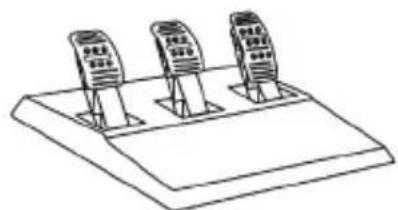
| Pedal set included | Yes (T3PA or T3PA-PRO, 3 adjustable pedals) |
| Connectors | USB (detachable cable), TURBO POWER power supply, pedal set, TH8A shifter |
| Cooling system | Internal fan (automatic on/off) |
| Buttons and controls | 2 sequential paddles, direction pad, Xbox Guide button, MODE button with LED |
| Additional features | Electronic pedal inversion (via MODE button), conical brake stop (MOD Conical Rubber Brake) |
| Power supply | TURBO POWER power supply (voltage according to country, detachable power cord) |
| Safety | Immediate stop in case of anomaly, do not use barefoot with pedals, adequate ventilation |
| Warranty | 2 years in EU (according to local legislation) |
Frequently Asked Questions - TSXW Racer met Sparco P310 Competition THRUSTMASTER
User questions about TSXW Racer met Sparco P310 Competition THRUSTMASTER
0 question about this device. Answer the ones you know or ask your own.
Ask a new question about this device
Download the instructions for your Controller in PDF format for free! Find your manual TSXW Racer met Sparco P310 Competition - THRUSTMASTER and take your electronic device back in hand. On this page are published all the documents necessary for the use of your device. TSXW Racer met Sparco P310 Competition by THRUSTMASTER.
USER MANUAL TSXW Racer met Sparco P310 Competition THRUSTMASTER
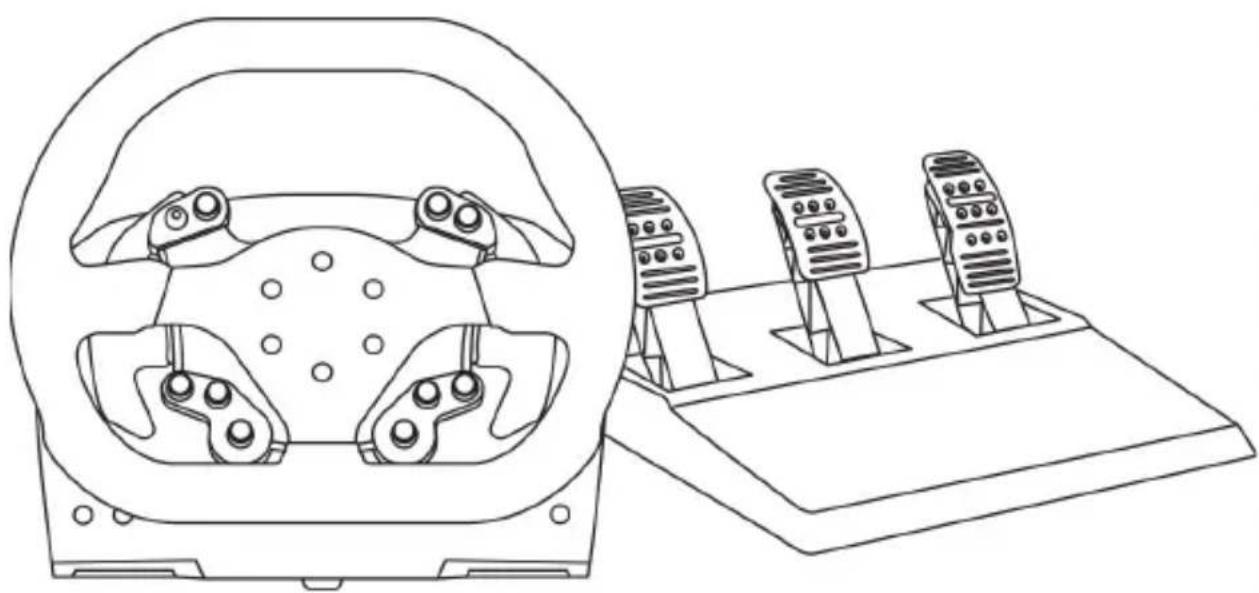
P310 Competition Mod
TS-XW RACER
For Xbox One and Windows
User Manual

TECHNICAL FEATURES
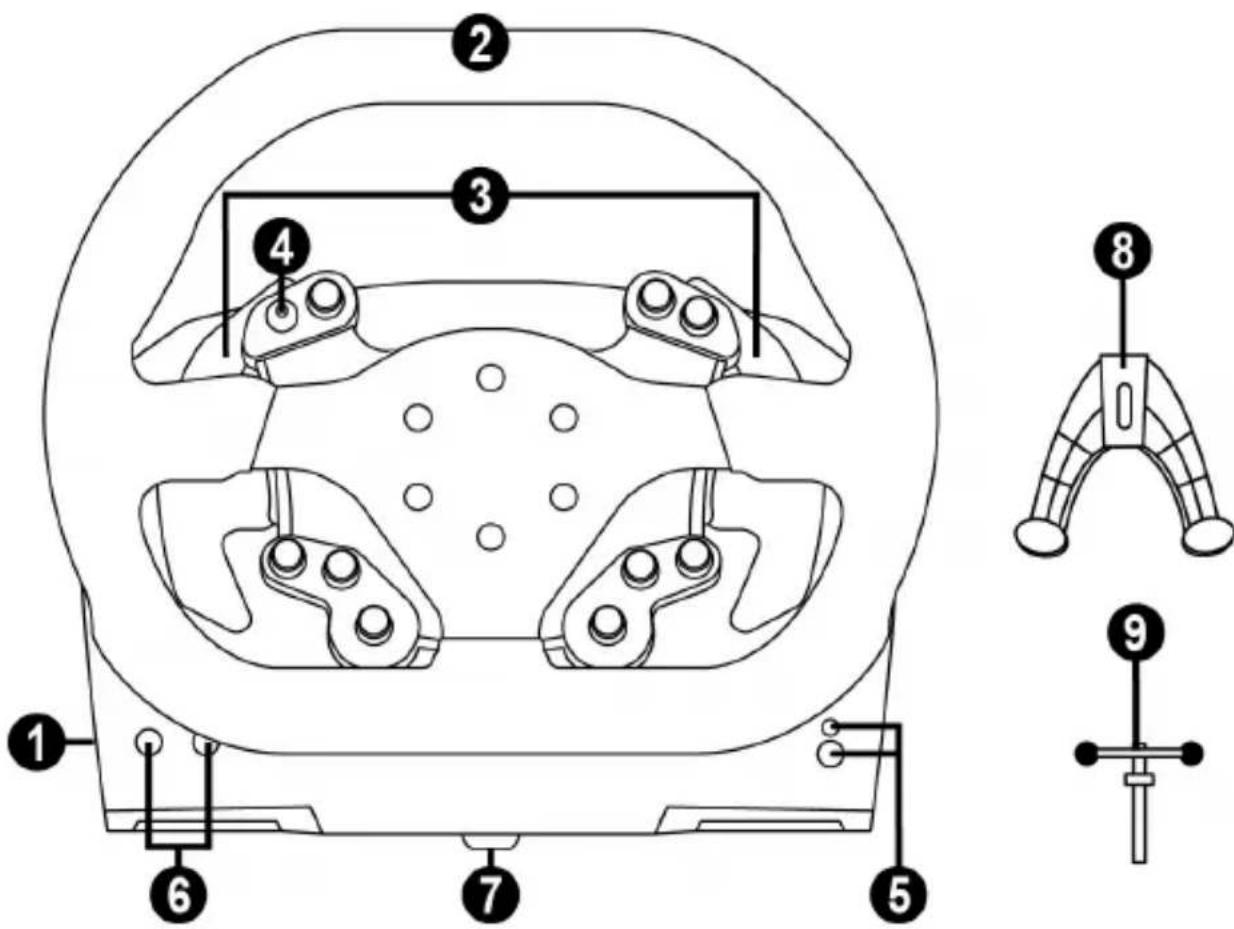
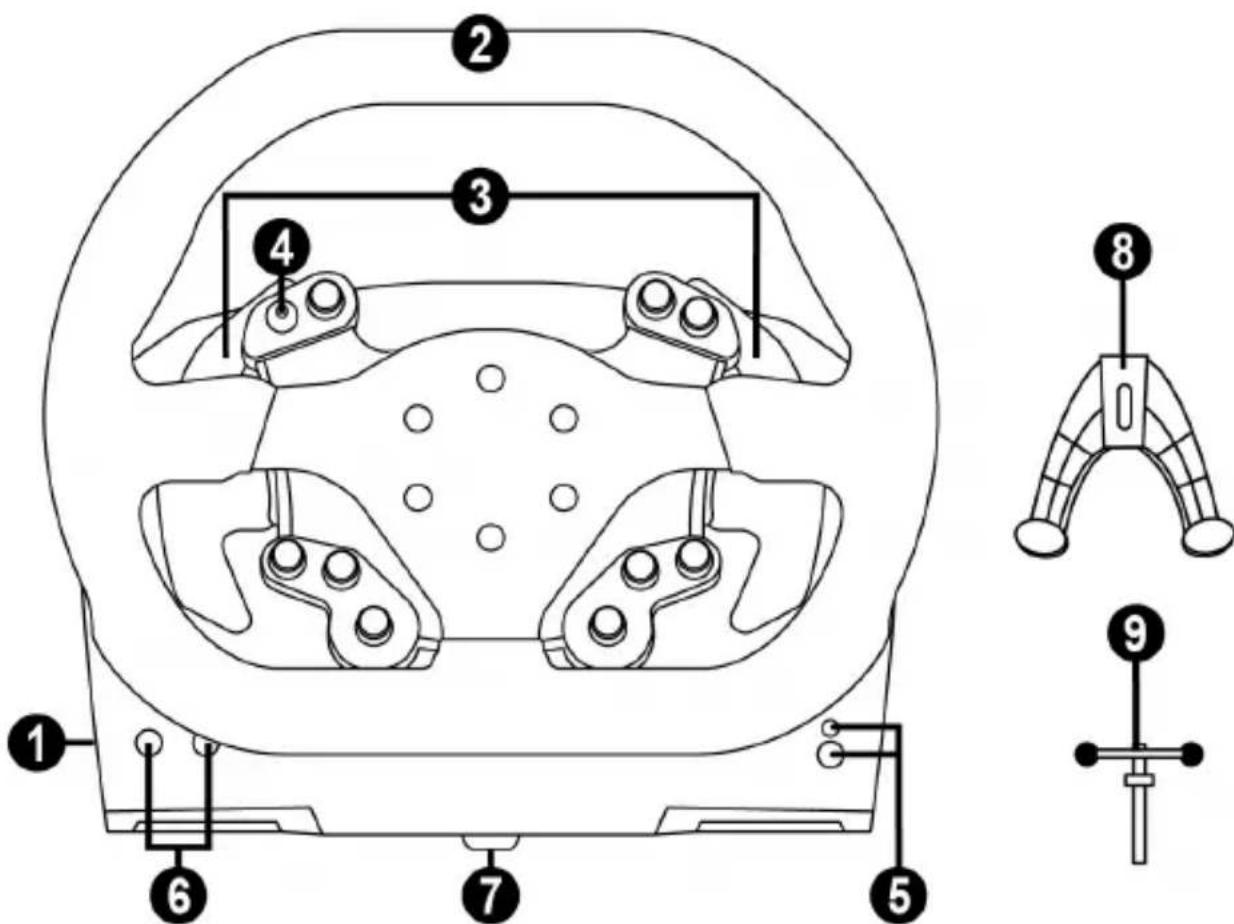
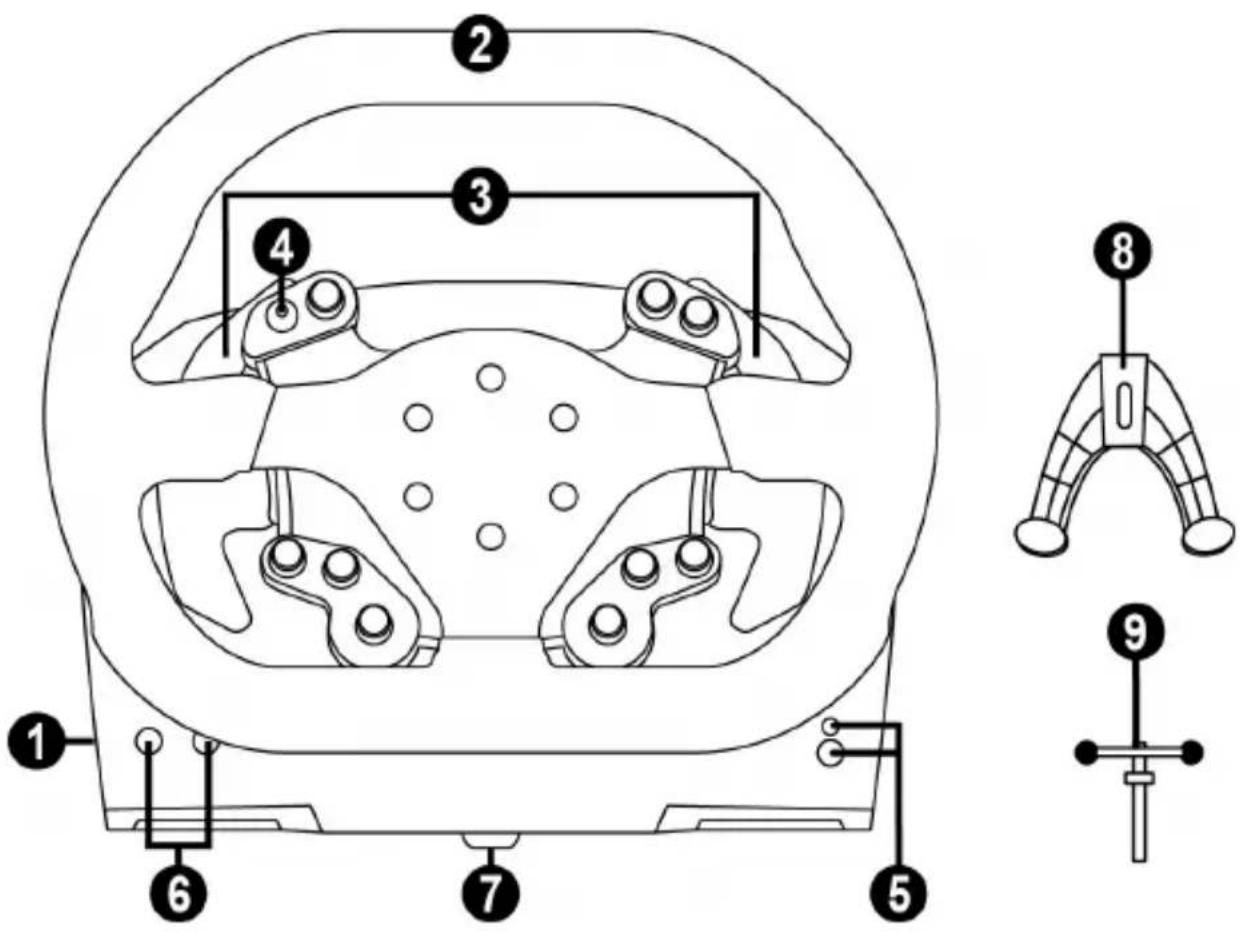
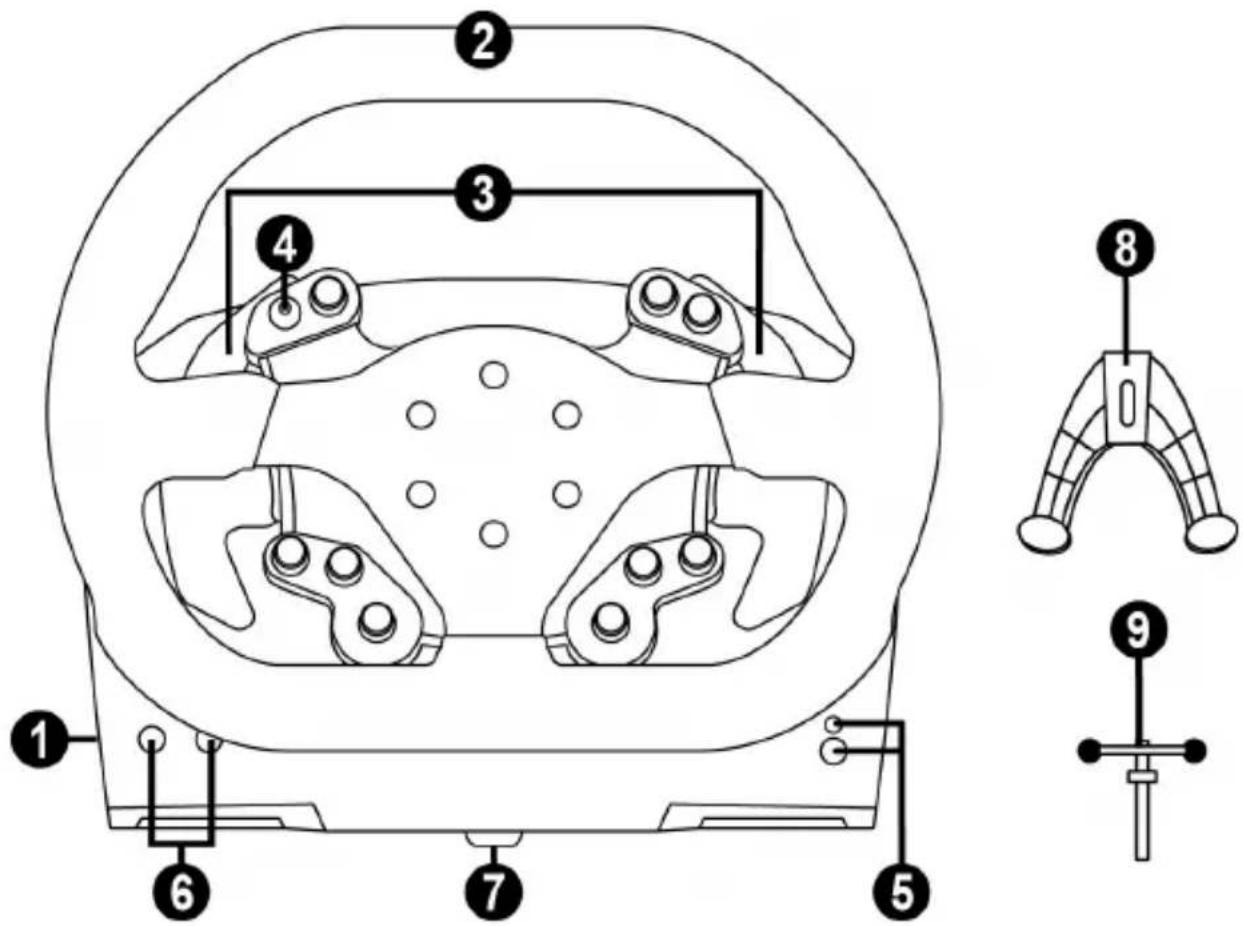
1 Base
2 Wheel
3 2 sequential paddle shifters (up & down)
4 D-pad with push button
5 Xbox Guide button + white indicator light
6 MODE button + red/green indicator light
7 Large threaded hole (for attachment system and fastening screw)
8 Attachment system
9 Metal fastening screw
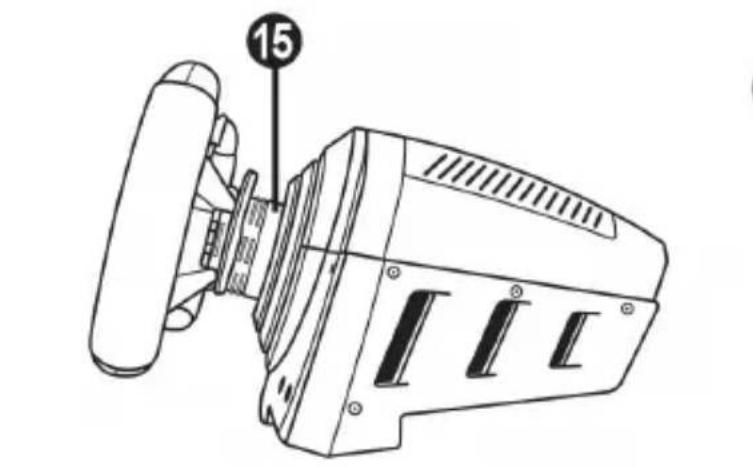
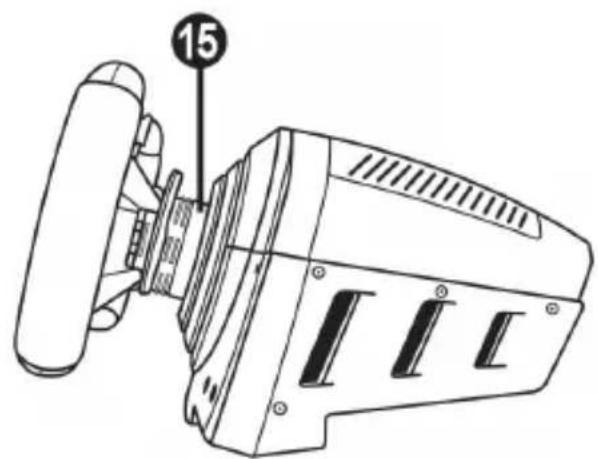
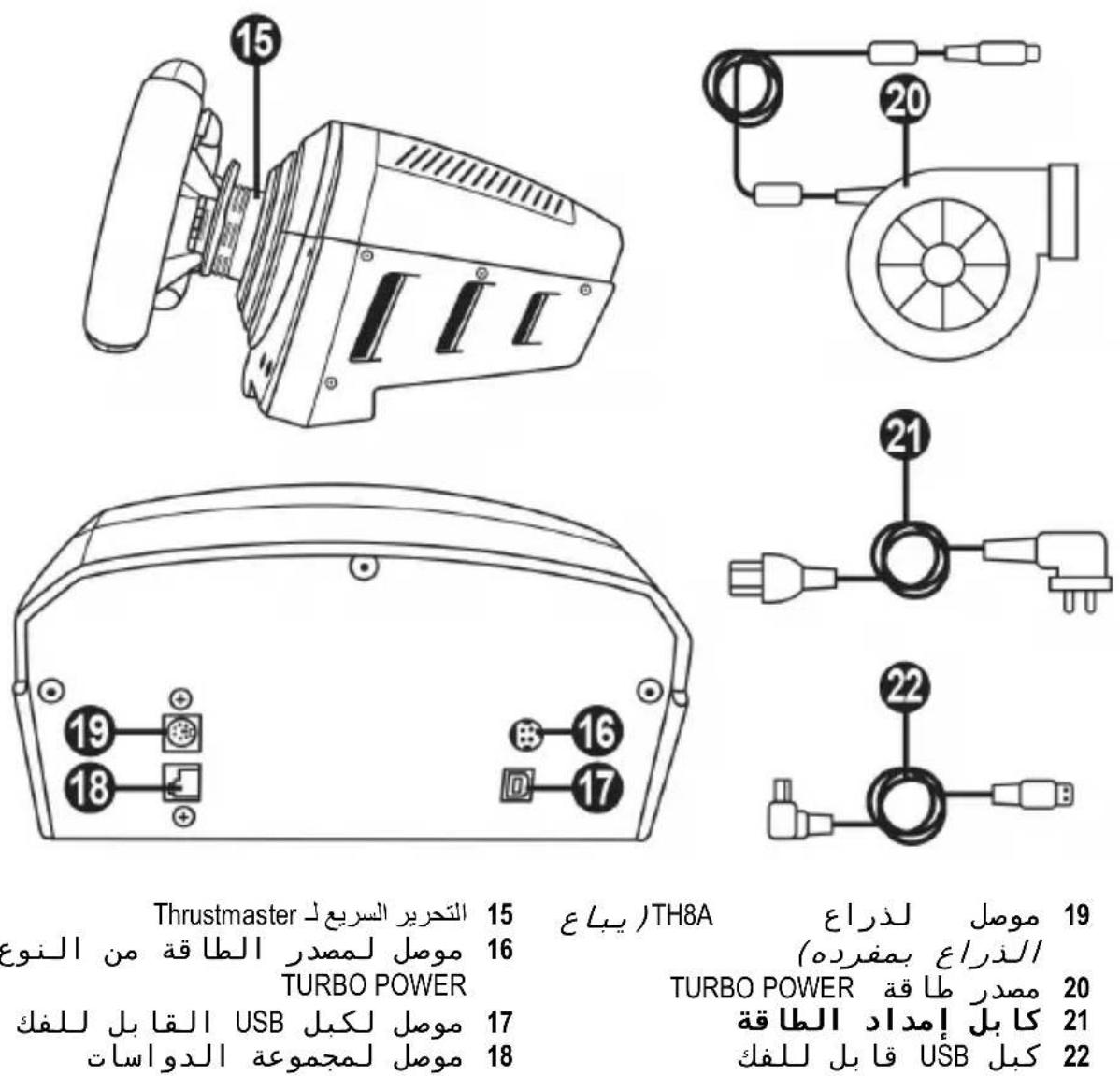
15 Thrustmaster Quick Release
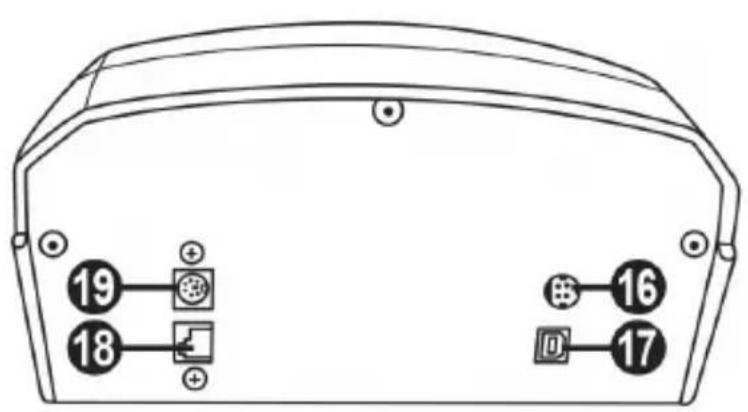
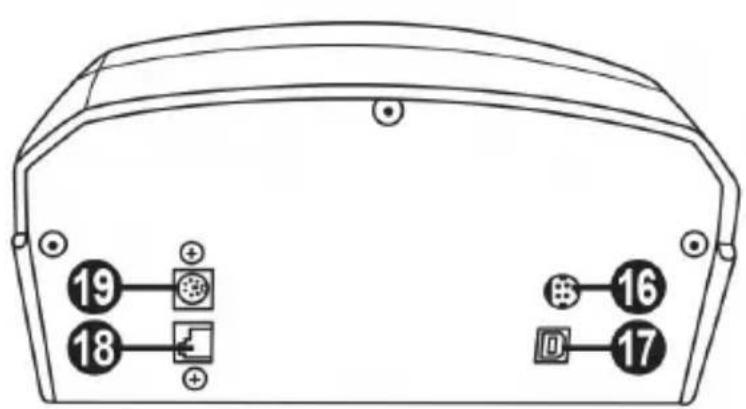
16 Connector for TURBO POWER power supply
17 Connector for removable USB cable
18 Connector for pedal set
19 Connector for TH8A shifter (shifter sold separately)
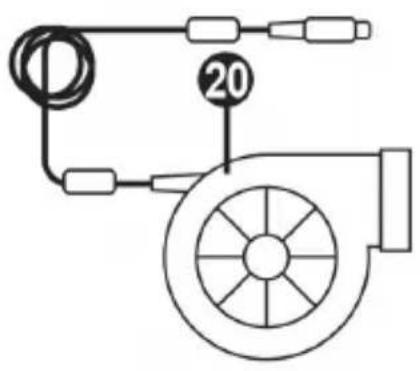
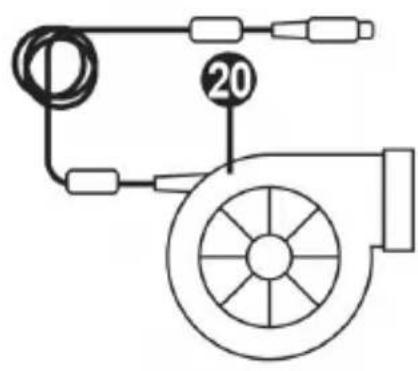
20 TURBO POWER power supply
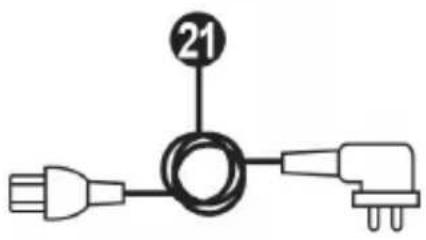
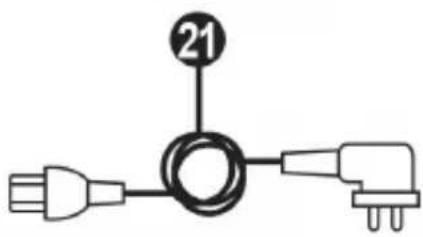
21 Power supply cable
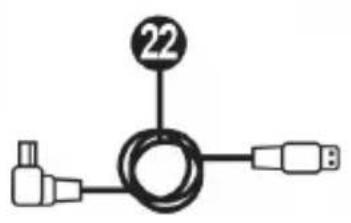
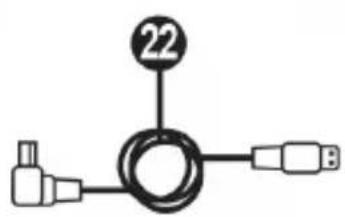
22 Removable USB cable
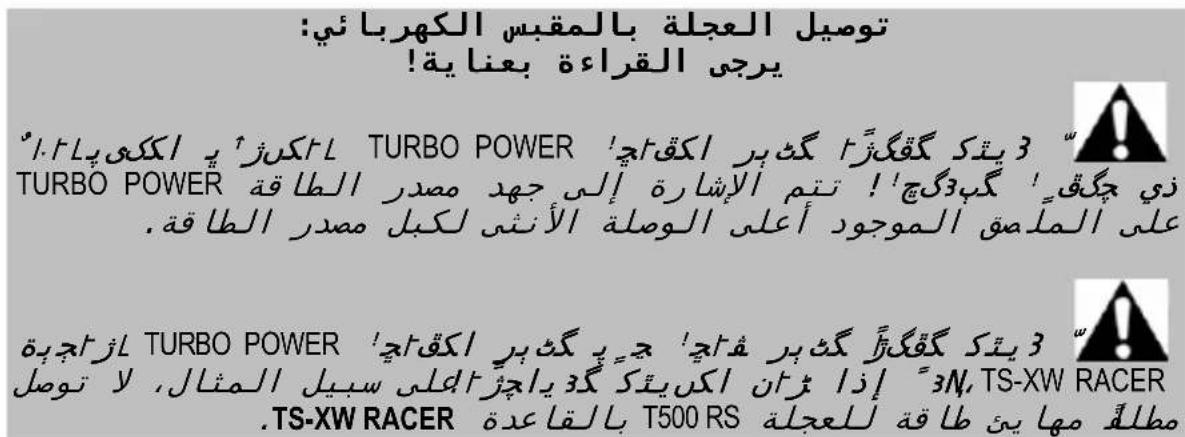
PLugging THE WHEEL INTO AN ELECTRICAL OUTLET: PLEASE READ CAREFULLY!

Never plug the TURBO POWER power supply into an electrical outlet with a different
voltage! The TURBO POWER power supply's voltage is indicated on the label located above the female connector for the power supply cable.

Never connect a power supply other than the TURBO POWER power supply to the TS-XW
RACER base, even if the connector is compatible! For example, never connect the power adapter for the T500 RS wheel to the TS-XW RACER base.
WARNING
Before using this product, please read this manual carefully and save it for later reference.

Warning - Electrical shock
- Keep the product in a dry location and do not expose it to dust or sunlight.
- Do not twist or pull on the connectors and cables.
- Do not spill any liquid on the product or its connectors.
- Do not short-circuit the product.
- Never dismantle the product; do not throw it onto a fire and do not expose it to high temperatures.
- Do not use a power supply cable other than the one provided with your racing wheel.
- Do not use the power supply cable if the cable or its connectors are damaged, split or broken.
- Make sure that the power supply cable is properly plugged into an electrical outlet, and properly connected to the connector at the rear of the racing wheel's base.
- Do not open up the racing wheel: there are no user-serviceable parts inside. Any repairs must be carried out by the manufacturer, its authorized representative or a qualified technician.
- Only use attachment systems/accessories specified by the manufacturer.
- If the racing wheel is operating abnormally (if it is emitting any abnormal sounds, heat or odors), stop using it immediately, unplug the power supply cable from the electrical outlet and disconnect the other cables.
- If you will not be using the racing wheel for an extended period of time, unplug its power supply cable from the electrical outlet.
- The electrical outlet must be located near the equipment and must be easily accessible.

Air vents
Make sure not to block any of the air vents on the racing wheel's base. For optimal ventilation, make sure to do the following:
- Position the wheel's base at least 10 cm away from any wall surfaces.
- Do not place the base in any tight spaces.
- Do not cover the base.
- Do not let any dust build up on the air vents.

For safety reasons, never use the pedal set with bare feet or while wearing only socks on your feet.
THRUSTMASTER © DISCLAIMS ALL RESPONSIBILITY IN THE EVENT OF INJURY RESULTING FROM USE OF THE PEDAL SET WITHOUT SHOES.

Warning - Injuries due to Force Feedback and repeated movements
Playing with a Force Feedback racing wheel may cause muscle or joint pain. To avoid any problems:
- Avoid lengthy gaming periods.
- Take 10 to 15 minute breaks after each hour of play.
- If you feel any fatigue or pain in your hands, wrists, arms, feet or legs, stop playing and rest for a few hours before you start playing again.

Warning - Injuries due to Force Feedback and repeated movements (continued)
- If the symptoms or pain indicated persist when you start playing again, stop playing and consult your doctor.
- Keep out of children's reach.
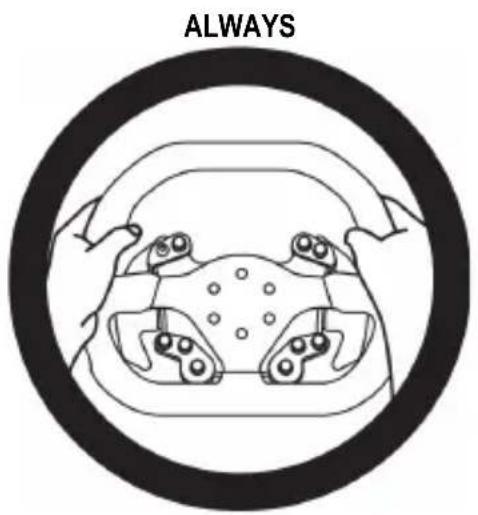
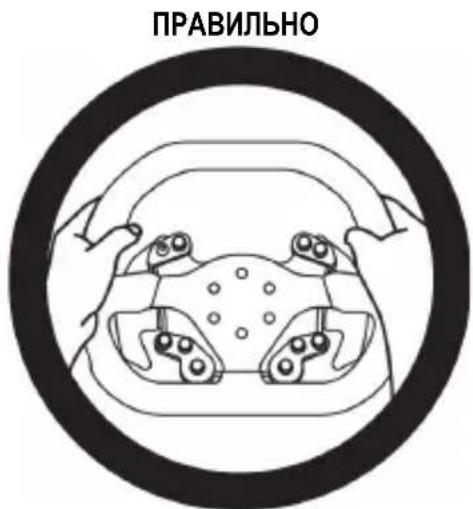
- During gameplay, always leave both hands correctly positioned on the wheel without completely letting go.
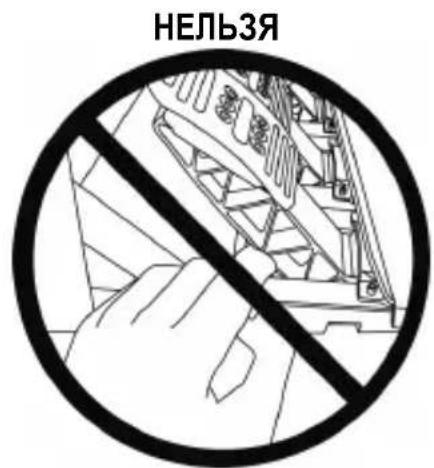
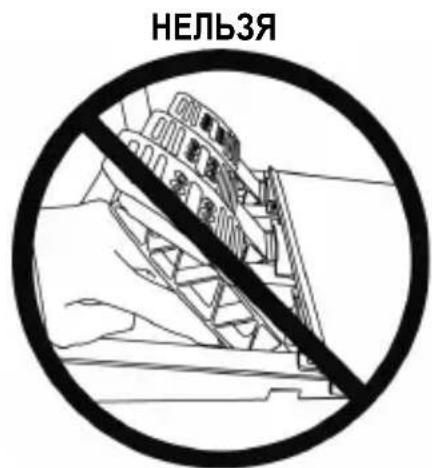
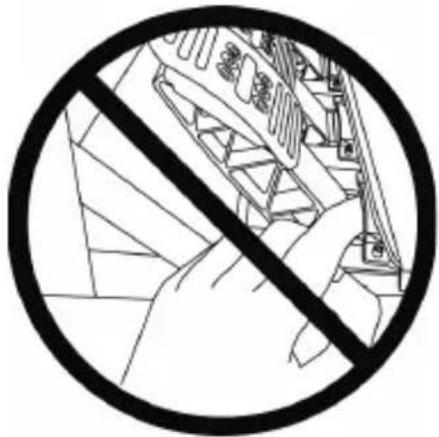
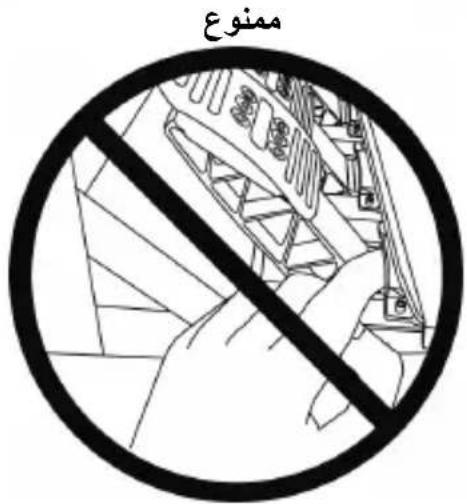
- During gameplay, never place your hands or your fingers under the pedals or anywhere near the pedal set.
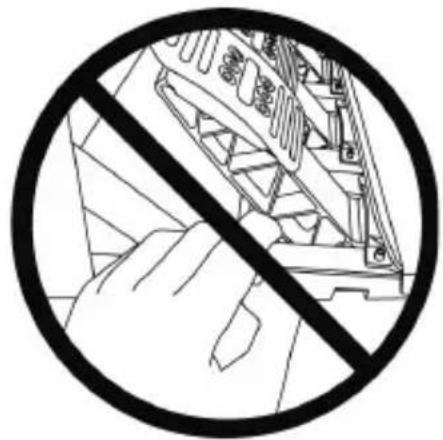
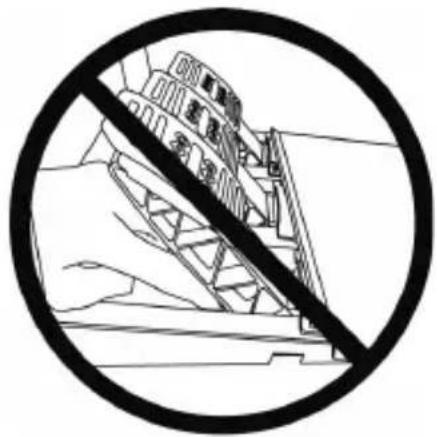
- During calibration and gameplay, never place your hand or your arm through the openings in the racing wheel.
- Make sure that the racing wheel's base is properly secured, as per this manual's instructions.

Product to be handled only by users 16 years of age or older

HEAVY PRODUCT
Be careful not to drop the product on yourself or on anyone else!
COMPATIBILITY WITH THE THRUSTMASTER ECOSYSTEM
Pedal sets
The TS-XW RACER base is compatible:
- On Xbox One and Windows, with the Thrustmaster T3PA and T3PA-PRO pedal sets that connect directly to the connector for pedal set (18).
- On Windows, with the Thrustmaster DB9 PEDALS T.RJ12 ADAPTER that enables the non-Thrustmaster pedal sets equipped with a DB9 connector to connect to the connector for pedal set (18).
- On Windows (only), with all the USB pedal sets on the market (in games supporting MULTI-USB and USB pedal sets).
Wheels
The TS-XW RACER base is compatible, on Xbox One and Windows, with all Thrustmaster detachable wheels, including:
Ferrari 599XX EVO 30 Wheel Add-On Alcantara Edition
-Ferrari F1 Wheel Add-On
Ferrari GTE Wheel Add-On Ferrari 458 Challenge Edition
- TM Leather 28 GT Wheel Add-On
- TM Open Wheel Add-On
-TM Competition Wheel Sparco® P310 Mod
- TM Rally Wheel Add-On Sparco® R383 Mod
-etc.
Shifters
The TS-XW RACER base is compatible:
- On Xbox One, with the Thrustmaster TH8A Shifter Add-On shifter: connect it directly to the connector for TH8A shifter (19) for the "Sequential (+/-)" and "H-pattern (7 + 1) " modes.
- On Windows, with the Thrustmaster TH8A Shifter Add-On shifter: connect it directly to the connector for TH8A shifter (19) for the "Sequential (+/-)"mode.
- On Windows, with the Thrustmaster TH8A Shifter Add-On shifter: connect it to a USB port for the "Sequential (+/-)", "H-pattern (7+1)" and ANALOG / HANDBRAKE modes.
- On Windows, with all the USB shifters on the market (in games supporting MULTI-USB and USB shifters).
HELP FILES AND FAQs (not included in this manual)
Please visit http://support.thrustmaster.com. Click Racing Wheels / TS-XW RACER, and then select Manual or FAQ.
INSTALLING THE WHEEL ON ITS BASE
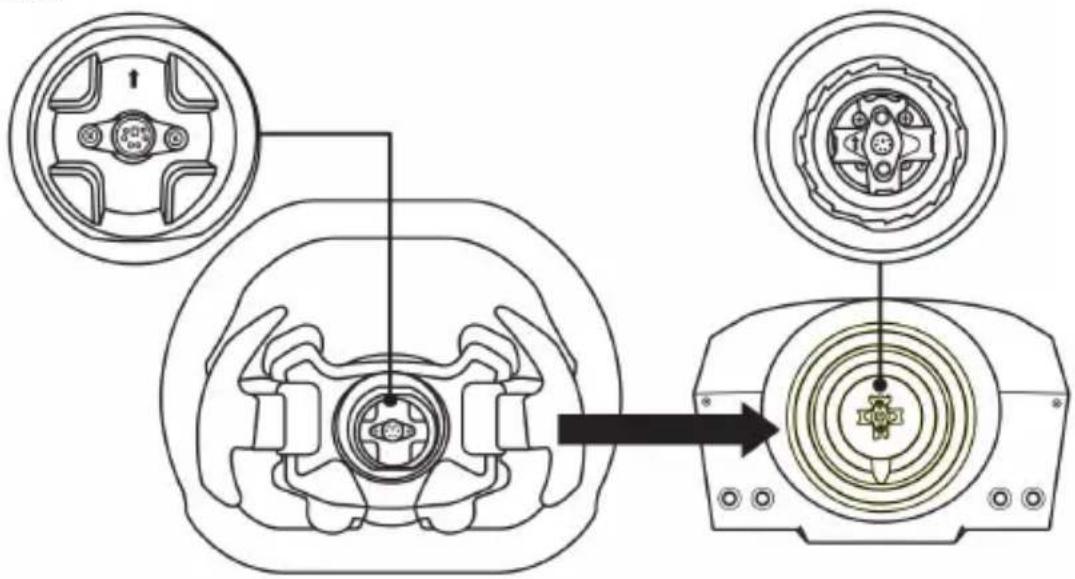
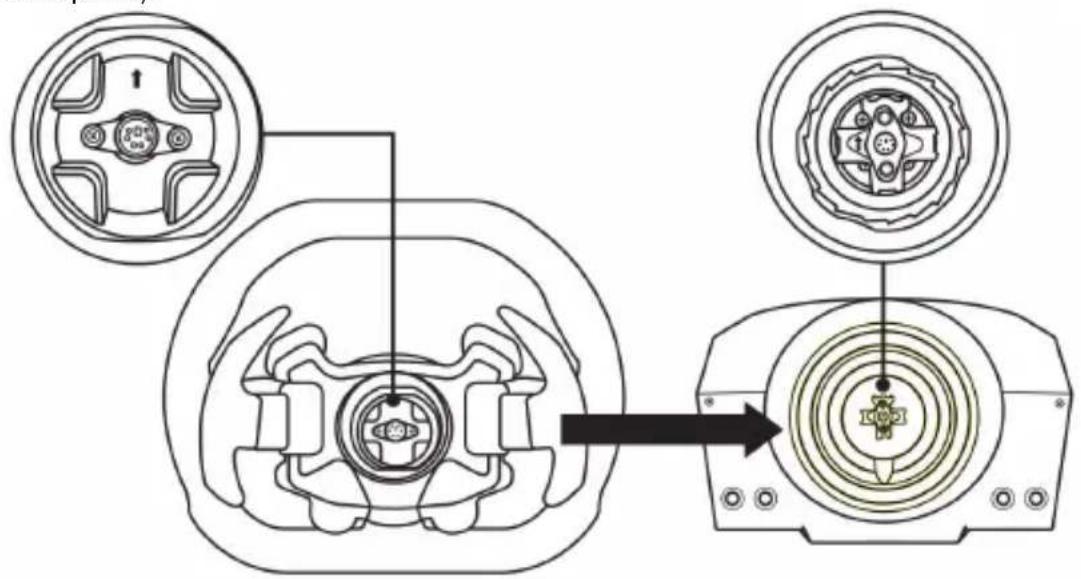
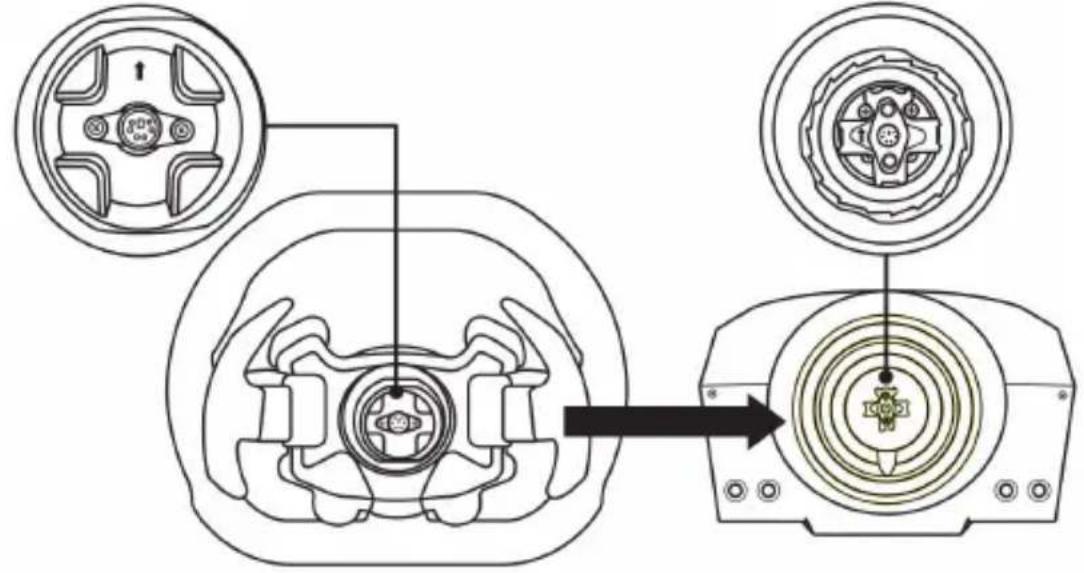
Align the connector positions using the arrows:
Base (1) connector: Arrow pointing upwards
Racing wheel (2) connector: Arrow pointing upwards
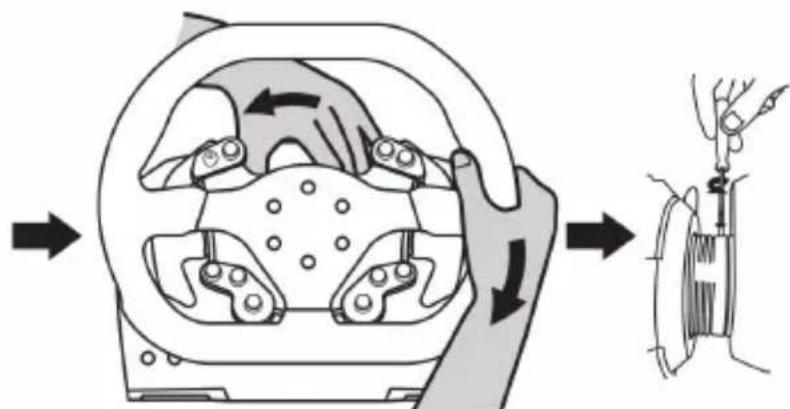
Once the connectors are correctly positioned, simply rotate the Thrustmaster Quick Release (15) device's ring anticlockwise, while holding the racing wheel (2) in position.
Then, tighten the ring as much as you can: to do so, hold the ring in position and rotate the racing wheel clockwise.
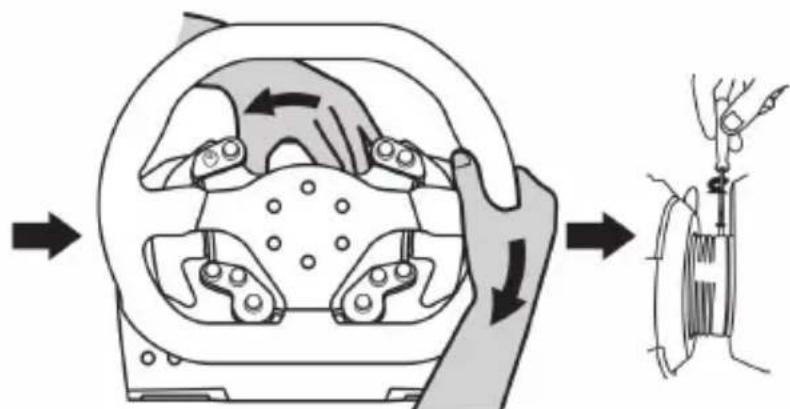
Once you have installed the wheel, rotate it 180^ (when facing the wheel, the Sparco logo should be upside down) to access the small attachment screw located on the ring of the Thrustmaster Quick Release (15) device. Use a large Phillips screwdriver to tighten the small attachment screw (do not use excessive force), turning it clockwise.

When using a Philips screwdriver, ensure NOT to use excessive force
when tightening the small attachment screw!
Stop turning the screw as soon as you feel some resistance.
ATTACHING THE RACING WHEEL
Attaching the racing wheel's base to a cockpit
- Place the racing wheel's base on the cockpit shelf.
- Drive two M6 screws (not included) through the cockpit shelf, then feed them into the two small screw threads located on the underside of the racing wheel. Important: The length of the two M6 screws must not exceed the thickness of the shelf + 12 mm; longer screws could cause damage to internal components located in the racing wheel's base.
- If required, tighten the standard attachment system by inserting the fastening screw in the large threaded hole.
Attaching the racing wheel to a table or a desktop
- Place the racing wheel on a table or any other horizontal, flat and stable surface.
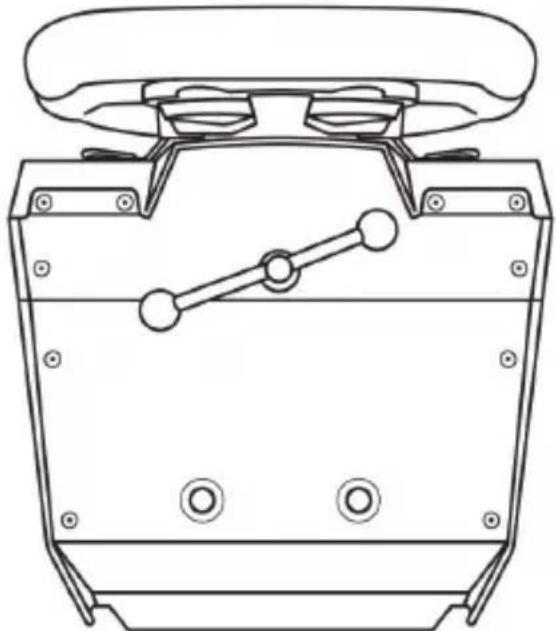
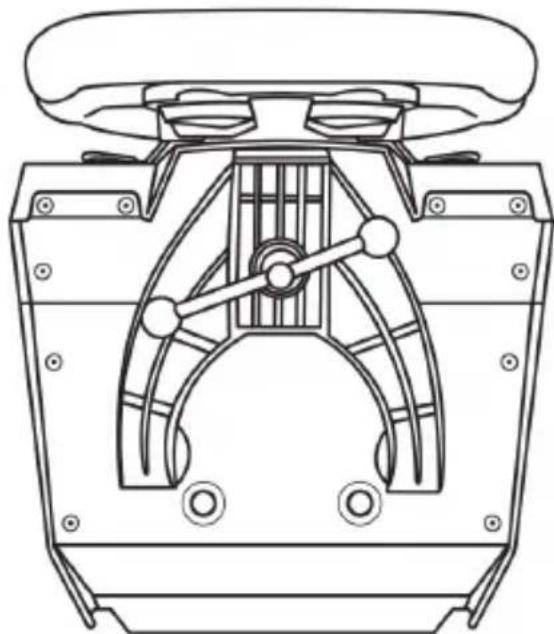
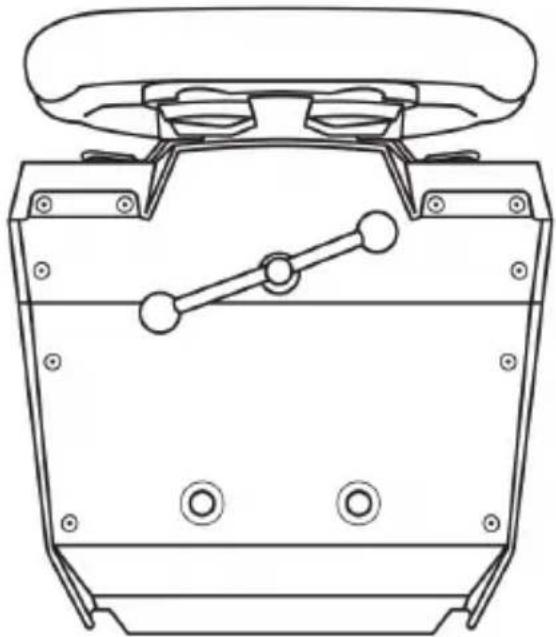
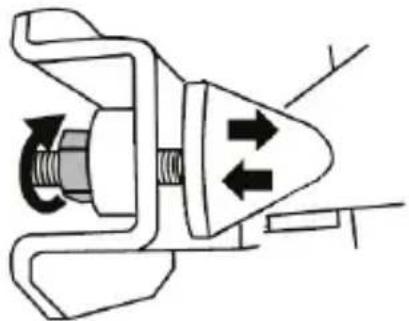
- Insert the fastening screw (9) in the attachment system (8), then tighten the device by turning the screw anticlockwise, so that it feeds into the large threaded hole (7) located beneath the racing wheel, until the wheel is perfectly stable.
ALWAYS NEVER
WARNING:
- Never tighten the screw alone, without the attachment system in place (this could damage the racing wheel).
| ATTACHMENT / REMOVAL | DIRECTION |
| To tighten: Turn the screw anticlockwise | |
| To release: Turn the screw clockwise |
INSTALLATION ON XBOX ONE
- Connect the pedal set to the connector (18) located at the back of the racing wheel's base.
- Connect the TURBO POWER power supply cable (20) to the connector (16) located at the back of the racing wheel's base.
- Connect the removable power supply cable (21) to the TURBO POWER power supply (20).
- Connect the removable power supply cable (21) to a mains outlet with proper voltage specifications.
- Connect the removable racing wheel's USB connector (22) to the racing wheel's connector (17) and to one of the console's USB ports.
- When you turn on your console, the racing wheel automatically self-calibrates.
You are now ready to race!
The list of Xbox One games compatible with the TS-XW RACER is available here: http://support.thrustmaster.com (in the Racing Wheels / TS-XW RACER section). This list is updated regularly.
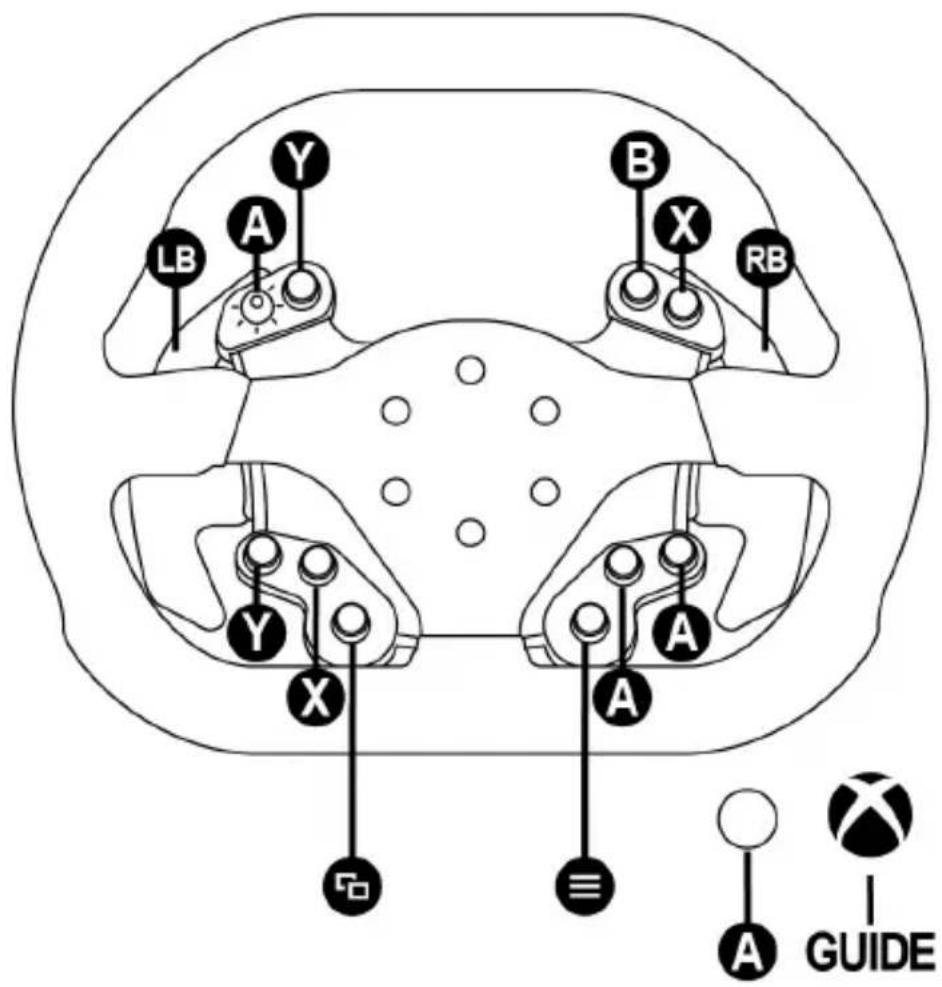
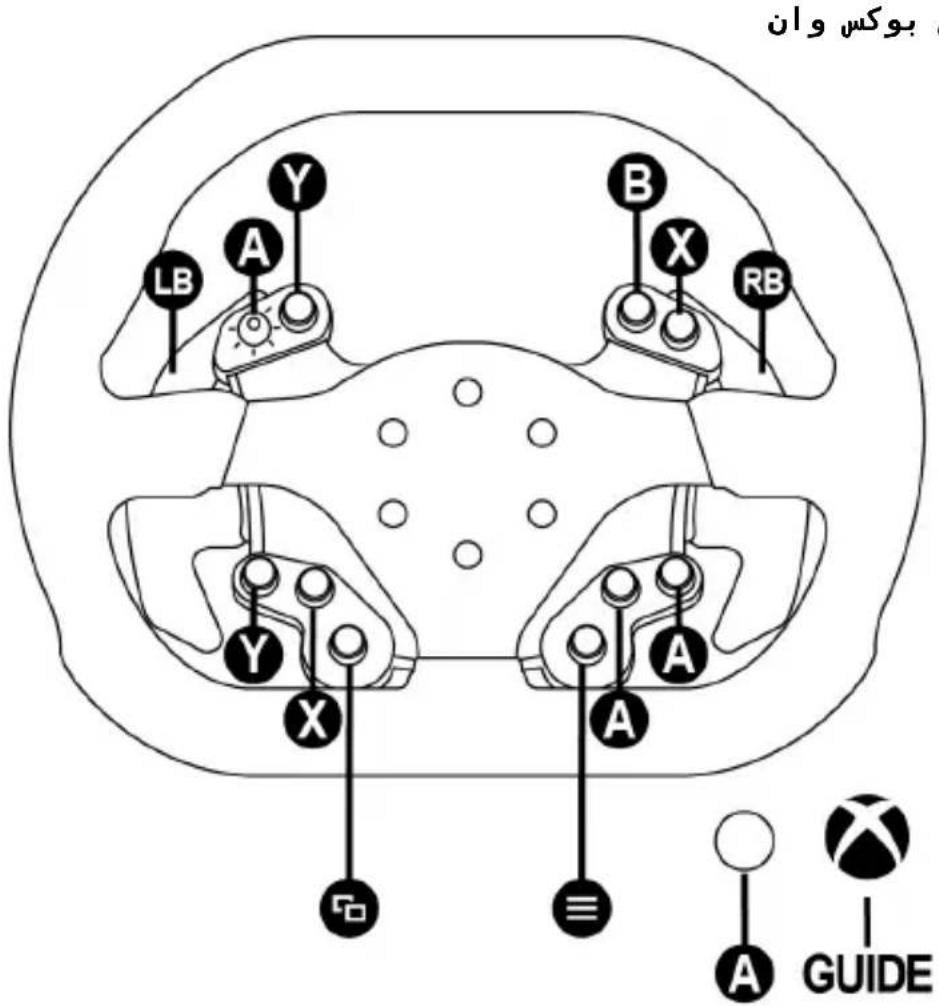
XBOX ONE MAPPING
INSTALLATION ON PC
- Go to http://support.thrustmaster.com, then select Racing Wheels / TS-XW RACER to download the drivers and the force feedback software for PC.
- Once the download is complete, launch the installation, and follow the on-screen instructions to connect the wheel's USB plug to your computer and complete the installation.
- Once the installation is complete, click Finish and restart your computer.
- Select Start / All Programs / Thrustmaster / FFB Racing Wheel / Control Panel to open the Game Controllers window.
The Game Controllers window displays the racing wheel's name Thrustmaster TS-XW RACER with the status OK.
-
Click Properties to configure your wheel in the TS- XW RACER control panel:
-
Test Input tab: allows to test and view the action buttons, directional buttons, wheel and pedals axes, and to adjust the wheel's rotation angle in your PC games.
- Test Forces tab: allows to test 12 force feedback effects.
- Gain Settings tab: allows to adjust the power of the force feedback effects in your PC games.
You are now ready to play!
General notes:
- On PC, click OK to close the Game Controllers window before launching the game.
- Your wheel's firmware version is displayed in the upper right-hand corner of the control panel tabs.
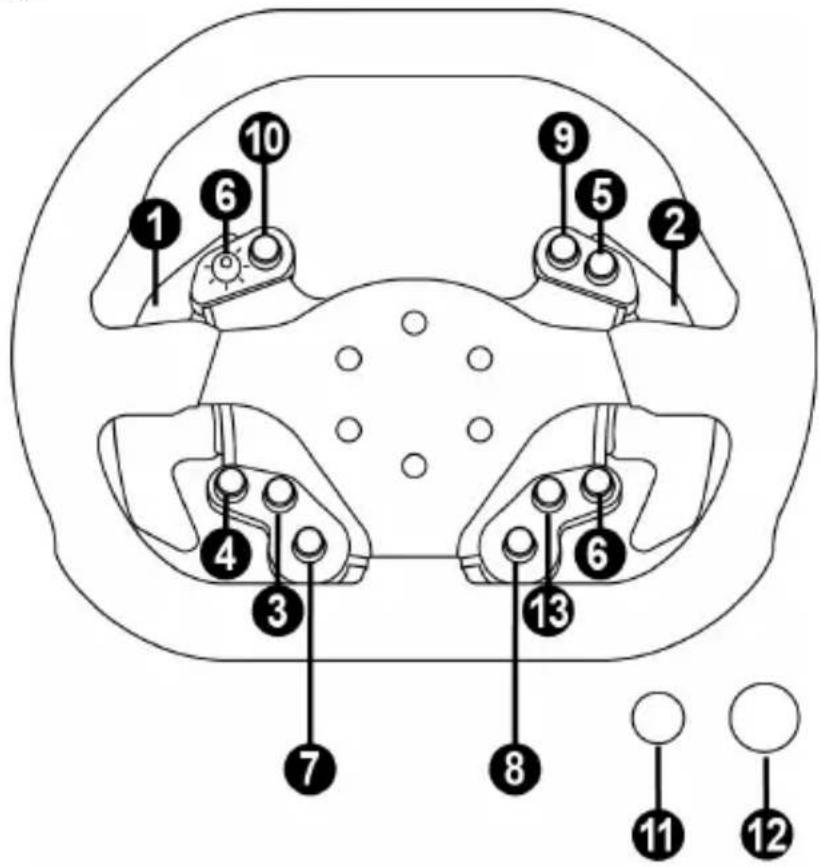
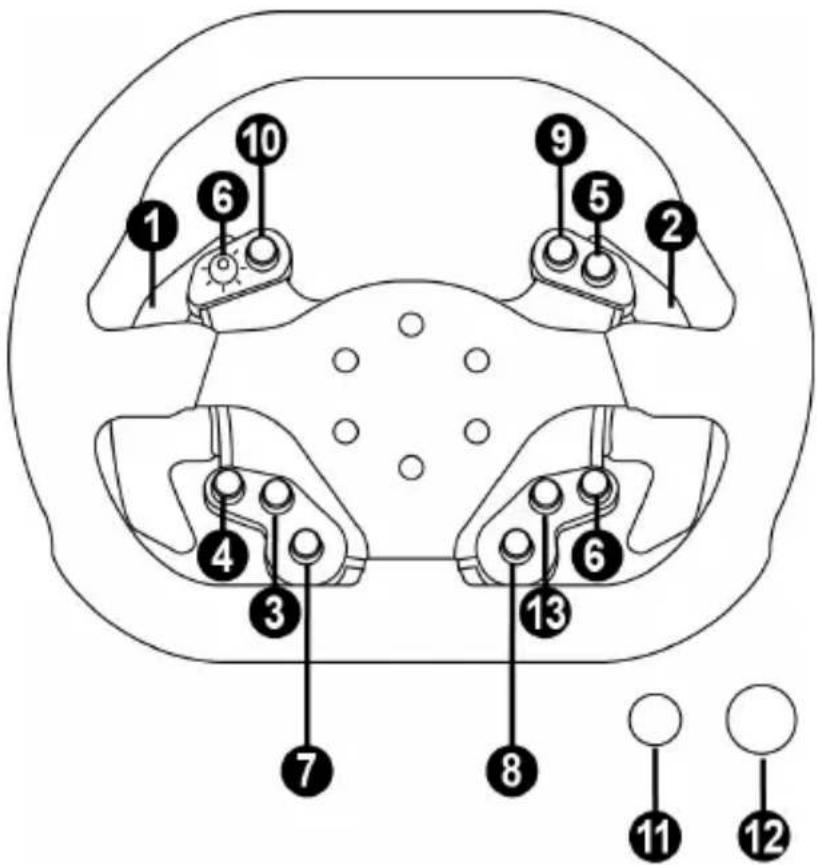
PC MAPPING
UPDATING YOUR RACING WHEEL'S FIRMWARE
The firmware included in your racing wheel's base can be updated to a more recent version featuring product enhancements.
To display the firmware version that your racing wheel is currently using and update it if required: on PC, visit http://support.thrustmaster.com. Click Racing Wheels / TS-XW RACER, then select Firmware and follow the instructions describing the download and installation procedure.
AUTOMATIC RACING WHEEL CALIBRATION
The wheel automatically self-calibrates when you plug the racing wheel into an electrical outlet and connect the racing wheel's USB connector.
During this phase, the racing wheel will rotate quickly towards the left and the right, covering a 1080 degree angle, before stopping at the center.

WARNING:
Never touch the racing wheel during the self-calibration phase!
(This could result in improper calibration and/or personal injuries.)
If your racing wheel does not function correctly, or if it seems to be improperly calibrated:
Power off your PC or your console and completely disconnect the racing wheel. Then reconnect all cables (including the power supply cable and the pedal set), and restart your PC and your game.
INTERNAL COOLING SYSTEM FOR THE WHEEL'S BASE
The internal cooling system for the wheel's base
- starts working when the wheel is powered on.
- switches off after a few minutes of inactivity when the internal temperature cools down to a low level.
- switches on again when you use the wheel.
MODE BUTTON AND INDICATOR LIGHT (6)
MODE button for the pedal set
You can electronically swap the accelerator and clutch pedals if you are using a Thrustmaster T3PA or T3PA-PRO pedal set connected to the connector for pedal set (18).
To do so, simply press the MODE button (6) for 2 seconds.
The racing wheel's internal memory stores whether the pedals have been swapped around or not.
| GAS AND CLUTCH PEDALS | Color of the MODE indicator light (6) |
| NORMAL | RED |
| SWAPPED AROUND | GREEN |
Other information regarding the MODE button
To learn more about the MODE button and indicator light, please visit http://support.thrustmaster.com. Click Racing Wheels / TS-XW RACER, and then select Manual or FAQ.

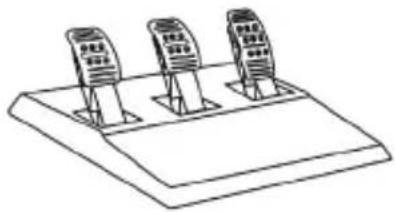
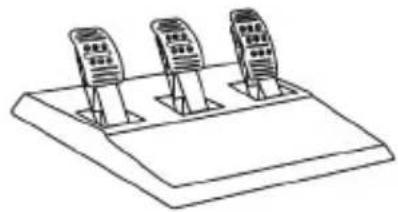
THRUSTMASTER 3 PEDALS ADD-ON
TECHNICAL FEATURES
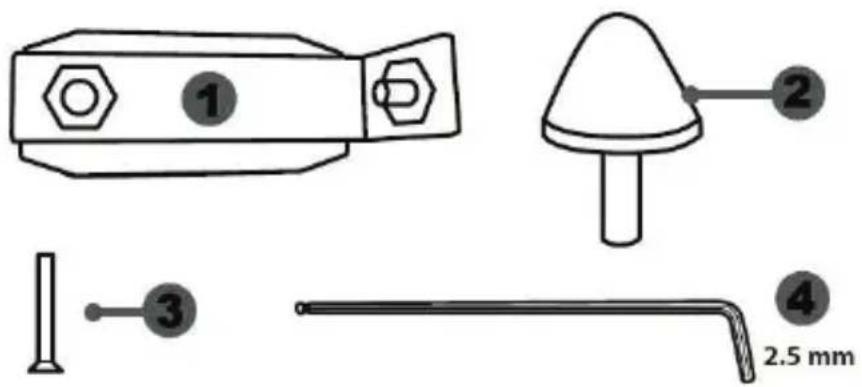
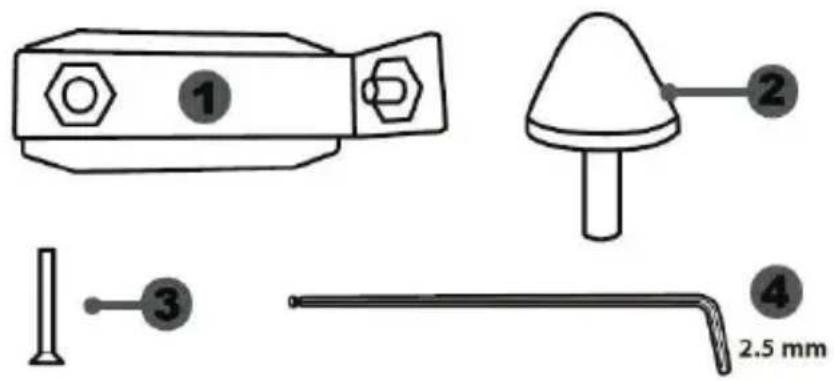
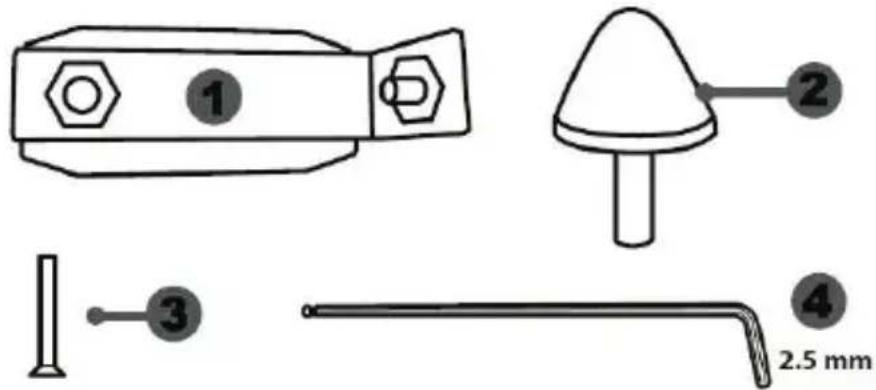
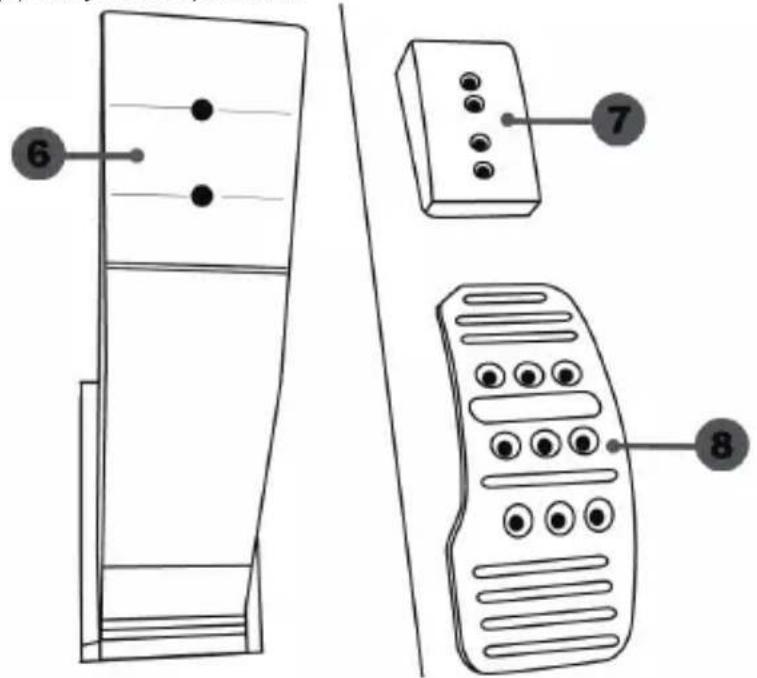
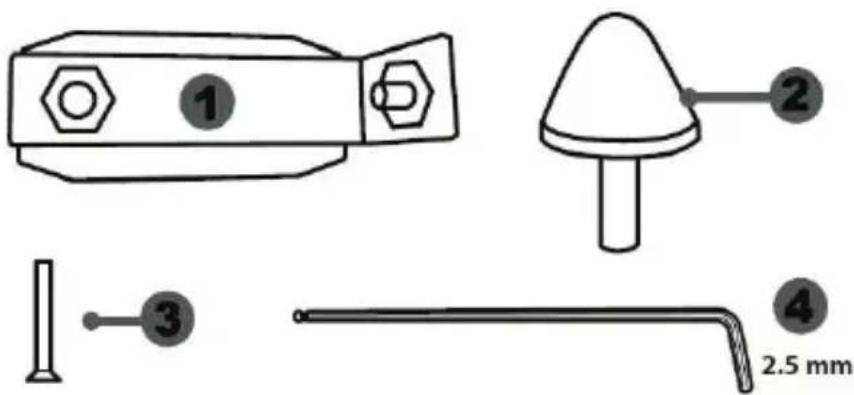
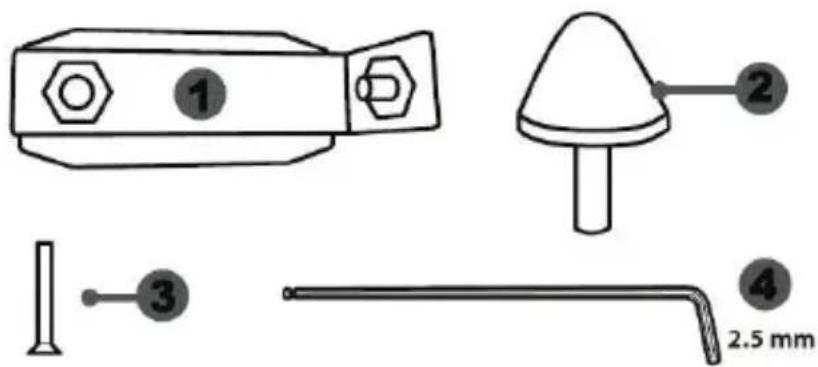
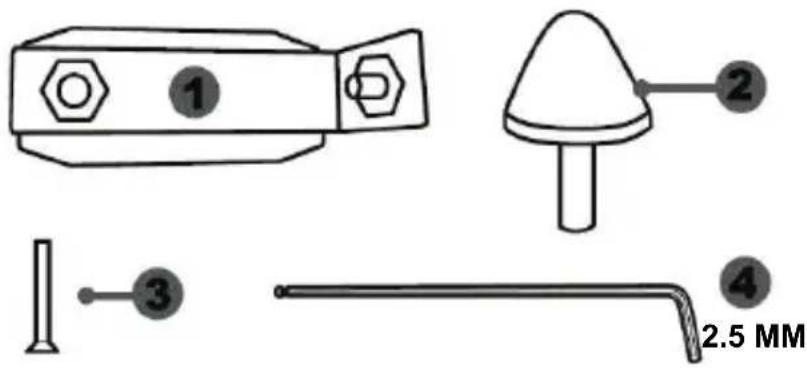
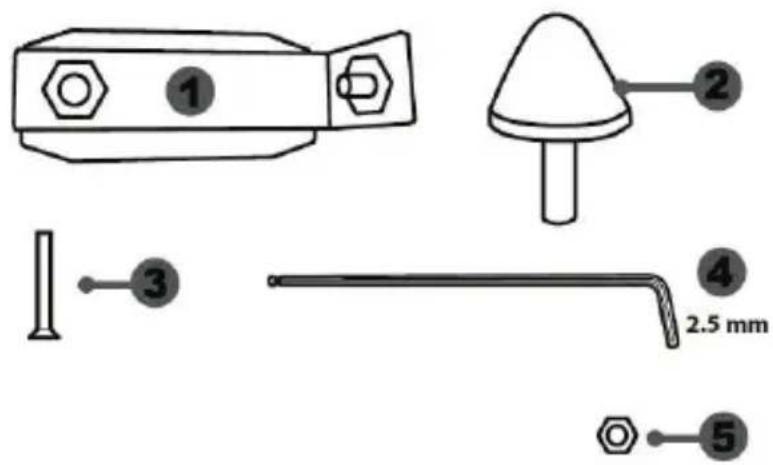
1 Metal support for conical stop (not installed by default)
4 2.5 mm Allen key (included)
2 Conical stop
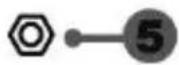
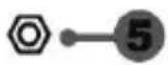
5 Position adjustment nut for conical stop
3 Attachment screw for metal support
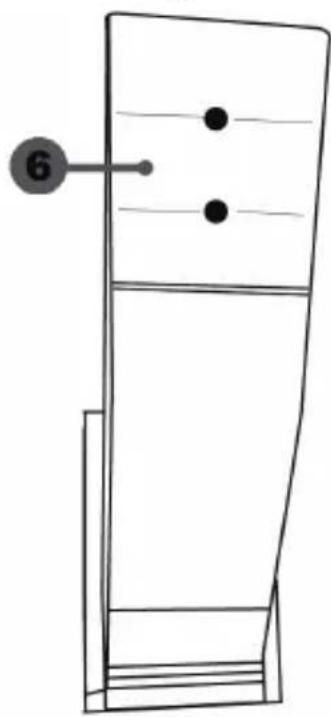
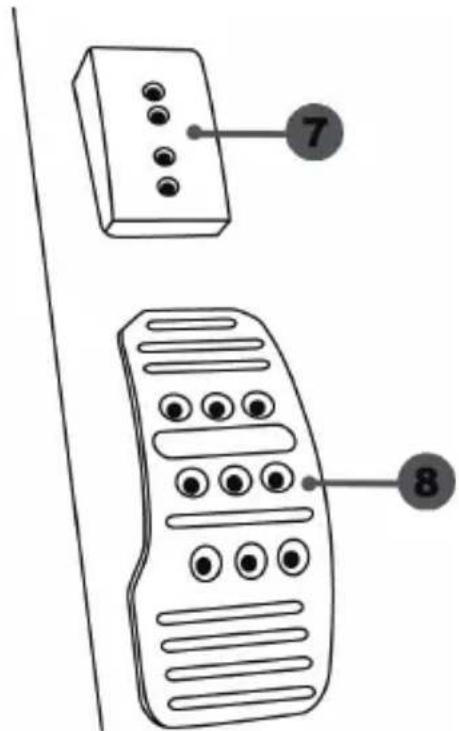
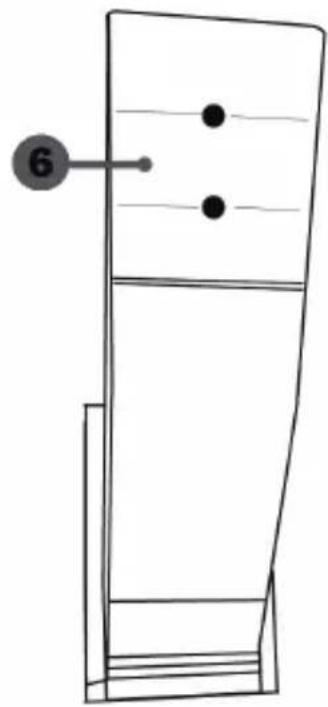
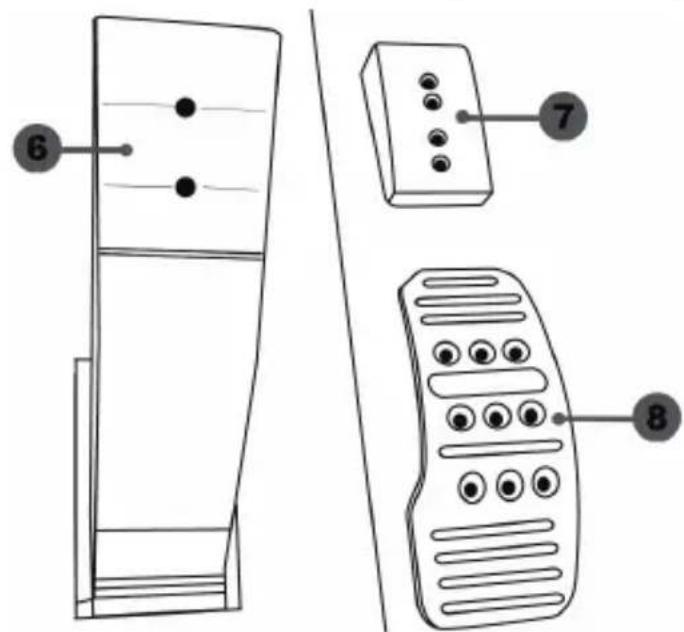
6 Pedal arm
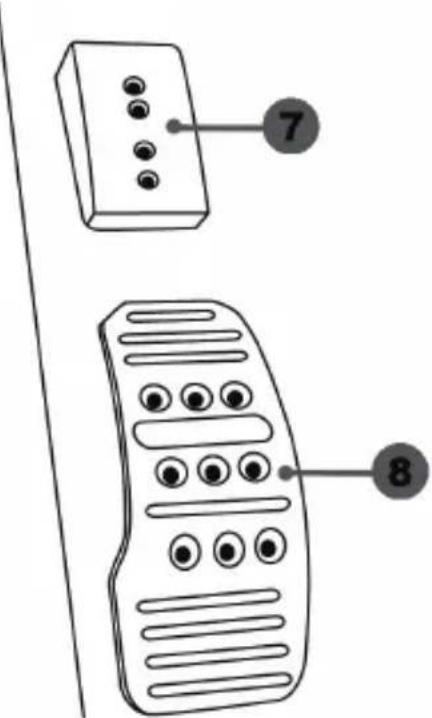
8 Metal pedal head
7 Plastic head support
WARNING
Before using this product, be sure to read these instructions carefully and save them for future reference.

For safety reasons, never use the pedal set with bare feet or while wearing only socks on your feet.
THRUSTMASTER® DISCLAIMS ALL RESPONSIBILITY IN THE EVENT OF INJURY RESULTING FROM USE OF THE PEDAL SET WITHOUT SHOES.

Warning - Pedal set pinching hazard during gaming sessions
- Keep the pedal set out of the reach of children.
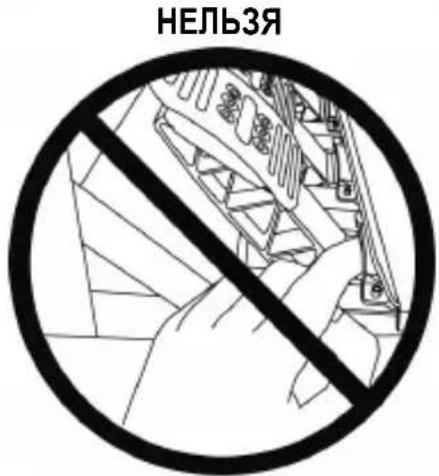
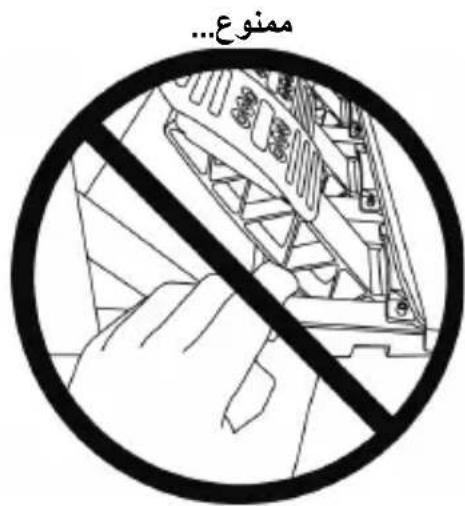
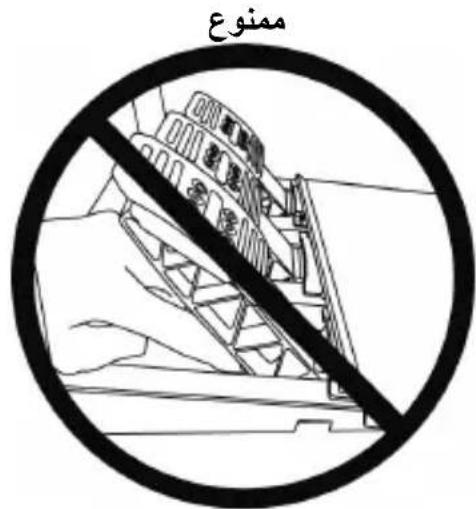
- During gaming sessions, never place your fingers or thumbs on or near the sides of the pedals.
- During gaming sessions, never place your fingers or thumbs on or near the rear base of the pedals.
- During gaming sessions, never place your fingers or thumbs on or near the front base of the pedals.
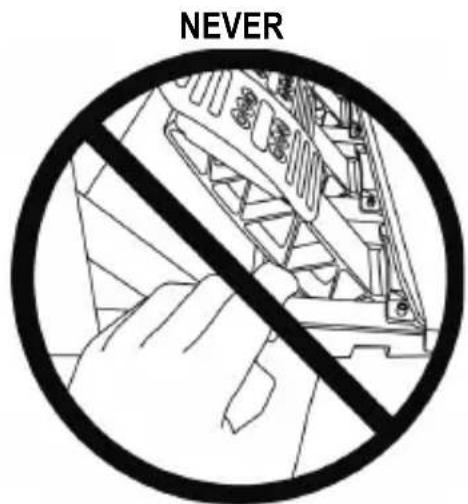
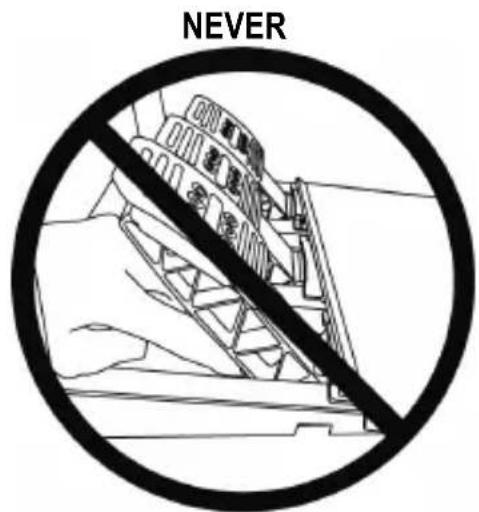
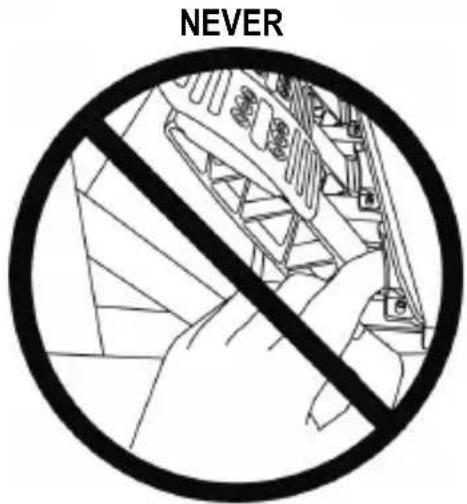
AUTOMATIC CALIBRATION OF PEDALS

- Never connect or disconnect the pedal set from the base of the wheel when the wheel is connected to the system or PC, or during gaming sessions, to avoid calibration problems.
= Always connect the pedal set to the wheel before connecting the wheel to the system or PC. - Once the wheel has self-calibrated and the game has started, the pedals automatically calibrate themselves after being pressed a few times.
- Never press on the pedals when the wheel is self-calibrating or when your game is starting up, to avoid calibration problems.
- If the pedals are not functioning correctly or appear to be improperly calibrated, power off your system, completely disconnect your wheel, then reconnect all of the cables (including the power supply cable and the pedal set cable), power the system back on and restart your game.
ATTACHING THE PEDAL SET TO A COCKPIT
- Attach the pedal set using the small screw threads located on the underside of the pedal set.
- Screw two M6 screws (not included) into the cockpit's pedal support plate and into the two small screw threads located on the underside of the pedal set.
Important: The length of the two M6 screws must not exceed the thickness of the cockpit's pedal support plate plus an additional 10mm , to avoid damaging the pedal set's internal components.
ADJUSTING THE PEDAL SET
Each of the three pedals includes:
- A metal head (8) with multiple perforations (nine for the accelerator - six for the brake - six for the clutch).
- A plastic head support (7) (placed between the head and the arm) with four perforations.
- A pedal arm (6) with two perforations.
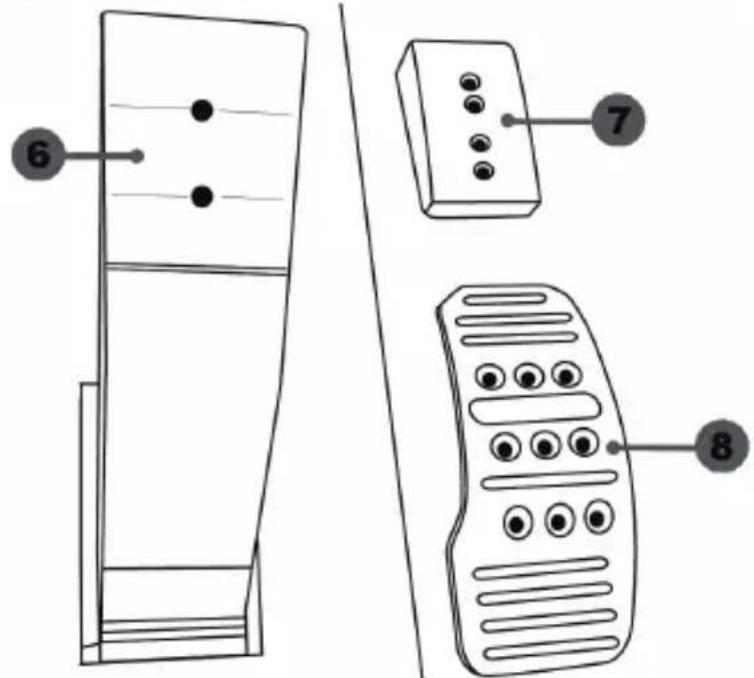
ATTENTION: To avoid any calibration problems, be sure to always disconnect your wheel's USB cable from the system or PC before making any adjustments to your pedal set.
Adjusting the HEIGHT of the accelerator pedal
- Using the included 2.5mm Allen key (4), unscrew the two screws holding the metal head (8) and its support (7) in place.
- Select your preferred height position, then replace and re-tighten the screws so that the metal head (8) and its support (7) are held firmly in place.
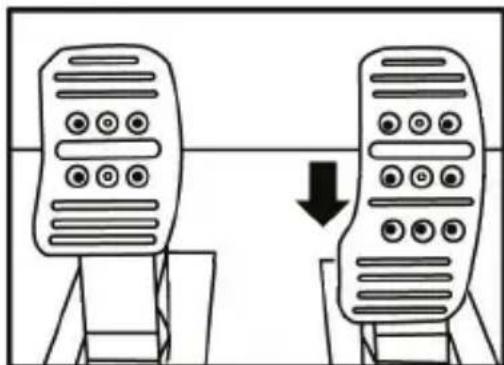
Low position (default)
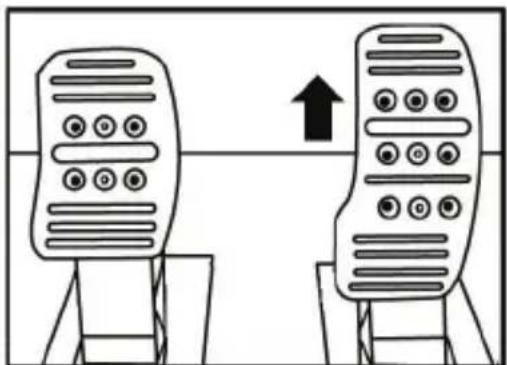
High position
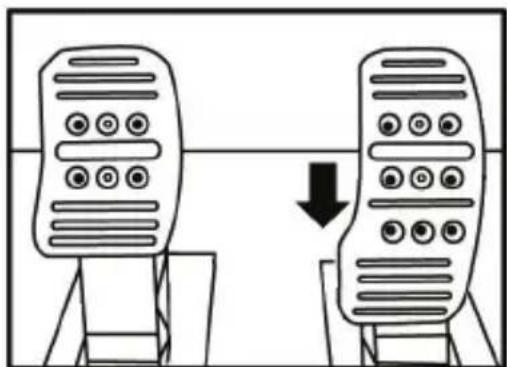
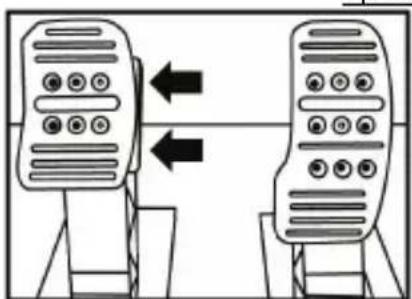
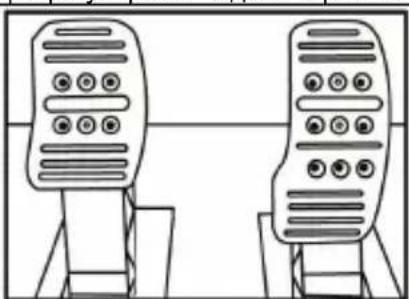
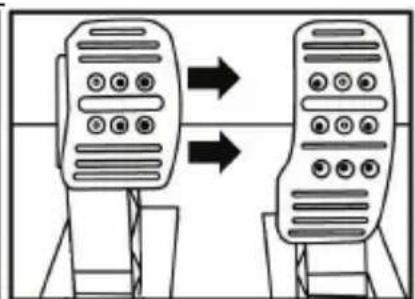
Adjusting the SPACING of the three pedals
- Using the included 2.5 ~mm Allen key (4), unscrew the two screws holding the metal head (8) and its support (7) in place.
- Select your preferred position (to the left, centered, or to the right), then replace and re-tighten the screws so that the metal head (8) and its support (7) are held firmly in place.
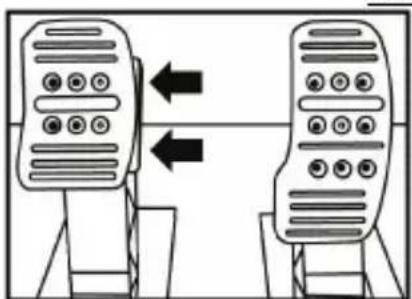
Examples illustrating the brake pedal:
Left position
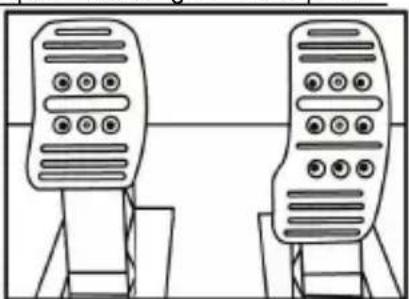
Centered position (default)
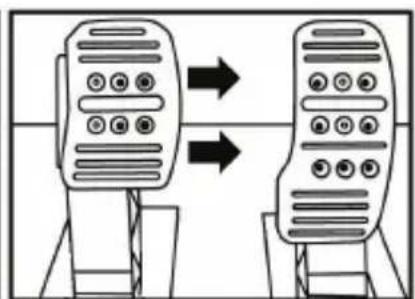
Right position
Number of possible spacing positions per pedal:
-
Three for accelerator pedal
-
Three for brake pedal
- Three for clutch pedal
Adjusting the INCLINATION of the pedals
- Using the included 2.5 ~mm Allen key (4), unscrew the two screws holding the metal head (8) and its support (7) in place.
- Turn the plastic head support (7) 180^ , then replace and re-tighten the screws so that the metal head (8) and its support (7) are held firmly in place.
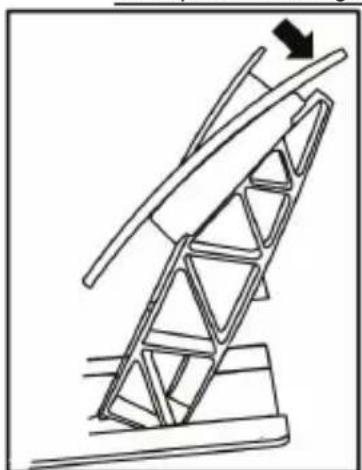
Examples illustrating the accelerator pedal:
Less inclined position
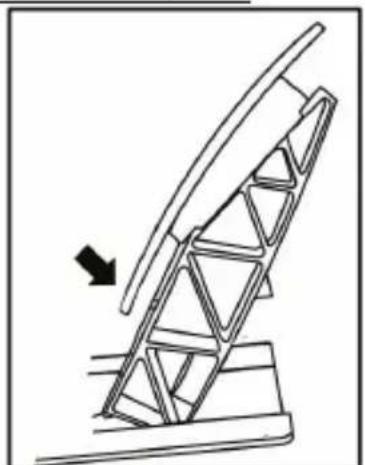
More inclined position (default)
Number of possible inclination positions per pedal:
-
Two for accelerator pedal
-
Two for brake pedal
- Two for clutch pedal
Installing the conical stop ("CONICAL RUBBER BRAKE" mod)
This modification (or "mod") is not essential, and is not installed by default. This means that the brake pedal functions perfectly even if the mod is not installed.
This mod lets you experience a different feeling and resistance when braking. It's up to you whether or not to install it, depending on your own preferences.
- Screw the conical stop (2) onto its metal support (1).
- Screw the position adjustment nut (5) onto the bottom (onto the conical stop's screw thread).
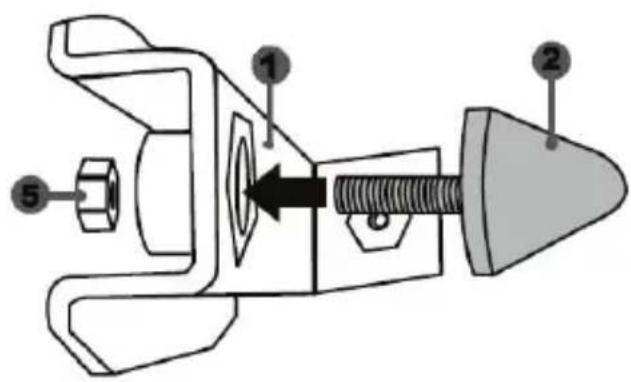
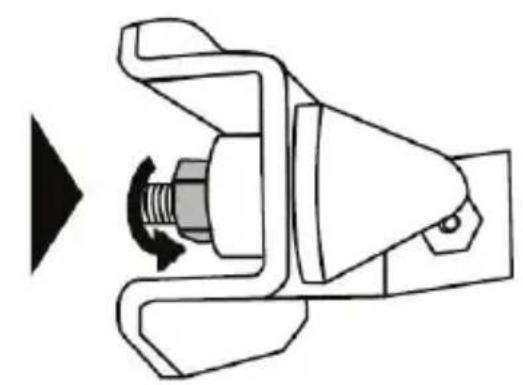
- Position the unit at the back of the brake pedal's arm.
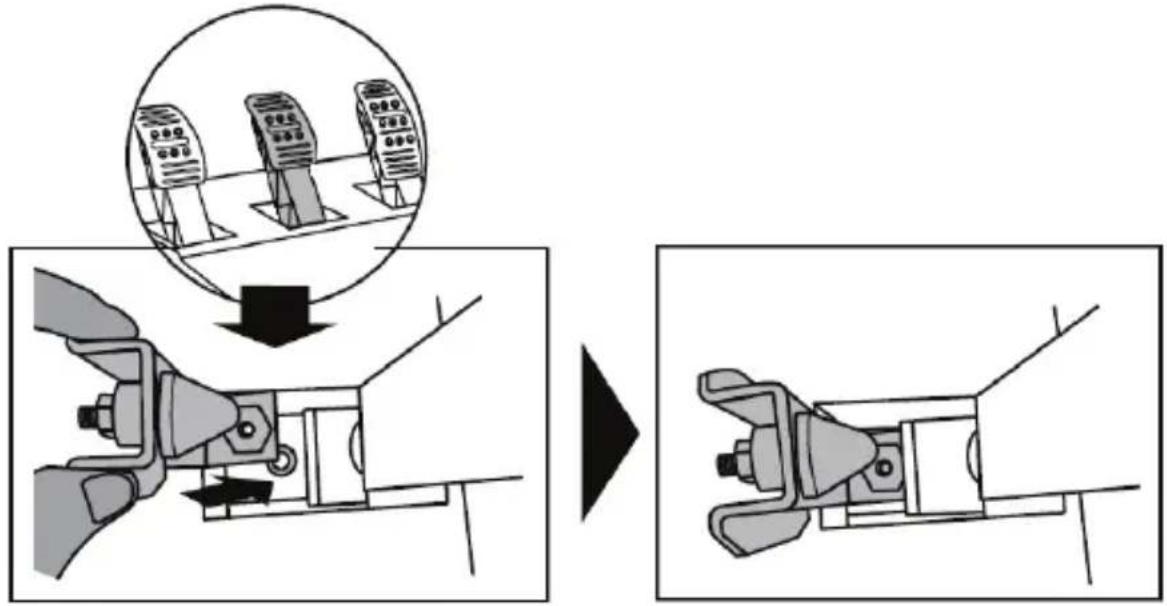
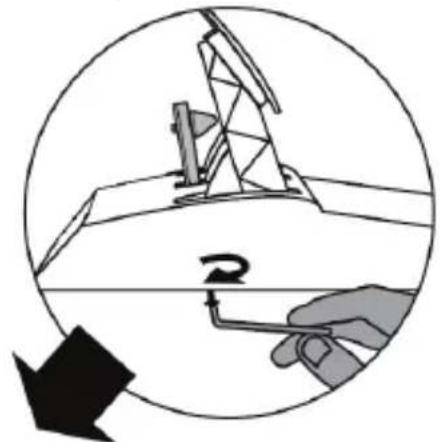
- Using the included 2.5mm Allen key (4), attach the unit using the attachment screw (3) and the small central screw thread located on the underside of the pedal set.
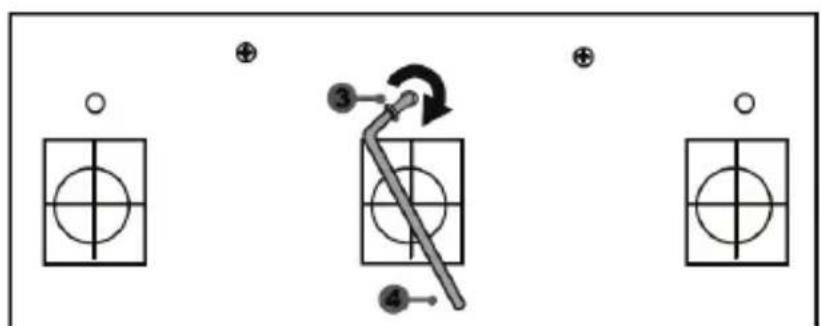
The "CONICAL RUBBER BRAKE" mod is now installed!
Adjusting the brake pedal's RANGE of travel and STRENGTH of resistance
By slightly unscrewing the nut (5), you can further strengthen the resistance of the brake pedal by moving the conical stop (2) closer to the back of the pedal's arm (if necessary, use a 14mm wrench or pliers to re-tighten the nut and maintain the selected position). The closer the conical stop is positioned to the back of the pedal's arm, the greater the strength of resistance will be.
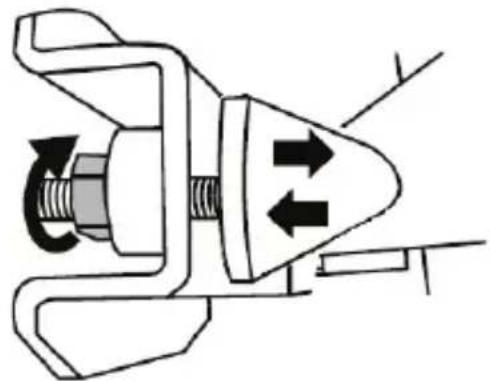
Note: When the conical stop is very close to the back of the brake pedal's arm, you may experience difficulties in reaching the maximum calibration value. Should that be the case:
- Slowly, press very hard on the brake pedal so as to reach the maximum value (if necessary, stand very briefly on the pedal – just for a second), then release the pressure; or else
- Move the conical stop a bit farther away from the back of the brake pedal's arm.
CONSUMER WARRANTY INFORMATION
Worldwide, Guillemot Corporation S.A., whose registered office is located at Place du Granier, B.P. 97143, 35571 Chantepie, France (hereinafter "Guillemot") warrants to the consumer that this Thrustmaster product shall be free from defects in materials and workmanship, for a warranty period which corresponds to the time limit to bring an action for conformity with respect to this product. In the countries of the European Union, this corresponds to a period of two (2) years from delivery of the Thrustmaster product. In other countries, the warranty period corresponds to the time limit to bring an action for conformity with respect to the Thrustmaster product according to applicable laws of the country in which the consumer was domiciled on the date of purchase of the Thrustmaster product (if no such action exists in the corresponding country, then the warranty period shall be one (1) year from the original date of purchase of the Thrustmaster product).
Notwithstanding the above, rechargeable batteries are covered by a warranty period of six (6) months from the date of original purchase.
Should the product appear to be defective during the warranty period, immediately contact Technical Support, who will indicate the procedure to follow. If the defect is confirmed, the product must be returned to its place of purchase (or any other location indicated by Technical Support).
Within the context of this warranty, the consumer's defective product shall, at Technical Support's option, be either replaced or returned to working order. If, during the warranty period, the Thrustmaster product is subject to such reconditioning, any period of at least seven (7) days during which the product is out of use shall be added to the remaining warranty period (this period runs from the date of the consumer's request for intervention or from the date on which the product in question is made available for reconditioning, if the date on which the product is made available for reconditioning is subsequent to the date of the request for intervention). If permitted under applicable law, the full liability of Guillemot and its subsidiaries (including for consequential damages) is limited to the return to working order or the replacement of the Thrustmaster product. If permitted under applicable law, Guillemot disclaims all warranties of merchantability or fitness for a particular purpose.
This warranty shall not apply: (1) if the product has been modified, opened, altered, or has suffered damage as a result of inappropriate or abusive use, negligence, an accident, normal wear, or any other cause unrelated to a material or manufacturing defect (including, but not limited to, combining the Thrustmaster product with any unsuitable element, including in particular power supplies, rechargeable batteries, chargers, or any other elements not supplied by Guillemot for this product); (2) if the product has been used for any use other than home use, including for professional or commercial purposes (game rooms, training, competitions, for example); (3) in the event of failure to comply with the instructions provided by Technical Support; (4) to software, said software being subject to a specific warranty; (5) to consumables (elements to be replaced over the product's lifespan: disposable batteries, audio headset or headphone ear pads, for example); (6) to accessories (cables, cases, pouches, bags, wrist-straps, for example); (7) if the product was sold at public auction.
This warranty is nontransferable.
The consumer's legal rights with respect to laws applicable to the sale of consumer goods in his or her country are not affected by this warranty.
Additional warranty provisions
During the warranty period, Guillemot shall not provide, in principle, any spare parts, as Technical Support is the only party authorized to open and/or recondition any Thrustmaster product (with the exception of any reconditioning procedures which Technical Support may request that the consumer carry out, by way of written instructions - for example, due to the simplicity and the lack of confidentiality of the reconditioning process - and by providing the consumer with the required spare part(s), where applicable).
Given its innovation cycles and in order to protect its know-how and trade secrets, Guillemot shall not provide, in principle, any reconditioning notification or spare parts for any Thrustmaster product whose warranty period has expired.
In the United States of America and in Canada, this warranty is limited to the product's internal mechanism and external housing. In no event shall Guillemot or its affiliates be held liable to any third party for any consequential or incidental damages resulting from the breach of any express or implied warranties. Some States/Provinces do not allow limitation on how long an implied warranty lasts or exclusion or limitation of liability for consequential or incidental damages, so the above limitations or exclusions may not apply to you. This warranty gives you specific legal rights, and you may also have other rights which vary from State to State or Province to Province.
Liability
If permitted under applicable law, Guillemot Corporation S.A. (hereinafter "Guillemot") and its subsidiaries disclaim all liability for any damages caused by one or more of the following: (1) the product has been modified, opened or altered; (2) failure to comply with assembly instructions; (3) inappropriate or abusive use, negligence, an accident (an impact, for example); (4) normal wear; (5) the use of the product for any use other than home use, including for professional or commercial purposes (game rooms, training, competitions, for example). If permitted under applicable law, Guillemot and its subsidiaries disclaim all liability for any damages unrelated to a material or manufacturing defect with respect to the product (including, but not limited to, any damages caused directly or indirectly by any software, or by combining the Thrustmaster product with any unsuitable element, including in particular power supplies, rechargeable batteries, chargers, or any other elements not supplied by Guillemot for this product).
DECLARATION OF CONFORMITY
CANADIAN COMPLIANCE NOTICE: this Class B digital apparatus meets all requirements of the Canadian Interference-Causing Equipment Regulations.
USA COMPLIANCE NOTICE: this equipment has been tested and found to comply with the limits for a Class B digital device, pursuant to Part 15 of the FCC rules. Operation is subject to the following two conditions:
(1) This device may not cause harmful interference, and
(2) This device must accept any interference received, including interference that may cause undesired operation.
These limits are designed to provide reasonable protection against harmful interference in a residential installation. This equipment generates, uses and can radiate radio frequency energy and, if not installed and used in accordance with the instructions, may cause harmful interference to radio communications. However, there is no guarantee that interference will not occur in a particular installation. If this equipment does cause harmful interference to radio or television reception, which can be determined by turning the equipment on and off, the user is encouraged to try to correct the interference by one or more of the following measures:
- Reorient or relocate the receiving antenna.

- Increase the separation between the equipment and receiver.
- Connect the equipment into an outlet on a circuit different from that to which the receiver is connected.
- Consult the dealer or an experienced radio/TV technician for help.
COPYRIGHT
© 2017 Guillemot Corporation S.A. All rights reserved. Thrustmaster® is a registered trademark of Guillemot Corporation S.A. All other trademarks are the property of their respective owners. Illustrations not binding. Contents, designs and specifications are subject to change without notice and may vary from one country to another. Made in China.
Manufactured and distributed by Guillemot Corporation S.A. under official licence from Sparco S.p.A. Sparco is a registered trademark of Sparco S.p.A.
ENVIRONMENTAL PROTECTION RECOMMENDATION
In the European Union: At the end of its working life, this product should not be disposed of with standard household waste, but rather dropped off at a collection point for the disposal of Waste Electrical and Electronic Equipment (WEEE) for recycling.
This is confirmed by the symbol found on the product, user manual or packaging. Depending on their characteristics, the materials may be recycled. Through recycling and other forms of processing Waste Electrical and Electronic Equipment, you can make a significant contribution towards helping to protect the
environment.
Please contact your local authorities for information on the collection point nearest you.
For all other countries: Please adhere to local recycling laws for electrical and electronic equipment.
Retain this information. Colours and decorations may vary.
Plastic fasteners and adhesives should be removed from the product before it is used.
www.thrustmaster.com
*Applicable to EU and Turkey only



TS-XW RACER
INFORMATIONS RELATIVES A LA GARANTIE AUX CONSOMMATEURS
www.thrustmaster.com
EINBAU DES PEDALSETS IN EIN COCKPIT
ANPASSEN DES PEDALSETS
www.thrustmaster.com
DE PEDAALSET AAN EEN COCKPIT BEVESTIGEN
www.thrustmaster.com
www.thrustmaster.com
THRUSTMASTER 3 PEDALS ADD-ON
CHARACTERISTICAS TÉCNICAS

1 Soporte metalico para tope conico (no está instalado de forma predeterminada)
2 Tope cónico
www.thrustmaster.com
FIXAR O CONJUNTO DE PEDAIS A UM COCKPIT
- Fixe o Conjunto de pedais utilizing as pequeas roscas de parafusos situadas na parte inferior doconjunto de pedais.
- Enrosque dois parafusos M6 (não incluídos) na chapa de apoio do Conjunto de pedais e nas das vezes pesquenas roscas de parafusosNJsuaas na parte inferior do conjunto de pedais.
www.thrustmaster.com
FIXAR O CONJUNTO DE PEDAIS A UM COCKPIT
- Fixe o Conjunto de pedais utilizing as pequeas roscas de parafusos situadas na parte inferior doconjunto de pedais.
- Enrosque dois parafusos M6 (não incluídos) na chapa de apoio do Conjunto de pedais e nas das vezes pesquenas roscas de parafusos situadas na parte inferior do Conjunto de pedais.
www.thrustmaster.com

TS-XW RACER
�� Xbox One u Windows
Инструкця по заци
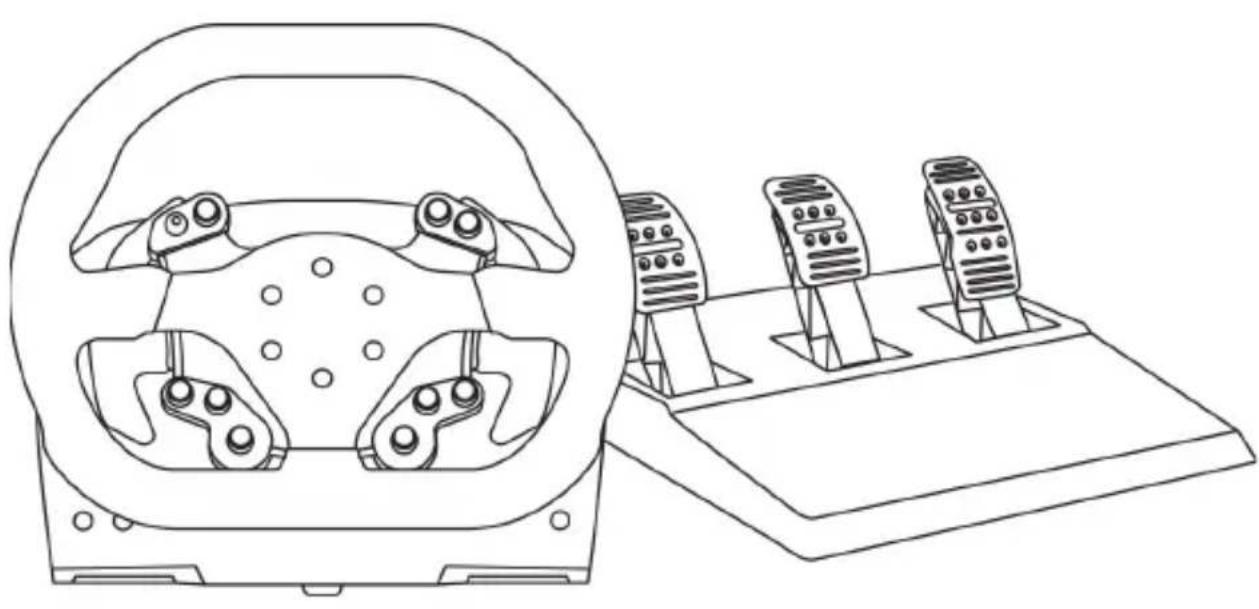
TEXHNUECKNEXAPAKTEPNCN
1 Ba3a
2 Pynb
3 2 neneKTkoBbIX nepeKIOUaTeJIa (BBepx IN BHN3)
4 MHorOIO3NIOHOHHbI nepeKJIIOUaTeJIb C HAXUMHOH KHOHKOJ
5 KhoNka Xbox Guide + 6eIbI nHnKaTOp
6 KhoNka MODE +kpachb/3eJeHbIM HdNKaTOp
7 Pe3b6a noD 60nbWOn BnHT (dIpa cnCTeMbI KpennneHnN KpeNexKHO BnHTa)
8 CnCTema KpePJIeHnIa
9 MeTJIInueckn KpeNexKbI BnHT
15 CnCTema KpenJeHna Thrustmaster Quick Release
16 Pa3bEm dIa 6Ioka nITaHnTURBO POWER
17 Pa3bemДЯ CBemHOrO USB-ka6eJRA
18 Pa3bem dIy neIaJIbHoro 6noka
19 Pa3bEm dIe nepeKIOUcATEIa TH8A (nepeKIOUcAmel npuOsbemaemcra omdeJIbHo)
20 Bnok nTaHnTURBO POWER
21 KaebJIb 6Ioka nITaHnIa
22 Cbemhbl USB-ka6ebn
ПОДКЛIOUЧЕНЕ РУLEBOИ ССТЕМБI K ЗЛЕКТРОПО3ETKE BHIMATEЛьНО ПСОТNTE CLEДYIOUIEE!

Hu e koem cnyae He nodknioyamae 6nok numahua TURBO POWER K 3nekmpocemu C
HedonycmumbIM HanpexHuem! Donycmumoe HanpexHuue 6noka numaHua TURBO POWER yka3aHo Ha npIke Haid 2He3dOm nnoKluoyehu KaBen.

Hu e koem cnyae He nodknouaume K 6a3e TS-XW RACER uHOJ 6nok numanu, kpoeme
TURBO POWER, daxe e cnyae coemecmumocmu pa3bema! B yacmhcmu, Hnbl3ra nodknioyamk 6bae TS-XW RACER cemeou adanmep dna pyn T500 RS.
BHIMAHHE!
Ipeed 3Kcnpnyataunei daHHoro n3dennBHNMaTeIbHO O3HaKOMbTeCb C Hactoae IHCTpyKuuei coxpaHnte ee Ha 6yuee.

BHHMaHne - onachoctb nopaxeHna 3JeKtpnueckm TOKOM!
* N3deJIne CneJeYTe XpaHnTb B CyXOM MecTe, N36erag nonaHa Ha Hero nbIIN cOnHeuHOro CBeta.
He donyckaetcnepekpyuBaHne pa3bEmOB n Ka6eJIe; Ka6eJIn HeJIb3r TaHyTb.
He donyckaetc nonaahanhe kndkoctn Ha n3deJne ero pa3bembl.
He donyckaetc kopotkoe 3ambikaHne B ceni n3deJn.
3anpezaetcpa3bnpaTb n3dene, 6pocTb n3dene B OOrHb I NOBepraTb erO BO3dEiCTBnIO BblCOKNX TemnepaTyp.
He donyckaetcncnoIb3ObaHne dpyrnx ka6e ne nHTaHn, Kpome ka6eJI, BXoJrero B KOMNJIeKt pyJeBOv CnCTeMbI.
HeJIb3a nCNoJIb3OBAt b Ka6eJIb NITaHnI, ecJIH OH NJIH erO pa3beMbI NOBpeKdEhbl, IOTpeCKaJIncb NJIcNOMaHbI.
* Y6eIntecb,ЧTo Ka6eIb ПИТAHЯ ДОЛЖнБIM OБpa3OM ПОДКПЮчЕН K ΚЛЕKTpopo3eTke И К pa3beMy Ha 3aIHeN CTOpOHe 6a3blpyNeBOrO KOleca.
* Henb3a BckpbBaTb CnCTemy pyneBoro Koneca B HeH HET DeTaNe, KOtOpbIe MOryT 06cJyKbBaTbCra NOJb3OBaTeJeM. JIO6oB peMOHT DOJXeH BblNOJHrTbcr IpOu3BOUHTeJeM, ero ABTOPn3OBaHHbIM PpeDCTaBnteMe NII KBAJIINΦNUPOBaHHbIM TEXHnueCKm CneuaJIACTOM.
Донусяаюнлбзоваиме только одобрених пОНЗВОДпелем систем креленя и akceccуаров.
^ B cIyuae HeHOpMaJIbHOrO cyHKUHOHPOBaHnpyJleBOi CNCTeMbI (PpN BO3HNKHOBeHnIOCTOPOHHX 3ByKOB, npeIpeBcE IIN 3aIaxe) CneIyET HEmdJIeHHO pKePaITb NcNOJIb3OBAHne CNCTeMbI, BBIKJIouHTb Ka6JIb PNTAHn I3 PO3eTKN OTCOeINHtB BCE OCTaJIbHbIe Ka6JIIn.
* Ecnn npednonaraetc, yTo pyneBa rCCTema He 6ydet nCnoJb3OBAbcs npoDOnKntBHe BpeMn, OTKIIOUHTe Ka6JIb NiTaHnO T p03ETKn.
* 3IeKtpop03EtKa IOnxHa HaxoUntbcra N6JIIN3OCTn OT CnCTeMb IN B yIoBHom IOCTyne.

BeHTnlaIauIOHbIe OTBepCTna
He donyckaetc6IokupobAHne BENTINaOHbIX OTBepTn Ha 6a3e pyJeBOu CnCTembl. Ipn oBeceueHn ONTMaJIbHOB BENTINaUm BBINOJHnTe CNeDyOUsne yKa3aHn:
- pa3MeuIe 6a3y pyJn Ha pacCToHn He MeHee 10 cm OT CTen;
- He pa3meuTe 6a3y B CTeCHEHOM pOcTpaHCTBe;
- HNCHEM He NaKpbIBaIte 6a3y;
- He donyckaJIte cKoJIneHn IblIa Ha BeHTnJIaCIOHHbIX OTBepCTmX.

I3 coo6paXeHn 6e3OnaNCHoTn HNKoTn He HaxmMaTe Ha neJaN 6ocOHorO nn HorO B HOcKe (6e3 o6yBn).
KOMNAHRA THRUSTMASTER® OTKA3bIBAETCRA OT JIOBOI
OTBETCTBEHHOCTN B CJIyAe IOJIyEHNr TPABMbI B PE3YJbTATE
HAXIMAHNA HANPAJNHEOBybIMHORAMN.
DnCTBnCnIOBOO6paTHoCB3n (npOdoJIkeHne)
* NcnoIb3OBaHne pyJeBOI CnCTeMbI C CInIOBoi 6paTHoI CB3bIO MOXeT Bbl3BaTb 6OJIb B MblUax IIN CYCTaBax. CoBeTI no npedOTBpaueHIO npo6iem co 3dopOBbem:
He npoBOdnte 3a ngpoI npoDoJInxTeJbHoe BpeM;
nocne kaxdoro yaca nrgbI deNaTe 10-15-MnHyThbI nepepbIB;
*ecnB KnCTx, 3aIacTbax, npeIIneYbax, cTOnax IIN Horax NOrBnIacb yctanoctb nn 6oJIb, npeKpaTneIrpyNOTdoXHnTe B TeueHne HeckOJIbKnx YacOB, npeJde Yem ChOBA npicTynITb K nIpe;
* ecnn Bblweyka3aHHbIe npn3HaKn IpOraBJIOTcR CHOBa npn BO3BpaUeHnn K nIrppe, npekpaTnte nIpy N o6paTNTecb K BpaCy;
* DépЖиTe CnCTeMy BHe DoCTyNa DeTei;
* BO Bpemr npabnblho pacnonaraTe obe pykn Ha pyneBOM KOnece n He no3BOJnTe emy Bpaatcb6eckoHTpoJIbHO;
* BO BpMa Irpbl HN B KOe CnIyuae He 3acOBbIBaIte pyKn NII NaIbCbl NOD NeJaNN He DepeKHTe IN PraDM C NeDaJIbHbIM 6JLOKOM;
* BO BpemKaIINbPobKn HnB Koem Cnyuae He 3acOBbIaTe pykn B pyneBoe KONEco;
* oBecneyTe HaedKHyTo 6a3bl pyNeBOrO KOleCa B COOTBeTCTBm C yKa3aHnMaMn B HNCTpyKznn No 3KcPnyatau.

He donyckaetcncnoB30BaHne n3deNn nnamM MoIooKe 16 neT

TAXEIOE N3ENNE
He poHnIte n3dJIe Ha ce6a nn Ha dpYnx Iu!
COBMECTUMOCTb C 3KOCNCTEMOHTRUSTMASTER
PepaJIbHbIe 6JOKN
Ba3a TS-XW RACER coBmecTma co cneyuOuImu yctpoiCTbAmn:
- Ha cncTeMax Xbox One n Windows — neaIbHbIe 6nOKn Thrustmaster T3PA n T3PA-PRO, KOTOpBie NOdkJIouaIOTc HEnocpeIcTBenHO K pa3bemy IJRA neaIbHorO 6noka (18);
- Na cncteme Windows — aanTep DB9 PEDALS T.RJ12 ADAPTER Thrustmaster, c nomoubkoTOporo K pa3bemy nra neaIbHoro 6noka (18) moXHO noKIOuHTb neaIbHbN 6nOK npyroM aPkn, ochaennb pa3bemom DB9;
- (Tolbko) Ha cncteme Windows — BCE DoctynbIe Ha pbIHke neaIbHbIe 6nOKn USB (B irpax c noIepKkO nepaIbHbIX 6nOKOB C noDKnUoyHem MULTI-USB n USB).
Pyrn
База TS-XW RACER COBmecTIma Ha cnCTeMax Xbox One n Windows, co BCemn cbemhblm pyJAMn Thrustmaster, B TOM YIcNe:
Ferrari 599XX EVO 30 Wheel Add-On Alcantara Edition
- Ferrari F1 Wheel Add-On
- Ferrari GTE Wheel Add-On Ferrari 458 Challenge Edition
- TM Leather 28 GT Wheel Add-On
- TM Open Wheel Add-On
-TM Competition Wheel Sparco® P310 Mod
- TM Rally Wheel Add-On Sparco® R383 Mod
- n np.
IpeeknlouataeI nepeea
Ba3a TS-XW RACER coBmecTma co cIeIyUoIIMu yCTpoIcTBAMn:
- Ha cnCTeMe Xbox One - nepeknioaTeIb nepeaay Thrustmaster TH8A Shifter Add-On: NOdknHouaetc HENOCpeIcTBeHHo K pa3bemy dIa TH8A(19) dIpa peKIMOB cekBHeHIOHOH O INaCTINbI (+/-) nIIaCTINbI TnIa «H» (7+1);
- Ha Windows — nepeknioateNB nepeaThrustmaster TH8A Shifter Add-On: noKnioaetcHnocpeDCTBeHHo K pa3bemy dny TH8A (19) dny peKIma ceKBeHNoHHo INaCTNHbl (+/-);
- Ha cuncteme Windows — nepeknjuatene nepeaay Thrustmaster TH8A Shifter Add-On: nodknjuaetcK USB-nopTy dny peximacceBHeuOHnoPiactnbl (+/-) , nIIN K USB-nopTy dny peximamPiactnblTnna «H» (7+1) und pekmob AHAJIOBObI/PUHYOH TOPMO3;
- Ha cnCTeMe Windows — Bce DocTyNHbIe Ha pbIHke nepeKlNoaTeHn nepeDaU USB (B irpax c noDcepXkO n peKlNoaTeHne C noDcKnUcHHeM MULTI-USB n USB).
CINPABKA N OTBETbl HA YACTbIE BONPOCbI (He npNBedeHHbIe B HacToaem pyKOBoDCTBe)
IocTe caT http://support.thrustmaster.com. ⅢeKHTe TOnOuHbIe pyn / TS-XW RACER m BbIbePte NcTpykuaNo 3KcNpyataaun nn Yacto 3aDaBaemble BOpncbl.
YCTAHOBKA PYNHA BA3Y
C nomoubIO CTpeJIOK COOTHEcITe pa3beMbI.
Pa3beM Ha 6a3e (1): CTpeJIka YKa3bIbAet BBepx.
Pa3bem Ha pyne (2): CTpeJIka YKa3bIBaET BBepX.
Iocne npabHoro no3nOHOPOBaHna pa3bEMOB npocTo NOBepHnte KoJIbTO KpeNEXHOcCTeMbI Thrustmaster Quick Release (15) npotNB yacOBOn CTpeKN, ydepxHBaHa MeCTe pylb (2).
3aTeM c MaKcImaHbHbIM ycHIne 3aTAHTE KOJIbO, yIepXINBa ero Ha MeCTe I NOBOpaUNBa pyIb (no YacOBoi CTpeJIke).
YctaHOBINB pyIb PS, NOBepHnTe ero Ha 180° (ecn CMOTpeb Ha pyIb, IOROTIN Sparco doJxeh 6bITb NpeBepHyr «BBepx HorAmu»), qTO6bl nOlyuHTb DOCTyn K MaIOMy KpeNEXHomy BnHTy Ha KOJIbCe CnCTembl Thrustmaster Quick Release (15). C NOMOuBIO 6OJbwo OTBepTKn Phillips 3aTAHnTe MaIbI KpeNEXHb BNHT (6e3 Upe3MepHoro ycInna) no Yacoboi cTpeKe.

Pa6otar c OTBepTKoI Philips HE npmEnHne Ype3MePbIX ycHnnpn 3aTARBaHN MaNOrO KpenexHoro BnHTa!
IpekpataTe 3aTnBaanHe, KaK TOnbKO noyBCTByeTe cnpotNBJeHne
YCTAHOBKA PYJEBOI CNTEMbl
3aKpenneHne 6a3bI pyNeBoro KOleca Ha KOKnITE
- Pa3mecntte 6a3y pyneBoro KOJeca Ha uNTke KOKnTa.
- Yepe3 OTBepCTnB uNTke KOKnHTa BCTaBBte DBA BNHTa M6 (He BXOJrT B KOMnJIeKT) B DBA HeoJIbXuBXHHTOBbIX OTBepCTnHa HnKHe CTOpOHe 6a3bl PVJIA.
Baxho! Dnua Hbmoe M6 He donxHa npebawm monuuny umka + 12 MM; bonee dnuHbte buhmbi Moaym eb3aamb nobpekdeHue eHympeHHux demaneu ba3bl pyne020 koneca.
- Pn Heo6xOIMOCTN 3aTaNHTe CTAHdAPTHU O CNTEmy KpePHeN, BCTaBnB KpeNexHbI BNHT B 60nbwoe pe3b60oe OTBepCTne.
Pa3MeueHne pyJeBoro KOleca Ha cToJe.
- PacnoJIOKInTe roHOUHbI pyJIb Ha cTOne IIN INHOr rOpN3OHTaJIbHOr pIoCKoN u yCTOnuBOI NOBepxHOCTn.
- BCTaBbTe KpeNexHbI BNHT (9) B CnCTeMy KpeNneHna (8) n HadeXHO 3aФNKcpyIte pyNb 3aTgNBaB BnHT npOTnB YacBOB CTpeJIKN, TAK YTO6bl OH BOSeJ B 6OJIbWoe pe3b6OBoE OTBepCTne (7), pacNoIoxKeHHoe HHXe pyJIa.
INPABNJIbHO HEJIb3J

BHIMAHNE!
He 3akpyuBaIte 3OT BnHT OTdEInbHo, 6e3 CnCTembl KpenneHn (3TO MOKeT npNBecTN K NOBpeXdeHNIO pyna).
Ecnr roohbI pyIb He pa6oTaETdoJXhBIM 06pa3OM IIN KaKeTcH HeBepHO OTKaJIH6poBaHHbIM:
BbIKHouHTe PIK nnn KOHCoJIb n noJHoCTbIO OTCoeHNHTe pyJeByIO CnCTeMy; 3aTeM 3aHOBO PNOdkHouHTe BCE Ka6eJI (B TOM YncIe Ka6eJI NITaHINr I neJaIbHorO 6Ioka) n nepe3anyctnte PKN irpy.
BCTPOEHHAR CNTEMA OXJIAXDEHnI JIa3bI PYJIa
BcTpoEHnA cnCTema oxJaXeHnI nn6a3bI pyJr:
- HauHHaet pa60TaTb npn BkHoueHn pyJr;
- BbIKIIOUaETcI NOcJIe HECKoJIbKInx MmHyT 6e3dEINCTBnI, KOrJa BHyTpEHHra TeMnepaTypa yCTpOINCTBa naaet Do Hn3Koro ypoBHra;
- CHOBA BKJIOUaEcra npn INCNoJIb3OBaHm pyJIa.
KHONKA IN INHDMKATOP MODE (6)
KhoNka MODE nI neaIbHoro 6noka
EcnK pa3bemy dnn neaIbHoro 6noka (18) noKnIOueH neaIbHbI 6nOK Thrustmaster T3PA nnT3PA-PRO, ndaIra3a I cuenneHmOxHO nOmeHrB MeCTAm 3JeKToPHbIM CnOCo6om.
Длг STORO DOCTaTOH HaxKaTb KhoNky MODE (6) Ha 2 cek.
Bo BCTpoEHHO nAMrTn pyJIeBOu cNCTeMbI COXpAHyOTc DaHhbI O nepeHoce neJaJIe.
THRUSTMASTER 3 PEDALS ADD-ON
TEXHnueCKne XAPAKTEPNCN
1 MetaJIINueckaj 6a3a JnKohycoo6pa3Horo cTOnopa (no ymoJauHIO He ycmaHOBneHa)
2Kohycoo6pa3HbI cToOp
3 KpeJekhbl BnHT dJa MeTaJIInuChecko 6a3bl
4 6-tpaHHbI KnHou 2,5 MM (B KOMNNEKTe)
5 PerynipoBoHna raiKa dno KOhyco06pa3Horo cTOnopa
6 Pbyar nepa
7Пл actikobar npoknaKa
8 Metanluecka neanb
BHIMAHHE!
Ipeed 3Kcnpnyataunei DaHHoro N3dEInB HnMaTeIbHO O3HaKOMbTecb C HactoJe IHCTpyKuNei COxpaHnte ee Ha 6dyuee.

I3 coo6paXeHn 6e3OpacHOCTN HIKoRda He HaxmMaTe Ha neJaH 6ocO HOro nn HoroB HOCKe (6e3 o6yBn). KOMNAHn THRUSTMASTEROTKA3bIBAETCn OT JIOBOI OTBETCTBEHHOCTN B CInyAE NOLUyeHENr TPABMbI B PE3yJbTATE HAXIMAHn HA PEAJIH HEOBytBIMn HOAMn.

PpeynpeKdHne - onachoctb 3aueemJHeHn neaIbHbIM 6lOKOM BO BpeM nRpbl
- XpaHnte neJaIbHbI bIOK BHe doCTyna deTei.
*Bo BpemrIrpbHn B Koem CJIyae He KlaIInTe PJIbUpyK IIN Hor Ha NeJaIN HHe 3acOBbBaIe IN c60kOBbIX CTOpOH NepaIbHoro 6Joka.
*BoBpemrHnB Koem Cnyae He KlaInte PauIbIpyK IIN HOR Ha NeJaIN HHe 3acOBbIaTe INC 3aHEn CTOpOHJIpeJaIbHO6Joka.
*BoBpeMnIrpblHbKoemClyuae He KlaInte PAnbUpyk IIN Hor Ha NeJaN HHe 3acOBbBaTe IN C nepeDne CTOpOHbI neDaIbHoro 6Joka.
ABTOMATUÇECKA KAJINBPOBKA PΕDAJIΕN

-Bo n36exaHne npoBnem c KaIIObPOBkoH H N B KOeM cnyae He NOdkIOUaHTe H He OTKIOUaTe neJaIbHbI 6IOK OT 6a3bl pyJI, Noka pyJeBaR CnCTema NOkIOUeHa K KOHcON PS3TM ININ PS4TM, a TaKKe BO BpEMaIrPbI.
=ПeДаньньиблOKслЕдуETПОДКЛЮЧаТБКpyЛeВОИСИСТЕМ,пржdeчem OHa6yIeTПОДКЛЮЧЕHA K KOHCoIIPS3TM nII IN PS4TM.
- Pocne abTOKaJIb6pOKn pyIy n 3aynsKa Irpbl aBToMaTnueckn HeCKoJIbKIMn HaxaTnA Mn Ha nepaII 3aynsKaETcR aBToMaTnueckra KaJIb6pOBKa nepaIeN.
-Bo n36exaHne npo6nem c KaIb6pOBKoH N B Koem cnyae He haxMaTe Ha neJaN BO BpeM aBtOKaJIb6pOBKn I BO BpeM 3aNycka nRpbl.
- Ecπn πeānH He pa6oTaIOT DoJKNbIM Obpa3OM nIi KaKytcH HeBepHO OTKaJIbPoBAHHbIMN, BbIKIIOHTe KOHCOJIb, NOJIHOCTbIO OTCOeINHITe pyJeByIO CNTeMy 3aHOBO NODKIIIOHTe BCE Ka6eJI (B TOM YIcSe KaeBb PntAHnI N Ka6eJIb πeJaIbHOrO 6LOKa, BKJIIOHTe KOHCOJIb N nepe3aIyCTInTe irpy.
3AKPENJIENHE PENDHORO BLOKA B KOKNITE
- 3akpenite neaIbHbI 6nok c nOmoIbIIO He6oJIbIX Pe3b6OBbIX OTBepCTn Ha erO HxKHei NOBepXHOCTN.
- 3akpytnte Dba Bnhta M6 (He BXoJrB KOMnneKT) B nnoaKy dny neaIbHorO 6noka n B da HbeOnbXu BnHTOBbIX OTBepCTna Ha HxKHe CTOpOHe neaIbHorO 6noka.
Baxho!ДинанВИNTOB M6 He DoJnxHa npeBbIaTb TOnuHn PNOuaKn 6OnbWe Yem Ha 10 MM BO n36eXaHne NOBpeKdEHH BHyTpEnHnx DeTaJe NepaIbHoro 6Noka.
PEYUNPOBKA PEAJIbHORO BLOKA
KoHCTpykUneJaIeN:
- MeTaJIInuecka IIIOUaIka NeJaII (8) C HeCKoJIbKIMM OTBepCTnIaMn (9 OTBepCTn Ha neJaII ra3a, 6 — Ha neJaII TOpMo3a, 6 — Ha neJaII CuenJIeHna);
- nlaactNKOBa npoknaJa dny nloaakn (7) (kpeNTcMexdy nloaakn npbYarom) c YeTbIPbMa OTBepCTnAM;
-pbUar neDAnu (6) C DByM OTBepCTnMn.
BHIMAHNE! Bo n36eXaHne npo6nem c KaIIb6pOBKo o6ra3aTeIbHo OTKnIOuayte USBKa6eIb ot KOHcOJI NSPS3TM nIN PS4TM, npexde yem KaK-JN6o peryInpoBaTb neJaIbHbI 6JIOK.
Perynilopobka neaJn r3a no BbICOTE
- C nOMOJIb BxODaIeBO KOMnIeKT IeCTnIRpaHOrO KInOa 2,5 MM (4) OTKpyTnte 2 BnHTa, ydePknBaIOx MeaJIINueckyIO NIOuaADKy (8) INpOKnaADKy (7).
- BbI6epnte HxKHyBbICOTy neaJIu n 3aHOBO 3akpyTte BNHTbI dJa JxecTKo fHKcaun MeTaNJHueckO nnouaADKn (8) n npoklaKn (7).
HnKHe nOIOKeHne (no ymoJU.)

Bbicokoe noJoxKeHne
PergunpoBka PACCTOHaMmexdy TpeMa neaJMaM
- C nOMOsbBxOJaIero B KOMnneKT WecTnRpaHOro KInOa 2,5 MM (4) OTKpyTnte 2 BnHTa, ydePknBaIOxMetanlneckyIO NIOaADKy (8) INpOKnaDKy (7).
- BbI6epnte HxKHe noIOXeHne nea (cIeBa, no cHTpy nnn Cnpaba) n 3aHOBO 3akpyTnte BuHTbI dJIg XeCTKO fIKCaunn MetaIIuueckO nnouaKn (8) n npoknaKn (7).
PpimepbpeynpovBn neaT TopMo3a:
Jeboe noJIOXeHne
LcHTpaJIbHoe nIOJoxKeHne (no yMoJn.)
Ppaboe noIoxKeHne
KoJIHcTeB0 BO3MOxHbIX IOIIOKeHn IaI neJaII:
Koupi MODE yia to oet twv nevtal
MTopeite va evaAaleTe nEeKtpovika Ta TevTau Tou ykaiou kai tou oumIektn av xpnoiotoeiTa 0eT TeVtAL T3PA n T3PA-PRO TnS Thrustmaster ouvdeEmevo otny uToboxn ia eT TeVtAL (18).
Tia va to kavete auto, aTawc TATnote To TAnktpo MODE (6) yia 2 dEutepoAeTTTA.
IPOZAPTHsH TOY SET TQN NENTAA E OEEH OAHFOY
- PpOaPTnTo oET twV TevTAL XpNoiopoioWvTaC ta Mkpa OIIeipwata BiDwatoC OTO KATUpeoTou eT TwV TevTAL.
- Biodwote TIC duo biides M6 (ev πeipiaαβavovtai) eoa aTNO TNY EπiapeiaC OTnpieGTOU TVEIaOtn Θeon tou ohyou kai eoa aTTO dao uikpa OTIEpωmaTBIOWV TOU βpiokovtai OTO KATWpeoC tou oET TOW TVEIa.
www.thrustmaster.com
THRUSTMASTER 3 PEDALS ADD-ON
TEKNIK ÖZELLLIKLER
www.thrustmaster.com
ZGODNOSC Z PRODUKTAMI THRUSTMASTER
Zestawy pedałów
TM Competition Wheel Sparco® P310 Mod
TM Rally Wheel Add-On Sparco® R383 Mod
- itd.
Skrzynie biegów
THRUSTMASTER 3 PEDALS ADD-ON
ELEMENTY

www.thrustmaster.com
www.thrustmaster.com
Made in China.

:外箱

TS-XW RACER
適用於Xbox One和Windows
使用者手册
技術特徵
1底座

THRUSTMASTER 3 PEDALS ADD-ON
技術特點
ReiHnIe HnEe HnEe HnEe HnEe HnEe HnEe HnEe HnEe HnEe HnEe HnEe HnEe HnEe HnEe HnEe HnEe HnEe HnEe HnEe HnEe HnEe HnEe HnEe HnEe HnEe Hn Ee Hn Ee Hn Ee Hn Ee Hn Ee Hn Ee Hn Ee Hn Ee Hn Ee Hn Ee Hn Ee Hn Ee Hn Ee Hn Ee Hn Ee Hn Ee Hn Ee Hn Ee Hn Ee Hn Ee Hn Ee Hn Ee Hn Ee Hn Ee Hn Ee Hn
RACER http://support.thrustmaster.com. RAIiSHI HAI/ TS-XW RACER to 1, pwrwto tck h o d rotd f ch t shing a
ReiHnIeJit
RaiiHnIeHnIeHnIeHnIeHnIeHnIeHnIeHnIeHnIeHnIeHnIeHnIeHnIeHnIeHnIeHnIeHnIeHnIeHnIeHnIeHnIeHnIeHnIeHnIeHnIeHnI e HnIeHnIeHnIeHnIeHnIeHnIeHnIeHnIeHnIeHnIeHnIeHnIeHnI e HnIeHnIeHnI e HnIeHnI e HnI e Hn I e Hn I e Hn I e Hn I e Hn I e Hn I e Hn I e Hn I e Hn I e Hn I e Hn I e Hn I e Hn I e Hn I e Hn I e Hn I e Hn I e Hn I e Hn I e Hn I e Hn I e Hn I e Hn I e Hn I e Hn I e Hn H n I e H n I e H n I e H n I e H n I e H n I e H n I e H n I e H n I e H n I e H n I e H n I e H n I e H n I e H n I e H n I e H n I e H n I e H n I e H n I e H n I e H n I e H n I e H n I e H n I e H n I c H n I c H n I c H n I c H n I c H n I c H n I c H n I c H n I c H n I c H n I c H n I c H n I c H n I c H n I c H n I c H n I c H n I c H n I c H n I c H n I c H n I c H n I c H n I c H n I c H n Ic H n Ic H n Ic H n Ic H n Ic H n Ic H n Ic H n Ic H n Ic H n Ic H n Ic H n Ic H n Ic H n Ic H n Ic H n Ic H n Ic H n Ic H n Ic H n Ic H n Ic H n Ic H n Ic H n Ic H n Ic H n I c H n Ic H n Ic H n Ic H n Ic H n Ic H n Ic H n Ic H n Ic H n Ic H n Ic H n Ic H n Ic H n Ic H n Ic H n Ic H n Ic H n Ic H n Ic H n Ic H n Ic H n Ic H n Ic H n Ic H n I c H.
i 1080

者告保定有同在通阿,能大,
(0/9JU 1
ReiHnIeHnIeHnIeHnIeHnIeHnIeHnIeHnIeHnIeHnIeHnIeHnIeHnIeHnIeHnIeHnIeHnIeHnIeHnIeHnIeHnIeHnIeHnIeHnIeHnIeHnI e HnIeHnIeHnIeHnIeHnIeHnIeHnIeHnIeHnIeHnIeHnIeHnIeHnIeHnIeHnIeHnIeHnIeHnIeHnIeHnIeHnIeHnIeHnIeHnIeHnIe
An antenan sainong wihhe pnd tne tre to cte d anb bntn ng mnn n ine aene eepi 100000000000000000000000000000000000000000000000000000000000000000000000000000

程和一-加中
* 場當世號海阿國I有者已知之果如
* 1
冉川中京中京中京中京中京中京中京中京中京中京中京中京中京中京中京中京中京中京中京中京中京中京中京中京中京中京中京中京中京中京中京中京中京中京中京中京中京中京中京中京中京中京中京中京中京中京中京中京中京中京中
这日中日韩日韩日韩日韩日韩日韩日韩日韩日韩日韩日韩日韩日韩日韩日韩日韩日韩日韩日韩日韩日韩日韩日韩日韩日韩日韩日韩日韩日韩日韩日韩日韩日韩日韩日韩日韩日韩日韩日韩日韩日韩日韩日韩日韩日韩日韩日韩日韩日韩日韩日韓日韓日韓日韓日韓日韓日韓日韓日韓日韓日韓日韓日韓日韓日韓日韓日韓日韓日韓日韓日韓日韓日韓日韓日韓日韓日韓日韓日韓日韓日韓日韓日韓日韓日韓日韓日韓日韓日韓日韓日韓日韓日韓日韓日韓日韓日韓日韓日韓日韓日韩
對大
對大
對大
対挡者通報

壹Ω:
BrReIeK TealdeMieTgWJfJHtHgRt
Nt(5)T 1111111111111111111111111111111111111111111111
j0g0g0g0g0g0g0s1 aabjy
pJ
$$ \begin{array}{l} 1 \circ \text {d} \text {L} \text {J I} \quad \text {s} \text {s} \text {s} + \text {M O D E} \quad \text {j} \text {J I}. 6 \ 2 \text {a l j} \quad \text {J I} \quad \text {J I} \ \text {J I}) \text {J i} \text {J i} \text {J i} \text {J i} \text {J i} \text {J i} \text {J i} \text {J i} \text {J i} \text {J i} \text {J i} \text {J i} \text {J i} \text {J i} \text {J i} \text {J i} \text {J i} \text {I} \ J _ {\text {J W}} ^ {\prime} ( & b _ {\text {J R}} \rho_ {\text {J L}} ^ {\prime} g _ {\text {J L}} ^ {\prime} g _ {\text {J L}} ^ {\prime} g _ {\text {J L}} ^ {\prime} g _ {\text {J L}} ^ {\prime} g _ {\text {J L}} ^ {\prime} g _ {\text {J L}} ^ {\prime} g _ {\text {J L}} ^ {\prime} g _ {\text {J L}} ^ {\prime} g _ {\text {I}} ^ {\prime} \ J _ {\text {J W}} ^ {\prime} ( & J _ {\text {J L}} ^ {\prime} g _ {\text {J L}} ^ {\prime} g _ {\text {J L}} ^ {\prime} g _ {\text {J L}} ^ {\prime} g _ {\text {J L}} ^ {\prime} g _ {\text {J L}} ^ {\prime} g _ {\text {J L}} ^ {\prime} g _ {\text {J L}} ^ {\prime} g _ {\text {(I)}} \ J _ {\text {J W}} ^ {\prime} ( & J _ {\text {J L}} ^ {\prime} g _ {\text {J L}} ^ {\prime} g _ {\text {J L}} ^ {\prime} g _ {\text {J L}} ^ {\prime} g _ {\text {J L}} ^ {\prime} g _ {\text {(I)}} \ J _ {\text {J W}} ^ {\prime} ( & J _ {\text {J L}} ^ {\prime} g _ {\text {J W}} ^ {\prime} g _ {\text {J W}} ^ {\prime} g _ {\text {(I)}} \ J _ {\text {J W}} ^ {\prime} ( & J _ {\text {(I)}} ^ {\prime} g _ {\text {(I)}} ^ {\prime} g _ {\text {(I)}} ^ {\prime} g _ {\text {(I)}} ^ {\prime} g _ {\text {(I)}} ^ {\prime} g _ {\text {(I)}} ^ {\prime} g _ {\text {(I)}} ^ {\prime} g _ {\text {(I)}} ^ {\prime} g _ {\text {(I)}} ^ {\prime} g _ {\text {(I)}} ^ {\prime} g. \end{array} $$
a

pddgJl 0y ,aoLj y Lw
.1
HHTRUSTMASTER
.132 1g24 a1g24 4g24

0,5iJ1
J 100
: xSio g iXj .Jolao Jg | xia
(Racing Wheels) http://support.thrustmaster.com
Thrustmaster Quick Release (15)
J 1
1gaa 2a aae aee
a 100 100
. as LJI oJLc oLJI g JLJI aXg yDy Dg Lggo g aaJJI

()
180
jla j
Jg j 18) Jg yagj (18) Jg yagj 20) TURBO POWER aJbJbJbJbJbJ bJbJ bJbJ bJbJ bJbJ bJbJ bJbJ bJbJ bJbJ bJbJ bJbJ bJbJ bJbJ bJbJ bJbJ bJbJ bJbJ bJbJ bJbJ bJbJ bJbJ bJbJ bJbJ bJbJ bJbJ bJbJ 21) JI J I J I J I J I J I J I J I J I J J J J J J J J J J J J J J J J J J J J J J J J J J J J J J J J J J J J J J J J J J J J J J J J J J J J J J J J J J J J J J J J J J J
!
:1sNr35 TS-XW RACER 5 jz/3u51 u/g L zl / rcs / u.l.r. (TS-XW RACER s/ g'U51 o'z) http://support.thrustmaster.com .s95 SsL 'U.I.r51 o44 r n3 53.
1wS
http://support.thrustmaster.com JyI gJr j 1.
Racing Wheels / TS-XW RACER
J 1
All USB 15 15
J 1
J (Finish) eaii j 3.
Control) f FFB/Thrustmaster/(AllPrograms)
aill sall jiejai (Panel
Thrustmaster TS-XW RACER (Game Controllers)
.(OK)"
:TS-XW RACER 15
JJIJI JJJgLj: (Test Input)
jg j blog , lglg Jg JgJgJg
.1jL> 1c 111 1JU aIJI
12 Jf (Test Forces)
a: (Gain Settings)
j j00s|j l> s ii|y|j|j
!
a0lc = lb > x0
Game Controllers) (OK) "jai" jai
a aae e ae e aee aee aee aee
S = S1 + S2 + S_3
MODE JRRJrJrJrJrJrJrJrJrJrJrJrJrJrJrJrJrJrJrJrJrJrJrJrJrJrJrJrJrJrJrJrJrJrJrJrJrJrJrJrJrJrJrJrJrJrJrJrJrJrJrJ rR 1. http://support Thrustmaster.com . (FAQ) (Manual)

a
()2.54 1
1 1
(/y/ () 2 2
3
aaiiaai 8
6 7
1

b0e 1g j 1 1 1 1 1 1 1 1 1 1 1 1 1 1 1 1
aeggagaaagaaagaaagaaagaaagaaagaaagaaagaaagaaagaaagaaagaaagaaagaaagaaagaaagaaagaaagaaagaaagaaagaaagaaagaaagaaagaaagaaagaaagaaagaaagaaagaaagaaagaaagaaagaaagaaagaaagaaagaaagaaagaaagaaagaaagaaagaaagaaagaa

Jlsljglil 12yIgulgla gao
gio jolj gll gll gll gll gll gll gll gll gll gll
a a a a a a a a a a a a a a a a a a a a a a a

PS4TM PS3TM 1000000000000000000000000000000000000000000
.
.PS4TM PS3TM
-
y
gblll gill lgljylaa cai jia jia jia jia jia jia jia jia jia jia jia jia jia jia jia jia jia jia jia jia jia jia jia jia jia jia jia jia jia jia jia jia jia jia jia jia jia jia
1 1
a a
Lwgl 8g jn g aill gall gall gll nll pssu wll gdl 8g -
aalw al aegn no gawll ilg
10 1
aalal al aegaaal alal calsy jn
J 1 J 1 J 1 J 1 J 1 J 1 J 1 J 1
www.thrustmaster.com
15 11
CE