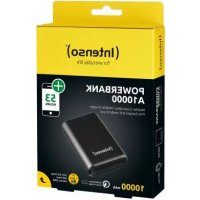
A10000 - Power bank INTENSO - Free user manual and instructions
Find the device manual for free A10000 INTENSO in PDF.



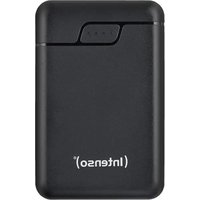
| Product type | Portable battery (Powerbank) |
| Brand | Intenso |
| Model | A10000 |
| Battery capacity | 10000 mAh (3.7 V lithium polymer) |
| Dimensions | 95 x 63.5 x 24.5 mm |
| Input (Powerbank charging) | USB-C: 5V-3A (normal), 5V-3A/9V-2.22A/12V-1.67A (PD max 20W) |
| USB-A output | Normal: 5V-3A max; Quick Charge 3.0: 5V-3A/9V-2A/12V-1.5A (max 18W) |
| USB-C output | Normal: 5V-3A max; Power Delivery: 5V-3A/9V-2.22A/12V-1.67A (max 20W) |
| Combined output (USB-A + USB-C) | 5V-3A max (15W), without fast charging |
| Fast charging technologies | Qualcomm Quick Charge 3.0 and Power Delivery 3.0 |
| Status indicator | 4 LEDs: white (normal charge) / blue (fast charge) |
| Integrated protections | Against overcharges, deep discharges, overvoltages and short circuits |
| Operating temperature | 0 °C to 40 °C |
| Storage temperature | -10 °C to 45 °C |
| Max. relative humidity | 90 % (short period) |
| Package contents | Powerbank, USB-C to USB-C cable, user manual |
| Maintenance | Recharge fully at least every 3 months |
| Cleaning | Wipe with a dry, soft cloth; do not use liquids |
| Spare parts / repairability | Not user-serviceable; no spare parts available |
| Warranty / Compliance | CE marking; warranty void if opened or used improperly |
| Customer service | Intenso International GmbH, email: rma@intenso-international.de |
Frequently Asked Questions - A10000 INTENSO
User questions about A10000 INTENSO
0 question about this device. Answer the ones you know or ask your own.
Ask a new question about this device
Download the instructions for your Power bank in PDF format for free! Find your manual A10000 - INTENSO and take your electronic device back in hand. On this page are published all the documents necessary for the use of your device. A10000 by INTENSO.
USER MANUAL A10000 INTENSO
Please read this manual carefully and observe and follow all the instructions mentioned in it to ensure a long service life and reliable use of the device. Keep this manual handy and pass it on to other users of the device.
Safety instructions 2
Declaration of confirmity 3
Scope of delivery 3
Use 4
Device overview 4
Operation 4
Function key (On/Off) 4
LED status display 4
Commissioning / Charging the Powerbank / Charging connected devices 5
Service/Distributor 5
Disposal 6
Operating conditions 6
Technical data 6
Qualcomm Quick Charge is a product from Qualcomm Technologies, Inc. Qualcomm is a trademark of Qualcomm Incorporated registered in the United States and other countries. Quick Charge is a trademark of Qualcomm Incorporated. All Qualcomm Incorporated brands are used with permission.
SAFETY
Intended use
This Powerbank is intended exclusively for the power supply of devices with an operating voltage of 5V direct current (mobile phones, MP3-Player, etc.), as well as devices which support the Power Delivery Standard (PD) or the Qualcomm® Quick Charge™ Technology Standard. This product is not intended for commercial use or for medical and special applications, where the failure of the product can cause injuries, mortalities or considerable material damages. In the case of use which does not correspond to the intended use, the liability expires. The opening as well as conversion of the device and the use of additional devices and accessories, which are not approved by us, must be refrained from. Do not use the device under extreme environmental conditions and observe the safety instructions. Non- observance of the information and safety instructions in these Instructions is deemed as non-observance of the intended use and leads to expiry of the liability and can lead to personal or material damages.
The firmware and/or hardware may be changed at any time without prior notice. For this reason it is possible that parts of these instructions, technical data and images in this documentation differ slightly from the product in your possession. All points described in these instructions only serve the purpose of clarification and must not inevitably correspond to a certain situation. Legal claims cannot be made on the basis of these instructions.
Safety instructions
Dangers for children and persons with restricted physical, sensory or mental abilities:
Children often underestimate dangers or do not recognize them at all. This device is not intended to be used by persons (including children) with restricted sensory, physical or mental abilities or lack of experience and/or knowledge, unless they are supervised by a person responsible for their safety or received instructions from the person on how to use the device and they have understood the resultant dangers. Unsupervised children should not have access to the device. Make sure that children do not play with the device.
Danger of asphyxiation!
Children can put the packaging film or small parts in their mouths and choke on them.
Risk of short circuit!
To avoid injury, do not operate this appliance with wet hands.
Do not insert any items, which are not intended for its use, into the openings of the device. This could lead to an electrical short-circuit and a resultant fire.
Do not use the device if there is visible damage to the device itself or to the USB cable, as this may result in injury or damage.
The device may not be exposed to spray or dripping water.
Do not place containers filled with liquids (vases, glasses, etc.) on the device or in its immediate vicinity. There is a risk that the container will tip over and the liquid will affect the electrical safety.
Tripping hazard!
When positioning the device, pay attention that no one can tread on the cable or trip over it. Do not place any objects onto the cable.
Damage!
Do not use the device in extremely cold, hot, humid or dusty areas. Do not subject it to direct sunlight.
Protect the product from open fire. There is danger of explosion!
Protect the device in every operating state against impact and falling.
This device is sensitive to electrostatic discharge. Therefore protect the device against every possible electrostatic discharge.
To avoid malfunctions, do not connect the USB output ports of the device with USB ports of computers or other devices. They are only intended for charging devices.
To avoid overheating, do not block or cover the openings of the product.
Do not cover the product completely during operation to ensure heat dissipation.
Do not open the housing of the device and do not disassemble it into its component parts. Do not try to repair it yourself. The guarantee expires in this case.

WARNING! Hot surface!
Holding the device for longer periods when in use can result in the surface becoming hot, causing skin injuries. When using the device, avoid holding it for too long, especially in areas which become very hot. Do not carry the device directly on your body. The device can be touched for longer periods after it has cooled down.
Declaration of conformity

he CE marking says that this product meets the requirements of all EU Directives applicable for this product.

The UKCA marking says, that this product meets the requirements of all UK Directives applicable for this product.
SCOPE OF DELIVERY
Intenso Powerbank A10000 USB-C to USB-C charging cable (supports PD)
3 Operating instruction
Please check whether the contents of the packaging (see also graphic at the beginning of the manual on page 2) are complete and undamaged. If this is not the case, please contact the seller or our service department:
rma@intenso-international.de
USE
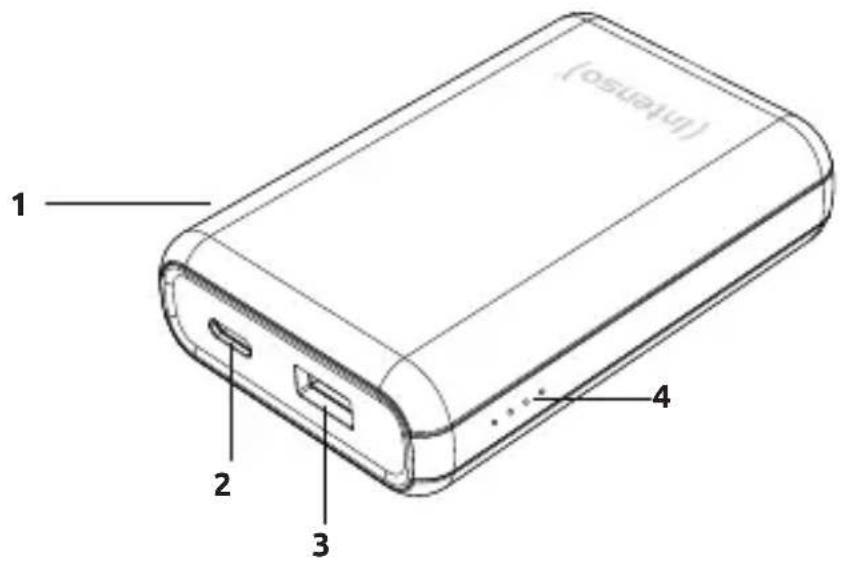
Device overview
1 - Function key (On/Off)
2 - USB-C In/Out (PD)
3 - USB-A Out (QC)
4 - Status LED
Operation
Function key (On/Off)
If the charging process does not start automatically, you can start it manually by briefly pressing the function key. You can stop the charging process and deactivate the Powerbank by briefly pressing the key twice.
LED Status display
The individual LEDs display the remaining energy of the Powerbank:
| LED light | ||||
| % - Energy LED 1 | LED 2 LED 3 LED 4 | |||
| 1 % - 25 % | ● | ○ | ○ | ○ |
| 26 % - 50 % | ● | ● | ○ | ○ |
| 51 % - 75 % | ● | ● | ● | ○ |
| 76 % - 100 % | ● | ● | ● | ● |
Commissioning / Charging the Powerbank / Charging connected devices
a) Charging the Powerbank
Please connect the supplied USB-C cable to the USB-C port (USB-C In/Out) of the Powerbank; then connect the other end of the USB cable to a USB-C power supply or to a USB-C port on your computer. The charging process and current charging status will be indicated by the LED status lights. If the Powerbank is entirely charged, the LED status lights remain illuminated. The required charging time of the Powerbank depends on the selected charging source and the output power.
Normal charging:
Use a standard USB power supply or a USB port on a computer to charge the power bank via the USB-C Out/In port (maximum 5V 3A = maximum 15 watts).
Fast charging:
To charge the power bank with a maximum power (20 watts), please use a power supply unit supporting the Power Delivery Standard (PD). The fast charging is indicated by an LED as well which now lights up blue. If the LED does not change from white to blue, your power supply unit or the cable used are incompatible with the PD standard and the power bank will be charged normally.
b) Charging devices with the Powerbank
This Powerbank has a USB-A port (USB-A OUT) and a USB-C port (USB-C In/Out), both of which can be used to charge devices.
The USB-A port supports the Qualcomm Quick Charge 3.0 Standard (Output normal: 5V/3A max.; Output QuickCharge: 5V/3A, 9V/2A, 12V/1.5A max. = max. 18 Watt).
The USB-C port supports the Power Delivery (PD) Standard (Output normal: 5V/3A max.; Output PD: 5V/3A, 9V/2.22A, 12V/1.67A max. = max. 20 Watt).
To charge your device with USB-C port, simply use the supplied USB-C to USB-C cable. Of course you can also use your own USB charging cable to connect the Powerbank with your device. Please note, however, that for the Quick Charge Technology and the Power Delivery standard cables are required, which support this standard (if necessary ask the manufacturer of your USB cable).
To charge your device, simply connect the supplied cable with the USB-C port (USB-C In/ Out) of the Powerbank and the other end with the USB-C port of the device to be charged. Alternatively, connect your own cable - depending on cable type - with the USB-A port (USB-A OUT) or the USB-C port (USB-C In/Out) of the Powerbank and the other end with the device to be charged. The charging process starts automatically and the devices determine the suitable charging current independently. If the charging process does not start automatically, please activate it with the function key. The fast charging is indicated by an LED as well which now lights up blue. If the LED does not change from white to blue, your connected device or the cable used are incompatible with the PD standard and the power bank will be charged normally.
You can charge two devices simultaneously with the Powerbank. The Quick Charge Technology and the Power Delivery Standard are, however, only supported when just one device is charged. When charging 2 devices simultaneously, the ports share the maximum output of 5V / 3A = 15Watt .
If a device is charged with the Powerbank and the capacity of the Powerbank is almost exhausted, this is signalled by blinking of the last status LED. Please re-charge the Powerbank.
Please note that while charging a device with a Powerbank, about 30% of the total capacity is used up just through the charging process. This is due, for example, through the loss of power from circuit warmth and voltage conversion.
The Powerbank has to be used regularly for optimum performance. If this is not the case, charge the Powerbank fully at least every three months.
Make sure that the warmth created through the charging process can be emitted from the device (ideally place the Powerbank on a firm and heat-resistant base while in use).
SERVICE / DISTRIBUTOR
INTENSO INTERNATIONAL GMBH | Kopernikusstraße 12-14 I D-49377 Vechta
Email (technical support): support@intenso-international.de
Email (RMA number): rma@intenso-international.de
Internet:
www.intenso.eu
Telephone (technical support): +49 (0) 4441 - 999 111 (Mon. - Thur. 09:00 - 16:30; Fri. 09:00 - 14:00)
DISPOSAL
| Disposal of old batteries: The devices marked with this symbol are subject to the European Directive 2006/66/EC All old batteries must be disposed of separate from the municipal waste stream via design- nated collection facilities appointed by the government or the local authorities You avoid environmental damage with the proper disposal. | |
| Disposal of old electronic equipment: The devices marked with this symbol are subject to the European Directive 2012/19/ EC. All electrical appliances and old electrical appliances must be disposed of separate from the municipal waste stream via designated collection facilities appointed by the government or the local authorities. You avoid environmental damage with the proper disposal of old electrical equipment. | |
| Packaging: Packaging is raw material. The packaging material of this product is suitable for recycling and can be re-used. Please pay attention to the local recycling provisions when disposing of any materials. |
OPERATING CONDITIONS
Operate the device at 0 to 35 degrees Celsius and a maximum humidity of 85% (for a short time). If you do not use your device for a longer period, store it at between -10 and 45 degrees Celsius at max. 90% relative humidity (for a short time) and charge this every three months to maintain full capacity.
TECHNICAL DATA
| Dimensions: 95 x 63.5 x 24.5 mm | |
| Power consumption (Input): | USB-C In: Normal: 5V-3A Power Delivery: 5V-3A, 9V-2.22A, 12V-1.67A (max. 20 watt) |
| Charging current delivery (Output): | USB-A Out: Normal: 5V-3A Quick Charge: 5V-3A, 9V-2A, 12V-1.5A (max. 18 watt) USB-C Out: Normal: 5V-3A Power Delivery: 5V-3A, 9V-2.22A, 12V-1.67A (max. 20 watt) USB-A + USB-C Out: 5V-3A gesamt |
| Internal battery: 10000 mAh / 3.7V lithium | um polymer battery |
| Status display: 4 LED lights | |
| Integrated overcharge protection / discharge protec-tion / overvoltage protection / short circuit fuse: | Yes |
| Standby time: Up to 3 months |
MODE D'EMPLOI
Sécurité 2
Email (assistance technique): support@intenso-international.de
| LED lámpa | ||||
| Energia % LED 1 | LED 2 LED 3 LED 4 | |||
| 1% - 25% | ● | ○ | ○ | ○ |
| 26% - 50% | ● | ● | ○ | ○ |
| 51% - 75% | ● | ● | ● | ○ |
| 76% - 100% | ● | ● | ● | ● |
CBeToaNoIuHnKauncoCToHHN 4
BbD B 3Kcnpnyatauio / 3apdka BHeHero aKKymyIaTopa /
3apKa POnKJIoueHHbIX ycTpoiCTB 5
CEPBNC/INCTPNbIOTOP 5
YTNIN3AUN 6
UCIOBNA 3KcPlyATAUIN 6
TEXHnueCKNE DAHHbIE 6
Qualcomm Quick Charge npedctabnaret c6oB npodukk Kompanu Qualcomm Technologies, Inc. Qualcomm YbIeTc TOBAPbIM 3HaKOM Qualcomm Incorporated, 3apernctpnpobAHbIM B CUSA n dpynx ctpaHax. Quick Charge YbIaeTc TOBAPbIM 3HaKOM Kompanu Qualcomm Incorporated. BCE TOBAPbIE 3HaKn Qualcomm Incorporated nCnoNb3yUToTc c ee pa3peWeHn.
B30NACHOCTb
Ha3haueHne
3TOT BHeuHn AKKyMylAToP npEHa3Hauen NCKIIOUHTeBHO DnA 3JeKTPoNtAHn yCTPOINCTB Cpa6OUM HApJxHnEM 5 B nocToaHnO ToKa (MObNbHbIX TelefoHOB, MP3-tnEEPoB IN. T. n.), a TaKxue yCTPOINCTB, POndepKNaBIOx CTAnDAPr „Power Delivery" (PD) nII texHoIorIO Qual- comm® Quick ChargeTM. 3TOT npOdyKT He npEduCMOTpeH dIy KOMMepueckoro IcNoJIb3OBaHnRA nn DnMaIe MEdiunHcKnx I cneuaNBbIX npImeHn, pR KOTOpBX BixOD IpOdykTA n3 CTrPOr MoKeT PnIBeCTN K TpaBMam, CmepTeHBHIM HeCuaCTHbIM CnyaAM nII 3HaHTeBHomMy MaTePnaIbHomU yIep6y. B Clyuae IcNoJIb3OBaHnRA He no Ha3HaueHnIO OTBeTCTBeHHOCb I3ROTOBnteY UtpaHbaET cnIy. He BckpbBaIte KopNyca yCTPOINCTB, He BVocITE B yCTPOINCTBA HnKaKne I3MeHEnra I He nCnoJIb3yIte HnKaKne IOnOJIHNTeBhble YCTPOINCTBA I npHaJdLeXHOCTH, KOtOpBie He 6bln Hamu YTBepJdeHb. 3aIpeuaTeCn IcNoJIb3OBaTb YCTPOINCTBO B 3KCTpeMaJIbHbIX YcIOBHX OkpykaIOSeI cpebl, a TaKxhe Heo6XoDMo Co6IIODaTb Yka3aHnra IO TexHnke 6e3OnacNocTN. HecobIoJeHne IHΦopMaunu N yka3aHn No 6e3OnacNocTn, CoedePxaUnxCBA E TOM pYkoBODCTBE, CHTaEtCnIOJIb3OBaHnEm YCTPOINCTBA He n O Ha3HaueHnIO, CHMaET OTBeTCTBeHHOCTB I3ROTOBNTeL N MOKe TnpIBeCTN K TpaBMam IIN MaTePnaJIbHOMy yIep6y.
I3meHnBO CTpoEHOM nporpaMMHom n/nn annapaTHOM oecneueHN MOryt 6bItb BHeceHb I JIO6oe Bpemn 6e3 npedBapntelbHoro yBeDomLeHn. NTo aToi npuHne Bo3MOxHo, UTo qactn pyKOBoDCTBa, TexHnueckne xapaKTePncTnN u 3O6paJKeHn B 3ToI DOkUMeHTaCnM OMyr HEMHO OTnUaTbcr OT npOyKtA, KOTOpBn Y Bac eTb. Bce NyHKTbI, ONncaHHbE B 3ToM pyKOBoDCTBe, CnyKaT ToIbKO dJa YTOUHeHn N Heo6a3aTeNbHO DoJIXHbI COOTBeTcTBOBaTb KOHKpeTHo CNTuaCn. Ha ochobAHn HAcToaIero pkyKOBoDCTBa He MOrY 6bITb npedBraHbI HnKaKne IopNiueckne npTeH3nn.
Yka3aHnno 6e3oNaChOCTN
Onachoctn dIy deTei n IuC c OrpaHnueHHbIMN fN3NueCKMn, ceHCOPHBIMN IIN NCNXNUeCKMn BO3MOXHOCTaMn:
ДeТи чаTo HeДооцehнваIoT OnaHocThилдже BOВCE He paCNo3HaIoTnx. 3To yCTpoIcTBO He paccHTaHo Ha To, YTObI erO nCnoJIb3OBaII NlUca (BkIIOUaJdTei) C OrpaHnueHHbIMn ceHCOPHBIMN, fN3NuEckHMn IIN PNCXInuEckMn CnOCo6HocTЯMn (B TOM YnCSle DeTn) NlN LlUca, He paCNoIarAOUJIne COOTBeTCTByUOUIM ONbITOM N/INN 3HaHnIAmN, 3a NsCKJIIOUeHNHe ClyuaeB, eCIn 3To npOnCxOJNT NOI NaD3OpOM LlUca, OTBeUaIooero 3a INx 6e3ONaChocTb, IIN eCIn OHI NOLyUHIn OT Hero Yka3AHnI NO PONb3OBaHInO UcTpoIcTBOM N NOHJIIN CBra3aHHbIe C 3TIm pNcKn. 3eTn 6e3 HAd3Opa He DOnJXhbl ImMeTb DoCTyNA K 3ToMy UcTpoIcTBY. CLeIIne 3a TeM, YTObI deTn He irpAln C yCTpoIcTBOM.
Onachoctb ydyusb!
IeT MOrTy NIOJXHTb yNaKOBouHyU pIeHky IIN MeIeKne DeTaJI B pot n 3aDOxHyTbcra.
Onachoctb KopotKoro 3amblaHna!
YTo6bI n36ExKaTb TpaBM, He nCNoJIb3yIe 3TO yCTpoiCtBO MOKpbIMn pyKaAMn.
He BCTaBnIe B OTBepCTNa He npEynCMOTpeHHbIe IJIr 3TOrO npeMeIb. 3TO MoKet npNBecTN K TpaBMam, Bbl3BaHHbIM 3JIeKTPnueCKm KOpOTkM 3AmbKaHHeM N/INN CnOC6HOCTbIO K Bo3RopAHIO.
Hn B Koem cnyae He nCnoIb3yIte yCTpoIcTBo, ecn Ha HEM camOM nn Ha USB-kaBeIe ImeIoTcBvDnMbIe NOBpeJdeHn.
He onyckaTb nonaHa Ha ycToiCTBO 6pbI3 ngn KapeIb BObl.
Ha yctpoicTBO HeIb3a CtaBnTb COcyIb, 3aONHeHbIe KNDKocTbIO (Ba3bl, cTaKaHbI nn T.I.). CyueCTByET ONaCHOCTb ONpOKnDbIbAHnca COCyDa n ONaCHORO Bo3DeiCTBna KNDKocTn Ha 3JeKTpUyeCKne Zenn.
Onachoctb cNOTbikaHna!
BbIbepnte IyctpoiCTBa TaKoe MeCTo, UTO6bl HNkTo He MoT HaCTyNTb Ha Ka6JIb NIIc CNOTKHytbcr O Hero. He cTaBbTe Ha Ka6JIb KaKHe-Jn6o PpeDMeTbI.
Onachoctb noBpeKdenn!
He nCnoIb3yIte yCTpoIcTBO B Upe3BbIaHNo XOIOhBIX, TOpAHyX, BlaXhbIX IIN PbIbHBIX MeCTax. He noDbepraIte ero BO3deIcTBnIO npAmbix coJIHeuHbIX Lyuei. 3aUIIaIte yCTpoIcTBO OT OTKpbIToro OrHr. OnacHOctb B3pBa!
B JIObO m pa6ooyem coCToHn yCTpOyIcTbA 3aUuHaTe erO OYdApOB n PaJeHn.
3TO yCTpoiCTBO uYBCTBnTeIbHO K 3JIeKTPoCtAtNueckm pa3pIaM. PoTOMy 3aIuIaIte yCTPOiCTBO OT JIO6bIX BO3MOxHbIX 3JIeKTPoCtAtNuecknx pa3pIaOB.
Bo n36eHXHe HnpaBnIbHOro fYHKcHOnHpOBaHn He coeHNrTe BbIXOHDhie rHe3da USB yCTpoiCTBa c rHe3dAmn USB kOMnbIOTePOB nII nHbIX np6OpOB. OHI ppeHa3NaueHbToJIbKO dIra 3apAKn yCTpoiCTB.
UTo6bI n36eKaTb nepepeBa, He 3aropaknBaIte H He NaKpbBaIte OTBepCTna yCTpoiCTBa. He HaKpbBaIte UcTPOINCTBO NOLHOCTBIO BO BpempaOtbl, UTo6bI oecneuHTb OTBOI TeIIa.
He BckpbBaIte Kopnyc yctpoiCTBa n He pa3bnpaTe yctpoiCTBO Ha qactn. He nbitaTecb erocamocToTebHo peMOHTnpoBaTb. B 3tix clyuaRx rapaHTna YTPaunBaET cnly.

PPEyIeHHe!Topa noBepxHocb!
Ecn yctpoicTBO nCnoB3yeTc, npKocHOBeHne K HeMy B TeueHne DInTeIbHoro BpeMeHN MoKeT npNBecTN K TeNIOBbIM NOBpeJDeHnAM KOHN. Ppi erO nCnoJIb3OBAHn He IepKntEcB npExe BCero 3a ropAune yUacTK N DInTeIbHoe Bpem. He HocHTe ycTPOiCTBO npAmo Ha TeJe BO BpeMn CNoJIb3OBAHn. IocNe OXJaKeHnK YcTPOiCTBy MOxHO npNKacaTbcR DInTeIbHoe BpeM.
Декларачи COOTBETCTBNA

apknpoBka CE 03nauaet, yTO 3TOT npOdyKT COOTBeTCTByeT Tpe6oBaHnM BCex dIpuekTINB EC, DeiCTbYIOxN x IJIy 3TOrO npOdyKta.
OeEMIOCTABKN
Intenso Powerbank A10000 PukoBoDCTeO
3apnHyk6eIbckOnuAMNTtnaUSB-C (noDepKnBaETcAnaprPD)
IopkaJyIcTa, npOBepbTe, yBJIeTcJ IIN cOdepKIMoe yNaKOBKn (cM. TaKHe rpaΦNK B HaJaJIe IHCTpyKcIIN Ha Ctp. 2) pONHbIM n HEnOBpeXeHbIM. EcII N3To He TaK, POxKaIyIcTa, CBaIKTeCb C IpOdaBcOM IIN HaShIM cepBvcom: rma@intenso-international.de
ПРИМЕHEHNE
0630p yctpoiCTBa
1-Функционаьная Клавишa (On/Off)
2 - USB-C In/Out (PD)
3 - USB-A Out (QC)
4-CbetoIOnOcOCToHHN
№ь3OBaHne
CBeToaNoA HdNkauncoCToHn
OTdIbHbIe CBeToIONoDbI NOKa3bBaHT 3anac 3Heprn BO BHeuHem aKKyMylatope:
| СbvetoДиоД | ||||
| % зангий Сbveto | ДиоД 1 | 2 CbvetoДиоД 3 | СbvetoДиоД 4 | |
| 1 % - 25 % | • | ○ | ○ | ○ |
| 26 % - 50 % | • | • | ○ | ○ |
| 51 % - 75% | • | • | • | ○ |
| 76 % - 100 % | • | • | • | • |
BbD B 3Kcnpnyatauio / 3apraKa BHewHero aKKymyIaTopa / 3apraKa noKnIOueHHbIX yCTpoiCTB
a)3apAka BHeuHero aKKymyIaTopa
IopKlIOHTe npnilaraemb Kabe USB-C K nopTy USB-C (USB-C In/Out) nobep6aHka, a pyroK KOHeu Ka6eJy USB noekluOHTe K nctouHky nItaHnY USB-C nIi npTy USB-C Ha BaWeM KompbTepe. Ipocecc 3apdKn i TekyuN CTatyc 3apdKn OTObpaKaOTc CBeToNDnOBIMn INDnKaTOpAMn COCToHnR. Korda Nobep6aHK pNOHocTBIO 3apJxH, CBeToNDnHBi NHDnKaTOp COCToHnR TpEbyEmoe BpMa 3apdKn dJa Nobep6aHka 3abNCIT OT Bb6paHHOrO nCTouHnKa 3apdKn n erO BbIXoDHo MOUHOCTN.
06bUHaHa 3apAka:
IcnoJb3yIte cTaNdapThbI hCTOuHnK nTahnI USB nIi npT USB Ha KOMnbIepe dIaApIKn NOBep6aHaKepe3 USB-C In/Out (MaKc. 5V, 3 A = MaKc. 15 Bt).
Быстая заюка:
YTo6bI 3apJntb NOBep6aHK c MaKcHMaJIbHOm MoUHocTbIO (20 BT), NcNoJIb3yIte 6JOK nHTAHn, NOdEprKINBaIOuI CTaHdApT NoDAuN PNTAHn (PD).Ha 6bICTpyO 3apJky YKa3bIBaET CBeTOAnOD, KOTOpBI Tenepb rOpNT CINHM. Ecln UCBET CBEToDIOJa He MeHReTcR c 6eJoro Ha CINH, BaW 6Jok nITAHn IIN NCNoJIb3yeMbI Ka6eJIb HecOBMeCTMbl CO CTaHdApTOM PD, IN NOBep6aHK 3apJkaeTcH HopMaJIbHO.
b) 3apädka yctpoiCTB OT BHeuHero akKymyIaTopa
B 3TOM BHeIshem aKKyMylATope HmeeTcra Tnna USB-A (USB-A OUT QC) n THe3do Tnna USB-C (USB-C In/Out PD). O6a 3Tnx THe3da MoJHcNcNoJIb3OBA Tb dJa 3apRdKn dpyrInx yCTpoiCTB.
- SCOPE OF DELIVERY 3
- USE 4
- SERVICE/DISTRIBUTOR 5
- DISPOSAL 6
- OPERATING CONDITIONS 6
- TECHNICAL DATA 6
- SAFETY
- INTENDED USE
- SAFETY INSTRUCTIONS
- DANGER OF ASPHYXIATION
- RISK OF SHORT CIRCUIT
- TRIPPING HAZARD
- DAMAGE
- WARNING! HOT SURFACE
- DECLARATION OF CONFORMITY
- SCOPE OF DELIVERY
- USE
- DEVICE OVERVIEW
- OPERATION
- FUNCTION KEY (ON/OFF)
- LED STATUS DISPLAY
- COMMISSIONING / CHARGING THE POWERBANK / CHARGING CONNECTED DEVICES
- CHARGING THE POWERBANK
- NORMAL CHARGING
- FAST CHARGING
- CHARGING DEVICES WITH THE POWERBANK
- SERVICE / DISTRIBUTOR
- DISPOSAL
- OPERATING CONDITIONS
- TECHNICAL DATA
- MODE D'EMPLOI
- SÉCURITÉ 2
- CEPBNC/INCTPNBIOTOP 5
- YTNIN3AUN 6
- UCIOBNA 3KCPLYATAUIN 6
- TEXHNUECKNE DAHHBIE 6
- B30NACHOCTB
- HA3HAUEHNE
- YKA3AHNNO 6E3ONACHOCTN
- ONACHOCTN DIY DETEI N IUC C ORPAHNUEHHBIMN FN3NUECKMN, CEHCOPHBIMN IIN NCNXNUECKMN BO3MOXHOCTAMN
- ONACHOCTB YDYUSB
- ONACHOCTB KOPOTKORO 3AMBLAHNA
- ONACHOCTB CNOTBIKAHNA
- ONACHOCTB NOBPEKDENN
- PPEYIEHHE!TOPA NOBEPXHOCB!
- ДЕКЛАРАЧИ COOTBETCTBNA
- OEEMIOCTABKN
- ПРИМЕHEHNE
- 0630P YCTPOICTBA
- №Ь3OBAHNE
- CBETOANOA HDNKAUNCOCTOHN
- BBD B 3KCNPNYATAUIO / 3APRAKA BHEWHERO AKKYMYIATOPA / 3APRAKA NOKNIOUEHHBIX YCTPOICTB
- A)3APAKA BHEUHERO AKKYMYIATOPA
- 06BUHAHA 3APAKA
- БЫСТАЯ ЗАЮКА
- 3APÄDKA YCTPOICTB OT BHEUHERO AKKYMYIATOPA
Brand : INTENSO
Model : A10000
Category : Power bank