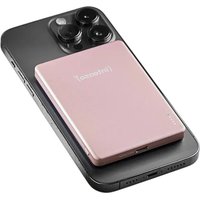
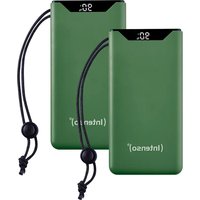
MW5000 - Power bank INTENSO - Free user manual and instructions
Find the device manual for free MW5000 INTENSO in PDF.


| Product type | Portable battery (Power Bank) |
| Brand | Intenso |
| Model | MW5000 |
| Battery capacity | 5000 mAh (Li-polymer 3.85 V) |
| Dimensions | 96 x 66 x 9.5 mm |
| Weight | Approx. 130 g |
| USB-C input (charging) | 5V/2.5A (12.5W) or PD: 5V/2.5A, 9V/2A, 12V/1.5A (max. 18W) |
| USB-C output (wired charging) | 5V/3A (15W) or PD: 5V/3A, 9V/2.22A, 12V/1.67A (max. 20W) |
| Wireless output | Up to 15W (Qi compatible, MagSafe) |
| Charge indicator | 4 LEDs for battery level + function LED (blue/green/turquoise) |
| Integrated protection | Overcharge, deep discharge, overvoltage, short circuit, foreign object detection |
| Operating temperature | 0 °C to 40 °C |
| Storage temperature | -10 °C to 45 °C |
| Maximum humidity | 90% RH (short period) |
| Package contents | Power bank, USB-C to USB-C cable (PD compatible), user manual |
| Main features | Wireless charging (15W), wired PD charging (20W), MagSafe magnetic ring, foreign object detection |
| Care and cleaning | Wipe with a dry cloth; do not use harsh liquids |
| Recycling | Do not dispose of with household waste; take to a collection point |
| Service / Customer service | Intenso International GmbH, email: rma@intenso.de, phone: +49 4441 999111 |
Frequently Asked Questions - MW5000 INTENSO
User questions about MW5000 INTENSO
0 question about this device. Answer the ones you know or ask your own.
Ask a new question about this device
Download the instructions for your Power bank in PDF format for free! Find your manual MW5000 - INTENSO and take your electronic device back in hand. On this page are published all the documents necessary for the use of your device. MW5000 by INTENSO.
USER MANUAL MW5000 INTENSO

Please read this manual carefully and observe and follow all the instructions mentioned in it to ensure a long service life and reliable use of the device. Keep this manual handy and pass it on to other users of the device.
Safety instructions 2
Declaration of confirmity 3
Simplified EU Declaration of Conformity 3
Scope of delivery 4
Use 4
Device overview 4
Operation 4
Function button (On/Off) 4
Status LEDs 4
Commissioning / Charging the Powerbank / Charging connected devices ..... 5
Service/Distributor....6
Operating conditions 6
Disposal 7
Technical data 7
MagSafe™ is a trademark of Apple Inc., registered in the U.S. and other countries. All mentioned trademarks are the intellectual property of the copyright and/or trademark owner.
SAFETY
Intended use
This power bank is solely intended to power devices with a operating voltage of 5.0V DC (mobile phones, MP3 players, etc.), as well as devices that support the Power Delivery (PD) standard and for wireless charging of Qi-enabled devices. The magnetic ring is optimized for Apple iPhones with MagSafe support (from the iPhone 12 series onwards), but inductive charging is also compatible with other devices that can be wirelessly charged. To determine if your device supports wireless charging, please refer to the corresponding user manual or check with the manufacturer. Any other or additional use is considered improper and may result in damage or injury. This product is not intended for commercial use or for medical and special applications where product failure could cause injury, death, or significant property damage. Any claims for damages arising from improper use or failure to observe safety instructions are excluded.
The firmware and/or hardware may be changed at any time without prior notice. For this reason it is possible that parts of these instructions, technical data and images in this documentation differ slightly from the product in your possession. All points described in these instructions only serve the purpose of clarification and must not inevitably correspond to a certain situation. Legal claims cannot be made on the basis of these instructions.
Safety instructions
Dangers for children and persons with restricted physical, sensory or mental abilities:
Children often underestimate dangers or do not recognize them at all. This device is not intended to be used by persons (including children) with restricted sensory, physical or mental abilities or lack of experience and/or knowledge, unless they are supervised by a person responsible for their safety or received instructions from the person on how to use the device and they have understood the resultant dangers. Unsupervised children should not have access to the device. Make sure that children do not play with the device.
Danger of asphyxiation!
Children may put parts of the packaging or other small parts in their mouths and choke on them.
Risk of injury!
If you have a pacemaker or any other medical implant, consult your doctor or the manufacturer of the implant before using the power bank. The built-in magnets may interfere with its functionality.
Risk of short circuit!
To avoid injury, do not operate this appliance with wet hands.
Do not insert any items, which are not intended for its use, into the openings of the device. This could lead to an electrical short-circuit and a resultant fire.
Do not use the device if there is visible damage to the device itself or to the USB cable, as this may result in injury or damage.
The device may not be exposed to spray or dripping water.
Do not place containers filled with liquids (vases, glasses, etc.) on the device or in its immediate vicinity. There is a risk that the container will tip over and the liquid will affect the electrical safety.
Tripping hazard!
When positioning the device, pay attention that no one can tread on the cable or trip over it. Do not place any objects onto the cable.
Damage!
Do not use the device in extremely cold, hot, humid or dusty areas. Do not subject it to direct sunlight.
A battery exposed to extremely low air pressure may explode or leak flammable liquid or gas.
Protect the product from open fire. There is danger of explosion!
Protect the device in every operating state against impact and falling.
This device is sensitive to electrostatic discharge. Therefore protect the device against every possible electrostatic discharge.
To avoid malfunctions, do not connect the USB output ports of the device with USB ports of computers or other devices. They are only intended for charging devices.
To avoid overheating, do not block or cover the openings of the product.
Do not cover the product completely during operation to ensure heat dissipation.
Do not open the housing of the device and do not disassemble it into its component parts. Do not try to repair it yourself. The guarantee expires in this case.
To avoid damage, cards with magnetic strips or other items that may be sensitive to magnets must not be placed on the power bank.

WARNING! Hot surface!
Holding the device for longer periods when in use can result in the surface becoming hot, causing skin injuries. When using the device, avoid holding it for too long, especially in areas which become very hot. Do not carry the device directly on your body. The device can be touched for longer periods after it has cooled down.
Declaration of conformity
CE
The CE marking says that this product meets the requirements of all EU Directives applicable for this product.
UKCA
The UKCA marking says, that this product meets the requirements of all UK Directives applicable for this product.
Simplified EU Declaration of Conformity
Hereby Intenso International declares that the radio installation type Power Bank MW5000 complies with the Directive 2014/53/EU. The complete text of the EU Declaration of Conformity is available at the following Internet address www.intenso.eu.
SCOPE OF DELIVERY
Intenso Power Bank MW5000 USB-C to USB-C charging cable (supports PD)
3 Operating instruction
Please check whether the contents of the packaging (see also graphic at the beginning of the manual on page 2) are complete and undamaged. If this is not the case, please contact the seller or our service department: rma@intenso.de
USE
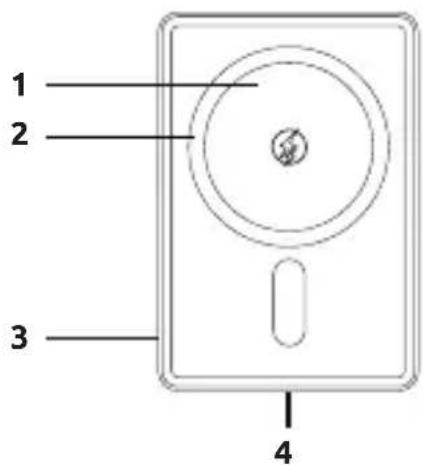
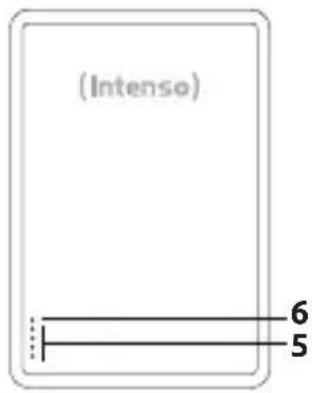
Device overview
1 - Wireless charging area
2 - Magnetic ring
3 - Function button (ON/OFF)
4 - USB-C In/Out (PD)
5 - Status LEDs
6 - Function-LED
Operation
Function button (On/Off)
If the charging process does not start automatically, you can manually start it by briefly pressing the function button. Double-pressing the button will stop the charging process after approximately 2 seconds and turn off the power bank.
If no device is connected to the power bank, or if the connected device signals to the power bank that it is fully charged, the power bank will automatically switch to standby mode after about 30 seconds.
Status LEDs
he individual LEDs display the remaining energy of the Powerbank:
| LED lights | ||||
| % - energy LED 1 | LED 2 LED 3 LED 4 | |||
| 1 % - 25 % | ● | ○ | ○ | ○ |
| 26 % - 50 % | ● | ● | ○ | ○ |
| 51 % - 75% | ● | ● | ● | ○ |
| 76 % - 100 % | ● | ● | ● | ● |
Commissioning / Charging the power bank / Charging connected devices
a) Charging the power bank
Please connect the included USB-C cable to the USB-C port (USB-C In/Out) of the power bank and connect the other end of the USB cable to a USB-C power adapter or USB-C port on your computer. Of course, you can also use your own USB-C cable.
The required charging time for the power bank depends on the chosen power source and its output capacity.
Normal charging:
Use a standard USB power adapter or USB port of a computer to charge the power bank via the USB-C In/Out port (max. 5.0 V/DC 2.5 A = max. 12.5 W). The status LED will remain off.
Fast charging:
To charge the power bank with maximum performance (9.0 V/DC 2.0 A, 12.0 V/DC 1.5 A = 18.0 W), please use a power adapter that supports the Power Delivery (PD) standard. Fast charging is indicated by the green function LED. If it remains off, your power adapter or the cable being used is not PD-compatible, and the power bank will charge at a normal speed.
b) Charging devices with the power bank
Wireless charging:
Place your device on the wireless charging area of the power bank. Devices that support Apple MagSafe will automatically align optimally due to the built-in magnets. All other devices must be manually aligned. The charging process will now start automatically.
If the charging process does not start automatically, please check whether your device supports wireless charging and if the power bank is sufficiently charged and activated. There may also be a foreign object between the devices or you may be using a smartphone case that is not suitable for wireless charging. You may also need to adjust the alignment of your device. If the power bank detects an issue, the function LED will blink blue.
The power bank charges devices wirelessly with a maximum of 15 watts. The output power depends on the connected device and the standard it supports. If no wireless fast charging is available, the function LED will be blue. If the device signals to the power bank that it also supports fast wireless charging, it will be activated automatically, and the function LED will turn turquoise. Depending on the device's charge level, it may take a few minutes for fast charging to be activated, and the power bank may switch between both modes depending on the device's charge level and temperature during the charging process.
To end the charging process, simply remove your device from the power bank or double-press the function button.
Please note that the surrounding temperature and the device's temperature can affect the charging speed, as most devices reduce power intake at higher temperatures.
Wireless charging generates heat. This is normal. Therefore, do not place devices on soft surfaces, such as wool blankets, during wireless charging, so that heat can dissipate from the device.
Wired charging:
This power bank features a USB-C port (USB-C In/Out), which can be used to charge devices. It supports the Power Delivery (PD) standard.
To charge your device with a USB-C port, simply use the included USB-C to USB-C cable. Of course, you can also use your own USB cable to connect the power bank to your device. Please note that for PD, a cable that supports this standard is required (you may want to check with the manufacturer of your USB cable).
For wired charging of your device, simply connect the included cable to the USB-C port (USB-C In/Out) of the power bank and the other end to the USB-C port of the device to be charged, or alternatively use your own USB-C cable.
The charging process starts automatically, and the devices will independently determine the appropriate charging current. If fast charging is not possible, the function LED will remain off, and the device will be charged with a maximum of 15 watts (5.0 V/DC 3.0 A). If fast charging via PD is activated, the function LED will light up green, and the device will be charged with a maximum of 20 watts (9.0 V/DC 2.22 A or 12.0 V/DC 1.67 A).
When a device is charging from the power bank and the power bank's capacity is nearly exhausted, this will be signaled by the last LED blinking when the remaining capacity is around 3% . Please recharge the power bank soon.
Please note that during device charging, around 30% of the total capacity of the power bank is consumed by the charging process itself. This is due to power loss from circuit heat and voltage conversion.
For optimal performance, the power bank should be used regularly. If this is not the case, make sure to fully charge the power bank at least every three months.
Ensure that the heat generated by the charging process can dissipate from the device (ideally, place the power bank on a firm and heat-resistant surface during use). Do not use the device in bags or other enclosed spaces to avoid overheating caused by heat buildup.
SERVICE / DISTRIBUTOR
INTENSO INTERNATIONAL GMBH I Kopernikusstraße 12-14 I D-49377 Vechta
Email (technical support): support@intenso.de
Email (RMA number): rma@intenso.de
Internet: www.intenso.eu
Telephone (technical support): +49 (0) 4441 – 999 111 (Mon. – Thur. 09:00 – 16:30; Fri. 09:00 – 14:00)
OPERATING CONDITIONS
Operate the device at 0 to 40 degrees Celsius and a maximum humidity of 90 % (for a short time). If you do not use your device for a longer period, store it at between -10 and 45 degrees Celsius at max. 90 % relative humidity (for a short time) and charge this every three months to maintain full capacity.
DISPOSAL
 | Disposal of old batteries:The devices marked with this symbol are subject to the Battery Regulation 2023/1542. All old batteries must be disposed of separate from the municipal waste stream via designated collection facilities appointed by the government or the local authorities. You avoid environmental damage with the proper disposal. |
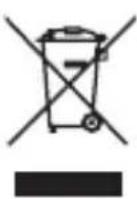 | Disposal of old electronic equipment:The devices marked with this symbol are subject to the European Directive 2012/19/EC. All electrical appliances and old electrical appliances must be disposed of separate from the municipal waste stream via designated collection facilities appointed by the government or the local authorities. You avoid environmental damage with the proper disposal of old electrical equipment. |
 | Packaging:Packaging is raw material. The packaging material of this product is suitable for recycling and can be re-used. Please pay attention to the local recycling provisions when disposing of any materials. |
TECHNICAL DATA
| Dimensions: 96 x 66 x 9.5 mm | |
| Power consumption (Input): | USB-C In:Normal: 5.0 V/DC 2.5 APower Delivery: 5.0 V/DC 2.5 A, 9.0 V/DC 2.0 A, 12.0 V/DC 1.5 A (max. 18.0 W) |
| Charging current delivery (Output): | USB-C Out:Normal: 5.0 V/DC 3.0 APower Delivery: 5.0 V/DC 3.0 A, 9.0 V/DC 2.22 A, 12.0 V/DC 1.67 A (PPS: 5.0 - 5.9 V/DC 3.0 A, 5.0 – 11.0 V/DC 2.0 A) (max. 20.0 W)Wireless:5.0 V/DC 1.0 A, 7.5 V/DC 1.0 A, 9.0 V/DC 1.1 A, 9.0 V/DC 1.66 A (max. 15.0 W) |
| Frequency band: 110 - 205 kHz | |
| Max. rediated power: 15,0 W | |
| Internal battery: 5000 mAh / 3.85 V | ithium polymer akku |
| Status display: 5 LED lights | |
| Integrated overcharge protection / discharge protection / overvoltage protection / short circuit fuse: | Yes |
| Forein object detection: Yes | |
| Cover-friendly: | Yes (depending from cover material and thickness. Maximum 5mm and no metal.) |
| Standby time: Up to 3 months |

ATTENTION ! Surface brûlante !
Email (assistance technique) : support@intenso.de
WAARSCHUWING! Heet oppervlak!
MANUAL DE INSTRUÇÕES
Segurança 2
| LED lampa | ||||
| % energie LED 1 | LED 2 | LED 3 | LED 4 | |
| 1% - 25% | ● | ◇ | ◇ | ◇ |
| 26% - 50% | ● | ● | ◇ | ◇ |
| 51% - 75% | ● | ● | ● | ◇ |
| 76% - 100% | ● | ● | ● | ● |
| LED lámpa | ||||
| Energia % LED 1 LED 2 LED 3 LED 4 | ||||
| 1% - 25% | ● | ○ | ○ | ○ |
| 26% - 50% | ● | ● | ○ | ○ |
| 51% - 75% | ● | ● | ● | ○ |
| 76% - 100% | ● | ● | ● | ● |
- SCOPE OF DELIVERY 4
- USE 4
- SERVICE/DISTRIBUTOR....6
- OPERATING CONDITIONS 6
- DISPOSAL 7
- TECHNICAL DATA 7
- SAFETY
- INTENDED USE
- SAFETY INSTRUCTIONS
- DANGER OF ASPHYXIATION
- RISK OF INJURY
- RISK OF SHORT CIRCUIT
- TRIPPING HAZARD
- DAMAGE
- WARNING! HOT SURFACE
- DECLARATION OF CONFORMITY
- SIMPLIFIED EU DECLARATION OF CONFORMITY
- SCOPE OF DELIVERY
- USE
- DEVICE OVERVIEW
- OPERATION
- FUNCTION BUTTON (ON/OFF)
- STATUS LEDS
- COMMISSIONING / CHARGING THE POWER BANK / CHARGING CONNECTED DEVICES
- CHARGING THE POWER BANK
- NORMAL CHARGING
- FAST CHARGING
- CHARGING DEVICES WITH THE POWER BANK
- WIRELESS CHARGING
- WIRED CHARGING
- SERVICE / DISTRIBUTOR
- OPERATING CONDITIONS
- DISPOSAL
- TECHNICAL DATA
- ATTENTION ! SURFACE BRÛLANTE
- WAARSCHUWING! HEET OPPERVLAK
- MANUAL DE INSTRUÇÕES
- SEGURANÇA 2
Brand : INTENSO
Model : MW5000
Category : Power bank