USER MANUAL B10000 INTENSO

Please read this manual carefully and observe and follow all the instructions mentioned in it to ensure a long service life and reliable use of the device. Keep this manual handy and pass it on to other users of the device.
Safety instructions 2
Declaration of confirmity 3
Scope of delivery 3
Use 4
Device overview 4
Operation 4
Function key (On/Off) 4
LED status display 4
Commissioning / Charging the power bank / Charging connected devices .... 5
Service/Distributor....5
Disposal 6
Operating conditions 6
Technical data 6
SAFETY
Intended use
This power bank is intended exclusively for the power supply of devices with an operating voltage of 5V direct current (mobile phones, MP3 player, etc.). Any other use or use beyond this is considered improper use and may lead to damage and injury. This product is not designed for commercial use or for medical and special applications where failure of the product could cause injury, death or substantial material damage. Claims of any kind due to damage resulting from improper use or failure to follow safety instructions are excluded.
Changes can be made to the firmware and/or hardware at any time and without prior notice. It is therefore possible that parts of this manual as well as technical data and images in this documentation may deviate slightly from the product in front of you. All points described in this manual are for illustrative purposes only and do not necessarily correspond to your specific product. No legal claims can be made on the basis of this manual.
Safety instructions
Dangers for children and persons with restricted physical, sensory or mental abilities:
Children often underestimate dangers or do not recognize them at all. This device is not intended to be used by persons (including children) with restricted sensory, physical or mental abilities or lack of experience and/or knowledge, unless they are supervised by a person responsible for their safety or received instructions from the person on how to use the device and they have understood the resultant dangers. Unsupervised children should not have access to the device. Make sure that children do not play with the device.
Danger of asphyxiation!
Children may put parts of the packaging or other small parts in their mouths and choke on them.
Risk of short circuit!
To avoid injury, do not operate this appliance with wet hands.
Do not insert any items, which are not intended for its use, into the openings of the device. This could lead to an electrical short-circuit and a resultant fire.
Do not use the device if there is visible damage to the device itself or to the USB cable, as this may result in injury or damage.
The device may not be exposed to spray or dripping water.
Do not place containers filled with liquids (vases, glasses, etc.) on the device or in its immediate vicinity. There is a risk that the container will tip over and the liquid will affect the electrical safety.
Tripping hazard!
When positioning the device, pay attention that no one can tread on the cable or trip over it. Do not place any objects onto the cable.
Damage!
Do not use the device in extremely cold, hot, humid or dusty areas. Do not subject it to direct sunlight. Protect the product from open fire. There is danger of explosion!
Protect the device in every operating state against impact and falling.
This device is sensitive to electrostatic discharge. Therefore protect the device against every possible electrostatic discharge.
To avoid malfunctions, do not connect the USB output ports of the device with USB ports of computers or other devices. They are only intended for charging devices.
To avoid overheating, do not block or cover the openings of the product.
Do not cover the product completely during operation to ensure heat dissipation.
Do not open the housing of the device and do not disassemble it into its component parts. Do not try to repair it yourself. The guarantee expires in this case.

WARNING! Hot surface!
Holding the device for longer periods when in use can result in the surface becoming hot, causing skin injuries. When using the device, avoid holding it for too long, especially in areas which become very hot. Do not carry the device directly on your body. The device can be touched for longer periods after it has cooled down.

The CE marking says that this product meets the requirements of all EU Directives applicable for this product.

The UKCA marking says, that this product meets the requirements of all UK Directives applicable for this product.
SCOPE OF DELIVERY
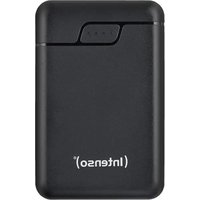
1 Intenso Power Bank B10000 USB-A to USB-C charging cable
3 Operating instruction
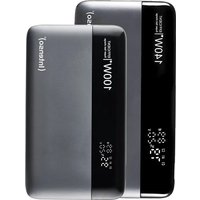
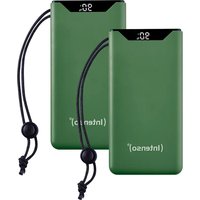
Please check whether the contents of the packaging (see also graphic at the beginning of the manual on page 2) are complete and undamaged. If this is not the case, please contact the seller or our service department: rma@intenso.de
USE
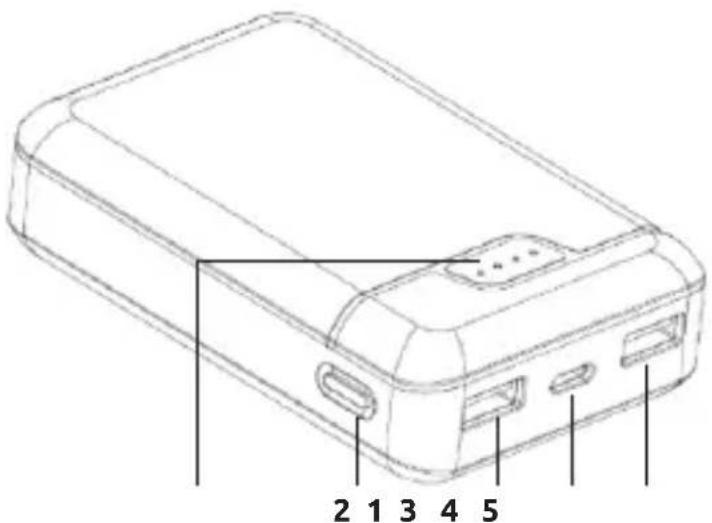
Device overview
1 - Status LEDs
2 - Function key (ON/OFF)
3 - USB-A Out 1
4 - USB-C In/Out
5 - USB-A Out 2
Operation
Function key (On/Off)
By briefly pressing the key, the current battery status is displayed through the LED lights and the power bank is activated.
If no device is connected to the power bank, or the connected device is fully charged, the power bank changes automatically into standby mode after a time interval of approx. 30 seconds.
LED Status display
The individual LEDs indicate the remaining power of the power bank:
| LED light |
| % - Energy LED 1 | LED 2 LED 3 LED 4 | | | |
| 1 % - 25 % | ● | ◇ | ◇ | ◇ |
| 26 % - 50 % | ● | ● | ◇ | ◇ |
| 51 % - 75% | ● | ● | ● | ◇ |
| 76 % - 100 % | ● | ● | ● | ● |
Commissioning / Charging the power bank / Charging connected devices
a) Charging the power bank
Please connect the supplied USB-A to USB-C cable with the USB-C connection (USB-C In/Out) of the power bank and connect the opposite end of the USB cable with the standard USB Port of a computer or USB power supply.
The charge process and the current charge status is signalled by the LED status lights. If the power bank is fully charged, the LED status lights are lit permanently. The required charging time of the power bank is dependent on the selected charging source and its output power (USB-C In/Out max. 5,0 V/DC 2,4 A = 12,0 W).
b) Charging devices with the power bank
This power bank is equipped with two USB-A ports (USB-A Out 1/2) and one USB-C port (USB-C In/Out) for charging connected devices.
You can charge up to three devices simultaneously with the power bank, for example a tablet and an MP3 player via the USB-A ports, and a smartphone via the USB-C port. Due to the maximum charging output (5.0 V/DC 2.4 A = 12.0 W), it is recommended to charge no more than two devices at the same time.
Connect the supplied USB-A to USB-C cable with the USB-A connection (USB-A Out 1/2) of the power bank and the opposite end of the USB cable with the USB-C connection of the device to be charged. If the charging procedure does not start automatically, press the function key to manually start the charging procedure.
If a device is charged with the power bank and the capacity of the power bank is almost exhausted, this is signalled by blinking of the last status LED. Please re-charge the power bank.
Please note that while charging a device with a power bank, about 30% of the total capacity is used up just through the charging process. This is due, for example, through the loss of power from circuit warmth and voltage conversion.
The power bank has to be used regularly for optimum performance. If this is not the case, charge the power bank fully at least every three months.
Make sure that the warmth created through the charging process can be emitted from the device (ideally place the power bank on a firm and heat-resistant base while in use).
SERVICE / DISTRIBUTOR
INTENSO INTERNATIONAL GMBH | Kopernikusstraße 12-14 | D-49377 Vechta
Email (technical support): support@intenso.de
Email (RMA number): rma@intenso.de
Internet: www.intenso.eu
Telephone (technical support): +49 (0) 4441 – 999 111 (Mon. – Thur. 9:00 am to 4:40pm; Fri. 9:00am to 2:00pm)
DISPOSAL
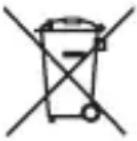 | Disposal of old batteries:The devices marked with this symbol are subject to the Battery Regulation 2023/1542. All old batteries must be disposed of separate from the municipal waste stream via designated collection facilities appointed by the government or the local authorities You avoid environmental damage with the proper disposal. |
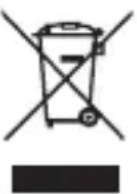 | Disposal of old electronic equipment:The devices marked with this symbol are subject to the European Directive 2012/19/EC. All electrical appliances and old electrical appliances must be disposed of separate from the municipal waste stream via designated collection facilities appointed by the government or the local authorities. You avoid environmental damage with the proper disposal of old electrical equipment. |
 | Packaging:Packaging is raw material. The packaging material of this product is suitable for recycling and can be re-used. Please pay attention to the local recycling provisions when disposing of any materials. |
OPERATING CONDITIONS
Operate the device at temperatures between 0 and 40 degrees Celsius with a maximum relative humidity of 75%. If the device is not used for an extended period, store it between -10 and 30 degrees Celsius (up to 40 degrees Celsius for short durations) and recharge it every three months to maintain full performance.
TECHNICAL DATA
| Dimensions: 99 x 64 x 26 mm | |
| Power consumption (Input): max. 5.0 V/DC 2.4 A |
| Charging current delivery (Output): max. 5.0 V/DC 2.4 A total |
| Internal battery: 10000 mAh / 3.7 V Lithium Polymer Akku |
| Status display: 4 LED lights | |
| Integrated overcharge protection / discharge protec- tion / overvoltage protection / short circuit fuse: | Yes |
| Standby time: Up to 3 months | |

ATTENTION ! Surface brûlante !
Email (assistance technique) : support@intenso.de
WAARSCHUWING! Heet oppervlak!
| Ledlampje |
| %-energie LED 1 | LED 2 | LED 3 | LED 4 | |
| 1% - 25% | ● | ○ | ○ | ○ |
| 26% - 50% | ● | ● | ○ | ○ |
| 51% - 75% | ● | ● | ● | ○ |
| 76% - 100% | ● | ● | ● | ● |
| Piloto LED |
| % energía LED 1 LED 2 LED 3 LED 4 | | | | |
| 1% - 25% | ● | ○ | ○ | ○ |
| 26% - 50% | ● | ● | ○ | ○ |
| 51% - 75% | ● | ● | ● | ○ |
| 76% - 100% | ● | ● | ● | ● |
MANUAL DE INSTRUÇÕES
Segurança 2
Tecla defunção (On/Off)......4
| LED lampa |
| % energie LED 1 | LED 2 LED 3 LED 4 | | | |
| 1% - 25% | ● | ◇ | ◇ | ◇ |
| 26% - 50% | ● | ● | ◇ | ◇ |
| 51% - 75% | ● | ● | ● | ◇ |
| 76% - 100% | ● | ● | ● | ● |
| LED lampa |
| % energie LED 1 | LED 2 LED 3 LED 4 | | | |
| 1% - 25% | ● | ○ | ○ | ○ |
| 26% - 50% | ● | ● | ○ | ○ |
| 51% - 75% | ● | ● | ● | ○ |
| 76% - 100% | ● | ● | ● | ● |
| LED lámpa |
| Energia % LED 1 LED 2 LED 3 LED 4 | | | | |
| 1% - 25% | ● | ○ | ○ | ○ |
| 26% - 50% | ● | ● | ○ | ○ |
| 51% - 75% | ● | ● | ● | ○ |
| 76% - 100% | ● | ● | ● | ● |