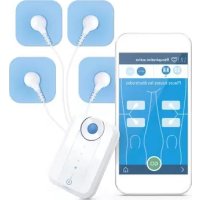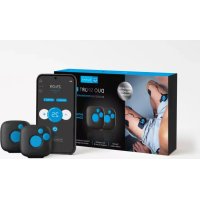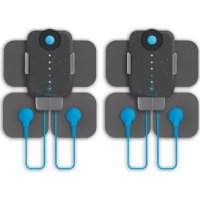
Duo Sport - Fitness Equipment BLUETENS - Free user manual and instructions
Find the device manual for free Duo Sport BLUETENS in PDF.



| Product Type | Electrical Muscle Stimulation Device |
| Brand | BLUETENS |
| Model | Duo Sport |
| Maximum Output Intensity | 120 mA (peak), 20 mA average |
| Maximum Output Voltage | 100 V (no load), 65 V with load |
| Power Supply | USB 5V/1A (5 W) |
| Current Waveform | Symmetric biphasic with zero average |
| Maximum Load Resistance | 1500 ohms |
| Automatic Shut-off | Yes, at the end of each program |
| Safety Classification | Type BF |
| Compliance Standards | CE (Directive 93/42/EEC), ROHS |
| Protection against Electric Shock | Class 2 |
| Connectivity | Bluetooth 4.0 |
| Mobile App | Bluetens (iOS 8+ and Android 4.3+) |
| Number of Electrodes Provided | 2 S electrodes |
| Cables Provided | 2 cables (15 cm and 25 cm) |
| Package Contents | Main unit, sport clip, 2 cables, 2 electrodes, USB cable, manual, transport pouch, rigid protective case |
| Warranty | 2 years (battery: 6 months) |
| Storage Temperature | 10°C to 45°C |
| Storage Humidity | 25% to 80% |
| Battery | Rechargeable via USB |
Frequently Asked Questions - Duo Sport BLUETENS
User questions about Duo Sport BLUETENS
0 question about this device. Answer the ones you know or ask your own.
Ask a new question about this device
Download the instructions for your Fitness Equipment in PDF format for free! Find your manual Duo Sport - BLUETENS and take your electronic device back in hand. On this page are published all the documents necessary for the use of your device. Duo Sport by BLUETENS.
USER MANUAL Duo Sport BLUETENS
Get Better you scanne ce QR
We thank you for purchasing a Duo Sport device.
Duo Sport is a medical device, to make best use of it, you will find all relevant informations included in this user manual.

For any additional information or to simply give us your feedback, you can contact us at contact@bluetens.com.
Pre-requisites
Box content
3 The Duo Sport
4 The Application
5 First use
6 Safety instructions
7 Technical characteristics
8 Customer Service
9 Guarantee
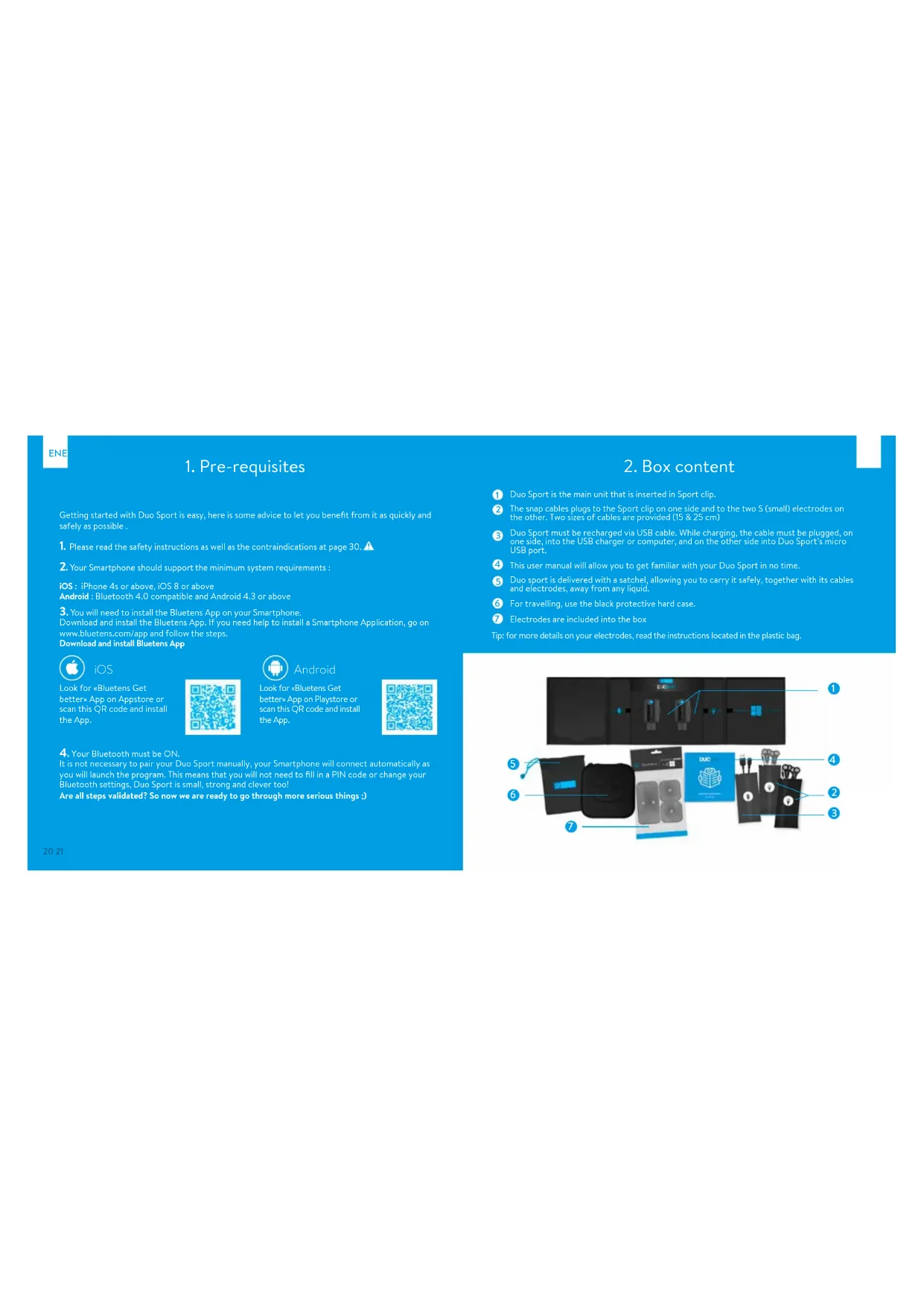
1. Pre-requisites
Getting started with Duo Sport is easy, here is some advice to let you benefit from it as quickly and safely as possible.
-
Please read the safety instructions as well as the contraindications at page 30. A
-
Your Smartphone should support the minimum system requirements :
iOS: iPhone 4s or above, iOS 8 or above
Android : Bluetooth 4.0 compatible and Android 4.3 or above
- You will need to install the Bluetens App on your Smartphone.
Download and install the Bluetens App. If you need help to install a Smartphone Application, go on
www.bluetens.com/app and follow the steps.
Download and install Bluetens App

iOS
Look for «Bluetens Get
better App on Appstore or
scan this QR code and install
the App


Android
Look for "Bluetens Gel."
better* App on Playstore or
scan this QR code and install
the App.

- Your Bluetooth must be ON.
It is not necessary to pair your Duo Sport manually, your Smartphone will connect automatically as you will launch the program. This means that you will not need to fill in a PIN code or change your Bluetooth settings, Duo Sport is small, strong and clever too!
Are all steps validated? So now we are ready to go through more serious things.)
2.Box content
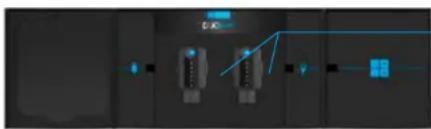
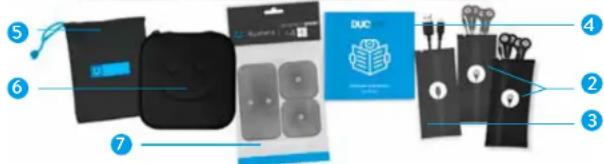
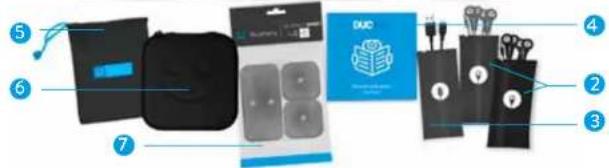
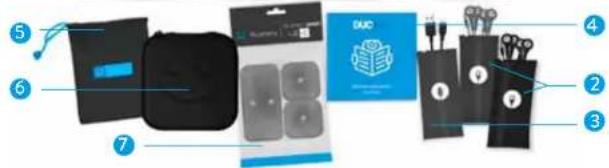
1 Duo Sport is the main unit that is inserted in Sport clip.
The snap cables plugs to the Sport clip on one side and to the two S (small) electrodes on the other. Two sizes of cables are provided (15 & 25 cm)
3 Duo Sport must be recharged via USB cable. While charging, the cable must be plugged, on one side, into the USB charger or computer, and on the other side into Duo Sport's micro USB port.
4 This user manual will allow you to get familiar with your Duo Sport in no time.
Duo sport is delivered with a satchel, allowing you to carry it safely, together with its cables and electrodes, away from any liquid.
For travelling, use the black protective hard case.
7 Electrodes are included into the box
Tip: for more details on your electrodes, read the instructions located in the plastic bag.
EN
3. The Duo Sport
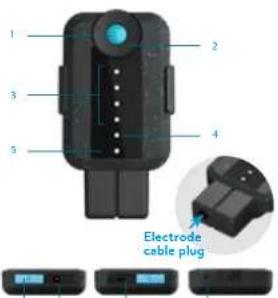
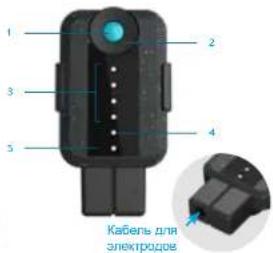
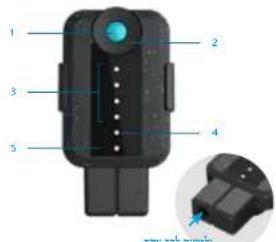
1 ON/OFF Button: this button allows you to turn Duo Sport on and off.
Intensity adjustment knob : allows you to increase or reduce the program's intensity. To increase the intensity, turn the knob to the right, and to reduce it turn the knob to the left. Intensity increases in increments of 1 up to the level of 60 . Turning the knob to the left you will reduce the intensity from 1 to the minimum level of 0 .
Program intensity indicators: the first indicator lights up when a program is launched. For all 15 intensity levels a blue indicator will light up, so you will see:
1 Light from level 0 to 15
-2 lights from level 16 to 30
- 3 lights from level 31 to 45
Charge indicator : when your Duo Sport has less than 20% of battery remaining, charging light will blink. When you charge Duo Sport, the charge indicator will stop flashing and remain fixed until the battery is fully recharged then turns off.
Power on indicator with a simple touch of the ON/OFF button the light will turn green. A second press and the light will turn off.
6 Sli d r: for safety reasons, you cannot rechage and use Duo Sport at the same time, drag the slider either to change mode or usage mode.
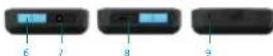
Sport clip plug:Sport clip entry
Micro USB plug : USB cable entry.
Reset button : this button will restore Duo Sport to factory settings.
6789
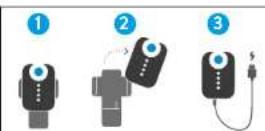
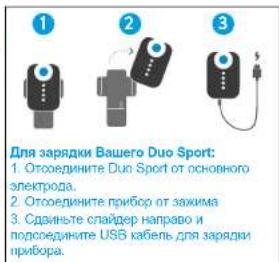
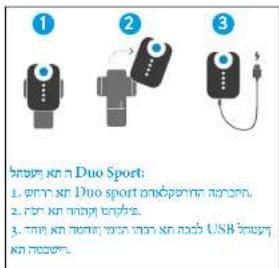
To charge your Duo Sport :
- Uncip the Dua apart from the main electrode
- Remove the device from the clip
- Remove the device from the cable to connect the usb cable to charge the device
4. The application
EN
米
AUTOMATIC PAIRING
Duo Sport will pair with your Smartphone automatically when you launch the program. It's 'Plug and Play', no manual intervention is necessary.
☆
FAVOURITES
Get quick access to your favourites programs with
- Avantages option. On the program description page, click the star icon to create a shortcut in the
Favourises menu.
#
DOWNSLOAD
You can transfer the program of your choice to
Duo Spirit memory and enjoy it without using yourEnergizedOnce you have downloaded the program
Smartphone . Once you have downloaded the program ,turn your Duo Sport on slide the intensity wheel and
carrying Sub sport on, include the intensity weights and the program will begin:
G
SPLIT
Run a different program on each Duo Sport. Once first running the program on the PC10, you can see the
second one.
>
SKIP
For Tone programs, you can now skip warn-up and
recovery phase directly on the description page by
cking on wam-up or recovery com
前
LINK/JUNLINK
Link or unlik your Dua Sport in the settings of the App.
Solo modo enables you to use one device at a time .Double mode allows you to record your video devices
5. First use
LAUNCH THE BLUETENS APPLICATION
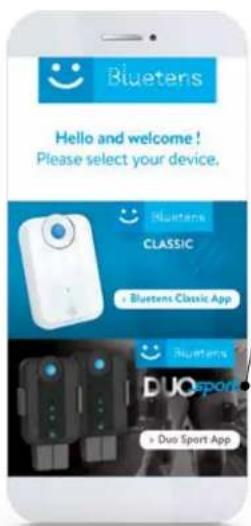
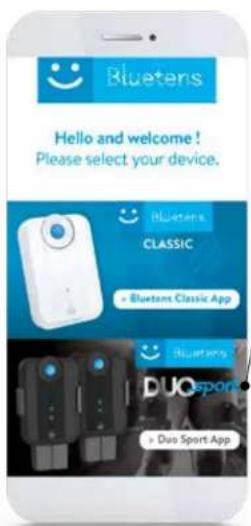
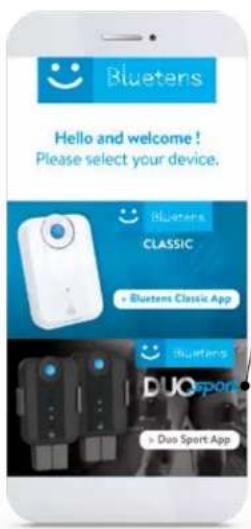
> Select the Duo Sport product
>Creation of a Duo Sport account.
Click on New user? and create your account. Fill in the mandatory fields, read and accept the terms & conditions. Once you have created your account, you will receive an email with an activation link. Click on this link to validate your account. You can also use Dua Sport App without creating an account by clicking on register later.
>For your first use, a tutorial will be displayed.
The tutorial picks up the various stages of Duo Sport operation to ensure a safe use, please take a few minutes to read it carefully.
PROGRAM SELECTION
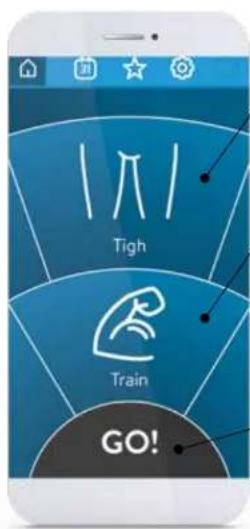
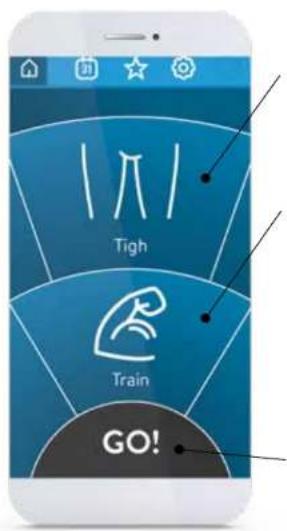
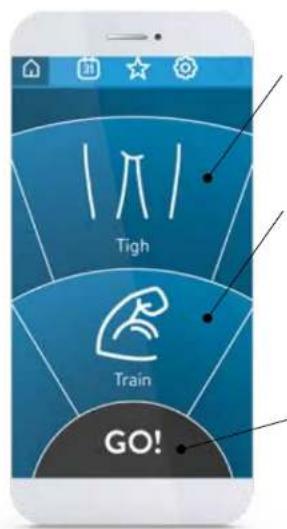
The first step consists in defining the area and action you are looking for.
Available body areas are:
Upper back - Back - Lower back - Abdomen - Buttocks Thigh - knee - Calf - Ankle - Foot - Shoulder - Pectoralis Upper arm - Elbow - Forearm - Wrist
Rotate the wheel to select the desired body area, then do the same for the desired action.
Cure
For physiotherapy care aiming to amplify rehabilitation or allow a rapid pain relief effect.
Relax
For a relaxing massage or to ease muscle tension, also very effective on improving quality and speed of recovery.
Tone
For a muscular work-out session.
Then press GO.
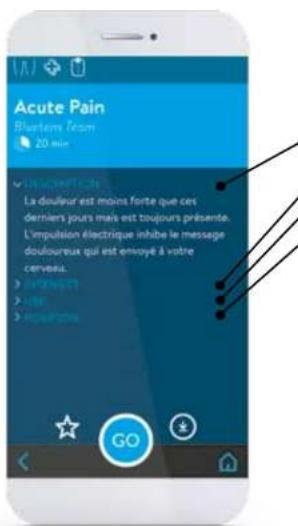
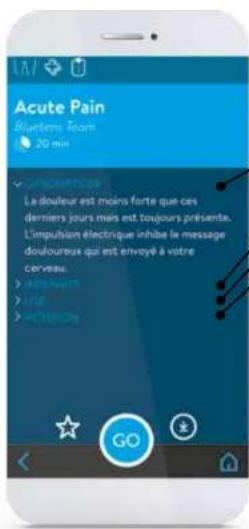
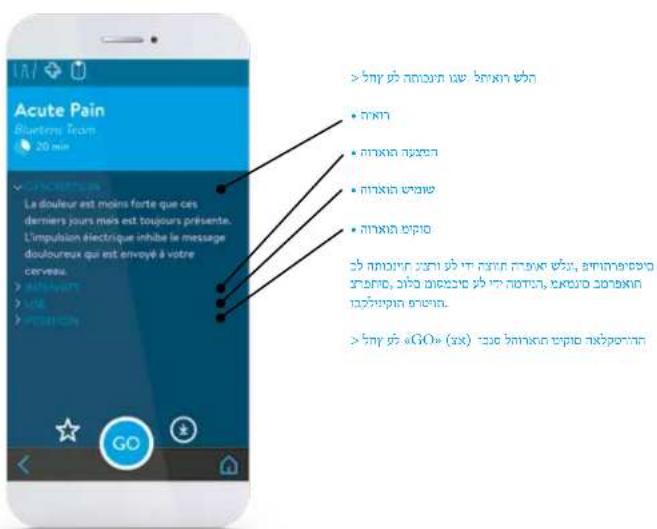
Click on the program and access its description:
Description
- Intensity advices
Use advices
- Position advices
All programs were created by our medical team composed by French physiotherapists, all State-certified, practicing in clinics and private practices.
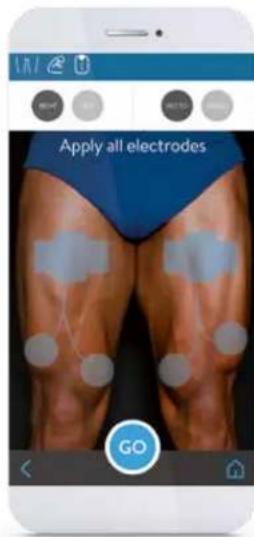
Press 空 O ^ 是 and access to electrode placement's advices.
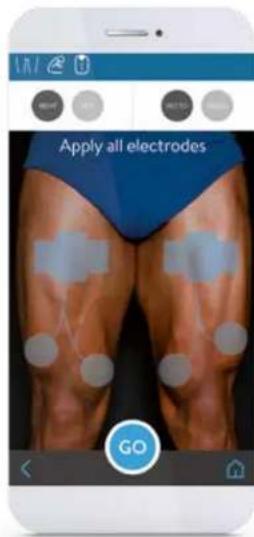
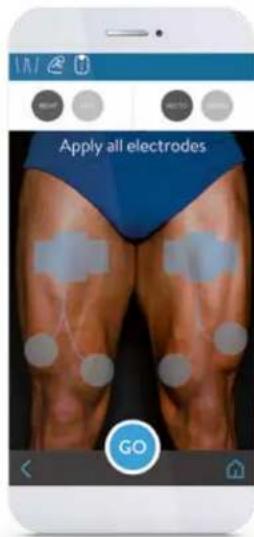
Place the electrodes as shown in the drawing.
Make sure you have placed the 3 (or 6) electrodes on your skin, Duo Sport will not work unless all electrodes are connected.
Caution: Make sure that Duo Sport is turned off during the electrode placement. Turn it on when prompted by the App.
Tip: find all electrode usage instructions in the plastic bag.
Then press GO.
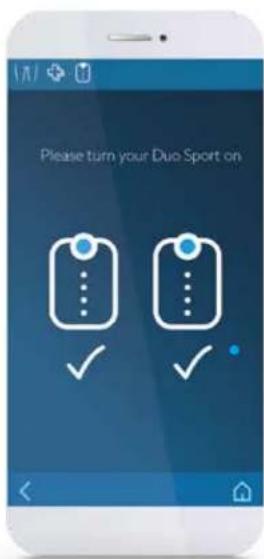
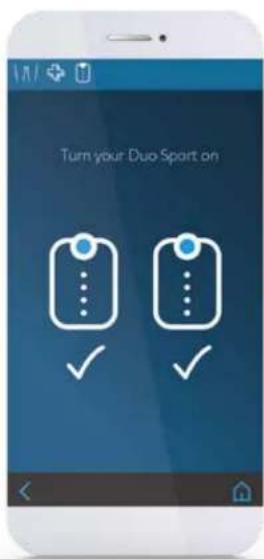
TURN YOUR DUO SPORT ON
Turn DUO SPORT devices by on pressing ON when requested.
Duo Sport will automatically connect to your smartphone and the program will start after a few seconds.
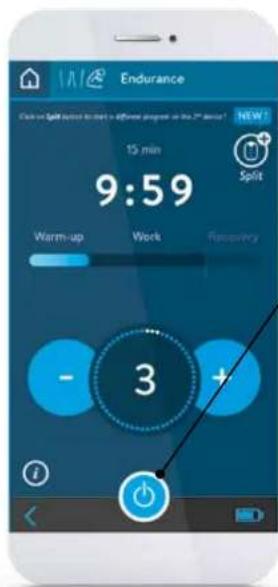
DURING THE PROGRAM
Adjust the program's intensity turning Duo Sport wheel or using the App.
To achieve greater effectiveness, follow our intensity advices.

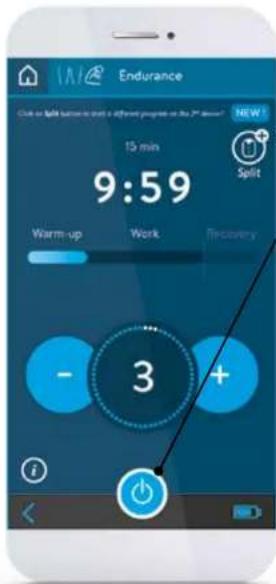
SOLO MODE / SPLIT FUNCTION
If you are using Duo Sport in SOLO mode and you wish to start a different program on the second device, click on SPLIT icon to select a second program to run on your second Duo Sport device.
PROGRAM TERMINATION
If you want to stop the program, press the Stop button. You will be redirected to the main menu.
END OF THE PROGRAM
A message will indicate the end of the program.
Turn Duo Sport off before removing the electrodes.
Reposition the electrodes on the proper side of the plastic film and store them inside the sealed bag.
ENE
6. Safety instructions
7. Technical characteristics
CONTRAINDICATIONS
The use of Duo Sport is forbidden for people fitted with a pacemaker or epilepsy-prone. Duo Sport use is also not recommended for pregnant women and people with a hernia or an incisional hernia. People suffering from heart weakness must avoid areas around the heart. Don't use Duo Sport if you have heart irregularities or heart diseases.
IMPORTANT!
Do not use Duo Sport in water or in humid environments (sauna, balneotherapy and hammam etc). It is forbidden to place the electrodes on the sinocarotid region (in the front of the neck), on the transcranial region (through the head) or transthoracic region (through the ribcage). To get it right, please follow the electrode placement's advices, they have been prepared by health professionals and correspond to areas of the body where Duo Sport will be more effective.
SAFETY PRECAUTIONS
Do not use Duo Sport within a meter from shortwave medical devices or microwave equipment, which could modify the current generated by the device. Use only the cable provided by blasters. During sessions do not disconnect the electrode cable because power is on. The device must be turned off first. Never take off the electrodes when Duo Sport is powered on. Never connect the electrode cable to an external power source. That could cause electric shock. Do not use any damaged or defective electrode cable. Always use the USB cable provided by Bluetons to charge the device. Never use Duo Sport or the USB cable if damaged. Keep Duo Sport and its accessories out of reach of children. Prevent any foreign matter (soil, water, metal, etc.) from entering the device. Do not use Duo Sport while driving.
Never recharge Duo Sport during its use: a sliding part (the slider) prevents the simultaneity of recharge and use as an extra protection. In case of doubt, do not hesitate to consult a doctor.
- Compact design
Dual function mode (Bluetooth/standalone)
Program control by Bluetooth 4.0 (BLE)
Program control by budget
Compatible with Android 4.3 and above iPhone
Compatible With And
45.1058 and above
- Powered by a rechargeable built-in lithium-ion
battery
Intensity adjustment on the device
Medical certified device
Medical Cenured Device
Electrode and USB cables included
Reusable electrodes in
Weight: 25 grams
Batteru 1.7V 400mA H
Batal 0.7015000
VOLAGE:070V(350K
Frequency:1Hz 1200Hz
Output Current: Maximum 120mA (peak).
average of 20 mA
Output voltage: Maximum 100 V (without load)
65V(with load)
Power supply: USB
1.USB (on charge): 5V/1200mA, 5.0W
08(on charge):SV 600mX 3.0W
Impulse form: symmetrical binaasic square pulse
Maximum resistance:1500 Ohm
Automatic shut-off after each program: yes
-Logitian safety:100%
Classifed as:VineB
(Directive 93/42/EEC)
ROHS: devices built without materials that can
have a harmful impact on the environment. RoHS
Protection against electric stock class 2.
- Device in contract with the patient excluded
near area
- Read the user manual carefully
30:31
中
Information on waste management
At the end of the product life, make sure to discard it properly, following the relevant national rules.
We thank you, in advance, for dropping the product in a place provided for this purpose in order to ensure a safe disposal in the respect of the environment.
RECOMMENDATIONS (storage and transport)
Temperature: 10^ / 45^ - Humidity level : 25% / 80%
Duo Sport must be used only in accordance with the proposed programs. Bluetens Limited cannot be held responsible for any misuse or manipulation of Duo Sport. Handle electrodes only when Duo Sport is turned off. Duo Sport is a class IIA medical device certified by TUV, do not leave it near children. Hereby, Bluetens limited, declares that Bluetens is in compliance with the essential requirements and other relevant provisions of 1999/5/EC directive and 31/42/EEC directive 9. A copy of the Declaration of conformity is available on request to Bluetens Ltd. 2003 20/F Tower S, China Hong Kong City, 33 Canton Road, TST, Hong-Kong or Bluetens France, 5 passago Saint Bernard, 7501 Paris, France and on www.bluetens.com/doc
8. Customer Service
We manage all after-sale questions directly.
If you need assistance after the purchase of your Duo Sport from one of our distributors, do not
Return the product to the physical store, please contact us directly at:st@blutoners.com or visit the troubleshooting page on www.blutoners
Our agents will get back to you within 24 hours with a quick solution.
9. Guarantee
Duo Sport is guaranteed for two years, this warranty does not cover damages caused by improper maintenance or usage not compliant with the related documentation, accidents (shock, fire).
Liquid) modiflcations, repairs, misuse or normal wear and tear. This guarantee covers material or manufacturing
defects. This guarantee covers products purchased directly from Bluetens or from a
Buetensauthorizeddereronly.
GUARANTEE PERIOD
Your product is guaranteed two years from the date of purchase, the battery has
Six month guarantee.
NOT COVERED BY THE GUARANTEE
Electrodes; clip, satchol as well as cables and accessories included in the box do not benefit from
this guarantee.
BLUFTENSAT YOUR SERVICE
In the event of a defect covered by the guarantee, Bluetens team will send you a return slip and will be
responsible for the repairs or exchange of your device as well as of its return to you .
HOW TO GET CUSTOMER SUPPORT?
You can reach our Customer Service at any time at the following address:
contact@bluetens.com, a member of our team will be dedicated to find a solution to your request.
Gracias!
Le agradecemos la compra del dispositivo Duo Sport.
Duo Sport es un dispositivo medico: para
m = 311 ;
图
LINK/UNLINK
ACCENDI IL TUO DUO SPORT
WLACZ APLIKACJE BLUETENS
WLACZ SWOJE DUO SPORT
WYLACZNE Z OCHRONY GWARANCYJNEJ
SOLO MOD/SPLIT FUNKCI
Forn muskular training.
Tryckpa<
>,
SATT PA DIN DUO SPORT
ELEKTRODIEN SIJAINNIT
SOLO MODUS/SPLIT FUNKSJON
RECOMMENDATIONS (storage and transport)
Temperature: 10^ / 45^ - Humidity level: 25% - 80%
Duo sport ma kun bruies i henhold til de foreslte programme. Bluteens Limited kan itke holds answarg for misbruk eri manipulng ay Duo sport. Handtier elektron der bare nir Duo sport er slit av. Duo sport er onsklia IAE medinsnsen hent sirtfert sv TUV, ike i cian mahrten av born. Bluteens Limited ander hered at Bluteens er i overensstimmende gel de grunlegende krav og orndre relevante bestemmelr 1999/15/DEC dirktytog 3/42/ EOF dirktyt 9. En kcpi ay erkruieringen om semsvar er bilgengelig pf aforesporil st Bluteens Ltd. 2003 201F (power 5, China Hong Kong City, 33 Canton Road, TST, Hong Kong) Bluteens Frankrike, 5 Passage Saint Bernard, 73011 Paris, Franksige og pwh bluteens.com/doc
8. Kundeservice
Vi svarer pā alle etter salgs sporsmā direktó.
Hvns du trenger hjelp etter at du har kjept var Duo Sport hos an selger onsker vi at du tar kontakt med osi stede for butukken, kontakt os direkt de contact@bluetens.com eller beseker www. bluetens.com og finner problemslser 20.
Vare agenter villig dog svar inner 241 med en lasning
9. Garanti
Du har 2 hrs garanti) p5 Duo Sport, Forskrittener dokker (keke skater giort ufofrikhtigkeit erther at den Ike erkrut bil det der skal, skyaker (stol, ilj, varasse), modifikasater, reperasjerter, misbruk erller normal slitsajc. Garantien matriele er fabrik feil. Garantien gijder kon vend kjaag fra an autorisert forhander av Duo Sport.
GARANTI PERIODEN Ditt Produkt har garanti to 3r er tkeksp data, batteriet har saks mandar garanti.
IKKE DEKKETAV GARANTIEN
Elektroder, klip, bag, kabler og tibehor som er med i boksen er ilke mer denne garantien.
BLUETENSTILTJENESE
I filliche det er n mangel dekket av garantien, vil Bluetens sende deg et returkort og vil sarensario for repasitioner oer uskiftengen erhent den, somt a returnere den til deg.
HVORDAN FA HJELP
Du kam vāk kundeservice nār som helst pf séfide nente: post: oblutentens.com, an i vart team vil da starte med a ordne en leaining for ditt sparsmīl.
Cnacu6o!
M6nroapmBac3npoepenene np6opa
Duo Sport.
Duo SopnHHTcMeiHckm np6opom.
TObbHsBHeH3 Hero MAKCMajHyo N013y
NIOIOBtBdOePKEINHO,O3HAKOMTebc C
HHCPMAuH,pndctabHHoB HactoIeM
pyKOBCTBeNoBQBaTeN.
Ддпл�нучима дол�нштельноMHФорmaи,在ТAKKEДдобогathонCBSINCBWNTBcB HAMNTOANETKPOHNOHTO contact us at
contact@bluetens.com

Heo6xOdMbIe
Tpe6oBaHn
3 KOMNNEKT NCTABKN
4 HnctpykUH no TeXhKe
5 6e3oNaCHOCTN
6 TexHnueckne
7 xapaKTepeNCTNk
8 CepBucnHaN NoDepKka
9「apaHTnIa
RUR
1.Heo6xoIIMbIe
Bb Mokote HnHbP a5Oy Tc p60BcoD Uo Spot IeKo b 6bTcPo. Bt HEckko kpoekomhauu nlae b6aonachoro, p9rTHOrho NdXkEHTBHOrho NcNObIbAHOBnPi h6bopa.
- Iozhanyjcta, bHnMATEbIHO npOHTaJIe NcHrpyUckI NO TEXHKI SeBONACCHOT, a TAOKIEIpepeHNeI pTOBIOKAN3AHIH na cTf. 198.
2.BaW CMAPF0DQIDKOHCOBTBTOBBAETMIMHAMATBBHM TEXNHCKOMTpe6OBHHRMOS:iPhone4sNHNBUEI,OIS8NNNBIUE
Android: coBmecTnMoCTb Bluetooth 4.0 n Android 4.3 mN BvIe.
3.BAMNTOPEBSYCTCYAHTAOHOBtBAuBa CMAPTOOH pnpIOKHOHe Bluetens App. CKBaHATEYUCYTAHOBITE pnpIOKHOHe Bluetens App.
EcnBrampebysTOMOIOpnpyctAHOBeMOoBbHOrO pnpioKENHn,neepuOteNooCboIke www.bletzents.com APP cnEpyteNHtPcYDku. CKaayre y npctohobte npnpioKENHe Bluctens


iOS
Nizinte npinokhenhe "Bluetet Get better" A Apstore nH otckanipnyte 3tot QR kD yctahonbe npinokhenhe.


UuTne npnOeHne BluTeNsGetgeta HnPlaystore mnn otckanpyre 30r QR kdo yctahOBIne npnOeHne.

- Bluetooth dongxhen 6byb Bknouen
Het Heo6xOIMOCn BpyHyIO CnHxPOH3NPOBaT BaI np6op Dua Sport co cMaprpoHom
CINXPOHMSAUPPON3OJETABOTMATNHECKNOCNE3ANYCKNPpPAMMBI,3TO03HaayT,4TO
BAM He npundetc BvOHTb PIN KON MNN MeHArb Hactponku Bluetooth, DuSport - ManeHbKn
MOUHbIN OOeHb yMHbIN
Bce warbblonHeHb? TenepbMbI roTOBb I nepeTn K bonee cepbe3HBIM Beaam
2. Tpe6oBaHnA
1 Duo Sport - 3TO OCHOBHON 6NOK, BKNIOUeHHbB a 3axmSport.
CoenHnHHeNHeHbKaBENXBOATcOHDTHOpBOH BzAMKSpoRtC, a cDpyrTOCTOPBOH-B D8A S (MAHNHH) 3eIeKtPOHa. KaBbMn ppeTaeNBHeH b DYBX paeBHxpeMaepMeX (15425cm).
3 DUo Sport 3apkaeTcpe3 Ka6eB USB Bo pema3ap4aKa6eBdoJgKeh6bTBBCaBnEH oHIM KOHUM B CIEuHbIh USB npexpOHN HIN KOMtBIOep,dpYHM KOHUM-B MmPc USB nopntnpocuDuoSport.
4 HactoIuey pyKOBQCTBO NOIb3OBATeRAIOBONAEOTNYAHTOBETNNOIcNOIb3OBAHHINIPIN608 B IIO60e SPAIR.
Duo Sport Nocturnal C BOHOENHOHPOUHEAMB HEXNOM, PNOBOIROUHM BEOONAO XPAHHTB pnp60BMACTe C KABOTM N ANKTOPOAMN.
6 B nyteeectbixx honbaythe yepbhi xctkn 3aunrhyneHan.
7 3neKtpoDbB BkIOUeHbB KOMNNEKT NOCTABK
CoeB: IINI PONYEMENI OONIOH NIOH MNOFOPMAUO 63JIeKtpoDax, pNOHNTAte HNCTpyKIOHO, HXADJOYUCOH BIIAPACTIKOBOM NAKTE.
1
RU
3. Komnnekt noctabkn
1 KhoKANO ONOFT:ATBA KHOKNEI PnEDJI BHNHIN HIN IINIKCCHNIM K BIAKINIOHNIPPnEOB Daop Scirp.
PyKoTHA HACTPOH INHTCHHOHCTNOONIOHETYENHHTB NINMHEUYHHTNTRHEHOHCTNPOPAMHJINNHNHHEH INTCHHOHCTNBAUAPITE pyKOHNYBPNBOIINMHNHOTIHINCHHOHCTN-BPAUPOIpyKOHNYEINHCHOHCTNANPSACTAE NOENQOATAENTHOI 1060.BpAIOIO POKYHO BINOHOIOHOHOHOHO HOHOHOHOHOHOHOHOHOHOHOHOHOHOHOHOHOHOHOHOHOHOHOHOHOHOHOHOHOHOHOHOHOHOHOHOHOHOHOHOHOHOHOHOHOHOHOHOHOHOHOHOHOHOHOHOHOHOHOHOHOHOHOHOHOHOHOHOHOHOHOHOHOHO
HINDATOPH INHTEHOBHCTN npORpMAHbI neBpBn HINDATOPH 3AoropBTHCR pAnyNCHE npORpMAHbI. IaB BcE0X 15 yOoHHe INHTEHOBHCTN roOH TOny6Bn HINDATOPH, n Bb yBu4dute:
1 orone k n ypeBn 0-15
2 orohbna 10 yobbn16-30
3 oroynn an nnoynn 31-45
400hka dian ypoeHH 46-60
4 HNikatop 3apnki Kornai npa npnpbdo Duo Sport octanohoe, 3amraiaht NnHikatop 3apnki. Koraja Bu noctanite np60p Duo Sport h npapuy, nHikatop npapny npocianet Mntab H octanohc Tepb To Do npohn3apnki npnpda, npnohnn3apnpd HnHikatop npapdy notxyeh.
HdKATOP BKNHOHEHn. npn PpNOCHOBHHX KONHKe ON/OFF 3aOHTOR 3eHNbH NkDcKATOp. nPn BTPOm. pNHOCHOBHH 3eHNbH NkDcKATOp NOTxHYeN.
CnAep:KcOoBpXHHH6eONaOHcHbHe CmOeRt AapKnnnNnNnNnBnnpocDuoSopCNCHPemHHO. CnAep HApXnTCHnBnOaMpaBo,HN BnOaMnAapKnn.
7 Pa3eM 3axmMa Sport mesno 3axmMa Sport
8 Pa3bem MMKpo USB: hede USB kabena.
Kohnka nepa3pyrnn: 3ra Khoia 6bnyaet DuO Sport do 3abdo2ck HacTb0k.
4.Инстукши no TextнIKE
RU
#
ABTOMATHECKAR CHHXPOHN3AUN
PnBopDuoSportaTOMATueckx
CHXPOHHMHPBETC BAIUMCMPTFOHM CHYHJHJHJHJHJHJHJHJHJHJHJHJHJHJHJHJHJHJHJHJHJHJHJHJHJHJHJHJHJHJHJHJHJHJHJHJHJHJHJHJHJHJHJHJHJHJHJHJHJHJH
p rnepe Plug and Play u upware
PPOIN3BODNTB HMKAKX DYHbIX HACTPQEK
☆
M36PAHHOE
POnyHrTe DoCTyn K Baunm NIOOBMbIM
Tporpammm conuyn N36paHHoe. Ha
CTPAHnue OINCAHNAI pORpAMMbI NPOCTO
1eHa3BcDcKyDTHc0d8Hn3
B MEHNO 130pahHOE
#
3ATPY3KA
Bb moke te 3anwcaht nporpammy no
Bawemy bbiOpy a naTb npboopa
Duo Sport n hacnaxnaTboc nporpaMMo
0e3 mchon6308aHH CMaptpoHa1 Ioche
epnepnneepnnnepnneepnnneepnnneepnnneepnnneepnnneepnnneepnnneepnnneepnnneepnnneepnnneepnnneepnnneepnnneepnnneepnnneepnnneepnnneepnnneepnnneepnnneepnnneepnnneepnnneepnnneepnnneepnnneepnnneepnnneepnnneepnnneepnnneepnnneepnnpe
INTHSHROHOCTOJDMOMOLIADEPSTOTOPA-4
npnpamma HauHetca.
0
PA3DENEHNE
3anyckai pepaHbIe npolpaMMbHa paHbix
yctpoTExx DUo Sport. Bo BpemaPabotb
REPOPIPMAH NHOBOPMAMPL SPLIT IN BIDEBPTE STEPYIO PNOPTPMMY
>
NPONYCTNTB
ДяпрогамМ《ToHc》БыМохerte
IponyCTNTb pa3MNHHKy n qa3y
BOcCTaHOBnEHn, nepexoHaHnpmyK
CtpaHue OINCAHH.
图
COEINHHTb/OTKIOOHHTb
CnHxpoHmApyMe Nm OKnIOaHrTe
yctpomctBo Dua Sport B Hactponkax
PpnooHn. PexMM SOI noaBONraT
mchonb308aftb tonbko odH npnoop
eMHUYBpEMH,peXMDUOn3BOJRE
5.6e30nachoctn
3ANYCTNTI PUNIOXEHME BLUETENS
BbIepeHr npOyKT Duo Sport
Co3dHne aKKayHTa DUo Sport
UaiknHtHa HbBn noBbaoratbn?n Cooaaidre HOBBI AKAYHT. 3anonHtte 6BaBaeTbe Hne nOJ, npOoYHtne HnpMMTe TepMHN yCNOyBn. Nocoe coaadHn AAKAYHT, BblnoyHtne Ha 3eKnTPOHHy NOHY nIcMbMo cCbIKoHn HA kTNBAuHIO. NpEuaHn No 3to10 CbLJIe INBauDAAuHn AAKAYHT. Bbl TaKke MoKeTe NcNoBtB08A Tb pInIOKeHe MU Doo Sport 6e3 COaDHAn BAKAYHT, ZeINKHy Hb C4aercktpRBOAATTnOaNGHe).
BoBpMa neBpOro HcNoJIb3oBaHn6yDet DOCTyNEH NOMOuNHK.
POMOUIHMK NOKAHABaET cnpaKy no pa3nHHbIM BONpocam KcN0sBtBaHryo DuaSopr nraBauu BezomacHcy. POKAYyctA, ypeHnTe Heckonlyko MmHyT, YTO6IyNoPbOHO haoKAMHTcRc H
BbI6OP POTPAMMBI
NpBbI W aar COCTOHT B onpeDeneHH yuaCTKa Tana H eFekkta, KOtopoRo Bbl XoTHRE doBnCTBA.
DocynbIe yactkn tera:
Pnneboi noaC . Cnna . Pnochnnn oyden . KenydoK . RnoDmu . Beda . KoneH . Nkpb . Nojbock . Ctytnn . Pnne . Fpydnb Mblu . Pykn . PtoKn . Pnpdeuueh . 3aBctb.
NoBaPnHte peryrTOp nnn Bb6opa TpeSyEmoR YoYcTaKTe Ta, cDaeNaTe To Je camoe IaNnaeMaMoR 3000
#
CpHNTePepBtHnckMMUUEHMNINYCHINHEA 300000000000000000000000000000000000000000000000000000
PaccnabneHne
PaccnaBneHne
DooSport jjj jj jao aaoa oaoa oaoa oaoa oaoa oaoa oaoa oaoa oaoa oaoa oaoa oaoa oaoa oaoa oaoa oaoa oaoa oaoa oaoa oaoa oaoa oaoa oaoa oaoa oaoa oaoa oaoa oaoa oaoa oaoa oaoa oaoa oaoa oaoa oaa
1.5g5g5g5g5g5g5g5g5g5g5g5g5g5g5g5g5g5g5g5g5g5g5g5g5g5g5g5g5g5g5g5g5g5g5g5g5g5g5g5g5g5g5g5g5g5g5g5
2. gwi i gei oioi ad uodg Uesolus p jpdjuiu wib
iOS:iPhone 念 Sdgl,IOSulglA
Androidg gbloth Android
- gubicuysdyeocn Baeemssiehctias Jc
gbs Jj 83 Nuetens
j j j 1
B

iOS
hurey e bcbuag . Dbeets Get better pug Apprentice ' s like a ? OK gae uucnue


Android
yue yuuyu binyu Bnues G get better 2015 Playtorl Juprse Ow gnd wooyuyu Liouyu

- gaiydiuyjogaoaouuuaoyu
Aegyra noeaglyd [k]n 100000000000000000000000000000000000000000000000000000000000000000000
sppssd uusuususususususususususususususususususususususususususususususususususususususususususususususususus

de paoed wae nere e aeg duoe spon. gug,
spn Gg Uwng Uwng uag e gS PSLT 0000
Wuag Uwge

1. DNA 分子
Lalai Lalaal Dn Aotg 1500000000000000000000000000000000000000000000000000000000000000000000000000000000000
A
ll Cnunnnn nn nnnnnnnnnnnnnnnnnnnnnnnnnnnnnnnnnnnnnnnnnnnnnnnnnnnnnnnnnnnnnnnnnnnnnnnnnnnnnnnnnnnnnnnnnnnnnnnnnnnnnnnnnnnnnnnnnnnnnnnnnnnnnnnnnnnnnn nn nannn nannn nannn nannn nannn nannn nannn nannn nannn nannn nannn nannn nannn nannn nannn nannn nannn nannn nannn nannn nannn nannn nannn nannn nannn nannn nannn nannn nannn nannn nannn nannn nannn nannn nn annn nn annn nn annn nn annn nn annn nn annn nn annn nn annn nn annn nn annn nn annn nn annn nn annn nn annn nn annn nn annn nn annn nn annn nn annn nn annn nn annn nn annn nn annn nn annn nn annn nn annn nn annn nn annn nn annn nn annn nn annn nn annn nn annn nn ann
12 1234567890
Cnuee eae nene ne ne ne ne ne ne ne ne ne ne ne ne ne ne ne ne ne ne ne ne ne ne ne ne ne ne ne ne ne ne ne ne ne ne ne ne ne ne ne ne ne ne ne ne ne ne ne ne ne ne ne ne ne ne ne ne ne ne ne ne ne ne ne ne ne ne ne ne ne ne ne ne ne ne ne ne ne ne ne ne ne nne nne nne nne nne nne nne nne nne nne nne nne nne nne nne nne nne nne nne nne nne nne nne nne nne nne nne nne nne nne nne nne nne nne nne nne nne nne nne nne nne nne nne nne nne nne nne nne nne nne nnee nnee nnee nnee nnee nnee nnee nnee nnee nnee nnee nnee nnee nnee nnee nnee nnee nnee nnee nnee nnee nnee nnee nnee nnee nnee nnee nnee nnee nnee nnee nnee nnee nnee nnee nnee nnee nnee nnee nnee nnee nnee nnee nnee nnee nnee nnee
7.1JUJUJU
1.2018年1月16日
aipaae aae 13 gao 19 iPhone 15 gao 19 i058
1
( 1 + u) + ·s + ( 1 + z) + ( 1 + z) u = 1 + 2z + q_0
m = 311
(2)
·914.25
+Ud3.8.2V400mA
100
1
100m(p).20mA
Ue
- 实验原理
100
289
100
当 m = 32 时方程有两个实数根;
ROIN 1
RoHS
- 1000000000000000000000000000000
a1 = 2,an + 1 = 2( 3n + 1) ( 3n + 2) > 3n + 1( 3n + 2) ( 3n + 3) < 3n + 2( 3n + 3) ( 3n + 4)
A
005
A
a 1
1
10-452p3p2
Duo Sport 1
33 1
1999/5/7 FC pgs 142 FFC 0, Cn, Gpa, p, pU, Lal, gis, Jn, Jn, Jn, Wulrnnu 10, 2003 20/F Thwes 5, China Hong Kong
Ctt 33 Canton Road, Tst Hong Kong or Bautena France Passag hant Hernard, 25011 Paris, France and g
8. 2015 UJU
watches your baby , helps you learn how to use your baby , helps you get yourbaby . Contact us at http://www . com - please email us babbles @ babbles . com
m !
Duo Sport.
Duo Sport mix aen nax, gun hmpn en kne nene nnnr nnnn nn nnnn
spnmpnpnnpnnnppnnnnpnnnnpnnnnpnnnnpnnnnpnnnnpnnnnpnnnnpnnnnpnnnnpnnnnpnnnnpnnnnpnnnnpnnnnpnnnnpnnnnpnnnnpnnnnpnnnnpnnnnpnnnnpnnnnpnnnnpnnnnpnnnnpnnnnpnnnnpnnnnpnnnnpnnnnpnnnnpnnnnpnnnnp

1
3. 甲、乙、丙三色
3 -Duo Sport
4
5
6
7
8
9 X
HEH
1. nuiu
narnnnn rnoo nnnn nnnn nnnn nnnn nnnn nnnn nnnn nnnn
- 20x pax xin xin xin xin xin xin xin 226. A
2.
0723
iPhone 4s xn nn, iOS 8 km
Xnrrr: mkaBleotho 4.0 xnnn 4.3 nnn
- 1
mrrn mnnn Bluetens x nnnn ananr nn noen nne, xnnn nanrww. bluetens.com/
app 1000 mm 2000 mm 3000 mm 4000 mm

iOS
RnKr nro 1eBluetens Gel better
- Appstore an enp an pRn nn nnn


NNTTNT:
Bluetens Get better
= -Playstore x1 emp x np t QR
http://www.mpg.de

- hata (Bluetooth), nba bnae (ON).
Knnn nn n H - Dua Sport 2018 2019 2020
in shn xh nnn pIN xn nn nnn nnn (Bleuot), Dua Sport mix p, np no
nx
x
2.ninpiox
1 Duo Sport nx mnnn nnnn nnnn 5 Sport clip.
2 153790786969999999999999999999999999999999999999999999999999
3 Duo Sport mbsn 2022 USB . aet rpsn nnnn nnnn nnnn nnnn nnnn nnnn nnnn nnnn nnnn nnnn nnnn nnnn nnnn nnnn nnnn nnnn nnnn nnnn nnnn nnnn nnnn nnnn nnnn nnnn nnnn nnnn nnnn nnnn nnnn nnnn nnnn nnnn nnnn nnn nnnn nnnn nnnn nnnn nnnn nnnn nnnn nnnn nnnn nnnn nnnn nnnn nnnn nnnn nnnn nnnn nnnn nnnn nnnn nnnn nnnn nnnn nnnn nnnn nnnn nnnn nnnn nnnn nnnn nnnn nnnn nnnn nnnn
4 1
5 Dua Sport en yip roxen bexn knn nnnn nnrnnnne
6 biywnn nnnn an npnnn nn nnnn
7 1
rnnnne nnnnne nnnnne nnnnne nnnnne nnnnne nnnnne nnnnne nnnnne nnnnne nnnnne nnnnne nnnnne nnnnne nnnnne nnnnne nnnnne nnnnne nnnnne nnnnne nnnnne nnnnne nnnnne nnnnne nnnnne nnnnne
1
HE
3.π - Duo Sport
ON/OFFBnagn/Anrnnmnnn nn nnnnnnnnnnnnnnnnnnnnnnnnnnnnnnnnnnnnnnnnnnnnnnnnnnnnnnnnnnnnnnnnnnnnnnnnnnnnnnnnnnnnnnnnnnnnnnnnnnnnnnnnnnnnnnnnn
zamn harns paxen xeroy 1 nnnn 1 kpnn kpnn mnnn nnnn nn nnnn nnnn nnnn nnnn nnnn nnnn nnnn nnnn nnnn nnnn nnnn nnnn nnnn nnnn nnnn nnnn nnnn nnnn nnnn nnnn nnnn nnnn nnnn nnnn nnnn nnnn nnnn nnnn nnnn nnnn nnnn nnnn nnnn nnnn
```python
main program name = main program name
print main program name
print main program name
print main program name
2011-201015
2877-77169730
387 3149
477-77461760
4 term system 100 m in 100 m DuSport 100 m - 20% - 20 m sprint 30m sprint 100 m DuSport, term no. keep track of race pass by race/term system according to:
10 string input: 10000000000000000000000000000000000000000000000000000000000000
61 80
7 npj Sport clip: aren Sport clip.
8 rpp Micro USB: xen zb USB.
9 1nnae nraaennnnnnnnnnn nn Dua Sport.

6789
4.7
HE

有X
Duo Sport vien konge no nio nio nio konge anen heng nain cienen heng heng, ki amangnain

YDNT
paae aae eae aeae aee

DOWNLAD
sion . The most popular and most popular way to get a DuaSport team game is to watch the game online .
pion xion yon a Duo Sport ( 2017 ) and the 2018赛季 ( 2019 ) Liga Solo ( mm ) season on the international soccer club ( 2016 ) and the 2017 season ( 2018 ) Duo ( mm ) season on the national soccer club
HEH
5. w m w
BLUETENS
amn nn Dua Sport
ennrnDuoSport.
bny jw waww mnn?w ywn kn nnnn 100, 000 000 000 000 000 000 000 000 000 000 000 000 000 000 000 000 000 000 000 000 000 000 000 000 000 00
220 221
#
n mnnnnnnnnnnnnnnnnnnnnnn
x
A
10
·277·TNT·TNT·TNT·TNT·TNT·TNT

paae aae eae aeae aeae aeae aeae aeae aeae aeae aeae aeae aeae aeae aeae aeae aeae aeae aeae aeae aeae aeae aeae aeae aeae aeae aeae aeae aeae aeae aeae aeae aeae aeae aeae aeae aeae aeae aeae aeae aeae aeae aeae aeae aeae aeae aeae aeae aeae aeae aeae aeae aeae aaee
yanyepnbnpnnne,an
Xeunnnnne
Tone (mnp)
pan
5xnnnbnpy(GO)(2x).
wnnnn
nnn
nnn nn nnnnnnnnnnnnnnnnnnnnnnnnnnnnnnnnnnnnnnnnnnnnnnnnnnnnnnnnnnnnnnnnnnnnnnnnnnnnnnnnnnnnnnnnnnnnnnnnnnnnn
m 3. (G6) mdpnnn n pnnn Duo Sport S
mian 12 Dua Sport - son nnnn nn nnnnnn nnnnnn nn nnnn nnnn nn nnnn
jbn: bkr kn 2n nn nne nee aennnn eepin noeep.
snn nn nny G0x(2x).
Duo SPORT
nepk nnpu DUOSPORT 1- mnnn nn
Duo Sport nnnnnn nn nnnnnnnnnnnnnnnnnnnnnnnnnnnnnnnnnnnnnnnnnnnnnnnnnnnnnnnnnnnnnnnnnnnnnnnnnnnnnnnnnnnnnnnnnnnnnnnnnnnnnnnnnnnnnnnnnnnnn
#
n nn nnnn nn nnnnnn nn Doo Sport
n nn nnnnnn nn nnnnnnnnnnnnnnnnnnnnnnnnnnnnnnnnnnnnnnnnnnnnnnnnnnnnnnnnnnnnnnnnnnnnnnnnnnnnnnnnnnnnnnnnnnnnnnnnnnnnnnnnnnnnn

SOLO (m) / supn
#
k##n #k#n #n#n, n#n #n m (Stop) (m#n) n#n a##n b##n m#
19
nnn nn nn nnnn nn nn nn nn nn nn nn nn nn nn nn nn nn nn nn nn nn nn nn nn nn nn nn nn nn nn nn nn nn nn nn nn nn nn nn nn nn nn nn nn nn nn nn nn nn nn nn nn nn nn nn nn nn nn nn nn nn nn nn nn nn nn nn nn nn nn nn nn nn nn nn nn nn nn nn nn nn nn nn nn nn nn nn nn nn nn nn
HEH
6. mnnn
7.
图10-2
meme : DuO Sport team , team who has to win thematch . Diao Sport team may have an advantage over us . The team ’ s results and the results of their previous matches will be similar to those of the other teams .
A
Kan Kanaee 3-Duo Spirit 2019-2020 (Kan, Kan, Kan)
Kan Kanaee 3-Duo Spirit 2019-2020 (Kan, Kan, Kan)
Kan Kanaee 3-Duo Spirit 2019-2020 (Kan, Kan, Kan)
Kan Kanaee 3-Duo Spirit 2019-2020 (Kan, Kan, Kan)
Kan Kanaee 3-Duo Spirit 2D019-2020 (Kan, Kan, Kan)
Kan Kanaee 3-Duo Spirit 2019-2020 (Kan, Kan, Kan)
#
s h t h e m a n d i t h e s p a r t o f the m a n d i t y .
s n bneae aee eaeenee aeenee aeeneae aeeneae aeeneae aeeneae aeeneae aeeneae aeeneae aeeneae aeeneae aeeneae aeeneae aeeneae aeeneae aeeneae aeeneae aeeneae aeeneae aeeneae aeeneae aeeneae aeeneae aeeneae aeeneae aeeneae aeeneae aeeneae aeeneae aeeneae aeeneae aeeneae aeeneae aeeneae aeeneae aeeneae aaee
```python
duo Sport = DuO Sport() duoSport.isduo True duoSport.isduo True duoSport.isduo True
- 2017年nnnnp
-
-
a a a a a a a a a a a a a a a a a a a a a a a a a a a a a a a a a
brnrrnnrnnn rnrnnn nnnn nnnn nnnn nnnn nnnn nnnn nnnn nnnn nnnn nnnn nnnn nnnn nnnn nnnn nnnn nnnn nnnn nnnn nnnn nnnn nnnn nnnn nnnn nnnn nnnn nnnn nnnn nnnn nnnn nnnn nnnn nnnn nnnn nannn nnnn nnnn nnnn nnnn nnnn nnnn nnnn nnnn nnnn nnnn nnnn nnnn nnnn nnnn nnnn nnnn nnnn nnnn nnnn nnnn nnnn nnnn nnnn nnnn
www.bluetens.com
nne 24
9. xnnn
Knnn Dua Sport slann boun enne, xnnn nn anan anan anan anan anan anan
Xn Xn nnnn nn nnnn nn nnnn nn nnnn nn
10000000000000000000000000000000000000000000
y
Bluetens
2016年8月27日
nannnnn nnnnne nnnnne nnnnne nnnnne nnnnne
X
2017年1月16日
Kpnnn, p5, np, 301 2020 190k k0 60
BLUETENS
aannnnn nnnnnn nn nnnnnnnnnnnnnnnnnnnnnnnnnnnnnnnnnnnnnnnnnnnnnnnnnnnnnnnnnnnnnnn
X
#
aahn anen nnnn nnnn nnannn
contact@bluetens.com
nannnnnnnnnnnnnnnnnnnnnnnnnnnnnnnnnnnnnnnnnnnnnnnnnnnnnnnnnnnnnnnnnnnnnnnnnnnnnnnnnnnnnnnnnnnnnnnn

User instructions
for TENS
CAUTION
Do not use while sleeping.
Do not use while driving.
Do not continuous
electrodes on body
Do not use metal to touch the electrodes.
Use this product with high
frequency surgery devices might
cause those device to become
unstable.
MAIN DEVICE MAINTENANCE
Clear regularly.
Take off cables from the device
and electrode after power off.
- Use soft cloth to clean if the
device is dirty.
Use wet cloth with neutral
detergent or spirit to
necessarily.
- Do not use spirit on the
LED panel.
Do not use other detergent.
- Keep water or liquids away from
the device.
OPERATION INSTRUCTIONS
The device needs to be used
together with the water proof
carrying case in order to preve
any damage caused by water.
Please put the device into the
carrying bag during use , then use
the App to realize all settings and
229
ELECTRODE PAD
Specification
| ITEM STANDARD | |
| Size | 49.5±0.5 mm |
| Thickness 1.6 + 0.4 mm | |
| Appearance | No stain, no gel spillover at the edges |
| Backing material | White non-woven cloth |
| Gel adhesion Under normal humidity (60%) | skin application is above 100 times after 72 hour unprotected storing |
| Under high humidity (80%), skin application is above 30 times after 72-hour unprotected storing | |
| Under low humidity (20%), skin application is above 10 times after 72 hour unprotected storing | |
| Dried completely at 100°C for 1.5 hours, skin application is above 5 times | |
| For un pretreated or sweaty skin, skin application is above 10 times. | |
| Comfortable cutaneous sensation | |
| No edge lift after 2 hour skin application under any condition | |
| Skin adhesion reaction time: No need to press or press for less than 3 seconds |
| ITEM STANDARD | |
| Conductivity After 100 skin application, peel | the gel off from the carbon film in the water and dry it. The impedance is <200ohms between any two points |
| A.C. impedance for gel to metal by LCR meter: <100ohms at 100Hz: <80ohms at 1,000Hz: >70ohms at 10,000Hz: <65ohms at 100,000Hz | |
| Lead wire Adaptable to male pin from 1.95-2.10m | |
| Strength between leadwire and connector is min. 4kg pulling force | |
| Strength between leadwire and electrode pad is min.3kg pulling force | |
| Adhesive force Gel is strongly attached to the carbon film, hard to peel it off | |
| Protective liner 110X10mm, 0.075mm transparent release liner, no gel residue when peel the electrode off | |
| Printing Lot number & expiry date: firm and legible | |
| Safety Biocompatibility of the gel G607 used for this product conforms to ISO/10993 5-10 | |
| Package 120±5mm×185±5mm, transparent eco friendly PE re sealable bag | |
| Applicable humidity Humidity: 15%-70% Temperature: 0°C-30°C | |
| Shelf life 2 year sealed storage under 30°C, gel color and adhesion remain unchanged | |
ELECTROMAGNETIC COMPATIBILITY DESCRIPTIONS
The ENC declaration according to the requirement of EN 60601-1-2
CAUTIONS
User must regard EMC, please install and put in service BLTISDS according to the EMC information provided in the accompanying documents.
Portable and mobile RF communications equipment can affect medical electrical equipment.
The performance of the EQUIPMENT and SYSTEM that was determined to be essential performance
Table 201 Guidance and manufacturer's declaration electromagnetic emissions for BLT15DS as following table.
Table 202 Guidance and manufacturer's declaration electromagnetic immunity for BL15DS, as following table.
Table 204 -Guidance and manufacturer's declaration on-electromagnetic immunity for BL11DS, as following table.
Tab 8.206 Recommended separation distances between portable and mobile RF communications equipment and
BLT15DS, as following table.
Table 201
| GUIDANCE AND MANUFACTURER'S DECLARATION - ELECTROMAGNETIC EMISSIONS | |
| The BLT1SDS is intended for use in the electromagnetic environment specified below. The customer or the user of the BLT1SDS should assure that it is used in such an environment. | |
| Immunity test Compliance Electromagnetic environment - guidance | |
| RF emissions CISPR 11 | Group 1 The BLT1SDS uses RF energy only for its internal function. Therefore, its RF emissions are very low and are not likely to cause any interference in nearby electronic equipment. |
| RF emissions CISPR 11 | Class B The BLT1SDS is suitable for use in all establishments, including domestic establishments. |
| Harmonic emissions IEC 61000-3-2 | Not applicable |
| Voltage fluctuations / flicker emissions IEC 61000-3-3 | Not applicable |
Table 294
| Guidance and MANUFACTURER'S DECLARATION - ELECTROMAGNETIC IMMUNITY | |||
| The BLT1SDS is intended for use in the electromagnetic environment specified below. The customer or the user of the BLT1SDS should assure that it is used in such an environment. | |||
| Immunity test IEC | 60/601 test level | Compliance level | Electromagnetic environment - guidance |
| Conducted RFIEC 61000-4-6 | 3 Vrms150 kHz to 80 MHz | Not applicable | Portable and mobile RF communications equipment should be used no closer to any part of the BLT1SDS, including cables, than the recommended separation distance calculated from the equation applicable to the frequency of the transmitter. Recommended separation distance 80 MHz to 800 MHz800 MHz to 2.5 GHz |
| Radiated RFIEC 61000-4-3 | 3 V/m80 MHz to 2.5 GHz | 3 V/m | Where P is the maximum output power rating of the transmitter in watts (W) according to the transmitter manufacturer and is the recommended separation distance in meters (m).Field strengths from fixed RF transmitters, as cotermined by an electromagnetic site survey, a should be less than the compliance level in each frequency range'sInterference may occur in the vicinity of equipment marked with the following symbol: |
| NOTE 1 At 80 MHz and 800 MHz, the higher frequency range applies. NOTE 2 These guidelines may not apply in all situations. Electromagnetic propagation is affected by absorption and reflection from structures, objects and people. | |||
| a Field strengths from fixed transmitters, such as base stations for radio (colluca-collids) telephones and land mobile radios, amateur radio, AM and FM radio broadcast and TV broadcast cannot be predicted theoretically with accuracy. To assess the electromagnetic environment due to fixed RF transmitters, an electromagnetic site survey should be considered. If the measured field strength in the location in which the BLT1SDS is used exceeds the applicable RF compliance level above, the BLT1SDS should be observed to verify normal operation. If abnormal performance is observed, additional measures may be necessary, such as reorienting or relocating the BLT1SDS. b Over the frequency range 150 kHz to 80 MHz field strengths should be less than 3 V/m. | |||
Table 206
| RECOMMENDED SEPARATION DISTANCES BETWEEN PORTABLE AND MOBILE RF COMMUNICATIONS EQUIPMENT AND THE BLTISDS | |||
| The BLTISDS is intended for use in an electromagnetic environment in which radiated RF disturbances are controlled. The customer or the user of the BLTISDS can help prevent electromagnetic interference by maintaining a minimum distance between portable and mobile RF communications equipment (transmitters) and the BLTISDS as recommended below, according to the maximum output power of the communications equipment. | |||
| Rated maximum output power of transmitter | Separation distance according to frequency of transmitter | ||
| 150 kHz to 80 MHz 80 MHz to 800 MHz d = 1,2√P d = 1,2√P d = 1,2√P d = 2,3√P | |||
| W | 0,01 0.12 0.12 0.23 | ||
| 0,10 0.38 0.38 0.73 | |||
| 11,21,2 2,3 | |||
| 10 3,8 3,8 7,3 | |||
| 100 12 | 12 | 23 | |
| For transmitters rated at a maximum output power not listed above, the recommended separation distance d in meters (m) can be estimated using the equation applicable to the frequency of the transmitter, where P is the maximum output power rating of the transmitter in watts (W) according to the transmitter manufacturer. NOTE 1 At 80 MHz and 800 MHz, the separation distance for the higher frequency range applies. NOTE 2 These guidelines may not apply in all situations. Electromagnetic propagation is affected by absorption and reflection from structures, objects and people. | |||

contact@bluetens.com
www.bluetens.com




123