Collection Master Pack - Fitness Equipment BLUETENS - Free user manual and instructions
Find the device manual for free Collection Master Pack BLUETENS in PDF.



| Product type | TENS device (transcutaneous electrical stimulation) / Fitness equipment |
| Brand | Bluetens |
| Model | Collection Master Pack |
| Weight | 25 g |
| Battery | Rechargeable lithium-ion, 3.7 V / 400 mAh, USB charging (5 V / 1000 mA) |
| Maximum intensity | 60 levels (adjustable via wheel or app) |
| Output voltage | 100 V max (no load), 65 V with load |
| Frequency | 1 Hz to 1200 Hz |
| Output current | Max 300 mA (peak), average 20 mA |
| Current shape | Symmetrical biphasic rectangular with zero average |
| Connectivity | Bluetooth 4.0, automatic pairing |
| Smartphone compatibility | iOS 7+ (iPhone 4S+), Android 4.3+ with Bluetooth 4.0 |
| App | Bluetens Get Better (App Store / Google Play) |
| Functions | Preset programs: Heal, Relax, Strengthen |
| Usage modes | Connected (via smartphone) or standalone (program downloaded to memory) |
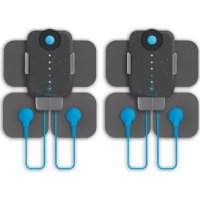
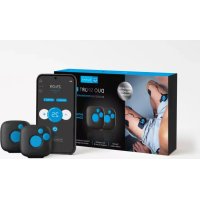
| Included accessories | Bluetens, snap cable, USB cable, reusable electrodes, carrying case, manual, warranty card |
| Safety | Automatic shutdown at end of program, slider protection against simultaneous charging/use, medical certification class 2A, type BF, CE (93/42/EEC), ROHS |
| Contraindications | Pacemaker, epilepsy, pregnancy, hernia, heart problems |
| Warranty | 2 years (battery: 6 months) |
| Customer service | contact@bluetens.com, response within 24h |
| Storage temperature | 10 °C to 45 °C |
| Storage humidity | 25% to 80% |
Frequently Asked Questions - Collection Master Pack BLUETENS
User questions about Collection Master Pack BLUETENS
0 question about this device. Answer the ones you know or ask your own.
Ask a new question about this device
Download the instructions for your Fitness Equipment in PDF format for free! Find your manual Collection Master Pack - BLUETENS and take your electronic device back in hand. On this page are published all the documents necessary for the use of your device. Collection Master Pack by BLUETENS.
USER MANUAL Collection Master Pack BLUETENS
Unit 905,9/F,Kowloon center
33 Ashley road, Tsimshatsui
Kawloon
Hong Kang

Fabricant
Manufacturer
Luechers limited.
Unit 905,9/F,Kowloon center
33 Ashley road, Tsimshatsui
Kawloon
Hong Kong
Merci!
We thank you for purchasing a Bluetens device.
Bluetens is a medical device. To make best use of it, you will find all relevant informations included in this user manual.
For any additional information or to simply give us your feedback, you can contact us at contact@bluetens.com.

1 Pre-requisites
Box content
3 The Bluetens
4 The Application
5 First use
6 Safety instructions
7 Technical characteristics
8 Customer Service
9 Guarantee
17
ENE
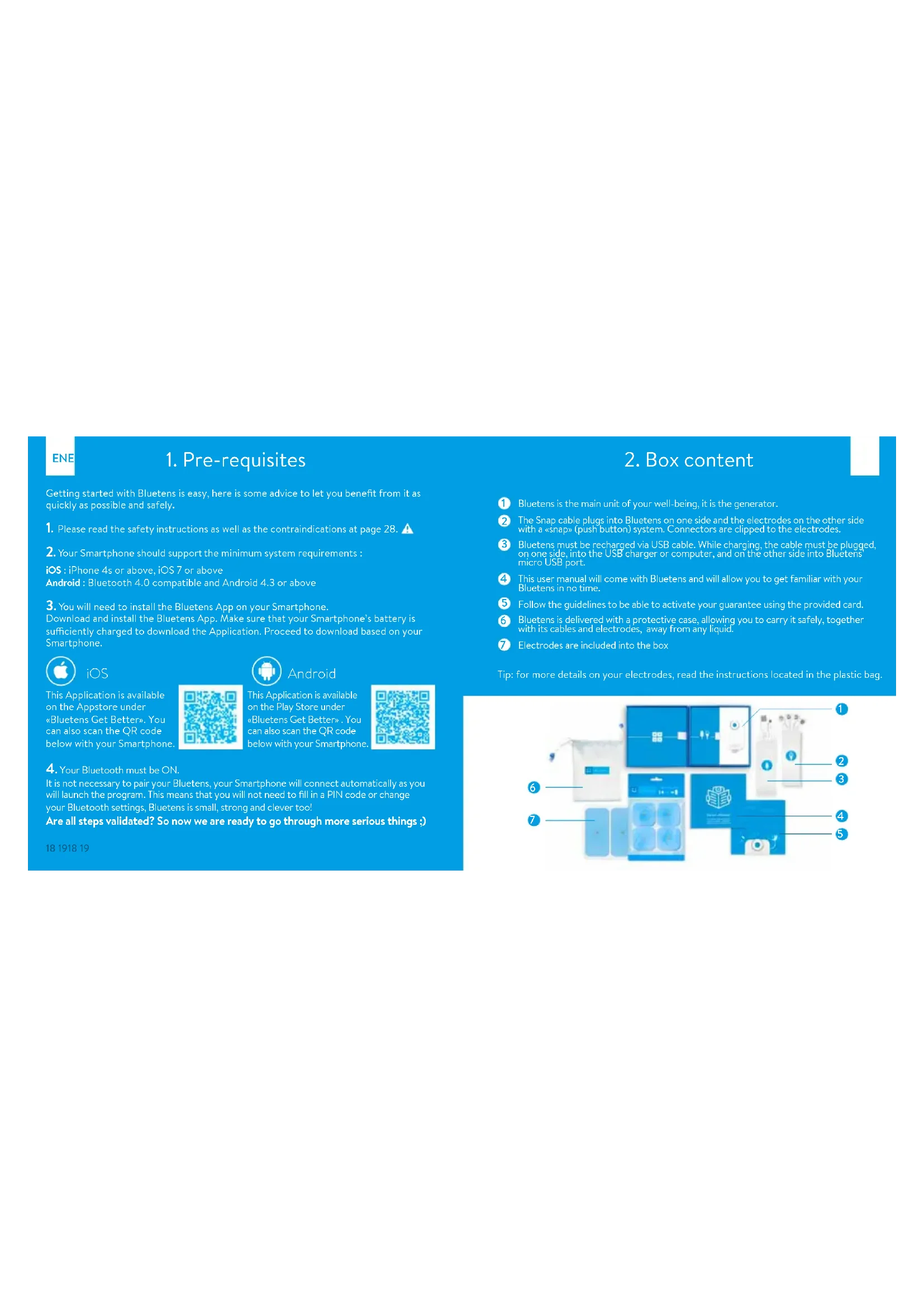
1. Pre-requisites
Getting started with Bluetens is easy, here is some advice to let you benefit from it as quickly as possible and safely.
- Please read the safety instructions as well as the contraindications at page 28.
- Your Smartphone should support the minimum system requirements:
iOS : iPhone 4s or above, iOS 7 or above
Android:Bluetooth 4.0 compatible and Android 4.3 or above
- You will need to install the Bluetens App on your Smartphone.
Download and install the Bluetens App. Make sure that your Smartphone's battery is sufficiently charged to download the Application. Proceed to download based on your Smartphone.

iOS
This Application is available on the Appstore under
"Bluetens Get Better". You can also scan the QR code below with your Smartphone.


Android
This Application is available on the Play Store under «Bluetens Get Better » . You can also scan the QR code below with your Smartphor

- Your Bluetooth must be ON.
It is not necessary to pair your Bluetens, your Smartphone will connect automatically as you will launch the program. This means that you will not need to fill in a PIN code or change your Bluetooth settings, Bluetens is small, strong and clever too!
Are all steps validated? So now we are ready to go through more serious things.)
18 1918 19
2.Box content
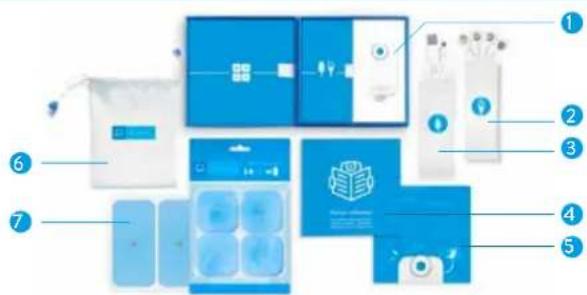
Bluetens is the main unit of your well-being, it is the generator.
The Snap cable plugs into Bluetens on one side and the electrodes on the other side with a «snap» (push button) system. Connectors are clipped to the electrodes.
3 Bluetens must be recharged via USB cable. While charging, the cable must be plugged on one side, into the USB charger or computer, and on the other side into Bluetens micro USB port.
This user manual will come with Bluetens and will allow you to get familiar with your Bluetens in no time.
5 Follow the guidelines to be able to activate your guarantee using the provided card.
6 Bluetens is delivered with a protective case, allowing you to carry it safely, together with its cables and electrodes, away from any liquid.
7 Electrodes are included into the box
Tip: for more details on your electrodes, read the instructions located in the plastic bag.
EN
3. The Bluetens

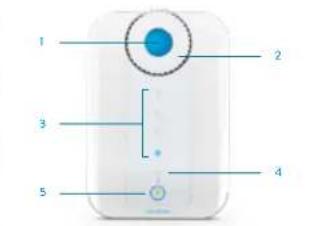
ON/OFF Button: this button allows you to turn Bluetens on and off.

Intensity adjustment knob : allows you to increase or reduce the program's intensity. To increase the intensity, turn the knob to the right, and to reduce it turn the knob to the left. Intensity increases in increments of 1 up to the level of 60 . Turning the knob to the left you will reduce the intensity from 1 to the minimum level of 0 .

Program intensity indicators: the first indicator lights up when a program is launched from the application. When Bluetens is used in standalone mode (without smartphone) the first indicator lights up when the default program begins. For all 15 intensity levels a blue indicator will light up, so you will see:
1 light from level 0 to 15
-2 lights from level 16 to 30 -4 lights from level 46 to 60

Charge indicator: when your Bluetens has less than 20% of battery remaining, charging light will blink. When you charge Bluetens, the charge indicator will stop flashing and remain fixed until the battery is fully recharged then turns off.

Voltage indicator: with a simple touch of the ON/OFF button the light will turn green. A second press and the light will turn off.

Slider::for safety reasons, you cannot recharge and use Bluetens at the same time, drag the slider either to charge mode or usage mode.

Electrode cable plug: electrode cable entry.

Micro USB plug: USB cable entry.

Reset button: this button will restore Bluetens to factory settings.
20


4. The application
EN


Bluetens will pair with your Smartphone automatically when you launch the program. It's 'Plug and Play', no manual intervention is
necessary.

CALENDAR 31
Plan your session with "calendar", choose the program, the number of sessions and the number of days, then finish the full course of your treatment.


Get quick access to your favourites programs with Favourites. On the program description page, click the star to create a shortcut under the favourites menu.

DOWNSLOAD
You can transfer the program of your choice to Bluetens' memory and enjoy it without using your Smartphone! Once you have downloaded the program, turn on your Bluetens, wait for 10 seconds (or slide the intensity wheel) and the program will begin.
RENAME

OPTION
to rename your Bluetens,ename>, under «My Bluetens»follow the guide and give yourunique name. It will helpyour Bluetens more easily ifRices are switched on at the
SHORTCUT
If you want to browse through the App when a program is in progress, the shortcut button allows you to return to the program page.

Find all the answers to your questions under Settings, "Discovery," "FAQ."
PRO MODE

If you are a health professional, you can activate the Pro mode and access each program's technical specifications. Go to Settings, Pro mode, and then click GO. After a quick evaluation of your application, we will activate the Pro mode on your App.
5. First use
LAUNCH THE BLUETENS APPLICATION
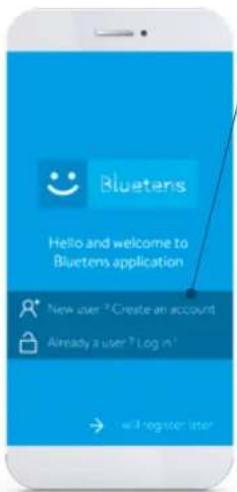
>Creation of a Bluetens account.
Click on New user? and create your account. Fill in the mandatory fields, read and accept the terms & conditions. If you are a health professional, select the checkbox to enable the Pro mode application. This will give you access to all programs technical information. Once you have created your account, you will receive an email with an activation link. Click on this link to validate your account. You can also use Bluetens without creating an account by clicking on register later.
> A tutorial will be available during your first use.
The tutorial picks up the various stages of Bluetens operation to ensure a safe use. During the following sessions, you will bypass the tutorial and go directly to the main menu.
PROGRAM SELECTION
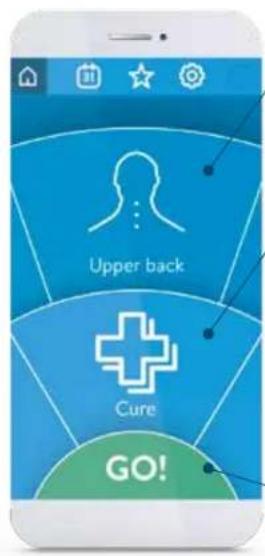
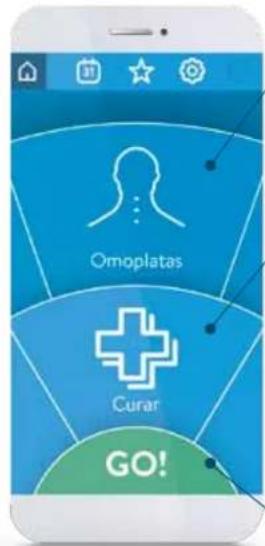
The first step consists in defining the area and action you are looking for. Available body parts are:
Upper back - Back - Lower back - Abdomen - Buttocks - Thigh - knee - Calf - Ankle - Foot - Shoulder - Upper arm - Elbow - Forearm - Wrist.
Rotate the wheel to select the desired body part, then do the same for the desired action.
Cure
For physiotherapy care aiming to amplify rehabilitation or allow a rapid pain relief effect.
Relax
For a relaxing massage or to ease muscle tension. It is also very effective to improve the quality and speed of recovery.
Tone
For an excito-motor session allowing the creation of muscle fibers.
Then press GO
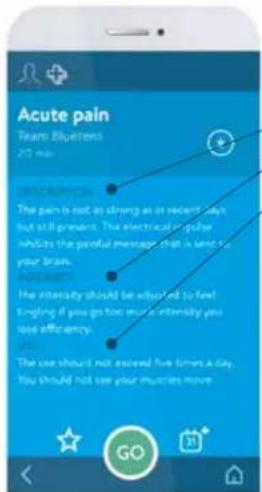
Click on the program and access its description :
Description Intensity adj
- Use advices
All programs were created by our medical team composed by French masseur physiotherapists, all State-certified, practicing in clinics and private practices.
Press GO and access to electrode placement's advices.
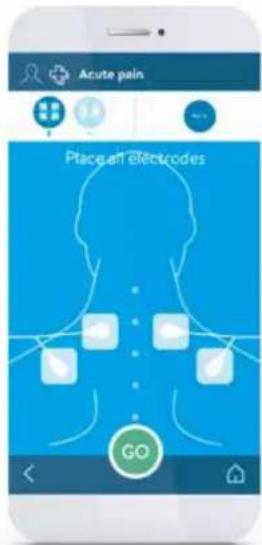
Place the electrodes as shown in the diagram.
Make sure you have placed the 4 electrodes on your skin, Bluetens will not work unless the 4 electrodes are connected. Caution: Make sure that Bluetens is turned off during the electrode placement. Turn it on when requested.
Tip: You can find all our tips inside the electrode bag.
Then press 0G
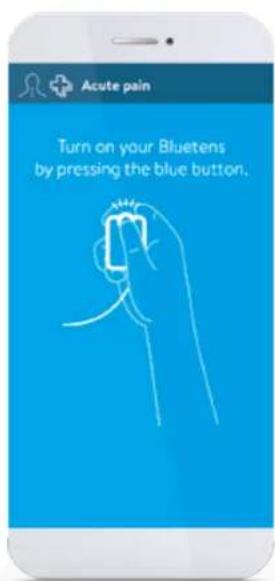
TURN YOUR BLUETENS ON
Turn Bluetens on by pressing ON when requested. Bluetens will automatically connect to your smartphone and the program will start after few seconds.
DURING THE PROGRAM
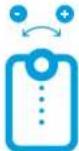
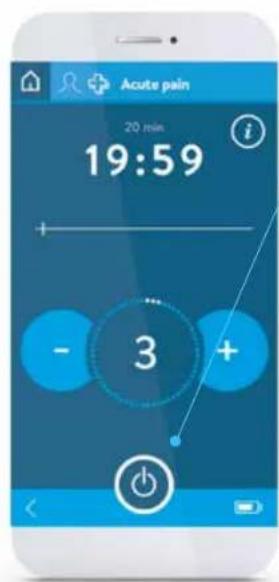
Adjust the program's intensity turning Bluetens wheel.
Access the program's description by pressing the Information button.
To achieve greater effectiveness, follow our intensity advices.
PROGRAM TERMINATION
If you want to stop the program, press the "Stop" button. You will be redirected to the main menu.
END OF THE PROGRAM
A message will indicate the end of the program.
Turn Bluetens off before removing the electrodes.
Reposition the electrodes on the good side of the plastic film and store them inside the sealed bag.
ENE
6. Safety instructions
CONTRAINDICATIONS
The use of Bluetens is forbidden for people fitted with a pacemaker or epilepsy-prone. Bluetens use is also not recommended for pregnant women and people with a hernia or an incisional hernia. People suffering from heart weakness must avoid areas around the heart. Don't use Bluetens if you have heart irregularities or heart diseases.
IMPORTANT!
Do not use Bluctens in water or in humid environments (sauna, balneotherapy and hammam, etc.). It is forbidden to place the electrodes on the sinocarotid region (in the front of the neck), on the transcranial region (through the head) or transthoraxale region (through the ribcage). To get it right, please follow the electrode placement's advices, they have been prepared by health professionals and correspond to areas of the body where Bluctens will be more effective.
SAFETY PRECAUTIONS
Do not use Bluetens within a meter from shortwave medical devices or microwave equipment, which could modify the current generated by the device. Use only the cable provided by Bluetens. During sessions do not disconnect the electrode cable because power is on. The device must be turned off first. Never take off the electrodes when Bluetens is powered on. Never connect the electrode cable to an external power source. That could cause electric shock. Do not use any damaged or defective electrode cable. Always use the USB cable provided by Bluetens to charge the device. Never use Bluetens or the USB cable if damaged. Keep Bluetens and its accessories out of reach of children. Prevent any foreign matter (soil, water, metal, etc.) from entering the device. Do not use Bluetens while driving. Never recharge Bluetens during its use; a sliding part (the slider) prevents the simultaneity of recharge and use as an extra protection. In case of doubt, do not hesitate to consult a doctor.
7. Technical characteristics
- Compact design
- Dual function mode (Bluetens/standalone)
Program control by Bluetooth 4.0 (BLE)
compatible smartphone
Compatible with Android 4.3 and above, iPhone
Compatible with Android 4s iOS7 and above - Powered by a rechargeable built-in lithium-ion
battery
Battery - Intensity adjustment on the device - Intensity adjustment: Medical artifact index
Medical certified device - Electrode cables and USB included
- Reusable electrodes included
Weight: 25 grams
·Battery:3.7V400mAh
Volatne:0-70V(chargea500Ω)
Frequency:1Hz-1200Hz
Output Current: Maximum 300mA (pic), average of 20mA
Output voltage: Maximum 100 V (without load), 65V with load
Power supply:USB
USB(oncharge):5V1000mA 5.0W
Impulse form: symmetrical bihasic square pulse
Maximum resistance: 1500 Ohm.
Automaticshit-offaftereachprogramuwer
Automated shc- on a
- Ignition safety: 100%
- Classified as type BPE
Classified as type BF X
- CE regulations concerning Medical Devices
(Directive 93/42/EEC) (102)
ROHS: devices built without materials that can
have a harmful impact on the environment RoHS
Protection against electric shock class 2
Device in contact with the patient out heart area
Read the label
At the end of the product life, make sure to discard it properly, following the relevant national rules. We thank you, in advance, for dropping the product in a place provided for this purpose in order to ensure a safe disposal in the respect of the environment.
RECOMMENDATIONS (storage and transport)
Temperature: 10°C / 45°C - Humidity level: 25% / 80%
Bluetens must be used only in accordance with the proposed programs. Bluetens Limited cannot be held responsible for any misuse or manipulation of Bluetens. Handle electrodes only when Bluetens is turned off. Bluetens is a medical device, do not leave it near children. Your Bluetens is a class 2A medical device certified by TUV. It comes with a 2 year warranty. EMC information on www.bluetens.com. Hereby, Bluetens limited, declares that Bluetens is in compliance with the essential requirements and other relevant provisions of 1999/5/ EC directive and 3/42/EEC directive 9, A copy of the Declaration of conformity is available on request from Bluetens Ltd, unit 905, 9/F, Kowloon center, 33 Ashley Road, Timshetsui, Kowloon, Hong Kong, www.bluetens.com/doc et sur commande adressée à Bluetens Limited, unit 905, 9/F, Kowloon center, 33 Ashley Hong Kong or Bluetens France, 7 passage Saint Bernard, 7501 Paris, France
EN
8. Customer Service
We manage all after-sale questions live.
If you need assistance after the purchase of your Bluetens from one of our distributors, do not return the product to the physical store, please contact us directly at contact@bluetens.com
Our agents will get back to you within 24 hours with a quick solution.
9.Guarantee
Bluetens is guaranteed for two years, this warranty does not cover damages caused by improper maintenance or usage not compliant with the related documentation, accidents (shock, fire, liquid), modifications, repairs, misuse or normal wear and tear. This guarantee covers material or manufacturing defects. This guarantee covers products purchased directly from Bluetens or from a Bluetens authorized dealer only.
GUARANTEE PERIOD
Your product is guaranteed two years from the date of purchase, the battery has a six month guarantee.
NOT COVERED BY THE GUARANTEE
Electrodes, clip, satchel, as well as cables and accessories included in the box do not benefit from this guarantee.
BLUETENS AT YOUR SERVICE
In the event of a defect covered by the guarantee, Bluetens will send you a return slip and will be responsible for the repairs or exchange of your device as well as of its return to you.
HOW TO GET CUSTOMER SUPPORT?
You can reach our Customer Service at any time at the following address:
contact@bluetens.com, a member of our team will be dedicated to find a solution to your request.
ES
Gracias!
WAS DIE GARANTIE NICT ABDECKT
VOORZORGSGMAATREGELEN
Influenza Bacteria Intensities of pathogens
Intensitie anpassing op net apparatus
>Creation of a Bluetens account.
Click on New user? and create your account. Fill in the mandatory fields, read and accept the terms & conditions. If you are a health professional, select the checkbox to enable the Pro mode application. This will give you access to all programs' technical information. Once you have created your account, you will receive an email with an activation link. Click on this link to validate your account. You can also use Bluetens without creating an account by clicking on register later.
> A tutorial will be available during your first use.
The tutorial picks up the various stages of Bluetens operation to ensure a safe use. During the following sessions, you will bypass the tutorial and go directly to the main menu.
SELEÇÃO DO PROGRAMA
Dostepne czesci ciala to:
GWARANCJA NIE OBEJMUJE
∴ m = 3/11 ;

PARANCSIKON


- MERCI
- PRE-REQUISITES
- IOS
- ANDROID
- 2.BOX CONTENT
- EN
- THE BLUETENS
- THE APPLICATION
- FIRST USE
- LAUNCH THE BLUETENS APPLICATION
- CREATION OF A BLUETENS ACCOUNT
- A TUTORIAL WILL BE AVAILABLE DURING YOUR FIRST USE
- PROGRAM SELECTION
- TURN YOUR BLUETENS ON
- DURING THE PROGRAM
- PROGRAM TERMINATION
- END OF THE PROGRAM
- SAFETY INSTRUCTIONS
- CONTRAINDICATIONS
- IMPORTANT
- SAFETY PRECAUTIONS
- TECHNICAL CHARACTERISTICS
- CUSTOMER SERVICE
- 9.GUARANTEE
- GUARANTEE PERIOD
- NOT COVERED BY THE GUARANTEE
- BLUETENS AT YOUR SERVICE
- HOW TO GET CUSTOMER SUPPORT
- ES
- GRACIAS
- WAS DIE GARANTIE NICT ABDECKT
- VOORZORGSGMAATREGELEN
- SELEÇÃO DO PROGRAMA
- GWARANCJA NIE OBEJMUJE
Brand : BLUETENS
Model : Collection Master Pack
Category : Fitness Equipment