
9042 WH3R MiBaby - Scale SALTER - Free user manual and instructions
Find the device manual for free 9042 WH3R MiBaby SALTER in PDF.




| Product type | Baby scale with growth tracking software |
| Brand | Salter |
| Model | 9042 WH3R MiBaby |
| Category | Scale |
| Power supply | Batteries (type not specified, likely AAA or AA) |
| Maximum capacity | 150 kg (estimated) |
| Accuracy | Rounded to nearest value |
| Units of measurement | kg, st, lb (selectable) |
| Main functions | Adult mode, baby mode (differential weighing), quick weighing, PC software tracking (Windows) |
| Software functions | Record weight, height, BMI, teeth, milestones, photos; growth charts (WHO percentiles); up to 4 user profiles |
| Included accessories | Printed wall-mounted height gauge, stickers, carpet feet |
| Software compatibility | Windows 2000, XP, Vista, 7, 8 (not Mac compatible) |
| Care and cleaning | Clean with a damp cloth, do not use chemical detergents, avoid contact with water |
| Safety | Platform slippery if wet, do not jump on the device |
| Spare parts and repairability | Batteries, carpet feet; opening or disassembly voids warranty |
| Warranty | 15 years (domestic), covers manufacturing defects and materials, does not cover normal wear or accidental damage |
| General information | Domestic use, complement to medical care, manual available in multiple languages |
Frequently Asked Questions - 9042 WH3R MiBaby SALTER
User questions about 9042 WH3R MiBaby SALTER
0 question about this device. Answer the ones you know or ask your own.
Ask a new question about this device
Download the instructions for your Scale in PDF format for free! Find your manual 9042 WH3R MiBaby - SALTER and take your electronic device back in hand. On this page are published all the documents necessary for the use of your device. 9042 WH3R MiBaby by SALTER.
USER MANUAL 9042 WH3R MiBaby SALTER
MiBaby scale with PC tracking software
Instructions and Guarantee
MiBaby
The MiBaby scales, height chart and PC software are intended to provide a precious record of a child's growth and development as well as provide convenience and reassurance to parents wishing to check and monitor their baby's growth and development in the comfort of their own home. MiBaby should be used in addition with and not as a substitute to professional medical guidance and postnatal care. If you are concerned about any aspect of your child's health please seek professional medical guidance.
SOFTWARE INSTALLATION
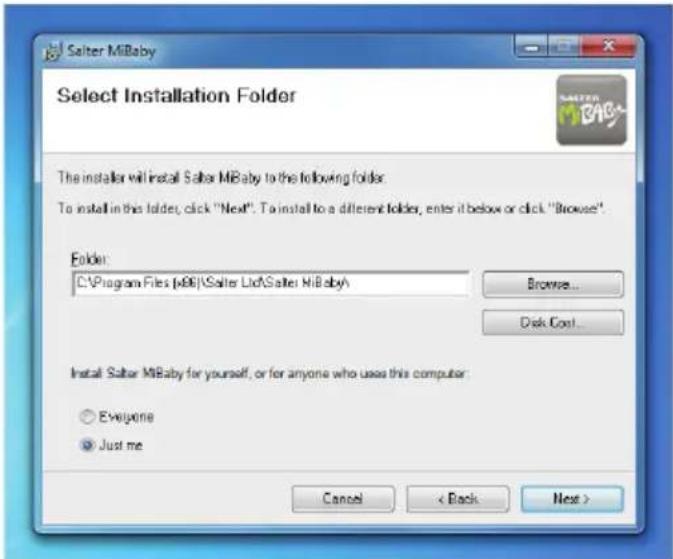
Please go to www.saltermibaby.com and download the latest version of the MiBaby software. The full operating instructions will be included with this download. The MiBaby computer software is compatible with Windows 2000, XP, Vista, Windows 7 and Windows 8. It is not compatible with apple computers. To install the software follow this sequence:
- Close all open programs.
- Double-click on the application file that you have just downloaded.
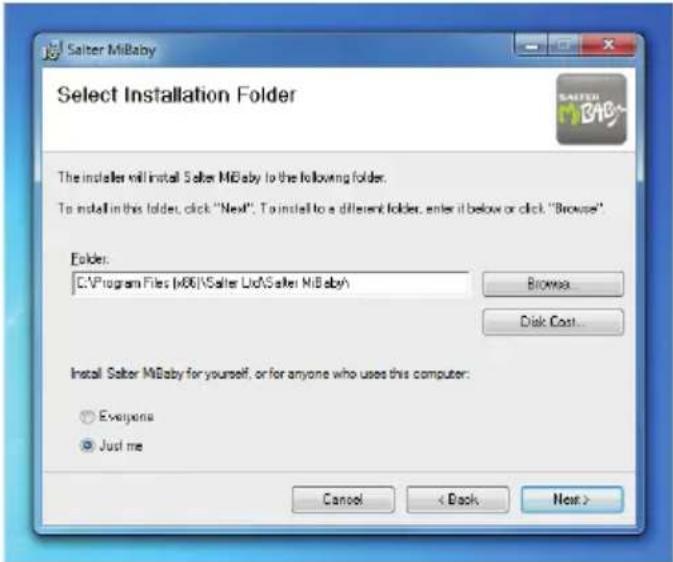
- Follow the on screen installation instructions.
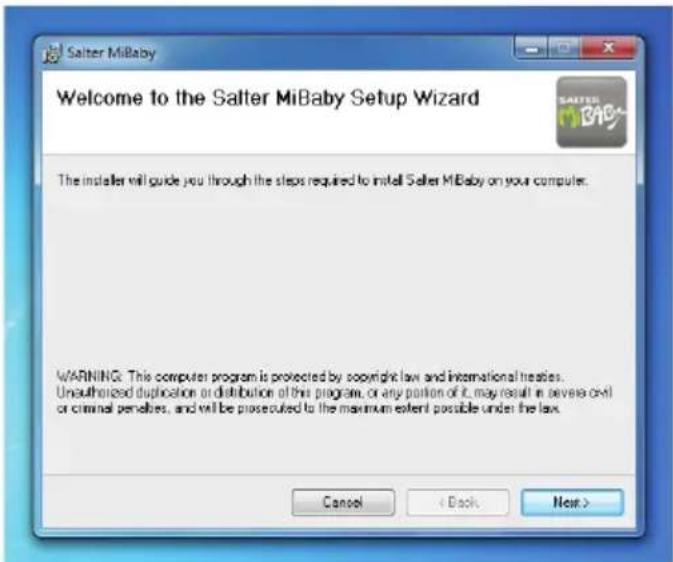
- Click Next.
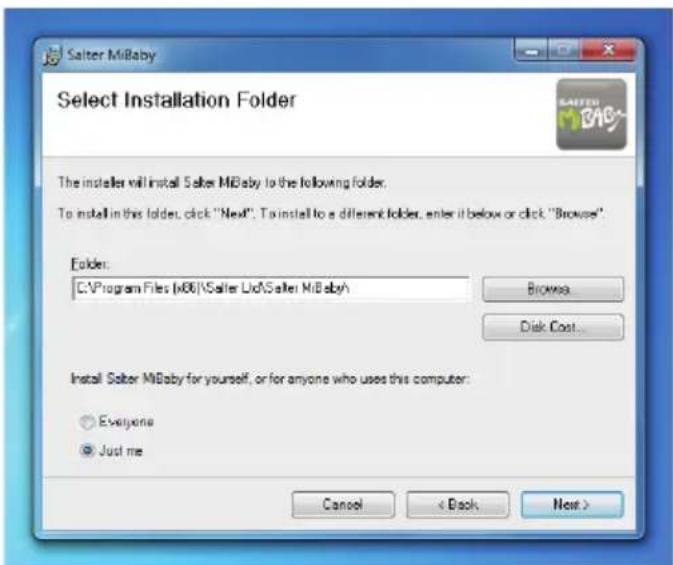
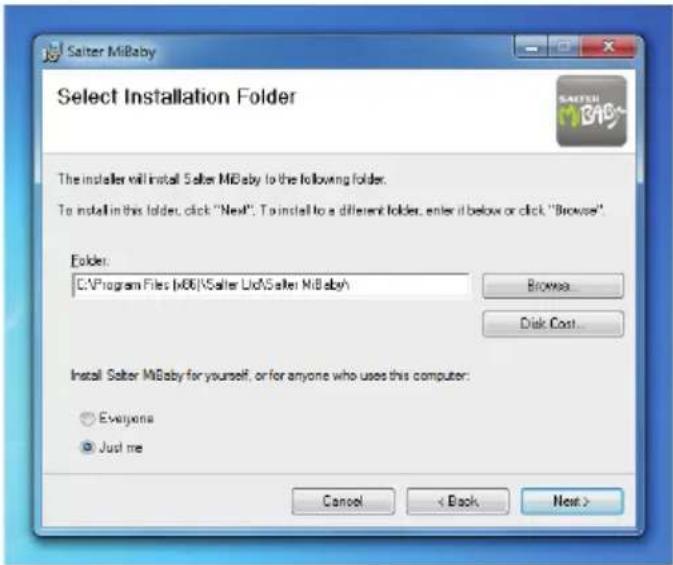
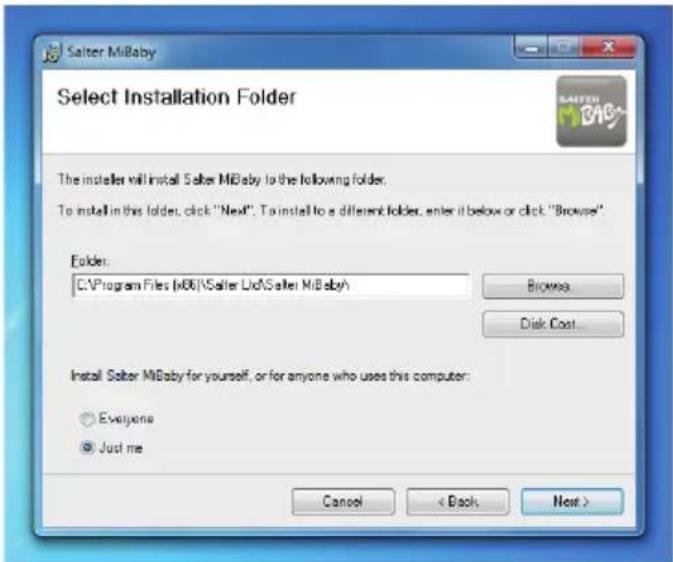
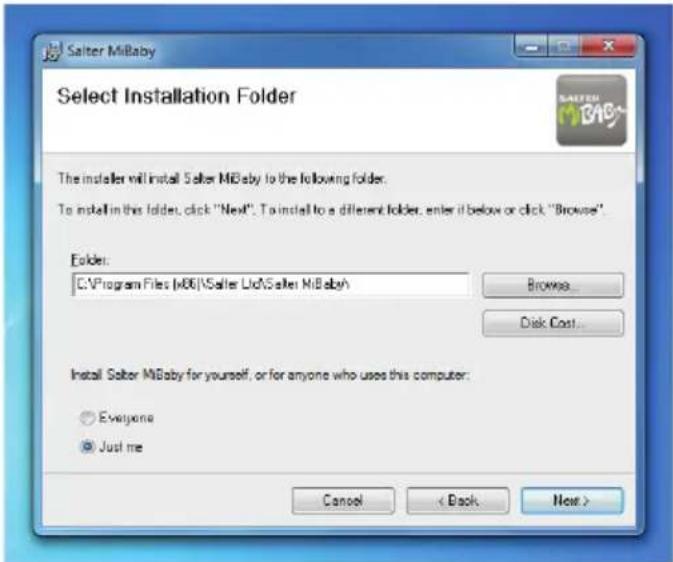
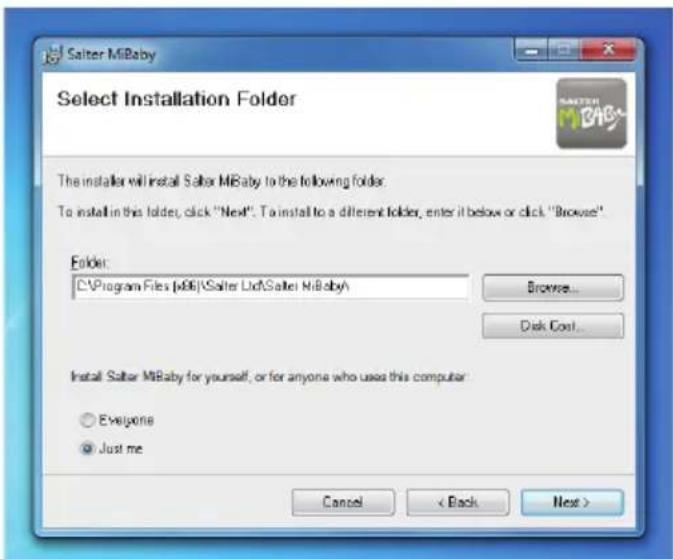
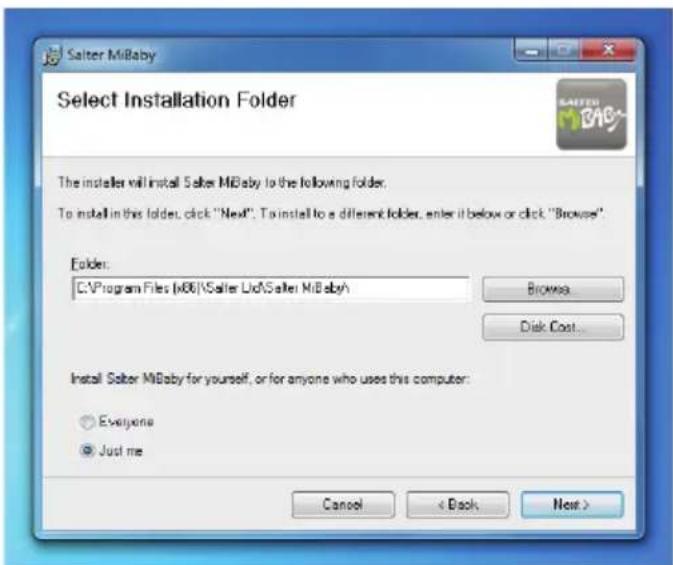
- Select a folder or click next.
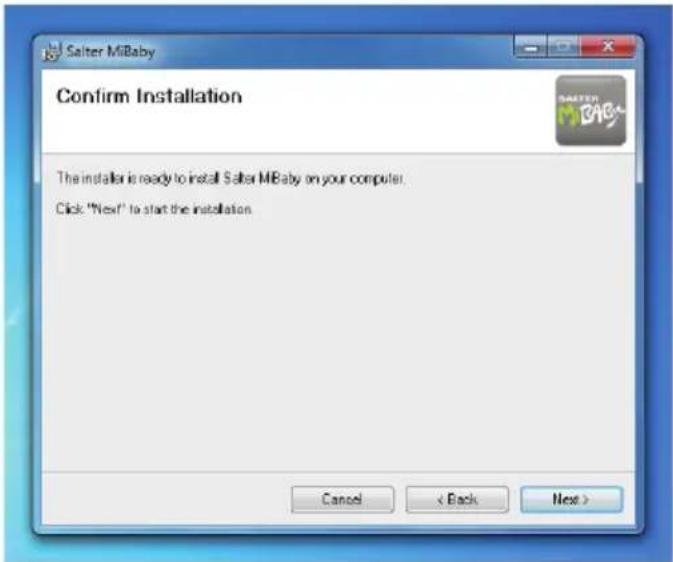
- Click Next.
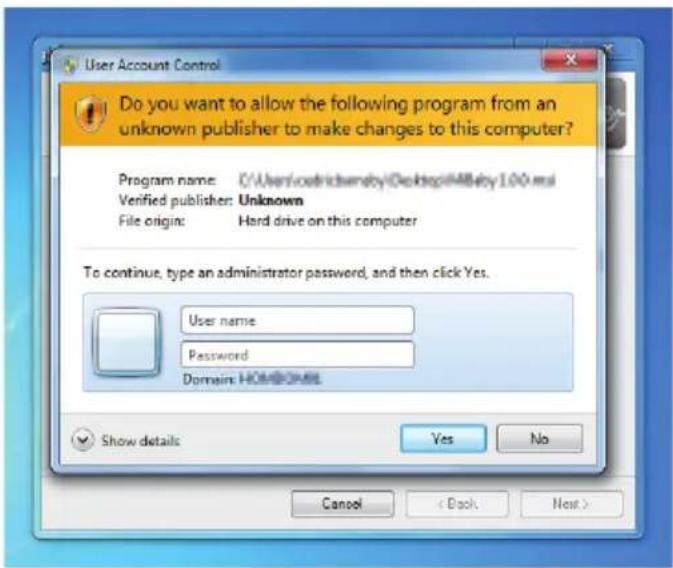
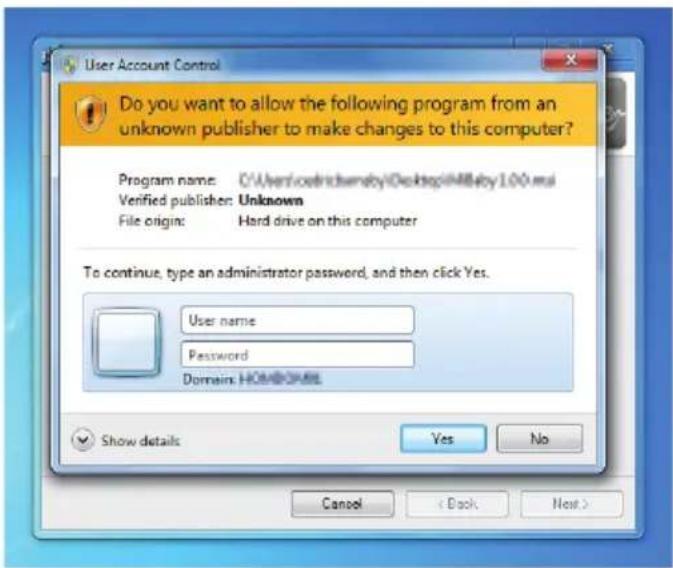
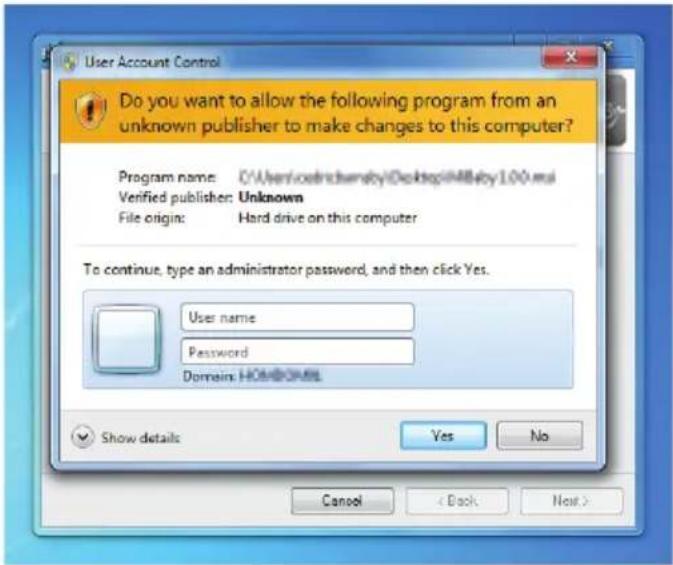
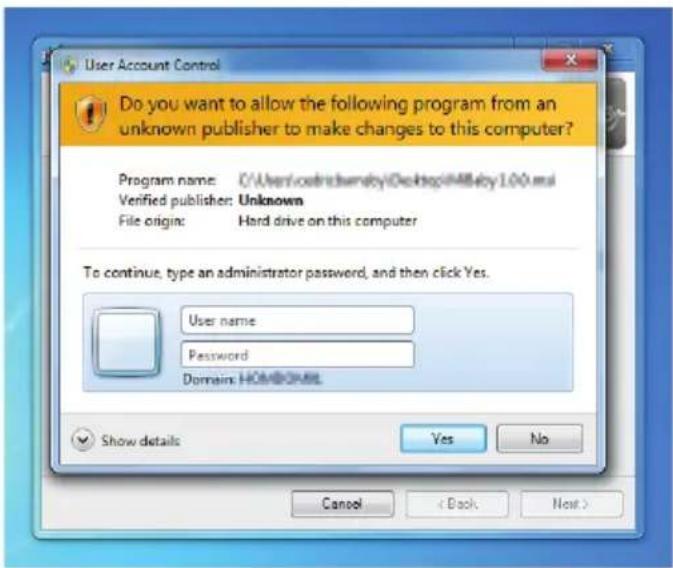
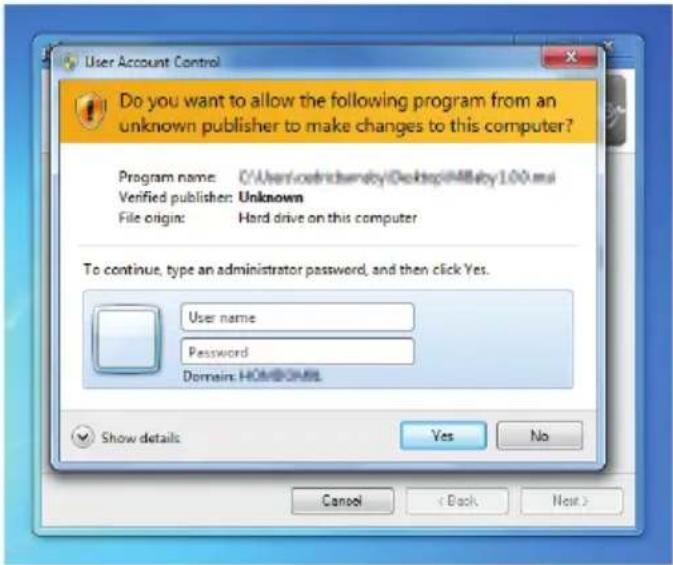
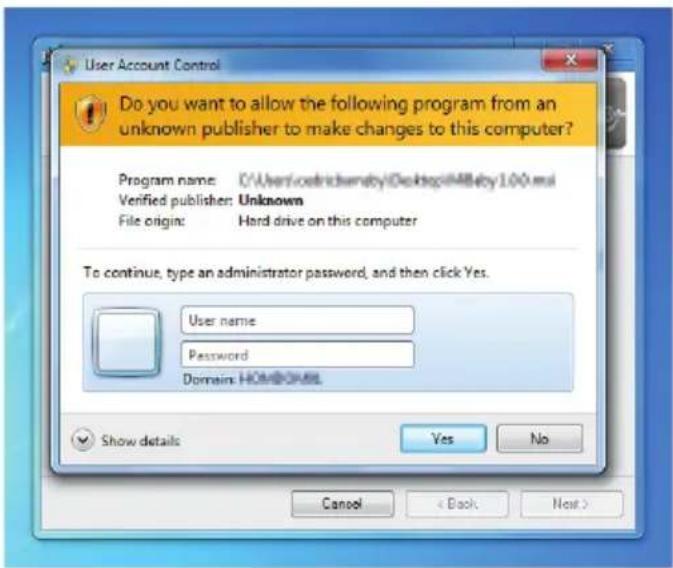
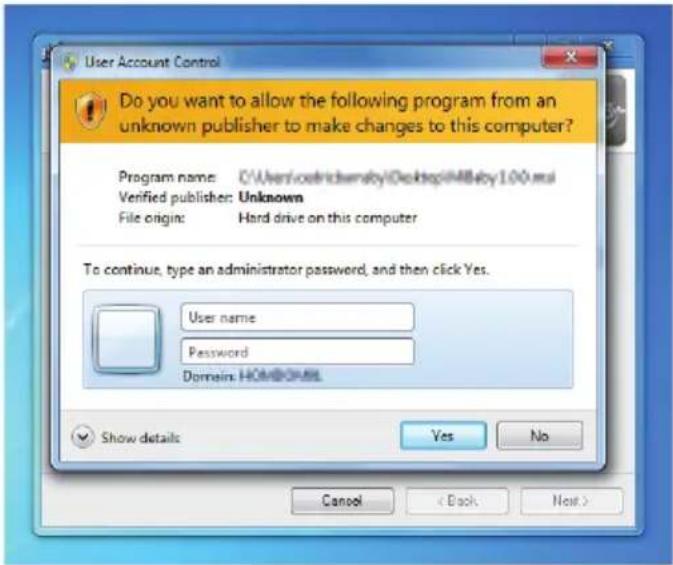
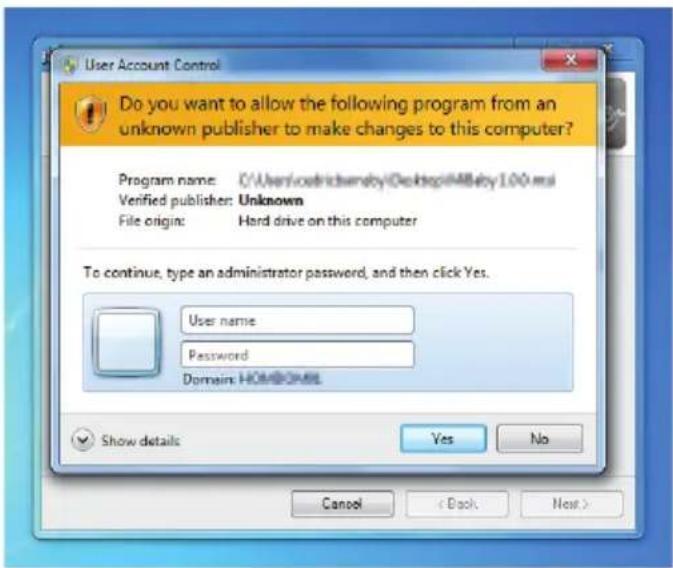
- If requested enter your computer administrator User name and Password.
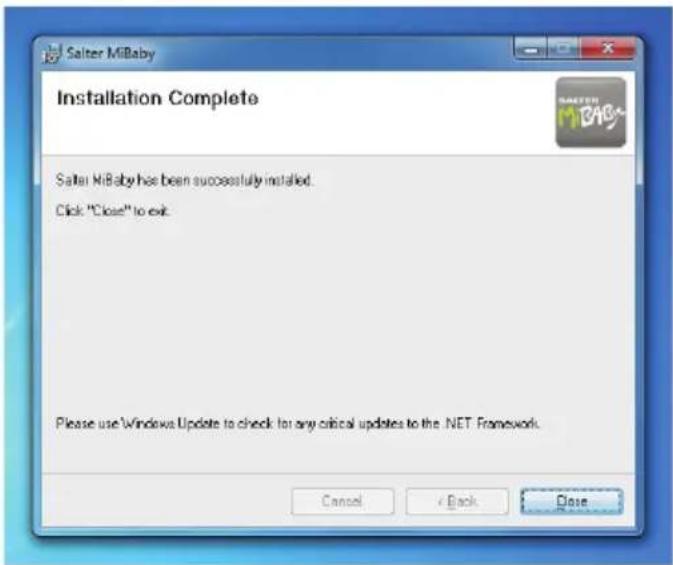
- Click Close.

- The Salter MiBaby icon should appear on the desktop. The software installation is now complete.
MiBaby SOFTWARE
Double click on the MiBaby icon to open the software.
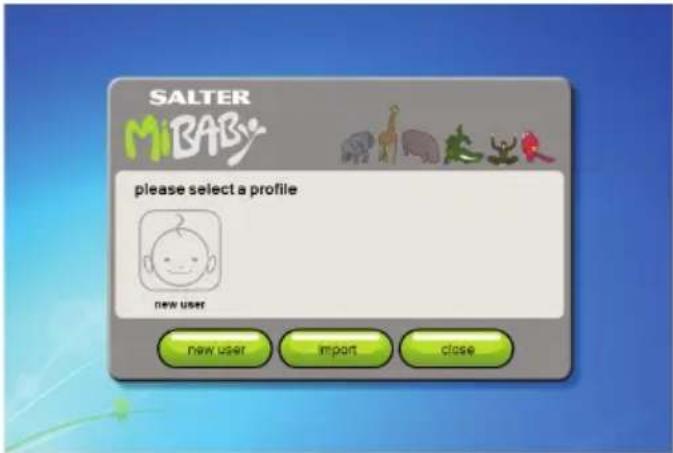
Click on a user icon for an existing user, new user to create a new user or import to import existing user data.
New User
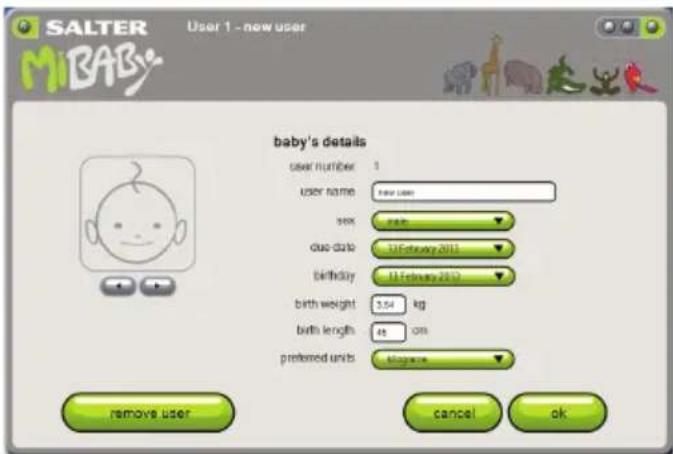
Enter the baby's details and select your preferred units. Click ok to confirm.
Summary
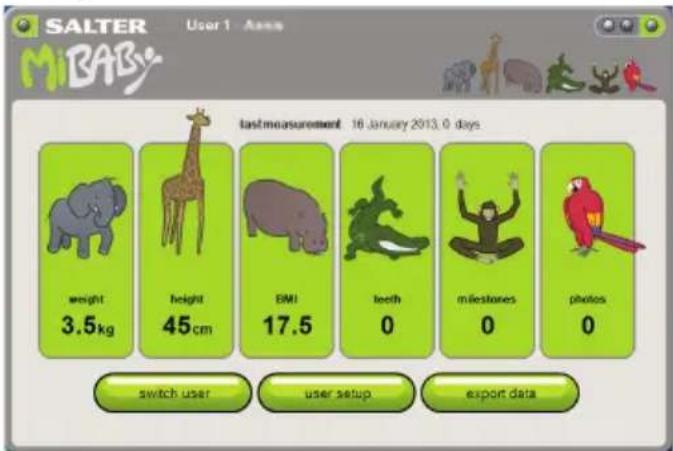
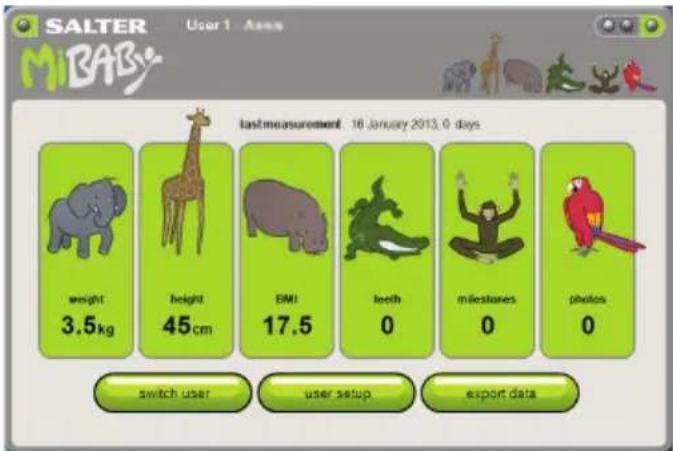
The summary page shows the baby's last measurements. Click on any of the animal icons to enter the measurement data.
Click on switch user to select a different child's profile. The MiBaby software supports up to 4 users.
Click user setup to return to the user setup page.
Click export data to save the child's data to another location on the PC. This can then be transferred to another PC and shared with friends and family. Exported data can be imported using the import button on the user selection page.
Note: Only the user number selected data is exported. For multiple users data must be exported individually.
Weight Height and BMI
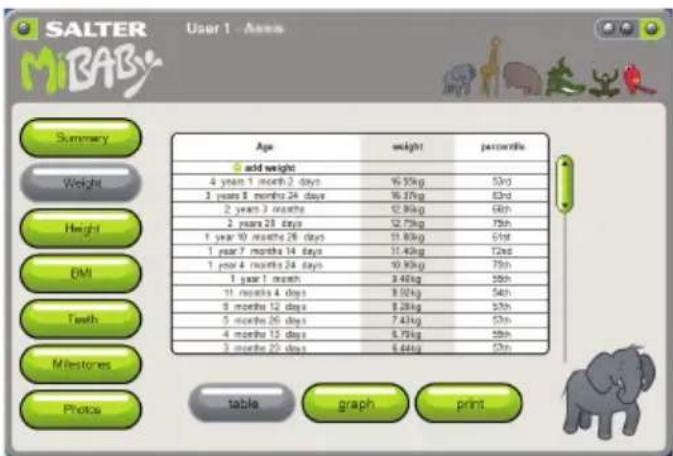
You can navigate to Weight, Height, BMI, Teeth, Milestones, Photos or back to the Summary page using the buttons on the left of the page.
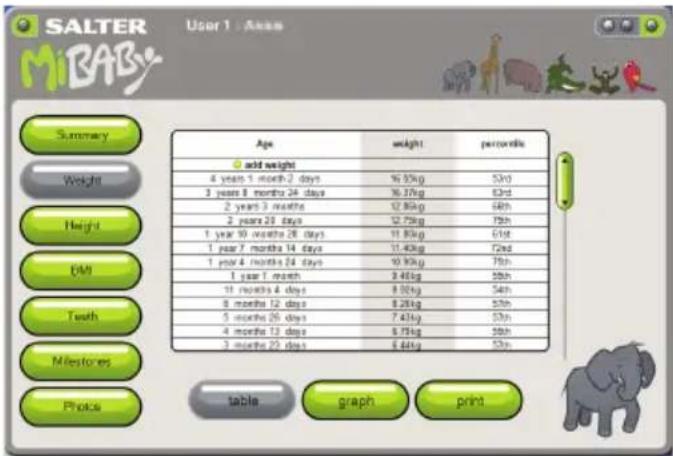
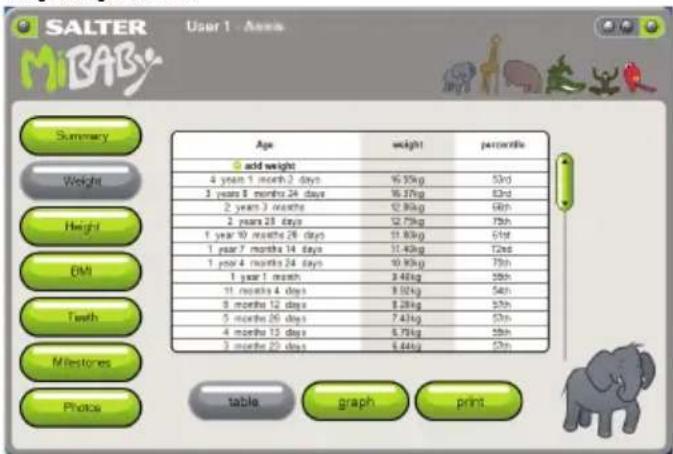
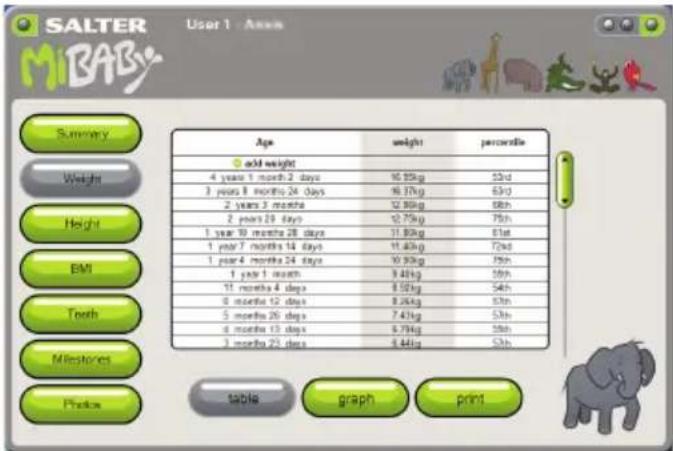
Weight Height and BMI measurements are displayed in a table. You can manually add a new weight or height by clicking on the add weight/add height button at the top of the table.
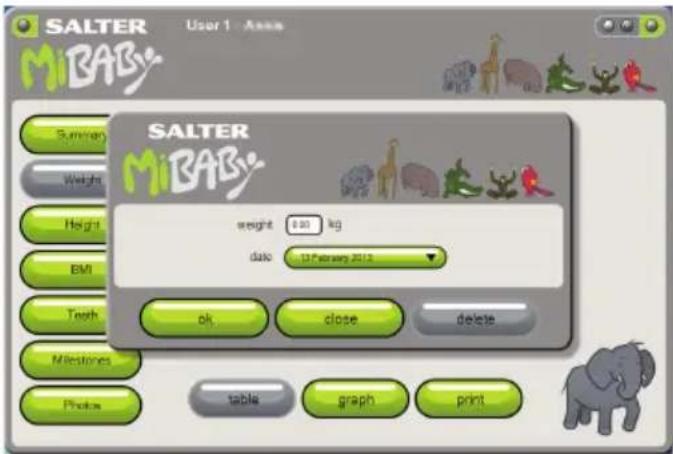
Enter the new weight/height and date and click ok.
Double click on an existing weight/height to edit it.
Note: BMI measurements are calculated from the weight and height measurements so there is no need to enter these. Regularly updating both weight and height measurements will give the most accurate BMI measurements.
line
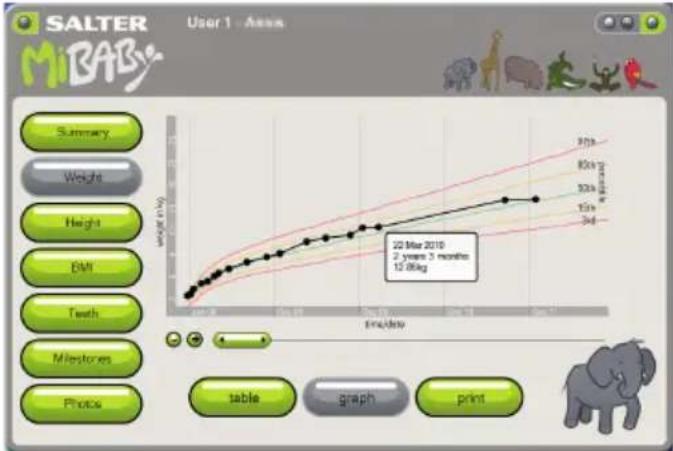
| Time Point | Weight (kg) | | :--- | :--- | | 22 Mar 2010 | 12.00kg |Click on graph to display the measurements as a graph. The results are shown against percentile curves. You can hover over a data point to see details. You can zoom in or out and travel along the timeline using the +,- buttons and slide bar.
Percentile curves are derived from: World Health Organisation (2006). WHO child growth standards: length/height-for-age, weight-for-age, weight-for-length, weight-for-height and body mass index-for-age : methods and development.
Teeth
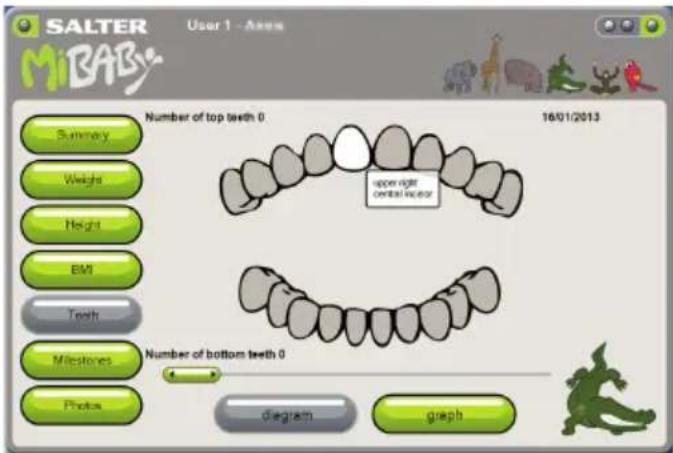
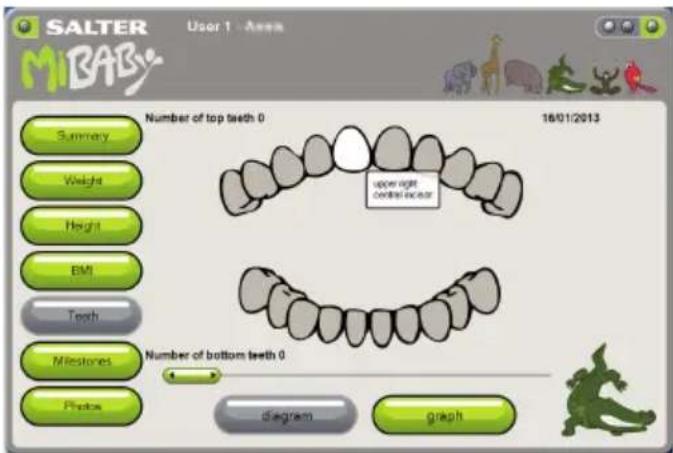
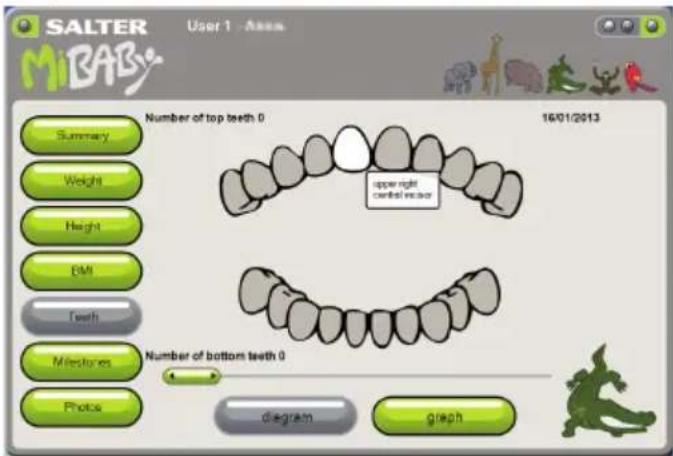
Teeth are shown as a diagram.
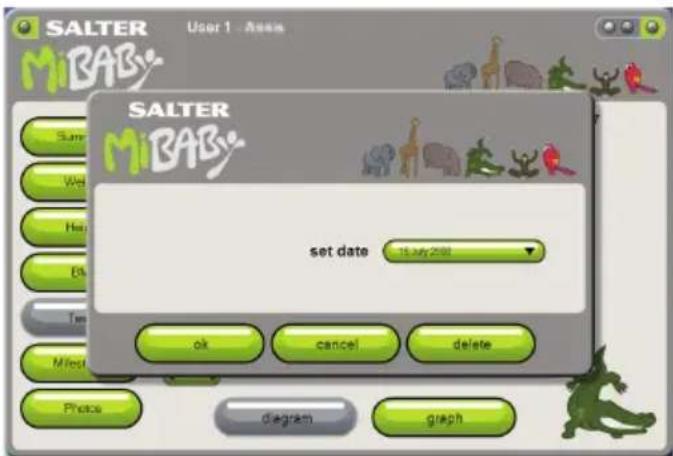
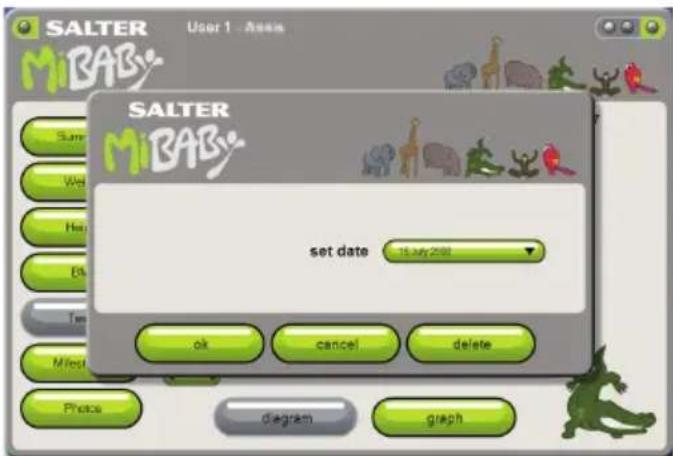
Click on a tooth to enter/edit the date it appeared. Use the slide bar to see the order the teeth appeared.
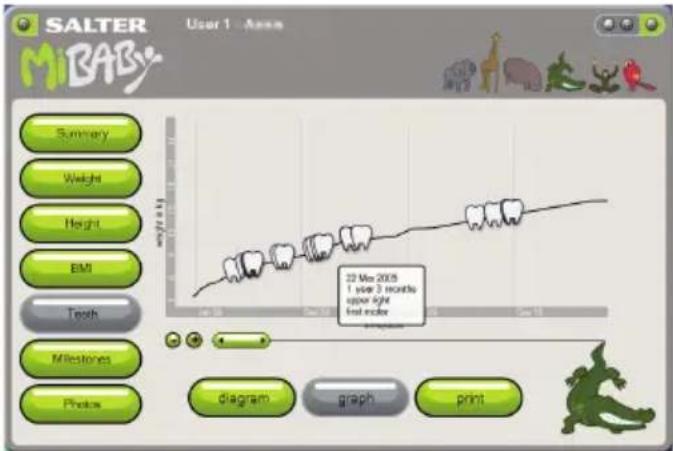
Click on graph to see the order the teeth appeared on a timeline. You can hover over a data point to see details. You can zoom in or out and travel along the timeline using the +, - buttons and slide bar.
Milestones
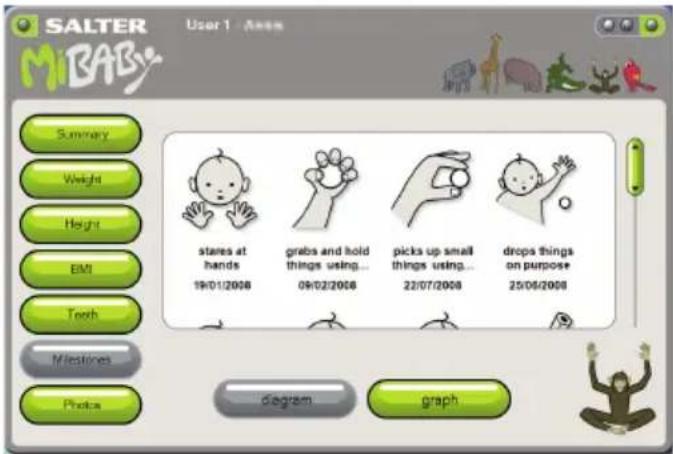
Milestones are shown as diagrams.
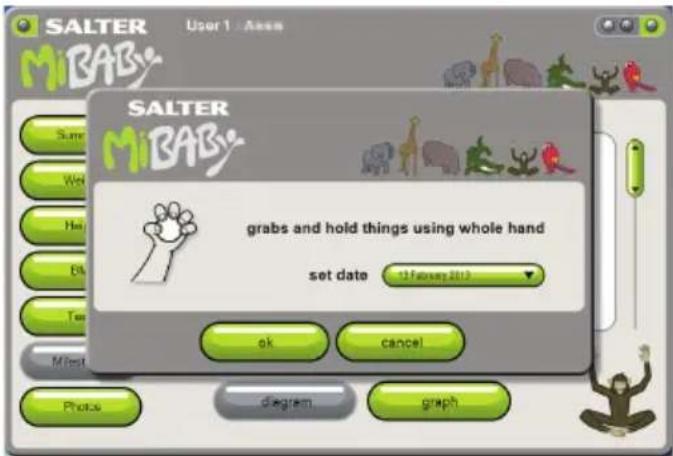
Click on the + button to add dates the milestones were achieved. There is also a custom milestone icon with free text. You may add multiple custom milestones to record individual key events in your child's development. Click on an existing milestone to edit.
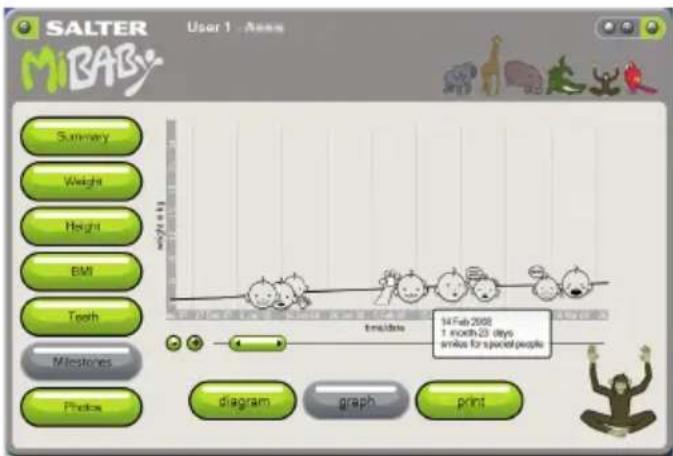
Click on graph to display the measurements as a graph. You can hover over a data point to see details. You can zoom in or out and travel along the timeline using the +, - buttons and slide bar.
Photos
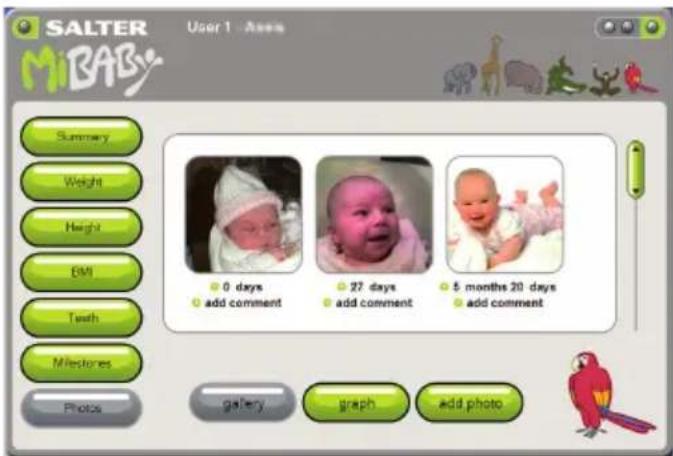
Photos are shown as a gallery. Click on a photo to see a large version.
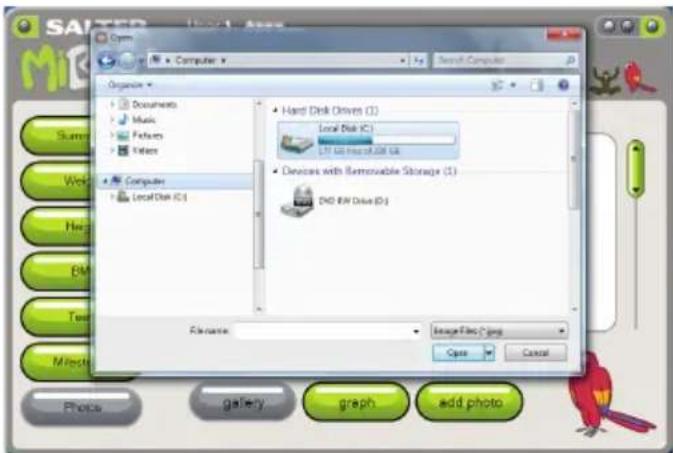
Click on add photo and locate the photo file location on your computer to add a photo. Click on add date and add comment to add/edit details.
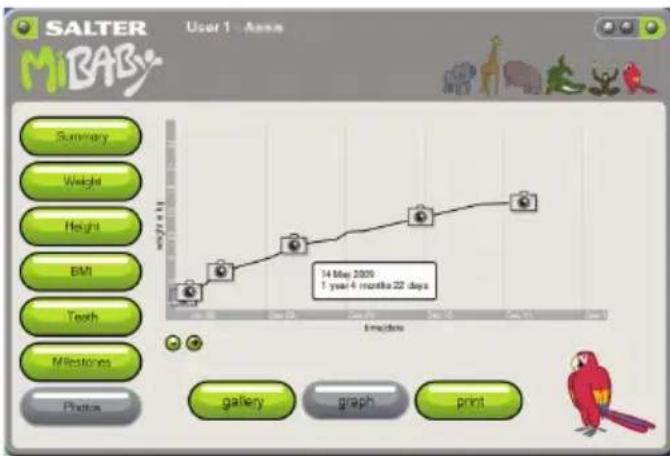
Click on graph to see the photos on a timeline. You can hover over a data point to see details. You can zoom in or out and travel along the timeline using the +, - buttons and slide bar. Click on the camera icon to see a large version of the photo.
MiBaby HEIGHT CHART
The printed MiBaby height chart provides your child with a visual record of their height engaging the child in understanding how they grow. The stickers are intended to encourage regular height checks but if they run out the height chart can be written on directly. To fit the height chart first select a suitable location on an unobstructed section of wall. Measure 60cm or 2ft from the floor and mark this position on the wall. Ensure the 60cm or 2ft marker of the height chart aligns with the marked position. Affix the height chart to the wall with a suitable adhesive such as blue tack or double sided tape. Take care not to damage the decoration. When measuring your child ensure they stand up straight, feet together and still and mark their height on the chart. The child may enjoy sticking the sticker on themselves. This height can easily be entered into the MiBaby PC software to provide a digital record of the child's height.
NEW FEATURE!
This scale features our convenient step-on operation. Once initialised the scale can be operated by simply stepping straight on the platform – no more waiting!
PREPARING YOUR SCALE
- Open the battery compartment on the scale underside.
- Remove isolating tab from beneath the battery (if fitted) or insert batteries observing the polarity signs (+ and -) inside the battery compartment.
- Close the battery compartment.
- Select kg, st or lb weight mode by the switch on the underside of the scale.
- For use on carpet attach enclosed carpet feet.
- Position scale on a firm flat surface.
INITIALISING YOUR SCALE
- Press the platform centre and remove your foot.
- '0.0' will be displayed.
- The scale will switch off and is now ready for use.
This initialisation process must be repeated if the scale is moved.
At all other times step straight on the scale.
- Select adult mode by the switch inside the battery compartment.
- Step on and stand very still while the scale computes your weight.
- Your weight is displayed.
- Step off. Your weight will be displayed for a few seconds.
- The scale will switch off.
- Select baby mode by the switch inside the battery compartment.
- Step on and stand very still while the scale computes your weight.
- Your weight and the 📋 icon will be displayed. Then '0.0' will be displayed.
- Step off the scale and carefully pick up the baby.
- Step back on the scale holding the baby.
- The baby weight only and ✕ icon will be displayed.
- Step off. The baby weight will be displayed for a few seconds.
- The scale will switch off.
WARNING INDICATORS
O-Ld Weight exceeds maximum capacity.
Lo Replace battery.
Err Unstable weight. Stand still.
ADVICE FOR USE AND CARE
- Always weigh yourself on the same scale placed on the same floor surface. Do not compare weight readings from one scale to another as some differences will exist due to manufacturing tolerances.
- Placing your scale on a hard, even floor will ensure the greatest accuracy and repeatability.
- Weigh yourself at the same time each day, before meals and without footwear. First thing in the morning is a good time.
- Your scale rounds up or down to the nearest increment. If you weigh yourself twice and get two different readings, your weight lies between the two.
• Clean your scale with a damp cloth. Do not use chemical cleaning agents. - Do not allow your scale to become saturated with water as this can damage the electronics.
• Treat your scale with care - it is a precision instrument.
Do not drop it or jump on it.
• Caution: the platform may become slippery when wet.
TROUBLESHOOTING GUIDE
If you experience any difficulty in the use of your scale:
• Check the battery is correctly fitted.
- Check that you have selected your preference of stones/pounds, kilograms or pounds.
- Check that the scale is on a flat, level floor and not touching against a wall.
- Repeat the 'Initialisation' procedure every time the scale is moved.
- If when you use the scale there is no display at all or if 'Lo' is displayed – try a new battery.
• If '0-Ld' is displayed the scale has been overloaded.
WEEE EXPLANATION

This marking indicates that this product should not be disposed with other household wastes throughout the EU. To prevent possible harm to the
environment or human health from uncontrolled waste disposal, recycle it
responsibly to promote the sustainable reuse of material resources. To return your used device, please use the return and collection systems or contact the retailer where the product was purchased. They can take this product for environmental safe recycling.
BATTERY DIRECTIVE

This symbol indicates that batteries must not be disposed of in the domestic
waste as they contain substances which can be damaging to the environment ealth. Please dispose of batteries in designated collection points.
GUARANTEE
This product is intended for domestic use only. Salter will repair or replace the product, or any part of this product, free of charge if within 15 years of the date of purchase, it can be shown to have failed through defective workmanship or materials. This guarantee covers working parts that affect the function of the scale. It does not cover cosmetic deterioration caused by fair wear and tear or damage caused by accident or misuse. Opening or taking apart the scale or its components will void the guarantee. Claims under guarantee must be supported by proof of purchase and be returned carriage paid to Salter (or local Salter appointed agent if outside the UK). Care should be taken in packing the scale so that it is not damaged while in transit. This undertaking is in addition to a consumer's statutory rights and does not affect those rights in any way. For UK Sales and Service contact HoMedics Group Ltd, PO Box 460, Tonbridge, Kent, TN9 9EW, UK. Helpline Tel No: (01732) 360783. For Ireland, please contact Petra Brand Masters, Unit J4 Maynooth Business Campus, Maynooth, Co. Kildare, Ireland. Tel +00 353 (0) 1 6510660. e-mail sales@petrabrandmasters.ie.
www.salterhousewares.com/servicecentres
Register your product today at: www.homedicsgroup.com/register
CE
SALTER
HoMedics Group Ltd
PO Box 460, Tonbridge, Kent, TN9 9EW, UK.
www.saltermibaby.com
www.salterhousewares.co.uk IB-9042GB-0213-01
SALTER MiBABy
Register your product today at: www.homedicsgroup.com/register
CE
SALTER
HoMedics Group Ltd
PO Box 460, Tonbridge, Kent, TN9 9EW, UK.
www.saltermibaby.com
www.salterhousewares.co.uk IB-9042CZ-0213-01
SALTER MiBABy
line
| Time Point | Weight (kg) | | :--- | :--- | | 22 Mar 2010 | 5 | | 3rd | 8 | | 4th | 10 | | 5th | 12 | | 6th | 15 | | 7th | 18 | | 8th | 20 | | 9th | 22 | | 10th | 25 | | 11th | 28 | | 12th | 30 | | 13th | 32 | | 14th | 35 | | 15th | 38 | | 16th | 40 | | 17th | 42 | | 18th | 45 | | 19th | 48 | | 20th | 50 | | 21st | 52 | | 22nd | 55 | | 23rd | 58 | | 24th | 60 | | 25th | 62 | | 26th | 65 | | 27th | 68 | | 28th | 70 | | 29th | 72 | | 30th | 75 | | 31st | 78 | | 32nd | 80 | | 33rd | 82 | | 34th | 85 | | 35th | 88 | | 36th | 90 | | 37th | 92 | | 38th | 95 | | 39th | 98 | | 40th | 100 | | 41st | 102 | | 42nd | 105 | | 43rd | 108 | | 44th | 110 | | 45th | 112 | | 46th | 115 | | 47th | 118 | | 48th | 120 | | 49th | 122 | | 50th | 125 | | 51st | 128 | | 52nd | 130 | | 53rd | 132 | | 54th | 135 | | 55th | 138 | | 56th | 140 | | 57th | 142 | | 58th | 145 | | 59th | 148 | | 60th | 150 | | 61st | 152 | | 62nd | 155 | | 63rd | 158 | | 64th | 160 | | 65th | 162 | | 66th | 165 | | 67th | 168 | | 68th | 170 | | 69th | 172 | | 70th | 175 | | 71st | 178 | | 72nd | 180 | | 73rd | 182 | | 74th | 185 | | 75th | 188 | | 76th | 190 | | 77th | 192 | | 78th | 195 | | 79th | 198 | | 80th | 200 | | 81st | 202 | | 82nd | 205 | | 83rd | 208 | | 84th | 210 | | 85th | 212 | | 86th | 215 | | 87th | 218 | | 88th | 220 | | 89th | 222 | | 90th | 225 | | 91st | 228 | | 92nd | 230 | | 93rd | 232 | | 94th | 235 | | 95th | 238 | | 96th | 240 | | 97th | 242 | | 98th | 245 | | 99th | 248 | | Note: The weights are estimated based on the chart title and the number of weights in the data table. The 'Table' is not explicitly labeled in the image. The 'Year' is not explicitly labeled in the chart title but corresponds to the date of the chart. The 'Weight' label is not explicitly labeled in the chart title. The 'Height' label is not explicitly labeled in the chart title. The 'Width' label is not explicitly labeled in the chart title. The 'Depth' label is not explicitly labeled in the chart title. The 'Miles' label is not explicitly labeled in the chart title. The 'Phot' label is not explicitly labeled in the chart title. The 'Print' label is not explicitly labeled in the chart title. The 'Date' label is not explicitly labeled in the chart title. The 'Date' label is not explicitly labeled in the chart title. The 'Time' label is not explicitly labeled in the chart title. The 'Balance' label is not explicitly labeled in the chart title. The 'Balance' label is not explicitly labeled in the chart title. The 'Balance' label is not explicitly labeled in the chart title. The 'Balance' label is not explicitly labeled in the chart title. The 'Balance' label is not explicitly labeled in the chart title. The 'Balance' label is not explicitly labeled in the chart title. The 'Balance' label is not explicitly labeled in the chart title. The 'Balance' Label is not explicitly labeled in the chart title. The 'Balance' Label is not explicitly labeled in the chart title. The 'Balance' Label is not explicitly labeled in the chart title. The 'Balance' Label is not explicitly labeled in the chart title. The 'Balance' Label is not explicitly labeled in the chart title. The 'Balance' Label is not explicitly labeled in the chart title. The 'Balance' Label is not explicitly labeled in the chart title. The 'Balance' Label is also labeled as 'Table', 'Graph', and 'print'.Register your product today at: www.homedicsgroup.com/register
CE
SALTER
HoMedics Group Ltd
PO Box 460, Tonbridge, Kent, TN9 9EW, UK.
www.saltermibaby.com
www.salterhousewares.co.uk IB-9042DE-0213-01
SALTER MiBABY
- Klik på Næste.
- Klik på Næste.
- Klik på Luk.

Weight Height and BMI
line
| Date | Weight (kg) | |---|---| | 22 Mar 2010 | 12.86kg |Procentvise kurver stammer fra: Verdenssundhedsorganisationen (2006). WHO child growth standards: length/height-for-age, weight-for-age, weight-for-length, weight-for-height and body mass index-for-age : methods and development.
tænder
Register your product today at: www.homedicsgroup.com/register
CE
SALTER
HoMedics Group Ltd
PO Box 460, Tonbridge, Kent, TN9 9EW, UK.
www.saltermibaby.com
www.salterhousewares.co.uk IB-9042DK-0213-01
SALTER MiBABy
Register your product today at: www.homedicsgroup.com/register
CE
SALTER
HoMedics Group Ltd
PO Box 460, Tonbridge, Kent, TN9 9EW, UK.
www.saltermibaby.com
www.salterhousewares.co.uk IB-9042EL-0213-01
SALTER MiBABy
Register your product today at: www.homedicsgroup.com/register
CE
SALTER
HoMedics Group Ltd
PO Box 460, Tonbridge, Kent, TN9 9EW, UK.
www.saltermibaby.com
www.salterhousewares.co.uk IB-9042ES-0213-01
SALTER MiBABy
- Napsauta Seuraava.
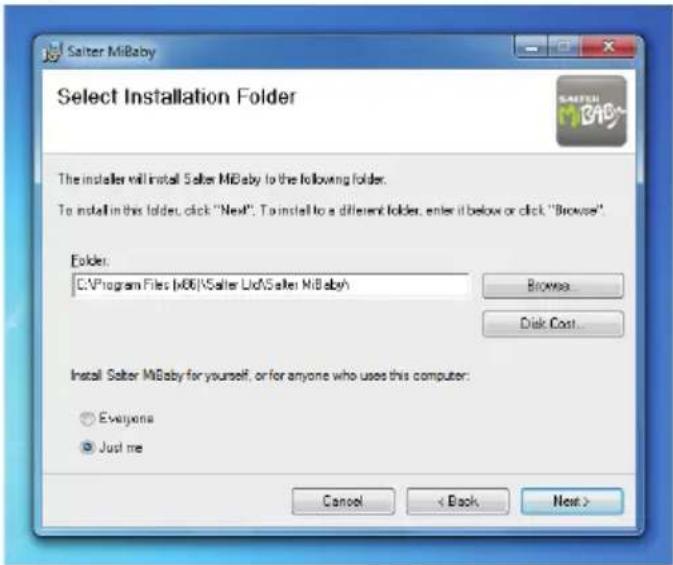
- Napsauta Seuraava.
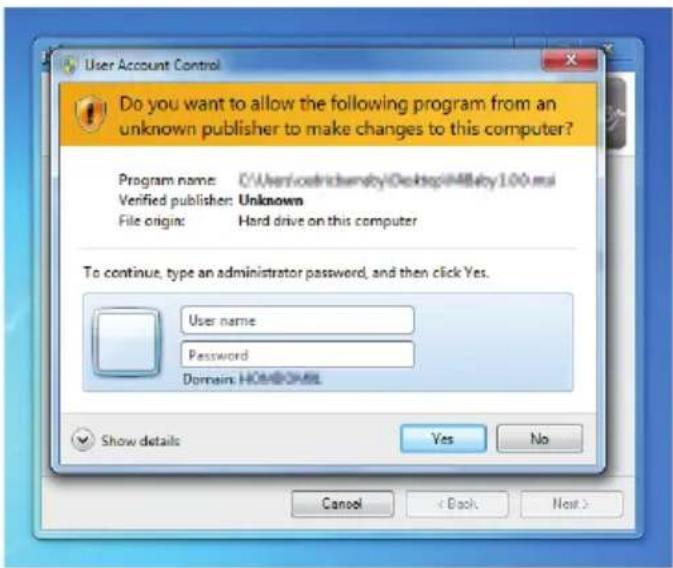
- Napsauta Sulje.

Register your product today at: www.homedicsgroup.com/register
CE
SALTER
HoMedics Group Ltd
PO Box 460, Tonbridge, Kent, TN9 9EW, UK.
www.saltermibaby.com
www.salterhousewares.co.uk IB-9042FI-0213-01
SALTER MiBABy
- Cliquez sur Fermer.

line
| Time Point | Weight (kg) | | :--- | :--- | | 22 May 2010 | 3 months | | 2 May 2010 | 12.5 kg |Register your product today at: www.homedicsgroup.com/register
CE
SALTER
HoMedics Group Ltd
PO Box 460, Tonbridge, Kent, TN9 9EW, UK.
www.saltermibaby.com
www.salterhousewares.co.uk IB-9042FR-0213-01
SALTER MiBABy
- Kattintson a Bezárás gombra.

Register your product today at: www.homedicsgroup.com/register
CE
SALTER
HoMedics Group Ltd
PO Box 460, Tonbridge, Kent, TN9 9EW, UK.
www.saltermibaby.com
www.salterhousewares.co.uk IB-9042HU-0213-01
SALTER MiBABy
- Fare clic su 'Avanti'.
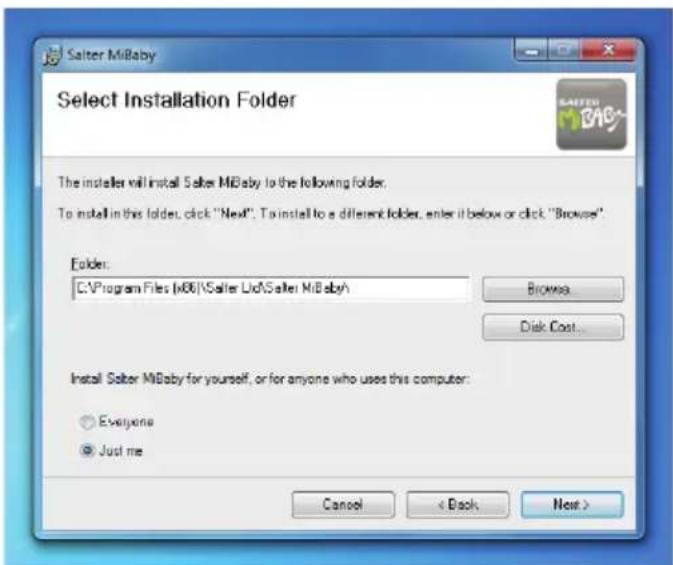
- Fare clic su 'Avanti'.
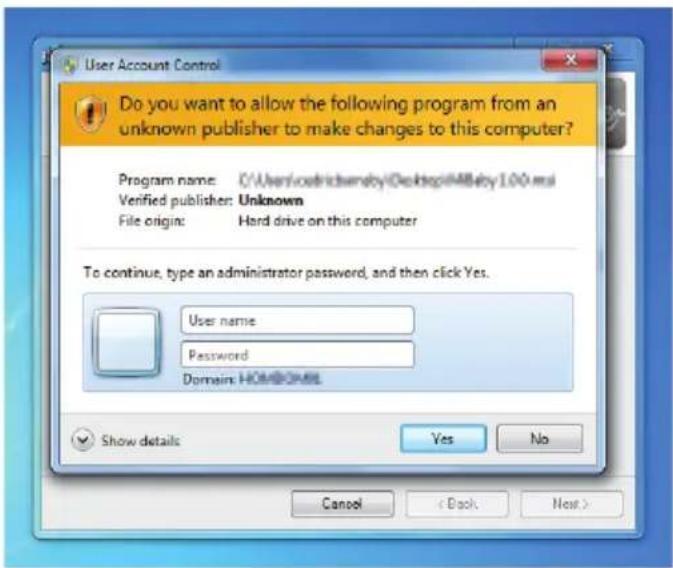
Weight Height and BMI
Register your product today at: www.homedicsgroup.com/register
CE
SALTER
HoMedics Group Ltd
PO Box 460, Tonbridge, Kent, TN9 9EW, UK.
www.saltermibaby.com
www.salterhousewares.co.uk IB-9042IT-0213-01
SALTER MiBABy
- Klik op Volgende.
- Klik op Volgende.
- Klik op Sluiten.

line
| Date | Weight (kg) | |---|---| | 22 Mar 2010 | 15.96 | Table: table; graph: print; Summary: Weight; Height: Pilt; Teeth: Milestones; Photos: ImagesWAARSCHUWINGSWEERGAVE
Register your product today at: www.homedicsgroup.com/register
CE
SALTER
HoMedics Group Ltd
PO Box 460, Tonbridge, Kent, TN9 9EW, UK.
www.saltermibaby.com
www.salterhousewares.co.uk IB-9042NL-0213-01
SALTER MiBABY
MiBaby-vekt med PC-sporingsprogram
- Klikk på Neste.
- Klikk på Neste.
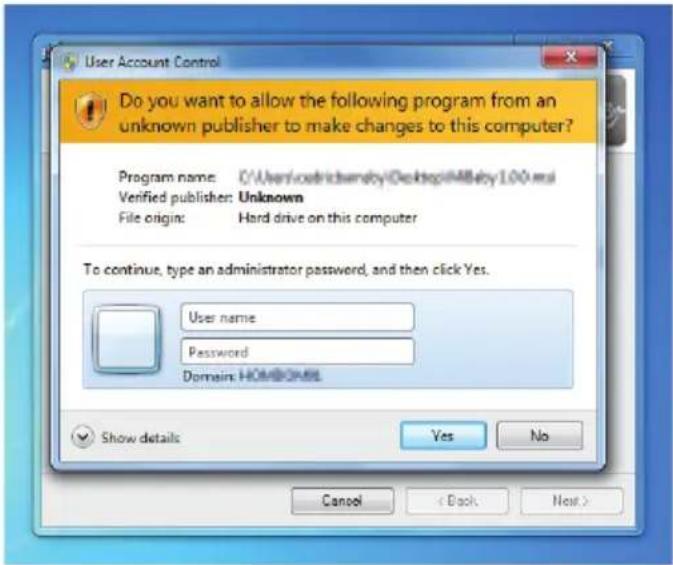
- Klikk på Avslutt.

Persentile kurvediagrammer er hentet fra Verdens helseorganisasjon (2006). WHO child growth standards: length/height-for-age, weight-for-age, weight-for-length, weight-for-height and body mass index-for-age : methods and development.
Tenner
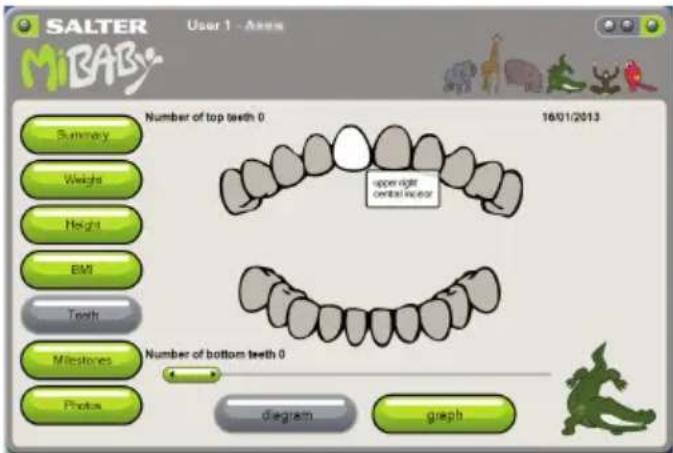
Tenner vises som et diagram.
Register your product today at: www.homedicsgroup.com/register
CE
SALTER
HoMedics Group Ltd
PO Box 460, Tonbridge, Kent, TN9 9EW, UK.
www.saltermibaby.com
www.salterhousewares.co.uk IB-9042N0-0213-01
SALTER MiBABy
- Kliknij Następny.
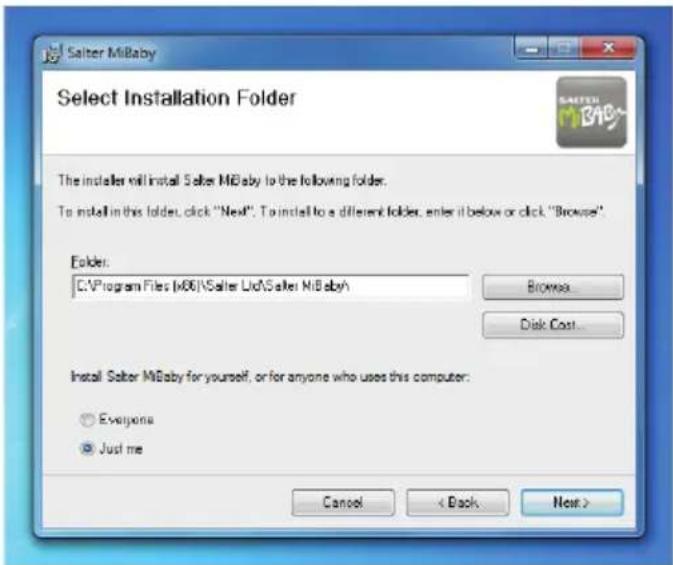
- Kliknij Następny.
- Kliknij Zamknij.

Weight Height and BMI
line
| Time Point | Weight (kg) | | ---------- | ----------- | | 22 May 2010 | 12.00 |Register your product today at: www.homedicsgroup.com/register
CE
SALTER
HoMedics Group Ltd
PO Box 460, Tonbridge, Kent, TN9 9EW, UK.
www.saltermibaby.com
www.salterhousewares.co.uk IB-9042PL-0213-01
SALTER MiBABy
- Clique em Seguinte.
- Clique em Seguinte.
- Clique em Fechar.

line
| Time Point | Weight (kg) | | :--- | :--- | | 1 | 5 | | 2 | 7 | | 3 | 9 | | 4 | 11 | | 5 | 13 | | 6 | 15 | | 7 | 17 | | 8 | 19 | | 9 | 21 | | 10 | 23 | | 11 | 25 | | 12 | 27 | | 13 | 29 | | 14 | 31 | | 15 | 33 | | 16 | 35 | | 17 | 37 | | 18 | 39 | | 19 | 41 | | 20 | 43 | | 21 | 45 | | 22 | 47 | | 23 | 49 | | 24 | 51 | | 25 | 53 | | 26 | 55 | | 27 | 57 | | 28 | 59 | | 29 | 61 | | 30 | 63 | | 31 | 65 | | 32 | 67 | | 33 | 69 | | 34 | 71 | | 35 | 73 | | 36 | 75 | | 37 | 77 | | 38 | 79 | | 39 | 81 | | 40 | 83 | | 41 | 85 | | 42 | 87 | | 43 | 89 | | 44 | 91 | | 45 | 93 | | 46 | 95 | | 47 | 97 | | 48 | 99 | | 49 | 101 | | 50 | 103 | | 51 | 105 | | 52 | 107 | | 53 | 109 | | 54 | 111 | | 55 | 113 | | 56 | 115 | | 57 | 117 | | 58 | 119 | | 59 | 121 | | 60 | 123 | | 61 | 125 | | 62 | 127 | | 63 | 129 | | 64 | 131 | | 65 | 133 | | 66 | 135 | | 67 | 137 | | 68 | 139 | | 69 | 141 | | 70 | 143 | | 71 | 145 | | 72 | 147 | | 73 | 149 | | 74 | 151 | | 75 | 153 | | 76 | 155 | | 77 | 157 | | 78 | 159 | | 79 | 161 | | 80 | 163 | | 81 | 165 | | 82 | 167 | | 83 | 169 | | 84 | 171 | | 85 | 173 | | 86 | 175 | | 87 | 177 | | 88 | 179 | | 89 | 181 | | 90 | 183 | | 91 | 185 | | 92 | 187 | | 93 | 189 | | 94 | 191 | | 95 | 193 | | 96 | 195 | | 97 | 197 | | 98 | 199 | | 99 | 201 | | Note: The weights are estimated based on the number of days since the start of the year. The chart is a simple line graph, not a line graph. The x-axis represents time in months (from January to March). The y-axis represents weight in kilograms (kg). There is no label for the data series. Legend indicates 'Table' and 'graph'.As curvas de percentil foram retiradas de: Organização Mundial de Saúde) (2006). WHO child growth standards: length/height-for-age, weight-for-age, weight-for-length, weight-for-height and body mass index-for-age : methods and development.
Dentição
Register your product today at: www.homedicsgroup.com/register
CE
SALTER
HoMedics Group Ltd
PO Box 460, Tonbridge, Kent, TN9 9EW, UK.
www.saltermibaby.com
www.salterhousewares.co.uk IB-9042PT-0213-01
SALTER MiBABy
- Щелкните «Далее».
- Щелкните «Далее».
- Щелкните «Закрыть».

Register your product today at: www.homedicsgroup.com/register
CE
SALTER
HoMedics Group Ltd
PO Box 460, Tonbridge, Kent, TN9 9EW, UK.
www.saltermibaby.com
www.salterhousewares.co.uk IB-9042RU-0213-01
SALTER MiBABy
- Kliknite na tlačidlo Đalej.
- Kliknite na tlačidlo Đalej.
- Kliknite na tlačidlo Zatvorit.

Zadajte údaje o dieťati a vyberte jednotky. Kliknutím na tlačidlo OK potvrdte.
Prehl'ad
Register your product today at: www.homedicsgroup.com/register
CE
SALTER
HoMedics Group Ltd
PO Box 460, Tonbridge, Kent, TN9 9EW, UK.
www.saltermibaby.com
www.salterhousewares.co.uk IB-9042SK-0213-01
SALTER MiBABy
- Klicka nästa.
- Klicka nästa.
- Klicka stäng.

Register your product today at: www.homedicsgroup.com/register
CE
SALTER
HoMedics Group Ltd
PO Box 460, Tonbridge, Kent, TN9 9EW, UK.
www.saltermibaby.com
www.salterhousewares.co.uk IB-9042SW-0213-01
SALTER MiBABY
line
| Date | Weight (kg) | |---|---| | 22 Mar 2010 | 12.86 | | 3 months | 15.00 |Register your product today at: www.homedicsgroup.com/register
CE
SALTER
HoMedics Group Ltd
PO Box 460, Tonbridge, Kent, TN9 9EW, UK.
www.saltermibaby.com
www.salterhousewares.co.uk IB-9042TR-0213-01

- Instructions and Guarantee
- MiBaby
- SOFTWARE INSTALLATION
- MiBaby SOFTWARE
- Photos
- MiBaby HEIGHT CHART
- NEW FEATURE!
- PREPARING YOUR SCALE
- INITIALISING YOUR SCALE
- WARNING INDICATORS
- ADVICE FOR USE AND CARE
- TROUBLESHOOTING GUIDE
- WEEE EXPLANATION
- BATTERY DIRECTIVE
- GUARANTEE
- Register your product today at: www.homedicsgroup.com/register
- SALTER MiBABy
- WAARSCHUWINGSWEERGAVE
Brand : SALTER
Model : 9042 WH3R MiBaby
Category : Scale