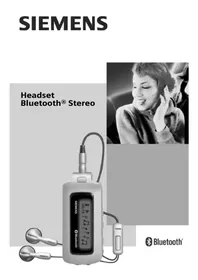
HHB700 - Hi-fi system SIEMENS - Free user manual and instructions
Find the device manual for free HHB700 SIEMENS in PDF.



| Product type | Bluetooth hands-free kit |
| Brand | Siemens |
| Model | HHB700 |
| Battery | Li-ion 100 mAh |
| Charging time | Approximately 2.5 hours |
| Standby time | Up to 300 hours |
| Talk time | Up to 6 hours |
| Maximum range | Up to 10 meters |
| Kit weight | Approximately 15 g |
| Charger weight | Approximately 60 g |
| Protection rating | IP20 |
| Operating temperature | -20 °C to 55 °C |
| Input power | 110-230 V AC, 50/60 Hz |
| Output power | 5 V DC / 0.4 A |
| Main functions | Voice dialing, volume control, call answering, call waiting |
| Compatibility | Bluetooth phones with hands-free or headset profile |
| Included accessories | Headband, charger |
| Maintenance and cleaning | Dry or antistatic cloth |
| Safety | Follow electrical and usage instructions, risk of ingestion for children |
| General information | Manufactured by BenQ Mobile GmbH & Co. OHG under license from Siemens AG |
Frequently Asked Questions - HHB700 SIEMENS
User questions about HHB700 SIEMENS
0 question about this device. Answer the ones you know or ask your own.
Ask a new question about this device
Download the instructions for your Hi-fi system in PDF format for free! Find your manual HHB700 - SIEMENS and take your electronic device back in hand. On this page are published all the documents necessary for the use of your device. HHB700 by SIEMENS.
USER MANUAL HHB700 SIEMENS
All rights reserved. Subject to availability.
Right of modification reserved.
www.BenQ-Siemens.com
Ref. No.: A31008-H2601-A105-4-ZC19
(06/06)

Headset Bluetooth®
HHB-700/710
Headset PTT Bluetooth® (en) 2
Headset PTT Bluetooth® (de) 12
Headset PTT Bluetooth® (it)
(Cuffia Bluetooth®) 22
Headset PTT Bluetooth® (fr)
(Kit Piéton Bluetooth®) 32
Headset PTT Bluetooth® (nI) 43
Headset PTT Bluetooth® (sv) 53
Headset PTT Bluetooth® (es)
(Auricular Bluetooth®) 63
Headset PTT Bluetooth® (pt) 73
Headset PTT Bluetooth® (tr) 83
Headset PTT Bluetooth® (el)
(Φopntó ακουσικό Bluetooth®) 93
Headset PTT Bluetooth® (pl) 103
Headset PTT Bluetooth® (cs)
Headset PTT Bluetooth® (sl)
(Bluetooth® slusalka pritisni in govori) 153
Headset PTT Bluetooth® (ykp)
(TapHiTypa PTT Bluetooth®) 163
Customer Care 173
European Directive 2002/96/EC 175
Federal Communication Commission (en) 182
FCC (Federal Communication Commission) (fr) 183
Safety precautions
Information for parents
Please read the user guide and safety precautions carefully before use. Explain the content to your children and the hazards associated with using the Bluetooth Headset.

Remember to comply with legal requirements and local restrictions when using the Bluetooth Headset in aeroplanes, petrol stations, hospitals or while driving, for example.

Mobile phones can interfere with the functioning of medical devices such as hearing aids or pacemakers. Keep a distance of at least 20cm/9 inches between the Bluetooth Headset and pacemaker. Wear the Bluetooth Headset on the ear further away from a heart pacemaker during a call. For more information consult your doctor.
It is possible to remove the earpiece. Caution! Small parts like this could be swallowed by young children.
The main voltage (V) specified on the power supply unit must not be exceeded. Otherwise the charging unit may be destroyed.

Do not throw the device into an open fire.
Use only original charging units. Otherwise you risk serious damage to health and property as the battery could explode, for instance.

The Bluetooth Headset must only be opened by authorised service partners. The rechargeable battery may be replaced by Service only. Any changes to this device are strictly prohibited and will invalidate the operating licence.
Important:
Dispose of used batteries and Bluetooth Headsets according to the legal regulations.

The Bluetooth Headset can interfere with the operation of nearby TVs, radios or PCs.

Use only original accessories. In this way, you will avoid possible health risks and damage to the product, and ensure compliance with all relevant provisions.
Improper use will invalidate the guarantee!
Permanent hearing loss may occur if you use ear- or headphones at high volume. You can adapt over time to a higher volume, which may sound normal but can be damaging to your hearing. Set your volume to a safe level. If you experience ringing in your ears, reduce the volume or discontinue use of your system.
Note
In some countries there may be restrictions on the use of Bluetooth devices. Please check with the relevant authority.
Manufactured by BenQ Mobile GmbH & Co. OHG under trademark license of Siemens AG.
Overview of headset
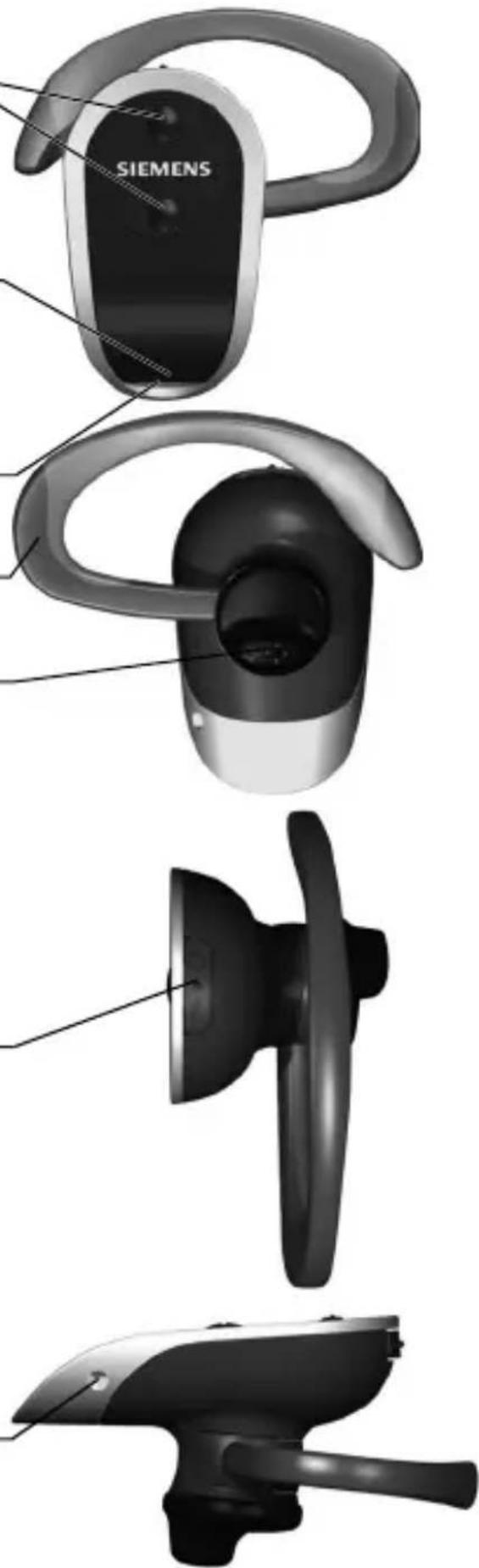
Rocker button volume
press:lower
press: louder
LED
signals different headset states (p. 5)
Microphone
Ear hook
Loudspeaker with earpiece
On/Off button ptt button
Press briefly:
to activate voice dialling or
to accept a call
Press and hold:
to end a call
Charging socket
LED display explained
The LED (Light Emitting Diode) indicates the different states of the headset:
| Lights up steadily (when connected to a charger) | Headset charging. |
| Off (when connected to a charger) | Headset is fully charged. |
| Repeatedly flashes 4x slowly | Empty battery. |
| Lights up steadily | Registering. |
| Flashes 5x | Successfully registered. |
| Flashes slowly | Headset is ready for use. |
| Repeatedly flashes 2x rapidly | Incoming and outgoing call. |
| Repeatedly flashes 2x slowly | Call in progress. |
| Off | Headset is switched off. |
Adjusting the headset
The Headset comes with two ear hooks for different ear sizes. Select the right one for your ear. You can reverse the ear hook so that you can wear the headset on the left or right ear.
-
Pull the ear hook backwards out of its holder.
-
Turn the ear hook and carefully insert it on the other side:
for the left ear:
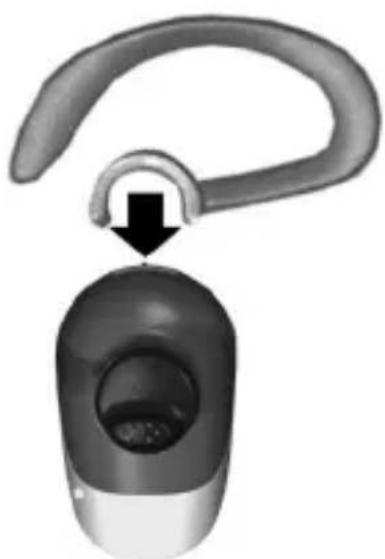
for the right ear:
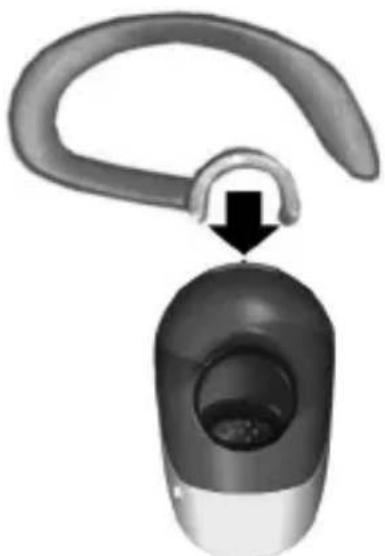
The earpiece can be rotated for a perfect fit.
Wearing the headset correctly
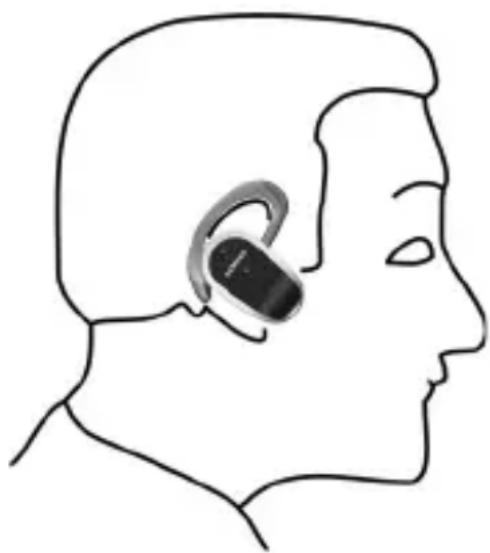
Wear the Bluetooth® Headset as shown in the diagram. The microphone opening must always point towards your mouth.
Bend the ear hook carefully to adjust it to your ear.
Ensure that part of the projecting end of the rubber earpiece sticks into your ear canal.
What is Bluetooth?
The Bluetooth® word mark and logos are owned by the Bluetooth® SIG, Inc. and any use of such marks by BenQ Corp. is under license.
Other trademarks and trade names are those of their respective owners.
Bluetooth is a short-range radio link. It enables wireless communication between various terminals equipped with Bluetooth.
The Bluetooth Headset will only work in conjunction with a Bluetooth-enabled mobile phone capable of supporting the headset profile. The handsfree profile is preferred for this purpose. Please read the notes on Bluetooth links in your mobile phone manual as the controls and display messages differ between phones.
Every Bluetooth device has a unique address and name. This ensures that it only communicates with the selected communication partners. The security concept uses a password which the devices exchange the first time they register (p. 8).
Setting up the headset
Before you can use your Bluetooth headset, you need to:
- charge the headset and
- register the headset with the mobile phone.
Charging the Bluetooth headset
The battery supplied has not been fully charged.
To charge the headset, you will need the charging unit included in the delivery. Please note that the mains power socket must be nearby and easily accessible.
You can also charge the Headset with a Travel Charger ETC-500/510* or Car Charger Plus ECC-600* using the charging adapter ECA-500*.
*: These products are offered as original accessories.
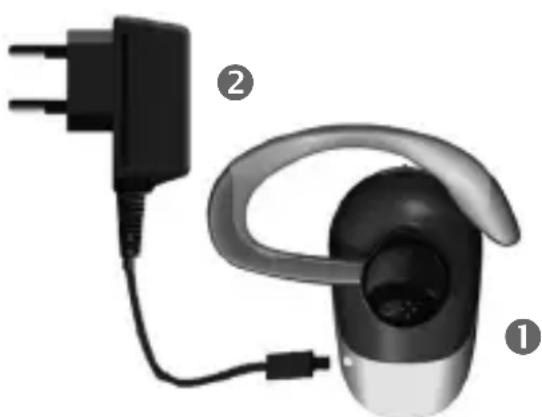
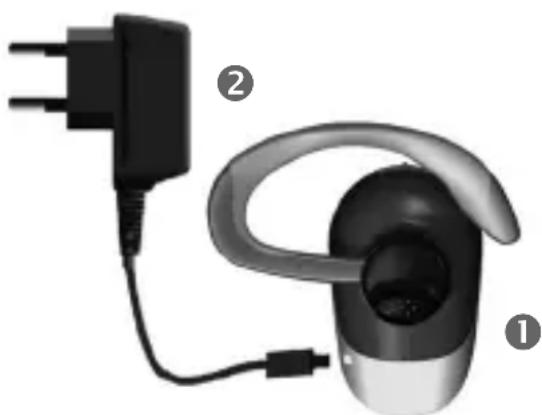
- Insert the charging unit connector ② into the headset ① as shown in the diagram.
- Plug the charging unit plug into the socket.
Charge time
A flat battery takes about two and a half hours to fully charge.
Display during charging
The LED is red during charging. When the battery is fully charged, the LED turns off.
Only charge the battery at a temperature of 0^ to 45^ . Otherwise, it will wear out prematurely. Please note that batteries generally wear out over time.
Switching on the Bluetooth Headset
Press the ptt button for 3 seconds. The LED flashes rapidly for 1 second, then it flashes more slowly. A low and a high tone can be heard.
Switching off the Bluetooth Headset
Press the ptt button for 3 seconds. The LED lights up steadily for 1 second and then goes out. A high and a low tone can be heard.
Registering the headset with a mobile phone
The headset must be switched off.
- Press the ptt button for at least 6 seconds. The LED lights up steadily, and two high tones can be heard. Your mobile phone can now "look for" the Bluetooth Headset.
- Activate search mode on your mobile phone. Please read the notes in your mobile phone manual.
- If your mobile phone finds your headset, this is shown on the mobile telephone display beneath the device name HHB-700.
If your mobile phone does not find the headset within 3 minutes, activate search mode again (repeat step 1).
4. If requested, enter the password (PIN) for the headset into your mobile phone: 0000
The Bluetooth Headset is now registered to your mobile phone.
Making a phone call
You can only make calls with the headset if the headset is switched on (see on left) and if the headset is registered with a mobile phone (p. 8).
The procedure described below only applies to Siemens mobile phones. It may be different for other manufacturers' mobiles.
The following symbols are used to explain how to operate the headset:

This function varies from service provider to service provider. You may need to register separately for this service.
- You will know the call is about to drop if the signal quality is poor.
- If the mobile phone is not connected to the network, you will hear a recurring beep tone in the headset.
- If the Bluetooth connection to the mobile phone is interrupted for several seconds during a call, you can only continue the call with the mobile phone.
Voice dialling
You can dial a number by saying the name aloud. A voice recording of the name must be stored with the number in the Addressbook in the mobile phone. Please read the manual for your mobile phone.
This function is not offered by all mobile phones.
- Briefly press the ptt key.
- Say the name. If the name is recognised, the mobile phone dials the telephone number. If the name is not recognised, press the ptt button again and repeat the name.
Dialling using the mobile phone
- Dial as normal using the mobile phone.
- Briefly press the ptt button to make the call via the headset.
Ending a call
Press and hold the ptt button. The call is ended. The headset remains ready for use.
Setting the volume
The two keys and adjust the volume.
The volume setting on the headset does not affect the volume setting on the mobile phone.
Answering a call
Press the ptt button briefly.
Hold call
Briefly press the ptt button twice. To continue the call, briefly press the ptt button twice again.
Call waiting/toggling between calls
Call waiting
If someone calls you while you are already in a call, you will hear a 'call waiting tone'.
Briefly press the ptt button in order to accept the new call. The current call is put on hold.
You have the following options:
Toggling
Briefly press the ptt button twice in order to toggle the calls.
Rejecting the current call
Press and hold the ptt key. The active call is ended.
The second call is accepted.
Picking up a call
Press the ptt key briefly: The active call is accepted by the Headset.
For additional information please consult your mobile phone's user guide.
Maintenance/ troubleshooting/ device data
Maintenance advice
- Clean the headset with a damp cloth or anti-static cloth. Do not use any chemicals.
- Protect the headset from moisture and knocks. Do not expose your headset to direct sunlight.
Conformity declaration
FCC:
see p. 182.
CE:
BenQ Mobile hereby declares that the phone described in this user guide is in compliance with the essential requirements and other relevant provisions of European Directive 1999/5/EC (R&TTE). The relevant declaration of conformity (DoC) has been signed. Please call the company hotline if you require a copy of the original:
www.BenQMobile.com/conformity
0984

FCC ID:QVZHHB700-3
Complies with
IDA Standards
DB01752
Headset technical data
Charging approx. 2.5 hours time
Standby time up to 300 hours
Talk time up to 6 hours*
Range max. 10 metres, less in buildings
Weight approx. 15 grams
Weight approx. 60 grams charger
Protection IP20 class
Operating temperature -20°C...55°C
*: depending on the mobile phone used
Mains adapter technical data
Input 110 V or 230 V AC, 50/60 Hz
Output 5 V DC/0.4 A
Operating 0^ C 55^ C temperature

N626
Customer service
See Customer Care, p. 173.Li-lon bat
Sicherheitshinweise
Hinweis für Eltern
Complies with IDA Standards DB01752
www.BenQMobile.com/conformity
0984

FCC ID:QVZHHB700-3
Complies with IDA Standards DB01752
Dati tecnici
Batteria 100 mAh Li-Ion
Weight circa 60 grammi charger
(touche push-to-talk)
www.BenQMobile.com/conformity
0984

FCC ID:QVZHHB700-3
Complies with IDA Standards DB01752
Service clients (Customer Care)
Complies with IDA Standards DB01752
www.BenQMobile.com/conformity
0984

FCC ID:QVZHHB700-3
Complies with IDA Standards DB01752
Tekniska data
Li-Ion- 100 mAh batteri
(Tecla push-to-talk)
Pulsar breve:
www.BenQMobile.com/conformity
0984

FCC ID:QVZHHB700-3
Complies with IDA Standards DB01752
Characteristicas先进技术 del auricular
Bateria 100 mAh Li-Ion
(tecla push-to-talk)
Premir brevamente:
Complies with IDA Standards DB01752
CE - Declaration of conformity
BenQ Mobile hereby declares that the phone described in this user guide is in compliance with the essential requirements and other relevant provisions of European Directive 1999/5/EC (R&TTE). The declaration of conformity (DoC) concerned has been signed.
Microlink Communications Inc.
Address: 3F, No. 196, Xinhu 3rd.,
Neihu, Taipei 114,
Taiwan, R.O.C.
ithalatci Firma
American Telecommunications
Certification Body
6731 Whittier Avenue, Suite C110
McLean, VA 22101
Telefon: +1 703-847-4700
Fax: +1 703-847-6888
e-mail: sales@atcb.com
Information and Communication mobile
Mobile
Phones
91/263/EEC, 92/31/EEC, 93/68/EEC ve 93/97/EEC)
Ti éival to Bluetooth?
IepaIepw uTIOBcEicG 0a Bpeite otC oyniecs xpnoons Tou KIVnTOU aac Tnaeewou.
Complies with IDA Standards DB01752
TεxviKa xapaktnpiotikα
Przycisk (push-to-talk)
Nacijsnij krótko:
www.BenQMobile.com/conformity
0984

FCC ID:QVZHHB700-3
Complies with
IDA Standards
DB01752
(tlačitko push to talk)
www.BenQMobile.com/conformity
0984

FCC ID:QVZHHB700-3
Complies with IDA Standards DB01752
www.BenQMobile.com/conformity
0984

FCC ID:QVZHHB700-3
Complies with
IDA Standards
DB01752
Tehnicke karakteristikenaglavne slusalice
Litij-ionskabaterija
100 mAh
Vrijemepunjenja
oko 2,5 sati
www.BenQMobile.com/conformity
0984

FCC ID:QVZHHB700-3
Complies with IDA Standards DB01752
He KndaIte npncTpiy BVdkpNTN BOHOb.
KopnctyItecT iNbKn OpiHJIbHIMN 3apdHIMN IpnCTpOaMn. IHaKWe Bn HapaKaTeCb Ha pn3NK 3aWKoDHTN 3OpOB'IO a60 BJaCHocTi, OckJIbKn, HApnKNaD, akymyJTop MOKe BN6ByxHyTu.

TapHITpy MoKytb po3bnpaTn
nIwe aBTopn3OBAhi cepBicHi
napThepn. AkymyJrToP
niIrae 3amHI nIwe
cneuiJI3OBAHOIO cnJx6oIO.
BHeceHHaByd-b-IAkX 3MiH
do npncTroIO cyBOPO
3a6opOHeHO i npn3BeDe
DO BTPaTI YHHOCTI NiueH3II.
BaxJnBO:
Ytunizyute BnKOpncTaHi akymyIaTOPn Ta rapHITypn Bluetooth BiINOBiIDNo Do MicceBOrO 3aKOHODaBCTBA.
TaphiTypa MoKe BnIiBaTu Ha po6Otu TeJIeBI3OpIB, paIionpniMauiB a6o PIK, 3NaXoJrTbCra N6n3y.

KopncTyuTecr TInbKn
OpnHnBnMn akcecyapam.
TaKIM YINOM BN yHnKHeTe
MOXJIIBOi WKOJn DnJ
3dopoB' Ta 3a6e3neuHtE
BiIDNOBIDHicTB ycIM
IIOLOXeHHAM.
BukopncTaHHe 3a npn3HaueHnM npn3BeDe Do BtpaTn rapaHTi!
IprocyxobyBaHHa HabyHnKaMnHa Bucoki ryHocti MOKe np3BecTu DO HeBnPaBHOI BtpaTu Cnyx. 3 yacOM BV MoKeTe 3BnKHyTu DO BucOKoi ryHocTi, Ka 6yde 3daBaTncr HopMaNbHoO, aJe ue MoKe 3aWKoHTu BaWOMy Cnyx.
YcTaHOBIb rUHicTb Ha 6e3neuHOMy pIBHi.
Rkuo BN yEte d3BiH y Byxax, 3MeHwTe
rUHicTb a60 npinnHtB BkOpNCtaHHa
CNCTeMn.
Ppimitka
B DeaKx KpaHax MoKyb icHyBaTn
obMexKeHHa BnKOpNCTaHH npNCtpoIB
Bluetooth. Byb nacka, i3HaITeCnpo ue
y BiINOBiHNx OpraHax MicceBOi BlaDi.
Bnpo6JIeHNo BenQ Mobile GmbH & Co. OHG 3a IiueH3ieIc Siemens AG.
OrlaI raphiTypn
Khonka ryuhocti

HATNCIb: TuxiJe

HaTnCHiB: ryuHiIe
CbitIOIoIa
P03HaayoToB pi3Hi peKmI rapHItypn
(ctop. 166)
Mikpofoh
UtpmMyBaaynByxa
TuyHOMOBeueb i3 HabyuHnKOM
KhONka yBIMKHeHHa/BUMKHeHHa KHONka ptt
AkymyJTop noCTaaytbc3apJxKeHm He NOBhictIO.
ДяЗapЯДжehн rapHiTypn 3HaIO6NtbcS3apAHH npNCtpiB, BKNIOUeHny KOMNJIeKT NOCTaBKN. 3ayBaXTe, OO JxpeJNO XKIBJeHHra Mae PO3TaIooByBaTncb NOBIN3y Ta B MExkax 6e3pepeoKoDHOI DOCJXHOCTi.
TakokrnapHitypMyoXHa3apJxKaTn 3aDOnOMOrOIO DOpOXHbOro 3apJHoro npicItro ETC-500/510* a6o aBTOMo6iNbHOro 3apJHoro npicItro ECC-600* 3aDOnomoro 3apJHoro aAnTepa ECA-500*.
*: Lpodykui nponohyctbcy K opnirhaIbHI akcecyapn.
- BCTaBTe 3apIHoTo npNcTpoIO B raphiTypy 1 rk 306paJxHcXeMI.
- 3'eɪnHaɪTe 3aɪpʌnɪ npɪcɪptɪi iʒdʌkepeJOM XɪVBJIeHŋr.
Yac 3apJxKeHHa
Po3pIaKeHn aKymyJIaTOp NOBHiCTU 3apJxKaEbCra Pn6IuN3Ho IPOTuROM DBOX i3 PNOBOHIO rOdINH.
IIndnkaTopn pid yac 3apxxeHHa
IHdkaTopPiJYac3apJxKaHHa CBITntbcryeRBOHM.IicnnoBHO 3apJxKeHHaIHdkaTOp BIMKAcTbcra.
3apjaKeTe aKymyIaTOp TiIbKn B diana30Hi TemnepaTpB iD 0 ^ C Do 45 ^ C IHaKwe BIn nepeDuacHo BnIe 3 JaNy. 3a3NaUte, 1o aKymyIaTOpN 3 Yaacom NiJaIOb8cra 3HOuYBaHNo.
YBIMKHeHHraPHiTypn Bluetooth
HaTnchItb KhoNky ptt npotrrom 3 cekyHd. CbitnoiOd 1 cekyHdy WbNDko 3a6nMae, a NOTIM NOUHe 6nmatn nobilbHiwe. MoxHa 6yde NoyTu Hn3bKn Ta BnCOKn 3ByKn.
BnMKeHnra rapHiTypn Bluetooth
HaTnCHiB KHONky ptt npotyrom 3 cekynd. CbitIOJIOc BITNTmEtbcra npotyrom cekyn, a notim norache. Moxha 6ynde nouytn BnCOKn Ta Hn3bKn 3ByKn.
Peectraia raphitypmbMOibbHomy Tepeponi.
TapHItypa MaE 6yTu BmKHeHa.
- Hatnchitb KhoNky ptt npotrarom 6 cekyHd.CBITIOIO3acBITbCra noctiHo, i npo3ByuATb DBa BncoKnx 3ByKn. BaM MoibHn TeJefoh Tenep MoKe «UyKaTu» rapHiTypy Bluetooth.
- AkTnByIte peKIM noUky Ha TeIefoHi. ByIb IaCKa, O3HaNoMTeC8 3 nOci6HnKOM KopncTyBaau Baaworo TeIefoHy.
3.ЯкsoMO6iNbHnTeJefoh 3HaIe rapHiTypy,po ue 6yde nobioMneHo Ha dinCnpeiT eJeFOHyPiHa3BOIO npncTPOH. HHB-700.
Якwo MObHn TepeH He 3HaIe rapHiTyPy BnpOdBx 3 XBnInH, yBIMKHiTb NOwYk 3HOBy (NOBTopiTb nepShn Kpok).
- 3a Heo6xioHocTi BBeiTb napOJIb (PIN)ДЯ rapHiTyprn Ha TeJeΦoHI: 0000
TaphiTypa Bluetooth Tenep 3apeecctpoBaHa Ha BaWOMy TeJefoHi.
TeIeΦoHyBaHHa
TelefoHyBaTn 3 rapHiTypoHOMoKHa, NlWe rKIo BOHa yBIMKHeHa (IINB. IIBOpu) Ta 3apeCtpoBaHa B TelefoHi (CTop.169).
IpoeDypa, onncaHa HxKye, 3actocobHa IInse dIra Mo6iNbHIX TepeohiB Siemens.BoHa MoKe BiDiPI3HЯTnCdIra TepeoHiB iHux Bnro6HnKiB.
HanaStyBaHHraYHocTi rapHiTyprn He BnIbAe Ha rYuHiCTb TeJeΦoHy.
BidnoBidaHa d3BIOHok.
HaTnCHiTb KHONky ptt kopoTko.
YtpnMaHHa3BiHka
KopoTko HaTnCHiTb KONky ptt Dbiu.
Uo6 npOIOBxNtBuNKInk, 3HOBy
KopoTko DbiuHaTnCHiTb KONky ptt.
OuikyBaHHaBnKlnKy/ nepeKnHoyeHHaMIX d3BiHKaMn
OuykyBaHHBnKnKy
KxO XTOcB TeJeOpHye Bam nIac PO3MOBn, BN NOUyTe «CINHaI D3BiHka Ha OuyiKyBaHHI>.
Kopotko HaTnCHiTb KHONky ptt, 0o6 npnHrtn HOBn BnKlnk. NotoHn BnKlnk 6ynde nepeBeJeHO ha yTpmyBaHHra.
Iicna zboRo Bam cTaHyTb DOCTyHnMI Taki OOnii:
Ipeeknoyehn
KopoTko DBiCyHaTnCHiTb KHONKy ptt, 06 nepeKJIHOHTNCa mix BnKJIKKAMN.
BixnneHHnnoToHoro BnKnky
HaTnCHiB iIyTpmyTe KHONky ptt. AKTNBHNI 3BiHOK 3aKiHyeHO. DpyrN BnKJIHK npnHraTo.
PpHHTBnKlnky
KopoTKo HaTnCHiTb KHONKy ptt. AKTNBHN BnKNk npNnHrTo raphitypoHO.
Bilbsh DOKlaHy iHΦopMaciHO MoKHa 3HaHTN B Noci6Hnky KopnCTyBaay do Mo6IbHoro TeJefoHy.
O6cIyroByBaHHa/ BnnpaBJIeHnHa HeNoJaIOK/TexHiuHa iHΦopMaciia
Popa3 06cnyroByBaHHa
- YnCTbTe raphiTyPy BOJOrOTo raHcyIkoIO a6o aHTncTaTnUHO MaTepeIeIO. He 3aCtOCOByTe xIMiuHi peuOBHH.
3axuatare raphityBID BOIOnTa ydapiB.He 3aIIuaTe raphityHa npMOMy COHauHOMy npomHHi.
Complies with IDA Standards DB01752
TexhiHa iHopmaizio do rapHiTypn
JIiIEBO-iOHn 100 mAroD aKymyTOp
Yac po3MOBn Do 6 roDnH*
Дiana30H maKc.10M,B cnOpydaX MeHwe.
Bara Pnp6n.15r
Bara 3apAHHoro Pnp6I.60 r npncTpoIO
Klaac 3axncty IP20
Poboya -20°C...55°C TemnepaTpa
*: 3aJIexHOb BiD BnKOpNCTOByBaHOro MO6IbHOrO TeNeΦoHy
TexhiHa iHopMauciaI zoDo aanTepa XnBleHn
Bxidn 110Ba6o
CnHaI 230B3mimHoro ctpymy,50/60T
BnxiHn 5B noctiHoro
CnHnA1 cTpyMv/0,4 A
Póbooya 0^ C 55^ C
Temnepaotypa

N626
Cnyk6a nIDtpmKn cnoXnBauiB
ДиВ. Customer Care,стop. 173.
Customer Care
We offer fast, individual advice! You have several options:
Our online support on the Internet:
www.BenQMobile.com/ customercare
We can be reached any time, any place. You are given 24 hour support on all aspects of our products. Here you will find an interactive fault-finding system, a compilation of the most frequently asked questions and answers, plus user guides and current software updates to download.
You will also find the most frequently asked questions and answers in this user guide.
You can also get personal advice about our range of products on our Premium Hotline:
Austria 09 00 30 08 08 (1,35 Euro/Minute)
France. 0899700185 (1,35 EuroTTC/ Appel puis 0,34 EuroTTC/Minute)
Italy. 899 842 423 (1 euro/minute da Telefono fisso e 1,42 euro/munito da cellulare)
Spain. 807 517 028 (0,91 euro/minute)
Qualified employees are waiting to offer you expert information about our products and installation.
In some countries repair and replace services are impossible where the products are not sold through our authorised dealers.
When calling customer service, please have ready your receipt and your car kit, and if available, your Service customer number.
If repair work is necessary, please contact one of our service centres:
Abu Dhabi. 026423800
Argentina 08102226624
Australia. 1300665366
Austria. 05 17 05 17
Bahrain 40 42 34
Bangladesh 017527447
Belgium. 078152221
Bolivia. 021214114
Bosnia Herzegovina. 033276649
Brunei 02430801
Bulgaria. 02739488
Cambodia 12800500
Canada 18887770211
Chile. 800530662
China 40 08 88 56 56
Colombia. 018007006624
Croatia 016 105381
Czech Republic. 233032727
Denmark 35 25 65 29
Dubai 043966433
Ecuador 1800101000
Egypt. 023334111
Estonia. 56 64 54 00
Finland. 0922943700
France. 0156384200
Germany. 01805333226
Greece. 80 11 11 11 16
Hong Kong. 28 61 11 18
Hungary .06 14 71 24 44
Iceland 5203000
India. 22 24 98 70 00 Extn: 70 40
Indonesia 02146826081
Ireland. 1850777277
Italy 0245279036
Ivory Coast. 05 02 02 59
Jordan. 064398642
Kenya. 2723717
Kuwait. 2454178
Latvia 7501118
Lebanon. 01443043
Libya 02 13 50 28 82
Lithuania. 870070700
Luxembourg. 4066615640
Macedonia 023131848
Malaysia.+60377124304
Malta. +35 32 14 94 06 32
Mauritius 2116213
Mexico 018007110003
Morocco. 22669209
Netherlands 0900333100
New Zealand. 08 00 27 43 63
Nigeria 014500500
Norway. 22577746
Oman. 79 10 12
Pakistan. 02 15 66 22 00
Paraguay 800102004
Peru .080052400
Philippines 027571118
Poland. 08 01 30 00 30
Portugal 808201521
Qatar. 04322010
Romania .02 12 09 99 66
Russia. 88002001010
Saudi Arabia 022260043
Serbia 01 13 07 00 80
Singapore 62 27 11 18
Slovak Republic 0259682266
Slovenia. 014746336
South Africa 08 60 10 11 57
Spain. 902115061
Sweden. 0857929049
Switzerland 0848840845
Taiwan 02 23 96 10 06
Thailand. 029535000
Tunisia 71861902
Turkey. 02164599898
Ukraine 88005010000
United Arab Emirates. 043660386
United Kingdom 08705334411
Uruguay 00 04 05 46 62
USA 18887770211
Venezuela. 08001005666
Vietnam. 84 89 20 24 64
Zimbabwe 04369424
European Directive 2002/96/EC
All electrical and electronic products should be disposed of separately from the municipal waste stream via designated collection facilities appointed by the government or the local authorities.
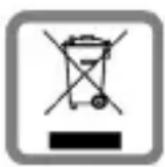
This crossed-out wheeled bin symbol on the product means the product is covered by the European Directive 2002/96/EC.
The correct disposal and separate collection of your old appliance will help prevent potential negative consequences for the environment and human health. It is a precondition for reuse and recycling of used electrical and electronic equipment.
For more detailed information about disposal of your old appliance, please contact your city office, waste disposal service or the shop where you purchased the product.
Italiana
All electrical and electronic products should be disposed of separately from the municipal waste stream via designated collection facilities appointed by the government or the local authorities.
This crossed-out wheeled bin symbol on the product means the product is covered by the European Directive 2002/96/EC.
The correct disposal and separate collection of your old appliance will help prevent potential negative consequences for the environment and human health. It is a precondition for reuse and recycling of used electrical and electronic equipment.
For more detailed information about disposal of your old appliance, please contact your city office, waste disposal service or the shop where you purchased the product.
Federal Communication Commission
This device complies with Part 15 of the FCC Rules. Operation is subject to the following two conditions: (1) This device may not cause harmful interference, and (2) this device must accept any interference received, including interference that may cause undesired operation.
This equipment has been tested and found to comply with the limits for a Class B digital device, pursuant to Part 15 of the FCC Rules. These limits are designed to provide reasonable protection against harmful interference in a residential installation. This equipment generates, uses and can radiate radio frequency energy and, if not installed and used in accordance with the instructions, may cause harmful interference to radio communications. However, there is no guarantee that interference will not occur in a particular installation. If this equipment does cause harmful interference to radio or television reception, which can be determined by turning the equipment off and on, the user is encouraged to try to correct the interference by one of the following measures:
- Reorient or relocate the receiving antenna.
- Increase the separation between the equipment and receiver.
- Connect the equipment into an outlet on a circuit different from that to which the receiver is connected.
- Consult the dealer or an experienced radio/TV technician for help.
Any changes or modifications not expressly approved by the party responsible for compliance could void the user's authority to operate this equipment.
FCC Radiation Exposure Statement:
This equipment complies with FCC radiation exposure limits set forth for an uncontrolled environment.
IC Statement:
"The installer of this radio equipment must ensure that the antenna is located or pointed such that it does not emit RF field in excess of Health Canada limits for the general population; consult Safety Code 6, obtainable from Health Canada's website www.hc-sc.gc.ca/rpb"
CE Statement:
Hereby, the manufacture declares that this device is in compliance with the essential requirements and other relevant provisions of the R&TTE Directive 1999/5/EC.
This device will be sold in the following EEA countries: Austria, Italy, Belgium, Liechtenstein, Denmark, Luxembourg, Finland, Netherlands, France, Norway, Germany, Portugal, Greece, Spain, Iceland, Sweden, Ireland, United Kingdom, Cyprus, Czech Republic, Estonia, Hungary, Latvia, Lithuania, Malta, Slovakia, Poland, Slovenia.