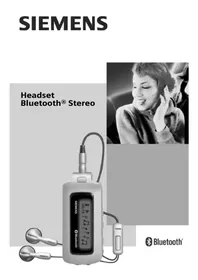
HHB750 - Hi-Fi System SIEMENS - Free user manual and instructions
Find the device manual for free HHB750 SIEMENS in PDF.

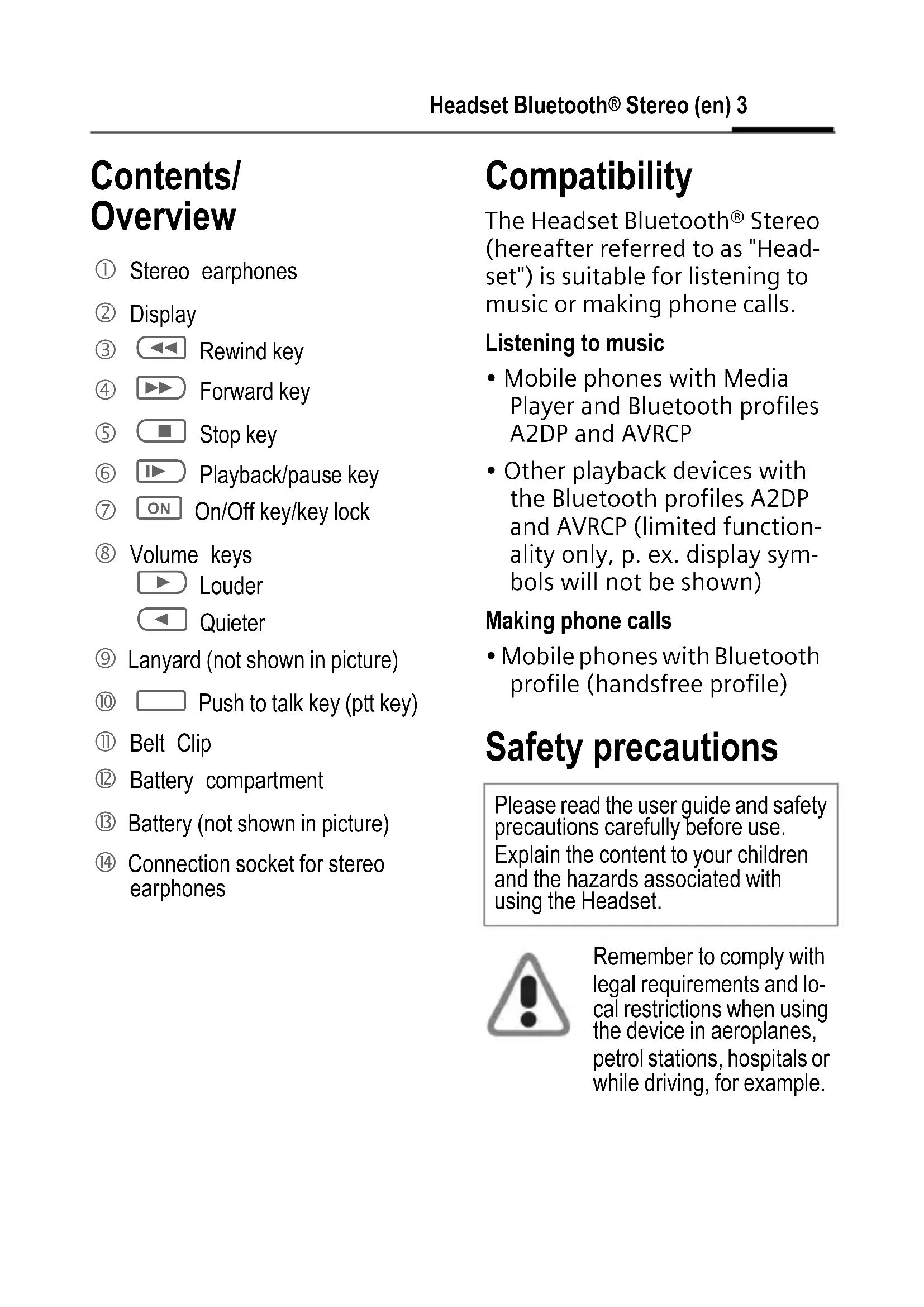


| Product type | Bluetooth stereo headset kit (portable hi-fi system) |
| Brand | Siemens |
| Model | HHB750 |
| Power supply | 1 AAA 1.5 V battery or rechargeable 1.2 V, 600 mAh minimum |
| Playback/communication autonomy | Up to 8 hours (depending on battery type) |
| Standby autonomy | Up to 450 hours |
| Bluetooth range | 10 m maximum (less indoors) |
| Unit weight | Approximately 42 g |
| Headphone weight (with cable) | Approximately 18 g |
| Unit dimensions (L x W x H) | Approximately 80.88 x 36.1 x 18.7 mm |
| Display | Indicator backlight |
| Music functions | Play/pause, next/previous track, fast forward/rewind, volume |
| Phone functions | Call, end call, reject, voice dial, hold, transfer |
| Music compatibility | Phones with media player and Bluetooth A2DP/AVRCP, other compatible devices |
| Phone compatibility | Bluetooth-compatible mobile phones (hands-free profile) |
| Maintenance and cleaning | Damp or antistatic cloth; do not use chemical products |
| Safety | Keep out of reach of children; do not dispose of in fire; comply with local regulations |
| Included accessories | Stereo headphones, cord, belt clip, battery (not included) |
| Certifications | CE, FCC, IC, CUL US |
| Operating temperature | -20 °C to +55 °C |
Frequently Asked Questions - HHB750 SIEMENS
User questions about HHB750 SIEMENS
0 question about this device. Answer the ones you know or ask your own.
Ask a new question about this device
Download the instructions for your Hi-Fi System in PDF format for free! Find your manual HHB750 - SIEMENS and take your electronic device back in hand. On this page are published all the documents necessary for the use of your device. HHB750 by SIEMENS.
USER MANUAL HHB750 SIEMENS

Bluetooth®
Headset Bluetooth ® Stereo (en) ......2
Headset Bluetooth ® Stereo (de) ......12
Headset Bluetooth ® Stereo (it) ......22
Headset Bluetooth® Stereo (fr)
European Directive 2002/96/EC ......128
Federal Communication Commission (en) ......135
FCC (Federal Communication Commission) (fr) ......136
Headset Bluetooth® Stereo (en)
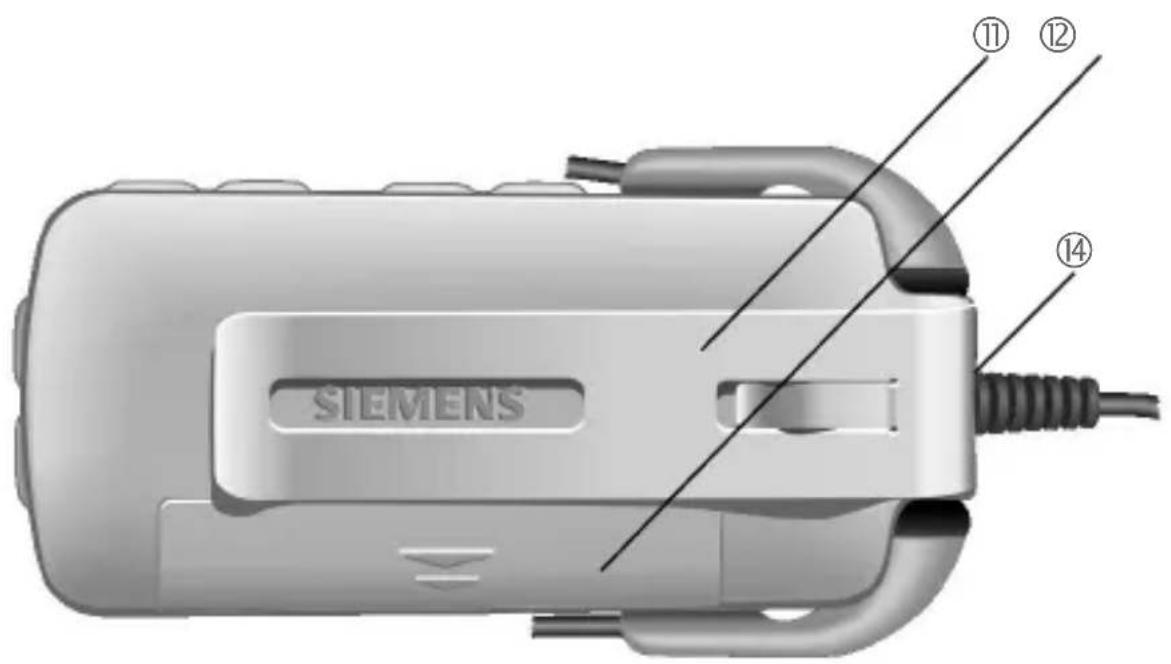
Contents/Overview
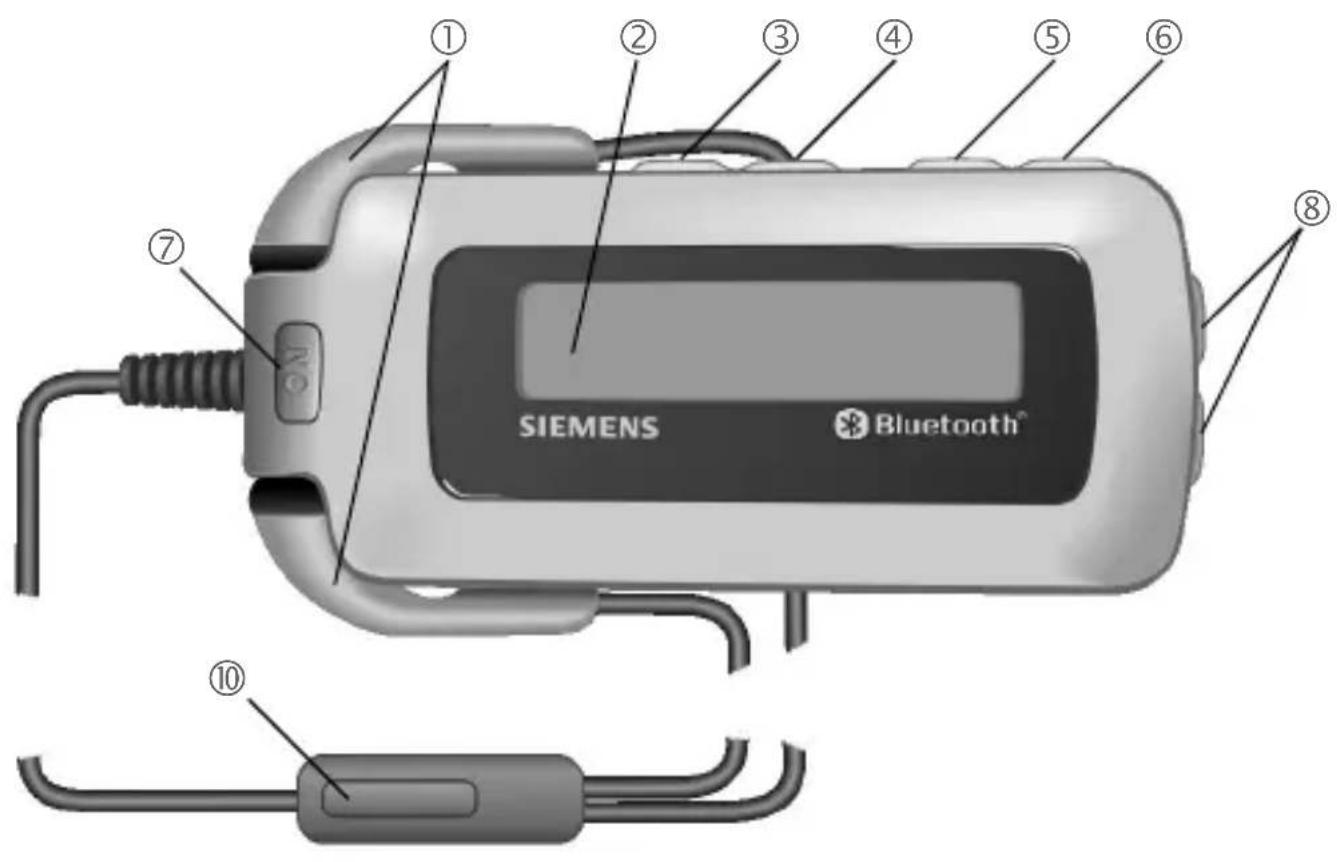
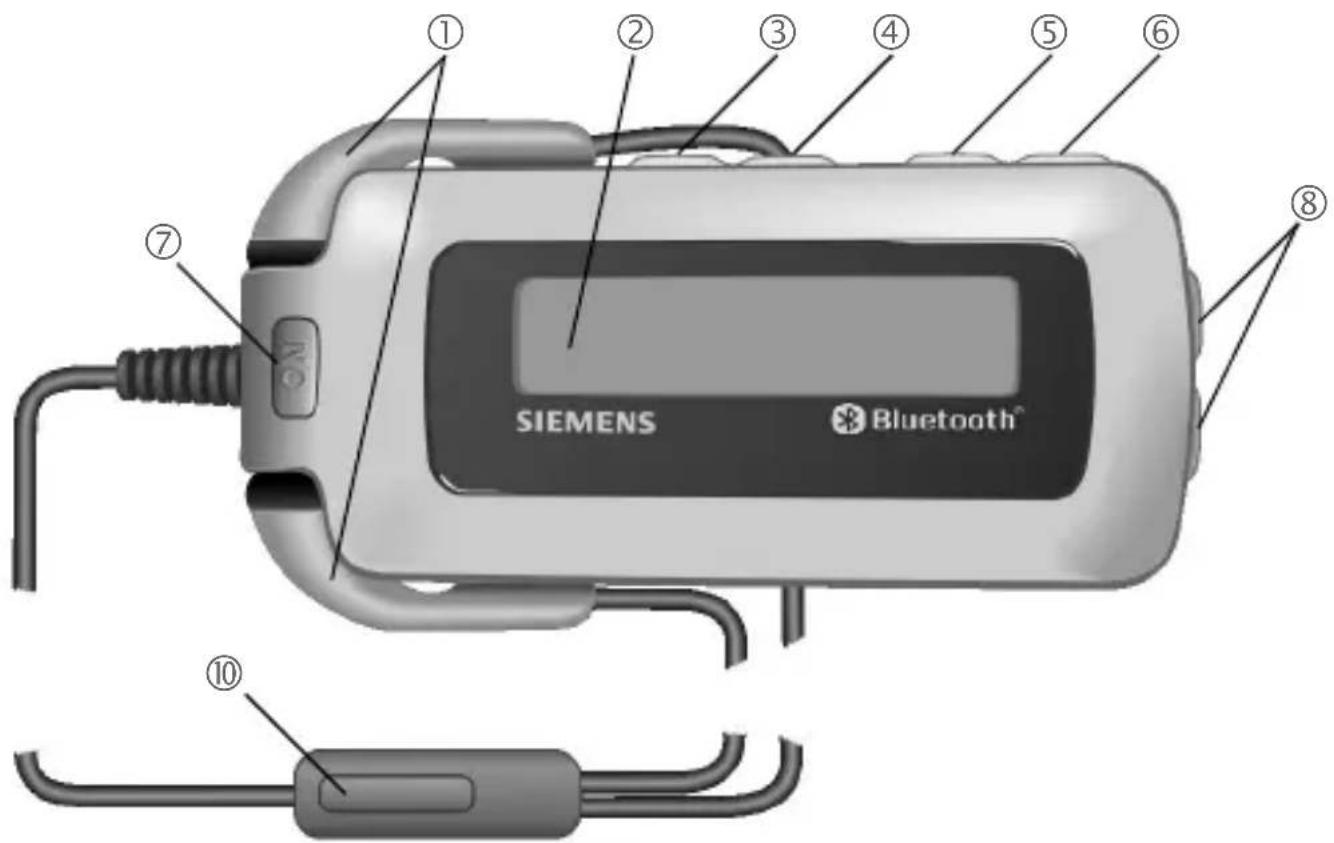
① Stereo earphones
② Display
③ Rewind key
④ Forward key
⑤ Stop key
⑥ ▶ Playback/pause key
⑦ ON On/Off key/key lock
⑧ Volume keys
Louder
Quieter
⑨ Lanyard (not shown in picture)
⑩ Push to talk key (ptt key)
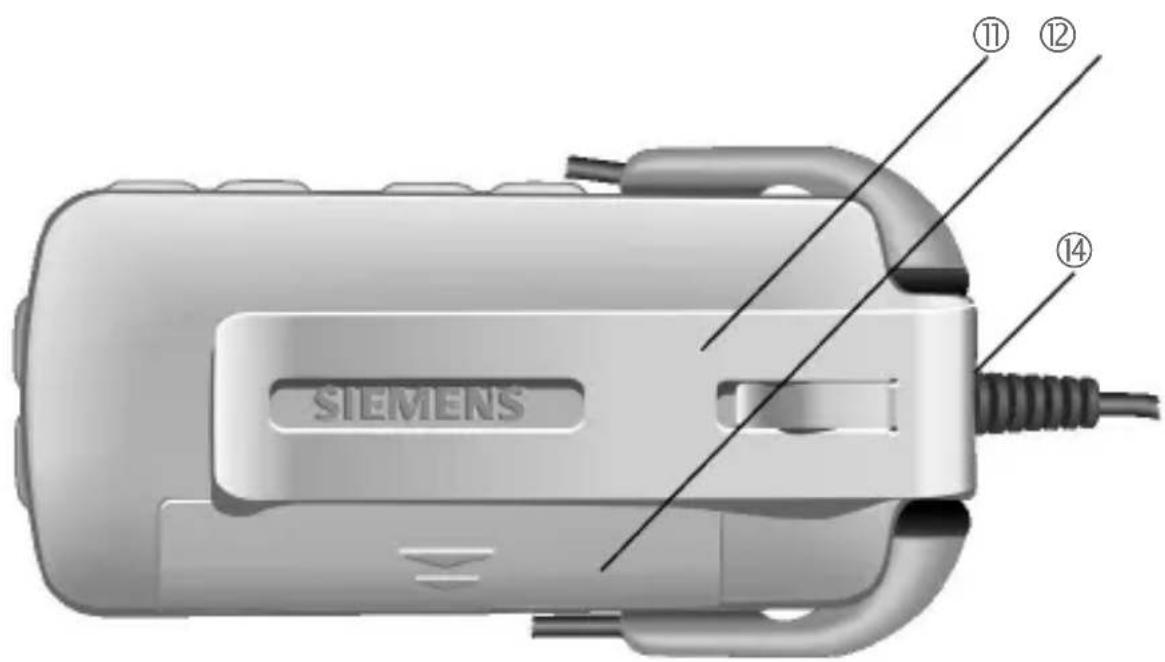
⑪ Belt Clip
⑫ Battery compartment
⑬ Battery (not shown in picture)
⑭ Connection socket for stereo earphones
Compatibility
The Headset Bluetooth ® Stereo (hereafter referred to as "Headset") is suitable for listening to music or making phone calls.
Listening to music
- Mobile phones with Media Player and Bluetooth profiles A2DP and AVRCP
- Other playback devices with the Bluetooth profiles A2DP and AVRCP (limited functionality only, p. ex. display symbols will not be shown)
Making phone calls
- Mobile phones with Bluetooth profile (handsfree profile)
Safety precautions
Please read the user guide and safety precautions carefully before use.
Explain the content to your children and the hazards associated with using the Headset.

Remember to comply with legal requirements and local restrictions when using the device in aeroplanes, petrol stations, hospitals or while driving, for example.

Mobile phones can interfere with the functioning of medical devices such as hearing aids or pacemakers. Keep at least 20 cm/9 inches between the Headset and the pacemaker. Wear the Headset on the ear farther away from a heart pacemaker during a call. For more information consult your doctor.
Caution! Small children might harm themselves. The device should therefore be kept out of reach of small children.

Do not throw the device into an open fire.
The Bluetooth Headset must only be opened by authorised service partners. Any changes to this device are strictly prohibited and will invalidate the operating licence.
Dispose of used devices and their accessories according to the legal regulations.
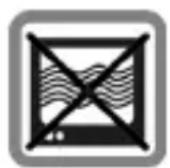
The device can interfere with the operation of near-by TVs, radios or PCs.
Use only original accessories. In this way, you will avoid possible health risks and damage to the product, and ensure compliance with all relevant provisions.
Improper use will invalidate the guarantee!
In some countries there may be restrictions on the use of Bluetooth devices. Please check with the relevant authority.
You may not hear music in stereo quality while driving because it is prohibited to use two earphones while driving. You may use one of the earphones for using the Headset for making phone calls.
For additional information please consult your mobile phone's user guide.
Manufactured by BenQ Mobile GmbH & Co. OHG under trademark license of Siemens AG.
Bluetooth® technology
The Bluetooth® word mark and logos are owned by the Bluetooth® SIG, Inc. and any use of such marks by BenQ Corp. is under license. Other trademarks and trade names are those of their respective owners.
The Headset and mobile phone communicate using Bluetooth, a short-range radio connection.
To enable this communication, the Headset must be connected (Pairing) to the phone. For more information please read "Connecting to the phone for the first time (Pairing)", page 5.
Symbols
The following symbol explains the operation of the Headset:

This function varies from service provider to service provider. You may need to register separately for this service.
Getting started
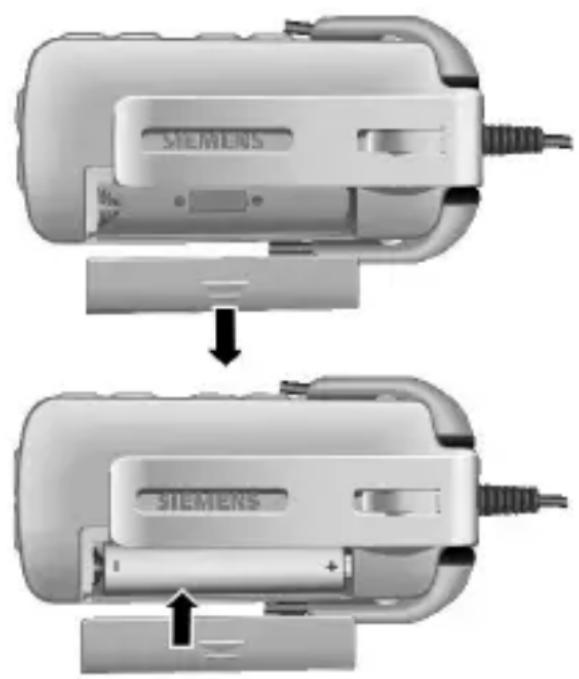
Insert the battery, see picture.
Connecting to the phone for the first time (Pairing)
For details on how to set up a Bluetooth connection, please consult your phone's user guide.
- Press the ON key and hold longer than 1 second (connection to a second phone: longer than 5 seconds). The display shows the registration mode (pairing).
-
Activate your phone's Bluetooth interface and start searching for Bluetooth-activated devices within the range of your mobile phone.
-
If your mobile phone finds your Headset, this is shown on the mobile phone display beneath the device name HHB-750.
If your mobile phone does not find the Headset within 3 minutes, activate search mode again (repeat first step). - Enter the password (PIN) for the Headset into your mobile phone. This will be generated by the Headset and shown on the display.
The Headset is now ready for use. The Headset and the phone can communicate with one another and recognise each other in future.
Switching the Headset on and off/Key lock.
- Switching on:
ON
Press for about
2 seconds. The Headset is switched on and shows the device identification number on the display. If only one mobile phone is connected, this one will get automatically assigned.
- Switching off:
ON
Hold down. The Headset is switched off when the display is extinguished.
• Key lock (in standby mode or during playback):
ON
Press briefly to activate and hold down to deactivate the key-lock.
Using a second mobile phone
The Headset can store the details of two phones, each of which can be selected for use.
When a third phone is connected, the entry details of the phone that has not been connected for the longer period of time are automatically deleted.
- Selecting a mobile phone:
ON
Press for about
2 seconds. The Headset is switched on and shows the two connected mobile phones on the display.


Select.

Confirm selection.
Listening to music
Prepare your mobile phone for playing music. For additional information please consult your mobile phone's user guide.
After connecting the mobile phone to the Headset you can play the title. Use the side keys on the Headset, see page 3.
Playback is interrupted by an incoming call. When the call is finished play-back continues automatically.

Playback/Pause

Press briefly: Forward to next title, hold down: fast forward

Press briefly: Back to start of title, hold down: fast rewind

Stops playback. Pressing ▶ starts play-back again and plays the next track.

Louder.

Quieter.
The playback ends automatically when the playlist is terminated.
Making a phone call
The procedure described below only applies to Siemens mobile phones. It may be different for other manufacturers' mobiles.
- Switch the Headset on, see page 6.
Making a call

Press briefly: Accept a call.

Hold down: Reject or end a call.
Dialling using the mobile phone
Dial as normal using the mobile phone.

Press briefly: Make the call using the Headset.
Voice dialling
(if supported by the phone)

Press briefly: Call up voice dialling.
For additional information please consult your mobile phone's user guide.
During calls

Louder.

Quieter.

Press briefly: Hold call. Press briefly again: Continue the call.

Hold down: End call.
Second Call


Hold down: End current call.

Press briefly: Hold current call and accept call waiting.

Press briefly: Swap between 2 calls.

Press and hold 2x: End all calls.
Transferring a call

Press briefly: Accept the call with the Headset.
For additional information please consult your mobile phone's user guide.
Further settings
Reset to factory settings

Hold down: prepares the Headset.

Hold down the key for 5 seconds.
Attention!
This function deletes all stored data in the Headset, e.g. address books, call lists, etc.
Show software version

Hold down: prepares the Headset.


Press briefly at the same time: Show software version.
Display symbols
| Charge level of the battery | |
| Login mode (Pairing) | |
| Login mode (Pairing) not successful | |
| Phone is being connected | |
| Phone is connected | |
| No phone connection | |
| GSM service is available | |
| GSM service is not available | |
| Outgoing call | |
| Engaged | |
| Incoming call | |
| Current call | |
| Held call/call waiting | |
| Held call | |
| Active call/held call | |
| Connection error | |
| Key lock | |
| connected to playback devices |
| Playback/Pause | |
| Pressbriefly:Forward to next title, holddown:fast forward | |
| Pressbriefly:Back to start of title, holddown:fast re-wind | |
| This is shown if there is no information about the music title. | |
| Volume | |
| Action not possible | |
| !←! | Reset to factory settings |
| Has been reset to factory settings | |
| Voice dialling active (if supported by the phone) | |
| SMS/MMS | |
Troubleshooting
Headset does not work
- If the battery is empty, you will hear a warning tone and the display shows □.
→ Insert new batteries.
Bluetooth connection problems
- The Bluetooth profile of your mobile phone and your Headset are not compatible, see page 3.
- No mobile phone connected, see page 5.
- You will know the call is about to drop if the audio quality is poor.
→ Reduce the distance between the Headset and the mobile phone.
If the Bluetooth connection to the mobile phone is interrupted for several seconds during a call, you can only continue the call with the mobile phone.
Technical data and approval
| Power supply AAA cell, 1.5 volts or rechargeable AAA cell, 1.2 V, min. 600 mAh | |
| Playback time/talk time | up to 8 hours (depending on battery type) |
| Standby time up to 450 hours | |
| Bluetooth range | max. 10 metres, less in buildings |
| Operating temperature | -20 °C to +55 °C |
| Headset output power | max. 8 mW (at least 16 Ohm) |
| Weight Headset (housing) | approx. 42 g |
| Weight Earphones (with cable) | approx. 18 g |
| Casing measurements (Headset) | approx. 80.88 x 36.1 x 18.7 mm (LxWxH) |
| Display LED backlighting | |
Declaration of conformity
FCC:
see page 135.
CE:
BenQ Mobile hereby declares that the device described in this user guide is in compliance with the essential requirements and other relevant provisions of European Directive 1999/5/EC (R&TTE). The declaration of conformity (DoC) concerned has been signed.
Within the EU this product is intended for use in Austria, Belgium, Denmark, Finland, France, Germany, Greece, Ireland, Italy, Luxembourg, The Netherlands, Portugal, Spain, Sweden, United Kingdom and within EFTA in Iceland, Norway and Switzerland.
CE 0682

FCC ID: BCE-HHB600

Canada: Licence No IC:2386-HHB600
Complies with IDA Standards DB01752
Care
Clean the Headset with a damp cloth or anti-static cloth. Do not use any chemicals.
Do not use cleaning solutions, colours or other chemical substances.
Protect the Headset from moisture and knocks. Do not expose your Headset to direct sunlight.
Accessories
Products may be obtained in specialist shops or visit our online shop at:
Original Accessories www.siemens.com/shop
Customer Care
See Customer Care, page 126.
Headset Bluetooth® Stereo (de)
Complies with IDA Standards DB01752
Pflege
Original Accessories www.siemens.com/shop
Kundenservice (Customer Care)
www.siemens.com/shop
www.siemens.com/shop
Assistance clientèle
Voir Customer Care, page 126.
Original Accessories
www.siemens.com/shop
Complies with IDA Standards DB01752
Cuidados
Complies with IDA Standards DB01752
Уход
Complies with IDA Standards DB01752
Konserwacja
Complies with IDA Standards DB01752
Verzorging
CE - Declaration of conformity
BenQ Mobile hereby declares that the phone described in this user guide is in compliance with the essential requirements and other relevant provisions of European Directive 1999/5/EC (R&TTE).
The declaration of conformity (DoC) concerned has been signed. Please call the company hotline if you require a copy of the original or visit: www.siemens.com/mobiledocs
Complies with IDA Standards DB01752
Φροντίδα
Complies with IDA Standards DB01752
Skötsel
www.siemens.com/shop
Kundservice (Customer Care)
se Customer Care, s. 126
Customer Care
We offer fast, individual advice! You have several options:
Our online support on the Internet:
www.siemens.com/ mobilephonescustomercare
We can be reached any time, any place. You are given 24 hour support on all aspects of our products. Here you will find an interactive fault-finding system, a compilation of the most frequently asked questions and answers, plus user guides and current software updates to download.
You will also find the most frequently asked questions and answers in this user guide.
You can also get personal advice about our range of products on our Premium Hotline:
Austria 0900 - 30 08 08
(1,35 Euro/Minute)
Germany 0190 - 74 58 26
(1,24 Euro/Minute)
France....08 99 70 01 85
(1,35 EuroTTC/
Spain....807 517 028
(0,91 euro/minuto)
Sweden 0900 204 18 00
Qualified Siemens employees are waiting to offer you expert information about our products and installation.
In some countries repair and replace services are impossible where the products are not sold through our authorised dealers.
When calling customer service, please have ready your receipt and your car kit, and if available, your Siemens Service customer number.
If repair work is necessary, please contact one of our service centres:
Abu Dhabi....0 26 42 38 00
Argentina 0 81 02 22 66 24
Australia....13 00 66 53 66
Austria....05 17 07 50 04
Bahrain 40 42 34
Bangladesh 0 17 52 74 47
Belgium....0 78 15 22 21
Bolivia....0 21 21 41 14
Bosnia Herzegovina....0 33 27 66 49
Brunei 02 43 08 01
Bulgaria....02 73 94 88
Cambodia 12 80 05 00
Canada 1888770211
Chile....8 00 53 06 62
China 40 08 88 56 56
Colombia.... 01 80 07 00 66 24
Croatia 0 16 10 53 81
Czech Republic....2 33 03 27 27
Denmark 35 25 86 00
Dubai 0 43 96 64 33
Ecuador 18 00 10 10 00
Egypt....0 23 33 41 11
Estonia....6 30 47 97
Finland....09 22 94 37 00
France....01 56 38 42 00
Germany....0 18 05 33 32 26
Greece....80 11 11 11 16
Hong Kong....28 61 11 18
Hungary 06 14 71 24 44
Iceland 5 11 30 00
India....22 24 98 70 00 Extn: 70 40
Indonesia 0 21 46 82 60 81
Ireland....18 50 77 72 77
Italy 02 24 36 44 00
Ivory Coast....05 02 02 59
Jordan....0 64 39 86 42
Kenya....2 72 37 17
Kuwait....2 45 41 78
Latvia 7 50 11 18
Lebanon....01 44 30 43
Libya 02 13 50 28 82
Lithuania....8 70 07 07 00
Luxembourg......43 84 33 99
Macedonia 0 23 13 14 84
Malaysia......+ 6 03 77 12 43 04
Malta....+ 35 32 14 94 06 32
Mauritius 2 11 62 13
Mexico 01 80 07 11 00 03
Morocco....22 66 92 09
Netherlands 0 90 03 33 31 00
New Zealand....08 00 27 43 63
Nigeria 0 14 50 05 00
Norway....22 70 84 00
Oman....79 10 12
Pakistan....02 15 66 22 00
Paraguay 800102004
Peru....0 80 05 24 00
Philippines 0 27 57 11 18
Poland....08 01 30 00 30
Portugal 8 08 20 15 21
Qatar....04 32 20 10
Romania 02 12 09 99 66
Russia....8 80 02 00 10 10
Saudi Arabia 0 22 26 00 43
Serbia 01 13 07 00 80
Singapore 62 27 11 18
Slovak Republic 02 59 68 22 66
Slovenia....0 14 74 63 36
South Africa 08 60 10 11 57
Spain....9 02 11 50 61
Sweden....0 87 50 99 11
Switzerland 08 48 21 20 00
Taiwan 02 23 96 10 06
Thailand....0 27 22 11 18
Tunisia 71 86 19 02
Turkey.... 0 21 64 59 98 98
Ukraine 8 80 05 01 00 00
United Arab Emirates....0 43 66 03 86
United Kingdom 08705334411
Uruguay 00 04 05 46 62
USA 1888770211
Venezuela....0 80 01 00 56 66
Vietnam....84 89 20 24 64
Zimbabwe 04 36 94 24
European Directive 2002/96/EC
All electrical and electronic products should be disposed of separately from the municipal waste stream via designated collection facilities appointed by the government or the local authorities.
This crossed-out wheeled bin symbol on the product means the product is covered by the European Directive 2002/96/EC.
The correct disposal and separate collection of your old appliance will help prevent potential negative consequences for the environment and human health. It is a precondition for reuse and recycling of used electrical and electronic equipment.
For more detailed information about disposal of your old appliance, please contact your city office, waste disposal service or the shop where you purchased the product.
Italiana
All electrical and electronic products should be disposed of separately from the municipal waste stream via designated collection facilities appointed by the government or the local authorities.
This crossed-out wheeled bin symbol on the product means the product is covered by the European Directive 2002/96/EC.
The correct disposal and separate collection of your old appliance will help prevent potential negative consequences for the environment and human health. It is a precondition for reuse and recycling of used electrical and electronic equipment.
For more detailed information about disposal of your old appliance, please contact your city office, waste disposal service or the shop where you purchased the product.
Federal Communication Commission
This device complies with Part 15 of the FCC Rules. Operation is subject to the following two conditions: (1) This device may not cause harmful interference, and (2) this device must accept any interference received, including interference that may cause undesired operation.
This equipment has been tested and found to comply with the limits for a Class B digital device, pursuant to Part 15 of the FCC Rules. These limits are designed to provide reasonable protection against harmful interference in a residential installation. This equipment generates, uses and can radiate radio frequency energy and, if not installed and used in accordance with the instructions, may cause harmful interference to radio communications. However, there is no guarantee that interference will not occur in a particular installation. If this equipment does cause harmful interference to radio or television reception, which can be determined by turning the equipment off and on, the user is encouraged to try to correct the interference by one of the following measures:
- Reorient or relocate the receiving antenna.
- Increase the separation between the equipment and receiver.
- Connect the equipment into an outlet on a circuit different from that to which the receiver is connected.
- Consult the dealer or an experienced radio/TV technician for help.
Any changes or modifications not expressly approved by the party responsible for compliance could void the user's authority to operate this equipment.
FCC Radiation Exposure Statement:
This equipment complies with FCC radiation exposure limits set forth for an uncontrolled environment. This equipment should be installed and operated with minimum distance 20cm between the radiator & your body.
This transmitter must not be co-located or operating in conjunction with any other antenna or transmitter.
IC Statement:
"The installer of this radio equipment must ensure that the antenna is located or pointed such that it does not emit RF field in excess of Health Canada limits for the general population; consult Safety Code 6, obtainable from Health Canada's website www.hc-sc.gc.ca/rpb"
CE Statement:
Hereby, the manufacture declares that this device is in compliance with the essential requirements and other relevant provisions of the R&TTE Directive 1999/5/EC.
This device will be sold in the following EEA countries: Austria, Italy, Belgium, Liechtenstein, Denmark, Luxembourg, Finland, Netherlands, France, Norway, Germany, Portugal, Greece, Spain, Iceland, Sweden, Ireland, United Kingdom, Cyprus, Czech Republic, Estonia, Hungary, Latvia, Lithuania, Malta, Slovakia, Poland, Slovenia.
FCC (Federal Communication Commission)
© BenQ Mobile GmbH & Co. OHG 2005
All rights reserved. Subject to availability.
Right of modification reserved.
The Bluetooth ® word mark and logos are owned by the Bluetooth ® SIG, Inc. and any use of such marks by BenQ Corp. is under license. Other trademarks and trade names are those of their respective owners.
Manufactured by BenQ Mobile GmbH & Co. OHG under trademark license of Siemens AG.
- CONTENTS/OVERVIEW
- COMPATIBILITY
- LISTENING TO MUSIC
- MAKING PHONE CALLS
- SAFETY PRECAUTIONS
- BLUETOOTH® TECHNOLOGY
- SYMBOLS
- GETTING STARTED
- CONNECTING TO THE PHONE FOR THE FIRST TIME (PAIRING)
- SWITCHING THE HEADSET ON AND OFF/KEY LOCK
- USING A SECOND MOBILE PHONE
- MAKING A PHONE CALL
- MAKING A CALL
- DIALLING USING THE MOBILE PHONE
- VOICE DIALLING
- DURING CALLS
- SECOND CALL
- TRANSFERRING A CALL
- FURTHER SETTINGS
- RESET TO FACTORY SETTINGS
- ATTENTION
- SHOW SOFTWARE VERSION
- TROUBLESHOOTING
- HEADSET DOES NOT WORK
- BLUETOOTH CONNECTION PROBLEMS
- TECHNICAL DATA AND APPROVAL
- DECLARATION OF CONFORMITY
- FCC
- CE
- CARE
- ACCESSORIES
- CUSTOMER CARE
- PFLEGE
- KUNDENSERVICE (CUSTOMER CARE)
- ASSISTANCE CLIENTÈLE
- CUIDADOS
- УХОД
- KONSERWACJA
- VERZORGING
- CE - DECLARATION OF CONFORMITY
- ΦΡΟΝΤΊΔΑ
- SKÖTSEL
- KUNDSERVICE (CUSTOMER CARE)
- WWW.SIEMENS.COM/ MOBILEPHONESCUSTOMERCARE
- EUROPEAN DIRECTIVE 2002/96/EC
- ITALIANA
- FEDERAL COMMUNICATION COMMISSION
- FCC RADIATION EXPOSURE STATEMENT
- IC STATEMENT
- CE STATEMENT
- FCC (FEDERAL COMMUNICATION COMMISSION)
Brand : SIEMENS
Model : HHB750
Category : Hi-Fi System