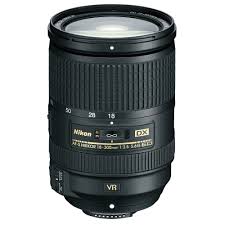
AF-S DX NIKKOR 18-300MM F/3.5-5.6G ED VR - Camera lens NIKON - Free user manual and instructions
Find the device manual for free AF-S DX NIKKOR 18-300MM F/3.5-5.6G ED VR NIKON in PDF.



| Brand | NIKON |
| Model | AF-S DX NIKKOR 18-300mm f/3.5-5.6G ED VR |
| Type | AF-S DX G-type lens with built-in microprocessor and F mount |
| Focal length | 18–300 mm |
| Maximum aperture | f/3.5–5.6 |
| Optical construction | 19 elements in 14 groups (including 3 aspherical elements and 3 ED glass elements) |
| Angle of view | 76° – 5° 20' |
| Minimum focus distance | 0.45 m (at 300 mm, from focal plane) |
| Diaphragm blades | 9 (circular diaphragm) |
| Aperture range | f/3.5 to f/22 (18 mm) / f/5.6 to f/32 (300 mm) |
| Filter diameter | 77 mm (P=0.75 mm) |
| Dimensions (diameter × length) | Approx. 83 × 120 mm |
| Weight | Approx. 830 g |
| Focus | AF-S (SWM motor) with permanent manual focus (M/A and M) |
| Vibration reduction (VR) | VRII, NORMAL and ACTIVE modes, ON/OFF switch |
| Zoom | Manual via independent zoom ring, lock at 18 mm |
| Lens hood | Bayonet HB-58 (supplied) |
| Supplied accessories | Front cap LC-77, rear cap LF-4, lens hood HB-58, soft case CL-1120 |
| Maintenance | Cleaning with blower brush, ethanol or lens cleaner; avoid organic solvents; store in dry and cool place |
| Safety | Do not disassemble, do not look at the sun, do not use in presence of flammable gas |
Frequently Asked Questions - AF-S DX NIKKOR 18-300MM F/3.5-5.6G ED VR NIKON
User questions about AF-S DX NIKKOR 18-300MM F/3.5-5.6G ED VR NIKON
0 question about this device. Answer the ones you know or ask your own.
Ask a new question about this device
Download the instructions for your Camera lens in PDF format for free! Find your manual AF-S DX NIKKOR 18-300MM F/3.5-5.6G ED VR - NIKON and take your electronic device back in hand. On this page are published all the documents necessary for the use of your device. AF-S DX NIKKOR 18-300MM F/3.5-5.6G ED VR by NIKON.
USER MANUAL AF-S DX NIKKOR 18-300MM F/3.5-5.6G ED VR NIKON
PykoBoDCTBO NOIb3OBaTeJIa
Gebruikshandleiding
Manual do utiliser
Manual do usuario
Manuale d'uso
Návod k obsluze
Užívatěška príručka
- Do not disassemble. Touching the internal parts of the camera or lens could result in injury. In the event of malfunction, the product should be repaired only by a qualified technician. Should the product break open as the result of a fall or other accident, remove the camera battery and/or disconnect the AC adapter and then take the product to a Nikon-authorized service center for inspection.
- Turn the camera off immediately in the event of malfunction. Should you notice smoke or an unusual smell coming from the equipment, immediately unplug the AC adapter and remove the camera battery, taking care to avoid burns. Continued operation could result in fire or injury. After removing the battery, take the equipment to a Nikonauthorized service center for inspection.
- Do not use in the presence of flammable gas. Operating electronic equipment in the presence of flammable gas could result in explosion or fire.
- Do not look at the sun through the lens or the camera viewfinder. Viewing the sun or other bright light source through the lens or viewfinder could cause permanent visual impairment.
- Keep out of reach of children. Failure to observe this precaution could result in injury.
-
Observe the following precautions when handling the lens and camera:
-
Keep the lens and camera dry. Failure to observe this precaution could result in fire or electric shock.
- Do not handle the lens or camera with wet hands. Failure to observe this precaution could result in electric shock.
- Keep the sun well out of the frame when shooting backlit subjects. Sunlight focused into the camera when the sun is in or close to the frame could cause a fire.
-
If the lens will not be used for an extended period, attach the front and rear lens caps and store the lens out of direct sunlight. If left in direct sunlight, the lens could focus the sun's rays onto flammable objects, causing fire.
-
Do not carry tripods with a lens or camera attached. You could trip or accidentally strike others, resulting in injury.
- Do not leave the lens where it will be exposed to extremely high temperatures, such as in an enclosed automobile or in direct sunlight. Failure to observe this precaution could adversely affect the lens' internal parts, causing fire.
Thank you for your purchase of an AF-S DX NIKKOR 18-300mm f/3.5-5.6G ED VR lens. Before using this product, please carefully read both these instructions and the camera manual.
Note: DX lenses are for use only with DX-format digital single-lens reflex cameras such as the D7000 or D300 series. The angle of view of a lens on a DX-format camera is equivalent to that of a lens with a focal length about 1.5 × longer mounted on a 35 ~mm format camera.
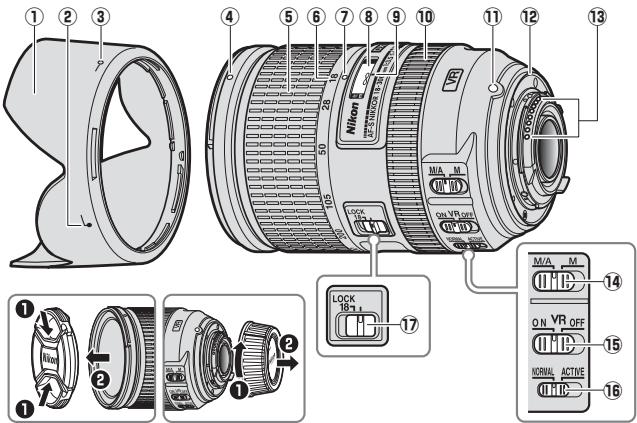
Parts of the Lens
① Lens hood. 20
Lens hood alignment mark.....20
③ Lens hood lock mark.20
④ Lens hood mounting mark.....20
⑤ Zoom ring. 16
(6) Focal length scale. 16
⑦ Focal length mark
Focus distance indicator
9 Focus distance mark
10 Focus ring. 17
1 Lens mounting mark
12 Rubber lens-mount gasket.....21
13 CPU contacts. 21
14 Focus-mode switch 17
Vibration reduction ON/OFF switch. 18
Vibration reduction mode switch. 18
⑦ Zoom lock. 16
Zoom and Depth of Field
Before focusing, rotate the zoom ring to adjust the focal length and frame the photograph. If the camera offers depth-of-field preview (stop down), depth of field can be previewed in the viewfinder.
Note: Focal length decreases as the focus distance shortens. Note that the focus distance indicator is intended only as a guide and may not accurately show the distance to the subject and may, due to depth of field or other factors, not show when the camera is focused on a distant object.
To lock the zoom ring, rotate it to the 18mm position and slide the zoom lock to LOCK. This prevents the lens extending under its own weight while the camera is being carried from place to place.
Aperture
Aperture is adjusted using camera controls.
Zoom and Maximum Aperture
Changes to zoom can alter the maximum aperture by up to 1^1 / _3 EV. The camera however automatically takes this into account when setting exposure, and no modifications to camera settings are required following adjustments to zoom.
Focus
Supported focus modes are shown in the following table (for information on camera focus modes, see the camera manual; for information on getting good results with autofocus, see "A Note on Wide- and Super Wide-Angle Lenses" on page 23).
| Camera focus mode | Lens focus mode | |
| M/A | M | |
| AF | Autofocus with manual override | Manual focus with electronic rangefinder |
| MF | Manual focus with electronic rangefinder | |
M/A (Autofocus with Manual Override)
To focus using autofocus with manual override (M/A):
1 Slide the lens focus-mode switch to M/A.
2 Focus.
If desired, autofocus can be over-ridden by rotating the lens focus ring while the shutter-release button is pressed halfway (or, if the camera is equipped with an AF-ON button, while the AF-ON button is pressed). To refocus using autofocus, press the shutter-release button halfway or press the AF-ON button again.
Vibration Reduction (VRII)
Vibration reduction (VRII) reduces blur caused by camera shake, allowing shutter speeds up to four stops slower than would otherwise be the case (Nikon measurements; effects vary with the photographer and shooting conditions). This increases the range of shutter speeds available and permits hand-held, tripod-free photography in a wide range of situations.
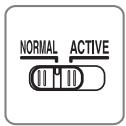
Choose from NORMAL and ACTIVE vibration reduction according to the frequency and amplitude of the vibration.
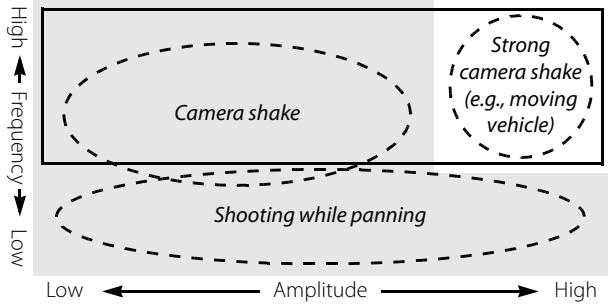
:Suited to NORMAL vibration reduction.
:Suited to ACTIVE vibration reduction.
- Camera shake: Choose NORMAL or ACTIVE.
- Shooting while panning: Choose NORMAL.
- Strong camera shake: Choose ACTIVE.
Using the Vibration Reduction ON/OFF Switch
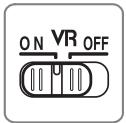
Select ON to enable vibration reduction. Vibration reduction is activated when the shutter-release button is pressed halfway, reducing the effects of camera shake for improved framing and focus.
Select OFF to turn vibration reduction off.
Using the Vibration Reduction Mode Switch
The vibration reduction mode switch is used to select the vibration reduction mode when vibration reduction is on.
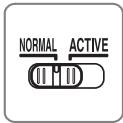
Select NORMAL to reduce vibration caused by camera shake or when panning the camera.
Select ACTIVE to reduce vibration caused by camera shake or when shooting from a moving car, boat, or other unstable platform. Panning motions are not detected.
Using Vibration Reduction: Notes
- When using vibration reduction, press the shutter-release button halfway and wait for the image in the viewfinder to stabilize before pressing the shutter-release button the rest of the way down.
- When vibration reduction is active, the image in the viewfinder may be blurred after the shutter is released. This does not indicate a malfunction.
- Slide the vibration reduction mode switch to NORMAL for panning shots. When the camera is panned, vibration reduction applies only to motion that is not part of the pan (if the camera is panned horizontally, for example, vibration reduction will be applied only to vertical shake), making it much easier to pan the camera smoothly in a wide arc.
- Do not turn the camera off or remove the lens while vibration reduction is in effect. If power to the lens is cut while vibration reduction is on, the lens may rattle when shaken. This is not a malfunction, and can be corrected by reattaching the lens and turning the camera on.
- If the camera is equipped with a built-in flash, vibration reduction will be disabled while the flash charges.
- If the camera is equipped with an AF-ON button, pressing the AF-ON button will not activate vibration reduction.
- Turn vibration reduction off when the camera is securely mounted on a tripod, but leave it on if the tripod head is not secured or when using a monopod.
The Lens Hood
The lens hoods protect the lens and block stray light that would otherwise cause flare or ghosting.
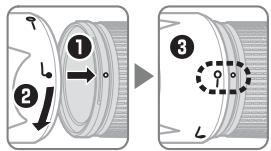
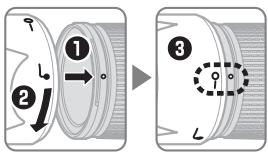
Align the lens hood lock mark (-) with the lens hood mounting mark () on the lens (3).
When attaching or removing the hood, hold it near the symbol on its base and avoid gripping it too tightly. Vignetting may occur if the hood is not correctly attached.
The hood can be reversed and mounted on the lens when not in use. When the hood is reversed, it can be attached and removed by rotating it while holding it near the lock mark (—O).
Built-in Flash Units
When using the built-in flash on cameras equipped with a built-in flash unit, shoot at ranges of 0.6m (2 ft) or more and remove the lens hood to prevent vignetting (shadows created where the end of the lens obscures the built-in flash).
| Camera | Focal length | Use at ranges of |
| D800 series (DX format) | 18 mm | 3.0 m (9 ft 10 in.) or more |
| 28 mm | 1.0 m (3 ft 3 in.) or more | |
| 50 mm or more | No restrictions | |
| D700 (DX format) | 18 mm | 3.0 m (9 ft 10 in.) or more |
| 28 mm or more | No restrictions | |
| D7000/D300 series/D200 | 28 mm | 1.0 m (3 ft 3 in.) or more |
| 50 mm or more | No restrictions | |
| D100 | 28 mm | 1.5 m (4 ft 11 in.) or more |
| 50 mm or more | No restrictions | |
| D90/D80/D70 series | 28 mm | 2.5 m (8 ft 2 in.) or more |
| 50 mm or more | 1.0 m (3 ft 3 in.) or more | |
| D5100/D5000/D3100/D3000/D60/D40 series | 50 mm or more | 1.0 m (3 ft 3 in.) or more |
| D50 | 28 mm | 2.0 m (6 ft 7 in.) or more |
| 50 mm or more | 1.0 m (3 ft 3 in.) or more |
Lens Care
- Do not pick up or hold the lens or camera using only the lens hood.
- Keep the CPU contacts clean.
- Should the rubber lens-mount gasket be damaged, cease use immediately and take the lens to a Nikon-authorized service center for repair.
- Use a blower to remove dust and lint from the lens surfaces. To remove smudges and fingerprints, apply a small amount of ethanol or lens cleaner to a soft, clean cotton cloth or lens-cleaning tissue and clean from the center outwards using a circular motion, taking care not to leave smears or touch the glass with your fingers.
- Never use organic solvents such as paint thinner or benzene to clean the lens.
- The lens hood or NC filters can be used to protect the front lens element.
- Attach the front and rear caps before placing the lens in its flexible pouch.
- If the lens will not be used for an extended period, store it in a cool, dry location to prevent mold and rust. Do not store in direct sunlight or with naphtha or camphor moth balls.
- Keep the lens dry. Rusting of the internal mechanism can cause irreparable damage.
- Leaving the lens in extremely hot locations could damage or warp parts made from reinforced plastic.
Supplied Accessories
- 77 mm snap-on Front Lens Cap LC-77
Rear Lens Cap LF-4
Bayonet Hood HB-58 - Flexible Lens Pouch CL-1120
Compatible Accessories
- 77 mm screw-on filters
Specifications
| Type | Type G AF-S DX lens with built-in CPU and F mount |
| Focal length | 18–300 mm |
| Maximum aperture | f/3.5–5.6 |
| Lens construction | 19 elements in 14 groups (including 3 aspherical lens elements and 3 ED lens elements) |
| Angle of view | 76°–5° 20' |
| Focal length scale | Graduated in millimeters (18, 28, 50, 105, 200, 300) |
| Distance information | Output to camera |
| Zoom | Manual zoom using independent zoom ring |
| Focusing | Nikon Internal Focusing (IF) System with autofocus controlled by Silent Wave Motor and separate focus ring for manual focus |
| Vibration reduction | Lens shift using voice coil motors (VCMs) |
| Focus distance indicator | 0.45 m to infinity (∞) |
| Minimum focus distance | 300 mm focal length: 0.45 m (1.48 ft) from focal plane |
| Diaphragm blades | 9 (rounded diaphragm opening) |
| Diaphragm | Fully automatic |
| Aperture range | · 18 mm focal length: f/3.5 to f/22 · 300 mm focal length: f/5.6 to f/32 |
| Metering | Full aperture |
| Filter-attachment size | 77 mm (P=0.75 mm) |
| Dimensions | Approx. 83 mm diameter × 120 mm (distance from camera lens mount flange) |
| Weight | Approx. 830 g (29.3 oz) |
Nikon reserves the right to change the specifications of the hardware described in this manual at any time and without prior notice.
A Note on Wide- and Super Wide-Angle Lenses
Autofocus may not provide the desired results with wide- and super wide-angle lenses in the following situations:
Example 1: A far-off portrait subject
at some distance from the
background
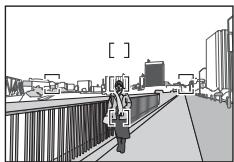
Example 2: A field of flowers
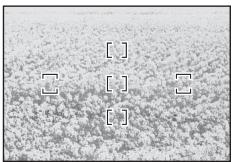
1 The subject does not fill the area enclosed by the focus brackets.
If the focus point contains both foreground and background objects, the camera may focus on the background and the subject may be out of focus.
2 The subject contains many fine details.
The camera may have difficulty focusing on subjects that contain many fine details or that are lacking in contrast.
In these cases, use manual focus, or use focus lock to focus on another subject at the same distance and then recompose the photograph.
For more information, see "Getting Good Results with Autofocus" in the camera manual.
Für ihre Sicherheit
SICHERHEITSHINWEISE
Passar for NORMAL vibrationsreducing.
Passar for ACTIVE vibrationsreducing.
IcnoJIb3OBAHnE nepeKIOUaTeIe peXIMa IoJaBLeHn Bn6paun
IpeeknouateIbpekmaIpoabLeHnaB6paunncnoJb3yeTcndy Bb6opa pekmaIpoabLeHnaB6paun,ecnn OHO BKJUoyeHo.
Bb6epTe NORMAL, yTo6bl yMeHbIuTb Bn6paCInIO, Bb3BaHHyI DpOxAHHeM fOTOKaMEpbI IIN BO BpEm NaHopamIpOBaHn.
Bb6epTe ACTIVE, UTo6bI yMeHbUInTb Bn6paUIO, Bb3BaHHy IdoXaHmE MTOKApMbpI INN BO BPEM CbEMKn N3 DnBuJxUeC MaMnHBI, NOkKn INN DpyrOFO HEcyTOuHBO NpOKeHIN. DnBxKeHIN NaHOpAMIpOBaHnI He 6dyt 3aMeTHbl.
IcnoIb3o8aHne noadBHeu 6bpaui: PmuEuaHua
- Пи Испльь�аимплобаленя Вибраци Нжмтс cnyckobук Кногку 3aTBOPа наюLOВИну И пeded Tem KaK HжakТсNYCOKOBU Кногку 3aTBOPа поноCTь,doЖДNTeСь,пOKа ИЗБрахеные в ВидОнSCaTeNe CTaБиЛЗИЗРУЕТС.
- Ecnn noadBneHne Bn6paun aKtNBHO, n3o6paJHHe N BnOuCKaTeMe MoKET CMa3aTbCn PocNe OnyckaHn 3aTbOpa. 3To He YBnEeTc HncnPabHocTbU.
- IpepeBnHbTe nepeKlOuateIb peKIma noDaBHeNRA Bn6paunB nnoJooKeHne NORMAL dIra CbEMKn paHOpamropoAHn. Bo BpeM aNaHOPaMPOBaHnHa FOtOKaMePoR noDaBHeNRE Bn6paun iPnIMeHReTcA TOBko K DBnJKeHIO, KOToPOe He AByTAETc qAcTbIO naHOpamPOBaHn (HaNPmEep, pRi TROP3OHTaBHOM NaHOPaMPOBaHn, NoDaBHeNBE Bn6paun 6yEdT npimEnHo ToBko K BerTtKaHbHOMy DpOxAHN), pRi ETOM ynpOuaETc MArKoe naHOpamPOBaHn EFOtOKaMePoR IO ShnPOKO dyre.
- He BbIKIouaIte fOToKamepy I He CHMaIte oBbekTnB BO Bpemra 0abOtI pOaBaNHeNn BnBpaun. Ecnn OTOeOeHNITb NITAHne oBbEknBa BO Bpemra paObTb IpoaBaNHeNn BnBpaun, BO Bpemra TpAcn KOBekTnB MoKeT dpe63KaTb. 3TO He YBaIaETc HEnCNPaBHOCTbIO, Ida yUcTaPHeNn dpe63KaHn CNeJyET NOBtPO HIOcOeINHtB OBeKtNB IN BkLIouHTb fOToKamepy.
- Ecπi Φοτokamepa δόργιδΟbaHa BCTροEHHΠ BÇπbιшΚΟ, ποδανβλενημε Bιδραζι Μδγετ 3aδποκιροBAHO BO Bpεm 3aργιdкИ BCπbιшΚΙ.
- Ecπi ΦOTOKaMepa OCHaIeHa KHOJIKOJ «AF-ON», HαKaTne 3ToJ KHOJIKN He aKTHBnpyET NpOaBLeHne Bn6pauni.
- BbIKIouHTe NIOabJIeHne Bn6paIe ecNI FOToKaMepa HAdexHO yCTaHOBJIeHa Ha 1tATINBE, HO OCTaBbTe ERO BKJIIOUeHHbIM, ECNI rONOBKa 1tATINBa 3aKpeIIeHa HeHaDeJXHO IIN INCIOJIb3yETc MOHONoI.
Бленьда
BleHda 3aunuaet oBekntn 6loKnpyTe npMble lyu, KOTopble MOryT cTaTb npUHHo6JlKOB nDBoEHn n3O6paKeHn.
BbpoBnIeMeMmky3akpenenneHua 6neHbI(—O)cmMkoKpnennHua 6neHbI () Ha oBeekmuE (3).
PnpcoeHnHn Hn CnHm8 6IeHny, yIepKnBaTe ee pAOM co 3HaKOM n He 3aTgNBAte ee CnUkOM Tyro. Ecn 6IeHda He npabInbHO npnkpeHHe, 3TO MOKeT Bb3BaTb BINbEtnPOBaHne.
BleHdy MoXHO nepeBopauNBaTb uYctaHaBnBaTb Ha 06bEkTNB TOIbKO KOrda OH He IcNoJIb3yETc. Korda 6IeHda nepeBepHyta, ee MoXHO npICoEINHHTb IIn ChrTb, IOBepHyB ee, yJepXnBaB O3JIe METKNФKcaun (—O).
BcTpoeHHbIe BCnbliKm
Пи ИСПОЛБОВАнN BCTРОЕНOH BCПБИШК Na ФOTOKамрах, OБOPДОВАнBHBIXТAKОI BCПБИшКО, CHIMaNTe Ha paCSTOнH N0,6 M ИлббоупсгИЗМЕБЕЧУ OББЕKTиBa, YTOбы ИЗБжаТь BИньтIpOBАнHA (TeHei, Opba3YIOUxnxTcAm, Гд Край OББЕKTиBA 3aTeMHЯET BCПБИшКY).
| Фотokамера | Фокунhoe passtorchиeme | Исплобизуетсь в дималоче |
| Серни D800 (Формат DX) | 18 MM | 3,0 м ivлп 6олөe |
| 28 MM | 1,0 м ivлп 6олөe | |
| 50 MM ivлп 6олөe | Бeз огранчechenii | |
| D700 (Формат DX) | 18 MM | 3,0 м ivлп 6олөe |
| 28 MM ivлп 6олөe | Бeз огранчechenii | |
| D7000/Cерни D300/D200 | 28 MM | 1,0 м ivлп 6олөe |
| 50 MM ivлп 6олөe | Бeз oгранчechenii | |
| D100 | 28 MM | 1,5 м ivлп 6олөe |
| 50 MM ivлп 6олөe | Бeз oгранчechenii | |
| D90/D80/D70 сэрни | 28 MM | 2,5 м ivлп 6олөe |
| 50 MM ivлп 6олөe | 1,0 м ivлп 6олөe | |
| D5100/D5000/D3100/D3000/D60/D40 сэрни | 50 MM ivлп 6олөe | 1,0 м ivлп 6олөe |
| D50 | 28 MM | 2,0 м ivлп 6олөe |
| 50 MM ivлп 6олөe | 1,0 м ivлп 6олөe |
YxOДЗaO6bekTUBOM
- He noiDnHMaIe n He iepKInTe o6bekTINB nII n fOToKamepy TOnbKO 3a 6JIeHdy.
- Coidepxknte KOHTaKtbl MmKpOnpoueccopa B uHCTOTE.
- Ecn peHOBa npKnaJaKa KpeJIeHnO oBekTbBa nOBpeJdeHa, HemeJeHNO pKePaTHe NcPb3OBAHne IOTHeCtte ee B OfuiNaIbHbI cepBVCbI ueTp Nikon dIpeMOHTa.
Испόньутгрушудя удалиca nOBePxHocTи obkeKTnBa nbIIN bOrcnHok.чToБы уdAnITbЯTNa HOTNecATKn paIbueB,do6abBte He6oJIbwo KoIuYeCTBO 3TuIOLOBO CnIPrTa IIN OUnCTNTeIЯ DnO obkeKTnBaHaMaRKyU,NUCTyU XIONKOBYU TkaHb IIN TkaHbДЯ OUnCTKnObekTeBA N,HaNuHaNOTcHTpa,OUnCTNTe erO KpyroBbIMn DBVKeHrAMu, CTapAraBHe NoCtABuTb PANTHO N HeDToPOHyTbCn PaIbCuMn Do CTEkJa. - HinkoIgda He Icnpb3yIte Ipy OuncTkn O6beKTnBa oprAHueckne pactBopnteni, TaKne KaK pa36abntelI py Kpaackn nn 6eH3nH.
- bIeHny nIiNΦIbTp NC moJHo nCnoJIb3ObaTb dIaIaIHTbI nepeJeHero 3IeMeHa o6beKtBa.
3aKpoIte npedHIOu 3aDHIQU KpbIiKn OBeKTnBa, npeJ TeM KaK pONoXtB OBeKTHB BMrKm YexOJ. - Ecnn obkeTnB He 6ydt NcNoIb3ObaTbC8 B TeueHne npoJOnKInTeNbHO BpeMeHn, XpaHnTe erO B npoxlaHOM, cyxom MeCTe, YTO6bI pEoTbPaTb NOaBHeNc PnCeHn n PjXaBUnHb. He xpaHnTe noD Bo3JeCTBnEM npAIMO CoNHeHOro CBeta nn BmCTe C hafTaJIINHObBIMn nn KaMphiApHbIMn ShaPukAmn IpOTnB MOJI.
XpaHnTe o6bekTcB cyxM.PkaBJIeHne BHyTpEHHero MexaHn3Ma MoKeT npuBeCTN K HeNoIpaBIMOMy NOBpeJdeHIO. - Ecnn octabnBt obBeKTHB B Upe3BbUaHNo JxapKom MeCTe, 3TO MoXET npINBeCTN K NOBpeKdEHNIO NII DeΦOpMauIN Yacte, CdelaHbIX N3 ycIneHHOrO Pnactka.
Bxodjme B kOmnpKeT npHaadJeXHOCTN
CobMecTbMbIe npHaJnEaXHOCTN
BbHnHbAIOUneCgHJbTpblDnAmEtPOM77MM
Cneunpkauu
No reproduction in any form of this manual, in whole or in part (except for brief quotation in critical articles or reviews), may be made without written authorization from NIKON CORPORATION.




