LIVARNO home Lampe de bureau LED avec surface de charge, 6,2 W - Consumer product

home Lampe de bureau LED avec surface de charge, 6,2 W - Consumer product LIVARNO - Free user manual and instructions

Find the device manual for free home Lampe de bureau LED avec surface de charge, 6,2 W LIVARNO in PDF.

📄 89 pages English EN Download 💬 AI Question 18 questions ⚙️ Specs
Notice LIVARNO home Lampe de bureau LED avec surface de charge, 6,2 W - page 12
Pick your language and provide your email: we'll send you a specifically translated version.
Product type LED desk lamp with wireless charger
Brand LIVARNO
Model Home LED desk lamp with charging surface, 6.2 W
Model number 14155005L / 14155006L
Energy efficiency class F
Supply voltage 230-240 V ~, 50 Hz
Maximum total power 23 W
LED module power 6.2 W
Power supply unit Model KDP-AE120200U, input 220-240 V ~ 50/60 Hz, output 12 V DC 2.0 A, 24 W max
USB port 5 V DC 1.0 A (output)
Induction charging Yes, QI compatible, frequency 100-205 kHz
Number of light colors 3 (warm white, neutral white, cool white)
Dimmer Yes, 6 levels, with memory function
LED lifespan 25,000 hours
Protection class II
Protection rating IP20 (indoor use only)
Packaging material Recycled paper
Maintenance Clean with a dry, lint-free cloth. Do not use water or solvents.
Safety Disconnect before cleaning. Do not immerse. Use only the supplied power supply unit. LEDs are not user-replaceable.
Warranty 36 months from date of purchase
Package contents 1 desk lamp, 1 plug transformer, 1 instruction manual

Frequently Asked Questions - home Lampe de bureau LED avec surface de charge, 6,2 W LIVARNO

How to turn the lamp on or off?
Press the touch ON/OFF button on the lamp base.
How to use induction charging?
Place your QI-compatible smartphone in the center of the charging surface (6) on the base. The LED indicator (5) lights up blue to indicate charging. The lamp must be plugged into a power outlet.
How to change the light color?
Press the Mode «M» button (7) to switch between warm white, neutral white, and cool white.
How to adjust brightness?
Use the touch dimmer (8) on the base. You can choose from 6 brightness levels. The lamp remembers the last setting.
Can I charge my phone via the USB port?
Yes, the USB port (4) provides 5 V / 1.0 A. It works even when the lamp is off.
What to do if the lamp does not turn on?
Check that the power supply unit is properly plugged into an outlet and that the cable is not damaged. If the problem persists, contact customer service.
How to clean the lamp?
Disconnect the lamp and let it cool down. Clean with a dry, lint-free cloth. Never use water or chemicals.
Is the LED replaceable?
No, the LEDs cannot be replaced by the user. In case of defect, contact the manufacturer or a specialist.
What type of power supply unit is included?
The power supply unit is model KDP-AE120200U with output 12 V DC / 2.0 A. Use this unit exclusively.
Is the lamp suitable for outdoor use?
No, this lamp is designed for indoor use only in dry rooms (IP20).

User questions about home Lampe de bureau LED avec surface de charge, 6,2 W LIVARNO

8 questions about this device. Answer the ones you know or ask your own.

Ask a new question about this device

The email remains private: it is only used to notify you if someone responds to your question.

What to do if the LIVARNO LED desk lamp does not work after a long charge?
Frequently Asked Questions - 11/02/2026
Response Notice-Facile

If your LIVARNO LED desk lamp with charging surface does not work despite a long charging period, here are several steps to follow to identify and possibly resolve the issue:

1. Check the position of the lamp on the charging surface

Make sure the lamp is properly positioned on the charging surface. Misalignment can prevent proper charging.

2. Check the power source

  • Ensure that the wall outlet or adapter used to power the charging surface is functioning correctly.
  • Test the outlet with another device to confirm it is supplying power.

3. Inspect the lamp and charging surface

  • Look for any visible damage on the lamp or charging surface (cracks, loose components, dirt).
  • Gently clean the charging contacts if necessary.

4. Reset the lamp

If possible, unplug the lamp from any power source for a few minutes, then plug it back in and try to turn it on again.

5. Check the indicator lights

Observe if any indicator lights on the lamp or charging surface turn on or blink, which may indicate a problem or charging status.

If after these checks the lamp still does not work, it is likely that it has a technical defect requiring professional intervention or replacement.

Respond (be the first)
How to use the LIVARNO LED desk lamp wirelessly after charging?
Frequently Asked Questions - 11/02/2026
Response Notice-Facile

The LIVARNO LED desk lamp with charging surface must remain permanently plugged into an electrical outlet (230-240V, 50Hz) to operate. Contrary to what the question might suggest, it does not have an internal battery and cannot operate wirelessly autonomously. The term "wireless" refers more to its charging capabilities for your mobile devices.

Using induction charging (Qi):

  • Ensure that the lamp is plugged into a properly installed outlet - inductive charging only works if the lamp is powered on.
  • Place your Qi-compatible smartphone at the center of the induction charging surface located on top of the lamp, parallel to this surface.
  • A blue LED indicator located on the side of the lamp's base lights up when a smartphone is charging - it remains off if no device is detected.
  • Your smartphone must have at least 5% battery remaining for charging to work.
  • Induction charging is compatible with all smartphones equipped with Qi technology.

Using the USB port:

  • A 5V/1.0A USB port is located on the lamp's housing and works with all settings (on or off).
  • Connect your USB devices via a cable (up to 5 meters long) to charge them.
  • The USB port remains active regardless of the lamp's brightness or color settings.

Important: Only use the supplied power adapter (12V/2.0A) with this lamp, and ensure that the wall outlet is properly installed before using the charging features.

Respond (be the first)
Can the LIVARNO LED desk lamp be used without activating the wireless charging function?
Frequently Asked Questions - 02/02/2026
Response Notice-Facile

Yes, it is entirely possible to use the LIVARNO LED desk lamp without activating the wireless charging function (induction). This function is an additional option that allows compatible devices to be charged simply by placing them on the dedicated surface.

If you prefer not to use this function, you can simply use the lamp as a regular light source. Wireless charging is not required for the lamp to function.

In summary:

  • The lamp can be used independently of the wireless charging function.
  • Wireless charging is a convenient but non-mandatory option.
  • You can choose to use only the lighting if you wish.
Respond (be the first)
What is the integrated induction charging in the LIVARNO desk lamp?
Frequently Asked Questions - 02/02/2026
Response Notice-Facile

The induction charging integrated into your LIVARNO desk lamp is a wireless charging technology that allows you to charge your smartphone simply by placing it on the induction charging surface integrated into the base of the lamp. This feature combines LED lighting with charging capability, making it a practical and stylish solution for your workspace.

How it works: The lamp uses Qi technology, a widely adopted wireless charging standard. When the lamp is plugged into the mains, the charging surface emits an electromagnetic field. Your smartphone, if equipped with Qi technology, detects this field and converts the electromagnetic energy into current to recharge its battery. The maximum transmission power is 5 W, with a very short emission range (maximum 5 mm), meaning your phone must be placed directly on the surface.

Instructions: To charge your smartphone, follow these simple steps: first, ensure that the lamp is plugged into a compliant power outlet. Then, place your smartphone on the induction charging surface (part 6) in a parallel and centered manner. A blue control LED (part 5), located on the side of the lamp's base, lights up to confirm that your phone is charging. Important: your smartphone must have a minimum residual charge of 5% for charging to begin.

Compatibility: Only smartphones equipped with Qi functionality can be charged by this surface. Before using this function, check that your phone supports Qi wireless charging. If your device is not compatible, charging will not occur and the LED indicator will not light up.

Practical advantages: This technology eliminates the need to plug in a USB cable every time you want to charge your phone. It reduces wear on your smartphone's charging ports and offers a secure solution without direct electrical contact, making it particularly convenient if you work near water or in a humid environment. The lamp operates independently: you can benefit from adjustable LED lighting in color and intensity while charging your phone.

Respond (be the first)
How can I tell if my LIVARNO LED desk lamp with charging surface is charging correctly?
Frequently Asked Questions - 26/01/2026
Response Notice-Facile

Your LIVARNO LED desk lamp has an induction charging system with a specific indicator. Here’s how to check if the charging is working correctly:

  • Check the blue LED indicator: On the side of the lamp's base, there is an LED control indicator. This is your main indicator: it is off when no smartphone is charging, but it lights up blue as soon as a compatible phone is placed on the charging surface. The absence of blue light means that charging is not in progress.
  • Presence of the lamp plugged in: Make sure the lamp is properly plugged into a compliant outlet. Induction charging only works if the lamp is powered electrically.
  • Smartphone compatibility: Your phone must be equipped with Qi functionality to be able to charge. Check your device's specifications to ensure that Qi wireless charging is supported.
  • Correct positioning of the phone: Place your smartphone on the charging surface by positioning it parallel and centered relative to this surface. Misalignment prevents charging from starting, and the indicator will not light up.
  • Minimum battery required: Your smartphone must have at least 5% battery for induction charging to begin.

In summary, if the blue LED indicator lights up when you place your Qi-compatible phone centered on the charging surface, then your lamp is charging correctly.

Respond (be the first)
Why does the LIVARNO LED desk lamp turn off after only 3 seconds of being turned on?
Frequently Asked Questions - 26/01/2026
Response Notice-Facile

If your LIVARNO LED desk lamp turns off automatically after only 3 seconds, several causes may explain this behavior:

1. Power or connection issue

  • Check that the power cable is properly plugged in and in good condition.
  • Ensure that the electrical outlet is functioning normally.

2. Faulty switch

  • A damaged switch can cause the light to turn off quickly.
  • Test the switch by toggling it several times to detect any malfunction.

3. Overheating protection

  • The lamp may turn off automatically if it detects overheating to prevent damage.
  • Make sure the lamp is placed in a well-ventilated area and is not obstructed.

4. Internal electronic issue

  • A fault in the circuit or internal components may lead to rapid shutdown.
  • In this case, contacting customer service or repair may be necessary.

5. Operating mode or setting

  • Check if the lamp has an energy-saving mode or a timer that could cause this rapid shutdown.

In summary, start by checking the power supply and the switch, then ensure that the lamp is not overheating. If the problem persists, it may be an internal defect requiring technical intervention.

Respond (be the first)
Why is the lighting duration of the LIVARNO LED desk lamp short?
Frequently Asked Questions - 26/01/2026
Response Notice-Facile

The lighting duration of an LED desk lamp, such as the LIVARNO home model with a charging surface of 6.2 W, may seem short for several reasons:

1. Insufficient or unstable power supply

If the lamp is powered by an unstable or insufficient energy source, this can cause a rapid decrease in brightness. Ensure that the power cable and outlet are in good condition and that the voltage meets the product specifications.

2. Simultaneous use of the wireless charging function

The lamp has a built-in wireless charging surface that also consumes energy. Using this function at the same time as the lighting can reduce the duration for which the lamp stays on at full brightness.

3. High ambient temperature

LEDs are sensitive to heat. Using them in a warm environment can lead to a temporary reduction in brightness to protect the internal components.

4. Natural wear of LEDs

Over time, LEDs gradually lose luminous efficiency. If the lamp has been used intensively, brightness may decrease and the lighting duration may seem shorter.

5. Technical issues or defects

A defective internal component or a technical problem may also be the cause of reduced brightness. In this case, it is advisable to check the warranty or contact customer service for a more in-depth diagnosis.

In summary, to optimize the lighting duration, check the power source, avoid using the wireless charging function simultaneously, and ensure that the lamp is used under suitable conditions.

Respond (be the first)
Can the LIVARNO LED desk lamp be powered directly via a computer USB port?
Frequently Asked Questions - 07/01/2026
Response Notice-Facile

Yes, the LIVARNO LED desk lamp with a charging surface of 6.2 W can generally be powered directly via a computer USB port, provided that the supplied USB cable is compatible and that the USB port delivers sufficient power.

Here are some important points to consider:

  • USB Compatibility: Ensure that the lamp comes with a standard USB cable (usually USB-A to micro-USB or USB-C) allowing it to connect to a PC USB port.
  • USB Port Power: A standard USB port typically delivers 5 V and up to 0.5 A (USB 2.0) or 0.9 A (USB 3.0), which is about 2.5 to 4.5 W. The lamp consumes 6.2 W, so it may work but at reduced brightness if the USB port does not provide enough current.
  • Optimal Use: To ensure optimal operation, it is advisable to use a USB power adapter capable of providing at least 6.2 W (for example, 5 V / 1.5 A). If you plug the lamp into a PC, check that the USB port is powered and capable of providing sufficient current.
  • Integrated Charging Surface: If the lamp includes a wireless charging surface, its operation may require stable and sufficient power, which is safer with a dedicated power adapter.

In summary, you can plug the LIVARNO LED lamp into a PC USB port, but performance will depend on the power delivered by that port. For optimal lighting and effective charging, a USB power adapter is recommended.

Respond (be the first)

Download the instructions for your Consumer product in PDF format for free! Find your manual home Lampe de bureau LED avec surface de charge, 6,2 W - LIVARNO and take your electronic device back in hand. On this page are published all the documents necessary for the use of your device. home Lampe de bureau LED avec surface de charge, 6,2 W by LIVARNO.

USER MANUAL home Lampe de bureau LED avec surface de charge, 6,2 W LIVARNO

Assembly, operating and safety instructions

NL BE

LED-TAFELLAMP

Before reading, unfold the page containing the illustrations and familiarise yourself with all functions of the device.

FR BE

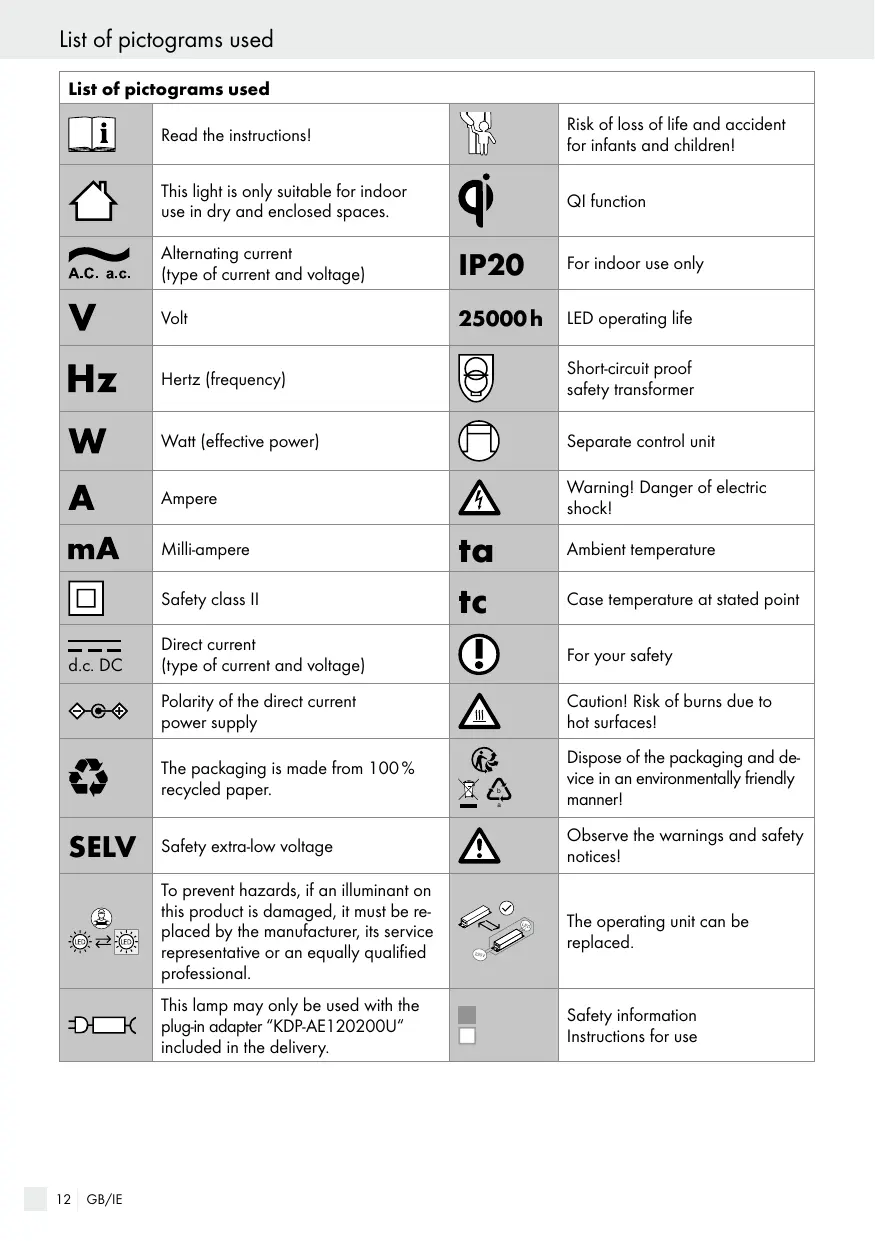
List of pictograms used

Introduction

Intended use Page 13

Scope of delivery.. Page 13

Parts description.. Page 13

Technical data.. Page 13

Safety. Page 13

Safety notices.. Page 13

Initial use

Mounting the light.. Page 14

Switching the lamp on/off. Page 14

USB connector . Page 15

Inductive charging.. Page 15

Setting the light colour.. Page 15

Dimming the lamp.. Page 15

Maintenance and cleaning

Disposal

Warranty and service..

Warranty. Page 16

Service address.. Page 16

Declaration of conformity.. Page 16

Manufacturer.. Page 16

List of pictograms used
iRead the instructions!Risk of loss of life and accident for infants and children!
This light is only suitable for indoor use in dry and enclosed spaces.qiQI function
A.C. a.c.Alternating current (type of current and voltage)IP20For indoor use only
VVolt25000hLED operating life
HzHertz (frequency)Short-circuit proof safety transformer
WWatt (effective power)Separate control unit
AAmpereWarning! Danger of electric shock!
mAMilli-amperetaAmbient temperature
d.c. DCSafety class IItcCase temperature at stated point
Direct current (type of current and voltage)For your safety
Polarity of the direct current power supplyCaution! Risk of burns due to hot surfaces!
The packaging is made from 100% recycled paper.Dispose of the packaging and device in an environmentally friendly manner!
SELVSafety extra-low voltageObserve the warnings and safety notices!
To prevent hazards, if an illuminant on this product is damaged, it must be replaced by the manufacturer, its service representative or an equally qualified professional.The operating unit can be replaced.
DThis lamp may only be used with the plug-in adapter "KDP-AE120200U" included in the delivery.Safety information Instructions for use

LED Desk lamp

Introduction

LIVARNO home Lampe de bureau LED avec surface de charge, 6,2 W - Introduction - 1

Congratulations on your new product.

You have selected a high quality product.

The instructions for use are a part of the

product. They contain important information about safety, use and disposal. Before using the product, please familiarise yourself with all the operating and safety instructions. Only use the product as described and for the indicated purpose. When passing this product on to others, please be sure to include all its documentation. Before using this product for the first time verify the correct voltage and that all parts are properly installed.

Intended use

LIVARNO home Lampe de bureau LED avec surface de charge, 6,2 W - Intended use - 1

This light is only suitable for indoor use in dry and enclosed spaces. This device is intended for normal operation.

- Scope of delivery

Check immediately after unpacking that the parts are complete and that the product is in proper condition.

1 LED desk lamp

(14155005L/

14155006L)

1 Plug-in transformer

1 Set of operating

instructions

Parts description

Lamp head
2 LED module
Lamp base
4 USB connector
Status LED
6 Inductive charging surface

Mode button "M"
8 Touch dimmer
9 ON/OFF touch button
10 Mains cable
11 Plug-in transformer

Technical data

Entire lamp:

Model number: 14155005L/14155006L

Operating voltage: 230-240V\~, 50Hz

Rated power: max. 23W

Protection class: II/

IP rating: IP20

LED:

LED module: max. 6,2W

USB:

Output power: 5V = =,1.0A

Mains adapter:

Model number: KDP-AE120200U

Operating voltage: 220-240V\~, 50/60Hz

Output power: 12V = = .2,0A,

24W max.

Protection class: II/

QI function:

Transmission frequency: 100-205kHz

QI field strength: less than -5 dBpA/m

at 10m

Max. transmission

capacity: 5W

Transmission range: ≤ 5mm

This product contains illuminants from energy efficiency category F^

Safety

LIVARNO home Lampe de bureau LED avec surface de charge, 6,2 W - Safety - 1

Safety notices

Damage due to failure to comply with these operating instructions will invalidate the warranty! We assume no liability for consequential damage! We assume no liability for material damage or personal injury due to improper handling or failure to comply with the safety instructions!

LIVARNO home Lampe de bureau LED avec surface de charge, 6,2 W - Safety notices - 1

A WARNING! RISK OF FATAL

INJURY AND ACCIDENT

HAZARD FOR TODDLERS AND SMALL CHILDREN!

Never leave children unattended with the packaging material. The packaging material represents a danger of suffocation. Children frequently underestimate the dangers.

This device may be used by children aged 8 years and up, as well as by persons with reduced physical, sensory or mental capacities, or lacking experience and/or knowledge, when supervised or instructed in the safe use of the device and they understand the associated risks. Do not allow children to play with the device. Cleaning and user maintenance must not be performed by children without supervision.

RISK OF INJURY!

Do not leave the lamp or packaging material lying unattended. Plastic film or bags, Styrofoam etc. can become dangerous toys for children.

LIVARNO home Lampe de bureau LED avec surface de charge, 6,2 W - RISK OF INJURY! - 1

Avoid the risk of fatal injury from electric shock

Always check the plug-in transformer and the USB connector for possible damage before connecting the light to the mains.
In the event of damage, repairs or other problems with the light, please contact the service centre or an electrician.
Ensure that the light does not come into contact with water or other liquids under any circumstances.
- Never open or insert anything into electrical fittings or equipment (e.g. switches, fitting socket). This will pose a risk of fatal injury from electric shock.
Only touch the insulated part of the plug-in transformer when connecting to or disconnecting from the mains supply!
The external flexible cord on this lamp is not replaceable; if the cord is damaged the lamp must be disposed of.
Before every use, verify the available mains voltage matches the required operating voltage of the light (see "Technical data").
Always disconnect the plug-in transformer from the mains prior to assembly, disassembly,

cleaning, or if the light will not be used for extended periods.

LIVARNO home Lampe de bureau LED avec surface de charge, 6,2 W - Avoid the risk of fatal injury from electric shock - 1

Safe working

Position the lamp so it is protected from moisture and dirt.
Always be attentive! Always pay attention to what you are doing and use common sense.
- Do not cover the lamp with objects. Excessive heat can result in fire.
Do not look into the illuminant from a close distance during operation.
Do not use optical instruments to look at the light source (e.g. magnifying glass).
In order to disconnect the light completely from the power supply, the plug-in transformer must be removed from the socket.
To prevent hazards, if an illuminant on this product is damaged, it must be replaced by the manufacturer, its service representative or an equally qualified professional.

- Initial use

- Mounting the light

Remove all packaging material from the lamp.
Connect the plug-in transformer [11] to the mains cable [10].
Plug the plug-in transformer into a properly installed power socket.

Your lamp is now ready to use.

- Switching the lamp on/off

Press the ON/OFF touch button on the lamp base to switch the lamp on and off.

- USB connector

  • Your lamp has a USB connector [4] in the case. With this USB connector [4] you can operate any devices that may be operated using a USB connector.
    The charging function works during all settings (ON/OFF).
    The light is suitable for USB cables up to 5m long.

Inductive charging

Note: The smartphone should have at least 5% charge remaining.

Ideally place the smartphone on the charging surface parallel and in the middle to the inductive surface. The lamp must be plugged into a properly installed plug socket in order for the inductive charging function to be used.

Note: Charging is only possible using smartphones with a QI function.

Place your smartphone on the inductive charging surface 6 on the lamp. On the side of the lamp base 3 there is a status LED 5. It does not light up when no smartphone is being charged. It lights up blue if a smartphone is on the inductive charging surface 6. Your smartphone is now charging.

- Setting the light colour

You can set three different light colours (warm white, neutral white or cold white) for the lamp using the mode button "M" 7.

Dimming the lamp

To dim the lamp, press the touch dimmer 8 on the lamp base 3.

The lamp can be dimmed in 6 stages.

Note: The lamp has a memory function. When it is switched on again the lamp automatically uses the previously selected dimming level.

- Maintenance and cleaning

WARNING! DANGER OF ELECTRIC SHOCK!

Switch the light off. Unplug the plug-in transformer 11 from the socket.

CAUTION! RISK OF BURNS DUE TO HOT SURFACES!

  • Allow the light to cool off completely. Remove the inserted USB plug if necessary.

WARNING! DANGER OF ELECTRIC SHOCK!

For electrical safety reasons, never clean the lamp with water or other liquids, or immerse it in water.

  • Do not use solvents, benzene or similar substances. They could damage the light.
    Only use a dry, lint-free cloth for cleaning.
    Plug the plug-in transformer [11] into a properly installed power socket.

- Disposal

The packaging is made entirely of recyclable materials, which you may dispose of at local recycling facilities.

LIVARNO home Lampe de bureau LED avec surface de charge, 6,2 W - - Disposal - 1

Observe the marking of the packaging materials for waste separation, which are marked with abbreviations (a) and numbers (b) with following meaning: 1-7: plastics/20-22: paper and fibreboard/80-98: composite materials.

LIVARNO home Lampe de bureau LED avec surface de charge, 6,2 W - - Disposal - 2

The product and packaging materials are recyclable, dispose of it separately for better waste treatment. The Triman logo is valid in France only.

LIVARNO home Lampe de bureau LED avec surface de charge, 6,2 W - - Disposal - 3

To help protect the environment, please dispose of the product properly when it has reached the end of its useful life and not in the household waste. Information on collection points and their opening hours can be obtained from your local authority.

Old devices can also be returned to retailers who offer devices for purchase.

Warranty and service

Warranty

You receive a 36 month warranty on this product, valid from the date of purchase. The appliance has been carefully produced under strict quality control. Within the warranty period we shall rectify without charge all material and manufacturing defects. In the event of a defect during the warranty period, please send the appliance to the listed Service Centre address, referencing the following item number: 14155005L/14155006L.

Wear parts (such as bulbs) and damage caused by improper handling, non-observance of the operating instructions or unauthorised interference are excluded from the warranty. The performance of services under the warranty does not extend or renew the warranty period.

Service address

Free service number:

Tel.: 00800/27456637

IAN 390957_2201

Please have your receipt and the item number (IAN 390957_2201) ready as your proof of purchase when enquiring about your product.

Declaration of conformity (C)

This product fulfils the requirements of the applicable European and national directives. Conformity has been demonstrated. The relevant declarations and documents are held by the manufacturer.

Briloner Leuchten GmbH & Co. KG hereby confirm that the radio equipment model 14155005L/ 14155006L complies with the RED Directive 2014/53/EU.

The full text of the EU Declaration of Conformity is available at the following web address: https://www.briloner.com/de/service/informationen-zu-leuchten/eu-konformitaetserklaerung-fuer-funkanlagentyp.php

Manufacturer

transmission max.: 5W

Portede transmission: ≤ 5mm

Wtqczanie/Wytqczanie lampy. Strona 35

Zlqcze USB. Strona 35

PRE MALÉ I STARŠIE DETI!

Tipode protection: IP20

LED:

Modulo LED: max. 6,2W

USB:

Potencia de salute: 5V = -1,0A

Montering of lampe. Side 62

Taend/sluk af lampen.. Side 62

USB-tilslutning. 62

Pooblascni serviser:
Manual assistant
Powered by Anthropic
Waiting for your message
Product information

Brand : LIVARNO

Model : home Lampe de bureau LED avec surface de charge, 6,2 W

Category : Consumer product