NC - Monitor SONY - Free user manual and instructions
Find the device manual for free NC SONY in PDF.



User questions about NC SONY
0 question about this device. Answer the ones you know or ask your own.
Ask a new question about this device
Download the instructions for your Monitor in PDF format for free! Find your manual NC - SONY and take your electronic device back in hand. On this page are published all the documents necessary for the use of your device. NC by SONY.
USER MANUAL NC SONY
www.tcodevelopment.com
This monitor complies with the TCO'03 guidelines.
目次
使用上之注意 4
各部の名前はたさ 5
接統と設定 6
手順1:スばンドを使う 6
手順2:ルフローにつんだ..................................................................................................... 7
手順3:電源コーダをつ胨く 7
手順4:一卜類をまとる 7
手順5:電源を入る 8
DvSPreI'向を変る 8
This display is designed for use in Japan only and cannot be used in any other country.
主女仕樣
SDM-E76A
www.tcodevelopment.com
Congratulations!
The display you have just purchased carries the TCO'03 Displays label. This means that your display is designed, manufactured and tested according to some of the strictest quality and environmental requirements in the world. This makes for a high performance product, designed with the user in focus that also minimizes the impact on our natural environment.
■ Ergonomics
- Good visual ergonomics and image quality in order to improve the working environment for the user and to reduce sight and strain problems. Important parameters are luminance, contrast, resolution, reflectance, colour rendition and image stability.
Energy
- Energy-saving mode after a certain time - beneficial both for the user and the environment
- Electrical safety
Emissions
- Electromagnetic fields
- Noise emissions
Ecology
- The product must be prepared for recycling and the manufacturer must have a certified environmental management system such as EMAS or ISO 14 001
-
Restrictions on
-
chlorinated and brominated flame retardants and polymers
- heavy metals such as cadmium, mercury and lead.
The requirements included in this label have been developed by TCO Development in co-operation with scientists, experts, users as well as manufacturers all over the world. Since the end of the 1980s TCO has been involved in influencing the development of IT equipment in a more user-friendly direction. Our labelling system
started with displays in 1992 and is now requested by users and IT-manufacturers all over the world.
For more information, please visit
www.tcodevelopment.com
Recycling Information
Customer in Europe
The collection and recycling of this product has been planned according to your country's relevant legislation. To ensure that this product will be collected and recycled in way that minimizes the impact on the environment, please do the following:
-
If you purchased this product for private use, contact your municipality or the waste collection system and bring the product to this collection point / have the product be picked up by the waste collection system. Alternatively, your retailer might take back this if you purchase new equivalent equipment; please check with your retailer whether he will take back this product before bringing it. For information on your country's recycling arrangements, please contact the Sony representation in your country (contact details at: www.sony-europe.com). Further details on specific recycling systems can be found at the following addresses:
-
Belgium: www-recupel.be
- Netherlands: www.nvmp.nl (consumer electronics) www.ictmilieu.nl (IT equipment)
- Norway: www.elretur.no
- Sweden: www.el-kretsen.se
-
Switzerland: www.swico.ch
-
If you use this product professionally, check the product's delivery contract for take back / recycling arrangements and follow the procedures described therein. Alternatively, follow the procedures described under point 1.
Customer in USA
We Sony as a member of EIA recommends to visit URL below http://www.eiae.org/
Customer in Asia
http://www.sony.co.jp/SonyInfo/Environment/recycle/3R.html
TFTLCD Color Computer Display
Operating Instructions (GB)
SDM-E76A/SDM-E96A
SDM-E76D/SDM-E96D
Owner's Record
The model and serial numbers are located at the rear of the unit. Record these numbers in the spaces provided below. Refer to them whenever you call upon your dealer regarding this product. Model No. __ Serial No. ____
WARNING
To reduce the risk of fire or electric shock, do not expose this apparatus to rain or moisture.
Dangerously high voltages are present inside the unit. Do not open the cabinet. Refer servicing to qualified personnel only.
FCC Notice
This equipment has been tested and found to comply with the limits for a Class B digital device, pursuant to Part 15 of the FCC Rules. These limits are designed to provide reasonable protection against harmful interference in a residential installation. This equipment generates, uses, and can radiate radio frequency energy and, if not installed and used in accordance with the instructions, may cause harmful interference to radio communications. However, there is no guarantee that interference will not occur in a particular installation. If this equipment does cause harmful interference to radio or television reception, which can be determined by turning the equipment off and on, the user is encouraged to try to correct the interference by one or more of the following measures:
- Reorient or relocate the receiving antenna.
- Increase the separation between the equipment and receiver.
- Connect the equipment into an outlet on a circuit different from that to which the receiver is connected.
- Consult the dealer or an experienced radio/TV technician for help. You are cautioned that any changes or modifications not expressly approved in this manual could void your authority to operate this equipment.
IMPORTANT
If you have any questions about this product, you may call; Sony Customer Information Services Center 1-800-222-7669 or http://www.sony.com/
Declaration of Conformity
Trade Name: SONY
Model: SDM-E76A/SDM-E96A
SDM-E76D/SDM-E96D
Responsible Party: Sony Electronics Inc.
Address: 16530 Via Esprillo,
San Diego, CA 92127 U.S.A.
Telephone Number: 858-942-2230
This device complies with part 15 of the FCC rules. Operation is subject to the following two conditions: (1) This device may not cause harmful interference, and (2) this device must accept any interference received, including interference that may cause undesired operation.
NOTICE
This notice is applicable for USA/Canada only.
If shipped to USA/Canada, install only a UL LISTED/CSA
LABELLED power supply cord meeting the following specifications:
SPECIFICATIONS
Plug Type Nema-Plug 5-15p
Cord Type SVT or SJT, minimum 3× 18 AWG
Length Maximum 15 feet
Rating Minimum 7 A, 125 V
NOTICE
As an ENERGY STAR Partner, Sony
Corporation has determined that this product meets the ENERGY STAR guidelines for energy efficiency.

This monitor complies with the TCO'03 guidelines.
Table of Contents
Precautions. 4
Identifying parts and controls 5
Setup. 6
Step 1: Use the stand. 6
Step 2: Connect the display to your computer. 6
Step 3: Connect the power cord. 7
Step 4: Secure the cords. 7
Step 5: Turn on the monitor and computer 7
Adjusting the tilt 8
Selecting the input signal (INPUT button)
(SDM-E76D/SDM-E96D only) 8
Customizing Your Monitor 9
Navigating the menu. 9
Adjusting the backlight (BACKLIGHT) 10
Adjusting the contrast (CONTRAST) 10
Adjusting the black level of an image (BRIGHTNESS). 11
Adjusting the picture's sharpness and centering (SCREEN) (analog RGB signal only). 11
Adjusting the color temperature (COLOR) 13
Changing the gamma setting (GAMMA). 13
Adjusting the sharpness (SHARPNESS) 13
Changing the menu's position (MENU POSITION) 13
Changing the input automatically (INPUT SENSING) (SDM-E76D/SDM-E96D only) 14
Selecting the on-screen menu language (LANGUAGE). 14
Additional settings. 14
Technical Features 16
Power saving function. 16
Automatic picture quality adjustment function (analog RGB signal only) 16
Troubleshooting. 17
On-screen messages 17
Trouble symptoms and remedies 18
Specifications. 20
TCO'03 Eco-document
- Macintosh is a trademark licensed to Apple Computer, Inc., registered in the U.S.A. and other countries.
- Windows® is registered trademarks of Microsoft Corporation in the United States and other countries.
- VESA and DDC™ are trademarks of the Video Electronics Standards Association.
- ENERGY STAR® is a U.S. registered mark.
- Adobe and Acrobat are trademarks of Adobe Systems Incorporated.
- All other product names mentioned herein may be the trademarks or registered trademarks of their respective companies.
- Furthermore, “TM” and “@” are not mentioned in each case in this manual.
Precautions
Warning on power connections
- Use the supplied power cord. If you use a different power cord, be sure that it is compatible with your local power supply.
For the customers in the U.S.A.
If you do not use the appropriate cord, this monitor will not conform to mandatory FCC standards.
For the customers in the UK
If you use the monitor in the UK, be sure to use the appropriate UK power cord.
Example of plug types
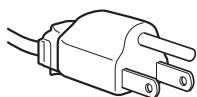
for 100 to 120 V AC
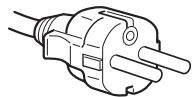
for 200 to 240 V AC
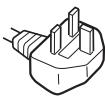
for 240 V AC only
The equipment should be installed near an easily accessible outlet.
Installation
Do not install or leave the monitor:
- In places subject to extreme temperatures, for example near a radiator, heating vent, or in direct sunlight. Subjecting the monitor to extreme temperatures, such as in an automobile parked in direct sunlight or near a heating vent, could cause deformations of the casing or malfunctions.
- In places subject to mechanical vibration or shock.
- Near any equipment that generates a strong magnetic field, such as a TV or various other household appliances.
- In places subject to inordinate amounts of dust, dirt, or sand, for example near an open window or an outdoor exit. If setting up temporarily in an outdoor environment, be sure to take adequate precautions against airborne dust and dirt. Otherwise irreparable malfunctions could occur.
Place this unit on a flat surface. Do not place it on an uneven surface like the edge of a desk. If a part of this unit sticks out from such surface, it may fall or cause damaged and injury.
Handling the LCD screen
- Do not leave the LCD screen facing the sun as it can damage the LCD screen. Take care when you place the monitor by a window.
- Do not push on or scratch the LCD screen. Do not place a heavy object on the LCD screen. This may cause the screen to lose uniformity or cause LCD panel malfunctions.
- If the monitor is used in a cold place, a residual image may appear on the screen. This is not a malfunction. The screen returns to normal as the temperature rises to a normal operating level.
- If a still picture is displayed for a long time, a residual image may appear for a while. The residual image will eventually disappear.
- The LCD panel becomes warm during operation. This is not a malfunction.
Note on the LCD (Liquid Crystal Display)
Please note that the LCD screen is made with high-precision technology. However, black points or bright points of light (red, blue, or green) may appear constantly on the LCD screen, and irregular colored stripes or brightness may appear on the LCD screen. This is not malfunction.
(Effective dots: more than 99.99% )
Maintenance
- Be sure to unplug the power cord from the power outlet before cleaning your monitor.
- Clean the LCD screen with a soft cloth. If you use a glass cleaning liquid, do not use any type of cleaner containing an anti-static solution or similar additive as this may scratch the LCD screen's coating.
- Clean the cabinet, panel, and controls with a soft cloth lightly moistened with a mild detergent solution. Do not use any type of abrasive pad, scouring powder, or solvent, such as alcohol or benzine.
- Do not rub, touch, or tap the surface of the screen with sharp or abrasive items such as a ballpoint pen or screwdriver. This type of contact may result in a scratched picture tube.
- Note that material deterioration or LCD screen coating degradation may occur if the monitor is exposed to volatile solvents such as insecticide, or if prolonged contact is maintained with rubber or vinyl materials.
Transportation
- Disconnect all cables from the monitor and grasp the monitor firmly with both hands when transporting. If you drop the monitor, you may be injured or the monitor may be damaged.
- When you transport this monitor for repair or shipment, use the original carton and packing materials.
Installation on a wall or a mounting arm
If you intend to install the display on a wall or a mounting arm, be sure to consult qualified personnel.
Disposal of the monitor
- Do not dispose of this monitor with general household waste.
- The fluorescent tube used in this monitor contains mercury. Disposal of this monitor must be carried out in accordance to the regulations of your local sanitation authority.
Identifying parts and controls
See the pages in parentheses for further details.
The (power) switch and the control buttons are on the lower right part of the front of the monitor.
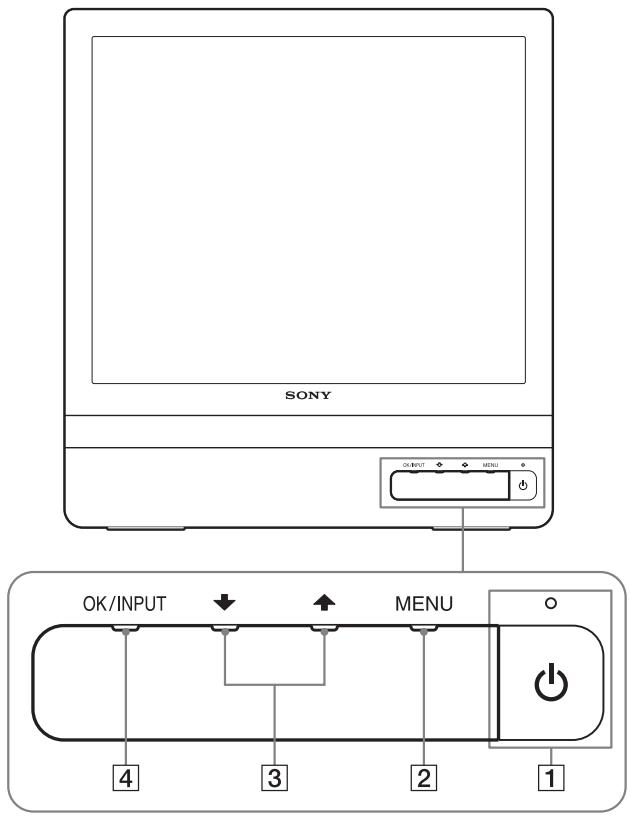
Front of the display
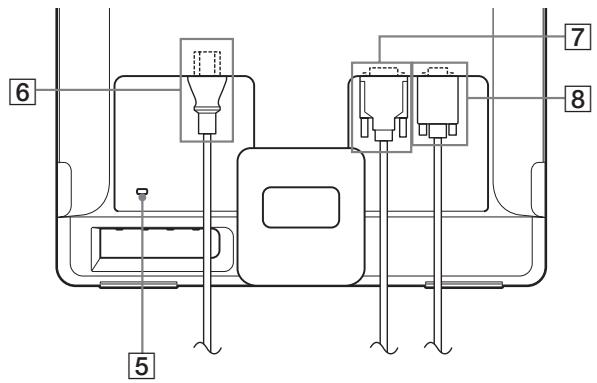
Rear of the display
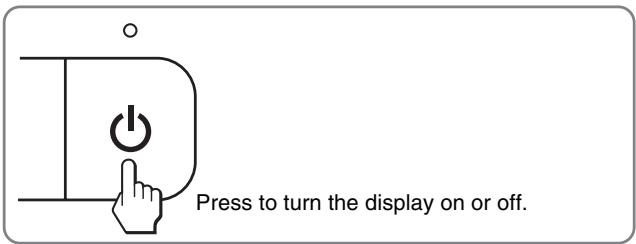
1 (Power) switch and indicator (pages 7, 16)
To turn the display on or off, press the (power) switch. The power indicator lights up in green when the display is turned on, and lights up in orange when the monitor is in power saving mode.
2 MENU button (pages 9, 10)
This button displays or closes the main menu.
You can also switch on the DDC/CI function by keeping this button pressed for more than 8 seconds.
3 / buttons (page 10)
These buttons function as the / buttons when selecting the menu items and making adjustments.
OK button (page 10)
This button selects the item or executes the settings in the menu.
INPUT button (page 8) (SDM-E76D/SDM-E96D only)
This button switches the video input signal between INPUT1 and INPUT2 when two computers are connected to the monitor.
5 Security Lock Hole
The security lock hole should be applied with the Kensington Micro Saver Security System.
Micro Saver Security System is a trademark of Kensington.
6 AC IN connector (page 7)
Connect the power cord (supplied).
DVI-D input connector (digital RGB) for INPUT1 (page 6) (SDM-E76D/SDM-E96D only)
This connector inputs digital RGB video signals that comply with DVI Rev.1.0.
8 HD15 input connector (analog RGB) (page 6)
This connector inputs analog RGB video signals (0.7 Vp-p, positive) and SYNC signals.
Setup
Before using your monitor, check that the following items are included in your carton:
- LCD display
Power cord - HD15-HD15 video signal cable (analog RGB)
- DVI-D video signal cable (digital RGB) (SDM-E76D/SDM-E96D only)
Cord strap - CD-ROM (utility software for Windows/Macintosh, Operating Instructions, etc.)
Warranty card - Quick Setup Guide
Step 1: Use the stand
Use the supplied stand
Open the stand.
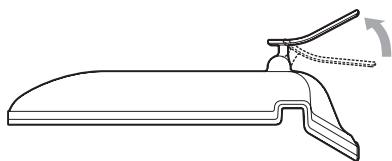
Note
The stand is folded at the factory. Be sure not to place the display vertically with the stand as it is. Otherwise, the display may topple over.
Use the VESA compatible stand
When using a non-supplied VESA compatible mounting arm or stand, use the VESA compatible screws to attach.
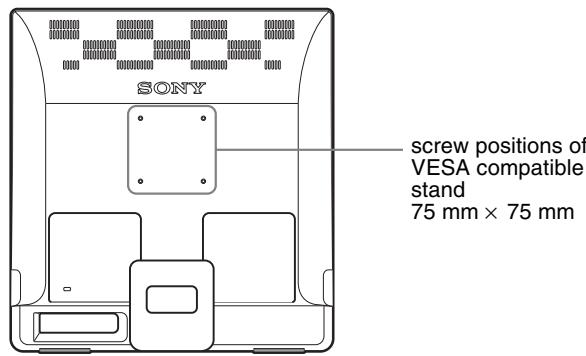
You can use the display with or without the supplied stand.
Step 2: Connect the display to your computer
Turn off the monitor and computer before connecting.
Notes
- Do not touch the pins of the video signal cable connector as this might bend the pins.
- Check the alignment of the HD15 connector to prevent bending the pins of the video signal cable connector.
Connect a computer equipped with a DVI output connector (digital RGB) (SDM-E76D/SDM-E96D only)
Using the supplied DVI-D video signal cable (digital RGB), connect the computer to the monitor's DVI-D input connector (digital RGB)
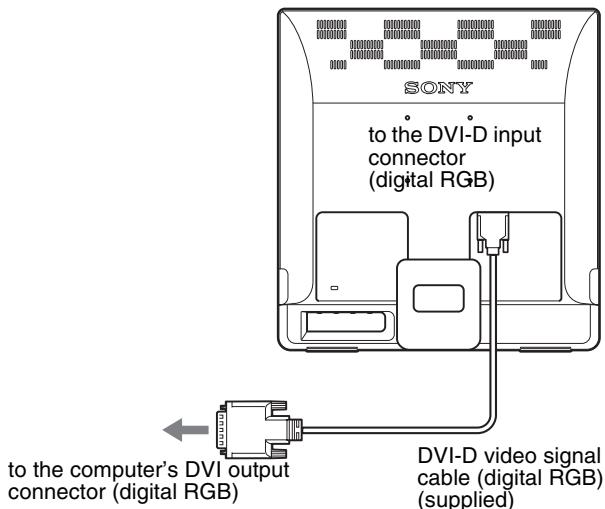
Connect a computer equipped with an HD15 output connector (analog RGB)
Using the supplied HD15-HD15 video signal cable (analog RGB), connect the computer to the monitor's HD15 input connector (analog RGB).
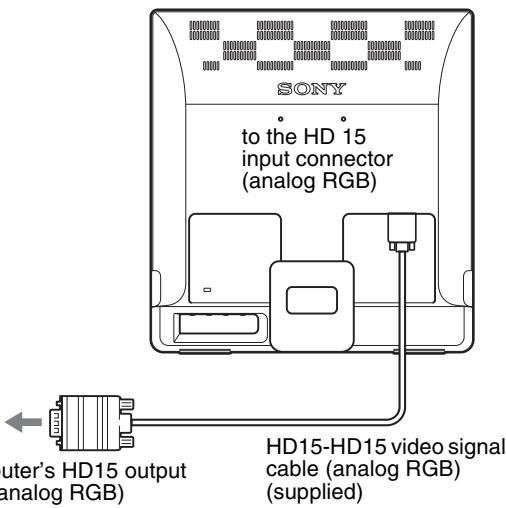
Step 3: Connect the power cord
With the monitor and computer switched off, first connect the power cord to the monitor, then connect it to a power outlet.

Step 4: Secure the cords
Bundle the cables and cords.
Using the supplied cord strap, bundle the cables and cords.
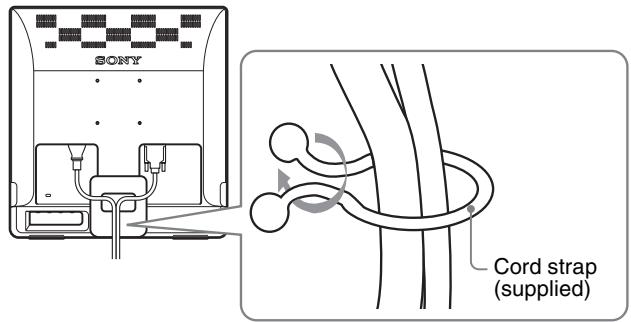
The illustration of the back of the monitor shown here is that of the SDM-E76D.
The same applies for the other models.
Step 5: Turn on the monitor and computer
Press the (power) switch.
The (power) indicator of the monitor lights up in green.
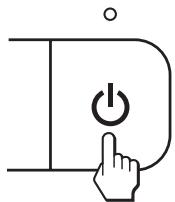
Turn on the computer.
The installation of your monitor is complete. If necessary, use the monitor's controls to adjust the picture.
If no picture appears on your screen
- Check that the power cord and the video signal cable are properly connected.
- If NO INPUT SIGNAL appears on the screen:
The computer is in the power saving mode. Try pressing any key on the keyboard or moving the mouse.
- If CABLE DISCONNECTED appears on the screen:
Check that the video signal cable is properly connected.
- If OUT OF RANGE appears on the screen:
Reconnect the old monitor. Then adjust the computer's graphics board within the following ranges.
| Analog RGB | Digital RGB(SDM-E76D/SDM-E96D only) | |
| Horizontal frequency | 28-80 kHz | 28-64 kHz |
| Vertical frequency | 56-75 Hz | 60 Hz |
| Resolution | 1280 × 1024 or less | 1280 × 1024 or less |
For more information about the on-screen messages, see "Trouble symptoms and remedies" on page 18.
No need for specific drivers
The monitor complies with the "DDC" Plug & Play standard and automatically detects all the monitor's information. No specific driver needs to be installed to the computer.
The first time you turn on your computer after connecting the monitor, the setup Wizard may appear on the screen. In this case, follow the on-screen instructions. The Plug & Play monitor is automatically selected so that you can use this monitor.
The vertical frequency turns to 60Hz
Since flickers are unobtrusive on the monitor, you can use it as it is. You do not need to set the vertical frequency to any particular high value.
Adjusting the tilt
This display can be adjusted within the angles shown below.
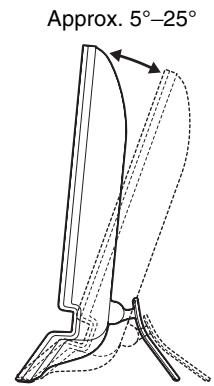
Grasp the lower sides of the LCD panel, then adjust screen tilt.
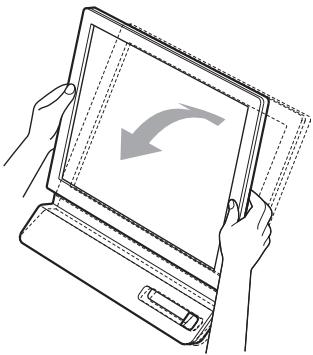
To use the display comfortably
This display is designed so that you can set it up at a comfortable viewing angle. Adjust the viewing angle of your display according to the height of the desk and chair, and so that light is not reflected from the screen to your eyes.
Note
When adjusting the screen tilt, make sure not to knock or drop the display off the desk.
Selecting the input signal (INPUT button) (SDM-E76D/SDM-E96D only)
Press the INPUT button.
The input signal change each time you press this button.
| On-screen message (Appears about 5 seconds on the upper left corner.) | Input signal configuration |
| INPUT1: DVI-D | DVI-D input connector (digital RGB) for INPUT1 |
| INPUT2: HD15 | HD15 input connector (analog RGB) for INPUT2 |
OK/INPUT
Customizing Your Monitor
Before making adjustments
Connect the monitor and the computer, and turn them on. Wait for at least 30 minutes before making adjustments for the best result.
You can make numerous adjustments to your monitor using the on-screen menu.
Navigating the menu
Press the MENU button to display the main menu on your screen. See page 10 for more information on using the MENU button.
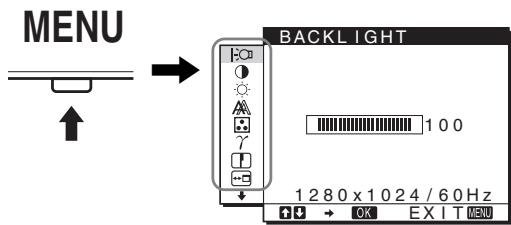
Use the / and OK buttons to select the icons in the above main menu illustration. The following 1 to 10 menu appears. Keep pressing to scroll down until the icons in menu 9 and 10 appear. See page 10 for more information on using the / and OK buttons.
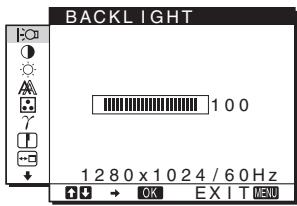
1 BACKLIGHT (page 10)
Select the BACKLIGHT menu to adjust the brightness of the backlight.
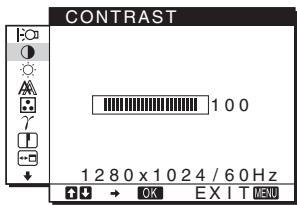
2 CONTRAST (page 10)
Select the CONTRAST menu to adjust the picture contrast.
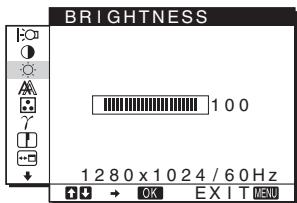
3 BRIGHTNESS
(page 11)
Select the BRIGHTNESS menu to adjust the picture brightness (black level).
4 SCREEN A (page 11)
Select the SCREEN menu to adjust the picture's sharpness (phase/pitch) or its centering (horizontal/vertical position).
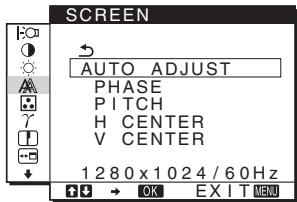
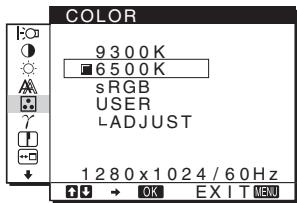
5 COLOR (page 13)
Select the COLOR menu to adjust the color temperature of the picture. This adjusts the tone of the screen. While COLOR is set to sRGB, you cannot adjust CONTRAST, BRIGHTNESS or GAMMA.
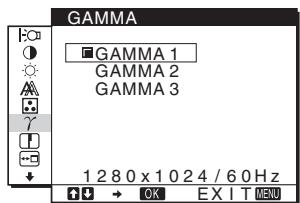
6 GAMMA (page 13)
Select the GAMMA menu to change the picture's color shade setting.
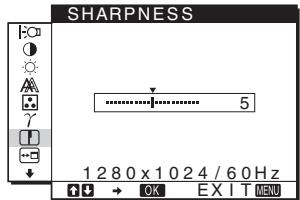
7 SHARPNESS (page 13)
Select the SHARPNESS menu to adjust to sharpen the edge of images.
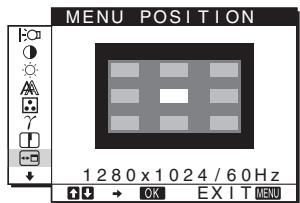
8 MENU POSITION (page 13)
Select the MENU POSITION to change the onscreen menu position.
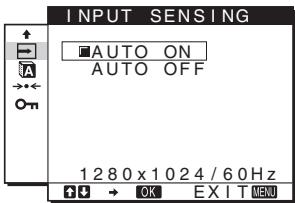
9 INPUT SENSING (page 14) (SDM-E76D SDM-E96D only)
The monitor automatically detects an input signal to an input terminal, and changes the input automatically before the monitor goes into the power saving mode.
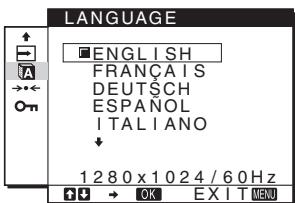
10 LANGUAGE (page 14)
Select LANGUAGE to change the language used on menus or messages.
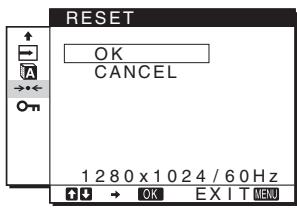
11 Other menus (page 14)
Set the following menu items.
- RESET
- MENU LOCK On
Using the MENU, / , and OK buttons
1 Display the main menu.
Press the MENU button to display the main menu on your screen.
MENU
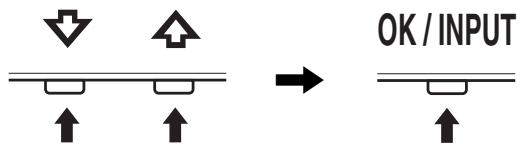
2 Select the menu you want to adjust.
Press the / buttons to display the desired menu. Press the OK button to select the menu item.
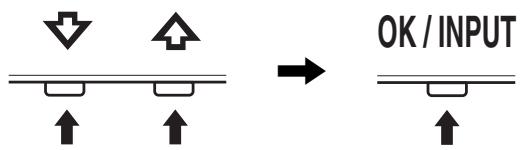
3 Adjust the menu.
Press the / buttons to make the adjustment, then press the OK button.
When you press the OK button, the setting is stored, then the display returns to the previous menu.
4 Close the menu.
Press the MENU button once to return to normal viewing. If no buttons are pressed, the menu closes automatically after about 45 seconds.
Resetting the adjustments
You can reset the adjustments using the RESET menu. See page 14 for more information on resetting the adjustments.
Controlling the monitor by computer
Press the MENU button down for at least 5 seconds. You will see an on-screen message indicating the current setting. After 3 seconds the DDC/CI setting is switched on or off, as shown below.
| On-screen messages (Appear for a while) | |
| DDC-CI: ON (default setting) | Allows the computer to control menu settings. |
| DDC-CI: OFF | Does not allow the computer to control menu settings. |
Note
This function applies only to computers that support the DDC/CI (Display Data Channel Command Interface) function.
Adjusting the backlight (BACKLIGHT)
If the screen is too bright, adjust the backlight and make the screen easier to see.
1 Press the MENU button.
The main menu appears on the screen.
2 Press the / buttons to select (BACKLIGHT) and press the OK button.
The BACKLIGHT menu appears on the screen.
3 Press the / buttons to adjust the light level and press the OK button.
Adjusting the contrast (CONTRAST)
Adjust the picture contrast.
Note
While COLOR is set to sRGB, you cannot adjust CONTRAST, BRIGHTNESS or GAMMA.
1 Press the MENU button.
The main menu appears on the screen.
2 Press the / buttons to select ① (CONTRAST) and press the OK button.
The CONTRAST menu appears on the screen.
3 Press the / buttons to adjust the contrast and press the OK button.
Adjusting the black level of an image (BRIGHTNESS)
Adjust the picture brightness (black level).
Note
While COLOR is set to sRGB, you cannot adjust CONTRAST, BRIGHTNESS or GAMMA.
1 Press the MENU button.
The main menu appears on the screen.
2 Press the / buttons to select (BRIGHTNESS) and press the OK button.
The BRIGHTNESS menu appears on the screen.
3 Press the / buttons to adjust the brightness and press the OK button.
Adjusting the picture's sharpness and centering (SCREEN) (analog RGB signal only)
Automatic picture quality adjustment function
When the monitor receives an input signal, it automatically adjusts the picture's position and sharpness (phase/pitch), and ensures that a clear picture appears on the screen (page 16).
Notes
- While the automatic picture quality adjustment function is activated, only the (power) switch will operate.
- The picture may flicker during this time, but this is not a malfunction. Simply wait a few moments until the adjustment completes.
If the automatic picture quality adjustment function of this monitor seems to not completely adjust the picture
You can make further automatic adjustment of the picture quality for the current input signal. (See AUTO ADJUST below.)
If you still need to make further adjustments to the picture quality
You can manually adjust the picture's sharpness (phase/pitch) and position (horizontal/vertical position).
These adjustments are stored in memory and automatically recalled when the display receives the same input signal.
These settings may have to be repeated if you change the input signal after reconnecting your computer.
Make further automatic adjustments to the picture quality for the current input signal (AUTO ADJUST)
Set the optimum phase, pitch and horizontal/vertical position for the current input signal.
1 Press the MENU button.
The main menu appears on the screen.
2 Press the / buttons to select A (SCREEN) and press the OK button.
The SCREEN menu appears on the screen.
3 Press the / buttons to select AUTO ADJUST and press the OK button.
The AUTO ADJUST menu appears on the screen.
4 Press the / buttons to select ON or OFF and press the OK button.
- ON: Make the appropriate adjustments of the screen's phase, pitch and horizontal/vertical position for the current input signal and store them.
Note
When the monitor is turned on or the input signal is changed, AUTO ADJUST makes the automatic adjustments.
- OFF: AUTO ADJUST is not available. Note
AUTO ADJUST works automatically when the input signal is changed.
5 Press the / buttons to select and press the OK button.
Return to the menu screen.
Adjust the picture's sharpness and position manually (PITCH/PHASE/H CENTER/V CENTER)
You can adjust the picture's sharpness as follows. This adjustment is effective when the computer is connected to the monitor's HD15 input connector (analog RGB).
1 Set the resolution to 1280 × 1024 on the computer.
2 Load the CD-ROM.
3 Start the CD-ROM
For Windows User
When Auto run operates:
Select the area, language and model, and click DISPLAY ADJUSTMENT TOOL (UTILITY).
4 Click "Adjust" and confirm the current resolution (top value) and recommended resolution (bottom value), and then click "Next".
Test pattern for PITCH appears.
5 Press the MENU button.
The main menu appears on the screen.
6 Press the / buttons to select A (SCREEN) and press the OK button.
The SCREEN menu appears on the screen.
7 Press the / buttons to select PITCH and press the OK button.
The PITCH adjustment menu appears on the screen.
8 Press the / buttons until the vertical stripes disappear.
Adjust so that the vertical stripes disappear.
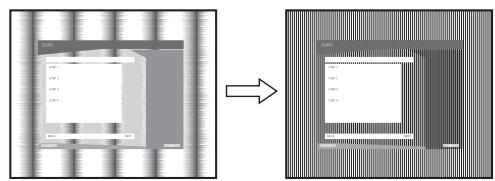
9 Press the OK button.
The main menu appears on the screen.
If horizontal stripes are observed over the entire screen, adjust the PHASE using the following procedures.
10 Click "Next".
Test pattern for PHASE appears.
11 Press the / buttons to select PHASE and press the OK button.
The PHASE adjustment menu appears on the screen.
12 Press the / buttons until the horizontal stripes are at a minimum.
Adjust so that the horizontal stripes are at a minimum.
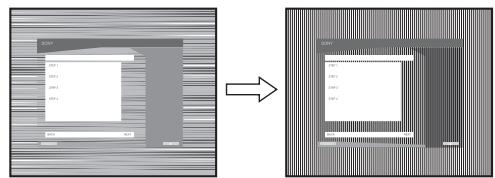
13 Press the OK button.
The main menu appears on the screen.
14 Click "Next".
Test pattern for CENTER appears.
15 Press the / buttons to select H CENTER or V CENTER and press the OK button.
The H CENTER adjustment menu or V CENTER adjustment menu appears on the screen.
16 Press the / buttons to center the test pattern on the screen.
17 Click "Next".
Click "End" or "EXIT" to turn off the test pattern.
When Auto run fails to operate:
1 Open "My Computer" and right click the CD-ROM icon.
Go to "Explorer" and open the CD-ROM icon.
2 Open [Utility] and then select [WINDOWS].
3 Start [WIN_U T I L I T I Y.EXE].
Test pattern appears. Go to step 4.
For Macintosh User
1 Open the CD-ROM.
2 Open [Utility] and then select [MAC].
3 Open [MAC UTILITY] and then start [MAC_CLASSIC_UTILITY] or [MAC OSX_UTILITY].
Test pattern appears. Go to step 4.
4 Press the MENU button.
The main menu appears on the screen.
5 Press the / buttons to select (SCREEN) and press the OK button.
The SCREEN menu appears on the screen.
6 Press the / buttons to select PHASE and press the OK button.
The PHASE adjustment menu appears on the screen.
7 Press the / buttons until the horizontal stripes are at a minimum.
Adjust so that the horizontal stripes are at a minimum.
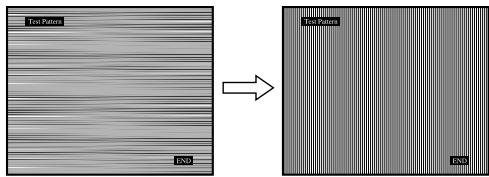
8 Press the OK button.
The main menu appears on the screen.
If vertical stripes are observed over the entire screen, adjust the PITCH using the following procedures.
9 Press the / buttons to select PITCH and press the OK button.
The PITCH adjustment menu appears on the screen.
10 Press the / buttons until the vertical stripes disappear.
Adjust so that the vertical stripes disappear.
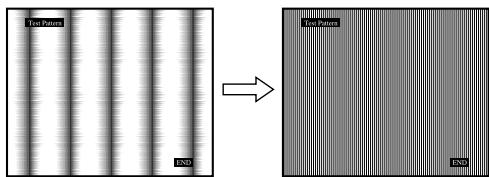
11 Press the OK button.
The main menu appears on the screen.
12 Press the / buttons to select H CENTER or V CENTER and press the OK button.
The H CENTER adjustment menu or V CENTER adjustment menu appears on the screen.
13 Press the / buttons to center the test pattern on the screen.
14 Click "END" on the screen to turn off the test pattern.
Adjusting the color temperature (COLOR)
You can select the color level of the picture's white color field from the default color temperature settings.
Also, if necessary, you can fine tune the color temperature.
You can set the desired color temperature for each mode of the brightness of screen.
1 Press the MENU button.
The main menu appears on the screen.
2 Press the / buttons to select (COLOR) and press the OK button.
The COLOR menu appears on the screen.
3 Press the / buttons to select the desired color temperature and press the OK button.
Whites will change from a bluish hue to reddish hue as the temperature is lowered from 9300K to 6500K (default setting).
When you select "sRGB," the colors adjust to the sRGB profile. (The sRGB color setting is an industry-standard color space protocol designed for computer products.) If you select "sRGB," the color settings of your computer must be set to the sRGB profile.
Notes
- If a connected computer or other equipment is not sRGB-compliant, color cannot be adjusted to the sRGB profile.
- While COLOR is set to sRGB, you cannot adjust CONTRAST, BRIGHTNESS or GAMMA.
Fine tuning the color temperature (USER ADJUSTMENT)
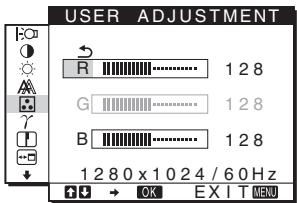
1 Press the / buttons to select ADJUST and press the OK button.
The USER ADJUSTMENT menu appears on the screen.
2 Press the / buttons to select R (Red) or B (Blue) and press the OK button. Then press the / buttons to adjust the color temperature and press the OK button.
Since this adjustment changes the color temperature by increasing or decreasing the R and B components with respect to G (green), the G component is fixed.
3 Press the / buttons to select , then press the OK button.
The new color setting is stored in memory for USER and automatically recalled whenever USER is selected.
The main menu appears on the screen.
Changing the gamma setting (GAMMA)
You can associate the picture's color shade on the screen with the picture's original color shade.
Note
While COLOR is set to sRGB, you cannot adjust CONTRAST, BRIGHTNESS or GAMMA.
1 Press the MENU button.
The main menu appears on the screen.
2 Press the / buttons to select (GAMMA) and press the OK button.
The GAMMA menu appears on the screen.
3 Press the / buttons to select the desired mode and press the OK button.
Adjusting the sharpness (SHARPNESS)
Adjust to sharpen the edge of images, etc.
1 Press the MENU button.
The main menu appears on the screen.
2 Press the / buttons to select (SHARPNESS) and press the OK button.
The SHARPNESS menu appears on the screen.
3 Press the / buttons to adjust the sharpness and press the OK button.
Changing the menu's position (MENU POSITION)
You can change the menu position if it is blocking an image on the screen.
1 Press the MENU button.
The main menu appears on the screen.
2 Press the / buttons to select (MENU POSITION) and press the OK button.
The MENU POSITION menu appears on the screen.
3 Press the / buttons to select the desired position and press the OK button.
There are three positions each for the top, center and bottom of the screen.
Changing the input automatically (INPUT SENSING) (SDM-E76D/SDM-E96D only)
When you select AUTO ON in the INPUT SENSING menu, the monitor automatically detects an input signal to an input terminal, and changes the input automatically before the monitor goes into the power saving mode.
1 Press the MENU button.
The main menu appears on the screen.
2 Press the / buttons to select (INPUT SENSING) and press the OK button.
The INPUT SENSING menu appears on the screen.
3 Press the / buttons to select the desired mode and press the OK button.
-
AUTO ON: When the selected input terminal has no input signal, or when you select an input terminal by the INPUT button on the monitor and the terminal has no input signal, the on-screen message appears (page 17) and the monitor checks the input signal to another input terminal automatically to change the input. When the input is changed, the selected input terminal is displayed on the left upper of the screen. When there is no input signal, the monitor goes into the power saving mode automatically.
-
AUTO OFF: The input is not changed automatically. Press the INPUT button to change the input.
Selecting the on-screen menu language (LANGUAGE)
You can change the language used on menus or messages displayed on this monitor.
1 Press the MENU button.
The main menu appears on the screen.
2 Keep pressing the button until the icon of the desired option item appears.
3 Press the / buttons to select A (LANGUAGE) and press the OK button.
The LANGUAGE menu appears on the screen.
4 Press the / buttons to select a language and press the OK button.
- ENGLISH
FRANÇAIS: French - DEUTSCH: German
- ESPANOL: Spanish
ITALIANO:Italian - NEDERLANDS: Dutch
SVENSKA: Swedish - PYCCKIN: Russian
- 日本語:Japanese
- 中文:Chinese
Additional settings
You can adjust the following options:
- RESET
- MENU LOCK
1 Press the MENU button.
The main menu appears on the screen.
2 Keep pressing the button until the icon of the desired option item appears.
3 Press the / buttons to select the desired option item and press the OK button.
Adjust the selected option item according to the following instructions.
Resetting the adjustment data to the defaults
You can reset the adjustments to the default settings.
1 Press the / buttons to select (RESET) and press the OK button.
The RESET menu appears on the screen.
2 Press the / buttons to select the desired mode and press the OK button.
- OK: To reset all of the adjustment data to the default settings. Note that the (LANGUAGE) setting is not reset by this method.
- CANCEL: To cancel resetting and return to the menu screen.
Locking the menus and controls
You can lock the control of buttons to prevent accidental adjustments or resetting.
1 Press the / buttons to select O (MENU LOCK) and press the OK button.
The MENU LOCK menu appears on the screen.
2 Press the / buttons to select ON or OFF and press the OK button.
- ON: Only the (power) switch will operate. If you attempt any other operation, the On (MENU LOCK) icon appears on the screen.
- OFF:Set On (MENU LOCK) to OFF. If you set the On (MENU LOCK) item to ON, only this menu item can be selected.
Technical Features
Power saving function
This monitor meets the power-saving guidelines set by VESA, ENERGY STAR, and NUTEK. If the monitor is connected to a computer or video graphics board that is DPMS (Display Power Management Standard) for Analog input/DMPM (DVI Digital Monitor Power Management) for Digital input compliant, the monitor will automatically reduce power consumption as shown below.
| Power mode | Power consumption | ( power) indicator |
| normal operation | 38W(max.) | green |
| (SDM-E76A/SDM-E76D) | ||
| 44W(max.) | ||
| (SDM-E96A/SDM-E96D) | ||
| active off* (deep sleep)** | 1.0W(max.) | orange |
| power off | 1.0W(max.) | off |
- When your computer enters the "active off" mode, the input signal is cut and NO INPUT SIGNAL appears on the screen. After 5 seconds, the monitor enters the power saving mode.
** "deep sleep" is the power saving mode defined by the Environmental Protection Agency.
Automatic picture quality adjustment function (analog RGB signal only)
When the monitor receives an input signal, it automatically adjusts the picture's position and sharpness (phase/pitch), and ensures that a clear picture appears on the screen.
The factory preset mode
When the monitor receives an input signal, it automatically matches the signal to one of the factory preset modes stored in the monitor's memory to provide a high quality picture at the center of the screen. If the input signal matches the factory preset mode, the picture appears on the screen automatically with the appropriate default adjustments.
If input signals do not match one of the factory preset modes
When the monitor receives an input signal that does not match one of the factory preset modes, the automatic picture quality adjustment function of this monitor is activated to ensure that a clear picture always appears on the screen (within the following monitor frequency ranges):
Horizontal frequency: 28 - 80kHz
Vertical frequency: 56 - 75Hz
Consequently, the first time the monitor receives input signals that do not match one of the factory preset modes, the monitor
may take a longer time than normal to display the picture on the screen. This adjustment data is automatically stored in memory so that next time, the monitor will function in the same way as when the monitor receives the signals that match one of the factory preset modes.
Note (SDM-E76D/SDM-E96D only)
There is no need to adjust the digital RGB signals of the DVI-D input connector for INPUT1.
If you adjust the phase, pitch and picture position manually while OFF of AUTO ADJUST is selected
For some input signals, the automatic picture quality adjustment function of this monitor may not completely adjust the picture position, phase, and pitch. In this case, you can set these adjustments manually (page 11). If you set these adjustments manually, they are stored in memory as user modes and automatically recalled whenever the monitor receives the same input signals.
Notes
- While the automatic picture quality adjustment function is activated, only the (power) switch will operate.
- The picture may flicker during this time, but this is not a malfunction. Simply wait a few moments until the adjustment completes.
Troubleshooting
Before contacting technical support, refer to this section.
On-screen messages
If there is something wrong with the input signal, one of the following messages appears on the screen. To solve the problem, see "Trouble symptoms and remedies" on page 18.
If OUT OF RANGE appears on the screen
This indicates that the input signal is not supported by the monitor's specifications. Check the following items.
Example
INFORMATION
OUT OF RANGE
INPUT1:DVI-D
xxxx.xkHz/ xxxHz
If "xxx.x kHz/xxx Hz" is displayed
This indicates that either the horizontal or vertical frequency is not supported by the monitor's specifications.
The figures indicate the horizontal and vertical frequencies of the current input signal.
If “RESOLUTION >1280 × 1024 ” is displayed
This indicates that the resolution is not supported by the monitor's specifications ( 1280× 1024 or less).
If NO INPUT SIGNAL appears on the screen
This indicates that no signal is being input.
Example
INFORMATION
NO INPUT SIGNAL
INPUT1:DVI-D
GO TO POWER SAVE
GO TO POWER SAVE
The monitor will enter the power saving mode after about 5 seconds from the time the message is displayed.
If CABLE DISCONNECTED appears on the screen
This indicates that the video signal cable has been disconnected.
Example
INFORMATION
CABLE DISCONNECTED
INPUT1:DVI-D
GO TO POWER SAVE
GO TO POWER SAVE
The monitor will enter the power saving mode after about 45 seconds from the time the message is displayed.
Trouble symptoms and remedies
If a problem is caused by the connected computer or other equipment, please refer to the connected equipment's instruction manual.
| Symptom | Check these items |
| No picture | |
| If the (1)(power) indicator is not lit, or if the (1)(power) indicator will not light up when the (1)(power) switch is pressed, | · Check that the power cord is properly connected. |
| If CABLE DISCONNECTED appears on the screen, | · Check that the video signal cable is properly connected and all plugs are firmly seated in their sockets (page 6). · Check that the video input connector's pins are not bent or pushed in. · Check that the input select setting is correct (page 8). · A non-supplied video signal cable is connected. If you connect a non-supplied video signal cable, CABLE DISCONNECTED may appear on the screen before entering the power saving mode. This is not a malfunction. |
| If NO INPUT SIGNAL appears on the screen, or the (1)(power) indicator is orange, | · Check that the video signal cable is properly connected and all plugs are firmly seated in their sockets (page 6). · Check that the video input connector's pins are not bent or pushed in. · Check that the input select setting is correct (page 8). ■ Problems caused by a computer or other equipment connected, and not caused by the monitor · The computer is in the power saving mode. Try pressing any key on the keyboard or moving the mouse. · Check that your graphics board is installed properly. · Change your graphic board to the latest driver. Or match the version of your graphic board to the current OS. · When using a laptop computer, set the output of your computer to video out (for details on video out setting, contact your computer manufacturer). · Check that the computer's power is on. · Restart the computer. |
| If OUT OF RANGE appears on the screen, | ■ Problems caused by a computer or other equipment connected, and not caused by the monitor · Check that the video frequency range is within that specified for the monitor. If you replaced an old monitor with this monitor, reconnect the old monitor and adjust the computer's graphics board within the following ranges: Horizontal: 28-80 kHz (analog RGB), 28-64 kHz (digital RGB for SDM-E76D/SDM-E96D only) Vertical: 56-75 Hz (analog RGB), 60 Hz (digital RGB for SDM-E76D/SDM-E96D only) Resolution: 1280×1024 or less · Start your OS in Safe mode and restart the computer after setting the resolution. The setting of safe mode varies depending on your OS. For more details, contact your computer manufacturer. |
| If you are using Windows and replaced an old monitor with this monitor, | · If you replaced an old monitor with this monitor, reconnect the old monitor and do the following. Select "SONY" from the "Manufacturers" list and select the desired model name from the "Models" list in the Windows device selection screen. If the model name of this monitor does not appear in the "Models" list, try "Plug & Play." |
| If using a Macintosh system, | · If you use the Macintosh adapter (not supplied), check that the Macintosh adapter and the video signal cable are properly connected. |
| Picture flickers, bounces, oscillates, or is scrambled | Adjust the pitch and phase (page 11).Try plugging the monitor into a different AC outlet, preferably on a different circuit.Problems caused by a computer or other equipment connected, and not caused by the monitorCheck your graphics board manual for the proper monitor setting.Confirm that the graphics mode (VESA, Macintosh 19" Color, etc.) and the frequency of the input signal are supported by this monitor. Even if the frequency is within the proper range, some graphics boards may have a sync pulse that is too narrow for the monitor to sync correctly.Adjust the computer's refresh rate (vertical frequency) to obtain the best possible picture. |
| Picture is fuzzy | Adjust the brightness and contrast (page 10, 11).Adjust the pitch and phase (page 11).Problems caused by a computer or other equipment connected, and not caused by the monitorSet the resolution to 1280 × 1024 on your computer. |
| Picture is ghosting | Eliminate the use of video cable extensions and/or video switch boxes.Check that all plugs are firmly seated in their sockets. |
| Picture is not centered or sized properly | Adjust the pitch and phase (page 11).Adjust the picture position (page 11). Note that some video modes do not fill the screen to the edges. |
| Picture is too small | Problems caused by a computer or other equipment connected, and not caused by the monitorSet the resolution to 1280 × 1024 on your computer. |
| Picture is dark | Adjust the brightness using the BRIGHTNESS menu (page 11).Adjust the backlight (page 10).It takes a few minutes for the display to become bright after turning on the monitor. |
| Wavy or elliptical pattern (moire) is visible | Adjust the pitch and phase (page 11). |
| Color is not uniform | Adjust the pitch and phase (page 11). |
| White does not look white | Adjust the color temperature (page 13). |
| Monitor buttons do not operate (OM appears on the screen) | If the menu lock is set to ON, set it to OFF (page 15). |
| The monitor turns off after a while | Problems caused by a computer or other equipment connected, and not caused by the monitorSet the computer's power saving setting to off. |
| Resolution displayed on the menu screen is incorrect | Depending on the graphics board setting, the resolution displayed on the menu screen may not coincide with the one set on the computer. |
If any problem persists, call your authorized Sony dealer and give the following information:
- Model name: SDM-E76A, SDM-E96A, SDM-E76D or SDME96D
- Serial number
- Detailed description of the problem
- Date of purchase
- Name and specifications of your computer and graphics board
Specifications
SDM-E76A
| LCD panel | Panel type: a-Si TFT Active Matrix Picture size: 17.0 inch |
| Input signal format | RGB operating frequency* Horizontal: 28-80 kHz (analog RGB) Vertical: 56-75 Hz (analog RGB) |
| Resolution | Horizontal: Max.1280 dots Vertical: Max.1024 lines |
| Input signal levels | Analog RGB video signal 0.7 Vp-p, 75 Ω, positive SYNC signal TTL level, 2.2 kΩ positive or negative (Separate horizontal and vertical) |
| Power requirements | 100-240 V, 50-60 Hz, Max. 1.0 A |
| Operating temperature | 5-35°C |
| Dimensions (width/height/depth) | Display (5°): Approx. 382 × 403.2 × 193.2 mm (15^1/8 × 15^7/8 × 7^5/8 inches) |
| Mass | Approx. 4.5 kg (9 lb 14^3/4 oz) |
| Plug & Play | DDC2B |
| Accessories | See page 6. |
SDM-E96A
| LCD panel | Panel type: a-Si TFT Active Matrix Picture size: 19.0 inch |
| Input signal format | RGB operating frequency* Horizontal: 28-80 kHz (analog RGB) Vertical: 56-75 Hz (analog RGB) |
| Resolution | Horizontal: Max.1280 dots Vertical: Max.1024 lines |
| Input signal levels | Analog RGB video signal 0.7 Vp-p, 75 Ω, positive SYNC signal TTL level, 2.2 kΩ, positive or negative (Separate horizontal and vertical) |
| Power requirements | 100-240 V, 50-60 Hz, Max. 1.0 A |
| Operating temperature | 5-35°C |
| Dimensions (width/height/depth) | Display (5°): Approx. 420 × 433.1 × 193.2 mm (16^5/8 × 17^1/8 × 7^5/8 inches) |
| Mass | Approx. 5.5 kg (12 lb 2 oz) |
| Plug & Play | DDC2B |
| Accessories | See page 6. |
- Recommended horizontal and vertical timing condition
Horizontal sync width duty should be more than 4.8% of total horizontal time or 0.8~ s whichever is larger.
Horizontal blanking width should be more than 2.5 sec.
Vertical blanking width should be more than 450 usec.
Design and specifications are subject to change without notice.
SDM-E76D
| LCD panel | Panel type: a-Si TFT Active Matrix Picture size: 17.0 inch |
| Input signal format | RGB operating frequency* Horizontal: 28-80 kHz (analog RGB) 28-64 kHz (digital RGB) |
| Vertical: 56-75 Hz (analog RGB) 60 Hz (digital RGB) | |
| Resolution | Horizontal: Max.1280 dots Vertical: Max.1024 lines |
| Input signal levels | Analog RGB video signal 0.7 Vp-p, 75 Ω, positive SYNC signal TTL level, 2.2 kΩ positive or negative (Separate horizontal and vertical) |
| Digital RGB (DVI) signal: TMDS (Single link) | |
| Power requirements | 100-240 V, 50-60 Hz, Max. 1.0 A |
| Operating temperature | 5-35°C |
| Dimensions (width/height/depth) | Display (5°): Approx. 382 × 403.2 × 193.2 mm (15 1/8 × 15 7/8 × 7 5/8 inches) |
| Mass | Approx. 4.5 kg (9 lb 14 3/4 oz) |
| Plug & Play | DDC2B |
| Accessories | See page 6. |
SDM-E96D
| LCD panel | Panel type: a-Si TFT Active Matrix Picture size: 19.0 inch |
| Input signal format | RGB operating frequency* Horizontal: 28-80 kHz (analog RGB) 28-64 kHz (digital RGB) |
| Vertical: 56-75 Hz (analog RGB) 60 Hz (digital RGB) | |
| Resolution | Horizontal: Max.1280 dots Vertical: Max.1024 lines |
| Input signal levels | Analog RGB video signal 0.7 Vp-p, 75 Ω, positive SYNC signal TTL level, 2.2 kΩ positive or negative (Separate horizontal and vertical) |
| Digital RGB (DVI) signal: TMDS (Single link) | |
| Power requirements | 100-240 V, 50-60 Hz, Max. 1.0 A |
| Operating temperature | 5-35°C |
| Dimensions (width/height/depth) | Display (5°): Approx. 420 × 433.1 × 193.2 mm (16 5/8 × 17 1/8 × 7 5/8 inches) |
| Mass | Approx. 5.5 kg (12 lb 2 oz) |
| Plug & Play | DDC2B |
| Accessories | See page 6. |
- Recommended horizontal and vertical timing condition
Horizontal sync width duty should be more than 4.8% of total horizontal time or 0.8~ s , whichever is larger.
Horizontal blanking width should be more than 2.5 sec.
Vertical blanking width should be more than 450~ sec
Design and specifications are subject to change without notice.
TCDDevelopment
Tc0'03
DISPLAYS
www.tcodevelopment.com
Congratulations!
The display you have just purchased carries the TCO'03 Displays label. This means that your display is designed, manufactured and tested according to some of the strictest quality and environmental requirements in the world. This makes for a high performance product, designed with the user in focus that also minimizes the impact on our natural environment.
■ Ergonomics
- Good visual ergonomics and image quality in order to improve the working environment for the user and to reduce sight and strain problems. Important parameters are luminance, contrast, resolution, reflectance, colour rendition and image stability.
Energy
- Energy-saving mode after a certain time - beneficial both for the user and the environment
- Electrical safety
Emissions
- Electromagnetic fields
- Noise emissions
Ecology
- The product must be prepared for recycling and the manufacturer must have a certified environmental management system such as EMAS or ISO 14 001
-
Restrictions on
-
chlorinated and brominated flame retardants and polymers
-
heavy metals such as cadmium, mercury and lead.
The requirements included in this label have been developed by TCO Development in co-operation with scientists, experts, users as well as manufacturers all over the world. Since the end of the 1980s TCO has been involved in influencing the development of IT equipment in a more user-friendly direction. Our labelling system
started with displays in 1992 and is now requested by users and IT-manufacturers all over the world.
For more information, please visit
www.tcodevelopment.com
Recycling Information
Customer in Europe
The collection and recycling of this product has been planned according to your country's relevant legislation. To ensure that this product will be collected and recycled in way that minimizes the impact on the environment, please do the following:
-
If you purchased this product for private use, contact your municipality or the waste collection system and bring the product to this collection point / have the product be picked up by the waste collection system. Alternatively, your retailer might take back this if you purchase new equivalent equipment; please check with your retailer whether he will take back this product before bringing it. For information on your country's recycling arrangements, please contact the Sony representation in your country (contact details at: www.sony-europe.com). Further details on specific recycling systems can be found at the following addresses:
-
Belgium: www-recupel.be
- Netherlands: www.nvmp.nl (consumer electronics) www.ictmilieu.nl (IT equipment)
- Norway: www.elretur.no
- Sweden: www.el-kretsen.se
-
Switzerland: www.swico.ch
-
If you use this product professionally, check the product's delivery contract for take back / recycling arrangements and follow the procedures described therein. Alternatively, follow the procedures described under point 1.
Customer in USA
We Sony as a member of EIA recommends to visit URL below http://www.eiae.org/
Customer in Asia
http://www.sony.co.jp/SonyInfo/Environment/recycle/3R.html
TFTLCD Color Computer Display
Mode d'emploi (FR)
SDM-E76A/SDM-E96A
SDM-E76D/SDM-E96D
Owner's Record
The model and serial numbers are located at the rear of the unit. Record these numbers in the spaces provided below. Refer to them whenever you call upon your dealer regarding this product. Model No. __ Serial No. ____
WARNING
To reduce the risk of fire or electric shock, do not expose this apparatus to rain or moisture.
Dangerously high voltages are present inside the unit. Do not open the cabinet. Refer servicing to qualified personnel only.
FCC Notice
This equipment has been tested and found to comply with the limits for a Class B digital device, pursuant to Part 15 of the FCC Rules. These limits are designed to provide reasonable protection against harmful interference in a residential installation. This equipment generates, uses, and can radiate radio frequency energy and, if not installed and used in accordance with the instructions, may cause harmful interference to radio communications. However, there is no guarantee that interference will not occur in a particular installation. If this equipment does cause harmful interference to radio or television reception, which can be determined by turning the equipment off and on, the user is encouraged to try to correct the interference by one or more of the following measures:
- Reorient or relocate the receiving antenna.
- Increase the separation between the equipment and receiver.
- Connect the equipment into an outlet on a circuit different from that to which the receiver is connected.
- Consult the dealer or an experienced radio/TV technician for help. You are cautioned that any changes or modifications not expressly approved in this manual could void your authority to operate this equipment.
IMPORTANT
If you have any questions about this product, you may call; Sony Customer Information Services Center 1-800-222-7669 or http://www.sony.com/
Declaration of Conformity
Trade Name: SONY
Model: SDM-E76A/SDM-E96A
SDM-E76D/SDM-E96D
Responsible Party: Sony Electronics Inc.
Address: 16530 Via Esprillo, San Diego, CA 92127 U.S.A.
Telephone Number: 858-942-2230
This device complies with part 15 of the FCC rules. Operation is subject to the following two conditions: (1) This device may not cause harmful interference, and (2) this device must accept any interference received, including interference that may cause undesired operation.
NOTICE
This notice is applicable for USA/Canada only.
If shipped to USA/Canada, install only a UL LISTED/CSA
LABELLED power supply cord meeting the following specifications:
SPECIFICATIONS
Plug Type Nema-Plug 5-15p
Cord Type SVT or SJT, minimum 3× 18 AWG
Length Maximum 15 feet
Rating Minimum 7 A, 125 V
NOTICE
As an ENERGY STAR Partner, Sony
Corporation has determined that this product meets the ENERGY STAR guidelines for energy efficiency.

This monitor complies with the TCO'03 guidelines.
Table des matières
Précautions. 4
Spcifications techniques. 16
Specifications techniques
www.tcodevelopment.com
Congratulations!
The display you have just purchased carries the TCO'03 Displays label. This means that your display is designed, manufactured and tested according to some of the strictest quality and environmental requirements in the world. This makes for a high performance product, designed with the user in focus that also minimizes the impact on our natural environment.
■ Ergonomics
- Good visual ergonomics and image quality in order to improve the working environment for the user and to reduce sight and strain problems. Important parameters are luminance, contrast, resolution, reflectance, colour rendition and image stability.
Energy
- Energy-saving mode after a certain time - beneficial both for the user and the environment
- Electrical safety
Emissions
- Electromagnetic fields
- Noise emissions
Ecology
- The product must be prepared for recycling and the manufacturer must have a certified environmental management system such as EMAS or ISO 14 001
-
Restrictions on
-
chlorinated and brominated flame retardants and polymers
-
heavy metals such as cadmium, mercury and lead.
The requirements included in this label have been developed by TCO Development in co-operation with scientists, experts, users as well as manufacturers all over the world. Since the end of the 1980s TCO has been involved in influencing the development of IT equipment in a more user-friendly direction. Our labelling system
started with displays in 1992 and is now requested by users and IT-manufacturers all over the world.
For more information, please visit
www.tcodevelopment.com
Recycling Information
Customer in Europe
The collection and recycling of this product has been planned according to your country's relevant legislation. To ensure that this product will be collected and recycled in a way that minimizes the impact on the environment, please do the following:
-
If you purchased this product for private use, contact your municipality or the waste collection system and bring the product to this collection point / have the product be picked up by the waste collection system. Alternatively, your retailer might take back this if you purchase new equivalent equipment; please check with your retailer whether he will take back this product before bringing it. For information on your country's recycling arrangements, please contact the Sony representation in your country (contact details at: www.sony-europe.com). Further details on specific recycling systems can be found at the following addresses:
-
Belgium: www-recupel.be
- Netherlands: www.nvmp.nl (consumer electronics) www.ictmilieu.nl (IT equipment)
- Norway: www.elretur.no
- Sweden: www.el-kretsen.se
-
Switzerland: www.swico.ch
-
If you use this product professionally, check the product's delivery contract for take back / recycling arrangements and follow the procedures described therein. Alternatively, follow the procedures described under point 1.
Customer in USA
We Sony as a member of EIA recommends to visit URL below http://www.eiae.org/
Customer in Asia
http://www.sony.co.jp/SonyInfo/Environment/recycle/3R.html
TFTLCD Color Computer Display
The model and serial numbers are located at the rear of the unit. Record these numbers in the spaces provided below. Refer to them whenever you call upon your dealer regarding this product. Model No. __ Serial No. ____
WARNING
To reduce the risk of fire or electric shock, do not expose this apparatus to rain or moisture.
Dangerously high voltages are present inside the unit. Do not open the cabinet. Refer servicing to qualified personnel only.
FCC Notice
This equipment has been tested and found to comply with the limits for a Class B digital device, pursuant to Part 15 of the FCC Rules. These limits are designed to provide reasonable protection against harmful interference in a residential installation. This equipment generates, uses, and can radiate radio frequency energy and, if not installed and used in accordance with the instructions, may cause harmful interference to radio communications. However, there is no guarantee that interference will not occur in a particular installation. If this equipment does cause harmful interference to radio or television reception, which can be determined by turning the equipment off and on, the user is encouraged to try to correct the interference by one or more of the following measures:
- Reorient or relocate the receiving antenna.
- Increase the separation between the equipment and receiver.
- Connect the equipment into an outlet on a circuit different from that to which the receiver is connected.
- Consult the dealer or an experienced radio/TV technician for help. You are cautioned that any changes or modifications not expressly approved in this manual could void your authority to operate this equipment.
IMPORTANT
If you have any questions about this product, you may call; Sony Customer Information Services Center 1-800-222-7669 or http://www.sony.com/
Declaration of Conformity
Trade Name: SONY
Model: SDM-E76A/SDM-E96A
SDM-E76D/SDM-E96D
Responsible Party: Sony Electronics Inc.
Address: 16530 Via Esprillo, San Diego, CA 92127 U.S.A.
Telephone Number: 858-942-2230
This device complies with part 15 of the FCC rules. Operation is subject to the following two conditions: (1) This device may not cause harmful interference, and (2) this device must accept any interference received, including interference that may cause undesired operation.
NOTICE
This notice is applicable for USA/Canada only.
If shipped to USA/Canada, install only a UL LISTED/CSA
LABELLED power supply cord meeting the following specifications:
SPECIFICATIONS
Plug Type Nema-Plug 5-15p
Cord Type SVT or SJT, minimum 3× 18 AWG
Length Maximum 15 feet
Rating Minimum 7 A, 125 V
NOTICE
As an ENERGY STAR Partner, Sony
Corporation has determined that this product meets the ENERGY STAR guidelines for energy efficiency.

This monitor complies with the TCO'03 guidelines.
Inhalt
www.tcodevelopment.com
Congratulations!
The display you have just purchased carries the TCO'03 Displays label. This means that your display is designed, manufactured and tested according to some of the strictest quality and environmental requirements in the world. This makes for a high performance product, designed with the user in focus that also minimizes the impact on our natural environment.
■ Ergonomics
- Good visual ergonomics and image quality in order to improve the working environment for the user and to reduce sight and strain problems. Important parameters are luminance, contrast, resolution, reflectance, colour rendition and image stability.
Energy
- Energy-saving mode after a certain time - beneficial both for the user and the environment
- Electrical safety
Emissions
- Electromagnetic fields
- Noise emissions
Ecology
- The product must be prepared for recycling and the manufacturer must have a certified environmental management system such as EMAS or ISO 14 001
- Restrictions on
- chlorinated and brominated flame retardants and polymers
- heavy metals such as cadmium, mercury and lead.
The requirements included in this label have been developed by TCO Development in co-operation with scientists, experts, users as well as manufacturers all over the world. Since the end of the 1980s TCO has been involved in influencing the development of IT equipment in a more user-friendly direction. Our labelling system
started with displays in 1992 and is now requested by users and IT-manufacturers all over the world.
For more information, please visit
www.tcodevelopment.com
Recycling Information
Customer in Europe
The collection and recycling of this product has been planned according to your country's relevant legislation. To ensure that this product will be collected and recycled in a way that minimizes the impact on the environment, please do the following:
- If you purchased this product for private use, contact your municipality or the waste collection system and bring the product to this collection point / have the product be picked up by the waste collection system. Alternatively, your retailer might take back this if you purchase new equivalent equipment; please check with your retailer whether he will take back this product before bringing it. For information on your country's recycling arrangements, please contact the Sony representation in your country (contact details at: www.sony-europe.com).
Further details on specific recycling systems can be found at the following addresses:
- Belgium: www-recupel.be
- Netherlands: www.nvmp.nl (consumer electronics) www.ictmilieu.nl (IT equipment)
- Norway: www.elretur.no
- Sweden: www.el-kretsen.se
-
Switzerland: www.swico.ch
-
If you use this product professionally, check the product's delivery contract for take back / recycling arrangements and follow the procedures described therein. Alternatively, follow the procedures described under point 1.
Customer in USA
We Sony as a member of EIA recommends to visit URL below http://www.eiae.org/
Customer in Asia
http://www.sony.co.jp/SonyInfo/Environment/recycle/3R.html
TFTLCD Color Pantalla del PC
The model and serial numbers are located at the rear of the unit. Record these numbers in the spaces provided below. Refer to them whenever you call upon your dealer regarding this product. Model No. __ Serial No. ____
WARNING
To reduce the risk of fire or electric shock, do not expose this apparatus to rain or moisture.
Dangerously high voltages are present inside the unit. Do not open the cabinet. Refer servicing to qualified personnel only.
FCC Notice
This equipment has been tested and found to comply with the limits for a Class B digital device, pursuant to Part 15 of the FCC Rules. These limits are designed to provide reasonable protection against harmful interference in a residential installation. This equipment generates, uses, and can radiate radio frequency energy and, if not installed and used in accordance with the instructions, may cause harmful interference to radio communications. However, there is no guarantee that interference will not occur in a particular installation. If this equipment does cause harmful interference to radio or television reception, which can be determined by turning the equipment off and on, the user is encouraged to try to correct the interference by one or more of the following measures:
- Reorient or relocate the receiving antenna.
- Increase the separation between the equipment and receiver.
- Connect the equipment into an outlet on a circuit different from that to which the receiver is connected.
- Consult the dealer or an experienced radio/TV technician for help. You are cautioned that any changes or modifications not expressly approved in this manual could void your authority to operate this equipment.
IMPORTANT
If you have any questions about this product, you may call; Sony Customer Information Services Center 1-800-222-7669 or http://www.sony.com/
Declaration of Conformity
Trade Name: SONY
Model: SDM-E76A/SDM-E96A
SDM-E76D/SDM-E96D
Responsible Party: Sony Electronics Inc.
Address: 16530 Via Esprillo, San Diego, CA 92127 U.S.A.
Telephone Number: 858-942-2230
This device complies with part 15 of the FCC rules. Operation is subject to the following two conditions: (1) This device may not cause harmful interference, and (2) this device must accept any interference received, including interference that may cause undesired operation.
NOTICE
This notice is applicable for USA/Canada only.
If shipped to USA/Canada, install only a UL LISTED/CSA
LABELLED power supply cord meeting the following specifications:
SPECIFICATIONS
Plug Type Nema-Plug 5-15p
Cord Type SVT or SJT, minimum 3× 18 AWG
Length Maximum 15 feet
Rating Minimum 7 A, 125 V
NOTICE
As an ENERGY STAR Partner, Sony
Corporation has determined that this product meets the ENERGY STAR guidelines for energy efficiency.

This monitor complies with the TCO'03 guidelines.
Indices
Precauciones 4
www.tcodevelopment.com
Congratulations!
The display you have just purchased carries the TCO'03 Displays label. This means that your display is designed, manufactured and tested according to some of the strictest quality and environmental requirements in the world. This makes for a high performance product, designed with the user in focus that also minimizes the impact on our natural environment.
■ Ergonomics
- Good visual ergonomics and image quality in order to improve the working environment for the user and to reduce sight and strain problems. Important parameters are luminance, contrast, resolution, reflectance, colour rendition and image stability.
Energy
- Energy-saving mode after a certain time - beneficial both for the user and the environment
- Electrical safety
Emissions
- Electromagnetic fields
- Noise emissions
Ecology
- The product must be prepared for recycling and the manufacturer must have a certified environmental management system such as EMAS or ISO 14 001
-
Restrictions on
-
chlorinated and brominated flame retardants and polymers
-
heavy metals such as cadmium, mercury and lead.
The requirements included in this label have been developed by TCO Development in co-operation with scientists, experts, users as well as manufacturers all over the world. Since the end of the 1980s TCO has been involved in influencing the development of IT equipment in a more user-friendly direction. Our labelling system
started with displays in 1992 and is now requested by users and IT-manufacturers all over the world.
For more information, please visit
www.tcodevelopment.com
Recycling Information
Customer in Europe
The collection and recycling of this product has been planned according to your country's relevant legislation. To ensure that this product will be collected and recycled in a way that minimizes the impact on the environment, please do the following:
-
If you purchased this product for private use, contact your municipality or the waste collection system and bring the product to this collection point / have the product be picked up by the waste collection system. Alternatively, your retailer might take back this if you purchase new equivalent equipment; please check with your retailer whether he will take back this product before bringing it. For information on your country's recycling arrangements, please contact the Sony representation in your country (contact details at: www.sony-europe.com). Further details on specific recycling systems can be found at the following addresses:
-
Belgium: www-recupel.be
- Netherlands: www.nvmp.nl (consumer electronics) www.ictmilieu.nl (IT equipment)
- Norway: www.elretur.no
- Sweden: www.el-kretsen.se
-
Switzerland: www.swico.ch
-
If you use this product professionally, check the product's delivery contract for take back / recycling arrangements and follow the procedures described therein. Alternatively, follow the procedures described under point 1.
Customer in USA
We Sony as a member of EIA recommends to visit URL below http://www.eiae.org/
Customer in Asia
http://www.sony.co.jp/SonyInfo/Environment/recycle/3R.html
TFTLCD Color Computer Display
The model and serial numbers are located at the rear of the unit. Record these numbers in the spaces provided below. Refer to them whenever you call upon your dealer regarding this product. Model No. __ Serial No. ____
WARNING
To reduce the risk of fire or electric shock, do not expose this apparatus to rain or moisture.
Dangerously high voltages are present inside the unit. Do not open the cabinet. Refer servicing to qualified personnel only.
FCC Notice
This equipment has been tested and found to comply with the limits for a Class B digital device, pursuant to Part 15 of the FCC Rules. These limits are designed to provide reasonable protection against harmful interference in a residential installation. This equipment generates, uses, and can radiate radio frequency energy and, if not installed and used in accordance with the instructions, may cause harmful interference to radio communications. However, there is no guarantee that interference will not occur in a particular installation. If this equipment does cause harmful interference to radio or television reception, which can be determined by turning the equipment off and on, the user is encouraged to try to correct the interference by one or more of the following measures:
- Reorient or relocate the receiving antenna.
- Increase the separation between the equipment and receiver.
- Connect the equipment into an outlet on a circuit different from that to which the receiver is connected.
- Consult the dealer or an experienced radio/TV technician for help. You are cautioned that any changes or modifications not expressly approved in this manual could void your authority to operate this equipment.
IMPORTANT
If you have any questions about this product, you may call; Sony Customer Information Services Center 1-800-222-7669 or http://www.sony.com/
Declaration of Conformity
Trade Name: SONY
Model: SDM-E76A/SDM-E96A
SDM-E76D/SDM-E96D
Responsible Party: Sony Electronics Inc.
Address: 16530 Via Esprillo, San Diego, CA 92127 U.S.A.
Telephone Number: 858-942-2230
This device complies with part 15 of the FCC rules. Operation is subject to the following two conditions: (1) This device may not cause harmful interference, and (2) this device must accept any interference received, including interference that may cause undesired operation.
NOTICE
This notice is applicable for USA/Canada only.
If shipped to USA/Canada, install only a UL LISTED/CSA
LABELLED power supply cord meeting the following specifications:
SPECIFICATIONS
Plug Type Nema-Plug 5-15p
Cord Type SVT or SJT, minimum 3× 18 AWG
Length Maximum 15 feet
Rating Minimum 7 A, 125 V
NOTICE
As an ENERGY STAR Partner, Sony
Corporation has determined that this product meets the ENERGY STAR guidelines for energy efficiency.

This monitor complies with the TCO'03 guidelines.
Indice
Precauzioni 4
www.tcodevelopment.com
Congratulations!
The display you have just purchased carries the TCO'03 Displays label. This means that your display is designed, manufactured and tested according to some of the strictest quality and environmental requirements in the world. This makes for a high performance product, designed with the user in focus that also minimizes the impact on our natural environment.
■ Ergonomics
- Good visual ergonomics and image quality in order to improve the working environment for the user and to reduce sight and strain problems. Important parameters are luminance, contrast, resolution, reflectance, colour rendition and image stability.
Energy
- Energy-saving mode after a certain time - beneficial both for the user and the environment
- Electrical safety
Emissions
- Electromagnetic fields
- Noise emissions
Ecology
- The product must be prepared for recycling and the manufacturer must have a certified environmental management system such as EMAS or ISO 14 001
-
Restrictions on
-
chlorinated and brominated flame retardants and polymers
-
heavy metals such as cadmium, mercury and lead.
The requirements included in this label have been developed by TCO Development in co-operation with scientists, experts, users as well as manufacturers all over the world. Since the end of the 1980s TCO has been involved in influencing the development of IT equipment in a more user-friendly direction. Our labelling system
started with displays in 1992 and is now requested by users and IT-manufacturers all over the world.
For more information, please visit
www.tcodevelopment.com
Recycling Information
Customer in Europe
The collection and recycling of this product has been planned according to your country's relevant legislation. To ensure that this product will be collected and recycled in a way that minimizes the impact on the environment, please do the following:
-
If you purchased this product for private use, contact your municipality or the waste collection system and bring the product to this collection point / have the product be picked up by the waste collection system. Alternatively, your retailer might take back this if you purchase new equivalent equipment; please check with your retailer whether he will take back this product before bringing it. For information on your country's recycling arrangements, please contact the Sony representation in your country (contact details at: www.sony-europe.com). Further details on specific recycling systems can be found at the following addresses:
-
Belgium: www-recupel.be
- Netherlands: www.nvmp.nl (consumer electronics) www.ictmilieu.nl (IT equipment)
- Norway: www.elretur.no
- Sweden: www.el-kretsen.se
-
Switzerland: www.swico.ch
-
If you use this product professionally, check the product's delivery contract for take back / recycling arrangements and follow the procedures described therein. Alternatively, follow the procedures described under point 1.
Customer in USA
We Sony as a member of EIA recommends to visit URL below http://www.eiae.org/
Customer in Asia
http://www.sony.co.jp/SonyInfo/Environment/recycle/3R.html
TFTLCD Color Computer Display
The model and serial numbers are located at the rear of the unit. Record these numbers in the spaces provided below. Refer to them whenever you call upon your dealer regarding this product. Model No. __ Serial No. ____
WARNING
To reduce the risk of fire or electric shock, do not expose this apparatus to rain or moisture.
Dangerously high voltages are present inside the unit. Do not open the cabinet. Refer servicing to qualified personnel only.
FCC Notice
This equipment has been tested and found to comply with the limits for a Class B digital device, pursuant to Part 15 of the FCC Rules. These limits are designed to provide reasonable protection against harmful interference in a residential installation. This equipment generates, uses, and can radiate radio frequency energy and, if not installed and used in accordance with the instructions, may cause harmful interference to radio communications. However, there is no guarantee that interference will not occur in a particular installation. If this equipment does cause harmful interference to radio or television reception, which can be determined by turning the equipment off and on, the user is encouraged to try to correct the interference by one or more of the following measures:
- Reorient or relocate the receiving antenna.
- Increase the separation between the equipment and receiver.
- Connect the equipment into an outlet on a circuit different from that to which the receiver is connected.
- Consult the dealer or an experienced radio/TV technician for help. You are cautioned that any changes or modifications not expressly approved in this manual could void your authority to operate this equipment.
IMPORTANT
If you have any questions about this product, you may call; Sony Customer Information Services Center 1-800-222-7669 or http://www.sony.com/
Declaration of Conformity
Trade Name: SONY
Model: SDM-E76A/SDM-E96A
SDM-E76D/SDM-E96D
Responsible Party: Sony Electronics Inc.
Address: 16530 Via Esprillo, San Diego, CA 92127 U.S.A.
Telephone Number: 858-942-2230
This device complies with part 15 of the FCC rules. Operation is subject to the following two conditions: (1) This device may not cause harmful interference, and (2) this device must accept any interference received, including interference that may cause undesired operation.
NOTICE
This notice is applicable for USA/Canada only.
If shipped to USA/Canada, install only a UL LISTED/CSA
LABELLED power supply cord meeting the following specifications:
SPECIFICATIONS
Plug Type Nema-Plug 5-15p
Cord Type SVT or SJT, minimum 3× 18 AWG
Length Maximum 15 feet
Rating Minimum 7 A, 125 V
NOTICE
As an ENERGY STAR Partner, Sony
Corporation has determined that this product meets the ENERGY STAR guidelines for energy efficiency.

This monitor complies with the TCO'03 guidelines.
Contudos
Precauções 4
Regular a nitidez (SHARPNESS) 13
Alterar a posicao do menu (MENU POSITION) 13
Alterar automaticamente o sinal de entrada (INPUT SENSING)
(aperanas SDM-E76D/SDM-E96D) 14
Seleccionar o idioma do menu no ecrã (LANGUAGE) 14
■ Repor as regulacoes
Surge no(ECRAo menu USERADJUSTMENT.
Regular a nitidez (SHARPNESS)
Regular paraacular a nitidze do contorno das imagens, etc.
www.tcodevelopment.com
Congratulations!
The display you have just purchased carries the TCO'03 Displays label. This means that your display is designed, manufactured and tested according to some of the strictest quality and environmental requirements in the world. This makes for a high performance product, designed with the user in focus that also minimizes the impact on our natural environment.
■ Ergonomics
- Good visual ergonomics and image quality in order to improve the working environment for the user and to reduce sight and strain problems. Important parameters are luminance, contrast, resolution, reflectance, colour rendition and image stability.
Energy
- Energy-saving mode after a certain time - beneficial both for the user and the environment
- Electrical safety
Emissions
- Electromagnetic fields
- Noise emissions
Ecology
- The product must be prepared for recycling and the manufacturer must have a certified environmental management system such as EMAS or ISO 14 001
- Restrictions on
- chlorinated and brominated flame retardants and polymers
- heavy metals such as cadmium, mercury and lead.
The requirements included in this label have been developed by TCO Development in co-operation with scientists, experts, users as well as manufacturers all over the world. Since the end of the 1980s TCO has been involved in influencing the development of IT equipment in a more user-friendly direction. Our labelling system
started with displays in 1992 and is now requested by users and IT-manufacturers all over the world.
For more information, please visit
www.tcodevelopment.com
Recycling Information
Customer in Europe
The collection and recycling of this product has been planned according to your country's relevant legislation. To ensure that this product will be collected and recycled in a way that minimizes the impact on the environment, please do the following:
- If you purchased this product for private use, contact your municipality or the waste collection system and bring the product to this collection point / have the product be picked up by the waste collection system. Alternatively, your retailer might take back this if you purchase new equivalent equipment; please check with your retailer whether he will take back this product before bringing it. For information on your country's recycling arrangements, please contact the Sony representation in your country (contact details at: www.sony-europe.com).
Further details on specific recycling systems can be found at the following addresses:
- Belgium: www-recupel.be
- Netherlands: www.nvmp.nl (consumer electronics) www.ictmilieu.nl (IT equipment)
- Norway: www.elretur.no
- Sweden: www.el-kretsen.se
-
Switzerland: www.swico.ch
-
If you use this product professionally, check the product's delivery contract for take back / recycling arrangements and follow the procedures described therein. Alternatively, follow the procedures described under point 1.
Customer in USA
We Sony as a member of EIA recommends to visit URL below http://www.eiae.org/
Customer in Asia
http://www.sony.co.jp/SonyInfo/Environment/recycle/3R.html
TFTLCD Color Computer Display
The model and serial numbers are located at the rear of the unit. Record these numbers in the spaces provided below. Refer to them whenever you call upon your dealer regarding this product.
Model No. __ Serial No. ____
WARNING
To reduce the risk of fire or electric shock, do not expose this apparatus to rain or moisture.
Dangerously high voltages are present inside the unit. Do not open the cabinet. Refer servicing to qualified personnel only.
FCC Notice
This equipment has been tested and found to comply with the limits for a Class B digital device, pursuant to Part 15 of the FCC Rules. These limits are designed to provide reasonable protection against harmful interference in a residential installation. This equipment generates, uses, and can radiate radio frequency energy and, if not installed and used in accordance with the instructions, may cause harmful interference to radio communications. However, there is no guarantee that interference will not occur in a particular installation. If this equipment does cause harmful interference to radio or television reception, which can be determined by turning the equipment off and on, the user is encouraged to try to correct the interference by one or more of the following measures:
-
Reorient or relocate the receiving antenna.
-
Increase the separation between the equipment and receiver.
- Connect the equipment into an outlet on a circuit different from that to which the receiver is connected.
- Consult the dealer or an experienced radio/TV technician for help. You are cautioned that any changes or modifications not expressly approved in this manual could void your authority to operate this equipment.
IMPORTANT
If you have any questions about this product, you may call;
Sony Customer Information Services Center
1-800-222-7669 or http://www.roy.com/
Declaration of Conformity
Trade Name: SONY
Model: SDM-E76A/SDM-E96A
SDM-E76D/SDM-E96D
Responsible Party: Sony Electronics Inc.
Address: 16530 Via Esprillo,
San Diego, CA 92127 U.S.A.
Telephone Number: 858-942-2230
This device complies with part 15 of the FCC rules. Operation is subject to the following two conditions: (1) This device may not cause harmful interference, and (2) this device must accept any interference received, including interference that may cause undesired operation.

BZ02
I3ROTOBnTeIb: CoHn KopnopeuH
Ampec: 6-7-35 KntaunHaRaBa,
LInharaba-Ky, Tokno 141-0001, JnoHn
CtpaHa-mpoN3BODNTeIb:KtTai
NOTICE
This notice is applicable for USA/Canada only.
If shipped to USA/Canada, install only a UL LISTED/CSA
LABELLED power supply cord meeting the following
specifications:
SPECIFICATIONS
Plug Type Nema-Plug 5-15p
Cord Type SVT or SJT, minimum 3× 18 AWG
Length Maximum 15 feet
Rating Minimum 7 A, 125 V
NOTICE
As an ENERGY STAR Partner, Sony
Corporation has determined that this product meets the ENERGY STAR guidelines for energy efficiency.

www.tcodevelopment.com
This monitor complies with the TCO'03 guidelines.
Copepkanhe
Mepbl npedoctopoKnoctn. 4
IeHTnΦkaunJeTaJIeN OpraHOB ynpaBHeHn. 5
Подговka к paбote. .6
Uar 1: IcnoJb3ObaHne nOdCTaBKn. 6
IynoKynateJeBBeJHKo6pTuHHN
Пин ИСЮЛБЗОВАHИМ MOHHTOPA В BeJIHKоБрNTaHINI HOJIb3уНТecb COOTBeTCTByIOHIM Ka6eJIeM IINTaHINIДЛЯ BeJIHKоБрNTaHIN.
PpimMepbI CeTeBbIX BUNOK
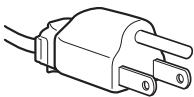
Длг 100 - 120В
нepемен Horo Toka
He yctaHaBJIbBaIte H He ocTaJIyTe MoHHTop:
B MecTax, IIOJIbEpKHeHHbIX BO3IeCTBHIO BbICOKHX TeIIIepaTyp, HAIIPHMep, PIAOM C 6aTapeAIMH, HArpeBaTeJIbHbIMN BO3JyXOBOJaAMn, HJIH B MeCTax, IIE Bo3MOJHO IIOIIaJaHne IprMOrO COJIHeUHO CBeTa. Pa3MeIeHHe MOHITopa B MecTax, IIOJIbEpKHeHHbIX BO3IeCTBbIO BbICOKHX TeIIIepaTyp, HAIIPHMep, B aBTOMo6NJIAX, IIPIIIapKOBAHbIX B COJIHeUHO MeCTax, HJIH pAIDom C HArpeBaTeJIbHbIMN BO3JyXOBOJaAMn, MOKeT IIpHBecTH K JeΦOpMaIuIN KOpIyCa HJIH K HeNCIIpaBHOCTM.
B MecTax, rIe BO3MOxHa Bn6paIIH NJIH pe3KHe mExaHnueckHe BO3JeICTBnI.
PcIOM cJIIO6bIM O6OpyIOBaHHem, KOTOpoe H3JIyuaET CHJIbHOe MaHHTHOE IOJE, HApIPmEp, TeJIeBn3OpamH HJIN JpyrHMN JOMaIIHHMn IIpi6OpamH.
B MecTax, rIe MoKTe cKaJIINBaTc8 MHOrO IIbIIN, Tpr3H INI IeCKa, HAnPmEep, PAnOM COTKpBTbIM OKHOM INI BbIXODOM N3 IHomeIIeHHN. EcJIn yCTpoNCTBO IpeHocHTc8 IIO yJIiue, O63aTeJIbHO IprMHTE COOTBeTCTBYIOIIne MEPbI IpeIOCTOPOXHOCTH INPTOH CBUIECTBYIOIIe B BO3IyXe INI Ipr3H. B IPOTHBOM CIyuae yCTpoNCTBO MoKTe 6bITb 6e3BO3BpaTHO IOBpeKJeHO.
YcTaHOBnTe CnCTeMy Ha POBHyIO IOBepXHocTb. He
yCTaHaBJIbBaIte ee Ha HEPOBHOI IOBepXHOCTH: HAIIpHMep, Ha
KpaIO CTJIA.EcJIN YacTb CnCTeMbI BbICTyIaET 3a KpaI
IOBepxHOCTH, Ha KOtOpO I OHA yCTaHOBJHeA, 3TO MOKeT CTAb
IIpUHHOIIaDeHnA, TpaBMbl HJIN IOJOMKH yCTpoCTBa.
06cIyXnBaHne KK-3KpaHa
He octabJIte KK-3KpaH B MecTaX, Ie Ha Hero IIaAet coJIHc, TAK KaK 3TO MOKeT IIpNBecTH K eRO IIOBpeJDeHHIO. Co6JIHOaIte ocTopoXHocTb IIpr pa3MeIeHHMOHTopa y OKHa.
- He ToJIkaIte Ie Ie IapaIaNTe JKK-ekpaH. He KJIaIITe TJIeJIbIe IIpeIMTeIHa JKK-ekpaH. 3TO MoKeT IIpHBeCTN K NcKpHBJIeHHIO 3KpaHa HJIN HeHCIIpaBHOCTH JKK-IIaHeJI.
- EcIN MOHHTOP HcIOJIb3yETC B XOJOIOHOM MecTe, TO Ha 3KpaHe MoKeT IIOBHTcR OCTaTOUHOE N3O6paXeHHe. 3To He YBJIeTcR IIpH3NaKOM HeNCIIpaBHOCTH. 3KpaH BO3BpaIIaETcK O6bIYHOMy BOCIIPOH3BeDEHIO, KAK TOJIbKO TemIIepaTypa CTaHOBTcR HopMaJIbHOH.
- EcII IN B TeueHne IOJIrOro BVpeMeHH OTo6paKaaTcR HeIOIBNIXHOe H3o6paKeHHe, To Ha 3KpaHE MoKTe HHaIOJIrIO IIOBHTbcra OCTaTOUHoe H3o6paKeHHe. OctaTOUHoe H3o6paKeHHe CO BVpeMeHem NChe3HET.
- XXK-IIaHeJIb HaIpeBaeTcB O BpEmpa6Otbi. 3To He IaJIaTeTcII pIIN3HaKOM HEnCIIpaBHOCTH.
1 BbIKJIIOaTeJIb (NTaHne) n HdNKaTOP (cTp. 7, 15)
YTO6bI BKKIOUHTb HJIN BBIKJIOUHTb INCIIJIeH, HAKMNTe BIKJIOUaTeJIb (IINTaHHe).
KorIa IINcIIeB KJIIOueH, INHINKaTOp IITaHHa ROPHT 3eJIeHBIM, a KOrIa IINcIIeJ HAXOINTCa BpeKHM EKOHOOMH NHePΓH, OH ROPHT OpaHKeBBIM.
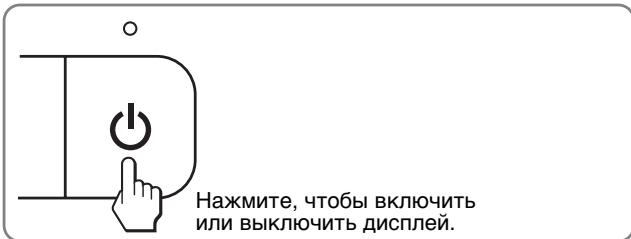
2 Khonka MENU (ctp. 9, 10)
3TO KHOIIKa IIJI OTKpbIITH/3aKpbITHgIaBHOro MeHIO. BbI TaKKe MoXKeTe BKJIIOHTb ΦyHKIINIO DDC/CI, yIepKHBaB 3Tu KHOIIKy HaxKaTOn 6OJIee 8 cek.
3 KhoNKn↓/↑ (ctp. 10)
3TH KHOIIKN BbIIOJIHJHO TpyHKUHN KHOIOK ↓/↑ IIpn BBIOpe IYHKTOB MeHIO H BbIIOJIHeHHn HaCTpOeK.
4 KhoNka OK (cTp. 10)
3Ta KHOIIKa CJIyKHT JJIa BbIbOpa IIyHKTOB H IprIMHeHnHaCTpoEKMHeIO.
KhoIIka INPUT (ctp. 8) (ToJIbKOДЯSDM-E76D/ SDM-E96D)
C IIOMOIbI O 3ToI KHOIIKN MOxH0 IpeKJIIOuHaTb BXOJHO BnIeOChrHaJI MekJy INPUT1 H INPUT2, KOrJa IBa KOMIbIOTepa IIOKJIIOUeHbI K MOHITopy.
5 OTBepCTne 3aunTHoN 6LOKnpOBKn
OTBepCTHe 3aIHTHO6JIOKHPOBKN Heo6XoJHMO HcIOJIb3OBAt bIJa cHCTeM 6e3OIIacHocTH Kensington Micro Saver Security System.
Micro Saver Security System - TOBAPиЗнКOMПаHHN Kensington.
6 THe3do AC IN (ctp. 7)
ПОДКЛЮЧNTe Ka6eJIb ПИТаHЯ (BXOДТВ KOMПЛJEKT).
7 BxoDHOe rHe3do DVI-D (uΦpOBoR RGB) dIa INPUT1 (ctp. 6) (ToIbKO dIa SDM-E76D/SDM-E96D)
Yepe3 3TOT pa3bEm IIOaIOTcI INΦpOBbIe BIIeOCHnHaJIbI RGB, COOTBeTCTByIOIIne DVI Rev.1.0.
BxoHoe rHe3do HD15 (aHaIorObbl RGB) (ctp. 6)
Yepe3 3TOT pa3bEm IIOaIOTcAHaJIIOROBbIE BIIeOCHrHaJIbI RGB (0,7 Vp-p, IIOJIOKHT.) IN CnHraJIbI CNHXPOHN3aIHH.
Повтовka к paбOTE
IpeepnIOJIb3OBaHHem MOHITopa IpoBepbTe HaJIuHne B Kopo6Ke CJeJyIOIIHX IIpHaNJIeXKHOCTe:
- KK-Дисплей
Ka6eJbIITaHnIa
Ka6eJIb BnIeOCHHaJa HD15-HD15 (aHaJiorOBbR RGB)
Ka6eJIb BnIeOCHrHaJa DVI-D (UHΦpOBoi RGB) (TOJbKO IJIa MoJeJIIN SDM-E76D/SDM-E96D) - IepkaTeJIb IIpoBOIOB
- CD-ROM (yTnJIInTBI IJIa Windows n Macintosh, HNCTpyKUINH IO NkCIIlyaTaUHN T.I.)
- KapaHTHbI TaIOH
PyKOBoIcTbO II IO 6bIcTpOyCtHaOBKe
War 1: Исторовныеmedia
Посадамп
IcnoJb3yIe npnlaeraMyoNocTaBky
OTKpoIte IIOCTaBky.
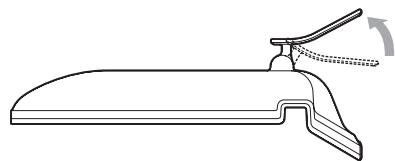
PpimueaHne
C 3aBOJa IIOCTaBkA IIOCTaBJIeTcB CIOJOKeHHOM BIIJe. He yCTaHABJIINBaIte EKpaH CO CIOJOKeHHOJ IOIDCTaBKOJ. B IIpoTHBHom cIJyae OH MOKeT OIIPOKHNHyTBcJ.
IcnoJb3yIte noIcTaBky VESA
IcnoJIb3yUte cneIIaJIbHbIe BnHTbI VESA IJIg KpeIIJIeHnI HeCyUIeTO pIuHa rIIN IIOCTaBKN VESA,He BXOJaIIux B KOMIIJEKT.
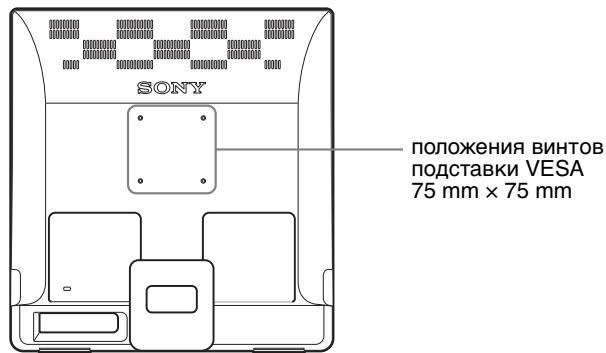
IIHCJIJIe MOXHO HcIOJIb3OBaTb KaK c IIOJCTaBKO, TaK n 6e3 Hee.
Ipeed BbInoJIHeHnEM HaCTpoeK
ПоДсоeДИнHITe MOHHTop K KOMIbIOTepy, a 3aTeM BKJIIOUHTe HX.
ДлЯ Достинженин haHnyuHero pe3yIbTaTaHaCTpoKn CJeJyET BbIIIOJIHЯrTB IIO IIPOIIeCTBHN 30 MHH.
IIIA NaCTPOIKN ICBETOBIO
TeMIIepaTpybI
H3O6paJxEHnB BbI6epHTe
MeHIO ICBET.OHO cIyXHT
IIIA NaCTPOIKN TOHa
EkpaHa.EcIN JIA
IapaMeTpA ICBET
BbI6paHO 3NaYeHne sRGB,
BbI He CMOKeTe
BbIIOJIHNrTB HaCTPOIKN
KOHTPACT,APKOCtB
HJIN GAMMA.
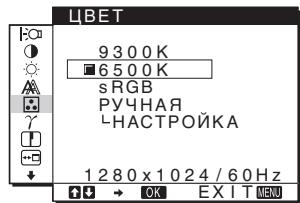
6 GAMMA (ctp. 14)
BbI6epHTe MeHIO GAMMA IJIa H3MeHeHHa IBeTOBbIX OTTeHKOB H3O6paJKeHHa.
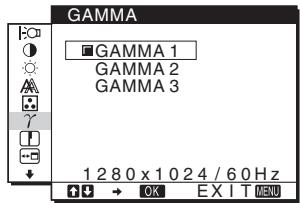
7 PE3KOCTb (ctp. 14)
BbI6epHTe MeHIO PE3KOCTb IJIa HacTpoiKn pe3KoCTn KOHTypOB N3O6paJxehN.
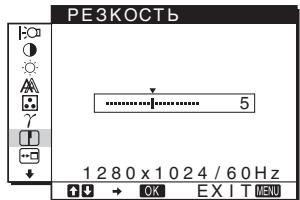
8 N03 MEHIO (ctp. 14)
Bb6epHTe MeHIO I03 MEHIO IIa Bb6opa IIIOJXKeHH 3KpaHHOR MeHIO.
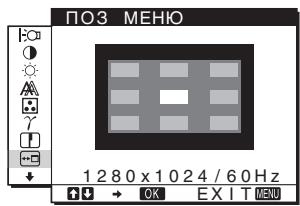
PACIO3H BXOJA (ctp.14) (ToIbKO dIa SDM-E76D/SDM-E96D) MoHITOP aBTOMaTHUeCKI ObHApYKHBaET BXOJHOI CnRHaJI C BXOJHOr pa3bema I IpeKJIIOuHaeTcHa Hcero, IpeXJe YcEM MOHITOP IpePeIeT BpeKHM 3KOHOMHN 3HeprHIN.
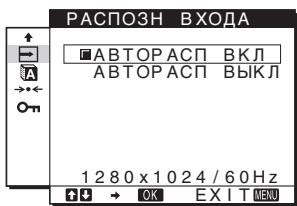
HactpoJa KOHTpaCTHOCTN (KOHTPACT)
HactpoTte KOHTpactHOCTb H3O6paXeHHa.
Приимechание
EcJIN IJIaI npaMeTpA ICBET BbIbpaHO 3NaueHne sRGB, BbI He cMOxKeTe BbIIIOJIHraTb HacTroPoiKN KOHTPACT, JPKOCTb IIIN GAMMA.
1 HaXMMTe KhONKy MENU.
Ha 3KpaHe IIOBHTcR IJIaBHOe MeHIO.
2 HaxMMTe KhoNk / IJIy BbIbopa
( KOHTPACT), 3aTeM HaxKMITE KhONKy OK.
Ha 3KpaHe IIOBHTcMa MeHIO KOHTPACT.
3 HaXMMTe KHOKN / ДЛЯ HAcTpOKn
KOHtpactHOCTn,3aTeMaXmTe KhONky OK.
HactpoJa ypoBnA chepHoro cBeTa n3o6paXeHnra (rPKOCTb)
HactpoitTe npKoctb H3o6paJaeHHa (ypOBeHb YepHoro).
PpmeaHne
EcJIN IJII IapAmEtpa ICBET BbIbpaHO 3NaueHne sRGB, BbI He cMOxKeTe BblIOJIHrTb HacTpOoiKNI KOHTPACT, JPKOCTb IIIN GAMMA.
1 HaXMMTe KhoNky MENU.
Ha əkpaHepoBHTcrgIaBHOe MeHIO.
2 HaXMMTe KHONK / DnBbIb6opa (RPKOCTb), 3aTEM HaXMMTe KHONKy OK.
Ha 3KpaHe IIOBHTcMeHIO JPKOCTb.
3 HaXMMTe KHONK / ДЯн HabcTpoiKN RaPKoCTN, 3aTEM HaXMMTe KHONKy OK.
Hac tropona pe3KocTn
n3o6paXeHnI n ceHTpOBKn
(3KPAH) (ToIbKO dJa
aHaIorOBOrO cnHaJa RGB)
Функця abTomatnuecko pergnilpoBkn KaueCTBa n306paXeHn
Korda ABTONONCK He pa60taeT:
1 OTKpoTe "MoK KombIOpTe" n npaBoi KhoKoM mbln uJIKHnTe 3HaQoK CD-ROM. IpeeiHTe B "PiPoBOdHnK" n OTKpoTe 3HaQoK CD-ROM.
2 OtkpoTe [Utility] n BbI6epnTe [WINDOWS].
3 3anyctnte [WIN Utility.EXE].
БудET ПOKаЗАнТecТОВаяТаБЛИЦA.ПеpeйДиTeКПУНКТу4.
Ha əKpaH eIIOBHTcR IJIaBHOe MeHIO.
5 HaxMMTe KhoNk / ДЯ Вьбopa (3KPAH) И ХхмTe KhoNky OK.
Ha əKpaHé IIOBHTcMaHIO ΘKPAH.
6 HaxMMTe KHONKn / ДЯ BBi6opa ΦA3A, 3aTeM HaxMMTe KHONky OK.
Ha əkpahe 6yIeT Ioka3aHO MeHIO HacTroPoiKN ΦA3A.
7 HaKImaIte KHONKN / , NOKa ROpN3OHTaJIbHbIE NOJOCbl He CTAHyT MHNMaJIbHbIMN.
OtperyIHyTe TaKHM 06pa3OM, YTO6bIROPHTaJIbHbIE IIOJIOcbl 6blIMHHMaJIbHbIMH.
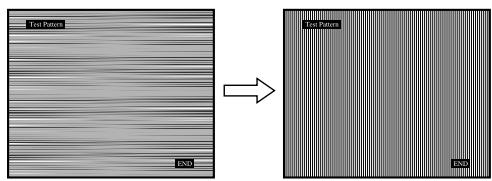
8 Haxmnte KhoNky OK.
Ha əKpaHe IIOBHTcra TJIaBHOe MeHIO.
EcHnHa BcEm 3KpaHe BHNbI BePTHKaJIbHbIe IIOJIOcbI, OTrpeYJInpyTe IapameTp IIIAΓ, BblIOJIHHB CJIeIyIOIIne DeICTBnI.
9 HaxMMTe KhoIKN / ДЯ BbI6opa IIAΓ, 3aTeM HaxMMTe KhoIKNy OK.
Ha 3KpaHe 6yIeT IOKa3aHO MeHIO HAcTpOiKN IIIAΓ.
10 Haxmaite KhONKn / , noka BepTKaJIbHbIe NOJocbl He Ncye3HyT.
OtperyJInpyIte TaKHM o6pa3OM, YTO6bI BepTHKaJIbHbIe IIOJIOcbI Hcye3JIH.
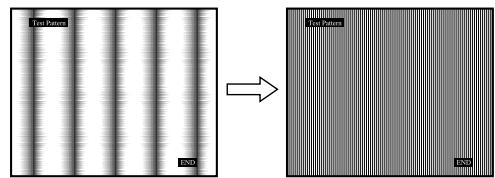
11 Haxmnte KhoNky OK.
Ha 3KpaHe IIOBHTcI rJIaBHOe MeHIO.
12 HaXMMTe KHOJKN / ДЯ ВьБОа ГОПЗ LЕHTР ИЛВЕТИК LЕHTP, 3aTeM HaXMMTe KHOJKY OK.
Ha 3KpaHe 6yIeT IOKa3aHOM MeHIO HAcTpOiKN TOPN3 CEHTP INB EPTNK CEHTP.
13 HaXMMTe KHOJKN / ДЯпетемшу.TECTOBORO 7a6JOna B UcHTp 3KpaHa.
14 HaxMMte KhoIky "END" Ha 3KpaHe, YTO6bI OTKJIHOHTb TECTOBbI WAp6IoH.
HactpoJa CBeTobOy TempeatypbI (LBT)
Mozho Bb6paTb ypoBeH bE Ta 6eJIO IOJI H3OpaKeHH N3 CJIeIyIOIIHX HAcTpoE KBeTOB O TeMIIepaTypb I IO yMOJIuaHHIO.
Takke IIpr HNeO6xOJHMOCTN MOXHO BbIIOJIHNITb TOHKyIO NaCTPOIKy IBeTOBOI TeMIpeaTypbl.
BbMOKeTe yCTaHOBHT Tpe6yEmyIO IBeTOByIO TeMIIepaTpyIJIKAJIOrO peKImaApKocTN KpaHa.
1 Haxmmte KhoNky MENU.
Ha əKpaHe IIOBHTcI rJIaBHoe MeHIO.
2 HaxMMTe KhoNkN / ДЯ Bbl6opa (LBT), 3aTem HaxMMTe KhoNky OK.
Ha əKpaHé IIOBHTcMeHIO LIBET.
3 HaxMnte KhoNk / IJy BbIbopa Heo6xOaMoI CBeTOBOI TEMpePaTypbl, 3aTeM HaxMnte KhoNky OK.
Белын TOH 6yIeT ИЗМeHЯТьСЯ OT roJy6OBArTO NO KpacHObAToR OTOteHKnOB IIO MEpe IOHnHexHnTeMIIpePAtypbI OT 9300K Do 6500K (3HaueHne IOn yMOJIuHaHHIO).
EcJIb BbIb6HpaTe 3NaueHHe "sRGB",To IIpoΦJIb IBeTOBOrO IIPOCTpaHCTBa ycTaHaBJIbBAeTc sRGB. (Iapametp IIbEta sRGB YBJIaETCsO TpacJIeBbIM cTaHdApTOM IIpOTOKoJIa IIbETOBORIO IIPOCTpaHCTBa IIJIA KOMIIbIbOTepHOI TexHHKn.) EcJIb Bblb6HpaTe 3NaueHHe "sRGB",To IIbETOBa HAcTpoJka BaIIeTo KOMIIbIbOTepa JIoJxHa 6blb yctaHOBJeHa Ha sRGB IIpoΦJIb.
PpmeuHn
- EcJIN IOKJIIOUeHHbI KOMIIbIOTep HIN IpyTOe OobopyOBAHHe He YBJIAOTc sRGB-cOBMeCTHMbIMn, ICBET HaCtPOITb IJIa sRGB IIpoΦJIJIa HEJIb3r.
- EcIII IIIpaMeIpa IIBET BbIbpaHO 3NaueHHe sRGB, BbI He cMOKeTe BbIIIOJIHrTb HAcTpOoi KOHTPACT, JPKOCTb IIIN GAMMA.
Tochna HactpoRka ZBeTOBOI TeMnepaTypbI (PYHAR HACTP)
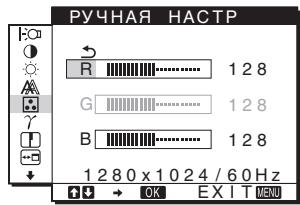
1 HaXMMTe KHOKN / JIy BbIbopa HACTPOJKA, 3aTEM HaXMMTe KHOKNy OK.
Ha 3KpaHe IIOBHTcMeHIO PYHAR HACTP.
2 HaxMnte KHONK / , YTO6bI Bbl6paTb R (KpachbI) nII B (CnHm), a 3aTe M hXMMTe KHONKY OK. 3aTe M hXMMTe KHONK / dIa NaCTPOiKN ZBeTOBOI TEMpePaTypbI, a NOTOM HaxMnte KHONKY OK.
IIOCKOJIbky 3Ta HAcTpoIka IBeTeBOI TeMIIePaTypbI N3MeHЯETcIpyTeM yBeJIuIeHnI NJIy UMeHbIeHnI COCTaBJIaIOIuNX R IN B OTHOCHTeJIbHO G (3eJIeHbI), COCTaBJIaIOIua G OCTaETcI HEN3MeHHoI.
3 HaxMMTe KHONK / ДЯ Вbl6opa 3JIeMeHTa , a 3aTEM HaxMMTe KHONKy OK.
Hobaa hacTroika 2Beta 6yIeT coXpaHeHa B IaMaTHn JIA PyuHAA II 6yIeT BbI3bIbA TbC8 H3 IaMaTHn KaJbI pa3 npu BbI6ope PyuHAA.
Ha 3KpaHe IIOBHTcI rJIaBHOe MeHIO.
Moxho COIOCTaBHTIIBETOBOITTEHOK H3O6paKeHnHa 3KpaHe COpHnHaJIbHbIM IIBETOBbIM OTTeHKOM H3O6paKeHn.
PpmeuHne
EcIII IIpaMaTeI QBET Bb6paHO 3HaueHHe sRGB, BbI He cMOKeTe BbIOJIHyTb HAcTpOoiKN KOHTPACT, IPKOCTb IIIN GAMMA.
1 Haxmte Khonky MENU.
Ha ekpahe IIOBHTcR fJIaBHOe MeHIO.
2 HaxMnte KhoNk / nBbI6opa (GAMMA), 3aTEM HaxMnte KhoNky OK.
Ha əKpaH eIIOBHTcMeHIO GAMMA.
3 HaKMMTe KHONK / ДЯ BbIbopa Heo6xOUMoropexkMa, a 3aTeM HaKMMTe KHONKy OK.
PeruginopBka pe3KocTn (PE3KOCTb)
PeryJInpOBkape3KocTnKpaEBH3O6paKeHHN T.I.
1 Haxmte KhoNky MENU.
Ha əkpaH eIIOBHTcR gJIaBHOe MeHIO.
2 Haxmnte KhoIkn / IJIy BbI6opa
(PE3KOCTb), 3aTeM HaxMMte KhONky OK.
Ha əkpaH eIIOBHTcMHeIO PE3KOCTb.
3 Haxmaite KhONKn / , YTO6bl OTpeRyJInpOBAtbe pe3KocTb, n HaxmTe KhONky OK.
Bb6op paCnoJoxKeHnMeH0 (P03 MEH0)
Moxho H3MeHnTb IIOJIOKeHHe MeHIO,ecJIN OHO 3aRopaxHbAeT H3O6paKeHHe Ha 3KpaHe.
1 Haxmte Khonky MENU.
Ha əkpaH eIIOBHTcR gJIaBHOe MeHIO.
2 Haxmnte KhoIpnK / IaBb6opa (IO3
MEHIO), 3aTeM HaxMMte KhONky OK.
Ha 3KpaHe IIOBHTcMeHIO IO3 MEHIO.
3 HaKMnTe KHOJKn / IaBbIbopa Heo6xOaMOro nIOJoxKeHnHaKmTe KHOJky OK.
HMeetc Tprn BapHaHTa pacIOJIOKeHn MeHIO:B BePxHei, IeHTpaJIbHOI HnKHeI YaCTn 3KpaHa.
Ha 3KpaHe IIOBHTcR IJIaBHOe MeHIO.
2 Haxmaite KhoNky IJIa IpoKpyTKn Do 3HaKa HyxHoi HaCTpOiKn.
3 HaxmTe KhoIKn / ДЯ Вbl6opa
A (LANGUAGE), 3aTeM HaxMMte KhoNky OK.
Ha 3KpaHe IIOBHTcMeHIO LANGUAGE.
4 HaXMMTe KHNK / , YTO6bI Bbl6paTb Ra3bIK, HaxMMTe KONKy OK.
- ENGLISH: AHRJINCKH
- FRANAIS: ΦρaΠιγεκαι
- DEUTSCH: HeMeIeKnI
- ESPAOL: Искпанckий
ITALIANO: I'TaJIb'HaHcKnI - NEDERLANDS: Γολλιαπικήση
SVENSKA: IIBeIckn - PYCKN
日本語:JIOHCKN - 中文:KHTaɪcKn
HacTpoIe BbI6paHHbI IapAmeTp coJIaCHO IIpHBeIeHHbIM HIXKe HHCTpyKIIHM.
Bo3BpaT daHHbIX HacTpoeK K 3HaueHnI M no yMOnUaHnIO
Mozho c6pocntb HacTpoKn IIO 3NaYeHn IIO yMOJIaHInIO.
1 HaxMnte KhoNKn / ДЯ Bbl6opa (C5POC), 3aTeM HaxMnte KhoNky OK.
Ha əKpaHepoBHTcMeHIO CBPOC.
2 HaKMMTe KHONK / ДЯ BbI6opa Heo6xOUMoropexkma, a 3aTeM HaKMMTe KHONky OK.
- OK: C6poc Bcex JaaHHbIX HacTpOKN II 3HaueHn IIO yMOJIuaHHIO. HeoXoJIMO IOMHHTb, YTO ΘTM cIoo6oM HeJIb3a C6pocHTb HaCTpOky (LANGUAGE).
OTMEHA:OTMeHa c6poca H BO3BpaT K əKpaHy MeHIO.
■Блokировka MeHIO uOpraHOB ynpaBLeHnA
BbMOjKeTe 6JIOKnPoBaTb yIpaBJIeHne KHOJIkAmN JJI IpeOTBpaIeHn cJIyauaIIhIX HaCTpoEKNJIN c6poca.
1 HaXMMTe KHOKN / ДЯ Вьбopa O(BJIOKINPOBKBAMEHIO),3aTeM HaXMMTe KHOKNY OK.
Ha əKpaHepoBHTcMeHIO BJOKNPOBKAMEHIO.
2 Haxmnte KhoNk / IJIy BbIbopa BKJI nIIN BblKJI, 3aTeM Haxmnte KhoNky OK.
- BKJI: Pa6Otae TToIbKO BbIKJIOUaTeJIb (ΠιTαHHe). Πρι N BbIIIOJIHeHH IpyrHx Oηερaιπι ḀΚρaHε 6yIeT ΠΟΚa3aH 3HaUOK (БЛОКИPOBKAMEHIO).
- BbIKJI: YcTaHOBnTe O (BJIOKINPOBKAMEHIO) Ha BbIKJI. EcJIN Bbl ycTaHOBnTe O (BJIOKINPOBKAMEHIO) Ha BKJI,TO BBIspaTb MOxH0 6yJeT TOJIbKO 3TOT IYHKT MeHIO.
TexHnueckne xapaKTepeNCTnKn
Pa6o7a TeMpepaTypa 5-35 °C
Pa3MepbI (HINPHHa/BBICota/TJy6HHa)
Дипай (5°):
Pa3mep H3o6paXeHn: 19,0
JIOHMOB
ΦopMaT BXOДHOrO CnHrHaJa
pa6o7a yactota RGB*
TOpn3OHTaJIbHaJa pa3BεpTrKa:
www.tcodevelopment.com
Congratulations!
The display you have just purchased carries the TCO'03 Displays label. This means that your display is designed, manufactured and tested according to some of the strictest quality and environmental requirements in the world. This makes for a high performance product, designed with the user in focus that also minimizes the impact on our natural environment.
■ Ergonomics
- Good visual ergonomics and image quality in order to improve the working environment for the user and to reduce sight and strain problems. Important parameters are luminance, contrast, resolution, reflectance, colour rendition and image stability.
Energy
- Energy-saving mode after a certain time - beneficial both for the user and the environment
- Electrical safety
Emissions
- Electromagnetic fields
- Noise emissions
Ecology
- The product must be prepared for recycling and the manufacturer must have a certified environmental management system such as EMAS or ISO 14 001
-
Restrictions on
-
chlorinated and brominated flame retardants and polymers
-
heavy metals such as cadmium, mercury and lead.
The requirements included in this label have been developed by TCO Development in co-operation with scientists, experts, users as well as manufacturers all over the world. Since the end of the 1980s TCO has been involved in influencing the development of IT equipment in a more user-friendly direction. Our labelling system
started with displays in 1992 and is now requested by users and IT-manufacturers all over the world.
For more information, please visit
www.tcodevelopment.com
Recycling Information
Customer in Europe
The collection and recycling of this product has been planned according to your country's relevant legislation. To ensure that this product will be collected and recycled in a way that minimizes the impact on the environment, please do the following:
-
If you purchased this product for private use, contact your municipality or the waste collection system and bring the product to this collection point / have the product be picked up by the waste collection system. Alternatively, your retailer might take back this if you purchase new equivalent equipment; please check with your retailer whether he will take back this product before bringing it. For information on your country's recycling arrangements, please contact the Sony representation in your country (contact details at: www.sony-europe.com). Further details on specific recycling systems can be found at the following addresses:
-
Belgium: www-recupel.be
- Netherlands: www.nvmp.nl (consumer electronics) www.ictmilieu.nl (IT equipment)
- Norway: www.elretur.no
- Sweden: www.el-kretsen.se
-
Switzerland: www.swico.ch
-
If you use this product professionally, check the product's delivery contract for take back / recycling arrangements and follow the procedures described therein. Alternatively, follow the procedures described under point 1.
Customer in USA
We Sony as a member of EIA recommends to visit URL below http://www.eiae.org/
Customer in Asia
http://www.sony.co.jp/SonyInfo/Environment/recycle/3R.html
TFTLCD Color Computer Display
Bruksanvising (SE)
SDM-E76A/SDM-E96A
SDM-E76D/SDM-E96D
Owner's Record
The model and serial numbers are located at the rear of the unit. Record these numbers in the spaces provided below. Refer to them whenever you call upon your dealer regarding this product. Model No. __ Serial No. ____
WARNING
To reduce the risk of fire or electric shock, do not expose this apparatus to rain or moisture.
Dangerously high voltages are present inside the unit. Do not open the cabinet. Refer servicing to qualified personnel only.
FCC Notice
This equipment has been tested and found to comply with the limits for a Class B digital device, pursuant to Part 15 of the FCC Rules. These limits are designed to provide reasonable protection against harmful interference in a residential installation. This equipment generates, uses, and can radiate radio frequency energy and, if not installed and used in accordance with the instructions, may cause harmful interference to radio communications. However, there is no guarantee that interference will not occur in a particular installation. If this equipment does cause harmful interference to radio or television reception, which can be determined by turning the equipment off and on, the user is encouraged to try to correct the interference by one or more of the following measures:
- Reorient or relocate the receiving antenna.
- Increase the separation between the equipment and receiver.
- Connect the equipment into an outlet on a circuit different from that to which the receiver is connected.
- Consult the dealer or an experienced radio/TV technician for help. You are cautioned that any changes or modifications not expressly approved in this manual could void your authority to operate this equipment.
IMPORTANT
If you have any questions about this product, you may call; Sony Customer Information Services Center 1-800-222-7669 or http://www.sony.com/
Declaration of Conformity
Trade Name: SONY
Model: SDM-E76A/SDM-E96A
SDM-E76D/SDM-E96D
Responsible Party: Sony Electronics Inc.
Address: 16530 Via Esprillo, San Diego, CA 92127 U.S.A.
Telephone Number: 858-942-2230
This device complies with part 15 of the FCC rules. Operation is subject to the following two conditions: (1) This device may not cause harmful interference, and (2) this device must accept any interference received, including interference that may cause undesired operation.
NOTICE
This notice is applicable for USA/Canada only.
If shipped to USA/Canada, install only a UL LISTED/CSA
LABELLED power supply cord meeting the following specifications:
SPECIFICATIONS
Plug Type Nema-Plug 5-15p
Cord Type SVT or SJT, minimum 3× 18 AWG
Length Maximum 15 feet
Rating Minimum 7 A, 125 V
NOTICE
As an ENERGY STAR Partner, Sony
Corporation has determined that this product meets the ENERGY STAR guidelines for energy efficiency.

This monitor complies with the TCO'03 guidelines.
(endast for analog RGB-signal) 15
Felsökning 16
Skarmmeddelanden 16
3 Starta [WIN_U T I L I T Y.EXE].
Testmönster visas. Fortsatt till steg 4.
For Macintosh-anvandare:
www.tcodevelopment.com
Congratulations!
The display you have just purchased carries the TCO'03 Displays label. This means that your display is designed, manufactured and tested according to some of the strictest quality and environmental requirements in the world. This makes for a high performance product, designed with the user in focus that also minimizes the impact on our natural environment.
■ Ergonomics
- Good visual ergonomics and image quality in order to improve the working environment for the user and to reduce sight and strain problems. Important parameters are luminance, contrast, resolution, reflectance, colour rendition and image stability.
Energy
- Energy-saving mode after a certain time - beneficial both for the user and the environment
- Electrical safety
Emissions
- Electromagnetic fields
- Noise emissions
Ecology
- The product must be prepared for recycling and the manufacturer must have a certified environmental management system such as EMAS or ISO 14 001
- Restrictions on
- chlorinated and brominated flame retardants and polymers
- heavy metals such as cadmium, mercury and lead.
The requirements included in this label have been developed by TCO Development in co-operation with scientists, experts, users as well as manufacturers all over the world. Since the end of the 1980s TCO has been involved in influencing the development of IT equipment in a more user-friendly direction. Our labelling system
started with displays in 1992 and is now requested by users and IT-manufacturers all over the world.
For more information, please visit
www.tcodevelopment.com
Recycling Information
Customer in Europe
The collection and recycling of this product has been planned according to your country's relevant legislation. To ensure that this product will be collected and recycled in a way that minimizes the impact on the environment, please do the following:
- If you purchased this product for private use, contact your municipality or the waste collection system and bring the product to this collection point / have the product be picked up by the waste collection system. Alternatively, your retailer might take back this if you purchase new equivalent equipment; please check with your retailer whether he will take back this product before bringing it. For information on your country's recycling arrangements, please contact the Sony representation in your country (contact details at: www.sony-europe.com).
Further details on specific recycling systems can be found at the following addresses:
- Belgium: www-recupel.be
- Netherlands: www.nvmp.nl (consumer electronics) www.ictmilieu.nl (IT equipment)
- Norway: www.elretur.no
- Sweden: www.el-kretsen.se
-
Switzerland: www.swico.ch
-
If you use this product professionally, check the product's delivery contract for take back / recycling arrangements and follow the procedures described therein. Alternatively, follow the procedures described under point 1.
Customer in USA
We Sony as a member of EIA recommends to visit URL below http://www.eiae.org/
Customer in Asia
http://www.sony.co.jp/SonyInfo/Environment/recycle/3R.html
TFTLCD Color Computer Display
The model and serial numbers are located at the rear of the unit. Record these numbers in the spaces provided below. Refer to them whenever you call upon your dealer regarding this product. Model No. __ Serial No. ____
WARNING
To reduce the risk of fire or electric shock, do not expose this apparatus to rain or moisture.
Dangerously high voltages are present inside the unit. Do not open the cabinet. Refer servicing to qualified personnel only.
FCC Notice
This equipment has been tested and found to comply with the limits for a Class B digital device, pursuant to Part 15 of the FCC Rules. These limits are designed to provide reasonable protection against harmful interference in a residential installation. This equipment generates, uses, and can radiate radio frequency energy and, if not installed and used in accordance with the instructions, may cause harmful interference to radio communications. However, there is no guarantee that interference will not occur in a particular installation. If this equipment does cause harmful interference to radio or television reception, which can be determined by turning the equipment off and on, the user is encouraged to try to correct the interference by one or more of the following measures:
- Reorient or relocate the receiving antenna.
- Increase the separation between the equipment and receiver.
- Connect the equipment into an outlet on a circuit different from that to which the receiver is connected.
- Consult the dealer or an experienced radio/TV technician for help. You are cautioned that any changes or modifications not expressly approved in this manual could void your authority to operate this equipment.
IMPORTANT
If you have any questions about this product, you may call; Sony Customer Information Services Center 1-800-222-7669 or http://www.sony.com/
Declaration of Conformity
Trade Name: SONY
Model: SDM-E76A/SDM-E96A
SDM-E76D/SDM-E96D
Responsible Party: Sony Electronics Inc.
Address: 16530 Via Esprillo, San Diego, CA 92127 U.S.A.
Telephone Number: 858-942-2230
This device complies with part 15 of the FCC rules. Operation is subject to the following two conditions: (1) This device may not cause harmful interference, and (2) this device must accept any interference received, including interference that may cause undesired operation.
NOTICE
This notice is applicable for USA/Canada only.
If shipped to USA/Canada, install only a UL LISTED/CSA
LABELLED power supply cord meeting the following specifications:
SPECIFICATIONS
Plug Type Nema-Plug 5-15p
Cord Type SVT or SJT, minimum 3× 18 AWG
Length Maximum 15 feet
Rating Minimum 7 A, 125 V
NOTICE
As an ENERGY STAR Partner, Sony
Corporation has determined that this product meets the ENERGY STAR guidelines for energy efficiency.

This monitor complies with the TCO'03 guidelines.
Inhoud
2 Open [Utility] en selecteer [WINDOWS].
3 Start [WIN_U T I L I T I Y.EXE].
www.tcodevelopment.com
Congratulations!
The display you have just purchased carries the TCO'03 Displays label. This means that your display is designed, manufactured and tested according to some of the strictest quality and environmental requirements in the world. This makes for a high performance product, designed with the user in focus that also minimizes the impact on our natural environment.
■ Ergonomics
- Good visual ergonomics and image quality in order to improve the working environment for the user and to reduce sight and strain problems. Important parameters are luminance, contrast, resolution, reflectance, colour rendition and image stability.
Energy
- Energy-saving mode after a certain time - beneficial both for the user and the environment
- Electrical safety
Emissions
- Electromagnetic fields
- Noise emissions
Ecology
- The product must be prepared for recycling and the manufacturer must have a certified environmental management system such as EMAS or ISO 14 001
-
Restrictions on
-
chlorinated and brominated flame retardants and polymers
- heavy metals such as cadmium, mercury and lead.
The requirements included in this label have been developed by TCO Development in co-operation with scientists, experts, users as well as manufacturers all over the world. Since the end of the 1980s TCO has been involved in influencing the development of IT equipment in a more user-friendly direction. Our labelling system
started with displays in 1992 and is now requested by users and IT-manufacturers all over the world.
For more information, please visit
www.tcodevelopment.com
Recycling Information
Customer in Europe
The collection and recycling of this product has been planned according to your country's relevant legislation. To ensure that this product will be collected and recycled in a way that minimizes the impact on the environment, please do the following:
-
If you purchased this product for private use, contact your municipality or the waste collection system and bring the product to this collection point / have the product be picked up by the waste collection system. Alternatively, your retailer might take back this if you purchase new equivalent equipment; please check with your retailer whether he will take back this product before bringing it. For information on your country's recycling arrangements, please contact the Sony representation in your country (contact details at: www.sony-europe.com). Further details on specific recycling systems can be found at the following addresses:
-
Belgium: www-recupel.be
- Netherlands: www.nvmp.nl (consumer electronics) www.ictmilieu.nl (IT equipment)
- Norway: www.elretur.no
- Sweden: www.el-kretsen.se
-
Switzerland: www.swico.ch
-
If you use this product professionally, check the product's delivery contract for take back / recycling arrangements and follow the procedures described therein. Alternatively, follow the procedures described under point 1.
Customer in USA
We Sony as a member of EIA recommends to visit URL below http://www.eiae.org/
Customer in Asia
http://www.sony.co.jp/SonyInfo/Environment/recycle/3R.html
彩色液晶显示器
使用说明书 (CS)
SDM-E76A/SDM-E96A
SDM-E76D/SDM-E96D
Owner's Record
The model and serial numbers are located at the rear of the unit. Record these numbers in the spaces provided below. Refer to them whenever you call upon your dealer regarding this product. Model No. __ Serial No. ____
WARNING
To reduce the risk of fire or electric shock, do not expose this apparatus to rain or moisture.
Dangerously high voltages are present inside the unit. Do not open the cabinet. Refer servicing to qualified personnel only.
FCC Notice
This equipment has been tested and found to comply with the limits for a Class B digital device, pursuant to Part 15 of the FCC Rules. These limits are designed to provide reasonable protection against harmful interference in a residential installation. This equipment generates, uses, and can radiate radio frequency energy and, if not installed and used in accordance with the instructions, may cause harmful interference to radio communications. However, there is no guarantee that interference will not occur in a particular installation. If this equipment does cause harmful interference to radio or television reception, which can be determined by turning the equipment off and on, the user is encouraged to try to correct the interference by one or more of the following measures:
- Reorient or relocate the receiving antenna.
- Increase the separation between the equipment and receiver.
- Connect the equipment into an outlet on a circuit different from that to which the receiver is connected.
- Consult the dealer or an experienced radio/TV technician for help. You are cautioned that any changes or modifications not expressly approved in this manual could void your authority to operate this equipment.
IMPORTANT
If you have any questions about this product, you may call; Sony Customer Information Services Center 1-800-222-7669 or http://www.sony.com/
Declaration of Conformity
Trade Name: SONY
Model: SDM-E76A/SDM-E96A
SDM-E76D/SDM-E96D
Responsible Party: Sony Electronics Inc.
Address: 16530 Via Esprillo, San Diego, CA 92127 U.S.A.
Telephone Number: 858-942-2230
This device complies with part 15 of the FCC rules. Operation is subject to the following two conditions: (1) This device may not cause harmful interference, and (2) this device must accept any interference received, including interference that may cause undesired operation.
NOTICE
This notice is applicable for USA/Canada only.
If shipped to USA/Canada, install only a UL LISTED/CSA
LABELLED power supply cord meeting the following specifications:
SPECIFICATIONS
Plug Type Nema-Plug 5-15p
Cord Type SVT or SJT, minimum 3× 18 AWG
Length Maximum 15 feet
Rating Minimum 7 A, 125 V
NOTICE
As an ENERGY STAR Partner, Sony
Corporation has determined that this product meets the ENERGY STAR guidelines for energy efficiency.

This monitor complies with the TCO'03 guidelines.
目录
使用前注意事项 4
识别部件和控制钮 5
安装 6
步骤1:使用支架 6
步骤2:将显示器连接到计算机 6
步骤3:连接电源线 7
步骤4:扎住电线 7
步骤5:打开显示器和计算机 7
调节倾斜度 8
选择输入信号(INPUT按钮)(仅限于SDM-E76D/SDM-E96D)……8
设定显示器 8
导航菜单 8
调整背光 (背光) 10
调整对比度 (对比度) 10
调整图像的黑色电平 (亮度) 10
www.tcodevelopment.com
Congratulations!
The display you have just purchased carries the TCO'03 Displays label. This means that your display is designed, manufactured and tested according to some of the strictest quality and environmental requirements in the world. This makes for a high performance product, designed with the user in focus that also minimizes the impact on our natural environment.
■ Ergonomics
- Good visual ergonomics and image quality in order to improve the working environment for the user and to reduce sight and strain problems. Important parameters are luminance, contrast, resolution, reflectance, colour rendition and image stability.
Energy
- Energy-saving mode after a certain time - beneficial both for the user and the environment
- Electrical safety
Emissions
- Electromagnetic fields
- Noise emissions
Ecology
- The product must be prepared for recycling and the manufacturer must have a certified environmental management system such as EMAS or ISO 14 001
-
Restrictions on
-
chlorinated and brominated flame retardants and polymers
-
heavy metals such as cadmium, mercury and lead.
The requirements included in this label have been developed by TCO Development in co-operation with scientists, experts, users as well as manufacturers all over the world. Since the end of the 1980s TCO has been involved in influencing the development of IT equipment in a more user-friendly direction. Our labelling system
started with displays in 1992 and is now requested by users and IT-manufacturers all over the world.
For more information, please visit
www.tcodevelopment.com
Recycling Information
Customer in Europe
The collection and recycling of this product has been planned according to your country's relevant legislation. To ensure that this product will be collected and recycled in a way that minimizes the impact on the environment, please do the following:
-
If you purchased this product for private use, contact your municipality or the waste collection system and bring the product to this collection point / have the product be picked up by the waste collection system. Alternatively, your retailer might take back this if you purchase new equivalent equipment; please check with your retailer whether he will take back this product before bringing it. For information on your country's recycling arrangements, please contact the Sony representation in your country (contact details at: www.sony-europe.com). Further details on specific recycling systems can be found at the following addresses:
-
Belgium: www-recupel.be
- Netherlands: www.nvmp.nl (consumer electronics) www.ictmilieu.nl (IT equipment)
- Norway: www.elretur.no
- Sweden: www.el-kretsen.se
-
Switzerland: www.swico.ch
-
If you use this product professionally, check the product's delivery contract for take back / recycling arrangements and follow the procedures described therein. Alternatively, follow the procedures described under point 1.
Customer in USA
We Sony as a member of EIA recommends to visit URL below http://www.eiae.org/
Customer in Asia
http://www.sony.co.jp/SonyInfo/Environment/recycle/3R.html
TFTLCD Color Computer Display
The model and serial numbers are located at the rear of the unit. Record these numbers in the spaces provided below. Refer to them whenever you call upon your dealer regarding this product. Model No. __ Serial No. ____
WARNING
To reduce the risk of fire or electric shock, do not expose this apparatus to rain or moisture.
Dangerously high voltages are present inside the unit. Do not open the cabinet. Refer servicing to qualified personnel only.
FCC Notice
This equipment has been tested and found to comply with the limits for a Class B digital device, pursuant to Part 15 of the FCC Rules. These limits are designed to provide reasonable protection against harmful interference in a residential installation. This equipment generates, uses, and can radiate radio frequency energy and, if not installed and used in accordance with the instructions, may cause harmful interference to radio communications. However, there is no guarantee that interference will not occur in a particular installation. If this equipment does cause harmful interference to radio or television reception, which can be determined by turning the equipment off and on, the user is encouraged to try to correct the interference by one or more of the following measures:
- Reorient or relocate the receiving antenna.
- Increase the separation between the equipment and receiver.
- Connect the equipment into an outlet on a circuit different from that to which the receiver is connected.
- Consult the dealer or an experienced radio/TV technician for help. You are cautioned that any changes or modifications not expressly approved in this manual could void your authority to operate this equipment.
IMPORTANT
If you have any questions about this product, you may call; Sony Customer Information Services Center 1-800-222-7669 or http://www.sony.com/
Declaration of Conformity
Trade Name: SONY
Model: SDM-E76A/SDM-E96A
SDM-E76D/SDM-E96D
Responsible Party: Sony Electronics Inc.
Address: 16530 Via Esprillo, San Diego, CA 92127 U.S.A.
Telephone Number: 858-942-2230
This device complies with part 15 of the FCC rules. Operation is subject to the following two conditions: (1) This device may not cause harmful interference, and (2) this device must accept any interference received, including interference that may cause undesired operation.
NOTICE
This notice is applicable for USA/Canada only.
If shipped to USA/Canada, install only a UL LISTED/CSA
LABELLED power supply cord meeting the following specifications:
SPECIFICATIONS
Plug Type Nema-Plug 5-15p
Cord Type SVT or SJT, minimum 3× 18 AWG
Length Maximum 15 feet
Rating Minimum 7 A, 125 V
NOTICE
As an ENERGY STAR Partner, Sony
Corporation has determined that this product meets the ENERGY STAR guidelines for energy efficiency.

This monitor complies with the TCO'03 guidelines.
Obsah
3 Spust'te soubor [WIN_U T I L I T I Y.EXE].
www.tcodevelopment.com
Congratulations!
The display you have just purchased carries the TCO'03 Displays label. This means that your display is designed, manufactured and tested according to some of the strictest quality and environmental requirements in the world. This makes for a high performance product, designed with the user in focus that also minimizes the impact on our natural environment.
■ Ergonomics
- Good visual ergonomics and image quality in order to improve the working environment for the user and to reduce sight and strain problems. Important parameters are luminance, contrast, resolution, reflectance, colour rendition and image stability.
Energy
- Energy-saving mode after a certain time - beneficial both for the user and the environment
- Electrical safety
Emissions
- Electromagnetic fields
- Noise emissions
Ecology
- The product must be prepared for recycling and the manufacturer must have a certified environmental management system such as EMAS or ISO 14 001
- Restrictions on
- chlorinated and brominated flame retardants and polymers
- heavy metals such as cadmium, mercury and lead.
The requirements included in this label have been developed by TCO Development in co-operation with scientists, experts, users as well as manufacturers all over the world. Since the end of the 1980s TCO has been involved in influencing the development of IT equipment in a more user-friendly direction. Our labelling system
started with displays in 1992 and is now requested by users and IT-manufacturers all over the world.
For more information, please visit
www.tcodevelopment.com
Recycling Information
Customer in Europe
The collection and recycling of this product has been planned according to your country's relevant legislation. To ensure that this product will be collected and recycled in a way that minimizes the impact on the environment, please do the following:
- If you purchased this product for private use, contact your municipality or the waste collection system and bring the product to this collection point / have the product be picked up by the waste collection system. Alternatively, your retailer might take back this if you purchase new equivalent equipment; please check with your retailer whether he will take back this product before bringing it. For information on your country's recycling arrangements, please contact the Sony representation in your country (contact details at: www.sony-europe.com).
Further details on specific recycling systems can be found at the following addresses:
- Belgium: www-recupel.be
- Netherlands: www.nvmp.nl (consumer electronics) www.ictmilieu.nl (IT equipment)
- Norway: www.elretur.no
- Sweden: www.el-kretsen.se
-
Switzerland: www.swico.ch
-
If you use this product professionally, check the product's delivery contract for take back / recycling arrangements and follow the procedures described therein. Alternatively, follow the procedures described under point 1.
Customer in USA
We Sony as a member of EIA recommends to visit URL below http://www.eiae.org/
Customer in Asia
http://www.sony.co.jp/SonyInfo/Environment/recycle/3R.html
TFTLCD Color Computer Display
The model and serial numbers are located at the rear of the unit. Record these numbers in the spaces provided below. Refer to them whenever you call upon your dealer regarding this product. Model No. __ Serial No. ____
WARNING
To reduce the risk of fire or electric shock, do not expose this apparatus to rain or moisture.
Dangerously high voltages are present inside the unit. Do not open the cabinet. Refer servicing to qualified personnel only.
FCC Notice
This equipment has been tested and found to comply with the limits for a Class B digital device, pursuant to Part 15 of the FCC Rules. These limits are designed to provide reasonable protection against harmful interference in a residential installation. This equipment generates, uses, and can radiate radio frequency energy and, if not installed and used in accordance with the instructions, may cause harmful interference to radio communications. However, there is no guarantee that interference will not occur in a particular installation. If this equipment does cause harmful interference to radio or television reception, which can be determined by turning the equipment off and on, the user is encouraged to try to correct the interference by one or more of the following measures:
- Reorient or relocate the receiving antenna.
- Increase the separation between the equipment and receiver.
- Connect the equipment into an outlet on a circuit different from that to which the receiver is connected.
- Consult the dealer or an experienced radio/TV technician for help. You are cautioned that any changes or modifications not expressly approved in this manual could void your authority to operate this equipment.
IMPORTANT
If you have any questions about this product, you may call; Sony Customer Information Services Center 1-800-222-7669 or http://www.sony.com/
Declaration of Conformity
Trade Name: SONY
Model: SDM-E76A/SDM-E96A
SDM-E76D/SDM-E96D
Responsible Party: Sony Electronics Inc.
Address: 16530 Via Esprillo, San Diego, CA 92127 U.S.A.
Telephone Number: 858-942-2230
This device complies with part 15 of the FCC rules. Operation is subject to the following two conditions: (1) This device may not cause harmful interference, and (2) this device must accept any interference received, including interference that may cause undesired operation.
NOTICE
This notice is applicable for USA/Canada only.
If shipped to USA/Canada, install only a UL LISTED/CSA
LABELLED power supply cord meeting the following specifications:
SPECIFICATIONS
Plug Type Nema-Plug 5-15p
Cord Type SVT or SJT, minimum 3× 18 AWG
Length Maximum 15 feet
Rating Minimum 7 A, 125 V
NOTICE
As an ENERGY STAR Partner, Sony
Corporation has determined that this product meets the ENERGY STAR guidelines for energy efficiency.

This monitor complies with the TCO'03 guidelines.
Tartalomjegyzék
Ovintézkedések 4
Alkatreszek es kezeloelemek 5
Uzembehelyezés 6
www.tcodevelopment.com
Congratulations!
The display you have just purchased carries the TCO'03 Displays label. This means that your display is designed, manufactured and tested according to some of the strictest quality and environmental requirements in the world. This makes for a high performance product, designed with the user in focus that also minimizes the impact on our natural environment.
■ Ergonomics
- Good visual ergonomics and image quality in order to improve the working environment for the user and to reduce sight and strain problems. Important parameters are luminance, contrast, resolution, reflectance, colour rendition and image stability.
Energy
- Energy-saving mode after a certain time - beneficial both for the user and the environment
- Electrical safety
Emissions
- Electromagnetic fields
- Noise emissions
Ecology
- The product must be prepared for recycling and the manufacturer must have a certified environmental management system such as EMAS or ISO 14 001
-
Restrictions on
-
chlorinated and brominated flame retardants and polymers
- heavy metals such as cadmium, mercury and lead.
The requirements included in this label have been developed by TCO Development in co-operation with scientists, experts, users as well as manufacturers all over the world. Since the end of the 1980s TCO has been involved in influencing the development of IT equipment in a more user-friendly direction. Our labelling system
started with displays in 1992 and is now requested by users and IT-manufacturers all over the world.
For more information, please visit
www.tcodevelopment.com
Recycling Information
Customer in Europe
The collection and recycling of this product has been planned according to your country's relevant legislation. To ensure that this product will be collected and recycled in a way that minimizes the impact on the environment, please do the following:
-
If you purchased this product for private use, contact your municipality or the waste collection system and bring the product to this collection point / have the product be picked up by the waste collection system. Alternatively, your retailer might take back this if you purchase new equivalent equipment; please check with your retailer whether he will take back this product before bringing it. For information on your country's recycling arrangements, please contact the Sony representation in your country (contact details at: www.sony-europe.com). Further details on specific recycling systems can be found at the following addresses:
-
Belgium: www-recupel.be
- Netherlands: www.nvmp.nl (consumer electronics) www.ictmilieu.nl (IT equipment)
- Norway: www.elretur.no
- Sweden: www.el-kretsen.se
-
Switzerland: www.swico.ch
-
If you use this product professionally, check the product's delivery contract for take back / recycling arrangements and follow the procedures described therein. Alternatively, follow the procedures described under point 1.
Customer in USA
We Sony as a member of EIA recommends to visit URL below http://www.eiae.org/
Customer in Asia
http://www.sony.co.jp/SonyInfo/Environment/recycle/3R.html
TFTLCD Color Computer Display
The model and serial numbers are located at the rear of the unit. Record these numbers in the spaces provided below. Refer to them whenever you call upon your dealer regarding this product. Model No. __ Serial No. ____
WARNING
To reduce the risk of fire or electric shock, do not expose this apparatus to rain or moisture.
Dangerously high voltages are present inside the unit. Do not open the cabinet. Refer servicing to qualified personnel only.
FCC Notice
This equipment has been tested and found to comply with the limits for a Class B digital device, pursuant to Part 15 of the FCC Rules. These limits are designed to provide reasonable protection against harmful interference in a residential installation. This equipment generates, uses, and can radiate radio frequency energy and, if not installed and used in accordance with the instructions, may cause harmful interference to radio communications. However, there is no guarantee that interference will not occur in a particular installation. If this equipment does cause harmful interference to radio or television reception, which can be determined by turning the equipment off and on, the user is encouraged to try to correct the interference by one or more of the following measures:
- Reorient or relocate the receiving antenna.
- Increase the separation between the equipment and receiver.
- Connect the equipment into an outlet on a circuit different from that to which the receiver is connected.
- Consult the dealer or an experienced radio/TV technician for help. You are cautioned that any changes or modifications not expressly approved in this manual could void your authority to operate this equipment.
IMPORTANT
If you have any questions about this product, you may call; Sony Customer Information Services Center 1-800-222-7669 or http://www.sony.com/
Declaration of Conformity
Trade Name: SONY
Model: SDM-E76A/SDM-E96A
SDM-E76D/SDM-E96D
Responsible Party: Sony Electronics Inc.
Address: 16530 Via Esprillo, San Diego, CA 92127 U.S.A.
Telephone Number: 858-942-2230
This device complies with part 15 of the FCC rules. Operation is subject to the following two conditions: (1) This device may not cause harmful interference, and (2) this device must accept any interference received, including interference that may cause undesired operation.
NOTICE
This notice is applicable for USA/Canada only.
If shipped to USA/Canada, install only a UL LISTED/CSA
LABELLED power supply cord meeting the following specifications:
SPECIFICATIONS
Plug Type Nema-Plug 5-15p
Cord Type SVT or SJT, minimum 3× 18 AWG
Length Maximum 15 feet
Rating Minimum 7 A, 125 V
NOTICE
As an ENERGY STAR Partner, Sony
Corporation has determined that this product meets the ENERGY STAR guidelines for energy efficiency.

This monitor complies with the TCO'03 guidelines.
Spis tresci
[MAC_CLASSIC Utility] lub [MAC OSX Utility].
"RESOLUTION > 1280 × 1024"
www.tcodevelopment.com
Congratulations!
The display you have just purchased carries the TCO'03 Displays label. This means that your display is designed, manufactured and tested according to some of the strictest quality and environmental requirements in the world. This makes for a high performance product, designed with the user in focus that also minimizes the impact on our natural environment.
■ Ergonomics
- Good visual ergonomics and image quality in order to improve the working environment for the user and to reduce sight and strain problems. Important parameters are luminance, contrast, resolution, reflectance, colour rendition and image stability.
Energy
- Energy-saving mode after a certain time - beneficial both for the user and the environment
- Electrical safety
Emissions
- Electromagnetic fields
- Noise emissions
Ecology
- The product must be prepared for recycling and the manufacturer must have a certified environmental management system such as EMAS or ISO 14 001
- Restrictions on
- chlorinated and brominated flame retardants and polymers
- heavy metals such as cadmium, mercury and lead.
The requirements included in this label have been developed by TCO Development in co-operation with scientists, experts, users as well as manufacturers all over the world. Since the end of the 1980s TCO has been involved in influencing the development of IT equipment in a more user-friendly direction. Our labelling system
started with displays in 1992 and is now requested by users and IT-manufacturers all over the world.
For more information, please visit
www.tcodevelopment.com
Recycling Information
Customer in Europe
The collection and recycling of this product has been planned according to your country's relevant legislation. To ensure that this product will be collected and recycled in a way that minimizes the impact on the environment, please do the following:
- If you purchased this product for private use, contact your municipality or the waste collection system and bring the product to this collection point / have the product be picked up by the waste collection system. Alternatively, your retailer might take back this if you purchase new equivalent equipment; please check with your retailer whether he will take back this product before bringing it. For information on your country's recycling arrangements, please contact the Sony representation in your country (contact details at: www.sony-europe.com).
Further details on specific recycling systems can be found at the following addresses:
- Belgium: www-recupel.be
- Netherlands: www.nvmp.nl (consumer electronics) www.ictmilieu.nl (IT equipment)
- Norway: www.elretur.no
- Sweden: www.el-kretsen.se
-
Switzerland: www.swico.ch
-
If you use this product professionally, check the product's delivery contract for take back / recycling arrangements and follow the procedures described therein. Alternatively, follow the procedures described under point 1.
Customer in USA
We Sony as a member of EIA recommends to visit URL below http://www.eiae.org/
Customer in Asia
http://www.sony.co.jp/SonyInfo/Environment/recycle/3R.html
TFTLCD Color Computer Display
Navodila za uporabo (SI)
SDM-E76A/SDM-E96A
SDM-E76D/SDM-E96D
Owner's Record
The model and serial numbers are located at the rear of the unit. Record these numbers in the spaces provided below. Refer to them whenever you call upon your dealer regarding this product. Model No. __ Serial No. ____
WARNING
To reduce the risk of fire or electric shock, do not expose this apparatus to rain or moisture.
Dangerously high voltages are present inside the unit. Do not open the cabinet. Refer servicing to qualified personnel only.
FCC Notice
This equipment has been tested and found to comply with the limits for a Class B digital device, pursuant to Part 15 of the FCC Rules. These limits are designed to provide reasonable protection against harmful interference in a residential installation. This equipment generates, uses, and can radiate radio frequency energy and, if not installed and used in accordance with the instructions, may cause harmful interference to radio communications. However, there is no guarantee that interference will not occur in a particular installation. If this equipment does cause harmful interference to radio or television reception, which can be determined by turning the equipment off and on, the user is encouraged to try to correct the interference by one or more of the following measures:
- Reorient or relocate the receiving antenna.
- Increase the separation between the equipment and receiver.
- Connect the equipment into an outlet on a circuit different from that to which the receiver is connected.
- Consult the dealer or an experienced radio/TV technician for help. You are cautioned that any changes or modifications not expressly approved in this manual could void your authority to operate this equipment.
IMPORTANT
If you have any questions about this product, you may call; Sony Customer Information Services Center 1-800-222-7669 or http://www.sony.com/
Declaration of Conformity
Trade Name: SONY
Model: SDM-E76A/SDM-E96A
SDM-E76D/SDM-E96D
Responsible Party: Sony Electronics Inc.
Address: 16530 Via Esprillo, San Diego, CA 92127 U.S.A.
Telephone Number: 858-942-2230
This device complies with part 15 of the FCC rules. Operation is subject to the following two conditions: (1) This device may not cause harmful interference, and (2) this device must accept any interference received, including interference that may cause undesired operation.
NOTICE
This notice is applicable for USA/Canada only.
If shipped to USA/Canada, install only a UL LISTED/CSA
LABELLED power supply cord meeting the following specifications:
SPECIFICATIONS
Plug Type Nema-Plug 5-15p
Cord Type SVT or SJT, minimum 3× 18 AWG
Length Maximum 15 feet
Rating Minimum 7 A, 125 V
NOTICE
As an ENERGY STAR Partner, Sony
Corporation has determined that this product meets the ENERGY STAR guidelines for energy efficiency.

This monitor complies with the TCO'03 guidelines.
Kazalo
Pozor 4
Delimonitorja in elementi za nastavljanje. 5
Nastavitev. 6
Nastavitev 1: Uporabite prilożeni podstavek. 6
Nastavitev 2: Prikljucite monitor na vaš računalnik. 6
www.tcodevelopment.com
Congratulations!
The display you have just purchased carries the TCO'03 Displays label. This means that your display is designed, manufactured and tested according to some of the strictest quality and environmental requirements in the world. This makes for a high performance product, designed with the user in focus that also minimizes the impact on our natural environment.
■ Ergonomics
- Good visual ergonomics and image quality in order to improve the working environment for the user and to reduce sight and strain problems. Important parameters are luminance, contrast, resolution, reflectance, colour rendition and image stability.
Energy
- Energy-saving mode after a certain time - beneficial both for the user and the environment
- Electrical safety
Emissions
- Electromagnetic fields
- Noise emissions
Ecology
- The product must be prepared for recycling and the manufacturer must have a certified environmental management system such as EMAS or ISO 14 001
- Restrictions on
- chlorinated and brominated flame retardants and polymers
- heavy metals such as cadmium, mercury and lead.
The requirements included in this label have been developed by TCO Development in co-operation with scientists, experts, users as well as manufacturers all over the world. Since the end of the 1980s TCO has been involved in influencing the development of IT equipment in a more user-friendly direction. Our labelling system
started with displays in 1992 and is now requested by users and IT-manufacturers all over the world.
For more information, please visit
www.tcodevelopment.com
Recycling Information
Customer in Europe
The collection and recycling of this product has been planned according to your country's relevant legislation. To ensure that this product will be collected and recycled in a way that minimizes the impact on the environment, please do the following:
- If you purchased this product for private use, contact your municipality or the waste collection system and bring the product to this collection point / have the product be picked up by the waste collection system. Alternatively, your retailer might take back this if you purchase new equivalent equipment; please check with your retailer whether he will take back this product before bringing it. For information on your country's recycling arrangements, please contact the Sony representation in your country (contact details at: www.sony-europe.com).
Further details on specific recycling systems can be found at the following addresses:
- Belgium: www-recupel.be
- Netherlands: www.nvmp.nl (consumer electronics) www.ictmilieu.nl (IT equipment)
- Norway: www.elretur.no
- Sweden: www.el-kretsen.se
-
Switzerland: www.swico.ch
-
If you use this product professionally, check the product's delivery contract for take back / recycling arrangements and follow the procedures described therein. Alternatively, follow the procedures described under point 1.
Customer in USA
We Sony as a member of EIA recommends to visit URL below http://www.eiae.org/
Customer in Asia
http://www.sony.co.jp/SonyInfo/Environment/recycle/3R.html
TFTLCD Color Computer Display
The model and serial numbers are located at the rear of the unit. Record these numbers in the spaces provided below. Refer to them whenever you call upon your dealer regarding this product. Model No. __ Serial No. ____
WARNING
To reduce the risk of fire or electric shock, do not expose this apparatus to rain or moisture.
Dangerously high voltages are present inside the unit. Do not open the cabinet. Refer servicing to qualified personnel only.
FCC Notice
This equipment has been tested and found to comply with the limits for a Class B digital device, pursuant to Part 15 of the FCC Rules. These limits are designed to provide reasonable protection against harmful interference in a residential installation. This equipment generates, uses, and can radiate radio frequency energy and, if not installed and used in accordance with the instructions, may cause harmful interference to radio communications. However, there is no guarantee that interference will not occur in a particular installation. If this equipment does cause harmful interference to radio or television reception, which can be determined by turning the equipment off and on, the user is encouraged to try to correct the interference by one or more of the following measures:
Reorient or relocate the receiving antenna.
- Increase the separation between the equipment and receiver.
- Connect the equipment into an outlet on a circuit different from that to which the receiver is connected.
- Consult the dealer or an experienced radio/TV technician for help. You are cautioned that any changes or modifications not expressly approved in this manual could void your authority to operate this equipment.
IMPORTANT
If you have any questions about this product, you may call; Sony Customer Information Services Center 1-800-222-7669 or http://www.sony.com/
Declaration of Conformity
Trade Name: SONY
Model: SDM-E76A/SDM-E96A
SDM-E76D/SDM-E96D
Responsible Party: Sony Electronics Inc.
Address: 16530 Via Esprillo,
San Diego, CA 92127 U.S.A.
Telephone Number: 858-942-2230
This device complies with part 15 of the FCC rules. Operation is subject to the following two conditions: (1) This device may not cause harmful interference, and (2) this device must accept any interference received, including interference that may cause undesired operation.
NOTICE
This notice is applicable for USA/Canada only.
If shipped to USA/Canada, install only a UL LISTED/CSA
LABELLED power supply cord meeting the following specifications:
SPECIFICATIONS
Plug Type Nema-Plug 5-15p
Cord Type SVT or SJT, minimum 3× 18 AWG
Length Maximum 15 feet
Rating Minimum 7 A, 125 V
NOTICE
As an ENERGY STAR Partner, Sony
Corporation has determined that this product meets the ENERGY STAR guidelines for energy efficiency.

This monitor complies with the TCO'03 guidelines.
Içindekiler
Uyarilar 4
www.tcodevelopment.com
Congratulations!
The display you have just purchased carries the TCO'03 Displays label. This means that your display is designed, manufactured and tested according to some of the strictest quality and environmental requirements in the world. This makes for a high performance product, designed with the user in focus that also minimizes the impact on our natural environment.
■ Ergonomics
- Good visual ergonomics and image quality in order to improve the working environment for the user and to reduce sight and strain problems. Important parameters are luminance, contrast, resolution, reflectance, colour rendition and image stability.
Energy
- Energy-saving mode after a certain time - beneficial both for the user and the environment
- Electrical safety
Emissions
- Electromagnetic fields
- Noise emissions
Ecology
- The product must be prepared for recycling and the manufacturer must have a certified environmental management system such as EMAS or ISO 14 001
- Restrictions on
- chlorinated and brominated flame retardants and polymers
- heavy metals such as cadmium, mercury and lead.
The requirements included in this label have been developed by TCO Development in co-operation with scientists, experts, users as well as manufacturers all over the world. Since the end of the 1980s TCO has been involved in influencing the development of IT equipment in a more user-friendly direction. Our labelling system
started with displays in 1992 and is now requested by users and IT-manufacturers all over the world.
For more information, please visit www.tcodevelopment.com
Recycling Information
Customer in Europe
The collection and recycling of this product has been planned according to your country's relevant legislation. To ensure that this product will be collected and recycled in way that minimizes the impact on the environment, please do the following:
-
If you purchased this product for private use, contact your municipality or the waste collection system and bring the product to this collection point / have the product be picked up by the waste collection system. Alternatively, your retailer might take back this if you purchase new equivalent equipment; please check with your retailer whether he will take back this product before bringing it. For information on your country's recycling arrangements, please contact the Sony representation in your country (contact details at: www.sony-europe.com). Further details on specific recycling systems can be found at the following addresses:
-
Belgium: www-recupel.be
- Netherlands: www.nvmp.nl (consumer electronics) www.ictmilieu.nl (IT equipment)
- Norway: www.elretur.no
- Sweden: www.el-kretsen.se
-
Switzerland: www.swico.ch
-
If you use this product professionally, check the product's delivery contract for take back / recycling arrangements and follow the procedures described therein. Alternatively, follow the procedures described under point 1.
Customer in USA
We Sony as a member of EIA recommends to visit URL below http://www.eiae.org/
Customer in Asia
http://www.sony.co.jp/SonyInfo/Environment/recycle/3R.html