NK24N5703BS - NK24N5703BS/UR - Basket SAMSUNG - Free user manual and instructions
Find the device manual for free NK24N5703BS - NK24N5703BS/UR SAMSUNG in PDF.



| Product Type | Extractor hood (extraction or recirculation) |
| Brand | Samsung |
| Model | NK24N5703BS / NK24N5703BS/UR |
| Main Functions | 3 speeds (low, medium, high) + intensive speed (Boost) 5 min, timer, LED lighting |
| Connectivity | Bluetooth for automatic connection with compatible Samsung hob; SmartThings app |
| Grease Filter | Metal, washable monthly by hand or in dishwasher |
| Charcoal Filter | Active, replace every 4 months (not washable) |
| Lighting | LED, extended lifespan, replacement by service technician only |
| Power Supply | Voltage adapted to local network (see rating label), frequency 50/60 Hz |
| Standby Consumption | 1.90 W |
| Off Consumption | 0.48 W |
| Minimum Installation Distance | 50 cm (electric cooker) / 65 cm (gas or mixed) |
| Installation Modes | Extraction version (external evacuation) or recirculation (with charcoal filter) |
| Safety | Automatic shutdown, do not flambé under the hood, hot surfaces during operation |
| Cleaning | Damp cloth and neutral detergent; avoid abrasive products and alcohol |
| Repairability | Repairs by qualified technician; LED lamps not user-replaceable |
| Standards | CE, WEEE compliance, Bluetooth (2402-2480 MHz, max 5 dBm) |
| Included Accessories | Screws, wall plugs; charcoal filter optional depending on version |
Frequently Asked Questions - NK24N5703BS - NK24N5703BS/UR SAMSUNG
User questions about NK24N5703BS - NK24N5703BS/UR SAMSUNG
0 question about this device. Answer the ones you know or ask your own.
Ask a new question about this device
Download the instructions for your Basket in PDF format for free! Find your manual NK24N5703BS - NK24N5703BS/UR - SAMSUNG and take your electronic device back in hand. On this page are published all the documents necessary for the use of your device. NK24N5703BS - NK24N5703BS/UR by SAMSUNG.
USER MANUAL NK24N5703BS - NK24N5703BS/UR SAMSUNG
EN Instruction on mounting and use
NK24N5703BM (net weight - gross weight) : 16 Kg - 18,6 Kg
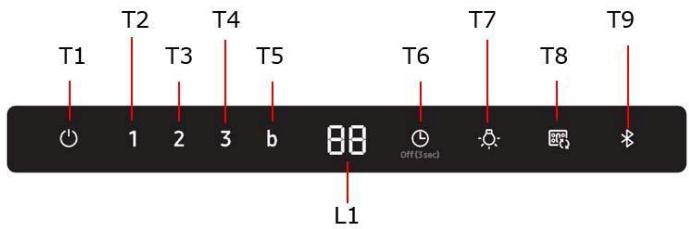
T5. Vitesse intensive (Boost)
EN - Instruction on mounting and use
Symbols used in this manual

WARNING
Hazards or unsafe practices that may result in severe personal injury or death.

CAUTION
Hazards or unsafe practices that may result in electric shock, personal injury, or property damage.

NOTE
Useful tips and instructions
These warning icons and symbols are here to prevent injury to you and others. Please follow them explicitly. After reading this section, keep it in a safe place for future reference.
Closely follow the instructions set out in this manual. All responsibility, for any eventual inconveniences, damages or fires caused by not complying with the instructions in this manual, is declined. This appliance is intended to be used in household and similar application such as: - staff kitchen areas in shop, offices and other working environments; - farm houses; - by clients in hotels, motels and other residential type environments; - bed and breakfast type environments.
The hood can look different to that illustrated in the drawings in this booklet. The instructions for use, maintenance and installation, however, remain the same.
It is important to conserve this booklet for consultation at any moment. In the case of sale, cession or move, make sure it is together with the product.
- Read the instructions carefully: there is important information about installation, use and safety.
- Do not carry out electrical or mechanical variations on the product or on the discharge conduits.
- Before proceeding with the installation of the appliance verify that there are no damaged all components. Otherwise contact your dealer and do not proceed with the installation.

Caution
- Before any cleaning or maintenance operation, disconnect hood from the mains by removing the plug or disconnecting the mains electrical supply.
- Always wear work gloves for all installation and maintenance operations.
- This appliance can be used by children aged from 8 years and above and persons with reduced physical, sensory or mental capabilities or lack of experience and knowledge if they have been given supervision or instruction concerning use of the appliance in a safe way and understand the hazards involved.
- Children shall not be allowed to tamper with the controls or play with the appliance.
- Cleaning and user maintenance shall not be made by children without supervision.
- The premises where the appliance is installed must be sufficiently ventilated, when the kitchen hood is used together with other gas combustion devices or other fuels.
- The hood must be regularly cleaned on both the inside and outside (AT LEAST ONCE A MONTH).
-
This must be completed in accordance with the maintenance instructions provided. Failure to follow the instructions provided regarding the cleaning of the hood and filters will lead to the risk of fires.
-
Do not flambe under the range hood.
- For lamp replacement use only lamp type indicated in the Maintenance/Replacing lamps section of this manual. The use of exposed flames is detrimental to the filters and may cause a fire risk, and must therefore be avoided in all circumstances.
Any frying must be done with care in order to make sure that the oil does not overheat and ignite.
CAUTION: Accessible parts of the hood may become hot when used with cooking appliances.
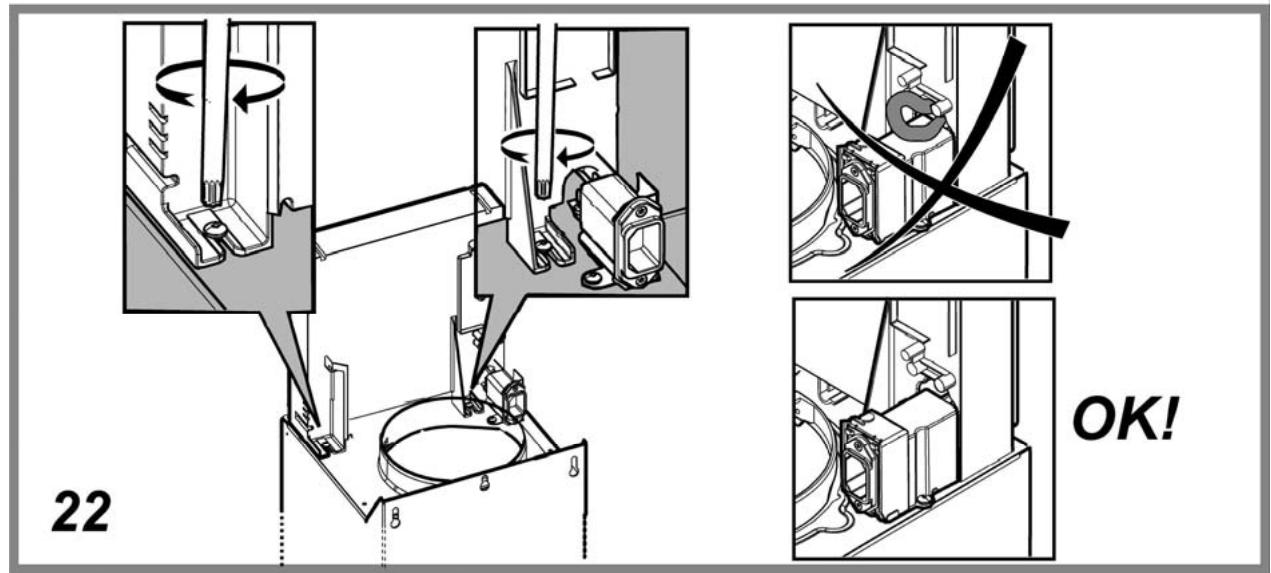
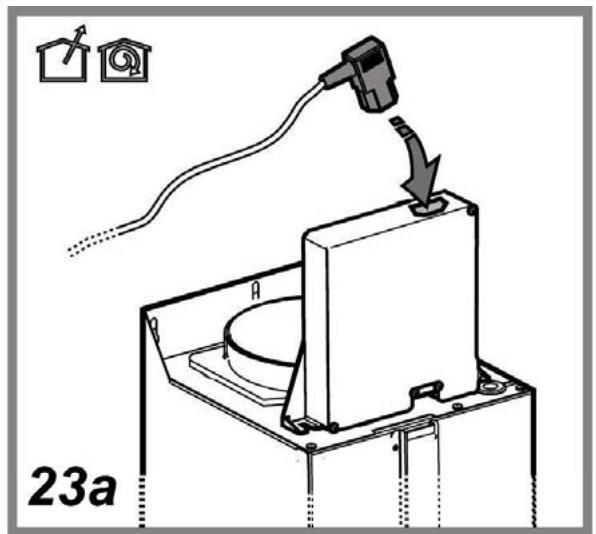
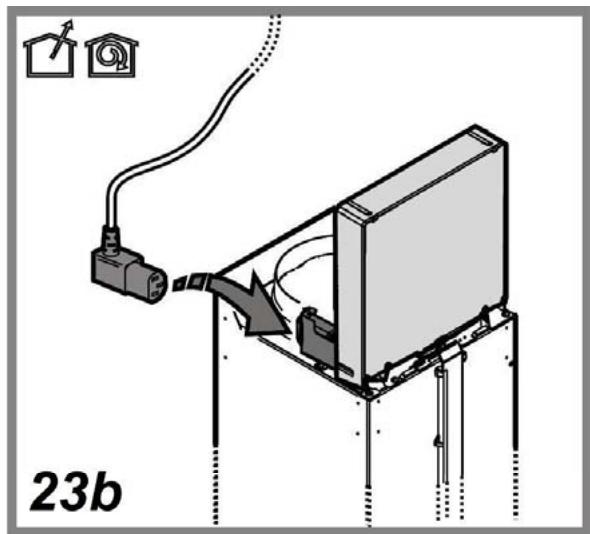
- Do not connect the appliance to the mains until the installation is fully complete.
- With regards to the technical and safety measures to be adopted for fume discharging it is important to closely follow the regulations provided by the local authorities.
- The air must not be discharged into a flue that is used for exhausting fumes from appliance burning gas or other fuels.
- Do not use or leave the hood without the lamp correctly mounted due to the possible risk of electric shocks.
- Never use the hood without effectively mounted grids.
- The hood must NEVER be used as a support surface unless specifically indicated.
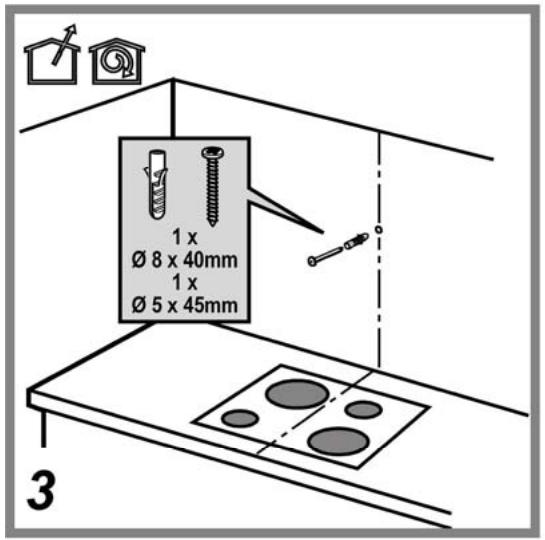
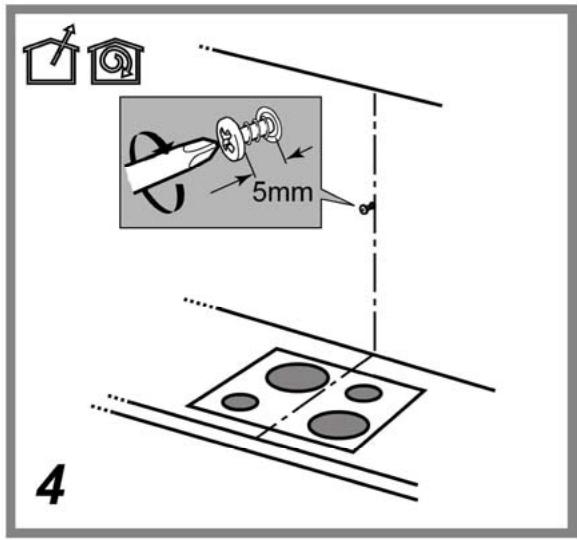
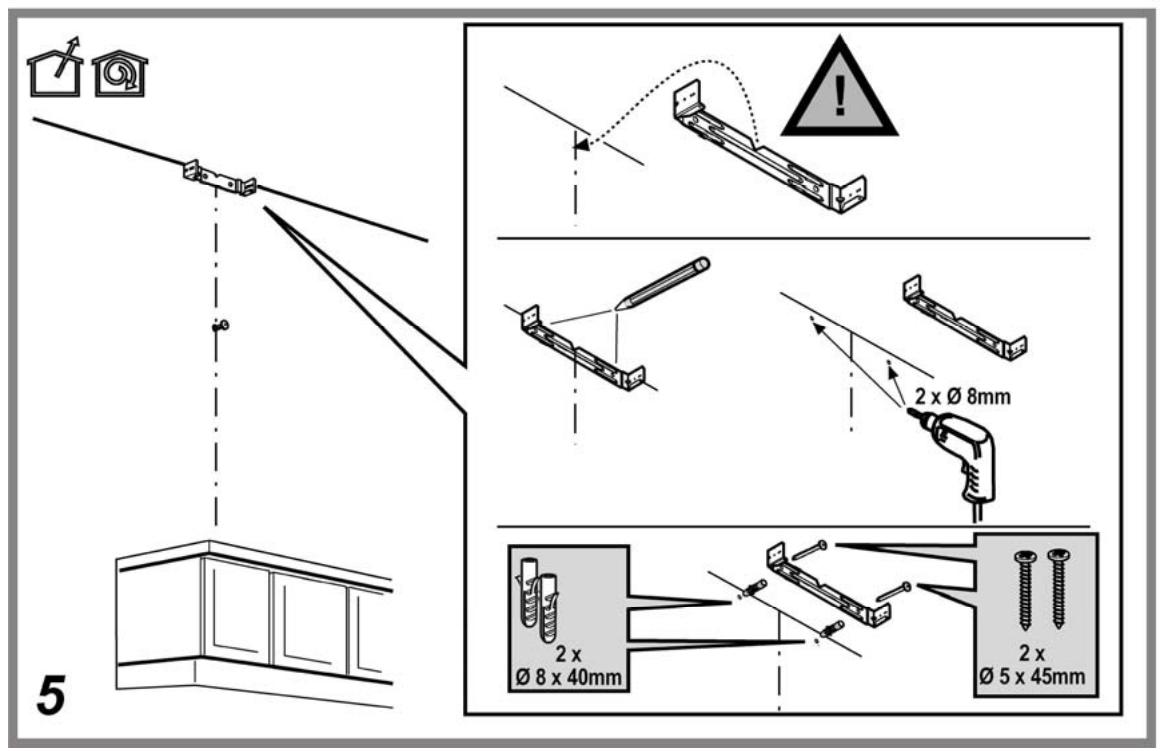
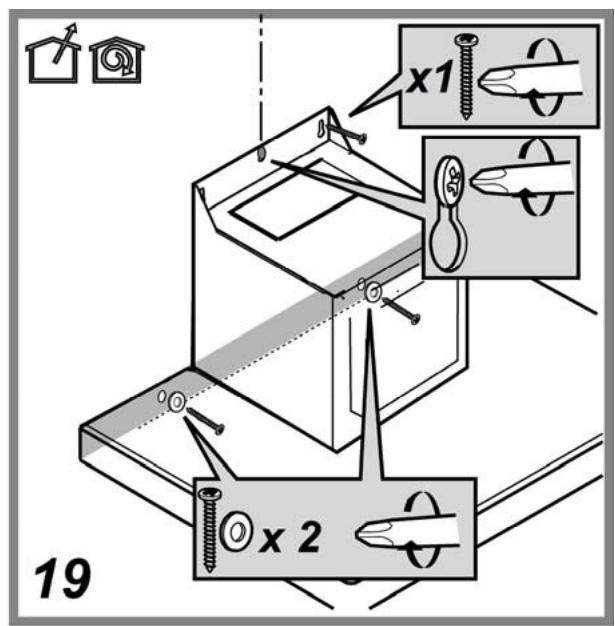
- Use only the fixing screws supplied with the product for installation or, if not supplied, purchase the correct screws type.
- Use the correct length for the screws which are identified in the Installation Guide.
- In case of doubt, consult an authorized service assistance center or similar qualified person.

WARNING!
- Failure to install the screws or fixing device in accordance with these instructions may result in electrical hazards.
-
Do not use with a programmer, timer, separate remote control system or any other device that switches on automatically.
-
This appliance is marked according to the European directive 2012/19/EC on Waste Electrical and Electronic Equipment (WEEE).
- By ensuring this product is disposed of correctly, you will help prevent potential negative consequences for the environment and human health, which could otherwise be caused by inappropriate waste handling of this product.

- The symbol on the product, or on the documents accompanying the product, indicates that this appliance may not be treated as household waste. Instead it should be taken to the appropriate collection point for the recycling of electrical and electronic equipment. Disposal must be carried out in accordance with local environmental regulations for waste disposal.
- For further detailed information regarding the process, collection and recycling of this product, please contact the appropriate department of your local authorities or the local department for household waste or the shop where you purchased this product.
Appliance designed, tested and manufactured according to:
Safety: EN/IEC 60335-1; EN/IEC 60335-2-31, EN/IEC 62233.
Performance: EN/IEC 61591; ISO 5167-1; ISO 5167-3; ISO 5168; EN/IEC 60704-1; EN/IEC 60704-2-13; EN/IEC 60704-3; ISO 3741; EN 50564; IEC 62301.
- EMC: EN 55014-1; CISPR 14-1; EN 55014-2; CISPR 14-2; EN/IEC 61000-3-2; EN/IEC 61000-3-3. Suggestions for a correct use in order to reduce the environmental impact: Switch ON the hood at minimum speed when you start cooking and kept it running for few minutes after cooking is finished. Increase the speed only in case of large amount of smoke and vapor and use boost speed(s) only in extreme situations. Replace the charcoal filter(s) when necessary to maintain a good odor reduction efficiency. Clean the grease filter(s) when necessary to maintain a good grease filter efficiency. Use the maximum diameter of the ducting system indicated in this manual to optimize efficiency and minimize noise.
Use
The hood is conceived for the suction of cooking fumes and steam and is destined only for domestic use.
The hood is designed to be used either for exhausting or filter version.

Extraction version
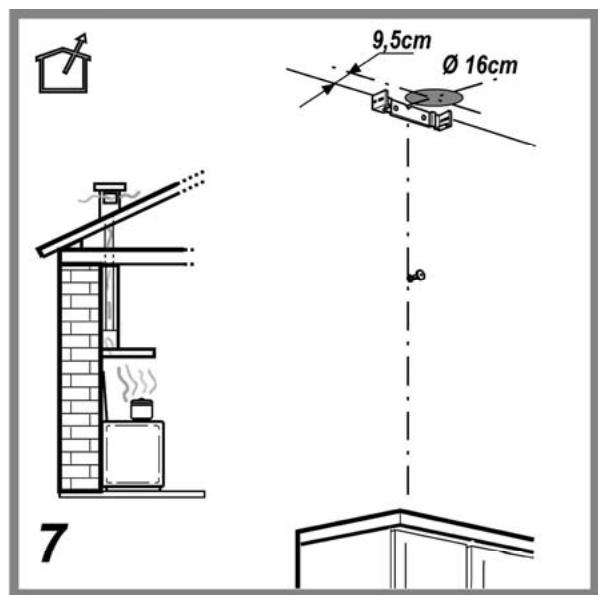
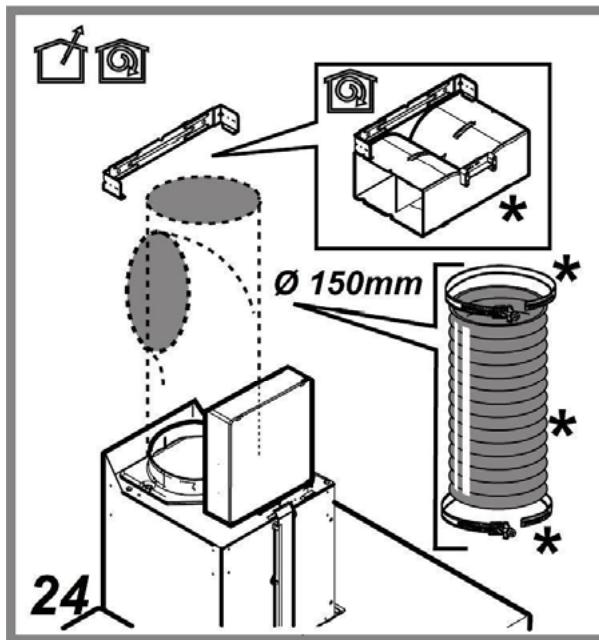
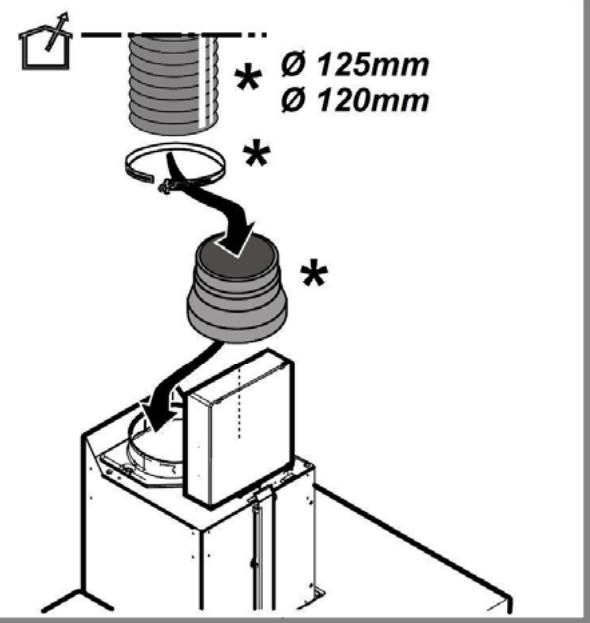
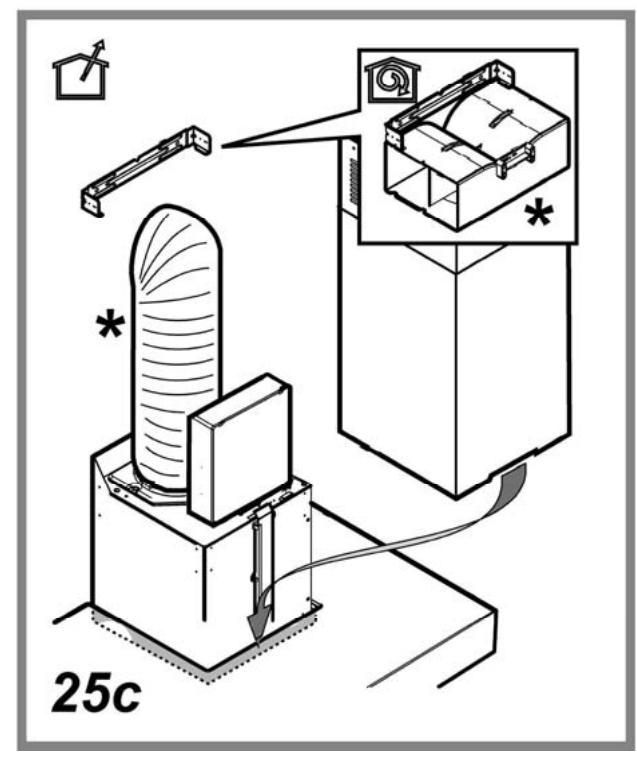
In this case the fumes are conveyed outside of the building by means of a special pipe connected with the connection ring located on top of the hood.

CAUTION!
The exhausting pipe is not supplied and must be purchased apart.
Diameter of the exhausting pipe must be equal to that of the connection ring.

CAUTION!
If the hood is supplied with active charcoal filter, then it must be removed.
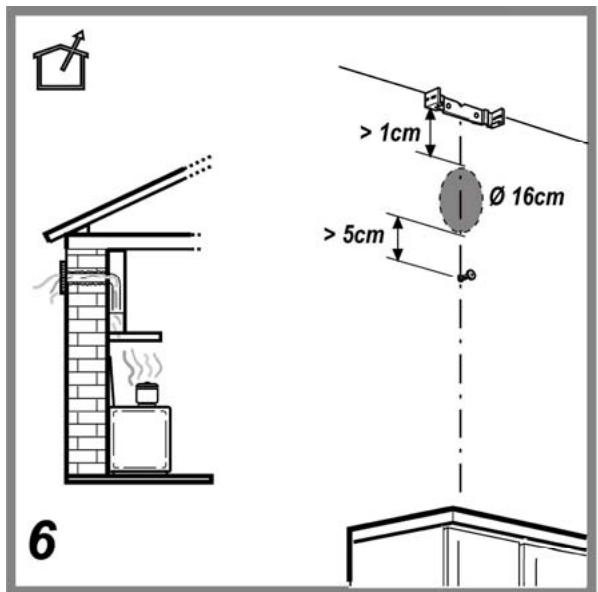
Connect the hood and discharge holes on the walls with a diameter equivalent to the air outlet (connection flange).
Using the tubes and discharge holes on walls with smaller dimensions will cause a diminution of the suction performance and a drastic increase in noise.
Any responsibility in the matter is therefore declined.
Use a duct of the minimum indispensable length.
Use a duct with as few elbows as possible (maximum elbow angle: 90^ ).
Avoid drastic changes in the duct cross-section.
If you want to use as Extraction version, Please remove the Charcoal filter on the Hood.

Filtration version
The aspirated air will be degreased and deodorised before being fed back into the room.
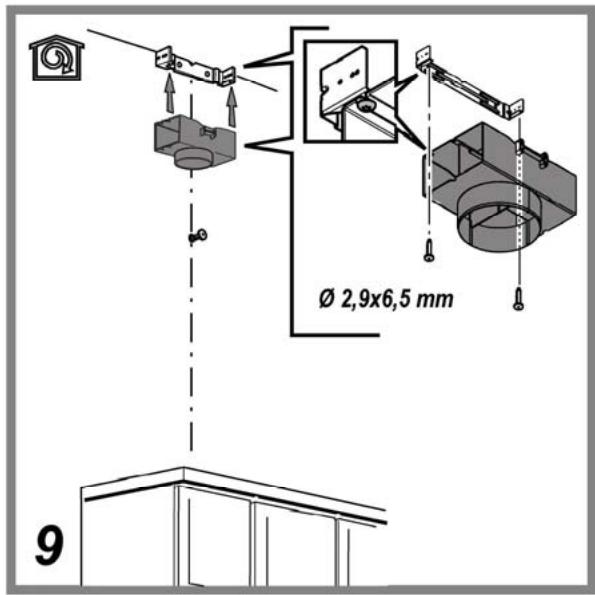
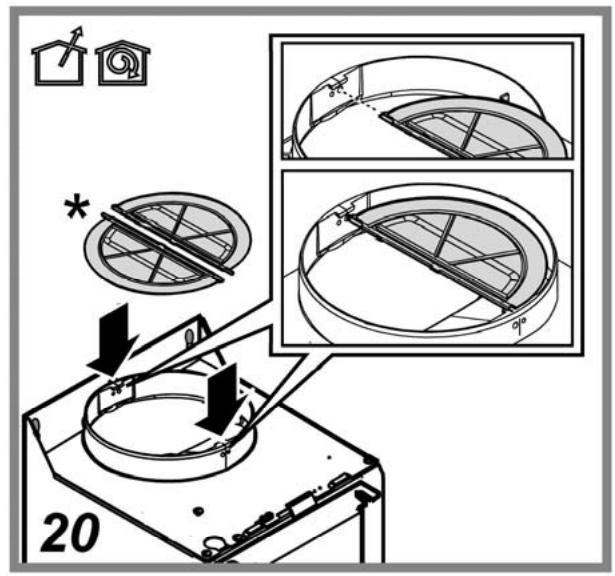
In order to use the hood in this version, you have to install a system of additional filtering based on activated charcoal.
Installation
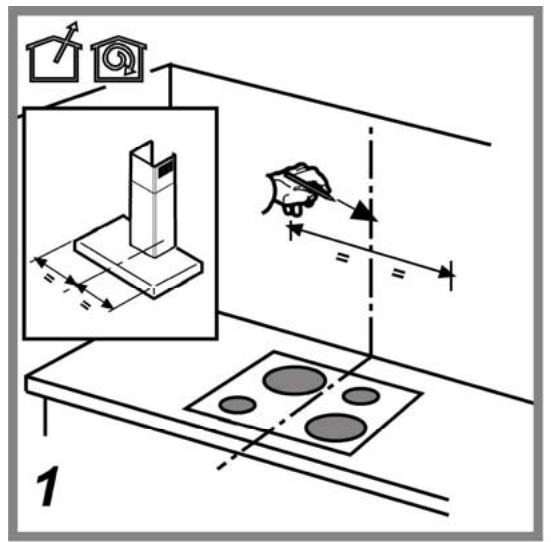
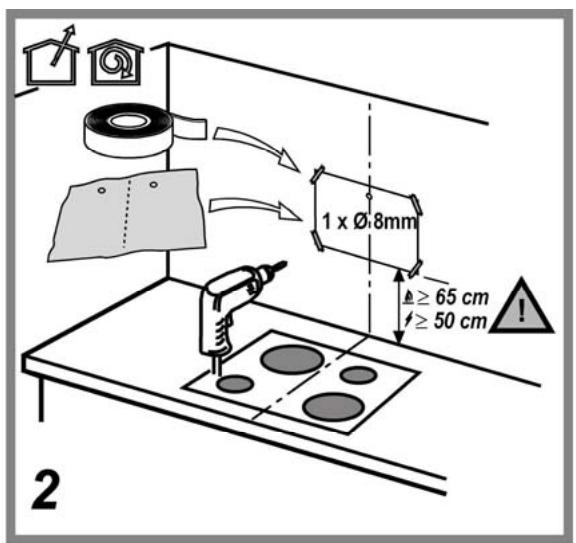
The minimum distance between the supporting surface for the cooking equipment on the hob and the lowest part of the range hood must be not less than 50cm from electric cookers and 65cm from gas or mixed cookers.
If the instructions for installation for the gas hob specify a greater distance, this must be adhered to.
*please check local regulation before installation.

Electrical connection
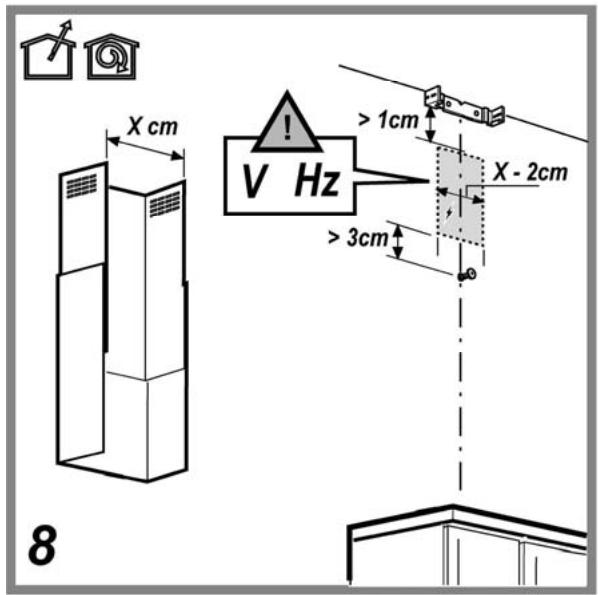
The mains power supply must correspond to the rating indicated on the plate situated inside the hood. If provided with a plug connect the hood to a socket in compliance with current regulations and positioned in an accessible area, after installation. If it not fitted with a plug (direct mains connection) or if the plug is not located in an accessible area, after installation, apply a double pole switch in accordance with standards which assures the complete disconnection of the mains under conditions relating to over-current category III, in accordance with installation instructions.

WARNING!
Before re-connecting the hood circuit to the mains supply and checking the efficient function, always check that the mains cable is correctly assembled.
The hood is provided with a special power cable; if the cable is damaged, request a new one from Technical Service.
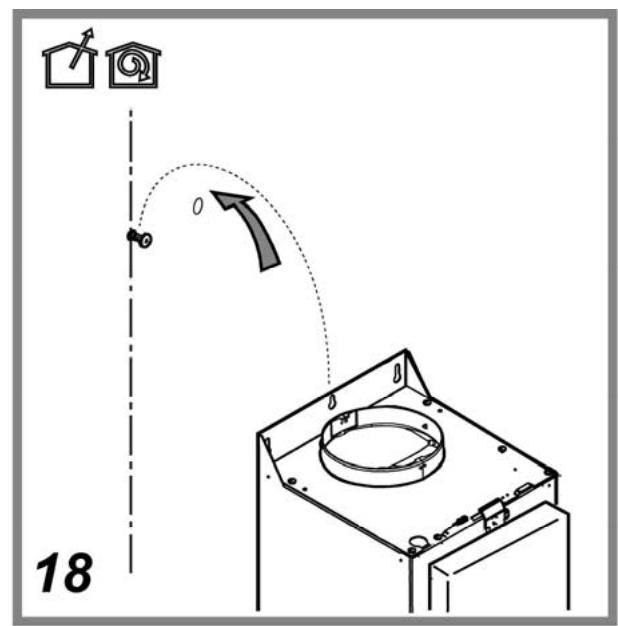
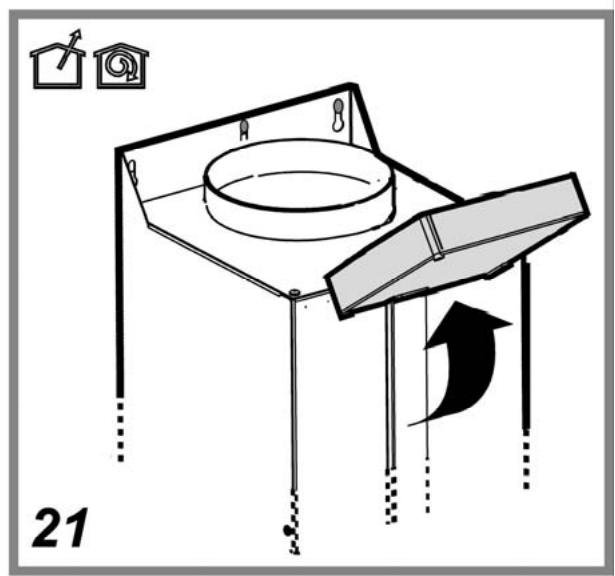
Mounting
Before beginning installation:
- Check that the product purchased is of a suitable size for the chosen installation area.
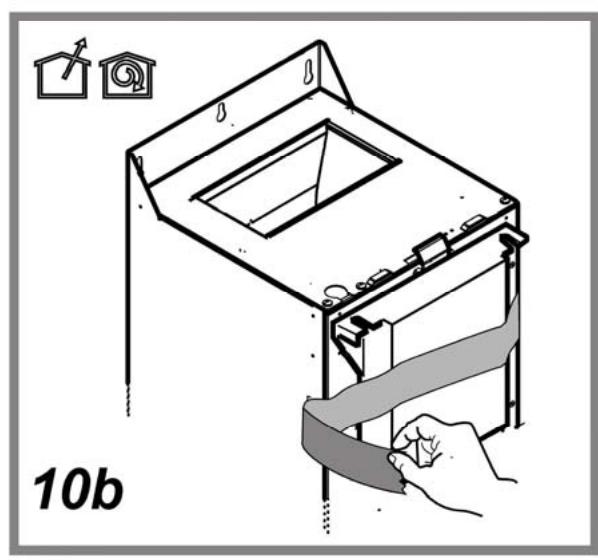
- Remove the charcoal () filter/s if supplied (see also relative paragraph). This/these is/are to be mounted only if you want to use the hood in the filtering version.
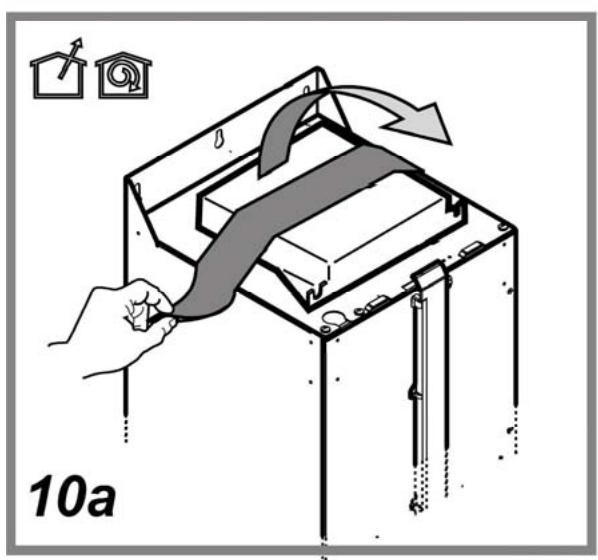
- Check (for transport reasons) that there is no other supplied material inside the hood (e.g. packets with screws (^) , guarantees (^) , etc.), eventually removing them and keeping them.
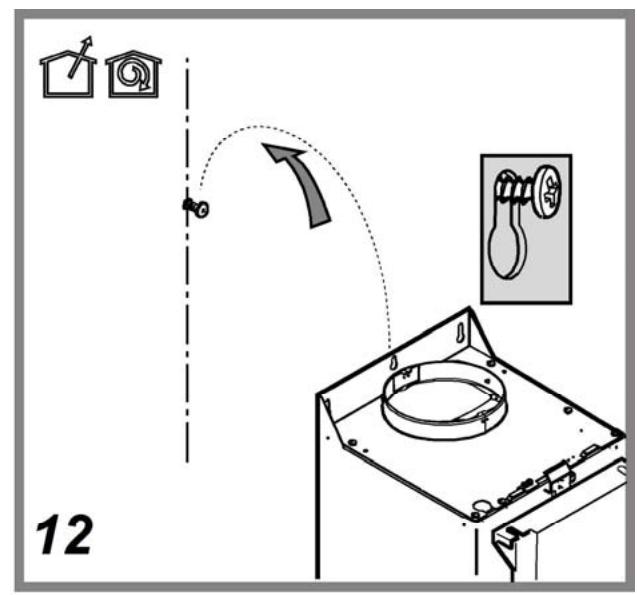
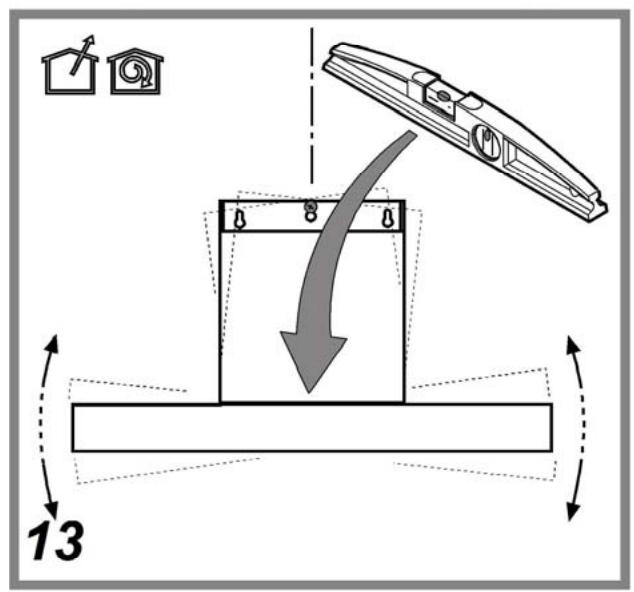
Expansion wall plugs are provided to secure the hood to most types of walls/ceilings. However, a qualified technician must verify suitability of the materials in accordance with the type of wall/ceiling. The wall/ceiling must be strong enough to take the weight of the hood.
Do not tile, grout or silicone this appliance to the wall. Surface mounting only.
Note: The parts marked with the symbol " () " are optional accessories supplied only with some models or otherwise not supplied, but available for purchase.
Maintenance
Cleaning
Clean using ONLY a cloth dampened with neutral liquid detergent. DO NOT CLEAN WITH TOOLS OR INSTRUMENTS. Do not use abrasive products. DO NOT USE ALCOHOL!
Always wear work gloves for all maintenance operations.
Grease filter
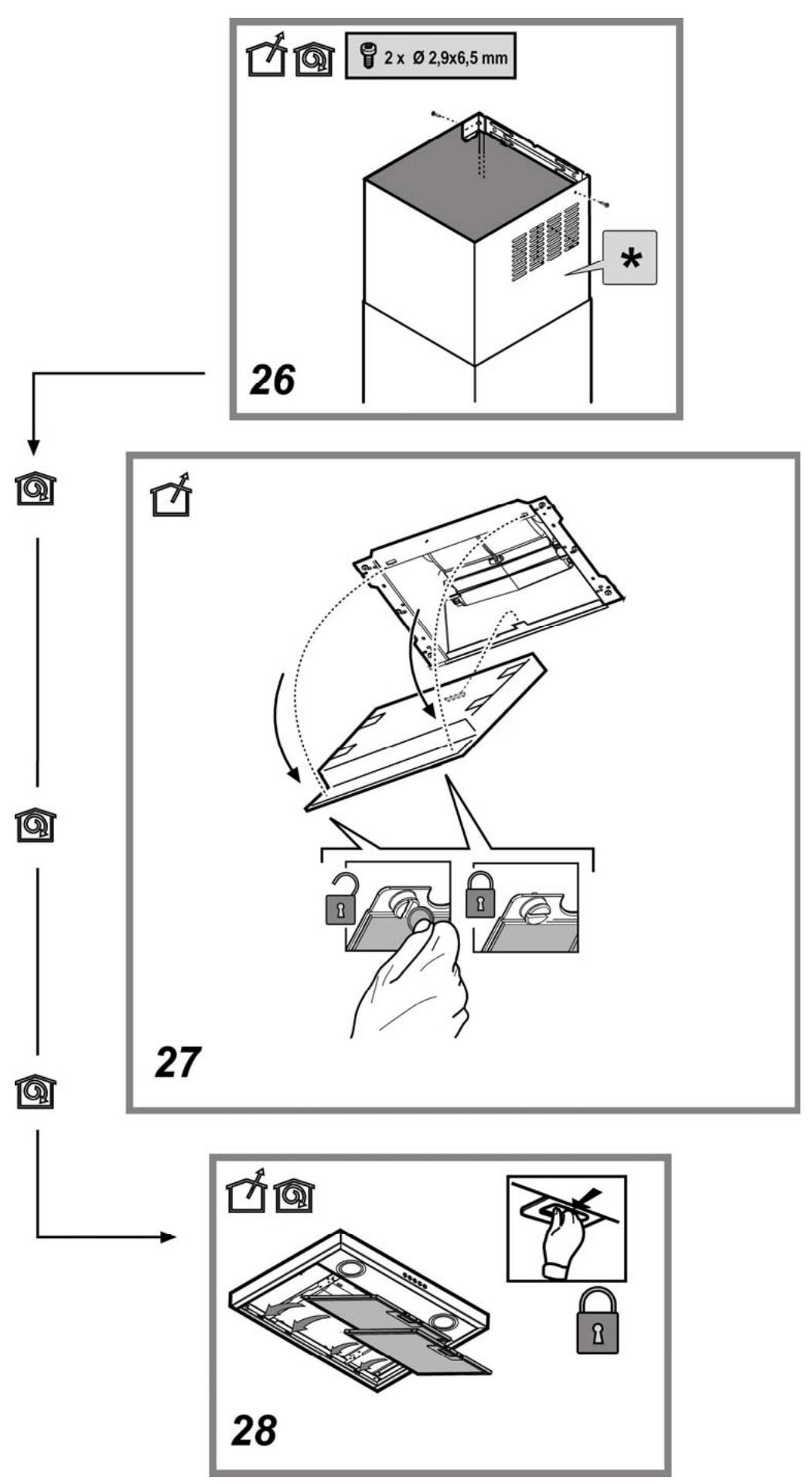
Fig. 11-28
Traps cooking grease particles.
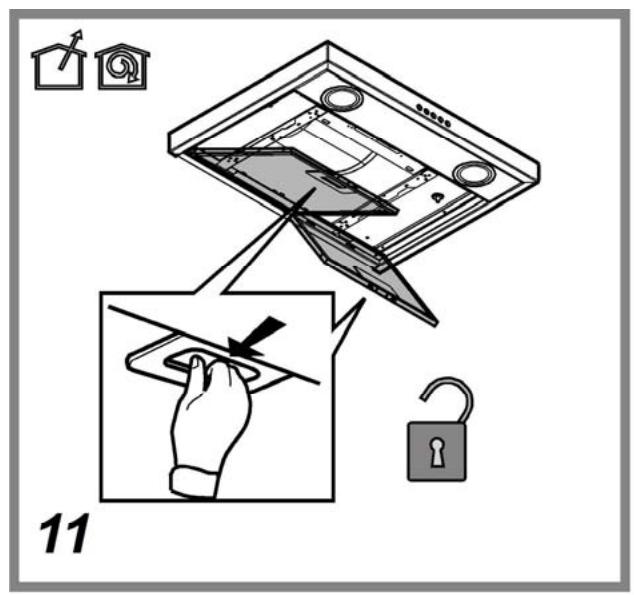
The grease filter must be cleaned once a month using non aggressive detergents, either by hand or in the dishwasher, which must be set to a low temperature and a short cycle. When washed in a dishwasher, the grease filter may discolor slightly, but this does not affect its filtering capacity.
To remove the grease filter, pull the spring release handle.
Charcoal filter (Optional)
Fig. 27
It absorbs unpleasant odors caused by cooking.
The saturation of the charcoal filter occurs after more or less prolonged use, depending on the type of cooking and the regularity of cleaning of the grease filter.
In any case it is necessary to replace the cartridge at least every four mounths (or when the filter saturation indication system - if envisaged on the model in possession - indicates this necessity). The charcoal filter may NOT be washed or regenerated.
Assembly
Hook the charcoal filter at the back on the metal tongue of the hood first, then on the front with the two knobs.
Disassembly
Remove the charcoal filter by turning the knobs fixing it to the hood by 90^ .
Buying charcoal filters
The Charcoal filter can be bought at Samsung Service Website and Service Center.
Please refer to the last page of manual.
Replacing lamps
The hood is equipped with a lighting system based on LED technology.
The LEDs guarantee an optimum lighting, a duration up to 10 times as long as the traditional lamps and allow to save 90% electrical energy.
For replacement, contact the technical service.
Operation
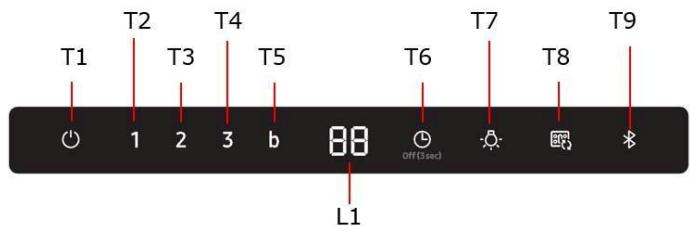
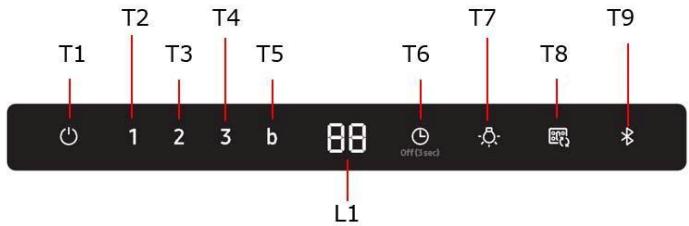
T1. Motor ON/OFF
Press the T1 button and the hood will be activated at default speed (Default Speed : Low).
Press again and the hood will return to sleep mode.
T2. Low speed
Press the T2 button and the hood will be activated at Low speed.
T3. Med Speed
Press the T3 button and the hood will be activated at Medium speed.
T4. High Speed
Press the T4 button and the hood will be activated at High speed
T5. Boost speed
Press the T5 button and the hood will be activated at Maximum speed for 5 minutes.
T6. Timer ON/OFF
Press the Timer button to set the working time.
Press the Timer button for 3 seconds and the Timer function will turn off.
T7. Light ON/OFF
Press the Light button and the lamps will turn on.
Press the Light button again and the lamps will turn off.
T7. SOUND ON/OFF
Press the Light button for 3 seconds. The sound will be turned off.
Press the Light button for 3seconds. The sound will be turned on.
COOKTOP AND RANGE HOOD CONNECTIVITY
This appliance has a feature which allows you to pair compatible Samsung cooktops and your hood via Bluetooth.
After you enable this function and pair your hood and a compatible cooktop, the hood fan will automatically come on at Low speed when you turn on a cooktop element. The hood fan will also shut off automatically when you turn off the cooktop elements.
In addition, after the hood and compatible cooktop are paired, you can download the
Smart Things app to a mobile device, and then use the Smart Things app to:
- Monitor and control the On/Off status of the hood.
Monitor and control the fan speed.
Monitor and control the lights. - Set the hood shut-off timer with the time-up alarm.
For more information about downloading the Smart Things app to your mobile device and using it to control your hood, visit:
www.samsung.com.
T9. Bluetooth connection (Pairing)
- Press the Bluetooth button on hood.
The pairing mode will be activated and \the indicator on the Bluetooth button will blink.
2. Press the Bluetooth button on cooktop. After the pairing process finishes, the Bluetooth light will stay lit and 'bt' appears in the display.
T9. Bluetooth disconnection (Pairing reset)
- Press and hold the T9 button on the hood for 3 seconds.
- The Bluetooth connection disconnects and "bt rt" appears in the display.
NOTE
For a detailed description of the pairing method, see the user manual of a compatible Samsung cooktop.
Auto Connectivity
The Auto Connectivity function lets you quickly connect the hood via Bluetooth with a compatible Samsung cooktop after the hood and cooktop have been paired. To turn the function on, press the Auto Connectivity button. To turn the function off and disconnect the hood and cooktop, press the Auto Connectivity button again. While the hood and cooktop are connected, the hood fan and Lamp will automatically come on at Low speed when you turn on a cooktop element. The hood fan and lamp will also shut off automatically when you turn off the cooktop elements. You will also be able to control the hood with the Smart Things app as described above.
T8. Auto Connectivity ON/OFF
- Press the Auto Connectivity button to activate the function.
- The hood fan and lamp will turn on/off automatically following the cooktop.
- Press again to deactivate the function.
| Display Icon | Remote Control by Smart Things App | Auto Connectivity | Hood Function |
| ○○○ | X | X | O |
| ○○○ | O | X | O |
| ○○○ | O | O | O |
Reset filter signals
- Press the T1 button until hearing the sound signal.
- The flashing LED 1 (grease filter) or 2 (charcoal filter) stops flashing
Charcoal filter signal ON/OFF
- Press the T2 and T3 Button for 3 seconds and the Charcoal filter signal will be activate.
- Press the T2 and T3 Button for 3 seconds, and the charcoal filter signal will be deactivate.
NK36N5703B*, NK24N5703B*
Data determined according to Regulation (EC) NO 1275/2008.
| Bluetooth | Standby-mode Power Consumption (W) : 1.90W Period of time for the power management (min.) : 3 min. |
| Off Mode | Power Consumption (W) : 0.48W Period of time for the power management (min.) : 3min. |
Bluetooth max transmitter power
NOTE
Hereby, Samsung Electronics, declares that the radio equipment type appliance is in compliance with Directive 2014/53/EU. The full text of the EU declaration of conformity is available at the following internet address: The official Declaration of conformity may be found at http://www.samsung.com, go to Support > Search Product Support and enter the model name.
| Bluetooth | Frequency range : 2402 MHz ~ 2480 MHz Transmitter power (Max) :5 dBm |
Troubleshooting
A fault may result from a minor information that you can correct yourself with the help of the following instructions. Do not attempt any further repairs if the following instructions do not help in each specific case.
WARNING
Repairs to the appliance are to be performed only by a qualified service technician. Improperly effected repairs may result in considerable risk to the user. If your appliance needs repair, please contact your customer service center.
| Problem | Possible cause | Solution |
| What should I do if the Hood are not working? | The fuse in the house wiring is not intact. | If the fuses trip a number of times, call an authorized electrician. |
| The power button was accidentally actuated. | The appliance is properly switched on. | |
| The control panel is contaminated with foreign objects or liquid. | Clean the control panel. | |
| What should I do if the Bluetooth connection is not working. | See the user manual of a compatible Samsung cooktop. | Only Samsung compatible cooktop can connect with Hood via Bluetooth |
| The hood is connected with other appliance. | Activate Bluetooth disconnection (Pairing reset,T9 for 3 sec) and then activate Bluetooth connection process again. | |
| Bluetooth connection(pairing) is not stable. | Disconnect the power more than 30 seconds. Then restart the appliance. Then activate Bluetooth disconnection and then activate Bluetooth connection process again. |
Reset indicator verzadiging filter
BbIbOHa TpyBa He BxOaNt B KOMJIeKT N DOJXHa 6bItb npNo6peTeHa OTDeIbHO. DnAmEtP BbIbOHO Tpy6bl DoJXeH COOTBeTCTBOBaT DnAmEtpy CoeINHITeIbHorO KOIbua.

BHIMAHHE!
EcnBbIyXKa Ch6KeHa yOJbHbIM fInbTpOM,TOy6epnte erO.
PiOnCoeHNHTe BbITKky K BbIBoHOH Tpy6e C dAmETpOM COOTBeCTBYUOUM OTBepnIO BVIXOda BO3dyxa (CoeHNHTeBbHbI NfnaHeU).
YcTaHOBKa Tpy6 c MehBWMdNAmETpOM daCT yMeHbSeHne MOuHOCTN BCaCbBaHnRA Bo3dyxa n pe3Koe yBEnuHene YPOBn7uMa.
Pon3BODInTeB ChmMaet C c6eBcRkyo OTBECTBEHHOCt b NO OTHoHeHIO Bblie CKa3aHHoro.
IcnoJb3ObaTtpy6cMnHmMaJIbHO Heo6xOIMoI nnHO.
! NcIOnJIb3OBAbT py6y C hAmMeHbIIM KOIINeCTBOM I3rNIOB (MaKcImaJIbHbI yrOJI 13rN6a:90°).
!I36eRaTpe3KOrO n3MeHEnrCeEHnra TpybI.
EcnnBbXOTNE hCnONb3OBaTb yCTPOCTBO dNr OTbOaNapOB, noXaanycta, ydaJIte yrOJbHbIΦJIbTpHa BbITxKe.

IcnoIb3OBaHne B pexnme peunpkylaenu Bo3dyxa
IOnJxH NcOnb3oBaTbC yOrIbHbI pIbTp, IMeHOuNcB H aHnUHy B aWaeO IncTp6yTopa. BTrrNaBembl Bo3dYx 06e3XkpnbAetcN de3oDnpyetc nepeTeM, KAK BHObB Bo3BpaAaETcB NOMeUHeMe YpeE BepXHIO PeWetKy.
YctaHOBka
PacctoHne HnKHe rpaHn BbTjAaKn HaonOpHn PIOCKOCTbHO IOD cocyDbHa KxOHn PIIITe DOJNkHO 6bITb He MeHee 50cm-dIg 3NeKtpuecknx PIIIT, H He MeHee 65 cm dIra3OBbIX nIN KOmbHnpoBaHHbIX PIIIT.
EcIn B INCTpyKUax No yCTaHOBke ra3OBn PIIITbI OROBopeHo 6OJIbWe paCCToHne, To yHTnte 3TO.
*PoxaynuYcTa, npey yCTaHOBkoO3HaKoMbTeCb C MeCTbIM 3aKOHOdaTeJIbCTBOM.

3neKtpueckoe coeHHeHne
HaprjEHe cTe dOJIKHO COOTBcETBOBaTb HaprjKeHHIO, yka3aHHOMy Ha Ta5JIuKHe texNuecknx DaHHbIX, KOTOPa pa3MeUeHa BHyTpnpn np6oPa. EcIn bIytjKa ch6KeHa BUNKO, NOkLIQUHTe BItjAKKY K wTeNCelbHOMy pa3bEmy. OH DOnJKeH OTBeuATb DeCTByUQMM npABINAM n 6blp TaONLOXeH B NERKOOCYTNOM MeTe. BkJIouTHB p03ETKMOKHO NOcNE YCTAHOBKn. EcIn JKe BITJKA He Ch6KeHa BUNKO (nprrMoE NOkLIQUHEnn K cTe), INI N TcENCeHbN pa3bEm He paCNOJoxeH B DOCTYHOM MeTe, TAKKE I NocNe YCTAHOBKn, TO NCNoJIb3yTe HADJNEXKaUIM DByxNOLIOCHbI BkJIouateB, ObecneuBaHOUsn POJIHOe pa3MbKaHHe cTe npn Bo3NHKHOBeHHN ycNOBnpeHAprrJaEHHa 3-ei KaTEROpn, B COOTBcETBm C IHCTpyKzmaMn No yCTAHOBKe.

BHIMAHHE!
Ipejde Yem NODKIIHOHTb K CETn IITAHN IJIeKTpUeCKyO CNTeMy BbITXKKI INPOBepNTb NCIPaBHOe FyHKUHINOpOBaHne ee yBeJntecb TOM, YTO KaBeJIb IITAHN INpaBUNbHO CMOTnPOBaH.
BbIyKa IImeT CneuaIbHbI Ka6BeI 3NeKtpOniTahnIa; B cNyuae NOBpeXDeHnIa Ka6BeI, Heo6xOIMO 3aKa3aTb eRo E Cnyk6e IIO TEXHnueckOMy OBCnyXuBaHnIO.
YctaHObKa
Ipeed HaayajOM MOHTaJa:
- Поверьт, чьбы размрь пиобетенlorу Bamn n3деля походлк вьбрансому месу erо мontаж.
- CHNMMTe yroIbHbIyΦnIbTp/bI, ecNI OHN IMeHTcR (CMOTpTe TaKKe COOTBETCTByIOU p3dJI). ΦnIbTp/bI yctaHaBnBaHOcTc O6paTHO, TOnkO ecNI Bbl xOTte nCnIb3OBaTB bItgKky B peKIMpeuPkyLanm.
IpoBepbTe,HTObb BHyTpBbITaRkHe OCTaBAnOCb PneDMeTOB,NOMeUeHHbIX TuJa Ha BpEm e ee TpaHCnOpTIpOBKn) (HapnPmEp, nakETNKOB C uypyPamM, JNCTKOB rapaHTIN N T.D.)ecn OHN IMMeOTcBbHbTe INx COXpaHInTe.
BbTgKka Ch6keHa DIO6eJMaMn DnI KpeJIeHnEe B 6OBJuHCTBe CTHe/NOTOKOB. Ondako, Heo6xOIMo 6paTbCk KBAINpUPOBaHOMy TexNky uyeiITcba TOM, YTO MATEpHaIbI pInrOdHbI DnI DaHHoro Tnna CTHe/ NOTOKA. CTeHa/NOTOKO dONKhbI 6bIaTaDb DOCTaTOHIN PpOHcTBc C yETom MacCbI pIn6opa.
PpimueaHHe: PnHaIeXHoCTN, 063HaeyHbIe 3hAKOM (^*) , RBAJHO TcOIOHAJIbHbIMN, NOCTABJIeMblIM NToBko Ha HeKOTOpble MoDeJI, INI ppeCTabJIOT cO6o DeTJIH, HE BXODJIeNE B KOMIIeKT NOCTaBKN, IN KOtOpble 3akynaHOTc OTdJIbHO.
yxoI
OuInctka
Длг OунстКИ NGOTьЗУTe TОЛБК CпeцmaJIbHyTOТяпКИ,СмочEHнЮ HeIITpaJIbHIM KИДКIM MOUSSIM CpeDCTBOM. HE ICSIOЛБ3YITE HNKAKNE ИHCTPUMEHTbI DlIЯ OUHSTKII. He npIMeHЯTe CpeDCTBA, coDEpXaUme abpa3nBbIe MaTePnAJIb. HE IPNIMEHЯITE CTNINT!
PnBbIopJIHeHH Bcex onepaun no Texo6cnyKuBaHIO nCnoJIb3yTe pa6Oue nepHaTkn.
KnpoBoiΦnIbTp
Pnc.11-28
Yapedxmbaet qactnubjXnpa,ncxOJauneOTnnTbI.
ФИЛТР CпдуET YСТПь ExжЕСЯн Ho HearpeCCBHBIMMOHQUIMM CpeДТВAMN, BpyHyU Ил B NOcYdOMOeHoi MaIINHe Пи Hn3KoI TempepaTne I 3KOHOMuHOM ZIKNE MblTb.
PnMbITBeB NocyDmoEueHOn MaunHe MoKET MeTb MeCTO HeKOTOpoe 6eBCuBcYBaHne XJPOBOro FInbTpA, Ho erO fInbTpkyoUaXapaKTepnCTNa octaetc a6coJIIOTHHO HEN3MeHHo.
A B T O M A T N U E C K O E C O E D H E N H E
ABTomatMueckoe CoeHHeHne N03BOJnEe TcHxPOHNO H6bIcTpo pa6oTaTb,pepe3 coeHHeHne Bluetooth,BbITaKke COBMeCTHO C COBMeCTmOH BapOCHNIOBepXHOCTbH Samsung, nocle BbINOnHeHnCOPraKeHn MEXdy DByM yCTpOCTBaMn.
ДяakTbauZиФунКUинХмNTe KHOKNy Auto Connectivity.
HaXMMTE eIe pa3 IJIa OTKIIIOUeHnI ΦyHKLmN I OTCOEINHEHnBbITJAKN OT BApOCHNOBepxHOCTn.
Iocne coeDHeHn DByx yCtpoiCTB, KaKdbi pa3 npn BKJIouChEN BApOCHoN NOBepXHOCTn Ha BaITJxKke aBTOMaTUnCeKN 3arOpaeTcN OCBeUeHne N AKTNBUPyETc Hn3KaJ cKopocTb.
YcTpoCTBOIOOCBSeHHe aBtOMaTnueCKN OTKJIouHaOTc npN OTKJIouHm BApOCHNoBepxHOCTn.
BbITaKKoMozHO ynpabJIaTb c NOMOcIbIO npINIOKeHnA Smart Things KaK OINCAHO Bblwe.
T8. BkJIOUeHHe/ByIKJIOUeHHe aBOMaTHueCKOrO coEINHeHn
- Haxmte KhoNky Auto Connectivity dIaakTbauu yHKU.
- BbIyXka N OcBeUeHHe BkIIOuHaOTcN N BbIKIOuHaOTcN B 3aBNCIMOCTN OT COCTOHN BapOCHN IOBepxHOCTN, KAK ONICHO BVIIIE.
3.Εuple pa3 hajmnte KhoNkIy dIЯ OTKIoueHnФyHKuIN.
Heo6xio npnMaTn do ybarb BiCTaHi, kki Bka3yOToBcB IHCTpyKci 3 IHCTaJIra30BOI nNTN.
He BnKOpNCTOByTe 3ac06n 5o MaHObMaepa3nBHi MaTepiAn. HE BnKOpNCTOByTE CnIPT!
Пд ус BCix onepaui 3 obcnyroByaHnBbKOpNCTObTuIte pykBaunu.
ΦIbTp 3aTpμmKxJnpiB
Man. 11-28
3aTpMyc Jxropbi cnoJyHn, 0o BnHnKaIOb nId qac npiroTyBaHH Ixi.
PiBHeH NCTNTcB oINi p3A HA MICJIe H CNIHbIOIOOHMM NIOHmN 3aco6aMn,
BpyHy aBO b NOcYDommHi MaunHi pni HNe3bKII TempeApTy i 3 KOPOTKM UKNOM.
Pn mI B NOcYdommHi MaunHi MeTaNEB mIbTp 3aTpIMKn Xnpy MoKe BTPaTtN
KoJIp, aJe IYO XpaAtePDCNTKK 3 fJIbTPyBAHH KJOHDMM YHOM He 3MIHYbC.
ДяЗЯТТФИЛБТРУ 3aTpIMKINJINPY NOTIHTb Ha ce6e npyKHHpy pyHy BiDyENJIeHnHЯ ФIbtpY.
ByrilbniΦiltp (tijlkBpejmi peepkpnyi)
Man. 27
B6pae Hnpiemmi 3anaxn kyxhi.
HacnueHicb ByrInhoro fipbpy nepebipcctc nCn6 6lbu a6o MeHs DOBOrO HbKOpNCtAHN B3aJIeXHOCTi BID TINy PInNT Ta perynpHocTi CUnHeHH NkponorHnHaOHOro fipbTy. U 6yb-akOMy BNapAdky Heo6xIDHO 3AmHHTn KapTpDnK npnaHmHI cepe3 KOxHi QOTnpi Mcaui (a60 kOni CnCTema iHnkaui hAcnueHoCTi fipbTIP - JaKIO taka nepeD6aChEu Ha BauM MoDei - Bkazye Ha Taky Heo6xIDHcTB) HE niJaRaE MtTTH uNoHOBneHHo.
BctaHOBJEHHH
IiDbcntn ByirbnHn pInbTp cNoatkY 3aHbOIO CTOpOHo Ha MetaJIeBn RaHOK KOBnaka, Notim nepedHIO qactHry 3akpInNTn DbOMa pyKAMN.
3HATTA
3Hrtn ByirbHn pifIbtp npoeBraOuHy puKn Ha 90° 1o o fikcyTo b noo do KOBnaka.
Pnnd6aHnByrInbHoro pInbtpy
ByrilbniΦiIbTp MoKHa npuδaTn Ha Be6-caTi CepBicHO CIyXbN a6o B LcHtpi oClyroBvBaHHa Samsung. DmBtbc DaHI, HabeDenHi a OCTaHHI CTOpIHci.
3amHa lam
BntaKa 6bIaHa hCCTeMoO oCBtJIeHnHa OcHOBi texHOnorii iOIOB (LED). IODI 3a6e3neuYoTb ONTMaJIbHe oCBtJIeHnHa, TpNBaICt bix B 10 pa3ib Bnua BiD 3BnuAHHx lamNoOHK Ta daIoTB 90% ekOHOMII eJeKTPoeHepri. 5Oio ix 3amHn 3BeptaiTeCe Do clyXbI texHInHO 6cIyroByBaHH.
Функционуванн.
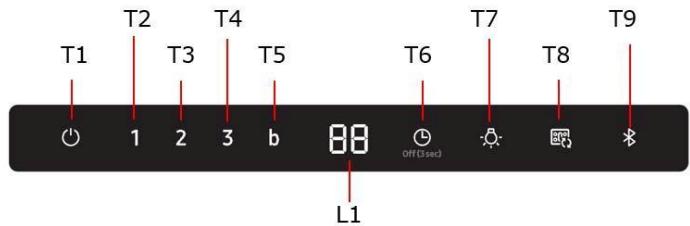
T1. ON/OFF Motore (BKΠ./BVMK.Двигуна)
HaTNCHTb KhoNky T1, 06aKTHyBaTn 8BnDkICTb 3a 3AmOBuYBaHHaM (UbnDkictb 3a 3AmOBuYBaHHaM: Hn3bka).
HaTnchHt b 贝pa3-BITaKKa NOBepTaεbCBypeKIM OiykBaHH.
T2. Hn3bka wBnKicTb
HaTmChItb Khonky T2, 06 akTNByBatn Hn3bKy WbNdkictb.
T3. CepednHs uBnKictb
HaTnCiHb KhoNkY T3, 06aKtBvBaTn cepEnu WbNkiCtB.
T4. Bucoka ÜBüdkiçTB
HaTnCHiB KhONky T4, 06abAaBbATn BnCOy 7uBnXicTb.
T5. lHTeHcBnHa 1bWdkicTb (Boost)
HaTnCHiTB KhONKy T5, 0o6 akTmByBaTN iHTeHCnBHy WbNdkicTb (Boost) Ha 5 XBNJINH.
T6. ON/OFF Timer (BKJI./BIMK. Taɪmepy)
HATNCHTb KONkY Timer, 106 hanaaTyBaTn Yac po6oTn.
HaTnCHiB KhoNkY Timer Ha 3 cekyHn, 106 BmKHytn fhykuio Timer.
T7. ON/OFF
HaTCHiB KhoNki Lyuce, uo6 yBIMKHyTN OCBITJeHnHa HATCHiB 1e pa3, uo6 BmKHyTN.
T7. ON/OFF SUONO (BKJI./BIMK. 3BYK)
HaTnCHyTuHa 3cekyni.3Byk6byeBmKHeo(OFF).
HaTnCHyTHa 3ceKyuHm.3Byk6yeakTNBOBaHO (ON).
3'cDHaHHn (niKIOeHH) MIX BNTaKKoHO Ta nnTOH
Moxha nié'ednATn (niKIOHHTN) BITRAKKy do cymicHOI BapnilbHOI nobepxHi Samsung, 3a donomoroTo texhOJorii Bluetooth.
IicnnyiiknoeHnDcymhoi BapnlbHOIO nobepxHi, BNTJkKa aBtOMaTHO BKNIOyAcTbCnHa Hn3bKII WBNKocTe KOKeH pa3, KOnBKNIOyAcTbCn BapnlbHa NOBEPXn, Ta ABtOMaTHO BIKNIOyAcTbCn, KOIn nAneJIb BmMkaeTbc.
Kpim TORO, pIKIHOHBIIN BNTJKKy DO CymiHOBAPINbHOIO NOBepxHi, BN MOKeTe 3aBaHTaxHTN i BCTAHOBITNODAtOK Smart Things Ha MoibHompy npictpoi i BVKOpNCTOBYaTNIoRO I NaHACTyNHIX qinei:
- Ipebipte i HalaaTuIe BKLIOUeHHB NTJXKN Ta OCBITNeHH,po6oy WbNkICTb 3aNPoRpaMOBaHe BmNKaHnB NTJXKN (TaIMep)i《time-up alarm》 (6yDnJIbNHK).
Длг OTриманн ДддКоови iHфорmaць np0 «Завтхени» i ВИКОпstанн nporpam Smart Things Ha mobiNbHomy npicrtpoi npo Te,явИКОпстуВати II дг управлинь ВITЯжкю, BiDыаиTe:
www.samsung.com.
T9. 3'εДнаннь Bluetooth (3'εДнаннь mix BNTЯЖКоТа symichою Naheлл� Samsung)
- HataChiTb KhoNkbluTeoth Ha BntraXzj.
Ihikatop Ha KnaBii 6nMaC, Bka3yOuHa AKTIBauiio npoccy 3'EdnHaHH.
- Hataichi Kaonky Bluetooth Ha Bapinbhi nobepxhi. IIndkaTop Ha Knabiui 3aJinshaTc ropitB, Bka3youHn Ha 3akihehn npoecy 3'edHaHH, Ha dncnniei ropntb cmb0B "bt".
T9. BiiKlnoueHHa Bluetooth (cknDaHna)
-
HatnchItb Ta ytpmyte HatahcytoIO npotrOm 3 cek. KhoNkY T9 Ha BntjXuJi.
-
Ha dinnei 3'Явпьсь "btrt" , lo O3haatime BiDknHoueHHA.
NIPMITKA
Ioo akTbByBaTn fynKlH,HaTNCiH, KHONKy aBtOMaTHHOrO nIKIOeHHA Auto Connectivity.
HaTnchItb 1e pa3, 06 BiKIIIOHTNФyHKJIO i BiD'EDHATN BNTJXKByi nnITN.
Koyn Kyxohna BnTjXkka i NOBepxHni jdkJIOeHI mix cO6OIO, Koxen pa3 npi yBIMKHeHHI NOBepxHi, Na BtJXkJI aBTOMaTHUHO BMKAeTbC oCBITNeHHa Ta Hm3bKa WbNkicTb.
Ubukicb i CBITIO BmNKaOTbcA ABTomATuHO, KOJI IN BmNKaETbcB BapnIbHa noBepxH.
BntjKkoMOxHaKepyBaTn 3a DOnOMoHO DoaTaKa Smart Things, Rk ONCaHO BIlue.
T8. BKJ./BIMK. ABTomatuhe nID'cDHaHHa
- HATINCHITb KHOKNy aBOMaTHHORO NiJIKIOUeHHA Auto Connectivity, 0o6 aKTHByBaTn fHyHKLIO.
- WbNdkictb Bntjckn Ta OCBIJIeHHB BMNKaIOTBcI a BMNKaIOTBcR BiNObiDHO Do CTAHy BapNJbHOI NOBepXHi, JK ONICAO BNIe.
- Hatncihb 1e pa3, 5o6 BiKJIOUHTn fHyHKJIO.
HaTnCHyTN KhoIKN T2 i T3 ha 3 cekHydn, uo6 akTbByBatn (ON) iHdkaTop HacuHeHH qilbTy 3 AKTNBHM ByrInlM.
HaTnCHyTN KhoNk T2 i T3 Ha 3 cekyHm, zo6 BmKHyTN (OFF) iHnKaTop HacnueHH pifIbTpry 3akTnBHM ByrIJIaM.
NK36N5703B*, NK24N5703B*
Dahi, Bn3NaueHeni BiNobiDiNo do PernamEnTy (EC) N° 1275/2008.
Pred zahajenim instalace:
B Te3n Cnyan QnpMaTa He Noema HnKaKbO OTROBOPHOCT.
I ⅢnOJI3BaIe Tpb6a C Heo6xOJIMMaT a IbJIINHa.
! N3noI3BaIte Tp6a C Bb3MOxHO HAI-MaIKO Tp6Hn KOJIeHa (CMAKCIMJAEH bIHa H3BvBA:90°).
He npomehraaTe p3kO ceueHMeTo Ha Tpb6nte!
Ako XeNaeTe Da n3non3BaTe BepCnTa EkctpaKun, MoJ, oTcPaHete BblneHOBnФnIbP Ha AcnPapota.

Bercnca c pfntpnpane
AcnnpaHnT B3dyx Ce npuehCTBa n ocBexaba npdN da Bne3e OTHOBo B o6pbuHHe N POMeUHeNTo. 3a Da n3PON3BaTe acnnpaTopa B TO3N BapnAHT Ha pa6ota Tp6Ba Da nHCTaInpate DoonbJIHnTeIHa fHnTPpaIa CnCTema Ha Ba3aTa Ha fHnTPnc aKtINBeH BByIeN.
MoHTypaHe
MNHIMAJHOTo pa3cTcHHe Mekdy NOBbPxHocCTTa, Ha KOJTo Ce NoCTaBrt CbDObTe 3a rotBeHe n Hau-Hnckata Yact HA KxHHeNCKn AcnnpatOp, Tpr6Ba Da 6bJe He No-MaKo OT 50cm B clyuHa eNeKTPnuCKe N neKn I He No-MaKo OT 65cm, B clyuHa ra3OBn INI KN KOMbHnpanHne kn.
Ako B INHCTpykUInTe Ha razOBn ypeI 3a roTBeHe e nocOeHO no-roJMo pa3ctOHN, To Tp8Ba Da CE mHa npEdBn.
*MOJI npOBepe MeCTHnTE perIaMeHTn IpeDn IHCTaJIpaHe.

En.Bp3ka
Hanse Hne To B en. Mekata Tpa6b da otroabap Ha Hanege He, Koeto e nocuHb Vbpxy etnkeTa c daHnite 3a acnnpaTopo, NoctabEH OT bTpeuHa My ctpna. Ako e Chaben C ciencBcPxete acnPataopb KbM KOHTAKT, CbOTBeCTBaau Ha DeiCTBaHte HOpMN HAmpaCe Ha Jecho DoctbnHO MRCTO DOpN i Cled npKIOUbaHe Ha MoTHaKa. Ako He e Chaben C cience (DnpeKTHO CbP3BaHe KbM MpeKa), NII UENCEbT He e Ha DoCTbnHO MRCTO Cled npKIOUbaHe Ha MOTHaKa, mON3BaTe DByIOnIOcH npeKcbBaCnopeH HopmTe, Taka Ye da ce Ocnypn PbIHO nKIOUbaHe Ha MpeKa np CBpbXanpeXehne III, B cbOTBeTcBne C npabunata 3a MOHTpae.

BHIMAHHE!
Ipei Da Cbpxkete OTHOBO acnnpatopa KbM MPexkata N da npoBepnte daJIyHKUHOHPa npabINHO, npoBepete daJI KabeJbTe moHTnpaH kaTO Tp6Ba.
AcnipatopbTe cna6BeH cbc cneuaanen Ka6e 3a 3axpaHbaHe; B cnyuay, ue Ka6eBbT 6bde yBpeH eOnbPheTe Ce KbM rapaHcuOHncaepBn3 3a da noJyHTe HOB.
MOHTAX
Ppei Da npicTbnte KbM MOttaKa::
YBepete ce, ye 3akynenrT ot Bac npoayt OTroBaPra no pa3mepn Ha n36paHOT MRCTO 3a HCTaJInpaHe.
- OtrcpaHeteФINITbpa/ΦINITPnTe C AKTUBeH BByIeN (pa36pura ce, ako n36paHnA r ot Bac moen pa3noJara c TaKbB). 3a da N3BbpiHTe TOBa npocJeTe onepaunite B CbOTBeTHnia naparpa. MoNTpaJte FInITpUte OTHOBO CAMO B cnuya, ye Jeenaete Da n3No13BaTe acnnpatopa BB BapnaHT Ha FInITpPaua Bepcna.
YBepete ce, ye no Bpeme Ha TpaHcnpTa BbB bTpeuHa t aCt Ha acnnapota He ca nonaHaJI NdpEbn PneMeTn, KaTo HApMep pNkQeTc C BNHTOBe, rapaHIOOHn Kaptn n Dp.; aKO HamePte TaKINBa OCTpaHete rN n 3ana3e.
PnBTOBa, Bn npenopbUbaMe da ce nocbBetBaTe C KBaIINpHuaP an TexHik, 3a da cte cnpyHn, ye doctabehnte akcecoapn ca noDxohyun 3a centa. CteHata, cbOTBEHO tabAHbT, Tpr6Ba da 6bDat doCTaTbUHO CTabHnHn 3a da n3dbpxat Ha HatoBapBaHTo.
3a6eIeKka: Yactte, OTbEJIaHn Cbc CmBOna " ^ 喜 " ca ONUry n CE DOCTABRT cAmO C HKOJ MOeIN mN TpRbBa da bDat 3aKyHeHn OTdEHNHO.
Iopdpbjka
Почистванe
3a nouchTbAHeTo I3noI3BaIte EEDNHCTBEHO Kbpna, HABnaxHeHa C HeYtpaJIHn TeuHn nouchTbAsI npepaTn. HE I3NoJ3BAIte IHCTPYMEHTN INI INPNI BOPN 3A IOUCHCTBAHE!
I36aRbAte npenapatn, KOINTo cbdbpxat abpa3NBH qactu. HE I3PON3BAITE CINPT!
3a BcNkOn oepauu nnooDpBka, n3noJ3BaIte pa6OTh npbKaBnC.
ΦnITbP 3a Ma3HnHn
ΦmR.11-28
ΦntbpbT 3aIbpxa Ma3HnTe qactnq,OTdIeHN npri rotBeHe.
IpoHCTBa Ce BeHbK MeCeHNo C HeYTpAhn N npenapatn. Mne Ce pBcuHO nIN B cbDOMNHa MaSHHa Ha HNCa TempepaTya N KpaTBk peKM Ha n3MmBaHe.
Пи PMIeH HeФИЛТьра 3a Ma3HINH B cБДOMHЯнHa MaSHInHa e bB3MOxHTo TOn Da ce O6e3ZbETn, HO TOBa B HNKaKbB CnyaH He HamaJIra B CnocO6HocTt My HaФИЛТрupaH.
3a da paarno6nte fuiIbpa 3a Ma3HHnTe, dpbHnTe dpbxkata c npyKinHe MEXAH3bM.
ФиNTbP cakTNBeH BblNeH (cAmO 3a ФиNTpnpa7a BepCn)
Φnr.27
3aIbpxKa HnepnAHTHe Mnpn3Mn, KOHTe Ce OTeJrT npn IbpxKeHe.
ФИNTbpbT c AkTNBEH BbIJIe CE 3aIpyBa NpIbIIN3IteJIHO CNeI DbIbI nepIOd Ha I3NoI3BaHe B 3aBcIMOCT OT HauHnHa HOTBeH N OTOBA KOLKO YecTo NOUcIbTaTeФИNTbpa.
BbB CBeKn Cnyaie H eNo6xOJIMO Da NIOMeHReTe ΦnITbpa C aKTHBEH BbTHeN Ha BCEKn YcTIPr Mecuza IIN KOrato INDkaTOpbT 3a 3acnUaHe Na fNITpIte (pa3bpa ce ako BaWInr MoeJ pa3nOJa rCaTbB) NOKa3Ba, Ye e Hno6xOJIMO.
He ce me nHTO moKe da ce n3noI3Ba noBTOPOHO.
MoHTypaHe
ФИКСИРаTe ФИNTьpa CakTINBEH BByIeH Hau-HaNPed OTo 3aIHaTc STPbA Hbpy MTeJIHOTo e3Nue Ha acnnpatopu n CneI ToB aTOn IInCeBaTa CTpHa C NOMOHTa Ha DBete KpbIin pblKoXBaTKN.
Демоштupahe
ФИNTbPbT cakTNBeH BbIeH ce demOHtnpa KaTo ce 3aBbPtT Ha 90^ KpbflntepbKOxBaTkM, KOINTO rnpNDbPxKt KbMaCnPaTopa.
3akyuBaHe Ha BbIpeoDen pntTbp
BbIpeoHnHT pHITbP MoKe Da 6bJe 3akyenOT INTEpHET cTpaHuaTa Ha OTdEn TexHueecko O6cnykBaHe mN B LcHtpoBeTe 3a O6cnykBaHe Samsung. HanpaBete cnpabKa C HOpMaunrTa, npInOKeHa NaocIeHnata cTpaHua Ha ToBa pbKOBOCTBO.
IopmHaHa en. KpyuKn
AcnipatopbT pa3noIara c ocBteJIHa cnCTema cbc CBETOIOIOI.
CBETOIOIOINTe rapaHTnpaT ONTMajHOOCBtJeHne,do 10 nbtnno-CnHNOOT
TpaHIOHHHTe JAMMn I IO3BOJRAbAT 90% IKOHOMHa ha eIeKtpoeHeprna.
3a IIOIMrHa Ce oBpHete KbM cepBn3a 3a TeXHnuecko OcbnyBaHe.
Hauin ha ynoptpe6a
T1. ON/OFF Motop
HaTnCHeTe 6yToH T1 6yToH 3a da akTnBnPate cKOpocTta no npda3bnpaHe (CkopoCT no npda3bnpaHe: BaBa).
HaTnCHeTe NOBtOpHo, acnnpaTopbT ce Bpba a Bpexim rotobnoct (stand-by).
T2. Hncka Ckopoct
HATNCHE6yTOH T23a da aKTHBnPate 6bHa 6ckoOCT.
T3. CpeHa CkopoCT
HaTnCHeTe 6yToH T3 3a da aKtINBnPate yMepeHa ckopoCT.
T4. Bucoka Ckapoct
HaTnCHeTe 6byToH T4 3a da aKtmbnPate 6bpa3a ckopocT.
T5. INHTeH3nBHa (Boost)
HaTnCHete 6yToH T5 3a da aKTHBnPaTe INTeH3NBhata ckopoCT (Boost) 3a 5 MNHyTN.
T6. ON/OFF TaImeP
HATNCHEt6yToH TaIeMep3a dapeRyInpate BpeMeTo Ha fYHKUOHNpaHe.
HaTnCHeTe 6byToH TaIMeP 3a 3 cekyHn TaKa, Ye da ce N3KnIOuN FyHKUraTa TaIMeP.
T7. ON/OFF
HaTnCHete 6yToH Luce 3a Da BKNIOHTe CBETINHInTe
HaTnCHeTe noBToHPO 3a Da Tn N3KIIouHTe.
T7. ON/OFF 3BYK
HaTncHe 3a 3ceKHyHn.3ByKbT ce DeakTbupa (OFF).
HaTnCHHe 3a 3 cekyHd. 3Byklt ce akTbHpa (ON).
Cbpb3BaHe (cBp3BaHe) mexy acnnapota n nnota 3a rotbehe
Bb3MOxH e da ce CbByPke (CbByPxTe) acnnpaTopa KbM eINH CbBMecTm NNOT 3a roTBeHe Samsung nocpeDCTBOM texHONorra Bluetooth.
CleI KaTo e 6nJIo N3BbPseHo CbP3BaHETO C eEINH CbBMeCTM NIOt 3a rotBeHe, acNIPAtoptbT Ie Ce BKJIIOuN aBTOMaTHUHO Ha HnCKa CkOpoc T BCEKn PbT, KOrato CE BKNIOu NIOta 3a rotBeHe, 3a Da Ce N3KNIoH aBTOMaTHO npN N3KJIIOUBAHe Na NIOta 3a rotBeHe.
KaTo DoIbJIHeHne, CbP3BaMn ACnnpaTopa KbM EINH CbBMeCTUM NlOT 3a rotBeH, e Bb3MOxHO Da Ce I3TeTmN INHCTaNIPA Ha eDHO MO6nH0 yCTPOJCTBO pNlIOKeHHeTO Smart Things n da Ce I3No3Ba 3a CneHNTE uei:
- Поберете И насточи КBNIOUbaHETo Ha acnnpaTopa И Ha CBETJIINHATA, CKOPOCTTa Na ФунКИОнIHpaHe И погрампаHOTо N3KIIIOUBAHe Ha acnpaTopa (Taimep) и "time-up alarm".
3a DonblHnTeHa HnOpMauaia OTHoCHO "download" n ynoTppe6ata Ha npInIOKeHHeTo Smart Things Ha BaIeTO MoBnH0 yCtpoiCTBO n OTHoCHO kak da 6bJe mNIOJ3BaHO 3a ynpabVHeHne Ha BaIIra acnnpatop, nocetete:
www.samsung.com.
T9. Cbbp3BaHe Bluetooth (Cbbp3BaHe mExdy acnnpaTopa n cbbmecTM pnot 3a rotBeH e Samsung)
- HatncheTe 6yToH Bluetooth Ha acnnpaTopa.
INHnKaTOpBbPxy 6yToHa Mira, 3a da NOKaxe akTNBnPaHeTo Ha npoceca Ha CBp3BaHe.
- Hatachete 6ytoh Bluetooth Ha pIOTA. INHdkatopbT Bbpxy 6ytoHa octaba BKJIOeH 3a Da nokaxe Kpa Ha npoceca Ha Cbbp3BaHe, Ha dncnpec BKLHOBA cIMBOLA "bt".
T9. N3KJIIOUBAne Bluetooth (Reset)
- HatncheTe n 3aPbXte HATNCchat 3a 3 cek.6yToHa T9 Ha acnnpatopa.
- Ha nscnpe ce noBBA "bt rt" 3a da nokakke hactbnnlto NkIouBaHe.
3A6EJIENKKA
3a eJHNO nOIOpObHO OINcAHHe Ha npOeIpyPATA Ha CBp3BaHe, KOHCyIITpaIte pKOBODCTBOTO 3a yNtpe6a Ha cBMeCTIMnI NOT 3a rotBeHesamsung.
ABTomatnHcBb3BaHe
ABTomatMnHOTo CBp3BaHe No3B0JbBA CnHXPOH3IpaHOTo N 6bp3O yHuKIOHOHaPe, nocpeDCTBOM Bluetooth, Ha acnnpaTopa KbM eINH CbBMecTIM nIOT 3a rotBeHe Samsung, cIeKato e 6IIO n3BbPpSeHO CBp3BaHETo MEXy DbaTa ypeJa.
3a da akTbnpate dyHKnraTa, HATNCHE 6yToHa Auto Connectivity.
HaTnCHeTe NOBTOPOHO 3a Da DeakTNBnPaTe FyHKUraTa N 3a Da N3KNIouHte acnnpaTopo o TnOta 3a roTbeHe.
PnCbpaHn acnpaTOp nIOT 3a rotBeHe, BCEKn T, KORATOe BkNOnu NIOta 3a rotBeHe, Ha acnpaTopa Ce BKJHObA bTOMaTHUHO CBEITINHHN INHINKAToP n BaBHa ckopocT.
CkopoctTn u CBeJIHHNHT nHdNKaTOP ce N3KJIIOvBaT aBtOMaTHHO npn N3KJIIOvBaHeTo Na IJOTA 3a rotBeHe.
Bb3MoKHO e da ce ynpabJIra aCnIpaTopa c npInIOxHHeTo Smart Things, KaKTo e onIcAno no-rope.
T8. ABTomatnH0 CBbP3BaHe ON/OFF
- Hatnche 6ytoH Auto Connectivity 3a da aKTHBnape Te yHKLmraTa.
- CkopoocTHa Ha acnnpaTopa N CBETNIHata Ce BkIIOUbaN I N3KIIIOUbaT, Bb3 OCHOBa HA CTATyCa Ha IIIOta, ONICAH NO-rope.
- HatncheTne NOBTOPO 3a da DeakTNBnpuTe yHKnuraTa.
| Икona на Диспел | Дистанцонно урравлике от Приложения Smart Things | Auto Connectivity | Аспатор Фун的游戏 |
| X | X | O | |
| O | X | O | |
| O | O | O |
Pecet Ha HnDnkaTop 3a 3anyuBaHa hФHJTbP
- HatncheT6byToH T1 do 3bYkoB CnHaI.
- INДикагорьT LED 1 (обзмасяBaц φиntьр) Ии INДикагорьT LED 2 (фиntьс cakTNBEH BbrgHe) cnmpat DA mRAT.
ON/OFF INHnKaTOp 3a 3anyBaHe Ha qHITbP cAKTHBn BByIeHH
HaTnCHete 3a 3cekyHd6yToH T2 n T3 3a da aKTHBnpaTe (ON) mHnkaTopa 3a 3anyBaHe Ha qnnTbpcakTNBn BbrJehn.
HaTnCHete 3a 3 cekyHd 6yToH T2 n T3 3a da DeakTNBnpate (OFF) HnDnKaTopa 3a 3anyuBaHe Ha pntbpcakTNBn BbrIeHn.
NK36N5703B*, NK24N5703B*
T5. INHTeH3nBHa 6p3nHa (Boost)
PnTCHETe ro konHTo T5 3a akTbnpaHe Ha nHTeH3NBHata 6p3Ha (Boost) 5 MNHyTN.
T6. BknyuBaBe / ncknyuBaBe Ha Tajmepot
Ppntnchete ro koncheTo Tajmep 3a da ro perynipate BpeMeTo ha pa6ota.
IpnTnCHeTo KOHcTe Tajmep 3 cekyHdn, 3a da ja ncknyHte cyHKunjata Ha TajmepOT.
T7. ON/OFF
PnTtncHETe ro konHTe 3a CBETnHATA da m BVkLyUHTe CBETnata
PpntncheTne noBtropHo 3a da Tn NcknyuHte.
T7.ON/OFF3BYK
Ppntnche3 cekyHn. 3BykOt ce ncknyya (OFF).
PnTtncHeTe 3 cekyHn. 3BykOT ce BknyuBa (ON).
Iobp3yBaIbe (cnojyBaIbe) nomery actnapotn nIOOyata 3a TOTBeHe
Mожно e ду ro noobperte (cnoite) acnnpaTopoT co kOMnatnBnHa nNoa Ha Samsung co Bluetooth texHONorua.
Otkako Ke ce noBp3eTe co KOMnATn6nHa nNoa 3a rotBeHe, acnnpatopot abTOMATCKn Ke ce Bknyu Ha "Hncka 6p3nHa" cekoj nat KOra Ke ja BknyuTe nOoata 3a rotBeHe, 3a ABtOMATCKn Da ce NcKlyuN KOra Ke CE NcKlyuN pNoata 3a rotBeHe.
INoHaTamy, co NoBp3yBaHBe Ha acnnpaTOPOt CO kOMNaTbMInHa nOoHa 3a roTbeH, MoXeTe da ja npEzEMeTe u HcTaNpate anIIkaunjata Smart Things Ha MObJIHNOT ypeN da ja KOpNCHTe 3a CneDnITE cIeN:
-Пюверете Ги поставete Ги acnnpatopot ИCBetnata,разовнata 6рзни рампарно ИСКЛУЧВаье на acnnpatopot (Тajмep) и"anapmot 3a Врeme".
3a NOBEKe INHΦoMauIm 3a "IpeBεMaHbeto" N KOpNCTeHbeto Ha anIINaJjata Smart Things Ha BaHnOT MObInen ypei n KaKo Da ro KOpNCTte 3a KOHTpOHa Ha BaHnOT acnupatop, nocetete ro:
www.samsung.com.
T9. Bluetooth KOHEKUja (cnojyBahe nomery acnnpatopot n CamcyH KOMnATnBnHata nloa)
1. PnTtncHete ro konHTo Bluetooth ha nnoyata.
INHdkatopot Ha konyeto Tpenka 3a da ro 03hau n akTbnpaheTo Ha npocot Ha cnojyahe.
2.Пипшсichte ro konчeto Bluetooth ha nIoUATA 3a rotBeHe.Индikatopot Ha konCheto octaHyBa 3analeH 3a da ro O3Haun KpaJOT ha npocetot Ha cnapyBaHe, cmm60lon "bt" CBTe H a ekpaHot.
T9. Bluetooth ncknybahe (Reset)
1.Пи捜сichteизаджeteго3сек.КончетоT9haacnnpatopot.
2. Ha ekpaHOT ce nojabyBa "bt rt" 3a da ce noKaxe deKa e ncknyeh. 3A6EJIeUka
3a detanen onnc Ha noctankata 3a noBpyBahe, norneHete BO ynatCTBOTO 3a ynotpe6a ha KOMnATnbHnHATA nNoOa 3a rotBeHe Samsung.
ABTomatcko IOBp3yBahe
ABTomatcko NOBp3yBaHBe OBO3MOxCyBa Da pa60T 6ecnpeKOpHo n 6p3o, npeky Bluetooth, Samsung KOMnATn6nIHata nloa 3a rotBeHe n acnnpatopot, oTKako Ke cnapite Dbata ypei.
3a da ja akTNBnape fynkuijata, npTnCHete ro konHeTo Auto Connectivity.
IpnTnCTHETe NOBTOPO 3a da ja deakTNBnpate fynKuJaTa n NCKLnyTe ro acnnapotOT oNIOUATA 3ra rotBeHe.
Kora acnnpatopot n nnoyata 3a roTbeHe ce noBp3aHn, cekoj nat kora Ke ce Bknynnnnoyata 3a roTbeHe, CBeTnOTo "Low Speed" ce BknyuBa abTomatckn Ha acnnpatopot.
Брзина и СВЕТлина та ABIТOMATСКИ се ИСКЛУЧУBAАТ KORA ППОЧАТа 3a rotbeHe ce IСКЛУЧУBA.
Moxho e da ce KOHTPOInpa acnnpatopot co anIIkauijata Smart Things kaKo 1to e onnuaHO norope.
T8. ABTomatcko ON / OFF nobp3ybahe
1.Пи捜нс悔To konчeto Auto Connectivity 3a Да ja akTNBIPAte ФункNJata.
2БрИнATA ha acInnpatOpOT n CBETnata ce BkIyUyBaAT n NCKIyUyBaAT cNopeD CTaTycOT ha IIIOuYATA 3a rotBeHbe KAKO WTo e OINiHaHO Norope.
3.Пиитиштete NOBTOPHO 3aJa ja DeakTNbnpateФункилajaTа.
Maiyi yctan kany cy3riwi
11-28 cypet
Ac daibinhdyaefbMai6eKeTepiyctan Kanadbl.
Фиьт diа calbH arpeccnBti émc Jyfbi 3aTapmeh, KOmHe Hemece bDbcKyfbiMaunHa, TeMeH TeMnepatypa, YHemDi Ta3aJAY Tepi6iHne Jyy Kepek.
blbicxyblu MaunHada JyblraH MaYCTaTbH MInIbTp Tyci3deHyI MyMKH, 6ipak OaH OHbH cy3iH Kacneti MYJne e3repicci3 KanabI.
MaCy3irH anbIn Tactay ywH cepinneni 6ocaty tyTKacbH TaptbHbI3
Kemip cy3riw (tek cy3riw-copfbiw TypiHde)
27-cypet
Ac nicipren Ke3e JxapamcbI niCti yctan KaIaIbI.
Kemip fnlbtpinH KaHbIybl, acydiH Tpyi MeH Kemip fnlbtpinH Jxyni Ta3anaHbIyblHa 6aIIaHbIcTbI y3ak YakBt KOlanFaHHan KeiH 6oNaBl. KaHaai KaFdaN 60MaIbMn, KaptprndzI KEMHDe 4 aai CaiH aybCTbIPIN Typ KaKet (HeMece fllbtpin HKaHbIy HmDkaTOP Kyneci, ere pciDiH MOneJIH3re OpaHbInFaH 60nca, aybCtbpYdH KaKest EKeHH KepcETKH KaFdaJa).
JyyfHa HemeCe KaNbHa KENTipyRe BOJMAHdbl.
Kypactbipy
Kemip cy3rici KaKaNaKbIH aIdbIme MeTaJI N DeHec JKePiIH apTbHa, OaH KeIN aIbHa eKI TYIMMeH iJIH3.
Bennektey
Kemip cy3ricin kaknaka 90^ 6ypbIbIHda yctaHTbIH TTKanapbl 6py apKbIbI aJIbI TAcTaHbI3.
Kemip cy3rinepih catbin any
Kemip cy3rinepiH Samsung Kbl3MeTik Be6caTbIHan XaHe Kbl3MeT KepcTeY optaIbIfbIHan catbIn anyFa 60JaB. OcbI HcKayJIbIKtbIH COHfbl 6etIH KapaHbI3.
Uamaybictbipy
Kopnyc xapbIK IIOID TexHONOMRcBaIHa HerizdIeRr HxapbIK XyIecIMeH Xa6bIKTaNFaH.
Kapbik MIOITapbl OHTaIbnI JkapbIKTbI, eDetteri wamdapdah 10 cce aptbk Y3akTbIKTb I KAMTaMaCbI3 etedi XeHe 90% 3JKeTp 3HeprnaBcIH CaKTayFa MymkHnD6bepei.
Abyictbpy YuiH TeXnHKaIbIK Kbi3MeT KePcTeY 6eJIiMe HxaparacbIbI3.
Пайдалану
T1. MoToPbI KOCY/ΘUIPY (ON/OFF)
T1 TtMyMeCIn 6acbHbI3, cOn Ke3Je TyTIH TapKbIaU eDenKi KblJaAMdbIKNeH Icke KocbIaNabi (OeNkI XblJdAmDbIK; TeMeH).
Tafblda6acbHb3,coHdTaTyTihTapTkbluYkblpeKmIHe opaIaIbI.
T2. TemeHri XbIJaMaBbIK
T2 TyImeCIn 6acbHb3, con Ke3Je TYtIH TapTkblw TeMeHri KblnamDbIKneH icke KocblnaDbl.
T3.OpTaJHa JbIJaMdBiK
T3 TyImeCIn 6aBbHb3, con Ke3Je TYtIH TapTKblOpTaIa JkJIJaAMDbIKNeH IcKe Kocblnadbl.
T6. Taimepi KOCY/THIIPY (ON/OFF)
Kymbic yaKbItbH opHaTy yuH Timer TyuMecin 6acbHb3.
Timer Tymecin 3 cekynd 6acbIn TypcaHbI3, Timer fynKcnaCbI ewei.
T7.単amdbi KOCY/OLIPY (ON/OFF)
Light Tynmecin 6accaHb3,waMap kaHaabi.
Light TyuMecin Kaeta 6accaHbI, Waamap eWeji.
T7.ДыБИCTbI KOCY/ΘШИРY
Iam Tymecin 3 cekynd 6acbIn typbHbI3. Ibi6bc Ewei.
Uam Tymecin 3 cekyHd 6acbIn typbHbI3. Ibl6bc KocbJaabI.
NICIPY BETI MEH TYTIH TAPTKblUTbl JKAJIFAY
Бук Крьлфыда улесимд Samsung Nicipy 6etepi Meн ТутптapТьшТь Bluetooth apКьлыжNTactbpy MymkiHdiri baP.
OcbI cyHKunraHbI icke KockaH coH XaHe TyTih TapTkbln nen YJNecimdi nicipy 6etIH JynTactbipraH coH, TyTih TapTkbln JeJeTeKlWi nicipy 6eTI Jemehin icKeckah Ke3de Low (TeMeH) XblJamdbfBihda ABTomattbI Typde icke KocbJaabI. Nicipy 6eTI JemeHTi ABtomattbI Typde Xankah Ke3de TyTih TapTkbln JeJeTeKlWi de ewedi.
CoHbIMeKatap, TyTih TApTkblIeN yInecimdi nicipy bTe KytTaJfAH coH, Smart Things KondaH6acbIH MoBnIbDi KypbIjFbIa KyKTen aJIbIN,
Smart Things KOJdaH6acbH KeJIeCi MaKCaTTapFa naJaDaNaHbIbI3:
- Tytīn Tāpṛkṣṭṭbɪn On/Off (Kocy/Θwipy) kūniŋ 6aKaBlaHaBla3 xēHe 6aackapbHbI3.
- XeIeTeKiUx KblIaMdbIbH 6aKblIaHbI3 xHe 6acapbHbI3.
- ⅢaMdapdbI 6aKbIinaHbI3 JkHe 6ackapbIbI3.
Tytih TaPTkbltBih eIy TaImeipH yaKbIT da6blimEH opHaTbIHbI3.
Samsung Smart Home KonlaHbCIn MOBnIki Kpyblfifa KykTe any XHe OHt TyTIN TAPKbIITb6ackapY uWIn naIaIaNy Typanb ToIbIFpaK aknapaTTb Any yUHH MHaHaN eTI3:
www.samsung.com.
T9. Bluetooth 6aJIaHbIcBi (xynTaCTbIpy)
- TyTIN tapTKbiWtaFbl Bluetooth TyIMeciH 6acbHb3.
Kyntactbipy pexmi beIceHdpiJei xeHe \T9 Tymecinderi HndkaTop KblbIbIKtaIbl.
- Nicipy 6etihderi Bluetooth tyMecin 6acbHb3. KytTactbipy npoueci aKaTaIraH coH Bluetooth wAmbl KaHaH Kynde KaIaDbI XeHe dncnneJe "bt" kazybl Keipinei.
T9. Bluetooth axbipaty (xyntactbipyda Kaeta ophaTy)
1.TyTin TapTkbluTaBbl Bluetooth TyMecin 3 cekyHd 6acbIn TpybHbI3.
2. Bluetooth 6aɪnlaɪbɪcɪ bʌkɪpənɪbɪ JæHe DɪncnIeɪne "bt n" Kæ3ybl Kepiːndi.
ECKEPTNE
KynTactbipy aicih tonbfbpaK cnaTTamacbiH nicti Samsung nicipy 6eTIHN naaIaNHybI HcKayIbIbHaH KepiH3.
ABTomAttbIKocy
"ABTomaTbI Kocy" cyHKunacbTyTIn TapKbIuTb Bluetooth apkblnylncimdi Samsung nicipy beTimeh TyTIN tapKbIu nen Nicipy beti KjNTactbipbIraH conK bIaam KocbIyFa MymkiHdk bepei. Byn cyHKunraHb icke Kocy yuH Auto Connectivity (ABTomaTbI Kocy) Tymecin bacHB3. Byn cyHKunraHb eWipy yuH TyTIN tapKbIu nen Nicipy beTIN axbipatBn, Auto Connectivity (ABTomaTbI Kocy) Tymecin Kaeta bacHB3. TyTIN tapKbIu nen Nicipy beTei xanfaHaf coH, nicipy 3neMeHTi icke KocbIuHaKe3De TyTIN tapKbIuTBn HxJedTeKiWi Low (TeMeH) XbIaamDbikNeh ABTomaTbI TypDe icke KocbIaDa JxHe xam XhaHaNb. Piciy beTei 3neMeHTi ABTomaTbI TypDe xankaH Ke3De TyTIN tapKbIu XeJeTkiWi MeH waMb da eUeDi. TyTIN tapKbIuTBn Smart Things KondaH6acbApkbIbXoFabda CinaTaTaNfAHaDaBacapya Da 6olaB1.
T8. ABOMaTTbI KocyDbI KOCY/OLIPY
- BynФункиЯнblбenceндipy yuH Auto Connectivity (ABTOMaTTbI KOCy) TymeciH bacblb3.
- TyTIN TAPTkblIe neH Iaam nicipy 6eTIHeN KeiH icKe KocblJaIbI/oeJeI.
- ByIyHKUHbI aKbIpaTy yuH OH bI KaTaN6acblb13.
| Ди检пей беници | Smart Things Колдамбасьмен Кашыктын баскару | АВТOMATТБI КOCУ | Тугін ТарTKыш Фун.KсИЯсы |
| XXX | X | X | 0 |
| XXX | 0 | X | 0 |
| XXX | 0 | 0 | 0 |
CyrhannapbH KaTApHaTy
T1 Tymecin Dbl6bictc nHaj ectJireHe 6acbl3.
KbInbInbIKTan TpyraH 1 (MaJIbI Kip cy3rici) Hemece 2 (KeMip cy3rici) KUd WAMdapbl KblbJbIKTaybIH TOkTaTaDbI
Kemip cy3rici cunHabn KOCY/OLIPy
T2 JxHe T3 TyMmepin 3 cekyHd bacbl typbHbI3, coHa Kemip cy3ricHH CnHabl icke KocblanaBl.
T2 XaHe T3 TyMenepeH 3 cekyHd bacbI typbIn, coHa Kemip cy3ricHH CnHaJIbI eWeJI.
NK36N5703B*, NK24N5703B*
№ 1275/2008 (EK) epexere cai anbiktafahan depeksep.
T7. Lampani yoghish/o'chirish
T8. Avto-ulanishni yogish/o'chirish
- Bu funksiyani faollashtirish uchun Avto-ulanish tugmasini bosing.
- Gaz plitasiga mos ravishda dudburon parragi va chirogi avtomatik tarzda yonadi/o'chadi.
- Bu funksiyani o'chirish uchun o'sha tugmani yana bir marta dosing.
| Ekrandagi belgi | Smart Things ilovasi tomonidan masofaviy boshqaruv | Avto ulanish | Dudburon funksiyasi |
| X | X | O | |
| O | X | O | |
| O | O | O |
Filtr signallarini gaytadan o'matish
T1 tugmasini to ovozli signalni eshitmagunga qadar bosib turing.
Yonib o'chuvchi LED 1 (yog'larni tutib qoluvchi filtr) yoki 2 (ko'mir filtr) yonib o'chishdan to'xtaydi
Ko'mir filtri signalini yqish/o'chirish
3 soniya davomida T2 va T3 tugmalarini bosib turing, ko'mir filtri signali ishga tushadi.
3 soniya davomida T2 va T3 tugmalarini bosib turing, ko'mir filtri signali o'chadi.
NK36N5703B*, NK24N5703B*
Ma'lumotlar (Yevropa Ittifoqi) 1275/2008-sonli Nizomiga ko'ra keltiriladi.
| Bluetooth | Kutish rejoimida iste'mol qilinadigan quvvat (Vatt): 1,90 Vatt. Quvvatni boshqarish uchun vaqt davri (daqia): 3 daqia |
| O'chirish rejimi | Quvvat iste'mol qilish (Vatt): 0,48 Vatt Quvvatni boshqarish uchun vaqt davri (daqia): 3 daqia |
Bluetooth o'tkazishining maksimal quvvati
ESLATMA
Ushbu bilan Samsung Electronics radio uskuna ko'rinishidagi jihozning 2014/53/EU Direktivasiga muvofiqligini ma'lum qiladi. YI muvofiqlik deklaratsiyasining to'liq matni bilan quyidagi internet sahfasida tanishish mumkin: Rasmiy Muvofiqlik deklaratsiyasi bilan tanishish uchun ESA http://www.samsung.com vebaaytiga kiring, Qo'llab-quvvatlash > Mahsulot qo'llab-quvvatlashiniqidiring bo'limiga o'ting va model nomini kiriting.
| Bluetooth | Davriylik oraligi: 2402 MGs ~ 2480 Mgs Uzatkich quvvati (maks.): 5 dBm |
Nosozlikarni tuzatish
Arzimas ma'lumotlar sababli xatolik kelib chiqishi mumkin va ularni quyida keltirladigan ko'rsatmalar yordamida mustaqil bartaraf qilishingiz mumkin. Ayrim holatlarda quyida keltirladigan ko'sratmalar yordam bermasa, boshqacha tarzda ta'mirlashga urinmang.
OGOHLANTIRISH
Jihoz faqat malakali servis xizmatchilari tomonidan ta'mirlanishi zarur. Noto'gri amalga oshirilgan ta'mirlash foydalanuvchi uchun jiddiy xavf tug'dirishi mumkin. Agar jihozingiz ta'mirtalab bo'lsa, mijozlarga xizmat ko'satish markaziga murojaat qiling.
| Muammo | Ehtimoly sababi | Yechimi |
| Agar dudburon ishlamasa nima qilishim zarur? | Uydagi elektr similara qo'yilgan saqlagichga zarar yetmagan. | Agar saqlagichlar sababli bir necha uzilishlar bo'lsa, malakali elektrikni chaqiring. |
| Quwat tugmasi tasodifan faollashtirildi. | Jihoz me'yoriy tarzda yogilgan. | |
| Sensorli boshqaruv paneli yot narsalar yoki suyuqliklar bilan ifloslangan. | Boshqaruv panelini tozalang. | |
| Bluetooth ulanishi ishlama nima qilishim zarur. | Tegishli Samsung plitasasi uchun mo'jallangan qo'llanca bilan tanishib chiing. | Dudburonga faqat tegishli Samsung plitasasi Bluetooth orqali ulanishi mumkin |
| Dudburon boshqa jihozga ulangan. | Bluetooth funksiyasini o'chiring (ulanishni qayta ishga tushirish, T9 tugmasini 3 soniyaga bosish) va so'ngra Bluetooth ulanishi jarayonini yana faollashtiring. | |
| Bluetooth ulanishi barqaror emas. | Tokni 30 soniyadan ko'proqqa uzib qo'ying. So'ngra jihozni qayta ishga tushiring. So'ngra Bluetooth funksiyasini o'chiring va uni qayta yoqing. |