USER MANUAL EXTERNAL HARD DRIVE USB 2.0 VERBATIM
External Hard Drive USB 2.0
Quick Start Guide
Contents
| English | 3 |
| François | 8 |
| Deutsch | 13 |
| Italiano | 18 |
| Espanol | 23 |
| Português | 28 |
| Wersja Polska | 33 |
| Yüstskii | 38 |
| Česky | 43 |
| Magyar | 48 |
| Eesti | 53 |
| Latviešu v | 58 |
| Lietuviu k | 63 |
| Slovensky | 68 |
| Slovenščina | 73 |
| Türkce | 78 |
| Nederland | 83 |
| Еλληνικά | 88 |
| Română | 93 |
| Hrvatski | 98 |
| Srpski | 103 |
| Dansk | 108 |
| Suomi | 113 |
| Norsk | 118 |
| Svenska | 122 |
| Бъларскii | 127 |
| IJ | 132 |
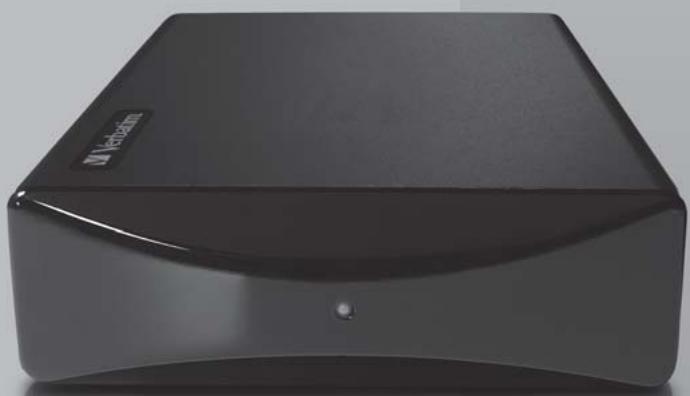
Your Verbatim External USB Hard Disk drive is a versatile external hard drive featuring high-performance storage and a high-speed USB 2.0 interface. Once your drive is connected properly to your computer, you will be able to use it as you would any hard drive for storing your data and for performing data back-up functions.
About the Hard Disk
The Verbatim hard disk comes pre-formatted in FAT32 format. This format allows for operation with either Windows or Mac OS.
Note: Capacity dependent on model. 1 MB = 1,000,000 bytes/1 GB = 1,000,000,000 bytes/ 1 TB = 1,000,000,000,000 bytes. Some capacity used for pre-loaded software, formatting and other functions, and thus is not available for data storage. As a result, and due to differing calculation methods, your operating systems may report as fewer megabytes/gigabytes/terabytes.
Nero BACKITUP 2 Software
Nero BACKITUP 2 back up software is included on the hard drive. Double click the Nero folder on the drive and then double click the setupx file to start installation. The Nero Installation window will appear. Follow the set up wizard to install the software.
Connecting External USB Hard Disk
To connect to your computer follow the steps below:
- Connect the included AC Adapter to the Hard Drive, and then to a wall outlet using the included power cord.
- Press the ON/OFF button on the back of the Hard drive.
- Connect the included USB cable from the USB port on the Hard drive to an available USB port on your computer.
- The Hard drive will mount automatically, and a new icon will appear in My Computer (Windows) or a new icon will appear on the desktop (Mac).
Disconnecting External USB Hard Disk
Your Hard Drive is hot-swappable. It can be connected and disconnected without restarting your computer. To disconnect your drive at any time, perform the following steps. You can also disconnect your hard drive at any time while your computer is powered off.
For Windows Users:
- If you have files located on your drive open in any applications, close them.
- Click the Unplug or Eject Hardware button in the System Tray.
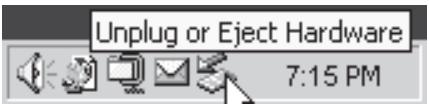
- Select your drive from the menu that appears.
- After a moment, Windows will display a message that your hardware can be safely removed.
For Mac OS Users:
- If you have files located on your drive open in any applications, close them.
- Locate the icon for your drive on the desktop, and drag it to the trash.
Technical Support
If you are experiencing difficulty installing or using your Verbatim product, please visit the main Verbatim Technical Support website at www.verbatim-europe.com From this page you can access our library of user documentation, read answers to frequently asked questions, and download available software updates. Although most of our customers find this content sufficient to put them back on the right track, this page also lists ways in which you can contact the Verbatim Technical Support Team directly.
Europe: For technical support in Europe e-mail drivesupport@verbatim-europe.com or call 00 800 3883 2222 in the following countries: Austria, Belgium, Denmark, Finland, France, Germany,
Hungary, Italy, Luxemburg, Monaco, Netherlands, Norway, Poland, Portugal, Republic of Ireland, Spain, Sweden, Switzerland and the United Kingdom. All other countries call +353 61 226586.
Limited Warranty Terms
Verbatim Limited warrants this product to be free from defects in material and workmanship for a period of 2 years from date of purchase. This warranty excludes batteries. If this product is found to be defective within the warranty period, it will be replaced at no cost to you. You may return it with your original cash register receipt to the place of purchase or contact Verbatim.
In the U.S. and Canada, call 800-538-8589 or email techsupport@verbatim.com.
In the following European countries, Austria, Belgium, Denmark, Finland, France, Germany, Greece, Hungary, Italy, Luxembourg, Monaco, Netherlands, Norway, Poland, Portugal, Republic of Ireland, Spain, Sweden, Switzerland, and the United Kingdom call 00 800 3883 2222. All other European countries call +353 61 226586. You can email drivesupport@verbatim-europe.com.
Product replacement is your sole remedy under this warranty, and this warranty does not apply to normal wear or to damage resulting from abnormal use, misuse, abuse, neglect or accident, or to any incompatibility or poor performance due to the specific computer software or hardware used. VERBATIM WILL NOT BE LIABLE FOR DATA LOSS OR ANY INCIDENTAL, CONSEQUENTIAL OR SPECIAL DAMAGES, HOWEVER CAUSED, FOR BREACH OF WARRANTY OR OTHERWISE. This warranty gives you specific legal rights and you may also have other rights which vary from state to state or country to country.
Note: Verbatim Corporation may at any time revise the content of this user guide without further notice.
User Manual
A full user manual is available at www.verbatim-europe.com/support
Assistance technique
PykoBoIcTBO noJIb3ObaTeJIa
Pa3kaUbaHe Ha BbHsHnTbbpd USB nck
To3n TBbpD nDCK ce HnHnCnAInnN3npa ABTomAtuHNo. ToJ MOKe Da ce CbBp3Ba n pa3KaChBa, 6e3 da e Heo6xOIMO pectapTnpaHe Na KOMNtBpa. 3a Da pa3KaCHte TBbpDnna DnCK KOrato nonckate, npocTo n3PbJInHe TPOOCHeHnTe No-DoIy DeiCTBnR. CbIo TaKa MoKeTe Da pa3KaCHne npehOCMnRA TBbpD nDCK NO BCaKO BpeMe, KOrato KOMNtBpbT e N3KJIIOUeH.
3a notpe6ntenC Windows:
- Ako imate OTbopeHn fainoBe OT dncka, 3aTbopeTe rN.
-
IIpaKHeTe Bbpyx 6byToHa Unplug or Eject Hardware (I3KnIOu NmI IN3BaIIN xapdyepa), KOJIto Ce HAMIPA B DЯcHATA CNTEmHa Yact Ha JLeHTaT C OTBOpEH 3aJaH.
-
136epete DnCKa OT MeHIOTo, KOeTO ce NOBBA.
- Cnémálko Windows Μe nokae cboobueHne, Ye keJahnIy xapdyep moKe da bde pa3kauhen be3onacHO.
3a noTpe6nteJc Mac OS:
- Ako imate OTBOpEN paJIOBE OT DCsKa, 3aTbOpeTe rN.
- OtkpniTe IKoHaTa Ha npHeHocmna Dnck Bbpyx pa6OTHna ekpan n I pIb3HeT e B KoiUHTo.
Texnuecka noDpBkka
Ako cpeuHete TpydHoctn npn HnctaInpaHeto nnn noJI3BaHeto Ha npOyKta Ha Verbatim, nocetete OCHOBHna caHT ha Verbatim 3a texHnuecka noDpBxka Ha aDpec www.verbatim-europe.com. Ot Herobata cTpaHnca ige IMate doCTbI noHaata b6bnOTeka CdoKymenta 3a notpe6nteNTte, OTkDeTo MOKTe Da npOHTe OTROBOpTE Ha YcEto 3aDaabAHnte BbPocin da N3terTTne HAnUHNTte AKTuAIN3aun HA codTpyepa. Makap ye NobeHTo OT hAnITE KInMeHTn HAMnPAT Heo6xoImata Im INHopMaIHa Ta3n CTpaHnca, tam CbIIO Taka ca IocOHeHn HauHInTe 3a DnpeKTHa Bpb3ka C eknna 3a texHnuecka noDpBxka Ha Verbatim.
Ebpona: 3a noJyabaHe ha texHuecka nOmoB u Ebpona nIpaTe He MeiHa drivesupport@verbatim-europe.com mN ce oBaTe Ha 00 800 3883 2222 B cneHNTE cTpanHn: ABCTPn, BeNn, DaHn, FInnAaHn, FpAnu, FepMaHn, YHrpna, NtAina, JIOKcEMbpyr, MoHako, HndepNaHn, HopBerma, PIoIsha, IopTyan, UpAnu, IVcnaHn, IIBeua, IIBeuapraN u ObeHHeHO T KpANCTBO. 3a BCnuKn octaHn CTpanHc Ce oBakdaIte Ha +353 61 226586.
Фирma Verbatim Limited rapaHTnpa, Ye to3n npoaykT Hma Da nokaxe DepeKTN B n3pa60Tkata
m MATEpnaJInte cn B npOdbIpxKeHne Ha 2 roDINn OT dATATA Ha NKyPkata. OT Ta3n rapaHcNCE
n3KJIIOvBAT bATEpInTe. Ako To3n npoaykT NOKAXe DepeKTN NO BpeMe Ha rapaHcUHmN I nepiOJ,
TO ToJIe BN 6bJe 3aMEnH Be3PNaTHO C dpyr. MoKTe Da ro BbPhe T3aEDHO c KacOBaTa
6BeIexKa B MxCTOTO Ha NOKyPkata IIIM Da ce CBpbXeTe c Verbatim.
B CAU anda MojTe da ce oBaIte Ha 800-538-8589 nn da n3npaTIne mEmn ha techsupport@verbatim.com.
3a cnehdnte ebponeckn ctpanH: ABcTPN, BefnH, DaHn, FInHlaHnDn, FpAnuH, ErpaMaHn, YHrapn, NtAtna, JIOKcEm6ypr, MoHako, HndepnaHn, HopBerHn, POnIsha, IpOpyraHn, UpTaHn, IcPAnHn, IIBeuH, IIBeuHcApn n OBeDuHeNTo KpAnCTBo ce oBaXdaIte Ha 00 800 3883 2222.3a BCNUKn octaHann ebponeckn ctpanH ce oBaxdaiTe ha +353 61 226586.MoKeTe da I3npaTIne ImeJn Ha drivesupport@verbatim-europe.com.
CmraHATA Ha npOdykTa e eDInCTBeHOTo Bn yDObIeTBopeHne Cnopei Ta3n rapaHnna, KaTO THe ce OTHACr 3a HopMaJIHOTo m3HOcBaHe nII NOBpeNTe Ha npOdykTa B pe3yUHTat Ha HEnpaBnHa hyoTpe6a, 3IOyNtpe6a, HeDOrIeXJaDe, Dpyr INuIeENTn IIN IopAaN He cBbMeCTIMocT nIIN loIuN TeHNueckn NOKa3aTeEN HA n3NoJ3BaHnN KOHKpTeH KOMKnOpTpBn IIN coΦTyep. FIPMATA VERBATIM HRA M DA CE CHTA 3A OTROBOPHA 3A 3ABySATA HA DAHHN IINI KAKBNTO I DA E INLUnEHTHn, 3AKOHOMEHN IIN OC0SEH NOBPeDN, KOINTO CA IPRUHHEH N B HAPUYEHEH IE RAPAHJRA TAn IIN IO PPyH HauIH. Ta3n rapaHnna Bn DaBa KOHKpeTHn IOpNiUeCKn Ipaba, Ho BVE MoKe Ja IMaTe n Dpyr npBa, KOINTO da ce pa3nnabat 3a OTdJIHnTe dbpKabn.
3A5EJIEXKA: Kopnpauiy Verbatim moe no oecko epeme da npomeHu cIbprxHaHEmo Ha moea pIkooeocmeo 3a nompe6umena be3 Hukakeo npeduaeecmue.
PbkoBoDCTBOHa nOTpe6HTeJIa
100000000000 = 1/1000000000 = 1/10000000 = 1/1000000 = 1/1000000 = 1/1000000 = 1/1000000 = 1/1000000 = 1/1000000 = 1/1000000 = 1/1000000 = 1/1000000 = 1/1
/1/11111111111111111111111
Nero BACKITUP 2
Nero BACKITUP 2
. . . . . . . . . . . . . . . . . . . . . . . . . . . . . . . . . . . . . . . . . . . . . . . . . . . . . . . . . . . . . . . . . . . . . . . . . . . . . . . . . . . . . . .
JL USB 1
ylll lgllll 1 1 1 1 1 1 1 1 1 1 1 1
1
aJlll aJJI JJI JJI ON/OFF jJI 2
.3
.(Mac alil) (Windows alil) jj j j j j j j j j j j j j j j j j j j j j j j j j j j j j j j j j j j j j
JL USB JI J
Jg Jg Jg Jg Jg Jg Jg Jg Jg Jg Jg Jg Jg Jg Jg Jg Jg Jg Jg Jg Jg Jg Jg Jg Jg Jg Jg Jg Jg Jg Jg Jg Jg Jg Jg Jg Jg Jg Jg Jg Jg Jg
J 1
:Windows abjil gei
1
.(a) System Tray (a) Unplug or Eject Hardware 2
.3
.4
As jusl lgl 1000000000000000000000000000000000000000000000000000000000000000000000000000000000000000000000
drivesupport@verbatim-europe.com j 1234567890101123456789010112345678901011234567890101123456789010112345678901011234567890101123456789010112345678
jzall jlaalb