
53141 - External hard drive VERBATIM - Free user manual and instructions
Find the device manual for free 53141 VERBATIM in PDF.


| Product Type | Portable External Hard Drive |
| Interface | USB 2.0 (compatible with USB 1.1) |
| Compatibility | Windows (98 SE, Me, 2000, XP, Vista), Mac OS |
| Dimensions (approx.) | 130 x 80 x 15 mm (5.1 x 3.1 x 0.6 in) |
| Weight (approx.) | 160 g (5.6 oz) |
| Power Source | Bus-powered via USB; optional Y-cable for extra power |
| Hot-Pluggable | Yes |
| Data Transfer | Drag and drop; no additional software required |
| Operating System Support | Windows, Mac OS |
| Pre-loaded Software | Some capacity used for pre-loaded software |
| Warranty | 2 years limited warranty |
| Regulatory Compliance | FCC Class B, CE, RoHS, WEEE |
| Maximum Data Transfer Rate (USB 2.0) | 480 Mbps |
| File System | Pre-formatted FAT32 (compatible with Windows and Mac) |
| Indicator Lights | Power/activity LED (not specified but typical) |
| Cable Included | Mini-USB cable |
| Maintenance | Wipe with dry cloth; avoid liquids |
| Safety Precautions | Follow correct disconnection to prevent data loss |
| Spare Parts / Repairability | Not user-serviceable; contact support for replacement |
| General Information | User manual available in PDF; technical support via website or phone |
Frequently Asked Questions - 53141 VERBATIM
User questions about 53141 VERBATIM
0 question about this device. Answer the ones you know or ask your own.
Ask a new question about this device
Download the instructions for your External hard drive in PDF format for free! Find your manual 53141 - VERBATIM and take your electronic device back in hand. On this page are published all the documents necessary for the use of your device. 53141 by VERBATIM.
USER MANUAL 53141 VERBATIM
Portable Hard Drive USB 2.0
User Guide
English
Contents
Introduction 3
Connecting Portable Hard Drive 3
Storing and Transferring Data 4
Disconnecting Portable Hard Drive 5
Technical Support 6
Limited Warranty Terms 7
Rights
FCC Compliance 8
WEEE Notice 9
CE Declaration 10
RoHS Compliance 10
8
Note: Capacity dependent on model. 1 MB = 1,000,000 bytes/1 GB = 1,000,000,000 bytes/1 TB = 1,000,000,000,000 bytes.
Some capacity used for pre-loaded software, formatting and other functions, and thus is not available for data storage. As a result, and due to differing calculation methods, your operating systems may report as fewer megabytes/gigabytes/terabytes.
Connecting Portable Hard Drive
Installing your Portable Hard Drive is extremely simple - just use the included mini-USB cable to connect your Portable Hard Drive to any free USB port on your computer. On Windows computers, a new icon will appear in My Computer representing your Portable Hard Drive. On Mac OS systems, your Portable Hard Drive will appear on the desktop as a new disk.
If your computer is running Windows 98 Second Edition, you will need some additional software that you can download from the Verbatim web site. Refer to the Technical Support section.
If you are using a USB 1.1 port on your Windows computer, the following cautionary note may appear on your display: Hi-Speed USB Device plugged into non-Hi-Speed USB hub. This does not indicate a problem because the drive is compatible with both USB 1.1 and USB 2.0 ports.
Simply close the message and proceed. However, in this case the drive will operate only at USB 1.1 speeds.
If you connect your portable hard drive and it doesn't appear to power up you may require an additional power source. This is available via an optional USB-Y cable from our Technical Support team. Details for Technical Support are included later in the manual.
Storing and Transferring Data
Once your Portable Hard Drive is connected to a computer, it can be accessed and used like any other removable disk. You can drag fi les to your portable hard drive's icon to copy them, navigate to your hard drive in Open or Save dialog boxes, or delete files stored on your portable hard drive. For information on copying, opening, or deleting fi les, consult your computer's documentation.
Disconnecting Portable Hard Drive
Your Portable Hard drive is hot-pluggable; it can be connected and disconnected without restarting your computer. To disconnect your portable hard drive at any time, simply perform the following steps. You can also disconnect your hard drive at any time while your computer is powered off.
Note: Please be careful to follow the correct procedure when disconnecting your unit. Simply unplugging the unit without first following the instructions below may result in damage to your unit and/or loss of data.
For Windows Users:
1 If you have files located on your drive open in any applications, close them.
2 Click the Unplug or Eject Hardware button in the System Tray.
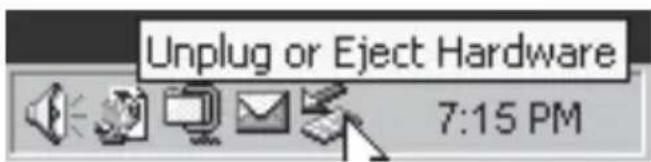
3 Select your drive from the menu that appears.
4 After a moment, Windows will display a message that your hardware can be safely removed.
For Mac OS Users:
1 If you have fi les located on your drive open in any applications, close them.
2 Locate the icon for your drive on the desktop, and drag it to the trash.
Technical Support
If you are experiencing diffi culty installing or using your Verbatim product, please visit the main Verbatim Technical Support website at www.verbatim.com or www.verbatim-europe.com. From this page you can access our library of user documentation, read answers to frequently asked questions, and download available software updates. Although most of our customers find this content suffi cient to put them back on the right track, this page also lists ways in which you can contact the Verbatim Technical Support Team directly.
US/Canada 800-538-8589
Mexico (55)55284642
Argentina (54-11) 4943-3336
Europe: For technical support in Europe e-mail drivesupport@verbatim-europe.com or call 00 800 3883 2222 in the following countries: Austria, Belgium, Denmark, Finland, France, Germany, Hungary, Italy, Luxemburg, Monaco, Netherlands, Norway, Poland, Portugal, Republic of Ireland, Spain, Sweden and Switzerland. All other countries call +353 61 226586.
Limited Warranty Terms
Verbatim Limited warrants this product to be free from defects in material and workmanship for a period of 2 years from date of purchase. This warranty excludes batteries. If this product is found to be defective within the warranty period, it will be replaced at no cost to you. You may return it with your original cash register receipt to the place of purchase or contact Verbatim.
In the U.S. and Canada, call 800-538-8589 or email techsupport@verbatim.com.
In the following European countries, Austria, Belgium, Denmark, Finland, France, Germany, Greece, Hungary, Italy, Luxembourg, Monaco, Netherlands, Norway, Poland, Portugal, Republic of Ireland, Spain, Sweden, Switzerland, call 00 800 3883 2222. All other European countries call +353 61 226586. You can email drivesupport@verbatim-europe.com.
Product replacement is your sole remedy under this warranty, and this warranty does not apply to normal wear or to damage resulting from abnormal use, misuse, abuse, neglect or accident, or to any incompatibility or poor performance due to the specific computer software or hardware used.
VERBATIM WILL NOT BE LIABLE FOR DATA LOSS OR ANY INCIDENTAL, CONSEQUENTIAL OR SPECIAL DAMAGES, HOWEVER CAUSED, FOR BREACH OF WARRANTIES OR OTHERWISE. This warranty gives you specific legal rights and you may also have other rights which vary from state to state or country to country.
NOTE: Verbatim Limited may at any time revise the content of this user guide without further notice.
Copyright © 2007 Verbatim Limited. No part of this document may be reproduced in any form or by any means, for any purpose, without the express written permission of Verbatim Corporation. All rights reserved. All other brands and product names referenced herein are property of their respective owners.
FCC Compliance
This equipment has been tested and found to comply with the limits for a Class B digital device, pursuant to Part 15 of the FCC Rules. These limits are designed to provide reasonable protection against harmful interference in a residential installation. This equipment generates, uses and can radiate radio frequency energy and, if not installed and used in accordance with the instructions, may cause harmful interference to radio communications. However, there is no guarantee that interference will not occur in a particular installation. If this equipment does cause harmful interference to radio or television reception, which can be determined by turning the equipment off and on, the user is encouraged to try to correct the interference by one or more of the following measures:
- Reorient or relocate the receiving antenna.
- Increase the separation between the equipment and receiver.
- Connect the equipment into an outlet on a circuit different from that to which the receiver is connected.
- Consult the dealer or an experienced radio/TV technician for help
The Directive on Waste Electrical and Electronic Equipment (WEEE), which entered into force as European law on 13th February 2003, resulted in a major change in the treatment of electrical equipment at end-of-life.
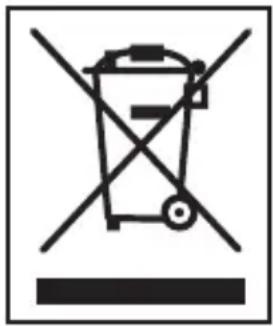
The WEEE logo (shown at the left) on the product or on its box indicates that this product must not be disposed of or dumped with your other household waste. For more information about electronic and electrical waste equipment disposal, recovery, and collection points, please contact your local municipal household waste disposal service or shop from where you purchased the equipment.
EC Declaration of Conformity
It is hereby declared that this product complied with the essential protection requirements of Council Directive 89/336/EEC and its amendments on the approximation of the laws of the Member States relating to electromagnetic compatibility.
This declaration applies to all specimens manufactured identical to the model submitted for testing/evaluation.
EN 55022: 1998 + A1: 2000 + A2: 2003
EN 61000-3-3:1995 + A1:2001
EN 55024: 1998 + A1: 2001 + A2: 2003
IEC 61000-4-2: 1995 + A1: 1998 + A2: 2000
IEC 61000-4-3: 2002 + A1: 2002
IEC 61000-4-4: 1995 + A1: 2000 + A2: 2001
IEC 61000-4-5: 1995 + A1: 2000
IEC 61000-4-6: 1996 + A1: 2000
IEC 61000-4-8: 1993 + A1: 2000
IEC 61000-4-11: 1994 + A1: 2000
RoHS Compliance
This product is in compliance with Directive 2002/95/EC of the European Parliament and of the Council of 27 January 2003, on the restriction of the use of certain hazardous substances in electrical and electronic equipment (RoHS) and its amendments.


Brand : VERBATIM
Model : 53141
Category : External hard drive