
EY45A5 - Cordless tool PANASONIC - Free user manual and instructions
Find the device manual for free EY45A5 PANASONIC in PDF.



| Product Type | Cordless Band Saw |
| Brand | Panasonic |
| Model | EY45A5 |
| Dimensions (length) | 382 mm (main unit only) |
| Weight (with battery EY9L54) | 4.05 kg |
| Motor voltage | DC 14.4 V / DC 18 V |
| Blade rotation speed (no load, 18 V) | Low: 120 m/min, Medium: 140 m/min, High: 162 m/min |
| Blade dimensions | Length 730 mm x Width 13 mm x Thickness 0.5 mm |
| Max. cutting capacity (round piece) | Outer diameter 63.5 mm |
| Max. cutting capacity (rectangular piece) | 56 mm x 63.5 mm |
| Compatible battery type | Panasonic Li-ion (DC 14.4 V or DC 18 V): EY9L45, EY9L47, EY9L51, EY9L52, EY9L53, EY9L54 |
| Compatible charger | EY0L82 |
| Recommended saw blade | EY9SXMJ4 |
| Speed settings | 3 positions: L (low), M (medium), H (high) |
| Safety | Overload, overheat, and over-discharge protection; indicator lights |
| Intended use | Cutting metal and wood |
| Maintenance and cleaning | Wipe with a dry, clean cloth; do not use water or solvent; remove battery before maintenance |
| Warranty | Additional warranty: failures due to prolonged continuous use or use of unspecified accessories are not covered |
| Included accessories | Hanging hook (removable) |
| Safety precautions | Read the manual thoroughly; wear PPE; do not touch the blade after use; hold with both hands |
Frequently Asked Questions - EY45A5 PANASONIC
User questions about EY45A5 PANASONIC
0 question about this device. Answer the ones you know or ask your own.
Ask a new question about this device
Download the instructions for your Cordless tool in PDF format for free! Find your manual EY45A5 - PANASONIC and take your electronic device back in hand. On this page are published all the documents necessary for the use of your device. EY45A5 by PANASONIC.
USER MANUAL EY45A5 PANASONIC
Before operating this unit, please read these instructions completely and save this manual for future use.
Battery pack release button
Original instructions: English Translation of the original instructions: Other languages
Read "the Safety Instructions" booklet and the following before using.
I. INTRODUCTION
DANGER
This product is a cutting tool, designed to cut through metal and wood. It has a rotating blade which is capable of cutting you deeply, causing serious injury or death. As a result, please read this manual and the cautionary markings on the tool carefully, and obey all of the Safety Instructions to avoid such injury.
WARNING
To avoid injury, never insert your finger or any other object into any opening of the tool.
WARNING
Read all safety warnings and all instructions.
Failure to follow the warnings and instructions may result in electric shock, fire and/or serious injury.
How to Use This Manual
- Please read this manual completely before starting to cut with your tool. If you let someone else use the tool, make sure they either read this manual or are fully instructed in the proper use and all safety precautions concerning the tool.
- Please keep this manual for future reference. It contains important safety information that you must follow to use the tool safely.
- This manual and product use the following signal words:
NOTE:
Notes provide additional information that you should know about the tool.
CAUTION:
Caution indicates a potentially hazardous situation, which could result in minor or moderate injury if not avoided. Cautions also alert you to unsafe practices to be avoided.
WARNING
Warning indicates a potentially hazardous situation, which could result in serious injury or death if not avoided.
DANGER
Danger indicates an imminent hazard which will result in serious injury or death if not avoided.
II. ADDITIONAL SAFETY RULES
Safety instructions for all saws
DANGER
1) Keep hands away from cutting area and the blade. Keep your second hand on auxiliary handle, or motor housing. If both hands are holding the saw, they cannot be cut by the blade.
2) Never hold piece being cut in your hands or across your leg. Secure the workpiece to a stable platform. It is important to support the work properly to minimize body exposure, blade binding, or loss of control.
3) Use saw blades recommended by Manufacture.
4) Wear a dust mask, if the work causes dust.
5) Wear ear protectors when using the tool for extended periods.
6) Never wear knitted gloves.
7) Be sure to inspect material. Avoid cutting other different material.
8) Be careful not to drop the tool.
9) Never swing the tool.
DANGER
10) Never cover the ventilation slots, and keep them free from dust or other material.
11) Do not clamp the tool in a vise. Never cut with the tool held upside down in a vise. This is extremely dangerous and can lead to serious accidents.
12) Be sure no one is below when using the tool in high locations.
13) Do not touch the blade immediately after operation. It may be hot and could burn your skin.
14) Do not touch material after it has been cut. Cut material may be very hot.
15) Do not use cutting oil. This use of cutting oil may cause a fire.
16) Do not start the blade when in contact with workpiece. Wait for blade to reach full speed before beginning cut.
17) Ensure sparks don't strike your body. This can cause burning.
18) When attaching or removing a saw blade or preparing, inspecting or storing the device, be sure to remove the battery pack first. Failure to do this could lead to unintended operation and injury.
19) Keep your hands and face away from the saw blade and moving parts. Failure to do so can lead to injury
20) Do not touch the saw blade, discharge or frame after operation as they may be hot. This can lead to injury.
21) Fix the workpiece firmly. Failure to fix the workpiece properly can lead to movement, damage to the saw blade, or injury.
22) To prevent accidents, be sure to switch off and remove the battery pack from the device when operation is interrupted or complete.
DANGER
23) Be sure to attach the saw blade cover to the saw blade rotation roller. Failure to do so can lead to injury if the saw blade slips off or is damaged.
24) The saw blade, workpiece and debris can be hot immediately after cutting, so do not touch with bare hands.
25) Do not put pressure on the grip during cutting in an attempt to speed up the process.
26) Do not cut heat-mouldable plastics. The heat of cutting can cause the workpiece to melt, making the saw blade embed into the workpiece and leading to the motor locking.
27) Do not cut hard workpieces such as toughened steel. This can cause damage to the saw blade.
28) If the saw blade locks during cutting, immediately switch off and suspend operation.
29) Be sure to hold the grip and auxiliary handle during use, holding with both hands.
30) Periodically open the saw blade rotation cover to remove debris. Debris may build up within the frame during continuous use.
31) If the device will not be used for a long time, remove the saw blade from the device before storage.
Symbol
| Symbol | Meaning |
| V | Volts |
| --- | Direct current |
| n0 | No load speed |
| ... min-1 | Revolutions or reciprocations |
| A | Amperes |
| To reduce the risk of injury, user must read and understand instruction manual. | |
| For indoor use only. |
WARNING
- Do not use other than the Panasonic battery packs that are designed for use with this rechargeable tool.
- Panasonic is not responsible for any damage or accident caused by the use of the recycled battery pack and the counterfeit battery pack.
- Do not dispose of the battery pack in a fire, or expose it to excessive heat.
- Do not drive the likes of nails into the battery pack, subject it to shocks, dismantle it, or attempt to modify it.
- Do not allow metal objects to touch the battery pack terminals.
- Do not carry or store the battery pack in the same container as nails or similar metal objects.
- Do not charge the battery pack in a high-temperature location, such as next to a fire or in direct sunlight. Otherwise, the battery may overheat, catch fire, or explode. Never use other than the dedicated charger to charge the battery pack. Otherwise, the battery may leak, overheat, or explode.
- After removing the battery pack from the tool or the charger, always reattach the pack cover. Otherwise, the battery contacts could be shorted, leading to a risk of fire.
WARNING
- When the Battery Pack Has Deteriorated, Replace It with a New One. Continued use of a damaged battery pack may result in heat generation, ignition or battery rupture.
III. ASSEMBLY
Fitting a saw blade
CAUTION:
- Wear gloves when exchanging the saw blade.
- Immediately after operation the saw blade will be hot. Remove only after it has cooled down.
-
When attaching or removing a saw blade or preparing, inspecting or storing the device, be sure to remove the battery pack first. Failure to do this could lead to unintended operation and injury.
-
Loosen the saw blade cover fixing screw and remove the saw blade cover. [Fig.1]
- The saw blade cover separates into two.
- Rotate the saw blade tension lever 180 degrees clockwise (direction of the arrow), to release tension. [Fig.2]
- Firmly set the saw blade tension lever to maintain the saw blade tension.
- Insert the saw blade into the saw blade restraining bearings from the rear. [Fig.3]
- Be sure to push it home until the back of the blade contacts with the inside of the saw blade restraining bearings.
WARNING
Inserting a saw blade
If the saw blade is not mounted correctly the blade may sit at an angle and will not cut straight, causing motor burnout or blade damage.
- Be sure to push until the back of the saw blade contacts with the rear bearings of the saw blade restraining bearings (both). [Fig.4]
-
Be sure that the saw blade is parallel to the guide plate. [Fig.5]
-
Hand the saw blade on the saw blade rotation roller, while holding the saw blade so it does not fall off. [Fig.6]
- Rotate the saw blade tension lever 180 degrees anticlockwise (direction of the arrow), to tighten the saw blade. [Fig.7]
WARNING
Be careful not to trap your fingers in the saw blade tension lever when selecting the tension.
6. Move the saw blade in the direction of rotation manually, and check whether it hangs correctly on the saw blade rotation roller (the saw blade should not move outside the thickness of the saw blade rotation roller).
NOTE:
If it is not hanging correctly, rotate the saw blade tension lever 180 degrees clockwise to loosen the saw blade and rehang the saw blade.
7. Attach the saw blade cover and tighten the saw blade cover fixing screw.
NOTE:
Tighten the saw blade cover fixing screw while holding the saw blade cover in position so it does not rise up.
Attaching or Removing Battery Pack
CAUTION:
Before inserting battery pack, check that the power switch in the tool actuates properly and returns to the "OFF" position when released.
- To connect the battery pack [Fig.8] Align the highlighted marker points and attach battery pack.
- Slide the battery pack until it locks into position.
- To remove the battery pack [Fig.9] Push down the button and slide the battery pack forward.
IV. OPERATION
[Main Body]
Before Using the Tool
- Do not touch the saw blade, workpiece, or cutting chips with bare hands immediately after cutting; they may be hot and could burn skin.
Each time you use the tool, you must make sure it is in good operating condition.
- Test operation
Cycle the device through on and off several times and check that the saw blade is mounted correctly. If the saw blade is not running smoothly, remove the saw blade and reinstall from the beginning.
- Select the blade speed
Set to suit the properties of the workpiece being cut.
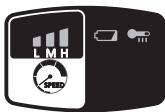
- 3 blade speed settings are available.
- Blade speed setting "L" is effective for cutting stainless steel which requires slow rotation.
Press the blade speed button to set the rotation speed.

- Keep pressing to switch from H to M to L.
| Blade speed button setting | L | M | H |
| Type of operation | Stainless steel Steel pipe | ||
| ● | ● | ● | |
| 18 V | 120 m/min | 140 m/min | 162 m/min |
| 14.4 V | 110 m/min | 120 m/min | 130 m/min |
- Bring guide plate to workpiece
Press the workpiece against the guide plate such that the saw blade does not make contact. [Fig.10]
WARNING
If a gap is left between the guide plate and the workpiece, the workpiece may wobble and damage the saw blade.
- Make the cut
(1) Check the saw blade is not touching the workpiece.
(2) Switch on while holding the off-lock switch.
(3) If rotation is smooth, bring the saw blade slowly towards the workpiece without shocking the saw blade, and make the cut. [Fig.11]
(4) Do not apply unreasonable force to the saw blade.
(5) Be sure to hold the device with both hands. While holding the device, be sure to keep the saw blade perpendicular to the workpiece. There is no need to force the device more than required. Be aware that application of excessive lateral or pushing force to the device may cause device malfunction.
(6) Blade rotation spin-up can be controlled using the pressure on the switch, to control kickback when starting a cut (only for blade speeds 2 and 3 when using the 18V battery model).

WARNING
Fix the workpiece firmly.
- Be sure to attach the saw blade cover.
CAUTION:
- Attach only after checking for abnormalities such as splinters and fissures on the saw blade.
- Wipe away any debris or dirt attached to the saw blade rotation roller. Fitting an oiled or greased saw blade to the saw blade restraining bearing can cause the saw blade to slip or come loose.
- When attaching a saw blade, avoid twisting or folding at the join on the saw blade.
- Keep your face away when exchanging a saw blade as the saw blade can jump out suddenly.
- A ruptured saw blade will not rotate easily. (Rotation may be accompanied by a noise)
- A worm blade edge may lead to slower cutting times.
These phenomena are indications that the saw blade requires exchange.
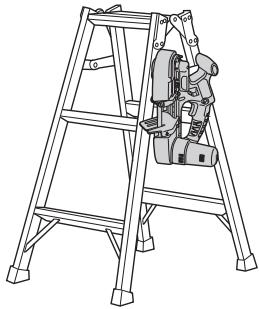
Using the hook
The hook is intended for hanging on stepladders, etc. and should not be used to hang at your side on a belt. If the hook is not required, the screw can be loosened to remove it.

WARNING
- Do not hang the hook at your side such as on a belt.
- Check that the hook is not unstable and the screw is not loose.
Example of Use
Rubber belt inspection
A rubber belt is attached to the outer rim of the saw blade rotation roller (inlay type).
Be sure to check the rubber belt tightness and damage whenever exchanging the saw blade.
A loose or damaged rubber belt may cause the saw blade to run unevenly or jump out, so be sure to contact your retailer in this event. [Fig.12]

WARNING
Periodically remove any debris from the rubber belt.
Failure to do so may cause the saw blade to slip or be unable to cut.
Control Panel
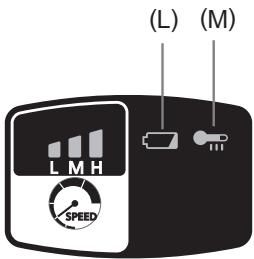
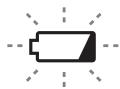
(L) Battery low warning lamp

Off (normal operation)

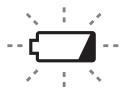
Printing
(No charge)
Battery protection
feature active
Excessive (complete) discharging of lithium ion batteries shortens their service life dramatically.
The tool includes a battery protection feature designed to prevent excessive discharging of the battery pack.
- The battery protection feature activates immediately before the battery loses its charge, causing the battery low warning lamp to flash.
- If you notice the battery low warning lamp flashing, charge the battery pack immediately.
- If it is started with too little battery power remaining, the tool may stop operating without the battery low warning lamp flashing first. This indicates that there is too little battery power remaining to use the tool, and the battery pack should be charged before further use.
- If the tool is subject to a sudden load during use that causes the motor to lock up, the over-discharge prevention sensor may be triggered, and the battery low warning lamp may flash. The lamp will stop flashing once you address the cause of the motor's locking up and cycle the trigger.
CAUTION:
The over-discharge protection function works even when both the battery low warning lamp and LED light are flashing.
- Charge the battery pack immediately as the battery power is getting low.
- When charging a cool battery pack (below 0^ ( 32^ )) in a warm place, leave the battery pack at the place and wait for more than one hour to warm up the battery to the level of the ambient temperature.
- Weaken and cut off the power applied as the voltage of the battery is plummeting due to the high load acting on the motor. Do not carry out operations that will repeatedly cause the over-discharge prevention function to be activated.
(M) Overheat warning lamp (motor / battery)
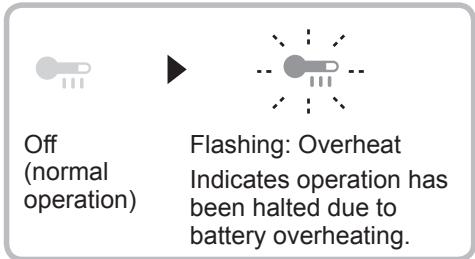
The overheating protection feature halts tool operation to protect the battery pack in the event of overheating. The overheat warning lamp on the control panel flashes when this feature is active.
- If the overheating protection feature activates, allow the tool to cool thoroughly (at least 30 minutes). The tool is ready for use when the overheat warning lamp goes out.
- Avoid using the tool in a way that causes the overheating protection feature to activate repeatedly.
- If the tool is used in cold-temperature conditions (such as during winter) or if it is frequently stopped during use, the overheating protection feature may not activate. The performance of the EY9L42 deteriorates significantly at and below 10^ due to work conditions and other factors.
- The ambient temperature range is between 0^ ( 32^ ) and 40^ ( 104^ ). If the battery pack is used when the battery temperature is below 0^ ( 32^ ), the tool may fail to function properly.
- When charging a cool battery pack (below 0^ ( 32^ )) in a warm place, leave the battery pack at the place and wait for more than one hour to warm up the battery to the level of the ambient temperature.
[Battery Pack]
For Appropriate Use of Battery Pack [Fig.13]
- The rechargeable batteries have a limited life.
- For optimum battery life, store the Li-ion battery pack following use without charging it.
- When operating the battery pack, make sure the work place is well ventilated.
For safe use
- The battery pack is designed to be installed by proceeding two steps for safety. Make sure the battery pack is installed properly to the main unit before use.
- If the battery pack is not connected firmly when the switch is switched on, the overheat warning lamp and the battery low warning lamp will flash to indicate that safe operation is not possible, and the main unit will not rotate normally. Connect the battery pack into the unit of the tool until the red or yellow label disappears.
[Battery Charger]
Charging
CAUTION:
1) If the temperature of the battery pack falls approximately below -10^ (14°F), charging will automatically stop to prevent degradation of the battery.
2) The ambient temperature range is between 0^ (32°F) and 40^ (104°F). If the battery pack is used when the battery temperature is below 0^ (32°F), the tool may fail to function properly.
3) Use the charger at temperatures between 0^ and 40^ , and charge the battery at a temperature similar to that of the battery itself. (There should be no more than a 15^ difference between the temperatures of the battery and the charging location.)
4) When charging a cool battery pack (below 0^ (32^) ) in a warm place, leave the battery pack at the place and wait for more than one hour to warm up the battery to the level of the ambient temperature.
5) Cool down the charger when charging more than two battery packs consecutively.
6) Do not insert your fingers into contact hole, when holding charger or any other occasions.
7) To prevent the risk of fire or damage to the battery charger.
- Do not cover vent holes on the charger and the battery pack.
- Unplug the charger when not in use.
NOTE:
Your battery pack is not fully charged at the time of purchase. Be sure to charge the battery before use.
How to charge
- Plug the charger into the AC outlet.
NOTE:
Sparks may be produced when the plug is inserted into the AC power supply, but this is not a problem in terms of safety.
- Connect the battery pack firmly into the charger.
1 Line up the alignment marks and place the battery onto the dock on the charger.
NOTE:
Not all battery packs display the alignment mark (F) (on page 3).
2 Slide forward in the direction of the arrow. [Fig.14]
- During charging, the charging lamp will be lit. When charging is completed, an internal electronic switch will automatically be triggered to prevent overcharging.
- Charging will not start if the battery pack is hot (for example, immediately after heavy-duty operation). The orange standby lamp will be flashing until the battery cools down. Charging will then begin automatically.
- The charge lamp (green) will flash slowly once the battery is approximately 80% charged.
- When charging is completed, the charging lamp in green colour will turn off.
- If the temperature of the battery pack is 0^ or less, charging takes longer to fully charge the battery pack than the standard charging time. Even when the battery is fully charged, it will have approximately 50% of the power of a fully charged battery at normal operating temperature.
- Consult an authorized dealer if the charging lamp (green) does not turn off.
- If a fully charged battery pack is inserted into the charger again, the charging lamp lights up. After several minutes, the charging lamp in green colour will turn off.
- Remove the battery pack while the battery pack release button is held up. [Fig.14]
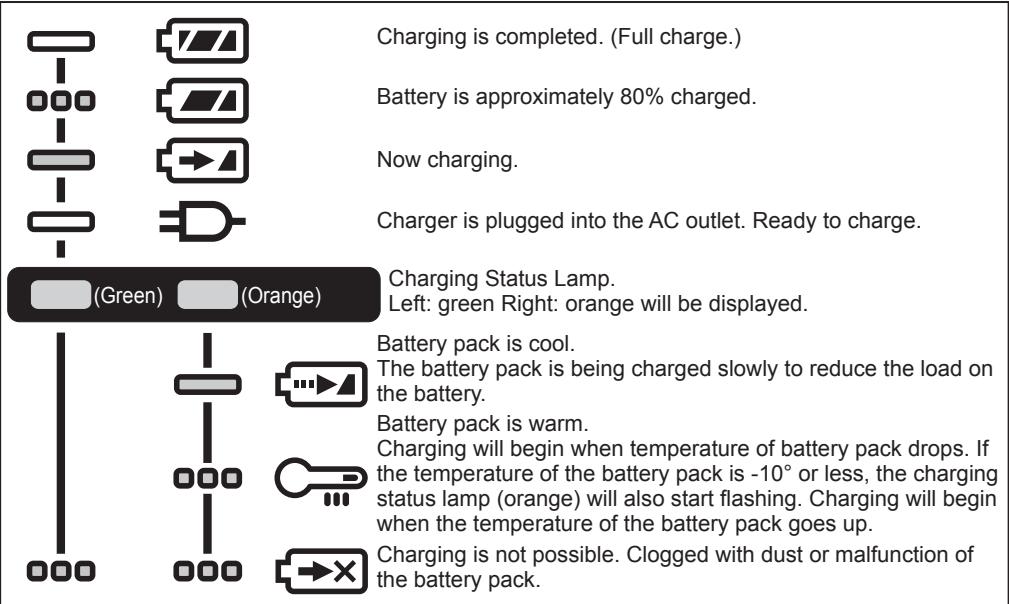

Turn off

Illuminated

Flashing
Battery Recycling
ATTENTION:
For environmental protection and recycling of materials, be sure that it is disposed of at an officially assigned location, if there is one in your country.
Information for Users on Collection and Disposal of Old Equipment and used Batteries
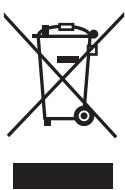
These symbols on the products, packaging, and/or accompanying documents mean that used electrical and electronic products and batteries should not be mixed with general household waste.
For proper treatment, recovery and recycling of old products and used batteries, please take them to applicable collection points, in accordance with your national legislation and the Directives 2012/19/EC and 2006/66/EC.
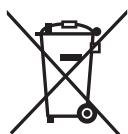
By disposing of these products and batteries correctly, you will help to save valuable resources and prevent any potential negative effects on human health and the environment which could otherwise arise from inappropriate waste handling.
For more information about collection and recycling of old products and batteries, please contact your local municipality, your waste disposal service or the point of sale where you purchased the items.
Penalties may be applicable for incorrect disposal of this waste, in accordance with national legislation.
[For business users in the European Union]
If you wish to discard electrical and electronic equipment, please contact your dealer or supplier for further information.
[Information on Disposal in other Countries outside the European Union]
These symbols are only valid in the European Union. If you wish to discard these items, please contact your local authorities or dealer and ask for the correct method of disposal.
V. MAINTENANCE
- Use only a dry, soft cloth for wiping the unit.
Do not use a damp cloth, thinner, benzine, or other volatile solvents for cleaning. - In the event that the inside of the tool or battery pack is exposed to water, drain and allow to dry as soon as possible. Carefully remove any dust or iron filings that collect inside the tool. If you experience any problems operating the tool, consult with a repair shop.
WARNING:
To avoid severe personal injury, always remove the battery pack from the tool before starting any maintenance procedure.
CAUTION:
To assure product SAFETY and RELIABILITY, servicing should be performed by an authorized service center. Always insist on genuine Panasonic replacement parts.
VI. ACCESSORIES
Battery pack
Do not use other than Panasonic Li-ion battery packs (output voltage DC 14.4 V or DC 18 V) for this tool.
-
EY9L45
-
EY9L47
-
EY9L51
-
EY9L52
-
EY9L53
-
EY9L54
Saw blade
EY9SXMJ4
Battery charger
EY0L82
VII. SPECIFICATIONS
NOTE:
Weight indication
Greater than or equal to 1kg indicated by 0.05kg .
Less than 1 kg: indicated by 0.01kg
MAIN UNIT
| Model No. | EY45A5 | |
| Motor voltage | DC 14.4 V | DC 18 V |
| Blade speed (no load) | Low: 110 m/min Mid: 120 m/min High: 130 m/min | Low: 120 m/min Mid: 140 m/min High: 162 m/min |
| Blade dimensions | Length 730 mm × Width 13 mm × Thickness 0.5 mm | |
| Maximum cutting capacity* | Round stock: external diameter 63.5 mm Rectangular stock: 56 mm × 63.5 mm (* Values for cutting a rotating workpiece.) | |
| Overall length | 382 mm (main unit only) | |
| Weight (with battery pack: EY9L54) | 4.05 kg | |
| Noise, Vibration | See the included sheet | |
VIII.APPENDIX
WARRANTY SUPPLEMENT
- The breakdown and damage caused by usage consistent for a long time (e.g.: factory work on the assembly line, etc.) is out of warranty.
- Damage or failure caused by use of accessories that are not specified in this manual will not be covered by warranty.
ONLY FOR U. K.
IX. CAUTION FOR AC MAINS LEAD
FOR YOUR SAFETY, PLEASE READ THE FOLLOWING TEXT CAREFULLY
This appliance is supplied with a moulded three pin mains plug for your safety and convenience. A 5 amp fuse is fitted in this plug.
Should the fuse need to be replaced please ensure that the replacement fuse has a rating of 5 amp and that it is approved by ASTA or BSI to BS1362.
Check for the ASTA mark or the BSI mark on the body of the fuse.
If the plug contains a removable fuse cover you must ensure that it is refitted when the fuse is replaced.
If you lose the fuse cover the plug must not be used until a replacement cover is obtained.
A replacement fuse cover can be purchased from your local Panasonic Dealer.
CAUTION:
IF THE FITTED MOULDED PLUG IS UNSUITABLE FOR THE SOCKET OUTLET IN YOUR HOME THEN THE FUSE SHOULD BE REMOVED AND THE PLUG CUT OFF AND DISPOSED OF SAFELY. THERE IS A DANGER OF SEVERE ELECTRICAL SHOCK IF THE CUT OFF PLUG IS INSERTED INTO ANY 13 AMP SOCKET.
How to replace the fuse
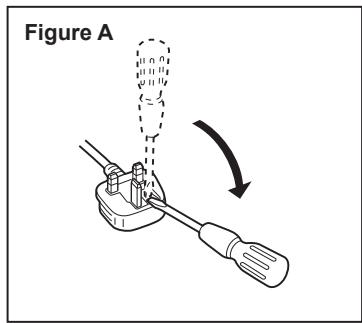
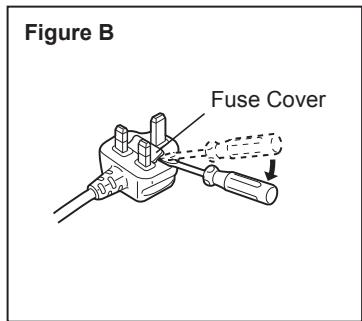
The location of the fuse differs according to the type of AC mains plug (figures A and B).
Confirm the AC mains plug fitted and follow the instructions below. Illustrations may differ from actual AC mains plug.
Open the fuse cover with a screwdriver and replace the fuse and close or attach the fuse cover.
(L) Pil az uyari lambasi

Kapali (normal calisma)

Yanip sonuyor
(Sarj yok)
- INTRODUCTION
- DANGER
- WARNING
- How to Use This Manual
- NOTE:
- CAUTION:
- ADDITIONAL SAFETY RULES
- Symbol
- ASSEMBLY
- Fitting a saw blade
- Inserting a saw blade
- Attaching or Removing Battery Pack
- OPERATION
- [Main Body]
- Before Using the Tool
- Using the hook
- Rubber belt inspection
- Control Panel
- Battery low warning lamp
- Overheat warning lamp (motor / battery)
- [Battery Pack]
- For Appropriate Use of Battery Pack [Fig.13]
- For safe use
- [Battery Charger]
- Charging
- How to charge
- Battery Recycling
- ATTENTION:
- Information for Users on Collection and Disposal of Old Equipment and used Batteries
- [For business users in the European Union]
- [Information on Disposal in other Countries outside the European Union]
- MAINTENANCE
- WARNING:
- ACCESSORIES
- SPECIFICATIONS
- VIII.APPENDIX
- WARRANTY SUPPLEMENT
- ONLY FOR U. K.
- CAUTION FOR AC MAINS LEAD
- FOR YOUR SAFETY, PLEASE READ THE FOLLOWING TEXT CAREFULLY
- How to replace the fuse
- Pil az uyari lambasi
Brand : PANASONIC
Model : EY45A5
Category : Cordless tool