
EY-7420 - Cordless tool PANASONIC - Free user manual and instructions
Find the device manual for free EY-7420 PANASONIC in PDF.



| Brand | Panasonic |
| Model | EY-7420 |
| Product type | Cordless drill/driver |
| Rated voltage | 7.2 V DC |
| No-load speed (low) | 0 - 300 min⁻¹ |
| No-load speed (high) | 0 - 900 min⁻¹ |
| Max tightening torque (low speed) | 6.0 N·m |
| Max tightening torque (high speed) | 2.0 N·m |
| Clutch torque range | 0.3 - 4.0 N·m (21 positions) |
| Screwing capacity (machine screw) | M5 (low speed), M4 (high speed) |
| Overall length | 145 mm |
| Weight (with battery) | 0.63 kg |
| Battery type | Li-ion (model EY9L20) |
| Battery voltage | 7.2 V DC |
| Charge time (usable) | Approx. 35 minutes |
| Charge time (full) | Approx. 60 minutes |
| Included charger | Model EY0L20, 0.43 kg |
| Integrated lighting | LED |
| Bit lock | Yes (up to 5 N·m) |
| Brake | Electronic, immediate stop |
| Adjustable clutch | 21 positions |
| Auxiliary handle | Included |
| Maintenance | Clean with dry cloth only |
| Included accessories | Battery, charger, auxiliary handle, hanging ring |
Frequently Asked Questions - EY-7420 PANASONIC
User questions about EY-7420 PANASONIC
0 question about this device. Answer the ones you know or ask your own.
Ask a new question about this device
Download the instructions for your Cordless tool in PDF format for free! Find your manual EY-7420 - PANASONIC and take your electronic device back in hand. On this page are published all the documents necessary for the use of your device. EY-7420 by PANASONIC.
USER MANUAL EY-7420 PANASONIC
Cordless Drill & Driver
Akku-Bohrschrauber
Before operating this unit, please read these instructions completely and save this manual for future use.
English: Page 4 Dansk: Side 63
Original instructions: English Translation of the original instructions: Other languages
I. INTENDED USE
These tools can be used to tighten screws in clutch mode and to drill holes in wood and metal in drill mode.
Read the Safety Instructions booklet and the following before using.
II. ADDITIONAL SAFETY RULES
1) Wear ear protectors. Exposure to noise can cause hearing loss.
2) Use auxiliary handle supplied with the tool. Loss of control can cause personal injury.
3) Hold power tools by insulated gripping surfaces when per-forming an operation where the cutting tool may contact hidden wiring; contact with a "live" wire will make exposed metal parts of the tool "live" and shock the operator.
4) Wear a dust mask, if the work causes dust.
5) Be aware that this tool is always in an operating condition, since it does not have to be plugged into an electrical outlet.
6) When drilling or driving into walls, floors, etc., "live" electrical wires may be encountered. DO NOT TOUCH THE CHUCK OR ANY FRONT METAL PARTS OF THE TOOL! Hold the tool only by the plastic handle to prevent electric shock in case you drill or drive into a "live" wire.
7) If the bit becomes jammed, immediately turn the trigger switch off to prevent an overload, which can damage the battery pack or motor. Use reverse motion to loosen jammed bits.
8) Do NOT operate the For-ward/Reverse lever when the trigger switch is on. The battery will discharge rapidly and damage to the unit may occur.
9) During charging, the charger may become slightly warm. This is normal. Do NOT charge the battery for a long period.
10) When storing or carrying the tool, set the Forward/Reverse lever to the center position (switch lock).
11) Do not strain the tool by holding the speed control trigger halfway (speed control mode) so that the motor stops.
12) Do not operate the speed selector switch (LOW-HIGH) while pulling on the speed control trigger. This can cause the rechargeable battery to wear quickly or damage the in-ternal mechanism of the motor.
WARNING
- Do not use other than the Panasonic battery packs that are designed for use with this rechargeable tool.
- Panasonic is not responsible for any damage or accident caused by the use of recycled or counterfeit battery pack.
- Do not dispose of the battery pack in a fire, or expose it to excessive heat.
- Do not drive the likes of nails into the battery pack, subject it to shocks, dismantle it, or attempt to modify it.
- Do not allow metal objects to touch the battery pack terminals.
- Do not carry or store the battery pack in the same container as nails or similar metal objects.
- Do not charge the battery pack in a high-temperature location, such as next to a fire or in direct sunlight. Otherwise, the battery may overheat, catch fire, or explode.
- Never use other than the dedicated charger to charge the battery pack. Otherwise, the battery may leak, overheat, or explode.
- After removing the battery pack from the tool or the charger, always reattach the pack cover. Otherwise, the battery contacts could be shorted, leading to a risk of fire.
- When the Battery Pack Has Deteriorated, Replace It with a New One. Continued use of a damaged battery pack may result in heat generation, ignition or battery rupture.
| Symbol | Meaning |
| V | Volts |
| --- | Direct current |
| n₀ | No load speed |
| ...min-1 | Revolutions or reciprocations per minutes |
| Ah | Electrical capacity of battery pack |
| Rotation only | |
| To reduce the risk of injury, user must read and understand instruction manual. | |
| For indoor use only. |
III. ASSEMBLY
Attaching or Removing Bit
NOTE:
When attaching or removing a bit, disconnect battery pack from tool or place the switch in the center position (switch lock).
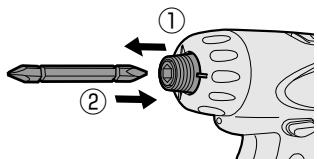
1. Attachment
① While pulling the bit holder
② Insert the bit
(3) Release the bit holder
2. Removal
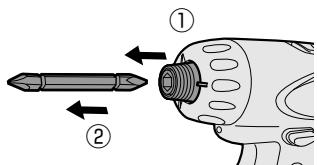
① While pulling the bit holder
② Remove the bit
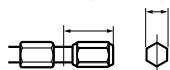
9.5 mm (3/8") - 13 mm (33/64") 6.35 mm (1/4")
Attaching or Removing Battery Pack
- To connect the battery pack: Insert the battery pack firmly into the main body.
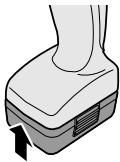
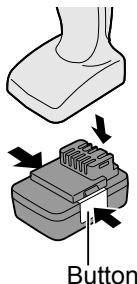
- To remove the battery pack:
Push on the button from the side to release the battery pack.
IV. OPERATION
[Main Body]
Switch Operation
- The speed increases with the amount of depression of the trigger. When beginning work, depress the trigger slightly to start the rotation slowly.
- A feedback electronic controller is used to give a strong torque even in low speed.
- The brake operates when the trigger is released and the motor stops immediately.
NOTE:
When the brake operates, a braking sound may be heard. This is normal.
Switch and Forward/Reverse Lever Operation
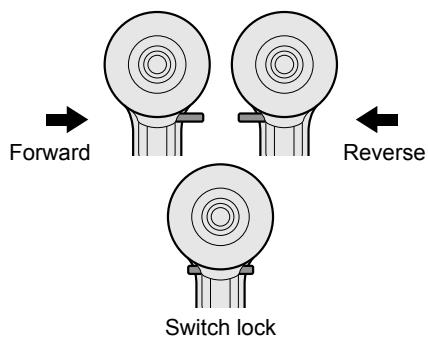
CAUTION:
To prevent damage, do not operate Forward/Reverse lever until the bit comes to a complete stop.
Forward Rotation Switch Operation
- Push the lever for forward rotation.
- Depress the trigger switch slightly to start the tool slowly.
- The speed increases with the amount of depression of the trigger for efficient tightening of screws and drilling. The brake operates and the chuck stops immediately when the trigger is released.
- After use, set the lever to its center position (switch lock).
Reverse Rotation Switch Operation
- Push the lever for reverse rotation. Check the direction of rotation before use.
- Depress the trigger switch slightly to start the tool slowly.
- After use, set the lever to its center position (switch lock).
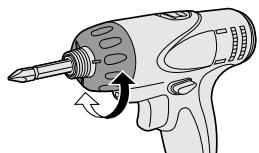
Clutch Torque Setting
Adjust the torque to one of the 21 clutch settings.
Use for Drilling
- When using for drilling, set the clutch at "2" position.
- Use a bit designed for drilling.
CAUTION:
Set the clutch scale at the alignment position before actual operation.
| Setting | Torque | Use |
| 1 | Approx: 0.3 N·m(3.0 kgf-cm or 2.6 in-lbs) | For driving screws |
| 5 | Approx: 1.0 N·m(11 kgf-cm or 8.8 in-lbs) | |
| 9 | Approx: 1.8 N·m(18 kgf-cm or 15.9 in-lbs) | |
| 13 | Approx: 2.5 N·m(26 kgf-cm or 22.1 in-lbs) | |
| 17 | Approx: 3.3 N·m(33 kgf-cm or 29.2 in-lbs) | |
| 21 | Approx: 4.0 N·m(41 kgf-cm or 35.4 in-lbs) | |
| Approx: 6 N·m(61 kgf-cm or 53.1 in-lbs) | For powerful driving screws and drilling |
- When using at high speeds, set the clutch at 10 or below. (Operation stops at the maximum torque of 1.5N· m (15 kgf-cm) when the scale is higher.)
- The auto shut-off function may become inoperable at high clutch settings when battery power drops. Recharge the battery in that case.
Speed Selection
Choose a low or high speed to suit the use.
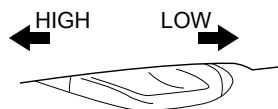
The more the variable speed control trigger is pulled, the higher the speed becomes.
CAUTION:
-
Check the speed selector switch before use.
-
Use at low speed when high torque is needed during operation. (Using at high speed when high torque is required may cause a motor breakdown.)
- Do not operate the speed selector switch (LOW-HIGH) while pulling on the speed control trigger. This can cause the rechargeable battery to wear quickly or damage the internal mechanism of the motor.
- See specifications for “MAXIMUM RECOMMENDED CAPACITIES”.
CAUTION:
- To prevent excessive temperature increase of the tool surface, do not operate the tool continuously using two or more battery packs. The tool needs cool-off time before switching to another pack.
- Do not close up vent holes on the sides of the body during operation. Otherwise, the machine function is adversely affected to cause a failure.
- Do NOT strain the tool (motor). This may cause damage to the unit.
- Use the tool in such a way as to prevent the air from the body vent holes from blowing directly onto your skin. Otherwise, you may get burned.
Bit-locking Function
- With the trigger switch not engaged and a screwdriver bit locked in place, the tool can be used as a manual screwdriver (up to 5 N·m, 51 kgf·cm, 44.3 in-lbs).
There will be a little play in the chuck, but this is not a malfunction.
- This feature is handy for tightening screws that require more torque than the maximum torque of the driver (position 2 on the clutch), for confirming the tightness of a screw or to loosen an extremely tight screw.
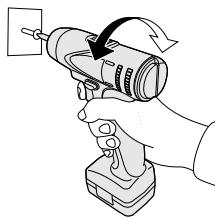
How to Use Hook Ring
WARNING!
- When the main unit is held by the hook ring, avoid jumping or running with it. Doing so may cause the ring to slip and the main unit may fall.
This may result in an accident or injury. - When the hook ring is not used, be sure to return it to the original position. The hook ring may catch on something. This may result in an accident or injury.
- When the unit is hooked by the hook ring, do not attach driver bits to the unit. A sharp edge object, such as a drill bit, may cause injury or an accident.
- Use a hooking tool (carabiner etc.) that does not come off easily. If this unit falls it may cause accident.
Using Hook Ring
- Release the hook ring.
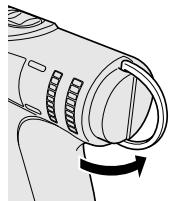
-
Attach the hook ring to the hooking tool.
-
Use a hooking tool (carabiner etc.) that does not come off easily. If this unit falls it may cause accident.
- Ensure that there is no contact with the surroundings when a hook ring is used.
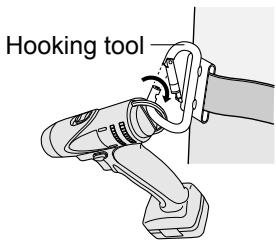
- Return the hook ring after use.
LED Light
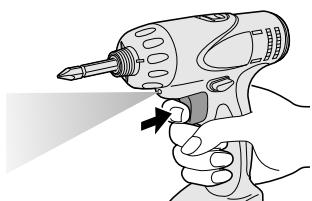
Pull the trigger.
The light illuminates with very low current, and it does not adversely affect the performance of the tool during use or its battery capacity.
CAUTION:
- The built-in LED light is designed to illuminate the small work area temporarily.
- Do not use it as a substitute for a regular flashlight, since it does not have enough brightness.
Caution: DO NOT STARE INTO BEAM. Use of controls or adjustments or performance of procedures other than those specified herein may result in hazardous radiation exposure.
[Battery Pack]
For Appropriate Use of Battery Pack
Li-ion Battery Pack
- For optimum battery life, store the Li-ion battery pack following use without charging it.
- When charging the battery pack, confirm that the terminals on the battery charger are free of foreign substances such as dust and water etc. Clean the terminals before charging the battery pack if any foreign substances are found on the terminals.
The life of the battery pack terminals may be affected by foreign substances such as dust and water etc. during operation.
- When battery pack is not in use, keep it away from other metal objects like: paper clips, coins, keys, nails, screws, or other small metal objects that can make a connection from one terminal to another.
Shorting the battery terminals together may cause sparks, burns or a fire. - When operating the battery pack, make sure the work place is well ventilated.
- When the battery pack is removed from the main body of the tool, replace the battery pack cover immediately in order to prevent dust or dirt from contaminating the battery terminals and causing a short circuit.
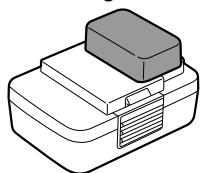
Battery Pack Life
The rechargeable batteries have a limited life. If the operation time becomes extremely short after recharging, replace the battery pack with a new one.
Battery Recycling
ATTENTION:
For environmental protection and recycling of materials, be sure that it is disposed of at an officially assigned location, if there is one in your country.
[Battery Charger]
Charging
CAUTION:
- If the temperature of the battery pack falls approximately below -10^ ( 14^ ), charging will automatically stop to prevent degradation of the battery.
- The ambient temperature range is between 0^ (32^) and 40^ (104^) . If the battery pack is used when the battery temperature is below 0^ (32^) , the tool may fail to function properly.
- When charging a cool battery pack (below 0^ ( 32^ ) in a warm place, leave the battery pack at the place and wait for more than one hour to warm up the battery to the level of the ambient temperature.
Cool down the charger when charging more than two battery packs consecutively. - Do not insert your fingers into contact hole, when holding charger or any other occasions.
To prevent the risk of fire or damage to the battery charger.
- Do not use power source from an engine generator.
- Do not cover vent holes on the charger and the battery pack.
- Unplug the charger when not in use.
NOTE:
Your battery pack is not fully charged at the time of purchase. Be sure to charge the battery before use.
Battery charger
- Plug the charger into the AC outlet.
- Insert the battery pack firmly into the charger.
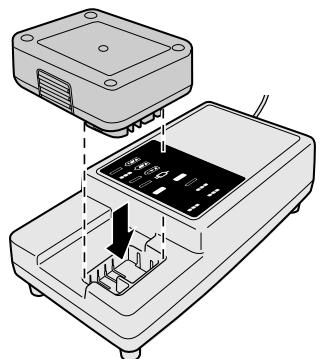
-
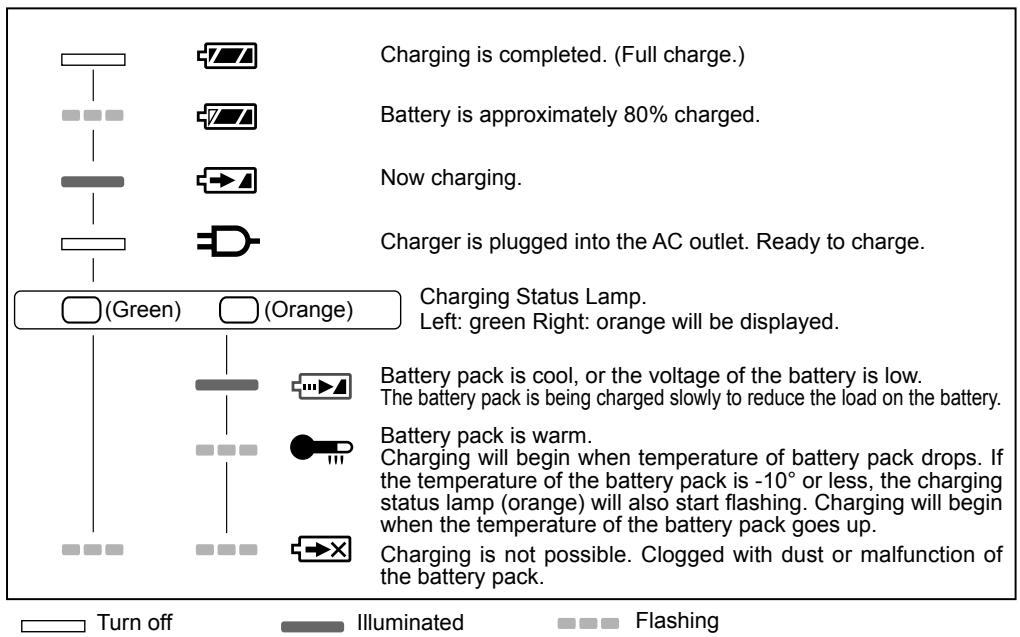
During charging, the charging lamp will be lit. When charging is completed, an internal electronic switch will automatically be triggered to prevent overcharging.
-
Charging will not start if the battery pack is warm (for example, immediately after heavy-duty operation).
The orange standby lamp will be flashing until the battery cools down. Charging will then begin automatically.
- The charge lamp (green) will flash slowly once the battery is approximately 80% charged.
- When charging is completed, the charging lamp in green color will turn off.
- If the temperature of the battery pack is 0^ or less, charging takes longer to fully charge the battery pack than the standard charging time.
Even when the battery is fully charged, it will have approximately 50% of the power of a fully charged battery at normal operating temperature.
- Consult an authorized dealer if the charging lamp (green) does not turn off.
- If a fully charged battery pack is inserted into the charger again, the charging lamp lights up. After several minutes, the charging lamp in green color will turn off.
LAMP INDICATIONS
Information for Users on Collection and Disposal of Old Equipment and used Batteries

These symbols on the products, packaging, and/or accompanying documents mean that used electrical and electronic products and batteries should not be mixed with general household waste.
For proper treatment, recovery and recycling of old products and used batteries, please take them to applicable collection points, in accordance with your national legislation and the Directives 2002/96/EC and 2006/66/ EC.
By disposing of these products and batteries correctly, you will help to save valuable resources and prevent any potential negative effects on human health and the environment which could otherwise arise from inappropriate waste handling.
For more information about collection and recycling of old products and batteries, please contact your local municipality, your waste disposal service or the point of sale where you purchased the items.
Penalties may be applicable for incorrect disposal of this waste, in accordance with national legislation.
For business users in the European Union
If you wish to discard electrical and electronic equipment, please contact your dealer or supplier for further information.
[Information on Disposal in other Countries outside the European Union]
These symbols are only valid in the European Union. If you wish to discard these items, please contact your local authorities or dealer and ask for the correct method of disposal.
Note for the battery symbol (bottom two symbol examples):
This symbol might be used in combination with a chemical symbol. In this case it complies with the requirement set by the Directive for the chemical involved.
V. MAINTENANCE
Use only a dry, soft cloth for wiping the unit. Do not use a damp cloth, thinner, benzine, or other volatile solvents for cleaning.
In the event that the inside of the tool or battery pack is exposed to water, drain and allow to dry as soon as possible.
Carefully remove any dust or iron filings that collect inside the tool. If you experience any problems operating the tool, please contact your nearest authorised service center.
VI. ACCESSORIES
Use only bits suitable for size of drill's chuck.
VII. APPENDIX
MAXIMUM RECOMMENDED CAPACITIES
| Model | EY7420 | |
| Screw driving | Machine screw | Low: M5 High: M4 |
VIII. SPECIFICATIONS
MAIN UNIT
| Model | EY7420 | |
| Motor voltage | 7.2 V DC | |
| No load speed | Low | 0 - 300 min-1(rpm) |
| High | 0 - 900 min-1(rpm) | |
| Maximum torque | Low | 6.0 N·m (61 kgf-cm, 53.24 in-lbs) |
| High | 2.0 N·m (20 kgf-cm, 17.75 in-lbs) | |
| Clutch torque | Approx. 0.3 N·m (3 kgf-cm, 2.6 in-lbs) – 4.0 N·m (41 kgf-cm, 35.6 in-lbs) | |
| Overall length | 145 mm (5-7/10") | |
| Weight (with battery pack) | 0.63 kg (1.39 lbs) | |
BATTERY PACK
| Model | EY9L20 |
| Storage battery | Li-ion |
| Battery voltage | 7.2 V DC (3.6 V × 2 cells) |
| Charging time | Usable: 35 min |
| Full: 60 min |
NOTE: This chart may include models that are not available in your area.
Please refer to the latest general catalogue.
For the dealer name and address, please see the included warranty card.
BATTERY CHARGER
| Model | EY0L20 |
| Rating | See the rating plate on the bottom of the charge. |
| Weight | 0.43 kg (0.95 lbs) |
NOTE: This chart may include models that are not available in your area.
Please refer to the latest general catalogue.
For the dealer name and address, please see the included warranty card.
VIII. TEKNISET TIEDOT
PÄALAITE
Panasonic Testing Center
Winsberging 15,
22525 Hamburg,
Germany
Panasonic Corporation
1006,Kadoma,Osaka 571-8501,Japan
http://panasonic.net
EN. DE. FR. IT. NL. ES. DA. SV. NO. FI
EY971074201 201302
Printed in Japan